FMP vs Microsoft Native Tools — Gap Analysis
Why Microsoft’s 12 tools don’t replace a governance orchestration layer
Download this whitepaper as DOCX — a Word copy of this page, regenerated on every site deploy. (Also available from the Other Formats link in the page sidebar.)
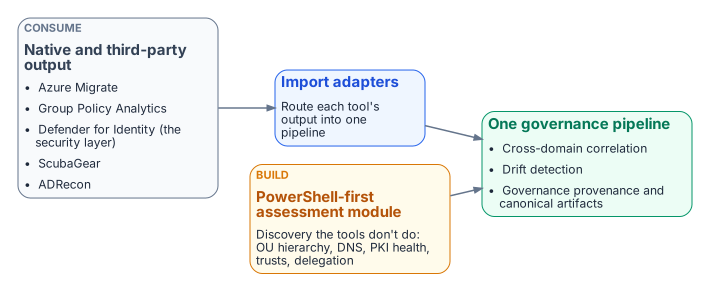
Problem. “Doesn’t Microsoft already do this?” Partially — across twelve disconnected tools that, without significant custom glue, cover an estimated 30% of the AD assessment discovery surface and roughly 22% once the governance pipeline, cross-domain correlation, and drift detection are counted. OU hierarchy and delegation, DNS, PKI health, and trusts are essentially uncovered.
Solution. Position FMP as a complementary orchestration layer, not a replacement — the same pattern as FMP SCuBA and CISA ScubaGear. Consume Microsoft and third-party output (Azure Migrate, Group Policy Analytics, Defender for Identity, ScubaGear, ADRecon) through the FMPImportAdapters module; keep the PowerShell-first assessment module for the discovery Microsoft does not do; treat Defender for Identity as the good-enough security layer.
Ask. Do not frame the build-vs-buy decision as FMP versus Microsoft. Route native tool output into one governance pipeline, run the assessment module against a representative forest to replace this paper’s illustrative percentages with your own numbers, and carry the complementary positioning into the FedRAMP CWGs, CISA/FSCAC, and the Microsoft partner ecosystem (§10).
1. Executive Summary
The short answer to “Does Microsoft already do this?” is: Yes, partially — across 12 disconnected tools, none of which produce a unified governance pipeline.
Microsoft offers excellent point solutions for specific assessment and migration tasks. But no single Microsoft tool — and no combination of them without significant custom glue — covers the full FMP assessment surface: forest topology → OU hierarchy → GPO inventory → DNS → PKI → computer objects → users/groups → trusts → sites → ACLs, all feeding into a Git-hosted governance pipeline with drift detection, canonical artifact management, and SLA-tracked remediation.
FMP’s positioning is identical to FMP SCuBA’s relationship with CISA ScubaGear: complementary orchestration layer, not competitive replacement. FMP consumes the outputs of Microsoft’s native tools and provides the governance fabric that connects them.
Microsoft’s tools collectively cover approximately 30% of what the FMP Assessment Module captures in raw technical discovery. The remaining 70% of the discovery surface — OU hierarchy, DNS, PKI health, trusts, delegation — plus governance provenance, canonical artifact management, drift detection, cross-domain correlation, and pipeline orchestration is where FMP provides unique value. When governance requirements are factored in, Microsoft’s effective coverage drops to approximately 22% of the total FMP assessment surface. These percentages are illustrative estimates derived from this paper’s own domain coverage matrix (Section 4); the canonical gap doctrine deliberately carries no coverage percentages.
The 30% / 22% figures above are derived from the domain coverage matrix in Section 4, not from a single reproducible assessment run. Before external release, replace this block with a worked example that anchors the headline number in an actual (or representative) assessment:
Applied to a representative [N]-object AD forest assessment run on [date], Microsoft’s native tooling (the tools inventoried in Section 2) surfaced [X] of [Y] governance-relevant findings across the domains enumerated in §3’s capability matrix; FMP’s methodology, applied to the same forest, surfaced [X2] of [Y] findings. The [Y] findings should be enumerated (or referenced) so the count is auditable, and [X] / [X2] should map back to specific rows of the §3 matrix so a reader can verify which findings each tooling approach did and did not surface.
2. The Microsoft Native Tool Landscape
The following inventory catalogs every Microsoft tool that touches Active Directory assessment, migration, or modernization. For each tool, we document its current status, capabilities, limitations, licensing requirements, and output format — with specific attention to governance pipeline compatibility. Product statuses and version details in this inventory reflect the June–July 2026 snapshot and move quickly; verify current status before relying on any individual entry.
2.1 Microsoft Assessment and Planning (MAP) Toolkit
| Attribute | Detail |
|---|---|
| Status | Effectively deprecated — Microsoft now recommends Azure Migrate |
| Version | 9.9.13 (July 2024, last update) |
| What It Does | Agentless, automated multi-product planning and assessment. Hardware/software inventory, readiness reports, server virtualization planning. |
| What It Doesn’t Do N | o GPO analysis, no AD security assessment, no governance artifacts, no OU/delegation analysis, no DNS/PKI assessment. |
| License | Free |
| Output Format | Excel reports, Word proposals — no machine-readable pipeline output. |
2.2 Azure Migrate
| Attribute | Detail |
|---|---|
| Status | Active, regularly updated (March 2026 latest) |
| What It Does | Server/VM/SQL/web app discovery and assessment, dependency mapping, cost projections, readiness scoring, migration execution for VMs and databases. |
| What It Doesn’t Do N | o AD forest topology analysis, no GPO inventory, no OU structure analysis, no DNS zone assessment, no PKI/ADCS assessment, no user/group governance analysis, no trust mapping. |
| License | Free (Azure subscription required) |
| Output Format | Azure portal dashboards, downloadable reports — no Git-compatible structured output. |
2.3 Group Policy Analytics (Intune)
| Attribute | Detail |
|---|---|
| Status | Active, GA |
| What It Does | Import GPO XML exports, analyze MDM support percentage, identify deprecated/unsupported settings, migrate supported settings to Settings Catalog policies. |
| What It Doesn’t Do C | annot export ALL GPO settings — only analyzes Windows 10/11 device policies. No server GPO analysis. No GPO link/scope analysis. No WMI filter assessment. No cross-GPO conflict detection. No governance tracking of migration status. |
| License | Intune license required |
| Output Format | Intune portal only — no bulk export, no machine-readable pipeline output. |
For the governance lens on what this tool’s ~30–60% support percentage actually costs — the policy-plane capabilities lost in the GPO-to-Intune shift — see GPO-to-Cloud Governance Gaps.
2.4 Microsoft Entra Connect / Cloud Sync
| Attribute | Detail |
|---|---|
| Status | Active (Cloud Sync is the recommended future direction) |
| What It Does | Synchronizes identities (users, groups, devices) from on-premises AD to Entra ID. Password hash sync, pass-through auth, federation. Health monitoring via Entra Connect Health. |
| What It Doesn’t Do N | ot an assessment tool — it is a sync engine. No OU analysis, no GPO analysis, no DNS/PKI assessment, no security posture evaluation. Connect Health monitors sync health, not AD health. |
| License | Entra ID P1 (Connect Health requires P1 or P2) |
| Output Format | Sync logs, health alerts — no structured assessment output. |
2.5 Microsoft Defender for Identity
| Attribute | Detail |
|---|---|
| Status | Active, continuously updated |
| What It Does | Security posture assessments via Microsoft Secure Score. Detects misconfigurations: unsecured SID History, weak cipher usage, dormant entities, insecure Kerberos delegation, LDAP signing, NTLM exposure, AdminSDHolder, print spooler risks. Real-time threat detection (credential theft, lateral movement, privilege escalation). |
| What It Doesn’t Do N | ot a comprehensive AD inventory tool. No forest topology export. No OU hierarchy analysis. No GPO inventory. No DNS zone assessment. No PKI/ADCS template analysis. No trust analysis. Security-focused only — no migration readiness assessment. No structured export for governance pipelines. |
| License | E5 Security or Defender for Identity standalone license (expensive) |
| Output Format | Secure Score dashboard, alerts — no JSON/CSV structured export for automation. |
2.6 Microsoft Security Compliance Toolkit (SCT)
| Attribute | Detail |
|---|---|
| Status | Active, updated February 2026 (Windows Server 2025 baseline added) |
| What It Does | Policy Analyzer compares GPOs against Microsoft security baselines. LGPO applies/exports local policy. SetObjectSecurity manages permissions. Provides Windows 10/11, Server 2022/2025, Edge, M365 Apps baselines. |
| What It Doesn’t Do B | aseline comparison only — not a full GPO inventory tool. No OU analysis, no DNS, no PKI, no computer inventory, no user/group analysis, no trust mapping. Manual process — no automation pipeline. Windows GPOs only — no cross-platform. |
| License | Free |
| Output Format | Excel comparison, GPO backup format — no structured JSON/API output. |
2.7 Active Directory Migration Tool (ADMT)
| Attribute | Detail |
|---|---|
| Status | Legacy, last major update for Server 2008 R2, still functions on newer servers |
| What It Does | Migrates AD objects (users, groups, computers) between domains/forests. SID history translation, password migration (PES), group membership preservation. |
| What It Doesn’t Do N | OT an assessment tool. No discovery, no inventory, no analysis. Requires Domain Admin in target, BUILTIN\Administrators in source. No GPO migration. No DNS migration. No PKI migration. SQL Server dependency. |
| License | Free |
| Output Format | Migration logs — no assessment artifacts. |
2.8 Microsoft FastTrack
| Attribute | Detail |
|---|---|
| Status | Active service (not a tool) |
| What It Does | Remote deployment guidance for Entra ID P1/P2, Conditional Access, MFA, PIM, Access Reviews, Lifecycle Workflows, Application Proxy, B2B, and Identity Governance. Provides architectural guidance and best practices. |
| What It Doesn’t Do N | ot an assessment tool. Does not discover or inventory AD environments. Does not produce assessment artifacts. Guidance-only — no automation, no scripts, no structured output. Requires 150+ paid seats. |
| License | Included with qualifying M365/E5 licenses (150+ seats) |
| Output Format | Guidance documents — no machine-readable output. |
2.9 Entra Connect Health
| Attribute | Detail |
|---|---|
| Status | Active |
| What It Does | Monitors sync health (Entra Connect), AD FS health, AD DS health. Alerts on sync failures, risky IP addresses, extranet lockouts, failed authentications against DCs. |
| What It Doesn’t Do H | ealth monitoring only — not an assessment tool. No inventory, no GPO analysis, no OU analysis, no DNS, no PKI, no trust analysis. Requires agent installation on each DC being monitored. |
| License | Entra ID P1 or P2 |
| Output Format | Portal dashboards, email alerts — no structured export. |
2.10 Microsoft Entra Health Monitoring (Preview)
| Attribute | Detail |
|---|---|
| Status | Preview (as of April 2026) |
| What It Does | Tenant-level health signals, SLA attainment reporting, anomaly detection for authentication patterns. |
| What It Doesn’t Do C | loud-side only — no on-premises AD assessment. No forest/OU/GPO/DNS/PKI analysis. Tenant health, not migration readiness. |
| License | Included with Entra ID |
| Output Format | Portal only. |
2.11 Azure Policy / Azure Arc Guest Configuration
| Attribute | Detail |
|---|---|
| Status | Active, GA |
| What It Does | Compliance assessment for Azure and Arc-enrolled servers. Guest Configuration can audit OS settings, registry, files, services. Built-in policy definitions for Windows security baselines. |
| What It Doesn’t Do R | equires Azure Arc enrollment first — not pre-migration assessment. No AD-specific analysis (no OU, GPO, trust, forest topology). Policy compliance, not discovery/inventory. |
| License | Free (basic), Azure Arc license for servers |
| Output Format | Azure Policy compliance dashboard, Resource Graph queries — structured but Azure-only. |
2.12 PowerShell AD Module + RSAT
| Attribute | Detail |
|---|---|
| Status | Active, shipping with Server 2025 |
| What It Does | Full programmatic access to AD — the same cmdlets FMP uses. Get-ADForest, Get-ADDomain, Get-GPO, Get-GPOReport, Get-ADComputer, Get-ADUser, Get-ADGroup, Get-DnsServerZone, etc. |
| What It Doesn’t Do R | aw building blocks, not a solution. No orchestration, no structured output pipeline, no governance framework, no drift detection, no reporting, no Gitea integration. Every organization must build their own assessment from scratch. |
| License | Free (included with RSAT) |
| Output Format | PowerShell objects — whatever you build. |
3. The Capability Matrix
The following matrix maps every FMP assessment domain against the Microsoft tools that provide coverage, the level of that coverage, and the specific gap description.
| Assessment Domain | FMP Assessment Module | Microsoft Tool(s) That Cover It | Coverage Level | Gap Description |
|---|---|---|---|---|
| Forest Topology (domains, DCs, functional levels, FSMO roles, sites, subnets) | Full JSON export via Invoke-FMPADAssessment. Structured, versioned, Git-committed. | PowerShell RSAT (raw cmdlets); Azure Migrate (server discovery, not AD topology); Defender for Identity (monitors DCs, doesn’t export topology) * | *Partial** N | o Microsoft tool produces a structured, versioned forest topology artifact suitable for governance tracking. |
| OU Hierarchy & Delegation | Full recursive tree with GPO links, object counts, delegation ACLs. | None. ADMT reads OUs for migration but doesn’t assess them. * | *None** C | omplete gap. Organizations must manually document OU structure. |
| GPO Inventory & Settings Decomposition | Full inventory via Get-GPOReport XML, link analysis, WMI filter mapping, conflict detection, unlinked/empty GPO identification, backup. | Group Policy Analytics (Intune) — Windows 10/11 client MDM subset. SCT PolicyAnalyzer — baseline comparison only. | Partial | No Microsoft tool provides cross-GPO conflict detection, scope analysis, WMI filter correlation, or structured GPO inventory for governance. |
| DNS Zone & Record Assessment | Full zone inventory, record enumeration, DNSSEC status, stale record detection, scavenging config, SRV validation. | None. Azure DNS is cloud-only. | None | Complete gap. DNS assessment is entirely custom. |
| PKI/ADCS Assessment | CA discovery, template inventory, ESC1–ESC8 vulnerability patterns, CRL/AIA/OCSP, auto-enrollment config. | Defender for Identity — detects some ADCS misconfigurations (ESC patterns) via Secure Score. No comprehensive template inventory or PKI health assessment. | Partial | Defender for Identity covers security findings but not operational PKI health or migration readiness. |
| Computer Object Inventory | Full extraction with OS classification, stale detection, SPN inventory, delegation analysis, LAPS/BitLocker detection. | Azure Migrate (server discovery with OS/hardware). MAP Toolkit (deprecated, similar). | Partial | Server inventory exists; AD-specific computer governance attributes (delegation, SPNs, group memberships) do not. |
| User & Group Inventory | Privileged user identification, AdminSDHolder analysis, service account detection (MSA/gMSA), circular nesting, Kerberoastable SPNs. | Defender for Identity (dormant entities, privileged account risks, Kerberoast exposure). Entra Connect (syncs users/groups). | Partial | Security findings exist; comprehensive user/group governance inventory does not. |
| Trust Mapping | Direction/type analysis, SID filtering status, selective authentication, cross-forest enumeration. | None. Defender for Identity detects some trust-related attacks but doesn’t inventory/analyze trusts. * | *None** C | omplete gap. |
| ACL/Delegation Analysis | OU-level delegation audit, AdminSDHolder capture, dangerous permission patterns. | Defender for Identity — detects some dangerous delegations. No comprehensive ACL export or analysis tool. | Partial | Security alerting exists; comprehensive delegation audit does not. |
| Cross-Domain Correlation | Correlates findings across all 9 domains above into a unified assessment manifest. | None. Microsoft’s tools are completely siloed. GPO Analytics doesn’t know about Azure Migrate findings. Defender for Identity doesn’t correlate with DNS assessment. **N | one** Com | plete gap. This is FMP’s primary unique value. |
| Governance Pipeline Integration | Assessment → JSON artifacts → Gitea commit → drift detection → remediation tracking → SLA enforcement. | None. Each tool has its own portal/dashboard. No Microsoft tool produces governance artifacts for a Git pipeline. | None | Complete gap. This is the core of the FMP governance pipeline. |
| Drift Detection & Continuous Monitoring | Scheduled re-assessment with diff against baseline, Gitea-tracked changes, issue creation on drift. | Defender for Identity (continuous security monitoring). Entra Connect Health (sync monitoring). Neither provides governance drift detection against a canonical desired state. | Partial | Security monitoring exists; governance drift detection does not. |
4. The Gap Analysis Summary
| Category | Microsoft Coverage | FMP Coverage | Gap Owner |
|---|---|---|---|
| Infrastructure Discovery | 70% (Azure Migrate + MAP) | 95% | Microsoft adequate for server inventory; FMP adds AD-specific attributes |
| GPO Analysis | 40% (Group Policy Analytics + SCT) | 95% | Microsoft covers MDM migration subset; FMP covers full GPO governance |
| Security Posture | 60% (Defender for Identity) | 85% | Microsoft strong on threat detection; FMP adds governance correlation |
| DNS Assessment | 0% | 90% | Complete FMP advantage |
| PKI/ADCS Assessment | 25% (Defender for Identity partial) | 85% | FMP significantly ahead |
| Trust Analysis | 0% | 90% | Complete FMP advantage |
| OU & Delegation | 0% | 90% | Complete FMP advantage |
| Cross-Domain Correlation | 0% | 90% | FMP’s core differentiator |
| Governance Pipeline | 0% | 95% | FMP’s fundamental value proposition |
| Drift Detection | 30% (security only) | 85% | FMP covers governance drift, not just security |
Microsoft tools cover approximately 22% of the total FMP assessment surface when governance pipeline, cross-correlation, and drift detection requirements are factored in (the unweighted average of all ten categories above). For pure technical discovery without governance, Microsoft covers approximately 30% (the unweighted average of the seven discovery categories, excluding cross-domain correlation, governance pipeline, and drift detection). Both figures are illustrative estimates derived from this paper’s domain matrix, not canonical measurements.
5. Third-Party Tool Landscape
Beyond Microsoft’s native tools, several third-party solutions overlap with portions of FMP’s assessment capabilities. Understanding their strengths and limitations informs FMP’s positioning and integration strategy.
5.1 ADRecon (Open Source)
| Attribute | Detail |
|---|---|
| What It Does | PowerShell-based AD reconnaissance. Extracts forest, domain, trusts, sites, OUs, GPOs, DNS, users, groups, computers, SPNs, ACLs, LAPS, BitLocker. Generates Excel reports. |
| Overlap with FMP | HIGH — ADRecon’s data collection scope is very similar to FMP’s assessment module. |
| What FMP Adds | Governance pipeline (Gitea integration), machine-readable JSON output (not just Excel), drift detection, remediation tracking, SLA enforcement, canonical artifact management, modernization planning correlation. |
| Positioning | ADRecon is the closest open-source equivalent for data collection. FMP provides the governance layer above it. |
5.2 PingCastle
| Attribute | Detail |
|---|---|
| What It Does | AD security health check with risk scoring. Analyzes configurations, detects insecure settings, generates HTML reports with risk levels. |
| Overlap with FMP | MODERATE — security assessment overlap but PingCastle is security-focused, not governance-focused. |
| What FMP Adds | Governance pipeline, migration planning, non-security assessment domains (DNS, PKI templates, OU design), cross-domain correlation. |
| Positioning | Complementary — PingCastle for security scoring, FMP for governance. |
5.3 BloodHound (SpecterOps)
| Attribute | Detail |
|---|---|
| What It Does | Attack path mapping using graph theory. Identifies privilege escalation paths, dangerous ACLs, Kerberoasting targets. |
| Overlap with FMP | LOW — BloodHound is offensive security tooling, not governance. |
| What FMP Adds | Everything except attack path visualization. |
| Positioning | Different purpose entirely. BloodHound for penetration testing, FMP for operational governance. |
5.4 Purple Knight (Semperis)
| Attribute | Detail |
|---|---|
| What It Does | AD security assessment with 150+ security indicators. Pre/post-migration security validation. |
| Overlap with FMP | MODERATE — security indicator overlap. |
| What FMP Adds | Governance pipeline, migration planning, operational assessment domains. |
| Positioning | Complementary. |
6. FMP Positioning Framework
6.1 The Orchestration Layer Pattern
FMP operates as an orchestration layer that sits above Microsoft’s native tools, consuming their output and providing the governance fabric that connects them into a unified pipeline.
| Layer | Components | Role |
|---|---|---|
| Top Layer: Governance Outcomes | Compliance Dashboard, Migration Readiness Score, Drift Reports, Remediation Status, Owner Accountability | The actionable intelligence that governance stakeholders consume. Evidence for ATO, compliance reporting, executive visibility. |
| Middle Layer: FMP Governance Pipeline | Assessment Module, Canonical Artifacts, Drift Detection, Remediation Pipeline, SLA Enforcement | The orchestration engine that transforms raw tool output into governance-grade artifacts with provenance, version control, and accountability. |
| Bottom Layer: Microsoft Native Tools | Azure Migrate, Group Policy Analytics, Defender for Identity, Entra Connect, SCT, ADMT | Point solutions that produce raw technical data. Excellent at their individual domains but disconnected from each other. |
“Microsoft provides the instruments. FMP provides the orchestra.”
6.2 The Consumption Model
FMP does not replace Microsoft’s tools — it consumes their output:
| Microsoft Tool | FMP Consumption Pattern |
|---|---|
| Azure Migrate | Import server discovery data as computer inventory supplement |
| Group Policy Analytics | Export MDM readiness percentages; feed into GPO migration tracker |
| Defender for Identity | Import Secure Score findings as security assessment overlay |
| Entra Connect Health | Import sync status into governance health dashboard |
| Security Compliance Toolkit | Import baseline comparisons into GPO compliance scoring |
| Azure Policy Compliance | Import Arc-enrolled server compliance into drift detection |
6.3 The SCuBA Parallel
The explicit parallel between FMP’s two complementary orchestration relationships:
| Dimension | FMP SCuBA vs. CISA ScubaGear | FMP AD Assessment vs. Microsoft Tools |
|---|---|---|
| Relationship | Complementary orchestration | Complementary orchestration |
| Microsoft Tool Provides | Raw compliance data | Raw discovery/assessment data |
| FMP Provides | Canonical desired state, drift detection, remediation orchestration, SLA enforcement | Canonical desired state, drift detection, remediation orchestration, SLA enforcement |
| Pipeline | ScubaGear JSON → FMP governance artifacts | PowerShell/API JSON → FMP governance artifacts |
| Unique Value | Machine-trackable governance provenance | Machine-trackable governance provenance |
7. What FMP Should Consume vs. Build
Strategic recommendations for each assessment domain — whether FMP should consume existing Microsoft tool output or build its own capability:
| Assessment Domain | Recommendation | Rationale |
|---|---|---|
| Server Inventory | CONSUME Azure Migrate output | Azure Migrate is superior for hardware/VM discovery. No need to rebuild. |
| GPO MDM Readiness | CONSUME Group Policy Analytics output | Built into Intune, already does MDM mapping well. |
| Security Posture | CONSUME Defender for Identity findings | E5 customers already have this; supplement with FMP’s broader assessment. |
| Security Baselines | CONSUME SCT PolicyAnalyzer output | Free, well-maintained, authoritative. |
| Forest Topology | BUILD in FMP | No Microsoft tool covers this. Zero overlap. |
| OU Hierarchy & Delegation | BUILD in FMP | No Microsoft tool covers this. Zero overlap. |
| GPO Full Inventory | BUILD in FMP | Group Policy Analytics only covers client MDM subset. |
| DNS Assessment | BUILD in FMP | No Microsoft tool covers this. Zero overlap. |
| PKI/ADCS Assessment | BUILD in FMP | Defender for Identity covers security subset only. |
| Trust Analysis | BUILD in FMP | No Microsoft tool covers this. Zero overlap. |
| Cross-Domain Correlation | BUILD in FMP | This is FMP’s core differentiator. |
| Governance Pipeline | BUILD in FMP | This is FMP’s fundamental value proposition. |
| Drift Detection | BUILD in FMP | Security drift monitoring exists; governance drift does not. |
8. Competitive Messaging
8.1 For VCs and Analysts
| “Microsoft provides 12 assessment tools that each solve a piece of the AD modernization puzzle. But no organization can build a governance program from 12 disconnected dashboards. The FMP governance pipeline is the canonical layer that ties them together — consuming their outputs, tracking drift against desired state, enforcing SLAs, and giving every governance artifact a machine-trackable provenance chain. We’re not competing with Microsoft’s tools. We’re making them useful for governance.” |
8.2 For Federal Customers
| “Your ATO process requires evidence that every configuration change is tracked, every deviation is detected, and every remediation is time-bound. Microsoft’s tools produce excellent technical data. FMP transforms that data into the compliance evidence your assessors need — version-controlled in Git, traceable to canonical policy, and auditable end-to-end.” |
8.3 For Legacy Engineers
| “You know PowerShell. You know AD. You’ve probably built your own assessment scripts. FMP standardizes what you’ve been doing ad hoc — same PowerShell, same RSAT cmdlets, but with structured JSON output, automatic Gitea commits, drift detection, and a governance pipeline that makes your assessment work reusable and auditable.” |
9. Integration Architecture
9.1 Import Adapters (Implemented)
The import adapters described conceptually in earlier revisions of this paper are now implemented as the FMPImportAdapters PowerShell module (tools/powershell/FMPImportAdapters/, shipped as .psd1 + .psm1 with Pester tests wired into CI), governed by the canon specification FMP_182 and positioned by ADR-094 as a producer in the assessment-to-plan toolchain. The module normalizes heterogeneous third-party assessment output into the FMP schema so that downstream correlation, drift detection, and plan generation operate over one canonical assessment shape rather than vendor-specific exports.
The architectural contract is deliberately file-path-based: every importer consumes an already-produced report via -ReportPath and writes normalized JSON via -OutputPath. The module never reaches a live API. An operator (or another tool) exports the report from Azure Migrate, Intune, Defender for Identity, ScubaGear, or ADRecon; the adapter ingests the exported file. This keeps the ingestion surface read-only, credential-free, and auditable within the M365 GCC-Moderate boundary.
The canonical function roster (per FMP_182):
| Function | Source Consumed | Normalized Target |
|---|---|---|
| Import-FMPAzureMigrateReport | Azure Migrate assessment export | FMP ComputerInventory |
| Import-FMPGPOAnalyticsReport | Intune Group Policy Analytics export | GPOMigrationTracker |
| Import-FMPDefenderFindings | Defender for Identity Secure Score export | SecurityAssessment overlay |
| Import-FMPSCuBAReport | CISA ScubaGear compliance output | FMP conformance evidence |
| Import-FMPADReconReport | ADRecon Excel output | FMP ComputerInventory / identity |
| Merge-FMPAssessmentSources | Multiple normalized sources | Correlated assessment bundle |
SCT PolicyAnalyzer, Entra Connect Health, and Azure Policy compliance output remain candidates for future adapters; the consumption patterns in Section 6.2 describe where their exports would land.
9.2 Import Module Specification
Each importer wraps its normalized records in a sealed provenance envelope (schema: fmp.import.v1) whose provenance block carries:
source — name of the third-party tool consumed
version — source export version (recorded when supplied, “unknown” otherwise)
timestamp — ISO 8601 UTC timestamp of import execution
content_hash — integrity seal over the normalized data, computed by the canonical hasher so it is byte-identical to the Python
canonical_hash— making every imported artifact directlyDRIFT-PROVENANCE-classifiable bysrc/fmp/governance/drift.pysource_file — path of the ingested report
actor, import_module, import_module_version — adapter identity for the provenance chain
Merge-FMPAssessmentSources correlates multiple normalized envelopes (-SourcePaths, -MergeStrategy) into a single assessment bundle, validating each source’s provenance completeness and integrity seal first: an envelope that is incomplete, or whose hash no longer matches its data, is a DRIFT-PROVENANCE finding by definition (FMP_182).
Outputs are FMP-schema JSON artifacts suitable as input to FMPPlanGenerators and as canon-anchored evidence through the FMP IR / OSCAL pipeline. Consistent with the program’s classification: Public posture, the envelope carries provenance metadata rather than a classification marking; Authenticode signing occurs at release packaging.
10. Conclusions and Recommendations
10.1 The Bottom Line
Microsoft offers powerful but fragmented tools. FMP provides the governance fabric that connects them. The relationship is symbiotic: FMP is more valuable when it consumes Microsoft tool output, and Microsoft’s tools are more valuable when they feed into a governance pipeline.
No single Microsoft tool — and no feasible combination of Microsoft tools without significant custom development — provides the unified, version-controlled, drift-detected, SLA-enforced governance pipeline that FMP delivers. This is not a criticism of Microsoft’s tools; it is a recognition that governance orchestration is a fundamentally different problem than point-solution assessment.
10.2 Strategic Recommendations
Do not position FMP as competing with Microsoft’s tools — the SCuBA pattern (complementary orchestration) is the correct positioning.
Route Microsoft and third-party tool output through the implemented FMPImportAdapters module — Azure Migrate, Group Policy Analytics, Defender for Identity, ScubaGear, and ADRecon exports all normalize through its file-based importers (Section 9, canon FMP_182).
Maintain the PowerShell-first assessment module — it provides the roughly 70% of technical discovery coverage that no Microsoft tool offers (OU, DNS, PKI, trusts, cross-correlation; an illustrative estimate per the Section 4 matrix).
Leverage Defender for Identity as a “good enough” security layer — focus FMP’s unique value on governance, not security tooling.
Use ADRecon as a validation reference — FMP’s data collection should produce at least everything ADRecon produces, plus governance metadata.
10.3 Engagement Channels
The following channels should be used for communicating FMP’s positioning relative to Microsoft native tools:
FedRAMP CWGs (Rev5 and 20x)
FedRAMP RFCs
FSCAC/CISA direct engagement
Microsoft Partner ecosystem
GitHub Discussions on WhalerMike/modernization-workbook
Appendix A — Tool-by-Tool Detailed Comparison Matrix
The following reference matrix maps each Microsoft tool against every FMP assessment domain. Legend: ✓ Full | ~ Partial | ✗ None
| Microsoft Tool | Forest Topology | OU Hierarchy | GPO Inventory | DNS | PKI/ADCS | Computer Objects | Users & Groups | Trusts | ACLs | Cross-Correlation | Governance Pipeline | Drift Detection |
|---|---|---|---|---|---|---|---|---|---|---|---|---|
| MAP Toolkit | ✗ | ✗ | ✗ | ✗ | ✗ | ~ * | *✗** * | *✗** * | *✗** * | *✗** * | *✗** * | *✗** |
| Azure Migrate | ✗ | ✗ | ✗ | ✗ | ✗ | ~ * | *✗** * | *✗** * | *✗** * | *✗** * | *✗** * | *✗** |
| Group Policy Analytics | ✗ | ✗ | ~ * | *✗** * | *✗** * | *✗** * | *✗** * | *✗** * | *✗** * | *✗** * | *✗** * | *✗** |
| Entra Connect / Cloud Sync | ✗ | ✗ | ✗ | ✗ | ✗ | ✗ | ~ * | *✗** * | *✗** * | *✗** * | *✗** * | *✗** |
| Defender for Identity | ~ * | *✗** * | *✗** * | *✗** * | *~ | ✗** ** | ~** **✗ | ** **~ | ** **✗* | * **✗* | * **~* | * |
| Security Compliance Toolkit | ✗ | ✗ | ~ * | *✗** * | *✗** * | *✗** * | *✗** * | *✗** * | *✗** * | *✗** * | *✗** * | *✗** |
| ADMT | ✗ | ✗ | ✗ | ✗ | ✗ | ~ * | *~ | ✗** ** | ✗** ** | ✗** ** | ✗** ** | ✗** |
| FastTrack | ✗ | ✗ | ✗ | ✗ | ✗ | ✗ | ✗ | ✗ | ✗ | ✗ | ✗ | ✗ |
| Entra Connect Health | ✗ | ✗ | ✗ | ✗ | ✗ | ✗ | ✗ | ✗ | ✗ | ✗ | ✗ | ~ |
| Entra Health Monitoring | ✗ | ✗ | ✗ | ✗ | ✗ | ✗ | ✗ | ✗ | ✗ | ✗ | ✗ | ✗ |
| Azure Policy / Arc | ✗ | ✗ | ✗ | ✗ | ✗ | ~ * | *✗** * | *✗** * | *✗** * | *✗** * | *✗** * | *~** |
| PowerShell AD / RSAT | ~ * | *~ | ~** **~ | ** **~* | * ~ | ~ | ~ | ~ | ✗ | ✗ | ✗ | |
| FMP Assessment Module | ✓ | ✓ | ✓ | ✓ | ✓ | ✓ | ✓ | ✓ | ✓ | ✓ | ✓ | ✓ |
Key observation: Only PowerShell AD/RSAT provides partial coverage across most domains — but it is raw building blocks, not a solution. Every other Microsoft tool covers at most 1–2 domains. FMP is the only entry that provides full coverage across all 12 domains in a unified, governance-grade pipeline.
Appendix B — License and Cost Comparison
| Tool | License Type | Estimated Annual Cost (per user or per environment) | Notes |
|---|---|---|---|
| MAP Toolkit | Free | $0 D | eprecated; no ongoing investment |
| Azure Migrate | Free (Azure subscription required) | $0 (compute costs for appliance) A | ssessment is free; migration execution incurs Azure consumption costs |
| Group Policy Analytics | Intune license required | $8–$16/user/month (Intune standalone or as part of M365) Pa | rt of Microsoft Intune Suite; most orgs already have via M365 E3/E5 |
| Entra Connect / Cloud Sync | Entra ID P1 | $6/user/month (P1) or $9/user/month (P2) Of | ten bundled with M365 E3 (P1) or E5 (P2) |
| Defender for Identity | E5 Security or standalone | $6/user/month (standalone) or part of E5 at $57/user/month Mo | st expensive point solution; significant budget requirement |
| Security Compliance Toolkit | Free | $0 D | ownload from Microsoft; no license required |
| ADMT | Free | $0 L | egacy tool; SQL Server dependency adds indirect cost |
| FastTrack | Included with qualifying licenses | $0 (requires 150+ paid seats) G | uidance service only; no tooling or automation |
| Entra Connect Health | Entra ID P1 or P2 | Included with P1/P2 license | No additional cost beyond Entra ID licensing |
| Entra Health Monitoring | Included with Entra ID | $0 (preview) P | review; pricing may change at GA |
| Azure Policy / Arc | Free (basic) / Arc license | $0 (basic) / ~$6/server/month (Arc-enabled servers) Arc | enrollment required for on-premises servers |
| PowerShell AD / RSAT | Free | $0 I | ncluded with Windows Server; engineering time not included |
| FMP governance pipeline | Open Source (Apache-2.0) | $0 | Free. Requires PowerShell, RSAT, and Gitea (also free/open-source). All governance pipeline capabilities included. |
To achieve equivalent assessment coverage using Microsoft tools alone (without FMP), an organization would need: Intune licensing + Entra ID P1/P2 + Defender for Identity + Azure Arc — totaling approximately $25–$57/user/month, while still leaving governance pipeline, cross-correlation, and drift detection as custom development. FMP provides the governance layer at $0 license cost.
Appendix C — Companion Document Cross-Reference
This document is part of the FMP documentation corpus. The following table maps this gap analysis to companion documents in the repository:
| Companion Document | Relationship to This Document | Key Cross-References |
|---|---|---|
| AD Computer Object Conversion Guide | Details the computer object assessment that Section 3 summarizes as “Computer Object Inventory” Se | ction 3, Row 6 (Computer Object Inventory); Section 7 (Server Inventory — CONSUME vs. BUILD) |
| FMP Platform Server Build Guide | Describes the infrastructure on which FMP assessment modules execute, including Gitea server setup | Section 6 (Governance Pipeline Integration); Section 9 (Integration Architecture) |
| FMP CLI and Operations Guide | Documents the Invoke-FMPADAssessment cmdlet and other assessment operations referenced throughout | Section 3 (all assessment domains reference FMP cmdlets); Section 9.2 (Import Module Specification) |
| FMP Active Directory Interaction Guide | Details the read-only and read-write AD interaction patterns that underpin FMP’s assessment module S | ection 2.12 (PowerShell AD / RSAT); Section 3 (assessment domain cmdlet references) |
| FMP Identity Modernization Guide | Covers the modernization planning that FMP assessment data feeds into, including Entra ID migration | Section 2.4 (Entra Connect); Section 6.3 (SCuBA Parallel); Section 7 (CONSUME vs. BUILD) |
| FMP DNS Modernization Guide | Details the DNS assessment and modernization workflow that this document identifies as a complete Microsoft gap | Section 3, Row 4 (DNS Zone & Record Assessment); Section 4 (DNS Assessment — 0% Microsoft coverage) |
| FMP Read-Only AD Assessment Guide | Specifies the non-invasive assessment methodology that ensures FMP assessment is safe for production environments | Section 3 (all assessment domains); Section 10.2 (Recommendation 3 — PowerShell-first assessment) |
| FMP Git Infrastructure ADR | Architecture Decision Record for Gitea-based governance pipeline — the infrastructure that Section 3 Row 11 describes | Section 3, Row 11 (Governance Pipeline Integration); Section 6 (Orchestration Layer Pattern) |
| FMP Git Server Implementation Guide | Implementation details for the Gitea server that stores governance artifacts and enables drift detection | Section 3, Rows 11–12 (Governance Pipeline, Drift Detection); Section 9 (Integration Architecture) |
FMP vs. Microsoft Native Tools — AD Assessment and Modernization Gap Analysis | Version 1.1 | July 2026
Classification: Public | Boundary: GCC-Moderate
FMP Architecture Team | github.com/WhalerMike/modernization-workbook