SQL Server Identity Transformation — Narrative Series
From Windows Authentication to cloud identity — a reading sequence on transforming the SQL Server estate
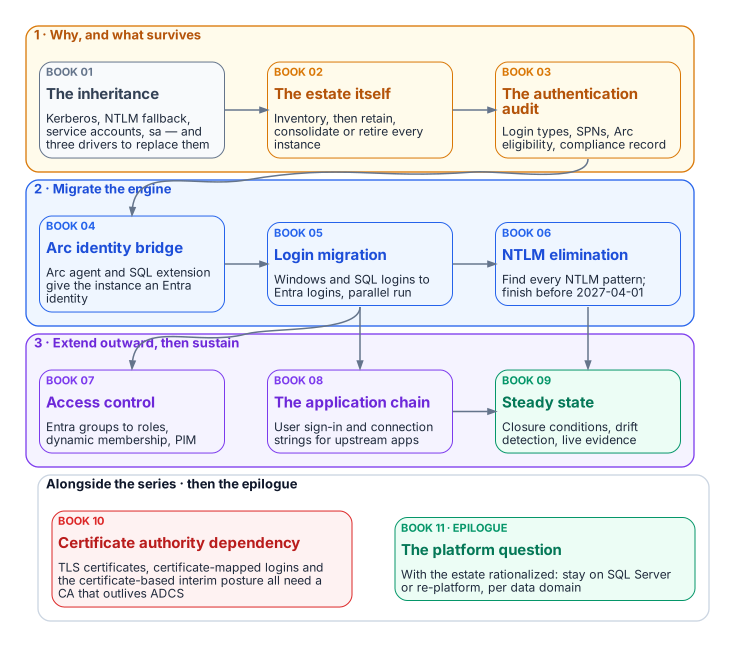
Full narrative bundle: sql-server-narrative-bundle.docx — all books combined into one Word document, regenerated on every site deploy.
Series overview: Series Overview — cleaned summary with the series diagrams.
Status
The full original narrative is available as a single DOCX bundle. Individual cleaned Markdown chapters are also present. Every book and chapter carries its own diagram; the sources and render script are in docs/images/sql-server/diagrams/.
The destination
Windows Authentication and SQL Authentication are eliminated and replaced with cloud identity authentication for SQL Server 2022 and later. Authentication is enforced through OAuth 2.0 tokens, a Microsoft Entra identity for each instance (the Arc managed identity on SQL Server 2025, an app registration on SQL Server 2022), and multi-factor authentication for every human principal.
The journey in diagrams
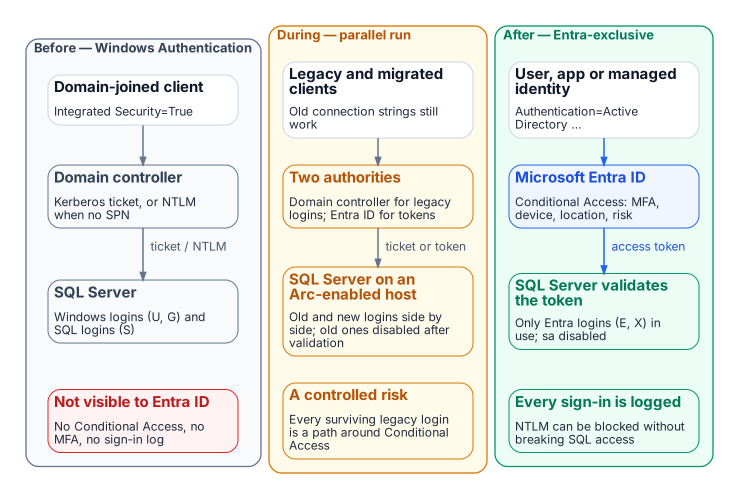
Before, every party is domain-joined and NTLM is the silent fallback when the service principal name is missing. During the parallel run, legacy and migrated clients coexist. After, Conditional Access evaluates every sign-in and the SQL Server validates the Entra token; no domain controller is in the path.
Reading sequence
| Book | Title | Focus |
|---|---|---|
| — | Applicability | Read first: where the series applies as written, alternatives, and fallback protections |
| 01 | The Authentication Inheritance Problem | What Windows Authentication actually is, and why it must end |
| 02 | The Estate Itself | Assess and consolidate before you touch authentication |
| 03 | The Authentication Audit | What is actually using Windows Authentication, SQL Authentication, and NTLM |
| 04 | The Identity Bridge | Hybrid-management attachment and an Entra identity for the engine |
| 05 | Login Migration | Parallel-run of Windows and cloud-identity logins |
| 06 | NTLM Elimination | Silent fallback, service principal name repair, and protocol restriction |
| 07 | Access Control | Dynamic groups and administrative-unit delegation |
| 08 | The Upstream Application Chain | Applications that depend on Windows Authentication or LDAP |
| 09 | Transformed Steady State | The destination and the milestone |
| 10 | Certificate-Authority Dependency | The layer the other steps depend on but rarely name |
| 11 | Epilogue — The Platform Question | Database consolidation toward SSOT, after the transformation |
| A | Appendix A — Requirements Mapping | Each book’s controls and evidence mapped to M-22-09, CISA ZTMM v2, SP 800-207 and SP 800-53 Rev. 5 (compliance-enabling, not a compliance claim) |
| B | Appendix B — Security-Approval (ATO) Kit | Boundary diagram, outbound endpoints, FedRAMP audit scope, Graph permission justification, token-folder mitigation, break-glass and licensing |
Relationship to identity governance
Dynamic Entra security groups grant SQL Server access based on HR-sourced user attributes, so no database administrator has to provision access by hand. The HR-to-directory attribute feed, its write protection, and the rule testing described in Book 07 must be in place before the dynamic-group access work starts.
Original diagrams from the source bundle. Paths are relative and resolve for both HTML and DOCX.
Building the Word bundles
The combined Word document (downloads/sql-server-narrative-bundle.docx, also published as sql-server-narrative-standalone-bundle.docx) and the per-book documents (downloads/Book_01-bundle.docx to Book_11-bundle.docx) are built directly from the Markdown pages in this folder by scripts/build_bundles.py. The same script builds the site’s other section bundles. The site deploy workflow runs it on every push to main. To build locally, run this from the repository root (you need Quarto, plus rsvg-convert if any page uses an SVG):
python3 scripts/build_bundles.py                                    # every bundle, into _site/downloads/
python3 scripts/build_bundles.py --only sql-server-narrative-bundle.docx Book_07-bundle.docx
python3 scripts/build_bundles.py --list # print each manifest, build nothing- Reading order comes from the manifests in
scripts/bundles.yml. The combined bundle lists every page explicitly:index.md, then eachBook_NN.mdfollowed by its chapters, then Book 11. When you add, remove, or rename a page, update that list. The build fails if a listed file is missing, and it warns about anyBook_*page that isn’t listed. Each per-book bundle isBook_NN.mdfollowed by itsBook_NN_CPT_*.mdchapters, so new chapters are picked up automatically. - Images are resolved relative to the page that references them (normally
../../images/sql-server/). Each one is embedded where it appears, with its alt text as the caption, scaled to the page width. SVGs are converted to PNG, and files whose extension doesn’t match their content are fixed for Word. The build fails if a referenced image is missing. It prints a report of references and embedded images per bundle, plus any images indocs/images/sql-server/that no page uses. - Web-only pieces are dropped by
scripts/bundle-filter.lua: chapter listings, the “Continue the series” and “Download” callouts, and links between pages, which become plain text. Each bundle gets a title page and a Word table of contents. If Word asks to update fields when you open it, choose Yes so it fills in the page numbers. - Download links on the site must point at a bundle the script builds: the build fails if any
downloads/*.docxlink on a published page has no matching bundle.