The Authentication-Audit Script: What It Measures and Why
Chapter 1 — The Authentication-Audit Script: What It Measures and Why
The instrument that turns the surviving estate into a structured, drift-aware authentication record.
What the authentication-audit script enumerates across the surviving estate, how it reads the authentication-mode configuration and classifies every login by type, how it captures the engine service-account identity and SPN registration, the three-category Arc-eligibility classification that drives migration sequencing, and why the script’s output feeds the compliance-monitoring pipeline rather than a spreadsheet.
This audit runs only on the instances Book 02 classified as retain or consolidation-target — the rationalization decision has already removed the zombies and retirees from scope before a single line of enumeration runs.
Scope of the Enumeration
The authentication-audit script performs a structured enumeration of the SQL Server estate across all hosts in the program’s management scope. For each host it identifies every SQL Server instance — named instances and the default instance — along with the version, edition, and build number.
The host operating system version is captured because it determines the Arc capability envelope. Windows Server 2019 and 2022 support the Connected Machine agent, and therefore support Arc-based Entra authentication for the SQL Server engine (through an app registration on SQL Server 2022, the managed identity on SQL Server 2025).1234 They do not, however, support the AADLoginForWindows OS-level Entra login extension, which requires Windows Server 2025. Windows Server 2025 supports both capabilities.
That distinction matters for migration sequencing, and the audit captures it explicitly. The domain-join status of the host is recorded alongside it: a host already migrated to a non-domain-joined state under the Arc non-domain-join requirement occupies a different starting position than a domain-joined host, and the per-instance output must reflect that.
Arc-enablement status — whether the Connected Machine agent is installed and the system-assigned Managed Identity is available — is the single most consequential classification output for migration prioritization.
Authentication Mode Configuration
For each instance the script reads the authentication-mode configuration. SQL Server supports two modes: Windows Authentication mode and Mixed Mode.5 In Windows Authentication mode, SQL Authentication logins are rejected at the connection level — no SQL Authentication credential is accepted regardless of whether a matching login exists in master. In Mixed Mode, both Windows Authentication and SQL Authentication are accepted. Microsoft Entra authentication, once configured, works alongside either mode; neither mode turns Windows authentication off.
The mode is stored in the Windows registry at HKLM:\SOFTWARE\Microsoft\Microsoft SQL Server\[InstanceName]\MSSQLServer\LoginMode: a value of 1 indicates Windows Authentication mode, and a value of 2 indicates Mixed Mode.
The audit reads this value directly and also cross-references it against the running instance with SERVERPROPERTY('IsIntegratedSecurityOnly'), which returns 1 in Windows Authentication mode. Discrepancies between the registry value and the running configuration can occur after a manual reconfiguration without a service restart. Any discrepancy is flagged as an anomaly requiring resolution before the migration can proceed.
Login Type Classification
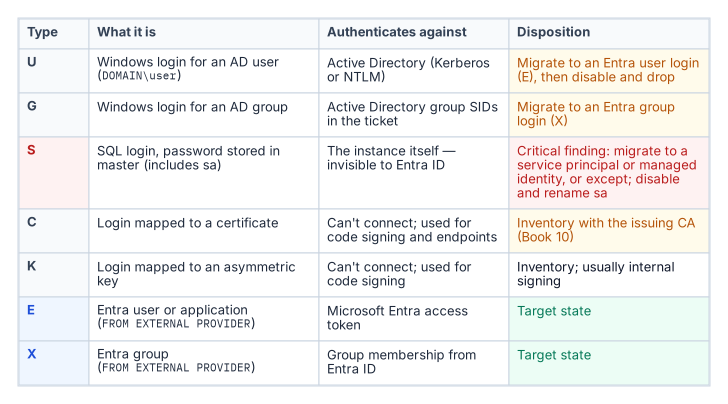
The script connects to each instance and queries the sys.server_principals system view to enumerate all logins.6 Each login is classified by type: Windows logins derived from individual AD user accounts (type U, mapped by SID to an AD user object); Windows logins derived from AD security groups (type G, mapped by SID to an AD group object); SQL Authentication logins with credentials stored in master (type S); certificate-mapped logins (type C); and asymmetric key-mapped logins (type K).
The count and identity of each type is reported per instance. The presence of active SQL Authentication logins — type S — is a critical finding, because these logins are invisible to the Azure identity plane.
Such logins must be either migrated to Entra ID equivalents — type E, FROM EXTERNAL PROVIDER logins created in Book 05 — or formally excepted with documented justification before the SQL Server authentication transformation can be declared closed.7
The sa account’s status is separately flagged: enabled, disabled, or renamed. An enabled sa account with a non-rotated password is the highest-priority remediation finding in the audit output.
Service Account Identity and SPN Registration
The script captures the identity of the Windows service account running the SQL Server engine process — the MSSQLSERVER service or its named-instance equivalent — by querying the service configuration. This identifies whether the engine runs as a domain service account, a gMSA, the NT SERVICE\MSSQLSERVER virtual account, or another identity.8
It then queries Active Directory — using the Get-ADServiceAccount and setspn equivalents — to determine whether the correct SPN is registered for the service account and the instance endpoint.
The SPN check is one of the most operationally valuable outputs of the audit. SPN misconfiguration is the primary cause of NTLM fallback, and it is not visible without deliberately querying AD for it.9
An instance with a missing or incorrect SPN is generating NTLM traffic for every connection that expects Kerberos — and in most cases, the application teams generating those connections do not know it.
The Arc-Eligibility Output
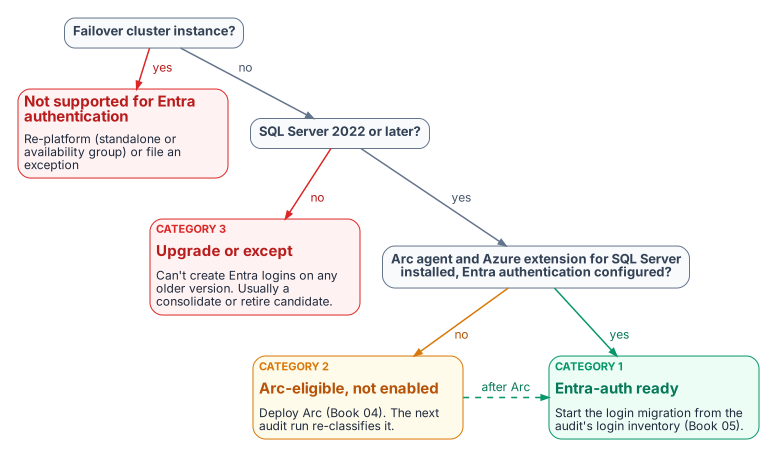
The most consequential output of the audit is the Arc-eligibility classification it assigns to every instance. Every instance falls into one of three categories.
Category 1 is Arc-eligible and Entra-auth-ready today: the server is already running the Connected Machine agent, the Azure extension for SQL Server has been deployed, the system-assigned managed identity is available, and the SQL Server version is 2022 or later.10 A Category 1 instance can have its Entra ID logins created and its login migration begun immediately — it requires no further infrastructure work before Book 05’s migration pattern can be applied.
Category 2 is Arc-eligible but not yet enabled: the host meets all the prerequisites for Arc enablement — Windows Server 2019 or later, network connectivity to the Azure Arc endpoint, SQL Server 2022 — but the Connected Machine agent has not been installed. A Category 2 instance requires Arc deployment as the prerequisite action before login migration can begin.
Category 3 is not yet Arc-eligible. Either the SQL Server version is pre-2022 — 2019, 2017, or earlier — which means the engine cannot accept FROM EXTERNAL PROVIDER logins regardless of Arc status, or the host has a configuration that prevents Arc enrollment.
A Category 3 instance requires a SQL Server version upgrade as the gate before any Entra-auth migration can occur, and that upgrade timeline must be factored into the overall program sequencing against the 2027-04-01 NTLM deadline.
The Compliance-Monitoring Telemetry Sink
The audit script’s output is not a standalone deliverable — it is the input to the compliance-monitoring pipeline. This is the architectural characteristic that distinguishes the authentication-audit script from a conventional discovery script.
The continuous-compliance monitoring system is the program-level tracking system for SQL Server authentication state at the instance level. Each time the audit runs — and it is designed to run continuously, on a schedule, against the full estate — it produces a structured per-instance compliance record that the compliance-monitoring pipeline ingests.
That pipeline computes the current authentication posture of the instance, compares it to the previous record, and flags any drift: a new SQL Authentication login that appeared since the last scan, an instance that has reverted from Windows Authentication mode back to Mixed Mode, a new linked-server definition that uses NTLM passthrough.11
Drift events are not informational — they are compliance violations that trigger the program’s remediation workflow. The required output is a per-instance compliance record, not a spreadsheet delivered to a program manager.
- The audit enumerates the surviving estate: version and OS, domain join, authentication mode, login types, and service-account and SPN posture.
- Every instance gets an Arc-eligibility category: Entra-ready (1), Arc-eligible but not enabled (2), or upgrade required (3).
- The output is a per-instance compliance record that re-runs as a drift-aware baseline, not a one-off spreadsheet.
Microsoft Learn, Azure Arc-enabled servers overview.↩︎
Microsoft Learn, Connected Machine agent prerequisites.↩︎
Microsoft Learn, Microsoft Entra authentication for SQL Server overview.↩︎
Microsoft Learn, Managed identity overview — SQL Server enabled by Azure Arc.↩︎
Microsoft Learn, Change server authentication mode.↩︎
Microsoft Learn, sys.server_principals (Transact-SQL).↩︎
Microsoft Learn, CREATE LOGIN (Transact-SQL).↩︎
Microsoft Learn, Group Managed Service Accounts overview.↩︎
Microsoft Learn, Register a Service Principal Name for Kerberos connections.↩︎
Microsoft Learn, Overview — SQL Server enabled by Azure Arc.↩︎
Microsoft Learn, Linked server for SQL Server with Microsoft Entra authentication.↩︎