Dynamic Membership, Delegation, and Privileged Access
Chapter 2 — Dynamic Membership, Delegation, and Privileged Access
A dynamic group is a policy that executes itself. It is only as trustworthy as the data it reads and the people who can change it.
Why the attribute a rule reads is itself an access control. Which user attributes Entra dynamic rules can use, and where those values should come from. How to write, name, test, and change rules safely within Microsoft’s processing limits. How administrative units scope DBA delegation, and where restricted management collides with governance tooling. Why privileged SQL Server access belongs in PIM for Groups rather than in a dynamic rule. How access reviews, break-glass, and monitoring close the loop. What a FedRAMP Moderate system in the commercial cloud can adopt as written, and why preview features stay out of production.
Chapter 1 turned the organization-derived groups of the old estate into dynamic groups, whose membership Entra ID recomputes from a rule such as user.department -eq "Finance" whenever attributes change. No ticket, no DBA action. This chapter covers what has to be true for that to be safe.
The Attribute Is the Access Control
The person or process that can write the attribute a dynamic rule reads controls access to everything that rule grants. Write access to an access-driving attribute is therefore a privileged permission, governed and reviewed like any other.
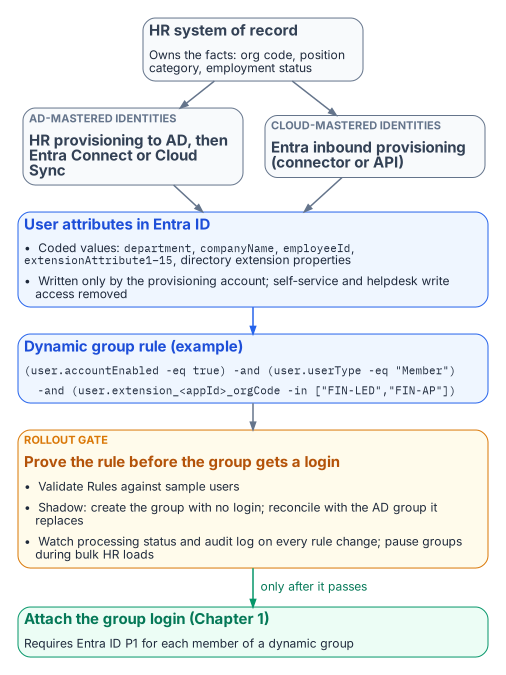
Under assigned membership, whoever can add a member controls access; under dynamic membership, whoever can write the attribute does. Microsoft’s dynamic-group guidance says to review who can write an attribute in Entra ID and in any source directory that syncs it, especially on-premises attributes users can edit on their own objects.
The single source of truth for access-driving attributes is therefore the HR system of record, which knows when someone joins, moves, or leaves and has the governance to make those changes defensible. The path from HR to the directory is automated and one-way:
- For identities still mastered in Active Directory, HR-driven provisioning populates AD, and Microsoft Entra Connect or Cloud Sync carries the values into Entra ID.1
- For cloud-mastered identities, Entra ID’s inbound provisioning writes them directly. There are built-in connectors for the major cloud HR suites, and an API-driven inbound provisioning endpoint covers any other HR system that can produce a feed.
Either way, a provisioning service account writes the attribute, and self-service and helpdesk write access to it is removed.
Choosing the Attributes
Entra dynamic rules can read a fixed set of user properties. Microsoft’s current list includes department, companyName, jobTitle, employeeId, employeeHireDate (preview), userType, accountEnabled, and location fields. It also includes the fifteen extensionAttribute1–extensionAttribute15 values, which are commonly synced from on-premises AD, and directory extension properties (user.extension_<appId>_<name>), which can be synced from AD or created through Microsoft Graph. Two cautions apply. First, not every attribute on the user object is usable. For example, employeeType doesn’t appear in the supported-properties list at the time of writing, so check that list before designing around any attribute. Second, multi-value extension properties aren’t supported in rules.
Good rule inputs are HR-owned codes that change only when the business fact changes: an organization code in a directory extension property, not a display string someone will eventually retype. Publish a small, documented set of HR-sourced access attributes (organization code, position category, employment status) and write rules only against those:
(user.accountEnabled -eq true) -and (user.userType -eq "Member")
  -and (user.extension_<appId>_orgCode -in ["FIN-LED","FIN-AP"])
  -and (user.extension_<appId>_positionCategory -eq "Analyst")
A rule body can’t exceed 3,072 characters, and a tenant can have at most 15,000 dynamic groups. Prefer -eq, -startsWith, and -in over -match, -contains, and chains of -or; such rules process faster and review more easily. Every access rule excludes disabled accounts and guests explicitly, as above.
Dynamic membership needs a Microsoft Entra ID P1 license for each user in one or more dynamic groups. Most federal tenants have it through Microsoft 365 or EMS; confirm the count before rollout.
Writing, Naming, and Testing Rules
Two practices keep a dynamic group from becoming an untested access grant.
The first is naming and ownership. Entra’s naming policy covers only Microsoft 365 groups, so the convention for SQL Server access groups is enforced by the provisioning automation or a review gate. A pattern such as SQL-<env>-<instance or app>-<database>-<role> carries Chapter 1’s one-group-one-role meaning. Each description records the rule’s business intent, the owning team, and the last change record; each group has at least two named owners.
The second is testing before granting. A rule should be proven before its group is attached to a SQL Server login:
- Validate. The Validate Rules feature in the Entra admin center evaluates a draft rule against up to 20 chosen users and shows which expression each one passes or fails.
- Shadow. Create the group first with no login attached. Once processing reports complete, compare its membership with the legacy AD group it replaces, and explain every difference before the login is created.
- Watch processing. For a rule change on a group that’s already live, check the group’s processing status and its audit-log entries for the additions and removals the change caused.
- Pause bulk changes. For HR reorganizations or bulk attribute loads that will touch thousands of users, Microsoft recommends pausing non-essential dynamic groups, letting processing catch up, and resuming in phases.
The rollout gate for the whole pattern follows from this. No dynamic group grants production access until the access attributes are populated and verified for a pilot cohort, and its rule has been validated, shadowed, and reconciled against the group it replaces.
Scoped Delegation with Administrative Units
Someone still has to manage the assigned groups and the dynamic groups’ owners and descriptions, and tenant-wide Groups Administrator for a DBA lead would just move the privilege concentration. Administrative units solve this: Groups Administrator assigned at AU scope manages only the groups in that AU. The scoped administrator needs P1; AU members need nothing extra. Draw one AU per DBA team, application portfolio, or data owner, so a team’s authority matches its accountability.
Restricted management administrative units go further. Only administrators scoped to the AU can modify its objects, even Global Administrators can’t, and that is attractive for protecting access groups. But it has costs that matter here:
- Groups in a restricted management AU can’t be managed by PIM, access reviews, entitlement management, or lifecycle workflows.
- Restricted management AUs accept only plain security groups.
- The setting can’t be changed after the AU is created.
Use regular AUs for groups that need governance tooling; reserve restricted management for cases where tamper-resistance outweighs reviewability. Dynamic AU membership is generally available in the commercial cloud (not Azure Government), but its rules select users or devices, not groups, so access groups are added to an AU explicitly or by automation.
Privileged Access Belongs in PIM, Not in a Rule
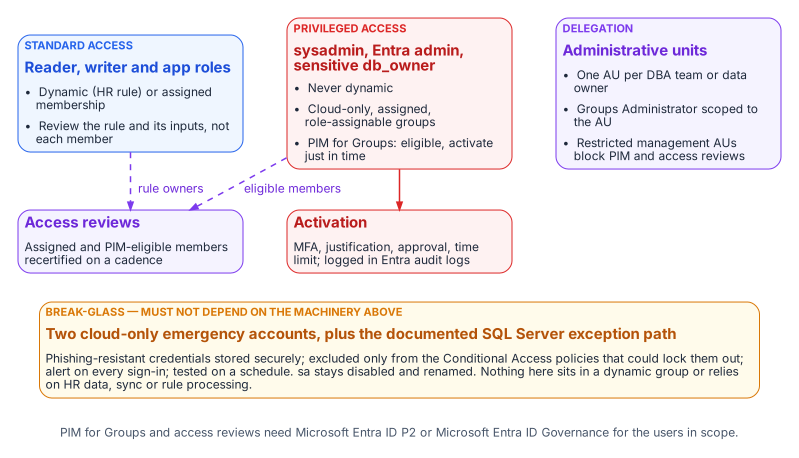
Groups mapped to sysadmin, the instance’s Entra administrator, and db_owner on sensitive databases are never dynamic. Microsoft makes the same judgment for directory roles: role-assignable groups must have assigned membership. The SQL Server equivalent is PIM for Groups: DBAs are eligible, not standing, members, and each logged activation is time-bound and requires MFA and, where policy demands, approval and justification.
PIM for Groups can’t manage dynamic or on-premises-synced groups, so privileged groups are cloud-only and assigned by construction; making them role-assignable also blocks credential changes by lower-tier administrators. PIM for Groups and access reviews require Microsoft Entra ID P2 or Microsoft Entra ID Governance for eligible users, approvers, and reviewers.
Access Reviews
A dynamic group’s membership can’t be edited by hand, so a member-by-member review has no remediation path. Review the rule and its inputs instead: on a fixed cadence the data owner confirms the rule still expresses the intended population, and the identity team confirms its attributes are still HR-sourced and write-protected. For assigned groups and PIM eligible assignments, use Entra access reviews; a recurring review can remove access when the reviewer doesn’t respond, and its results are the AC-2 evidence an assessor will ask for.
Break-Glass
Two kinds of break-glass access are needed, and they must not depend on the machinery they exist to bypass. At the tenant level, Microsoft’s guidance for emergency-access accounts applies:
- at least two cloud-only accounts, with phishing-resistant credentials stored securely
- excluded only from the Conditional Access policies that could lock them out2
- alerting on every sign-in
- tested on a regular schedule
At the SQL Server level, Book 05’s position stands. The built-in sa is disabled and renamed, and any retained emergency path is a documented exception with its own monitoring. Neither emergency path may sit in a dynamic group or rely on HR data, Entra Connect, or rule processing being healthy.
Monitoring
The access model is now spread across HR, the provisioning service, Entra ID, and the engine, so monitoring has to cover each hand-off:
- Entra audit logs record rule edits, membership additions and removals, PIM activations, and AU and role-assignment changes. A change to the rule of any SQL Server access group should raise an alert.
- Entra sign-in logs show every token issued for SQL Server and the Conditional Access result.3
- SQL Server Audit records successful and failed logins, and changes to server and database role membership.4
The continuous audit described in Book 09 should reconcile all three. Every type-E and type-X principal on an instance must map to a known user, application, or group. Every group must follow the naming convention and have an owner. No privileged role may have a standing member that PIM doesn’t account for.
FedRAMP Moderate in the Commercial Cloud
The series assumes Microsoft’s commercial cloud (Entra ID at login.microsoftonline.com, Azure public US regions) under an agency authorization at FedRAMP Moderate.
What the cloud authorization covers. Azure’s public cloud holds a FedRAMP High P-ATO for its US regions. The Moderate baseline (325 controls) is a subset of High (421), so a Moderate system can draw on High-authorized services; whether it inherits them is the agency’s call. The public-cloud audit-scope list includes the services this book relies on:
- Entra ID (Free, P1 and P2), Entra ID Governance, the Entra provisioning service, and Entra multifactor authentication
- Microsoft Graph
- Azure Arc-enabled servers and Azure Arc-enabled SQL Server
- Azure Monitor (Log Analytics), Microsoft Sentinel, and Key Vault
The list names services, not features; confirm dynamic groups, AUs, PIM for Groups, and access reviews against the agency’s boundary and Microsoft’s FedRAMP package (requestable through the FedRAMP Marketplace). The SQL Server hosts and Arc agent are part of the agency’s own system, and a third-party HR system has its own authorization. As Microsoft’s Entra FedRAMP guidance says, the authorization makes compliant configuration possible; the agency configures it.
Keep previews out of the production access path. Microsoft’s Data Protection Addendum says previews “may employ lesser or different privacy and security measures” and, unless noted otherwise, should not be used for regulated data; Entra’s preview terms add that SLAs don’t apply. For a Moderate system, that rules out:
- the
memberOfdynamic-rule operator (a preview that ends on 3 November 2026; see Chapter 1) - preview user properties in membership rules, such as
employeeHireDate - any PIM, access-review, or provisioning capability that the Entra admin center or Microsoft Learn still marks as preview
Check for the preview label at adoption and again at the rollout gate.
What is in scope as recommended. The generally available pieces of this design are delivered by services on the High list:
- Entra group logins and Entra authentication for SQL Server through Azure Arc. Microsoft notes that the SQL Server instance needs access to the Azure public cloud for this.
- Dynamic security groups built on supported properties and directory extension attributes
- Regular and restricted-management administrative units, including dynamic AU membership for users
- PIM for Groups and access reviews, licensed through P2 or Entra ID Governance
- Emergency access accounts and Log Analytics monitoring
Treat any feature not verifiable at feature level as unconfirmed until the agency’s ATO documentation says otherwise.
- Whoever can write the attribute a rule reads controls access, so only HR-driven provisioning writes access attributes.
- Rules are validated, shadowed against the groups they replace and piloted; privileged groups are assigned, cloud-only and governed by PIM for Groups and access reviews.
- Only generally available features sit in the production access path, and break-glass paths depend on none of this machinery.
Microsoft Learn, What is Microsoft Entra Connect?.↩︎
Microsoft Learn, What is Conditional Access?.↩︎
Microsoft Learn, Sign-in logs in Microsoft Entra ID.↩︎
Microsoft Learn, SQL Server Audit (Database Engine).↩︎