Three Principal Types — User, Group, Service Principal
Chapter 1 — Three Principal Types — User, Group, Service Principal
The moment the engine stops accepting Kerberos and NTLM and starts accepting Entra-issued tokens.
The FROM EXTERNAL PROVIDER syntax that creates type-E logins validated by token at connect time, the three principal types those logins map to — Entra user, Entra security group, and Entra service principal — and the three-phase parallel-run pattern that creates and validates the new logins before disabling the old ones.1
This is the technical heart of the series: the engine stops accepting Kerberos tickets and NTLM exchanges and starts accepting Entra ID OAuth 2.0 access tokens carrying claims about identity, group membership, device compliance, and MFA. Books 01–04 are prerequisite; Books 06–10 are consequence. The SQL Server engine-authentication decision records the canonical sequence this chapter follows.
The FROM EXTERNAL PROVIDER Syntax
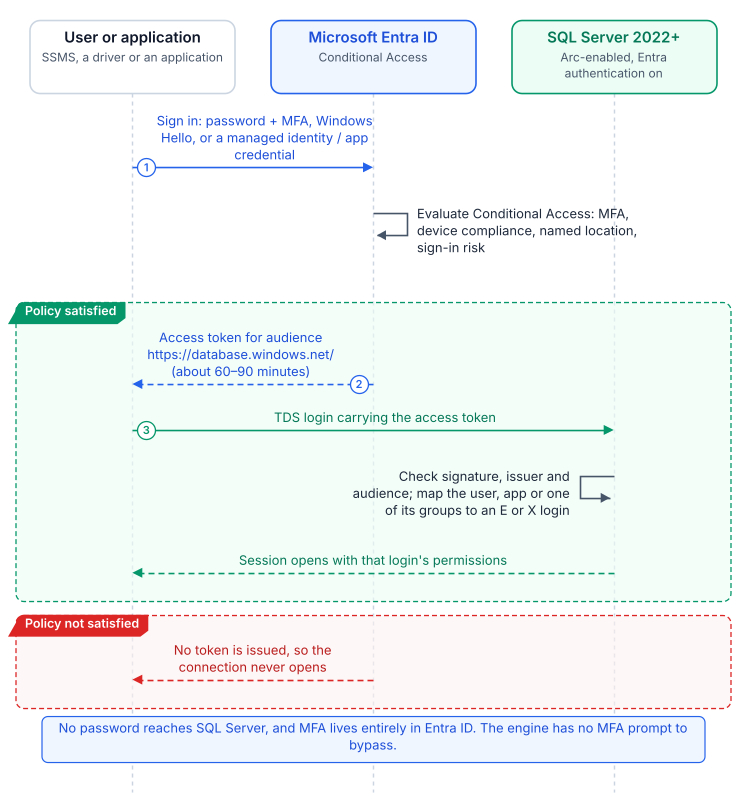
SQL Server 2022’s CREATE LOGIN [principal] FROM EXTERNAL PROVIDER maps an Entra principal (a user’s UPN, a group’s display name, or an application’s name) to a login with no Active Directory involvement. The login is stored in master as a passwordless external principal. At connection time the client presents an access token for the SQL Server resource audience; the engine validates its signature, maps the claims to the login, and, if the login is enabled, applies its permissions and database roles.
The syntax requires the Azure extension for SQL Server, which configures the instance’s Entra identity (an app registration on 2022, the managed identity on 2025) and token validation, and registration with the Arc SQL resource plane.234 CREATE LOGIN looks the principal up through Microsoft Graph, which is why the instance’s identity needs Graph read permissions. Verify that each principal exists before creating its login, to avoid orphaned logins that map to deleted or renamed principals.
Type 1 — Entra User Login
For human DBAs and developers, a CREATE LOGIN [DOMAIN\username] FROM WINDOWS login gets a type-E counterpart for the same person’s UPN: CREATE LOGIN [username@tenant.onmicrosoft.com] FROM EXTERNAL PROVIDER. UPNs can differ from SAM account names where UPN synchronization was never standardized, so the audit captures the UPN-to-SAMAccountName mapping for every Windows login first. The user then signs in with password plus MFA, FIDO2, or Windows Hello for Business, as Conditional Access requires.5
The engine has no MFA logic. Conditional Access enforces MFA, device compliance, Named Locations, and sign-in risk before the token is issued;6 if they fail, no token is issued and the connection never opens. There is no SQL-level MFA prompt and no SQL-level bypass. None of these controls apply to Windows Authentication or NTLM connections.
Type 2 — Entra Group Login
A SQL Server login can be created for an Entra ID security group rather than an individual user: CREATE LOGIN [GroupDisplayName] FROM EXTERNAL PROVIDER. When a user whose Entra access token includes a claim asserting membership in the named group connects to SQL Server, the engine maps the group claim to the group login and grants the user the permissions associated with that login.
It is the familiar AD group pattern, with group claims in place of SID resolution and Kerberos PAC membership. Group logins appear in sys.server_principals as type X (EXTERNAL_GROUP), distinct from type E.7 When the group is a dynamic group whose rule reads HR-sourced attributes, users gain and lose SQL Server access as HR updates them, with no CREATE USER or DROP USER.8 Book 07 covers designing and governing those groups.
Type 3 — Entra Service Principal Login
ETL pipelines, reporting services, API backends, and monitoring agents replace their SQL Authentication account (a type-S login with a stored password) with a service principal login: CREATE LOGIN [ApplicationDisplayName] FROM EXTERNAL PROVIDER. This removes passwords from connection strings, configuration files, logs, and repositories, along with their rotation.
Preferably the application uses a managed identity and holds no credential. On an Arc-enabled server, DefaultAzureCredential in Azure.Identity finds the server’s managed identity at the agent’s local endpoint (localhost:40342), provided the process account is in the local Hybrid Agent Extension Applications group.9 Azure VMs, Container Instances, and App Service use their platform managed identity. Where a credential is unavoidable, use a client certificate stored in Key Vault, never a client secret or a file.
The Parallel-Run Migration Pattern
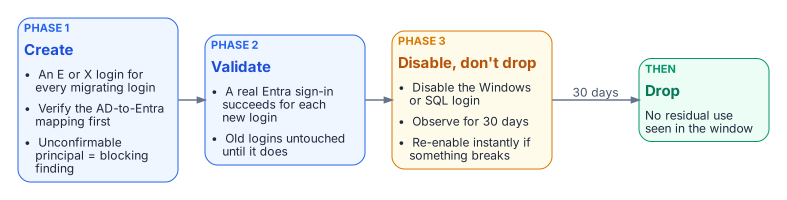
No Windows login is dropped until its Entra equivalent is validated. The engine-authentication decision makes this three-phase parallel run required for production:
- Create. For every migrating Windows login, user or group, create the
FROM EXTERNAL PROVIDERlogin for the corresponding Entra principal. Verify each mapping first; a principal with no confirmed Entra equivalent is a blocking finding. This mapping, built from the authentication audit’s AD inventory and Entra’s UPN and group data, is the most labor-intensive step. - Validate. Test each new login with the principal’s real Entra credential before any legacy login is touched.
- Disable, observe, drop. Disable (do not drop) the legacy Windows and SQL Authentication logins, monitor for 30 days to confirm nothing depends on them, then drop them.
Non-production instances may shorten the observation window with documented owner sign-off, but create→validate→disable→observe→drop is the canonical sequence. Other platforms document the same side-by-side premise: Google’s Cloud SQL for SQL Server lets Entra ID authentication be enabled without disabling existing Active Directory authentication during a phased migration.10 The next chapter records four further decisions around it.
FROM EXTERNAL PROVIDERcreates passwordless logins for Entra users and applications (type E) and groups (type X), authenticated by Entra-issued tokens.- MFA and other sign-in conditions are enforced by Conditional Access in the Entra plane, not by the engine.
- Migration is the parallel run: create, validate, disable (not drop) the legacy login, observe for 30 days, then drop.
Microsoft Learn, CREATE LOGIN (Transact-SQL).↩︎
Microsoft Learn, Overview — SQL Server enabled by Azure Arc.↩︎
Microsoft Learn, Microsoft Entra authentication for SQL Server overview.↩︎
Microsoft Learn, Managed identity overview — SQL Server enabled by Azure Arc.↩︎
Microsoft Learn, What is Conditional Access?.↩︎
Microsoft Learn, What is Microsoft Entra ID Protection?.↩︎
Microsoft Learn, sys.server_principals (Transact-SQL).↩︎
Microsoft Learn, Manage rules for dynamic membership groups in Microsoft Entra ID.↩︎
Microsoft Learn, Access Azure resources with managed identity on Azure Arc-enabled servers.↩︎
Third-party source (Google Cloud documentation), Integration with Microsoft Entra ID — Cloud SQL for SQL Server, “Migration from Microsoft Active Directory.”↩︎