Groups, Roles, and How Membership Reaches the Engine
Chapter 1 — Groups, Roles, and How Membership Reaches the Engine
Group-based authorization survives the migration. Its plumbing, its timing, and its outer boundary do not.
How an Entra security group becomes a SQL Server login and a database role member. Why each group should grant exactly one role. Why the group model should stay flat. When a membership change actually takes effect at the engine. How the four kinds of AD group found in a SQL Server estate migrate. Why Conditional Access becomes the outer perimeter once every login is Entra-backed.1
SQL Server’s access model has two halves: roles and permissions inside the engine, and the directory outside it that decides group membership. For twenty years the outside half was Active Directory: a DBA mapped DOMAIN\SQL-Reporting-Readers to a login and role, and whoever controlled that AD group controlled access.
The transformation replaces the outside half and leaves the inside nearly untouched. Roles, GRANT and DENY, ownership chains, and module signing work as before. What changes is the principal (an Entra group), the proof of membership (an Entra token, not a Kerberos ticket), and when a membership change takes effect.
How an Entra Group Becomes SQL Server Access
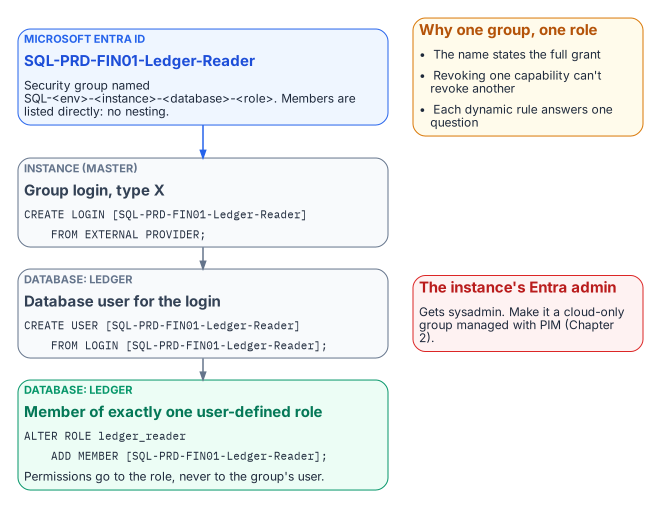
CREATE LOGIN … FROM EXTERNAL PROVIDER creates type-E logins for Entra users and applications and type-X (EXTERNAL_GROUP) logins for groups.
A group enters SQL Server as an AD group did, as a server login created by display name, then a database user (CREATE USER … FROM LOGIN) added to a role. Book 09’s continuous audit must count type X as well as type E, because group logins are where most access should live.
The instance’s Microsoft Entra administrator receives sysadmin and, in any sizable estate, should be a group (Chapter 2). The instance’s Entra identity needs Microsoft Graph User.Read.All, GroupMember.Read.All, and Application.Read.All,2 granted by a Privileged Role Administrator: an identity-team step, not a DBA step.
-- Instance level: one login per Entra group
CREATE LOGIN [SQL-PRD-FIN01-Ledger-Reader] FROM EXTERNAL PROVIDER;

-- Database level: the group becomes a member of exactly one role
USE Ledger;
CREATE USER [SQL-PRD-FIN01-Ledger-Reader] FROM LOGIN [SQL-PRD-FIN01-Ledger-Reader];
ALTER ROLE ledger_reader ADD MEMBER [SQL-PRD-FIN01-Ledger-Reader];
The Implementation Companion carries the full runbook. Authorization inside the engine is not redesigned; only the principal changes.
One Group, One Role
The most consequential design decision in this book is the simplest: each Entra group grants exactly one role, on one database, in one environment. A user who reads the ledger and runs the month-end job belongs to two groups.
The rule pays off three ways. The group name fully states what it grants, so an access review can be answered without opening SQL Server Management Studio.3 Revoking one capability never revokes another. And dynamic membership becomes tractable: “who should read the ledger?” can be written as a rule; “whoever this legacy group happened to include” cannot.
Permissions go to user-defined database roles, never directly to group users, and db_owner and sysadmin are kept for the few who need them. Every legacy group mapped to db_owner “because the application needed it” is a finding to resolve before its replacement is created.
Flat by Design
AD estates are full of nested groups. Don’t rebuild that tree in Entra ID; the platform’s constraints point to a flat model.
- Dynamic groups can’t contain groups. A dynamic rule selects users (or devices) by attribute, never other groups.
- The
memberOfoperator is ending. It was the preview workaround for building a dynamic group from other groups. Microsoft has announced that its public preview ends on 3 November 2026. After that date, groups that use it stop updating and stay in their last-known state. - Role-assignable groups can’t nest. These are the groups with the strongest protection against privilege escalation, and they accept no group members at all.
- Group claims are capped. Applications that read group membership straight from the token get at most 200 groups in a JWT, and above that receive an overage indicator instead of the list.
- Nested-group evaluation is undocumented for SQL Server. Microsoft’s SQL Server documentation doesn’t describe how nested Entra group membership is evaluated for an on-premises instance’s group logins.
Nesting builds on behavior that is unsupported, ending, or undocumented. A flat model costs a few more groups and gives up nothing: each role-mapped group lists members directly, by rule or assignment, and several populations needing one role share one rule. Where a nested chain is unavoidable, test it on the target instance version first.
When a Change Takes Effect
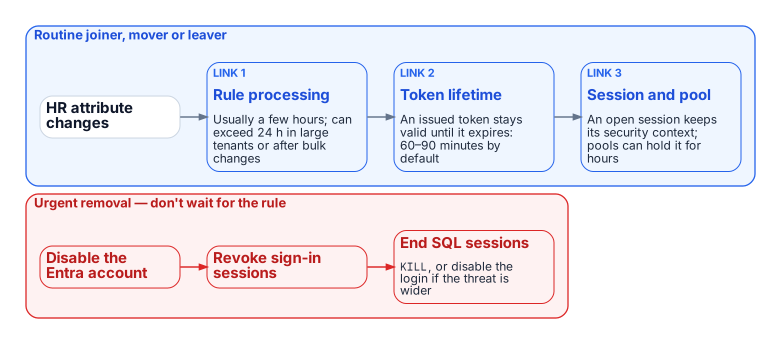
Under Windows Authentication a membership change arrived with the next Kerberos ticket, usually the next logon. The Entra chain is longer:
- Rule processing. A dynamic group is recalculated when a relevant attribute changes. Microsoft documents that this usually completes within a few hours, but that it can take more than 24 hours in large tenants, after bulk changes, or with complex rules.
- Token lifetime. An access token already issued to the user stays valid until it expires. By default that’s a randomized 60 to 90 minutes.
- Session and pool lifetime. An open SQL Server session keeps the security context it was established with. A connection pool can keep that session open for hours.
That latency is acceptable for routine joiners, movers, and leavers, and often beats the ticket queue it replaces. Urgent removal doesn’t wait for a rule: disable the Entra account, revoke the user’s sign-in sessions, and end the user’s SQL Server sessions (KILL, or disabling the individual or group login if the threat is broader). Write this path into the operations runbook before the first dynamic group grants production access.
Migrating the Four AD Group Patterns
Groups in a long-lived SQL Server estate fall into four patterns:
- Organization-derived access groups, kept in step with the org chart by hand, become dynamic groups whose rules read HR-maintained attributes such as
department,companyName,jobTitle, anextensionAttribute, or a directory extension property (Chapter 2). - Explicit role-assignment groups such as
PROD-SQL-SYSADMINreflect specific people given a specific permission, so no rule should define them. They become flattened assigned groups managed by a delegated administrator or, for privileged roles, PIM (Chapter 2). - Distribution lists for SQL Server Agent notifications become mail-only groups; the operator address is updated and no login is created.
- Mail-enabled security groups split into a mail-only group and an assigned security group, with the pairing recorded in both descriptions and the migration record.
Conditional Access as the Outer Perimeter
Once every login is Entra-backed, every connection needs a token and every token request passes Conditional Access. A non-compliant device, a sign-in outside named locations, or a high-risk sign-in is refused a token, so the connection never opens.4
None of this reaches a Windows or SQL-authenticated login, so the perimeter is binary: one surviving Windows login bypasses every policy. Privileged-access workstations, bastions, segmentation, and vaulting are legitimate interim controls, but none evaluates identity, device, and risk per connection. Book 05 therefore treats each surviving legacy login as a documented, sunset-dated exception.
- An Entra group reaches SQL Server as a type-X login and grants exactly one role, on one database, in one environment.
- The group model stays flat, and membership changes reach the engine only after rule processing, token expiry and session turnover, so urgent removal needs its own runbook.
- Each kind of AD group maps to a specific Entra replacement, and Conditional Access then sits in front of every login.
Microsoft Learn, What is Conditional Access?.↩︎
Microsoft Learn, Set up managed identity and Microsoft Entra authentication for SQL Server enabled by Azure Arc.↩︎
Microsoft Learn, What are access reviews?.↩︎
Microsoft Learn, What is Microsoft Entra ID Protection?.↩︎