What Windows Authentication Actually Is
Chapter 1 — What Windows Authentication Actually Is
The inheritance, named precisely, before the case for replacing it.
How SQL Server delegates authentication to the Windows security subsystem through Kerberos and SSPI, why a missing SPN silently drops a connection to NTLM, what the service account and the sa account each contribute to the picture, and why this whole architecture was genuinely good engineering for the world it was designed for.1
The Kerberos Foundation
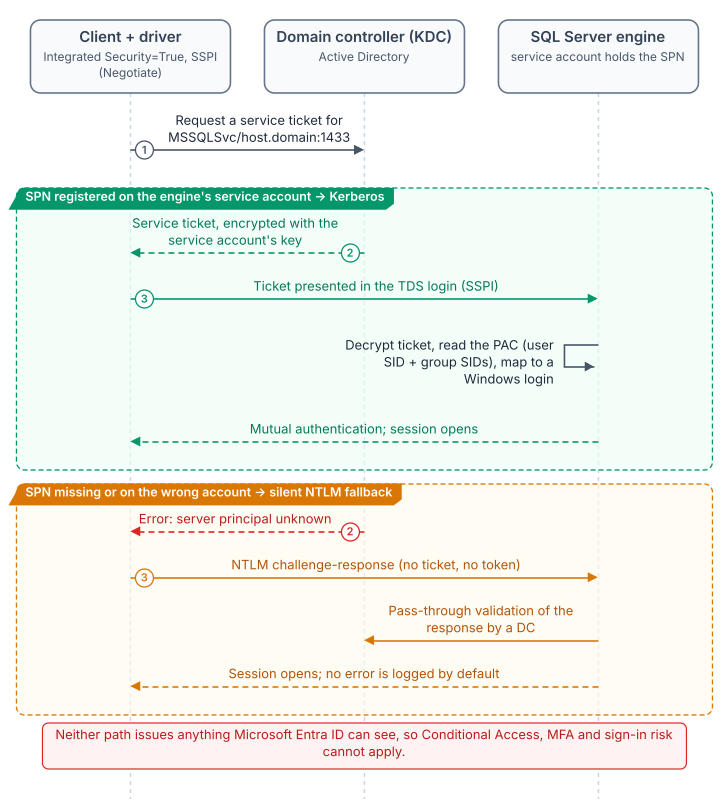
In Windows Authentication mode, SQL Server delegates authentication entirely to the Windows security subsystem, with no password verification or token model of its own.2 With Integrated Security=True, the driver hands off to the Security Support Provider Interface (SSPI), which, if Kerberos is negotiable, requests a service ticket from the domain controller’s Key Distribution Center (KDC) for the instance’s Service Principal Name (SPN). The engine validates the ticket with the service account’s key and maps the principal to a login. No password crosses the network, none sits in configuration files, and authentication is mutual. This is good security architecture, and it deserves saying plainly before explaining why it must be replaced.
The SPN, MSSQLSvc/hostname.domain.com:port, is registered on the engine’s service account, binding that account’s long-term key to the service name. Without it the KDC cannot issue a ticket, and SSPI silently falls back to NTLM.
That silent fallback is the most consequential fault in the inheritance. It is invisible to applications and absent from the default error log, so environments confident they run Kerberos are running NTLM on a significant fraction of connections. Only measurement reveals the fraction; the authentication audit is the instrument, and most federal environments have not run it.
The NTLM Fallback
NTLM was Windows’ original network protocol. When Windows 2000 made Kerberos preferred, NTLM stayed as the fallback where Kerberos could not be negotiated: untrusted domains, non-domain-joined clients, unreachable KDCs. SQL Server inherited that order unchanged, and for a perimeter-defended, fully domain-joined network it was adequate.
It does not scale to zero trust, which this program’s FedRAMP Moderate boundary now requires. NTLM’s challenge-response happens entirely inside the connection negotiation and issues no token or assertion a third party can validate. Conditional Access, which lives in the Azure identity plane outside the connection path, has nothing to observe, evaluate, or deny.34
The Service Account
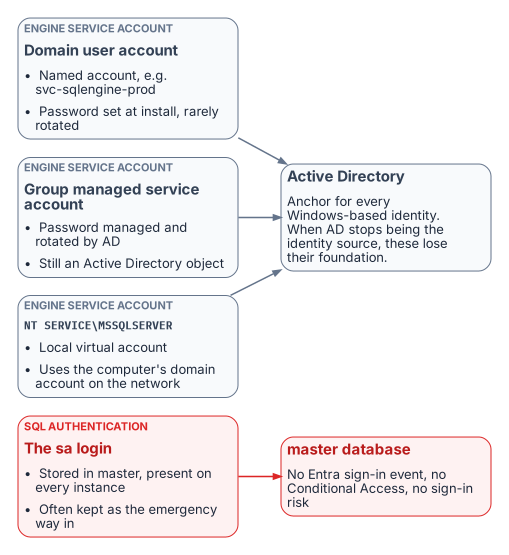
The engine’s service account is the identity it presents on the network: to file shares, linked servers, and monitoring sinks. Federal estates use three forms:
- a domain service account such as
svc-sqlengine-prod, with a password set at installation and rarely changed; - a group managed service account (gMSA), whose password AD rotates every 30 days and no human knows;5 better hygiene, but still AD-anchored;
- the
NT SERVICE\MSSQLSERVERvirtual account, which authenticates on the network as the domain-joined computer account.
In every case AD is the engine’s identity authority. When the program removes AD as the authoritative source, the engine needs a new identity in Microsoft Entra ID — on SQL Server 2025, the system-assigned managed identity that Arc provides for the host; on SQL Server 2022, an app registration whose certificate is kept in Azure Key Vault.67 That identity sits alongside the Windows account the service runs as rather than replacing it; the transition is the subject of Book 04.
The sa Account
SQL Authentication stores credentials in master instead of AD, and sa is its built-in administrator on every instance. Well-governed estates disable or rename it; many federal estates keep it active as an emergency path in case AD fails, often with its installation-time password.
SQL Authentication is invisible to the Azure identity plane: no Entra sign-in event, no Conditional Access, no Defender for Identity signal, no risk assessment. An active sa is the most dangerous entry point on the instance. Its handling is one of the decisions the SQL Server engine-authentication decision formalizes.
Why This Was Correct
Taken together, SSPI-negotiated Kerberos, SPNs, NTLM fallback, AD service accounts, and SQL Authentication as a local fallback form a coherent, defensible architecture. In a fully domain-joined world it was centrally managed, non-repudiable at the ticket level, resistant to credential theft in transit, and needed nothing beyond the domain controllers already in place. It was not a compromise. The problem is that its world (every machine domain-joined, the perimeter as the boundary, no cloud identity plane) no longer exists.
- SQL Server Windows Authentication delegates to the Windows security subsystem: Kerberos through SSPI when an SPN is registered, silent NTLM fallback when it is not.
- The engine’s process identity and the
saaccount are anchored to authorities — Active Directory andmaster— that the program removes or that the Azure identity plane can’t see. - None of this was a mistake; it was correct engineering for a fully domain-joined world that no longer exists.
Microsoft Learn, Register a Service Principal Name for Kerberos connections.↩︎
Microsoft Learn, Change server authentication mode.↩︎
Microsoft Learn, What is Microsoft Entra ID Protection?.↩︎
Microsoft Learn, What is Conditional Access?.↩︎
Microsoft Learn, Group Managed Service Accounts overview.↩︎
Microsoft Learn, Managed identity overview — SQL Server enabled by Azure Arc.↩︎
Microsoft Learn, Set up Microsoft Entra authentication with app registration — SQL Server enabled by Azure Arc.↩︎