Chapter 04 — Identity: Hierarchical Directory → Flat Cloud Identity + Attribute-Driven Structure
How the organizational-unit tree becomes organizational attributes, dynamic groups, administrative units, and Conditional Access
Dependency chain: Inventory → Plan → Identity → Policy → Network services → Devices and servers → Access plane → Retire AD DS → Prove steady state
The identity claim
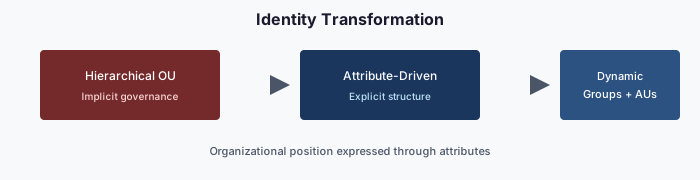
The Active Directory organizational-unit tree was never just a folder structure. It encoded delegation, policy inheritance, operational accountability, and security scope in a single hierarchical graph. A flat cloud directory has none of that by default.
The attribute-driven structure reconstructs those governance properties inside a flat directory using four governed mechanisms — organizational attributes, dynamic groups, administrative units, and Conditional Access targeting — stitched together into one deterministic model.
This chapter describes how it works.
The four mechanisms
Cloud identity platforms provide individually powerful tools. The framework uses them together to replace what the organizational-unit tree was doing.
| Mechanism | What it replaces |
|---|---|
| Organizational attributes | Organizational-unit placement |
| Dynamic groups | Organizational-unit-derived security groups |
| Administrative units | Organizational-unit-level delegation |
| Conditional Access targeting | Group Policy-based policy inheritance |
Each mechanism is individually documented by the platform vendor; the innovation is the contract that binds them together so that a single act (setting a user’s organizational attributes) produces consistent downstream effects (group membership, administrative-unit scope, policy targeting, license assignment, drift-detector visibility).
Organizational attributes
Organizational position is carried in attributes on every governed user (and, where applicable, device and group) object.
Where the attributes live
The examples in this series use the on-premises-synchronized extensionAttribute1–15 and standard attributes such as department, which dynamic-membership rules can reference. Once AD is no longer the source, the same values must be written by HR-driven inbound provisioning directly to Entra ID (or held in directory extension attributes), so the attribute source has to be planned before AD retires.
What the attributes drive
One stamped set of attributes drives five downstream outcomes:
- Dynamic group membership — every user with a matching department attribute is in the corresponding dynamic group.
- Administrative unit scoping — the administrative unit scopes on the same attributes; delegated administrators of that unit manage only those users.
- Conditional Access targeting — policies include or exclude groups keyed to attribute values.
- License assignment — group-based licensing flows from attribute-scoped dynamic groups.
- Drift detection — every user’s attributes are validated against the HR-system source of truth.
One stamp. Five governance outcomes. Zero administrative-portal clicks to assign any of them.
Dynamic groups — materializing every subtree
Active Directory computed “who is in the Finance branch?” by walking the organizational-unit tree. Cloud identity computes it by evaluating a dynamic-group rule against user attributes.
The two query patterns
Every attribute-governed dynamic group uses one of two patterns.
Pattern 1 — Node Query (exact). Captures users at one specific place in the hierarchy and nowhere else. This is boolean attribute composition.
(user.extensionAttribute2 -eq "Finance") and (user.extensionAttribute3 -eq "GRC")Produces: users in Finance/GRC exactly.
Pattern 2 — Functional Query (cross-cutting). Combines an organizational attribute with another attribute for a question that is not about hierarchy position at all.
(user.extensionAttribute2 -eq "IT") and (user.jobTitle -contains "Security")Produces: every IT user whose title includes “Security,” in every region.
Naming convention
Every governed dynamic group follows a consistent pattern, for example Structure-[SCOPE]-[PURPOSE]:
Structure-FIN-Users— Finance usersStructure-IT-SEC-SOC-Users— SOC analystsStructure-HR-Licensed— HR users targeted for specific licensesStructure-EXEC-CA— Executive users targeted by specific Conditional Access policies
Groups that do not match the pattern are orphan drift. The drift engine finds them; cleanup is escalated.
Administrative units — the delegation replacement
Active Directory delegated organizational-unit-level administrative rights via access-control lists on the organizational-unit object. Cloud identity delegates via administrative units — named scopes that contain users, and against which roles can be assigned.
The three-tier model
Administrative units are enumerated in a three-tier structure mirroring the organizational hierarchy:1
| Tier | Scope | Pattern | Typical Roles |
|---|---|---|---|
| Tier 1 — Enterprise | All governed users | AU-ORG-Enterprise |
Global Reader, Security Reader |
| Tier 2 — Department | All users in one department, in one region | AU-[REGION]-[DEPT] |
User Administrator, Groups Administrator |
| Tier 3 — Division | Users in one division beneath that department | AU-[REGION]-[DEPT]-[DIV] |
Helpdesk Administrator, Password Administrator |
Each administrative unit uses dynamic membership with a rule that exactly mirrors the corresponding dynamic-group rule, so it contains the same users as its matching dynamic group. Dynamic membership for groups and administrative units requires Microsoft Entra ID P1 licenses for the users in scope.2
Restricted management
Two separate controls protect administrative-unit scope. Dynamic membership means no administrator can hand-add a user; the only way in is a change to the user’s attributes through the governed workflow. Restricted management, applied to administrative units that hold sensitive objects, goes further: tenant-level administrators can no longer modify the objects inside; only administrators assigned at the unit scope can.3 Together they preserve the property that organizational-unit access-control lists provided.
Role assignments
Roles are scoped to administrative units, never granted tenant-wide except for break-glass accounts. The assignment pattern:
role:        User Administrator
principal:   Structure-NCR-Finance-Admins    ← a role-assignable group (assigned membership, PIM-eligible)
scope:       /administrativeUnits/AU-NCR-Finance
A member of the administrators group can reset passwords and manage users and groups — but only for objects in that administrative unit. Outside that scope, the role has no effect. Groups used as role-assignment principals must be role-assignable, and role-assignable groups cannot have dynamic membership;4 their membership is assigned and is best managed as eligible assignments in Privileged Identity Management (Microsoft Entra ID P2 or ID Governance).5
The full role matrix is stored in the authoritative repository. Changes require review; validation ensures new assignments respect least-privilege and tier-boundary rules.
Conditional Access — policy inheritance replacement
Group Policy Objects inherited down the organizational-unit tree. Conditional Access policies target groups. The bridge: attribute-scoped dynamic groups that match the inheritance pattern.
Example: a Group Policy Object linked at a regional organizational unit required smart-card logon for all users in that region. The Conditional Access equivalent is a policy, targeting a region-scoped dynamic group whose rule is the region attribute alone, that requires a phishing-resistant authentication strength. Users in that region get the policy; everyone else does not. (Settings such as account lockout are not Conditional Access controls; they move to Entra smart lockout for cloud accounts6 and to Intune device policy for local accounts — see Chapter 05.)
Inheritance is simulated by group targeting at the branch level. Conditional Access does not inherit through administrative units the way Group Policy inherited through organizational units; the governance model makes up the difference by having the branch group include everyone the ancestor policy would have targeted.
HR-driven lifecycle (joiner / mover / leaver)
Organizational attributes are not a thing administrators maintain. They are driven by the HR system. The lifecycle is:
Joiner
- The HR system creates the employee record with organizational unit, department, location, and manager.
- HR-to-cloud provisioning populates the standard attributes.7
- A governed workflow computes the organizational attributes from HR attributes according to the mapping rules and writes them.
- Dynamic groups recompute membership within the platform cadence.8
- The user is now an administrative-unit member, Conditional-Access-scoped, group-licensed, and visible to the drift engine — all automatically.
Mover
The employee’s HR record moves them from one division to another. The same workflow runs; the relevant attribute updates; every downstream group, administrative unit, Conditional Access scope, and license assignment follows automatically. No hand edits; no ticket; no drift window.
Leaver
Termination in the HR system triggers the leaver workflow (for example, Microsoft Entra Lifecycle Workflows, which require an ID Governance license);9 the organizational attributes are cleared; dynamic groups evict; administrative-unit membership drops; Conditional Access scope drops; license drops. Provenance points to the HR event that triggered it.
Every lifecycle workflow (joiner, mover, leaver, re-hire, contractor onboard, executive provision, emergency deprovision, name change, reorganization) is enumerated with its triggers, inputs, outputs, and exception paths. There are no undocumented identity workflows.
Drift categories
The drift detection engine classifies identity findings into categories such as:
| Category | Example |
|---|---|
| Value Drift | HR says Division GRC; the user’s attribute says Data |
| Orphan Drift | A security group exists that is not in the governed library |
Every drift finding opens a tracked item with defined response expectations.
Migration phases
Moving an existing forest into the attribute-driven model is a phased runbook, not a flag-day cutover.
Phase 0 — Assessment
Chapter 02’s assessment run.
Phase 2 — Pilot division
Pick one division, compute its attribute mappings, stage the transformation plan, authorize, deliver. Validate. Any drift is fixed before moving on.
Phase 3 — Division-by-division rollout
Each division gets its own plan, its own review, its own delivery. No division is rolled out until the previous one’s drift findings are zero.
Phase 4 — Legacy retirement
Once every user has organizational attributes and every organizational unit has a dynamic-group equivalent, the organizational-unit-based security groups and legacy Group Policy Objects are retired in a governed deprecation pass. This is the only destructive phase; it requires explicit approval per item.
Phase 5 — Steady state
The daily assessment produces zero-action plans. The drift engine reports green. The forest itself may remain for now (for DNS, DHCP, Kerberos-bound legacy applications, and as the source of synchronized attributes until HR-to-Entra provisioning writes them directly) but is no longer the governance model. Chapters 06 and 07 remove those remaining dependencies.
Verification
Migration passes when:
- Every HR-listed employee has valid organizational attributes.
- Every dynamic group matches one of the two patterns.
- Every administrative unit’s membership rule mirrors its dynamic group’s rule.
- Every Conditional Access policy targets only governed groups.
- Drift detection reports zero findings.
- The nightly assessment-to-plan run produces a zero-action plan.
Only when every box is ticked is the tenant in steady state.
Key takeaways
- Delegation moves from OU access-control lists to administrative units and PIM-managed, role-assignable groups.
- HR-driven provisioning and lifecycle workflows, not administrators, keep identity data current.
- Identity is first in the chain because policy, devices, and access all target identity groups.
Previous: Chapter 03 — Analysis → Plan → Delivery
Next: Chapter 05 — Policy Transformation
Footnotes
Microsoft Learn, Administrative units in Microsoft Entra ID - Microsoft Entra ID. https://learn.microsoft.com/en-us/entra/identity/role-based-access-control/administrative-units↩︎
Microsoft Learn, Manage users or devices for an administrative unit with rules for dynamic membership groups - Microsoft Entra ID. https://learn.microsoft.com/en-us/entra/identity/role-based-access-control/admin-units-members-dynamic↩︎
Microsoft Learn, Restricted management administrative units in Microsoft Entra ID - Microsoft Entra ID. https://learn.microsoft.com/en-us/entra/identity/role-based-access-control/admin-units-restricted-management↩︎
Microsoft Learn, Use Microsoft Entra groups to manage role assignments - Microsoft Entra ID. https://learn.microsoft.com/en-us/entra/identity/role-based-access-control/groups-concept↩︎
Microsoft Learn, Privileged Identity Management (PIM) for Groups - Microsoft Entra ID Governance. https://learn.microsoft.com/en-us/entra/id-governance/privileged-identity-management/concept-pim-for-groups↩︎
Microsoft Learn, Prevent Attacks Using Smart Lockout - Microsoft Entra ID. https://learn.microsoft.com/en-us/entra/identity/authentication/howto-password-smart-lockout↩︎
Microsoft Learn, Plan cloud HR application to Microsoft Entra user provisioning - Microsoft Entra ID. https://learn.microsoft.com/en-us/entra/identity/app-provisioning/plan-cloud-hr-provision↩︎
Microsoft Learn, Manage rules for dynamic membership groups in Microsoft Entra ID - Microsoft Entra ID. https://learn.microsoft.com/en-us/entra/identity/users/groups-dynamic-membership↩︎
Microsoft Learn, What are lifecycle workflows? - Microsoft Entra ID Governance. https://learn.microsoft.com/en-us/entra/id-governance/what-are-lifecycle-workflows↩︎