Chapter 05 — Policy: Group Policy → Device Management + Conditional Access
How twenty-five years of Group Policy becomes configuration profiles, compliance policies, and Conditional Access
Dependency chain: Inventory → Plan → Identity → Policy → Network services → Devices and servers → Access plane → Retire AD DS → Prove steady state
The policy claim
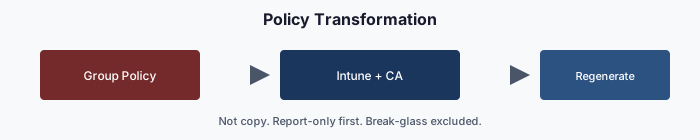
Group Policy was Active Directory’s most ambitious delivery system: configuration, security, software, scripts and drive mappings, inherited down the OU tree and filtered by security groups. Its replacement is several surfaces: Intune (configuration and compliance), Conditional Access (access control), Azure Machine Configuration for servers, and tenant settings. The framework maps every Group Policy category to its modern target, versions the mapping in the repository, and delivers policy through the same pipeline used for identity.
The target surfaces
| Group Policy category | Modern target | Attribute-scoped? |
|---|---|---|
| Device configuration (lockscreen, power, printers, drive maps) | Configuration profiles | Yes |
| Security baselines (local password and lockout, audit, UAC) | Intune security baselines and settings catalog (device and local accounts); Entra authentication methods and smart lockout (cloud accounts) | Yes |
| Software deployment (.msi, scripts) | Application deployment + enrollment | Yes |
| Scripts and mappings (startup and logon scripts, drive-letter mapping) | Intune platform scripts and remediations;1 OneDrive / SharePoint for file shares | Yes |
| Access control (user rights, logon restrictions) | Conditional Access + session controls; Intune user-rights policy | Yes |
| Server configuration (roles, features, registry hardening) | Azure Machine Configuration + Azure Policy | Yes |
| Browser / mailbox config | Settings catalog + productivity-suite policies | Yes |
The assessment classifies every GPO into exactly one category, and the Plan stage proposes its modern equivalent.
Why one-to-one mapping fails (and what to do instead)
Porting a fifty-setting GPO as fifty modern settings fails three ways. Dead weight: a decades-old GPO almost always holds settings no current requirement explains. Old conflicts: a faithful port reproduces conflicts born of Group Policy’s merge-versus-replace semantics. Wrong targeting: copying an OU-plus-security-group filter keeps manually curated groups that drift, instead of attribute-scoped dynamic groups.
The pattern is regenerate, not copy: one canonical modern policy per category, keyed to attribute branches, with per-branch overrides only where assessment data justifies them.
Configuration profiles — the workhorse
In most estates the majority of Group Policy settings map to Intune configuration profiles; Intune Group Policy analytics reports the actual supported percentage for each imported GPO.2 Each profile is a versioned manifest in the repository, targeting user or device dynamic groups:
policy_id: CONF-ENDPOINT-BASELINE-v1
display_name: Endpoint Baseline (v1)
platform: windows-11
profile_type: settings-catalog
scope:
  include_groups:
    - Structure-Enterprise-Devices
  exclude_groups:
    - Structure-Enterprise-BreakGlass-Devices
settings:
  - path: DeviceLock/MaxInactivityTimeDeviceLock
    value: 15            # illustrative values
  - path: LocalPoliciesSecurityOptions/InteractiveLogon_MachineInactivityLimit
    value: 900
  - path: Device/Experience/LockScreenMessage
    value: "Authorized use only."
  - path: Browser/Edge/SmartScreen/Enable
    value: true
provenance:
  derives_from_gpos:
    - { guid: "{8d1a7fc9-...}", gpo_name: "Enterprise Endpoint Baseline" }
    - { guid: "{2f6e4c7a-...}", gpo_name: "Global Browser Hardening" }
A new version supersedes the old one. Both stay in the repository for audit, but only the newest enabled manifest is assigned.
Profiles target attribute-scoped dynamic groups at enterprise, division, department or role scope (for example, high-risk devices). Only the enterprise baseline targets every device; narrower scopes keep the blast radius small.
Compliance policies are separate: they evaluate device state (minimum OS version, disk encryption, firewall, real-time protection, health attestation, required and prohibited apps) and report compliant or noncompliant on a schedule. Conditional Access reads that state directly through the “require device to be marked as compliant” grant control; no separate compliant-devices group is needed.3
Conditional Access — the access gate
Conditional Access replaces the perimeter-based authority Group Policy inherited from network segmentation. Policies target attribute-scoped groups, evaluate signals (compliance, risk, location, session age) and enforce controls (MFA, block, session limits). The library is a set of versioned manifests:
policy_id: CA-100-Enterprise-MFA
display_name: "CA-100 · Enterprise · Require MFA for all users"
state: enabled
conditions:
  users:
    include_groups: [Structure-Enterprise-Users]
    exclude_groups: [Structure-BreakGlass-Users]
  applications:
    include: all-cloud-apps
    exclude: [assessment-apps]
  client_app_types: [browser, mobileAppsAndDesktopClients]
grant:
  controls: [require_mfa]
  operator: AND
session:
  sign_in_frequency: 12h   # illustrative
Policy numbers encode scope:
| Range | Meaning |
|---|---|
| CA-000–099 | Foundational / break-glass / emergency |
| CA-100–199 | Enterprise baseline (all users) |
| CA-200–299 | Division-scoped |
| CA-300–399 | Department-scoped |
| CA-400–499 | Role-scoped (executive, admin, high-risk) |
| CA-500–599 | Workload-specific |
| CA-900–999 | Reserved — experimental / pilot |
A new policy takes the next open number in its range, and its display name starts with that number.
Prefer “require” to “block.” A bad block rule locks users out; a bad require rule adds a step that can be fixed. Block only clear-cut cases: legacy authentication4 and high-risk sign-ins detected by Entra ID Protection.5 Everything else (MFA, compliant device, session lifetime) is a require.
Server configuration
Windows Server registry settings, service states and features move to Azure Machine Configuration6 on Arc-connected servers, with Azure Policy governing assignment. Assignments target resource tags kept in sync with the server’s organizational attributes; a tag that drifts opens a tracked item.
The policy-delivery pipeline
Policy uses the Chapter 03 pipeline. Analyze diffs the repository against live Intune, Conditional Access and Arc state; Plan proposes one action per policy (create, update or retire); Deliver calls the APIs, verifies the after-state and records it. A typical run has tens to hundreds of actions, and the evidence packet snapshots every policy after delivery.
Conflict resolution
When two Intune profiles set the same setting to different values on the same device, Intune does not merge them by scope; it reports a conflict, and the outcome is not something to rely on.7 The framework therefore uses this order as an authoring rule, so each setting is owned by exactly one layer:
- Enterprise baseline profiles
- Division profiles
- Department profiles
- Role-scoped profiles
- Device-specific profiles (emergency patches)
A plan that sets one setting in two layers for the same device fails validation. Conditional Access follows a similar order, and requiring at a broad scope while blocking at a narrower one is prohibited, because it produces lockouts that are hard to debug.
Break-glass exclusions and testing
Every library excludes a small number of emergency access accounts8 from block-class policies. They are vaulted, used only in documented emergencies, reviewed on a schedule, and every use opens an incident ticket.
Every policy change passes four stages, and the pipeline rejects any that skips one: schema and boundary checks at plan validation; a simulated tenant whose tests assert the expected effect; a pilot group watched by the drift engine for a set period; then production after a clean pilot.
Retiring legacy Group Policy Objects
Once every user device is in Intune, every server is Arc-connected and every Conditional Access policy is attribute-scoped, legacy GPOs retire in three steps: unlink each migrated GPO from its OU; keep unlinked GPOs for a rollback window (for example, ninety days, illustrative); then delete them through a governed change once the modern surface shows zero drift.
The last GPO is typically the domain password and account policy, which still governs remaining AD accounts, including Kerberos-application service accounts. It retires only when compute migration is complete and no AD accounts remain in use.
Verification
Policy migration passes when every Intune profile, compliance policy, Conditional Access policy and Machine Configuration assignment derives from a repository manifest that targets attribute-scoped dynamic groups, and the forest has no linked GPOs except those inside the rollback window.
Key takeaways
- Group Policy is regenerated into Intune, Conditional Access, and machine configuration, not copied setting by setting.
- Each setting has exactly one owning layer, enforced at plan validation.
- The last GPO retires only when no AD accounts remain in use.
Footnotes
Microsoft Learn, Understand Microsoft Intune Management Extension - Microsoft Intune. https://learn.microsoft.com/en-us/intune/device-management/tools/management-extension-windows↩︎
Microsoft Learn, Use Microsoft Intune to import and analyze group policies - Microsoft Intune. https://learn.microsoft.com/en-us/intune/device-configuration/import-group-policy-analytics↩︎
Microsoft Learn, How to Require Device Compliance with Conditional Access - Microsoft Entra ID. https://learn.microsoft.com/en-us/entra/identity/conditional-access/policy-all-users-device-compliance↩︎
Microsoft Learn, Block legacy authentication with Conditional Access - Microsoft Entra ID. https://learn.microsoft.com/en-us/entra/identity/conditional-access/policy-block-legacy-authentication↩︎
Microsoft Learn, What are risk detections? - Microsoft Entra ID Protection. https://learn.microsoft.com/en-us/entra/id-protection/concept-identity-protection-risks↩︎
Microsoft Learn, What is Azure Machine Configuration? - Azure Machine Configuration. https://learn.microsoft.com/en-us/azure/governance/machine-configuration/overview/01-overview-concepts↩︎
Microsoft Learn, See device configuration policies with Microsoft Intune - Microsoft Intune. https://learn.microsoft.com/en-us/intune/device-configuration/monitor-device-profile↩︎
Microsoft Learn, Manage emergency access admin accounts - Microsoft Entra ID. https://learn.microsoft.com/en-us/entra/identity/role-based-access-control/security-emergency-access↩︎