Chapter 07 — Compute: Domain-Joined → Cloud Identity + Device Management + Hybrid Management
Device object transformation · PCs to cloud identity + device management · servers to hybrid management · service principal and Kerberos retirement
Dependency chain: Inventory → Plan → Identity → Policy → Network services → Devices and servers → Access plane → Retire AD DS → Prove steady state
The compute claim
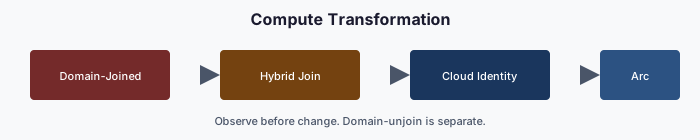
Once identity (Chapter 04), policy (Chapter 05) and services (Chapter 06) have moved, domain-joined PCs and servers are the largest remaining Active Directory dependency. PCs move to Entra join and Intune. Servers move to Azure Arc and Machine Configuration. Kerberos-bound applications lose their domain-join anchor and either move to modern authentication or retire. This chapter ends when no device authenticates to Active Directory, the last precondition for retiring AD DS.
The device states
| State | Primary auth | Managed by | When to use |
|---|---|---|---|
| Domain-joined (legacy) | AD Kerberos | Group Policy | Migration origin |
| Entra registered1 | Personal device with a work account | Intune (optional) | BYOD; rare in regulated environments |
| Hybrid-joined | AD and Entra ID together | Group Policy + Intune | Transition state, not a target |
| Entra joined | Entra ID only | Intune | Target for user PCs |
| Arc-connected server | Local or domain logon unchanged; system-assigned managed identity for Azure-plane operations | Azure Arc + Azure Policy machine configuration | Target for servers |
Two rules follow. Hybrid join is a transition, not a destination: a program that leaves devices hybrid-joined has not finished. And the target depends on device class: user PCs go to Entra join and Intune; Windows and Linux servers go to Arc and Machine Configuration. The two share compliance telemetry but not a management model.
Before a device leaves the domain, three AD dependencies need replacements, or it ships with a gap:
- Identity. The computer account authenticates with Kerberos and receives Group Policy through its OU.
- Policy. Local administrators, registry settings, software and startup scripts arrive through Group Policy.
- Trust. The certificate store trusts AD-issued CAs, smart-card logon relies on AD CS, and network access control may use AD credentials.
Three migration patterns for user PCs
- Greenfield. New hardware ships from the OEM pre-registered,2 and first boot is an Entra join. No AD dependency is ever created. Every hardware refresh should use this pattern, whatever the state of the wider program.
- Reset and re-enroll. Back up user state, reset the device, and re-enroll it as Entra joined. It is heavy for the user but technically clean, and a common choice for high-privilege users’ devices.
- Hybrid, then cloud. Where an immediate reset isn’t feasible, devices are hybrid-joined first while workloads move from Group Policy to Intune. There is no supported in-place conversion from hybrid join to Entra join, so the final step is still a reset and Autopilot re-provisioning3 (or a third-party migration tool), timed to a refresh or scheduled window. This is the most common and slowest path; it defers the reset rather than avoiding it, and drift detection keeps devices from stalling in hybrid state.
Servers — the Arc path
Azure Arc projects an on-premises or other-cloud server into Azure as a resource. The server stays where it is physically. It gains a system-assigned managed identity for Azure-plane operations (its OS logon is unchanged), receives Azure Policy and Machine Configuration assignments, appears in security and monitoring services, and is governed like a native Azure VM. Each projected server is tagged with its organizational attributes, and policy assignments target those tags, the same pattern Intune uses for user devices.
For each domain-joined server:
- Connect to Arc. Install the Connected Machine agent, register, and apply tags.4
- Onboard reporting. Defender for Servers and Machine Configuration report posture.5 (Conditional Access governs user and workload sign-ins to Entra-protected resources; it does not evaluate server compliance for server-to-server traffic.)
- Assign policy. Settings that came from Group Policy now come through Arc.
- Validate. Machine Configuration reports compliant and drift is zero.
- Leave the domain, only once Kerberos-bound clients have moved and no local administrators are AD-anchored.
- Re-validate. The server reboots clean, the Arc heartbeat continues, and configuration re-applies without AD.
Duration depends mostly on the Kerberos-application inventory, so budget per application, not per server.
Kerberos and SPN retirement
Every service principal name in the Chapter 02 map is an application that expects Kerberos. Each needs one of three decisions:
- Migrate to OAuth 2.0 / OpenID Connect through an Entra app registration.6 This is the preferred path.
- Retire it, often the cheapest option for end-of-life applications.
- Island it, as a last resort: a minimal AD island hosting only that application, with a documented end-of-life date.
No server leaves the domain until every SPN on it is resolved.
Devices, attributes and certificates
Devices carry organizational attributes, typically device extension attributes set through Microsoft Graph7 or rules on properties such as the enrollment profile. Those attributes drive device dynamic groups, Intune compliance scoping and Conditional Access device-state targeting. A device whose attributes disagree with its owner’s is value drift.
When domain-joined PCs go, AD CS-anchored smart-card logon goes with them. Entra certificate-based authentication replaces it: Windows smart-card sign-in to Entra-joined devices keeps working,8 with the chain ending in Entra ID. It needs a reader and a valid user certificate with a configured binding (Chapter 08). Access from Entra-joined devices to remaining on-premises Kerberos resources still depends on AD until those resources retire.9
Lifecycle after the move
- Joiner. The device ships from the OEM, the user signs in with Entra ID, compliance enrollment and Conditional Access apply, apps install from Intune, and encryption keys are escrowed.
- Mover. Attribute changes recompute device groups and Intune re-applies policy.
- Leaver. The device is retired (and its Entra object deleted) or reset for its next user.
There are no OU moves, domain unjoins, GPO re-links or AD cleanup. Device lifecycle becomes policy, not infrastructure.
Validation
Compute migration passes when:
- every user PC is Entra joined, and every server is Arc-connected or exempt with a retirement date;
- every device has valid attributes, and Intune and Azure Policy assignments target attribute-scoped groups or tags;
- every SPN in the legacy map is migrated, retired or islanded with an end-of-life date.
When every device, application, DNS zone, DHCP scope, SPN and GPO has moved, AD DS has no active consumers. The retirement itself is mechanical (Chapter 09); the hard part is Chapters 04–07.
Key takeaways
- User PCs end Entra joined; reaching that from hybrid join requires a reset or re-provisioning.
- Servers are Arc-connected for governance; their operating-system logon is a separate dependency.
- No server leaves the domain until every SPN on it is migrated, retired, or islanded.
Footnotes
Microsoft Learn, What is device identity in Microsoft Entra ID? - Microsoft Entra ID. https://learn.microsoft.com/en-us/entra/identity/devices/overview↩︎
Microsoft Learn, Overview of Windows Autopilot. https://learn.microsoft.com/en-us/autopilot/overview↩︎
Microsoft Learn, Windows Autopilot scenarios. Autopilot for existing devices is the listed method for converting hybrid-joined devices to Entra join; it reinstalls Windows. https://learn.microsoft.com/en-us/autopilot/tutorial/autopilot-scenarios↩︎
Microsoft Learn, Azure Arc-enabled servers Overview - Azure Arc. https://learn.microsoft.com/en-us/azure/azure-arc/servers/overview↩︎
Microsoft Learn, Connect on-premises machines - Microsoft Defender for Cloud. https://learn.microsoft.com/en-us/azure/defender-for-cloud/quickstart-onboard-machines↩︎
Microsoft Learn, Publish on-premises apps with Microsoft Entra application proxy - Microsoft Entra ID. For web applications that cannot be rewritten, Entra application proxy can publish them with Entra pre-authentication and Kerberos constrained delegation to the back end. https://learn.microsoft.com/en-us/entra/identity/app-proxy/overview-what-is-app-proxy↩︎
Microsoft Learn, Manage rules for dynamic membership groups in Microsoft Entra ID - Microsoft Entra ID. https://learn.microsoft.com/en-us/entra/identity/users/groups-dynamic-membership↩︎
Microsoft Learn, Windows smart card sign-in using Microsoft Entra certificate-based authentication - Microsoft Entra ID. https://learn.microsoft.com/en-us/entra/identity/authentication/concept-certificate-based-authentication-smartcard↩︎
Microsoft Learn, How SSO to on-premises resources works on Microsoft Entra joined devices - Microsoft Entra ID. https://learn.microsoft.com/en-us/entra/identity/devices/device-sso-to-on-premises-resources↩︎