Chapter 08 — Access Plane: SASE, Zero Trust, MFA, Certificate-Based Auth
The identity-bound access plane that replaces the Active Directory network perimeter
Dependency chain: Inventory → Plan → Identity → Policy → Network services → Devices and servers → Access plane → Retire AD DS → Prove steady state
The access claim
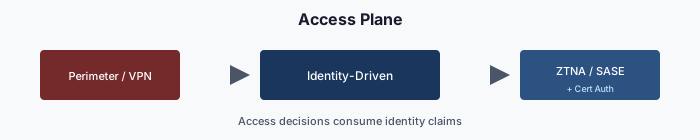
Retiring Active Directory removes the network perimeter as an authorization boundary. Its replacement is an identity-bound access plane with four coordinated surfaces: Zero Trust (the architectural model), Conditional Access (policy enforcement, Chapter 05), SASE (edge delivery), and phishing-resistant MFA with certificate-based authentication (proof of identity). Every access decision becomes a per-request evaluation of identity, device and signal, made at the cloud edge, logged, and visible to the drift engine.
The model — Zero Trust
Zero Trust is a set of architectural principles,1 not a product:
- Verify explicitly. Identity, device posture, risk and session state are evaluated per request; being inside the network confers no trust.
- Use least-privilege access. Access is time-bound and scoped to resource and purpose, with no standing privilege.
- Assume breach.2 Treat every session as potentially compromised; continuous access evaluation can revoke it mid-flight, and break-glass exclusions stay minimal and audited.
No single control is Zero Trust. The pattern is Conditional Access, Intune compliance, privileged identity management and certificate-based authentication working together. Three AD-era patterns retire with it:
- Network segment as authority. IP allowlists stop being authoritative; policy is per identity, device and session.
- Pass-through AD Kerberos. Modernized services accept short-lived cloud tokens instead of domain-controller tickets. Services on a documented Kerberos island keep Kerberos until they retire.
- Persistent administrative rights. Domain Admins, local administrator groups and never-expiring service accounts move to just-in-time elevation, group managed service accounts on remaining Kerberos islands,3 or workload identity federation for cloud workloads.4
SASE — the edge delivery surface
Secure Access Service Edge (SASE) is the cloud-delivered security surface5 that replaces the on-premises firewall, VPN, proxy and CASB stack. The framework does not pick a vendor; it governs the integration contract.
| Component | Function | Integration |
|---|---|---|
| Zero Trust Network Access | Per-application access; replaces VPN | Attribute-scoped application groups; Conditional Access enforces compliance and MFA |
| Secure Web Gateway | Outbound web filtering and DLP | Attribute-scoped user groups; logs to the SIEM |
| Cloud Access Security Broker | Inline enforcement for sanctioned cloud apps | Reads the cloud app catalog; attribute-scoped policies |
| Firewall as a Service | Distributed firewall plane | Policy targeted by projected tags |
| Data Loss Prevention | Content-aware filtering | Attribute-scoped sensitive-data groups |
Whatever the vendor, the contract is the same:
- Federation. Users authenticate through Entra ID; there is no local SASE user database.
- Group targeting. Policies reference attribute-scoped dynamic groups.
- Device posture. The Intune compliance signal is a policy input.
- Logging. Access logs go to the SIEM, and the drift engine correlates them with Entra sign-in logs.
- Provenance. Policy changes flow through the repository, never through direct portal edits.
Phishing-resistant MFA
Phishing-resistant methods are required for every privileged user and for all users on high-risk resources.6
| Method | Phishing-resistant | Typical use |
|---|---|---|
| FIDO2 security keys | Yes | Tier-0 administrators, high-privilege users |
| Windows Hello for Business (and Platform SSO on macOS)78 | Yes | Default daily sign-in on user PCs |
| Certificate-based authentication (PIV/CAC) | Yes | Smart-card holders |
| Passkey in Authenticator (device-bound)9 | Yes | Mobile and cross-device sign-in |
| Authenticator push (number matching always on)10 | No; resists push fatigue, not phishing | Transition and secondary method |
| SMS / voice | No | Not permitted |
The Conditional Access library (Chapter 05) requires FIDO2 or CBA for Tier-0 administrators, privileged roles and break-glass test accounts; requires MFA for everyone else with an authentication strength that excludes SMS and voice;11 and requires stronger methods for sensitive applications. Where smart cards exist, CBA is the user default: card plus PIN reaches the same phishing-resistant session as Windows Hello for Business.
Cloud certificate-based authentication — the AD CS retirement path
Smart-card logon has historically been anchored in AD CS and AD DS. When AD DS retires, that validation path goes with it unless the chain is re-anchored in Entra ID.
Entra CBA accepts X.509 certificates from CAs in the tenant’s PKI-based trust store, which holds root and issuing CA certificates and their revocation-list locations.12 At sign-in, Entra ID validates the chain, binds the certificate to a user through username-binding rules (for example SAN principal name, RFC 822 name, or issuer and serial number, with high-affinity bindings preferred),13 issues a token, and evaluates Conditional Access. The user still inserts a card and enters a PIN; only the end of the validation chain moves.
The retirement sequence:
- Add root and issuing CA certificates, with revocation-list locations, to the PKI-based trust store.
- Configure username bindings.
- Enable CBA as an authentication method.
- Require CBA for designated attribute-scoped groups through Conditional Access.
- Validate smart-card sign-ins in the sign-in logs.
- Retire the AD smart-card logon GPO (Chapter 05).
Issuance is a separate decision. An AD CS enterprise CA depends on AD DS,14 so issuance must move before AD retires: to a standalone CA, a managed cloud PKI service,15 or a third-party or federal shared-service CA. For PIV/CAC, the agency’s PIV issuer usually already fills this role. The framework keeps issuance and the Entra trust store pointed at the same CAs.
Privileged access management
Every privileged account, whether a domain-admin equivalent, cloud administrator or break-glass account, goes through a PAM vault, whichever vendor supplies it:
- No standing privilege.16 Each use requires explicit MFA-gated, time-bound, purpose-documented elevation.
- Break-glass accounts are vaulted, with dual-approval checkout, session recording and rotation on release.
- Elevated service accounts use managed identities and workload identity federation where possible, gMSAs on remaining Kerberos islands, and vaulted accounts only as a last resort.
- Session recording (video, keystrokes, command lines) goes to the SIEM. This is a third-party PAM capability, not part of Entra PIM.
Two drift types apply here: a vaulted account missing from Entra ID is orphan drift; a privileged Entra account that is not vaulted is phantom drift.
Continuous access evaluation
A Zero Trust session is not “good for twelve hours.” With continuous access evaluation, Entra ID and participating services revoke a live session when:
- the user’s password changes, or the account is disabled or deleted;
- the network location moves to a blocked range (with strict location enforcement enabled);
- user risk rises to high, for example on leaked credentials detected by Entra ID Protection.17
CAE works only with CAE-capable applications,18 and reacts to these critical events and IP-location changes, not to every Conditional Access condition. A device-compliance change, for example, takes effect at the next token refresh, so policies are written with that in mind.
The access plane in one flow
- Boot. Intune compliance checks pass and the disk unlocks with an escrowed key.
- Sign-in. Smart card and PIN; CBA validates the chain; a CAE-capable token is issued.
- Conditional Access. Compliant device, phishing-resistant MFA, expected location and low risk: allowed.
- Apps. Single sign-on covers later authentications; CAE can revoke the session if risk rises.
- Internal apps. ZTNA accepts the cloud token, checks compliance, MFA and attribute scope, proxies the connection and logs it. No VPN.
- Privileged change. Just-in-time elevation re-challenges MFA, grants a time-boxed window, records the session and emits the event.
- End of day. Tokens expire or refresh at the next sign-in, and the cycle restarts.
Each step is attribute-scoped and logged. Any failure becomes a tracked item.
Validation
Access-plane migration passes when:
- every user’s primary method is FIDO2, a passkey, Windows Hello for Business or CBA, with no SMS or voice as primary;
- every smart-card user signs in through Entra CBA, not AD-anchored smart-card logon;
- user-facing policies target attribute-scoped dynamic groups;
- at least ZTNA, a secure web gateway and a CASB are in place and federated with Entra ID;
- every privileged account goes through PAM with session recording, and break-glass use is audited on a schedule;
- CAE is enabled for supported applications, with strict location enforcement where location policies apply;
- the VPN remains only for named legacy applications with an end-of-life date.
Key takeaways
- Access decisions move from network location to identity, device, and risk, enforced by Conditional Access.
- Phishing-resistant MFA (FIDO2, Windows Hello, passkeys, PIV/CAC via CBA) is the target for all users.
- Certificate issuance needs a successor before AD retires, because an enterprise CA depends on AD DS.
Footnotes
NIST, SP 800-207, Zero Trust Architecture. https://csrc.nist.gov/pubs/sp/800/207/final↩︎
Microsoft Learn, Zero Trust as a security foundation. https://learn.microsoft.com/en-us/security/zero-trust/zero-trust-overview↩︎
Microsoft Learn, Group Managed Service Accounts overview. https://learn.microsoft.com/en-us/windows-server/identity/ad-ds/manage/group-managed-service-accounts/group-managed-service-accounts/group-managed-service-accounts-overview↩︎
Microsoft Learn, Workload Identity Federation - Microsoft Entra Workload ID. https://learn.microsoft.com/en-us/entra/workload-id/workload-identity-federation↩︎
Microsoft Learn, What is Global Secure Access? - Global Secure Access. Microsoft’s Security Service Edge offering is Global Secure Access (Entra Internet Access and Entra Private Access). https://learn.microsoft.com/en-us/entra/global-secure-access/overview-what-is-global-secure-access↩︎
OMB, OMB M-22-09: Moving the U.S. Government Toward Zero Trust Cybersecurity Principles. M-22-09 requires phishing-resistant MFA for agency staff, contractors, and partners. https://www.whitehouse.gov/wp-content/uploads/2022/01/M-22-09.pdf↩︎
Microsoft Learn, Configure Platform SSO for macOS devices - Microsoft Intune. https://learn.microsoft.com/en-us/intune/device-configuration/settings-catalog/configure-platform-sso-macos↩︎
Microsoft Learn, Windows Hello for Business overview. https://learn.microsoft.com/en-us/windows/security/identity-protection/hello-for-business/↩︎
Microsoft Learn, Enable and support passkeys in Authenticator for Microsoft Entra ID - Microsoft Entra ID. https://learn.microsoft.com/en-us/entra/identity/authentication/how-to-enable-authenticator-passkey↩︎
Microsoft Learn, How number matching works in MFA push notifications for Authenticator - Microsoft Entra ID. https://learn.microsoft.com/en-us/entra/identity/authentication/how-to-mfa-number-match↩︎
Microsoft Learn, Overview of Conditional Access Authentication Strengths - Microsoft Entra ID. https://learn.microsoft.com/en-us/entra/identity/authentication/concept-authentication-strengths↩︎
Microsoft Learn, How to configure certificate authorities for Microsoft Entra certificate-based authentication - Microsoft Entra ID. https://learn.microsoft.com/en-us/entra/identity/authentication/how-to-configure-certificate-authorities↩︎
Microsoft Learn, Set Up Microsoft Entra CBA - Microsoft Entra ID. https://learn.microsoft.com/en-us/entra/identity/authentication/how-to-certificate-based-authentication↩︎
Microsoft Learn, What is the Certification Authority Role Service in Windows Server?. https://learn.microsoft.com/en-us/windows-server/identity/ad-cs/certification-authority-role↩︎
Microsoft Learn, Microsoft Cloud PKI for Microsoft Intune - Microsoft Intune. https://learn.microsoft.com/en-us/intune/cloud-pki/↩︎
Microsoft Learn, What is Privileged Identity Management? - Microsoft Entra ID Governance. https://learn.microsoft.com/en-us/entra/id-governance/privileged-identity-management/pim-configure↩︎
Microsoft Learn, What are risk detections? - Microsoft Entra ID Protection. https://learn.microsoft.com/en-us/entra/id-protection/concept-identity-protection-risks↩︎
Microsoft Learn, Continuous access evaluation in Microsoft Entra - Microsoft Entra ID. Strict location enforcement is in public preview at the time of writing. https://learn.microsoft.com/en-us/entra/identity/conditional-access/concept-continuous-access-evaluation↩︎