Chapter 06 — The Canonical Workforce Identity Model
Chapter 06 — The Canonical Workforce Identity Model
OPM’s standard attributes are the contract. Native attributes first. A small, coded set of extension attributes for access. Nothing hand-edited.
The standard-attribute layer: why OPM’s data standards, not vendor fields, are the contract for federal employees. Contractors and vendors, whom HRIT doesn’t cover: where to source them, and how to split authority among those sources. The design rules behind the schema. The implementation crosswalk, which every other page on this site links to instead of repeating. Why three extension attributes, and why they hold codes. How the hire and leave dates reach Entra ID from each landing zone. Who is allowed to write any of it.
The standard-attribute layer
The schema below names Oracle fields because Oracle Fusion Cloud HCM is the Core HCM platform. But the durable contract is one level up: OPM’s standard personnel data. Every agency on the platform records the same data elements with the same codes and meanings, defined by OPM’s data standards (formerly published as the Guide to Data Standards, now maintained in OPM’s online metadata repository),12 and every personnel action carries a nature-of-action code from the same standards (Chapter 08).3 For federal employees, mapping identity to the standard rather than to vendor fields means one crosswalk serves every employee population, survives the next vendor change, and can be reused by any agency on the platform. The standard stops at federal employees, though; contractors and vendors are covered in the next section.
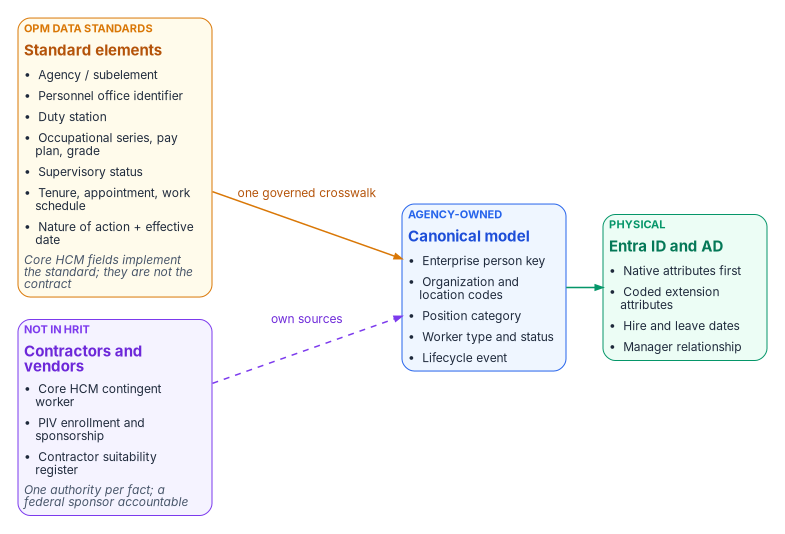
| OPM standard data element | Identity use | Lands as (crosswalk below) |
|---|---|---|
| Agency / subelement | Legal employer and component scope | companyName; organization code |
| Personnel office identifier | Servicing HR office; delegated administration scope | Administrative-unit rule input |
| Duty station | Location of record; location-based scoping; physical-access integration | Location code; usageLocation source |
| Occupational series, pay plan, grade | Position category for role-eligible access packages | Position category code |
| Supervisory status | Approver and reviewer eligibility; manager-chain integrity | Supervisor group; manager checks |
| Tenure, type of appointment, work schedule | Worker type and its lifecycle profile (pre-hire window, license, retention) | employeeType; worker-type code |
| Nature of action + effective date | Lifecycle trigger: joiner, mover, conversion, leave, return, leaver, correction | Hire and leave dates; account state |
Confirm each element’s current name, values and how Core HCM exposes it against OPM’s current standards at engagement time (Chapter 12, verification register). OPM requires that the coded blocks of the SF-50 use only codes listed in the EHRI Data Standards,4 which is what makes them dependable as access inputs. Where an access decision needs a code that a standard element supplies, the code is the standard’s — not a locally invented list.
Contractors and vendors: the population HRIT doesn’t cover
OPM’s data standards and nature-of-action codes describe federal employees. Federal HR 2.0 moves federal employees. Contractors and vendors — often a large share of an agency’s accounts, and the share most likely to be orphaned — are in neither. In most agencies they are tracked today in contracting officer’s representative (COR) spreadsheets: a sponsor, a contract or task order, a start date and an end date that nobody is obliged to keep current. A spreadsheet can’t be a source of authority, so these workers need one, mapped into the same canonical model as employees.
| Option | What it gives | What it lacks |
|---|---|---|
| Core HCM Contingent Worker (best fit) | Oracle Fusion Cloud HCM treats contractors as a full worker type, the contingent worker: a person record, an assignment, a place in the organization and a lifecycle much like an employee’s, with add, renew and convert actions and the same interfaces567 | No vendor-management system and no non-employee governance layer: sponsorship, contract linkage and end-date attestation still need an owner and a process. Confirm that the agency’s Core HCM configuration will record contingent workers |
| PIV credential and sponsorship system | Sponsorship, adjudication, the sponsoring office and an expiry already exist for every badged contractor: FIPS 201-3 requires a background investigation and favorable adjudication before issuance, and caps a PIV card’s validity at six years8 | Covers only people who get a PIV credential; vendors and short-term workers without one need another path |
| Contractor suitability register | Many agencies already keep one, under personnel security or contracting: each contractor tied to the agency contract they work on, with the suitability determination and its date. It is often the only existing record that links a person to a contract under agency authority | Often records the vetting decision, not the end of the engagement. Owner, interface and update timing vary, and a register keyed by hand from COR spreadsheets inherits their lag |
| A non-employee lifecycle service (complement) | Sponsor workflows, contract and vendor records, periodic attestation | A third source to integrate and govern; usually layered on one of the two options above rather than replacing them |
Whichever source the agency chooses, the rules are the same:
- One model. Contractors map into the same canonical model, with worker type set to contractor and their own enterprise person key (Chapter 04). In the proposed canonical model, conversion between contractor and employee creates a new affiliation for the same person, joining the two sources on that key, so a converting person never gets a second identity.
- Different triggers. Contractors have no SF-50. Their joiner and leaver events are the contract or sponsorship start and end dates, and a sponsor’s withdrawal is a leaver event (Chapter 08).
- Map what applies. Organization code, duty station and sponsor (as
manager) carry over; employee-only elements such as pay plan and grade don’t. Add a contract or task-order reference so access can be scoped to the contract and reviewed with it. - Expiry is enforced, not trusted. An end date that passes without renewal ends access on that date, whatever the spreadsheet says.
Sequence: start with what already exists
- Read only. Reconcile the register and PIV enrollment against the contractor accounts in AD and Entra ID, joined on the enterprise person key. Report orphans and expired engagements, and write nothing to any directory. This measures the problem before anyone is asked to change a process.
- Before Core HCM. The register plus sponsor attestation become the contractor source. Ship the leaver trigger first, then the joiner.
- At Core HCM go-live. Decide whether to configure the contingent worker type. If the agency adopts it, it holds the person and the assignment, and the register stays the authority for the contract and suitability. Either way the identity pipeline doesn’t change: it reads one canonical record, whatever the source.
Design rules
- Use a native Entra attribute wherever one exists.
employeeId,department,jobTitle,companyName,manager,employeeType,employeeHireDate,employeeLeaveDateTimeandemployeeOrgDataalready mean what the HR record means. Other Microsoft features (the org chart, Lifecycle Workflows, access-package approvals) read them directly. - Add an extension attribute only where access needs a value a rule can’t read natively. Rules for dynamic membership support a fixed list of user properties. That list includes
department,companyName,jobTitle,employeeId,employeeHireDate(preview),userTypeandaccountEnabled, plusextensionAttribute1–15and directory extension properties. It doesn’t includeemployeeType,employeeOrgDataormanager(direct-reports groups use a separate rule form).10 Three attributes cover the gap. - Put codes in access attributes, never display strings. An organization code changes only when the business fact changes; a display name changes whenever someone retypes it.
- Use the same carrier in both landing zones.
extensionAttribute1–15exist in on-premises AD and in Entra ID. For synced users, AD is the source and the Entra values are read-only; for cloud-only users they can be set when the user is created or updated.11 A rule written againstuser.extensionAttribute10works the same for a hybrid user and a cloud-mastered one, which matters during the years of coexistence. - Don’t build an organizational hierarchy into attributes. The reporting line is the
managerrelationship; organizational placement isdepartment,employeeOrgDataand one organization code. There’s no encoded path, tree or composite key to maintain.
The schema
| Canonical field | Oracle HCM source | SCIM attribute | On-premises AD | Entra ID | Rule can read it | Used for |
|---|---|---|---|---|---|---|
| Person number | workers.PersonNumber |
externalId |
employeeID |
employeeId |
Yes | Source correlation key, subject to the enterprise identifier decision in Chapter 04 (where the agency already has an enterprise ID, such as a Mainframe PIN, employeeId carries that instead and PersonNumber maps to it) |
| Employment active | Assignment status | active |
accountDisabled |
accountEnabled |
Yes | Joiner and leaver state |
| Given name / surname | workers.names |
name.givenName / name.familyName |
givenName / sn |
givenName / surname |
Yes | Display, UPN rules |
| Display name | workers.DisplayName |
displayName |
cn |
displayName |
Yes | Display only, never access |
| Department | Department name | enterprise department |
department |
department |
Yes | Display, address book, coarse scoping |
| Division | Business unit | enterprise division |
division |
employeeOrgData.division |
No | Reporting, profile card |
| Cost center | Cost center | enterprise costCenter |
— | employeeOrgData.costCenter |
No | Chargeback, reporting |
| Legal employer | Legal employer | enterprise organization |
company |
companyName |
Yes | Agency or component |
| Manager | Manager’s person number | enterprise manager |
manager (DN) |
manager |
Direct-reports rule only | Supervisory chain, approvals, reviewers |
| Job title | JobName |
title |
title |
jobTitle |
Yes | Display; not an access input |
| Worker type | Worker type / person type | custom extension workerType |
employeeType |
employeeType |
No | Employee, contractor, intern, volunteer |
| Hire date | Effective start date | custom extension HireDate |
extensionAttribute2 |
employeeHireDate |
Yes (preview) | Joiner workflow trigger |
| Leave date | Termination effective date | custom extension TermDate |
extensionAttribute3 |
employeeLeaveDateTime |
No | Leaver workflow trigger |
| Work country | Work address country | addresses[type eq "work"].country |
co |
country |
Yes | Address; source for the usageLocation expression that licensing needs |
| Organization code | Department ID (code) | custom extension orgCode |
extensionAttribute10 |
extensionAttribute10 |
Yes | Access targeting |
| Worker type code | Worker type (code) | custom extension workerTypeCode |
extensionAttribute11 |
extensionAttribute11 |
Yes | Access targeting; mirrors employeeType |
| Position category | Job family or position category (code) | custom extension positionCategory |
extensionAttribute12 |
extensionAttribute12 |
Yes | Access targeting |
Notes on the table:
- The SCIM mappings for both landing zones follow the example worksheets in Microsoft’s Oracle HCM integration guide, which also maps a custom
JobCodetoextensionAttribute1in both AD and Entra ID. Custom attributes are added to the provisioning app’s schema as SCIM schema extensions and then mapped.1213 For attributes with no AD equivalent, the same guide says to useextensionAttribute1–15or extend the AD schema.14 - Neither date has a native AD attribute. For AD-landed users, Microsoft’s Oracle HCM worksheet writes
HireDateandTermDatetoextensionAttribute2andextensionAttribute3;15 a sync rule then maps each one toemployeeHireDateoremployeeLeaveDateTimein Entra ID. The AD attribute must be a string, and the value must be converted to the format Entra expects, usually with a date-format expression. Inbound provisioning, Entra Connect cloud sync and Entra Connect Sync all support both target attributes.16 - The choice of
extensionAttribute10–12for access codes is this workbook’s proposed implementation choice, not a Microsoft default. Before Phase 1 closes, confirm that each one is in the provisioning app’s target attribute list and isn’t already used. Exchange callsextensionAttribute1–15custom attributes 1–15.17 - Rules can’t use multi-value extension properties.18 All three access attributes hold one code.
Writers
A dynamic membership rule moves the access decision to whoever can write the attribute it reads. Microsoft’s guidance is to check write permissions for every attribute a rule uses, in Entra ID and in any source directory, and to restrict self-service write access to attributes used in security-sensitive groups.19 For this schema that means:
- The only writer of every field above is the provisioning service: the API-driven inbound app for cloud-mastered users, the provisioning agent plus Entra Connect for AD-mastered ones.
- Remove help-desk, self-service and Exchange-admin write paths to
extensionAttribute10–12and to the two date carriers. In AD, review the ACLs on the target OUs; in Exchange, the custom-attribute cmdlets are a write path. - Any write by another principal is a drift event (Chapter 11).
How other pages use this schema
The SQL Server Identity Transformation series, Book 07 applies the same attribute-to-access discipline to SQL Server logins and database roles. Book 02, Chapter 09 — Building the Entra ID Target and the Conditional Access library link here rather than carrying their own attribute map.
U.S. Office of Personnel Management, “Data Policy & Guidance” (data standards and the metadata repository that replaced the PDF Guide to Data Standards), https://www.opm.gov/policy-data-oversight/data-analysis-documentation/data-policy-guidance/ (accessed Oct 20, 2026).↩︎
U.S. Office of Personnel Management, Federal Workforce Data, “EHRI Data Standards,” https://data.opm.gov/data-standards/ehri-data-standards (accessed Oct 20, 2026).↩︎
U.S. Office of Personnel Management, Guide to Processing Personnel Actions, October 2026 edition, https://www.opm.gov/policy-data-oversight/data-analysis-documentation/personnel-documentation/processing-personnel-actions/guide_to_processing_personnel_actions.pdf (accessed Oct 20, 2026).↩︎
U.S. Office of Personnel Management, Guide to Processing Personnel Actions, October 2026 edition, https://www.opm.gov/policy-data-oversight/data-analysis-documentation/personnel-documentation/processing-personnel-actions/guide_to_processing_personnel_actions.pdf (accessed Oct 20, 2026).↩︎
Oracle, REST API for Oracle Fusion Cloud HCM, “Create a worker work relationship” (
WorkerTypevalues Employee (E), Contingent Worker (C), Pending Worker (P), Nonworker (N)), https://docs.oracle.com/en/cloud/saas/human-resources/farws/op-workers-workersuniqid-child-workrelationships-post.html (accessed Oct 20, 2026).↩︎Oracle, Oracle Fusion Cloud HCM, “How You Convert Pending Workers” (Add Contingent Worker, Add Contingent Work Relationship and Renew Contingent Worker actions), https://docs.oracle.com/en/cloud/saas/human-resources/fawhr/how-you-convert-pending-workers.html (accessed Oct 20, 2026).↩︎
Oracle, Oracle Fusion Cloud Human Resources 26B What’s New, “New Redwood Process to Change Worker Type” (contingent worker to employee in one transaction), https://docs.oracle.com/en/cloud/saas/readiness/hcm/26b/hure-26b/26B-hr-wn-f43513.htm (accessed Oct 20, 2026).↩︎
National Institute of Standards and Technology, FIPS 201-3, Personal Identity Verification (PIV) of Federal Employees and Contractors, January 2022 (background investigation and adjudication before issuance; identity proofing and registration meet IAL3; card validity of no more than six years), https://nvlpubs.nist.gov/nistpubs/FIPS/NIST.FIPS.201-3.pdf (accessed Oct 20, 2026).↩︎
National Institute of Standards and Technology, FIPS 201-3, Personal Identity Verification (PIV) of Federal Employees and Contractors, January 2022 (background investigation and adjudication before issuance; identity proofing and registration meet IAL3; card validity of no more than six years), https://nvlpubs.nist.gov/nistpubs/FIPS/NIST.FIPS.201-3.pdf (accessed Oct 20, 2026).↩︎
Microsoft Learn, “Manage rules for dynamic membership groups in Microsoft Entra ID” (supported properties; extension attributes and custom extension properties; security consideration on attribute write permissions), https://learn.microsoft.com/en-us/entra/identity/users/groups-dynamic-membership (accessed Oct 20, 2026).↩︎
Microsoft Graph, “onPremisesExtensionAttributes resource type,” https://learn.microsoft.com/en-us/graph/api/resources/onpremisesextensionattributes (accessed Oct 20, 2026).↩︎
Microsoft Learn, “Configure Oracle Human Capital Management (HCM) for automatic user provisioning,” https://learn.microsoft.com/en-us/entra/identity/saas-apps/oracle-hcm-provisioning-tutorial (accessed Oct 20, 2026).↩︎
Microsoft Learn, “Extend API-driven provisioning to sync custom attributes,” https://learn.microsoft.com/en-us/entra/identity/app-provisioning/inbound-provisioning-api-custom-attributes (accessed Oct 20, 2026).↩︎
Microsoft Learn, “Configure Oracle Human Capital Management (HCM) for automatic user provisioning,” https://learn.microsoft.com/en-us/entra/identity/saas-apps/oracle-hcm-provisioning-tutorial (accessed Oct 20, 2026).↩︎
Microsoft Learn, “Configure Oracle Human Capital Management (HCM) for automatic user provisioning,” https://learn.microsoft.com/en-us/entra/identity/saas-apps/oracle-hcm-provisioning-tutorial (accessed Oct 20, 2026).↩︎
Microsoft Learn, “How to synchronize attributes for Lifecycle Workflows,” https://learn.microsoft.com/en-us/entra/id-governance/how-to-lifecycle-workflow-sync-attributes (accessed Oct 20, 2026).↩︎
Microsoft Graph, “onPremisesExtensionAttributes resource type,” https://learn.microsoft.com/en-us/graph/api/resources/onpremisesextensionattributes (accessed Oct 20, 2026).↩︎
Microsoft Learn, “Manage rules for dynamic membership groups in Microsoft Entra ID” (supported properties; extension attributes and custom extension properties; security consideration on attribute write permissions), https://learn.microsoft.com/en-us/entra/identity/users/groups-dynamic-membership (accessed Oct 20, 2026).↩︎
Microsoft Learn, “Manage rules for dynamic membership groups in Microsoft Entra ID” (supported properties; extension attributes and custom extension properties; security consideration on attribute write permissions), https://learn.microsoft.com/en-us/entra/identity/users/groups-dynamic-membership (accessed Oct 20, 2026).↩︎