Chapter 08 — Joiner, Mover, Leaver
Chapter 08 — Joiner, Mover, Leaver
Nobody requests an account for a new hire. The hire causes it.
The five events a worker record goes through and what each one causes in the directory. The personnel-action codes that trigger them. The division of labor between inbound provisioning and Lifecycle Workflows. Triggers, schedules and built-in tasks. Emergency termination, rehire, conversion and deletion. The leaver sequence itself, including credentials, is in Chapter 09.
The lifecycle is an event stream
Joiner, mover and leaver, plus the two transitions estates forget until they hurt, rehire and conversion (contractor to employee), are the five state changes a worker record goes through. Each is recorded in the HR system as an effective-dated event, and each maps to a fixed set of identity actions:
| HR event | Recorded fact | Identity actions derived from it |
|---|---|---|
| Joiner | Future-dated hire: worker record and assignment created | Account created ahead of the start date by provisioning; licenses and baseline access derived from attributes; credential enrollment queued for day one (Chapter 09) |
| Mover | Assignment change: new position, organization, location or supervisor | Attributes re-stamped; dynamic memberships re-evaluated, so the old organization’s access leaves as the new one’s arrives; access review on what remains (PS-5); approvals follow the new supervisor of record |
| Leaver | Effective-dated separation | The leaver sequence of Chapter 09: immediately block logical access, then reconcile credentials, devices, entitlements, application access, and later disposition — one workflow, one evidence trail (PS-4) |
| Rehire | Returning worker matched to the prior worker record | Prior identifier re-linked; the person resumes an identity rather than getting a second one (IA-4) |
| Conversion | Worker type changes; affiliation continuous | Same identifier, access re-derived from the new worker type; no duplicate identity |
The property that matters is the direction of causation. Nobody remembers to disable a leaver; the separation record causes the disablement, on the effective date. Tickets survive only for exceptions, and every exception is visible as a deviation from a computed baseline.
The controls in the table are NIST SP 800-53’s. PS-4 requires, on termination, disabling system access within an organization-defined period and terminating or revoking the person’s authenticators and credentials. PS-5 requires reviewing and confirming the need for existing logical and physical access when a person is reassigned or transferred, and modifying it to match. IA-4 requires preventing the reuse of identifiers for an organization-defined period.1
Personnel actions are the triggers
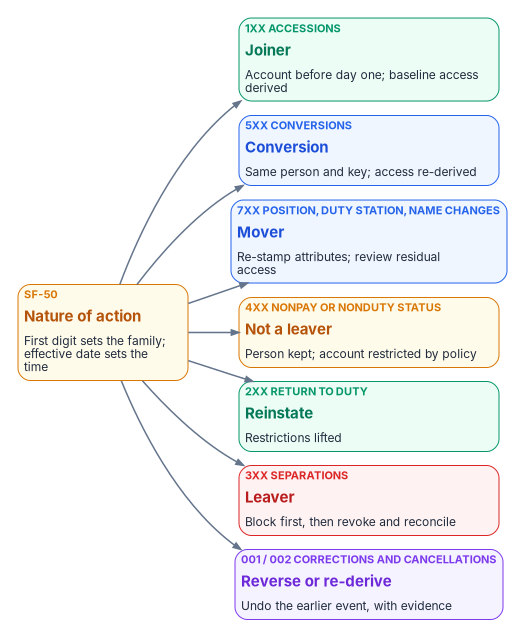
For federal employees, every HR event above is recorded as a personnel action, and every personnel action carries a nature-of-action (NOA) code. The first digit of the code sets the family (1 for appointments, 3 for separations, 5 for conversions, 7 for position and miscellaneous changes, and so on); OPM’s Guide to Processing Personnel Actions organizes its chapters around those codes.2 That gives HR-driven identity a standard, government-wide trigger vocabulary instead of a locally invented one. Every accession, conversion and separation, and every correction or cancellation of one, must be documented on an SF-50, the Notification of Personnel Action. A few action types don’t need an SF-50; realignment is one of them, so a mover feed can’t assume one.3
| NOA family (GPPA chapters) | Examples | Identity event |
|---|---|---|
| Accessions — 1xx (Ch 9–11, 13) | 100, 101, 130, 140, 141, 170, 171 | Joiner |
| Conversions — 5xx (Ch 9–11, 13) | 500, 501, 540, 570, 571 | Conversion: same person and key; access re-derived |
| Position changes — 7xx (Ch 14) | 702 promotion, 713 change to lower grade, 721 reassignment | Mover |
| Other 7xx changes (Ch 20, 21, 23, 24) | 780 name change, 790 realignment, 792 duty station change, 781/782 work schedule | Mover (attribute re-stamp; UPN kept on a name change) |
| Nonpay or nonduty status — 4xx (Ch 15) | 430, 450–452, 460, 471, 473, 480 | Not a leaver: the person is kept; policy restricts the account |
| Return to duty — 2xx (Ch 16) | 280, 292 | Reinstate: restrictions lifted |
| Separations — 3xx (Ch 30–31) | 300–304, 307, 308 retirements; 312, 317, 330, 350–357, 385, 390 | Leaver: block first (Chapter 09) |
| Corrections and cancellations (Ch 32) | 002 correction, 001 cancellation | Reverse or re-derive from the corrected record, with evidence |
| Pay and data-element changes — 8xx (Ch 17, 26, 28) | 880 tenure change; 800, 803 data element change | Usually none; re-derive the worker profile when tenure or a mapped element changes |
The table is a proposed interpretation, not an OPM rule. HR, security, labor-relations, privacy, and personnel-policy owners validate the mappings, exceptions, precedence rules, and actions before automation.
Contractors and vendors have no SF-50 and no nature-of-action codes. Their joiner and leaver events are the contract or sponsorship start and end dates in their own source, and a sponsor’s withdrawal is a leaver event (Chapter 06).
Three rules follow, and Appendix A sets out the rest:
- Leave is not a leaver. Furlough, leave without pay and suspension (the 4xx family) keep the person; deprovisioning them as leavers locks out people who are still employed.
- Precedence is a rule. When two actions for one person land in one cycle, a separation wins, and a conversion is applied before a mover is evaluated.
- Cancellations are first-class events. A cancelled separation (001/002) re-enables what the separation disabled, from the corrected record, with evidence.
Who does what: provisioning and Lifecycle Workflows
Two Microsoft services share the work, and the boundary between them is easy to blur:
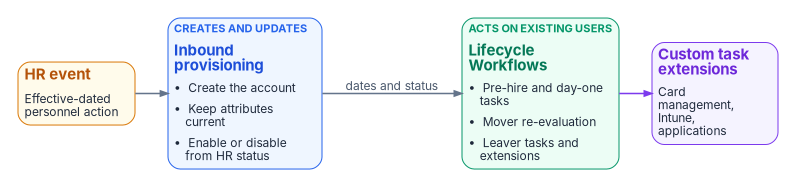
- Inbound provisioning creates and updates accounts. It creates the user, keeps attributes current, and enables or disables the account from the HR status (Chapter 05).56 With API-driven inbound provisioning, the SCIM
activevalue sets the account status by default, and the/bulkUploadendpoint doesn’t delete users; Microsoft points to the Lifecycle Workflows Delete user task for that.7 - Lifecycle Workflows act on users who already exist. Microsoft describes them as automating the routine processes around HR-driven provisioning: while HR provisioning manages creation and attribute updates, workflows run additional tasks.8 A workflow is a set of tasks plus execution conditions: a scope (who) and a trigger (when).9
A workflow never creates the account. A page that says “Lifecycle Workflows provision the new hire” has the boundary wrong.
The two also license differently. API-driven inbound provisioning is included from Microsoft Entra ID P1; Lifecycle Workflows need Microsoft Entra ID Governance or Microsoft Entra Suite.1011 Microsoft Entra ID Governance is available in GCC, GCC High and DoD.12
Triggers and schedule
Lifecycle Workflows support four scheduled trigger types — time-based attribute, attribute change, group membership change, and sign-in inactivity — plus on-demand only.13 The time-based trigger reads employeeHireDate, employeeLeaveDateTime or createdDateTime, with an offset of 0 to 180 days before or after the date; a relative time-based trigger, in preview, extends the offset to 365 days.14 Scheduling has to be turned on for each workflow, and scheduled workflows are evaluated every 3 hours by default; the interval can be set from 1 to 24 hours, and it’s a single tenant-wide setting that every workflow follows.1516 Just before processing, the engine re-evaluates each user and skips anyone who no longer meets the conditions.17
That schedule matters for evidence. A workflow never runs earlier than the time in the trigger attribute, but the tenant schedule can delay it,18 so a leaver workflow keyed to employeeLeaveDateTime runs at the first scheduled pass after the date, and the separation-to-revocation interval (Chapter 11) includes the schedule interval. Set the tenant interval with the leaver workflow in mind. There’s also a three-day catch-up window: a user whose trigger date passed no more than three days before the engine sees them is still processed, but a later one isn’t.19 A separation recorded more than three days after its effective date has to go through the on-demand path (see Emergency termination).
Built-in tasks by stage
| Stage | Built-in tasks (selection) |
|---|---|
| Joiner | Send welcome email; generate a Temporary Access Pass and send it to the manager; request an access package assignment; assign licenses; add to groups and Teams; enable the account |
| Mover | Notify the manager of the move; request or remove access package assignments; add to or remove from selected groups; update user attributes |
| Leaver | Disable the account; remove from all groups and all Teams; remove all access package assignments and cancel pending requests; remove licenses; revoke all refresh tokens; delete the user |
| Any stage | Run a custom task extension (a call out to an Azure Logic App) |
No built-in task revokes a certificate or a PIV credential, or retires a device. Those steps go through a custom task extension or a separate process (Chapter 09).
Joiner
Provisioning creates the account ahead of the start date from the future-dated hire. A pre-hire workflow runs a set number of days before employeeHireDate (for example, generate a Temporary Access Pass and send it to the manager), and a day-one workflow runs on the date (enable the account, assign licenses, add baseline groups). Microsoft recommends a 24-hour maximum lifetime for a Temporary Access Pass sent to a new hire, so that it hasn’t expired in another time zone, and recommends setting the time portion of employeeHireDate early enough that the tenant schedule doesn’t push the day-one run past the start of work.21 Day-one readiness (account, licenses and baseline access in place at start of day) is a metric, not a hope (Chapter 11).
Mover
The mover event re-stamps attributes through provisioning; dynamic memberships re-evaluate on their own (Chapter 10). An attribute-change workflow scoped to department or the organization code can notify the manager and start a review of what’s left. Old access that came from a dynamic group goes away when the rule stops matching; old access that came from an access package or a direct assignment doesn’t, which is why the review on the residual is a control, not a courtesy.
Leaver
The separation record sets employeeLeaveDateTime through provisioning, and the leaver workflows run against it: a pre-separation workflow (notify the manager), a last-day workflow, and a post-separation workflow that deletes the user after the retention period. The order of the steps, and the credential and device steps that the built-in tasks don’t cover, are Chapter 09’s subject.
Emergency termination
Some separations can’t wait for the schedule. Microsoft’s Real-time employee termination template is an on-demand workflow; its tutorial removes the user from all groups and all Teams and deletes the account.22 For an agency, use the template as the starting point for an on-demand workflow that runs the same sequence as the scheduled leaver workflow (Chapter 09), not a shorter one. The trigger is human; the execution and the evidence are identical.
Rehire and conversion
- Rehire. The returning worker is matched to the prior worker record by person number, and the provisioning match on
employeeIdre-links the existing account if it still exists; Microsoft’s HR-driven provisioning can reactivate or reprovision a rehire’s old account.2324 If the account was deleted, the new account carries the sameemployeeId; the identifier history lives in the HR record, not the directory. - Conversion. A contractor-to-employee change is an attribute change on the same person, not a leaver plus a joiner.
employeeTypeand the worker-type code change; access re-derives; the identifier stays.
Deletion
Disable on the separation date; delete or anonymize only under the approved account-disposition rule; retain each category of HR record, authorization record, audit evidence, and security log under its applicable schedule and legal-hold requirements, from a post-separation workflow. A deleted Entra user can be restored for 30 days, after which it is permanently deleted;25 retention for audit and records purposes has to be met by the logs and the HR record, not by keeping the account. For a synchronized user, the disposition happens in Active Directory: Entra ID isn’t the source of authority for that account, and a user deleted only in Entra ID can be restored by the next sync cycle.26
NIST, SP 800-53 Rev. 5, Security and Privacy Controls for Information Systems and Organizations, September 2020 (updated December 10, 2020), controls IA-4, PS-4 and PS-5, https://csrc.nist.gov/pubs/sp/800/53/r5/upd1/final (accessed Oct 20, 2026).↩︎
U.S. Office of Personnel Management, The Guide to Processing Personnel Actions, October 2026 edition (chapter list with nature-of-action codes per chapter; Chapter 1 §4, nature of action, and the SF-50 documentation requirement; Chapter 4 job aid for blocks 5-A and 6-A), https://www.opm.gov/policy-data-oversight/data-analysis-documentation/personnel-documentation/processing-personnel-actions/guide_to_processing_personnel_actions.pdf (accessed Oct 20, 2026).↩︎
U.S. Office of Personnel Management, The Guide to Processing Personnel Actions, October 2026 edition (chapter list with nature-of-action codes per chapter; Chapter 1 §4, nature of action, and the SF-50 documentation requirement; Chapter 4 job aid for blocks 5-A and 6-A), https://www.opm.gov/policy-data-oversight/data-analysis-documentation/personnel-documentation/processing-personnel-actions/guide_to_processing_personnel_actions.pdf (accessed Oct 20, 2026).↩︎
U.S. Office of Personnel Management, The Guide to Processing Personnel Actions, October 2026 edition (chapter list with nature-of-action codes per chapter; Chapter 1 §4, nature of action, and the SF-50 documentation requirement; Chapter 4 job aid for blocks 5-A and 6-A), https://www.opm.gov/policy-data-oversight/data-analysis-documentation/personnel-documentation/processing-personnel-actions/guide_to_processing_personnel_actions.pdf (accessed Oct 20, 2026).↩︎
Microsoft Learn, “Lifecycle Workflow built-in tasks,” https://learn.microsoft.com/en-us/entra/id-governance/lifecycle-workflow-tasks (accessed Oct 20, 2026).↩︎
Microsoft Learn, “Automate identity lifecycle management with Microsoft Entra ID Governance” (enabled HR scenarios), https://learn.microsoft.com/en-us/entra/id-governance/scenarios/automate-identity-lifecycle (accessed Oct 20, 2026).↩︎
Microsoft Learn, “Frequently asked questions about API-driven inbound provisioning,” https://learn.microsoft.com/en-us/entra/identity/app-provisioning/inbound-provisioning-api-faqs (accessed Oct 20, 2026).↩︎
Microsoft Learn, “Lifecycle Workflow built-in tasks,” https://learn.microsoft.com/en-us/entra/id-governance/lifecycle-workflow-tasks (accessed Oct 20, 2026).↩︎
Microsoft Learn, “What are lifecycle workflows?,” https://learn.microsoft.com/en-us/entra/id-governance/what-are-lifecycle-workflows (accessed Oct 20, 2026).↩︎
Microsoft Learn, “Microsoft Entra ID Governance licensing fundamentals,” https://learn.microsoft.com/en-us/entra/id-governance/licensing-fundamentals (accessed Oct 20, 2026).↩︎
Microsoft Learn, “What are lifecycle workflows?,” https://learn.microsoft.com/en-us/entra/id-governance/what-are-lifecycle-workflows (accessed Oct 20, 2026).↩︎
Microsoft Learn, “Microsoft Entra ID Governance licensing fundamentals,” https://learn.microsoft.com/en-us/entra/id-governance/licensing-fundamentals (accessed Oct 20, 2026).↩︎
Microsoft Learn, “Lifecycle workflows execution conditions and scheduling,” https://learn.microsoft.com/en-us/entra/id-governance/lifecycle-workflow-execution-conditions (accessed Oct 20, 2026).↩︎
Microsoft Learn, “Lifecycle workflows execution conditions and scheduling,” https://learn.microsoft.com/en-us/entra/id-governance/lifecycle-workflow-execution-conditions (accessed Oct 20, 2026).↩︎
Microsoft Learn, “Lifecycle workflows execution conditions and scheduling,” https://learn.microsoft.com/en-us/entra/id-governance/lifecycle-workflow-execution-conditions (accessed Oct 20, 2026).↩︎
Microsoft Learn, “Customize the schedule of workflows,” https://learn.microsoft.com/en-us/entra/id-governance/customize-workflow-schedule (accessed Oct 20, 2026).↩︎
Microsoft Learn, “Lifecycle workflows execution conditions and scheduling,” https://learn.microsoft.com/en-us/entra/id-governance/lifecycle-workflow-execution-conditions (accessed Oct 20, 2026).↩︎
Microsoft Learn, “How to synchronize attributes for Lifecycle workflows” (Importance of time), https://learn.microsoft.com/en-us/entra/id-governance/how-to-lifecycle-workflow-sync-attributes (accessed Oct 20, 2026).↩︎
Microsoft Learn, “Lifecycle workflows execution conditions and scheduling,” https://learn.microsoft.com/en-us/entra/id-governance/lifecycle-workflow-execution-conditions (accessed Oct 20, 2026).↩︎
Microsoft Learn, “Lifecycle Workflow built-in tasks,” https://learn.microsoft.com/en-us/entra/id-governance/lifecycle-workflow-tasks (accessed Oct 20, 2026).↩︎
Microsoft Learn, “How to synchronize attributes for Lifecycle workflows” (Importance of time), https://learn.microsoft.com/en-us/entra/id-governance/how-to-lifecycle-workflow-sync-attributes (accessed Oct 20, 2026).↩︎
Microsoft Learn, “Execute employee termination tasks by using lifecycle workflows” (the Real-time employee termination template), https://learn.microsoft.com/en-us/entra/id-governance/tutorial-offboard-custom-workflow-portal (accessed Oct 20, 2026).↩︎
Microsoft Learn, “Automate identity lifecycle management with Microsoft Entra ID Governance” (enabled HR scenarios), https://learn.microsoft.com/en-us/entra/id-governance/scenarios/automate-identity-lifecycle (accessed Oct 20, 2026).↩︎
Microsoft Learn, “Frequently asked questions about API-driven inbound provisioning,” https://learn.microsoft.com/en-us/entra/identity/app-provisioning/inbound-provisioning-api-faqs (accessed Oct 20, 2026).↩︎
Microsoft Learn, “Restore or remove a recently deleted user,” https://learn.microsoft.com/en-us/entra/fundamentals/users-restore (accessed Oct 20, 2026).↩︎
Microsoft Learn, “Restore or remove a recently deleted user,” https://learn.microsoft.com/en-us/entra/fundamentals/users-restore (accessed Oct 20, 2026).↩︎