Chapter 03 — Where Device and Server Data Lives
Chapter 03 — Where Device and Server Data Lives
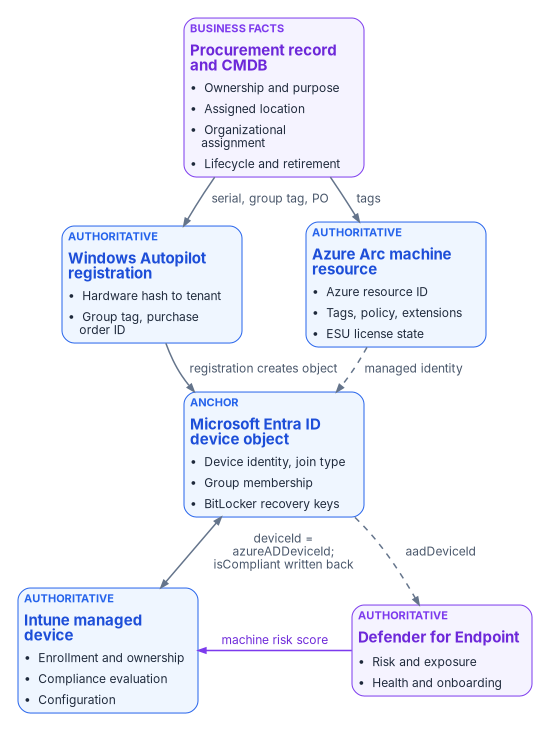
A device in the cloud isn’t one record but six, and governance holds only when each fact has exactly one place where it’s true.
The authority map for devices and servers: which system owns each fact, which systems hold only derived copies, and which must never be treated as a source of truth. What each Microsoft record (Entra ID device object, Intune managed device, Windows Autopilot registration, Azure Arc machine resource, Defender for Endpoint machine) is actually authoritative for. The keys that tie the records together, the places they break, and a read-only script that correlates them.
In an Active Directory estate a computer had one record that mattered. The computer object sat in an OU, the OU decided which Group Policy Objects applied, and the domain controller was both the directory and the enforcer (Chapter 01). After modernization the same laptop is described by a procurement record, a Windows Autopilot registration, a Microsoft Entra ID device object, an Intune managed-device record and a Defender for Endpoint machine entry. A server adds an Azure Arc resource in Azure Resource Manager. Each record is maintained by a different service on a different schedule, and most of them can be edited by someone.
That’s manageable only if the program decides, fact by fact, where the truth lives. This chapter extends the identity data-location model in Book 02 (Chapter 03 of Book 02) to devices and Azure resources. For each kind of fact it names the authoritative origin, the derived pointers that copy it, and the systems that must not be treated as the source.
The rule
Two sentences carry the whole model, and both are the program’s design position.
- No device or Azure resource carries an empty governance attribute once it’s enrolled or created on the governed path. If no source can supply a value, the attribute carries an explicit “unpositioned” marker (Chapter 04).
- Every derived value (a tag, a group membership, a policy assignment, a device category) must be explainable from its authoritative origin. If a derived value can’t be traced back, it’s drift, and it’s corrected at the origin, not at the copy.
The second rule is the one that breaks most often. An Intune administrator renames a device category to fix a report. A server owner edits a tag in the portal. An analyst moves a device into a static group “for now.” Each edit makes a derived pointer disagree with the record it was supposed to reflect, and nothing in the platform flags it. Detecting that disagreement is the job of the drift loop described in Chapter 10.
Which system owns which fact
The authority map below covers devices. Procurement and the asset record are authoritative for business facts, the decisions the organization made when it bought the device. Microsoft’s services are authoritative for technical state, what the device actually is and does.
| Claim | Authoritative origin | Derived pointers | Not a source of truth |
|---|---|---|---|
| Ownership and purpose | Procurement or asset record | Intune device category; ownership type; dynamic group membership | Whoever enrolled the device |
| Assigned location or site | Procurement or assignment record | Named location; dynamic group; Autopilot group tag | The IP address the device last reported |
| Organizational assignment | Procurement record, validated against the organizational registry | Autopilot group tag; Entra ID extension attribute; Arc tag | The primary user’s department |
| Device identity and join type | Microsoft Entra ID device object | Intune azureADDeviceId; Defender aadDeviceId |
The device’s host name |
| Management authority (endpoints) | Intune enrollment | Entra ID isManaged, managementType |
Configuration Manager collections |
| Management authority (servers) | Azure Arc onboarding into Azure Resource Manager | Arc machine tags; policy assignments | Active Directory OU placement |
| Compliance state | Intune compliance policy evaluation | Entra ID isCompliant, read by Conditional Access |
A spreadsheet or a manual attestation |
| Threat and exposure state | Defender for Endpoint | Intune compliance (through the machine risk score) | The antivirus console’s last scan date |
The source page this chapter replaces listed Azure Arc as a derived pointer of Intune enrollment. That’s corrected above: Arc is the management authority for servers in its own right. Intune’s supported platforms don’t include Windows Server,1 and an Arc server is a resource in Azure Resource Manager, not an Intune record. The one overlap is Defender security settings management, which lets Intune endpoint security policies reach servers onboarded to Defender for Endpoint without Intune enrollment (Chapter 09).2
Azure resources follow the same pattern. The governance record, not the portal, is authoritative.
| Claim | Authoritative origin | Derived pointers |
|---|---|---|
| Subscription or resource group purpose | Governance assignment | Tags; policy assignment |
| Owner | Governance record | Owner tag; role assignment |
| Environment (production or non-production) | Governance assignment | Environment tag; policy; Conditional Access named location |
| Compliance scope | Governance boundary | Azure Policy assignment; regulatory tags |
How the records correlate
Correlation is where most device inventories fail. The same physical device can appear in every system with a different primary key. The table shows the keys and how far you can trust each one.
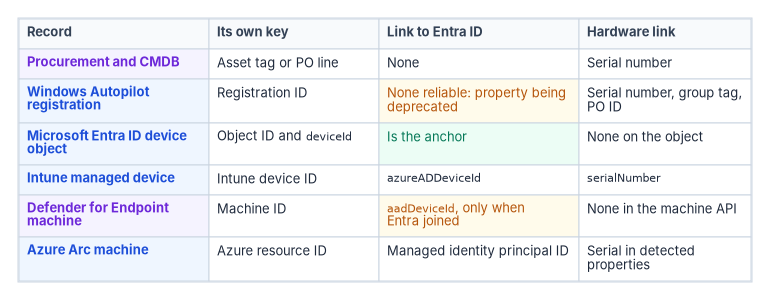
| Record | Its own key | Link to Entra ID | Hardware link |
|---|---|---|---|
| Procurement and CMDB | Asset tag or purchase order line | None | Serial number |
| Windows Autopilot registration | Registration ID | None reliable; the Entra device ID property is being deprecated | serialNumber, plus groupTag and purchaseOrderIdentifier20 |
| Microsoft Entra ID device object | Object id; deviceId |
Is the anchor | None on the object |
| Intune managed device | Intune device id |
azureADDeviceId21 |
serialNumber |
| Defender for Endpoint machine | Machine id |
aadDeviceId, only when Entra joined22 |
None in the machine resource |
| Azure Arc machine | Azure resource ID | Managed identity principal ID | Serial number in the agent’s detected properties23 |
Three rules follow from the table, and they’re the program’s correlation design.
- Join Microsoft records on the Entra ID device ID. It’s set once at registration and every Microsoft record that knows about Entra ID points at it.
- Join to procurement on the serial number. It’s the only key that exists before the device is powered on, and it’s what an OEM or reseller registration carries.
- Expect identifiers to change at lifecycle events. A reimage, an OS reinstall or a broken hybrid join can leave duplicate device objects or objects in the Pending state.24 When Linux devices update to version 2.0.2 or later of the Microsoft Identity Broker, Intune re-registers and re-enrolls them with new Intune and Entra ID device IDs, and Microsoft tells administrators to review assignments and group memberships that depend on device IDs.25 The serial number survives these events; the device ID doesn’t.
Arc servers are the exception to rule 1. A workgroup Arc server has no Entra ID device object unless you enable Entra ID sign-in, which Entra-joins it through an extension (Chapter 09). Join Arc servers on the Azure resource ID and the serial number. Defender security settings management also creates an Entra ID device object for a server that doesn’t already have one, so a server can acquire a device object without being Entra joined in the usual sense.26 Account for that in any stale-device rule.
A read-only correlation pass
The script below pulls the Entra ID, Intune and Autopilot records and an Arc inventory, joins them on the keys above, and reports the records that don’t line up. It writes nothing back to any service.
These commands are examples. They haven’t been run against a production tenant or subscription. Read each one, run it in a test scope first, and review the output before acting on it. The script only reads. It needs the read-only Microsoft Graph scopes shown and Reader on the Arc resource groups.
# Read-only. Requires Microsoft.Graph and Az.ConnectedMachine modules.
Connect-MgGraph -Scopes 'Device.Read.All',
                        'DeviceManagementManagedDevices.Read.All',
                        'DeviceManagementServiceConfig.Read.All'

$entra     = Get-MgDevice -All
$intune    = Get-MgDeviceManagementManagedDevice -All
$autopilot = Get-MgDeviceManagementWindowsAutopilotDeviceIdentity -All

# Index the Entra ID objects by deviceId, the anchor key
$entraById = @{}
foreach ($d in $entra) { $entraById[$d.DeviceId] = $d }

# Index the Autopilot registrations by serial number, the procurement key
$apBySerial = @{}
foreach ($a in $autopilot) { $apBySerial[$a.SerialNumber] = $a }

# 1. Intune records whose Entra ID object is missing
$orphanIntune = $intune | Where-Object {
    -not $_.AzureAdDeviceId -or -not $entraById.ContainsKey($_.AzureAdDeviceId)
}

# 2. Corporate Windows devices enrolled without an Autopilot registration
$noRegistration = $intune | Where-Object {
    $_.OperatingSystem -eq 'Windows' -and
    $_.ManagedDeviceOwnerType -eq 'company' -and
    -not $apBySerial.ContainsKey($_.SerialNumber)
}

# 3. Registrations with no group tag (no procurement attribute carried)
$untagged = $autopilot | Where-Object { [string]::IsNullOrWhiteSpace($_.GroupTag) }

# 4. Arc servers that aren't connected, with their tags for owner follow-up
Connect-AzAccount
$arc = Get-AzConnectedMachine
$arcNotConnected = $arc | Where-Object { $_.Status -ne 'Connected' } |
    Select-Object Name, ResourceGroupName, Status, LastStatusChange, DomainName, Tags

$orphanIntune    | Select-Object DeviceName, Id, AzureAdDeviceId, SerialNumber |
    Export-Csv .\intune-without-entra.csv -NoTypeInformation
$noRegistration  | Select-Object DeviceName, SerialNumber, EnrolledDateTime, DeviceEnrollmentType |
    Export-Csv .\enrolled-without-registration.csv -NoTypeInformation
$untagged        | Select-Object SerialNumber, Model, PurchaseOrderIdentifier |
    Export-Csv .\registration-without-grouptag.csv -NoTypeInformation
$arcNotConnected | Export-Csv .\arc-not-connected.csv -NoTypeInformation
Each output file maps to a governance finding. Enrolled-without-registration is the vector the program calls DRIFT-ENROLLMENT-VECTOR, and registration-without-group-tag is DRIFT-VENDOR-PROGRAM-CARRIER (Chapter 04). Compare the serial numbers against a CMDB export to find the fifth class, DRIFT-PROCUREMENT-RECORD-ABSENT. A disconnected or expired Arc server is a management gap on the server side. Don’t delete anything this script reports until the owner has confirmed it; deletion order matters, as described above.
What this chapter establishes
- Every fact about a device has one authoritative origin. Procurement owns the business facts; Entra ID, Intune, Autopilot, Arc and Defender each own a slice of the technical state.
- Derived pointers (tags, groups, categories, compliance flags) must be explainable from their origin, and drift is fixed at the origin.
- The Entra ID device ID ties the Microsoft records together, the serial number ties them to procurement, and Arc servers join on the Azure resource ID.
- Identifiers change at lifecycle events, and the Entra ID object, which holds the BitLocker keys, is the last record to delete.
Chapter 04 uses this map to stamp governance attributes on net-new devices before a user ever signs in.
Microsoft Learn, “Supported operating systems and browsers in Intune,” https://learn.microsoft.com/intune/fundamentals/ref-supported-platforms (accessed Oct 20, 2026).↩︎
Microsoft Learn, “Learn how to use Intune endpoint security policies to manage Microsoft Defender for Endpoint on devices that are not enrolled with Intune,” https://learn.microsoft.com/intune/device-security/microsoft-defender/security-settings-management (accessed Oct 20, 2026).↩︎
Microsoft Learn, “What is a device identity?,” https://learn.microsoft.com/entra/identity/devices/overview (accessed Oct 20, 2026).↩︎
Microsoft Learn, “device resource type” (Microsoft Graph v1.0), https://learn.microsoft.com/graph/api/resources/device?view=graph-rest-1.0 (accessed Oct 20, 2026).↩︎
Microsoft Learn, “How To: Manage stale devices in Microsoft Entra ID,” https://learn.microsoft.com/entra/identity/devices/manage-stale-devices (accessed Oct 20, 2026).↩︎
Microsoft Learn, “managedDevice resource type” (Microsoft Graph v1.0), https://learn.microsoft.com/graph/api/resources/intune-devices-manageddevice?view=graph-rest-1.0 (accessed Oct 20, 2026).↩︎
Microsoft Learn, “Use compliance policies to set rules for devices you manage with Intune,” compliance policy settings, https://learn.microsoft.com/intune/device-security/compliance/overview#compliance-policy-settings (accessed Oct 20, 2026).↩︎
Microsoft Learn, “Windows Autopilot registration overview,” https://learn.microsoft.com/autopilot/registration-overview (accessed Oct 20, 2026).↩︎
Microsoft Learn, “Windows Autopilot registration overview,” https://learn.microsoft.com/autopilot/registration-overview (accessed Oct 20, 2026).↩︎
Microsoft Learn, “New-MgDeviceManagementWindowsAutopilotDeviceIdentity” (windowsAutopilotDeviceIdentity properties), https://learn.microsoft.com/powershell/module/microsoft.graph.devicemanagement.enrollment/new-mgdevicemanagementwindowsautopilotdeviceidentity?view=graph-powershell-1.0 (accessed Oct 20, 2026).↩︎
Microsoft Learn, “Manage rules for dynamic membership groups in Microsoft Entra ID,” rules for devices, https://learn.microsoft.com/entra/identity/users/groups-dynamic-membership#rules-for-devices (accessed Oct 20, 2026).↩︎
Microsoft Learn, “Compare Windows Autopilot device preparation and Windows Autopilot,” https://learn.microsoft.com/autopilot/device-preparation/compare (accessed Oct 20, 2026).↩︎
Microsoft Learn, “What is Azure Arc-enabled servers?,” https://learn.microsoft.com/azure/azure-arc/servers/overview (accessed Oct 20, 2026).↩︎
Microsoft Learn, “Overview of Azure Connected Machine agent,” instance metadata, https://learn.microsoft.com/azure/azure-arc/servers/agent-overview#instance-metadata (accessed Oct 20, 2026).↩︎
Microsoft Learn, “Security overview for Azure Arc-enabled servers,” https://learn.microsoft.com/azure/azure-arc/servers/security-overview (accessed Oct 20, 2026).↩︎
Microsoft Learn, “Plan and deploy Azure Arc-enabled servers,” prerequisites and service limits, https://learn.microsoft.com/azure/azure-arc/servers/plan-at-scale-deployment#prerequisites (accessed Oct 20, 2026).↩︎
Microsoft Learn, “What is Azure Arc-enabled servers?,” https://learn.microsoft.com/azure/azure-arc/servers/overview (accessed Oct 20, 2026).↩︎
Microsoft Learn, “Machine resource type” (Defender for Endpoint API), https://learn.microsoft.com/defender-endpoint/api/machine (accessed Oct 20, 2026).↩︎
Microsoft Learn, “Device compliance settings for Windows in Intune,” Microsoft Defender for Endpoint rules, https://learn.microsoft.com/intune/device-security/compliance/ref-windows-settings#microsoft-defender-for-endpoint (accessed Oct 20, 2026).↩︎
Microsoft Learn, “New-MgDeviceManagementWindowsAutopilotDeviceIdentity” (windowsAutopilotDeviceIdentity properties), https://learn.microsoft.com/powershell/module/microsoft.graph.devicemanagement.enrollment/new-mgdevicemanagementwindowsautopilotdeviceidentity?view=graph-powershell-1.0 (accessed Oct 20, 2026).↩︎
Microsoft Learn, “managedDevice resource type” (Microsoft Graph v1.0), https://learn.microsoft.com/graph/api/resources/intune-devices-manageddevice?view=graph-rest-1.0 (accessed Oct 20, 2026).↩︎
Microsoft Learn, “Machine resource type” (Defender for Endpoint API), https://learn.microsoft.com/defender-endpoint/api/machine (accessed Oct 20, 2026).↩︎
Microsoft Learn, “Overview of Azure Connected Machine agent,” instance metadata, https://learn.microsoft.com/azure/azure-arc/servers/agent-overview#instance-metadata (accessed Oct 20, 2026).↩︎
Microsoft Learn, “How To: Manage stale devices in Microsoft Entra ID,” https://learn.microsoft.com/entra/identity/devices/manage-stale-devices (accessed Oct 20, 2026).↩︎
Microsoft Learn, “Deployment guide: Manage Linux devices in Microsoft Intune,” step 4, https://learn.microsoft.com/intune/fundamentals/platform-guide-linux#step-4-enroll-devices (accessed Oct 20, 2026).↩︎
Microsoft Learn, “Learn how to use Intune endpoint security policies to manage Microsoft Defender for Endpoint on devices that are not enrolled with Intune,” https://learn.microsoft.com/intune/device-security/microsoft-defender/security-settings-management (accessed Oct 20, 2026).↩︎