Chapter 09 — What Arc Provides to SQL Server
Chapter 09 — What Arc Provides to SQL Server
Arc isn’t an end state; it’s the bridge that gives the SQL Server engine a cloud-native identity.
What the Connected Machine agent and its managed identity establish; which Entra identity the instance uses on SQL Server 2022 and 2025; the two-layer distinction between SQL-engine Entra authentication and OS-level Entra sign-in; why Arc’s managed identity beats a gMSA, a vaulted secret, certificate-based authentication or Microsoft’s manual non-Arc setup; what using Arc for this costs and where it’s available; and what Arc deliberately doesn’t change.
Without Arc, the program’s SQL Server engine has no cloud-native identity. Without that identity there’s nothing to anchor the instance’s Entra identity (the managed identity on SQL Server 2025, or the app registration certificate the Arc agent installs on SQL Server 2022), and no managed mechanism to accept Entra ID-issued tokens.123 This chapter and the next explain exactly what Arc does and doesn’t change, and why SQL engine Entra authentication (Layer 1) must not be blocked on the domain unjoin that OS-level Entra sign-in (Layer 2) requires. In the program’s dependency chain this is step 4: enable the identity substrate. The hands-on procedure is in Runbook R04; the server-wide view of Arc, which this chapter stays consistent with, is Book 05, Chapter 09.
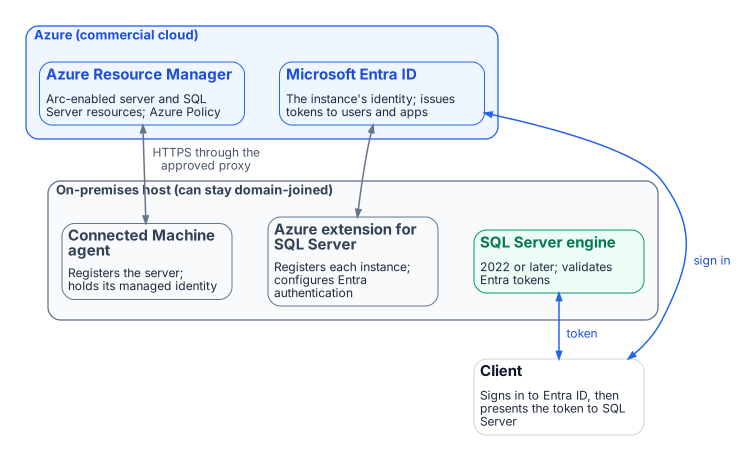
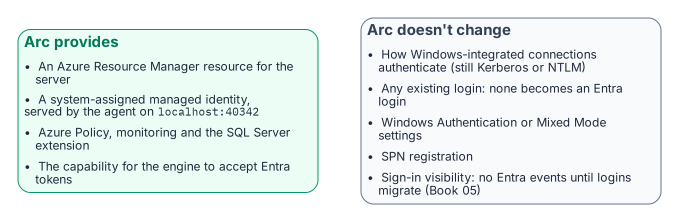
Arc is usually introduced as a management capability: on-premises servers in the Azure portal, under Azure Policy and Azure Resource Manager. For this transformation it matters more because it gives the server, and through it the SQL Server engine, a cloud-native identity. On the program’s path, without that identity the engine can’t authenticate to Key Vault, can’t have its Entra configuration managed from Azure, and has no credential-free way to accept Entra ID tokens from clients. Arc is the enablement layer for everything that follows.
The Arc agent and the ARM resource identity
Installing the Azure Connected Machine agent gives the server a first-class Azure Resource Manager (ARM) resource of type Microsoft.HybridCompute/machines, with a resource ID, subscription and resource group.4 That resource makes the server visible in the portal and addressable by Azure Policy and ARM, and it’s the basis for the system-assigned managed identity: a service principal that ARM creates in Microsoft Entra ID for the server, in the tenant the subscription trusts.5
The agent manages the identity’s credential entirely. The certificate behind it is valid for 90 days, and the agent renews it when 45 or fewer days remain, as long as the server stays connected; a server offline long enough for the certificate to expire becomes Expired and has to be disconnected and reconnected with an onboarding credential.6 No administrator handles the credential. A process requests a token from the agent’s local identity endpoint, the Hybrid Instance Metadata Service (HIMDS) at http://localhost:40342/metadata/identity/oauth2/token (not the Azure VM address 169.254.169.254), and the agent returns a token for any Azure resource the identity has been granted. Before it returns a token, the endpoint issues a challenge that only members of the local Administrators or Hybrid Agent Extension Applications group can complete, so not every process on the host can obtain one.7
The two-layer distinction
Arc enables two architecturally independent Entra ID capabilities for SQL Server. Confusing them is the most common sequencing error in this transformation.
Layer 1 is SQL Server engine Entra authentication, the subject of this book. With the Azure extension for SQL Server on an Arc-enabled server running SQL Server 2022 or later, the engine accepts Entra ID access tokens for CREATE LOGIN ... FROM EXTERNAL PROVIDER logins and validates them against Entra ID.8910 It needs the registered Arc agent, SQL Server 2022 or later, the Azure extension for SQL Server, Entra authentication configured on the instance (Chapter 10), and an instance that isn’t a failover cluster instance. It doesn’t need domain unjoin or Windows Server 2025: a domain-joined Windows Server 2019 host running SQL Server 2022 is fully capable of Layer 1 today.
Layer 2 is OS-level Entra sign-in through the AADLoginForWindows extension, which lets administrators sign in over Remote Desktop with Entra credentials, authorized by Azure role assignments.11 It belongs to the server infrastructure transformation, needs Windows Server 2025 with Desktop Experience, and Entra-joins the server, which Microsoft intends only for machines that aren’t joined to another domain. That makes it more disruptive: unjoin affects every AD-dependent service on the host, plus DNS, Group Policy and certificate enrollment. Conditional Access isn’t supported for servers joined this way, so Layer 2 brings Azure RBAC on who may sign in, not the workstation Conditional Access perimeter.12
Don’t block Layer 1 on domain unjoin, a Layer 2 prerequisite. Layer 1 proceeds on domain-joined servers and should finish before Layer 2 begins. Say this explicitly to every DBA and infrastructure team; incorrect sequencing assumptions are the most common cause of unnecessary delay.
The managed identity and the service account
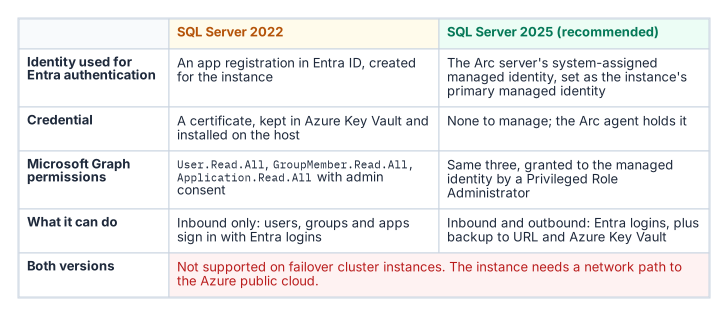
What the instance uses as its Entra identity depends on the version. On SQL Server 2025, the server’s system-assigned managed identity is set as the instance’s primary managed identity and serves both inbound Entra authentication and outbound connections to Azure services such as backup to URL and Azure Key Vault; only system-assigned identities are supported, and only on Windows.13 On SQL Server 2022, the instance uses an Entra app registration whose certificate is kept in Azure Key Vault; the Arc agent downloads that certificate to the host, after the server’s managed identity has been granted access to it.14 An app registration covers inbound Entra authentication only and can’t make outbound connections.15
On both versions, agent-side work (retrieving certificates from Key Vault, the extension’s own operations) authenticates with the server’s managed identity, not stored credentials.
None of this replaces the Windows account the service runs as (NT SERVICE\MSSQLSERVER, a gMSA or a domain account), which still presents the computer or domain identity for Windows networking on a domain-joined host. What changes is the identity Entra ID and Azure see: the managed identity (2025) or the app registration (2022) instead of an AD service account. On SQL Server 2025 there’s no credential to manage. On 2022 the one credential is the app registration’s Key Vault certificate, which needs a named renewal owner: Microsoft recommends a validity of at most 12 months, and the certificates created for this setup aren’t rotated automatically.1617
Why Arc and not the alternatives
Every alternative either re-anchors on the directory the program is retiring or reintroduces the stored credential it exists to eliminate.
- A gMSA or domain service account works only while AD is authoritative. Chapter 02’s third driver removes AD as the authority for this boundary; a gMSA can stay the Windows logon account while the domain exists, but it can’t be the engine’s Entra identity.18
- A service principal with a client secret, on disk or in Key Vault, reintroduces a rotatable credential and a bootstrap problem: the engine must authenticate to the vault first, so a root credential lands on the server anyway.
- Microsoft’s manual, non-Arc setup for SQL Server 2022 and later on Windows is real and supported: a certificate imported into the machine store, an app registration with Graph permissions, and registry values under the instance’s
FederatedAuthenticationkey.19 It works on a host with no Arc agent, but it has no managed identity, no Azure-side configuration or inventory of the setting, and a certificate whose lifecycle is entirely manual. It’s an option for a host that can’t run the agent, not the program’s path. - Certificate-based authentication is the program’s interim posture, authorized for the pre-2022 exception long tail that can’t reach Kerberos or Entra authentication before the program’s 2027-04-01 backstop. It still needs certificate lifecycle management, hence the AD CS-to-Microsoft Cloud PKI dependency the transformation inventory still classifies as “Not Yet Defined.” Part of the reason is that Cloud PKI issues certificates to Intune-managed devices,20 and Intune doesn’t manage Windows Server (Book 05, Chapter 09). It’s a bridge, not a destination.
The Arc managed identity is the only option that is both cloud-native and credential-free for the operator: the agent renews its certificate automatically, no human sees it, and its lifecycle is bound to the ARM resource rather than to AD. SQL Server 2025 uses it directly. SQL Server 2022 still authenticates through an app registration certificate, but the Arc agent fetches it from Key Vault with the managed identity, so no root credential is placed on the server by hand.
What it costs and where it’s available
Using Arc for this purpose doesn’t depend on the SQL Server license type. Microsoft lists connecting to Arc, inventory, Microsoft Entra authentication and Defender for Cloud as available to license-only customers as well as those with Software Assurance, a SQL Server subscription or pay-as-you-go; features such as best practices assessment, automatic updates and monitoring need Software Assurance, a subscription or pay-as-you-go.21 Availability isn’t the same as price: Defender for Cloud plans are paid services in their own right. Book 05, Chapter 09 covers the server-side costs, Extended Security Updates and the Windows Server Management benefit.
Two placement constraints matter for a federal boundary. First, SQL Server enabled by Azure Arc in the US Government Virginia region currently supports only onboarding, inventory, licensing and billing, failover cluster instance management and ESU licenses; Microsoft Entra authentication isn’t in that list.22 The program therefore assumes, as Book 05 does, a commercial Azure subscription in the same directory as the GCC tenant. Second, SQL Server needs access to the Azure public cloud to use Microsoft Entra authentication.23
What Arc doesn’t do
Arc’s effect is often overstated in both directions. A domain-joined client using Integrated Security=True against an Arc-enabled instance still negotiates Kerberos or NTLM exactly as described in Chapter 01, and Arc alone produces no Entra sign-in events for SQL Server connections. Arc converts no login to the external-provider type, disables neither Windows Authentication nor mixed mode,24 and leaves SPN registration untouched. Installing the extension doesn’t even turn Entra authentication on: that setting is off by default and is configured per instance.25 Arc provides the capability without activating it; the login migration in Chapter 11 is what changes authentication behavior. Arc is a necessary prerequisite, not the transformation itself.
- Arc gives the server an ARM identity and a system-assigned managed identity whose tokens come from the local endpoint (
localhost:40342); the instance’s Entra identity is an app registration and Key Vault certificate on SQL Server 2022 and the managed identity on SQL Server 2025. - Layer 1 (SQL-engine Entra authentication) is independent of Layer 2 (OS-level Entra sign-in) and must never be blocked on it.
- Arc provides the capability but doesn’t activate it, and it doesn’t replace the Windows account the service runs as; of the alternatives, it’s the only one both credential-free and independent of AD. Entra authentication through Arc is available under every SQL Server license type, but not yet in the US Government Virginia region.
Microsoft Learn, “Microsoft Entra authentication for SQL Server,” https://learn.microsoft.com/sql/relational-databases/security/authentication-access/azure-ad-authentication-sql-server-overview (accessed Oct 20, 2026).↩︎
Microsoft Learn, “Managed identity for SQL Server enabled by Azure Arc,” https://learn.microsoft.com/sql/sql-server/azure-arc/managed-identity (accessed Oct 20, 2026).↩︎
Microsoft Learn, “Tutorial: Set up Microsoft Entra authentication for SQL Server enabled by Azure Arc,” https://learn.microsoft.com/sql/sql-server/azure-arc/entra-authentication-setup-tutorial (accessed Oct 20, 2026).↩︎
Microsoft Learn, “What is Azure Arc-enabled servers?,” https://learn.microsoft.com/azure/azure-arc/servers/overview (accessed Oct 20, 2026).↩︎
Microsoft Learn, “Access Azure resources by using managed identity on Azure Arc-enabled servers,” https://learn.microsoft.com/azure/azure-arc/servers/managed-identity-authentication (accessed Oct 20, 2026).↩︎
Microsoft Learn, “Identity and authorization” (Azure Arc-enabled servers security), Microsoft Entra ID managed identity, https://learn.microsoft.com/azure/azure-arc/servers/security-identity-authorization (accessed Oct 20, 2026).↩︎
Microsoft Learn, “Access Azure resources by using managed identity on Azure Arc-enabled servers,” https://learn.microsoft.com/azure/azure-arc/servers/managed-identity-authentication (accessed Oct 20, 2026).↩︎
Microsoft Learn, “SQL Server enabled by Azure Arc” (overview), feature availability and settings, https://learn.microsoft.com/sql/sql-server/azure-arc/overview (accessed Oct 20, 2026).↩︎
Microsoft Learn, “Microsoft Entra authentication for SQL Server,” https://learn.microsoft.com/sql/relational-databases/security/authentication-access/azure-ad-authentication-sql-server-overview (accessed Oct 20, 2026).↩︎
Microsoft Learn, “CREATE LOGIN (Transact-SQL),” https://learn.microsoft.com/sql/t-sql/statements/create-login-transact-sql (accessed Oct 20, 2026).↩︎
Microsoft Learn, “Sign in to an Azure Arc-enabled server using Microsoft Entra ID and Azure Roles Based Access Control,” https://learn.microsoft.com/entra/identity/devices/howto-arc-sign-in-windows (accessed Oct 20, 2026).↩︎
Microsoft Learn, “Sign in to an Azure Arc-enabled server using Microsoft Entra ID and Azure Roles Based Access Control,” https://learn.microsoft.com/entra/identity/devices/howto-arc-sign-in-windows (accessed Oct 20, 2026).↩︎
Microsoft Learn, “Managed identity for SQL Server enabled by Azure Arc,” https://learn.microsoft.com/sql/sql-server/azure-arc/managed-identity (accessed Oct 20, 2026).↩︎
Microsoft Learn, “Tutorial: Set up Microsoft Entra authentication for SQL Server enabled by Azure Arc,” https://learn.microsoft.com/sql/sql-server/azure-arc/entra-authentication-setup-tutorial (accessed Oct 20, 2026).↩︎
Microsoft Learn, “Managed identity for SQL Server enabled by Azure Arc,” https://learn.microsoft.com/sql/sql-server/azure-arc/managed-identity (accessed Oct 20, 2026).↩︎
Microsoft Learn, “Tutorial: Set up Microsoft Entra authentication for SQL Server enabled by Azure Arc,” https://learn.microsoft.com/sql/sql-server/azure-arc/entra-authentication-setup-tutorial (accessed Oct 20, 2026).↩︎
Microsoft Learn, “Tutorial: Using automation to set up the Microsoft Entra admin for SQL Server,” https://learn.microsoft.com/sql/relational-databases/security/authentication-access/azure-ad-authentication-sql-server-automation-setup-tutorial (accessed Oct 20, 2026).↩︎
Microsoft Learn, “Group Managed Service Accounts overview,” https://learn.microsoft.com/windows-server/identity/ad-ds/manage/group-managed-service-accounts/group-managed-service-accounts/group-managed-service-accounts-overview (accessed Oct 20, 2026).↩︎
Microsoft Learn, “Tutorial: Enable Microsoft Entra authentication for SQL Server on Windows without Azure Arc,” https://learn.microsoft.com/sql/relational-databases/security/authentication-access/microsoft-entra-authentication-sql-server-enable-without-arc (accessed Oct 20, 2026).↩︎
Microsoft Learn, “Overview of Microsoft Cloud PKI for Microsoft Intune,” https://learn.microsoft.com/intune/cloud-pki/ (accessed Oct 20, 2026).↩︎
Microsoft Learn, “SQL Server enabled by Azure Arc” (overview), feature availability and settings, https://learn.microsoft.com/sql/sql-server/azure-arc/overview (accessed Oct 20, 2026).↩︎
Microsoft Learn, “SQL Server enabled by Azure Arc in US Government,” available features, https://learn.microsoft.com/sql/sql-server/azure-arc/us-government-region (accessed Oct 20, 2026).↩︎
Microsoft Learn, “Managed identity for SQL Server enabled by Azure Arc,” https://learn.microsoft.com/sql/sql-server/azure-arc/managed-identity (accessed Oct 20, 2026).↩︎
Microsoft Learn, “Change server authentication mode,” https://learn.microsoft.com/sql/database-engine/configure-windows/change-server-authentication-mode (accessed Oct 20, 2026).↩︎
Microsoft Learn, “SQL Server enabled by Azure Arc” (overview), feature availability and settings, https://learn.microsoft.com/sql/sql-server/azure-arc/overview (accessed Oct 20, 2026).↩︎