Chapter 05 — The Governed, Manual and Retrofit Paths
Chapter 05 — The Governed, Manual and Retrofit Paths
Every path ends at the same device configuration; what differs is who holds the decision record and whether anyone notices when the estate drifts back.
The three ways a workstation or server reaches the target state: the governed path, orchestrated by the program with evidence; the manual path, run by operators without an orchestration platform; and the retrofit path, which brings an estate that was already modernized by hand under governance. The chapter sets out the runbook all three share, what each path adds, what each one risks, and how to choose.
Chapter 04 described where a device should land: enrolled in Intune first, with Group Policy retired setting by setting rather than copied. This chapter is about how it gets there. The workbook’s sources described the journey as three separate kits, each with its own runbook, and they repeated most of the same steps. The steps are the same because the destination is the same. Servers are onboarded to Azure Arc, workstations are enrolled in Intune, NTLM is restricted after it has been measured, service principal names are clean, SQL Server is hardened, and Conditional Access is enforced. What changes from path to path is the binding between an organizational decision and the technical change that carries it out: who approved it, where that approval is recorded, and how anyone finds out when a device stops matching it.
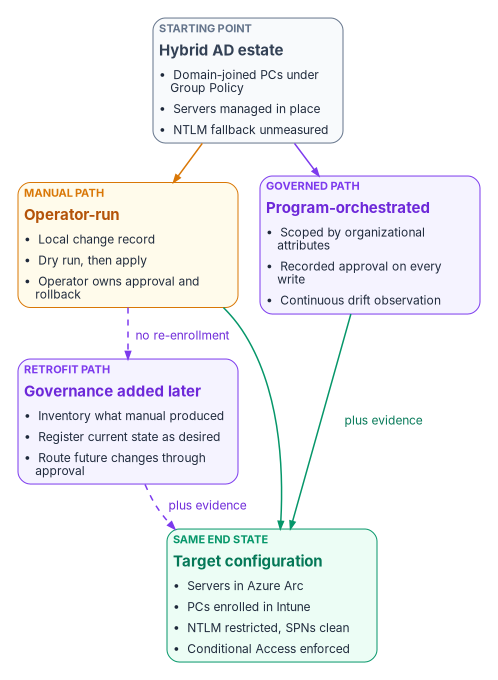
One end state, three ways to reach it
The program is an active reconciliation control plane. It holds the desired state of each managed object, observes the actual state, classifies the difference as drift, and reconciles toward the desired state. It isn’t an inline runtime component and doesn’t replace any Microsoft service. That definition, which is the program’s own design, explains why the three paths can share a runbook. Microsoft’s services do the work in every path. The program only changes what happens around them.
The rule all three obey: the control plane governs, the data plane executes
Active Directory merged two jobs. The directory held the truth about users and computers, and the domain controller enforced it in the authentication path. The target keeps those jobs apart, and the program sits on the truth side. It governs: it holds desired state, observes, classifies and reconciles. The provider executes: it authenticates, authorizes, enrolls, evaluates policy and stores. A program adapter may call a provider’s management API to make a change. It must never sit inline in an authentication or request path. Onboarding a server calls the Azure management plane. Deploying a Conditional Access policy calls the Microsoft Graph policy API. Neither puts the program between a user and a sign-in.
The providers are incorporated, not replaced.
| Provider (data plane) | What it does at runtime | What the program governs |
|---|---|---|
| Microsoft Entra ID | Authenticates and enforces Conditional Access | Desired Conditional Access and identity state; drift against it |
| Microsoft Intune | Enrolls devices and enforces device policy | Desired profile and compliance state; observed posture |
| Azure Policy and Azure Arc | Evaluates machine configuration on servers | Desired server baseline; compliance reconciliation |
| Active Directory | Issues Kerberos tickets and holds SPNs | Desired NTLM and SPN state; audit and repair plan |
The program doesn’t reimplement any of these functions. It compares their state against the desired state and emits evidence.
Terms used in this chapter
The control plane is the reconciliation layer described above. Organizational attributes are the coded values every governed object carries, so that its state can be addressed in the same terms in Entra ID, Intune, Azure and Active Directory. Book 02, Chapter 05 explains why attributes, not organizational units, carry that meaning once the directory is flat. An actuation rung is the level of change an operation is allowed to make, described under the governed path below.
The manual path
The manual path is for an agency that is modernizing without an orchestration platform. That can happen because of how the agency is organized, because it acquired the estate, because the timeline is compressed, or because it has no budget for one yet. Every step is self-contained and is meant to be run by qualified staff with no outside advisory dependency.
The manual path isn’t the ungoverned path. Because no control plane checks each decision as it happens, the operator owns the change record, the approval and the rollback. Write the accepted risks into a change record before you start.
| Manual path | |
|---|---|
| Needs | The licensing and roles above, a local change-control process, operators who can read every script before running it |
| Produces | The full target configuration on the Microsoft surface; a change record per step; read-only drift and status reports run on a schedule |
| Doesn’t produce | An approval reference bound to each change, or continuous drift classification. Evidence is assembled when an auditor asks for it |
| Main risks | Drift found by incident, not by observation; approvals that live in a ticket nobody links to the device; the NTLM and Conditional Access cutovers done on one operator’s judgment |
| Best for | Small estates, pilots, and agencies that need to start before a control plane exists |
If you expect to add governance later, the manual path is designed for it. Don’t re-image or re-enroll devices just so you can add governance later. The retrofit path below exists so that you never have to.
The governed path
The governed path reaches the same end state as the manual path. The same steps run. What governance adds is the binding from organizational intent to each technical change.
- Address before you actuate. Organizational attributes must be present on every device before any policy targets it. Scope is derived from attributes, not from an OU or a hand-built group.
- Cap the blast radius. High-blast-radius classes, such as privileged access workstations, servers and kiosks, stay gated on human approval.
- Plan, then apply with a dry run. No change is applied without a preview of its impact.
- Report-only first. Enforcement is measured before it’s switched on.
- Reconcile duplicates and lifecycle. One object per machine. Orphaned and phantom device objects are findings, not leftover state.
- Emit evidence an authorizing official can sign. Every bulk change produces a provenance record.
- Cover the whole denominator. No platform or ownership class is quietly left out.
The actuation ladder
Every governed operation declares a rung. The rung is a property of the operation, not a global switch. The program’s federal default write ceiling is L3: a human approves, and the program executes through the provider’s API. Autonomous L4 actuation is refused inside the boundary. The ladder and the ceiling are the program’s design. Raising the ceiling takes deliberate configuration outside the kit, and a tightened boundary can lower it, for example to L1 so that only observers run.
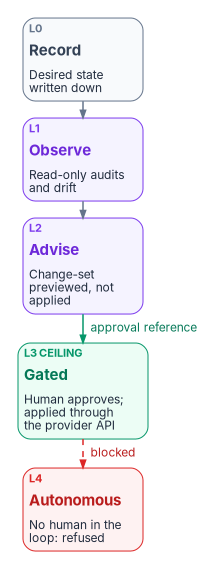
| Rung | Name | Meaning | In this book’s runbook |
|---|---|---|---|
| L0 | Record | Desired state recorded, nothing observed yet | The modernization desired-state table |
| L1 | Observe | Actual state collected and drift detected, read-only | NTLM, SPN, SQL Server and Intune audits; the drift report |
| L2 | Advise | Corrective change-set generated and shown | The dry-run previews |
| L3 | Gated | A human approves; the program applies the change through the provider API | Every state-changing step, carrying an approval reference |
| L4 | Autonomous | The loop closes without a human | Above the ceiling; refused |
The approval check refuses any write above the ceiling, refuses a gated write that has no approval reference, and logs every decision. Microsoft provides a native second-approver gate for part of the endpoint surface. Intune Multi Admin Approval can require a second administrator to approve changes to app deployments, compliance policies, settings catalog policies, scripts, role assignments, and the wipe, retire and delete device actions. The person who requests a change can’t approve it, not even a Global Administrator or Intune Administrator. The gate also applies to automation that calls Microsoft Graph.53 Where it covers a workload, the program records the Multi Admin Approval request as the L3 approval instead of building a parallel one.
The reconciliation loop
The governed path runs the modernization domains through the program’s drift-detection loop, not as one-shot scripts. The loop has six phases: snapshot, compare, classify, alert, remediate and verify. It runs as a dry run by default, and high-blast-radius operations are gated for governance review. The read-only audits from Phase 1 and Phase 4 are the snapshot, compare and classify steps for each domain. Remediate and verify are the gated L3 write: the same step, run again with an approval reference once a human approves the change-set. The kit’s governed invocation looks like this:
Import-Module .\lib\IntuneArcModernization.psm1

# Observe (L1): identical to the manual path
.\scripts\Get-NtlmAudit.ps1 -DaysBack 30 -OutputPath .\artifacts\ntlm-audit.csv

# Gated actuation (L3): an approval reference is required; a write without one is refused
.\scripts\Invoke-ArcOnboarding.ps1 -SubscriptionId $sub -ResourceGroup rg-arc-servers `
    -Location eastus -ApprovalRef 'CR0012345' -WhatIf
.\scripts\Set-NtlmRestriction.ps1 -Level 5 -ApprovalRef 'CR0012346' -WhatIf

# Verify (L1)
.\scripts\Get-ModernizationDriftReport.ps1 -ArtifactPath .\artifacts
These are the program’s companion kit scripts, not Microsoft cmdlets, and the kit isn’t published with this workbook. Read the block as the shape of a governed run: observe, preview, approve, apply, verify.
Mapping the source’s model to the program’s terms
One source draft described the governed path as five products. The concepts exist, but as machinery the program already names. This book uses the program’s terms.
| Source draft term | The program’s term |
|---|---|
| Policy engine | Desired state plus plan, apply and reconcile adapters |
| Identity registry | The identity control-plane slot |
| Attestation service | The drift-detection loop, six phases, dry run by default |
| Audit ledger | The provenance-anchored evidence pipeline: every artifact cites the desired-state record and version it derives from |
| Access orchestrator | Enforcement adapters bound to a control-plane slot |
What the governed path adds, and what it evidences
Over the manual end state, the governed path delivers:
- every modernized resource traceable to a recorded approval;
- no Conditional Access change outside a gated, logged workflow;
- continuous, exportable evidence, anchored to provenance instead of assembled at audit time;
- drift caught and classified by the loop instead of discovered by an incident.
FedRAMP’s Consolidated Rules for 2026 express security outcomes as 46 Key Security Indicators in 10 themes.54 Initial certification under the rules began on July 4, 2026, and ongoing certification follows them from January 1, 2027.55 The indicators are written for cloud service offerings. The program uses them as a vocabulary for the evidence it produces. The mapping below is the program’s own claim about a bounded slice of the catalog.
| Key Security Indicator | Evidenced on the governed path by |
|---|---|
| KSI-IAM-APM, Adopting Passwordless Methods | The Conditional Access baseline and phishing-resistant sign-in |
| KSI-IAM-ELP, Ensuring Least Privilege | Attribute-scoped assignment instead of tenant-wide assignment |
| KSI-SVC-ACM, Automating Configuration Management | Machine configuration baselines on Arc servers |
| KSI-CNA-EIS, Enforcing Intended State | Conditional Access drift comparison against the captured baseline |
| KSI-CMT-LMC, Logging Changes | The approval reference attached to every state-changing run |
| KSI-MLA-EVC, Evaluating Configurations | The cross-domain drift report against the baseline |
Don’t cite this path for recovery planning (KSI-RPL), supply chain risk (KSI-SCR), cybersecurity education (KSI-CED) or incident response (KSI-INR). That evidence comes from contingency-plan reviews, software bill of materials and vulnerability disclosure tooling, training records and response playbooks, not from the endpoint surface. The manual path produces the same Microsoft configuration but no approval chain, so it doesn’t evidence KSI-CMT-LMC. That gap is the reason the governed path exists.
The kit’s scope is also deliberately bounded. It enforces MFA and compliant devices through Conditional Access at the Entra ID P1 level, and it includes Defender for Servers Plan 2 and Defender for SQL. Risk-based Conditional Access, PIV-only enforcement, FIPS-validated cryptography and extended log retention are handled through separate controls and other chapters, not by this path.
Rolling back the governed path
Roll back in two layers. The operational back-outs are the same as the shared runbook’s. The governance seam has its own:
- Approval enforcement: lower the approval check to record-only (an L1 ceiling). Gated writes stop, and the observers keep running.
- Loop suspension: stop the scheduled compare and drift-report runs. The provider state isn’t affected.
Rolling back the seam never requires re-onboarding, re-enrollment, or undoing any Intune, Arc or Conditional Access work, because the provider always owns the operational state.
The retrofit path
The retrofit path starts where the manual path finished. Servers are in Arc, workstations are in Intune, legacy protocols are restricted and Conditional Access is enforced, and now governance is required. The retrofit adopts that estate into the governed path without redoing any of the Intune or Arc work.
It works because the manual path already produced what the control plane needs: Arc tags, enrollment state, Conditional Access policies and the audit artifacts from each phase. The retrofit reads those artifacts, derives the governance attributes from structure that already exists, and attaches the observation and approval loop.
- Inventory what the manual path produced: tags, enrollment status, policy assignments and audit files.
- Derive governance attributes from the existing tags, OUs or groups.
- Stamp the derived attributes onto the objects that already exist.
- Register the current state as the desired state.
- Turn on continuous observation and drift detection.
- Route all future changes through the approval process.
| Retrofit path | |
|---|---|
| Needs | The manual path’s artifacts, intact; owners who can confirm that the current state is the intended state before step 4 |
| Produces | The governed path’s evidence from the day observation starts, with no re-imaging, re-onboarding or re-enrollment |
| Main risks | Step 4 blesses whatever is there, so drift accumulated before the retrofit becomes desired state unless someone reviews it; attributes derived from old OUs can carry old structure forward |
| Best for | Estates modernized by hand that now need an authorizing official’s signature |
Adding governance after the fact isn’t a migration. It turns on the observation and approval seam that the manual path left available.
When the estate can’t leave the domain yet
An earlier version of these guides also used “retrofit” for a different case: devices that can’t be treated as new and can’t be unjoined in the current wave. This book keeps the word for adding governance after the fact. The domain-bound case is a constraint that can apply on any of the three paths, and it has its own rules:
- Arc onboarding and Intune enrollment attach the management plane without a domain unjoin.
- Policy is applied through the management plane. Group Policy stays only where Intune or machine configuration can’t yet own the setting.
- Group Policy and Intune conflicts are documented before they’re hit, and the overlapping settings are retired in a later wave.
- NTLM and SPN work proceeds in parallel but is sequenced after the management plane is attached.
- Domain unjoin is scheduled on its own, as described in Chapter 02.
How to choose
The three paths aren’t competing products. They’re three answers to one question: who holds the decision record, and when does that start?
| If the estate… | Use | Because |
|---|---|---|
| Is small or a pilot, and no control plane exists yet | Manual | It starts now, and nothing in it forecloses governance later |
| Is larger than a few hundred devices, or an authorizing official must sign the change | Governed | The approval and drift evidence is what the signature rests on |
| Was already modernized by hand and now needs governance | Retrofit | It adds the evidence without touching the devices |
| Must stay domain-joined for this wave | Any of the three, with the domain-bound rules above | The constraint is about sequencing, not governance |
The paths share the observe-before-change rule and the evidence requirement. The manual path is where operators learn the runbook. The governed path is the production path for large estates. The retrofit path makes sure the first choice is never wasted.
Key risks on every path
- Restricting NTLM before the audit window closes breaks legacy applications.
- Onboarding secrets left in plain text in startup scripts expose a credential that can register servers into your subscription.
- Enforcing Conditional Access without the emergency access exclusion locks out recovery.
- Treating domain unjoin as a side effect of onboarding instead of a sequenced decision.
- Incomplete attribute population lets devices fall outside policy scope, which the endpoint charter lists as a key risk (endpoint and device project charter).
Microsoft Learn, “Uninstall the Azure Connected Machine agent from Arc-enabled servers,” https://learn.microsoft.com/azure/azure-arc/servers/uninstall-agent (accessed Oct 20, 2026).↩︎
Microsoft Learn, “Analyze Conditional Access policy impact,” https://learn.microsoft.com/entra/identity/conditional-access/concept-conditional-access-report-only (accessed Oct 20, 2026).↩︎
Microsoft Learn, “Manage emergency access accounts in Microsoft Entra ID,” https://learn.microsoft.com/entra/identity/role-based-access-control/security-emergency-access (accessed Oct 20, 2026).↩︎
Microsoft Learn, “Microsoft Intune licensing,” https://learn.microsoft.com/intune/fundamentals/licensing (accessed Oct 20, 2026).↩︎
Microsoft Learn, “Microsoft Intune planning guide,” Step 3, “Determine costs and licensing,” https://learn.microsoft.com/intune/fundamentals/planning-guide (accessed Oct 20, 2026).↩︎
Microsoft Learn, “Require multifactor authentication for elevated sign-in risk,” https://learn.microsoft.com/entra/identity/conditional-access/policy-risk-based-sign-in (accessed Oct 20, 2026).↩︎
Microsoft Learn, “Microsoft Intune planning guide,” Step 3, “Determine costs and licensing,” https://learn.microsoft.com/intune/fundamentals/planning-guide (accessed Oct 20, 2026).↩︎
Microsoft Learn, “Azure Arc overview,” section “Pricing,” https://learn.microsoft.com/azure/azure-arc/overview (accessed Oct 20, 2026).↩︎
Microsoft Learn, “Windows Server Management enabled by Azure Arc,” https://learn.microsoft.com/azure/azure-arc/servers/windows-server-management-overview (accessed Oct 20, 2026).↩︎
Microsoft Learn, “Protect your servers with Defender for Servers,” https://learn.microsoft.com/azure/defender-for-cloud/tutorial-enable-servers-plan (accessed Oct 20, 2026).↩︎
Microsoft Learn, “Enable Defender for SQL Servers on Machines,” https://learn.microsoft.com/azure/defender-for-cloud/defender-for-sql-usage (accessed Oct 20, 2026).↩︎
Microsoft Learn, “Role-based access control (RBAC) with Microsoft Intune,” https://learn.microsoft.com/intune/fundamentals/role-based-access-control/overview (accessed Oct 20, 2026).↩︎
Microsoft Learn, “Identity and authorization” (Azure Arc-enabled servers security), section “RBAC roles,” https://learn.microsoft.com/azure/azure-arc/servers/security-identity-authorization (accessed Oct 20, 2026).↩︎
Microsoft Learn, “Identity and authorization” (Azure Arc-enabled servers security), section “RBAC roles,” https://learn.microsoft.com/azure/azure-arc/servers/security-identity-authorization (accessed Oct 20, 2026).↩︎
Microsoft Learn, “Role-based access control (RBAC) with Microsoft Intune,” https://learn.microsoft.com/intune/fundamentals/role-based-access-control/overview (accessed Oct 20, 2026).↩︎
Microsoft Learn, “Microsoft Entra built-in roles,” https://learn.microsoft.com/entra/identity/role-based-access-control/permissions-reference (accessed Oct 20, 2026).↩︎
Microsoft Learn, “Microsoft Entra built-in roles,” https://learn.microsoft.com/entra/identity/role-based-access-control/permissions-reference (accessed Oct 20, 2026).↩︎
Microsoft Learn, “Audit use of NTLMv1 on a Windows Server-based domain controller,” https://learn.microsoft.com/troubleshoot/windows-server/windows-security/audit-domain-controller-ntlmv1 (accessed Oct 20, 2026).↩︎
Microsoft Learn, “Policy CSP - LocalPoliciesSecurityOptions,” entries NetworkSecurity_LANManagerAuthenticationLevel and NetworkSecurity_RestrictNTLM_*, https://learn.microsoft.com/windows/client-management/mdm/policy-csp-localpoliciessecurityoptions (accessed Oct 20, 2026).↩︎
Microsoft Learn, “Kerberos generates KDC_ERR_S_PRINCIPAL_UNKNOWN or KDC_ERR_PRINCIPAL_NOT_UNIQUE error,” https://learn.microsoft.com/troubleshoot/windows-server/windows-security/kerberos-error-kdc-err-s-principal-unknown-or-not-unique (accessed Oct 20, 2026).↩︎
Microsoft Learn, “Connected Machine agent network requirements,” https://learn.microsoft.com/azure/azure-arc/servers/network-requirements (accessed Oct 20, 2026).↩︎
Microsoft Learn, “Azure Machine Configuration prerequisites,” section “Assigning policies to machines outside of Azure,” https://learn.microsoft.com/azure/governance/machine-configuration/overview/02-setup-prerequisites (accessed Oct 20, 2026).↩︎
Microsoft Learn, “Azure Arc overview,” section “Pricing,” https://learn.microsoft.com/azure/azure-arc/overview (accessed Oct 20, 2026).↩︎
Microsoft Learn, “Identity and access management with Azure Arc-enabled servers,” https://learn.microsoft.com/azure/azure-arc/servers/cloud-native/identity-access (accessed Oct 20, 2026).↩︎
Microsoft Learn, “Connect machines at scale using Group Policy,” https://learn.microsoft.com/azure/azure-arc/servers/onboard-group-policy-powershell (accessed Oct 20, 2026).↩︎
Microsoft Learn, “Identity and authorization” (Azure Arc-enabled servers security), section “RBAC roles,” https://learn.microsoft.com/azure/azure-arc/servers/security-identity-authorization (accessed Oct 20, 2026).↩︎
Microsoft Learn, “Planning and deployment guidance” (Azure Arc-enabled servers security), sections “Onboarding credential” and “Protecting secrets in onboarding script,” https://learn.microsoft.com/azure/azure-arc/servers/security-onboarding (accessed Oct 20, 2026).↩︎
Microsoft Learn, “Planning and deployment guidance” (Azure Arc-enabled servers security), sections “Onboarding credential” and “Protecting secrets in onboarding script,” https://learn.microsoft.com/azure/azure-arc/servers/security-onboarding (accessed Oct 20, 2026).↩︎
Microsoft Learn, “Cloud-native governance and policy with Azure Arc-enabled servers,” https://learn.microsoft.com/azure/azure-arc/servers/cloud-native/governance-policy (accessed Oct 20, 2026).↩︎
Microsoft Learn, “Azure Policy built-in definitions for Azure Arc-enabled servers,” https://learn.microsoft.com/azure/azure-arc/servers/policy-reference (accessed Oct 20, 2026).↩︎
Microsoft Learn, “Install the Azure machine configuration extension” (Defender for Cloud), https://learn.microsoft.com/azure/defender-for-cloud/security-baseline-guest-configuration (accessed Oct 20, 2026).↩︎
Microsoft Learn, “Planning and deployment guidance” (Azure Arc-enabled servers security), sections “Onboarding credential” and “Protecting secrets in onboarding script,” https://learn.microsoft.com/azure/azure-arc/servers/security-onboarding (accessed Oct 20, 2026).↩︎
Microsoft Learn, “Step 5 – Enroll devices in Microsoft Intune,” section “Enrollment for Windows,” https://learn.microsoft.com/intune/device-enrollment/enroll-devices (accessed Oct 20, 2026).↩︎
Microsoft Learn, “Enroll a Windows device automatically using Group Policy,” https://learn.microsoft.com/windows/client-management/enroll-a-windows-10-device-automatically-using-group-policy (accessed Oct 20, 2026).↩︎
Microsoft Learn, “Troubleshooting Windows 10 Group Policy-based auto-enrollment in Intune,” https://learn.microsoft.com/troubleshoot/mem/intune/device-enrollment/troubleshoot-windows-auto-enrollment (accessed Oct 20, 2026).↩︎
Microsoft Learn, “Microsoft Intune support for Windows LAPS,” https://learn.microsoft.com/intune/device-security/laps/overview (accessed Oct 20, 2026).↩︎
Microsoft Learn, “Configure actions for noncompliant devices in Intune,” https://learn.microsoft.com/intune/device-security/compliance/configure-noncompliance-actions (accessed Oct 20, 2026).↩︎
Microsoft Learn, “Enroll a Windows device automatically using Group Policy,” https://learn.microsoft.com/windows/client-management/enroll-a-windows-10-device-automatically-using-group-policy (accessed Oct 20, 2026).↩︎
Microsoft Learn, “Policy CSP - ControlPolicyConflict,” entry MDMWinsOverGP, https://learn.microsoft.com/windows/client-management/mdm/policy-csp-controlpolicyconflict (accessed Oct 20, 2026).↩︎
Microsoft Learn, “Configure Windows Hello for Business,” section “Policy conflicts from multiple policy sources,” https://learn.microsoft.com/windows/security/identity-protection/hello-for-business/configure (accessed Oct 20, 2026).↩︎
Microsoft Learn, “Deprecated features for Windows client,” entry NTLM (deprecation announced June 2024; NTLMv1 removed starting in Windows 11, version 24H2 and Windows Server 2025), https://learn.microsoft.com/windows/whats-new/deprecated-features (accessed Oct 20, 2026).↩︎
Microsoft Learn, “How to enable NTLM 2 authentication,” section “More information” (LMCompatibilityLevel levels 0–5), https://learn.microsoft.com/troubleshoot/windows-client/windows-security/enable-ntlm-2-authentication (accessed Oct 20, 2026).↩︎
Microsoft Learn, “Status code 0x32 and you can’t join a domain,” section “More information” (the seven NTLM security policies), https://learn.microsoft.com/troubleshoot/windows-server/active-directory/status-code-0x32-cannot-join-domain (accessed Oct 20, 2026).↩︎
Microsoft Learn, “Policy CSP - LocalPoliciesSecurityOptions,” entries NetworkSecurity_LANManagerAuthenticationLevel and NetworkSecurity_RestrictNTLM_*, https://learn.microsoft.com/windows/client-management/mdm/policy-csp-localpoliciessecurityoptions (accessed Oct 20, 2026).↩︎
Microsoft Learn, “‘Cannot generate SSPI context’ error when using Windows authentication to connect to SQL Server,” section “Frequently asked questions,” https://learn.microsoft.com/troubleshoot/sql/database-engine/connect/cannot-generate-sspi-context-error (accessed Oct 20, 2026).↩︎
Microsoft Learn, “Kerberos generates KDC_ERR_S_PRINCIPAL_UNKNOWN or KDC_ERR_PRINCIPAL_NOT_UNIQUE error,” https://learn.microsoft.com/troubleshoot/windows-server/windows-security/kerberos-error-kdc-err-s-principal-unknown-or-not-unique (accessed Oct 20, 2026).↩︎
Microsoft Learn, “Troubleshoot SQL Server Kerberos and authentication failures with gMSAs,” https://learn.microsoft.com/troubleshoot/sql/database-engine/startup-shutdown/gmsa-kerberos-authentication-failures (accessed Oct 20, 2026).↩︎
Microsoft Learn, “Register a Service Principal Name for Kerberos connections,” https://learn.microsoft.com/sql/database-engine/configure-windows/register-a-service-principal-name-for-kerberos-connections (accessed Oct 20, 2026).↩︎
Microsoft Learn, “Enable Defender for SQL Servers on Machines,” https://learn.microsoft.com/azure/defender-for-cloud/defender-for-sql-usage (accessed Oct 20, 2026).↩︎
Microsoft Learn, “Analyze Conditional Access policy impact,” https://learn.microsoft.com/entra/identity/conditional-access/concept-conditional-access-report-only (accessed Oct 20, 2026).↩︎
Microsoft Learn, “Manage emergency access accounts in Microsoft Entra ID,” https://learn.microsoft.com/entra/identity/role-based-access-control/security-emergency-access (accessed Oct 20, 2026).↩︎
Microsoft Learn, “Uninstall the Azure Connected Machine agent from Arc-enabled servers,” https://learn.microsoft.com/azure/azure-arc/servers/uninstall-agent (accessed Oct 20, 2026).↩︎
Microsoft Learn, “Use access policies to require multi admin approval,” https://learn.microsoft.com/intune/fundamentals/role-based-access-control/multi-admin-approval (accessed Oct 20, 2026).↩︎
FedRAMP, “Key Security Indicators,” FedRAMP Consolidated Rules for 2026, https://www.fedramp.gov/2026/reference/20x/b/key-security-indicators/ (accessed Oct 20, 2026).↩︎
FedRAMP, “FedRAMP Certification,” FedRAMP Consolidated Rules for 2026, section “Effective Date(s) & Overall Applicability for 20x,” https://www.fedramp.gov/2026/providers/20x/rules/fedramp-certification/ (accessed Oct 20, 2026).↩︎