Chapter 10 — From Attributes to Access
Chapter 10 — From Attributes to Access
In a dynamic group, whoever writes the attribute controls access.
The derivation chain. Valid rule patterns against the canonical schema, with Microsoft’s limits. Administrative units. Access packages and access reviews that route to the supervisor of record, and the licenses they need. Where dynamic membership stops: privileged roles, PIM and break-glass.
The derivation chain
The chain runs in one direction: worker record, then stamped attributes, then dynamic groups, then entitlements.
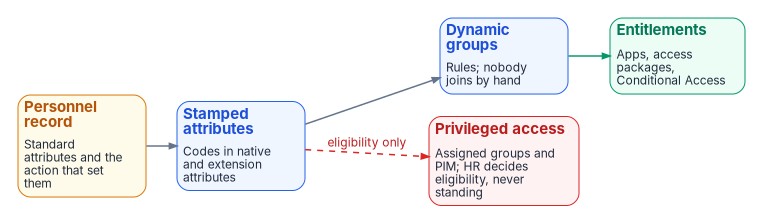
Rules for dynamic membership evaluate HR-derived attributes, so nobody joins these groups by hand and nobody forgets to leave one: Entra ID adds and removes members as attributes change, and a member can’t be added or removed manually.1 Access packages bundle entitlements behind eligibility rules and approvals that route to the supervisor of record. Conditional Access and application roles consume the same groups; a Conditional Access policy can include or exclude any user group, dynamic or assigned.2 Three properties follow:
- Membership is computed. There’s no group owner to lobby, no ticket to lose, no offboarding step to forget. A mover’s access converges on the new assignment within the provisioning and rule-processing cycle.
- Every entitlement has a because. Access exists because an attribute satisfied a rule; the attribute exists because an HR record asserted it; the record has an author, a date and a business act behind it. That chain can contribute to the authorization and account-management evidence associated with AC-2, which asks the organization to specify group and role membership and to authorize access on a valid authorization and organization-defined attributes,3 and it can be queried end to end.
- Roles and attributes stop competing. Roles define what a position may touch; attributes prove which position the person holds. Both resolve against the same upstream record.
Under Zero Trust, delivered through SASE, this chain is the access decision itself: Conditional Access evaluates its policies, including their group assignments, before it grants access,4 so an attribute error is an access error (Chapter 02). The chain is only as good as its weakest writer. Microsoft’s guidance is to review write permissions for every attribute a rule uses, in Entra ID and in any source directory, before using it in a security-sensitive group.5 Chapter 06 sets the only writer of the access attributes: the provisioning service.
Rule patterns
Write rules against the canonical schema of Chapter 06: native attributes where a rule can read them, and the three coded access attributes otherwise. Every rule that grants access excludes disabled accounts and guests explicitly.
| Pattern | Rule | Use |
|---|---|---|
| Organization | (user.accountEnabled -eq true) -and (user.userType -eq "Member") -and (user.extensionAttribute10 -eq "FIN-LED") |
Organization-scoped access |
| Several organizations | (user.accountEnabled -eq true) -and (user.userType -eq "Member") -and (user.extensionAttribute10 -in ["FIN-LED","FIN-AP"]) |
Roll-up without chains of -or |
| Organization and worker type | (user.accountEnabled -eq true) -and (user.extensionAttribute10 -eq "FIN-LED") -and (user.extensionAttribute11 -eq "EMP") |
Employees only |
| Exclusion | (user.accountEnabled -eq true) -and (user.extensionAttribute10 -eq "FIN-LED") -and (user.extensionAttribute11 -ne "CTR") |
Everyone but contractors |
| Position category | (user.accountEnabled -eq true) -and (user.userType -eq "Member") -and (user.extensionAttribute12 -eq "ANALYST") |
Role-like access across organizations |
| Legal employer | (user.accountEnabled -eq true) -and (user.companyName -eq "Example Bureau") |
Component-wide baseline |
| Direct reports | Direct Reports for "<manager object ID>" |
A supervisor’s team, maintained from manager |
| Device class | (device.deviceOSType -eq "Windows") -and (device.deviceOwnership -eq "Company") |
Device policy |
The codes (FIN-LED, EMP, CTR, ANALYST) are placeholders for the agency’s own code lists. Extension attributes 1–15 are supported as string properties in rules.7 The -in operator takes a bracketed list.8 The direct-reports rule uses the manager’s object ID; the manager is also added to the group, the rule covers direct reports only (not their reports), and it can’t be combined with any other rule.9 employeeType, employeeOrgData and manager aren’t on the list of user properties a rule can read, which is why worker type and organization have coded carriers.10
An agent’s user account is a kind of user in Entra ID, and user rules evaluate it like any other user unless the rule excludes it.11 Add that exclusion to every rule that grants workforce access.
Limits and efficiency
- A rule body can’t exceed 3,072 characters, and a tenant can have at most 15,000 dynamic membership groups.12 Dynamic administrative units count against the same 15,000.13
- Prefer
-eq, then-startsWithor-endsWith, over-matchand-contains; replace chains of-oron one property with-in.14 - Dynamic membership needs an Entra ID P1 license count covering each unique user who is a member of one or more dynamic groups; the licenses don’t have to be assigned to those users, and device members need none.15
Governance of the rules themselves
- Code lists are controlled vocabularies owned by HR. A value that isn’t on the list is a drift event (Chapter 11).
- Every rule that grants access is validated, run in shadow against the group it replaces, and gated on a verified pilot cohort before it’s attached to a resource.
- A group’s membership must be explainable from attributes alone. A manual addition to a dynamic group isn’t possible;16 a manual change to an attribute is drift.
Administrative units
Administrative units scope delegated administration (for example, a help desk that may reset passwords only for one component) without making policy read a container path.17 They can’t be nested, so a component’s divisions are sibling units, not children.18 Book 02, Chapter 05 covers the delegation model in full; this section covers only what the derivation chain needs.
An administrative unit’s user membership can itself be a dynamic rule, using the same canonical attributes. A dynamic unit holds users or devices, not both, and dynamic rules for groups aren’t supported.19 A dynamic unit needs Entra ID P1 for each administrator and each member (an assigned unit needs P1 only for its administrators).20 Dynamic units are available in the global Azure cloud, not in specialized clouds such as Azure Government.21 GCC tenants use Microsoft Entra ID in the global cloud, while GCC High and DoD tenants use Azure Government,22 so an agency in GCC High or DoD has to maintain unit membership another way.
Restricted management administrative units protect sensitive objects from tenant-level administrators. The setting must be applied when the unit is created and can’t be changed afterward.23 It also removes the unit’s users and groups from the rest of this chapter: Privileged Identity Management, entitlement management, Lifecycle Workflows and access reviews can’t manage users or groups in a restricted management unit.24 Use restriction for a small, deliberately chosen population, never for the governed workforce as a whole; Book 02 Chapter 05 sets the per-unit decision.
Access packages and access reviews
- Access packages carry the entitlements that a rule can’t decide alone. An approval policy for users in the directory can name Manager as approver,25 which resolves to the
managerattribute in the user’s profile, the relationship the HR feed maintains. Configure a fallback approver: entitlement management sends the request to the fallback when it can’t find the requester’s manager.26 - Access reviews verify what remains. Reviews can be assigned to Managers of users, with a fallback reviewer for users who have no manager in the directory,27 and the review population can be scoped to exceptions — access outside the derivation baseline — instead of four hundred rows a reviewer will approve in bulk. A rejected entitlement is removed by fixing the attribute, the rule or the exception that produced it, so the same wrong answer can’t regrow.
- Separation-of-duties checks read the same rails: whether two roles are held by the same person (the
employeeIdanchor) and whether an approver reports to the requester (themanagerchain). Entitlement management has a built-in separation-of-duties capability for incompatible access packages and groups;28 the person-level and reporting-chain checks are this program’s design and run in the drift engine (Chapter 11).
Licensing
Entitlement management and access reviews are Microsoft Entra ID Governance features for the organization’s member users, including everyone who reviews access or has access reviewed; the capabilities that were generally available in Entra ID P2, including managers as access package approvers, also operate under P2, but Microsoft is adding no new governance features to P2.29 Several things this book relies on need ID Governance (or the Entra Suite) rather than P2: Lifecycle Workflows, automatic assignment policies, managers requesting access on behalf of their employees, and PIM for Groups eligibility delivered through an access package.30 An ID Governance subscription also needs a prerequisite product with the P1 or P2 service plan in the tenant, and ID Governance for Government is offered in GCC, GCC High and DoD.31
Where dynamic membership stops
- Privileged roles use assigned groups. Role-assignable groups require assigned membership, which Microsoft notes already removes the attribute-write risk.32 A tenant can have at most 500 role-assignable groups.33
- PIM for Groups doesn’t take dynamic groups. Any security group or Microsoft 365 group can be enabled for PIM for Groups except dynamic membership groups and groups synchronized from on-premises.34 Privileged access is assigned, cloud-only and time-bound; HR attributes decide eligibility (through an access package), not standing membership.
- Position decides eligibility, not standing access. HR attributes — position category and supervisory status — decide who may request a privileged role through an access package; the role itself is activated just in time through PIM. For groups that elevate into Entra roles, Microsoft recommends requiring approval for eligible member assignments.35
- The same key joins the evidence. The enterprise person key (Chapter 04) is the join key for the SIEM, database logins and badge events, and any authentication by a person whose HR record shows a separation is an alert, not a log line.
- Break-glass accounts depend on none of this. Emergency access accounts are cloud-only accounts on the
*.onmicrosoft.comdomain, not federated or synchronized from on-premises, not associated with any individual, excluded from Conditional Access policies that block or restrict sign-in, and monitored with an alert on every sign-in.36 In this program they’re also excluded from HR-driven rules and lifecycle workflows.
The SQL Server Identity Transformation workbook, Book 07 applies this chapter to SQL Server logins and database roles, including naming, shadow testing and rollout gates.
Microsoft Learn, “Manage rules for dynamic membership groups in Microsoft Entra ID,” https://learn.microsoft.com/en-us/entra/identity/users/groups-dynamic-membership (accessed Oct 20, 2026).↩︎
Microsoft Learn, “Conditional Access: Users, groups, agents, and workload identities,” https://learn.microsoft.com/en-us/entra/identity/conditional-access/concept-conditional-access-users-groups (accessed Oct 20, 2026).↩︎
National Institute of Standards and Technology, SP 800-53 Rev. 5, Security and Privacy Controls for Information Systems and Organizations, September 2020 (updated December 10, 2020; Release 5.2.0, August 27, 2025), control AC-2, https://csrc.nist.gov/pubs/sp/800/53/r5/upd1/final (accessed Oct 20, 2026).↩︎
Microsoft Learn, “Conditional Access: Users, groups, agents, and workload identities,” https://learn.microsoft.com/en-us/entra/identity/conditional-access/concept-conditional-access-users-groups (accessed Oct 20, 2026).↩︎
Microsoft Learn, “Manage rules for dynamic membership groups in Microsoft Entra ID,” https://learn.microsoft.com/en-us/entra/identity/users/groups-dynamic-membership (accessed Oct 20, 2026).↩︎
Microsoft Learn, “Manage rules for dynamic membership groups in Microsoft Entra ID,” https://learn.microsoft.com/en-us/entra/identity/users/groups-dynamic-membership (accessed Oct 20, 2026).↩︎
Microsoft Learn, “Manage rules for dynamic membership groups in Microsoft Entra ID,” https://learn.microsoft.com/en-us/entra/identity/users/groups-dynamic-membership (accessed Oct 20, 2026).↩︎
Microsoft Learn, “Manage rules for dynamic membership groups in Microsoft Entra ID,” https://learn.microsoft.com/en-us/entra/identity/users/groups-dynamic-membership (accessed Oct 20, 2026).↩︎
Microsoft Learn, “Manage rules for dynamic membership groups in Microsoft Entra ID,” https://learn.microsoft.com/en-us/entra/identity/users/groups-dynamic-membership (accessed Oct 20, 2026).↩︎
Microsoft Learn, “Manage rules for dynamic membership groups in Microsoft Entra ID,” https://learn.microsoft.com/en-us/entra/identity/users/groups-dynamic-membership (accessed Oct 20, 2026).↩︎
Microsoft Learn, “Manage rules for dynamic membership groups in Microsoft Entra ID,” https://learn.microsoft.com/en-us/entra/identity/users/groups-dynamic-membership (accessed Oct 20, 2026).↩︎
Microsoft Learn, “Manage rules for dynamic membership groups in Microsoft Entra ID,” https://learn.microsoft.com/en-us/entra/identity/users/groups-dynamic-membership (accessed Oct 20, 2026).↩︎
Microsoft Learn, “Microsoft Entra administrative units: Troubleshooting and FAQ,” https://learn.microsoft.com/entra/identity/role-based-access-control/admin-units-faq-troubleshoot (accessed Oct 20, 2026).↩︎
Microsoft Learn, “Create simpler, more efficient rules for dynamic membership groups in Microsoft Entra ID,” https://learn.microsoft.com/en-us/entra/identity/users/groups-dynamic-rule-more-efficient (accessed Oct 20, 2026).↩︎
Microsoft Learn, “Manage rules for dynamic membership groups in Microsoft Entra ID,” https://learn.microsoft.com/en-us/entra/identity/users/groups-dynamic-membership (accessed Oct 20, 2026).↩︎
Microsoft Learn, “Manage rules for dynamic membership groups in Microsoft Entra ID,” https://learn.microsoft.com/en-us/entra/identity/users/groups-dynamic-membership (accessed Oct 20, 2026).↩︎
Microsoft Learn, “Administrative units in Microsoft Entra ID,” https://learn.microsoft.com/en-us/entra/identity/role-based-access-control/administrative-units (accessed Oct 20, 2026).↩︎
Microsoft Learn, “Administrative units in Microsoft Entra ID,” https://learn.microsoft.com/en-us/entra/identity/role-based-access-control/administrative-units (accessed Oct 20, 2026).↩︎
Microsoft Learn, “Manage users or devices for an administrative unit with rules for dynamic membership groups,” https://learn.microsoft.com/en-us/entra/identity/role-based-access-control/admin-units-members-dynamic (accessed Oct 20, 2026).↩︎
Microsoft Learn, “Administrative units in Microsoft Entra ID,” https://learn.microsoft.com/en-us/entra/identity/role-based-access-control/administrative-units (accessed Oct 20, 2026).↩︎
Microsoft Learn, “Manage users or devices for an administrative unit with rules for dynamic membership groups,” https://learn.microsoft.com/en-us/entra/identity/role-based-access-control/admin-units-members-dynamic (accessed Oct 20, 2026).↩︎
Microsoft Learn, “Planning identity for Azure Government applications” (FAQ: “Why does Office 365 GCC use Microsoft Entra Public?”), https://learn.microsoft.com/en-us/azure/azure-government/documentation-government-plan-identity (accessed Oct 20, 2026).↩︎
Microsoft Learn, “Restricted management administrative units in Microsoft Entra ID,” https://learn.microsoft.com/en-us/entra/identity/role-based-access-control/admin-units-restricted-management (accessed Oct 20, 2026).↩︎
Microsoft Learn, “Restricted management administrative units in Microsoft Entra ID,” https://learn.microsoft.com/en-us/entra/identity/role-based-access-control/admin-units-restricted-management (accessed Oct 20, 2026).↩︎
Microsoft Learn, “Change approval settings for an access package in entitlement management,” https://learn.microsoft.com/en-us/entra/id-governance/entitlement-management-access-package-approval-policy (accessed Oct 20, 2026).↩︎
Microsoft Learn, “Change approval settings for an access package in entitlement management,” https://learn.microsoft.com/en-us/entra/id-governance/entitlement-management-access-package-approval-policy (accessed Oct 20, 2026).↩︎
Microsoft Learn, “Create an access review of groups and applications,” https://learn.microsoft.com/en-us/entra/id-governance/create-access-review (accessed Oct 20, 2026).↩︎
Microsoft Learn, “Microsoft Entra ID Governance licensing fundamentals,” https://learn.microsoft.com/en-us/entra/id-governance/licensing-fundamentals (accessed Oct 20, 2026).↩︎
Microsoft Learn, “Microsoft Entra ID Governance licensing fundamentals,” https://learn.microsoft.com/en-us/entra/id-governance/licensing-fundamentals (accessed Oct 20, 2026).↩︎
Microsoft Learn, “Microsoft Entra ID Governance licensing fundamentals,” https://learn.microsoft.com/en-us/entra/id-governance/licensing-fundamentals (accessed Oct 20, 2026).↩︎
Microsoft Learn, “Microsoft Entra ID Governance licensing fundamentals,” https://learn.microsoft.com/en-us/entra/id-governance/licensing-fundamentals (accessed Oct 20, 2026).↩︎
Microsoft Learn, “Manage rules for dynamic membership groups in Microsoft Entra ID,” https://learn.microsoft.com/en-us/entra/identity/users/groups-dynamic-membership (accessed Oct 20, 2026).↩︎
Microsoft Learn, “Privileged Identity Management (PIM) for Groups,” https://learn.microsoft.com/en-us/entra/id-governance/privileged-identity-management/concept-pim-for-groups (accessed Oct 20, 2026).↩︎
Microsoft Learn, “Privileged Identity Management (PIM) for Groups,” https://learn.microsoft.com/en-us/entra/id-governance/privileged-identity-management/concept-pim-for-groups (accessed Oct 20, 2026).↩︎
Microsoft Learn, “Privileged Identity Management (PIM) for Groups,” https://learn.microsoft.com/en-us/entra/id-governance/privileged-identity-management/concept-pim-for-groups (accessed Oct 20, 2026).↩︎
Microsoft Learn, “Manage emergency access admin accounts,” https://learn.microsoft.com/en-us/entra/identity/role-based-access-control/security-emergency-access (accessed Oct 20, 2026).↩︎