Chapter 19 — Connection String Migration: The Last Mile
Chapter 19 — Connection String Migration: The Last Mile
The simplest change in the entire program, and the most gate-controlled.
The connection-string change that ends the application-chain migration: from Integrated Security or SQL Authentication to Entra ID authentication keywords. The Entra options in each Microsoft driver family. The gate conditions that must hold before the change can be made. How the Azure.Identity library’s DefaultAzureCredential chain lets a .NET application use one credential code path across production and development, and why production should name its credential explicitly.
The final step in the application-chain migration is the SQL Server connection-string change. It’s the moment the engine sees an Entra ID identity in the application connection rather than a SQL Authentication credential or a Windows Integrated Security token. Technically it’s the simplest step in the entire migration. Operationally it’s the most gate-controlled, and the two facts together are why it’s treated as a distinct step rather than folded into the work before it.
The connection-string change
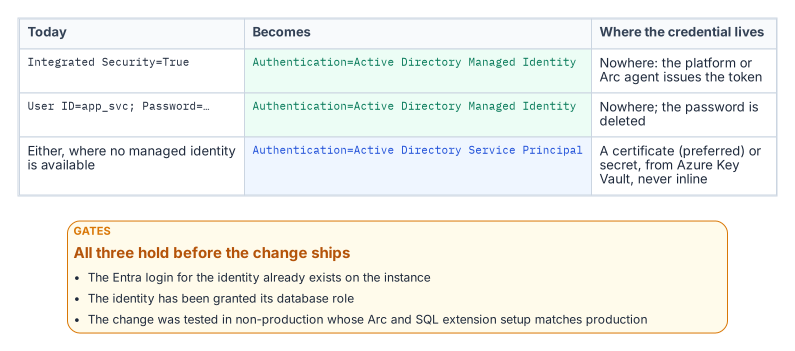
The connection strings below are illustrative and haven’t been tested against a production instance. Review them against the driver version you deploy, and test them in a non-production environment first.
For an application using Windows Integrated Security, the connection string changes to use Entra ID authentication. For an application running on an Arc-enabled server with the server’s system-assigned managed identity, using Microsoft.Data.SqlClient:
Before:  Data Source=sqlserver;Initial Catalog=database;Integrated Security=True
After:   Data Source=sqlserver;Initial Catalog=database;Authentication=Active Directory Managed Identity;Encrypt=True
The keyword tells the driver to acquire a token from the host’s managed identity rather than negotiate a Windows credential; for a system-assigned identity no User ID is needed.1 On an Arc-enabled server, that identity is the server’s own, and tokens come from the Arc agent’s local identity endpoint (http://localhost:40342). Only local Administrators and members of the local Hybrid agent extension applications group can complete the agent’s challenge and obtain a token, so the application’s process account must be added to that group.2 Two consequences follow. Every application on the host that is allowed to request the token authenticates as the same identity, so the server identity’s SQL login and role grants have to be sized for everything permitted to run there. And membership of that group is a privileged permission: Microsoft’s guidance is to limit it.3
For an application using a service principal, Microsoft.Data.SqlClient uses Authentication=Active Directory Service Principal, with the application’s client ID as User ID and its client secret as Password.4 The program stores the secret in Azure Key Vault and injects it at runtime, never inline in configuration. Where a certificate is required instead of a secret, the application acquires the token itself (for example with ClientCertificateCredential) and hands it to the driver through AccessTokenCallback, because the connection-string service-principal mode itself takes a secret.5 For SQL Authentication connections (User ID=serviceaccount;Password=…), moving to a managed identity or service principal removes the password from the connection string entirely. In every case the stored SQL credential goes, which is the point: the connection no longer carries a credential the identity plane can’t see.
Entra options by driver
The same change looks different in each Microsoft driver family, and the version deployed decides which modes exist. The application audit’s driver inventory (Chapter 18) is checked against this table:
| Driver | Managed identity | Service principal | Credential chain | Notes |
|---|---|---|---|---|
Microsoft.Data.SqlClient (.NET) |
Authentication=Active Directory Managed Identity (or Active Directory MSI), from 2.1 |
Active Directory Service Principal, from 2.0 |
Active Directory Default, from 3.0 |
From 7.0, the Entra modes need the separate Microsoft.Data.SqlClient.Extensions.Azure package at a matching version6 |
| ODBC Driver 17 and 18 | Authentication=ActiveDirectoryMsi, from 17.3.1.1 |
ActiveDirectoryServicePrincipal (UID = client ID, PWD = secret), from 17.7 |
None | An application-acquired token can be passed through SQL_COPT_SS_ACCESS_TOKEN789 |
OLE DB Driver (MSOLEDBSQL) |
Authentication=ActiveDirectoryMSI, from 18.3 |
ActiveDirectoryServicePrincipal, from 18.5 |
None | Microsoft’s driver page describes 18.3 managed identity from an Azure VM; SQL Server 2025’s linked-server guidance uses it on Arc-enabled hosts1011 |
JDBC (mssql-jdbc) |
authentication=ActiveDirectoryManagedIdentity, from 12.2 (ActiveDirectoryMSI from 7.2); Azure Arc listed as a supported host from 12.2 |
ActiveDirectoryServicePrincipal; ActiveDirectoryServicePrincipalCertificate from 12.4 |
ActiveDirectoryDefault, from 12.2 |
Needs the azure-identity (and, for some modes, msal4j) libraries at the versions Microsoft lists12 |
In every family the Entra username-and-password mode (Active Directory Password, ActiveDirectoryPassword) is deprecated: it uses the resource-owner password flow, which can’t satisfy multifactor authentication.1314 It isn’t a migration target. For drivers whose documentation doesn’t list Arc as a managed-identity host, the gate-three test below is where that support is proved.
The gate conditions
The change is the simplest step technically, but it can’t be made on demand. Three conditions must hold first.
- The Entra login exists. The
FROM EXTERNAL PROVIDERlogin covered in Chapter 11 must already exist on the target instance, because a connection string that names an Entra identity with no corresponding login fails at connection time.15 For an application, the login is created from the name of the Entra application or, for a managed identity, the server’s identity. - The role is granted. The application’s service principal or managed identity must hold the right database role, so that authentication succeeds and authorization follows (Chapter 16). A token doesn’t grant database permissions by itself.16
- The change is tested in a production-equivalent environment. Token acquisition and validation depend on the Arc agent, the Azure extension for SQL Server and the instance’s Entra configuration being present and correct, and Entra connections require an encrypted connection with a server certificate the client trusts.17 A connection-string change that works on a developer’s laptop but has never been exercised against a production-equivalent Arc, extension and certificate stack isn’t a tested change.
Only when all three gates hold is the production cutover safe to perform.
The Azure.Identity library and DefaultAzureCredential
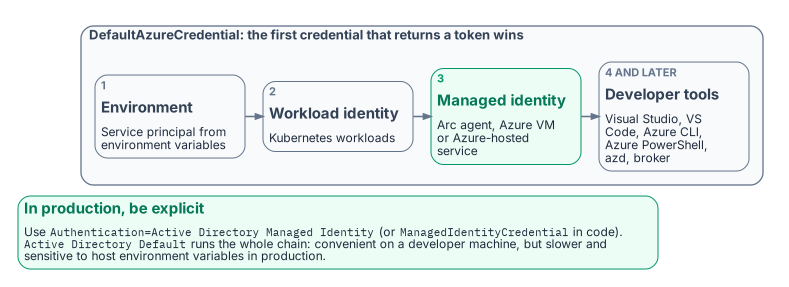
For .NET applications, a large share of most agency application estates, the Azure.Identity library provides DefaultAzureCredential, a preconfigured, ordered credential chain. It tries environment-variable service-principal credentials first, then workload identity, then managed identity, and then developer-tool credentials: Visual Studio, Visual Studio Code (with the Azure.Identity.Broker package), Azure CLI, Azure PowerShell, Azure Developer CLI and the broker. Interactive browser sign-in is in the chain but off by default.18 On an Arc-enabled server the managed identity step reaches the Arc agent’s local endpoint; on an Azure VM it reaches the Azure Instance Metadata Service.19
The value of the chain is that one credential code path works unchanged across environments. In production the application resolves its managed identity; in a developer’s environment it resolves the developer’s Visual Studio or Azure CLI sign-in; no code differs between them. The SQL connection uses Authentication=Active Directory Default, available in Microsoft.Data.SqlClient 3.0 and later, which runs the chain with interactive browser sign-in disabled; or the application sets AccessTokenCallback (5.2 and later) with a credential of its choice, which lets the driver renew tokens for pooled connections.20
Active Directory Default is convenient in development. In production, Microsoft recommends naming the credential explicitly (Authentication=Active Directory Managed Identity, or ManagedIdentityCredential in code), because walking the whole chain is slower and harder to debug, and its result can change if someone sets environment variables on the host.2122 Setting the AZURE_TOKEN_CREDENTIALS environment variable to prod, or to a single credential name, narrows the chain where code can’t change.23 The result is that the connection-string change is a net reduction in complexity for .NET applications: one keyword replaces an entire credential-management system. This is the workload-identity model from Chapter 11: the application authenticates as itself through a managed identity, with no human credential and no stored secret anywhere in the path.
- The connection-string change replaces Integrated Security or SQL Authentication with an Entra authentication mode, and the stored credential disappears; on an Arc host, who can request the server’s token becomes the control to govern.
- Each driver family supports managed identity and service principals from a specific version; Entra password authentication is deprecated everywhere.
- The change is gated on an existing Entra login, the right database role and a tested change in a production-equivalent environment. In production, name a specific mode such as
Active Directory Managed Identity;Active Directory Defaultwalks a credential chain.
Microsoft Learn, “Microsoft Entra authentication with Microsoft.Data.SqlClient” (authentication modes and first supported releases; service principal; managed identity; default authentication; deprecated password authentication;
AccessTokenandAccessTokenCallback; 7.0 package split), https://learn.microsoft.com/sql/connect/ado-net/sql/azure-active-directory-authentication (accessed Oct 20, 2026).↩︎Microsoft Learn, “Access Azure resources by using managed identity on Azure Arc-enabled servers,” sections “Prerequisites” and “Security overview,” https://learn.microsoft.com/azure/azure-arc/servers/managed-identity-authentication (accessed Oct 20, 2026).↩︎
Microsoft Learn, “Identity and access management for Azure Arc-enabled servers” (Cloud Adoption Framework), section “Configure managed identities,” https://learn.microsoft.com/azure/cloud-adoption-framework/scenarios/hybrid/arc-enabled-servers/eslz-identity-and-access-management (accessed Oct 20, 2026).↩︎
Microsoft Learn, “Microsoft Entra authentication with Microsoft.Data.SqlClient” (authentication modes and first supported releases; service principal; managed identity; default authentication; deprecated password authentication;
AccessTokenandAccessTokenCallback; 7.0 package split), https://learn.microsoft.com/sql/connect/ado-net/sql/azure-active-directory-authentication (accessed Oct 20, 2026).↩︎Microsoft Learn, “Microsoft Entra authentication with Microsoft.Data.SqlClient” (authentication modes and first supported releases; service principal; managed identity; default authentication; deprecated password authentication;
AccessTokenandAccessTokenCallback; 7.0 package split), https://learn.microsoft.com/sql/connect/ado-net/sql/azure-active-directory-authentication (accessed Oct 20, 2026).↩︎Microsoft Learn, “Microsoft Entra authentication with Microsoft.Data.SqlClient” (authentication modes and first supported releases; service principal; managed identity; default authentication; deprecated password authentication;
AccessTokenandAccessTokenCallback; 7.0 package split), https://learn.microsoft.com/sql/connect/ado-net/sql/azure-active-directory-authentication (accessed Oct 20, 2026).↩︎Microsoft Learn, “Using Microsoft Entra ID with the ODBC Driver,” https://learn.microsoft.com/sql/connect/odbc/using-azure-active-directory (accessed Oct 20, 2026).↩︎
Microsoft Learn, “Frequently Asked Questions for ODBC on Linux and macOS,” section “Does the driver support Microsoft Entra ID authentication?,” https://learn.microsoft.com/sql/connect/odbc/linux-mac/frequently-asked-questions-faq-for-odbc-linux (accessed Oct 20, 2026).↩︎
Microsoft Learn, “Connect Using Microsoft Entra authentication” (Microsoft Drivers for PHP;
ActiveDirectoryMsirequires ODBC Driver 17.3.1.1 or later), https://learn.microsoft.com/sql/connect/php/azure-active-directory (accessed Oct 20, 2026).↩︎Microsoft Learn, “Use Microsoft Entra ID” (OLE DB Driver for SQL Server), https://learn.microsoft.com/sql/connect/oledb/features/using-azure-active-directory (accessed Oct 20, 2026).↩︎
Microsoft Learn, “Configure managed identity for linked servers” (SQL Server 2025), https://learn.microsoft.com/sql/sql-server/azure-arc/managed-identity-support-linked-server (accessed Oct 20, 2026).↩︎
Microsoft Learn, “Connect using Microsoft Entra authentication” (Microsoft JDBC Driver for SQL Server), sections “Client setup requirements” and “Connect using ActiveDirectoryManagedIdentity authentication mode,” https://learn.microsoft.com/sql/connect/jdbc/connecting-using-azure-active-directory-authentication (accessed Oct 20, 2026).↩︎
Microsoft Learn, “Microsoft Entra authentication with Microsoft.Data.SqlClient” (authentication modes and first supported releases; service principal; managed identity; default authentication; deprecated password authentication;
AccessTokenandAccessTokenCallback; 7.0 package split), https://learn.microsoft.com/sql/connect/ado-net/sql/azure-active-directory-authentication (accessed Oct 20, 2026).↩︎Microsoft Learn, “Using Microsoft Entra ID with the ODBC Driver,” https://learn.microsoft.com/sql/connect/odbc/using-azure-active-directory (accessed Oct 20, 2026).↩︎
Microsoft Learn, “Tutorial: Set up Microsoft Entra authentication for SQL Server enabled by Azure Arc,” section “Create logins and users,” https://learn.microsoft.com/sql/sql-server/azure-arc/entra-authentication-setup-tutorial (accessed Oct 20, 2026).↩︎
Microsoft Learn, “Microsoft Entra authentication with Microsoft.Data.SqlClient” (authentication modes and first supported releases; service principal; managed identity; default authentication; deprecated password authentication;
AccessTokenandAccessTokenCallback; 7.0 package split), https://learn.microsoft.com/sql/connect/ado-net/sql/azure-active-directory-authentication (accessed Oct 20, 2026).↩︎Microsoft Learn, “Tutorial: Set up Microsoft Entra authentication for SQL Server enabled by Azure Arc,” section “Create logins and users,” https://learn.microsoft.com/sql/sql-server/azure-arc/entra-authentication-setup-tutorial (accessed Oct 20, 2026).↩︎
Microsoft Learn, “Credential chains in the Azure Identity library for .NET,” https://learn.microsoft.com/dotnet/azure/sdk/authentication/credential-chains (accessed Oct 20, 2026).↩︎
Microsoft Learn, “Access Azure resources by using managed identity on Azure Arc-enabled servers,” sections “Prerequisites” and “Security overview,” https://learn.microsoft.com/azure/azure-arc/servers/managed-identity-authentication (accessed Oct 20, 2026).↩︎
Microsoft Learn, “Microsoft Entra authentication with Microsoft.Data.SqlClient” (authentication modes and first supported releases; service principal; managed identity; default authentication; deprecated password authentication;
AccessTokenandAccessTokenCallback; 7.0 package split), https://learn.microsoft.com/sql/connect/ado-net/sql/azure-active-directory-authentication (accessed Oct 20, 2026).↩︎Microsoft Learn, “Credential chains in the Azure Identity library for .NET,” https://learn.microsoft.com/dotnet/azure/sdk/authentication/credential-chains (accessed Oct 20, 2026).↩︎
Microsoft Learn, “Microsoft Entra authentication with Microsoft.Data.SqlClient” (authentication modes and first supported releases; service principal; managed identity; default authentication; deprecated password authentication;
AccessTokenandAccessTokenCallback; 7.0 package split), https://learn.microsoft.com/sql/connect/ado-net/sql/azure-active-directory-authentication (accessed Oct 20, 2026).↩︎Microsoft Learn, “Credential chains in the Azure Identity library for .NET,” https://learn.microsoft.com/dotnet/azure/sdk/authentication/credential-chains (accessed Oct 20, 2026).↩︎