Federal Modernization Workbook · Book 00 · How
Chapter 10 — Retirement, Steady State and Measuring Success
Retire each legacy dependency only when the data shows nothing uses it, keep the way back open until the gate is green, and then measure the program by what it keeps true, not by what it switched off.
The program’s last three phases in Book 01’s terms: Phase 4 legacy retirement (where the master plan’s cutover milestones land) and its gate G4, Phase 5 AD DS retirement (which the master plan doesn’t reach) and its gate G5, and Phase 6 steady state. For each, what is done, what has to stay running until the domain itself retires, how to check it and how to back out. The chapter closes with the program scorecard: the charter’s and the plan’s success criteria, joined to the outcome measures that steady state keeps green.
The program reaches this chapter when gate G3, Rollout Complete, has cleared: every division has passed its exit gate, every user PC is cloud-joined and every server Arc-connected or recorded as an exception (Chapter 09). From here on, the work changes character. The earlier phases built new things alongside old ones; these phases take old things away. That is where the program’s rule that every change carries its own rollback matters most, because some of these steps have no cheap way back.
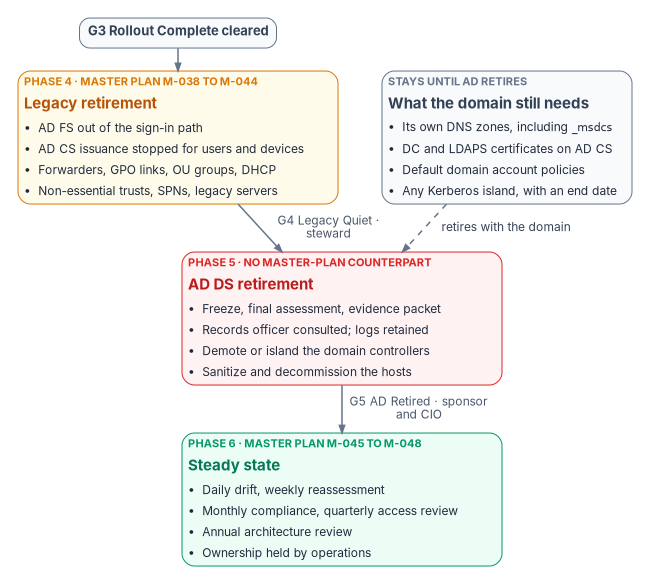
Where the master plan’s last phases land
The master plan calls its last two phases Cutover (weeks 34 to 41) and Steady State (week 42 on). In Book 01’s terms they are Phase 4 and Phase 6. The full mapping is in Chapter 05; the part that matters here is short:
| Master plan | Milestones | Book 01 phase | Exit gate | Gate owner |
|---|---|---|---|---|
| 5 — Cutover | M-038 to M-044 | 4 — Legacy retirement | G4 — Legacy Quiet | Steward, with the executive sponsor as backup |
| No counterpart | — | 5 — AD DS retirement | G5 — AD Retired | Executive sponsor and CIO |
| 6 — Steady state | M-045 to M-048 | 6 — Steady state | — (runs indefinitely) | Program office, handing over to operations |
Gate owners are Book 01’s (Book 01, Chapter 09). The master plan’s cutover ends with Active Directory still running “for auth”: its own validation checklist requires the AD service-location records to keep resolving. That is a sound place to stop a cutover, but it isn’t the end of the modernization. Book 01 adds a Phase 5 to take AD DS itself out, or to reduce it to documented Kerberos islands with end dates, and this chapter covers it from Book 01 because the master plan doesn’t.
Phase 4 — Legacy retirement
Phase 4 retires the legacy components the rollout has made redundant, each through its own plan with steward approval. The master plan opened its cutover phase by calling every action “irreversible,” then listed a rollback for each, most of them reversible. The second statement is the accurate one, and it’s the one the program runs on: an action is retired only while its rollback still works, and the rollback stays available until the next gate.
The retirement actions
The master plan’s seven cutover milestones can run in parallel after the last rollout wave, with the legacy server decommission waiting on three of them. Each is shown with the correction the published books make to it.
| Milestone | Action | Owner | What the program does differently |
|---|---|---|---|
| M-038 — AD FS out of the path (if present) | Convert federated domains to managed authentication; take the AD FS farm out of the sign-in path1 | Identity lead | Convert with the Microsoft Graph PowerShell cmdlets; conversion can take up to 60 minutes per domain,2 and Microsoft’s AD FS FAQ allows up to 4 hours for the change to take full effect.3 Before decommissioning, Microsoft says to test cloud authentication for at least a week and confirm with Connect Health and the sign-in logs that no relying party still uses the farm.4 Procedure: Book 02, Chapter 10 and Book 07, Chapter 07 |
| M-039 — AD CS issuance stopped | Disable auto-enrollment and lock templates | PKI lead | Stop issuance for user and device templates that have moved to Cloud PKI; keep domain controller and LDAPS templates enrolling, because those certificates stay on AD CS until AD retires (Book 07, Chapter 07) |
| M-040 — DNS forwarders migrated | Hybrid forwarding through Azure DNS Private Resolver; remove on-premises forwarders | DNS lead | Remove forwarders only for zones that have moved; the AD domain’s own zones, including _msdcs, stay on a DNS service that accepts secure dynamic registration from domain controllers and move last (Book 08, Chapter 10) |
| M-041 — GPO links removed | Remove the remaining GPO links from every OU (each link disabled first); keep the objects for audit | Endpoint lead | Not every link can go while domain controllers run: domain controllers take their password, lockout and Kerberos policy only from a GPO linked at the domain root.5 What remains is the minimum set the running domain and any Kerberos island need |
| M-042 — Trusts reduced | Remove non-essential trusts per the trust decommission plan | Identity lead | Unchanged; each removal is a recorded plan with its recreation procedure |
| M-043 — Legacy servers decommissioned | NDES, secondary issuing CAs, secondary DNS servers | Infrastructure lead | An issuing CA retires only when its certificates have expired or been superseded, and its final CRL stays published for as long as any certificate it issued could still be validated.67 DNS servers that are also domain controllers wait for Phase 5 |
| M-044 — Cutover validation | All modernization plans at 100% in the repository; no legacy dependencies | Steward | Becomes the G4 evidence; “no legacy dependencies” is read as Book 01’s G4 criteria below |
Book 01’s G4 also covers three things the master plan’s cutover leaves out: OU-based security groups superseded by dynamic groups, AD-authorized DHCP, and the service principal names still bound to AD, each migrated, retired or islanded application by application (Book 01, Chapter 12). They belong to the same phase and the same evidence packet.
Four more dependencies keep AD alive and are easy to miss because no cutover milestone names them. Each needs an owner and a dated response in the same packet (design guidance):
| Dependency | Response |
|---|---|
| Synced users’ attributes: while users are synced, HR provisioning writes to AD and AD masters most attributes | Move the source of authority population by population, as a gated step. Entry checks for a population: HR provisions it directly to Entra ID, and it has no on-premises Exchange mailbox, no AD FS dependency and no password-based application. Whether source-of-authority transfer is available in GCC is an open question to confirm with Microsoft; until it’s answered, the AD-mastered path is the default (Book 02, Chapter 10) |
| Cloud groups written back to AD for Kerberos applications | Each written-back group is a dependency to retire: move the application to SAML or OpenID Connect, or record it in a Kerberos island with an end date |
| SQL Server Windows logins, which keep AD in the authentication path and bypass Conditional Access | Report them as an IA-2 gap in the program’s control mapping, and close them through Book 06’s login migration (Book 06, Appendix A) |
| Domain GPOs that hybrid-joined devices still apply | Keep the domain baselines until the last hybrid-joined device is gone; links come off population by population with rollback tested (Book 05, Chapter 07) |
The cutover validation checklist
The master plan’s twenty-five-item checklist is the most useful single artifact for this phase, because each item names its check and its owner. It is kept here, with the items that would fail a correctly built estate corrected.
| # | Validation item | Method | Owner |
|---|---|---|---|
| 1 | Every user account synced to Entra ID with correct organizational attributes | Entra ID export compared with the identity modernization plan | Identity lead |
| 2 | No permanent Global Administrator assignments except the emergency access accounts | PIM role assignment report. Microsoft says emergency access accounts should hold Global Administrator as permanent active, not eligible, so “zero permanent assignments” as written would remove them8 | Identity lead |
| 3 | Every baseline Conditional Access policy enforced; any policy left in report-only mode has a recorded decision | Conditional Access policy status report | Security lead |
| 4 | Every user device enrolled in Intune and compliant | Intune compliance report (servers are covered by item 14, not by Intune) | Endpoint lead |
| 5 | No GPO linked to any OU beyond the minimum set the running domain needs | Get-GPInheritance for the domain root and every OU (the source named a Get-GPLink cmdlet, which doesn’t exist)9 |
Endpoint lead |
| 6 | No migrated device receiving GPO-delivered settings | gpresult /r on sample devices |
Endpoint lead |
| 7 | Every user and device certificate issued by Cloud PKI | Intune certificate report; no AD CS issuance from migrated templates in the last 30 days | PKI lead |
| 8 | AD CS auto-enrollment disabled on every migrated template | Template audit with certutil -template; domain controller and LDAPS templates excepted |
PKI lead |
| 9 | Every AD CS misconfiguration finding remediated or accepted with documentation | Security remediation plan: all items closed (Book 07, Chapter 03) | Security lead |
| 10 | CRL distribution points still reachable for existing certificates | certutil -verify against issued certificates |
PKI lead |
| 11 | Name resolution working for every zone through the hybrid resolver | Resolution tests from every site | DNS lead |
| 12 | No conditional forwarders left on on-premises DNS for zones that have moved | DNS server configuration audit | DNS lead |
| 13 | AD service-location records still resolvable while AD runs | nslookup -type=SRV _ldap._tcp.dc._msdcs.<domain> |
DNS lead |
| 14 | Every in-scope server Arc-connected | Arc inventory compared with the computer modernization plan | Infrastructure lead |
| 15 | Machine configuration (formerly Guest Configuration) compliant on every Arc server | Azure Policy compliance view10 | Infrastructure lead |
| 16 | Every trust marked for removal removed | Trust decommission plan: all non-essential trusts gone | Identity lead |
| 17 | AD FS farm out of the sign-in path (if present) | No federated domains remain; no AD FS sign-in activity | Identity lead |
| 18 | Service accounts migrated to group managed service accounts or workload identities, or documented as exceptions | Service account inventory | Identity lead |
| 19 | Drift detection running daily by default (a check with its own cadence in Book 13, Chapter 06 follows that), with weekly reassessment reports | Repository history shows daily drift results and weekly assessment diffs | Steward |
| 20 | Every planning document at its current, approved status | Repository status audit | Steward |
| 21 | Decommissioned servers removed from AD computer objects | Re-scan of the computer inventory | Infrastructure lead |
| 22 | Monitoring and alerting configured for every modernized service | Alert test for each workstream | All leads |
| 23 | Emergency access accounts tested and documented | Successful test sign-in; Microsoft’s minimum is a validation at least every 90 days11 | Security lead |
| 24 | Operational runbooks drafted for steady state | Runbooks committed to the repository | All leads |
| 25 | Phase completion report committed | Gate review report in the repository | Project manager |
Item 5 is easy to script. The example below lists every container that still has a GPO linked directly to it. On a correctly retired estate the output is short and expected: the domain root with the default domain policy, the Domain Controllers OU with its default policy, and any OU that holds a Kerberos island.
The script below is an illustrative read-only check. It hasn’t been tested against a production forest. Review it before running it, and run it with an account that has only read access.
# List the domain root and every OU that still has a GPO linked directly to it.
Import-Module ActiveDirectory, GroupPolicy

$targets = @((Get-ADDomain).DistinguishedName) +
           (Get-ADOrganizationalUnit -Filter * |
                Select-Object -ExpandProperty DistinguishedName)

foreach ($target in $targets) {
    $links = (Get-GPInheritance -Target $target).GpoLinks
    if ($links) {
        [pscustomobject]@{
            Target     = $target
            LinkedGpos = ($links.DisplayName -join '; ')
        }
    }
}
Rollback for each retirement action
| Action | Can it be undone? | How | Window |
|---|---|---|---|
| AD FS out of the path | Yes, while the farm is restorable | Re-federate the domain with New-MgDomainFederationConfiguration from the recorded configuration and restore the claim rules12 |
The master plan allowed 72 hours, shorter than Microsoft’s one-week observation before decommissioning. The program uses the windows in Book 07, Chapter 07 (30 days out of the path) and Book 02, Chapter 10 (restorable for 90 days after decommission) |
| AD CS issuance stopped | Yes | Re-enable the templates and restart issuance; the CRL must stay valid | While the CA is online |
| DNS forwarders migrated | Yes | Recreate the on-premises forwarders; disable the resolver rules | Indefinite, but see the record-deletion warning in Book 08, Chapter 10 |
| GPO links removed | Yes | Re-link the retained GPO objects | Until the GPO objects are deleted |
| Trust removed | By recreation | Recreate the trust; needs administrative rights on both sides | Hours |
| Legacy server decommissioned | Only by rebuild | Restore from backup or rebuild from the documented procedure; the program plans 8 to 12 hours to restore a CA (Book 07, Chapter 07) | The point of no easy return |
Gate G4 — Legacy Quiet
The steward clears G4, with the executive sponsor as backup. The criteria are Book 01’s, evaluated from the repository and the drift reports rather than by signature: no active GPOs beyond the minimum the running domain and any Kerberos island need; no AD security groups in active use; every DNS zone moved or retired except the AD domain’s own; user and device certificate issuance off AD CS; every service principal name migrated, retired or islanded; and AD authentication volume below an agreed threshold (Book 01, Chapter 12). The cutover checklist above is the evidence; the gate review records the decision in the repository, using the program’s gate review template.
Phase 5 — AD DS retirement
Phase 5 is the shortest phase because the earlier ones did the work. Book 01 sets its steps: freeze AD changes and run a final assessment and evidence packet; demote the domain controllers that hold no operations master roles; transfer those roles to a survivor if a Kerberos island is kept; demote or isolate the rest, with the domain’s DNS zones moving or retiring with them; then decommission the hosts, archive the final state and commit the retirement record (Book 01, Chapter 12). Two facts from Book 01 shape the plan. Demoting the last domain controller in a domain removes the domain itself, and a backup can restore Active Directory only within the tombstone lifetime, so the archive is a records copy, not an indefinite rollback. The real rollback point is the last moment a domain controller still runs.
Two steps are easy to forget because no technical check fails without them:
- Records before hardware. Domain controllers, AD FS farms, sync servers and SIEM connectors hold years of access records with retention rules of their own. The program consults the agency records officer before any of them is decommissioned, and archives what the schedule requires first; the checklist below sets out the steps (Book 01, Chapter 09).
- Sanitize what you retire. Domain controllers store the password hashes of every account in the domain,13 so a retired domain controller’s disks hold them until they’re sanitized. The program sanitizes retired hosts and their storage under the agency’s media sanitization procedure; NIST’s current guidance is SP 800-88 Rev. 2, Guidelines for Media Sanitization, published in September 2025.14
Removing each domain controller cleanly
Each domain controller leaves Active Directory by demotion, not by being switched off. A normal demotion removes the domain controller’s metadata from Active Directory as part of the operation. Forced removal demotes it without removing that metadata, and Microsoft reserves it for a domain controller that can’t contact other domain controllers when there’s no reasonable way to fix the network problem: it leaves orphaned metadata on the remaining domain controllers and loses any changes that hadn’t replicated.15 Metadata cleanup is then required.16
Demote normally wherever the domain controller can reach a partner. On the domain controller, run the demotion cmdlet; adding
-WhatIffirst shows the values it will use. For the last domain controller in a domain, Microsoft’s example adds-LastDomainControllerInDomainand-RemoveApplicationPartitions, and the demotion needs Enterprise Admins membership because it removes the domain.17Uninstall-ADDSDomainControllerForce removal only when a graceful demotion can’t work. Microsoft’s forced-demotion example uses
-ForceRemovaland-DemoteOperationMasterRole. Any operations master roles the domain controller holds must be seized from another domain controller immediately afterwards, and metadata cleanup must follow at once.18 A domain controller that is permanently offline skips this step and goes straight to cleanup.19Clean up the metadata after any forced removal or permanently offline domain controller. Work on a domain controller in the same domain that is a replication partner of the removed one, with Domain Admins rights at least (the command prompt may ask for Enterprise Admin credentials). Deleting the removed domain controller’s computer object from the Domain Controllers OU in Active Directory Users and Computers, and confirming that it is permanently offline, does the cleanup automatically. From the command line, type each command at the prompt that follows the one before; in
connect to server,<ServerName>is the domain controller doing the cleanup:20ntdsutilmetadata cleanupconnectionsconnect to server <ServerName>quitremove selected server <ServerName>Confirm the removal in the Server Remove Configuration dialog, then type
quitat themetadata cleanup:andntdsutil:prompts. If cleanup returns “Access is denied,” clear Protect object from accidental deletion on the computer object and the NTDS Settings object.21Verify and record. The removed domain controller no longer appears under Domain Controllers in Active Directory Users and Computers, and its server object in Active Directory Sites and Services has no NTDS Settings object.22 The result goes into the Phase 5 evidence packet with the retirement record.
Records before hardware: the decommissioning checklist
Federal records law applies to every system the program retires. Agency heads “shall make and preserve records containing adequate and proper documentation” of the agency’s functions and decisions, and records may not be destroyed except under a NARA-approved schedule or the General Records Schedules.2324 Destroying an unscheduled record, a temporary record before its retention period ends, or a record under a FOIA request or litigation hold is unlawful destruction, and the agency must report it to NARA.25 The checklist applies the rules to each domain controller, AD FS farm, sync server, certificate authority, DNS and DHCP server, file server and SIEM connector before it is decommissioned; the ordering is the workbook’s recommendation.
- Name the records owner. The agency records officer signs off on each system’s disposition before the hardware is touched.
- Map each record class to a disposition authority. Every federal record must be covered by a NARA-approved agency schedule or the General Records Schedules, and anything unscheduled may not be destroyed.26 The usual items for these systems: user profiles, log-in files and audit trails are system access records under GRS 3.2 items 030 and 031, and for systems “requiring special accountability for access” are kept 6 years after the password is altered or the account terminated; cybersecurity event logs are GRS 3.2 item 036, kept 30 months; system security plans and disaster recovery plans are item 010; certificate authority records are items 060 to 062; configuration and change records, and system development records, are GRS 3.1 items 030 and 011, kept 5 years after the system is superseded or terminated.2728 NARA is revising GRS 3.2 items 035 and 036, which still cite the rescinded M-21-31, so check the current transmittal.29 The General Records Schedules for technology don’t cover a system’s data or content, so file shares need the owning program’s own schedule.30
- Migrate before retiring, if the retention outlives the system. Agencies must determine whether a record’s retention period is longer than the life of the system holding it, “If so, plan for the migration of the records to a new system before the current system is retired,” keeping the link between records and their metadata.31
- Don’t treat backups as the archive. “System and file backup processes and media do not provide the appropriate recordkeeping functionalities and must not be used as the agency electronic recordkeeping system.”32 A domain controller backup restores only within the tombstone lifetime anyway.
- Keep the names that make email records readable. Where mail identifies people by codes, nicknames or distribution lists, agencies must “retain the intelligent or full names on directories or distributions lists,” so the directory’s mapping of aliases and groups to full names is kept with the mail archive.33
- Keep what’s needed to read the records: the software and documentation that the migrated records depend on, for their whole retention period.3435
- Check holds first, then transfer any permanent records to NARA in electronic form with their metadata, which has been required since June 30, 2024.36
- Destroy only what the schedule allows, and sanitize the media under SP 800-88 Rev. 2, as above.
- File the disposition record with the G4 or G5 evidence packet.
Gate G5 — AD Retired
The executive sponsor and the CIO clear G5 together. The criteria: domain controllers decommissioned, or kept as a documented Kerberos island with an end-of-life date; the final evidence packet in the repository and the SIEM; no live production dependency on AD authentication. G5 is also where the last open item of the success scorecard closes: every residual risk documented, with an owner.
Phase 6 — Steady state
Steady state has no exit gate. The master plan’s objective for it holds: operate the modernized environment under continuous governance, with automated drift detection, scheduled reassessment and periodic access reviews, all tracked in the repository. Book 01 adds the finish line: zero drift findings, zero actions from the nightly plan run, signed evidence flowing to the SIEM and to continuous monitoring, and only routine tickets (Book 01, Chapter 12). That is the operating form of the continuous monitoring that SP 800-53 control CA-7 asks for: metrics, monitoring frequencies, ongoing assessment, analysis and response, and status reporting.37
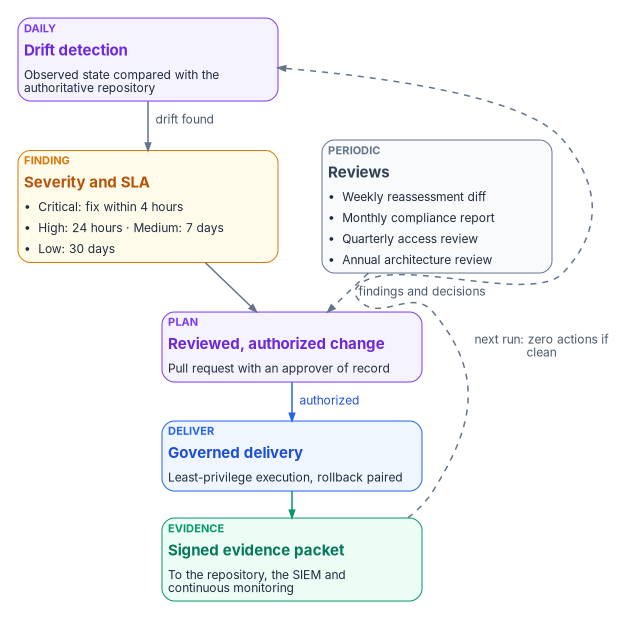
The operating cadence
| Operation | Cadence | How | Output |
|---|---|---|---|
| Reassessment | Weekly | The assessment runs on a schedule and commits its diff to the repository. While AD runs it reads the forest; afterward it reads the cloud surfaces (Entra ID, Intune, Arc, DNS and PKI) | A weekly delta in the repository |
| Drift detection | Daily by default; a check with its own cadence follows it (Book 13, Chapter 06) | Current state compared with the approved plans | A tracked finding per drift, with an owner and a severity SLA |
| Compliance monitoring | Continuous | Intune compliance, Azure Policy and machine configuration compliance, Entra sign-in health | A monthly compliance report committed to the repository |
| Certificate lifecycle | Daily | Renewal monitoring on all three engines: Intune for device certificates, AD CS autoenrollment for domain controllers, and the CLM platform for everything else; certificate-based authentication binding checks | Expiry alerts at 30, 14 and 7 days |
| DNS health | Continuous | Service-location record probes, resolver health checks, query analytics | Alert when the resolution failure rate exceeds 0.1% |
| Access reviews | Quarterly | Privileged role reviews, group attestation, application consent reviews | Review results committed to the repository |
Two licensing notes apply. Access reviews for member users now need Microsoft Entra ID Governance (or the Entra Suite), with some capabilities still running on Entra ID P2; PIM itself needs P2 or ID Governance.38 And any surface the agency’s cloud doesn’t offer has to be planned around, not assumed (Book 10, Chapter 04).
The master plan made four of these into standing milestones, each committed to the repository when it runs:
| Milestone | Cadence | Owner |
|---|---|---|
| M-045 — Drift assessment | Daily drift detection and a weekly reassessment diff, automated | Automation, reviewed by the steward |
| M-046 — Compliance report | Monthly | Security lead |
| M-047 — Access review | Quarterly | Identity lead |
| M-048 — Architecture review | Annual | Steward |
Drift remediation SLAs
Every finding gets a severity, and every severity a clock. These are the program’s default values from the master plan; the agency sets its own, and they become part of its continuous monitoring strategy. (The engagement archetype in Appendix B uses a different set of tiers; the values matter less than having one set, written down and measured.)
| Severity | Detect within | Remediate within | Escalation |
|---|---|---|---|
| Critical | 1 hour | 4 hours | Steward and security lead notified immediately |
| High | 4 hours | 24 hours | Workstream lead notified within 4 hours |
| Medium | 24 hours | 7 days | Workstream lead notified within 24 hours |
| Low | 7 days | 30 days | Tracked as an issue; reviewed at the weekly status meeting |
Handing over to operations
The project plan’s last phase ends when two things are true: the charter’s success criteria are met or explicitly deferred with a reason, and ownership of the authoritative source and of drift detection has passed from the project to steady-state operations. The handover is a decision like any other, recorded in the repository: who owns the repository and its branch protections, who owns each drift class, who answers each severity, and who runs the periodic reviews. Without that record, steady state decays into the implicit governance the program set out to remove. The ongoing evidence work belongs to the continuous monitoring project in the portfolio (Chapter 06).
Measuring success: the program scorecard
The charter and the project plan each list success criteria, and they overlap. The charter’s are method measures, because the charter’s scope is the method and leaves execution with the adopting organization; the plan’s add execution. Read together, and joined to the steady-state outcomes above, they make one scorecard. Each measure says where its evidence lives and at which gate it should turn green, consistent with Chapter 05.
Delivery measures
| # | Measure | From | Evidence | Green by | Owner |
|---|---|---|---|---|---|
| 1 | A current-state assessment of the major governance surfaces and dependencies exists and is accepted | Charter; plan | The committed assessment and its approval record (Chapter 08) | G0 | Program office |
| 2 | The target attribute-driven structure and control-plane model is defined, agreed and understood by the domain leads | Charter; plan | Approved target architecture; each domain lead can explain how an organizational fact is expressed, how policy attaches to it and how drift is detected | G1 | Program office with platform teams |
| 3 | At least one domain has a complete playbook with gates and evidence expectations | Charter | The first wave’s playbook in the repository | G2 Pilot Clean | Domain lead |
| 4 | The change-control pattern (origination, authorization, least-privilege execution, provenance closure, evidence emission) is defined and in use | Charter | The plan, review and delivery pipeline (Book 01, Chapter 11) | G1 | Program office |
| 5 | The first wave has run with full provenance and evidence | Plan | Pilot evidence packets | G2 | Steward |
| 6 | Drift classes and the detection approach are specified, then operational for every domain in scope | Charter; plan | Drift taxonomy; daily detection results | Specified by G1; operational by G2 and G3 | Program office |
| 7 | Residual risks are documented and each has an owner | Plan | The risk register (Appendix A) | Checked at every gate; closed at G5 | Project manager; the authorizing official accepts residual risk |
| 8 | Leadership can describe the modernization path, its major risks and how success is measured, without citing internal decision records | Charter; plan | A sponsor briefing given without document numbers | G0, then monthly | Executive sponsor |
Outcome measures
These are the program’s own design measures, read from the repository and the drift reports. They are what the steady state keeps green.
| Measure | Target at steady state | Source |
|---|---|---|
| Open drift findings past their SLA | Zero; trend reported monthly by severity | Drift reports |
| Nightly plan runs with zero actions | The normal case; any action traces to an authorized change | Plan run logs |
| AD authentication volume | Below the agreed G4 threshold, then zero or confined to dated Kerberos islands | Domain controller logs, then none |
| Evidence packets | Every delivery emits one; every packet signed and forwarded to the SIEM | Repository and SIEM |
| Access reviews | Completed on schedule, with decisions applied | Review results in the repository |
| Certificate expiries | None missed; every alert answered before the 7-day mark | The CLM platform’s inventory, with Intune and domain controller monitoring (Book 07, Chapter 08) |
| Gate decisions | Every criterion evaluated from data; every decision recorded with its maker | Gate review records |
| Ownership | Every drift class, severity and periodic review has a named operational owner | Handover record |
A program can meet every delivery measure and still fail if the outcome measures drift after the project team leaves. That is why the handover is part of the scorecard, not an afterthought, and why the architecture review is annual and owned by the steward.
Certificates in this book and the CLM platform
Book 07 gives each class of certificate one issuer and one renewal engine, and makes CyberArk Certificate Manager, Self-Hosted the system of record for every certificate that Intune and the PIV system don’t manage (Chapter 04, Chapter 05). The certificates this book’s systems depend on map to it as follows; Book 07, Appendix C describes the platform itself.
| Certificate | Book 07 class | Issued by | Renewed by | What the CLM platform does |
|---|---|---|---|---|
| Platform host (Gitea and IIS) TLS on 443 | Internal server TLS | Retained AD CS | CyberArk Certificate Manager | Requests and renews it; the CAPI driver installs it and binds IIS |
| RADIUS and NPS server certificates in the G0 inventory | RADIUS and 802.1X servers | Retained AD CS | CyberArk Certificate Manager | Renews them; installs through the CAPI driver on NPS |
| Domain controller and LDAPS certificates | Domain controller and LDAPS | Retained AD CS | AD CS autoenrollment | Watches through CA Import and discovery; never renews |
| CRL and OCSP endpoints checked at cutover | CA certificates and CRLs | The hierarchy | AD CS autoenrollment | Revocation monitoring checks them at least daily |
| Wi-Fi, VPN and CBA certificates from the pilot | Device and user auth (Intune) | Cloud PKI | Intune | Nothing: Intune renews them |
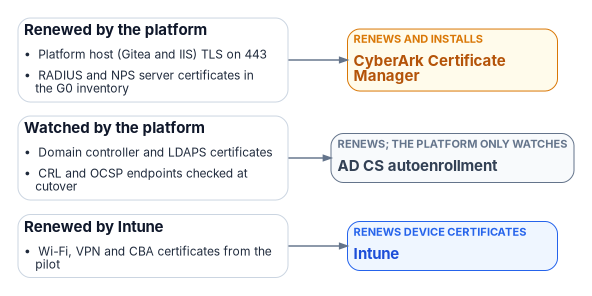
The operating cadence’s certificate row therefore watches three engines, not one: Intune for device certificates, AD CS autoenrollment for domain controllers, and the CLM platform for everything else, which also holds the inventory.3940
Key takeaways
- The master plan’s cutover is Book 01’s Phase 4 and gate G4; AD DS retirement (Phase 5, G5) is the step the master plan didn’t take, and the program does.
- Retire only what the data shows is unused, and keep each rollback working until the next gate. The domain’s own DNS zones, domain controller certificates and default account policies stay until the domain retires.
- Before any domain controller goes, retain its records and plan to sanitize its storage.
- Steady state is a loop: drift becomes a finding with an SLA, the finding an authorized plan, the plan evidence. The agency sets the SLA values; the program sets that there are some.
- Measure success twice: delivery measures that turn green gate by gate, and outcome measures that operations keeps green after the project ends.
Microsoft Learn, “AD FS Decommission” (the decommission guide, the AD FS to Microsoft Entra FAQ, and the resources for migrating authentication and applications from AD FS to Microsoft Entra ID), https://learn.microsoft.com/windows-server/identity/ad-fs/ad-fs-decommission (accessed Nov 9, 2026).↩︎
Microsoft Learn, “Migrate from federation to cloud authentication” (plan the maintenance window: conversion may take up to 60 minutes; plan for rollback with
New-MgDomainFederationConfiguration; convert withUpdate-MgDomain -AuthenticationType "Managed"), https://learn.microsoft.com/entra/identity/hybrid/connect/migrate-from-federation-to-cloud-authentication (accessed Oct 21, 2026).↩︎Microsoft Learn, “Active Directory Federation Server to Microsoft Entra FAQ,” entry “When switching a domain from federated to managed how long does it take for the change to take place?” (up to 4 hours to fully cut over), https://learn.microsoft.com/windows-server/identity/ad-fs/decommission/ad-fs-to-azure-ad-faq (accessed Nov 9, 2026).↩︎
Microsoft Learn, “Active Directory Federation Services (AD FS) decommission guide” (run Connect Health for at least one week; test cloud authentication for at least one week before decommissioning), https://learn.microsoft.com/windows-server/identity/ad-fs/decommission/adfs-decommission-guide (accessed Oct 21, 2026).↩︎
Microsoft Learn, “Group Policy application rules for domain controllers” (account policies, including password, lockout and Kerberos policy, apply to domain controllers only from a GPO linked to the domain container), https://learn.microsoft.com/troubleshoot/windows-server/active-directory/group-policy-application-rules-for-domain-controller (accessed Oct 21, 2026).↩︎
Microsoft Learn, “How to decommission a Windows enterprise certification authority and remove all related objects” (the CRL’s lifetime should be longer than the remaining lifetime of revoked certificates; AIA and CDP objects are retained while issued certificates are outstanding), https://learn.microsoft.com/troubleshoot/windows-server/certificates-and-public-key-infrastructure-pki/decommission-enterprise-certification-authority-and-remove-objects (accessed Oct 21, 2026).↩︎
Microsoft Learn, “Operate certificate revocation, CRL publication, and CDP changes in AD CS” (keep a CDP endpoint and current CRL content available until no unexpired certificate or CA certificate in scope references it), https://learn.microsoft.com/windows-server/identity/ad-cs/operate-certificate-revocation-crl-cdp (accessed Oct 21, 2026).↩︎
Microsoft Learn, “Manage emergency access accounts in Microsoft Entra ID,” Configuration requirements and Security guardrails summary (Global Administrator assigned as permanent active, not eligible; validate at least every 90 days), https://learn.microsoft.com/entra/identity/role-based-access-control/security-emergency-access (accessed Oct 21, 2026).↩︎
Microsoft Learn, “Get-GPInheritance” (GroupPolicy module; the
GpoLinksproperty lists the GPOs linked directly to a domain or OU), https://learn.microsoft.com/powershell/module/grouppolicy/get-gpinheritance (accessed Oct 21, 2026).↩︎Microsoft Learn, “Cloud-native governance and policy with Azure Arc-enabled servers,” Azure machine configuration (“previously called Azure Policy Guest Configuration”), https://learn.microsoft.com/azure/azure-arc/servers/cloud-native/governance-policy (accessed Oct 21, 2026).↩︎
Microsoft Learn, “Manage emergency access accounts in Microsoft Entra ID,” Configuration requirements and Security guardrails summary (Global Administrator assigned as permanent active, not eligible; validate at least every 90 days), https://learn.microsoft.com/entra/identity/role-based-access-control/security-emergency-access (accessed Oct 21, 2026).↩︎
Microsoft Learn, “Migrate from federation to cloud authentication” (plan the maintenance window: conversion may take up to 60 minutes; plan for rollback with
New-MgDomainFederationConfiguration; convert withUpdate-MgDomain -AuthenticationType "Managed"), https://learn.microsoft.com/entra/identity/hybrid/connect/migrate-from-federation-to-cloud-authentication (accessed Oct 21, 2026).↩︎Microsoft Learn, “Active Directory accounts,” Secure and manage domain controllers (“domain controllers store credential password hashes of all accounts in the domain”), https://learn.microsoft.com/windows-server/identity/ad-ds/manage/understand-default-user-accounts (accessed Oct 21, 2026).↩︎
NIST, SP 800-88 Rev. 2, Guidelines for Media Sanitization, September 2025 (supersedes Rev. 1, December 2014), https://csrc.nist.gov/pubs/sp/800/88/r2/final (accessed Oct 21, 2026).↩︎
Microsoft Learn, “Demote domain controllers and domains,” sections “Demotion and role removal by using PowerShell,” “Credentials,” “Warnings,” “Confirmation” and “Demotion,” https://learn.microsoft.com/windows-server/identity/ad-ds/deploy/demoting-domain-controllers-and-domains--level-200- (accessed Nov 9, 2026).↩︎
Microsoft Learn, “Clean up Active Directory Domain Controller server metadata,” sections “Clean up server metadata using Active Directory Users and Computers” and “Clean up server metadata using the command line,” https://learn.microsoft.com/windows-server/identity/ad-ds/deploy/ad-ds-metadata-cleanup (accessed Nov 9, 2026).↩︎
Microsoft Learn, “Demote domain controllers and domains,” sections “Demotion and role removal by using PowerShell,” “Credentials,” “Warnings,” “Confirmation” and “Demotion,” https://learn.microsoft.com/windows-server/identity/ad-ds/deploy/demoting-domain-controllers-and-domains--level-200- (accessed Nov 9, 2026).↩︎
Microsoft Learn, “Demote domain controllers and domains,” sections “Demotion and role removal by using PowerShell,” “Credentials,” “Warnings,” “Confirmation” and “Demotion,” https://learn.microsoft.com/windows-server/identity/ad-ds/deploy/demoting-domain-controllers-and-domains--level-200- (accessed Nov 9, 2026).↩︎
Microsoft Learn, “Clean up Active Directory Domain Controller server metadata,” sections “Clean up server metadata using Active Directory Users and Computers” and “Clean up server metadata using the command line,” https://learn.microsoft.com/windows-server/identity/ad-ds/deploy/ad-ds-metadata-cleanup (accessed Nov 9, 2026).↩︎
Microsoft Learn, “Clean up Active Directory Domain Controller server metadata,” sections “Clean up server metadata using Active Directory Users and Computers” and “Clean up server metadata using the command line,” https://learn.microsoft.com/windows-server/identity/ad-ds/deploy/ad-ds-metadata-cleanup (accessed Nov 9, 2026).↩︎
Microsoft Learn, “Clean up Active Directory Domain Controller server metadata,” sections “Clean up server metadata using Active Directory Users and Computers” and “Clean up server metadata using the command line,” https://learn.microsoft.com/windows-server/identity/ad-ds/deploy/ad-ds-metadata-cleanup (accessed Nov 9, 2026).↩︎
Microsoft Learn, “Clean up Active Directory Domain Controller server metadata,” sections “Clean up server metadata using Active Directory Users and Computers” and “Clean up server metadata using the command line,” https://learn.microsoft.com/windows-server/identity/ad-ds/deploy/ad-ds-metadata-cleanup (accessed Nov 9, 2026).↩︎
44 U.S.C. §3101 (2023 edition), https://www.govinfo.gov/content/pkg/USCODE-2023-title44/html/USCODE-2023-title44-chap31-sec3101.htm (accessed Oct 23, 2026).↩︎
36 CFR 1230.3 (unlawful or accidental destruction), 1230.10(a) and 1230.14 (reporting to NARA), https://www.ecfr.gov/current/title-36/chapter-XII/subchapter-B/part-1230 (accessed Oct 23, 2026).↩︎
36 CFR 1230.3 (unlawful or accidental destruction), 1230.10(a) and 1230.14 (reporting to NARA), https://www.ecfr.gov/current/title-36/chapter-XII/subchapter-B/part-1230 (accessed Oct 23, 2026).↩︎
36 CFR 1225.10 (“All Federal records … must be covered by a NARA-approved agency disposition authority, SF 115, Request for Records Disposition Authority, or the NARA General Records Schedules”) and 36 CFR 1226.10, https://www.ecfr.gov/current/title-36/chapter-XII/subchapter-B/part-1225 and https://www.ecfr.gov/current/title-36/chapter-XII/subchapter-B/part-1226 (accessed Oct 23, 2026).↩︎
National Archives, General Records Schedule 3.2, Information Systems Security Records (Transmittal 33, January 2023), items 010, 030, 031, 036 and 060–062, https://www.archives.gov/files/records-mgmt/grs/grs03-2.pdf (accessed Oct 23, 2026).↩︎
National Archives, General Records Schedule 3.1, General Technology Management Records (Transmittal 30, November 2019), introduction (“This schedule does not apply to system data or content”), items 011 and 030, and the note on keeping software needed to read the records, https://www.archives.gov/files/records-mgmt/grs/grs03-1.pdf (accessed Oct 23, 2026).↩︎
National Archives, “GRS Status Updates” (as of October 2026), Transmittal 38: “GRS 3.2, Information Systems Security Records — Revision to items 035-036 (related to rescission of OMB Memo M-21-31 and issuance of OMB M-26-14) — Drafting,” https://www.archives.gov/records-mgmt/grs/grs-status-updates (accessed Oct 23, 2026).↩︎
National Archives, General Records Schedule 3.1, General Technology Management Records (Transmittal 30, November 2019), introduction (“This schedule does not apply to system data or content”), items 011 and 030, and the note on keeping software needed to read the records, https://www.archives.gov/files/records-mgmt/grs/grs03-1.pdf (accessed Oct 23, 2026).↩︎
36 CFR 1236.14(a) and (b)(3) (migration), 1236.20(c) (backup systems) and 1236.22(a)(3) (email directories), https://www.ecfr.gov/current/title-36/chapter-XII/subchapter-B/part-1236 (accessed Oct 23, 2026).↩︎
36 CFR 1236.14(a) and (b)(3) (migration), 1236.20(c) (backup systems) and 1236.22(a)(3) (email directories), https://www.ecfr.gov/current/title-36/chapter-XII/subchapter-B/part-1236 (accessed Oct 23, 2026).↩︎
36 CFR 1236.14(a) and (b)(3) (migration), 1236.20(c) (backup systems) and 1236.22(a)(3) (email directories), https://www.ecfr.gov/current/title-36/chapter-XII/subchapter-B/part-1236 (accessed Oct 23, 2026).↩︎
National Archives, General Records Schedule 3.1, General Technology Management Records (Transmittal 30, November 2019), introduction (“This schedule does not apply to system data or content”), items 011 and 030, and the note on keeping software needed to read the records, https://www.archives.gov/files/records-mgmt/grs/grs03-1.pdf (accessed Oct 23, 2026).↩︎
36 CFR 1236.14(a) and (b)(3) (migration), 1236.20(c) (backup systems) and 1236.22(a)(3) (email directories), https://www.ecfr.gov/current/title-36/chapter-XII/subchapter-B/part-1236 (accessed Oct 23, 2026).↩︎
Office of Management and Budget and National Archives, M-23-07, Update to Transition to Electronic Records, December 23, 2022, §1.2 (“After June 30, 2024, Federal agencies must transfer all permanent records in an electronic format and with appropriate metadata”), https://www.archives.gov/files/records-mgmt/policy/m-23-07.pdf (accessed Oct 23, 2026).↩︎
NIST, SP 800-53 Rev. 5, Security and Privacy Controls for Information Systems and Organizations, release 5.2.0 (August 27, 2025), control CA-7, Continuous Monitoring, https://csrc.nist.gov/pubs/sp/800/53/r5/upd1/final; control text read from NIST’s OSCAL Rev. 5 catalog, https://github.com/usnistgov/oscal-content/tree/main/nist.gov/SP800-53/rev5 (both accessed Oct 21, 2026).↩︎
Microsoft Learn, “What are access reviews?,” License requirements, https://learn.microsoft.com/entra/id-governance/access-reviews-overview, and “Microsoft Entra ID Governance licensing fundamentals,” Privileged Identity Management, https://learn.microsoft.com/entra/id-governance/licensing-fundamentals (both accessed Oct 21, 2026).↩︎
CyberArk, Certificate Manager, Self-Hosted 26.1, “CAPI” application driver (installs certificates and keys into the Windows CAPI store over WinRM, optionally binds IIS, and can grant a named Windows identity read access to the private key), https://docs.venafi.com/Docs/current/TopNav/Content/Drivers/cco-CAPI-AppDriverConfig-tpp.php and https://docs.venafi.com/Docs/current/TopNav/Content/Drivers/r-CAPI-AppObjSettings-tpp.php (accessed Oct 23, 2026).↩︎
CyberArk, 26.1, “Selecting components” (Certificate Revocation Monitoring checks CRL distribution points at least daily and monitors OCSP), https://docs.venafi.com/Docs/current/TopNav/Content/Install/r-install-select-components.php (accessed Oct 23, 2026).↩︎