Federal Modernization Workbook · Book 15 · How
Chapter 14 — Provider Notices in Day-Two Operations
Every cloud provider tells the agency, in writing and ahead of time, what it will change, retire or patch in the agency’s own estate; day two fails when that notice lands in one person’s inbox and nobody owns it.
Why the notices providers send about the agency’s own estate go unread, and the six kinds of notice across Azure, Microsoft 365, Oracle Cloud Infrastructure, AWS and Google Cloud. Who owns each kind, using the roles of Chapter 10 and the routing of Chapter 03. How a notice becomes a task in the front door and closes only when the provider’s own record shows it is done, and what the weekly digest is for. Then the evidence the process leaves and the federal requirements it supports, what is available in each government cloud, and where the implementation guide and kit take over.
Chapter 03 routes Microsoft’s service health email to the service desk supervisor, to correlate with open tickets and post as a known issue, and sets the rule that nothing is approved or changed on the strength of an email. Book 12, Chapter 04 sends the Azure activity log’s ServiceHealth category to the workspace. Both are right, and neither is enough. A service health email is one notice from one provider; the agency’s estate also gets maintenance windows, retirements with deadlines, security advisories and changes that need an administrator to act, from every cloud it uses. This chapter sets out the operating model for all of them: who owns each kind, how it becomes work, and how the agency knows it was done.
The procedures are in the Provider Notices implementation guide and the code in the provider notices kit, examples/provider-notices. This chapter doesn’t repeat them. It explains what they are for and who answers for them. The model is program design except where a footnote says otherwise.
Why provider notices go unread
Providers don’t hide their notices. They publish them in a portal and send some of them by email, and every one of those channels ends at a person or a page, not a queue.
- Azure shows five kinds of event in Service Health: service issues, planned maintenance, health advisories (including deprecations and upgrade requirements), security advisories and billing updates. The portal keeps an event in its history for 90 days after it goes inactive.1 Nobody is told unless someone created a Service Health alert, and an alert fires only for the subscriptions, services and regions its rule names; Microsoft’s own FAQ gives a rule that left out the affected subscription as a reason an alert never arrived.2
- Microsoft 365 posts upcoming changes, retirements and required actions in the Message center. Each administrator’s view is their own: archiving a post removes it only from that administrator’s view, and the weekly digest goes by default to each administrator’s own primary email address. Microsoft gives at least 30 days’ notice of a major update that needs action, and the “Act by” date is rare enough that Microsoft says to pay extra attention when it appears.3
- Oracle Cloud Infrastructure contacts the tenancy administrator with service status announcements by email; anyone else receives them only through managed email preferences or announcement subscriptions.4 An agency whose HR platform runs on OCI therefore gets that platform’s maintenance and change notices at whatever address the tenancy was opened with.
- AWS sends account email to the root user’s address, plus up to three alternate contacts, one each for billing, operations and security.5 The AWS Health Dashboard and API keep events for up to 90 days.6
- Google Cloud sends notifications by category (billing, legal, product updates, security, suspension and technical) to the contacts set in Essential Contacts; a category with no contact falls back to principals chosen by IAM role.7
The pattern is the same everywhere. The notice reaches a mailbox that may belong to someone who left, or a portal that nobody opens on a schedule, and it carries no owner, no due date and no way to show it was dealt with. Two more problems follow. Attackers imitate provider email, which is why Chapter 03 never acts on it. And a notice that is read can still be forgotten: a retirement announced a year ahead is easy to agree with and easy to miss on the day.
The program’s answer is to treat the provider’s own record, read from its API, as the source of truth, and to run notices through the same front door as every other request (Book 13, Chapter 10). Email stays useful as an early warning; it stops being the system of record.
The six kinds of notice
Each provider names its notices differently. The program sorts them into six kinds, because the kind decides who owns the notice and what it asks of the agency. The guide’s track at a glance maps every provider type code to a kind; this table shows what each kind means.
| Kind | What the provider is saying | Where it comes from (examples) | What it asks of the agency |
|---|---|---|---|
| Maintenance | Work is scheduled that may affect availability | Azure planned maintenance;8 OCI scheduled and emergency maintenance;9 AWS scheduled changes;10 Microsoft 365 “Stay informed” posts about planned maintenance11 | Check the window against the systems that depend on it; tell the desk and users before it lands |
| Retirement | A feature, version or resource type is ending, with a date | Azure health advisories for deprecations;12 Message center posts tagged Retirement;13 AWS planned lifecycle and end-of-support events14 | Plan and approve the migration before the date; review the contingency plan if a system depends on it |
| Advisory | Information or a recommendation, often with no deadline | Azure health advisories; OCI “action recommended” and “information” announcements;15 AWS account notifications16 | Read it, decide whether it applies, and record the decision |
| Security | A security-related notice about the agency’s resources or account | Azure security advisories;17 AWS events for the security persona18 | Assess the exposure and act within the security response window |
| Change | A change the agency must plan for, or act on to avoid disruption | Message center “Plan for change” and “Prevent or fix issues” posts;19 OCI planned changes and “action required” announcements20 | Treat it as a proposed change to the system: impact analysis, then the change process |
| Incident | Something is broken now | Azure service issues; Microsoft 365 service health issues;21 OCI production event notifications;22 AWS issues;23 Google Cloud incidents24 | Correlate with open tickets, post a known issue, and activate contingency arrangements if the outage warrants it |
Not every provider has every kind. Google Cloud’s Personalized Service Health reports incidents only: its event category has one value, for service outage or degradation, so planned maintenance and security notices reach a Google Cloud project by other channels, such as the Essential Contacts categories above.2526 Some providers also say outright whether action is required. Microsoft 365 has its “Act by” date, OCI its “action required” type, and AWS an actionability field whose values are action required, action may be required and informational.272829 Azure’s notification types include “action required,” and Microsoft notes that an incident, though labeled informational, may be the moment to activate contingency plans.30 Where the provider doesn’t say, the kit applies a rule and the record shows which.
Who owns each kind
Ownership follows the roles this book already has. The table uses Chapter 10’s roles and Chapter 03’s routing; it adds no new role. The guide’s gate owners (“the cloud platform lead,” “the Microsoft 365 service owner”) are the platform owners named here.
| Kind | Owns it (decides what happens) | Does the work | Informed or consulted |
|---|---|---|---|
| Incident | The service desk supervisor, as Chapter 03 routes service health today | The service desk: correlate with open tickets, post the known issue; the platform owner of the affected platform if anything must change | Security operations, if the incident has a security element; the system owner, if the outage affects a system’s essential functions |
| Maintenance | The platform owner of the affected platform: the cloud platform owner for Azure, AWS, Google Cloud and each OCI tenancy; the collaboration owner for Microsoft 365 | The platform owner; the service desk prepares for the calls | The service desk lead, through the change advisory board (Chapter 10); the system owner of each system the window touches |
| Retirement | The system owner of each affected system, who decides the schedule, as for any finding on the system (Chapter 10) | The platform owner, through a normal change | The ISSO; the change advisory board |
| Change | The platform owner proposes; the change advisory board authorizes, as a normal change after the ISSO’s security impact analysis | The platform owner | The service desk lead; the system owner |
| Security | Security operations, which decides alert triage in Chapter 10 | Security operations, with the platform owner for any fix | The ISSO; the CISO for anything that acts on production |
| Advisory | The platform owner of the platform it names | The platform owner records whether it applies | The digest’s readers |
Three more pieces of ownership come from rows Chapter 10 already has. The routing rules that send each kind to an assignment group are routing and assignment rules: the service desk manager owns them and the ITSM platform team builds them (Chapter 10). The identities that read each provider’s notices are automation service identities: identity engineering designs them and the CISO decides any privileged scope. And a change to the routing, like any change to the ITSM platform’s routing or integrations, goes to the change advisory board.
Book 15 doesn’t yet name an owner for two decisions the process needs, and this chapter doesn’t invent one:
- Who receives each provider’s notices at the source: the OCI tenancy administrator’s address, the AWS alternate contacts, Google Cloud’s Essential Contacts and the Message center recipients. Not yet specified. The guide’s preflight checks that the contacts are named and current; the agency decides who names them.
- Who reviews the contingency plan when a retirement or maintenance window names a system’s resources. Not yet specified in this book. Book 14, Chapter 06 sets out the contingency plan and its roles; the routing flags the notice for that review.
From notice to task to closure
The lifecycle is the one Book 13, Chapter 10 sets for every finding, applied to a provider’s notice.
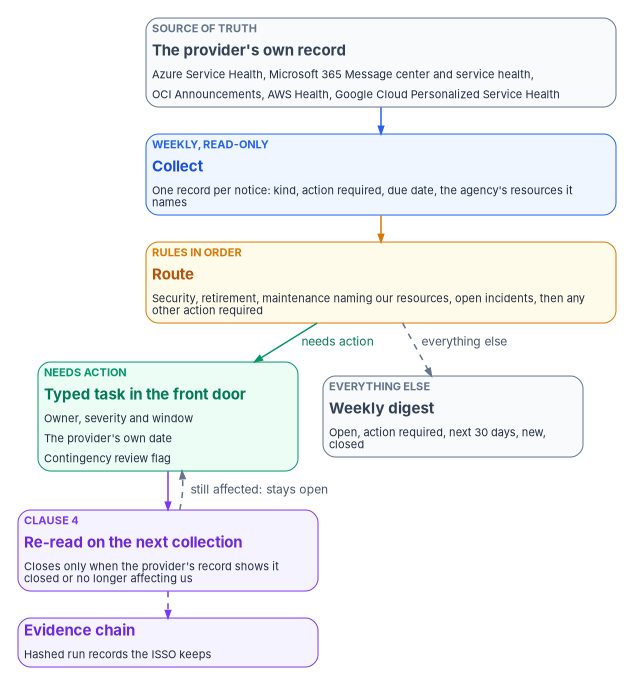
Collect from the provider, not the mailbox. A read-only identity reads each provider’s notices on a schedule, at least weekly, through the provider’s own interface: Service Health through Azure Resource Graph, Message center and service health through Microsoft Graph, OCI Announcements, the AWS Health API and Google Cloud Personalized Service Health. Each notice becomes one record with its kind, whether action is required and by when, and which of the agency’s resources it names.
Route by rules, in order. The routing rules are tried in order and the first match wins, so the specific rules come first: security advisories, then retirements, then maintenance that names the agency’s resources, then open incidents that name them, then anything else the provider marks as needing action. A notice that matches none goes to the digest. The order matters: a retirement is often also marked “action required,” and the retirement rule, which carries the contingency review, should take it first.
A task is a typed task. A notice that needs action becomes a task in the ITSM front door, not a second queue (Chapter 03). It carries an owner, the program’s severity and response window from the finding contract (P1 immediate, P2 one hour, P3 24 hours, P4 72 hours; program design, Book 13, Appendix B), and the provider’s own action date kept separately. The response window says how fast the owner must pick the task up; the provider’s date says when the work must be done, and for a retirement it may be months away. The task is keyed to the provider and the provider’s notice ID, so a notice the provider hasn’t changed never makes a second task, and an update to the notice (a rescheduled window, a new date) updates the task.
Close on the re-read. A task closes when the next collection shows the provider’s notice closed or the agency’s resources no longer affected, and the owner’s change record is attached. That is the fourth clause of the request chain, closure with provenance (Book 13, Appendix B). The provider closing its notice isn’t enough by itself: a retirement can close on the provider’s side while the agency still runs the retired version. When the provider closes a notice, the task is asked for its re-read, not closed.
Changes go through change control. A maintenance window the agency must prepare for, a retirement that needs a migration and a change that needs an administrator are all proposed changes to the system. The platform owner raises them, the ISSO analyzes the impact, and the change advisory board authorizes them like any normal change (Chapter 10). A provider’s notice doesn’t authorize anything; it starts the agency’s own decision.
The weekly digest
Not every notice is a task, and most shouldn’t be. The digest is how the owners see the rest. Once a week it lists, for each provider: the open notices; every notice that needs action, with its due date and owner; the maintenance and changes starting in the next 30 days; what is new in the last week; and what closed or stopped being listed.
The digest goes to the owners in the table above, not to a shared mailbox. Its natural home is a standing review the book already has: the service desk supervisor’s weekly review of the queue (Chapter 10) and the change advisory board’s agenda, where the next 30 days of maintenance and changes belong (design guidance). Two numbers from it are worth watching over time: notices that needed action and reached their due date with the task still open, and notices that were never routed because no rule matched them.
Evidence and the federal requirements it supports
Each weekly run leaves the provider’s raw response, the notice records, the task payloads, the digest and a hashed evidence record that chains to the previous one. The ISSO keeps them with the system’s continuous-monitoring evidence. The guide’s evidence table lists the files by gate.
| Requirement | What the notice process contributes | KSI |
|---|---|---|
| SA-9 (external system services), part c: monitor control compliance by external service providers on an ongoing basis | A weekly, recorded read of what each provider says about the agency’s estate | KSI-SCR-MIT, KSI-SCR-MON |
| SI-5 (security alerts, advisories and directives): receive them on an ongoing basis, disseminate them to the people who act, and implement directives in time or report the gap | Collection, routing to a named owner, and tasks with due dates | KSI-SCR-MON |
| CM-3 (configuration change control), parts b and f; CM-4 (impact analyses) | Announced changes, retirements and maintenance reviewed, analyzed and authorized before they land | KSI-CMT-LMC, KSI-CMT-RVP |
| CP-2 (contingency plan), part e: update the plan for changes to the system or its environment of operation | Retirements and maintenance that name the agency’s resources flagged for a contingency plan review | KSI-RPL-ARP |
| RA-3 (risk assessment), part f: update the assessment when there are significant changes to the environment of operation | The digest, as a weekly record of what is changing underneath the system | KSI-SCR-MON, KSI-SCR-MIT |
| SR-8 (notification agreements): agreements and procedures with supply chain entities for the notifications the organization defines | The named, current recipients of each provider’s notices | KSI-SCR-MON |
| CA-7 (continuous monitoring) and AU-9 (protection of audit information) | Every run kept in a hash-chained evidence record | KSI-MLA-EVC, KSI-MLA-OSM |
The control statements are from SP 800-53 Rev. 5 as published in release 5.2.0.31 The KSI pairs are the ones FedRAMP lists as related controls on its 2026 indicator pages: KSI-SCR-MON cites SA-9, SI-5, RA-3 and SR-8; KSI-SCR-MIT cites SA-9 and RA-3; KSI-CMT-LMC and KSI-CMT-RVP cite CM-3; KSI-RPL-ARP cites CP-2; KSI-MLA-EVC cites CA-7 and RA-3; and KSI-MLA-OSM cites AU-9. No KSI cites base CM-4.32 The indicators are written for cloud service providers; an agency uses them as vocabulary to line its evidence up with what its providers report, as Chapter 11 explains.
These records support the controls and address parts of them; they don’t by themselves decide whether a control is in place, and the agency’s assessor and authorizing official do. The agency still owns the organization-defined parameters, such as the external organizations SI-5 receives advisories from and the personnel it disseminates them to.
Government clouds
The process works the same way in a government cloud, but each provider’s notices are read where the tenant lives, and not every feature is there. The guide’s providers compared table has the detail.
| Provider | In a government cloud |
|---|---|
| Azure | Azure Government is supported by the kit. Microsoft Learn doesn’t state Resource Graph’s Service Health table availability in Azure Government explicitly; the guide records it as not yet specified |
| Microsoft 365 | The service communications API is available on Microsoft Graph’s national clouds: GCC High at graph.microsoft.us and DoD at dod-graph.microsoft.us.33 GCC uses the worldwide endpoint |
| Oracle Cloud Infrastructure | Oracle US Government Cloud, which Oracle lists with FedRAMP High and DISA Impact Level 4 authorizations, has Announcements endpoints in us-langley-1 and us-luke-1.34 The guide records the DoD realm’s endpoint as not yet specified |
| AWS | In AWS GovCloud (US), the Health API has a single regional endpoint in us-gov-west-1, and EventBridge doesn’t send the Service Health view’s public events.35 The API needs a qualifying AWS Support plan36 |
| Google Cloud | Personalized Service Health isn’t among the supported products of Assured Workloads’ FedRAMP Moderate, FedRAMP High, IL2, IL4, IL5, CJIS or ITAR control packages.37 A project in those packages records the gap with the ISSO and relies on the provider’s other channels |
An empty result from the wrong cloud looks like a quiet week. The kit refuses a session signed in to a different cloud, partition or realm from the one the settings name, for that reason.
Where the guide and the kit fit
This chapter is the operating model. The Provider Notices implementation guide is the procedure: seven gates, one per provider, then routing and the digest with evidence, each with its permissions, the evidence the ISSO keeps, an interim path and a read-only check. The kit, examples/provider-notices, is the code: collectors for the five providers, the notice record, the router, the digest, the evidence chain and the deployment scripts, with fictional fixtures that run on a laptop with no tenant. The routing and settings an agency writes from the kit’s templates stay inside its boundary.
| If you need to | Go to |
|---|---|
| Decide who owns each kind of notice and how the desk handles it | This chapter, and Chapter 03 for the desk’s triage |
| Grant each reader its least-privileged role and collect from one provider | The guide, Gates 1 to 5 |
| Write and test the routing rules | The guide, Gate 6 |
| Schedule the weekly run, send the digest and check the evidence | The guide, Gate 7 |
| Try the whole loop without a tenant | The kit’s fixtures, from the guide’s Try it boxes |
| Learn the gates in order, with a lab on fixtures and a knowledge check for each | The Provider Notices learning path |
| Build or change the code behind the kit | The developer workbook, Building Provider Notices |
Honest limits
- The process is only as current as its last run. A weekly collection sees an incident after the fact; incidents still reach the desk as calls and alerts first. The weekly read is for owning and closing notices, not for incident detection.
- Providers change their own vocabularies. Type codes, tags and categories are the providers’, and they add new ones. The kit maps what each provider documented on November 9, 2026, and a new value may route to the digest until a rule names it.
- Google Cloud’s API doesn’t carry maintenance. Until it does, Google Cloud’s planned maintenance and security notices reach the agency by the contacts it sets, and the gap is recorded.
- AWS ties the API to the support plan. Without a qualifying AWS Support plan, the Health API refuses the call and the dashboard is the interim path. AWS’s own pages name the qualifying plans differently, so check the plan against the current AWS Health documentation.3839
- Two owners aren’t named yet. Who keeps each provider’s notice contacts current, and who reviews the contingency plan when a notice names a system’s resources, are decisions this book leaves to the agency for now.
- Nothing here was run against a live tenant. The kit is fixture-tested. The guide lists what couldn’t be verified.
What changes, in one table
| Old habit | What replaces it |
|---|---|
| Provider notices go to whoever opened the account, or to each administrator’s own inbox | Notices are read from each provider’s own record on a schedule, by a read-only identity |
| Service health email is the only notice the desk sees | Six kinds of notice from every cloud the agency uses, each with an owner from this book’s roles |
| A retirement is read, agreed with and forgotten | A retirement becomes a task with the provider’s date, a change through the change advisory board and a contingency review flag |
| A notice is “done” when the provider closes it | A task closes only when the next read shows the agency’s resources no longer affected |
| Nobody can say which notices were acted on | A weekly digest for the owners, and hashed evidence for the ISSO |
Key takeaways
- Providers publish what they will change, retire and patch in the agency’s estate; the gap is ownership, not information.
- Read notices from each provider’s own record, not from email, and treat email as an early warning only.
- Sort every notice into one of six kinds, because the kind decides the owner: incidents to the service desk supervisor, maintenance and advisories to the platform owner, retirements to the system owner, changes to the change advisory board, security to security operations.
- A notice that needs action becomes a typed task in the front door, keeps the provider’s date beside the program’s response window, and closes only on a re-read.
- The weekly digest belongs on the supervisor’s review and the change advisory board’s agenda.
- The records support SA-9, SI-5, CM-3, CM-4, CP-2, RA-3, SR-8, CA-7 and AU-9; they don’t decide whether those controls are in place.
- The guide and the kit do the work; this chapter says who answers for it.
Microsoft Learn, “Azure Service Health portal,” section “Service Health events” (service issues, planned maintenance, health advisories including deprecations and upgrade requirements, security advisories and billing updates; events kept in Health History for up to 90 days after they become inactive), https://learn.microsoft.com/azure/service-health/service-health-portal-update (accessed Nov 9, 2026).↩︎
Microsoft Learn, “Azure Service Health FAQ” (Service Health notifications versus alerts; an alert not received because the rule didn’t include the affected subscription, service or region, or its action group wasn’t set up), https://learn.microsoft.com/azure/service-health/service-health-faq (accessed Nov 9, 2026).↩︎
Microsoft Learn, “Track new and changed features in the Microsoft 365 Message center” (major updates communicated at least 30 days in advance when action is required; preferences and the weekly digest, on by default and sent to each admin’s primary email; the Act by column; the Retirement tag; the categories Prevent or fix issues, Plan for change and Stay informed, including planned maintenance; archiving is specific to the admin’s own view), https://learn.microsoft.com/microsoft-365/admin/manage/message-center (accessed Nov 9, 2026).↩︎
Oracle, Oracle Cloud Infrastructure documentation, “Console Announcements” (Oracle contacts the tenancy administrator with service status announcements through email; other delivery through tenancy administrator email preferences or announcement subscriptions), https://docs.oracle.com/en-us/iaas/Content/General/Concepts/announcements.htm (accessed Nov 9, 2026).↩︎
AWS, AWS Account Management Reference Guide, “Update the alternate contacts for your AWS account” (up to three alternate contacts, one each for billing, operations and security, in addition to the root user’s email address), https://docs.aws.amazon.com/accounts/latest/reference/manage-acct-update-contact-alternate.html (accessed Nov 9, 2026).↩︎
AWS, AWS Health User Guide, “Concepts for AWS Health” (event type categories account notification, issue and scheduled change, including planned lifecycle and end-of-support events; events viewable for up to 90 days; actionability values; the OPERATIONS, SECURITY and BILLING personas; the Health API’s support plan requirement and
SubscriptionRequiredException), https://docs.aws.amazon.com/health/latest/ug/aws-health-concepts-and-terms.html (accessed Nov 9, 2026).↩︎Google Cloud, Resource Manager documentation, “Managing contacts for notifications” (Essential Contacts categories billing, legal, product updates, security, suspension and technical; fallback contacts chosen by IAM role), https://docs.cloud.google.com/resource-manager/docs/managing-notification-contacts (accessed Nov 9, 2026).↩︎
Microsoft Learn, “Azure Service Health portal,” section “Service Health events” (service issues, planned maintenance, health advisories including deprecations and upgrade requirements, security advisories and billing updates; events kept in Health History for up to 90 days after they become inactive), https://learn.microsoft.com/azure/service-health/service-health-portal-update (accessed Nov 9, 2026).↩︎
Oracle, OCI Python SDK reference, the
Announcementmodel (announcement_typevalues, among them ACTION_RECOMMENDED, ACTION_REQUIRED, INFORMATION, PLANNED_CHANGE, SCHEDULED_MAINTENANCE, EMERGENCY_MAINTENANCE and PRODUCTION_EVENT_NOTIFICATION; “An announcement’s type signals its severity”), https://docs.oracle.com/en-us/iaas/tools/python/latest/api/announcements_service/models/oci.announcements_service.models.Announcement.html (accessed Nov 9, 2026).↩︎AWS, AWS Health User Guide, “Concepts for AWS Health” (event type categories account notification, issue and scheduled change, including planned lifecycle and end-of-support events; events viewable for up to 90 days; actionability values; the OPERATIONS, SECURITY and BILLING personas; the Health API’s support plan requirement and
SubscriptionRequiredException), https://docs.aws.amazon.com/health/latest/ug/aws-health-concepts-and-terms.html (accessed Nov 9, 2026).↩︎Microsoft Learn, “Track new and changed features in the Microsoft 365 Message center” (major updates communicated at least 30 days in advance when action is required; preferences and the weekly digest, on by default and sent to each admin’s primary email; the Act by column; the Retirement tag; the categories Prevent or fix issues, Plan for change and Stay informed, including planned maintenance; archiving is specific to the admin’s own view), https://learn.microsoft.com/microsoft-365/admin/manage/message-center (accessed Nov 9, 2026).↩︎
Microsoft Learn, “Azure Service Health portal,” section “Service Health events” (service issues, planned maintenance, health advisories including deprecations and upgrade requirements, security advisories and billing updates; events kept in Health History for up to 90 days after they become inactive), https://learn.microsoft.com/azure/service-health/service-health-portal-update (accessed Nov 9, 2026).↩︎
Microsoft Learn, “Track new and changed features in the Microsoft 365 Message center” (major updates communicated at least 30 days in advance when action is required; preferences and the weekly digest, on by default and sent to each admin’s primary email; the Act by column; the Retirement tag; the categories Prevent or fix issues, Plan for change and Stay informed, including planned maintenance; archiving is specific to the admin’s own view), https://learn.microsoft.com/microsoft-365/admin/manage/message-center (accessed Nov 9, 2026).↩︎
AWS, AWS Health User Guide, “Concepts for AWS Health” (event type categories account notification, issue and scheduled change, including planned lifecycle and end-of-support events; events viewable for up to 90 days; actionability values; the OPERATIONS, SECURITY and BILLING personas; the Health API’s support plan requirement and
SubscriptionRequiredException), https://docs.aws.amazon.com/health/latest/ug/aws-health-concepts-and-terms.html (accessed Nov 9, 2026).↩︎Oracle, OCI Python SDK reference, the
Announcementmodel (announcement_typevalues, among them ACTION_RECOMMENDED, ACTION_REQUIRED, INFORMATION, PLANNED_CHANGE, SCHEDULED_MAINTENANCE, EMERGENCY_MAINTENANCE and PRODUCTION_EVENT_NOTIFICATION; “An announcement’s type signals its severity”), https://docs.oracle.com/en-us/iaas/tools/python/latest/api/announcements_service/models/oci.announcements_service.models.Announcement.html (accessed Nov 9, 2026).↩︎AWS, AWS Health User Guide, “Concepts for AWS Health” (event type categories account notification, issue and scheduled change, including planned lifecycle and end-of-support events; events viewable for up to 90 days; actionability values; the OPERATIONS, SECURITY and BILLING personas; the Health API’s support plan requirement and
SubscriptionRequiredException), https://docs.aws.amazon.com/health/latest/ug/aws-health-concepts-and-terms.html (accessed Nov 9, 2026).↩︎Microsoft Learn, “Azure Service Health portal,” section “Service Health events” (service issues, planned maintenance, health advisories including deprecations and upgrade requirements, security advisories and billing updates; events kept in Health History for up to 90 days after they become inactive), https://learn.microsoft.com/azure/service-health/service-health-portal-update (accessed Nov 9, 2026).↩︎
AWS, AWS Health User Guide, “Concepts for AWS Health” (event type categories account notification, issue and scheduled change, including planned lifecycle and end-of-support events; events viewable for up to 90 days; actionability values; the OPERATIONS, SECURITY and BILLING personas; the Health API’s support plan requirement and
SubscriptionRequiredException), https://docs.aws.amazon.com/health/latest/ug/aws-health-concepts-and-terms.html (accessed Nov 9, 2026).↩︎Microsoft Learn, “Track new and changed features in the Microsoft 365 Message center” (major updates communicated at least 30 days in advance when action is required; preferences and the weekly digest, on by default and sent to each admin’s primary email; the Act by column; the Retirement tag; the categories Prevent or fix issues, Plan for change and Stay informed, including planned maintenance; archiving is specific to the admin’s own view), https://learn.microsoft.com/microsoft-365/admin/manage/message-center (accessed Nov 9, 2026).↩︎
Oracle, OCI Python SDK reference, the
Announcementmodel (announcement_typevalues, among them ACTION_RECOMMENDED, ACTION_REQUIRED, INFORMATION, PLANNED_CHANGE, SCHEDULED_MAINTENANCE, EMERGENCY_MAINTENANCE and PRODUCTION_EVENT_NOTIFICATION; “An announcement’s type signals its severity”), https://docs.oracle.com/en-us/iaas/tools/python/latest/api/announcements_service/models/oci.announcements_service.models.Announcement.html (accessed Nov 9, 2026).↩︎Microsoft Learn, “Working with service communications API in Microsoft Graph” (service health and Message center posts for the tenant; national cloud availability, with the US Government L4 and L5 URLs), https://learn.microsoft.com/graph/api/resources/service-communications-api-overview (accessed Nov 9, 2026).↩︎
Oracle, OCI Python SDK reference, the
Announcementmodel (announcement_typevalues, among them ACTION_RECOMMENDED, ACTION_REQUIRED, INFORMATION, PLANNED_CHANGE, SCHEDULED_MAINTENANCE, EMERGENCY_MAINTENANCE and PRODUCTION_EVENT_NOTIFICATION; “An announcement’s type signals its severity”), https://docs.oracle.com/en-us/iaas/tools/python/latest/api/announcements_service/models/oci.announcements_service.models.Announcement.html (accessed Nov 9, 2026).↩︎AWS, AWS Health User Guide, “Concepts for AWS Health” (event type categories account notification, issue and scheduled change, including planned lifecycle and end-of-support events; events viewable for up to 90 days; actionability values; the OPERATIONS, SECURITY and BILLING personas; the Health API’s support plan requirement and
SubscriptionRequiredException), https://docs.aws.amazon.com/health/latest/ug/aws-health-concepts-and-terms.html (accessed Nov 9, 2026).↩︎Google Cloud, “Personalized Service Health overview” (emerging and active Google Cloud incidents relevant to the agency’s projects or organization), https://docs.cloud.google.com/service-health/docs/overview (accessed Nov 9, 2026).↩︎
Google Cloud, Personalized Service Health REST reference, the Event resource (
EventCategory:INCIDENT, “Event category for service outage or degradation,” is the only category besides unspecified), https://docs.cloud.google.com/service-health/docs/reference/rest/v1/projects.locations.events (accessed Nov 9, 2026).↩︎Google Cloud, Resource Manager documentation, “Managing contacts for notifications” (Essential Contacts categories billing, legal, product updates, security, suspension and technical; fallback contacts chosen by IAM role), https://docs.cloud.google.com/resource-manager/docs/managing-notification-contacts (accessed Nov 9, 2026).↩︎
Microsoft Learn, “Track new and changed features in the Microsoft 365 Message center” (major updates communicated at least 30 days in advance when action is required; preferences and the weekly digest, on by default and sent to each admin’s primary email; the Act by column; the Retirement tag; the categories Prevent or fix issues, Plan for change and Stay informed, including planned maintenance; archiving is specific to the admin’s own view), https://learn.microsoft.com/microsoft-365/admin/manage/message-center (accessed Nov 9, 2026).↩︎
Oracle, OCI Python SDK reference, the
Announcementmodel (announcement_typevalues, among them ACTION_RECOMMENDED, ACTION_REQUIRED, INFORMATION, PLANNED_CHANGE, SCHEDULED_MAINTENANCE, EMERGENCY_MAINTENANCE and PRODUCTION_EVENT_NOTIFICATION; “An announcement’s type signals its severity”), https://docs.oracle.com/en-us/iaas/tools/python/latest/api/announcements_service/models/oci.announcements_service.models.Announcement.html (accessed Nov 9, 2026).↩︎AWS, AWS Health User Guide, “Concepts for AWS Health” (event type categories account notification, issue and scheduled change, including planned lifecycle and end-of-support events; events viewable for up to 90 days; actionability values; the OPERATIONS, SECURITY and BILLING personas; the Health API’s support plan requirement and
SubscriptionRequiredException), https://docs.aws.amazon.com/health/latest/ug/aws-health-concepts-and-terms.html (accessed Nov 9, 2026).↩︎Microsoft Learn, “Service Health notifications,” section “Service Health notification types” (action required; incident notifications, labeled informational, when “you might activate your contingency plans”; maintenance; information), https://learn.microsoft.com/azure/service-health/service-health-notifications-properties (accessed Nov 9, 2026).↩︎
National Institute of Standards and Technology, SP 800-53 Rev. 5, Security and Privacy Controls for Information Systems and Organizations, controls SA-9, SI-5, CM-3, CM-4, CP-2, RA-3, SR-8, CA-7 and AU-9; text read from the release 5.2.0 OSCAL catalog (last modified October 22, 2026), https://github.com/usnistgov/oscal-content/blob/main/nist.gov/SP800-53/rev5/json/NIST_SP-800-53_rev5_catalog.json (accessed Nov 9, 2026).↩︎
FedRAMP, “Key Security Indicators,” FedRAMP Consolidated Rules for 2026, the supply chain risk, change management, recovery planning, and monitoring, logging and auditing theme pages (KSI-SCR-MON, KSI-SCR-MIT, KSI-CMT-LMC, KSI-CMT-RVP, KSI-RPL-ARP, KSI-MLA-EVC and KSI-MLA-OSM, with their related SP 800-53 controls), https://www.fedramp.gov/2026/providers/20x/key-security-indicators/ (accessed Nov 9, 2026).↩︎
Microsoft Learn, “Working with service communications API in Microsoft Graph” (service health and Message center posts for the tenant; national cloud availability, with the US Government L4 and L5 URLs), https://learn.microsoft.com/graph/api/resources/service-communications-api-overview (accessed Nov 9, 2026).↩︎
Oracle, Oracle Cloud Infrastructure documentation, “Oracle US Government Cloud” (authorizations FedRAMP High and DISA Impact Level 4; Announcements API endpoints in us-langley-1 and us-luke-1), https://docs.oracle.com/en-us/iaas/Content/General/Concepts/govfedramp.htm (accessed Nov 9, 2026).↩︎
AWS, AWS GovCloud (US) User Guide, “AWS Health in AWS GovCloud (US)” (a single regional endpoint in us-gov-west-1; EventBridge doesn’t send public events from the Service Health view; the API for Business or Enterprise support plan customers), https://docs.aws.amazon.com/govcloud-us/latest/UserGuide/govcloud-health.html (accessed Nov 9, 2026).↩︎
AWS, AWS Health User Guide, “Concepts for AWS Health” (event type categories account notification, issue and scheduled change, including planned lifecycle and end-of-support events; events viewable for up to 90 days; actionability values; the OPERATIONS, SECURITY and BILLING personas; the Health API’s support plan requirement and
SubscriptionRequiredException), https://docs.aws.amazon.com/health/latest/ug/aws-health-concepts-and-terms.html (accessed Nov 9, 2026).↩︎Google Cloud, Assured Workloads, “Supported products” (Personalized Service Health,
servicehealth.googleapis.com, is listed for the regional data boundary packages and not for Data Boundary for FedRAMP Moderate, FedRAMP High, IL2, IL4, IL5, CJIS, ITAR or IRS 1075), https://docs.cloud.google.com/assured-workloads/docs/supported-products (accessed Nov 9, 2026).↩︎AWS, AWS Health User Guide, “Concepts for AWS Health” (event type categories account notification, issue and scheduled change, including planned lifecycle and end-of-support events; events viewable for up to 90 days; actionability values; the OPERATIONS, SECURITY and BILLING personas; the Health API’s support plan requirement and
SubscriptionRequiredException), https://docs.aws.amazon.com/health/latest/ug/aws-health-concepts-and-terms.html (accessed Nov 9, 2026).↩︎AWS, AWS GovCloud (US) User Guide, “AWS Health in AWS GovCloud (US)” (a single regional endpoint in us-gov-west-1; EventBridge doesn’t send public events from the Service Health view; the API for Business or Enterprise support plan customers), https://docs.aws.amazon.com/govcloud-us/latest/UserGuide/govcloud-health.html (accessed Nov 9, 2026).↩︎