Implementation guide · Draft
Azure Security Engineering
Status — Draft
This page is still being written. Expect gaps and changes; it is not part of the workbook's production guidance. Last reviewed 2026-11-11.
A landing zone decides what can be deployed; it doesn’t decide what the internet can reach, what leaves, or who can read a key. Those are engineered one service at a time, and each one has to be proved.
How an agency engineers the security of its Azure estate on top of the landing zone Book 10 designs, as gated steps an operator can run. First, how to read the guide, where each topic is covered, the placeholders, prerequisites and government-cloud availability, a comparison with AWS, Google Cloud and Oracle Cloud Infrastructure, the reference architecture and the decision record. Then ten steps: the landing-zone security baseline, the public exposure inventory, DDoS protection, the web application firewall, Front Door and Application Gateway, Azure Firewall and segmentation, Private Link and DNS, managed identities and Key Vault, Azure Policy and drift, and operations and evidence. Each step carries its authority label, copy-paste commands from Microsoft Learn, the How template of Book 00, Appendix D, a Validate step and an evidence checklist. Then the RACI, the evidence catalog, the metrics, the requirements and KSIs, the dangers, rollback, the implementation checklist and what couldn’t be verified.
How to read this guide
The books already design most of this. Book 10, Chapter 05 builds the management group hierarchy, the boundary policies and the exemption rule; Chapter 07 puts every change through a provisioning loop; Chapter 08 names who owns the boundary. Book 12, Chapter 08 chooses the posture tool on each cloud and feeds its findings into the evidence contract. Book 09 owns the agency network edge. What none of them gives is the service-by-service engineering of the Azure controls a Zero Trust assessment tests: DDoS protection on every public IP, a web application firewall in prevention mode, origins that only the edge can reach, egress through an inspecting firewall, PaaS reachable only through private endpoints, keys behind RBAC with purge protection, and the evidence that each one is in place and working. This guide does that, and links to the books instead of restating them.
The guide replaces the separate Azure security book the Zero Trust Assessment closure update proposed: the workbook’s editor chose implementation guides over new books on November 11, 2026. Each of the proposed book’s ten chapters is a step below. The guide also carries the Azure part of the closure map’s row for DDoS, WAF and public exposure (closure-map item CM-11, which is not the NIST control of the same number); Book 10 carries the boundary decisions behind it.
Where the facts come from. Every command, service behavior and government-cloud statement was read on Microsoft Learn on November 11, 2026, through the Microsoft Learn documentation service, and the commands are Learn’s own, with Learn’s names replaced by placeholders. Control statements come from NIST SP 800-53 Rev. 5 and the KSIs’ related controls from fedramp.gov’s 2026 theme pages, read the same day. AWS, Google Cloud and Oracle facts come from each provider’s documentation. The verification log lists every claim. Where Learn doesn’t say, the guide says not yet specified and lists it. Nothing here was run against a live subscription.
Labels. Each step carries the authority label of Appendix D: Mandated only where a federal source requires it, Microsoft-recommended where Learn recommends it, Risk-based recommended where it is this program’s position. (Design guidance) marks the program’s own choices in prose. A control a tenant isn’t licensed for, or a feature a cloud doesn’t offer, is a licensing or environment decision, not a failed control: an assessment test that can’t run against it is Skipped, not Fail (Book 11, Chapter 10).
The audience. A civilian agency at FedRAMP Moderate whose Microsoft 365 GCC tenant pairs with commercial Azure, and agencies that run workloads in Azure Government (which pairs with GCC High and DoD). Book 10, Chapter 04 explains the pairing. The examples use the fictional Contoso and contoso.example.
The placeholders. Replace these once, everywhere:
| Placeholder | What it is |
|---|---|
<cloud> |
AzureCloud (commercial Azure, which a GCC tenant uses) or AzureUSGovernment |
<subscription-id>, <rg>, <location> |
A subscription, resource group and region in scope |
<mg-id> |
The intermediate root management group of Book 10, Chapter 05 |
<workspace-id> |
The resource ID of the Log Analytics workspace the platform team runs |
<vnet>, <subnet>, <pip> |
A virtual network, a subnet and a Standard public IP |
<ddos-plan> |
The agency’s one DDoS Network Protection plan |
<waf-policy>, <appgw>, <afd-profile>, <afd-waf> |
An Application Gateway WAF policy, an application gateway, a Front Door profile and its WAF policy |
<fw-policy>, <fw-private-ip>, <route-table> |
The Azure Firewall policy, the firewall’s private IP and a workload route table |
<vault>, <key>, <pe-name> |
A key vault, a key in it and a private endpoint |
<front-door-id> |
The Front Door ID on the profile’s Overview page, used in the X-Azure-FDID header |
<action-group-id> |
The resource ID of the action group that pages the security monitor |
<expiry> |
An exemption’s expiry date, ISO 8601, for example 2027-03-31T00:00:00Z |
The pieces. An implementation guide is finished when it has its deck series, developer workbook and training path (CONTRIBUTING):
| Piece | State |
|---|---|
| This guide | Draft, November 11, 2026 |
| Narrated deck series, one per step | Planned |
| Developer workbook with Lab 1 on fixtures and Lab 2 in a test subscription | Planned |
| Training path | Planned |
Where each topic is covered
| Topic | Where it’s covered | What this guide adds |
|---|---|---|
| 1. Landing-zone security baseline | Book 10, Chapter 05 (hierarchy, boundary policy, exemptions), Chapter 07 (provisioning loop), Chapter 08 (ownership); privileged access guide (PIM for Azure roles) | Step 1: the security settings the baseline adds, protecting the hierarchy, logging, and the gate |
| 2. Public exposure inventory | Book 12, Chapter 08 (internet exposure analysis in Defender for Cloud) | Step 2: the Resource Graph inventory, owners and the register |
| 3. DDoS protection | None | Step 3 |
| 4. Web application firewall | None | Step 4 |
| 5. Front Door and Application Gateway | None | Step 5 |
| 6. Firewall and segmentation | Book 09 (the agency edge and TIC) | Step 6: Azure Firewall egress, IDPS, threat intelligence, routes |
| 7. Private Link and DNS | Book 08 (DNS authority) | Step 7 |
| 8. Managed identities and Key Vault | Service account guide, Migration C (managed identities and workload identities) | Step 8: Key Vault only |
| 9. Policy and drift | Book 10, Chapter 05, Book 13, Chapter 02 | Step 9: the security initiatives, exemptions, remediation and the compliance export |
| 10. Operations and evidence | Book 12, Chapter 08, Book 11, Chapter 10, Book 15 | Step 10, the RACI, evidence catalog and metrics |
The track at a glance
The goal. Every internet-facing service in Azure is in an inventory with an owner, sits behind DDoS protection and a web application firewall in prevention mode, and can’t be reached around them; workloads leave Azure only through an inspecting firewall and reach PaaS only through private endpoints; secrets and keys sit in vaults that only managed identities and eligible administrators can use; Azure Policy holds all of it in place and reports drift; and each of those statements has evidence an assessor can inspect (design guidance).
Done when (design guidance):
- the public exposure register lists every public IP, Front Door endpoint and application gateway, each with an owner, and it is regenerated at least weekly;
- every public IP is covered by DDoS Network Protection or DDoS IP Protection, with metrics, diagnostic logs and an alert, and the response has been exercised;
- every internet-facing HTTP workload is behind a WAF in prevention mode with request body inspection and a rate limit, and its origin accepts traffic only from that edge;
- every workload subnet’s default route goes to Azure Firewall with threat intelligence and IDPS in deny mode;
- PaaS services in scope have public network access disabled and resolve through central private DNS zones;
- key vaults use RBAC, purge protection, private endpoints and audit logs, and workloads reach them with managed identities;
- the security initiatives are enforced at the intermediate root, every exemption has an expiry, and the compliance export is filed each month.
Prerequisites
The landing zone exists. The management group hierarchy, the boundary policies and the provisioning loop of Book 10, Chapters 05 and 07 are in place, and the platform team owns a connectivity hub subscription and a management subscription with a Log Analytics workspace.
Roles, eligible through PIM. Network Contributor for the connectivity work, Resource Policy Contributor for Azure Policy, Key Vault Administrator for vault settings, and Security Admin for Defender for Cloud, each eligible rather than standing, as the privileged access guide sets up. Emergency access accounts aren’t used for this work and aren’t excluded from anything here, because nothing here governs sign-in.
Tools. Azure CLI with the
resource-graphandazure-firewallextensions (the firewall policy draft needsazure-firewall1.2.3 or later),1 and the Az PowerShell module.The right cloud. Sign in to the cloud the subscription lives in. Azure Government endpoints differ (Resource Manager at
management.usgovcloudapi.net, Key Vault atvault.usgovcloudapi.net):2az cloud set --name <cloud> az login az account set --subscription <subscription-id> az extension add --name resource-graph az extension add --name azure-firewallLicenses and costs. DDoS Network Protection is billed per plan and DDoS IP Protection per protected IP;3 Front Door managed WAF rules need the Premium tier;4 IDPS and TLS inspection need Azure Firewall Premium.5 These are budget decisions recorded in the decision record, not findings.
Government-cloud availability
Microsoft 365 GCC pairs with commercial Azure, so a GCC agency’s subscriptions are usually commercial and the left column applies; GCC High and DoD pair with Azure Government (Book 10, Chapter 04). Learn’s comparison page says a service available in Azure Government has all its features unless the page lists a variation, and that it doesn’t cover Azure Government Secret or Top Secret.6
| Service | Commercial Azure | Azure Government | Difference to plan for |
|---|---|---|---|
| Azure Front Door Standard and Premium | Available | Generally available in US Gov Arizona and US Gov Texas7 | Learn’s Front Door overview says Standard, Premium and classic are available in Azure Government;8 the comparison page names the two regions. Classic retires March 31, 2027 and accepts no new profiles or domains.9 Premium is needed for managed WAF rules and Private Link origins |
| Front Door Private Link to origin | The listed regions | US Gov Arizona, US Gov Texas and US Gov Virginia are in Learn’s region list10 | The same page says the feature is only in regions with availability zones, and Learn’s Azure Government region list shows zones only in US Gov Virginia:11 treat Arizona and Texas as unconfirmed until a test profile shows them |
| Azure WAF (Application Gateway) | Available | Supported in sovereign clouds, but geo-filtering custom rules and bot protection rule sets aren’t12 | The Zero Trust test for a bot protection rule set can’t pass in Azure Government: record it as Skipped-Not-Applicable (environment), not Fail |
| Azure WAF (Front Door) | Available | Not yet specified separately on Learn | Assume the Application Gateway FAQ’s sovereign-cloud limits until a test policy shows otherwise |
| Azure DDoS Protection | Available | No variation listed on the comparison page13 | Simulation partner Red Button is public cloud only;14 which partners serve Azure Government is not yet specified. IP Protection versus Network Protection by cloud: not yet specified |
| Azure Firewall (Standard, Premium) | Available | No variation listed on the comparison page15 | Premium’s region list is on the products-by-region page, not Learn:16 not yet specified on Learn |
| Private Link and private DNS | Available | Per-service availability page; different zone names, for example privatelink.vaultcore.usgovcloudapi.net and privatelink.blob.core.usgovcloudapi.net17 |
Policy that registers DNS records needs the Azure Government zone names |
| Key Vault and Managed HSM | Available | vault.usgovcloudapi.net, managedhsm.usgovcloudapi.net18 |
Endpoints only |
| Azure Policy | Available | No variation listed19 | FedRAMP initiatives exist in separate versions for each cloud (Book 10, Chapter 05) |
| Microsoft Defender for Cloud | Available | Feature differences | Book 12, Chapter 08: internet exposure analysis and regulatory compliance are generally available in Azure Government; the AWS connector isn’t |
| Azure landing zone accelerators | Supported | Not supported unmodified; adapt the code (Book 10, Chapter 05) | Remove policies and resources that don’t exist in Azure Government |
| Azure Lighthouse | Available | No PIM (just-in-time) for delegated access, and no delegation across clouds20 | A partner managing an Azure Government estate needs standing roles or a different model; record it |
The same controls on AWS, Google Cloud and Oracle Cloud
The workbook’s estate spans clouds (Book 12, Chapter 08), and an agency’s HR platform may run on Oracle Cloud Infrastructure. The equivalents, briefly; each provider’s own documentation carries the build:
| Control | Azure | AWS | Google Cloud | Oracle Cloud Infrastructure |
|---|---|---|---|---|
| L3/L4 DDoS | DDoS infrastructure protection (free) plus Network or IP Protection21 | AWS Shield Standard (free) and Shield Advanced, with the Shield Response Team and cost protection22 | Google Cloud Armor: always-on L3/L4 protection for applications behind load balancers; Enterprise adds advanced network DDoS protection and telemetry23 | Not compared here; not yet specified |
| Web application firewall | Azure WAF on Front Door and Application Gateway | AWS WAF on CloudFront, Application Load Balancer, API Gateway and AppSync24 | Cloud Armor security policies with preconfigured OWASP CRS rules; Adaptive Protection on Enterprise25 | OCI WAF, as a regional policy on a load balancer or at the edge, with protection rules and rate limiting26 |
| Inspecting firewall | Azure Firewall Premium (IDPS, TLS inspection) | AWS Network Firewall; not compared here | Cloud NGFW; not compared here | OCI Network Firewall, built on Palo Alto Networks, with IDPS, TLS inspection and URL filtering, reached through VCN route tables27 |
| Private access to PaaS | Private Link private endpoints | AWS PrivateLink interface endpoints; not compared here | Private Service Connect: consumers reach Google APIs and published services on internal IPs in their own VPC28 | Private endpoints: a private IP in a VCN subnet for an Oracle service29 |
| Government-cloud note | Azure Government differences above | AWS WAF in GovCloud (US) offers only AWS managed rule groups, no Marketplace rule groups;30 Shield Advanced in GovCloud: not yet specified | Assured Workloads’ FedRAMP High package lists Cloud Armor and VPC, not Private Service Connect;31 Moderate: not yet specified | OCI Government Cloud availability of WAF and Network Firewall: not yet specified |
Reference architecture
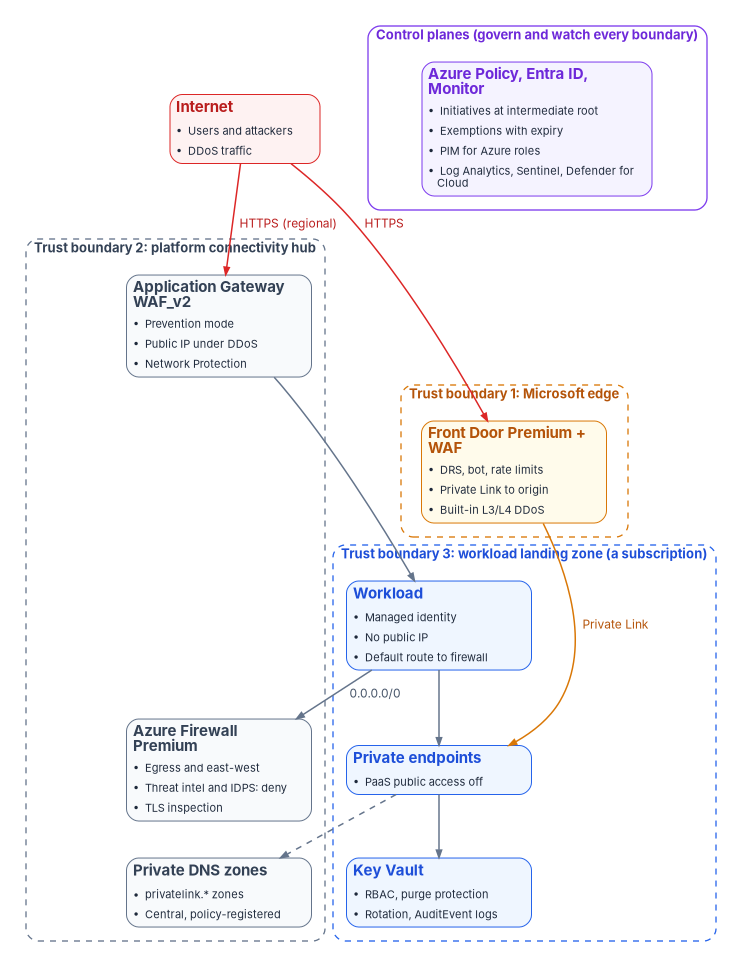
Three trust boundaries and the control planes that govern and watch them. Traffic from the internet meets the Microsoft edge first (Front Door with its WAF, or a regional Application Gateway whose public IP is under DDoS Network Protection). The platform hub holds the shared inspection and name resolution. The workload landing zone holds the workload, which has no public IP, sends its default route to the firewall and reaches PaaS and Key Vault only through private endpoints (design guidance).
Decision record template
One record per service decision (a DDoS tier, a Front Door tier, a firewall SKU, an exemption), kept with the change record of Book 10, Chapter 07 (design guidance):
**Decision:** <what was decided, one sentence>
**Step and topic:** <Step N, e.g. Step 3 DDoS protection>
**Scope:** <management group, subscriptions, resources>
**Options considered:** <e.g. DDoS Network Protection | DDoS IP Protection | infrastructure protection only>
**License or cost:** <SKU, tier, plan; who pays>
**Cloud availability:** <commercial Azure / Azure Government; region; Learn page and date read, or "not yet specified">
**Prerequisites:** <what must exist first: hub, workspace, roles, Premium tier>
**Compensating control, if the preferred option is unavailable:** <what covers the risk instead, and its evidence>
**Authority:** <Mandated | Microsoft-recommended | Risk-based recommended | Optional> (<source>)
**Requirements and KSIs supported:** <e.g. SC-5, KSI-CNA-RVP>
**Decided by / date:** <policy owner>, <date>   **Review by:** <date>
**Residual risk accepted by:** <authorizing official or delegate, if any>
The path on one page
| Step | Done when | Validate with |
|---|---|---|
| 1 Landing-zone security baseline | Hierarchy protected; security initiative assigned; platform logs flowing | az policy assignment list, Resource Graph diagnostic-settings query |
| 2 Public exposure inventory | Every public IP, Front Door endpoint and application gateway in the register with an owner | The inventory queries, rerun weekly |
| 3 DDoS protection | Every public IP protected, logged and alerting; one exercise run | ddosSettings query; the alert fired in the exercise |
| 4 Web application firewall | WAF in prevention mode with request body inspection, current rule set and rate limits | waf-policy show; a test request blocked |
| 5 Front Door and Application Gateway | Origins reachable only through the edge; TLS 1.2 minimum; logs on; failover tested | A direct request to the origin refused |
| 6 Firewall and segmentation | Default routes to the firewall; threat intelligence and IDPS in deny mode; logs on | Effective routes; a known-bad test domain denied |
| 7 Private Link and DNS | PaaS public access off; central zones; records registered by policy | nslookup resolves to a private IP |
| 8 Managed identities and Key Vault | Vaults on RBAC, purge protection, private endpoint, rotation and audit logs | az keyvault show; AuditEvent rows |
| 9 Policy and drift | Initiatives enforced; exemptions expire; monthly compliance export | az policy state summarize |
| 10 Operations and evidence | Owners, cadence, exercises and the evidence catalog in use | The quarterly review record |
Steps 1 and 2 come first; Steps 3 to 8 can run in parallel by workload once the inventory exists; Step 9 turns each of them into policy; Step 10 runs from the start.
Step 1: Landing-zone security baseline
Book 10, Chapter 05 designs the hierarchy, the boundary policies (allowed locations, allowed resource types, the FedRAMP initiative in audit mode) and the exemption rule; this step adds what the security baseline needs on top, and doesn’t repeat it.
Authority: Microsoft-recommended (protecting the hierarchy, the default management group, diagnostic logs on platform resources, Learn as cited) and Risk-based recommended (the gate, for the risk that security services get deployed into a landing zone nobody logs). Applies: all subscriptions; Environment-dependent: the landing zone accelerators need adapting in Azure Government.
Steps.
Protect the hierarchy. Require authorization to create management groups and send new subscriptions to a default group, as Book 10 recommends. Learn’s Az PowerShell, with the tenant root group’s ID:32
New-AzManagementGroupHierarchySetting -GroupName <tenant-root-group-id> -Authorization True -DefaultManagementGroup <sandbox-mg-id>Assign the security benchmark and the FedRAMP initiative in audit at the intermediate root, not enforcing yet (Step 9 enforces). List the initiatives in the cloud you’re signed in to, then assign:
az policy set-definition list --query "[?contains(displayName,'FedRAMP') || contains(displayName,'Microsoft cloud security benchmark')].{name:name, displayName:displayName}" -o table az policy assignment create --name azs-fedramp-mod --display-name "FedRAMP Moderate (audit)" --policy-set-definition <initiative-name> --scope /providers/Microsoft.Management/managementGroups/<mg-id> --enforcement-mode DoNotEnforceDoNotEnforceevaluates compliance without enforcing the effect; a remediation task can still run fordeployIfNotExistspolicies.33Send platform logs to the workspace. Every hub resource this guide creates gets a diagnostic setting to
<workspace-id>; Steps 3 to 8 give the command for each. Find what’s missing:az graph query -q "Resources | where type in~ ('microsoft.network/azurefirewalls','microsoft.network/applicationgateways','microsoft.cdn/profiles','microsoft.keyvault/vaults','microsoft.network/publicipaddresses') | project id, type, subscriptionId" --first 1000Compare the list with
az monitor diagnostic-settings list --resource <id>for each, or assign the built-in “Public IP addresses should have resource logs enabled for Azure DDoS Protection” policy and its peers in Step 9.34Turn on Defender for Cloud on every subscription, with continuous export to the workspace, as Book 12, Chapter 08 sets out.
| How template | This step |
|---|---|
| Prerequisites | Book 10’s hierarchy and boundary policy; Resource Policy Contributor eligible at <mg-id> |
| Pilot | The Sandbox management group, then one Corp subscription |
| Report-only or audit phase | Initiatives in DoNotEnforce for at least one 24-hour evaluation cycle and one compliance review with the ISSO |
| Enforcement | Not applicable here: Step 9 enforces |
| Rollback | az policy assignment delete --name azs-fedramp-mod --scope /providers/Microsoft.Management/managementGroups/<mg-id>; minutes |
| Exclusions | None at the root; exemptions only through Step 9, with expiry |
| Telemetry | Activity log and policy compliance in the workspace |
| Evidence | The checklist below |
| Day-two ownership | Platform owner; monthly compliance review (Step 10) |
az policy assignment list --scope /providers/Microsoft.Management/managementGroups/<mg-id> -o tableshows the initiatives inDoNotEnforce.- Every platform resource from the step 3 query has a diagnostic setting to
<workspace-id>. - Gate owner: the platform owner, with the ISSO.
Evidence checklist
Step 2: Public exposure inventory
Nothing in Steps 3 to 5 can be proved complete without a list of what is exposed. Learn recommends an inventory of every public IP and its protection status, kept with Resource Graph, and a quarterly review of which IPs still need protection.3536 The register adds the owner, the DNS names and certificates that point at each exposure, and whether a WAF covers it.
Authority: Mandated (FIPS 200 requires federal systems to apply the SP 800-53 baseline for their impact level, and CM-8, system component inventory, is in the Moderate baseline);37 Microsoft-recommended for the Resource Graph inventory and quarterly review (Learn as cited). The register’s shape is the program’s (design guidance). Applies: all subscriptions.
Steps.
Public IPs and their DDoS state. Built from Learn’s starter query, with the
ddosSettingsproperty Learn’s DDoS samples read:3839az graph query -q "Resources | where type =~ 'microsoft.network/publicipaddresses' | project id, name, subscriptionId, resourceGroup, ip = tostring(properties.ipAddress), sku = tostring(sku.name), ddosMode = tostring(properties.ddosSettings.protectionMode), attachedTo = tostring(properties.ipConfiguration.id), owner = tostring(tags['owner'])" --first 1000 -o json > out/public-ips.jsonFront Door profiles and application gateways, with their WAF.
az graph query -q "Resources | where type =~ 'microsoft.cdn/profiles' | project id, name, sku = tostring(sku.name), owner = tostring(tags['owner'])" --first 1000 -o json > out/frontdoor.json
az graph query -q "Resources | where type =~ 'microsoft.network/applicationgateways' | project id, name, sku = tostring(properties.sku.tier), wafPolicy = tostring(properties.firewallPolicy.id), owner = tostring(tags['owner'])" --first 1000 -o json > out/appgw.json
PaaS with public network access on. Many services expose a
publicNetworkAccessproperty; list the ones that aren’t disabled:az graph query -q "Resources | where isnotempty(properties.publicNetworkAccess) and tostring(properties.publicNetworkAccess) !~ 'Disabled' | project id, type, publicNetworkAccess = tostring(properties.publicNetworkAccess), owner = tostring(tags['owner'])" --first 1000 -o json > out/paas-public.jsonThe property’s name and values vary by service; treat the query as a starting list, not a complete one (design guidance).
Join the names and certificates. For each exposure, the DNS records that point at it come from the authoritative DNS (Book 08) and its certificate from the certificate inventory (Book 07). A DNS record that points at a public IP or endpoint no longer in the inventory is a dangling record to remove (design guidance).
Write the register with one row per exposure: resource ID, type, public name, owner, DDoS state, WAF and mode, origin lock-down, certificate expiry, last reviewed. Store it inside the boundary; it is a map of the attack surface and doesn’t belong in a public repository.
Compare with Defender for Cloud’s view. Internet exposure analysis is generally available in both clouds (Book 12, Chapter 08); an exposure it reports that the register lacks is a gap in the queries.
| How template | This step |
|---|---|
| Prerequisites | Reader on every subscription in scope; Resource Graph extension |
| Pilot | One management group’s subscriptions |
| Report-only or audit phase | Not applicable: the step only reads |
| Enforcement | Not applicable; Step 9 adds a policy that requires an owner tag on public IPs if the agency wants it |
| Rollback | Not applicable: read-only |
| Exclusions | None: every exposure is listed, including approved ones |
| Telemetry | Activity log Microsoft.Network/publicIPAddresses/write events show new exposures between runs |
| Evidence | The checklist below |
| Day-two ownership | Platform owner runs it weekly; workload owners answer for their rows; quarterly review with the ISSO |
- Every row in
out/public-ips.jsonhas an owner, and every ownerless row has a ticket. - The register’s count matches Defender for Cloud’s internet-exposed resources, or the difference is explained.
- Gate owner: the platform owner.
Evidence checklist
Step 3: DDoS protection
Every public IP in Azure gets DDoS infrastructure protection at no cost. DDoS Network Protection and DDoS IP Protection add per-IP adaptive tuning, attack analytics, metrics, alerts and mitigation reports; Network Protection also adds the DDoS Rapid Response team, cost protection and a WAF discount, and protects Basic public IPs, which IP Protection doesn’t.40 Neither covers a public IP attached to a NAT gateway, and both work at layers 3 and 4: layer 7 needs the WAF of Step 4.4142 Microsoft’s Zero Trust recommendations check that every public IP in a virtual network is protected, that metrics are on and that diagnostic logs are on.43
Authority: Mandated for the control (SC-5, denial-of-service protection, is in the Moderate baseline FIPS 200 requires);44 Microsoft-recommended for meeting it with Azure DDoS Protection on every public IP.45 Applies: License-dependent (plan or per-IP billing); Environment-dependent (exercise partners by cloud).
Choose the tier. Network Protection when many public IPs across subscriptions need coverage, or Rapid Response and cost protection are wanted; IP Protection for a few critical IPs.46 Record the choice in the decision record. Fewer public IPs (Private Link, one edge per application) means less to protect.47
Steps.
Create the one plan in the connectivity subscription (Network Protection):48
az network ddos-protection create --resource-group <rg> --name <ddos-plan>Link each virtual network that holds public IPs:
az network vnet update --resource-group <rg> --name <vnet> --ddos-protection-plan <ddos-plan> --ddos-protection trueA virtual network with DDoS protection can’t be moved between resource groups or subscriptions; disabling it to move resets the tuned thresholds.49 Or, for IP Protection on one Standard public IP:50
az network public-ip update --resource-group <rg> --name <pip> --ddos-protection-mode EnabledTurn on diagnostic logs for each protected public IP (
DDoSProtectionNotifications,DDoSMitigationFlowLogs, andDDoSMitigationReportsuntil its retirement, which Learn says starts about mid-August 2026):51az monitor diagnostic-settings create --name ddos-to-workspace --resource /subscriptions/<subscription-id>/resourceGroups/<rg>/providers/Microsoft.Network/publicIPAddresses/<pip> --workspace <workspace-id> --logs '[{"categoryGroup":"allLogs","enabled":true}]' --metrics '[{"category":"AllMetrics","enabled":true}]'Alert on attack. The metric Under DDoS attack or not (
IfUnderDDoSAttack) is 1 during mitigation; Learn’s tutorial alerts at maximum ≥ 1:5253az monitor metrics alert create --name ddos-under-attack-<pip> --resource-group <rg> --scopes /subscriptions/<subscription-id>/resourceGroups/<rg>/providers/Microsoft.Network/publicIPAddresses/<pip> --condition "max IfUnderDDoSAttack >= 1" --window-size 5m --evaluation-frequency 1m --action <action-group-id> --severity 1Hold it with policy. Assign “Virtual networks should be protected by Azure DDoS Protection” (Modify effect, to enable protection on noncompliant networks, or Audit) and “Public IP addresses should have resource logs enabled for Azure DDoS Protection” in Step 9.54
Exercise the response. Learn allows simulations only through its approved partners (MazeBolt, Red Button, RedWolf), only against the agency’s own protected Azure public IPs, and recommends staging or off-peak windows; Red Button is public cloud only.55 Before the exercise, write the response team and runbook Learn recommends, including how to raise a severity A request to Rapid Response under Network Protection.56
| How template | This step |
|---|---|
| Prerequisites | The inventory (Step 2); Network Contributor eligible on the hub and spokes; the plan’s budget approved |
| Pilot | One non-production virtual network with a load balancer, as Learn’s simulation tutorial builds |
| Report-only or audit phase | The DDoS policy in Audit for one evaluation cycle; the list of unprotected public IPs reviewed |
| Enforcement | Ring 0: hub; ring 1: Online landing zones; ring 2: Corp landing zones with public IPs; then the policy’s Modify effect |
| Rollback | az network vnet update ... --ddos-protection false (Learn’s disable command); the plan can’t be deleted while networks are linked to it57 |
| Exclusions | Public IPs on NAT gateways (unsupported);58 any others by decision record with expiry |
| Telemetry | IfUnderDDoSAttack and the other DDoS metrics; the three log categories; alerts in Defender for Cloud59 |
| Evidence | The checklist below |
| Day-two ownership | Security monitor answers the alert; platform owner owns the plan; quarterly coverage and cost review |
- Rerun the Step 2 query: every public IP shows
ddosModeEnabled, orVirtualNetworkInheritedin a linked network. - The simulation raised the alert, the action group paged the security monitor, and the logs show the mitigation.
- Gate owner: the platform owner, with the security monitor.
Evidence checklist
Step 4: Web application firewall
Azure WAF runs on Front Door (global) and Application Gateway WAF_v2 (regional) as a WAF policy of managed rules, custom rules and settings. In detection mode it only logs; only prevention mode blocks.60 Microsoft’s Zero Trust recommendations for both check prevention mode, request body inspection, the default rule set, the bot protection rule set, rate limiting, a JavaScript challenge and diagnostic logging, and for Application Gateway the HTTP DDoS rule set; Front Door adds a CAPTCHA challenge.61 Learn recommends the latest Default Rule Set, 2.2 at the time of reading, validated in log mode before blocking.62
Authority: Microsoft-recommended (Learn as cited); supports SP 800-53 SC-7 and SI-10. Applies: License-dependent (Front Door managed rules need Premium); Environment-dependent (no bot protection or geo-filtering custom rules in sovereign clouds).63
Steps (Application Gateway). Learn’s CLI; the defaults are Microsoft_DefaultRuleSet version 2.1, so name the version you’ve validated:64
Create the policy in detection mode, with request body inspection on:
az network application-gateway waf-policy create --name <waf-policy> --resource-group <rg> --type Microsoft_DefaultRuleSet --version 2.1
az network application-gateway waf-policy policy-setting update --policy-name <waf-policy> --resource-group <rg> --mode Detection --state Enabled --request-body-check true
Add bot protection (commercial Azure only) and a rate limit. The rate limit combines Learn’s two examples, grouping by client address and matching the login path:65
az network application-gateway waf-policy managed-rule rule-set add --policy-name <waf-policy> --resource-group <rg> --type Microsoft_BotManagerRuleSet --version 1.1
az network application-gateway waf-policy custom-rule create --policy-name <waf-policy> --resource-group <rg> --action Block --name LoginRateLimitRule --priority 99 --rule-type RateLimitRule --rate-limit-threshold 100 --group-by-user-session '[{"groupByVariables":[{"variableName":"ClientAddr"}]}]'
az network application-gateway waf-policy custom-rule match-condition add --policy-name <waf-policy> --resource-group <rg> --name LoginRateLimitRule --match-variables RequestUri --operator Contains --value '/login'
Associate the policy and log it. Attach it to the gateway (the
--setform is the CLI’s generic update, not a Learn sample), then sendApplicationGatewayAccessLogandApplicationGatewayFirewallLogto the workspace (resource-specific tables, as Learn recommends):66az network application-gateway update --name <appgw> --resource-group <rg> --set firewallPolicy.id=/subscriptions/<subscription-id>/resourceGroups/<rg>/providers/Microsoft.Network/ApplicationGatewayWebApplicationFirewallPolicies/<waf-policy> az monitor diagnostic-settings create --name appgw-to-workspace --resource /subscriptions/<subscription-id>/resourceGroups/<rg>/providers/Microsoft.Network/applicationGateways/<appgw> --workspace <workspace-id> --export-to-resource-specific true --logs '[{"categoryGroup":"allLogs","enabled":true}]'Tune, then enforce. Read the firewall log for false positives, scope each exception to the narrowest rule, then switch:6768
az network application-gateway waf-policy policy-setting update --policy-name <waf-policy> --resource-group <rg> --mode Prevention --state Enabled --request-body-check true
Steps (Front Door Premium). Learn’s quickstart creates the policy in prevention mode; this guide starts in detection, then switches:69
az network front-door waf-policy create --name <afd-waf> --resource-group <rg> --sku Premium_AzureFrontDoor --disabled false --mode Detection
az network front-door waf-policy managed-rules add --policy-name <afd-waf> --resource-group <rg> --type Microsoft_DefaultRuleSet --action Block --version 2.1
az network front-door waf-policy managed-rules add --policy-name <afd-waf> --resource-group <rg> --type Microsoft_BotManagerRuleSet --version 1.0
az network front-door waf-policy rule create --name rateLimitRule --policy-name <afd-waf> --resource-group <rg> --rule-type RateLimitRule --rate-limit-duration 1 --rate-limit-threshold 1000 --action Block --priority 1 --defer
az network front-door waf-policy rule match-condition add --match-variable RequestUri --operator Contains --values '/login' --name rateLimitRule --policy-name <afd-waf> --resource-group <rg>
az afd security-policy create --resource-group <rg> --profile-name <afd-profile> --security-policy-name <afd-profile>-waf --domains /subscriptions/<subscription-id>/resourcegroups/<rg>/providers/Microsoft.Cdn/profiles/<afd-profile>/afdEndpoints/<endpoint> --waf-policy /subscriptions/<subscription-id>/resourcegroups/<rg>/providers/Microsoft.Network/frontdoorwebapplicationfirewallpolicies/<afd-waf>
The rate-limit pair is Learn’s.70 Send FrontDoorAccessLog, FrontDoorHealthProbeLog and FrontDoorWebApplicationFirewallLog to the workspace; none is on by default.71
As code. The same Application Gateway policy in Bicep, from Microsoft’s Azure Verified Modules registry (pin the module version the platform team approved):72
module wafPolicy 'br/public:avm/res/network/application-gateway-web-application-firewall-policy:<version>' = {
  params: {
    name: '<waf-policy>'
    location: '<location>'
    managedRules: {
      managedRuleSets: [
        { ruleSetType: 'Microsoft_DefaultRuleSet', ruleSetVersion: '2.1' }
        { ruleSetType: 'Microsoft_BotManagerRuleSet', ruleSetVersion: '1.1' }
      ]
    }
    policySettings: { mode: 'Prevention', state: 'Enabled', requestBodyCheck: true }
  }
}
In Azure Government, leave out the bot manager rule set.73
| How template | This step |
|---|---|
| Prerequisites | Application Gateway WAF_v2 or Front Door Premium; the workspace; the inventory’s list of HTTP endpoints |
| Pilot | One application with its owner on call; detection mode for at least one full business cycle (two weeks is the program’s default (design guidance)) |
| Report-only or audit phase | Detection mode; read ApplicationGatewayFirewallLog or FrontDoorWebApplicationFirewallLog for matches on legitimate traffic |
| Enforcement | Prevention per application, in the rings of Appendix D; then the policies “WAF should use the specified mode” in Step 974 |
| Rollback | policy-setting update --mode Detection (Learn documents the reverse switch for false positives); minutes75 |
| Exclusions | Rule exceptions scoped to the narrowest rule and request attribute, each with an owner and review date76 |
| Telemetry | WAF logs and metrics; the Sentinel WAF solution and workbook |
| Evidence | The checklist below |
| Day-two ownership | Application owner and security monitor tune; platform owner owns the policy; rule-set upgrades reviewed each quarter |
az network application-gateway waf-policy show --name <waf-policy> --resource-group <rg> --query "{mode:policySettings.mode, body:policySettings.requestBodyCheck, sets:managedRules.managedRuleSets[].ruleSetType}"showsPrevention,trueand the rule sets.- A request to a test path carrying a benign SQL injection string returns 403, and the firewall log has the matching row.
- Gate owner: the application owner, with the security monitor.
Evidence checklist
Step 5: Front Door and Application Gateway
Front Door is global and sits at the Microsoft edge with built-in L3/L4 DDoS protection; Application Gateway is regional, in the agency’s virtual network.77 Either works with the WAF of Step 4. What this step adds is the rest of the ingress engineering: an origin nothing can reach around the edge, TLS, health probes, logs and failover.
Selection (design guidance): Front Door Premium for internet-facing applications that need global reach, Private Link origins or managed WAF rules; Application Gateway WAF_v2 for regional applications, for traffic that must enter through the agency’s own virtual network, or where Front Door isn’t available in the region; both (Front Door in front of Application Gateway, reached over Private Link) where the application needs regional inspection too.78 In Azure Government, check the region first (availability). Migrate any classic Front Door before March 31, 2027.79
Authority: Microsoft-recommended (origin lock-down, Private Link origins, TLS 1.2 minimum, migration from classic).8081 Applies: License-dependent (Private Link origins need Premium); Environment-dependent (Azure Government regions).
Steps.
Lock the origin. Use Private Link where the origin type supports it (App Service, Blob Storage, internal load balancers, API Management, Application Gateway, Container Apps); approve the private endpoint connection Front Door requests; don’t mix public and private origins in one origin group.82 Where Private Link doesn’t apply, use both the
AzureFrontDoor.Backendservice tag and theX-Azure-FDIDheader, because the tag’s addresses are shared by every Front Door customer.83 For an App Service origin, Learn’s access restriction does both:84az webapp config access-restriction add --resource-group <rg> --name <app-name> --priority 100 --service-tag AzureFrontDoor.Backend --http-header x-azure-fdid=<front-door-id>For an application gateway behind Front Door, an NSG rule allows 80 and 443 from
AzureFrontDoor.Backendand denies them fromInternet, and a WAF custom rule checksX-Azure-FDID.85Set TLS. TLS 1.2 or 1.3 only; on Application Gateway use a predefined policy such as
AppGwSslPolicy20220101.86 Learn’s Az PowerShell:87$AppGw = Get-AzApplicationGateway -Name <appgw> -ResourceGroupName <rg> Set-AzApplicationGatewaySslPolicy -PolicyType Predefined -PolicyName "AppGwSslPolicy20220101S" -ApplicationGateway $AppGw Set-AzApplicationGateway -ApplicationGateway $AppGwFront Door Standard and Premium require HTTPS on every custom domain; store custom certificates in Key Vault (Step 8).88
Health probes and failover. Learn’s quickstart builds an origin group with probes and two origins in different regions, then stops one origin to show failover:89
az afd origin-group create --resource-group <rg> --origin-group-name og --profile-name <afd-profile> --probe-request-type GET --probe-protocol Http --probe-interval-in-seconds 60 --probe-path / --sample-size 4 --successful-samples-required 3 --additional-latency-in-milliseconds 50With Private Link origins, health probes follow the same private path; Learn recommends origins in different Private Link regions for regional redundancy.90
Logs. As in Step 4 for both services.
| How template | This step |
|---|---|
| Prerequisites | Step 4’s WAF; the origin’s owner; Front Door Premium for Private Link |
| Pilot | One application, with the origin lock-down tested from outside before the old path closes |
| Report-only or audit phase | Not applicable to the lock-down itself; run Front Door in parallel with the old public endpoint and compare logs before cutting DNS |
| Enforcement | Close the origin’s public path (access restriction, NSG or publicNetworkAccess off) per application |
| Rollback | Remove the access restriction (az webapp config access-restriction remove) or NSG rule; restore DNS to the old endpoint |
| Exclusions | Origins that can’t take Private Link or a header check, each with a compensating control in the decision record |
| Telemetry | Access, health-probe and WAF logs; origin health metrics |
| Evidence | The checklist below |
| Day-two ownership | Application owner for origins and certificates; platform owner for the profile; failover exercised twice a year (design guidance) |
- A request straight to the origin’s own hostname from the internet is refused (403 or no route); the same request through Front Door succeeds.
- Stopping one origin leaves the application available through the other.
- Gate owner: the application owner, with the platform owner.
Evidence checklist
Step 6: Firewall and segmentation
Book 09 owns the agency’s edge and TIC; inside Azure, Azure Firewall is the inspection point for egress and east-west traffic. Microsoft’s Zero Trust recommendations check that outbound traffic from virtual-network workloads routes through the firewall, that threat intelligence and IDPS are in “alert and deny” mode, that outbound TLS is inspected, and that diagnostic logs are on.91 Threat intelligence deny needs Standard or Premium; IDPS, TLS inspection and full URL filtering need Premium, and Standard upgrades to Premium without redeployment.9293
Authority: Microsoft-recommended (Learn as cited); supports SP 800-53 SC-7 and SC-7(5) (deny by default) and SI-4. Applies: License-dependent (Premium); Environment-dependent (TLS inspection doesn’t decrypt the Education, Finance, Government and Health categories).94
Steps.
Create the policy in alert mode (Premium):95
az network firewall policy create --name <fw-policy> --resource-group <rg> --sku Premium --threat-intel-mode Alert --idps-mode AlertRoute workloads to it. Learn’s route table and default route:96
az network route-table create --resource-group <rg> --name <route-table> --location <location>
az network route-table route create --resource-group <rg> --route-table-name <route-table> --name default-to-firewall --address-prefix 0.0.0.0/0 --next-hop-type VirtualAppliance --next-hop-ip-address <fw-private-ip>
az network vnet subnet update --resource-group <rg> --vnet-name <vnet> --name <subnet> --route-table <route-table>
For high-volume egress, Learn suggests a NAT gateway on the firewall subnet to avoid SNAT port exhaustion.97
Log it (application, network, NAT, threat intelligence, IDPS and DNS proxy logs, in resource-specific tables):98
az monitor diagnostic-settings create --name fw-to-workspace --resource /subscriptions/<subscription-id>/resourceGroups/<rg>/providers/Microsoft.Network/azureFirewalls/<firewall> --workspace <workspace-id> --export-to-resource-specific true --logs '[{"categoryGroup":"allLogs","enabled":true}]'Move to deny through a draft, so every change lands at once and can be reviewed. Learn’s Draft + Deployment commands:99
az network firewall policy draft create --policy-name <fw-policy> --resource-group <rg>
az network firewall policy draft update --policy-name <fw-policy> --resource-group <rg> --threat-intel-mode Deny --idps-mode Deny
az network firewall policy draft show --policy-name <fw-policy> --resource-group <rg>
az network firewall policy deploy --name <fw-policy> --resource-group <rg>
Deploying replaces the whole applied policy; changes made to the live policy after the draft was created are lost unless they’re in the draft too.100
TLS inspection needs an intermediate CA certificate in Key Vault that clients trust; follow Learn’s enterprise CA procedure, and start with a pilot rule collection (design guidance).101
East-west. Spoke-to-spoke traffic goes through the hub firewall, not direct peering, and NSGs deny by default inside each spoke (design guidance); Book 10, Chapter 06 holds the route and NSG code.
| How template | This step |
|---|---|
| Prerequisites | Hub virtual network with AzureFirewallSubnet; Firewall Premium; the egress allow list from the workload owners |
| Pilot | One spoke subnet routed through the firewall in alert mode |
| Report-only or audit phase | Threat intelligence and IDPS in Alert for two weeks; read the threat-intelligence and IDPS logs for hits on legitimate traffic |
| Enforcement | The draft to Deny, deployed in a change window; routes added spoke by spoke |
| Rollback | A new draft back to Alert, deployed; or remove the route table from the subnet (az network vnet subnet update ... --route-table ""); minutes |
| Exclusions | IDPS bypass rules and threat-intelligence allow-list entries, each with an owner and expiry |
| Telemetry | Firewall logs and the Azure Firewall workbook |
| Evidence | The checklist below |
| Day-two ownership | Platform owner for the policy; security monitor for hits; rule review each quarter |
az network nic show-effective-route-tableon a workload VM’s NIC shows0.0.0.0/0to<fw-private-ip>.az network firewall policy show --name <fw-policy> --resource-group <rg> --query "{ti:threatIntelMode, idps:intrusionDetection.mode}"showsDenyandDeny.- A request from the pilot subnet to a test domain on the threat-intelligence feed is denied and logged.
- Gate owner: the platform owner, with the security monitor.
Evidence checklist
Step 7: Private Link and DNS
A private endpoint gives a PaaS resource an address in the agency’s virtual network; DNS decides whether clients use it. Name resolution is where private endpoints fail: the zone must exist, be linked to the virtual network and hold the record, and on-premises DNS must forward to Azure.102 Book 08 owns the agency’s DNS authority; this step adds the Azure side.
Authority: Microsoft-recommended (public access disabled with private endpoints; central zones registered by policy).103104 Applies: Environment-dependent (zone names differ in Azure Government).105
Steps.
Create each
privatelinkzone once, centrally, in the connectivity subscription, and link it to the hub (Key Vault shown; use the Azure Government name there):106az network private-dns zone create --resource-group <rg> --name privatelink.vaultcore.azure.net az network private-dns link vnet create --resource-group <rg> --virtual-network <vnet> --zone-name privatelink.vaultcore.azure.net --name <vnet>-link --registration-enabled falseCreate the private endpoint and its zone group, which registers and removes the A record with the endpoint:107108
az network private-endpoint create --resource-group <rg> --vnet-name <vnet> --subnet <subnet> --name <pe-name> --private-connection-resource-id "/subscriptions/<subscription-id>/resourceGroups/<rg>/providers/Microsoft.KeyVault/vaults/<vault>" --group-ids vault --connection-name <pe-name>-conn --location <location>
az network private-endpoint dns-zone-group create --resource-group <rg> --endpoint-name <pe-name> --name default --private-dns-zone privatelink.vaultcore.azure.net --zone-name vault
At scale, let policy do it. Microsoft’s Cloud Adoption Framework pattern: deny
privatelinkzones in workload subscriptions, deny PaaS with public endpoints, and adeployIfNotExistspolicy that adds the zone group in the central zone; the Azure landing zones initiative Configure Azure PaaS services to use private DNS zones carries the built-ins. The policy’s managed identity needs Private DNS Zone Contributor on the zones.109Turn public access off for each service once its private path works; for Key Vault,
--default-action denycloses the firewall (Step 8).110On-premises resolution. Conditional forwarders for the public zones (for Key Vault,
vault.azure.netandvaultcore.azure.net) to Azure DNS Private Resolver.111Exfiltration paths. A private endpoint can reach its own resource only, but traffic to it can bypass the firewall; where inspection is required, Learn’s troubleshooting route sends the endpoint’s /32 through the firewall (design guidance on when).112
| How template | This step |
|---|---|
| Prerequisites | Central zones; DNS Private Resolver or equivalent; Book 08’s conditional-forwarder change |
| Pilot | One vault or storage account, with its consumers tested from Azure and on premises |
| Report-only or audit phase | The deny-public-endpoint policies in Audit; Step 2’s paas-public list reviewed |
| Enforcement | Public access off per resource; then the deny policies |
| Rollback | Re-enable public access on the resource (for Key Vault, az keyvault update --default-action allow); minutes |
| Exclusions | Services without Private Link, recorded with a compensating firewall rule |
| Telemetry | Private DNS query logs if enabled; resource access logs showing private source addresses |
| Evidence | The checklist below |
| Day-two ownership | Platform owner for zones and policy; workload owner for endpoints |
- From a VM in a linked network,
nslookup <vault>.vault.azure.netreturns a private address throughprivatelink.vaultcore.azure.net; from outside it returns the public frontend, which refuses the request.113 - Rerun Step 2’s
paas-publicquery: resources in scope showDisabled. - Gate owner: the platform owner.
Evidence checklist
Step 8: Managed identities and Key Vault
Managed identities are covered in the service account guide: a workload that moves to Azure gets a user-assigned managed identity, an Arc-enabled server uses its system-assigned identity, and CI/CD uses workload identity federation. Follow it; this step covers the vault those identities read. Learn recommends one vault per application, region and environment; RBAC, not legacy access policies; PIM for administrators; soft delete and purge protection; autorotation; audit logging, Defender for Key Vault and alerts; private endpoints with public access disabled; and tested backups.114
Authority: Microsoft-recommended (Learn as cited); supports SP 800-53 SC-12, SC-28 and IA-5. Applies: all subscriptions; Defender for Key Vault is License-dependent.
Steps.
Create vaults on RBAC with purge protection, and close the firewall (Learn’s commands):115
az keyvault create --name <vault> --resource-group <rg> --location <location> --enable-rbac-authorization true --enable-purge-protection true
az keyvault update --name <vault> --resource-group <rg> --default-action deny
Purge protection can’t be turned off once on; that is the point (design guidance).
Grant the workload’s managed identity a data-plane role at the vault, not the subscription:
az role assignment create --assignee <managed-identity-principal-id> --role "Key Vault Secrets User" --scope /subscriptions/<subscription-id>/resourceGroups/<rg>/providers/Microsoft.KeyVault/vaults/<vault>Administrators get Key Vault Administrator as an eligible PIM assignment (privileged access guide).
Private endpoint: Step 7.
Rotate keys by policy. Write the policy file, then apply it (Learn’s command):116
{
  "lifetimeActions": [
    { "trigger": { "timeAfterCreate": "P18M" }, "action": { "type": "Rotate" } },
    { "trigger": { "timeBeforeExpiry": "P30D" }, "action": { "type": "Notify" } }
  ],
  "attributes": { "expiryTime": "P2Y" }
}
az keyvault key rotation-policy update --vault-name <vault> --name <key> --value rotation-policy.jsonThe periods are an example; the agency’s key management policy sets them.
Audit logs to the workspace (Learn’s command):117
az monitor diagnostic-settings create --name kv-to-workspace --resource /subscriptions/<subscription-id>/resourceGroups/<rg>/providers/Microsoft.KeyVault/vaults/<vault> --logs '[{"category":"AuditEvent","enabled":true}]' --workspace <workspace-id>Protect recovery. Back up keys that can’t be recreated and test a restore; if a key is suspected compromised, rotate and migrate dependents before disabling the old key, because disabling it takes dependent services offline.118
| How template | This step |
|---|---|
| Prerequisites | Step 7’s zone; the workload’s managed identity (service account guide) |
| Pilot | One application’s vault, moved from access policies to RBAC with both in place until the application reads through RBAC |
| Report-only or audit phase | Key Vault policies in Audit; AuditEvent rows checked for denied reads |
| Enforcement | --default-action deny; then the deny policies for public access and missing purge protection |
| Rollback | az keyvault update --default-action allow; role assignments removed with az role assignment delete; purge protection itself has no rollback |
| Exclusions | Vaults that still need trusted-service bypass, recorded; never an exclusion from purge protection |
| Telemetry | AuditEvent; Defender for Key Vault alerts; Event Grid on near-expiry |
| Evidence | The checklist below |
| Day-two ownership | Application owner for secrets and rotation; platform owner for vault policy; access review each quarter |
az keyvault show --name <vault> --query "{rbac:properties.enableRbacAuthorization, purge:properties.enablePurgeProtection, net:properties.networkAcls.defaultAction, pna:properties.publicNetworkAccess}"showstrue,true,Denyand, where public access is off,Disabled.- AuditEvent rows show the managed identity reading the secret, and a read from an unassigned identity denied.
- Gate owner: the application owner, with the platform owner.
Evidence checklist
Step 9: Policy and drift
Book 10, Chapter 05 sets the rollout (audit first, then deny) and Book 13, Chapter 02 explains why drift is the threat. This step turns Steps 3 to 8 into policy, holds the exceptions to an expiry, and files the evidence.
Authority: Microsoft-recommended (built-in definitions, DoNotEnforce before enforcement, exemptions with categories and expiry).119120 Applies: all subscriptions; Environment-dependent (built-in availability by cloud).
Steps.
Gather the security definitions into one initiative assigned at
<mg-id>: DDoS on virtual networks and DDoS logs (Step 3), “Web Application Firewall (WAF) should be enabled for Application Gateway”, “Azure Web Application Firewall should be enabled for Azure Front Door entry-points” and the two “WAF should use the specified mode” policies (Step 4),121 the private DNS and public-access policies (Step 7) and the Key Vault policies (Step 8). Look up each definition’s name in the cloud you’re in:az policy definition list --query "[?displayName=='Virtual networks should be protected by Azure DDoS Protection'].{name:name, effects:parameters.effect.allowedValues}" -o jsonAssign it in
DoNotEnforce, then switch toDefaultafter the compliance review, as Step 1 did for the benchmark. Policies withdeployIfNotExistsormodifyneed a managed identity and its role:az policy assignment create --name azs-security --policy-set-definition <initiative-name> --scope /providers/Microsoft.Management/managementGroups/<mg-id> --enforcement-mode DoNotEnforce --mi-system-assigned --location <location> --role Contributor --identity-scope /providers/Microsoft.Management/managementGroups/<mg-id> az policy assignment update --name azs-security --scope /providers/Microsoft.Management/managementGroups/<mg-id> --enforcement-mode DefaultGrant the narrowest role each definition names, not Contributor, where the initiative allows it (design guidance).
Remediate what already exists with a remediation task per
deployIfNotExistsormodifypolicy:az policy remediation create --name azs-ddos-remediation --policy-assignment azs-security --definition-reference-id <reference-id> --management-group <mg-id>Exemptions expire. Mitigated when the intent is met another way, Waiver when non-compliance is accepted for a time; an expired exemption is kept for the record but no longer honored.122
az policy exemption create --name <exemption-name> --policy-assignment /providers/Microsoft.Management/managementGroups/<mg-id>/providers/Microsoft.Authorization/policyAssignments/azs-security --exemption-category Waiver --expires-on <expiry> --scope /subscriptions/<subscription-id>/resourceGroups/<rg> --description "<decision record reference>"Export compliance each month:
az policy state summarize --management-group <mg-id> -o json > out/policy-summary.json
az policy state list --management-group <mg-id> --filter "complianceState eq 'NonCompliant'" -o json > out/policy-noncompliant.json
| How template | This step |
|---|---|
| Prerequisites | Steps 1 to 8 piloted; Resource Policy Contributor eligible at <mg-id> |
| Pilot | The initiative on the Sandbox group first |
| Report-only or audit phase | DoNotEnforce for at least one evaluation cycle and one review of policy-noncompliant.json with owners |
| Enforcement | Default at <mg-id>; remediation tasks; deny effects last |
| Rollback | az policy assignment update ... --enforcement-mode DoNotEnforce; minutes; resources a remediation created stay until removed |
| Exclusions | Exemptions only, each with a category, expiry and decision record; no notScopes for convenience |
| Telemetry | Policy compliance and activity-log deny events in the workspace |
| Evidence | The checklist below |
| Day-two ownership | Policy owner for the initiative; platform owner for remediation; exemptions reviewed monthly, expired ones reported |
- A test deployment of an application gateway without WAF in a pilot subscription is denied with the policy’s message.
out/policy-summary.jsonshows the initiative’s compliance; no exemption is past its expiry without a renewal decision.- Gate owner: the policy owner, with the ISSO.
Evidence checklist
Step 10: Operations and evidence
Each control above has an owner, a cadence and a test. This step puts them in one place: who does what, how an attack is handled, which resilience tests run, and what the assessor gets. Findings from a Zero Trust assessment enter the closure chain of Book 11, Chapter 10, weighted by exposure and blast radius rather than pass rate (Chapter 10); posture findings go into the one queue of Book 12, Chapter 08.
Authority: Risk-based recommended (the program’s operating model). SP 800-53 IR-4, CP-4 and CA-7 ask for incident handling, contingency plan testing and continuous monitoring at Moderate; the cadence below is the program’s.
Incident response for a DDoS attack (design guidance, built on Learn’s response strategy):123
- The
IfUnderDDoSAttackalert pages the security monitor; Defender for Cloud raises the mitigation alert.124 - The security monitor checks application health and the WAF logs for a layer-7 component with Learn’s top-talker queries, and the platform owner lowers the rate-limit thresholds through an emergency change if needed.125
- If mitigation isn’t enough, open a severity A support request for Rapid Response (Network Protection only).126
- After the event: the mitigation logs, the timeline, cost-protection claim if any, and an after-action report (KSI-INR-AAR).
Recurring reviews (design guidance):
| Cadence | Review | Owner |
|---|---|---|
| Weekly | Exposure register rerun; new public IPs and ownerless rows | Platform owner |
| Monthly | Policy compliance export; exemptions due or expired; WAF false positives | Policy owner, ISSO |
| Quarterly | DDoS coverage and cost;127 firewall rules and bypasses; Key Vault access; WAF rule-set version | Platform owner, security monitor |
| Twice a year | Front Door failover test; restore test of a vault backup | Application owners |
| Yearly | DDoS simulation with an approved partner; the decision records re-read | Security monitor, policy owner |
RACI
R responsible, A accountable, C consulted, I informed. Roles follow Book 10, Chapter 08 and Book 15 (design guidance):
| Activity | Policy owner | Platform owner | Operator | Security monitor | Help desk | Assessor |
|---|---|---|---|---|---|---|
| Decision records (tiers, SKUs, exemptions) | A | R | C | C | I | I |
| Landing-zone baseline and initiatives (Steps 1, 9) | A | R | C | C | I | I |
| Exposure register (Step 2) | I | A | R | C | I | I |
| DDoS plan, WAF policies, firewall policy (Steps 3, 4, 6) | C | A | R | C | I | I |
| Origins, certificates, vault contents (Steps 5, 8) | I | C | R (application owner) | C | I | I |
| Private DNS zones and endpoints (Step 7) | I | A | R | I | I | I |
| Alert response and DDoS incidents | I | C | C | A, R | I (user reports) | I |
| User reports of blocked access (WAF false positives) | I | C | R | C | R (first contact) | I |
| Exercises and resilience tests | C | A | R | R | I | I |
| Evidence package and closure readiness | A | R | C | C | I | C (decides) |
Evidence catalog
| Step | Configuration | Test | Operational | Exception | Reassessment |
|---|---|---|---|---|---|
| 1 Baseline | Hierarchy settings; initiative assignments | Default-group test | Compliance in the workspace | Exemption register | Monthly compliance export |
| 2 Exposure | Query text; dated register | New-IP detection test | Weekly runs; new-IP alert | Accepted exposures | Weekly rerun; quarterly review |
| 3 DDoS | Plan and links; per-IP mode | Simulation report and fired alert | DDoS metrics and logs | Unprotected IPs | Yearly simulation; quarterly coverage |
| 4 WAF | WAF policy exports or Bicep | Blocked test request | WAF logs and block counts | Rule exceptions; Azure Government bot skip | Quarterly rule-set review |
| 5 Front Door and Application Gateway | Profile, routes, access restrictions | Refused direct request; failover | Access and probe logs | Unlocked origins | Twice-yearly failover |
| 6 Firewall | Policy export; route tables | Denied threat-intel request | Firewall logs | Bypass and allow lists | Quarterly rule review |
| 7 Private Link and DNS | Zones, endpoints, policies | nslookup private and public |
Policy compliance | Public services | Monthly with Step 9 |
| 8 Key Vault | Vault properties; RBAC; rotation | Allowed and denied reads; restore | AuditEvent; Defender alerts | Vaults on access policies | Quarterly access review |
| 9 Policy | Initiative and assignment | Denied deployment | Deny events | Exemptions with expiry | Monthly export |
| 10 Operations | RACI; review calendar | Exercise records | Alert and incident history | Accepted risks | The next Zero Trust Assessment run |
File each item with its date, the cloud and subscription, and the tester; the evidence pattern is Appendix D’s.
Metrics
Measure protected coverage and effectiveness, not that a setting exists (design guidance):
| Metric | How it’s computed | Target |
|---|---|---|
| Exposure ownership | Register rows with an owner ÷ all rows | 100% |
| DDoS coverage | Public IPs with Network or IP Protection ÷ public IPs (excluding NAT gateway IPs) | 100% |
| WAF prevention coverage | Internet-facing HTTP endpoints behind a WAF in Prevention with request body inspection ÷ all | 100% |
| Origin lock-down | Origins reachable only through the edge (tested) ÷ origins | 100% |
| Egress inspection | Workload subnets whose effective default route is the firewall ÷ workload subnets | 100% |
| Private PaaS | In-scope PaaS with public network access disabled ÷ in-scope PaaS | Agency target, rising |
| Vault posture | Vaults with RBAC, purge protection, private endpoint and AuditEvent ÷ vaults | 100% |
| Policy compliance | Compliant resources ÷ resources for the security initiative | Rising each month |
| Exemption hygiene | Exemptions past expiry without renewal | 0 |
| Detection to page | Minutes from DDoS mitigation start to the security monitor’s acknowledgment, from the exercise | Agency target |
| Exercise currency | Days since the last DDoS simulation and failover test | Under 365 and 183 |
| WAF effectiveness | Blocked attack requests, and false positives reported through the help desk, per month | Trend |
| How template | This step |
|---|---|
| Prerequisites | Steps 1 to 9 in at least pilot; the roles named |
| Pilot | The first month’s reviews run with the ISSO watching |
| Report-only or audit phase | Not applicable: operations |
| Enforcement | Not applicable: operations |
| Rollback | Not applicable |
| Exclusions | Not applicable |
| Telemetry | The alerts and logs of Steps 3 to 8 |
| Evidence | The evidence catalog above |
| Day-two ownership | The RACI above; Book 15 for the help desk path |
Evidence checklist
Control states and assessment mapping
Control states.
| State | This page | Evidence |
|---|---|---|
| Designed | Decision record; reference architecture | Approved decision records |
| Configured | Steps 1 to 8 in pilot or audit mode | Exports and Bicep with commits |
| Enforced | Prevention mode, deny modes, public access off, Step 9 in Default |
Enforcing state in the exports; exemption register |
| Evidenced | Each step’s Validate | Test records and the log rows they produced |
| Operated | Step 10 | RACI, review calendar, alert definitions, last review |
A finding this page addresses is ready for closure when every applicable state has evidence; the authorizing official or assessor decides.
- Microsoft Zero Trust pillar: Networks and Infrastructure (Key Vault: Data)
- CISA ZTMM pillar: Networks; Applications and Workloads
- Depends on: Identity (PIM for Azure roles in the privileged access guide; workload identities in the service account guide); SecOps (the workspace and alerting of Book 12); the boundary decisions of Book 10
- Attack chain interrupted: Initial Access (exposed services and exploit traffic stopped at the edge), Impact (denial of service absorbed), Command and Control and Exfiltration (egress inspected and denied), Credential Access (secrets out of code and behind RBAC)
Federal requirements and KSIs
The steps support these controls and indicators; they don’t by themselves decide them. The KSI column names FedRAMP 20x indicators whose related controls, as fedramp.gov lists them, include the row’s control or closely match the step.128 KSIs are written for cloud service providers; the agency lines up its own evidence with them (Book 00, Appendix B). Control names are NIST SP 800-53 Rev. 5.129
| Step | NIST SP 800-53 Rev. 5 | KSI | What the ISSO keeps |
|---|---|---|---|
| 1 Baseline | CM-2, CM-6, CA-7 | KSI-SVC-ACM, KSI-MLA-EVC | Initiative assignments, compliance export |
| 2 Exposure | CM-8, SC-7 | KSI-CNA-MAT | The dated register |
| 3 DDoS | SC-5, SI-4 | KSI-CNA-RVP (cites SC-5), KSI-MLA-LET | Coverage, metrics and logs, simulation report |
| 4 WAF | SC-7, SI-10 | KSI-CNA-MAT (cites SI-10), KSI-CNA-RVP | WAF exports, logs, blocked test |
| 5 Front Door and Application Gateway | SC-7, SC-8, CP-2 | KSI-CNA-MAT (cites SC-8), KSI-SVC-SIN (cites SC-8) | Origin lock-down test, TLS policy, failover test |
| 6 Firewall | SC-7, SC-7(5), SI-4 | KSI-CNA-RNT (cites SC-7(5)), KSI-CNA-ULN (cites SC-7) | Firewall policy, routes, denied test |
| 7 Private Link and DNS | SC-7, AC-4 | KSI-CNA-ULN (cites AC-4(21), SC-7) | Zones, endpoints, public-access state |
| 8 Key Vault | SC-12, SC-28, IA-5 | KSI-SVC-ASM (cites SC-12, IA-5(2)), KSI-IAM-SNU | Vault posture, rotation policies, AuditEvent |
| 9 Policy | CM-2, CM-6, CA-7 | KSI-SVC-ACM, KSI-CNA-EIS, KSI-MLA-EVC | Monthly export, exemption register |
| 10 Operations | IR-4, CP-4, AU-6 | KSI-INR-RIR, KSI-INR-AAR, KSI-RPL-TRC, KSI-MLA-OSM | Review records, exercises, after-action reports |
SC-5, SC-7, CM-2, CM-6, CM-8, CA-7, IA-5, AU-6, IR-4 and CP-4 are in the Moderate baseline, as are SC-7(5), SC-8, SC-12, SC-28, SI-4, SI-10 and AC-4 (as the workbook reads SP 800-53B; Book 12, Appendix A and Book 13, Appendix A carry the core mappings). The organization still sets each control’s parameters, and the assessor decides whether each is satisfied.
Dangers and how to avoid them
| Danger | What goes wrong | Mitigation |
|---|---|---|
| The WAF left in detection mode | Attacks are logged and reach the backend130 | Validate shows Prevention; Step 9’s mode policy |
| An origin reachable around the edge | Attackers bypass the WAF and DDoS controls by calling the origin directly; the AzureFrontDoor.Backend tag alone admits any customer’s Front Door131 |
Private Link or tag plus X-Azure-FDID; Step 5’s refused-request test |
| A public IP nobody knows about | Created in a workload subscription, outside DDoS and WAF | Weekly register; DDoS Modify policy; new-IP alert |
| Moving a DDoS-protected virtual network | The move fails; disabling protection to move resets tuning132 | Plan moves; re-baseline after |
| A firewall draft deployed over newer changes | Live edits made after the draft are lost133 | One change path: drafts only, through the change record |
| Private DNS zones in workload subscriptions | Records split across zones; resolution fails or goes public | Deny privatelink zones outside the hub; zone groups by policy134 |
| Assuming commercial features in Azure Government | Bot rule sets, geo-filtering, some Front Door regions, a simulation partner aren’t there135136 | The availability table; skipped tests recorded as environment, not failures |
| Disabling a key to contain a compromise | Dependent databases and storage go offline137 | Rotate and migrate first, then disable |
| Classic Front Door past March 31, 2027 | Service disruption138 | Migrate in Step 5 |
| The register in a public repository | A map of the attack surface published | Keep it inside the boundary |
Rollback
| Step | Rollback | Time |
|---|---|---|
| 1 Baseline | Delete the initiative assignment; hierarchy settings revert with Update-AzManagementGroupHierarchySetting |
Minutes |
| 2 Exposure | None: read-only | Not applicable |
| 3 DDoS | Disable on the network; unlink before deleting the plan139 | Minutes; tuning resets |
| 4 WAF | Mode back to Detection140 | Minutes |
| 5 Front Door and Application Gateway | Remove access restriction or NSG rule; restore DNS | Minutes, plus DNS TTL |
| 6 Firewall | A draft back to Alert; or remove the route table from the subnet | Minutes |
| 7 Private Link and DNS | Re-enable public access on the resource | Minutes |
| 8 Key Vault | Firewall default action to allow; remove role assignments; purge protection has none | Minutes |
| 9 Policy | Enforcement mode to DoNotEnforce |
Minutes |
| 10 Operations | Not applicable | Not applicable |
Every rollback is a change: it goes through the change record of Book 10, Chapter 07, with the backout trigger that set it off.
Implementation checklist
Each line has its pilot, enforcement, rollback, exception and validation step in the step it names:
What couldn’t be verified
- Front Door in Azure Government, region by region. Learn’s comparison page says Standard and Premium are generally available in US Gov Arizona and US Gov Texas; the Front Door overview says Standard, Premium and classic are available in Azure Government without naming regions. Whether US Gov Virginia or the DoD regions host Front Door profiles is not yet specified.
- Front Door Private Link in US Gov Arizona and Texas. Learn lists them, but the same page limits the feature to regions with availability zones, and Learn’s Azure Government region list shows zones only in US Gov Virginia. Unresolved; test before relying on it.
- Front Door WAF in sovereign clouds. Learn’s sovereign-cloud limits (no bot protection, no geo-filtering custom rules) are on the Application Gateway WAF FAQ; Front Door’s are not yet specified.
- DDoS Protection tiers and simulation partners in Azure Government. Whether IP Protection is available there, and which partners other than Red Button (public cloud only) test Azure Government, are not yet specified.
- Azure Firewall Premium regions in Azure Government. Learn points to the products-by-region page, not a Learn statement.
- AWS Shield Advanced in GovCloud (US); OCI WAF and Network Firewall in OCI Government Cloud; Google Cloud’s FedRAMP Moderate package. Not read or not stated.
- Built-in policy names and effects in Azure Government. The guide lists the definitions by display name and has the reader look them up, because built-ins differ by cloud.
- The Step 2
publicNetworkAccessquery. The property’s presence and values vary by resource type; the query is a starting list. - Tenant behavior. Nothing in this guide was run in a subscription. Every command is Learn’s, unrun by the authors.
Back to the books
Book 10, Chapter 05 (the landing zone) · Chapter 07 (the provisioning loop) · Chapter 08 (who owns the boundary) · Book 12, Chapter 08 (cloud-native posture) · Book 11, Chapter 10 (evidence, not verdicts) · Book 13, Chapter 02 (drift) · Book 00, Appendix D (control states and evidence) · Service account guide · Privileged access guide
Version and revision history
This guide has not been published in an edition yet. Each edition is kept, with its Word editions, decks and videos, on the Archive page. Every change so far is in the commit history.
Footnotes
Microsoft Learn, “Azure Firewall Draft + Deployment” (draft create, update threat intelligence and IDPS modes, show, deploy, delete; CLI extension 1.2.3 or later; deploying replaces the applied policy), https://learn.microsoft.com/azure/firewall/draft-deploy (accessed Nov 11, 2026).↩︎
Microsoft Learn, “Compare Azure Government and global Azure” (endpoints; a listed service has all features unless a variation is listed; Front Door Standard and Premium generally available in US Gov Arizona and US Gov Texas; Private Link DNS zone names; Lighthouse without PIM or cross-cloud delegation; Secret and Top Secret not covered), https://learn.microsoft.com/azure/azure-government/compare-azure-government-global-azure (accessed Nov 11, 2026).↩︎
Microsoft Learn, “About Azure DDoS Protection tier comparison” (features by tier; Rapid Response, cost protection, WAF discount and Basic public IPs with Network Protection only; pricing per IP or per 100 IPs; infrastructure protection free; NAT gateway IPs not supported), https://learn.microsoft.com/azure/ddos-protection/ddos-protection-sku-comparison (accessed Nov 11, 2026).↩︎
Microsoft Learn, “Quickstart: Create an Azure Front Door using Azure CLI” (profile, origin group and probes, WAF policy with
--sku Premium_AzureFrontDoor, managed rules DRS 2.1 and bot manager 1.0, security policy; managed rules need Premium; failover test), https://learn.microsoft.com/azure/frontdoor/create-front-door-cli (accessed Nov 11, 2026).↩︎Microsoft Learn, “Zero Trust recommendations for Azure Firewall” (outbound routed through the firewall; NAT gateway for SNAT; threat intelligence deny needs Standard or Premium; IDPS deny; outbound TLS inspection with a CA in Key Vault; diagnostic logs), https://learn.microsoft.com/azure/networking/security/zero-trust-azure-firewall (accessed Nov 11, 2026).↩︎
Microsoft Learn, “Compare Azure Government and global Azure” (endpoints; a listed service has all features unless a variation is listed; Front Door Standard and Premium generally available in US Gov Arizona and US Gov Texas; Private Link DNS zone names; Lighthouse without PIM or cross-cloud delegation; Secret and Top Secret not covered), https://learn.microsoft.com/azure/azure-government/compare-azure-government-global-azure (accessed Nov 11, 2026).↩︎
Microsoft Learn, “Compare Azure Government and global Azure” (endpoints; a listed service has all features unless a variation is listed; Front Door Standard and Premium generally available in US Gov Arizona and US Gov Texas; Private Link DNS zone names; Lighthouse without PIM or cross-cloud delegation; Secret and Top Secret not covered), https://learn.microsoft.com/azure/azure-government/compare-azure-government-global-azure (accessed Nov 11, 2026).↩︎
Microsoft Learn, “What is Azure Front Door?” (built-in layer 3-4 DDoS protection; Standard, Premium and classic available in Azure (Commercial) and Azure Government (US)), https://learn.microsoft.com/azure/frontdoor/front-door-overview (accessed Nov 11, 2026).↩︎
Microsoft Learn, “Migrate Azure Front Door (classic) to Standard or Premium tier” (classic retires March 31, 2027; no new profiles, domains or managed certificates; Standard and Premium require HTTPS on custom domains), https://learn.microsoft.com/azure/frontdoor/migrate-tier (accessed Nov 11, 2026).↩︎
Microsoft Learn, “Secure your origin with Private Link in Azure Front Door Premium” (supported origin types; approval; region list including US Gov Arizona, Texas and Virginia; availability-zone note; no mixed origin groups; health probes on the private path; regional redundancy), https://learn.microsoft.com/azure/frontdoor/private-link (accessed Nov 11, 2026).↩︎
Microsoft Learn, “What is Azure Government?,” section “List of regions” (availability zone support shown for US Gov Virginia only), https://learn.microsoft.com/azure/azure-government/documentation-government-welcome (accessed Nov 11, 2026).↩︎
Microsoft Learn, “Frequently asked questions for Azure Web Application Firewall on Application Gateway” (sovereign clouds supported, but geo-filtering custom rules and bot protection rule sets aren’t; detection mode doesn’t block), https://learn.microsoft.com/azure/web-application-firewall/ag/application-gateway-waf-faq (accessed Nov 11, 2026).↩︎
Microsoft Learn, “Compare Azure Government and global Azure” (endpoints; a listed service has all features unless a variation is listed; Front Door Standard and Premium generally available in US Gov Arizona and US Gov Texas; Private Link DNS zone names; Lighthouse without PIM or cross-cloud delegation; Secret and Top Secret not covered), https://learn.microsoft.com/azure/azure-government/compare-azure-government-global-azure (accessed Nov 11, 2026).↩︎
Microsoft Learn, “Tutorial: Azure DDoS Protection simulation testing” (approved partners MazeBolt, Red Button and RedWolf; own protected public IPs only; Red Button public cloud only; alert on Under DDoS attack or not at 1), https://learn.microsoft.com/azure/ddos-protection/test-through-simulations (accessed Nov 11, 2026).↩︎
Microsoft Learn, “Compare Azure Government and global Azure” (endpoints; a listed service has all features unless a variation is listed; Front Door Standard and Premium generally available in US Gov Arizona and US Gov Texas; Private Link DNS zone names; Lighthouse without PIM or cross-cloud delegation; Secret and Top Secret not covered), https://learn.microsoft.com/azure/azure-government/compare-azure-government-global-azure (accessed Nov 11, 2026).↩︎
Microsoft Learn, “Azure Firewall Premium features implementation guide” (TLS inspection, IDPS, URL filtering, web categories; Education, Finance, Government and Health categories not TLS-terminated; supported regions on the products-by-region page), https://learn.microsoft.com/azure/firewall/premium-features (accessed Nov 11, 2026).↩︎
Microsoft Learn, “Azure Private Endpoint private DNS zone values,” section “Government” (for example
privatelink.vaultcore.usgovcloudapi.net,privatelink.blob.core.usgovcloudapi.net), https://learn.microsoft.com/azure/private-link/private-endpoint-dns (accessed Nov 11, 2026).↩︎Microsoft Learn, “Compare Azure Government and global Azure” (endpoints; a listed service has all features unless a variation is listed; Front Door Standard and Premium generally available in US Gov Arizona and US Gov Texas; Private Link DNS zone names; Lighthouse without PIM or cross-cloud delegation; Secret and Top Secret not covered), https://learn.microsoft.com/azure/azure-government/compare-azure-government-global-azure (accessed Nov 11, 2026).↩︎
Microsoft Learn, “Compare Azure Government and global Azure” (endpoints; a listed service has all features unless a variation is listed; Front Door Standard and Premium generally available in US Gov Arizona and US Gov Texas; Private Link DNS zone names; Lighthouse without PIM or cross-cloud delegation; Secret and Top Secret not covered), https://learn.microsoft.com/azure/azure-government/compare-azure-government-global-azure (accessed Nov 11, 2026).↩︎
Microsoft Learn, “Compare Azure Government and global Azure” (endpoints; a listed service has all features unless a variation is listed; Front Door Standard and Premium generally available in US Gov Arizona and US Gov Texas; Private Link DNS zone names; Lighthouse without PIM or cross-cloud delegation; Secret and Top Secret not covered), https://learn.microsoft.com/azure/azure-government/compare-azure-government-global-azure (accessed Nov 11, 2026).↩︎
Microsoft Learn, “About Azure DDoS Protection tier comparison” (features by tier; Rapid Response, cost protection, WAF discount and Basic public IPs with Network Protection only; pricing per IP or per 100 IPs; infrastructure protection free; NAT gateway IPs not supported), https://learn.microsoft.com/azure/ddos-protection/ddos-protection-sku-comparison (accessed Nov 11, 2026).↩︎
Amazon Web Services, “How AWS Shield and Shield Advanced work” and “What are AWS WAF, AWS Shield Advanced…?” (Shield Standard automatic; Shield Advanced protections, Shield Response Team, cost protection; AWS WAF resources), https://docs.aws.amazon.com/waf/latest/developerguide/ddos-overview.html (accessed Nov 11, 2026).↩︎
Google Cloud, “Google Cloud Armor overview” (always-on L3/L4 DDoS protection behind load balancers; preconfigured WAF rules from the OWASP CRS; Enterprise tier and Adaptive Protection), https://docs.cloud.google.com/armor/docs/cloud-armor-overview (accessed Nov 11, 2026).↩︎
Amazon Web Services, “How AWS Shield and Shield Advanced work” and “What are AWS WAF, AWS Shield Advanced…?” (Shield Standard automatic; Shield Advanced protections, Shield Response Team, cost protection; AWS WAF resources), https://docs.aws.amazon.com/waf/latest/developerguide/ddos-overview.html (accessed Nov 11, 2026).↩︎
Google Cloud, “Google Cloud Armor overview” (always-on L3/L4 DDoS protection behind load balancers; preconfigured WAF rules from the OWASP CRS; Enterprise tier and Adaptive Protection), https://docs.cloud.google.com/armor/docs/cloud-armor-overview (accessed Nov 11, 2026).↩︎
Oracle, OCI documentation, “Web Application Firewall overview” (OWASP protections; regional policy on a load balancer or edge policy; protection rules and rate limiting), https://docs.oracle.com/en-us/iaas/Content/WAF/Concepts/overview.htm (accessed Nov 11, 2026).↩︎
Oracle, OCI documentation, “Network Firewall overview” (powered by Palo Alto Networks; IDPS, SSL inspection, URL and FQDN filtering; reached through VCN route tables), https://docs.oracle.com/en-us/iaas/Content/network-firewall/overview.htm (accessed Nov 11, 2026).↩︎
Google Cloud, “Private Service Connect” (private access to Google APIs and published services with internal IP addresses in the consumer’s VPC), https://docs.cloud.google.com/vpc/docs/private-service-connect (accessed Nov 11, 2026).↩︎
Oracle, OCI documentation, “Access to Oracle Services: private access” (a private endpoint is a private IP in a VCN subnet for an Oracle service), https://docs.oracle.com/en-us/iaas/Content/Network/Concepts/privateaccess.htm (accessed Nov 11, 2026).↩︎
Amazon Web Services, AWS GovCloud (US) User Guide, “AWS WAF in AWS GovCloud (US)” (available in both GovCloud regions; only AWS managed rule groups, no Marketplace rule groups), https://docs.aws.amazon.com/govcloud-us/latest/UserGuide/govcloud-waf.html (accessed Nov 11, 2026).↩︎
Google Cloud, Assured Workloads, “Supported products by control package” (FedRAMP High lists Google Cloud Armor and VPC; Private Service Connect not listed), https://docs.cloud.google.com/assured-workloads/docs/supported-products (accessed Nov 11, 2026).↩︎
Microsoft Learn, “Protect your resource hierarchy” and Az PowerShell
New-AzManagementGroupHierarchySetting(-Authorization,-DefaultManagementGroup), https://learn.microsoft.com/azure/governance/management-groups/how-to/protect-resource-hierarchy (accessed Nov 11, 2026).↩︎Microsoft Learn, “Azure Policy assignment structure,” section “Enforcement mode” (
DoNotEnforceevaluates without enforcing; remediation still possible fordeployIfNotExists), https://learn.microsoft.com/azure/governance/policy/concepts/assignment-structure (accessed Nov 11, 2026).↩︎Microsoft Learn, “Secure your Azure DDoS Protection deployment” (built-in policies with Modify or Audit; inventory with Resource Graph; diagnostic categories and the
DDoSMitigationReportsretirement from about mid-August 2026; metric alerts; Sentinel; Rapid Response severity A; response team and runbook; simulation testing; quarterly cost review), https://learn.microsoft.com/azure/ddos-protection/secure-ddos-protection (accessed Nov 11, 2026).↩︎Microsoft Learn, “Secure your Azure DDoS Protection deployment” (built-in policies with Modify or Audit; inventory with Resource Graph; diagnostic categories and the
DDoSMitigationReportsretirement from about mid-August 2026; metric alerts; Sentinel; Rapid Response severity A; response team and runbook; simulation testing; quarterly cost review), https://learn.microsoft.com/azure/ddos-protection/secure-ddos-protection (accessed Nov 11, 2026).↩︎Microsoft Learn, “DDoS Protection cost optimization principles” (asset inventory; IP versus Network Protection; fewer public IPs through Private Link; quarterly reviews), https://learn.microsoft.com/azure/ddos-protection/ddos-optimization-guide (accessed Nov 11, 2026).↩︎
National Institute of Standards and Technology, SP 800-53 Rev. 5, Security and Privacy Controls for Information Systems and Organizations, and SP 800-53B, Control Baselines, https://doi.org/10.6028/NIST.SP.800-53r5 and https://doi.org/10.6028/NIST.SP.800-53B; FIPS 200, Minimum Security Requirements for Federal Information and Information Systems (organizations meet the minimum requirements by selecting the SP 800-53 baseline for the system’s impact level), https://doi.org/10.6028/NIST.FIPS.200 (accessed Nov 11, 2026).↩︎
Microsoft Learn, “Starter Resource Graph query samples,” section “List all public IP addresses,” https://learn.microsoft.com/azure/governance/resource-graph/samples/starter (accessed Nov 11, 2026).↩︎
Microsoft Learn, “QuickStart: Create and configure Azure DDoS IP Protection using Azure CLI” (
az network public-ip update --ddos-protection-mode Enabled), https://learn.microsoft.com/azure/ddos-protection/manage-ddos-ip-protection-cli (accessed Nov 11, 2026).↩︎Microsoft Learn, “About Azure DDoS Protection tier comparison” (features by tier; Rapid Response, cost protection, WAF discount and Basic public IPs with Network Protection only; pricing per IP or per 100 IPs; infrastructure protection free; NAT gateway IPs not supported), https://learn.microsoft.com/azure/ddos-protection/ddos-protection-sku-comparison (accessed Nov 11, 2026).↩︎
Microsoft Learn, “About Azure DDoS Protection tier comparison” (features by tier; Rapid Response, cost protection, WAF discount and Basic public IPs with Network Protection only; pricing per IP or per 100 IPs; infrastructure protection free; NAT gateway IPs not supported), https://learn.microsoft.com/azure/ddos-protection/ddos-protection-sku-comparison (accessed Nov 11, 2026).↩︎
Microsoft Learn, “What is Azure DDoS Protection?” (layers 3 and 4; layer 7 needs a WAF), https://learn.microsoft.com/azure/ddos-protection/ddos-protection-overview (accessed Nov 11, 2026).↩︎
Microsoft Learn, “Zero Trust recommendations for Azure DDoS Protection” (every public IP in VNets protected; metrics; diagnostic logs), https://learn.microsoft.com/azure/networking/security/zero-trust-ddos-protection (accessed Nov 11, 2026).↩︎
National Institute of Standards and Technology, SP 800-53 Rev. 5, Security and Privacy Controls for Information Systems and Organizations, and SP 800-53B, Control Baselines, https://doi.org/10.6028/NIST.SP.800-53r5 and https://doi.org/10.6028/NIST.SP.800-53B; FIPS 200, Minimum Security Requirements for Federal Information and Information Systems (organizations meet the minimum requirements by selecting the SP 800-53 baseline for the system’s impact level), https://doi.org/10.6028/NIST.FIPS.200 (accessed Nov 11, 2026).↩︎
Microsoft Learn, “Zero Trust recommendations for Azure DDoS Protection” (every public IP in VNets protected; metrics; diagnostic logs), https://learn.microsoft.com/azure/networking/security/zero-trust-ddos-protection (accessed Nov 11, 2026).↩︎
Microsoft Learn, “DDoS Protection cost optimization principles” (asset inventory; IP versus Network Protection; fewer public IPs through Private Link; quarterly reviews), https://learn.microsoft.com/azure/ddos-protection/ddos-optimization-guide (accessed Nov 11, 2026).↩︎
Microsoft Learn, “DDoS Protection cost optimization principles” (asset inventory; IP versus Network Protection; fewer public IPs through Private Link; quarterly reviews), https://learn.microsoft.com/azure/ddos-protection/ddos-optimization-guide (accessed Nov 11, 2026).↩︎
Microsoft Learn, “QuickStart: Create and configure Azure DDoS Network Protection using Azure CLI” (plan, linking and unlinking a virtual network; no move while protected, thresholds reset; dissociate before deleting the plan), https://learn.microsoft.com/azure/ddos-protection/manage-ddos-protection-cli (accessed Nov 11, 2026).↩︎
Microsoft Learn, “QuickStart: Create and configure Azure DDoS Network Protection using Azure CLI” (plan, linking and unlinking a virtual network; no move while protected, thresholds reset; dissociate before deleting the plan), https://learn.microsoft.com/azure/ddos-protection/manage-ddos-protection-cli (accessed Nov 11, 2026).↩︎
Microsoft Learn, “QuickStart: Create and configure Azure DDoS IP Protection using Azure CLI” (
az network public-ip update --ddos-protection-mode Enabled), https://learn.microsoft.com/azure/ddos-protection/manage-ddos-ip-protection-cli (accessed Nov 11, 2026).↩︎Microsoft Learn, “Secure your Azure DDoS Protection deployment” (built-in policies with Modify or Audit; inventory with Resource Graph; diagnostic categories and the
DDoSMitigationReportsretirement from about mid-August 2026; metric alerts; Sentinel; Rapid Response severity A; response team and runbook; simulation testing; quarterly cost review), https://learn.microsoft.com/azure/ddos-protection/secure-ddos-protection (accessed Nov 11, 2026).↩︎Microsoft Learn, “Supported metrics for Microsoft.Network/publicIPAddresses” (
IfUnderDDoSAttack, Maximum, PT1M), https://learn.microsoft.com/azure/azure-monitor/reference/supported-metrics/microsoft-network-publicipaddresses-metrics (accessed Nov 11, 2026).↩︎Microsoft Learn, “Tutorial: Azure DDoS Protection simulation testing” (approved partners MazeBolt, Red Button and RedWolf; own protected public IPs only; Red Button public cloud only; alert on Under DDoS attack or not at 1), https://learn.microsoft.com/azure/ddos-protection/test-through-simulations (accessed Nov 11, 2026).↩︎
Microsoft Learn, “Secure your Azure DDoS Protection deployment” (built-in policies with Modify or Audit; inventory with Resource Graph; diagnostic categories and the
DDoSMitigationReportsretirement from about mid-August 2026; metric alerts; Sentinel; Rapid Response severity A; response team and runbook; simulation testing; quarterly cost review), https://learn.microsoft.com/azure/ddos-protection/secure-ddos-protection (accessed Nov 11, 2026).↩︎Microsoft Learn, “Tutorial: Azure DDoS Protection simulation testing” (approved partners MazeBolt, Red Button and RedWolf; own protected public IPs only; Red Button public cloud only; alert on Under DDoS attack or not at 1), https://learn.microsoft.com/azure/ddos-protection/test-through-simulations (accessed Nov 11, 2026).↩︎
Microsoft Learn, “Secure your Azure DDoS Protection deployment” (built-in policies with Modify or Audit; inventory with Resource Graph; diagnostic categories and the
DDoSMitigationReportsretirement from about mid-August 2026; metric alerts; Sentinel; Rapid Response severity A; response team and runbook; simulation testing; quarterly cost review), https://learn.microsoft.com/azure/ddos-protection/secure-ddos-protection (accessed Nov 11, 2026).↩︎Microsoft Learn, “QuickStart: Create and configure Azure DDoS Network Protection using Azure CLI” (plan, linking and unlinking a virtual network; no move while protected, thresholds reset; dissociate before deleting the plan), https://learn.microsoft.com/azure/ddos-protection/manage-ddos-protection-cli (accessed Nov 11, 2026).↩︎
Microsoft Learn, “About Azure DDoS Protection tier comparison” (features by tier; Rapid Response, cost protection, WAF discount and Basic public IPs with Network Protection only; pricing per IP or per 100 IPs; infrastructure protection free; NAT gateway IPs not supported), https://learn.microsoft.com/azure/ddos-protection/ddos-protection-sku-comparison (accessed Nov 11, 2026).↩︎
Microsoft Learn, “Azure DDoS Protection fundamental best practices,” section “Configure monitoring and alerting” (metric alerts; mitigation alerts in Defender for Cloud), https://learn.microsoft.com/azure/ddos-protection/fundamental-best-practices (accessed Nov 11, 2026).↩︎
Microsoft Learn, “Zero Trust recommendations for Application Gateway WAF” (detection mode logs but forwards; only prevention blocks; request body inspection), https://learn.microsoft.com/azure/networking/security/zero-trust-application-gateway-waf (accessed Nov 11, 2026).↩︎
Microsoft Learn, “Azure network security Zero Trust recommendations” (the checks for DDoS Protection, Azure Firewall, Application Gateway WAF and Front Door WAF, with risk levels; automated by the Zero Trust Assessment), https://learn.microsoft.com/azure/networking/security/zero-trust-network-security (accessed Nov 11, 2026).↩︎
Microsoft Learn, “Secure your Azure Application Gateway” (WAF v2 with WAF policies; DRS 2.2, validated in log mode; detection before prevention; narrowly scoped exceptions; built-in policies), https://learn.microsoft.com/azure/application-gateway/secure-application-gateway (accessed Nov 11, 2026).↩︎
Microsoft Learn, “Frequently asked questions for Azure Web Application Firewall on Application Gateway” (sovereign clouds supported, but geo-filtering custom rules and bot protection rule sets aren’t; detection mode doesn’t block), https://learn.microsoft.com/azure/web-application-firewall/ag/application-gateway-waf-faq (accessed Nov 11, 2026).↩︎
Microsoft Learn, Azure CLI reference, “az network application-gateway waf-policy” (
createwith--typedefaultMicrosoft_DefaultRuleSetand--versiondefault 2.1;managed-rule rule-set add; accepted rule set types), https://learn.microsoft.com/cli/azure/network/application-gateway/waf-policy (accessed Nov 11, 2026).↩︎Microsoft Learn, “Configure rate limit custom rules” for Application Gateway WAF, and “Configure a WAF rate limit rule” for Front Door (the custom-rule and match-condition commands), https://learn.microsoft.com/azure/web-application-firewall/ag/rate-limiting-configure and https://learn.microsoft.com/azure/web-application-firewall/afds/waf-front-door-rate-limit-configure (accessed Nov 11, 2026).↩︎
Microsoft Learn, “Diagnostic logs for Application Gateway” (access and firewall logs; resource-specific destination tables), https://learn.microsoft.com/azure/application-gateway/application-gateway-diagnostics (accessed Nov 11, 2026).↩︎
Microsoft Learn, Azure CLI reference, “az network application-gateway waf-policy” (
createwith--typedefaultMicrosoft_DefaultRuleSetand--versiondefault 2.1;managed-rule rule-set add; accepted rule set types), https://learn.microsoft.com/cli/azure/network/application-gateway/waf-policy (accessed Nov 11, 2026).↩︎Microsoft Learn, “Secure your Azure Application Gateway” (WAF v2 with WAF policies; DRS 2.2, validated in log mode; detection before prevention; narrowly scoped exceptions; built-in policies), https://learn.microsoft.com/azure/application-gateway/secure-application-gateway (accessed Nov 11, 2026).↩︎
Microsoft Learn, “Quickstart: Create an Azure Front Door using Azure CLI” (profile, origin group and probes, WAF policy with
--sku Premium_AzureFrontDoor, managed rules DRS 2.1 and bot manager 1.0, security policy; managed rules need Premium; failover test), https://learn.microsoft.com/azure/frontdoor/create-front-door-cli (accessed Nov 11, 2026).↩︎Microsoft Learn, “Configure rate limit custom rules” for Application Gateway WAF, and “Configure a WAF rate limit rule” for Front Door (the custom-rule and match-condition commands), https://learn.microsoft.com/azure/web-application-firewall/ag/rate-limiting-configure and https://learn.microsoft.com/azure/web-application-firewall/afds/waf-front-door-rate-limit-configure (accessed Nov 11, 2026).↩︎
Microsoft Learn, “Configure Azure Front Door logs” and “Azure Front Door monitoring data reference” (access, health probe and WAF logs not enabled by default; categories
FrontDoorAccessLog,FrontDoorHealthProbeLog,FrontDoorWebApplicationFirewallLog), https://learn.microsoft.com/azure/frontdoor/standard-premium/how-to-logs (accessed Nov 11, 2026).↩︎Microsoft, Azure Verified Modules, “Application Gateway Web Application Firewall (WAF) Policies” Bicep module
br/public:avm/res/network/application-gateway-web-application-firewall-policy(managed rule sets and policy settings), https://github.com/Azure/bicep-registry-modules/tree/main/avm/res/network/application-gateway-web-application-firewall-policy (accessed Nov 11, 2026).↩︎Microsoft Learn, “Frequently asked questions for Azure Web Application Firewall on Application Gateway” (sovereign clouds supported, but geo-filtering custom rules and bot protection rule sets aren’t; detection mode doesn’t block), https://learn.microsoft.com/azure/web-application-firewall/ag/application-gateway-waf-faq (accessed Nov 11, 2026).↩︎
Microsoft Learn, “Azure Web Application Firewall and Azure Policy” (built-in definitions to require a WAF on Front Door and Application Gateway and to require a mode, with Audit, Deny and Disabled), https://learn.microsoft.com/azure/web-application-firewall/shared/waf-azure-policy (accessed Nov 11, 2026).↩︎
Microsoft Learn, “Troubleshoot Application Gateway WAF blocking legitimate requests” (switching
policy-setting update --modebetween Prevention and Detection with--request-body-check), https://learn.microsoft.com/troubleshoot/azure/application-gateway/troubleshoot-waf-blocking-legitimate-requests-403 (accessed Nov 11, 2026).↩︎Microsoft Learn, “Secure your Azure Application Gateway” (WAF v2 with WAF policies; DRS 2.2, validated in log mode; detection before prevention; narrowly scoped exceptions; built-in policies), https://learn.microsoft.com/azure/application-gateway/secure-application-gateway (accessed Nov 11, 2026).↩︎
Microsoft Learn, “What is Azure Front Door?” (built-in layer 3-4 DDoS protection; Standard, Premium and classic available in Azure (Commercial) and Azure Government (US)), https://learn.microsoft.com/azure/frontdoor/front-door-overview (accessed Nov 11, 2026).↩︎
Microsoft Learn, “Secure your origin with Private Link in Azure Front Door Premium” (supported origin types; approval; region list including US Gov Arizona, Texas and Virginia; availability-zone note; no mixed origin groups; health probes on the private path; regional redundancy), https://learn.microsoft.com/azure/frontdoor/private-link (accessed Nov 11, 2026).↩︎
Microsoft Learn, “Migrate Azure Front Door (classic) to Standard or Premium tier” (classic retires March 31, 2027; no new profiles, domains or managed certificates; Standard and Premium require HTTPS on custom domains), https://learn.microsoft.com/azure/frontdoor/migrate-tier (accessed Nov 11, 2026).↩︎
Microsoft Learn, “Secure your Azure Front Door deployment,” section “Network security” (migrate from classic; Private Link origins; restrict direct origin access; current DRS), https://learn.microsoft.com/azure/frontdoor/secure-front-door (accessed Nov 11, 2026).↩︎
Microsoft Learn, “Internet ingress: expose your application to the internet,” section “Security considerations” (TLS 1.2 or 1.3 only; predefined policies such as
AppGwSslPolicy20220101; origin lock-down with both mechanisms), https://learn.microsoft.com/azure/networking/design-guide/internet-ingress (accessed Nov 11, 2026).↩︎Microsoft Learn, “Secure your origin with Private Link in Azure Front Door Premium” (supported origin types; approval; region list including US Gov Arizona, Texas and Virginia; availability-zone note; no mixed origin groups; health probes on the private path; regional redundancy), https://learn.microsoft.com/azure/frontdoor/private-link (accessed Nov 11, 2026).↩︎
Microsoft Learn, “Secure traffic to Azure Front Door origins” (
AzureFrontDoor.Backendservice tag andX-Azure-FDIDtogether; the tag’s addresses are shared; Application Gateway NSG and WAF custom rule), https://learn.microsoft.com/azure/frontdoor/origin-security (accessed Nov 11, 2026).↩︎Microsoft Learn, “Tutorial: Create a highly available multi-region app in Azure App Service,” section “Configure Azure Front Door” (
az webapp config access-restriction addwith--service-tag AzureFrontDoor.Backendand--http-header x-azure-fdid=), https://learn.microsoft.com/azure/app-service/tutorial-multi-region-app (accessed Nov 11, 2026).↩︎Microsoft Learn, “Secure traffic to Azure Front Door origins” (
AzureFrontDoor.Backendservice tag andX-Azure-FDIDtogether; the tag’s addresses are shared; Application Gateway NSG and WAF custom rule), https://learn.microsoft.com/azure/frontdoor/origin-security (accessed Nov 11, 2026).↩︎Microsoft Learn, “Internet ingress: expose your application to the internet,” section “Security considerations” (TLS 1.2 or 1.3 only; predefined policies such as
AppGwSslPolicy20220101; origin lock-down with both mechanisms), https://learn.microsoft.com/azure/networking/design-guide/internet-ingress (accessed Nov 11, 2026).↩︎Microsoft Learn, “Configure TLS policy versions and cipher suites on Application Gateway using PowerShell” (
Set-AzApplicationGatewaySslPolicy -PolicyType Predefined -PolicyName "AppGwSslPolicy20220101S", thenSet-AzApplicationGateway), https://learn.microsoft.com/azure/application-gateway/application-gateway-configure-ssl-policy-powershell (accessed Nov 11, 2026).↩︎Microsoft Learn, “Migrate Azure Front Door (classic) to Standard or Premium tier” (classic retires March 31, 2027; no new profiles, domains or managed certificates; Standard and Premium require HTTPS on custom domains), https://learn.microsoft.com/azure/frontdoor/migrate-tier (accessed Nov 11, 2026).↩︎
Microsoft Learn, “Quickstart: Create an Azure Front Door using Azure CLI” (profile, origin group and probes, WAF policy with
--sku Premium_AzureFrontDoor, managed rules DRS 2.1 and bot manager 1.0, security policy; managed rules need Premium; failover test), https://learn.microsoft.com/azure/frontdoor/create-front-door-cli (accessed Nov 11, 2026).↩︎Microsoft Learn, “Secure your origin with Private Link in Azure Front Door Premium” (supported origin types; approval; region list including US Gov Arizona, Texas and Virginia; availability-zone note; no mixed origin groups; health probes on the private path; regional redundancy), https://learn.microsoft.com/azure/frontdoor/private-link (accessed Nov 11, 2026).↩︎
Microsoft Learn, “Zero Trust recommendations for Azure Firewall” (outbound routed through the firewall; NAT gateway for SNAT; threat intelligence deny needs Standard or Premium; IDPS deny; outbound TLS inspection with a CA in Key Vault; diagnostic logs), https://learn.microsoft.com/azure/networking/security/zero-trust-azure-firewall (accessed Nov 11, 2026).↩︎
Microsoft Learn, “Zero Trust recommendations for Azure Firewall” (outbound routed through the firewall; NAT gateway for SNAT; threat intelligence deny needs Standard or Premium; IDPS deny; outbound TLS inspection with a CA in Key Vault; diagnostic logs), https://learn.microsoft.com/azure/networking/security/zero-trust-azure-firewall (accessed Nov 11, 2026).↩︎
Microsoft Learn, “Azure Firewall and traffic inspection,” section “Azure Firewall SKU tiers” (features by SKU; upgrade from Standard to Premium without redeployment), https://learn.microsoft.com/azure/networking/design-guide/azure-firewall (accessed Nov 11, 2026).↩︎
Microsoft Learn, “Azure Firewall Premium features implementation guide” (TLS inspection, IDPS, URL filtering, web categories; Education, Finance, Government and Health categories not TLS-terminated; supported regions on the products-by-region page), https://learn.microsoft.com/azure/firewall/premium-features (accessed Nov 11, 2026).↩︎
Microsoft Learn, Azure CLI reference, “az network firewall policy create” (
--sku,--threat-intel-modeand--idps-modewith Alert, Deny, Off), https://learn.microsoft.com/cli/azure/network/firewall/policy (accessed Nov 11, 2026).↩︎Microsoft Learn, “Integrate NAT gateway with Azure Firewall,” section “Create a route table” (route table, default route to the firewall’s private IP, subnet association), https://learn.microsoft.com/azure/firewall/integrate-with-nat-gateway-v2 (accessed Nov 11, 2026).↩︎
Microsoft Learn, “Zero Trust recommendations for Azure Firewall” (outbound routed through the firewall; NAT gateway for SNAT; threat intelligence deny needs Standard or Premium; IDPS deny; outbound TLS inspection with a CA in Key Vault; diagnostic logs), https://learn.microsoft.com/azure/networking/security/zero-trust-azure-firewall (accessed Nov 11, 2026).↩︎
Microsoft Learn, “Zero Trust recommendations for Azure Firewall” (outbound routed through the firewall; NAT gateway for SNAT; threat intelligence deny needs Standard or Premium; IDPS deny; outbound TLS inspection with a CA in Key Vault; diagnostic logs), https://learn.microsoft.com/azure/networking/security/zero-trust-azure-firewall (accessed Nov 11, 2026).↩︎
Microsoft Learn, “Azure Firewall Draft + Deployment” (draft create, update threat intelligence and IDPS modes, show, deploy, delete; CLI extension 1.2.3 or later; deploying replaces the applied policy), https://learn.microsoft.com/azure/firewall/draft-deploy (accessed Nov 11, 2026).↩︎
Microsoft Learn, “Azure Firewall Draft + Deployment” (draft create, update threat intelligence and IDPS modes, show, deploy, delete; CLI extension 1.2.3 or later; deploying replaces the applied policy), https://learn.microsoft.com/azure/firewall/draft-deploy (accessed Nov 11, 2026).↩︎
Microsoft Learn, “Zero Trust recommendations for Azure Firewall” (outbound routed through the firewall; NAT gateway for SNAT; threat intelligence deny needs Standard or Premium; IDPS deny; outbound TLS inspection with a CA in Key Vault; diagnostic logs), https://learn.microsoft.com/azure/networking/security/zero-trust-azure-firewall (accessed Nov 11, 2026).↩︎
Microsoft Learn, “Integrate Key Vault with Azure Private Link” (CLI for an RBAC vault with purge protection, firewall deny, zone and link, private endpoint; validation with
nslookup; public DNS still resolves; on-premises conditional forwarders), https://learn.microsoft.com/azure/key-vault/general/private-link-service (accessed Nov 11, 2026).↩︎Microsoft Learn, “Secure your Azure Key Vault” (one vault per application, region and environment; private endpoints; RBAC not access policies; PIM; soft delete and purge protection; autorotation; logging, Defender, alerts; backup and key compromise response), https://learn.microsoft.com/azure/key-vault/general/secure-key-vault (accessed Nov 11, 2026).↩︎
Microsoft Learn, Cloud Adoption Framework, “Private Link and DNS integration at scale” (deny public endpoints and
privatelinkzones in workload subscriptions;deployIfNotExistszone groups; Private DNS Zone Contributor for the policy identity; the landing zone initiative), https://learn.microsoft.com/azure/cloud-adoption-framework/ready/azure-best-practices/private-link-and-dns-integration-at-scale (accessed Nov 11, 2026).↩︎Microsoft Learn, “Azure Private Endpoint private DNS zone values,” section “Government” (for example
privatelink.vaultcore.usgovcloudapi.net,privatelink.blob.core.usgovcloudapi.net), https://learn.microsoft.com/azure/private-link/private-endpoint-dns (accessed Nov 11, 2026).↩︎Microsoft Learn, “Integrate Key Vault with Azure Private Link” (CLI for an RBAC vault with purge protection, firewall deny, zone and link, private endpoint; validation with
nslookup; public DNS still resolves; on-premises conditional forwarders), https://learn.microsoft.com/azure/key-vault/general/private-link-service (accessed Nov 11, 2026).↩︎Microsoft Learn, “Integrate Key Vault with Azure Private Link” (CLI for an RBAC vault with purge protection, firewall deny, zone and link, private endpoint; validation with
nslookup; public DNS still resolves; on-premises conditional forwarders), https://learn.microsoft.com/azure/key-vault/general/private-link-service (accessed Nov 11, 2026).↩︎Microsoft Learn, “Azure Private Endpoint DNS integration scenarios,” section “Private DNS zone group” (records managed with the endpoint and deleted with it), https://learn.microsoft.com/azure/private-link/private-endpoint-dns-integration (accessed Nov 11, 2026).↩︎
Microsoft Learn, Cloud Adoption Framework, “Private Link and DNS integration at scale” (deny public endpoints and
privatelinkzones in workload subscriptions;deployIfNotExistszone groups; Private DNS Zone Contributor for the policy identity; the landing zone initiative), https://learn.microsoft.com/azure/cloud-adoption-framework/ready/azure-best-practices/private-link-and-dns-integration-at-scale (accessed Nov 11, 2026).↩︎Microsoft Learn, “Integrate Key Vault with Azure Private Link” (CLI for an RBAC vault with purge protection, firewall deny, zone and link, private endpoint; validation with
nslookup; public DNS still resolves; on-premises conditional forwarders), https://learn.microsoft.com/azure/key-vault/general/private-link-service (accessed Nov 11, 2026).↩︎Microsoft Learn, “Integrate Key Vault with Azure Private Link” (CLI for an RBAC vault with purge protection, firewall deny, zone and link, private endpoint; validation with
nslookup; public DNS still resolves; on-premises conditional forwarders), https://learn.microsoft.com/azure/key-vault/general/private-link-service (accessed Nov 11, 2026).↩︎Microsoft Learn, “Troubleshoot private endpoint connectivity failure” (a /32 route for the private endpoint’s address through the firewall), https://learn.microsoft.com/troubleshoot/azure/private-link/troubleshoot-private-endpoint-connectivity-failure (accessed Nov 11, 2026).↩︎
Microsoft Learn, “Integrate Key Vault with Azure Private Link” (CLI for an RBAC vault with purge protection, firewall deny, zone and link, private endpoint; validation with
nslookup; public DNS still resolves; on-premises conditional forwarders), https://learn.microsoft.com/azure/key-vault/general/private-link-service (accessed Nov 11, 2026).↩︎Microsoft Learn, “Secure your Azure Key Vault” (one vault per application, region and environment; private endpoints; RBAC not access policies; PIM; soft delete and purge protection; autorotation; logging, Defender, alerts; backup and key compromise response), https://learn.microsoft.com/azure/key-vault/general/secure-key-vault (accessed Nov 11, 2026).↩︎
Microsoft Learn, “Integrate Key Vault with Azure Private Link” (CLI for an RBAC vault with purge protection, firewall deny, zone and link, private endpoint; validation with
nslookup; public DNS still resolves; on-premises conditional forwarders), https://learn.microsoft.com/azure/key-vault/general/private-link-service (accessed Nov 11, 2026).↩︎Microsoft Learn, “Configure cryptographic key autorotation in Azure Key Vault” (
az keyvault key rotation-policy update --valuewith a policy file; lifetime actions Rotate and Notify; expiry), https://learn.microsoft.com/azure/key-vault/keys/how-to-configure-key-rotation (accessed Nov 11, 2026).↩︎Microsoft Learn, “Enable Key Vault logging” (diagnostic setting with the
AuditEventcategory), https://learn.microsoft.com/azure/key-vault/general/howto-logging (accessed Nov 11, 2026).↩︎Microsoft Learn, “Secure your Azure Key Vault” (one vault per application, region and environment; private endpoints; RBAC not access policies; PIM; soft delete and purge protection; autorotation; logging, Defender, alerts; backup and key compromise response), https://learn.microsoft.com/azure/key-vault/general/secure-key-vault (accessed Nov 11, 2026).↩︎
Microsoft Learn, “Azure Policy assignment structure,” section “Enforcement mode” (
DoNotEnforceevaluates without enforcing; remediation still possible fordeployIfNotExists), https://learn.microsoft.com/azure/governance/policy/concepts/assignment-structure (accessed Nov 11, 2026).↩︎Microsoft Learn, “Azure Policy exemption structure” (Mitigated and Waiver;
expiresOn; expired exemptions kept for the record) and theaz policy exemption createreference, https://learn.microsoft.com/azure/governance/policy/concepts/exemption-structure (accessed Nov 11, 2026).↩︎Microsoft Learn, “Azure Web Application Firewall and Azure Policy” (built-in definitions to require a WAF on Front Door and Application Gateway and to require a mode, with Audit, Deny and Disabled), https://learn.microsoft.com/azure/web-application-firewall/shared/waf-azure-policy (accessed Nov 11, 2026).↩︎
Microsoft Learn, “Azure Policy exemption structure” (Mitigated and Waiver;
expiresOn; expired exemptions kept for the record) and theaz policy exemption createreference, https://learn.microsoft.com/azure/governance/policy/concepts/exemption-structure (accessed Nov 11, 2026).↩︎Microsoft Learn, “Secure your Azure DDoS Protection deployment” (built-in policies with Modify or Audit; inventory with Resource Graph; diagnostic categories and the
DDoSMitigationReportsretirement from about mid-August 2026; metric alerts; Sentinel; Rapid Response severity A; response team and runbook; simulation testing; quarterly cost review), https://learn.microsoft.com/azure/ddos-protection/secure-ddos-protection (accessed Nov 11, 2026).↩︎Microsoft Learn, “Azure DDoS Protection fundamental best practices,” section “Configure monitoring and alerting” (metric alerts; mitigation alerts in Defender for Cloud), https://learn.microsoft.com/azure/ddos-protection/fundamental-best-practices (accessed Nov 11, 2026).↩︎
Microsoft Learn, “Application (layer 7) DDoS protection,” section “Analyze WAF and access logs” (WAF log categories and top-talker queries), https://learn.microsoft.com/azure/web-application-firewall/application-ddos-protection (accessed Nov 11, 2026).↩︎
Microsoft Learn, “Secure your Azure DDoS Protection deployment” (built-in policies with Modify or Audit; inventory with Resource Graph; diagnostic categories and the
DDoSMitigationReportsretirement from about mid-August 2026; metric alerts; Sentinel; Rapid Response severity A; response team and runbook; simulation testing; quarterly cost review), https://learn.microsoft.com/azure/ddos-protection/secure-ddos-protection (accessed Nov 11, 2026).↩︎Microsoft Learn, “DDoS Protection cost optimization principles” (asset inventory; IP versus Network Protection; fewer public IPs through Private Link; quarterly reviews), https://learn.microsoft.com/azure/ddos-protection/ddos-optimization-guide (accessed Nov 11, 2026).↩︎
FedRAMP, “Key Security Indicators,” FedRAMP Consolidated Rules for 2026, theme pages for Cloud Native Architecture, Service Configuration, Identity and Access Management, Monitoring, Logging and Auditing, Incident Response and Recovery Planning (indicator statements and “Related SP 800-53 Controls”), https://www.fedramp.gov/2026/providers/20x/key-security-indicators/ (accessed Nov 11, 2026).↩︎
National Institute of Standards and Technology, SP 800-53 Rev. 5, Security and Privacy Controls for Information Systems and Organizations, and SP 800-53B, Control Baselines, https://doi.org/10.6028/NIST.SP.800-53r5 and https://doi.org/10.6028/NIST.SP.800-53B; FIPS 200, Minimum Security Requirements for Federal Information and Information Systems (organizations meet the minimum requirements by selecting the SP 800-53 baseline for the system’s impact level), https://doi.org/10.6028/NIST.FIPS.200 (accessed Nov 11, 2026).↩︎
Microsoft Learn, “Zero Trust recommendations for Application Gateway WAF” (detection mode logs but forwards; only prevention blocks; request body inspection), https://learn.microsoft.com/azure/networking/security/zero-trust-application-gateway-waf (accessed Nov 11, 2026).↩︎
Microsoft Learn, “Secure traffic to Azure Front Door origins” (
AzureFrontDoor.Backendservice tag andX-Azure-FDIDtogether; the tag’s addresses are shared; Application Gateway NSG and WAF custom rule), https://learn.microsoft.com/azure/frontdoor/origin-security (accessed Nov 11, 2026).↩︎Microsoft Learn, “QuickStart: Create and configure Azure DDoS Network Protection using Azure CLI” (plan, linking and unlinking a virtual network; no move while protected, thresholds reset; dissociate before deleting the plan), https://learn.microsoft.com/azure/ddos-protection/manage-ddos-protection-cli (accessed Nov 11, 2026).↩︎
Microsoft Learn, “Azure Firewall Draft + Deployment” (draft create, update threat intelligence and IDPS modes, show, deploy, delete; CLI extension 1.2.3 or later; deploying replaces the applied policy), https://learn.microsoft.com/azure/firewall/draft-deploy (accessed Nov 11, 2026).↩︎
Microsoft Learn, Cloud Adoption Framework, “Private Link and DNS integration at scale” (deny public endpoints and
privatelinkzones in workload subscriptions;deployIfNotExistszone groups; Private DNS Zone Contributor for the policy identity; the landing zone initiative), https://learn.microsoft.com/azure/cloud-adoption-framework/ready/azure-best-practices/private-link-and-dns-integration-at-scale (accessed Nov 11, 2026).↩︎Microsoft Learn, “Frequently asked questions for Azure Web Application Firewall on Application Gateway” (sovereign clouds supported, but geo-filtering custom rules and bot protection rule sets aren’t; detection mode doesn’t block), https://learn.microsoft.com/azure/web-application-firewall/ag/application-gateway-waf-faq (accessed Nov 11, 2026).↩︎
Microsoft Learn, “Tutorial: Azure DDoS Protection simulation testing” (approved partners MazeBolt, Red Button and RedWolf; own protected public IPs only; Red Button public cloud only; alert on Under DDoS attack or not at 1), https://learn.microsoft.com/azure/ddos-protection/test-through-simulations (accessed Nov 11, 2026).↩︎
Microsoft Learn, “Secure your Azure Key Vault” (one vault per application, region and environment; private endpoints; RBAC not access policies; PIM; soft delete and purge protection; autorotation; logging, Defender, alerts; backup and key compromise response), https://learn.microsoft.com/azure/key-vault/general/secure-key-vault (accessed Nov 11, 2026).↩︎
Microsoft Learn, “Migrate Azure Front Door (classic) to Standard or Premium tier” (classic retires March 31, 2027; no new profiles, domains or managed certificates; Standard and Premium require HTTPS on custom domains), https://learn.microsoft.com/azure/frontdoor/migrate-tier (accessed Nov 11, 2026).↩︎
Microsoft Learn, “QuickStart: Create and configure Azure DDoS Network Protection using Azure CLI” (plan, linking and unlinking a virtual network; no move while protected, thresholds reset; dissociate before deleting the plan), https://learn.microsoft.com/azure/ddos-protection/manage-ddos-protection-cli (accessed Nov 11, 2026).↩︎
Microsoft Learn, “Troubleshoot Application Gateway WAF blocking legitimate requests” (switching
policy-setting update --modebetween Prevention and Detection with--request-body-check), https://learn.microsoft.com/troubleshoot/azure/application-gateway/troubleshoot-waf-blocking-legitimate-requests-403 (accessed Nov 11, 2026).↩︎