Federal Modernization Workbook · Book 19 · How
Chapter 03 — Writing a Validation Kit Check
A check is only evidence if it can’t change what it measures, can’t pass when it failed to look, and asks for no more access than the question needs.
The anatomy of a validation kit check, built end to end on a new one, VK-SYNC-02, which reports whether the tenant blocks soft match and cloud object takeover through hard match. You add a catalog entry, read the data through the kit’s one data path, turn it into findings, write pass and fail fixtures and Pester tests, and pass the kit’s safety tests. The check also shows what to do when Microsoft’s only supported role for a read is Global Administrator. Lab 1 runs on fixtures; Lab 2 uses an export from a test tenant.
Jump to a slide (18)
Deck · Narrated deck (about 11 minutes, captions) · Script · Captions. Recorded on November 2, 2026 from the approved chapter.
Goal and audience
Goal. By the end of this chapter you can add a check to examples/validation-kit that the kit’s own tests accept: named after its ID, catalogued with its permission and role, tested on fixtures in both directions, read-only by construction, and honest about what it couldn’t read.
Audience. Developers and engineers who extend the kit, and ISSOs who want to know what a check’s result can and can’t be trusted to mean. You should read PowerShell and know Pester’s Describe and It.
The kit is the executable form of the Validate step at each gate of the implementation guide and the four track guides. Its README lists every check, its permission and its Learn page. Book 13, Chapter 07 explains why the program wants evidence a machine produced over a statement someone signed.
Why this check
Gate 3 of the implementation guide maps attributes through sync. Before a single AD user is synchronized into a tenant that already has cloud accounts, the sync engine has to decide which incoming object matches which cloud account. A soft match joins on the primary SMTP address, and on the UPN when soft match on UPN is turned on; a hard match joins on the source anchor against onPremisesImmutableId.1 2 Either one, left open, lets an AD object take over a cloud account. Microsoft advises keeping soft match blocked, and offers a feature to block cloud object takeover through hard match, and says to turn each off only while a matching procedure needs it and back on when it’s done.3 From July 1, 2026, Entra ID also blocks a hard match on its own when the target cloud account holds or is eligible for a privileged role or already has onPremisesObjectIdentifier set; soft match stays governed by the blocking feature alone.4
So the question is simple: are both blocks on, and if not, is there an approved window that says why? That makes a good first check. It also hides a lesson, which comes next.
The anatomy of a check
Every check has the same five parts. The table names them; the sections below build each one for VK-SYNC-02.
| Part | Where | What it does |
|---|---|---|
| Catalog entry | Private/Catalog.ps1 |
ID, track, title, source, Graph permissions, delegated role, release stage, Learn pages; marks optional and preview checks |
| Function | Checks/<TRACK>.ps1 |
Invoke-Vk<Track><NN>, named from the ID; wraps its body in Invoke-VkCheckBody |
| Data read | Get-VkData, Read-VkInputJson, Read-VkInputCsv |
One path for fixtures, Graph, Resource Graph, AD and input files; logs every read as evidence |
| Rows and outcome | ConvertTo-VkFinding, Get-VkOutcome, Get-VkNotApplicable |
Detail rows with one shape; status from the rows |
| Tests and fixtures | tests/fixtures/pass, tests/fixtures/fail, tests/powershell |
The check must pass clean data and fail planted problems with an exact count |
The catalog entry, and the lesson in it
The README’s permissions table mirrors the catalog, and a test fails if any catalogued check is missing from it. The entry for VK-SYNC-02:
@{ Id = 'VK-SYNC-02'; Track = 'SYNC'; Title = 'Optional: soft match and hard match takeover not blocked outside an approved matching window'
    Source = 'Input (export), or Graph delegated'; GraphPermissions = @('OnPremDirectorySynchronization.Read.All')
    DelegatedRole = 'Global Administrator (the only role Learn lists; delegated only, no application permission)'; AzureRole = ''; Stage = 'v1.0'
    Optional = $true; Learn = @($VkLearn.OnPremSync, $VkLearn.MatchBlock) }
Here is the lesson. The read is GET /directory/onPremisesSynchronization. Its least-privileged permission is OnPremDirectorySynchronization.Read.All, which looks harmless. But Learn lists no application permission for it at all, and for delegated access says Global Administrator is the only supported role.5 A read-only check, run live, would need the most powerful role in the tenant.
The kit’s rule is that a check asks for the least privilege the question needs, and GET-only is necessary but not sufficient. So VK-SYNC-02 does three things differently from a typical check:
- It is optional.
Optional = $truekeeps it out of a default run, the same way the preview check VK-NPI-09 is kept out. It runs only when named with-CheckId. - It prefers an export. A Global Administrator who is already signed in for other reasons saves the GET’s response to a file; the kit reads the file and never needs the role. The live Graph read is the fallback, not the plan.
- It says so. The catalog’s
DelegatedRolenames the role and the reason, soGet-VkCheckCatalogand the README tell an ISSO what running it live would require before anyone does.
Design guidance: when a read’s only supported role is a privileged one, make the check consume an export by default and record in the evidence which path it took. Don’t build a standing identity with that role so a check can run on a schedule.
The function
function Invoke-VkSync02 {
    [CmdletBinding()] param([Parameter(Mandatory)]$Context)
    Invoke-VkCheckBody 'VK-SYNC-02' $Context {
        param($Context)
        $export = Read-VkInputJson -Context $Context -Option 'OnPremSyncExportFile'
        if ($null -ne $export) {
            $items = @($export)
            if ($export.PSObject.Properties['value']) { $items = @($export.value) }
        } else {
            $items = @(Get-VkData -Context $Context -Name 'onPremisesSynchronization' -Uri $script:VkOnPremSyncUri)
        }
        $items = @($items | Where-Object { $null -ne $_ })
        if ($items.Count -eq 0) { return Get-VkNotApplicable 'The tenant has no on-premises directory synchronization object' }
        # ... rows, below ...
    }
}
Invoke-VkCheckBody does the work every check needs and none should repeat: it looks up the catalog entry, clears the query log, runs the body, catches any exception and turns it into Status = 'Error', and wraps the outcome with the evidence block (mode, source, every query with its time, permissions, role, stage, as-of and collection time). Because of that wrapper, a read that throws can never come back as Pass. Don’t catch exceptions inside the body to make a check “more robust”; that is how a check passes while blind.
Get-VkData is the only way a check reads tenant data. In fixture mode it reads <fixture folder>\onPremisesSynchronization.json; live, it calls Invoke-VkGraphGet with the URI. Both are logged the same way, so the evidence shows fixture:onPremisesSynchronization.json <= /v1.0/directory/onPremisesSynchronization in a fixture run and the URI in a live one. The export is read by Read-VkInputJson, which logs it as Input. A reviewer can tell from the evidence alone which of the three paths a result came from.
Rows and outcome
$until = "$($Context.Options['MatchWindowOpenUntil'])".Trim()
$windowOpen = $false
if ($until) { $windowOpen = (ConvertTo-VkUtc $until).UtcDateTime.Date -ge $Context.AsOf.UtcDateTime.Date }
$severity = if ($windowOpen) { 'Warn' } else { 'Finding' }
foreach ($o in $items) {
    $f = Get-VkValue $o 'features'
    if ((Get-VkValue $f 'blockSoftMatchEnabled' $false) -ne $true) {
        ConvertTo-VkFinding -Severity $severity -Object 'onPremisesSynchronization' -ObjectId "$($o.id)" `
            -Issue 'Soft match is not blocked' -Data ([ordered]@{ Feature = 'blockSoftMatchEnabled'; Value = 'false' })
    }
    # the same for blockCloudObjectTakeoverThroughHardMatchEnabled, and an Info row for softMatchOnUpnEnabled
}
Get-VkOutcome -Rows @($rows) -Message $msg
Three severities, three meanings. A Finding fails the check. A Warn needs a person to look but isn’t a failure: here, a block that is off inside an approved matching window, which MatchWindowOpenUntil records as the window’s last day. The day after, the same state is a Finding again, without anyone editing anything. An Info row gives context and isn’t counted: soft match on UPN, which Microsoft’s Entra PowerShell documentation says can’t be turned off once it’s enabled.6 Get-VkOutcome derives the status from the rows (Fail if any Finding, else Warn if any Warn, else Pass), and the count is Findings plus Warns.
A missing value is read as off. Get-VkValue $f 'blockSoftMatchEnabled' $false returns $false when the property is absent, so a response shape the kit doesn’t expect produces a Finding, not a silent Pass. Design guidance: default every “is the control on” read to the unsafe answer.
NotApplicable is for a tenant with nothing to check, here no synchronization object at all, and for a missing input. It is never used for a failed read.
Fixtures and tests
The fixtures are a fictional tenant, contoso.example, in two states. tests/fixtures/pass/onPremisesSynchronization.json has both blocks on; tests/fixtures/fail/onPremisesSynchronization.json has both off, and soft match on UPN on. Each is the shape Learn’s example response shows, cut to the properties the check reads plus one it doesn’t, so a test would catch a check that reads the wrong one.7
Adding the check to the table-driven test in Checks.Tests.ps1 is one line:
@{ Id = 'VK-SYNC-02'; FailStatus = 'Fail'; FailCount = 2 }That line buys four tests: the pass fixture gives Pass with a count of 0; the fail fixture gives Fail with exactly 2 rows that aren’t Info; the result has the full shape with evidence; every detail row has the same columns. Then a Describe block for what is particular to this check:
- it isn’t selected by default, and its catalog entry names Global Administrator;
- soft match on UPN is an Info row, not a finding;
- inside an open window the status is
Warnand the message names the date; the day after, it’sFail; - an export in
-InputPathis read instead of Graph, and the evidence showsInput; - a tenant with no synchronization object is
NotApplicable.
The catalog test that lists every check ID in order also gains VK-SYNC-02, and the README gains its row. With those, the kit’s suite was 274 tests on PowerShell 7, all passing. Six more came with the tenant ID in the run manifest (below), for 280 when the check was added. The kit has more tests since: the captured run in this edition’s Lab 1 reports 297 passed, and step 6 prints the count for your copy.
The safety tests
Safety.Tests.ps1 parses every script in the kit and fails the build on any state-changing command: write verbs, Invoke-RestMethod, Invoke-WebRequest, native programs, file redirection, and more. Every Invoke-MgGraphRequest must carry a literal -Method GET, with one exception pinned by a test to one function: the beta evaluateDynamicMembership action that VK-DG-03 uses, which evaluates a rule and changes nothing. Graph beta paths are limited to a declared list. A nextLink that points at a host other than the cloud’s own Graph host is refused, so a token never leaves.
VK-SYNC-02 passes those tests without any change to them, because it reads only through Get-VkData and Read-VkInputJson. That’s the point of the single data path: a new check inherits the safety properties instead of re-proving them. If your check seems to need its own HTTP call, it doesn’t; add what it needs to the data path, where the safety tests already look.
The remediation is a write, so it stays out of the kit. Learn’s command to block soft match is:8
Connect-MgGraph -Scopes "OnPremDirectorySynchronization.ReadWrite.All"
$OnPremSync = Get-MgDirectoryOnPremiseSynchronization
$OnPremSync.Features.BlockSoftMatchEnabled = $true
Update-MgDirectoryOnPremiseSynchronization -OnPremisesDirectorySynchronizationId $OnPremSync.Id -Features $OnPremSync.Features
and the same with BlockCloudObjectTakeoverThroughHardMatchEnabled for hard match. The Entra PowerShell equivalent is Set-EntraDirSyncFeature -Features 'BlockSoftMatch' -Enable $true, which Learn says needs Global Administrator.9 Put these in the change record that the finding opens, run by the identity team under change control, never in the check.
The commands below run the kit as published in the repository. It is tested against fixtures, not against a production tenant. Review it, sign the module, and run it in a test tenant first.
Lab 1: fixtures, no tenant
You need PowerShell 7 and Pester 5.5 or later. Nothing here signs in.
Every command in this lab, in order. Each step below says what it does and what to look for.
# Step 1
cd examples/validation-kit
Import-Module ./powershell/ValidationKit -Force
$r = Invoke-VkCheck -CheckId VK-SYNC-02 -Context (Get-VkRunContext -FixturePath ./tests/fixtures/fail -AsOf 2026-10-30)
$r | Select-Object CheckId, Status, Count
$r.Details | Format-Table Severity, Issue
$r.Evidence.Queries | Format-Table Source, Query

# Step 2
(Invoke-VkCheck -CheckId VK-SYNC-02 -Context (Get-VkRunContext -FixturePath ./tests/fixtures/fail -AsOf 2026-10-30 -Option @{ MatchWindowOpenUntil = '2026-10-31' })).Status
(Invoke-VkCheck -CheckId VK-SYNC-02 -Context (Get-VkRunContext -FixturePath ./tests/fixtures/fail -AsOf 2026-11-01 -Option @{ MatchWindowOpenUntil = '2026-10-31' })).Status

# Step 3
New-Item -ItemType Directory -Force -Path ./inputs | Out-Null
Set-Content -Path ./inputs/onprem-sync-export.json -Value '{"value":[{"id":"x","features":{"blockSoftMatchEnabled":true,"blockCloudObjectTakeoverThroughHardMatchEnabled":false}}]}'
$r = Invoke-VkCheck -CheckId VK-SYNC-02 -Context (Get-VkRunContext -InputPath ./inputs -AsOf 2026-10-30)
$r | Select-Object CheckId, Status, Count
$r.Evidence.Queries | Format-Table Source, Query

# Step 4
Get-VkRequiredScope -Checks (Get-VkCheckCatalog -CheckId VK-SYNC-02)
(Get-VkCheckCatalog -CheckId VK-SYNC-02).DelegatedRole

# Step 5
(Get-VkCheckCatalog).Id -contains 'VK-SYNC-02'

# Step 6
pwsh -NoProfile -Command "Invoke-Pester -Path tests/powershell"

# Step 7
$f = './powershell/ValidationKit/Checks/SYNC.ps1'
(Get-Content -Raw $f).Replace("Name = 'blockSoftMatchEnabled'", "Name = 'blockSoftMatch'") | Set-Content -NoNewline $f
Import-Module ./powershell/ValidationKit -Force
(Invoke-VkCheck -CheckId VK-SYNC-02 -Context (Get-VkRunContext -FixturePath ./tests/fixtures/fail -AsOf 2026-10-30)).Status
(Invoke-VkCheck -CheckId VK-SYNC-02 -Context (Get-VkRunContext -FixturePath ./tests/fixtures/pass -AsOf 2026-10-30)).Status

# Step 7
(Get-Content -Raw $f).Replace("Name = 'blockSoftMatch'", "Name = 'blockSoftMatchEnabled'") | Set-Content -NoNewline $f
Import-Module ./powershell/ValidationKit -Force
(Invoke-VkCheck -CheckId VK-SYNC-02 -Context (Get-VkRunContext -FixturePath ./tests/fixtures/pass -AsOf 2026-10-30)).Status
Run the new check against the fail fixture:
cd examples/validation-kit
Import-Module ./powershell/ValidationKit -Force
$r = Invoke-VkCheck -CheckId VK-SYNC-02 -Context (Get-VkRunContext -FixturePath ./tests/fixtures/fail -AsOf 2026-10-30)
$r | Select-Object CheckId, Status, Count
$r.Details | Format-Table Severity, Issue
$r.Evidence.Queries | Format-Table Source, Query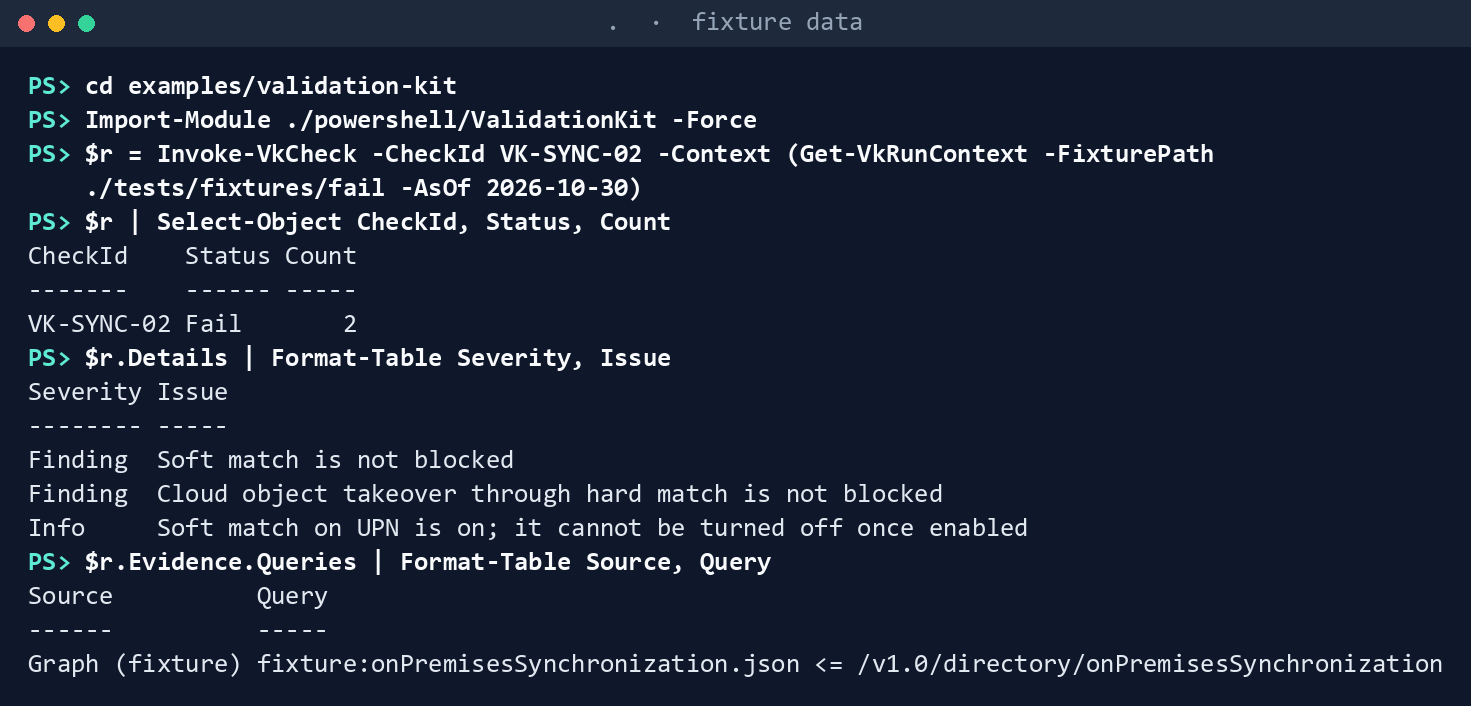
What the terminal shows, run on the kit’s fixtures (the same output as text) Expect
Fail, a count of 2, two Finding rows and one Info row, and one query logged asGraph (fixture).Open the matching window until 2026-10-31 and run again, then run on the day after the window closes:
(Invoke-VkCheck -CheckId VK-SYNC-02 -Context (Get-VkRunContext -FixturePath ./tests/fixtures/fail -AsOf 2026-10-30 -Option @{ MatchWindowOpenUntil = '2026-10-31' })).Status
(Invoke-VkCheck -CheckId VK-SYNC-02 -Context (Get-VkRunContext -FixturePath ./tests/fixtures/fail -AsOf 2026-11-01 -Option @{ MatchWindowOpenUntil = '2026-10-31' })).Status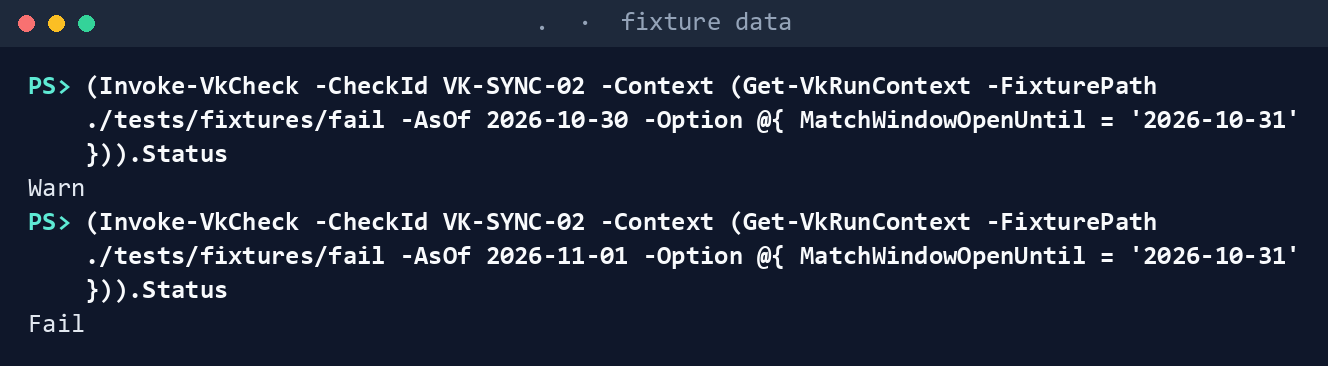
What the terminal shows, run on the kit’s fixtures (the same output as text) The status is
Warn, thenFailagain.Feed it an export. The first two commands make a folder,
inputs, with anonprem-sync-export.jsonthat blocks soft match but not hard-match takeover; the run passes the folder as-InputPath:New-Item -ItemType Directory -Force -Path ./inputs | Out-Null Set-Content -Path ./inputs/onprem-sync-export.json -Value '{"value":[{"id":"x","features":{"blockSoftMatchEnabled":true,"blockCloudObjectTakeoverThroughHardMatchEnabled":false}}]}' $r = Invoke-VkCheck -CheckId VK-SYNC-02 -Context (Get-VkRunContext -InputPath ./inputs -AsOf 2026-10-30) $r | Select-Object CheckId, Status, Count $r.Evidence.Queries | Format-Table Source, Query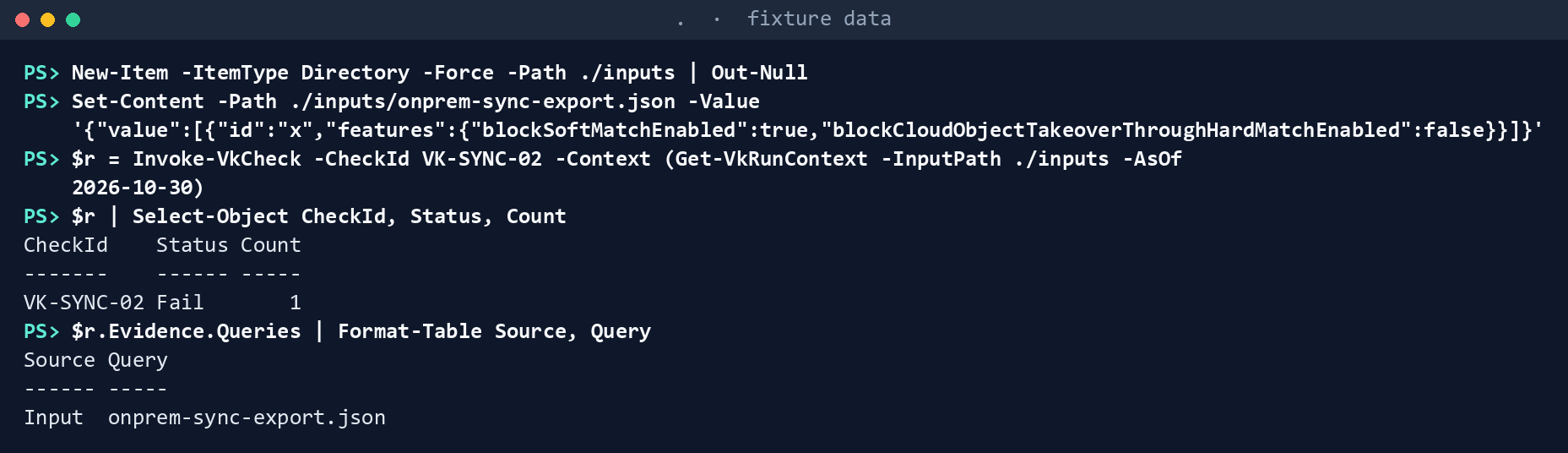
What the terminal shows, run on the kit’s fixtures (the same output as text) One Finding, and the evidence shows
Input.See what a live run would ask for:
Get-VkRequiredScope -Checks (Get-VkCheckCatalog -CheckId VK-SYNC-02)
(Get-VkCheckCatalog -CheckId VK-SYNC-02).DelegatedRole
What the terminal shows, run on the kit’s fixtures (the same output as text) The first prints
OnPremDirectorySynchronization.Read.All, and the second names the role.Confirm it isn’t in a default run:
(Get-VkCheckCatalog).Id -contains 'VK-SYNC-02'
What the terminal shows, run on the kit’s fixtures (the same output as text) It prints
False.Run the whole kit’s tests:
pwsh -NoProfile -Command "Invoke-Pester -Path tests/powershell"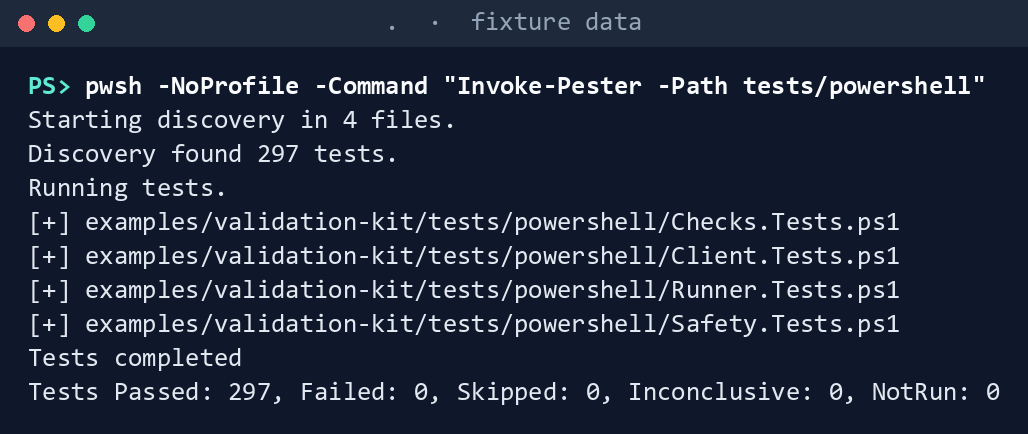
What the terminal shows, run on the kit’s fixtures (the same output as text) Make it fail for the right reason. The first two commands change your copy of the check to read
blockSoftMatch(a property that doesn’t exist); the next three reload the module and run the fail and pass fixtures:$f = './powershell/ValidationKit/Checks/SYNC.ps1' (Get-Content -Raw $f).Replace("Name = 'blockSoftMatchEnabled'", "Name = 'blockSoftMatch'") | Set-Content -NoNewline $f Import-Module ./powershell/ValidationKit -Force (Invoke-VkCheck -CheckId VK-SYNC-02 -Context (Get-VkRunContext -FixturePath ./tests/fixtures/fail -AsOf 2026-10-30)).Status (Invoke-VkCheck -CheckId VK-SYNC-02 -Context (Get-VkRunContext -FixturePath ./tests/fixtures/pass -AsOf 2026-10-30)).Status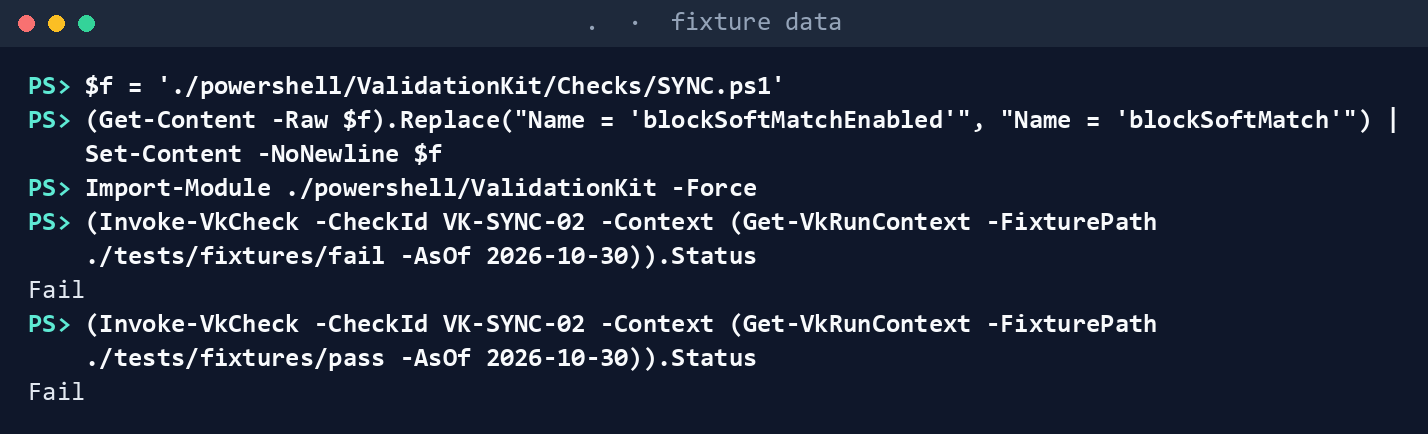
What the terminal shows, run on the kit’s fixtures (the same output as text) The fail fixture still fails, but the pass fixture now fails too, because the missing value reads as off. That is the default-to-unsafe rule doing its job. Put it back, reload the module, and the pass fixture passes again:
(Get-Content -Raw $f).Replace("Name = 'blockSoftMatch'", "Name = 'blockSoftMatchEnabled'") | Set-Content -NoNewline $f
Import-Module ./powershell/ValidationKit -Force
(Invoke-VkCheck -CheckId VK-SYNC-02 -Context (Get-VkRunContext -FixturePath ./tests/fixtures/pass -AsOf 2026-10-30)).Status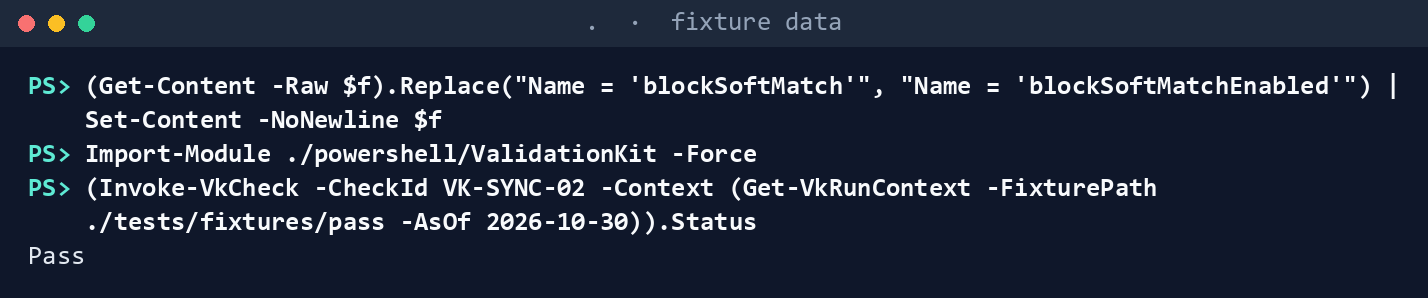
What the terminal shows, run on the kit’s fixtures (the same output as text)
Expected result: every test passes, and you’ve seen the check’s Pass, Fail and Warn outcomes. The tests cover the fourth, NotApplicable, for a tenant with no synchronization object.
Lab 2: test tenant
Use a test tenant that has Microsoft Entra Connect or Cloud Sync configured. The export is the only step that needs Global Administrator; nothing in the kit runs with that role. Work in examples/validation-kit.
Every command in this lab, in order, from examples/validation-kit. Each step below says what it does and what to look for.
# Step 1: Export
Connect-MgGraph -Scopes 'OnPremDirectorySynchronization.Read.All' -Environment Global   # USGov for GCC High
Invoke-MgGraphRequest -Method GET -Uri '/v1.0/directory/onPremisesSynchronization' |
    ConvertTo-Json -Depth 10 | Set-Content -Path ./inputs/onprem-sync-export.json
Disconnect-MgGraph

# Step 2: Run the check on the export
./Invoke-ValidationKit.ps1 -OutputPath ./out -CheckId VK-SYNC-02 -InputPath ./inputs -SkipConnect

# Step 3: Compare with the source
(Get-Content -Raw ./inputs/onprem-sync-export.json | ConvertFrom-Json).value.features

# Step 4: Back it out
Remove-Item ./inputs/onprem-sync-export.json
Export. A Global Administrator of the test tenant signs in and saves the response:
Connect-MgGraph -Scopes 'OnPremDirectorySynchronization.Read.All' -Environment Global   # USGov for GCC High
Invoke-MgGraphRequest -Method GET -Uri '/v1.0/directory/onPremisesSynchronization' |
    ConvertTo-Json -Depth 10 | Set-Content -Path ./inputs/onprem-sync-export.json
Disconnect-MgGraph
Read the file before handing it over. It holds tenant configuration and no personal data.
Run the check on the export as any user, without signing in:
./Invoke-ValidationKit.ps1 -OutputPath ./out -CheckId VK-SYNC-02 -InputPath ./inputs -SkipConnect-SkipConnectstops the runner from signing in to Graph for a live run. Because the export is present, the check doesn’t call Graph; the evidence inResults/ValidationResults.jsonshowsInput.Compare with the source. Print the
featuresblock in the export itself and check the result against it, line by line:(Get-Content -Raw ./inputs/onprem-sync-export.json | ConvertFrom-Json).value.featuresIf a property the check reads is missing or named differently, the response shape differs from Learn’s example; fix the fixture and the check together.
Back it out. Delete the export when the run’s evidence is stored; it isn’t evidence by itself, the run’s manifest is:
Remove-Item ./inputs/onprem-sync-export.jsonThe manifest,
ValidationManifest.json, records the cloud and the tenant the run read:TenantIdcomes from the Graph session, which takes it from the token’stidclaim, and a session in another tenant than the-TenantIdyou gave stops the run before it writes anything. Chapter 09’s comparator refuses to compare two runs of different tenants.
Verified facts
| Call | Endpoint | Least-privileged permission | Role | US Government clouds | Stage |
|---|---|---|---|---|---|
| Read sync features | GET /directory/onPremisesSynchronization |
OnPremDirectorySynchronization.Read.All, delegated only; no application permission10 |
Global Administrator, the only supported role11 | Global, US Government L4 and L512 | v1.0 |
| Block soft or hard match (remediation, not in the kit) | Update-MgDirectoryOnPremiseSynchronization with BlockSoftMatchEnabled or BlockCloudObjectTakeoverThroughHardMatchEnabled |
OnPremDirectorySynchronization.ReadWrite.All13 |
Global Administrator (Entra PowerShell)14 | as above | v1.0 |
| Rule evaluation (VK-DG-03, the kit’s one POST) | POST /groups/{id}/evaluateDynamicMembership, POST /groups/evaluateDynamicMembership |
Group.Read.All and User.Read.All (or Device.Read.All), delegated only15 |
— | Global, US Government L4 and L516 | beta |
| Paging | follow @odata.nextLink as an opaque URL until it is absent17 |
— | — | — | — |
| Throttling | on 429, wait Retry-After, then retry; back off exponentially if the header is missing18 |
— | — | — | — |
| Graph host per cloud | graph.microsoft.com (worldwide and Microsoft 365 GCC), graph.microsoft.us (GCC High), dod-graph.microsoft.us (DoD)19 |
— | — | — | — |
Federal requirements and evidence
A validation kit check is monitoring evidence only if it can’t change what it reads and can’t pass when it didn’t look. Each row names the file or command that proves it. Controls are from the Moderate baseline20; indicators are from FedRAMP’s list21. Which output supports which control is the program’s reading (design guidance).
| What the output proves | Requirement it supports | KSI it aligns to | Who keeps it |
|---|---|---|---|
The check fails on open soft and hard match, and logs every read it made (Lab 1, step 1: Status, Details, Evidence.Queries) |
CM-6; CA-7; AC-2: an AD object can’t take over a cloud account unnoticed | KSI-MLA-EVC | The run’s Results/ValidationResults.json |
An approved matching window is a warning only until its last day (step 2: Warn, then Fail) |
CM-6: deviations are approved and documented, with an end | KSI-MLA-EVC | The window date in the run’s options; the change record |
An export can stand in for a live read, and the evidence says which path it took (step 3: Input in Evidence.Queries) |
AC-6: no standing Global Administrator identity for a scheduled check; AU-3 | KSI-IAM-ELP | The run’s evidence block |
The privileged role a live read would need is stated before anyone runs it, and the check is out of a default run (steps 4 and 5: Get-VkRequiredScope, DelegatedRole, False) |
AC-6 | KSI-IAM-ELP | The kit’s catalog and README in the repository |
The kit passes its tests, including the safety tests that fail any state-changing command (step 6: Invoke-Pester, Safety.Tests.ps1) |
SA-11; CM-7 (Least Functionality): the kit can only read | KSI-CMT-VTD | The repository’s test results |
| A misread property fails the pass fixture, because a missing value reads as off (step 7) | SA-11 | KSI-CMT-VTD | The test results |
The privileged read happens once, by a named administrator, into a file (Lab 2, step 1: inputs/onprem-sync-export.json) |
AC-6 | KSI-IAM-ELP | The Entra sign-in log; the export is deleted after the run |
The run writes results, details and a summary (Lab 2, step 2: Results/ValidationResults.json and .csv, Details/VK-SYNC-02.csv, Summary/ValidationSummary.md) |
CA-7; CM-6 | KSI-MLA-EVC | The evidence store |
Every file of the run has a SHA-256, and the run records its cloud, tenant and read-only mode (Lab 2: ValidationManifest.json) |
SI-7 (Software, Firmware, and Information Integrity); AU-3 | KSI-SVC-VRI, Validating Resource Integrity | The evidence store; Chapter 09 refuses an edited run |
| The result matches the source line by line (Lab 2, step 3) | SA-11 | KSI-CMT-VTD | The test record |
| The remediation is a write made under change control, never by the check | CM-3; CM-5 (Access Restrictions for Change) | KSI-CMT-LMC | The change record the finding opens |
| Microsoft Entra ID and Microsoft Graph run on cloud services with FedRAMP Marketplace listings22 | SA-9 (External System Services); the agency confirms each service it uses is inside the listing’s scope (design guidance) | None: the provider reports against the indicators for its own offering | The system security plan’s list of external services |
Key Security Indicators are FedRAMP 20x indicators for cloud service providers. The agency authorizes its own system: it lines this evidence up with what Microsoft report against the indicators, and doesn’t report KSIs itself (Book 00, Appendix B). The control-by-control mapping is in Book 13’s Appendix A and Book 14’s Appendix A; the indicator pairings follow Book 04, Chapter 10 and Book 05, Chapter 10.
Dangers
| Danger | What happens | The guard |
|---|---|---|
| A read-only check that needs a privileged role | Someone creates a standing Global Administrator identity so a check can run on a schedule | The check is optional, prefers an export, and names the role in its catalog entry |
| A failed read reported as Pass | A tenant the kit couldn’t see looks compliant | Invoke-VkCheckBody turns any exception into Error; don’t catch inside the body |
| A missing property read as “on” | A response-shape change hides an open control | Read every control with the unsafe default |
| A check with its own HTTP call | A write slips past review, or a token goes to the wrong host | One data path; the safety tests parse the kit and fail on anything else |
| A fixture that matches the code, not the service | Tests pass while the live shape differs | Fixtures copy Learn’s example response shape; Lab 2 compares with the tenant |
| A Warn that never ends | An approved window becomes permanent | MatchWindowOpenUntil is a date; the day after, it’s a Finding |
| A check missing from the README | The permission table lies to the ISSO | A test fails when a catalogued check has no README row |
Checklist
Microsoft Learn, “Configure Microsoft Entra Connect for an existing tenant,” https://learn.microsoft.com/entra/identity/hybrid/connect/how-to-connect-install-existing-tenant (accessed Oct 30, 2026).↩︎
Microsoft Learn, “Set-EntraDirSyncFeature,” https://learn.microsoft.com/powershell/module/microsoft.entra.directorymanagement/set-entradirsyncfeature?view=entra-powershell (accessed Oct 30, 2026).↩︎
Microsoft Learn, “Configure Microsoft Entra Connect for an existing tenant,” https://learn.microsoft.com/entra/identity/hybrid/connect/how-to-connect-install-existing-tenant (accessed Oct 30, 2026).↩︎
Microsoft Learn, “Configure Microsoft Entra Connect for an existing tenant,” https://learn.microsoft.com/entra/identity/hybrid/connect/how-to-connect-install-existing-tenant (accessed Oct 30, 2026).↩︎
Microsoft Learn, “Get onPremisesDirectorySynchronization,” https://learn.microsoft.com/graph/api/onpremisesdirectorysynchronization-get?view=graph-rest-1.0 (accessed Oct 30, 2026).↩︎
Microsoft Learn, “Set-EntraDirSyncFeature,” https://learn.microsoft.com/powershell/module/microsoft.entra.directorymanagement/set-entradirsyncfeature?view=entra-powershell (accessed Oct 30, 2026).↩︎
Microsoft Learn, “Get onPremisesDirectorySynchronization,” https://learn.microsoft.com/graph/api/onpremisesdirectorysynchronization-get?view=graph-rest-1.0 (accessed Oct 30, 2026).↩︎
Microsoft Learn, “Configure Microsoft Entra Connect for an existing tenant,” https://learn.microsoft.com/entra/identity/hybrid/connect/how-to-connect-install-existing-tenant (accessed Oct 30, 2026).↩︎
Microsoft Learn, “Set-EntraDirSyncFeature,” https://learn.microsoft.com/powershell/module/microsoft.entra.directorymanagement/set-entradirsyncfeature?view=entra-powershell (accessed Oct 30, 2026).↩︎
Microsoft Learn, “Get onPremisesDirectorySynchronization,” https://learn.microsoft.com/graph/api/onpremisesdirectorysynchronization-get?view=graph-rest-1.0 (accessed Oct 30, 2026).↩︎
Microsoft Learn, “Get onPremisesDirectorySynchronization,” https://learn.microsoft.com/graph/api/onpremisesdirectorysynchronization-get?view=graph-rest-1.0 (accessed Oct 30, 2026).↩︎
Microsoft Learn, “Get onPremisesDirectorySynchronization,” https://learn.microsoft.com/graph/api/onpremisesdirectorysynchronization-get?view=graph-rest-1.0 (accessed Oct 30, 2026).↩︎
Microsoft Learn, “Configure Microsoft Entra Connect for an existing tenant,” https://learn.microsoft.com/entra/identity/hybrid/connect/how-to-connect-install-existing-tenant (accessed Oct 30, 2026).↩︎
Microsoft Learn, “Set-EntraDirSyncFeature,” https://learn.microsoft.com/powershell/module/microsoft.entra.directorymanagement/set-entradirsyncfeature?view=entra-powershell (accessed Oct 30, 2026).↩︎
Microsoft Learn, “group: evaluateDynamicMembership,” https://learn.microsoft.com/graph/api/group-evaluatedynamicmembership?view=graph-rest-beta (accessed Oct 30, 2026).↩︎
Microsoft Learn, “group: evaluateDynamicMembership,” https://learn.microsoft.com/graph/api/group-evaluatedynamicmembership?view=graph-rest-beta (accessed Oct 30, 2026).↩︎
Microsoft Learn, “Best practices for working with Microsoft Graph,” https://learn.microsoft.com/graph/best-practices-concept (accessed Oct 30, 2026).↩︎
Microsoft Learn, “Microsoft Graph throttling guidance,” https://learn.microsoft.com/graph/throttling (accessed Oct 30, 2026).↩︎
Microsoft Learn, “Microsoft Graph national cloud deployments,” https://learn.microsoft.com/graph/deployments (accessed Oct 30, 2026).↩︎
National Institute of Standards and Technology, SP 800-53B Moderate baseline, release 5.2.0 OSCAL profile, last modified October 22, 2026 (includes AC-2, AC-6, AU-3, CA-7, CM-3, CM-5, CM-6, CM-7, SA-9, SA-11 and SI-7), https://github.com/usnistgov/oscal-content/blob/main/nist.gov/SP800-53/rev5/json/NIST_SP-800-53_rev5_MODERATE-baseline_profile.json (accessed Nov 2, 2026).↩︎
FedRAMP, “Key Security Indicators,” FedRAMP Consolidated Rules for 2026 (indicators KSI-CMT-LMC, KSI-CMT-VTD, KSI-IAM-ELP, KSI-MLA-EVC and KSI-SVC-VRI; control mappings updated October 13, 2026), https://www.fedramp.gov/2026/reference/key-security-indicators/ (accessed Nov 2, 2026).↩︎
FedRAMP Marketplace product data, https://www.fedramp.gov/marketplace/products.json,
last_change2026-11-01T05:02:56Z (accessed Nov 2, 2026): MSO365MT, Microsoft 365 Government Community Cloud & Supporting Services, FedRAMP Certified, Class C, Moderate; FR1824057433, Microsoft 365 Government Community Cloud-High, FedRAMP Certified, Class D, High; F1209051525, Azure Commercial Cloud, FedRAMP Certified, Class D, High; F1603087869, Azure Government (includes Dynamics 365), FedRAMP Certified, Class D, High.↩︎