Federal Modernization Workbook · Book 15 · Why
Chapter 01 — Modernization Succeeds or Fails at the Help Desk
Cutover proves the new estate can be built; the first locked-out user on Monday morning proves whether it can be run.
Why the help desk, not the migration team, decides whether a modernized estate holds. Why a password or authenticator reset is the most dangerous routine action in identity, what attackers have done with it, and what NIST SP 800-63-4 and OMB M-22-09 say about recovery. What the help desk has to be able to do safely under the new model: resets, unlocks, provisioning and recovery. And the three questions every request has to answer (who routes it, who authorizes it, what proves it happened), which the rest of the book builds out.
A modernization program spends most of its attention on day one. The forest is assessed, the tenant is built, the identities are synchronized, the policies are written, the cutover runs, and someone sends a note saying the wave went well. All of that work matters, and none of it is what the estate is judged on.
The estate is judged on day two. A user who changed phones over the weekend can’t sign in. A new hire starts on Monday and needs an account, a license and three groups. A manager wants a contractor’s access to an application removed today. A synchronized account has stopped matching its cloud object and the user sees two of everything. Each of these lands at the help desk, and each is a test of the new model. Can the help desk do the work at all? Can it do it without standing administrator rights? Does the request go to someone who is entitled to approve it? And when the work is done, is there a record that shows what happened, to whom, on whose authority?
If the answers are yes, modernization becomes routine. If they are no, the help desk finds a way to get the work done anyway: an administrator account kept “for emergencies,” a reset done on the strength of an email, a temporary password sent back to the mailbox that asked for it, a trip back to the old console. Each workaround is small and reasonable on the day. Together they rebuild the estate the program set out to replace, and nobody notices until an assessor, or an attacker, does.
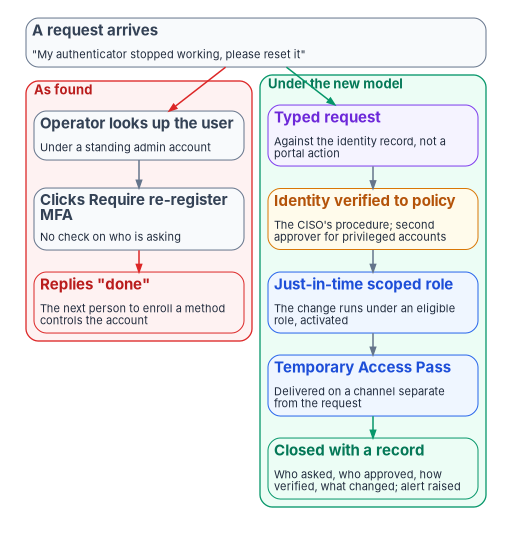
Day two is most of the work
Migration is a project with an end date. Day-two operations are the steady state, and they are where most changes to identity and configuration happen. Onboarding a user, resetting an authenticator, adding someone to a group, assigning a license, standing up a subscription, registering an application, assigning a phone number: these are the highest-volume changes a cloud team makes, and each one touches a surface that a control governs.
Done as portal clicks, each one is an ungoverned change. It has no typed request, no approval the control would recognize, no record linking the change to the person who asked and the person who approved. One such change is a minor gap. Thousands a year are the largest continuous source of control erosion in the estate, and they are exactly what an assessor samples. Chapter 02 traces that erosion control by control. This chapter is about the people and the actions at the center of it.
The help desk holds the keys
In an Active Directory estate the help desk’s power was easy to underestimate. It reset passwords and unlocked accounts through a delegated console, and the delegation lived in organizational-unit permissions that few people read. In Microsoft Entra ID the same power is explicit, and Microsoft’s own documentation is blunt about what it means.
Microsoft labels the Helpdesk Administrator role a privileged role. Users with it can change passwords and invalidate refresh tokens, and Microsoft warns that “changing the password of a user may mean the ability to assume that user’s identity and permissions.” Its examples include application owners who manage the credentials of privileged applications, Azure subscription owners, owners of groups that grant access to sensitive information, administrators of other services, and non-administrators such as executives, legal counsel and human resources staff.1 The Authentication Administrator role goes further: it can set or reset any authentication method for non-administrators and some roles, and can require users to re-register their non-password credentials.2 Which accounts each role can reset is set out in a table that Microsoft maintains; neither the Helpdesk Administrator nor the Authentication Administrator can reset a Global Administrator or a member of a role-assignable group, which only a Privileged Authentication Administrator or Global Administrator can do.3
The single most dangerous routine action follows from this. When an administrator chooses Require re-register MFA, Entra ID deletes the user’s phone numbers, Microsoft Authenticator registrations and software OATH tokens, deactivates hardware OATH tokens, and asks the user to set up a new method at the next sign-in.4 Whoever signs in next with the password and registers a method controls the account. An authenticator reset performed on an unverified request is therefore not a support task. It is a transfer of the account to whoever asked.
Attackers know where the keys are
This isn’t a theoretical concern. CISA’s joint advisory on the Scattered Spider group, first published in November 2023 and revised in July 2025, describes the actors placing calls to “convince IT help desk personnel to reset passwords and/or transfer MFA tokens,” posing as employees to get a password reset, and probing help desks first to learn what steps a reset requires.5 The advisory’s defense is phishing-resistant MFA and training against voice and email phishing. It doesn’t offer a help-desk procedure, which is the point: the procedure is the agency’s to design.
A modernization makes the help desk a more attractive target, not a less attractive one. During the waves the desk handles unusual volumes of method registrations, device re-enrollments and “I can’t sign in” calls, and an attacker’s call blends in. Book 01, Chapter 09 settles the program’s response: help-desk roles are scoped narrowly, the identity-verification procedure for resets and Temporary Access Passes is a CISO decision rather than a help-desk one, and ticket volume and method-registration rates are go/no-go inputs for each wave.
Federal guidance treats recovery as a bypass
Two federal documents frame how an agency should think about the reset and recovery path.
OMB’s zero trust memorandum, M-22-09, requires phishing-resistant MFA for agency staff, contractors and partners. It then addresses the obvious hole: agencies still need procedures for emergencies and account recovery, but “recovery processes represent a potential bypass of standard authentication protocols, and thus can be a significant threat vector if not mitigated.” Agency recovery processes should be designed as exceptional and should “require high-friction methods that are costly for an adversary to overcome, such as in-person verification, live video interaction, or other similar methods.”6
NIST’s digital identity guidelines, revised as SP 800-63-4 and published in July 2025, give recovery its own section. SP 800-63B-4 §4.2 recognizes four classes of recovery method (saved recovery codes, issued recovery codes, recovery contacts and repeated identity proofing) and lets a credential service provider support an application-specific method, such as interaction with one of its agents, only on the basis of a documented risk analysis. Where an account was identity-proofed, repeated proofing has to be “consistent with the level of initial identity proofing,” and the provider has to confirm that the claimant’s identity is consistent with the existing account. In every case, “account recovery SHALL cause a notification to be sent to the subscriber or their designee.”7
The help-desk reset is the application-specific method. Read together, the two documents say what it has to be: an exception, not the main path; high-friction for the account’s risk; at least as strong as the original proofing; and always followed by a notice to the real account holder. The control catalog says the same in its own terms. IA-5 requires the agency to verify the identity of the person receiving an authenticator at initial distribution and to have administrative procedures for lost, compromised or damaged authenticators; IA-5(1) requires immediate selection of a new password after account recovery; and IA-12 requires identity proofing to an appropriate assurance level, all in the moderate baseline.8
What the help desk must be able to do under the new model
The help desk’s job doesn’t shrink after modernization. It changes shape. Some tasks move to self-service, some move to automation, some get harder because the estate is hybrid for years, and a few become governance actions the help desk must never perform alone. The table sets out the core day-two tasks, what changes in the target, and what “safe” looks like in the program’s design. Chapter 04 and Appendix A give the procedures.
| Task | What changes in the target | What safe looks like (program design) | Controls it evidences |
|---|---|---|---|
| Password reset | Cloud-only users reset in Entra ID; synchronized users need password writeback to reach Active Directory | Self-service first; a help-desk reset only after verification to policy; the new credential never sent to the requesting channel | IA-5, IA-5(1) |
| Account unlock | Lockout may sit in Active Directory, Entra ID or both | Self-service unlock where configured; help-desk unlock against a ticket, not a phone call alone | AC-7, IA-5 |
| Authenticator reset or recovery | Re-registration deletes the user’s methods; a Temporary Access Pass bootstraps the new one | Treated as the highest-risk task on the desk: verification to the account’s risk tier, second approver for privileged accounts, notice to the account holder, alert on every reset | IA-5, IA-12 |
| Provisioning a joiner | Accounts originate from the HR event, not a request | The account is created by the lifecycle workflow with derived entitlements; the help desk handles exceptions only | AC-2 |
| Mover and leaver | Access follows attribute changes; termination disables at the source | Access re-derived on transfer; disablement driven by the personnel action, not a ticket someone remembers to raise | AC-2, AC-2(3), PS-4, PS-5 |
| Group or application access | Access is group-based and owner-approved | The help desk executes an owner-approved change; it never decides one | AC-2, AC-6 |
| Hybrid identity repair | A synchronized account can lose its match with its cloud object | A governance action with an identity-engineering approver, never a casual fix | AC-2, CM-3 |
A few facts sit behind the table. Microsoft’s self-service password reset can write password changes back to on-premises Active Directory through Microsoft Entra Connect or cloud sync, and can be set to let users unlock their on-premises accounts without resetting their password.9 Writeback works for synchronized accounts using password hash synchronization, pass-through authentication or federation (an administrator’s reset of a federated user is the exception the program handles in on-premises AD, Chapter 03), and enforces the on-premises password policy at the moment of the reset.10 A Temporary Access Pass is a time-limited passcode, single-use or multi-use, that lets a user sign in and register a passwordless method; Microsoft notes that it “makes recovery easier when a user loses or forgets a strong authentication method,” and that Authentication Administrators can create one for members while only Privileged Authentication Administrators can create one for administrators.11 The control rows come from the SP 800-53 catalog: AC-2 requires approvals for account creation and alignment of account management with personnel termination and transfer, AC-2(3) requires disabling accounts that are no longer associated with a user, AC-7 governs lockout after invalid logon attempts, and PS-4 and PS-5 require revoking credentials on termination and reviewing access on transfer.12
The pattern in the right-hand columns is the program’s. Self-service and automation take the volume; the help desk handles what remains under a scoped, just-in-time role; and the highest-risk actions carry the most friction. Book 03, Chapter 08 builds the joiner, mover and leaver lifecycle the provisioning rows depend on.
Every request answers three questions
Every day-two request, whatever it is, has to answer the same three questions before anything changes.
- Where does it go? Routing. The request is triaged and sent to the pipeline that matches the authority it needs.
- Who may say yes? Authorization. The approver is the one the control requires, resolved from the organization’s authority model, and is never the requester.
- What proves it happened? Evidence. The closing record carries the approval, the elevation, the change and a check that the change took.
The program answers them with a division of labor across three kinds of platform the agency already runs: the identity governance and administration (IGA) platform approves access decisions, the IT service management platform routes and tracks the work and approves routine support requests, and Entra ID is where the change is executed. The help desk performs only the residual manual action automation can’t reach, and never makes an access-governance decision on its own. That is program design, and it rests on the authority split Book 04, Chapter 06 already settles: requests are classified by the authority they need, from low-impact support through manager-approved and owner-governed access to governance actions that are never automated, and anything outside the help desk’s scope escalates.
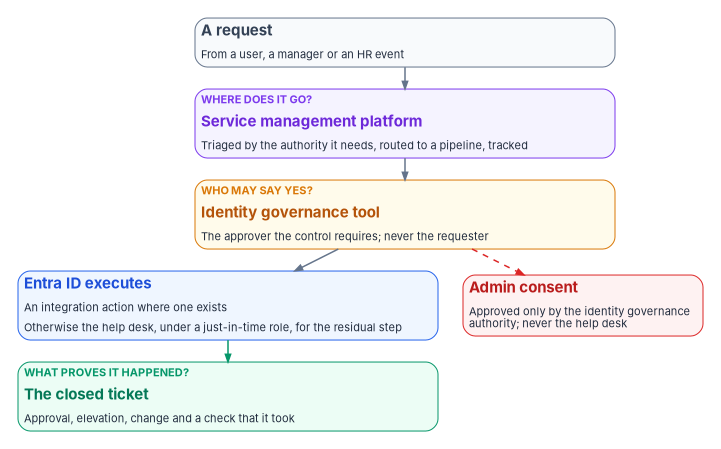
One control ties the model together, and the program treats it as unconditional. Admin consent to an application is approved through Book 04’s consent chain, which sets the approver by the application’s risk tier, and never by the help desk. The help desk triages and routes consent requests and application owners sponsor them; the identity governance office reviews every request, and a role holder there, not the approver, executes the grant. Book 04, Chapter 06 gives the consent chain, and Chapter 06 adds the check that matters most for a federal agency: whether the service at the other end is authorized to hold federal data at all.
Integrate what the platforms already ship
The program doesn’t ask an agency to build its own connectors. The platforms already ship most of the actions a help desk needs. ServiceNow’s Microsoft Entra ID Spoke, renamed from the Microsoft Azure Active Directory Spoke in December 2023, provides actions for user, group, application, license and password management, including revoking sign-in sessions, and for devices offers group membership and lookup only (Chapter 03).13 Where the agency runs ServiceNow, the program’s design integrates and customizes those actions into the help-desk model rather than reinventing them, so that most routine requests run as an integration action under a service identity and the help desk does only the steps no action covers. Chapter 03 maps each help-desk task to the action that can carry it.
Where a person does have to act, the role they act under is eligible, not active. Microsoft Entra Privileged Identity Management provides just-in-time, time-bound and approval-based role activation, can require MFA and a justification to activate, notifies on activation and keeps an audit history.14 Microsoft also recommends requiring phishing-resistant MFA for the Helpdesk Administrator, Authentication Administrator and Privileged Authentication Administrator roles, among others.15 Book 04, Chapter 08 builds the elevation pattern, and Chapter 04 applies it to the help desk.
No manual path, by design
Most of the workbook’s technical guidance offers two routes to the same end state: a manual one an operator can follow without the program’s tooling, and a governed one that adds automation and evidence. The help-desk model deliberately offers only the governed route. Its subject isn’t a configuration an operator could set by hand. It is the routing and approval model itself: who may approve what, and where the work is executed. There is no manual end state to split off, because the routing authority is the product. The residual manual steps the help desk does perform are still documented, task by task, in Chapter 04 and Appendix A.
The same reasoning explains why the program publishes its help-desk scripts as a reference implementation for review and adaptation rather than as a turnkey tool. The scripts are written against current Microsoft Graph PowerShell but not run against a live tenant, and every state-changing script honors -WhatIf. They belong inside the agency’s authorization boundary, with their inputs and outputs, and they are introduced in the chapters that use them.
How modernization quietly reverts
Reversion rarely looks like a decision. It looks like a sequence of reasonable exceptions.
- The emergency administrator account that never goes away. An account is kept with standing rights “until the help desk is comfortable,” and it becomes the way work gets done.
- The email that becomes the request. A request arrives by email, someone acts on it, and the email is the only record. Nothing checked that the sender was the account owner.
- The temporary password in the same inbox. A reset credential goes back to the channel that asked for it. If that mailbox is compromised, the reset hands over the account.
- The old console. A synchronized-account problem is fixed by editing the on-premises object directly, because that is the familiar tool, and the cloud side drifts.
- The script someone pasted. A requester supplies a command and an operator runs it with administrative rights. The requester is now the author of a tenant change and the operator is the execution engine.
None of these is visible on the day. Each shows up later as an unexplained privileged account, an access review with entitlements nobody can trace, or an assessment finding with no record behind it. The program’s position is that the cure isn’t more discipline at the desk. It is a model in which the governed path is also the easiest path: requests arrive as typed items, the approval is routed automatically, the change runs as an action, and the record writes itself. Chapter 12 rewrites the common as-found tasks as governed procedures.
Honest limits
- This is guidance, not policy. The verification procedure for resets, the risk tiers and the approval chains are the agency’s decisions. The program recommends that the CISO own the verification procedure; it doesn’t set it.
- Self-service doesn’t remove the help desk. It moves volume. Users without registered methods, devices or network access still call, and those are often the cases an attacker imitates.
- High friction has a cost. In-person or live-video verification is slow and expensive at scale. The program’s design spends that friction where the account’s risk justifies it, chiefly privileged and sensitive accounts, rather than on every reset.
- Hybrid estates stay hybrid for years. Many day-two tasks touch both Active Directory and Entra ID until the directory is retired, and the help desk has to be trained and scoped for both.
What leadership should take from this
- Judge the modernization on day two. Ask how a reset, an unlock, a joiner and a leaver run under the new model before calling a wave complete.
- Treat the authenticator reset as an account transfer. Put the verification procedure under the CISO, put the most friction on the most sensitive accounts, and alert on every reset.
- Make the governed path the easy path. Requests routed by authority, approvals resolved automatically, changes executed by integration actions under just-in-time roles, and records produced as a side effect. Anything harder will be worked around.
Chapter 02 follows the same day-two work into compliance: why controls decay without operational automation, and the outline of the operating model the rest of this book builds.
Microsoft Learn, “Microsoft Entra built-in roles,” sections Helpdesk Administrator and Authentication Administrator, https://learn.microsoft.com/en-us/entra/identity/role-based-access-control/permissions-reference (accessed Oct 21, 2026).↩︎
Microsoft Learn, “Microsoft Entra built-in roles,” sections Helpdesk Administrator and Authentication Administrator, https://learn.microsoft.com/en-us/entra/identity/role-based-access-control/permissions-reference (accessed Oct 21, 2026).↩︎
Microsoft Learn, “Privileged roles and permissions in Microsoft Entra ID,” section Who can reset passwords, https://learn.microsoft.com/en-us/entra/identity/role-based-access-control/privileged-roles-permissions (accessed Oct 21, 2026).↩︎
Microsoft Learn, “Manage user authentication methods for Microsoft Entra multifactor authentication,” section Manage user authentication options, https://learn.microsoft.com/en-us/entra/identity/authentication/howto-mfa-userdevicesettings (accessed Oct 21, 2026).↩︎
Cybersecurity and Infrastructure Security Agency, Cybersecurity Advisory AA23-320A, Scattered Spider, November 16, 2023, revised July 29, 2025, https://www.cisa.gov/news-events/cybersecurity-advisories/aa23-320a (accessed Oct 21, 2026).↩︎
Office of Management and Budget, M-22-09, Moving the U.S. Government Toward Zero Trust Cybersecurity Principles, January 26, 2022, §A (Identity), action 2, and Appendix discussion of M-19-17 (PIV and non-PIV authenticators; account recovery), https://www.whitehouse.gov/wp-content/uploads/2022/01/M-22-09.pdf (accessed Oct 21, 2026).↩︎
National Institute of Standards and Technology, SP 800-63B-4, Digital Identity Guidelines: Authentication and Authenticator Management, July 2025, §4.2 (Account Recovery), https://pages.nist.gov/800-63-4/sp800-63b.html (accessed Oct 21, 2026); publication record at https://csrc.nist.gov/pubs/sp/800/63/b/4/final (accessed Oct 21, 2026).↩︎
National Institute of Standards and Technology, SP 800-53 Rev. 5, Security and Privacy Controls for Information Systems and Organizations, controls AC-2, AC-2(3), AC-7, IA-5, IA-5(1), IA-12, PS-4 and PS-5, statements and moderate-baseline membership checked against the release 5.2.0 OSCAL catalog and moderate baseline profile, https://github.com/usnistgov/oscal-content/tree/main/nist.gov/SP800-53/rev5/json (accessed Oct 21, 2026).↩︎
Microsoft Learn, “How it works: Microsoft Entra self-service password reset,” section On-premises integration, https://learn.microsoft.com/en-us/entra/identity/authentication/concept-sspr-howitworks (accessed Oct 21, 2026).↩︎
Microsoft Learn, “How does self-service password reset writeback work in Microsoft Entra ID?,” https://learn.microsoft.com/en-us/entra/identity/authentication/concept-sspr-writeback (accessed Oct 21, 2026).↩︎
Microsoft Learn, “Configure Temporary Access Pass to register passwordless authentication methods,” https://learn.microsoft.com/en-us/entra/identity/authentication/howto-authentication-temporary-access-pass (accessed Oct 21, 2026).↩︎
National Institute of Standards and Technology, SP 800-53 Rev. 5, Security and Privacy Controls for Information Systems and Organizations, controls AC-2, AC-2(3), AC-7, IA-5, IA-5(1), IA-12, PS-4 and PS-5, statements and moderate-baseline membership checked against the release 5.2.0 OSCAL catalog and moderate baseline profile, https://github.com/usnistgov/oscal-content/tree/main/nist.gov/SP800-53/rev5/json (accessed Oct 21, 2026).↩︎
ServiceNow, “Microsoft Entra ID Spoke release notes,” ServiceNow Store release notes (version 4.2.1 rename; version 4.8.2, September 2026), https://www.servicenow.com/docs/r/C17ZqvSaMwUVpMBg8Nc5sg/H~l0CQedXnmILhdmVBqR6g (accessed Oct 21, 2026).↩︎
Microsoft Learn, “What is Microsoft Entra Privileged Identity Management?,” https://learn.microsoft.com/en-us/entra/id-governance/privileged-identity-management/pim-configure (accessed Oct 21, 2026).↩︎
Microsoft Learn, “Require phishing-resistant multifactor authentication for administrators,” https://learn.microsoft.com/en-us/entra/identity/conditional-access/policy-admin-phish-resistant-mfa (accessed Oct 21, 2026).↩︎