Federal Modernization Workbook · Book 19 · How
Chapter 04 — Dynamic Rules as Code
A dynamic rule is access policy written as a one-line expression. Treat it as code: review it, test it against people you can name, see whom a change adds and removes before it ships, and know how to stop the engine safely when one goes wrong.
The rules that place people and devices in dynamic membership groups, which the Attribute-Driven Migration uses for access, licensing and policy. You keep the rules in Git, one file per group, and check every change with code: a linter for the guards Book 03 requires, membership tests against a fictional population, and a shadow diff. For incidents, you start from Learn’s own pause and resume samples, which the repository keeps as a pinned copy, run them against a fake tenant, and add the record they leave out. Lab 1 runs on a laptop with no tenant; Lab 2 uses a test tenant.
Jump to a slide (18)
Deck · Narrated deck (about 11 minutes, captions) · Script · Captions. Recorded on November 2, 2026 from the approved chapter.
Goal and audience
Goal. By the end of this chapter you can write a dynamic rule as a reviewed file with tests, explain every finding the linter raises, show whom a rule change adds and removes before it reaches the tenant, and pause and resume dynamic processing in an incident without turning on anything that was off on purpose. For each rule in the code you can say whether it is Microsoft’s contract, Microsoft’s sample, or the program’s own design.
Audience. Developers and identity engineers who own the group library, and the reviewers who approve rule changes. You should be comfortable in PowerShell 7. You don’t need a tenant until Lab 2.
Where the rules sit
In the migration, a person’s access follows their HR record: HR attributes land in coded slots (extensionAttribute10 for organization, 11 for worker type, 12 for position category), and dynamic membership rules read those slots (Book 03, Chapter 10). Every rule that grants access ANDs two guards at the top: (user.accountEnabled -eq true) and (user.userType -eq "Member"). The validation kit already reads the rules live in a tenant (VK-DG-01 to VK-DG-07, Chapter 03). This chapter moves the same checks earlier, into the pull request that changes a rule.
What Learn says about the engine sets the stakes:
- A rule is
<property> <operator> <value>expressions joined with-and,-orand-not. Comparisons bind tightest, then-not, then-and, then-or. The body can’t exceed 3,072 characters.1 - String and regex comparisons aren’t case sensitive; property names are.2
fin-ledmatches"FIN-LED", so the HR side has to keep codes clean. - A tenant can have at most 15,000 dynamic membership groups.3 Each unique user in a dynamic group needs a Microsoft Entra ID P1 license.4
- Processing is sequential per tenant. Changes are usually applied within a few hours but can take more than 24, and
-match,-containsandmemberOfslow it down.5 memberOfis a preview that ends on November 3, 2026. After that date, groups that use it stop updating and stay in their last state. It is available only in the public cloud.6- An agent’s user account is a user to the engine and is included by user rules unless the rule excludes it.7 Learn doesn’t yet name the property to exclude it with, so the guards in this chapter can’t include that clause (see the book index).
Start with Learn’s samples
What Learn gives you
For writing rules, Learn gives you its syntax page, with a table of properties and operators and an example for each,8 and a page on writing efficient rules.9 There is no Microsoft sample library of rules or rule tests. Microsoft’s own testing tool is Graph’s evaluateDynamicMembership action, which is beta and delegated only.10
For running the engine, Learn publishes five PowerShell samples for an incident: when a rule change or a mass update starts moving members you didn’t intend, pause processing, then resume it in order.11
| Sample | What it does |
|---|---|
| Pause all | Pauses every dynamic group and dynamic administrative unit that is On12 |
| Pause specific | Pauses the IDs you type13 |
| Pause all except | Pauses everything that is On except the IDs you type14 |
| Resume specific critical | Resumes the IDs you type; run it first15 |
| Resume noncritical | Resumes up to 100 paused groups and 100 paused administrative units per run, after the critical ones16 |
Each script runs in two phases (groups, then administrative units), asks for yes before each, asks for the cloud, and requests only the scopes for the phases you choose: Group.ReadWrite.All with Groups Administrator, AdministrativeUnit.ReadWrite.All with Privileged Role Administrator.17
The pinned copy
The scripts live only inside Learn’s pages, so the repository pins the pages themselves: the overview and the five sample pages, from MicrosoftDocs/entra-docs at commit 07cb73d (October 30, 2026), unmodified, with the repository’s MIT code license.18 snapshot.json records each file’s SHA-256 and a unit test checks them. The weekly source watch reports new commits to the sample pages. Updating the copy is a reviewed pull request, as in Chapter 01.
tests/LearnSampleHarness.ps1 extracts each script from its pinned page at test time and runs it, unmodified, against a fake tenant. Only the commands it calls outside itself are replaced: the prompts, the screen output, Start-Sleep, and the four Graph PowerShell cmdlets it uses.
What they leave to you
Running the five samples against the fake tenant shows what they do well and what they leave to you. Each row is pinned by a test in tests/LearnSamples.Tests.ps1.
| Learn’s samples, run as published | Why it matters | What examples/dynamic-rules adds |
|---|---|---|
| Pause all skips a group that is already paused, pauses the rest, and signs in to the cloud chosen with only the scopes needed | — | Kept as the model: the same cloud hosts and the same two phases |
| Pause all records nothing about what it paused | Afterwards, nobody can tell which groups the incident paused and which were paused before it | New-DrPauseManifest records every collection’s state before anything changes; Invoke-DrPause records what it paused |
| Resume noncritical turns on every paused group, including one that was paused on purpose before the incident | A group held for review, or frozen while its rule was being fixed, starts moving members again | Invoke-DrResume resumes only collections this manifest paused, and refuses any other ID |
An answer the cloud prompt doesn’t recognize, such as GCCHigh, selects the worldwide endpoint |
In a GCC High or DoD tenant, the run signs in to the wrong cloud | Get-DrGraphEndpoint refuses a cloud name it doesn’t know |
| Nothing in the resume scripts enforces a wait | Learn asks for one: 12 hours on the samples page,19 at least 24 in its processing guidance20 | Noncritical resumes wait 24 hours after the pause by default, the stricter of the two |
| A throttled request is retried once, then counted as failed | In a large tenant some collections stay unpaused; the summary shows the count | The manifest lists every collection, so a second pause run picks up the rest |
| Interactive only | Fine at 2 a.m. by hand; not testable, not repeatable | -Apply to act and a dry run without it; the Graph call is a script block, so the tests use a fake tenant |
The verdict. Use Learn’s samples as the model for the incident path, and keep them pinned for comparison. The program’s runbook uses the manifest-based functions, because during recovery the questions are “what did we pause?” and “what was already off?”, and the samples can’t answer them.
The code: what examples/dynamic-rules adds
examples/dynamic-rules is one PowerShell module, one check script, the rule library and two test files.
One file per group
Each group is a JSON file in rules/:
{
  "displayName": "FIN-LED everyone but contractors",
  "kind": "user",
  "owner": "FIN-LED access owner",
  "critical": false,
  "membershipRule": "(user.accountEnabled -eq true) -and (user.userType -eq \"Member\") -and (user.extensionAttribute10 -eq \"FIN-LED\") -and (user.extensionAttribute11 -ne \"CTR\") -and (user.extensionAttribute11 -ne null)",
  "tests": [
    { "member": "u01", "expected": true },
    { "member": "u02", "expected": false },
    { "member": "u06", "expected": false }
  ]
}
The owner is the person who approves changes. critical marks the groups an incident responder resumes first. The tests name members of tests/fixtures/population.json, a fictional population built to exercise each guard: a disabled employee, a guest with a copied organization code, a worker with an empty worker-type slot, a lower-case code, a manager and their reports, and three devices. The six rules are Book 03’s patterns, with the guards in place.
Parse and evaluate offline
ConvertFrom-DrRule parses the grammar on Learn’s syntax page: the twelve comparison operators, written with or without the hyphen, -in lists, -any and -all over collections, null, system.now -plus, backtick-escaped quotation marks, the direct reports form, and Learn’s precedence.21 Learn’s own examples sometimes print an en dash for the hyphen (–eq), which the parser accepts. Test-DrMember evaluates a parsed rule against one fixture object, case-insensitively, as Learn says the engine compares.
The evaluator is for tests and reviews, and it isn’t the engine. It refuses memberOf and the date comparisons rather than guess. Lab 2 runs the same rules through Graph’s own evaluator for the same test users.
Lint
Test-DrRule applies eleven rules (DR-01 to DR-11; the README lists them). Two matter most. DR-03 and DR-04 require the guards to be ANDed at the top of the rule: a guard inside an -or protects nothing, and a regular expression over the rule text can’t tell the difference, which is why the linter works on the parsed tree. DR-10 notes that -ne or -notIn on a coded slot also admits someone whose slot is empty; add (… -ne null) if an empty slot must not qualify (design guidance).
Run against Book 03, Chapter 10’s own rule pattern table, the linter found three things. The Legal employer pattern had no userType guard, so a guest whose companyName matched would have qualified (DR-04);22 it now has the guard, fixed in the same change as this chapter. It still reads companyName, a display-name attribute (DR-05), because the row exists to show that case. The Exclusion pattern admitted a worker whose type slot was empty (DR-10). The owner decided that an empty worker type must not qualify, so the pattern now ends -and (user.extensionAttribute11 -ne null), as this library’s entry already did, and the linter finds nothing in it. The Direct reports pattern can’t carry guards at all, because Learn says that rule can’t be combined with any other, so the linter only notes it (DR-03, Info).23
The shadow diff
Compare-DrRule evaluates the current and proposed rule over the population and lists whom the change adds and removes. Invoke-DrLibraryCheck.ps1 is the pull request check: it lints every rule, runs every test, and for each rule file changed since -BaseRef, prints the adds and removes and writes them to out/check-results.json. The live equivalent, against real groups, is VK-DG-04.
The pause manifest
New-DrPauseManifest reads every dynamic group and dynamic administrative unit, with its processing state, through the same Graph calls Learn’s samples make, and returns a record: when, which cloud, why, and each collection’s state before. Invoke-DrPause pauses only what was On, minus any exceptions, and adds each ID it paused to the record. Invoke-DrResume -Ids resumes named critical collections at once. Without -Ids, it resumes the next batch, and only after the wait. It refuses any ID the record didn’t pause. Each function takes the Graph call as a script block: Invoke-MgGraphRequest in a tenant, a fake in the tests.
The tests
tests/DynamicRules.Tests.ps1 has 57 tests: the parser, the evaluator, the linter, the library, Book 03’s table, the shadow diff, and pause and resume against a fake Graph. tests/LearnSamples.Tests.ps1 has 13 tests that run Learn’s five scripts against the fake tenant. Neither needs a module, a tenant or a network.
The commands below run Learn’s pinned samples and the example as published in the repository, against fixtures and a fake tenant. The evaluator follows Learn’s syntax page but isn’t the service. Review the code, and run Lab 2 in a test tenant, before it governs real groups.
Lab 1: fixtures, no tenant
You need PowerShell 7.1 or later and Pester 5. Work in examples/dynamic-rules.
Every command in this lab, in order, from examples/dynamic-rules. Each step below says what it does and what to look for.
# Step 1: Run Learn's samples against the fake tenant
. ./tests/LearnSampleHarness.ps1
$pages = '../third_party/dynamic-membership-samples/scripts'
$t = New-FakeTenant -Collections @(
    @{ id = '11111111-1111-1111-1111-111111111111'; displayName = 'FIN-LED all members'; kind = 'group'; state = 'On' },
    @{ id = '22222222-2222-2222-2222-222222222222'; displayName = 'Held for review'; kind = 'group'; state = 'Paused' })
$answers = 'yes', 'USGov', 'yes', 'yes', 'yes'   # run, cloud, groups phase, AU phase, confirm account
Invoke-LearnSample -Page "$pages/powershell-pause-all-dynamic-membership.md" -Tenant $t -Answers $answers | Out-Null
$t.Connected = $null
Invoke-LearnSample -Page "$pages/powershell-resume-noncritical-dynamic-membership.md" -Tenant $t -Answers $answers | Out-Null
$t.Collections.Values | Select-Object displayName, state

# Step 1: Run Learn's samples against the fake tenant
$t = New-FakeTenant -Collections @(
    @{ id = '11111111-1111-1111-1111-111111111111'; displayName = 'FIN-LED all members'; kind = 'group'; state = 'On' })
Invoke-LearnSample -Page "$pages/powershell-pause-all-dynamic-membership.md" -Tenant $t -Answers 'yes', 'GCCHigh', 'yes', 'yes', 'yes' | Out-Null
$t.Calls[0].Uri

# Step 2: Lint Book 03's rule table
Import-Module ./powershell/DynamicRules.psm1
Get-Content ./tests/fixtures/book03-patterns.json -Raw | ConvertFrom-Json |
    ForEach-Object { Test-DrRule -Rule $_.membershipRule -Kind $_.kind -Group $_.pattern } |
    Format-Table Severity, Rule, Group, Issue

# Step 3: Evaluate a rule against the population
$pop = Get-Content ./tests/fixtures/population.json -Raw | ConvertFrom-Json
Get-DrMembers -Population $pop -Rule '(user.accountEnabled -eq true) -and (user.userType -eq "Member") -and (user.extensionAttribute10 -eq "FIN-LED")'

# Step 4: Run the pull request check
pwsh ./powershell/Invoke-DrLibraryCheck.ps1 -BaseRef HEAD

# Step 5: Break a rule on purpose
$f = './rules/fin-led-not-contractors.json'
(Get-Content -Raw $f).Replace(' -and (user.extensionAttribute11 -ne null)', '') | Set-Content -NoNewline $f

# Step 5: Break a rule on purpose
pwsh ./powershell/Invoke-DrLibraryCheck.ps1 -BaseRef HEAD

# Step 5: Break a rule on purpose
(Get-Content -Raw $f).Replace('-ne \"CTR\")"', '-ne \"CTR\") -and (user.extensionAttribute11 -ne null)"') | Set-Content -NoNewline $f

# Step 6: Run the tests
Invoke-Pester ./tests
Run Learn’s samples against the fake tenant:
. ./tests/LearnSampleHarness.ps1
$pages = '../third_party/dynamic-membership-samples/scripts'
$t = New-FakeTenant -Collections @(
    @{ id = '11111111-1111-1111-1111-111111111111'; displayName = 'FIN-LED all members'; kind = 'group'; state = 'On' },
    @{ id = '22222222-2222-2222-2222-222222222222'; displayName = 'Held for review'; kind = 'group'; state = 'Paused' })
$answers = 'yes', 'USGov', 'yes', 'yes', 'yes'   # run, cloud, groups phase, AU phase, confirm account
Invoke-LearnSample -Page "$pages/powershell-pause-all-dynamic-membership.md" -Tenant $t -Answers $answers | Out-Null
$t.Connected = $null
Invoke-LearnSample -Page "$pages/powershell-resume-noncritical-dynamic-membership.md" -Tenant $t -Answers $answers | Out-Null
$t.Collections.Values | Select-Object displayName, state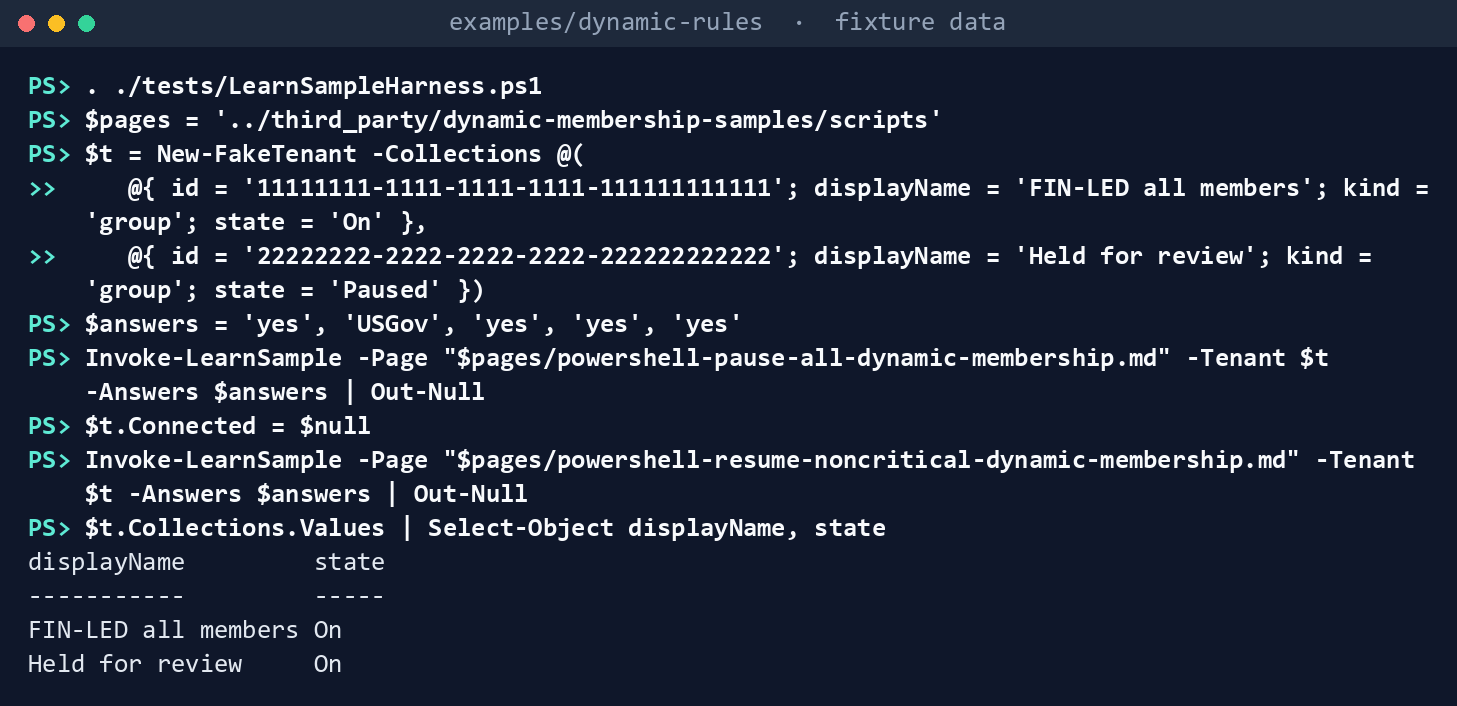
What the terminal shows, run on the kit’s fixtures (the same output as text) Both groups end
On. “Held for review” was paused before the incident, and the resume turned it on. Now run the pause on a fresh fake tenant withGCCHighas the cloud answer, and read the first call’s address:$t = New-FakeTenant -Collections @( @{ id = '11111111-1111-1111-1111-111111111111'; displayName = 'FIN-LED all members'; kind = 'group'; state = 'On' }) Invoke-LearnSample -Page "$pages/powershell-pause-all-dynamic-membership.md" -Tenant $t -Answers 'yes', 'GCCHigh', 'yes', 'yes', 'yes' | Out-Null $t.Calls[0].Uri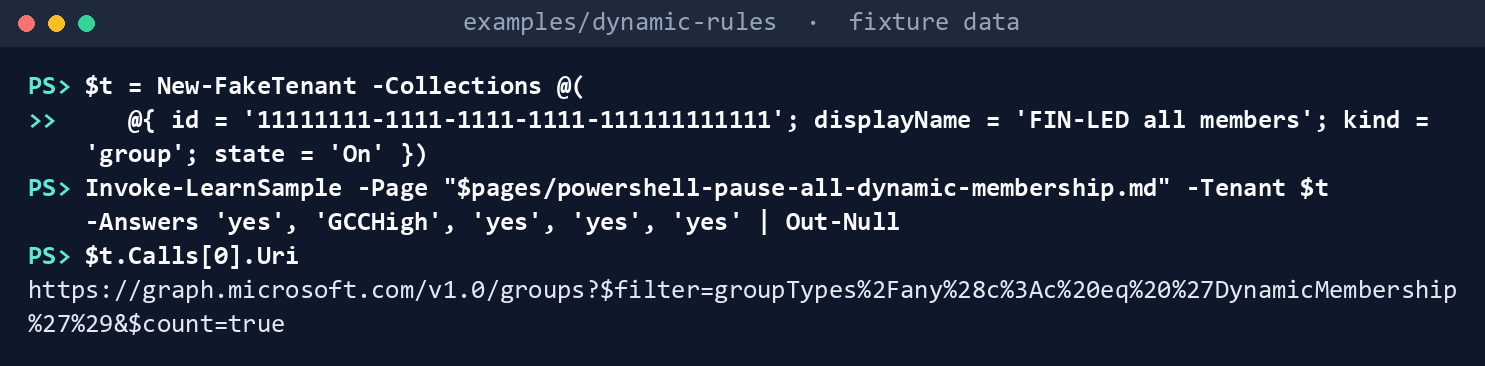
What the terminal shows, run on the kit’s fixtures (the same output as text) It starts
https://graph.microsoft.com/….Lint Book 03’s rule table:
Import-Module ./powershell/DynamicRules.psm1
Get-Content ./tests/fixtures/book03-patterns.json -Raw | ConvertFrom-Json |
    ForEach-Object { Test-DrRule -Rule $_.membershipRule -Kind $_.kind -Group $_.pattern } |
    Format-Table Severity, Rule, Group, Issue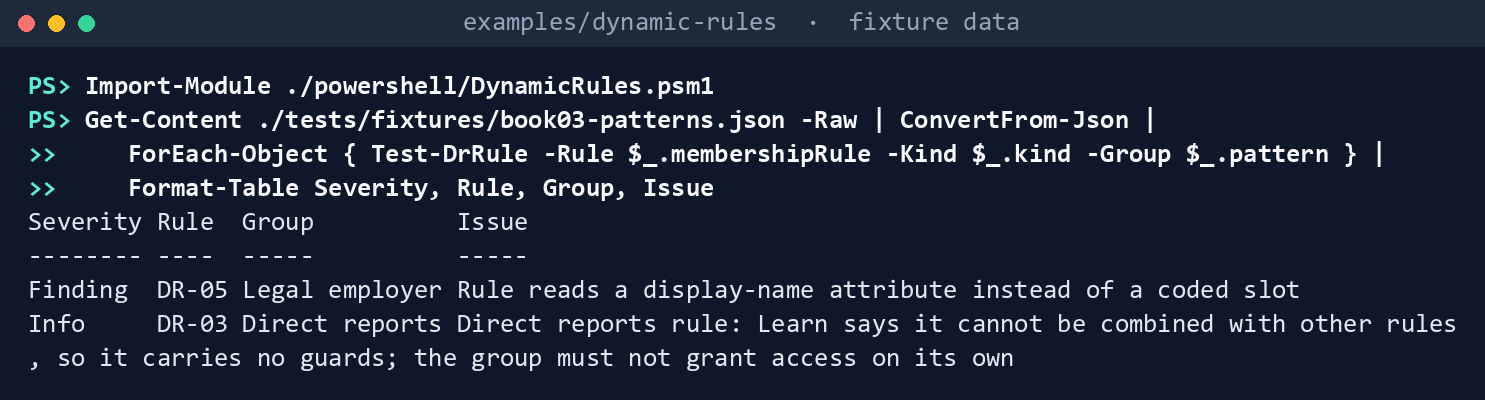
What the terminal shows, run on the kit’s fixtures (the same output as text) Two rows: DR-05 on Legal employer, and the DR-03 note on Direct reports. Exclusion, which now has the null guard, has none. A test checks that the fixture still matches Book 03’s table row for row.
Evaluate a rule against the population:
$pop = Get-Content ./tests/fixtures/population.json -Raw | ConvertFrom-Json
Get-DrMembers -Population $pop -Rule '(user.accountEnabled -eq true) -and (user.userType -eq "Member") -and (user.extensionAttribute10 -eq "FIN-LED")'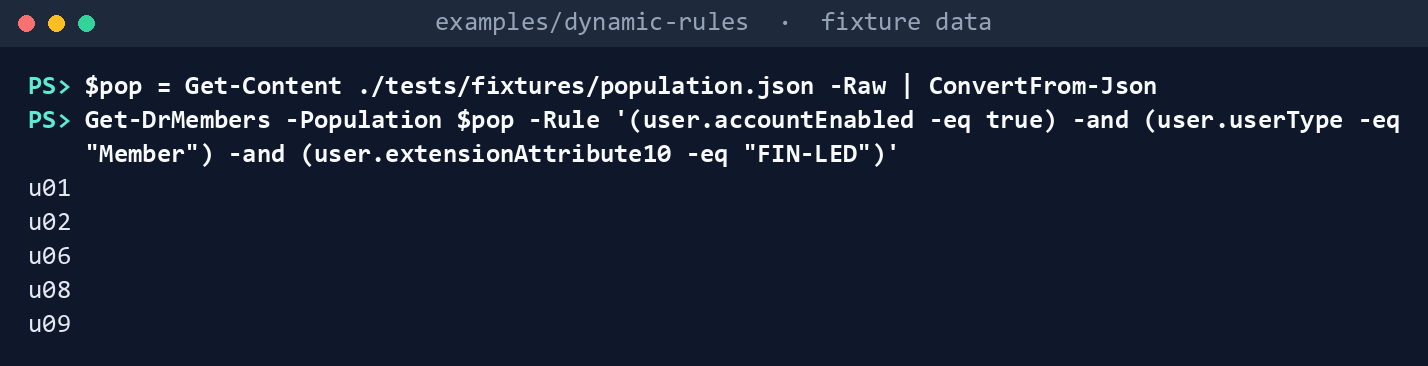
What the terminal shows, run on the kit’s fixtures (the same output as text) u01, u02, u06, u08, u09.u04(disabled) andu05(guest) are out because of the guards.u08, whose code isfin-ledin lower case, is in.Run the pull request check:
pwsh ./powershell/Invoke-DrLibraryCheck.ps1 -BaseRef HEADExit
0: six rules, no findings, no changed files.Break a rule on purpose. This deletes
-and (user.extensionAttribute11 -ne null)fromrules/fin-led-not-contractors.json:$f = './rules/fin-led-not-contractors.json' (Get-Content -Raw $f).Replace(' -and (user.extensionAttribute11 -ne null)', '') | Set-Content -NoNewline $f
What the terminal shows, run on the kit’s fixtures (the same output as text) Run the check again:
pwsh ./powershell/Invoke-DrLibraryCheck.ps1 -BaseRef HEADExit
2. The linter notes DR-10, the test foru06fails (DR-11), and the shadow diff printsadds u06. Put the clause back:(Get-Content -Raw $f).Replace('-ne \"CTR\")"', '-ne \"CTR\") -and (user.extensionAttribute11 -ne null)"') | Set-Content -NoNewline $f
What the terminal shows, run on the kit’s fixtures (the same output as text) Run the tests:
Invoke-Pester ./tests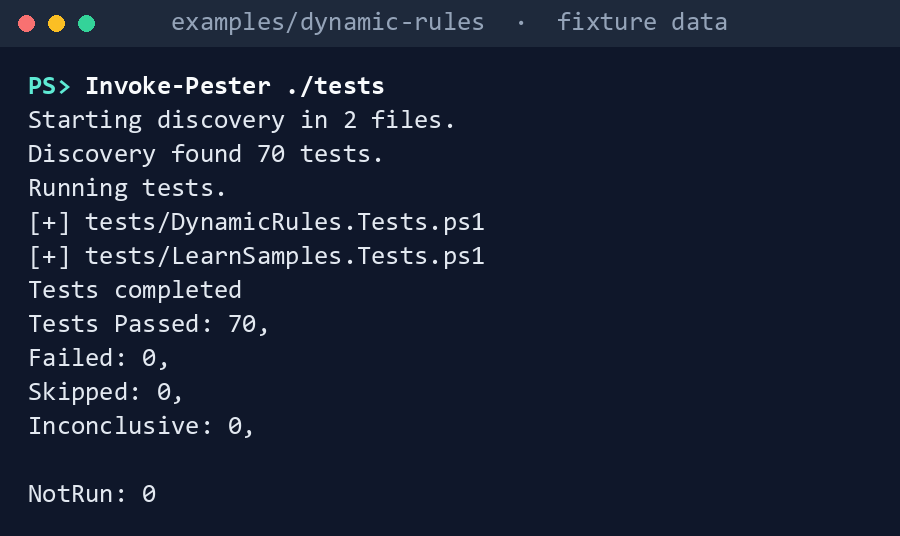
What the terminal shows, run on the kit’s fixtures (the same output as text)
Expected result: 70 tests passing, and each difference in the table above seen with your own eyes.
Lab 2: test tenant
Use a test tenant, never production, with fictional users whose slots match the population fixture. Work in examples/dynamic-rules. You’ll replace: <environment> (Global, USGov or USGovDoD, the tenant’s cloud for Connect-MgGraph), <cloud> (gcc, global, gcchigh or dod, the same cloud for the validation kit), and <object-id-u01> … <object-id-u07>, <object-id-d01> … <object-id-d03> (the object IDs of the test users and devices that stand for the population fixture’s members).
Every command in this lab, in order, from examples/dynamic-rules. Each step below says what it does and what to look for.
# Step 1: Sign in to the right cloud with the least you need
Connect-MgGraph -Scopes 'Group.ReadWrite.All', 'User.Read.All' -Environment <environment>
Import-Module ./powershell/DynamicRules.psm1

# Step 2: Create the groups from the library
$lib = Get-DrLibrary -Path ./rules
$groups = foreach ($r in $lib) {
    New-MgGroup -DisplayName $r.displayName -MailNickname $r.mailNickname -MailEnabled:$false -SecurityEnabled `
        -GroupTypes @('DynamicMembership') -MembershipRule $r.membershipRule -MembershipRuleProcessingState 'Paused'
}

# Step 3: Compare the offline evaluator with Graph's
$memberIds = @{ u01 = '<object-id-u01>'; u02 = '<object-id-u02>'; u03 = '<object-id-u03>'; u04 = '<object-id-u04>'
    u05 = '<object-id-u05>'; u06 = '<object-id-u06>'; u07 = '<object-id-u07>'
    d01 = '<object-id-d01>'; d02 = '<object-id-d02>'; d03 = '<object-id-d03>' }
foreach ($r in $lib) { foreach ($test in $r.tests) {
    $body = @{ memberId = $memberIds[$test.member]; membershipRule = $r.membershipRule } | ConvertTo-Json
    $got = (Invoke-MgGraphRequest -Method POST -Uri '/beta/groups/evaluateDynamicMembership' -Body $body -ContentType 'application/json').membershipRuleEvaluationResult
    if ($got -ne $test.expected) { "$($r.file) $($test.member): Graph says $got, expected $($test.expected)" }
} }

# Step 4: Turn processing on and shadow-diff live
foreach ($g in $groups) { Update-MgGroup -GroupId $g.Id -MembershipRuleProcessingState 'On' }

# Step 4: Turn processing on and shadow-diff live
$id = @{}; foreach ($g in $groups) { $id[$g.DisplayName] = $g.Id }
$current = $id[($lib | Where-Object file -EQ 'fin-led-all.json').displayName]
$proposed = $id[($lib | Where-Object file -EQ 'fin-led-employees.json').displayName]
New-Item -ItemType Directory -Force -Path ./inputs | Out-Null
'CurrentGroupId,ProposedGroupId', "$current,$proposed" | Set-Content ./inputs/shadow-pairs.csv
pwsh -File ../validation-kit/Invoke-ValidationKit.ps1 -OutputPath ./out/vk -CheckId VK-DG-04 -InputPath ./inputs -Cloud <cloud>

# Step 5: Drill an incident
$invoke = { param($Method, $Uri, $Body, $Headers) Invoke-MgGraphRequest -Method $Method -Uri $Uri -Body $Body -Headers $Headers }
$m = New-DrPauseManifest -Invoke $invoke -Cloud <environment> -Reason 'Drill'
Invoke-DrPause -Manifest $m -Invoke $invoke            # dry run: what would pause
Invoke-DrPause -Manifest $m -Invoke $invoke -Apply
$criticalIds = @($groups | Where-Object { ($lib | Where-Object displayName -EQ $_.DisplayName).critical } | ForEach-Object Id)
Invoke-DrResume -Manifest $m -Invoke $invoke -Ids $criticalIds -Apply

# Step 5: Drill an incident
Invoke-DrResume -Manifest $m -Invoke $invoke -WaitHours 0 -Apply
$m | ConvertTo-Json -Depth 10 | Set-Content ./drill-manifest.json

# Step 6: Back it out
foreach ($g in $groups) { Remove-MgGroup -GroupId $g.Id }
Get-DrDynamicCollections -Invoke $invoke -Endpoint (Get-DrGraphEndpoint -Cloud <environment>) | Where-Object state_before -cne 'On' | Format-Table kind, displayName, state_before
Sign in to the right cloud with the least you need. Creating groups needs
Group.ReadWrite.Alldelegated (orGroup.Createfor an application) with Groups Administrator.24 Reading test results with Graph’s evaluator needs onlyUser.Read.All(orDevice.Read.All) when you supply the rule. The action is beta and delegated only. It is listed for the global service, US Government L4 and L5.25Connect-MgGraph -Scopes 'Group.ReadWrite.All', 'User.Read.All' -Environment <environment> Import-Module ./powershell/DynamicRules.psm1Create the groups from the library. For each file,
New-MgGroupwithGroupTypes = @('DynamicMembership'),MembershipRulefrom the file andMembershipRuleProcessingState = 'Paused':$lib = Get-DrLibrary -Path ./rules $groups = foreach ($r in $lib) { New-MgGroup -DisplayName $r.displayName -MailNickname $r.mailNickname -MailEnabled:$false -SecurityEnabled ` -GroupTypes @('DynamicMembership') -MembershipRule $r.membershipRule -MembershipRuleProcessingState 'Paused' }Paused groups can be compared before they move anyone.
Compare the offline evaluator with Graph’s. For each test in each file, call
POST /beta/groups/evaluateDynamicMembershipwith the test user’s object ID and the rule, and comparemembershipRuleEvaluationResultwithexpected.26 The loop prints only the tests where the two disagree:$memberIds = @{ u01 = '<object-id-u01>'; u02 = '<object-id-u02>'; u03 = '<object-id-u03>'; u04 = '<object-id-u04>' u05 = '<object-id-u05>'; u06 = '<object-id-u06>'; u07 = '<object-id-u07>' d01 = '<object-id-d01>'; d02 = '<object-id-d02>'; d03 = '<object-id-d03>' } foreach ($r in $lib) { foreach ($test in $r.tests) { $body = @{ memberId = $memberIds[$test.member]; membershipRule = $r.membershipRule } | ConvertTo-Json $got = (Invoke-MgGraphRequest -Method POST -Uri '/beta/groups/evaluateDynamicMembership' -Body $body -ContentType 'application/json').membershipRuleEvaluationResult if ($got -ne $test.expected) { "$($r.file) $($test.member): Graph says $got, expected $($test.expected)" } } }The validation kit’s VK-DG-03 does this from a
rule-tests.jsonfile. Any difference between the two evaluators is a finding against the offline one: record the rule and the user.Turn processing on and shadow-diff live. Set each group
On:foreach ($g in $groups) { Update-MgGroup -GroupId $g.Id -MembershipRuleProcessingState 'On' }Wait for Update complete on the group’s overview page,27 then run VK-DG-04 with a pair of groups whose rules differ by one clause. The commands write the groups from
fin-led-all.jsonandfin-led-employees.json(whose rule adds one clause) as the pair ininputs/shadow-pairs.csv, and run the check in its own session:$id = @{}; foreach ($g in $groups) { $id[$g.DisplayName] = $g.Id } $current = $id[($lib | Where-Object file -EQ 'fin-led-all.json').displayName] $proposed = $id[($lib | Where-Object file -EQ 'fin-led-employees.json').displayName] New-Item -ItemType Directory -Force -Path ./inputs | Out-Null 'CurrentGroupId,ProposedGroupId', "$current,$proposed" | Set-Content ./inputs/shadow-pairs.csv pwsh -File ../validation-kit/Invoke-ValidationKit.ps1 -OutputPath ./out/vk -CheckId VK-DG-04 -InputPath ./inputs -Cloud <cloud>Drill an incident. Build the Graph script block, then take the record, pause, and resume:
$invoke = { param($Method, $Uri, $Body, $Headers) Invoke-MgGraphRequest -Method $Method -Uri $Uri -Body $Body -Headers $Headers } $m = New-DrPauseManifest -Invoke $invoke -Cloud <environment> -Reason 'Drill' Invoke-DrPause -Manifest $m -Invoke $invoke # dry run: what would pause Invoke-DrPause -Manifest $m -Invoke $invoke -Apply $criticalIds = @($groups | Where-Object { ($lib | Where-Object displayName -EQ $_.DisplayName).critical } | ForEach-Object Id) Invoke-DrResume -Manifest $m -Invoke $invoke -Ids $criticalIds -Apply$criticalIdsholds the object IDs of the groups whose library files saycritical. Save$mas JSON with the incident record. In a drill, resume the rest with-WaitHours 0and say so in the record; in a real incident, keep the default:Invoke-DrResume -Manifest $m -Invoke $invoke -WaitHours 0 -Apply $m | ConvertTo-Json -Depth 10 | Set-Content ./drill-manifest.jsonBack it out. Delete the test groups. Then list every dynamic group and administrative unit in the tenant that isn’t
On, and confirm that none is paused unless the record says it was paused before:foreach ($g in $groups) { Remove-MgGroup -GroupId $g.Id } Get-DrDynamicCollections -Invoke $invoke -Endpoint (Get-DrGraphEndpoint -Cloud <environment>) | Where-Object state_before -cne 'On' | Format-Table kind, displayName, state_before
Verified facts
| Item | Value | Source |
|---|---|---|
| Rule length | At most 3,072 characters | 28 |
| Case | String and regex operations aren’t case sensitive; property names are | 29 |
| Operator precedence | Comparisons, then -not, -and, -or |
30 |
| Extension attributes | extensionAttribute1 to 15 as string properties; multi-value extension properties aren’t supported |
31 |
| Direct reports | Can’t be combined with other rules; adds the manager too | 32 |
| Dynamic groups per tenant | 15,000 | 33 |
| License | Microsoft Entra ID P1 for each unique user in a dynamic group | 34 |
| Processing time | Usually within a few hours; can exceed 24; Match, Contains and memberOf slow it |
35 |
memberOf |
Preview ending November 3, 2026; then stops updating; public cloud only; 500 per tenant | 36 |
| Evaluate a rule | POST /beta/groups/evaluateDynamicMembership; delegated only; User.Read.All or Device.Read.All with a rule, plus Group.Read.All with a group ID; global, US Government L4 and L5 |
37 |
| Pause and resume | membershipRuleProcessingState On or Paused; Groups Administrator for groups, Privileged Role Administrator for administrative units |
38 39 |
| Waiting before resuming | At least 12 hours (samples page) or at least 24 hours (processing guidance) | 40 41 |
| Create a dynamic group | Group.ReadWrite.All delegated, Group.Create application |
42 |
| Agents’ user accounts | Included by user rules unless excluded; the property to exclude them isn’t documented | 43 |
One thing Learn states differently on two pages, recorded so a later edit doesn’t loosen the code: the samples page says to resume noncritical collections after at least 12 hours, and the processing guidance says to wait a minimum of 24 hours and check the audit logs first. The code defaults to 24. Separately, the rules page says a condition can exclude agents’ user accounts but names no property; the code doesn’t invent one.
Federal requirements and evidence
A dynamic rule is access policy, so a rule change is a configuration change and its review is the evidence. Each row names the file or command that proves it. Controls are from the Moderate baseline44; indicators are from FedRAMP’s list45. Which output supports which control is the program’s reading (design guidance). OMB M-22-09 notes that many federal authorization models rely on static, predefined roles,46 which attribute-based rules replace.
| What the output proves | Requirement it supports | KSI it aligns to | Who keeps it |
|---|---|---|---|
| Learn’s samples run unchanged: a resume turns on a group paused on purpose, and an unknown cloud answer signs in to the worldwide host (Lab 1, step 1) | SA-11; SR-3 | KSI-SCR-MIT; KSI-CMT-VTD | The repository: snapshot.json and LearnSamples.Tests.ps1 |
| Book 03’s rule patterns are linted on the parsed rule (step 2: DR-05 and the DR-03 note) | CM-3(2) (Testing, Validation, and Documentation of Changes) | KSI-CMT-VTD | The test results |
The guards keep disabled accounts and guests out (step 3: Get-DrMembers) |
AC-2; AC-3 | KSI-IAM-ELP | The rule library and fixture in the repository |
Every rule passes its tests, and each changed rule’s adds and removes are listed (step 4: out/check-results.json, exit 0) |
CM-3; CM-4 (Impact Analyses) | KSI-CMT-VTD; KSI-CMT-LMC | The pull request; the evidence package of Chapter 09 |
A broken rule fails the check and shows whom it would add (step 5: exit 2, adds u06) |
CM-4; CM-3(2) | KSI-CMT-VTD | The pull request’s check run |
| The parser, linter, evaluator and pause code pass (step 6: 70 tests) | SA-11 | KSI-CMT-VTD | The repository’s test results |
The session asks for only what creating groups and evaluating rules need (Lab 2, step 1: Group.ReadWrite.All, User.Read.All) |
AC-6 | KSI-IAM-ELP | The Entra sign-in and audit logs |
Groups are created from the reviewed library, paused (Lab 2, step 2: New-MgGroup ... -MembershipRuleProcessingState 'Paused') |
CM-3: only approved changes are implemented; CM-2 | KSI-CMT-RMV, Redeploying vs Modifying | The library commit; the Entra audit log |
| The offline evaluator agrees with Graph’s for every test (Lab 2, step 3: the loop prints disagreements) | CM-4(2) (Verification of Controls); SA-11 | KSI-CMT-VTD | The test record; a disagreement is a finding |
A one-clause change is shadow-diffed live (Lab 2, step 4: VK-DG-04, out/vk) |
CM-4(2); CA-7 | KSI-MLA-EVC | The evidence store |
The incident pause records each collection’s state first, and the resume touches only what it paused (Lab 2, step 5: drill-manifest.json) |
CM-3: the change and its reversal are recorded | KSI-CMT-LMC | The incident or drill record |
Nothing is left paused that the record didn’t pause before (Lab 2, step 6: Get-DrDynamicCollections) |
CM-4(2) | KSI-CMT-VTD | The drill record |
| Microsoft Entra ID and Microsoft Graph run on cloud services with FedRAMP Marketplace listings47 | SA-9 (External System Services); the agency confirms each service it uses is inside the listing’s scope (design guidance) | None: the provider reports against the indicators for its own offering | The system security plan’s list of external services |
Key Security Indicators are FedRAMP 20x indicators for cloud service providers. The agency authorizes its own system: it lines this evidence up with what Microsoft report against the indicators, and doesn’t report KSIs itself (Book 00, Appendix B). The control-by-control mapping is in Book 13’s Appendix A and Book 14’s Appendix A; the indicator pairings follow Book 04, Chapter 10 and Book 05, Chapter 10.
Dangers
| Danger | What happens | The guard |
|---|---|---|
A guard inside an -or |
Disabled accounts or guests qualify, and a text search for the guard still finds it | DR-03 and DR-04 work on the parsed rule, at the top level |
| A rule change that moves hundreds of people | Access, licenses and policy follow within hours | Tests per rule, the shadow diff in the pull request, then VK-DG-04 live |
| A code typed in the wrong case | fin-led matches FIN-LED, because the engine compares without case |
Code-list validation at the HR source (Chapter 01); a fixture user that proves it |
An empty slot under -ne |
A worker with no type passes “everyone but contractors” | DR-10, and the -ne null clause where an empty slot must not qualify |
memberOf after November 3, 2026 |
The group stops updating and holds stale access | DR-06 in the pull request; VK-DG-06 live |
| Resuming everything after an incident | Groups paused on purpose start moving members again | The pause manifest; resume only what it paused |
| The wrong cloud | A GCC High tenant is signed in to as worldwide | Get-DrGraphEndpoint refuses unknown names |
| Resuming too soon | The backlog returns | 24-hour default for noncritical resumes; critical ones by name |
| Trusting the offline evaluator | A difference from the engine goes unnoticed | Lab 2 step 3 compares it with Graph’s evaluator for every test |
| Agents’ user accounts in access groups | User rules include them by default | Open: add the clause when Learn names the property; review membership of access groups until then |
Checklist
Microsoft Learn, “Manage rules for dynamic membership groups in Microsoft Entra ID,” https://learn.microsoft.com/entra/identity/users/groups-dynamic-membership (accessed Oct 30, 2026).↩︎
Microsoft Learn, “Manage rules for dynamic membership groups in Microsoft Entra ID,” https://learn.microsoft.com/entra/identity/users/groups-dynamic-membership (accessed Oct 30, 2026).↩︎
Microsoft Learn, “Manage rules for dynamic membership groups in Microsoft Entra ID,” https://learn.microsoft.com/entra/identity/users/groups-dynamic-membership (accessed Oct 30, 2026).↩︎
Microsoft Learn, “Manage rules for dynamic membership groups in Microsoft Entra ID,” https://learn.microsoft.com/entra/identity/users/groups-dynamic-membership (accessed Oct 30, 2026).↩︎
Microsoft Learn, “Understand and manage dynamic group processing in Microsoft Entra ID,” https://learn.microsoft.com/entra/identity/users/manage-dynamic-group (accessed Oct 30, 2026).↩︎
Microsoft Learn, “Configure dynamic membership groups with the memberOf operator in the Entra Admin Center (preview),” https://learn.microsoft.com/entra/identity/users/groups-dynamic-rule-member-of (accessed Oct 30, 2026).↩︎
Microsoft Learn, “Manage rules for dynamic membership groups in Microsoft Entra ID,” https://learn.microsoft.com/entra/identity/users/groups-dynamic-membership (accessed Oct 30, 2026).↩︎
Microsoft Learn, “Manage rules for dynamic membership groups in Microsoft Entra ID,” https://learn.microsoft.com/entra/identity/users/groups-dynamic-membership (accessed Oct 30, 2026).↩︎
Microsoft Learn, “Create simpler, more efficient rules for dynamic membership groups in Microsoft Entra ID,” https://learn.microsoft.com/entra/identity/users/groups-dynamic-rule-more-efficient (accessed Oct 30, 2026).↩︎
Microsoft Learn, “group: evaluateDynamicMembership,” https://learn.microsoft.com/graph/api/group-evaluatedynamicmembership?view=graph-rest-beta (accessed Oct 30, 2026).↩︎
Microsoft Learn, “PowerShell samples for dynamic membership processing,” https://learn.microsoft.com/entra/identity/users/groups-dynamic-membership-powershell-samples, and its five sample pages (accessed Oct 30, 2026).↩︎
Microsoft Learn, “PowerShell sample - Pause all groups and administrative units with dynamic membership,” https://learn.microsoft.com/entra/identity/users/scripts/powershell-pause-all-dynamic-membership (accessed Nov 9, 2026).↩︎
Microsoft Learn, “PowerShell sample - Pause specific groups and administrative units with dynamic membership” (skips collections that aren’t dynamic or are already paused), https://learn.microsoft.com/entra/identity/users/scripts/powershell-pause-specific-dynamic-membership (accessed Nov 9, 2026).↩︎
Microsoft Learn, “PowerShell sample - Pause all groups and administrative units with dynamic membership except specified,” https://learn.microsoft.com/entra/identity/users/scripts/powershell-pause-all-except-dynamic-membership (accessed Nov 9, 2026).↩︎
Microsoft Learn, “PowerShell sample - Resume specific critical groups and administrative units with dynamic membership” (use it first when recovering from a pause), https://learn.microsoft.com/entra/identity/users/scripts/powershell-resume-specific-critical-dynamic-membership (accessed Nov 9, 2026).↩︎
Microsoft Learn, “PowerShell sample - Resume noncritical groups and administrative units with dynamic membership in batches” (up to 100 groups and 100 administrative units per run, after the critical collections), https://learn.microsoft.com/entra/identity/users/scripts/powershell-resume-noncritical-dynamic-membership (accessed Nov 9, 2026).↩︎
Microsoft Learn, “PowerShell samples for dynamic membership processing,” https://learn.microsoft.com/entra/identity/users/groups-dynamic-membership-powershell-samples, and its five sample pages (accessed Oct 30, 2026).↩︎
Microsoft, MicrosoftDocs/entra-docs,
docs/identity/users/scriptsanddocs/identity/users/groups-dynamic-membership-powershell-samples.mdat commit07cb73d6c6380414eecd040ba5e14c1c94d48b66(October 30, 2026), code under the MIT License, https://github.com/MicrosoftDocs/entra-docs/tree/07cb73d6c6380414eecd040ba5e14c1c94d48b66/docs/identity/users/scripts (accessed Oct 30, 2026); pinned copy inexamples/third_party/dynamic-membership-samples.↩︎Microsoft Learn, “PowerShell samples for dynamic membership processing,” https://learn.microsoft.com/entra/identity/users/groups-dynamic-membership-powershell-samples, and its five sample pages (accessed Oct 30, 2026).↩︎
Microsoft Learn, “Understand and manage dynamic group processing in Microsoft Entra ID,” https://learn.microsoft.com/entra/identity/users/manage-dynamic-group (accessed Oct 30, 2026).↩︎
Microsoft Learn, “Manage rules for dynamic membership groups in Microsoft Entra ID,” https://learn.microsoft.com/entra/identity/users/groups-dynamic-membership (accessed Oct 30, 2026).↩︎
Microsoft Learn, “Add or remove group members automatically” (tutorial; its rule selects guest users by
userTypeandcompanyName, so a guest can carry a partner’scompanyName), https://learn.microsoft.com/entra/identity/users/groups-dynamic-tutorial (accessed Nov 9, 2026).↩︎Microsoft Learn, “Manage rules for dynamic membership groups in Microsoft Entra ID,” https://learn.microsoft.com/entra/identity/users/groups-dynamic-membership (accessed Oct 30, 2026).↩︎
Microsoft Learn, “New-MgGroup,” https://learn.microsoft.com/powershell/module/microsoft.graph.groups/new-mggroup?view=graph-powershell-1.0 (accessed Oct 30, 2026).↩︎
Microsoft Learn, “group: evaluateDynamicMembership,” https://learn.microsoft.com/graph/api/group-evaluatedynamicmembership?view=graph-rest-beta (accessed Oct 30, 2026).↩︎
Microsoft Learn, “group: evaluateDynamicMembership,” https://learn.microsoft.com/graph/api/group-evaluatedynamicmembership?view=graph-rest-beta (accessed Oct 30, 2026).↩︎
Microsoft Learn, “Create or update a dynamic membership group in Microsoft Entra ID,” https://learn.microsoft.com/entra/identity/users/groups-create-rule (accessed Oct 30, 2026).↩︎
Microsoft Learn, “Manage rules for dynamic membership groups in Microsoft Entra ID,” https://learn.microsoft.com/entra/identity/users/groups-dynamic-membership (accessed Oct 30, 2026).↩︎
Microsoft Learn, “Manage rules for dynamic membership groups in Microsoft Entra ID,” https://learn.microsoft.com/entra/identity/users/groups-dynamic-membership (accessed Oct 30, 2026).↩︎
Microsoft Learn, “Manage rules for dynamic membership groups in Microsoft Entra ID,” https://learn.microsoft.com/entra/identity/users/groups-dynamic-membership (accessed Oct 30, 2026).↩︎
Microsoft Learn, “Manage rules for dynamic membership groups in Microsoft Entra ID,” https://learn.microsoft.com/entra/identity/users/groups-dynamic-membership (accessed Oct 30, 2026).↩︎
Microsoft Learn, “Manage rules for dynamic membership groups in Microsoft Entra ID,” https://learn.microsoft.com/entra/identity/users/groups-dynamic-membership (accessed Oct 30, 2026).↩︎
Microsoft Learn, “Manage rules for dynamic membership groups in Microsoft Entra ID,” https://learn.microsoft.com/entra/identity/users/groups-dynamic-membership (accessed Oct 30, 2026).↩︎
Microsoft Learn, “Manage rules for dynamic membership groups in Microsoft Entra ID,” https://learn.microsoft.com/entra/identity/users/groups-dynamic-membership (accessed Oct 30, 2026).↩︎
Microsoft Learn, “Understand and manage dynamic group processing in Microsoft Entra ID,” https://learn.microsoft.com/entra/identity/users/manage-dynamic-group (accessed Oct 30, 2026).↩︎
Microsoft Learn, “Configure dynamic membership groups with the memberOf operator in the Entra Admin Center (preview),” https://learn.microsoft.com/entra/identity/users/groups-dynamic-rule-member-of (accessed Oct 30, 2026).↩︎
Microsoft Learn, “group: evaluateDynamicMembership,” https://learn.microsoft.com/graph/api/group-evaluatedynamicmembership?view=graph-rest-beta (accessed Oct 30, 2026).↩︎
Microsoft Learn, “PowerShell samples for dynamic membership processing,” https://learn.microsoft.com/entra/identity/users/groups-dynamic-membership-powershell-samples, and its five sample pages (accessed Oct 30, 2026).↩︎
Microsoft Learn, “group resource type,” https://learn.microsoft.com/graph/api/resources/group?view=graph-rest-1.0 (accessed Oct 30, 2026).↩︎
Microsoft Learn, “PowerShell samples for dynamic membership processing,” https://learn.microsoft.com/entra/identity/users/groups-dynamic-membership-powershell-samples, and its five sample pages (accessed Oct 30, 2026).↩︎
Microsoft Learn, “Understand and manage dynamic group processing in Microsoft Entra ID,” https://learn.microsoft.com/entra/identity/users/manage-dynamic-group (accessed Oct 30, 2026).↩︎
Microsoft Learn, “New-MgGroup,” https://learn.microsoft.com/powershell/module/microsoft.graph.groups/new-mggroup?view=graph-powershell-1.0 (accessed Oct 30, 2026).↩︎
Microsoft Learn, “Manage rules for dynamic membership groups in Microsoft Entra ID,” https://learn.microsoft.com/entra/identity/users/groups-dynamic-membership (accessed Oct 30, 2026).↩︎
National Institute of Standards and Technology, SP 800-53B Moderate baseline, release 5.2.0 OSCAL profile, last modified October 22, 2026 (includes AC-2, AC-3, AC-6, CA-7, CM-2, CM-3, CM-3(2), CM-4, CM-4(2), SA-9, SA-11 and SR-3), https://github.com/usnistgov/oscal-content/blob/main/nist.gov/SP800-53/rev5/json/NIST_SP-800-53_rev5_MODERATE-baseline_profile.json (accessed Nov 2, 2026).↩︎
FedRAMP, “Key Security Indicators,” FedRAMP Consolidated Rules for 2026 (indicators KSI-CMT-LMC, KSI-CMT-RMV, KSI-CMT-VTD, KSI-IAM-ELP, KSI-MLA-EVC and KSI-SCR-MIT; control mappings updated October 13, 2026), https://www.fedramp.gov/2026/reference/key-security-indicators/ (accessed Nov 2, 2026).↩︎
Office of Management and Budget, M-22-09, Moving the U.S. Government Toward Zero Trust Cybersecurity Principles, January 26, 2022, §III.A, “Identity,” on authorization models that rely on static pre-defined roles, https://www.whitehouse.gov/wp-content/uploads/2022/01/M-22-09.pdf (accessed Nov 2, 2026).↩︎
FedRAMP Marketplace product data, https://www.fedramp.gov/marketplace/products.json,
last_change2026-11-01T05:02:56Z (accessed Nov 2, 2026): MSO365MT, Microsoft 365 Government Community Cloud & Supporting Services, FedRAMP Certified, Class C, Moderate; FR1824057433, Microsoft 365 Government Community Cloud-High, FedRAMP Certified, Class D, High; F1209051525, Azure Commercial Cloud, FedRAMP Certified, Class D, High; F1603087869, Azure Government (includes Dynamics 365), FedRAMP Certified, Class D, High.↩︎