Federal Modernization Workbook · Book 19 · How
Chapter 05 — Lifecycle Workflows Custom Extensions
A custom task extension hands a leaver, a joiner or a mover to code you wrote. Lifecycle Workflows then waits for that code to say what happened. Make sure it always says, says the truth, and says it to the right cloud.
How a Lifecycle Workflows task calls an Azure Logic App, what the call carries, how the Logic App proves who called it, and how it reports back so the workflow can go on. You start from the Logic App definition Learn publishes, which the repository keeps as a pinned copy, and run it against fakes to see what it does on its own. Then you build on examples/lifecycle-extensions for what it leaves to you: one reusable Logic App per integration, a callback that always arrives, the Graph host for each US cloud, idempotency, retries that fit the timeout, and the deployment pieces built from a reviewed registry. Lab 1 runs on a laptop with no tenant; Lab 2 uses a test tenant and a test subscription.
Jump to a slide (18)
Deck · Narrated deck (about 12 minutes, captions) · Script · Captions. Recorded on November 2, 2026 from the approved chapter.
Goal and audience
Goal. By the end of this chapter you can build a Logic App that a custom task extension calls, test it without a tenant, and deploy it with its authorization policy and its custom task extension from a file you reviewed. You can explain what Lifecycle Workflows records when the Logic App succeeds, fails, or never calls back, and for each rule in the code you can say whether it is Microsoft’s contract, Microsoft’s sample, or the program’s own design.
Audience. Developers and identity engineers who build the integrations behind the joiner, mover and leaver workflows, and the reviewers who approve them. You should read JSON and Python. You don’t need a tenant until Lab 2.
Where the extensions sit
Book 03 splits the work: inbound provisioning creates and updates accounts, and Lifecycle Workflows act on accounts that already exist. The built-in tasks cover the account side. Everything else in a leaver (the PIV credential, the devices, the servers) goes through a custom task extension (Book 03, Chapter 09). Book 03 also sets three rules this chapter builds in code: one parameterized Logic App per integration, not one per component (Chapter 08); block first, with Disable user account and Revoke all refresh tokens for user before the custom task; and custom tasks that are idempotent and retry with a bound.
What Learn says about the extension itself sets the contract:
- A custom task extension calls an Azure Logic App on the Consumption plan.1 It runs one of two ways. Launch and continue starts the Logic App and moves on; the task succeeds if the Logic App starts. Launch and wait starts it and waits for a response; if none arrives within the duration you set, the task is considered failed.2 The response can come from a third-party system if the Logic App is only an intermediary.3
- The wait is 30 minutes to 3 hours, written as an ISO 8601 duration.45 Learn’s deployment planning page says 3 minutes to 5 hours;6 the code follows the narrower range.
- The response is a
POSTtotaskProcessingResult: resumewith anoperationStatusofcompletedorfailed. It is in v1.0 and listed for the global service, US Government L4 and L5.78 - New custom task extensions use proof-of-possession (PoP) tokens to call the Logic App. Extensions created before PoP existed use bearer tokens and can’t be migrated: you create new ones.910
- A tenant can hold 100 custom task extensions, and a workflow 25 tasks.11 Lifecycle Workflows need Microsoft Entra ID Governance or Microsoft Entra Suite licenses.12 Microsoft Entra ID Governance is available in GCC, GCC High and DoD, and Lifecycle Workflows are listed as available in Azure for US Government.1314
- GCC keeps the worldwide Graph endpoint,
graph.microsoft.com. GCC High usesgraph.microsoft.usand DoDdod-graph.microsoft.us, and a token for one cloud doesn’t work in another.15
Start with Microsoft’s sample
What Learn gives you
Learn gives you two ways in. The Microsoft Entra admin center can create the custom task extension and a new Logic App together, and sets most of it up for you.16 For an existing Logic App, Learn’s page “Configure a Logic App for Lifecycle Workflow use” gives the workflow definition to paste into code view, the steps to turn on the system-assigned managed identity, and the authorization policy for each token type.17 That definition is Microsoft’s only sample for this integration. A search of the Azure-Samples and microsoft organizations on GitHub on October 30, 2026 found no repository, ARM template or Bicep file for it.
| Piece | What Learn’s definition does |
|---|---|
| Trigger | A Request trigger with the JSON schema of what Lifecycle Workflows sends: callbackUriPath, the subject (ID, display name, email, UPN, manager), the task, the task processing result and the workflow |
| Callback | One HTTP action: POST https://graph.microsoft.com/beta@{callbackUriPath} with the managed identity, audience https://graph.microsoft.com, body operationStatus: Completed |
| Your logic | “Add other actions between the trigger and callback action”; remove the callback for launch and continue18 |
| Authorization (PoP) | Policy AzureADLifecycleWorkflowsAuthPOPAuthPolicy, type AADPOP, with claims for issuer, audience, appid, m, u and p19 |
The pinned copy
The definition lives only inside the Learn page, so the repository pins the page: “Configure a Logic App for Lifecycle Workflow use” and “Lifecycle Workflows custom task extension”, from MicrosoftDocs/entra-docs at commit 07cb73d (October 30, 2026), unmodified, with the repository’s MIT code license.20 Each file’s git blob hash was checked against the upstream tree before snapshot.json recorded its SHA-256, and a unit test checks the hashes. The weekly source watch reports new commits to the configure page. Updating the copy is a reviewed pull request, as in Chapter 04.
tools/lcwext.py learn-sample extracts the definition from the pinned page at test time. tools/wdl.py is a small interpreter for the part of the Workflow Definition Language these definitions use, so the tests can run Learn’s definition, unchanged, against a fake Lifecycle Workflows service, a fake Graph per cloud and a fake downstream system.
What it leaves to you
Running Learn’s definition against the fakes shows what it does well and what it leaves to you. Each row is pinned by a test in tests/test_learn_sample.py or tests/test_extension.py.
| Learn’s definition, run as published | Why it matters | What examples/lifecycle-extensions adds |
|---|---|---|
| Resumes the task with the Logic App’s managed identity, no secret | — | Kept as the model, and the trigger schema is kept unchanged (a test compares them) |
Calls back to graph.microsoft.com, hard-coded, with a matching audience |
In a GCC High or DoD tenant the callback goes to the wrong cloud, and the task fails at the end of the wait | A graphHost parameter that accepts only the three Graph roots, set from the registry’s cloud |
Calls back on /beta |
Learn doesn’t support beta in production;21 resume is in v1.022 | The callback uses v1.0 |
Uses callbackUriPath as it arrives |
Any path appended to the Graph host gets a POST with the managed identity’s token (a test sends /users) |
Check_request refuses a path that isn’t a resume path for this workflow and task processing result, or a payload with no subject, and makes no call |
Always reports Completed |
A failed revocation reads as done | The status comes from the integration call: completed or failed |
| If work added before the callback fails, no callback is sent | Lifecycle Workflows waits out the whole timeout before the task fails | Resume runs after success, failure or time-out, so a failure is reported at once |
| No idempotency | A retried call or a rerun repeats the work downstream | Idempotency-Key set to the task processing result ID; the fake downstream does the work once |
| The trigger’s outputs carry the subject’s name, UPN, email and manager into run history | Personal data in run history, visible to anyone who can read runs | Trigger outputs and HTTP inputs and outputs secured;23 only the object ID goes downstream (design guidance) |
| Default retry policy, implicit | Fine on its own; once you add work, retries have to fit inside the wait | Explicit exponential retries with a maximumInterval; the lint checks the worst case against the extension’s timeout |
Authorization policy set by hand in the portal; the appid value printed on the page is a documentation placeholder |
A policy typed by hand drifts; a placeholder appid would block every call |
accessControl built from the registry, with SAS turned off as Learn’s security guidance asks;24 the builder refuses the placeholder |
The appid row needs a word. Learn’s page says the appid claim “represents Lifecycle Workflows and is always the same”, and prints 00001111-aaaa-2222-bbbb-3333cccc4444, the format Learn uses for example GUIDs. The page’s own azp row, in the bearer-token policy, prints ce79fdc4-cd1d-4ea5-8139-e74d7dbe0bb7, and the page’s history shows the appid row held that value until a documentation sweep in May 2024.2526 Learn’s access token claims reference settles it: azp, in v2.0 tokens, is “a replacement for appid”, and both hold the application ID of the client using the token.27 The PoP policy reads a v1.0 token’s appid, the bearer policy a v2.0 token’s azp, and the client is Lifecycle Workflows in both, so the value is ce79fdc4-cd1d-4ea5-8139-e74d7dbe0bb7. The entra-docs repository’s own list of known GUIDs names that value “Lifecycle Workflows”.28 The registry uses it, a test pins it to the azp row of the pinned page, and Lab 2 still reads the service principal in the tenant before anything depends on it (research gap 10, closed).
The verdict. Learn’s definition is the right shape and the right trigger, and the program keeps both. It isn’t safe to run as the leaver’s credential revocation as published: it can report success for work that failed, it reports nothing for work that failed after you add it, and it works only in the worldwide cloud. Use it as the model and run the program’s definition.
The code: what examples/lifecycle-extensions adds
examples/lifecycle-extensions is one Logic App definition, one registry, two Python tools and three test files. It needs only Python 3.10 or later.
One Logic App per integration
logicapp/integration.workflow.json is the definition every integration deploys. What changes between integrations is data, not code: four parameters.
| Parameter | What it holds |
|---|---|
graphHost |
The Graph root for the tenant’s cloud; only graph.microsoft.com, graph.microsoft.us or dod-graph.microsoft.us is accepted |
integrationUri |
The one downstream system this Logic App calls |
integrationAudience |
The audience the downstream system accepts in the managed identity’s token |
operations |
Each lifecycle workflow ID this integration serves, and the operation it runs for it (revoke, issue) |
The run goes in four steps:
Check_requestchecks thatcallbackUriPathstarts with/identityGovernance/lifecycleWorkflows/workflows/, ends with/resume, contains the payload’s workflow ID and task processing result ID, and that the subject has an ID. If not, the run stops withRejectedPayloadand sends nothing: it can’t trust the path to call back on.Operationlooks up the workflow ID inoperations. A workflow that isn’t registered gets no work done.Call_integrationposts the operation, the subject’s object ID, the workflow ID and the task processing result ID to the integration, with its managed identity and anIdempotency-Keyheader set to the task processing result ID. It retries 408, 429 and 5xx responses up to four times, waiting at most two minutes between tries.29Resumeposts to{graphHost}/v1.0{callbackUriPath}with the managed identity, after the integration call succeeds, fails or times out, and reportscompletedonly if the call succeeded. An unregistered workflow getsfailed.
The idempotency key is a contract with the downstream system, not a Microsoft feature: the system does the work once per key and answers a repeat with the first result (design guidance). The custom task extension may call the Logic App a second time (maximumRetries is 0 or 1),30 a workflow can be rerun, and Book 03’s rule for a partial leaver is that a rerun resumes from the first incomplete step (Appendix A). With the key, each of those is safe.
The exact callbackUriPath that Lifecycle Workflows sends isn’t documented. Learn’s definition appends it to https://graph.microsoft.com/beta, which makes it the resume path that the Graph reference shows.3132 Check_request is written to that shape, and Lab 2 confirms it with a real run (research gap 11).
The registry
config/integrations.json has one entry per integration: the tenant’s cloud, the Azure cloud the Logic App runs in, the Logic App’s subscription, resource group and name, the downstream URI and audience, the workflows it serves and their Book 03 scenario, and the custom task extension’s settings. The example entry, cms-revocation, is the leaver’s PIV revocation from Book 03, Chapter 09, for two fictional contoso.example leaver workflows.
The extension settings default to launch and wait, a one-hour wait, one retry of the call, and a one-second connection timeout (design guidance). The builder refuses values outside Learn’s ranges: maximumRetries 0 or 1, timeoutInMilliseconds 200 to 2,000, timeoutDuration 30 minutes to 3 hours.3334
Lint, run, build, check
tools/lcwext.py has six commands. learn-sample, described above, extracts Learn’s definition from the pinned page. The other five:
lintapplies twelve rules (LX-01 to LX-12; the README lists them) to any definition, Learn’s included. LX-11 adds up the worst-case retry waits of every HTTP action and fails the definition if they reach the extension’s timeout. With four retries capped at two minutes, the two HTTP actions can wait 16 minutes, inside the one-hour wait.runruns a definition against the fakes for a payload and a cloud, with optional downstream failures (--fail 503,503) and repeat deliveries (--deliveries 2), and prints what reached Graph and what Lifecycle Workflows records for the task.buildlints the integration’s definition and refuses to build if there is a finding. Otherwise it writes two files: the Logic App’s ARM resource, with a system-assigned identity, the parameter values andaccessControl; and the body forPOST /identityGovernance/lifecycleWorkflows/customTaskExtensionsin v1.0.check-extensioncompares a custom task extension read back from Graph with the registry: proof-of-possession authentication, the Logic App it points at, the timeouts, and an authorized app for the callback.check-workflowchecks a lifecycle workflow read back from Graph against Book 03’s leaver order: Disable user account, then Revoke all refresh tokens for user, then the custom task.
The leaver order
check-workflow reads a workflow’s tasks by execution sequence. In a leaver workflow it requires Disable user account (1dfdfcc7-…) and Revoke all refresh tokens for user (509589a4-…) before the custom task, in that order, because Book 03’s leaver sequence blocks first and follows Microsoft’s order: disable, then revoke. It warns when the custom task stops the workflow on error: in a leaver, a failed revocation shouldn’t stop the group, license and access package removals after it, and it is still recorded as failed (design guidance). build_task writes the task with the Run a custom task extension definition ID 4262b724-8dba-4fad-afc3-43fcbb497a0e and the argument customTaskExtensionID.4748
The tests
tests/test_wdl.py has 15 tests for the interpreter. tests/test_learn_sample.py has 9 that run Learn’s definition, unmodified, against the fakes. tests/test_extension.py has 31 for the program’s definition, the clouds, the outcomes, the builders and the read-back checks. None needs a package, a tenant or a network.
The commands below run Learn’s pinned definition and the example as published in the repository, against fixtures and fakes. The interpreter covers only the actions and functions these definitions use and refuses anything else. The fakes decide two things Learn doesn’t document: how Graph answers a second resume, and the exact callback path. Review the code, and run Lab 2 in a test tenant, before it carries real leavers.
Lab 1: fixtures, no tenant
You need Python 3.10 or later. Work in examples/lifecycle-extensions.
Every command in this lab, in order, from examples/lifecycle-extensions. Each step below says what it does and what to look for.
# Step 1: Extract and lint Learn's definition
python tools/lcwext.py learn-sample
python tools/lcwext.py lint out/learn-sample.workflow.json --timeout PT1H

# Step 2: Run Learn's definition for a GCC High tenant
python tools/lcwext.py run out/learn-sample.workflow.json tests/fixtures/trigger-leaver.json --cloud GCCHigh

# Step 2: Run Learn's definition for a GCC High tenant
python tools/lcwext.py run out/learn-sample.workflow.json tests/fixtures/trigger-leaver.json --cloud Global

# Step 3: Lint the program's definition
python tools/lcwext.py lint logicapp/integration.workflow.json --timeout PT1H

# Step 3: Lint the program's definition
python tools/lcwext.py lint logicapp/integration.workflow.json --timeout PT15M

# Step 4: Run it for GCC High through two transient failures
python tools/lcwext.py run logicapp/integration.workflow.json tests/fixtures/trigger-leaver.json --cloud GCCHigh --fail 503,503

# Step 4: Run it for GCC High through two transient failures
python tools/lcwext.py run logicapp/integration.workflow.json tests/fixtures/trigger-leaver.json --cloud GCCHigh --fail 503,503,503,503,503
python tools/lcwext.py run logicapp/integration.workflow.json tests/fixtures/trigger-leaver.json --cloud GCCHigh --deliveries 2

# Step 5: Build the deployment pieces
python tools/lcwext.py build config/integrations.json --name cms-revocation --tenant-id 6e3a1f2b-8c4d-4e5f-9a0b-1c2d3e4f5a6b

# Step 5: Build the deployment pieces
sed -i 's/"azureCloud": "AzureCloud"/"azureCloud": "AzureUSGovernment"/' config/integrations.json
python tools/lcwext.py build config/integrations.json --name cms-revocation --tenant-id 6e3a1f2b-8c4d-4e5f-9a0b-1c2d3e4f5a6b

# Step 5: Build the deployment pieces
sed -i 's/"azureCloud": "AzureUSGovernment"/"azureCloud": "AzureCloud"/' config/integrations.json

# Step 6: Check the read-backs
python tools/lcwext.py check-extension config/integrations.json --name cms-revocation tests/fixtures/extension-get.json
python tools/lcwext.py check-workflow config/integrations.json --name cms-revocation --extension-id c1d2e3f4-a5b6-4c7d-8e9f-0a1b2c3d4e01 tests/fixtures/workflow-get-leaver.json

# Step 6: Check the read-backs
sed 's/"executionSequence": 3, "displayName": "CMS/"executionSequence": 0, "displayName": "CMS/' tests/fixtures/workflow-get-leaver.json > workflow-seq0.json
python tools/lcwext.py check-workflow config/integrations.json --name cms-revocation --extension-id c1d2e3f4-a5b6-4c7d-8e9f-0a1b2c3d4e01 workflow-seq0.json

# Step 7: Run the tests
python -m unittest discover -s tests -v
Extract and lint Learn’s definition:
python tools/lcwext.py learn-sample
python tools/lcwext.py lint out/learn-sample.workflow.json --timeout PT1H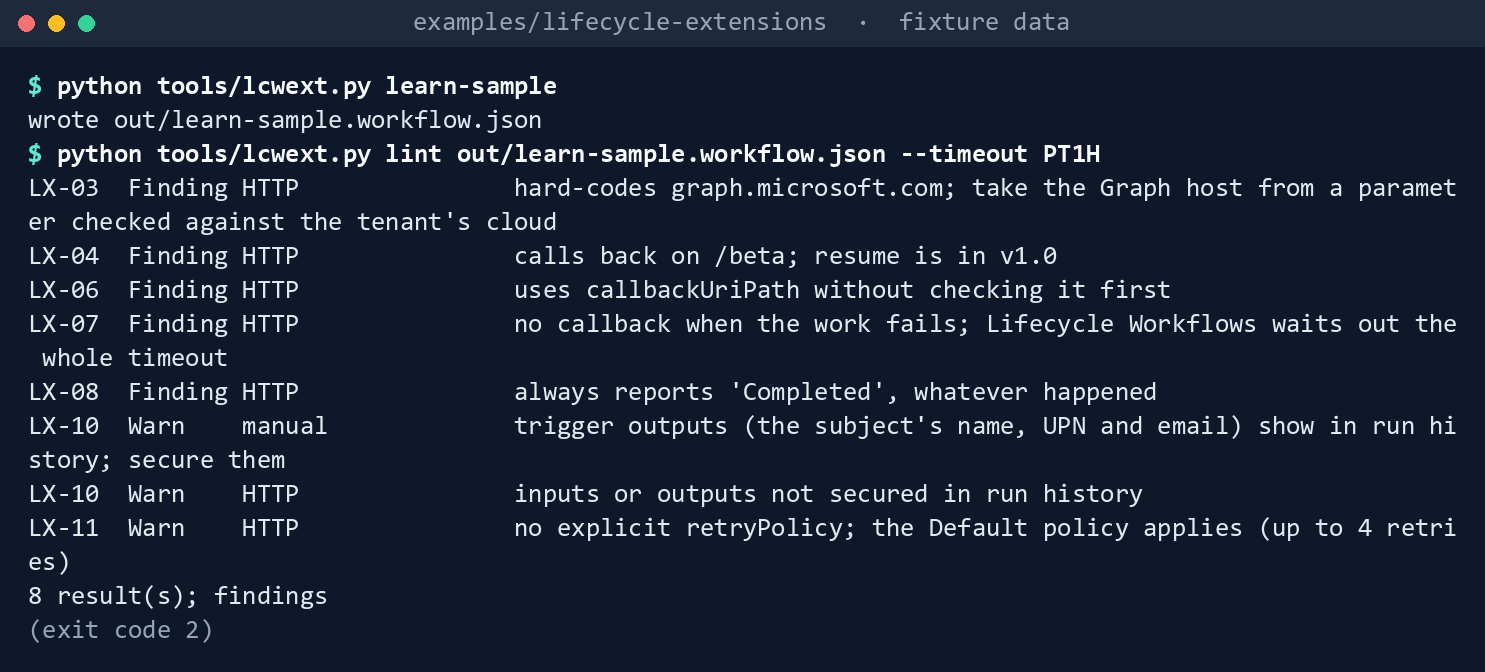
What the terminal shows, run on the kit’s fixtures (the same output as text) Eight results and exit
2: LX-03 (hard-codedgraph.microsoft.com), LX-04 (/beta), LX-06 (path not checked), LX-07 (no callback on failure), LX-08 (alwaysCompleted), two LX-10 warnings for run history, and an LX-11 warning for the implicit retry policy.Run Learn’s definition for a GCC High tenant:
python tools/lcwext.py run out/learn-sample.workflow.json tests/fixtures/trigger-leaver.json --cloud GCCHigh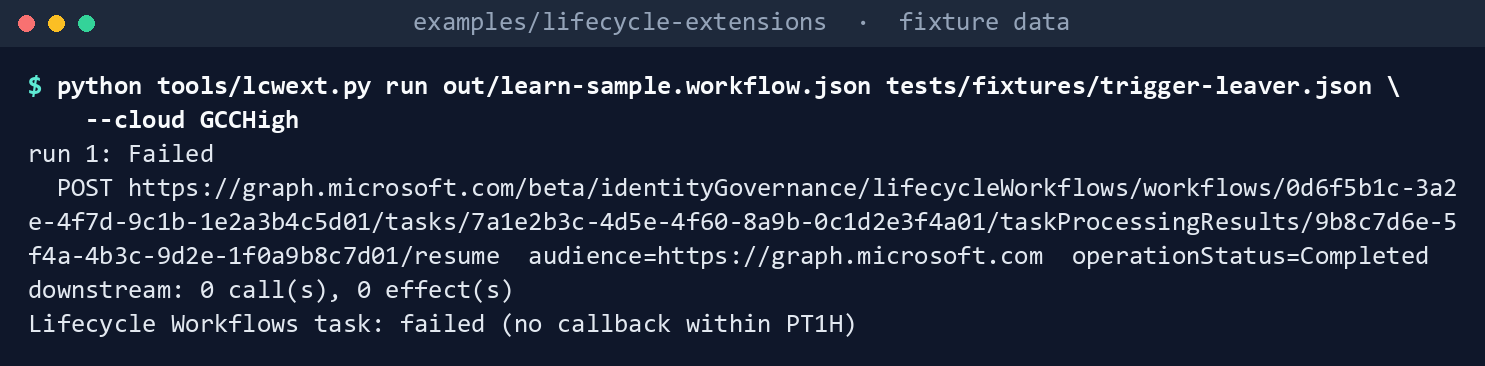
What the terminal shows, run on the kit’s fixtures (the same output as text) The run fails. The one
POSTgoes tohttps://graph.microsoft.com/beta/identityGovernance/…/resumewith the worldwide audience, and the last line readsLifecycle Workflows task: failed (no callback within PT1H). Run it again for a worldwide tenant:python tools/lcwext.py run out/learn-sample.workflow.json tests/fixtures/trigger-leaver.json --cloud Global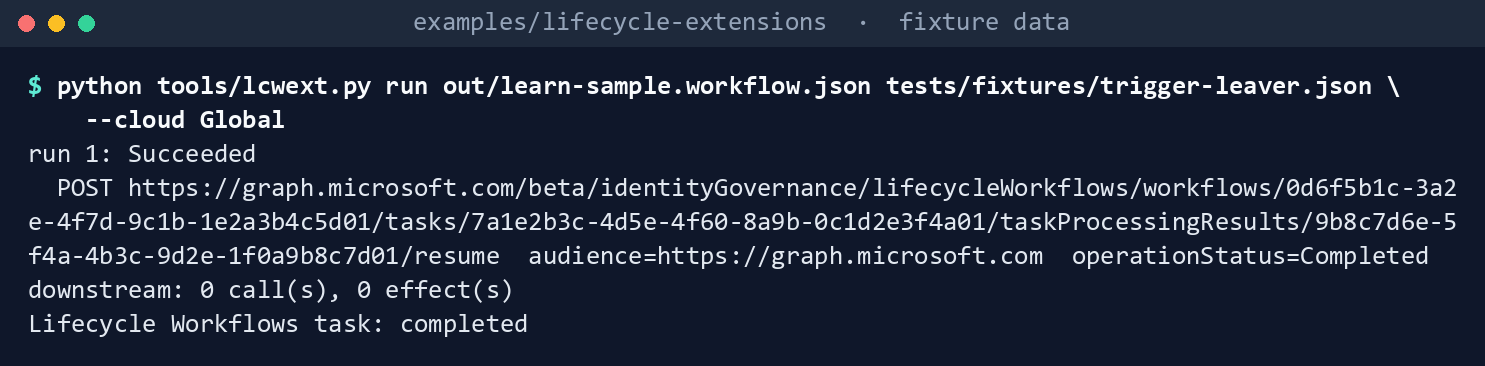
What the terminal shows, run on the kit’s fixtures (the same output as text) The task is
completed.Lint the program’s definition:
python tools/lcwext.py lint logicapp/integration.workflow.json --timeout PT1H
What the terminal shows, run on the kit’s fixtures (the same output as text) 0 result(s); no findings, exit0. Run it with a 15-minute timeout:python tools/lcwext.py lint logicapp/integration.workflow.json --timeout PT15M
What the terminal shows, run on the kit’s fixtures (the same output as text) LX-11 reports that the worst-case retry waits, 960 seconds, reach the timeout.
Run it for GCC High through two transient failures:
python tools/lcwext.py run logicapp/integration.workflow.json tests/fixtures/trigger-leaver.json --cloud GCCHigh --fail 503,503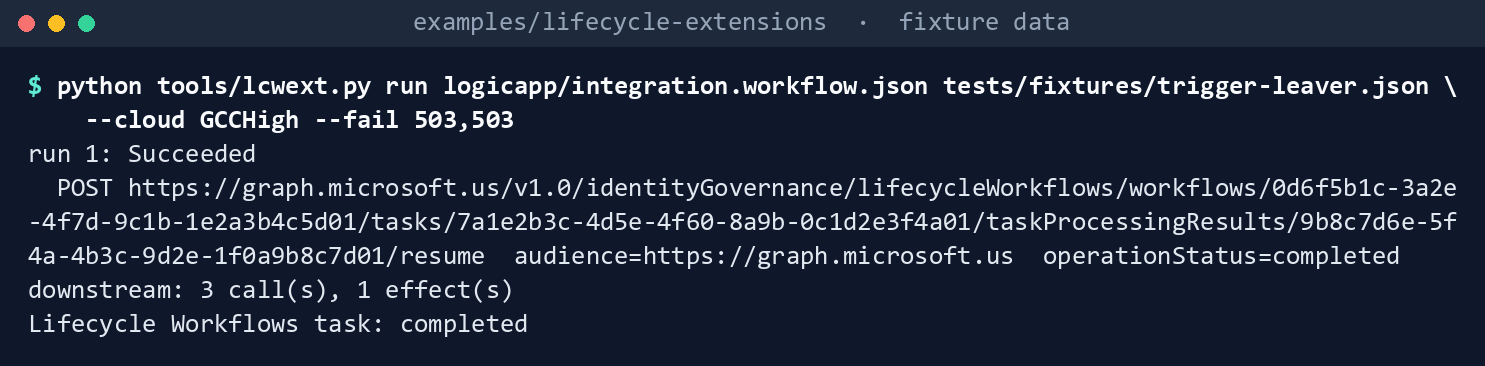
What the terminal shows, run on the kit’s fixtures (the same output as text) The callback goes to
https://graph.microsoft.us/v1.0/identityGovernance/…/resumewith the audiencehttps://graph.microsoft.usandoperationStatus=completed;downstream: 3 call(s), 1 effect(s); the task iscompleted. Now run it through five failures, then with two deliveries and no failures:python tools/lcwext.py run logicapp/integration.workflow.json tests/fixtures/trigger-leaver.json --cloud GCCHigh --fail 503,503,503,503,503 python tools/lcwext.py run logicapp/integration.workflow.json tests/fixtures/trigger-leaver.json --cloud GCCHigh --deliveries 2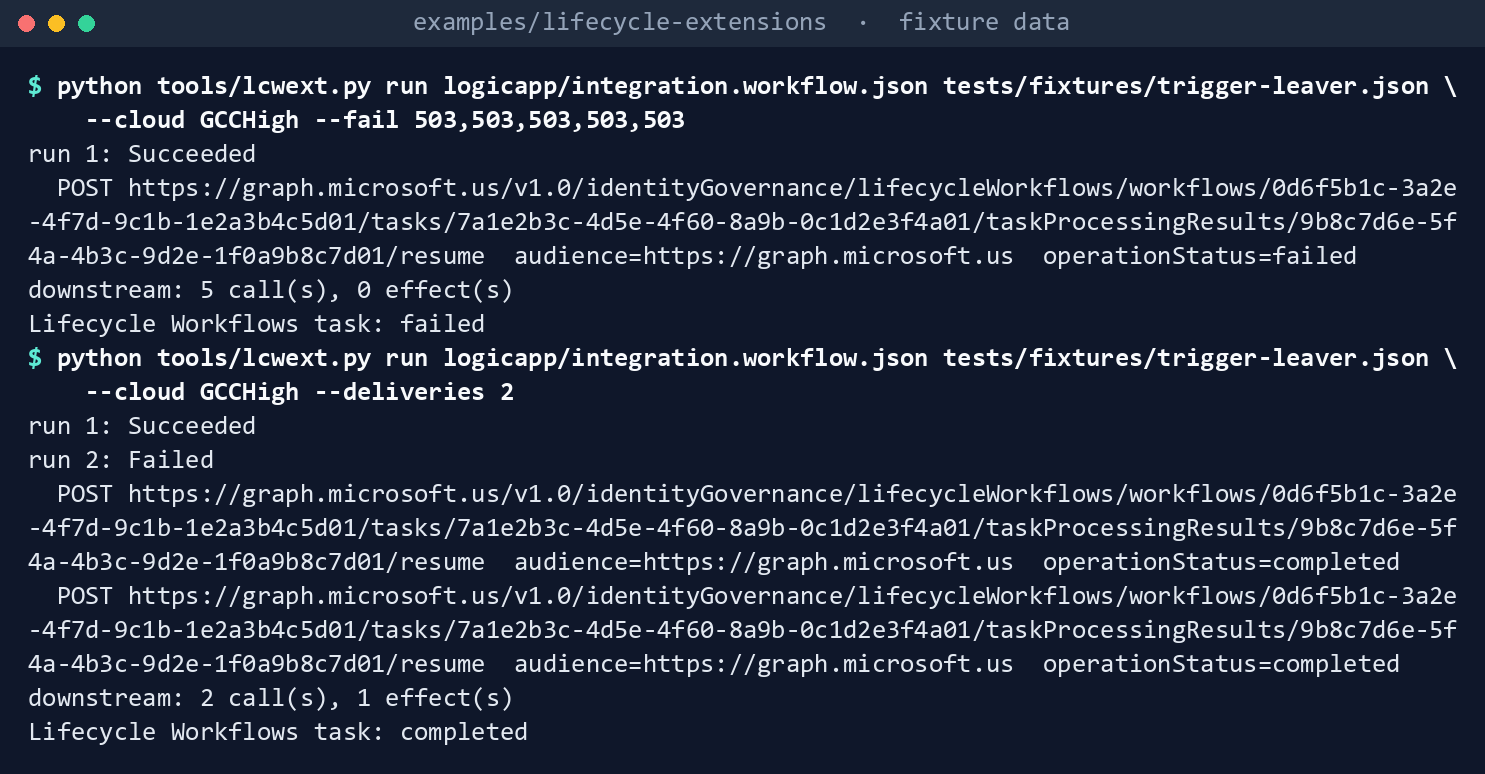
What the terminal shows, run on the kit’s fixtures (the same output as text) With five failures the downstream gets 5 calls, the callback reports
failed, and the task isfailedat once instead of at the end of the wait. With two deliveries the downstream gets 2 calls and 1 effect.Build the deployment pieces:
python tools/lcwext.py build config/integrations.json --name cms-revocation --tenant-id 6e3a1f2b-8c4d-4e5f-9a0b-1c2d3e4f5a6b
What the terminal shows, run on the kit’s fixtures (the same output as text) Two files in
out/:arm-cms-revocation.json, whoseaccessControlturns SAS off and holds theAADPOPpolicy with six claims, andextension-cms-revocation.json, withazureAdPopTokenAuthenticationandtimeoutDurationPT1H. The first command setsazureCloudtoAzureUSGovernmentinconfig/integrations.json; then build again:sed -i 's/"azureCloud": "AzureCloud"/"azureCloud": "AzureUSGovernment"/' config/integrations.json python tools/lcwext.py build config/integrations.json --name cms-revocation --tenant-id 6e3a1f2b-8c4d-4e5f-9a0b-1c2d3e4f5a6b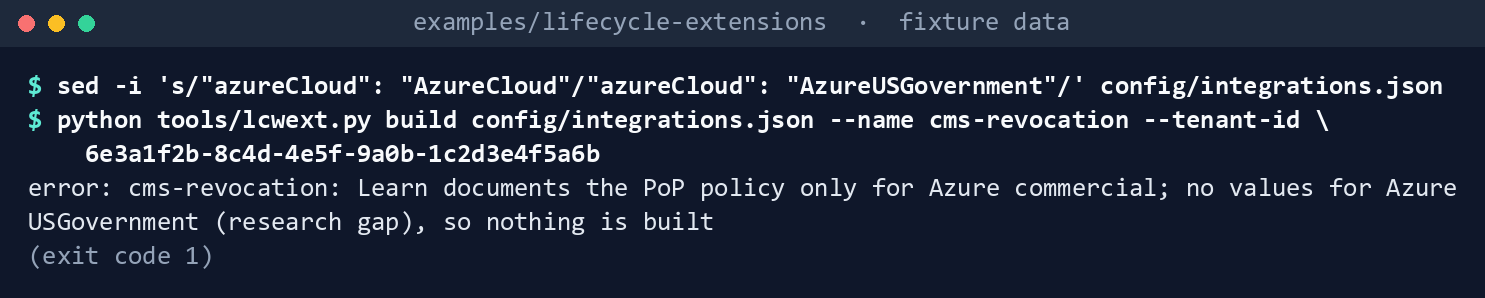
What the terminal shows, run on the kit’s fixtures (the same output as text) Exit
1, because Learn documents no PoP policy for Azure Government. Put it back:sed -i 's/"azureCloud": "AzureUSGovernment"/"azureCloud": "AzureCloud"/' config/integrations.json
What the terminal shows, run on the kit’s fixtures (the same output as text) Check the read-backs:
python tools/lcwext.py check-extension config/integrations.json --name cms-revocation tests/fixtures/extension-get.json
python tools/lcwext.py check-workflow config/integrations.json --name cms-revocation --extension-id c1d2e3f4-a5b6-4c7d-8e9f-0a1b2c3d4e01 tests/fixtures/workflow-get-leaver.json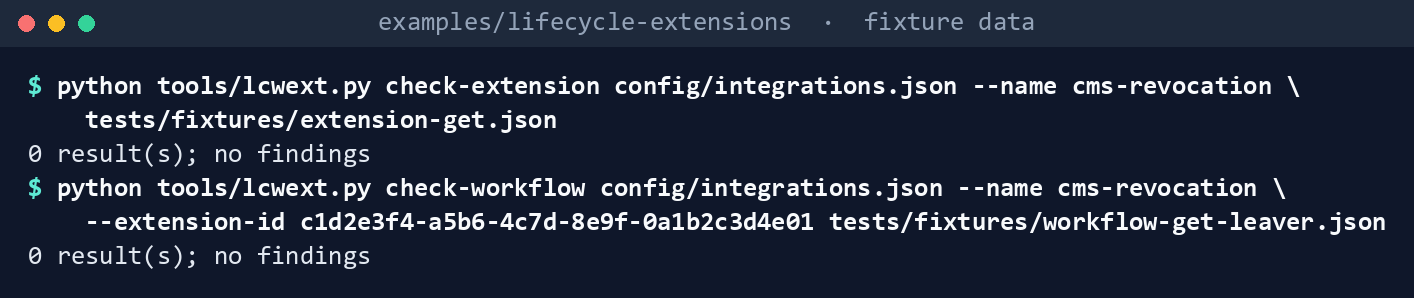
What the terminal shows, run on the kit’s fixtures (the same output as text) Both
0 result(s); no findings. The first command writes a copy of the workflow fixture in which the custom task hasexecutionSequence0; then check the copy:sed 's/"executionSequence": 3, "displayName": "CMS/"executionSequence": 0, "displayName": "CMS/' tests/fixtures/workflow-get-leaver.json > workflow-seq0.json python tools/lcwext.py check-workflow config/integrations.json --name cms-revocation --extension-id c1d2e3f4-a5b6-4c7d-8e9f-0a1b2c3d4e01 workflow-seq0.json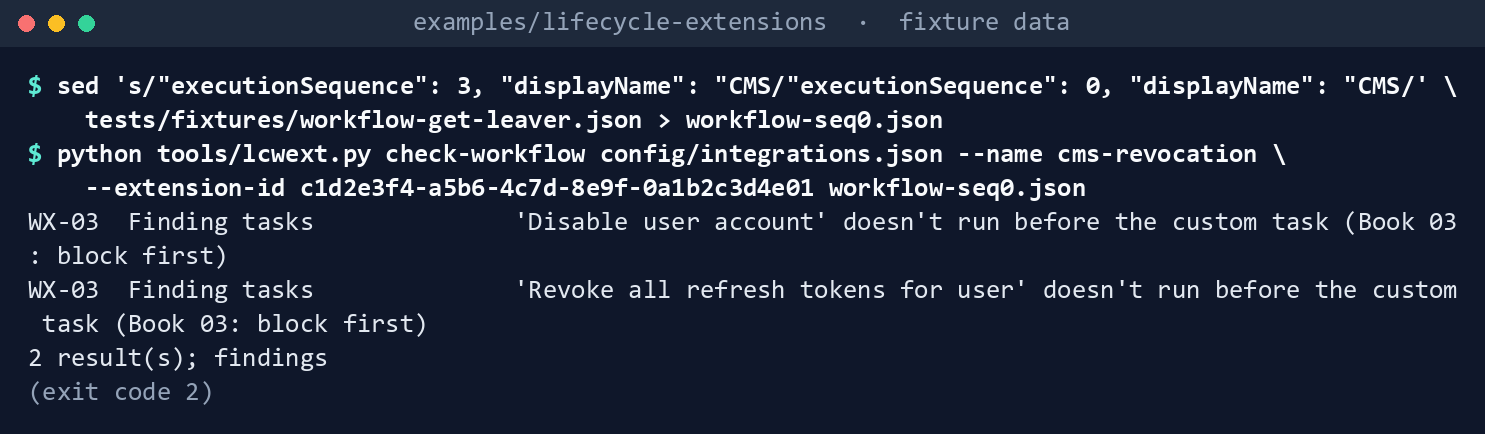
What the terminal shows, run on the kit’s fixtures (the same output as text) WX-03 twice, because the block no longer comes first.
Run the tests:
python -m unittest discover -s tests -v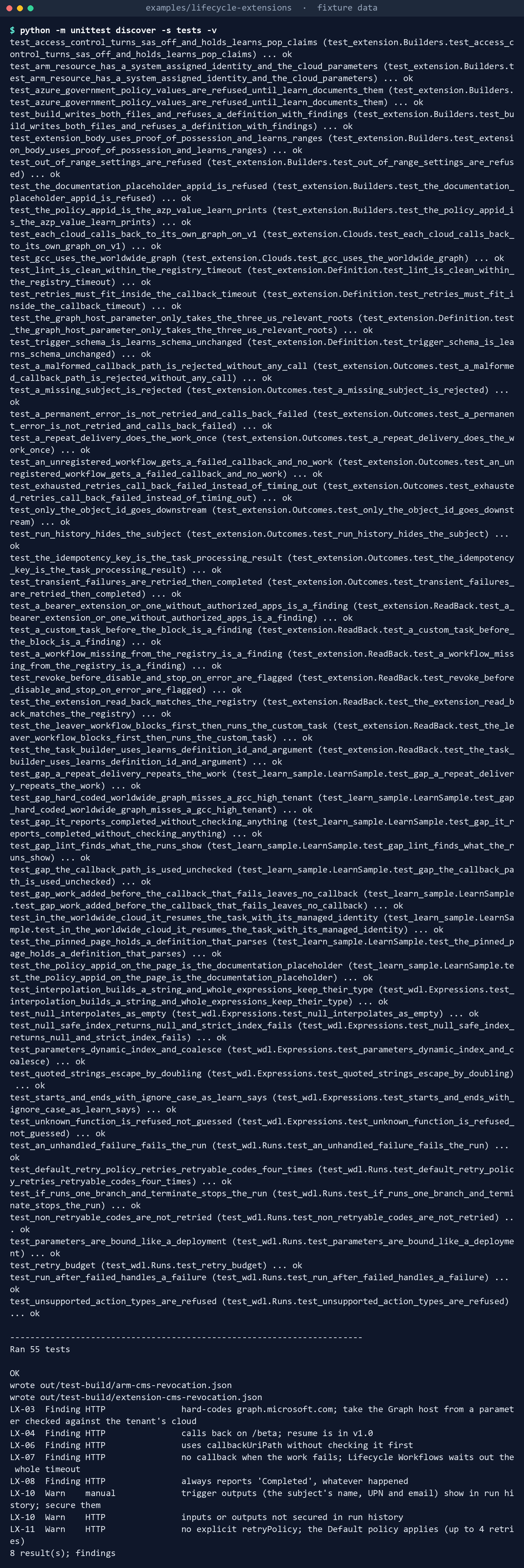
What the terminal shows, run on the kit’s fixtures (the same output as text)
Expected result: 55 tests passing, and each difference in the table above seen with your own eyes.
Lab 2: test tenant
Use a test tenant with Microsoft Entra ID Governance licenses and a test Azure subscription, never production, with fictional test users. You need Lifecycle Workflows Administrator in the tenant and Logic App Contributor, Contributor or Owner on the resource group; Logic App Operator isn’t enough.4950 Work in examples/lifecycle-extensions. You’ll replace: <tenant-id> (the test tenant’s ID), <extension-id> (the custom task extension’s ID), <workflow-id> (the test workflow’s ID), <subscription-id> and <resource-group> (the test subscription and resource group that hold the Logic App).
Every command in this lab, in order, from examples/lifecycle-extensions. Each step below says what it does and what to look for.
# Step 2: Record what the admin center made
Connect-MgGraph -Scopes 'LifecycleWorkflows.ReadWrite.All', 'Application.Read.All' -Environment Global
Invoke-MgGraphRequest -Method GET -Uri '/v1.0/identityGovernance/lifecycleWorkflows/customTaskExtensions/<extension-id>' -OutputType Json |
    Set-Content tests/fixtures/extension-get.json
python tools/lcwext.py check-extension config/integrations.json --name cms-revocation tests/fixtures/extension-get.json

# Step 2: Record what the admin center made
az rest --method get --url '/subscriptions/<subscription-id>/resourceGroups/<resource-group>/providers/Microsoft.Logic/workflows/la-lcw-cms-revocation?api-version=2016-06-01' --query properties.accessControl
python -c "import json; print(json.dumps(json.load(open('out/arm-cms-revocation.json'))['resources'][0]['properties']['accessControl'], indent=2))"
(Invoke-MgGraphRequest -Method GET -Uri "/v1.0/servicePrincipals(appId='ce79fdc4-cd1d-4ea5-8139-e74d7dbe0bb7')").displayName

# Step 4: Build a test workflow
Invoke-MgGraphRequest -Method GET -Uri '/v1.0/identityGovernance/lifecycleWorkflows/workflows/<workflow-id>?$expand=tasks' -OutputType Json |
    Set-Content workflow-get-test.json
python tools/lcwext.py check-workflow config/integrations.json --name cms-revocation --extension-id <extension-id> workflow-get-test.json
python -c "import json; p = 'config/integrations.json'; c = json.load(open(p)); c['integrations'][0]['workflows'].append({'workflowId': '<workflow-id>', 'scenario': 'leaver', 'operation': 'revoke'}); json.dump(c, open(p, 'w'), indent=2)"
python tools/lcwext.py build config/integrations.json --name cms-revocation --tenant-id <tenant-id>
Create the extension and its Logic App in the admin center. Follow Learn’s procedure: ID Governance > Lifecycle workflows > Custom task extension > Create custom task extension, choose Launch and wait, a one-hour wait, System-assigned managed identity for response authorization, and Create new Logic App in your test resource group with the registry’s name.51 This creates the Logic App with Learn’s definition, the managed identity, the PoP authorization policy and the extension’s authorized app.
Record what the admin center made. Read the extension with
GET /identityGovernance/lifecycleWorkflows/customTaskExtensions/{id}, save it overtests/fixtures/extension-get.json, and runcheck-extension:Connect-MgGraph -Scopes 'LifecycleWorkflows.ReadWrite.All', 'Application.Read.All' -Environment Global Invoke-MgGraphRequest -Method GET -Uri '/v1.0/identityGovernance/lifecycleWorkflows/customTaskExtensions/<extension-id>' -OutputType Json | Set-Content tests/fixtures/extension-get.json python tools/lcwext.py check-extension config/integrations.json --name cms-revocation tests/fixtures/extension-get.jsonRead the Logic App through Azure Resource Manager (
GET …/providers/Microsoft.Logic/workflows/{name}?api-version=2016-06-01, which Learn says returns the policies52) and print itsaccessControlbeside the one inout/arm-cms-revocation.json. Then look upGET /servicePrincipals(appId='ce79fdc4-cd1d-4ea5-8139-e74d7dbe0bb7')and record its display name:az rest --method get --url '/subscriptions/<subscription-id>/resourceGroups/<resource-group>/providers/Microsoft.Logic/workflows/la-lcw-cms-revocation?api-version=2016-06-01' --query properties.accessControl python -c "import json; print(json.dumps(json.load(open('out/arm-cms-revocation.json'))['resources'][0]['properties']['accessControl'], indent=2))" (Invoke-MgGraphRequest -Method GET -Uri "/v1.0/servicePrincipals(appId='ce79fdc4-cd1d-4ea5-8139-e74d7dbe0bb7')").displayNameAny difference is a finding against the builder.
Replace the definition with the program’s. In code view, paste
logicapp/integration.workflow.json; set the parameter values from the ARM file, withintegrationUripointing at your test instance of the downstream system or at a test receiver that answers200and logs theIdempotency-Keyheader.Build a test workflow. A custom leaver workflow, on demand only, with Disable user account, Revoke all refresh tokens for user, then Run a custom task extension with this extension. Read it with
GET /identityGovernance/lifecycleWorkflows/workflows/{id}?$expand=tasksand runcheck-workflow; then add its ID to the registry’sworkflowsand rebuild:Invoke-MgGraphRequest -Method GET -Uri '/v1.0/identityGovernance/lifecycleWorkflows/workflows/<workflow-id>?$expand=tasks' -OutputType Json | Set-Content workflow-get-test.json python tools/lcwext.py check-workflow config/integrations.json --name cms-revocation --extension-id <extension-id> workflow-get-test.json python -c "import json; p = 'config/integrations.json'; c = json.load(open(p)); c['integrations'][0]['workflows'].append({'workflowId': '<workflow-id>', 'scenario': 'leaver', 'operation': 'revoke'}); json.dump(c, open(p, 'w'), indent=2)" python tools/lcwext.py build config/integrations.json --name cms-revocation --tenant-id <tenant-id>Update the Logic App’s
operationsparameter from the rebuiltout/arm-cms-revocation.json.Run it on demand for one fictional user. In the Logic App’s run history,
Check_requestshould pass. If the run ends inReject_request, the realcallbackUriPathdiffers from the documented shape: turn off Secure Outputs on the trigger for one more run, record the path, turn it back on, and file the difference against research gap 11. The task processing result should endcompleted.Drill the failure path. Point
integrationUriat a receiver that answers503, run again for another fictional user, and confirm the task endsfailedwithin minutes, not at the end of the hour. Confirm the receiver logged one key per task processing result.Back it out. Remove the custom task from the workflow and delete the workflow; then delete the custom task extension, which Learn allows only when no task references it.53 Delete the Logic App and the test resource group, remove the role assignments you added, and delete the test users.
Verified facts
| Item | Value | Source |
|---|---|---|
| What a custom task extension calls | An Azure Logic App on the Consumption plan | 54 |
| Behaviors | Launch and continue; launch and wait, failed if no response within the duration | 55 |
| Callback wait | 30 minutes to 3 hours (timeoutDuration); 3 minutes to 5 hours on the planning page |
56 57 58 |
| Call to the Logic App | maximumRetries 0 or 1; timeoutInMilliseconds 200 to 2,000, default 1,000 |
59 |
| Token type | Proof-of-possession for new extensions; bearer extensions can’t be migrated | 60 61 |
| PoP authorization policy | AzureADLifecycleWorkflowsAuthPOPAuthPolicy, AADPOP: issuer, audience https://management.azure.com, appid, m POST, u management.azure.com, p the Logic App path |
62 |
| SAS | Not needed by Lifecycle Workflows; Learn recommends turning it off | 63 64 |
| Resume | POST /identityGovernance/lifecycleWorkflows/workflows/{id}/tasks/{id}/taskProcessingResults/{id}/resume, v1.0, 204 No Content; operationStatus completed or failed |
65 66 |
| Resume permission | LifecycleWorkflows.ReadWrite.All (delegated with Lifecycle Workflows Administrator, or application); none for an app in authorizedApps |
67 |
| Create an extension | POST /identityGovernance/lifecycleWorkflows/customTaskExtensions; LifecycleWorkflows-CustomExt.ReadWrite.All; Lifecycle Workflows Administrator; Logic App Contributor, Contributor or Owner on the Logic App |
68 |
| National clouds (resume, create) | Global service, US Government L4, US Government L5 (DoD) | 69 70 |
| Graph host | graph.microsoft.com for worldwide and GCC; graph.microsoft.us for GCC High; dod-graph.microsoft.us for DoD |
71 |
| Availability and license | Lifecycle Workflows listed for Azure for US Government; ID Governance in GCC, GCC High and DoD; ID Governance or Entra Suite licenses | 72 73 |
| Limits | 100 custom task extensions per tenant; 25 tasks per workflow; 100 workflows (50 on the licensing page) | 74 75 |
| Task | Run a custom task extension, 4262b724-8dba-4fad-afc3-43fcbb497a0e, argument customTaskExtensionID |
76 77 |
| Logic Apps retries | Default: up to 4 retries, intervals capped between 5 and 45 seconds; retries 408, 429 and 5xx | 78 |
| Release stage | Generally available: the extension and resume APIs are in v1.0 | 79 80 81 |
Learn states several things differently on different pages, recorded here so a later edit doesn’t loosen the code:
- The callback wait is 30 minutes to 3 hours on the resource and limits pages, and 3 minutes to 5 hours on the planning page. The code uses the narrower range.
- The tenant limit is 100 workflows on the limits page and “What are lifecycle workflows?”, and 50 on the licensing page. The chapter plans for 50.
- The Run a custom task extension task is
4262b724-…in the task page’s table and in the Graph arguments page’s table, andd79d1fcc-16be-490c-a865-f4533b1639eein the task page’s details section and in the arguments page’s own example for this task, so the arguments page disagrees with itself too.82 The argument iscustomTaskExtensionIDon the task page and in that example, andCustomTaskExtensionIDin the arguments page’s table. The code uses4262b724-…andcustomTaskExtensionID; Lab 2 reads back what the admin center writes. - Learn’s create example shows bearer authentication; the security page says v1.0 defaults to PoP and recommends it. The code asks for PoP.
- The callback data type lists
completedandfailed; Learn’s definition and the resume example sendCompleted. The code sends the listed values, and Lab 2 confirms the service accepts them. - The configure page prints a placeholder GUID for
appid; the code uses theazpvalue from the same page, and Lab 2 checks it.
Federal requirements and evidence
A custom task extension carries the part of a leaver that the built-in tasks don’t, so its evidence is account and credential removal. Each row names the file or command that proves it. Controls are from the Moderate baseline83; indicators are from FedRAMP’s list84. Which output supports which control is the program’s reading (design guidance).
| What the output proves | Requirement it supports | KSI it aligns to | Who keeps it |
|---|---|---|---|
Learn’s definition is extracted unchanged and linted: eight results (Lab 1, step 1: out/learn-sample.workflow.json, exit 2) |
SA-11; SR-3 | KSI-SCR-MIT; KSI-CMT-VTD | The repository: snapshot.json and the test results |
Learn’s definition fails a GCC High leaver at the end of the wait (step 2: failed (no callback within PT1H)) |
SA-11 | KSI-CMT-VTD | The test results |
The program’s definition passes, and retries that reach the timeout are refused (step 3: 0 result(s); LX-11 at PT15M) |
CM-3(2) | KSI-CMT-VTD | The pull request’s check run |
The callback reports what really happened, at once, and a repeat delivery has one effect (step 4: completed, failed, 1 effect(s)) |
AC-2; PS-4: a failed revocation is recorded as failed | KSI-IAM-AAM | The task processing result in Lifecycle Workflows |
The deployment pieces are built from the reviewed registry, SAS off and proof-of-possession on, and an Azure Government guess is refused (step 5: out/arm-cms-revocation.json, out/extension-cms-revocation.json, exit 1) |
CM-2; CM-6; AC-3 | KSI-CMT-RMV; KSI-IAM-SNU | The repository; the deployment record |
The extension read back matches the registry, and the leaver blocks before the custom task (step 6: check-extension, check-workflow, WX-03) |
CM-6; PS-4; AC-2 | KSI-MLA-EVC; KSI-IAM-AAM | The check output, filed with the change |
| The callback identity holds no tenant-wide Lifecycle Workflows permission (step 6: CX-04) | AC-6 | KSI-IAM-ELP; KSI-IAM-SNU | The extension’s authorizedApps; the check output |
| The definition, interpreter and builders pass (step 7: 55 tests) | SA-11 | KSI-CMT-VTD | The repository’s test results |
| The extension and Logic App are created by a named administrator (Lab 2, step 1) | CM-3 | KSI-CMT-LMC | The Entra and Azure activity logs |
What the admin center made is recorded and compared with the builder’s output (Lab 2, step 2: tests/fixtures/extension-get.json, az rest ... accessControl) |
CM-6; CM-4(2) | KSI-MLA-EVC | The change record; a difference is a finding |
| The deployed definition is the reviewed one (Lab 2, step 3) | CM-3 | KSI-CMT-RMV | The repository commit and the Logic App’s version history |
The test workflow blocks first, then runs the extension (Lab 2, step 4: workflow-get-test.json) |
PS-4; AC-2 | KSI-IAM-AAM | The check output |
An on-demand run completes, and run history holds no personal data (Lab 2, step 5: Check_request, secured outputs) |
AU-12 (Audit Record Generation); AC-2 | KSI-MLA-LET, Logging Event Types | The Logic App run history; the task processing result |
| A downstream failure is reported in minutes, once per task processing result (Lab 2, step 6) | PS-4; AC-2 | KSI-IAM-AAM | The drill record; the receiver’s log |
| The extension, workflow and role assignments are removed (Lab 2, step 7) | CM-3; AC-6 | KSI-CMT-LMC | The Entra and Azure activity logs |
| Lifecycle Workflows and Azure Logic Apps run on cloud services with FedRAMP Marketplace listings85 | SA-9 (External System Services); the agency confirms each service it uses is inside the listing’s scope (design guidance) | None: the provider reports against the indicators for its own offering | The system security plan’s list of external services |
Key Security Indicators are FedRAMP 20x indicators for cloud service providers. The agency authorizes its own system: it lines this evidence up with what Microsoft report against the indicators, and doesn’t report KSIs itself (Book 00, Appendix B). The control-by-control mapping is in Book 13’s Appendix A and Book 14’s Appendix A; the indicator pairings follow Book 04, Chapter 10 and Book 05, Chapter 10.
Dangers
| Danger | What happens | The guard |
|---|---|---|
| A failure that sends no callback | The leaver’s revocation fails, and nobody knows until the wait ends | Resume runs after failure and time-out; LX-07 |
| A callback that reports success for failed work | A credential stays valid and the record says revoked | Status computed from the call; LX-08 |
| The wrong cloud | A GCC High or DoD callback goes to the worldwide Graph and never arrives | graphHost limited to three roots, set from the registry; LX-03; tests for every cloud |
| A forged or malformed payload | The managed identity’s token is sent to a path you didn’t intend | PoP authorization with SAS off; Check_request before any call; LX-06 |
| A repeat delivery or a rerun | The downstream system revokes, issues or deletes twice | Idempotency-Key from the task processing result; LX-09 |
| Retries longer than the wait | The callback arrives after the task has already failed | Bounded retries; LX-11 against the registry’s timeout |
| Personal data in run history | Names, UPNs and emails readable by anyone with run access | Secured inputs and outputs; object ID only downstream; LX-10, LX-12 |
| A broad permission on the identity | A compromised Logic App can change any workflow | Resume through authorizedApps, no LifecycleWorkflows.ReadWrite.All; CX-04 |
| A custom task before the block | A leaver keeps signing in while revocations run | WX-03 and WX-04 against Book 03’s order |
| A bearer-token extension left in place | Weaker than PoP, and it can’t be converted | CX-01; recreate it as PoP |
The placeholder appid |
Every call is refused | The builder refuses it; Lab 2 checks the real one |
| Azure Government policy values guessed | The Logic App rejects Lifecycle Workflows, or accepts the wrong caller | The builder refuses; research gap 12 |
Checklist
Microsoft Learn, “Lifecycle Workflows custom task extension,” https://learn.microsoft.com/entra/id-governance/lifecycle-workflow-extensibility (accessed Oct 30, 2026).↩︎
Microsoft Learn, “Lifecycle Workflows custom task extension,” https://learn.microsoft.com/entra/id-governance/lifecycle-workflow-extensibility (accessed Oct 30, 2026).↩︎
Microsoft Learn, “Lifecycle Workflows custom task extension,” https://learn.microsoft.com/entra/id-governance/lifecycle-workflow-extensibility (accessed Oct 30, 2026).↩︎
Microsoft Learn, “customTaskExtensionCallbackConfiguration resource type,” https://learn.microsoft.com/graph/api/resources/identitygovernance-customtaskextensioncallbackconfiguration?view=graph-rest-1.0 (accessed Oct 30, 2026).↩︎
Microsoft Learn, “Microsoft Entra ID Governance service limits,” section “Lifecycle Workflows,” https://learn.microsoft.com/entra/id-governance/governance-service-limits#lifecycle-workflows (accessed Oct 30, 2026).↩︎
Microsoft Learn, “Plan a Lifecycle Workflow deployment,” section “Limitations and constraints,” https://learn.microsoft.com/entra/id-governance/lifecycle-workflows-deployment (accessed Oct 30, 2026).↩︎
Microsoft Learn, “taskProcessingResult: resume,” https://learn.microsoft.com/graph/api/identitygovernance-taskprocessingresult-resume?view=graph-rest-1.0 (accessed Oct 30, 2026).↩︎
Microsoft Learn, “customTaskExtensionCallbackData resource type,” https://learn.microsoft.com/graph/api/resources/identitygovernance-customtaskextensioncallbackdata?view=graph-rest-1.0 (accessed Oct 30, 2026).↩︎
Microsoft Learn, “Configure a Logic App for Lifecycle Workflow use,” https://learn.microsoft.com/entra/id-governance/configure-logic-app-lifecycle-workflows (accessed Oct 30, 2026).↩︎
Microsoft Learn, “Best practices for securing the custom extension extensibility to Azure Logic Apps,” https://learn.microsoft.com/entra/id-governance/custom-extension-security (accessed Oct 30, 2026).↩︎
Microsoft Learn, “Microsoft Entra ID Governance service limits,” section “Lifecycle Workflows,” https://learn.microsoft.com/entra/id-governance/governance-service-limits#lifecycle-workflows (accessed Oct 30, 2026).↩︎
Microsoft Learn, “Microsoft Entra ID Governance licensing fundamentals” (Lifecycle Workflows; Government availability), https://learn.microsoft.com/entra/id-governance/licensing-fundamentals, and “What are lifecycle workflows?” (license requirements), https://learn.microsoft.com/entra/id-governance/what-are-lifecycle-workflows (accessed Oct 30, 2026).↩︎
Microsoft Learn, “Microsoft Entra ID Governance licensing fundamentals” (Lifecycle Workflows; Government availability), https://learn.microsoft.com/entra/id-governance/licensing-fundamentals, and “What are lifecycle workflows?” (license requirements), https://learn.microsoft.com/entra/id-governance/what-are-lifecycle-workflows (accessed Oct 30, 2026).↩︎
Microsoft Learn, “Microsoft Entra feature availability” (Azure for US Government: Lifecycle workflows, in Microsoft Entra ID Governance), https://learn.microsoft.com/entra/identity/authentication/feature-availability (accessed Oct 30, 2026).↩︎
Microsoft Learn, “Microsoft Graph national cloud deployments,” https://learn.microsoft.com/graph/deployments (accessed Oct 30, 2026).↩︎
Microsoft Learn, “Trigger Logic Apps based on custom task extensions,” https://learn.microsoft.com/entra/id-governance/trigger-custom-task (accessed Oct 30, 2026).↩︎
Microsoft Learn, “Configure a Logic App for Lifecycle Workflow use,” https://learn.microsoft.com/entra/id-governance/configure-logic-app-lifecycle-workflows (accessed Oct 30, 2026).↩︎
Microsoft Learn, “Configure a Logic App for Lifecycle Workflow use,” https://learn.microsoft.com/entra/id-governance/configure-logic-app-lifecycle-workflows (accessed Oct 30, 2026).↩︎
Microsoft Learn, “Configure a Logic App for Lifecycle Workflow use,” https://learn.microsoft.com/entra/id-governance/configure-logic-app-lifecycle-workflows (accessed Oct 30, 2026).↩︎
Microsoft, MicrosoftDocs/entra-docs,
docs/id-governance/configure-logic-app-lifecycle-workflows.mdanddocs/id-governance/lifecycle-workflow-extensibility.mdat commit07cb73d6c6380414eecd040ba5e14c1c94d48b66(October 30, 2026), code under the MIT License, https://github.com/MicrosoftDocs/entra-docs/tree/07cb73d6c6380414eecd040ba5e14c1c94d48b66/docs/id-governance; commitb7e8790374026b37be320fe091aefb0747e54809(May 15, 2024) replaced theappidrows’ce79fdc4-…with the placeholder (accessed Oct 30, 2026); pinned copy inexamples/third_party/lifecycle-workflows-logic-app.↩︎Microsoft Learn, “Create customTaskExtensions” (beta), which notes that APIs under
/betaare subject to change and not supported in production applications, https://learn.microsoft.com/graph/api/identitygovernance-lifecycleworkflowscontainer-post-customtaskextensions?view=graph-rest-beta (accessed Oct 30, 2026).↩︎Microsoft Learn, “taskProcessingResult: resume,” https://learn.microsoft.com/graph/api/identitygovernance-taskprocessingresult-resume?view=graph-rest-1.0 (accessed Oct 30, 2026).↩︎
Microsoft Learn, “Secure access and data for workflows in Azure Logic Apps” (authorization policies in ARM templates; disabling SAS; securing inputs and outputs in run history), https://learn.microsoft.com/azure/logic-apps/set-up-security-permissions (accessed Oct 30, 2026).↩︎
Microsoft Learn, “Best practices for securing the custom extension extensibility to Azure Logic Apps,” https://learn.microsoft.com/entra/id-governance/custom-extension-security (accessed Oct 30, 2026).↩︎
Microsoft Learn, “Configure a Logic App for Lifecycle Workflow use,” https://learn.microsoft.com/entra/id-governance/configure-logic-app-lifecycle-workflows (accessed Oct 30, 2026).↩︎
Microsoft, MicrosoftDocs/entra-docs,
docs/id-governance/configure-logic-app-lifecycle-workflows.mdanddocs/id-governance/lifecycle-workflow-extensibility.mdat commit07cb73d6c6380414eecd040ba5e14c1c94d48b66(October 30, 2026), code under the MIT License, https://github.com/MicrosoftDocs/entra-docs/tree/07cb73d6c6380414eecd040ba5e14c1c94d48b66/docs/id-governance; commitb7e8790374026b37be320fe091aefb0747e54809(May 15, 2024) replaced theappidrows’ce79fdc4-…with the placeholder (accessed Oct 30, 2026); pinned copy inexamples/third_party/lifecycle-workflows-logic-app.↩︎Microsoft Learn, “Access token claims reference,” section “Payload claims,” https://learn.microsoft.com/entra/identity-platform/access-token-claims-reference#payload-claims (accessed Oct 30, 2026).↩︎
Microsoft, MicrosoftDocs/entra-docs,
.docutune/dictionaries/known-guids.jsonat commit4ed6827815ecbf4e021fc736d75fdda6a2fd6272(October 28, 2026), entry “Lifecycle Workflows”, read withgh api(accessed Oct 30, 2026). Not a Learn page: the repository’s list of GUIDs its documentation tooling treats as real values.↩︎Microsoft Learn, “Handle workflow errors and exceptions in Azure Logic Apps,” section “Retry policies,” https://learn.microsoft.com/azure/logic-apps/error-exception-handling#retry-policies (accessed Oct 30, 2026).↩︎
Microsoft Learn, “customExtensionClientConfiguration resource type,” https://learn.microsoft.com/graph/api/resources/customextensionclientconfiguration?view=graph-rest-1.0 (accessed Oct 30, 2026).↩︎
Microsoft Learn, “Configure a Logic App for Lifecycle Workflow use,” https://learn.microsoft.com/entra/id-governance/configure-logic-app-lifecycle-workflows (accessed Oct 30, 2026).↩︎
Microsoft Learn, “taskProcessingResult: resume,” https://learn.microsoft.com/graph/api/identitygovernance-taskprocessingresult-resume?view=graph-rest-1.0 (accessed Oct 30, 2026).↩︎
Microsoft Learn, “customExtensionClientConfiguration resource type,” https://learn.microsoft.com/graph/api/resources/customextensionclientconfiguration?view=graph-rest-1.0 (accessed Oct 30, 2026).↩︎
Microsoft Learn, “customTaskExtensionCallbackConfiguration resource type,” https://learn.microsoft.com/graph/api/resources/identitygovernance-customtaskextensioncallbackconfiguration?view=graph-rest-1.0 (accessed Oct 30, 2026).↩︎
Microsoft Learn, “Configure a Logic App for Lifecycle Workflow use,” https://learn.microsoft.com/entra/id-governance/configure-logic-app-lifecycle-workflows (accessed Oct 30, 2026).↩︎
Microsoft Learn, “Secure access and data for workflows in Azure Logic Apps” (authorization policies in ARM templates; disabling SAS; securing inputs and outputs in run history), https://learn.microsoft.com/azure/logic-apps/set-up-security-permissions (accessed Oct 30, 2026).↩︎
Microsoft Learn, “Configure a Logic App for Lifecycle Workflow use,” https://learn.microsoft.com/entra/id-governance/configure-logic-app-lifecycle-workflows (accessed Oct 30, 2026).↩︎
Microsoft Learn, “Compare Azure Government and global Azure,” section “Guidance for developers,” https://learn.microsoft.com/azure/azure-government/compare-azure-government-global-azure#guidance-for-developers (accessed Oct 30, 2026).↩︎
Microsoft Learn, “Create customTaskExtensions,” https://learn.microsoft.com/graph/api/identitygovernance-lifecycleworkflowscontainer-post-customtaskextensions?view=graph-rest-1.0, and “Lifecycle Workflows custom task extension” (Logic Apps prerequisites) (accessed Oct 30, 2026).↩︎
Microsoft Learn, “Best practices for securing the custom extension extensibility to Azure Logic Apps,” https://learn.microsoft.com/entra/id-governance/custom-extension-security (accessed Oct 30, 2026).↩︎
Microsoft Learn, “customTaskExtensionCallbackConfiguration resource type,” https://learn.microsoft.com/graph/api/resources/identitygovernance-customtaskextensioncallbackconfiguration?view=graph-rest-1.0 (accessed Oct 30, 2026).↩︎
Microsoft Learn, “Best practices for securing the custom extension extensibility to Azure Logic Apps,” https://learn.microsoft.com/entra/id-governance/custom-extension-security (accessed Oct 30, 2026).↩︎
Microsoft Learn, “taskProcessingResult: resume,” https://learn.microsoft.com/graph/api/identitygovernance-taskprocessingresult-resume?view=graph-rest-1.0 (accessed Oct 30, 2026).↩︎
Microsoft Learn, “Lifecycle Workflows custom task extension,” https://learn.microsoft.com/entra/id-governance/lifecycle-workflow-extensibility (accessed Oct 30, 2026).↩︎
Microsoft Learn, “Best practices for securing the custom extension extensibility to Azure Logic Apps,” https://learn.microsoft.com/entra/id-governance/custom-extension-security (accessed Oct 30, 2026).↩︎
Microsoft Learn, “Best practices for securing the custom extension extensibility to Azure Logic Apps,” https://learn.microsoft.com/entra/id-governance/custom-extension-security (accessed Oct 30, 2026).↩︎
Microsoft Learn, “Lifecycle Workflow built-in tasks,” https://learn.microsoft.com/entra/id-governance/lifecycle-workflow-tasks (accessed Oct 30, 2026).↩︎
Microsoft Learn, “Configure the arguments for built-in Lifecycle Workflows tasks,” https://learn.microsoft.com/graph/identitygovernance-lifecycleworkflows-task-arguments (table and example 7, “Run a custom task extension”) (accessed Oct 31, 2026).↩︎
Microsoft Learn, “Lifecycle Workflows custom task extension,” https://learn.microsoft.com/entra/id-governance/lifecycle-workflow-extensibility (accessed Oct 30, 2026).↩︎
Microsoft Learn, “Create customTaskExtensions,” https://learn.microsoft.com/graph/api/identitygovernance-lifecycleworkflowscontainer-post-customtaskextensions?view=graph-rest-1.0, and “Lifecycle Workflows custom task extension” (Logic Apps prerequisites) (accessed Oct 30, 2026).↩︎
Microsoft Learn, “Trigger Logic Apps based on custom task extensions,” https://learn.microsoft.com/entra/id-governance/trigger-custom-task (accessed Oct 30, 2026).↩︎
Microsoft Learn, “Secure access and data for workflows in Azure Logic Apps” (authorization policies in ARM templates; disabling SAS; securing inputs and outputs in run history), https://learn.microsoft.com/azure/logic-apps/set-up-security-permissions (accessed Oct 30, 2026).↩︎
Microsoft Learn, “Remove-MgIdentityGovernanceLifecycleWorkflowCustomTaskExtension” (a custom task extension can only be deleted if no task references it), https://learn.microsoft.com/powershell/module/microsoft.graph.identity.governance/remove-mgidentitygovernancelifecycleworkflowcustomtaskextension?view=graph-powershell-1.0 (accessed Oct 30, 2026).↩︎
Microsoft Learn, “Lifecycle Workflows custom task extension,” https://learn.microsoft.com/entra/id-governance/lifecycle-workflow-extensibility (accessed Oct 30, 2026).↩︎
Microsoft Learn, “Lifecycle Workflows custom task extension,” https://learn.microsoft.com/entra/id-governance/lifecycle-workflow-extensibility (accessed Oct 30, 2026).↩︎
Microsoft Learn, “customTaskExtensionCallbackConfiguration resource type,” https://learn.microsoft.com/graph/api/resources/identitygovernance-customtaskextensioncallbackconfiguration?view=graph-rest-1.0 (accessed Oct 30, 2026).↩︎
Microsoft Learn, “Microsoft Entra ID Governance service limits,” section “Lifecycle Workflows,” https://learn.microsoft.com/entra/id-governance/governance-service-limits#lifecycle-workflows (accessed Oct 30, 2026).↩︎
Microsoft Learn, “Plan a Lifecycle Workflow deployment,” section “Limitations and constraints,” https://learn.microsoft.com/entra/id-governance/lifecycle-workflows-deployment (accessed Oct 30, 2026).↩︎
Microsoft Learn, “customExtensionClientConfiguration resource type,” https://learn.microsoft.com/graph/api/resources/customextensionclientconfiguration?view=graph-rest-1.0 (accessed Oct 30, 2026).↩︎
Microsoft Learn, “Configure a Logic App for Lifecycle Workflow use,” https://learn.microsoft.com/entra/id-governance/configure-logic-app-lifecycle-workflows (accessed Oct 30, 2026).↩︎
Microsoft Learn, “Best practices for securing the custom extension extensibility to Azure Logic Apps,” https://learn.microsoft.com/entra/id-governance/custom-extension-security (accessed Oct 30, 2026).↩︎
Microsoft Learn, “Configure a Logic App for Lifecycle Workflow use,” https://learn.microsoft.com/entra/id-governance/configure-logic-app-lifecycle-workflows (accessed Oct 30, 2026).↩︎
Microsoft Learn, “Best practices for securing the custom extension extensibility to Azure Logic Apps,” https://learn.microsoft.com/entra/id-governance/custom-extension-security (accessed Oct 30, 2026).↩︎
Microsoft Learn, “Secure access and data for workflows in Azure Logic Apps” (authorization policies in ARM templates; disabling SAS; securing inputs and outputs in run history), https://learn.microsoft.com/azure/logic-apps/set-up-security-permissions (accessed Oct 30, 2026).↩︎
Microsoft Learn, “taskProcessingResult: resume,” https://learn.microsoft.com/graph/api/identitygovernance-taskprocessingresult-resume?view=graph-rest-1.0 (accessed Oct 30, 2026).↩︎
Microsoft Learn, “customTaskExtensionCallbackData resource type,” https://learn.microsoft.com/graph/api/resources/identitygovernance-customtaskextensioncallbackdata?view=graph-rest-1.0 (accessed Oct 30, 2026).↩︎
Microsoft Learn, “taskProcessingResult: resume,” https://learn.microsoft.com/graph/api/identitygovernance-taskprocessingresult-resume?view=graph-rest-1.0 (accessed Oct 30, 2026).↩︎
Microsoft Learn, “Create customTaskExtensions,” https://learn.microsoft.com/graph/api/identitygovernance-lifecycleworkflowscontainer-post-customtaskextensions?view=graph-rest-1.0, and “Lifecycle Workflows custom task extension” (Logic Apps prerequisites) (accessed Oct 30, 2026).↩︎
Microsoft Learn, “taskProcessingResult: resume,” https://learn.microsoft.com/graph/api/identitygovernance-taskprocessingresult-resume?view=graph-rest-1.0 (accessed Oct 30, 2026).↩︎
Microsoft Learn, “Create customTaskExtensions,” https://learn.microsoft.com/graph/api/identitygovernance-lifecycleworkflowscontainer-post-customtaskextensions?view=graph-rest-1.0, and “Lifecycle Workflows custom task extension” (Logic Apps prerequisites) (accessed Oct 30, 2026).↩︎
Microsoft Learn, “Microsoft Graph national cloud deployments,” https://learn.microsoft.com/graph/deployments (accessed Oct 30, 2026).↩︎
Microsoft Learn, “Microsoft Entra feature availability” (Azure for US Government: Lifecycle workflows, in Microsoft Entra ID Governance), https://learn.microsoft.com/entra/identity/authentication/feature-availability (accessed Oct 30, 2026).↩︎
Microsoft Learn, “Microsoft Entra ID Governance licensing fundamentals” (Lifecycle Workflows; Government availability), https://learn.microsoft.com/entra/id-governance/licensing-fundamentals, and “What are lifecycle workflows?” (license requirements), https://learn.microsoft.com/entra/id-governance/what-are-lifecycle-workflows (accessed Oct 30, 2026).↩︎
Microsoft Learn, “Microsoft Entra ID Governance service limits,” section “Lifecycle Workflows,” https://learn.microsoft.com/entra/id-governance/governance-service-limits#lifecycle-workflows (accessed Oct 30, 2026).↩︎
Microsoft Learn, “Microsoft Entra ID Governance licensing fundamentals” (Lifecycle Workflows; Government availability), https://learn.microsoft.com/entra/id-governance/licensing-fundamentals, and “What are lifecycle workflows?” (license requirements), https://learn.microsoft.com/entra/id-governance/what-are-lifecycle-workflows (accessed Oct 30, 2026).↩︎
Microsoft Learn, “Lifecycle Workflow built-in tasks,” https://learn.microsoft.com/entra/id-governance/lifecycle-workflow-tasks (accessed Oct 30, 2026).↩︎
Microsoft Learn, “Configure the arguments for built-in Lifecycle Workflows tasks,” https://learn.microsoft.com/graph/identitygovernance-lifecycleworkflows-task-arguments (table and example 7, “Run a custom task extension”) (accessed Oct 31, 2026).↩︎
Microsoft Learn, “Handle workflow errors and exceptions in Azure Logic Apps,” section “Retry policies,” https://learn.microsoft.com/azure/logic-apps/error-exception-handling#retry-policies (accessed Oct 30, 2026).↩︎
Microsoft Learn, “taskProcessingResult: resume,” https://learn.microsoft.com/graph/api/identitygovernance-taskprocessingresult-resume?view=graph-rest-1.0 (accessed Oct 30, 2026).↩︎
Microsoft Learn, “Create customTaskExtensions,” https://learn.microsoft.com/graph/api/identitygovernance-lifecycleworkflowscontainer-post-customtaskextensions?view=graph-rest-1.0, and “Lifecycle Workflows custom task extension” (Logic Apps prerequisites) (accessed Oct 30, 2026).↩︎
Microsoft Learn, “Best practices for securing the custom extension extensibility to Azure Logic Apps,” https://learn.microsoft.com/entra/id-governance/custom-extension-security (accessed Oct 30, 2026).↩︎
Microsoft Learn, “Configure the arguments for built-in Lifecycle Workflows tasks,” https://learn.microsoft.com/graph/identitygovernance-lifecycleworkflows-task-arguments (table and example 7, “Run a custom task extension”) (accessed Oct 31, 2026).↩︎
National Institute of Standards and Technology, SP 800-53B Moderate baseline, release 5.2.0 OSCAL profile, last modified October 22, 2026 (includes AC-2, AC-3, AC-6, AU-12, CM-2, CM-3, CM-3(2), CM-4(2), CM-6, PS-4, SA-9, SA-11 and SR-3), https://github.com/usnistgov/oscal-content/blob/main/nist.gov/SP800-53/rev5/json/NIST_SP-800-53_rev5_MODERATE-baseline_profile.json (accessed Nov 2, 2026).↩︎
FedRAMP, “Key Security Indicators,” FedRAMP Consolidated Rules for 2026 (indicators KSI-CMT-LMC, KSI-CMT-RMV, KSI-CMT-VTD, KSI-IAM-AAM, KSI-IAM-ELP, KSI-IAM-SNU, KSI-MLA-EVC, KSI-MLA-LET and KSI-SCR-MIT; control mappings updated October 13, 2026), https://www.fedramp.gov/2026/reference/key-security-indicators/ (accessed Nov 2, 2026).↩︎
FedRAMP Marketplace product data, https://www.fedramp.gov/marketplace/products.json,
last_change2026-11-01T05:02:56Z (accessed Nov 2, 2026): MSO365MT, Microsoft 365 Government Community Cloud & Supporting Services, FedRAMP Certified, Class C, Moderate; FR1824057433, Microsoft 365 Government Community Cloud-High, FedRAMP Certified, Class D, High; F1209051525, Azure Commercial Cloud, FedRAMP Certified, Class D, High; F1603087869, Azure Government (includes Dynamics 365), FedRAMP Certified, Class D, High.↩︎