Federal Modernization Workbook · Book 19 · How
Chapter 01 — The HR-to-Entra Middleware
Start from Microsoft’s sample, then add only what it leaves to you: the provisioning service will do whatever the payload says, so the code that builds the payload is where the HR record stays true.
The middleware that reads an HR extract and feeds Microsoft Entra ID’s API-driven inbound provisioning through the SCIM /bulkUpload endpoint. You start with Microsoft’s own sample, CSV2SCIM, which Learn documents step by step and which the repository keeps as a pinned copy. You run it on this book’s HR fixture and see what it sends. Then you build on examples/hcm-entra for what the sample leaves to you: validation that fails closed, quarantine, ordering, a mass-disable hold, pacing, all three US clouds, least privilege, and a provenance manifest that ties every batch to its inputs. Lab 1 runs both on fixtures with no tenant; Lab 2 uses a test tenant.
Jump to a slide (18)
Deck · Narrated deck (about 11 minutes, captions) · Script · Captions. Recorded on November 2, 2026 from the approved chapter.
Goal and audience
Goal. By the end of this chapter you know what Microsoft ships for API-driven inbound provisioning and how to use it, what a federal deployment has to add, and how to run, change and test the code that adds it. You can say, for every rule in the pipeline, whether it is Microsoft’s contract, Microsoft’s sample, or the program’s own design.
Audience. Developers who own the HR integration, and the engineers who review it. You should be comfortable in PowerShell 7 or Python and know what SCIM is. You don’t need to know the HR product: everything here reads a CSV extract whose columns a mapping file names.
Book 03, Chapter 05 describes the pipeline’s duties (validate, sequence and retry, normalize to SCIM, write provenance, reconcile) and Chapter 06 the canonical schema and attribute map. Appendix A holds the lifecycle rules, and Appendix B the security and privacy rules for what the pipeline may log. This chapter is the developer’s view of those pages.
Where the middleware sits
HR system ──extract (CSV)──► middleware ──SCIM BulkRequest──► /bulkUpload ──► provisioning job ──► Entra ID or AD
                               │  validate, normalize,              (202 + Location)       │
                               │  order, batch, pace                                        ▼
                               ├─► validation-report.json (keys and hashes only)    provisioning logs
                               ├─► quarantine.json (refused rows: personal data)            ▲
                               ├─► provenance.json (inputs and batches, by hash)            │
                               └─► apply-results.json (status, attempts, Location) ─────────┘
The provisioning service owns the mapping from SCIM attributes to directory attributes, the matching of incoming records to existing users, and the write. The middleware owns everything before the POST: what is sent, in what order, how fast, and what record is kept of it. Microsoft’s design intent is exactly that split: the client shouldn’t implement the logic of comparing the system of record with the directory; the provisioning service applies the IT-managed rules.1 The endpoint is asynchronous. A 202 Accepted means the batch was staged for the provisioning job, not that any user was written; the Location header points at the provisioning logs, where the per-record result appears.2
Start with Microsoft’s sample: CSV2SCIM
Microsoft publishes a PowerShell sample for this integration, CSV2SCIM, and documents it on Learn in a full tutorial: download, generate a payload, authenticate with a certificate, send, extend the provisioning schema, and read the provisioning logs.3 Use it. Most of what a first integration needs is already there, maintained by Microsoft, and every step has a Learn page behind it.
What it does
| Mode | Parameters | What it does | Network |
|---|---|---|---|
| Validate the mapping | -AttributeMapping $map -ValidateAttributeMapping |
Checks a .psd1 mapping of CSV columns against the SCIM Core and Enterprise User schema |
none |
| Generate a payload | -Path <csv> -AttributeMapping $map [-ScimSchemaNamespace <urn>] |
Turns each CSV row into a SCIM user, 50 operations per bulk request; with a namespace, every column also goes under that custom extension | none |
| Send | add -ServicePrincipalId, -TenantId, and -ClientId with -ClientCertificate |
Signs in and POSTs each bulk request to the job’s /bulkUpload |
Graph |
| Extend the app’s schema | -UpdateSchema -ScimSchemaNamespace <urn> |
Adds every CSV column to the provisioning app’s schema under the extension namespace | Graph |
| Read the logs | -GetPreviousCycleLogs [-NumberOfCycles n] |
Summarizes the latest sync cycles from the provisioning logs, per record | Graph |
The mapping file is the sample’s main idea. Each SCIM attribute names a CSV column, or a script block that computes the value from the row, such as active = { $_.'WorkerStatus' -eq 'Active' }.4 Learn is careful to say this mapping is CSV to SCIM only; the mapping from SCIM to Entra ID or AD attributes stays in the provisioning app.5
Microsoft provides the script “as-is” for implementation reference and takes questions and changes through its GitHub repository.6 It is MIT-licensed.
The pinned copy
A link to the sample’s main branch changes under you. The repository therefore keeps an unmodified copy in examples/third_party/csv2scim, taken at upstream commit f2e8c59 (March 2, 2026) and retrieved October 30, 2026.7 snapshot.json records the commit and the SHA-256 of every file, and a unit test fails if any file changes. The weekly source watch follows commits to the upstream folder and lists each one in its issue under this book, so a new version is a decision someone reviews, never a surprise. Design guidance: treat any sample you run the same way: pin it, hash it, watch upstream, and update it in a reviewed change.
What it leaves to you
Run on this book’s HR fixture (19 rows, Lab 1 below), CSV2SCIM sends all 19. That is by design: it is a converter, and validation is listed on Learn as a customization you add (“update the PowerShell script to include any custom CSV data validation logic”).8 A federal deployment has to add it, and more. The second column is what the pinned copy does. The tests in examples/hcm-entra/tests/powershell/Csv2ScimBaseline.Tests.ps1 check the validation, duplicate, order, future-hire and repeatability rows against the fixture; the cloud and privilege rows come from reading the pinned script.
| Concern | CSV2SCIM at f2e8c59 |
What examples/hcm-entra adds |
Why it matters |
|---|---|---|---|
| Record validation | Validates the mapping, not the values. A blank key, a 17-character key, a pending worker and an unknown worker type are all sent, active | Fails closed: 9 of the 19 rows are quarantined with reasons | A bad HR row becomes a bad account |
| Duplicates | A person with two rows is sent twice | A single separation wins; otherwise both are refused | Two writes race in the job |
| Order | File order | Leavers first, then managers before reports | A departing mover briefly gains access; a manager reference can’t resolve |
| Future hires | Sent active | Sent disabled until the hire date (Book 03, Appendix C) | An account works before day one |
| Mass change | No limit | max_disables_per_run holds the run |
One bad extract disables everyone |
| Pacing and budget | No pacing of its own; relies on the Graph SDK’s retry handling | 40 calls in any 5 seconds, a daily call budget, Retry-After, stop on first failure |
Throttling, and the tenant’s daily quota |
| Clouds | /bulkUpload and the schema update are hard-coded to https://graph.microsoft.com/beta, and sign-in names no cloud |
The endpoint must be one of the three Graph hosts; v1.0 or beta | Works in GCC (worldwide endpoint); can’t reach GCC High or DoD as written9 |
| Least privilege | Delegated sign-in asks for Application.ReadWrite.All, AuditLog.Read.All and SynchronizationData-User.Upload |
One permission to send; a separate log reader | Application.ReadWrite.All can change any app in the tenant |
| Repeatability | Each operation’s bulkId is a new random GUID |
bulkId is the person key, so the same input gives the same batch hash |
Without that, a batch can’t be traced to its inputs |
| Evidence | Console output | validation-report.json, quarantine.json, provenance.json, apply-results.json |
The ISSO needs records, not a screen |
Design guidance: use CSV2SCIM where it is strong and the tenant is worldwide or GCC: validating a mapping file, extending the provisioning app’s schema with -UpdateSchema, and reading cycle logs while you test. Use the hardened client for production sends, and everywhere in GCC High and DoD. If you would rather extend CSV2SCIM itself, the table is the list of changes to make; contribute them upstream through Microsoft’s repository, as Learn invites.10
The code: what examples/hcm-entra adds
The example is two equivalent clients, Python and PowerShell 7, that read the same mapping file and produce the same output for the same input. Its SCIM payload follows the shape of Learn’s /bulkUpload examples: Core and Enterprise User, plus one custom extension namespace.11
| File | What it does |
|---|---|
config/mapping.json |
Column to SCIM map, code lists, worker types, length limits, batch size |
config/csv2scim/AttributeMapping.psd1 |
The same columns as a CSV2SCIM mapping, for the baseline and for -UpdateSchema |
config/settings.example.json |
Non-secret settings: endpoint, time offsets, disable threshold, call budget, pacing, retries |
python/hcm_to_scim.py |
The Python client (standard library only, Python 3.10 or later) |
powershell/HcmToScim.psm1, Invoke-HcmToScim.ps1 |
The same in PowerShell 7.2 or later |
tests/ |
pytest and Pester 5 against tests/fixtures/hcm_extract_sample.csv, including the CSV2SCIM comparison |
Validate and fail closed
build_operation (Python) and ConvertTo-HcmScimOperation (PowerShell) take one row and either build a SCIM operation or refuse it with reasons. A row is refused when a required column is empty, the person number doesn’t fit employeeId, the worker type is unknown or refused (pending workers and nonworkers), a code isn’t in the code list, a value is longer than the target attribute holds, a date doesn’t parse, a worker is recorded as their own manager, or an inactive assignment has no termination date. Every refused row goes to quarantine.json with its reasons, the unchanged HR row and the attempted payload: the quarantine contract in Book 03, Appendix A.
Some rules are warnings, not refusals. A suspended assignment keeps the account active (“leave is not a leaver”). A manager separating in the same run never blocks the joiner. A separation older than the Lifecycle Workflows catch-up window is flagged for the on-demand leaver workflow. Design guidance: treat every new validation rule as a refusal until the HR owner agrees it can be a warning.
Send the complete record every time
Learn’s guidance is to include the complete user record in every bulk request, for full and delta runs alike. When the provisioning job’s clear attribute values feature (preview) is on, a null or empty mapped value clears the target, and so can an omitted attribute.12 The client never sends a partial record.
Order, batch and hold
Leavers go first, then managers before their reports, then person key. When one person has several rows, a single separation wins and the rest are marked superseded; any other duplicate is refused. Each request carries at most 50 operations.13
Two guards hold the whole run (exit code 3) until someone confirms it with --confirm-large-delta: more disables than max_disables_per_run, and more calls than daily_call_budget. The second follows Microsoft’s tenant quota: 2,000 calls in 24 hours with Microsoft Entra ID P1 or P2, and 6,000 with Microsoft Entra ID Governance,14 which at 50 records a call is 100,000 and 300,000 records a day.15
Pace, retry and stop
Learn’s concepts page sets the endpoint’s limit at 40 calls within any 5-second window;16 the API reference says 40 requests per second.17 The client paces to the stricter: min_seconds_between_calls can’t be below 0.125 seconds. On 429 or 503 it waits for Retry-After, backing off exponentially when the header is missing, as Graph’s throttling guidance says.18 It stops at the first failed batch; the next run resends complete records. A 500 saying the ingestion “bucket” is full means the job’s queue is backed up, typically during an initial or full load;19 design guidance: wait for it to drain and rerun, don’t retry in a loop.
The provenance manifest
provenance.json ties every sent batch to the exact inputs that produced it:
{
  "schema": "fmp-hcm-provenance/1",
  "as_of": "2026-10-25",
  "extract_sha256": "…sha256 of the extract file's bytes…",
  "mapping_sha256": "…sha256 of mapping.json's bytes…",
  "counts": { "ready": 9, "quarantined": 9, "superseded": 1 },
  "held": false,
  "batches": [
    { "batch": 1, "batch_sha256": "ab8f211e…", "person_keys": ["100003", "100008", "100013", "…"] }
  ],
  "quarantined": ["100006", "100007", "…"]
}
Each batch_sha256 is the hash apply-results.json records when that batch is sent, over the same canonical JSON. An auditor can go from a line in the provisioning logs to the person key, to the batch and its Location, to the extract and mapping files by hash. That only works because bulkId is the person key: with a random bulkId, as in the sample, the same input would never produce the same hash. The manifest carries keys and hashes only, so it can sit in the evidence store; Book 13, Chapter 04 describes the provenance pattern it follows.
The tests
The Python suite has 70 tests and the PowerShell suite 62, all passing. They cover every rule above; that the two clients produce the same payloads, hashes and provenance (shared fixture hashes); and, in Csv2ScimBaseline.Tests.ps1, seven tests that run the pinned CSV2SCIM offline on the same fixture and pin the differences it can observe there. If a future CSV2SCIM version adds validation or ordering, those tests fail on the snapshot update, which is the prompt to shrink our client.
The commands below run the pinned sample and the example as published in the repository. They are tested against fixtures, not against a production tenant. Review both, and run them in a test tenant, before they carry real HR data.
Lab 1: fixtures, no tenant
You need PowerShell 7 with Pester 5 (and Python 3.10 or later for the Python client). Nothing in this lab touches the network: CSV2SCIM’s validate and generate modes read local files only, and the example’s sender is tested with a fake poster.
Every command in this lab, in order. Each step below says what it does and what to look for.
In PowerShell 7:
# Step 1: Run Microsoft's sample on the fixture
$map = Import-PowerShellDataFile ./hcm-entra/config/csv2scim/AttributeMapping.psd1
./third_party/csv2scim/src/CSV2SCIM.ps1 -Path ./hcm-entra/tests/fixtures/hcm_extract_sample.csv -AttributeMapping $map -ValidateAttributeMapping
./third_party/csv2scim/src/CSV2SCIM.ps1 -Path ./hcm-entra/tests/fixtures/hcm_extract_sample.csv -AttributeMapping $map `
    -ScimSchemaNamespace 'urn:ietf:params:scim:schemas:extension:contoso:1.0:User' > baseline.json
python -c "import json; [print(o['data']['externalId'] or '(empty)', o['data']['active']) for o in json.load(open('baseline.json', encoding='utf-8-sig'))['Operations']]"
In a POSIX shell (Git Bash on Windows):
# Step 2: Run the hardened client on the same fixture
cd hcm-entra
python python/hcm_to_scim.py --extract tests/fixtures/hcm_extract_sample.csv --as-of 2026-10-25 --out out
pwsh -File powershell/Invoke-HcmToScim.ps1 -Extract tests/fixtures/hcm_extract_sample.csv -AsOf 2026-10-25 -Out out-ps

# Step 3: Compare
python -c "import json; [print(q['person_key'], '|', '; '.join(q['reasons'])) for q in json.load(open('out/quarantine.json', encoding='utf-8'))]"
python -c "import json; [print(f, o['data']['externalId'], o['data']['active']) for f in ('out/bulk-request-001.json', '../baseline.json') for o in json.load(open(f, encoding='utf-8-sig'))['Operations'][:1]]"
python -c "import json; [print(f, o['data']['externalId'], o['data']['active']) for f in ('out/bulk-request-001.json', '../baseline.json') for o in json.load(open(f, encoding='utf-8-sig'))['Operations'] if o['data']['externalId'] == '100001']"

# Step 4: Check provenance
cat out/provenance.json
python -c "import hashlib,sys;print(hashlib.sha256(open(sys.argv[1],'rb').read()).hexdigest())" tests/fixtures/hcm_extract_sample.csv

# Step 4: Check provenance
pwsh -NoProfile -Command '$map = Import-PowerShellDataFile ./config/csv2scim/AttributeMapping.psd1; ../third_party/csv2scim/src/CSV2SCIM.ps1 -Path ./tests/fixtures/hcm_extract_sample.csv -AttributeMapping $map -ScimSchemaNamespace "urn:ietf:params:scim:schemas:extension:contoso:1.0:User" > baseline-2.json'
python -c "import json; a, b = (json.load(open(f, encoding='utf-8-sig'))['Operations'] for f in ('../baseline.json', 'baseline-2.json')); print(sum(x['bulkId'] == y['bulkId'] for x, y in zip(a, b)), 'of', len(a), 'bulkId values match')"
python python/hcm_to_scim.py --extract tests/fixtures/hcm_extract_sample.csv --as-of 2026-10-25 --out out-2
cmp out/bulk-request-001.json out-2/bulk-request-001.json && cmp out/provenance.json out-2/provenance.json && echo identical

# Step 5: Break something on purpose
sed '/^100005,/s/ORG-100/org-100/' tests/fixtures/hcm_extract_sample.csv > extract-broken.csv
python python/hcm_to_scim.py --extract extract-broken.csv --as-of 2026-10-25 --out out-broken
python -c "import json; [print(q['person_key'], '|', '; '.join(q['reasons'])) for q in json.load(open('out-broken/quarantine.json', encoding='utf-8')) if q['person_key'] == '100005']"
pwsh -NoProfile -Command '$map = Import-PowerShellDataFile ./config/csv2scim/AttributeMapping.psd1; ../third_party/csv2scim/src/CSV2SCIM.ps1 -Path ./extract-broken.csv -AttributeMapping $map -ScimSchemaNamespace "urn:ietf:params:scim:schemas:extension:contoso:1.0:User" > baseline-broken.json'
grep -n '"org-100"' baseline-broken.json

# Step 6: Hold a run
echo '{"max_disables_per_run": 1}' > settings-hold.json
python python/hcm_to_scim.py --extract tests/fixtures/hcm_extract_sample.csv --as-of 2026-10-25 --settings settings-hold.json --out out-hold

# Step 7: Run the tests
python -m pytest -q -p no:cacheprovider tests/python
pwsh -NoProfile -Command "Invoke-Pester -Path tests/powershell"
Run Microsoft’s sample on the fixture. From
examples:$map = Import-PowerShellDataFile ./hcm-entra/config/csv2scim/AttributeMapping.psd1 ./third_party/csv2scim/src/CSV2SCIM.ps1 -Path ./hcm-entra/tests/fixtures/hcm_extract_sample.csv -AttributeMapping $map -ValidateAttributeMapping ./third_party/csv2scim/src/CSV2SCIM.ps1 -Path ./hcm-entra/tests/fixtures/hcm_extract_sample.csv -AttributeMapping $map ` -ScimSchemaNamespace 'urn:ietf:params:scim:schemas:extension:contoso:1.0:User' > baseline.json python -c "import json; [print(o['data']['externalId'] or '(empty)', o['data']['active']) for o in json.load(open('baseline.json', encoding='utf-8-sig'))['Operations']]"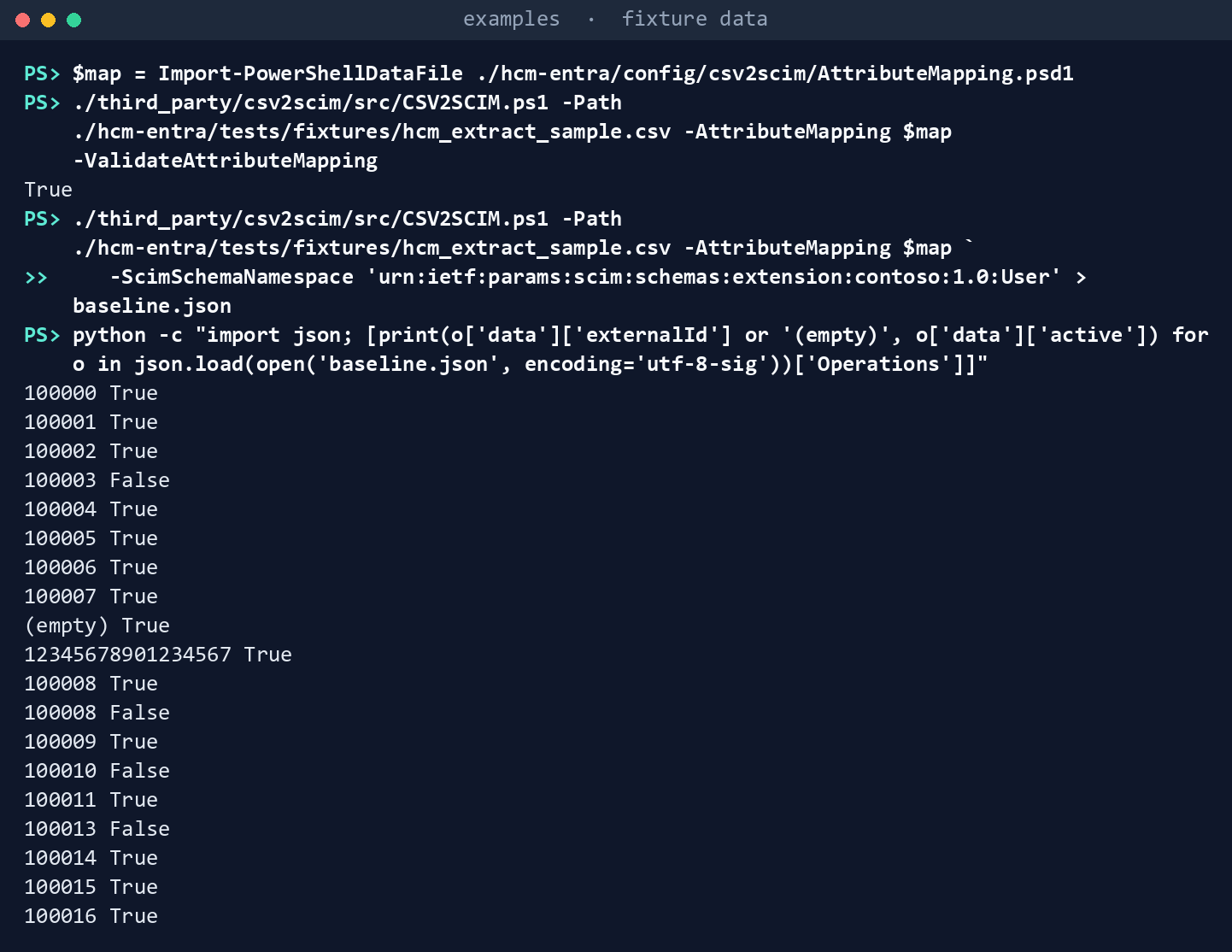
What the terminal shows, run on the kit’s fixtures (the same output as text) The first command returns
True. The last listsbaseline.json: one bulk request with 19 operations. Find person 100006 (worker typeP, a pending worker):activeistrue. Find person 100008: it is there twice. One operation has an emptyexternalId.Run the hardened client on the same fixture, then the PowerShell client:
cd hcm-entra
python python/hcm_to_scim.py --extract tests/fixtures/hcm_extract_sample.csv --as-of 2026-10-25 --out out
pwsh -File powershell/Invoke-HcmToScim.ps1 -Extract tests/fixtures/hcm_extract_sample.csv -AsOf 2026-10-25 -Out out-ps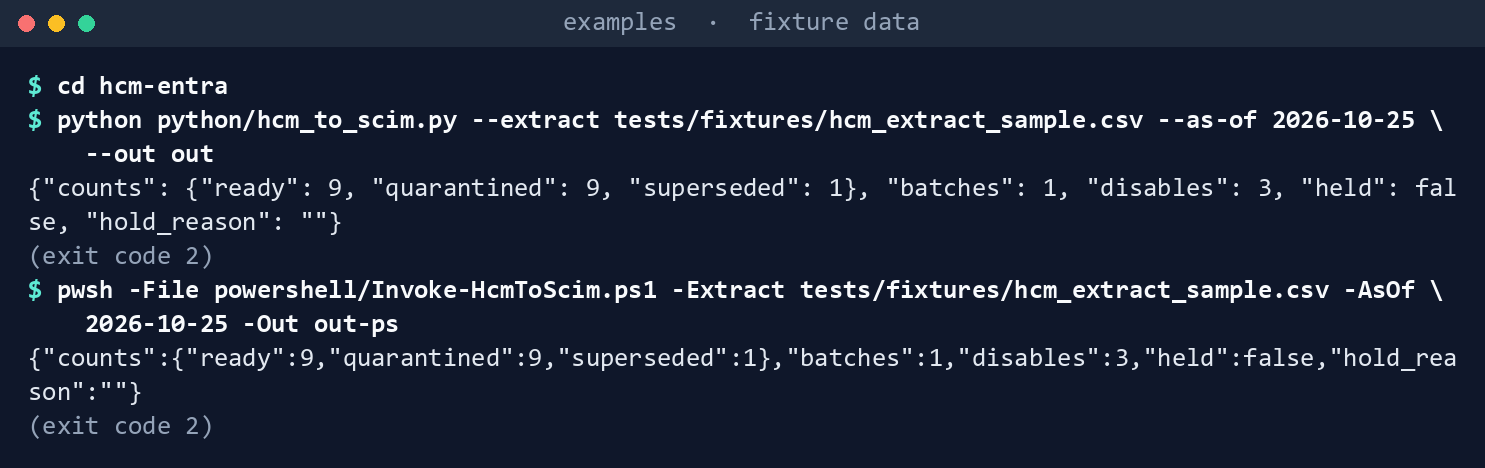
What the terminal shows, run on the kit’s fixtures (the same output as text) It exits with code
2. Counts: 9 ready, 9 quarantined, 1 superseded. The PowerShell client gives the same.Compare. List each quarantined record with its reason, then the first operation of each batch, then person 100001 in both:
python -c "import json; [print(q['person_key'], '|', '; '.join(q['reasons'])) for q in json.load(open('out/quarantine.json', encoding='utf-8'))]" python -c "import json; [print(f, o['data']['externalId'], o['data']['active']) for f in ('out/bulk-request-001.json', '../baseline.json') for o in json.load(open(f, encoding='utf-8-sig'))['Operations'][:1]]" python -c "import json; [print(f, o['data']['externalId'], o['data']['active']) for f in ('out/bulk-request-001.json', '../baseline.json') for o in json.load(open(f, encoding='utf-8-sig'))['Operations'] if o['data']['externalId'] == '100001']"![Terminal window showing python -c 'import json; [print(q['person_key'], '|', '; '.join(q['reasons']))… and what it printed](captures/01-3.png)
What the terminal shows, run on the kit’s fixtures (the same output as text) In
out/quarantine.json, find 100006 and its reason (worker typePrefused) and the blank-key row. Inout/bulk-request-001.json, the first operation is the leaver, 100003, withactivefalse; inbaseline.json, the first is 100000. Find 100001 (hire date after the run date): disabled in ours, active in the baseline.Check provenance. Show
out/provenance.jsonand hash the extract yourself:cat out/provenance.json python -c "import hashlib,sys;print(hashlib.sha256(open(sys.argv[1],'rb').read()).hexdigest())" tests/fixtures/hcm_extract_sample.csv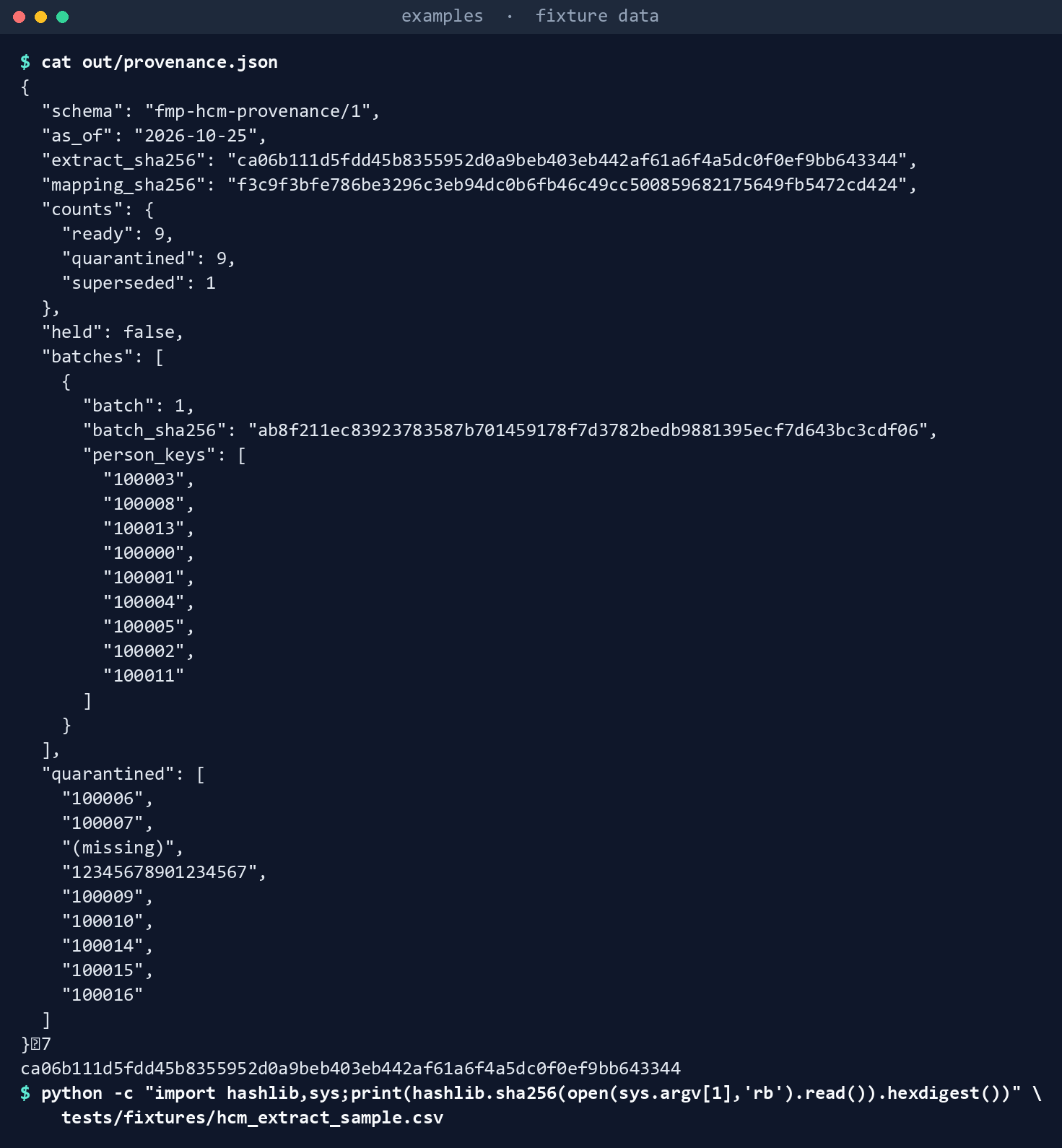
What the terminal shows, run on the kit’s fixtures (the same output as text) It matches
extract_sha256. Now run CSV2SCIM’s generate step a second time and count thebulkIdvalues that match the first run, then run our client a second time intoout-2and compare its batch and manifest with the first run’s:pwsh -NoProfile -Command '$map = Import-PowerShellDataFile ./config/csv2scim/AttributeMapping.psd1; ../third_party/csv2scim/src/CSV2SCIM.ps1 -Path ./tests/fixtures/hcm_extract_sample.csv -AttributeMapping $map -ScimSchemaNamespace "urn:ietf:params:scim:schemas:extension:contoso:1.0:User" > baseline-2.json' python -c "import json; a, b = (json.load(open(f, encoding='utf-8-sig'))['Operations'] for f in ('../baseline.json', 'baseline-2.json')); print(sum(x['bulkId'] == y['bulkId'] for x, y in zip(a, b)), 'of', len(a), 'bulkId values match')" python python/hcm_to_scim.py --extract tests/fixtures/hcm_extract_sample.csv --as-of 2026-10-25 --out out-2 cmp out/bulk-request-001.json out-2/bulk-request-001.json && cmp out/provenance.json out-2/provenance.json && echo identical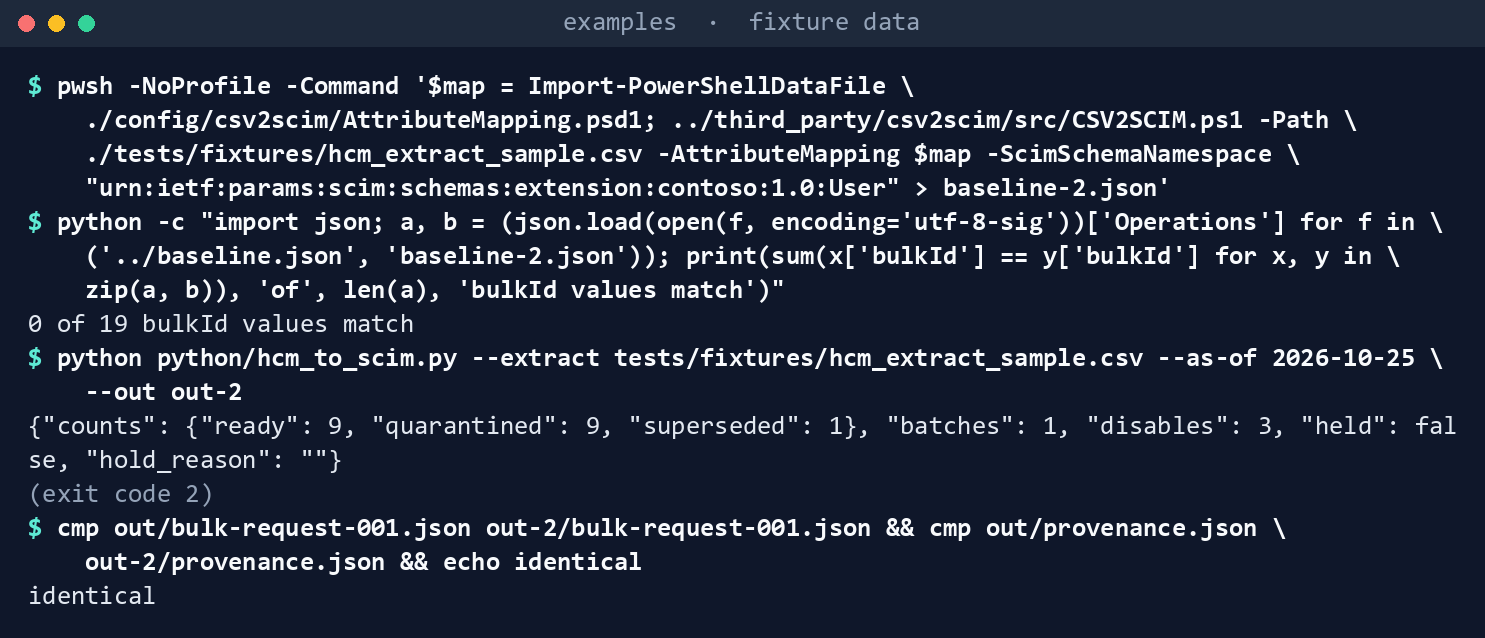
What the terminal shows, run on the kit’s fixtures (the same output as text) The
bulkIdvalues differ every time. Our client gives identical batches and hashes.Break something on purpose. The first command writes a copy of the extract with worker 100005’s
DepartmentCodechanged toorg-100(lower case). Run both tools on the copy:sed '/^100005,/s/ORG-100/org-100/' tests/fixtures/hcm_extract_sample.csv > extract-broken.csv python python/hcm_to_scim.py --extract extract-broken.csv --as-of 2026-10-25 --out out-broken python -c "import json; [print(q['person_key'], '|', '; '.join(q['reasons'])) for q in json.load(open('out-broken/quarantine.json', encoding='utf-8')) if q['person_key'] == '100005']" pwsh -NoProfile -Command '$map = Import-PowerShellDataFile ./config/csv2scim/AttributeMapping.psd1; ../third_party/csv2scim/src/CSV2SCIM.ps1 -Path ./extract-broken.csv -AttributeMapping $map -ScimSchemaNamespace "urn:ietf:params:scim:schemas:extension:contoso:1.0:User" > baseline-broken.json' grep -n '"org-100"' baseline-broken.json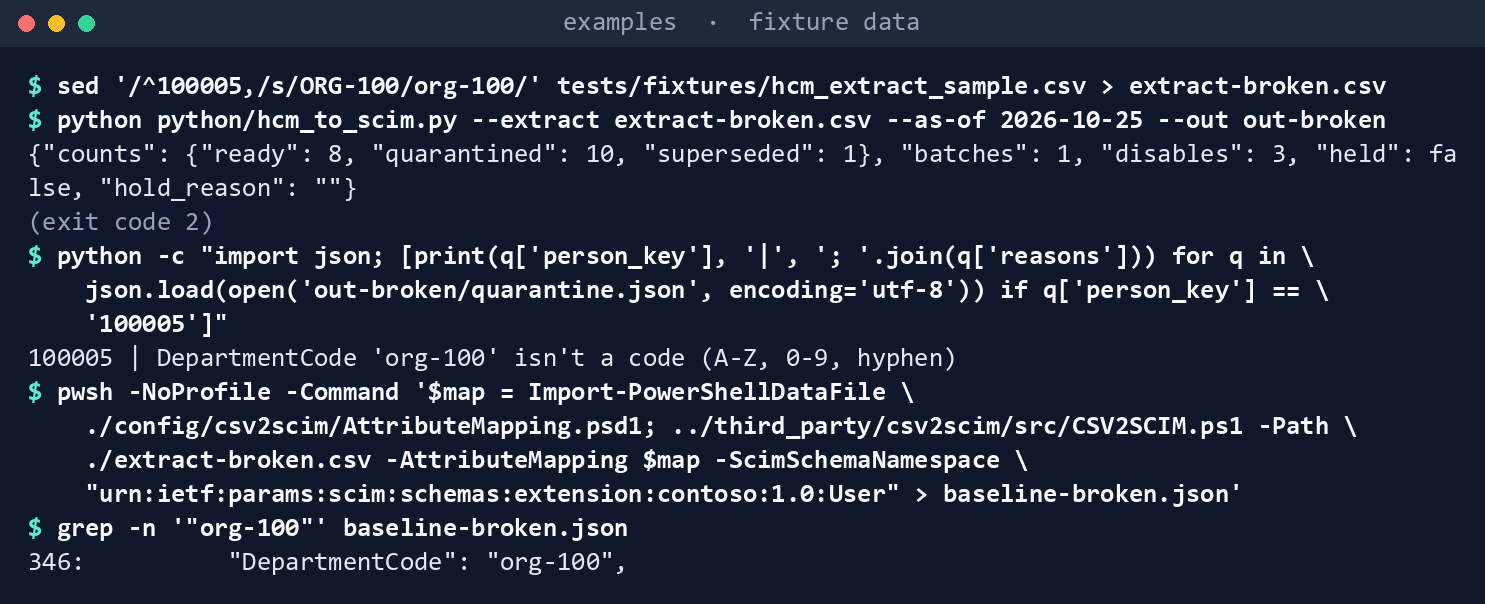
What the terminal shows, run on the kit’s fixtures (the same output as text) Our client quarantines that worker with a code-list reason; CSV2SCIM sends it.
Hold a run. Write a settings file containing
{"max_disables_per_run": 1}and pass it with--settings:echo '{"max_disables_per_run": 1}' > settings-hold.json python python/hcm_to_scim.py --extract tests/fixtures/hcm_extract_sample.csv --as-of 2026-10-25 --settings settings-hold.json --out out-hold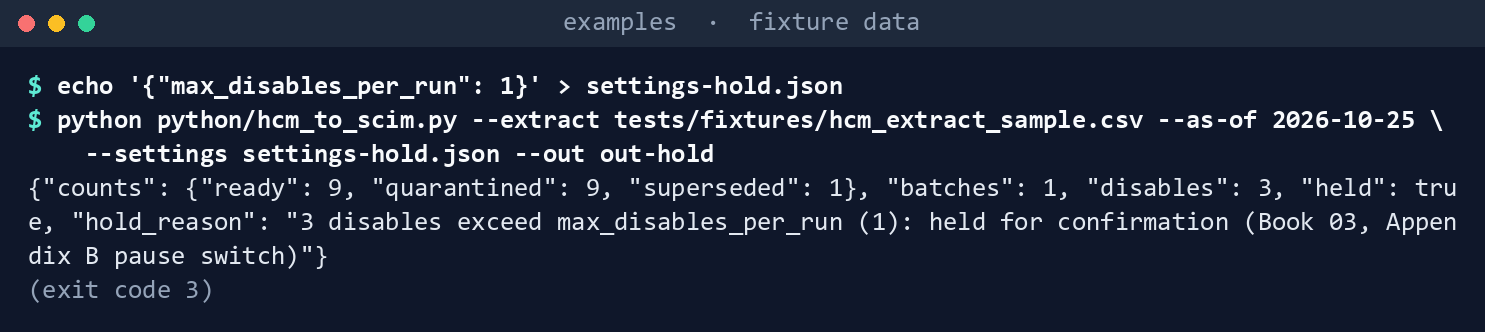
What the terminal shows, run on the kit’s fixtures (the same output as text) See exit code
3.Run the tests:
python -m pytest -q -p no:cacheprovider tests/python
pwsh -NoProfile -Command "Invoke-Pester -Path tests/powershell"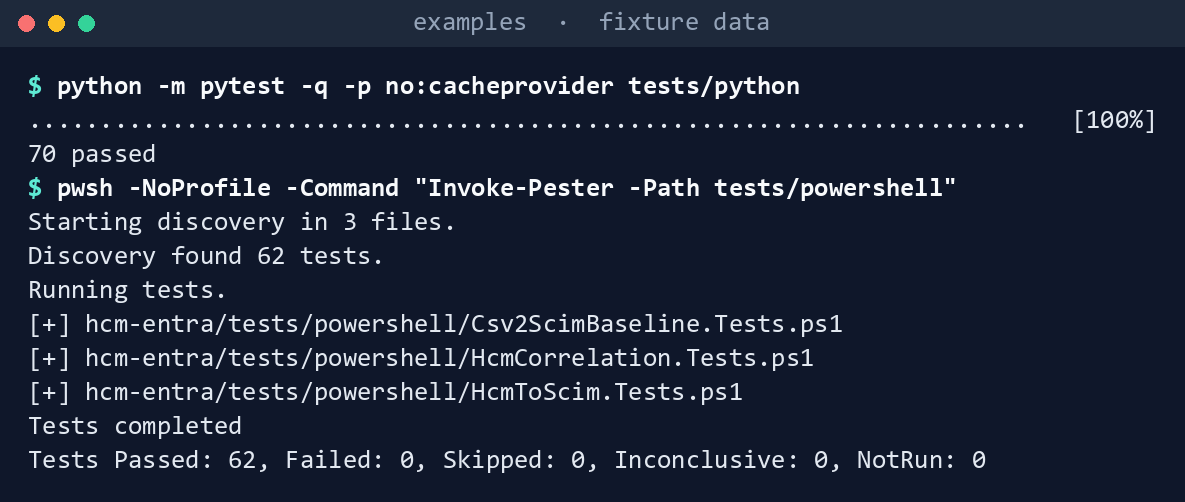
What the terminal shows, run on the kit’s fixtures (the same output as text)
Expected result: 70 Python and 62 Pester tests passing, and the differences in the table above, seen with your own eyes.
Lab 2: test tenant
Use a test tenant, never production, and fictional records only. Work from examples. You’ll replace: <tenant-id> (the test tenant’s ID), <provisioning-app-object-id> (the provisioning app’s object ID), <provisioning-api-endpoint> (the app’s Provisioning API Endpoint) and <graph-access-token> (a bearer token for the tenant’s Graph host, obtained outside the script from a managed identity or a certificate credential).
Every command in this lab, in order. Each step below says what it does and what to look for.
In PowerShell 7:
# Step 2: Extend its schema with Microsoft's sample
./third_party/csv2scim/src/CSV2SCIM.ps1 -Path ./hcm-entra/tests/fixtures/hcm_extract_sample.csv `
    -ScimSchemaNamespace 'urn:ietf:params:scim:schemas:extension:contoso:1.0:User' `
    -TenantId <tenant-id> -ServicePrincipalId <provisioning-app-object-id> -UpdateSchema
In a POSIX shell (Git Bash on Windows):
# Step 5: Send five records with the hardened client
cd hcm-entra
cp config/settings.example.json config/settings.json
python -c "import json; p = 'config/settings.json'; s = json.load(open(p)); s['endpoint'] = '<provisioning-api-endpoint>'; json.dump(s, open(p, 'w'), indent=2)"
export HCM_ENTRA_BEARER_TOKEN='<graph-access-token>'
head -n 6 tests/fixtures/hcm_extract_sample.csv > five.csv
python python/hcm_to_scim.py --extract five.csv --as-of 2026-10-25 --settings config/settings.json --out out-apply --apply
cat out-apply/apply-results.json
In PowerShell 7:
# Step 6: Reconcile
../third_party/csv2scim/src/CSV2SCIM.ps1 -TenantId <tenant-id> -ServicePrincipalId <provisioning-app-object-id> -GetPreviousCycleLogs
(Get-Content out-apply/provenance.json -Raw | ConvertFrom-Json).batches.person_keys
In a POSIX shell (Git Bash on Windows):
# Step 7: Back it out
python -c "import csv; rows = list(csv.DictReader(open('five.csv', encoding='utf-8', newline=''))); [r.update(AssignmentStatusType='INACTIVE', TerminationDate='2026-10-25') for r in rows]; w = csv.DictWriter(open('five-leavers.csv', 'w', encoding='utf-8', newline=''), fieldnames=list(rows[0])); w.writeheader(); w.writerows(rows)"
python python/hcm_to_scim.py --extract five-leavers.csv --as-of 2026-10-25 --settings config/settings.json --out out-backout --apply
unset HCM_ENTRA_BEARER_TOKEN
Create the provisioning app. Create an API-driven inbound provisioning app that provisions to Microsoft Entra ID, following Learn’s configuration guide; the feature needs Microsoft Entra ID P1, P2 or ID Governance.20 Copy its Provisioning API Endpoint.
Extend its schema with Microsoft’s sample (worldwide or GCC tenant): run CSV2SCIM’s
-UpdateSchemamode with the extension namespace frommapping.jsonand your provisioning app’s object ID, as Learn shows.21./third_party/csv2scim/src/CSV2SCIM.ps1 -Path ./hcm-entra/tests/fixtures/hcm_extract_sample.csv ` -ScimSchemaNamespace 'urn:ietf:params:scim:schemas:extension:contoso:1.0:User' ` -TenantId <tenant-id> -ServicePrincipalId <provisioning-app-object-id> -UpdateSchemaIt adds every extract column to the app’s attribute list. Then map the attributes you need in the admin center. In GCC High or DoD, add the attributes in the admin center instead: the sample can’t reach those clouds as written.
Grant the least privilege to the sender. Use a managed identity or an app with a certificate, never a secret. The least-privileged application permission is
SynchronizationData-User.Upload.OwnedBywhen the app owns the provisioning service principal; otherwiseSynchronizationData-User.Upload.22 Don’t give the production sender CSV2SCIM’s sign-in scopes. For CSV2SCIM’s certificate flow, Learn addsApplication.Read.AllandSynchronization.Read.Allso the script can look up the job;23 keep that identity for testing.Start the job and set its safety nets. Start the job, set the notification email, and turn on accidental-deletions prevention.
Send five records with the hardened client. The commands put the endpoint in
config/settings.json, the token inHCM_ENTRA_BEARER_TOKEN, write the fixture’s first five rows (all valid) tofive.csv, and send them with--apply:cd hcm-entra cp config/settings.example.json config/settings.json python -c "import json; p = 'config/settings.json'; s = json.load(open(p)); s['endpoint'] = '<provisioning-api-endpoint>'; json.dump(s, open(p, 'w'), indent=2)" export HCM_ENTRA_BEARER_TOKEN='<graph-access-token>' head -n 6 tests/fixtures/hcm_extract_sample.csv > five.csv python python/hcm_to_scim.py --extract five.csv --as-of 2026-10-25 --settings config/settings.json --out out-apply --apply cat out-apply/apply-results.jsonExpect one batch, a
202, and aLocationinapply-results.json.Reconcile. Read the cycle with CSV2SCIM’s
-GetPreviousCycleLogs(worldwide or GCC), or queryGET /auditLogs/provisioningfiltered on the job. Then list the person keys in the batch:../third_party/csv2scim/src/CSV2SCIM.ps1 -TenantId <tenant-id> -ServicePrincipalId <provisioning-app-object-id> -GetPreviousCycleLogs (Get-Content out-apply/provenance.json -Raw | ConvertFrom-Json).batches.person_keysEvery person key in
provenance.json’s batch should appear with a result; one that doesn’t is a finding.Back it out. The first command writes the five records again as
INACTIVEwith a termination date; the second sends them; the last unsets the token variable:python -c "import csv; rows = list(csv.DictReader(open('five.csv', encoding='utf-8', newline=''))); [r.update(AssignmentStatusType='INACTIVE', TerminationDate='2026-10-25') for r in rows]; w = csv.DictWriter(open('five-leavers.csv', 'w', encoding='utf-8', newline=''), fieldnames=list(rows[0])); w.writeheader(); w.writerows(rows)" python python/hcm_to_scim.py --extract five-leavers.csv --as-of 2026-10-25 --settings config/settings.json --out out-backout --apply unset HCM_ENTRA_BEARER_TOKENThen delete the test users and the app.
Verified facts
| Call | Endpoint | Least-privileged permission | US Government clouds | Stage |
|---|---|---|---|---|
| Send a batch | POST /servicePrincipals/{id}/synchronization/jobs/{jobId}/bulkUpload, Content-Type: application/scim+json |
Application: SynchronizationData-User.Upload.OwnedBy; delegated: SynchronizationData-User.Upload with User Administrator24 |
API-driven inbound provisioning is listed as available for Azure Government tenants25 | v1.0 |
| Read results | GET /auditLogs/provisioning with $filter on jobId |
AuditLog.Read.All and Directory.Read.All; delegated callers also need a role such as Reports Reader or Global Reader26 |
Global, US Government L4 and L527 | v1.0 |
| CSV2SCIM, certificate flow | the script’s own sign-in | Application.Read.All and Synchronization.Read.All added to the app, to look up the provisioning job28 |
worldwide endpoint only, as written29 | sample |
| Graph host | graph.microsoft.com (worldwide and Microsoft 365 GCC), graph.microsoft.us (GCC High), dod-graph.microsoft.us (DoD); token authority login.microsoftonline.us for the US Government clouds |
— | Tokens from one cloud don’t work in another30 | — |
Limits the hardened client enforces: at most 50 operations a request;31 40 calls in any 5 seconds (the stricter of Learn’s two statements); 2,000 or 6,000 calls in 24 hours by license;32 Retry-After on 429 and 503.33
Two things Learn states differently on different pages:
- The rate limit. The API page says 40 requests per second; the concepts and troubleshooting pages say 40 calls per 5 seconds.34 The client uses the stricter.
- The log-reading permission. The concepts page tells admins to grant
ProvisioningLog.Read.All;35 the List provisioningObjectSummary page namesAuditLog.Read.AllandDirectory.Read.All.36 Try the narrower one first in the test tenant.
Federal requirements and evidence
The middleware is where an HR record becomes an account, so its outputs are account-management evidence. Each row names the file or command that proves it. Controls are from the Moderate baseline37; indicators are from FedRAMP’s list38. Which output supports which control is the program’s reading (design guidance). OMB M-22-09 asks for centralized identity management that draws on human resources systems,39 which is what this pipeline feeds.
| What the output proves | Requirement it supports | KSI it aligns to | Who keeps it |
|---|---|---|---|
Microsoft’s sample sends every row, a pending worker active and one person twice (Lab 1, step 1: baseline.json) |
SA-11 (Developer Testing and Evaluation): the gap is measured, not assumed | KSI-CMT-VTD, Validating Throughout Deployment | The repository: Csv2ScimBaseline.Tests.ps1 |
Each row is checked before anything is sent, and the run counts ready, quarantined and superseded rows (step 2: validation-report.json, exit 2) |
SI-10 (Information Input Validation); AC-2 (Account Management) | KSI-IAM-AAM, Automating Account Management | The evidence store (keys and hashes only) |
Every refused row is kept with its reasons, the HR row and the attempted payload (step 3: quarantine.json) |
SI-10; IA-4 (Identifier Management): blank, over-length and duplicate keys never become identifiers | KSI-IAM-AAM | The access-controlled audit store (it holds personal data) |
Leavers go first, managers before reports, future hires disabled (step 3: bulk-request-001.json) |
AC-2; PS-4 (Personnel Termination) and PS-5 (Personnel Transfer); M-22-09’s identity actions | KSI-IAM-AAM | Not kept itself; its hash is in provenance.json |
Every batch is tied by hash to the extract and mapping that produced it, and a rerun gives identical bytes (step 4: provenance.json, cmp ... && echo identical) |
CM-3 (Configuration Change Control): a record of each change; AU-3 (Content of Audit Records) | KSI-CMT-LMC, Logging Changes | The evidence store |
A bad code is refused at the source, where the sample sends it (step 5: out-broken/quarantine.json) |
SI-10 | KSI-CMT-VTD | The test run’s log |
A mass disable holds the run until someone confirms it (step 6: exit 3; --confirm-large-delta) |
AC-2: account changes follow defined conditions and approvals; CM-3 | KSI-IAM-AAM | The change record that carries the confirmation |
Both clients pass every rule, and the pinned sample still matches its hashes (step 7: 70 pytest and 62 Pester tests; snapshot.json) |
SA-11; SR-3 (Supply Chain Controls and Processes): the sample is pinned and watched | KSI-CMT-VTD; KSI-SCR-MIT, Mitigating Supply Chain Risk | The repository’s test results |
The provisioning app’s schema change is made by a named run (Lab 2, step 2: -UpdateSchema) |
CM-3 | KSI-CMT-LMC | The change record; the Entra audit log, exported to the log store |
The sender holds one permission, with a certificate or managed identity and no secret (Lab 2, step 3: SynchronizationData-User.Upload.OwnedBy) |
AC-6 (Least Privilege); IA-5 (Authenticator Management) | KSI-IAM-ELP, Ensuring Least Privilege; KSI-IAM-SNU, Securing Non-User Authentication | The app registration and its consent record in the Entra audit log |
Each sent batch has its status, attempts and Location (Lab 2, step 5: out-apply/apply-results.json) |
AC-2; AU-3 | KSI-IAM-AAM; KSI-CMT-LMC | The evidence store |
Every person key in the batch has a result in the provisioning logs, or a finding is opened (Lab 2, step 6: -GetPreviousCycleLogs or GET /auditLogs/provisioning) |
AU-6 (Audit Record Review, Analysis, and Reporting); AC-2 | KSI-MLA-RVL, Reviewing Logs | The findings queue; the reconciliation report in the evidence store |
The test accounts are disabled through the same pipeline (Lab 2, step 7: out-backout/apply-results.json) |
AC-2(3) (Disable Accounts); PS-4 | KSI-IAM-AAM | The evidence store |
| The provisioning service and the tenant run on cloud services with FedRAMP Marketplace listings40 | SA-9 (External System Services); the agency confirms each service it uses is inside the listing’s scope (design guidance) | None: the provider reports against the indicators for its own offering | The system security plan’s list of external services |
Key Security Indicators are FedRAMP 20x indicators for cloud service providers. The agency authorizes its own system: it lines this evidence up with what Microsoft and the other providers whose services the system uses report against the indicators, and doesn’t report KSIs itself (Book 00, Appendix B). The control-by-control mapping is in Book 13’s Appendix A and Book 14’s Appendix A; the indicator pairings follow Book 04, Chapter 10 and Book 05, Chapter 10.
Dangers
| Danger | What happens | The guard |
|---|---|---|
| Sending a sample’s output to production unchanged | Pending workers, duplicates and blank keys reach the directory | The hardened client for production sends; the baseline tests show what the sample doesn’t check |
| A sample that changes under you | Labs and behavior drift without anyone deciding | The pinned copy, its hash test, and the weekly upstream watch |
| Over-broad sign-in scopes | Application.ReadWrite.All on an identity that only needs to upload |
One permission for the sender; the sample’s identity kept to the test tenant |
| Wrong cloud | A GCC High tenant can’t be reached, or a token goes to the wrong host | The endpoint allow-list of the three Graph hosts |
| Partial records | An omitted attribute clears the target when clearing is on (preview)41 | Every record is built complete |
| Mass disable from a bad extract | Hundreds of accounts disabled before anyone looks | max_disables_per_run holds the run |
Treating 202 as success |
A record that failed in the job is never followed up | Reconcile against the logs, using the manifest’s person keys |
| Personal data in logs | Names and payloads in the operational log | The report and manifest carry keys and hashes only |
Checklist
Microsoft Learn, “API-driven inbound provisioning with PowerShell script,” https://learn.microsoft.com/entra/identity/app-provisioning/inbound-provisioning-api-powershell (accessed Oct 30, 2026).↩︎
Microsoft Learn, “Perform bulkUpload,” https://learn.microsoft.com/graph/api/synchronization-synchronizationjob-post-bulkupload?view=graph-rest-1.0 (accessed Oct 30, 2026).↩︎
Microsoft Learn, “API-driven inbound provisioning with PowerShell script,” https://learn.microsoft.com/entra/identity/app-provisioning/inbound-provisioning-api-powershell (accessed Oct 30, 2026).↩︎
Microsoft Learn, “API-driven inbound provisioning with PowerShell script,” https://learn.microsoft.com/entra/identity/app-provisioning/inbound-provisioning-api-powershell (accessed Oct 30, 2026).↩︎
Microsoft Learn, “API-driven inbound provisioning with PowerShell script,” https://learn.microsoft.com/entra/identity/app-provisioning/inbound-provisioning-api-powershell (accessed Oct 30, 2026).↩︎
Microsoft Learn, “API-driven inbound provisioning with PowerShell script,” https://learn.microsoft.com/entra/identity/app-provisioning/inbound-provisioning-api-powershell (accessed Oct 30, 2026).↩︎
Microsoft, CSV2SCIM sample, AzureAD/entra-id-inbound-provisioning,
PowerShell/CSV2SCIMat commitf2e8c59f0af497b066c3484fc36a4197c2b37711(March 2, 2026), MIT License, https://github.com/AzureAD/entra-id-inbound-provisioning/tree/f2e8c59f0af497b066c3484fc36a4197c2b37711/PowerShell/CSV2SCIM (accessed Oct 30, 2026); pinned copy inexamples/third_party/csv2scim.↩︎Microsoft Learn, “API-driven inbound provisioning with PowerShell script,” https://learn.microsoft.com/entra/identity/app-provisioning/inbound-provisioning-api-powershell (accessed Oct 30, 2026).↩︎
Microsoft Learn, “Microsoft Graph national cloud deployments,” https://learn.microsoft.com/graph/deployments (accessed Oct 30, 2026).↩︎
Microsoft Learn, “API-driven inbound provisioning with PowerShell script,” https://learn.microsoft.com/entra/identity/app-provisioning/inbound-provisioning-api-powershell (accessed Oct 30, 2026).↩︎
Microsoft Learn, “Perform bulkUpload,” https://learn.microsoft.com/graph/api/synchronization-synchronizationjob-post-bulkupload?view=graph-rest-1.0 (accessed Oct 30, 2026).↩︎
Microsoft Learn, “API-driven inbound provisioning concepts,” https://learn.microsoft.com/entra/identity/app-provisioning/inbound-provisioning-api-concepts (accessed Oct 30, 2026).↩︎
Microsoft Learn, “Perform bulkUpload,” https://learn.microsoft.com/graph/api/synchronization-synchronizationjob-post-bulkupload?view=graph-rest-1.0 (accessed Oct 30, 2026).↩︎
Microsoft Learn, “API-driven inbound provisioning concepts,” https://learn.microsoft.com/entra/identity/app-provisioning/inbound-provisioning-api-concepts (accessed Oct 30, 2026).↩︎
Microsoft Learn, “Microsoft Entra ID Governance licensing fundamentals,” https://learn.microsoft.com/entra/id-governance/licensing-fundamentals (accessed Oct 30, 2026).↩︎
Microsoft Learn, “API-driven inbound provisioning concepts,” https://learn.microsoft.com/entra/identity/app-provisioning/inbound-provisioning-api-concepts (accessed Oct 30, 2026).↩︎
Microsoft Learn, “Perform bulkUpload,” https://learn.microsoft.com/graph/api/synchronization-synchronizationjob-post-bulkupload?view=graph-rest-1.0 (accessed Oct 30, 2026).↩︎
Microsoft Learn, “Microsoft Graph throttling guidance,” https://learn.microsoft.com/graph/throttling (accessed Oct 30, 2026).↩︎
Microsoft Learn, “Troubleshoot inbound provisioning API issues,” https://learn.microsoft.com/entra/identity/app-provisioning/inbound-provisioning-api-issues (accessed Oct 30, 2026).↩︎
Microsoft Learn, “API-driven inbound provisioning concepts,” https://learn.microsoft.com/entra/identity/app-provisioning/inbound-provisioning-api-concepts (accessed Oct 30, 2026).↩︎
Microsoft Learn, “API-driven inbound provisioning with PowerShell script,” https://learn.microsoft.com/entra/identity/app-provisioning/inbound-provisioning-api-powershell (accessed Oct 30, 2026).↩︎
Microsoft Learn, “Perform bulkUpload,” https://learn.microsoft.com/graph/api/synchronization-synchronizationjob-post-bulkupload?view=graph-rest-1.0 (accessed Oct 30, 2026).↩︎
Microsoft Learn, “API-driven inbound provisioning with PowerShell script,” https://learn.microsoft.com/entra/identity/app-provisioning/inbound-provisioning-api-powershell (accessed Oct 30, 2026).↩︎
Microsoft Learn, “Perform bulkUpload,” https://learn.microsoft.com/graph/api/synchronization-synchronizationjob-post-bulkupload?view=graph-rest-1.0 (accessed Oct 30, 2026).↩︎
Microsoft Learn, “Microsoft Entra feature availability,” https://learn.microsoft.com/entra/identity/authentication/feature-availability (accessed Oct 30, 2026).↩︎
Microsoft Learn, “List provisioningObjectSummary,” https://learn.microsoft.com/graph/api/provisioningobjectsummary-list?view=graph-rest-1.0 (accessed Oct 30, 2026).↩︎
Microsoft Learn, “List provisioningObjectSummary,” https://learn.microsoft.com/graph/api/provisioningobjectsummary-list?view=graph-rest-1.0 (accessed Oct 30, 2026).↩︎
Microsoft Learn, “API-driven inbound provisioning with PowerShell script,” https://learn.microsoft.com/entra/identity/app-provisioning/inbound-provisioning-api-powershell (accessed Oct 30, 2026).↩︎
Microsoft, CSV2SCIM sample, AzureAD/entra-id-inbound-provisioning,
PowerShell/CSV2SCIMat commitf2e8c59f0af497b066c3484fc36a4197c2b37711(March 2, 2026), MIT License, https://github.com/AzureAD/entra-id-inbound-provisioning/tree/f2e8c59f0af497b066c3484fc36a4197c2b37711/PowerShell/CSV2SCIM (accessed Oct 30, 2026); pinned copy inexamples/third_party/csv2scim.↩︎Microsoft Learn, “Microsoft Graph national cloud deployments,” https://learn.microsoft.com/graph/deployments (accessed Oct 30, 2026).↩︎
Microsoft Learn, “Perform bulkUpload,” https://learn.microsoft.com/graph/api/synchronization-synchronizationjob-post-bulkupload?view=graph-rest-1.0 (accessed Oct 30, 2026).↩︎
Microsoft Learn, “API-driven inbound provisioning concepts,” https://learn.microsoft.com/entra/identity/app-provisioning/inbound-provisioning-api-concepts (accessed Oct 30, 2026).↩︎
Microsoft Learn, “Microsoft Graph throttling guidance,” https://learn.microsoft.com/graph/throttling (accessed Oct 30, 2026).↩︎
Microsoft Learn, “Troubleshoot inbound provisioning API issues,” https://learn.microsoft.com/entra/identity/app-provisioning/inbound-provisioning-api-issues (accessed Oct 30, 2026).↩︎
Microsoft Learn, “API-driven inbound provisioning concepts,” https://learn.microsoft.com/entra/identity/app-provisioning/inbound-provisioning-api-concepts (accessed Oct 30, 2026).↩︎
Microsoft Learn, “List provisioningObjectSummary,” https://learn.microsoft.com/graph/api/provisioningobjectsummary-list?view=graph-rest-1.0 (accessed Oct 30, 2026).↩︎
National Institute of Standards and Technology, SP 800-53B Moderate baseline, release 5.2.0 OSCAL profile, last modified October 22, 2026 (includes AC-2, AC-2(3), AC-6, AU-3, AU-6, CM-3, IA-4, IA-5, PS-4, PS-5, SA-9, SA-11, SI-10 and SR-3), https://github.com/usnistgov/oscal-content/blob/main/nist.gov/SP800-53/rev5/json/NIST_SP-800-53_rev5_MODERATE-baseline_profile.json (accessed Nov 2, 2026).↩︎
FedRAMP, “Key Security Indicators,” FedRAMP Consolidated Rules for 2026 (indicators KSI-CMT-LMC, KSI-CMT-VTD, KSI-IAM-AAM, KSI-IAM-ELP, KSI-IAM-SNU, KSI-MLA-RVL and KSI-SCR-MIT; control mappings updated October 13, 2026), https://www.fedramp.gov/2026/reference/key-security-indicators/ (accessed Nov 2, 2026).↩︎
Office of Management and Budget, M-22-09, Moving the U.S. Government Toward Zero Trust Cybersecurity Principles, January 26, 2022, §III.A, “Identity,” action 1 (centralized identity management systems for agency users), and the identity discussion of systems that draw on human resources, contract management and personnel security data, https://www.whitehouse.gov/wp-content/uploads/2022/01/M-22-09.pdf (accessed Nov 2, 2026).↩︎
FedRAMP Marketplace product data, https://www.fedramp.gov/marketplace/products.json,
last_change2026-11-01T05:02:56Z (accessed Nov 2, 2026): MSO365MT, Microsoft 365 Government Community Cloud & Supporting Services, FedRAMP Certified, Class C, Moderate; FR1824057433, Microsoft 365 Government Community Cloud-High, FedRAMP Certified, Class D, High; F1209051525, Azure Commercial Cloud, FedRAMP Certified, Class D, High.↩︎Microsoft Learn, “API-driven inbound provisioning concepts,” https://learn.microsoft.com/entra/identity/app-provisioning/inbound-provisioning-api-concepts (accessed Oct 30, 2026).↩︎