Federal Modernization Workbook · Book 12 · What
Chapter 03 — Identity Telemetry from Entra ID
Identity is the first plane an attacker touches and the first one a defender loses sight of, because Entra ID keeps its own logs for only a month unless someone deliberately sends them somewhere.
Which Microsoft Entra ID log categories exist, which Log Analytics table each lands in, and which ones the program enables in every tenant. How to deploy the tenant-scope diagnostic setting by portal, Bicep or az rest, why the retention block on that setting does nothing, and how to prove emission is working. It closes with the endpoint changes for GCC High and DoD, with Microsoft Graph’s audit APIs as a tool for pulling specific evidence, not for feeding a SIEM, and with the signals that sit beside the diagnostic setting: Entra Health and recommendations, Global Secure Access logs and alerts, the Entra Connect server’s own audit events, and domain controller monitoring while the forest remains.
Chapter 02 set the rule that every plane emits deliberately, under one evidence contract. Identity comes first because it is the join key for almost everything else: a mailbox read, a Key Vault secret retrieval and a role assignment all trace back to a sign-in. It is also the plane where the default is most misleading. Entra ID records audit and sign-in activity whether or not anyone configures anything, and the admin center shows it. That makes the tenant look instrumented. But with Entra ID P1 or P2, audit and sign-in data is kept for 30 days (seven days on the Free tier), Microsoft Graph activity logs aren’t kept at all unless they are routed somewhere, and an upgrade never recovers data that already expired.1 An agency that hasn’t created a diagnostic setting has a rolling 30-day window of identity history and nothing older.
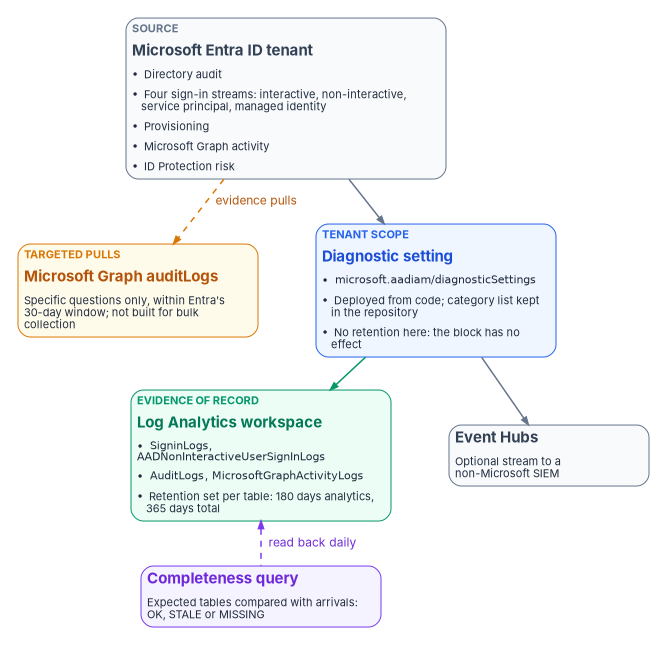
The mechanism that fixes this is the Entra diagnostic setting: a tenant-level object that streams selected log categories to a Log Analytics workspace, an Event Hubs namespace, a storage account or a partner solution.2 This chapter is about getting that one object right, keeping it right, and proving it works.
Before you start
| Requirement | Detail |
|---|---|
| Role | Security Administrator on the tenant, to create or edit a diagnostic setting.3 |
| Custom security attributes | The CustomSecurityAttributeAuditLogs category is configured separately, on the Custom security attributes tab, and needs Attribute Log Administrator as well as Security Administrator.4 |
| Destination | The workspace, event hub or storage account must exist before the setting is created.5 |
| Event Hubs tenancy | The subscription and Event Hubs namespace must both be associated with the Entra tenant whose logs are streamed.6 |
| Licensing | Microsoft Graph activity logs need Entra ID P1 or P2.7 Microsoft Sentinel’s Entra ID connector needs P1 or P2 to ingest sign-in logs, and Workload ID Premium for the two service-principal risk tables.8 |
The log categories and their tables
The category name you tick in the diagnostic setting is not always the table name you query. Microsoft says so directly in the ID Protection export guidance: the names in diagnostic settings “are not the same as the table names” used in KQL, and most of the tables carry an AAD prefix.9 The mapping isn’t mechanical (SignInLogs lands in SigninLogs, with a lowercase i), so detection rules and retention settings must name the table, not the category.
The tier column is the program’s design: Core categories carry the event-logging, record-content and record-generation evidence (NIST SP 800-53 AU-2, AU-3 and AU-12)10 for every tenant regardless of which features it uses; High value categories need ID Protection licensing; Conditional categories produce data only when a feature is deployed. Where a system’s baseline selects AU-3(1), Additional Audit Information, which asks for audit records that carry additional information the organization defines,11 the program names the High value and Conditional categories it enables as that additional information for the identity plane.
| Category (diagnostic setting) | Log Analytics table | Tier | What it captures |
|---|---|---|---|
AuditLogs |
AuditLogs |
Core | Changes to applications, groups, users and licenses |
SignInLogs |
SigninLogs |
Core | Interactive sign-ins: password entered or MFA challenge passed |
NonInteractiveUserSignInLogs |
AADNonInteractiveUserSignInLogs |
Core | Sign-ins a client performs on a user’s behalf with a token or code |
ServicePrincipalSignInLogs |
AADServicePrincipalSignInLogs |
Core | Apps and service principals authenticating with certificates or client secrets |
ManagedIdentitySignInLogs |
AADManagedIdentitySignInLogs |
Core | Managed identities, where Azure manages the secret |
ProvisioningLogs |
AADProvisioningLogs |
Core | Users, groups and roles provisioned by the Entra provisioning service |
MicrosoftGraphActivityLogs |
MicrosoftGraphActivityLogs |
Core | Every HTTP request against the tenant’s resources through Microsoft Graph |
RiskyUsers |
AADRiskyUsers |
High value | Users ID Protection assesses as at risk |
UserRiskEvents |
AADUserRiskEvents |
High value | Individual user risk detections |
RiskyServicePrincipals |
AADRiskyServicePrincipals |
High value | Workload identities assessed as risky |
ServicePrincipalRiskEvents |
AADServicePrincipalRiskEvents |
High value | Workload identity risk detections |
RiskyAgents |
AADRiskyAgents |
Conditional | Agent identities assessed as risky |
AgentRiskEvents |
AADAgentRiskEvents |
Conditional | Agent identity risk detections |
ADFSSignInLogs |
ADFSSignInLogs |
Conditional | AD FS application sign-ins; keep it while federation remains |
CustomSecurityAttributeAuditLogs |
AADCustomSecurityAttributeAuditLogs |
Conditional | Changes to custom security attribute definitions and assignments |
NetworkAccessTrafficLogs |
NetworkAccessTraffic |
Conditional | Global Secure Access traffic; no data without Internet or Private Access |
RemoteNetworkHealthLogs |
RemoteNetworkHealthLogs |
Conditional | Global Secure Access remote-network health |
EnrichedOffice365AuditLogs |
EnrichedMicrosoft365AuditLogs |
Conditional | Global Secure Access enriched Microsoft 365 logs; needs Internet Access and enrichment turned on |
MicrosoftServicePrincipalSignInLogs |
— | Not enabled | Microsoft first-party service-to-service sign-ins (preview) |
Category names and descriptions are from Microsoft’s list of identity logs that can be streamed;12 table names from the Sentinel Entra ID connector reference,13 the ID Protection export mapping (including the agent risk tables)14 and the Azure Monitor table reference for custom security attributes.15 Microsoft recommends sending custom security attribute logs to a different destination from the directory audit logs, so attribute assignments aren’t revealed by accident, and only Attribute Log Reader or Attribute Log Administrator can read them.16 The program routes them to a separate workspace with narrower access.
MicrosoftServicePrincipalSignInLogs off
Microsoft describes these preview logs as complex and high in volume, says they are “not essential for security investigations,” and strongly advises against acting on them, for example by disabling applications, because that can cause misconfiguration and even tenant lock-out.17 They cost money to ingest and invite exactly the wrong response. The program doesn’t enable them.
Why all four sign-in streams are core
SignInLogs covers only interactive human sign-ins. It doesn’t see a client app refreshing a token for a user, a service principal authenticating with a client secret, or a managed identity reading from Key Vault. Those are the other three sign-in categories, and they are where unattended credentials (the ones nobody is watching) do their work: a service principal signs in with its own certificate or client secret, and managed identity sign-ins are recorded only in their own log.18 A tenant that streams only SignInLogs is blind to every non-human authentication in the estate while appearing, on the sign-ins blade, to be fully instrumented.
The cost argument against them is real but doesn’t change the answer. Microsoft notes that non-interactive and service-principal sign-ins can be five to ten times larger than interactive ones.19 Graph activity logs are larger again: Microsoft’s own planning estimate is about 15 GiB a month of Azure Monitor Logs data for a 1,000-user tenant and about 1,200 GiB for 100,000 users, and diagnostic settings can’t filter them, although a workspace transformation or the Basic table plan can reduce cost.20 The program’s position is that volume is managed with table plans and transformations, never by leaving a sign-in stream off. Microsoft Graph activity logs are what show what a compromised account or app actually did with its token, and Microsoft recommends routing them to the same workspace as the sign-in logs so the two can be joined.21
Path A: the portal
For a one-time setup in a lab or a first tenant:
- Sign in to the Microsoft Entra admin center as at least a Security Administrator.
- Browse to Entra ID > Monitoring & health > Diagnostic settings. (Export Settings on the Audit Logs or Sign-ins page reaches the same place.)22
- Select Add diagnostic setting.
- Enter a name. The name can’t be changed when the setting is edited later,23 so choose one an assessor will recognize, such as
fmp-siem-emission-core. - Select the Core categories, plus the High value categories if ID Protection is licensed.
- Under Destination details, choose Send to Log Analytics workspace (and, for a non-Microsoft SIEM, Stream to an event hub), then the subscription and destination.
- Select Save.24
Don’t judge success in the first hour. Microsoft’s general guidance is that logs can take up to three days to start appearing in the destination; its ID Protection guidance suggests around 15 minutes for the risk tables.2526 Graph activity logs usually arrive within 30 minutes and occasionally take up to two hours.27 Microsoft’s latency reference sets the same expectation for a first-time setup: about 24 hours before data appears in a new storage account or SIEM, and up to three days in a Log Analytics workspace.28 The verification query later in this chapter is run at 24 hours and again at 72.
A setting someone clicked once has no source of truth, no review trail and no drift detection. FedRAMP’s Consolidated Rules for 2026 include KSI-MLA-EVC, Evaluating Configurations, which expects the configuration of machine-based information resources, especially infrastructure as code, to be continuously evaluated and tested, and KSI-MLA-LET, which expects a current list of the event types that will be logged.29 The program deploys the Entra setting from code (Path B or C), keeps the category list in the repository as that list, and compares the deployed setting against it on a schedule.
Path B: tenant-scope Bicep
Entra diagnostic settings are the Azure Resource Manager resource type microsoft.aadiam/diagnosticSettings, API version 2017-04-01, and they deploy only at tenant scope.30 That is why the usual resource-scope tooling doesn’t reach them.
The templates, scripts and queries in this chapter are illustrative. They haven’t been tested against a production tenant. Check every resource type, API version, category and table name against the Microsoft Learn pages cited, run them first in a test tenant, and put them through the program’s change control before they touch a production identity system.
// entra-diagnostics.bicep
// Deploy with:
//   az deployment tenant create --location <region> \
//     --template-file entra-diagnostics.bicep \
//     --parameters workspaceId=<log-analytics-workspace-resource-id>
targetScope = 'tenant'

@description('Full resource ID of the destination Log Analytics workspace.')
param workspaceId string

@description('Diagnostic setting name. It cannot be changed after creation.')
param settingName string = 'fmp-siem-emission-core'

// Core and High value tiers. Keep this list in the repository; it is the
// program's record of which identity event types are logged.
var categories = [
  'AuditLogs'
  'SignInLogs'
  'NonInteractiveUserSignInLogs'
  'ServicePrincipalSignInLogs'
  'ManagedIdentitySignInLogs'
  'ProvisioningLogs'
  'MicrosoftGraphActivityLogs'
  'RiskyUsers'
  'UserRiskEvents'
  'RiskyServicePrincipals'
  'ServicePrincipalRiskEvents'
]

resource entraDiagnostics 'microsoft.aadiam/diagnosticSettings@2017-04-01' = {
  name: settingName
  properties: {
    workspaceId: workspaceId
    logs: [for category in categories: {
      category: category
      enabled: true
    }]
  }
}
The resource schema still includes a retentionPolicy block on each log entry,31 and the source template this chapter replaces set it. It is left out on purpose.
Diagnostic-settings storage retention is deprecated, and Microsoft disabled all of its retention functionality on September 30, 2025; any value left on a setting no longer has any effect. Storage retention is now set with an Azure Storage lifecycle management policy on the storage account, and Log Analytics retention is set per table in the workspace.32 Setting days: 3650 here and recording it as the agency’s retention control is a finding waiting to happen.
Path C: az rest
az monitor diagnostic-settings create creates a setting on a resource identified by its resource ID,33 and the Entra setting is not a resource inside a subscription. The direct route is az rest against the tenant-scope Resource Manager path:
#!/usr/bin/env bash
# Create or update the Entra tenant diagnostic setting.
# Requires: Security Administrator on the tenant.
set -euo pipefail

ARM="https://management.azure.com"   # Azure Government: https://management.usgovcloudapi.net
SETTING_NAME="fmp-siem-emission-core"
WORKSPACE_ID="/subscriptions/${SUBSCRIPTION_ID}/resourceGroups/${RG}/providers/Microsoft.OperationalInsights/workspaces/${WORKSPACE}"

CATEGORIES=(
  AuditLogs SignInLogs NonInteractiveUserSignInLogs
  ServicePrincipalSignInLogs ManagedIdentitySignInLogs
  ProvisioningLogs MicrosoftGraphActivityLogs
  RiskyUsers UserRiskEvents
  RiskyServicePrincipals ServicePrincipalRiskEvents
)

LOGS_JSON=$(printf '%s\n' "${CATEGORIES[@]}" \
  | jq -R . | jq -s 'map({category: ., enabled: true})')

az rest --method PUT \
  --uri "${ARM}/providers/microsoft.aadiam/diagnosticSettings/${SETTING_NAME}?api-version=2017-04-01" \
  --headers "Content-Type=application/json" \
  --body "$(jq -n --arg ws "$WORKSPACE_ID" --argjson logs "$LOGS_JSON" \
      '{properties: {workspaceId: $ws, logs: $logs}}')"
Read the state back. This is also the way to see which categories a given tenant offers, because Microsoft’s reference says to perform a GET on diagnostic settings to obtain the category list for a resource.34
az rest --method GET \
  --uri "${ARM}/providers/microsoft.aadiam/diagnosticSettings?api-version=2017-04-01" \
  --query "value[].{name:name, workspace:properties.workspaceId, categories:properties.logs[?enabled].category}" \
  -o jsonc
The program commits the output of that GET with each change, so the evidence package carries the deployed setting itself, not just the template that was meant to produce it.
Retention: what the logging baseline asks for
OMB M-26-14 rescinded M-21-31 and set a minimum baseline: retained logs must be searchable for at least six months after creation and retrievable for a year. The memo defines the two words. Searchable data “can be immediately used for cyber defense,” with no preparation step; retrievable data can be used after one or more intermediate steps, such as replaying it from long-term storage.35 The baseline also lists the activities logs must support, including “determining the identity used for performing operations” and “identifying actions that affect changes to privilege levels.”36 Entra audit and sign-in logs are the primary evidence for both.
A Log Analytics workspace maps onto those definitions cleanly. Tables on the Analytics plan keep data in analytics retention, where it can be queried immediately, for up to two years; total retention, which adds low-cost long-term retention, can run to 12 years, and data in the long-term portion is reached through a search job.37 The default for most tables is 30 days.38 The program’s design for every identity table above:
| Setting | Value | Why |
|---|---|---|
| Analytics retention | At least 183 days (six months) | Immediately queryable: M-26-14’s searchable |
| Total retention | At least 366 days (one year), longer where a records schedule requires it | Long-term retention reached by search job: retrievable |
| Table plan | Analytics for tables that detections query; Basic considered only for high-volume tables (Graph activity) that are hunted rather than alerted on | Cost managed by plan, not by leaving categories off |
Retention is set per table, by portal, az monitor log-analytics workspace table update with --retention-time and --total-retention-time, or Update-AzOperationalInsightsTable.39 Shortening a table’s total retention takes effect only after a 30-day wait, which protects against mistakes; lengthening it applies to data already in the table.40 The Entra admin center’s own 30-day window is no substitute: it is a viewing convenience, not evidence storage.
Sovereign clouds
The endpoint you deploy to depends on which Entra cloud the tenant lives in, and that follows the Microsoft 365 environment. Office 365 GCC is paired with Microsoft Entra ID in commercial Azure; GCC High and DoD are paired with Entra ID in Azure Government.41
| Microsoft 365 environment | Resource Manager (diagnostic setting) | Microsoft Graph | Sign-in authority |
|---|---|---|---|
| GCC | management.azure.com |
https://graph.microsoft.com |
login.microsoftonline.com |
| GCC High | management.usgovcloudapi.net |
https://graph.microsoft.us |
login.microsoftonline.us |
| DoD | management.usgovcloudapi.net |
https://dod-graph.microsoft.us |
login.microsoftonline.us |
Graph endpoints and the GCC rule (keep using the worldwide endpoints) are from Microsoft’s national cloud deployment page;42 Resource Manager endpoints from the Azure Government comparison.43 Microsoft Graph activity logs and the Graph audit log APIs are available in the US Government L4 and L5 (DoD) deployments.4445 Microsoft Sentinel’s Entra ID connector is generally available in both commercial Azure and Azure Government.46 Feature availability still differs by cloud in places, and Book 10 is the place to check each capability against the agency’s boundary.
Microsoft Graph: targeted evidence, not the feed
Graph’s auditLogs APIs answer the question show me this specific thing: who granted this role, which sign-ins this app made last Tuesday. They are the wrong tool for continuous collection, and Microsoft says so: the API “isn’t designed for pulling large amounts of activity data,” and doing so “might lead to issues with pagination and performance.”47 Graph also returns only what Entra still holds, which is the 30-day default window with P1 or P2.4849 The diagnostic setting is the feed; Graph is the magnifying glass.
| Endpoint | Returns |
|---|---|
GET /v1.0/auditLogs/directoryAudits |
Directory audit history: user, group, app and device management, PIM, access reviews, password resets and more50 |
GET /v1.0/auditLogs/signIns |
Interactive sign-ins and successful federated sign-ins; up to 1,000 per page, newest first51 |
GET /beta/auditLogs/signIns with signInEventTypes |
Non-interactive, service-principal and managed-identity sign-ins (beta; not for production use)52 |
GET /v1.0/auditLogs/provisioning |
Provisioning service activity53 |
The v1.0 signIns endpoint does not return the three non-human sign-in streams; Microsoft’s examples reach them only through the beta endpoint with a signInEventTypes filter.5455 That is one more reason the evidence of record is the workspace, where all four streams are first-class tables.
Permissions
AuditLog.Read.All is the least-privileged permission, delegated or application, for listing both directory audits and sign-ins; getting a single directory audit item needs AuditLog.Read.All and Directory.Read.All.56 For delegated access the signed-in user also needs a supporting role: Reports Reader, Security Reader or Security Administrator for directory audits, with Global Reader and Security Operator also supported for sign-ins.5758
The appliedConditionalAccessPolicies property is left out of a signIns response unless the caller can read Conditional Access data: for an app, Policy.Read.All, Policy.Read.ConditionalAccess or Policy.ReadWrite.ConditionalAccess; for a user, a role such as Global Reader, Security Reader, Security Administrator or Conditional Access Administrator.59 Nothing in the response says the property was dropped. An evidence pull built without one of those permissions produces sign-in records that look complete and contain no Conditional Access evaluation, which is exactly what account management and least-privilege assessment (AC-2 and AC-6) turn on.60 Grant the narrowest of the three, Policy.Read.ConditionalAccess, to every evidence-collection app that reads sign-ins.
Examples
Always bound the time range; Microsoft advises a createdDateTime filter so the request doesn’t time out.61 Conditional Access failures in one week:
GET https://graph.microsoft.com/v1.0/auditLogs/signIns?$filter=conditionalAccessStatus eq 'failure' and createdDateTime ge 2026-10-01T00:00:00Z and createdDateTime lt 2026-10-08T00:00:00Z&$top=999
Authorization: Bearer {token}
Role-management changes since a date, with the Microsoft Graph PowerShell SDK (Get-MgAuditLogDirectoryAudit and Get-MgAuditLogSignIn are the audit and sign-in cmdlets62):
Connect-MgGraph -Scopes 'AuditLog.Read.All', 'Policy.Read.ConditionalAccess'

Get-MgAuditLogDirectoryAudit -All `
  -Filter "category eq 'RoleManagement' and activityDateTime ge 2026-10-01T00:00:00Z"
In GCC High, the app registration must be created in the Azure Government Entra admin center, and a scope that names the Graph domain must use the national-cloud domain; for app-only access the correct value is https://graph.microsoft.us/.default.63 In PowerShell that is Connect-MgGraph -Environment USGov, as in Microsoft’s example.64 For DoD, use the dod-graph.microsoft.us domain from the table above.65
Verify emission
A setting that saved without error is not proof that logs are arriving. The program runs the query below against the destination workspace 24 and 72 hours after any change, and daily thereafter. It compares an explicit list of expected tables with what actually arrived, so a table that never received data shows up as a row marked MISSING instead of silently disappearing from the results. It uses union isfuzzy=true, which lets the query run when some of the named tables don’t exist yet; without it, a single missing table makes the whole query fail.66
// Entra diagnostic-setting completeness.
// Pass: every expected table returns Status == "OK".
let expected = datatable(TableName: string) [
    "SigninLogs", "AADNonInteractiveUserSignInLogs",
    "AADServicePrincipalSignInLogs", "AADManagedIdentitySignInLogs",
    "AuditLogs", "AADProvisioningLogs", "MicrosoftGraphActivityLogs",
    "AADRiskyUsers", "AADUserRiskEvents",
    "AADRiskyServicePrincipals", "AADServicePrincipalRiskEvents"
];
let observed = union isfuzzy=true withsource=TableName
    SigninLogs, AADNonInteractiveUserSignInLogs,
    AADServicePrincipalSignInLogs, AADManagedIdentitySignInLogs,
    AuditLogs, AADProvisioningLogs, MicrosoftGraphActivityLogs,
    AADRiskyUsers, AADUserRiskEvents,
    AADRiskyServicePrincipals, AADServicePrincipalRiskEvents
    | where TimeGenerated > ago(7d)
    | summarize RecordCount = count(), LastRecord = max(TimeGenerated) by TableName;
expected
| join kind=leftouter observed on TableName
| project TableName, RecordCount, LastRecord,
    Status = case(isnull(LastRecord), "MISSING",
                  LastRecord < ago(24h), "STALE",
                  "OK")
| order by Status asc, TableName asc
MISSING means the category was never enabled, was enabled against a different workspace, or (for the risk tables) has had nothing to report; check the GET output from Path C before concluding anything. STALE is the more dangerous result: emission worked and then stopped, and any query over a wide time range will keep returning the old data and hide the gap. Some tenants legitimately produce no provisioning or risk events in a quiet week, so the program records an expected-quiet exception for those tables rather than lowering the bar for the sign-in tables. The query checks all eleven categories the setting deploys. The two workload-identity tables, AADRiskyServicePrincipals and AADServicePrincipalRiskEvents, receive records only when ID Protection flags a service principal or detects risk against one, and managed identities aren’t in scope for those detections, so a tenant with no risky workload identities shows them as MISSING and they carry the same expected-quiet exception.67 68 Tenants without Workload Identities Premium still receive the detections, with limited reporting detail.69
Where the workspace is Microsoft Sentinel, its Microsoft Entra ID data connector writes these same categories to these same tables, and needs read and write permission on the Entra diagnostic settings to show its status.70 The program still treats the tenant diagnostic setting, deployed from code, as the control of record, and checks for duplicate settings sending the same categories to the same workspace. How the tables become detections is Chapter 05, and the control-level detail is in the compliance volume Vol III Book 06, SIEM, XDR, and Detection Engineering.
Signals beyond the diagnostic setting
The diagnostic setting carries the identity record. Four other sources belong next to it during the migration, because they report on the identity plane’s health and on the on-premises pieces that still hold Tier 0 authority. None replaces the workspace tables above; each is either a pointer into them or a log the tenant setting can’t reach.
Microsoft Entra Health and Entra recommendations
Entra Health watches a set of sign-in scenarios (MFA sign-ins, sign-ins that need a compliant or managed device, SAML sign-ins and Conditional Access block policies among them),71 learns the tenant’s normal pattern and raises an alert when a scenario’s signal changes significantly. Scenario monitoring and alerts are in preview. Viewing the signals needs Entra ID P1 or P2; viewing alerts and receiving notifications needs a non-trial P1 or P2 tenant with at least 100 monthly active users, and a newly onboarded tenant may not have enough data to alert for about 30 days. Reports Reader is the least-privileged role to view signals and alerts, and Helpdesk Administrator to update them.72 An alert names the affected users or applications; the investigation itself runs in the sign-in and audit tables this chapter streams.73 The signals and alerts are also exposed through Microsoft Graph (beta), so the program can pull open alerts into the evidence record:
GET https://graph.microsoft.com/beta/reports/healthMonitoring/alerts?$filter=state eq microsoft.graph.healthmonitoring.alertState'active'&$select=id,alertType
Authorization: Bearer {token}
That request is Microsoft’s own example; it needs HealthMonitoringAlert.Read.All.74 Entra recommendations are a separate, daily comparison of the tenant’s configuration with Microsoft’s best practices. Each recommendation carries an action plan and the affected resources; Reports Reader, Security Reader and Global Reader can read them; and several, most of them in preview, apply directly to the hybrid estate, such as removing non-admin accounts with DCSync permissions, rotating the password of the Entra Connect AD DS Connector account, fixing misconfigured certificate templates and disabling the Print Spooler service on domain controllers.75 The program reads the recommendations list at each monthly evidence review and records what it accepted, fixed or deferred. Availability of Entra Health and of recommendations in Azure Government (GCC High and DoD) is not yet specified on Microsoft Learn; check it against the agency’s boundary (Book 10).
Global Secure Access logs and alerts
Where the agency licenses Internet Access or Private Access, Global Secure Access writes its own categories through the same Entra diagnostic setting: traffic (NetworkAccessTrafficLogs), connection events (NetworkAccessConnectionEvents), remote-network health (RemoteNetworkHealthLogs), generative AI insights (NetworkAccessGenerativeAIInsights, preview) and its own alerts (NetworkAccessAlerts). Each lands in a table of the same name, except traffic, which lands in NetworkAccessTraffic. Microsoft’s Global Secure Access solution in the Sentinel content hub adds three workbooks and seven analytics rules over those tables, among them threat-intelligence matches on destinations and a rule for connections outside operational hours.76 The alert types include Token/Device Inconsistency (one access token used on more than one device), Increased External Tenant Activity and Unhealthy Remote Network, and the alert structure follows Sentinel’s security alert schema.77 The program adds these categories to the setting in Path B or C only once Global Secure Access is deployed, and treats them as Conditional, like the Global Secure Access rows already in the table above. Global Secure Access is available in GCC but not yet supported in GCC High or DoD.78
The Entra Connect server
The Connect server is a Tier 0 system for as long as it synchronizes, and changes to its own configuration don’t appear in the tenant’s audit log. From version 2.4.129.0, Connect Sync records administrator actions taken in the wizard, in PowerShell or in the Synchronization Rules Editor (sync rule changes, domain and OU filtering, the sign-in method, password hash sync, AD DS Connector credential changes, ADSync permissions) in the server’s Application log under the source Entra Connect Admin Actions, event IDs 2603 to 2626. It’s on by default, and Microsoft recommends raising the Application log from its 20 MB default to at least 250 to 500 MB so the events aren’t overwritten.79 The program forwards that log from the Connect servers to the workspace and leaves the registry value that disables it (AuditEventLogging under HKLM\SOFTWARE\Microsoft\Azure AD Connect) at its default. To check each Connect server:
# Run on the Entra Connect server. Read-only.
Get-ItemProperty -Path 'HKLM:\SOFTWARE\Microsoft\Azure AD Connect' -Name AuditEventLogging -ErrorAction SilentlyContinue
Get-WinEvent -FilterHashtable @{ LogName = 'Application'; ProviderName = 'Entra Connect Admin Actions' } -MaxEvents 20
A value of 0 turns the auditing off and 1 turns it back on; with no value set, the default (on) applies.80 One older component is worth an inventory check on the same servers: the Microsoft Entra Connect Administration Agent, which lets a Microsoft support engineer see a user’s data from AD, the connector spaces and the metaverse during a support case. It is deprecated and can’t be used with Connect 2.1.12.0 or later; where an older server still has it, its UserDataEnabled setting controls that access.81 Upgrading the server removes the question.
Domain controllers while they remain Tier 0
Until the last domain controller retires, a compromise of one means the forest can’t be trusted again without recovery from a known good backup, so Microsoft’s guidance is to secure domain controllers separately from, and more strictly than, the rest of the infrastructure. During the hybrid period it recommends Microsoft Defender for Identity sensors on domain controllers and AD FS servers, no web browsing from domain controllers, and outbound internet access from them blocked at the perimeter.82 Defender for Identity is how Sentinel and Defender see on-premises Kerberos and NTLM behavior (Chapter 05); the Windows Security log on each domain controller is the other half.
Microsoft recommends configuring the advanced audit subcategories rather than the nine legacy categories, enabling the security option that forces subcategory settings to override category settings, and checking the effective policy with auditpol, because Group Policy doesn’t always report it accurately.83 Run this on each domain controller and keep the output with the evidence:
# Run elevated on each domain controller. Read-only. Create C:\Evidence first.
auditpol /get /category:* | Out-File "C:\Evidence\$env:COMPUTERNAME-auditpol-$(Get-Date -Format yyyyMMdd).txt"
Microsoft’s list of events to monitor rates a handful of events High, meaning a single occurrence should be investigated: 4618, 4649, 4719 (system audit policy changed), 4765 and 4766 (SID History added to an account, or the attempt failed), 4794 (an attempt to set the Directory Services Restore Mode), 4897, 4964 (special groups assigned to a new logon) and 5124. Event 1102 (audit log cleared) is rated Medium to High.84 The program’s detection rules for domain controllers start from that list and from Microsoft’s single-occurrence examples, such as a Domain Admins member signing in to a workstation, which event 4964 surfaces.85 Book 04 sets the tier rules those events test (Chapter 04).
Control states, rollout and evidence
This section applies Book 00, Appendix D’s conventions to the procedure above, Paths A to C and the verification query. It reuses what the chapter already says and adds only what was missing.
Authority: Mandated for the retention floor: OMB M-26-14’s six months searchable and one year retrievable (Retention). Microsoft-recommended for routing Graph activity logs to the same workspace as the sign-in logs and for keeping MicrosoftServicePrincipalSignInLogs off (Learn pages cited above, read Oct 21, 2026). Risk-based recommended for the Core, High value and Conditional tiers and for deploying from code, which are the program’s design. Applies: All tenants for the Core tier. License-dependent: Entra ID P1 or P2 for Graph activity logs; ID Protection licensing for the High value tier. Environment-dependent: endpoints by cloud, in Sovereign clouds; Global Secure Access categories not yet supported in GCC High or DoD.
Control states.
| State | This page | Evidence |
|---|---|---|
| Designed | The log categories and their tables and Retention: the category list and retention per table | The category list in the repository, approved by security engineering (Chapter 10) |
| Configured | Path B or Path C | The GET output from Path C, committed with each change; the table retention export (Chapter 12) |
| Enforced | Not applicable: a diagnostic setting emits records and blocks nothing; its scope is the whole tenant from the first save | — |
| Evidenced | Verify emission at 24 and 72 hours | The query result with every expected table OK or carrying a recorded expected-quiet exception |
| Operated | The daily run of the verification query and the scheduled comparison of the deployed setting with the repository | The query history, the comparison output, and the stale-source incidents Chapter 12 routes to the SOC |
A finding this page addresses is ready for closure when every applicable state has evidence; the authorizing official or assessor decides.
How-section coverage. The procedure carries each subsection of the template, or says why it doesn’t apply:
| Subsection | Where, or why not |
|---|---|
| Prerequisites | Before you start; government-cloud endpoints and availability in Sovereign clouds |
| Pilot | Path A in a lab or first tenant, then Path B or C in a test tenant, as the illustrative-code warning requires |
| Report-only or audit phase | Not applicable: emission has no blocking effect to observe first |
| Enforcement | Not applicable for the same reason; the Verify emission runs at 24 and 72 hours take its place |
| Rollback | Redeploy the previous template from the repository (Path B), or PUT the previous category list (Path C). Removing the setting stops emission and is itself a change that needs approval, because it ends the identity record |
| Exclusions | MicrosoftServicePrincipalSignInLogs, left off by design; expected-quiet exceptions for the provisioning and risk tables, each recorded with an owner |
| Telemetry | The workspace tables themselves, the completeness query, and the Entra audit events for changes to diagnostic settings |
| Evidence | The checklist below |
| Day-two ownership | Security engineering owns the setting and the category list; the SOC owns the daily query and the stale-source response (Chapter 10) |
Evidence checklist
- Microsoft Zero Trust pillar: SecOps (with Identity as the source)
- CISA ZTMM pillar: Identity, and the Visibility and Analytics cross-cutting capability
- Depends on: the workspace and its retention (Chapter 12); the identity detections that read these tables (Appendix B)
- Attack chain interrupted: Defense Evasion: an attacker’s sign-ins, consent grants and role changes stay on record past Entra’s 30-day window, so Credential Access, Persistence and Privilege Escalation can be investigated after the fact
Privacy: identity telemetry is PII
Every record this chapter collects is about a person. A sign-in event identifies the user by name, username and user ID, and records the application and resource, the IP address and an approximate location, and the browser, operating system and compliance state of the device.86 Under A-130’s definition that is personally identifiable information, and a workspace holding a year of it is a profile of each worker’s day.87 M-26-14 sets what to log and for how long; it doesn’t address privacy, and the Privacy Act and A-130 apply to the logs as to any other PII. Where the agency retrieves log records by a person’s name or identifier, they are records in a system of records, and the privacy office decides which notice covers them.88
Three controls in the privacy baseline, which applies at every impact level, shape the design: AU-3(3) limits the PII in audit records to the elements the agency names, PT-3 confines processing to its documented purposes, and SI-12 governs retention and disposal.89 The program’s position is that identity logs are collected for security monitoring and incident response, and that using them to measure an individual’s productivity or attendance is a new purpose that needs the privacy office’s approval first. Pipelines the program writes log the enterprise person key and a hash, not names or payloads (Book 03, Appendix B); Microsoft’s logs arrive as Microsoft defines them, so access to the workspace is the control that matters there. Book 03, Chapter 14 covers the wider obligations.
| Obligation | What the engineer does | Who signs off |
|---|---|---|
| Purpose limitation (PT-3) | Documents security monitoring and incident response as the purposes; routes any other proposed use of identity logs to the privacy office | Privacy office; CISO |
| Limit PII in audit records (AU-3(3)) | Keeps program-written log lines to the person key, the event and a hash; adds nothing to exports beyond what detection needs | ISSO; privacy office |
| Access to the logs | Restricts workspace and table access to the SOC and named investigators, and reviews that access with the other privileged roles | ISSO |
| SORN and PIA coverage | Asks the privacy office which notice covers the workspace and the SIEM; updates the PIA when a new log category or a new consumer is added | Privacy office |
| Retention and disposal (SI-12) | Sets retention to the logging baseline and the records schedule, and no longer | Records officer; ISSO |
What this chapter doesn’t cover
Entra diagnostic settings emit identity events. They don’t emit Azure control-plane or resource activity, and they don’t emit the Microsoft 365 unified audit log; both are Chapter 04. Conditional Access and PIM policy design, which produce many of the events logged here, is Book 04. Telemetry that the authorization boundary itself blocks, and its compensating controls, is a boundary question for Book 10.
Microsoft Learn, “Microsoft Entra data retention,” sections “How long does Microsoft Entra ID store the data?” and “Can I see last month’s data after getting a premium license?,” https://learn.microsoft.com/entra/identity/monitoring-health/reference-reports-data-retention (accessed Oct 21, 2026).↩︎
Microsoft Learn, “Configure Microsoft Entra diagnostic settings for activity logs,” sections “Prerequisites,” “Select the logs and destination” and “Basic process,” https://learn.microsoft.com/entra/identity/monitoring-health/howto-configure-diagnostic-settings (accessed Oct 21, 2026).↩︎
Microsoft Learn, “What are the identity logs you can stream to an endpoint?,” sections “Log streaming requirements and options” and “Activity log options,” https://learn.microsoft.com/entra/identity/monitoring-health/concept-diagnostic-settings-logs-options (accessed Oct 21, 2026).↩︎
Microsoft Learn, “What are the identity logs you can stream to an endpoint?,” sections “Log streaming requirements and options” and “Activity log options,” https://learn.microsoft.com/entra/identity/monitoring-health/concept-diagnostic-settings-logs-options (accessed Oct 21, 2026).↩︎
Microsoft Learn, “Configure Microsoft Entra diagnostic settings for activity logs,” sections “Prerequisites,” “Select the logs and destination” and “Basic process,” https://learn.microsoft.com/entra/identity/monitoring-health/howto-configure-diagnostic-settings (accessed Oct 21, 2026).↩︎
Microsoft Learn, “How to stream activity logs to an event hub,” sections “Stream logs to an event hub” and “Activity log integration options and considerations,” https://learn.microsoft.com/entra/identity/monitoring-health/howto-stream-logs-to-event-hub (accessed Oct 21, 2026).↩︎
Microsoft Learn, “Access Microsoft Graph activity logs,” sections “Prerequisites,” “Cost planning estimates,” “Cost reduction for Log Analytics” and “Limitations,” and the national cloud availability table, https://learn.microsoft.com/graph/microsoft-graph-activity-logs-overview (accessed Oct 21, 2026).↩︎
Microsoft Learn, “Send data to Microsoft Sentinel using the Microsoft Entra ID data connector,” sections “Prerequisites” and “Microsoft Entra ID data connector data types,” https://learn.microsoft.com/azure/sentinel/connect-azure-active-directory (accessed Oct 21, 2026).↩︎
Microsoft Learn, “How To: Export risk data,” sections “Diagnostic settings” and “Log Analytics” (category-to-table mapping), https://learn.microsoft.com/entra/id-protection/howto-export-risk-data (accessed Oct 21, 2026).↩︎
National Institute of Standards and Technology, SP 800-53 Rev. 5, Security and Privacy Controls for Information Systems and Organizations, controls AC-2, AC-6, AU-2, AU-3, AU-11 and AU-12 (OSCAL catalog release 5.2.0), https://csrc.nist.gov/pubs/sp/800/53/r5/upd1/final and https://github.com/usnistgov/oscal-content/tree/main/nist.gov/SP800-53/rev5 (accessed Oct 21, 2026); AU-3(1) from the same catalog (accessed Nov 9, 2026).↩︎
National Institute of Standards and Technology, SP 800-53 Rev. 5, Security and Privacy Controls for Information Systems and Organizations, controls AC-2, AC-6, AU-2, AU-3, AU-11 and AU-12 (OSCAL catalog release 5.2.0), https://csrc.nist.gov/pubs/sp/800/53/r5/upd1/final and https://github.com/usnistgov/oscal-content/tree/main/nist.gov/SP800-53/rev5 (accessed Oct 21, 2026); AU-3(1) from the same catalog (accessed Nov 9, 2026).↩︎
Microsoft Learn, “What are the identity logs you can stream to an endpoint?,” sections “Log streaming requirements and options” and “Activity log options,” https://learn.microsoft.com/entra/identity/monitoring-health/concept-diagnostic-settings-logs-options (accessed Oct 21, 2026).↩︎
Microsoft Learn, “Send data to Microsoft Sentinel using the Microsoft Entra ID data connector,” sections “Prerequisites” and “Microsoft Entra ID data connector data types,” https://learn.microsoft.com/azure/sentinel/connect-azure-active-directory (accessed Oct 21, 2026).↩︎
Microsoft Learn, “How To: Export risk data,” sections “Diagnostic settings” and “Log Analytics” (category-to-table mapping), https://learn.microsoft.com/entra/id-protection/howto-export-risk-data (accessed Oct 21, 2026).↩︎
Microsoft Learn, Azure Monitor Logs table reference, “AADCustomSecurityAttributeAuditLogs,” https://learn.microsoft.com/azure/azure-monitor/reference/tables/aadcustomsecurityattributeauditlogs (accessed Oct 21, 2026).↩︎
Microsoft Learn, “Manage access to custom security attributes in Microsoft Entra ID,” section “Custom security attribute audit logs,” https://learn.microsoft.com/entra/fundamentals/custom-security-attributes-manage (accessed Oct 21, 2026).↩︎
Microsoft Learn, “What are the identity logs you can stream to an endpoint?,” sections “Log streaming requirements and options” and “Activity log options,” https://learn.microsoft.com/entra/identity/monitoring-health/concept-diagnostic-settings-logs-options (accessed Oct 21, 2026).↩︎
Microsoft Learn, “What are service principal sign-ins in Microsoft Entra?” (sign-ins by apps and service principals that use their own certificate or secret; managed identity sign-ins are included only in the managed identity sign-in log), https://learn.microsoft.com/entra/identity/monitoring-health/concept-service-principal-sign-ins (accessed Nov 9, 2026).↩︎
Microsoft Learn, “How to stream activity logs to an event hub,” sections “Stream logs to an event hub” and “Activity log integration options and considerations,” https://learn.microsoft.com/entra/identity/monitoring-health/howto-stream-logs-to-event-hub (accessed Oct 21, 2026).↩︎
Microsoft Learn, “Access Microsoft Graph activity logs,” sections “Prerequisites,” “Cost planning estimates,” “Cost reduction for Log Analytics” and “Limitations,” and the national cloud availability table, https://learn.microsoft.com/graph/microsoft-graph-activity-logs-overview (accessed Oct 21, 2026).↩︎
Microsoft Learn, “What are the identity logs you can stream to an endpoint?,” sections “Log streaming requirements and options” and “Activity log options,” https://learn.microsoft.com/entra/identity/monitoring-health/concept-diagnostic-settings-logs-options (accessed Oct 21, 2026).↩︎
Microsoft Learn, “How to stream activity logs to an event hub,” sections “Stream logs to an event hub” and “Activity log integration options and considerations,” https://learn.microsoft.com/entra/identity/monitoring-health/howto-stream-logs-to-event-hub (accessed Oct 21, 2026).↩︎
Microsoft Learn, “How to stream activity logs to an event hub,” sections “Stream logs to an event hub” and “Activity log integration options and considerations,” https://learn.microsoft.com/entra/identity/monitoring-health/howto-stream-logs-to-event-hub (accessed Oct 21, 2026).↩︎
Microsoft Learn, “Configure Microsoft Entra diagnostic settings for activity logs,” sections “Prerequisites,” “Select the logs and destination” and “Basic process,” https://learn.microsoft.com/entra/identity/monitoring-health/howto-configure-diagnostic-settings (accessed Oct 21, 2026).↩︎
Microsoft Learn, “Configure Microsoft Entra diagnostic settings for activity logs,” sections “Prerequisites,” “Select the logs and destination” and “Basic process,” https://learn.microsoft.com/entra/identity/monitoring-health/howto-configure-diagnostic-settings (accessed Oct 21, 2026).↩︎
Microsoft Learn, “How To: Export risk data,” sections “Diagnostic settings” and “Log Analytics” (category-to-table mapping), https://learn.microsoft.com/entra/id-protection/howto-export-risk-data (accessed Oct 21, 2026).↩︎
Microsoft Learn, “Access Microsoft Graph activity logs,” sections “Prerequisites,” “Cost planning estimates,” “Cost reduction for Log Analytics” and “Limitations,” and the national cloud availability table, https://learn.microsoft.com/graph/microsoft-graph-activity-logs-overview (accessed Oct 21, 2026).↩︎
Microsoft Learn, “Log latency in Microsoft Entra ID,” section “Latency and first-time setup,” https://learn.microsoft.com/entra/identity/monitoring-health/reference-log-latency (accessed Nov 9, 2026).↩︎
FedRAMP, FedRAMP Consolidated Rules for 2026, Key Security Indicators, “Monitoring, Logging, and Auditing” (KSI-MLA-EVC, KSI-MLA-LET, KSI-MLA-OSM, KSI-MLA-RVL), https://www.fedramp.gov/2026/providers/20x/key-security-indicators/monitoring-logging-and-auditing/ (accessed Oct 21, 2026).↩︎
Microsoft Learn, Azure Resource Manager template reference, “microsoft.aadiam diagnosticSettings 2017-04-01,” Bicep resource definition and property values, https://learn.microsoft.com/azure/templates/microsoft.aadiam/2017-04-01/diagnosticsettings (accessed Oct 21, 2026).↩︎
Microsoft Learn, Azure Resource Manager template reference, “microsoft.aadiam diagnosticSettings 2017-04-01,” Bicep resource definition and property values, https://learn.microsoft.com/azure/templates/microsoft.aadiam/2017-04-01/diagnosticsettings (accessed Oct 21, 2026).↩︎
Microsoft Learn, “Migrate from diagnostic settings storage retention to Azure Storage lifecycle management,” https://learn.microsoft.com/azure/azure-monitor/essentials/migrate-to-azure-storage-lifecycle-policy (accessed Oct 21, 2026).↩︎
Microsoft Learn, “Diagnostic settings in Azure Monitor,” section “Methods for creating a diagnostic setting” (CLI tab), https://learn.microsoft.com/azure/azure-monitor/platform/diagnostic-settings (accessed Oct 21, 2026).↩︎
Microsoft Learn, Azure Resource Manager template reference, “microsoft.aadiam diagnosticSettings 2017-04-01,” Bicep resource definition and property values, https://learn.microsoft.com/azure/templates/microsoft.aadiam/2017-04-01/diagnosticsettings (accessed Oct 21, 2026).↩︎
Office of Management and Budget, M-26-14, Ensuring Effective and Efficient Agency Logging and Network Visibility to Defend Against Evolving Cyber Threats, May 22, 2026, rescission of M-21-31 and Appendix B (Minimum Logging Baseline Requirements and Objectives, items 1 and 5, notes 6 and 7), https://www.whitehouse.gov/wp-content/uploads/2026/05/M-26-14-Ensuring-Effective-and-Efficient-Agency-Logging-and-Network-Visibility-to-Defend-Against-Evolving-Cyber-Threats.pdf (accessed Oct 21, 2026).↩︎
Office of Management and Budget, M-26-14, Ensuring Effective and Efficient Agency Logging and Network Visibility to Defend Against Evolving Cyber Threats, May 22, 2026, rescission of M-21-31 and Appendix B (Minimum Logging Baseline Requirements and Objectives, items 1 and 5, notes 6 and 7), https://www.whitehouse.gov/wp-content/uploads/2026/05/M-26-14-Ensuring-Effective-and-Efficient-Agency-Logging-and-Network-Visibility-to-Defend-Against-Evolving-Cyber-Threats.pdf (accessed Oct 21, 2026).↩︎
Microsoft Learn, “Manage data retention in a Log Analytics workspace,” sections “Analytics, long-term, and total retention,” “How retention modifications work” and “Configure table-level retention,” https://learn.microsoft.com/azure/azure-monitor/logs/data-retention-configure (accessed Oct 21, 2026).↩︎
Microsoft Learn, “Manage data retention in a Log Analytics workspace,” sections “Analytics, long-term, and total retention,” “How retention modifications work” and “Configure table-level retention,” https://learn.microsoft.com/azure/azure-monitor/logs/data-retention-configure (accessed Oct 21, 2026).↩︎
Microsoft Learn, “Manage data retention in a Log Analytics workspace,” sections “Analytics, long-term, and total retention,” “How retention modifications work” and “Configure table-level retention,” https://learn.microsoft.com/azure/azure-monitor/logs/data-retention-configure (accessed Oct 21, 2026).↩︎
Microsoft Learn, “Manage data retention in a Log Analytics workspace,” sections “Analytics, long-term, and total retention,” “How retention modifications work” and “Configure table-level retention,” https://learn.microsoft.com/azure/azure-monitor/logs/data-retention-configure (accessed Oct 21, 2026).↩︎
Microsoft Learn, “Cloud feature availability for US Government customers,” section “Microsoft 365 integration,” https://learn.microsoft.com/azure/security/fundamentals/feature-availability (accessed Oct 21, 2026).↩︎
Microsoft Learn, “Microsoft Graph national cloud deployments,” sections “App registration and token service root endpoints” and “Microsoft Graph and Graph Explorer service root endpoints,” https://learn.microsoft.com/graph/deployments (accessed Oct 21, 2026).↩︎
Microsoft Learn, “Compare Azure Government and global Azure,” section “Guidance for developers” (Azure Resource Manager endpoint), https://learn.microsoft.com/azure/azure-government/compare-azure-government-global-azure (accessed Oct 21, 2026).↩︎
Microsoft Learn, “Access Microsoft Graph activity logs,” sections “Prerequisites,” “Cost planning estimates,” “Cost reduction for Log Analytics” and “Limitations,” and the national cloud availability table, https://learn.microsoft.com/graph/microsoft-graph-activity-logs-overview (accessed Oct 21, 2026).↩︎
Microsoft Learn, Microsoft Graph v1.0 reference, “List signIns,” sections “Permissions” and “Optional query parameters,” and national cloud availability table, https://learn.microsoft.com/graph/api/signin-list?view=graph-rest-1.0 (accessed Oct 21, 2026).↩︎
Microsoft Learn, “Microsoft Sentinel feature support for Azure commercial/other clouds,” section “Data collection,” https://learn.microsoft.com/azure/sentinel/feature-availability (accessed Oct 21, 2026).↩︎
Microsoft Learn, “How to analyze activity logs with Microsoft Graph,” sections “Access reports using Microsoft Graph Explorer,” “Sample sign-in queries” and “Access reports using Microsoft Graph PowerShell,” https://learn.microsoft.com/entra/identity/monitoring-health/howto-analyze-activity-logs-with-microsoft-graph (accessed Oct 21, 2026).↩︎
Microsoft Learn, Microsoft Graph v1.0 reference, “List signIns,” sections “Permissions” and “Optional query parameters,” and national cloud availability table, https://learn.microsoft.com/graph/api/signin-list?view=graph-rest-1.0 (accessed Oct 21, 2026).↩︎
Microsoft Learn, “Microsoft Entra data retention,” sections “How long does Microsoft Entra ID store the data?” and “Can I see last month’s data after getting a premium license?,” https://learn.microsoft.com/entra/identity/monitoring-health/reference-reports-data-retention (accessed Oct 21, 2026).↩︎
Microsoft Learn, Microsoft Graph v1.0 reference, “List directoryAudits,” https://learn.microsoft.com/graph/api/directoryaudit-list?view=graph-rest-1.0, and “Get directoryAudit,” https://learn.microsoft.com/graph/api/directoryaudit-get?view=graph-rest-1.0, sections “Permissions” (accessed Oct 21, 2026).↩︎
Microsoft Learn, Microsoft Graph v1.0 reference, “List signIns,” sections “Permissions” and “Optional query parameters,” and national cloud availability table, https://learn.microsoft.com/graph/api/signin-list?view=graph-rest-1.0 (accessed Oct 21, 2026).↩︎
Microsoft Learn, “How to analyze activity logs with Microsoft Graph,” sections “Access reports using Microsoft Graph Explorer,” “Sample sign-in queries” and “Access reports using Microsoft Graph PowerShell,” https://learn.microsoft.com/entra/identity/monitoring-health/howto-analyze-activity-logs-with-microsoft-graph (accessed Oct 21, 2026).↩︎
Microsoft Learn, “How to analyze activity logs with Microsoft Graph,” sections “Access reports using Microsoft Graph Explorer,” “Sample sign-in queries” and “Access reports using Microsoft Graph PowerShell,” https://learn.microsoft.com/entra/identity/monitoring-health/howto-analyze-activity-logs-with-microsoft-graph (accessed Oct 21, 2026).↩︎
Microsoft Learn, Microsoft Graph v1.0 reference, “List signIns,” sections “Permissions” and “Optional query parameters,” and national cloud availability table, https://learn.microsoft.com/graph/api/signin-list?view=graph-rest-1.0 (accessed Oct 21, 2026).↩︎
Microsoft Learn, “How to analyze activity logs with Microsoft Graph,” sections “Access reports using Microsoft Graph Explorer,” “Sample sign-in queries” and “Access reports using Microsoft Graph PowerShell,” https://learn.microsoft.com/entra/identity/monitoring-health/howto-analyze-activity-logs-with-microsoft-graph (accessed Oct 21, 2026).↩︎
Microsoft Learn, Microsoft Graph v1.0 reference, “List directoryAudits,” https://learn.microsoft.com/graph/api/directoryaudit-list?view=graph-rest-1.0, and “Get directoryAudit,” https://learn.microsoft.com/graph/api/directoryaudit-get?view=graph-rest-1.0, sections “Permissions” (accessed Oct 21, 2026).↩︎
Microsoft Learn, Microsoft Graph v1.0 reference, “List directoryAudits,” https://learn.microsoft.com/graph/api/directoryaudit-list?view=graph-rest-1.0, and “Get directoryAudit,” https://learn.microsoft.com/graph/api/directoryaudit-get?view=graph-rest-1.0, sections “Permissions” (accessed Oct 21, 2026).↩︎
Microsoft Learn, Microsoft Graph v1.0 reference, “List signIns,” sections “Permissions” and “Optional query parameters,” and national cloud availability table, https://learn.microsoft.com/graph/api/signin-list?view=graph-rest-1.0 (accessed Oct 21, 2026).↩︎
Microsoft Learn, Microsoft Graph v1.0 reference, “List signIns,” sections “Permissions” and “Optional query parameters,” and national cloud availability table, https://learn.microsoft.com/graph/api/signin-list?view=graph-rest-1.0 (accessed Oct 21, 2026).↩︎
National Institute of Standards and Technology, SP 800-53 Rev. 5, Security and Privacy Controls for Information Systems and Organizations, controls AC-2, AC-6, AU-2, AU-3, AU-11 and AU-12 (OSCAL catalog release 5.2.0), https://csrc.nist.gov/pubs/sp/800/53/r5/upd1/final and https://github.com/usnistgov/oscal-content/tree/main/nist.gov/SP800-53/rev5 (accessed Oct 21, 2026); AU-3(1) from the same catalog (accessed Nov 9, 2026).↩︎
Microsoft Learn, Microsoft Graph v1.0 reference, “List signIns,” sections “Permissions” and “Optional query parameters,” and national cloud availability table, https://learn.microsoft.com/graph/api/signin-list?view=graph-rest-1.0 (accessed Oct 21, 2026).↩︎
Microsoft Learn, “How to analyze activity logs with Microsoft Graph,” sections “Access reports using Microsoft Graph Explorer,” “Sample sign-in queries” and “Access reports using Microsoft Graph PowerShell,” https://learn.microsoft.com/entra/identity/monitoring-health/howto-analyze-activity-logs-with-microsoft-graph (accessed Oct 21, 2026).↩︎
Microsoft Learn, “Access national cloud deployments with the Microsoft Graph SDKs,” sections “Prerequisites,” “Permission scopes” and “Examples” (PowerShell tab), https://learn.microsoft.com/graph/sdks/national-clouds (accessed Oct 21, 2026).↩︎
Microsoft Learn, “Access national cloud deployments with the Microsoft Graph SDKs,” sections “Prerequisites,” “Permission scopes” and “Examples” (PowerShell tab), https://learn.microsoft.com/graph/sdks/national-clouds (accessed Oct 21, 2026).↩︎
Microsoft Learn, “Microsoft Graph national cloud deployments,” sections “App registration and token service root endpoints” and “Microsoft Graph and Graph Explorer service root endpoints,” https://learn.microsoft.com/graph/deployments (accessed Oct 21, 2026).↩︎
Microsoft Learn, Kusto Query Language reference, “union operator,” parameter
isfuzzy, https://learn.microsoft.com/kusto/query/union-operator (accessed Oct 21, 2026).↩︎Microsoft Learn, “How To: Export risk data,” sections “Diagnostic settings” and “Log Analytics” (category-to-table mapping), https://learn.microsoft.com/entra/id-protection/howto-export-risk-data (accessed Oct 21, 2026).↩︎
Microsoft Learn, “Securing workload identities,” introduction and sections “Workload identity risk detections” and “Export risk data,” https://learn.microsoft.com/entra/id-protection/concept-workload-identity-risk (accessed Nov 9, 2026).↩︎
Microsoft Learn, “Securing workload identities,” introduction and sections “Workload identity risk detections” and “Export risk data,” https://learn.microsoft.com/entra/id-protection/concept-workload-identity-risk (accessed Nov 9, 2026).↩︎
Microsoft Learn, “Send data to Microsoft Sentinel using the Microsoft Entra ID data connector,” sections “Prerequisites” and “Microsoft Entra ID data connector data types,” https://learn.microsoft.com/azure/sentinel/connect-azure-active-directory (accessed Oct 21, 2026).↩︎
Microsoft Learn, Microsoft Entra Health scenario pages “Sign-ins requiring Microsoft Entra MFA,” https://learn.microsoft.com/entra/identity/monitoring-health/scenario-health-sign-ins-mfa; “Sign-ins requiring a compliant or managed device,” https://learn.microsoft.com/entra/identity/monitoring-health/scenario-health-sign-ins-compliant-managed-device; “Sign-ins to applications using SAML authentication,” https://learn.microsoft.com/entra/identity/monitoring-health/scenario-health-sign-ins-saml-auth; and “Conditional Access block policy health scenario,” https://learn.microsoft.com/entra/identity/monitoring-health/scenario-health-conditional-access-block-policy (accessed Nov 9, 2026).↩︎
Microsoft Learn, “How to investigate Microsoft Entra Health monitoring alerts (Preview),” sections “Prerequisites,” “Investigate the signals and alerts” and the Microsoft Graph API tab, https://learn.microsoft.com/entra/identity/monitoring-health/howto-investigate-health-scenario-alerts (accessed Nov 9, 2026).↩︎
Microsoft Learn, “How to investigate Microsoft Entra Health monitoring alerts (Preview),” sections “Prerequisites,” “Investigate the signals and alerts” and the Microsoft Graph API tab, https://learn.microsoft.com/entra/identity/monitoring-health/howto-investigate-health-scenario-alerts (accessed Nov 9, 2026).↩︎
Microsoft Learn, “How to investigate Microsoft Entra Health monitoring alerts (Preview),” sections “Prerequisites,” “Investigate the signals and alerts” and the Microsoft Graph API tab, https://learn.microsoft.com/entra/identity/monitoring-health/howto-investigate-health-scenario-alerts (accessed Nov 9, 2026).↩︎
Microsoft Learn, “What are Microsoft Entra recommendations?,” sections “How does it work?,” “Roles and licenses” and “Recommendations overview table,” https://learn.microsoft.com/entra/identity/monitoring-health/overview-recommendations (accessed Nov 9, 2026).↩︎
Microsoft Learn, “Enhance threat detection with Global Secure Access in Microsoft Sentinel,” sections “Configure Microsoft Entra diagnostic settings” (category and table list), “Install the Global Secure Access solution from the Sentinel content hub” and “Enable analytics rules,” https://learn.microsoft.com/entra/global-secure-access/how-to-sentinel-integration (accessed Nov 9, 2026).↩︎
Microsoft Learn, “What are Global Secure Access alerts?,” sections “Types of alerts” and “View alerts,” https://learn.microsoft.com/entra/global-secure-access/concept-alerts (accessed Nov 9, 2026).↩︎
Microsoft Learn, “Known limitations for Global Secure Access,” section “Global Secure Access In Government Cloud limitations,” https://learn.microsoft.com/entra/global-secure-access/reference-current-known-limitations (accessed Nov 9, 2026).↩︎
Microsoft Learn, “Audit administrator events in Microsoft Entra Connect Sync,” sections “List of logged events” and “Disable auditing of administrator events,” https://learn.microsoft.com/entra/identity/hybrid/connect/admin-audit-logging (accessed Nov 9, 2026).↩︎
Microsoft Learn, “Audit administrator events in Microsoft Entra Connect Sync,” sections “List of logged events” and “Disable auditing of administrator events,” https://learn.microsoft.com/entra/identity/hybrid/connect/admin-audit-logging (accessed Nov 9, 2026).↩︎
Microsoft Learn, “What is the Microsoft Entra Connect Administration Agent?,” introduction (deprecated; can’t be used with version 2.1.12.0 or later) and sections “What data in my sync service is visible to the Microsoft support engineer?” and “What if I don’t want the Microsoft support engineer to access my data?,” https://learn.microsoft.com/entra/identity/hybrid/connect/whatis-aadc-admin-agent (accessed Nov 9, 2026).↩︎
Microsoft Learn, “Securing domain controllers against attack,” introduction and section “Blocking internet access for domain controllers,” https://learn.microsoft.com/windows-server/identity/ad-ds/plan/security-best-practices/securing-domain-controllers-against-attack (accessed Nov 9, 2026).↩︎
Microsoft Learn, “Monitoring Active Directory for Signs of Compromise,” sections “Advanced Audit Policies,” “Setting Windows Audit Policy Using Auditpol.exe” and “Enforcing Traditional Auditing or Advanced Auditing,” https://learn.microsoft.com/windows-server/identity/ad-ds/plan/security-best-practices/monitoring-active-directory-for-signs-of-compromise (accessed Nov 9, 2026).↩︎
Microsoft Learn, “Appendix L: Events to monitor,” section “Event ID table” (potential criticality High and Medium to High), https://learn.microsoft.com/windows-server/identity/ad-ds/plan/appendix-l--events-to-monitor (accessed Nov 9, 2026).↩︎
Microsoft Learn, “System audit policy recommendations,” section “Events to monitor,” https://learn.microsoft.com/windows-server/identity/ad-ds/plan/security-best-practices/audit-policy-recommendations (accessed Nov 9, 2026).↩︎
Microsoft Learn, “Learn about the sign-in log activity details” (sections “Who” and “Location and Device”), https://learn.microsoft.com/en-us/entra/identity/monitoring-health/concept-sign-in-log-activity-details (accessed Nov 2, 2026).↩︎
Office of Management and Budget, Circular A-130, Managing Information as a Strategic Resource, July 28, 2016 (§10, definition 57, personally identifiable information; Appendix II §3, Fair Information Practice Principles), https://www.whitehouse.gov/wp-content/uploads/legacy_drupal_files/omb/circulars/A130/a130revised.pdf (accessed Nov 2, 2026).↩︎
Privacy Act of 1974, 5 U.S.C. §552a (2023 edition), subsection (a)(5), system of records, https://www.govinfo.gov/content/pkg/USCODE-2023-title5/html/USCODE-2023-title5-partI-chap5-subchapII-sec552a.htm (accessed Nov 2, 2026).↩︎
National Institute of Standards and Technology, SP 800-53 Rev. 5, Security and Privacy Controls for Information Systems and Organizations, Release 5.2.0 (controls AU-3(3), PT-3 and SI-12), https://csrc.nist.gov/pubs/sp/800/53/r5/upd1/final; and SP 800-53B, Control Baselines for Information Systems and Organizations (the privacy baseline, “applied to systems irrespective of impact level”), https://csrc.nist.gov/pubs/sp/800/53/b/upd1/final; control text and privacy-baseline membership read from NIST’s OSCAL Release 5.2.0 catalog and privacy baseline profile, https://github.com/usnistgov/oscal-content/tree/main/nist.gov/SP800-53/rev5 (accessed Nov 2, 2026).↩︎