Federal Modernization Workbook · Book 19 · How
Chapter 02 — Graph Clients for the Government Clouds
A Graph client has to know which cloud it is in, send its token nowhere else, ask for no more than each call needs, and keep working when Graph says “slow down” or a beta API changes under it.
The client pattern every Graph caller in this workbook should follow, for the worldwide service, GCC, GCC High and DoD. You start with Microsoft’s own Graph SDK snippets for national clouds, which Learn renders and the repository keeps as a pinned copy, and run them against stand-ins to see what they would sign in to. Then you build on examples/ms-automation for what they leave to you: one table of endpoints per cloud, including Azure Resource Manager, a list of every call with its least-privileged permission, a token check before a live run, paging, Retry-After, and beta calls that can fail without failing the run. Lab 1 runs on a laptop with no tenant; Lab 2 uses a test tenant.
Jump to a slide (18)
Deck · Narrated deck (about 11 minutes, captions) · Script · Captions. Recorded on November 2, 2026 from the approved chapter.
Goal and audience
Goal. By the end of this chapter you can write a Graph client, in Python or PowerShell, that reaches the right cloud for the tenant, requests the right token, makes only the calls it declares, pages and retries the way Microsoft documents, and treats beta as optional. You can say, for each rule in the code, whether it is Microsoft’s contract, Microsoft’s sample, or the program’s own design.
Audience. Developers who build any code in this workbook that calls Microsoft Graph or Azure Resource Manager, and the reviewers who approve it. You should read Python or PowerShell 7 and know what an access token is. You don’t need a tenant until Lab 2.
Which cloud is which
Get this right first, because every other rule depends on it.
A GCC (Moderate) tenant uses the worldwide endpoints: login.microsoftonline.com for tokens and graph.microsoft.com for Graph. Learn says so plainly: in a Microsoft 365 GCC environment, keep using the worldwide endpoints.1 Office 365 GCC is paired with Microsoft Entra ID in Azure, the commercial cloud.2 GCC was built when Microsoft had one cloud directory, and it still uses that directory.3 4
GCC High and DoD are the clouds with separate hosts. Both get tokens from login.microsoftonline.us.5 GCC High calls Graph at graph.microsoft.us, and DoD at dod-graph.microsoft.us.6 They are paired with Microsoft Entra ID in Azure Government.7 A token from one cloud doesn’t work in another.8
| Program name | Microsoft 365 | Token authority | Graph host | Graph PowerShell -Environment |
Azure Resource Manager | Azure PowerShell environment |
|---|---|---|---|---|---|---|
global |
Worldwide | login.microsoftonline.com |
graph.microsoft.com |
Global |
management.azure.com |
AzureCloud |
gcc |
GCC (Moderate) | login.microsoftonline.com |
graph.microsoft.com |
Global |
management.azure.com |
AzureCloud |
gcchigh |
GCC High | login.microsoftonline.us |
graph.microsoft.us |
USGov |
management.usgovcloudapi.net |
AzureUSGovernment |
dod |
DoD | login.microsoftonline.us |
dod-graph.microsoft.us |
USGovDoD |
management.usgovcloudapi.net |
AzureUSGovernment |
Sources: Graph and token hosts,9 Graph PowerShell environments,10 Resource Manager hosts,11 12 Azure PowerShell environments.13
What GCC with commercial Azure means for the code
The target estate for this migration is Microsoft 365 GCC with commercial Azure. For the code, that means:
- Nothing is a
.ushost. Tokens come fromlogin.microsoftonline.com, Graph isgraph.microsoft.com, and Azure Resource Manager is the commercialmanagement.azure.com.14 15 Azure PowerShell connects with its default environment,AzureCloud.16 - One token per resource. A client-credentials token request names one resource’s
.defaultscope; Learn says scopes for several resources in one request give an error.17 A run that reads Graph and Resource Manager gets two tokens,https://graph.microsoft.com/.defaultandhttps://management.azure.com/.default, from the same tenant. - The cloud name is still explicit. GCC and worldwide resolve to the same endpoints today, but the code takes
gccas its own name. The run’s evidence then says which cloud it was meant for, and a GCC High build changes one argument, not the code. Design guidance. - Beware a second tenant. Learn notes that many GCC customers also hold an Azure Government subscription, with its own Microsoft Entra tenant and identities.18 If a workload ever lands there, its Resource Manager host is
management.usgovcloudapi.netand its tokens come fromlogin.microsoftonline.us, even though Microsoft 365 stays in GCC. The cloud table can’t guess that; the run has to be told. Design guidance: give each tenant its own configuration entry, never a fallback.
The clients this chapter is the reference for
Chapters 01, 03 and 04 were written first, because their code already existed. Each has its own Graph client, and each already follows part of this pattern:
| Example | Chapter | How it picks the cloud | What it already guards |
|---|---|---|---|
examples/hcm-entra |
01 | The provisioning endpoint in its settings file | The endpoint must be one of the three Graph hosts, v1.0 or beta |
examples/validation-kit |
03 | global, gcc, gcchigh, dod, each with its Graph environment, Azure environment and Graph host |
GET only; one data path; beta paths limited to a declared list; a nextLink to another host is refused |
examples/dynamic-rules |
04 | Learn’s environment names, Global, USGov, USGovDoD |
Get-DrGraphEndpoint refuses a name it doesn’t know |
examples/ms-automation |
this chapter | global, gcc, gcchigh, dod |
Everything in this chapter’s checklist |
Three naming schemes are in use: the program’s (gcc, gcchigh, dod), Learn’s PowerShell environment names (Global, USGov, USGovDoD), and the cloud names examples/lifecycle-extensions takes for --cloud in Chapter 05 (Global, GCC, GCCHigh, DoD). That last set belongs to that tool only: graphkit refuses GCCHigh, as the lab below shows. All are fine within their own tool; the table above maps the first two to each other. What isn’t fine is a default. A cloud name a client doesn’t recognize must stop the run. Learn’s own dynamic membership samples fall back to the worldwide endpoint on an unknown answer, which Chapter 04 shows and guards against. When you build a new client, use the checklist at the end of this chapter.
Start with Microsoft’s sample
What Microsoft gives you
Learn’s page on national clouds for the Graph SDKs gives, for each SDK language, the three things a client has to change: the token authority, the Graph service root, and any scope that names the Graph host. Its example connects to US Government L4, which is GCC High.19 It also says the shortened scope names (User.Read) and the cloud’s own form (https://graph.microsoft.us/User.Read) are equivalent for consent, and that app-only clients use the cloud’s .default scope, such as https://graph.microsoft.us/.default.20
For PowerShell, the same page gives one line: Connect-MgGraph -Environment USGov with the tenant, client and the cloud’s .default scope.21 Get-MgEnvironment lists the environments, and Connect-MgGraph targets the worldwide cloud unless told otherwise.22
Other Learn pages cover the rest of the pattern. The SDKs have a page iterator and follow @odata.nextLink; headers on the first request aren’t carried to later pages by default.23 The SDKs retry throttled requests using Retry-After, or exponential backoff when it’s missing, but they don’t retry requests inside a JSON batch.24
The pinned copy
The code behind Learn’s Python examples lives in Microsoft’s msgraph-snippets-python repository, and Learn’s pages pull it in when they publish.25 The repository pins an unmodified copy of the two files this chapter uses, national_clouds.py (the US Government L4 client) and create_clients.py (the credential snippets, including the certificate one an app-only job uses), in examples/third_party/msgraph-snippets-python, from commit 3ef4381 (October 20, 2026), retrieved October 30, 2026. snapshot.json records each file’s SHA-256, and a unit test checks them. The weekly source watch reports new commits to the snippets folder. Updating the copy is a reviewed pull request, as in Chapter 01.
tests/python/test_learn_sample.py loads both files unmodified and runs them against stand-ins for the SDK packages. The stand-ins record each constructor’s arguments, so the test sees what the snippet would sign in to and call. Nothing is installed and nothing signs in.
What it leaves to you
Running the snippets against the stand-ins shows what they do and what they leave to you. Each row is pinned by a test: in test_learn_sample.py for the sample’s behavior, and in test_graph_clients.py and GraphClients.Tests.ps1 for ours.
| Microsoft’s sample, as published | Why it matters | What examples/ms-automation adds |
|---|---|---|
The US Government client sets the scope to https://graph.microsoft.us/.default and the Graph host to NationalClouds.US_GOV |
— | Kept as the model: the scope is built from the cloud’s Graph host |
| The Python credential in that snippet names no authority. The C#, Go, Java and TypeScript tabs of the same Learn page set the US Government authority26 | An azure-identity credential uses the public cloud authority, login.microsoftonline.com, unless told otherwise,27 so a GCC High app would sign in to the wrong cloud |
azure_identity_provider sets AZURE_GOVERNMENT for gcchigh and dod, tested for every cloud. A managed identity ignores the authority, because it lives in one cloud28 |
| One national cloud function, for GCC High; nothing for DoD | DoD has its own Graph host | One table for all four clouds; an unknown name is an error |
The certificate snippet hard-codes https://graph.microsoft.com/.default and names no authority |
Right for worldwide and GCC, wrong for GCC High and DoD | scope_for(cloud) and the authority both follow the cloud |
| The client-credentials snippet also shows a client secret | A secret is a password in a file | The examples accept a certificate or a managed identity, never a secret |
| No Resource Manager endpoints | GCC with commercial Azure needs management.azure.com; GCC High and DoD need management.usgovcloudapi.net |
endpoints(cloud) and scope_for(cloud, "arm") |
| Nothing ties a call to a permission | Learn asks for the least-privileged permission for each call;29 an unused permission is still exposure30 | graph-calls.json lists every call with its permission; a task can make only its own calls; the token’s roles are checked before a live run |
| No paging in the Python snippets; Learn’s paging page shows a page iterator for the other SDK languages31 | A nextLink is a full URL from a response, and later pages lose the first request’s headers |
The client refuses a nextLink on any host but the cloud’s Graph host, and sends the same headers on every page |
The SDK retries on Retry-After but not inside a batch32 |
A batch hides throttled items | batch() retries throttled items after the longest Retry-After, and checks each request inside against the call list |
| Nothing about beta | Beta APIs can change without notice and aren’t supported in production33 | A beta call must be declared; try_beta turns a missing beta shape, or a cloud that doesn’t offer the feature, into “not evaluated” |
The verdict. Use Learn’s page as the model for the three things that change per cloud, and keep the pinned snippets to compare against. Don’t copy the Python national cloud snippet as written for GCC High or DoD: add the authority. For app-only background jobs, use the hardened client, because the questions a reviewer asks (“which calls, with which permissions, in which cloud?”) need answers the snippets don’t carry.
The code: what examples/ms-automation adds
examples/ms-automation already had a small Graph client, python/graphkit.py (standard library only), and a PowerShell module, powershell/FmwGraph.psm1, that runs ten read-only Entra ID and Intune checks. This chapter adds a call list both read, the Resource Manager endpoints, a token check, beta handling and the tests. The two clients stay in step: both read graph-calls.json, and both are tested against tests/fixtures/clouds.json.
One table of endpoints
endpoints(cloud) returns the token authority, Graph host, Resource Manager host and the PowerShell environment names for global, gcc, gcchigh or dod, and raises on anything else. scope_for(cloud, "graph") and scope_for(cloud, "arm") build the .default scopes. In PowerShell, Get-FmwCloud returns the same values, and Connect-FmwGraph passes the environment to Connect-MgGraph. The client refuses to send its token to any host but the cloud’s Graph host. In GCC High, a URL on graph.microsoft.com is refused, and so is a DoD client’s call to graph.microsoft.us.
Least privilege, per call
graph-calls.json lists every Graph call the tasks make: method, version, path, the least-privileged application permission from the API page, the release stage, the tasks that use it, and the clouds where Learn says the feature isn’t offered. For example:
{
  "id": "role-eligibility-schedules",
  "method": "GET",
  "version": "v1.0",
  "path": "/roleManagement/directory/roleEligibilitySchedules",
  "permissions": ["RoleEligibilitySchedule.Read.Directory"],
  "stage": "v1.0",
  "tasks": ["pim-report"]
}
Three rules follow from the file.
- A task makes only its calls. The command lines build the client with
load_calls(task). Any other call raisesPermissionErrorbefore it is sent. In PowerShell,Invoke-FmwEntraTaskandInvoke-FmwIntuneTaskpass the task toGet-FmwGraphCollection, which checks every page withAssert-FmwGraphCall. - A task’s permissions are the union of its calls. A test checks that this union equals each task’s published permission list, in both languages. Adding a call without its permission, or a permission without a call, fails the build.
- The token is checked before a live run. An app-only token carries its application permissions in the
rolesclaim.34preflightreads that claim from the run’s own token. A missing permission stops the run before any call; a permission the task doesn’t use is printed as a warning, because an unused permission is exposure even if the code never calls it.35 The check reads the claim; it doesn’t validate the token, and nothing uses it to authorize anything. In PowerShell,Test-FmwTokenRoledoes the same for a token you pass it, but Graph PowerShell signs in for you and never hands the module the token. It doesn’t need to: Learn’s app-only guide showsGet-MgContextreporting anAppOnlysession’s application permissions inScopes,36 and the SDK fillsScopesfrom the token’sscpclaim or, when there is none, itsrolesclaim.37 SoTest-FmwSessionRolereadsScopes, andInvoke-FmwEntraTaskandInvoke-FmwIntuneTaskcallAssert-FmwSessionRolefirst: a missing permission stops the task before any Graph call, and an extra one is a warning, as in Python. It refuses a delegated session or none at all.
Paging
get_all follows @odata.nextLink until it stops, and sends the same headers on every page. Learn says headers on the first request aren’t carried to later pages by default;38 the advanced-query header ConsistencyLevel: eventual is the one that matters here. A page that is throttled is retried with the same link. Learn warns not to use a page token from a retried request for the next page, which can cause DirectoryPageTokenNotFoundException;39 the client only ever follows a link from a successful response.
Throttling
On 429, 503 or 504, the client waits and retries, up to max_retries. The wait is the Retry-After header, as Learn asks,40 read as seconds or as an HTTP date.41 When the header is missing it backs off exponentially, as Learn recommends:42 1, 2, 4 seconds and on, capped at 60 (design guidance for the cap). That case is real for this example: Learn’s limits page says the conditional access resources don’t return Retry-After on 429.43 Every request also sends x-ms-throttle-priority: Low, which tells Graph to throttle these background reads before interactive users; it doesn’t change the limits.44 JSON batches hold at most 20 requests,45 and batch() retries throttled items inside a batch itself, after the longest Retry-After, because the SDKs don’t.46
PowerShell relies on the Graph PowerShell SDK’s own retry handling for single requests, as the README says.
Beta without depending on it
Beta APIs can change or disappear, and Learn says not to use them in production applications.47 Sometimes the only place a property lives is beta: the Autopilot check needs deploymentProfileAssignmentStatus, which v1.0 doesn’t have. The rules:
- A beta call must be declared. Even a client built without a call list refuses any
/betapath no entry ingraph-calls.jsonnames. v1.0 calls are allowed without a list; beta calls never are. - Beta is read through
try_beta(Get-FmwBetaCollectionin PowerShell). A refused call, or a400,404or501from Graph, returnsavailable: falsewith the reason, and the task reports"evaluated": falsewith stagebeta. A403or throttling that outlasts the retries still raises, because those aren’t beta problems. - The stage is in the output. The Autopilot task’s result carries
"stage": "beta"whether it ran or not.
The file also records where a feature isn’t offered. The beta Autopilot API page’s national cloud table shows the endpoint in US Government L4 and L5,48 but Intune’s government service description lists Windows Autopilot as not available in GCC High and DoD.49 An API that answers isn’t a feature you can use. The file follows the stricter statement: in gcchigh and dod, the task makes no call and reports “not evaluated”.
The tests
The Python suite has 70 tests (pytest) and the Pester suite 44. Chapter 02 added 35 and 27 of them, 4 of the Pester tests when research gap 16 was closed:
tests/python/test_learn_sample.py, 9 tests: Microsoft’s pinned snippets against stand-ins, and our provider’s authority for each cloud.tests/python/test_graph_clients.py, 24 tests: endpoints against the shared fixture, refused cloud names, the call list against each task’s permissions, refused calls, the token audit, headers on every page, retrying a page with the last good link,Retry-Afteras an HTTP date, backoff with no header, and beta.tests/python/test_intune_tasks.py, 2 new tests: Autopilot in GCC High makes no call, and a beta404is “not evaluated”.tests/powershell/GraphClients.Tests.ps1, 27 tests: the same rules in PowerShell, including the session check, withConnect-MgGraph,Get-MgContextandInvoke-MgGraphRequestmocked.
None needs a module, a tenant or a network.
The commands below run Microsoft’s pinned snippets against stand-ins, and the example as published in the repository against fixtures and fakes. They show what the code does, not that a tenant returns the same shapes. Review the code, and run Lab 2 in a test tenant, before it reads a real one.
Lab 1: fixtures, no tenant
You need Python 3.10 or later with pytest, and PowerShell 7.5 or later with Pester 5. Work in examples/ms-automation.
Every command in this lab, in order, from examples/ms-automation. Each step below says what it does and what to look for.
In a POSIX shell (Git Bash on Windows):
# Step 1: Run Microsoft's sample against the stand-ins
python -m pytest -q -p no:cacheprovider tests/python/test_learn_sample.py

# Step 1: Run Microsoft's sample against the stand-ins
grep -n -A7 "def test_sample_us_gov_credential_names_no_authority" tests/python/test_learn_sample.py

# Step 2: Print the endpoints for the target estate
python -c "import sys; sys.path.insert(0, 'python'); from graphkit import endpoints, scope_for; print(endpoints('gcc')); print(scope_for('gcc', 'arm')); print(scope_for('dod'))"

# Step 2: Print the endpoints for the target estate
python -c "import sys; sys.path.insert(0, 'python'); from graphkit import endpoints; print(endpoints('GCCHigh'))"

# Step 3: List a task's permissions from its calls
python -c "import sys; sys.path.insert(0, 'python'); from graphkit import load_calls, permissions_for; print(permissions_for(load_calls('pim-report')))"

# Step 4: Make a call the task doesn't declare
python -c "import sys; sys.path.insert(0, 'python'); from graphkit import GraphClient, load_calls; GraphClient('gcc', lambda s: 't', calls=load_calls('ca-export')).request('GET', '/users')"

# Step 5: Read beta where the feature isn't offered
python -c "import sys; sys.path.insert(0, 'python'); from graphkit import GraphClient, try_beta; print(try_beta(GraphClient('gcchigh', lambda s: 't'), '/deviceManagement/windowsAutopilotDeviceIdentities'))"
In PowerShell 7:
# Step 6: The same rules in PowerShell
Import-Module ./powershell/FmwGraph.psm1
(Get-FmwCloud gcc).Arm
Get-FmwCallPermission -Task pim-report
Assert-FmwGraphCall -Method GET -Uri '/beta/users' -Cloud gcc
Assert-FmwGraphCall -Method GET -Uri 'https://graph.microsoft.com/v1.0/users' -Cloud gcchigh
In a POSIX shell (Git Bash on Windows):
# Step 7: Run the tests
python -m pytest -q -p no:cacheprovider tests/python
pwsh -NoProfile -Command "Invoke-Pester -Path tests/powershell"
Run Microsoft’s sample against the stand-ins:
python -m pytest -q -p no:cacheprovider tests/python/test_learn_sample.py
What the terminal shows, run on the kit’s fixtures (the same output as text) 9 passed. Now show the testtest_sample_us_gov_credential_names_no_authority:grep -n -A7 "def test_sample_us_gov_credential_names_no_authority" tests/python/test_learn_sample.py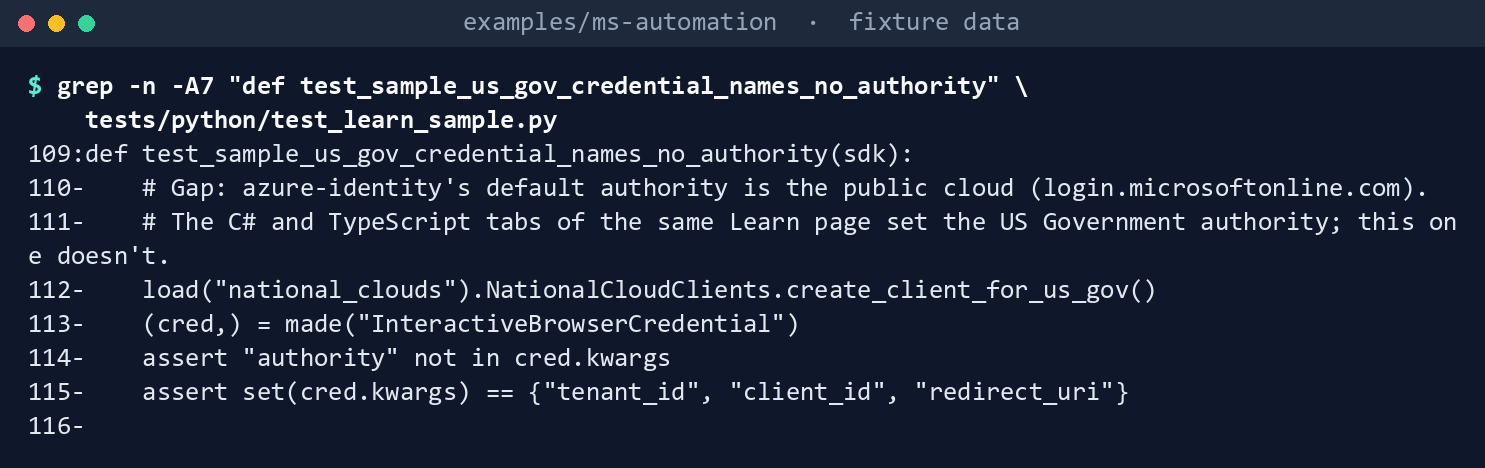
What the terminal shows, run on the kit’s fixtures (the same output as text) The snippet’s credential gets
tenant_id,client_idandredirect_uri, and nothing else.Print the endpoints for the target estate:
python -c "import sys; sys.path.insert(0, 'python'); from graphkit import endpoints, scope_for; print(endpoints('gcc')); print(scope_for('gcc', 'arm')); print(scope_for('dod'))"{'login': 'https://login.microsoftonline.com', 'graph': 'https://graph.microsoft.com', 'arm': 'https://management.azure.com', 'ps_env': 'Global', 'azure_env': 'AzureCloud'} https://management.azure.com/.default https://dod-graph.microsoft.us/.default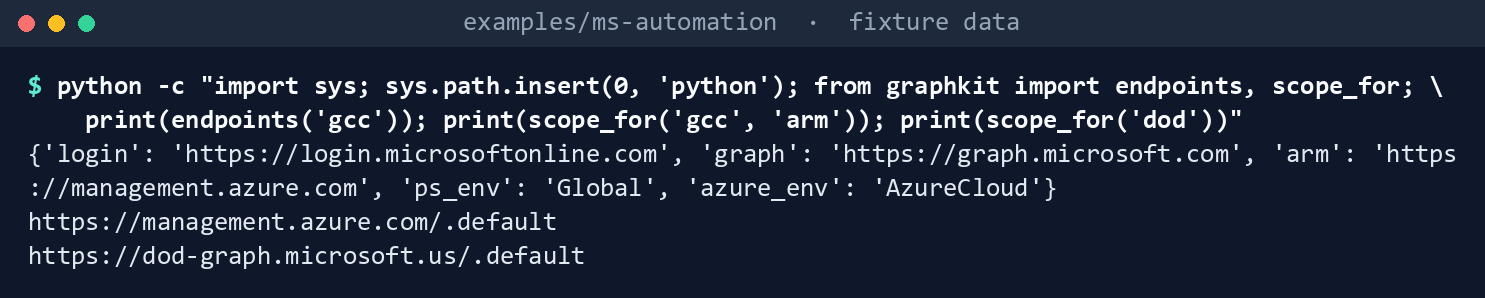
What the terminal shows, run on the kit’s fixtures (the same output as text) No
.ushost for GCC. Now ask forGCCHigh, a name the kit doesn’t know:python -c "import sys; sys.path.insert(0, 'python'); from graphkit import endpoints; print(endpoints('GCCHigh'))"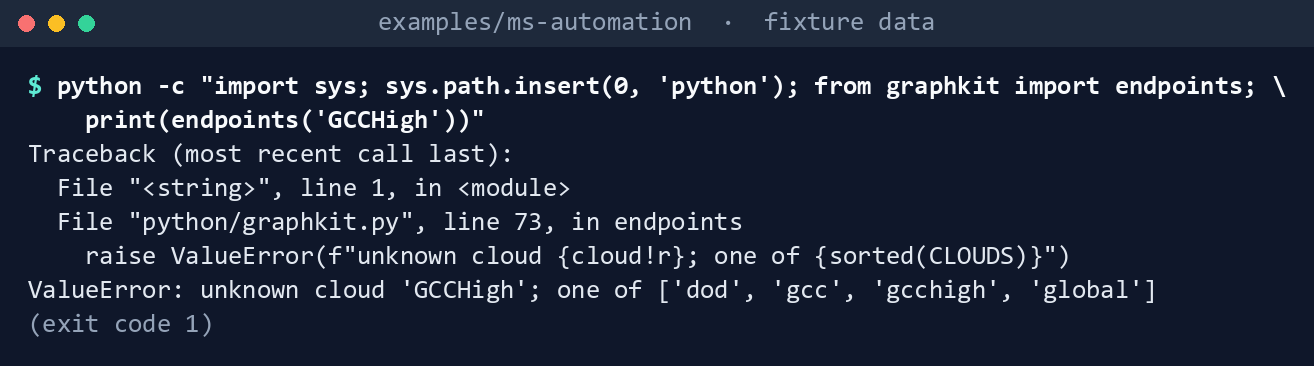
What the terminal shows, run on the kit’s fixtures (the same output as text) It ends
ValueError: unknown cloud 'GCCHigh'.List a task’s permissions from its calls:
python -c "import sys; sys.path.insert(0, 'python'); from graphkit import load_calls, permissions_for; print(permissions_for(load_calls('pim-report')))"
What the terminal shows, run on the kit’s fixtures (the same output as text) ['RoleAssignmentSchedule.Read.Directory', 'RoleEligibilitySchedule.Read.Directory', 'RoleManagement.Read.Directory'], the three in the README’s table.Make a call the task doesn’t declare:
python -c "import sys; sys.path.insert(0, 'python'); from graphkit import GraphClient, load_calls; GraphClient('gcc', lambda s: 't', calls=load_calls('ca-export')).request('GET', '/users')"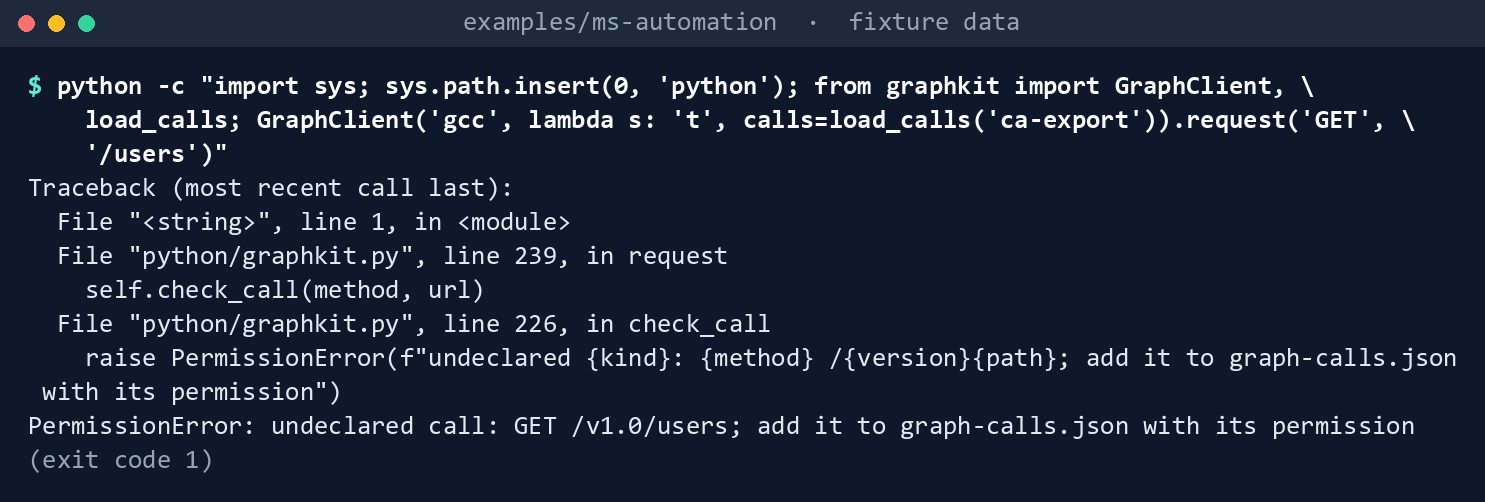
What the terminal shows, run on the kit’s fixtures (the same output as text) It ends
PermissionError: undeclared call: GET /v1.0/users; add it to graph-calls.json with its permission. Nothing was sent.Read beta where the feature isn’t offered:
python -c "import sys; sys.path.insert(0, 'python'); from graphkit import GraphClient, try_beta; print(try_beta(GraphClient('gcchigh', lambda s: 't'), '/deviceManagement/windowsAutopilotDeviceIdentities'))"
What the terminal shows, run on the kit’s fixtures (the same output as text) {'stage': 'beta', 'available': False, 'items': [], 'reason': "autopilot-device-identities isn't offered in gcchigh (graph-calls.json not_in_clouds)"}.The same rules in PowerShell:
Import-Module ./powershell/FmwGraph.psm1
(Get-FmwCloud gcc).Arm
Get-FmwCallPermission -Task pim-report
Assert-FmwGraphCall -Method GET -Uri '/beta/users' -Cloud gcc
Assert-FmwGraphCall -Method GET -Uri 'https://graph.microsoft.com/v1.0/users' -Cloud gcchigh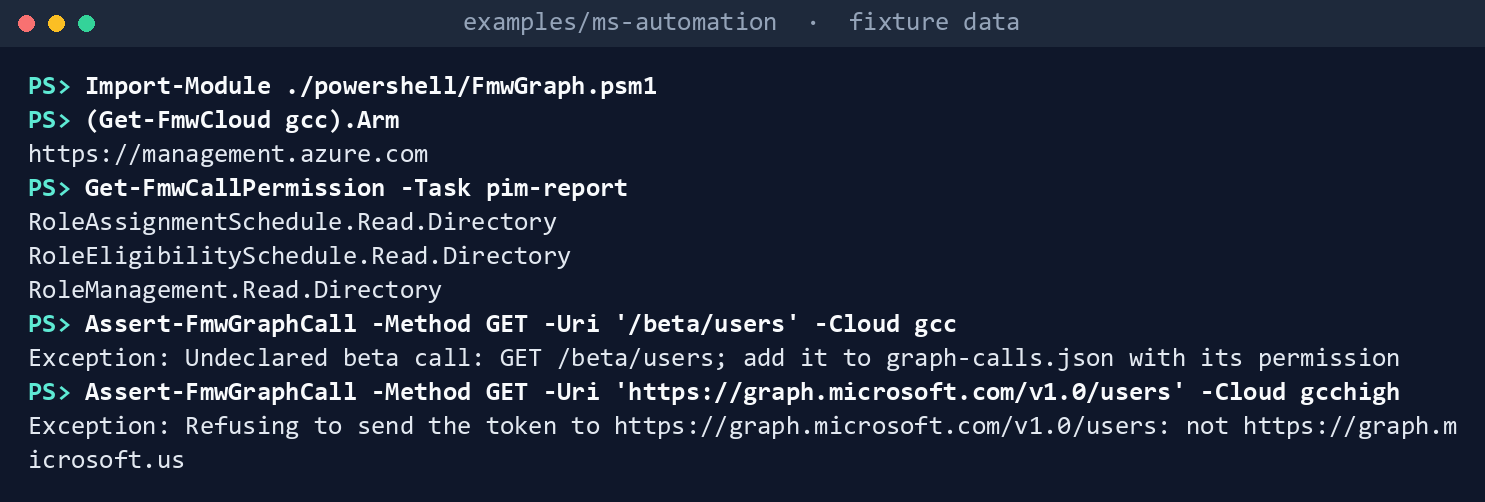
What the terminal shows, run on the kit’s fixtures (the same output as text) https://management.azure.com, the same three permissions, then two errors:Undeclared beta call: GET /beta/users; ...andRefusing to send the token to https://graph.microsoft.com/v1.0/users: not https://graph.microsoft.us.Run the tests:
python -m pytest -q -p no:cacheprovider tests/python
pwsh -NoProfile -Command "Invoke-Pester -Path tests/powershell"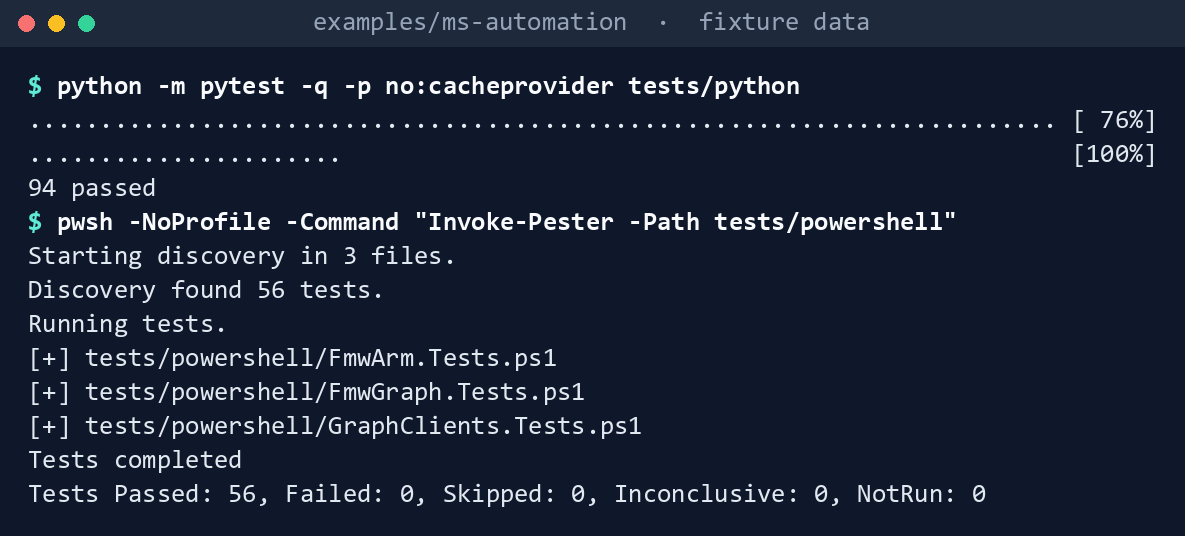
What the terminal shows, run on the kit’s fixtures (the same output as text)
Expected result: 70 Python and 44 Pester tests passing, and each row of the gap table seen with your own eyes.
Lab 2: test tenant
Use a test tenant in the worldwide or GCC cloud, never production, with fictional data. The steps use the Conditional Access export because it needs one permission. Work in examples/ms-automation. You’ll replace: <tenant-id> (the test tenant’s ID), <app-id> (the app registration’s application (client) ID), <thumbprint> (its certificate’s thumbprint, in your certificate store for PowerShell), and app.pem is the PEM file with that certificate and its private key.
Every command in this lab, in order, from examples/ms-automation. Each step below says what it does and what to look for.
In a POSIX shell (Git Bash on Windows):
# Step 3: Run the task
pip install azure-identity
python python/entra_tasks.py --cloud gcc --tenant <tenant-id> --client <app-id> --cert app.pem ca-export --out ca

# Step 4: See the token check work
python python/entra_tasks.py --cloud gcc --tenant <tenant-id> --client <app-id> --cert app.pem app-credentials

# Step 4: See the token check work
python python/entra_tasks.py --cloud gcc --tenant <tenant-id> --client <app-id> --cert app.pem ca-export --out ca

# Step 5: See the wrong cloud fail closed
python python/entra_tasks.py --cloud gcchigh --tenant <tenant-id> --client <app-id> --cert app.pem ca-export --out ca
In PowerShell 7:
# Step 6: Optional: PowerShell
Import-Module ./powershell/FmwGraph.psm1
Connect-FmwGraph -Cloud gcc -TenantId <tenant-id> -ClientId <app-id> -CertificateThumbprint <thumbprint>
Invoke-FmwEntraTask -Task ca-export -OutDirectory ca-ps
Compare-Object (Get-ChildItem ca -Name) (Get-ChildItem ca-ps -Name)
In a POSIX shell (Git Bash on Windows):
# Step 7: Back it out
rm -rf ca ca-ps
Register the app in the tenant’s own cloud. An app for a GCC tenant is registered in the worldwide Microsoft Entra admin center; an app for GCC High or DoD must be registered in the national cloud’s.50 Add a certificate credential. Don’t add a secret.
Grant one permission. Add the application permission
Policy.Read.All, the oneca-exportdeclares, and grant admin consent. Nothing else.Run the task. Install
azure-identityfirst:pip install azure-identity python python/entra_tasks.py --cloud gcc --tenant <tenant-id> --client <app-id> --cert app.pem ca-export --out caExpect no warning, one JSON file per policy in
ca, and a summary on screen.See the token check work. First run
app-credentialswith onlyPolicy.Read.Allgranted:python python/entra_tasks.py --cloud gcc --tenant <tenant-id> --client <app-id> --cert app.pem app-credentialsIt stops with
token lacks Application.Read.Allbefore any Graph call. Then addApplication.Read.Allto the app, grant consent, and run the export again:python python/entra_tasks.py --cloud gcc --tenant <tenant-id> --client <app-id> --cert app.pem ca-export --out caThe run continues and prints
warning: token also holds Application.Read.All, which this task doesn't use.See the wrong cloud fail closed. Run the export with
--cloud gcchigh:python python/entra_tasks.py --cloud gcchigh --tenant <tenant-id> --client <app-id> --cert app.pem ca-export --out caSign-in goes to
login.microsoftonline.us, the Azure Government authority, which doesn’t hold a GCC tenant,51 and the run stops before anything reaches Graph. Learn says tokens aren’t interchangeable between clouds.52Optional: PowerShell. Run the export into
ca-ps, then compare the two folders:Import-Module ./powershell/FmwGraph.psm1 Connect-FmwGraph -Cloud gcc -TenantId <tenant-id> -ClientId <app-id> -CertificateThumbprint <thumbprint> Invoke-FmwEntraTask -Task ca-export -OutDirectory ca-ps Compare-Object (Get-ChildItem ca -Name) (Get-ChildItem ca-ps -Name)Back it out. Remove
Application.Read.AllandPolicy.Read.Allfrom the app, delete the app registration and its certificate, and delete thecaandca-psfolders. They hold the tenant’s policies:rm -rf ca ca-ps
Verified facts
| Item | Value | US Government clouds | Stage | Source |
|---|---|---|---|---|
| Token authority | login.microsoftonline.com (worldwide and GCC); login.microsoftonline.us (Azure US Government) |
Separate authority for GCC High and DoD | — | 53 |
| Graph host | graph.microsoft.com (worldwide and Microsoft 365 GCC); graph.microsoft.us (L4, GCC High); dod-graph.microsoft.us (L5, DoD) |
Tokens aren’t interchangeable between clouds | — | 54 |
| GCC’s directory | Office 365 GCC is paired with Microsoft Entra ID in Azure; GCC High and DoD with Microsoft Entra ID in Azure Government | — | — | 55 56 |
| Azure Resource Manager | management.azure.com (Azure public); management.usgovcloudapi.net (Azure Government) |
Azure Government host for GCC High and DoD | — | 57 58 |
| Graph PowerShell environments | Global, USGov, USGovDoD; Connect-MgGraph defaults to the worldwide cloud |
— | — | 59 |
| Azure PowerShell environments | AzureCloud (default), AzureUSGovernment |
— | — | 60 |
| Scope in a national cloud | A scope naming the Graph host uses the cloud’s host; app-only uses the cloud’s .default, such as https://graph.microsoft.us/.default |
— | — | 61 |
| One resource per token request | All scopes in a client-credentials request must be for one resource | — | — | 62 |
azure-identity authority |
Defaults to the public cloud; managed identities ignore it | — | — | 63 64 |
| Application permissions in a token | The roles claim |
— | — | 65 |
| Paging | Follow @odata.nextLink; headers aren’t carried to later pages by default; don’t use a page token from a retry |
— | — | 66 |
| Throttling | 429 with Retry-After; back off exponentially when it’s missing; SDKs don’t retry inside a batch |
— | — | 67 |
No Retry-After |
Conditional access and identity protection resources | — | — | 68 |
x-ms-throttle-priority |
Low, Normal (default), High; low is throttled first; the limits don’t change |
— | — | 69 |
| JSON batch | At most 20 requests | — | — | 70 |
| Beta | Subject to change; not supported in production applications | — | Beta | 71 |
| Autopilot device identities | GET /deviceManagement/windowsAutopilotDeviceIdentities; DeviceManagementServiceConfig.Read.All |
API table lists L4 and L5; Intune lists Windows Autopilot as not available in GCC High and DoD | v1.0; assignment status in beta only | 72 73 |
Two places where Learn’s pages differ, recorded so a later edit doesn’t loosen the code:
- Autopilot in the US Government clouds. The API page’s national cloud table shows the Autopilot device identity endpoint in L4 and L5;74 Intune’s government service description lists Windows Autopilot as not available in GCC High and DoD.75 The call list follows the stricter.
- The Python snippet and the other languages. On the same national cloud page, the C#, Go, Java and TypeScript examples set the US Government authority; the Python example doesn’t.76 The code follows the other languages, and
azure-identity’s own reference, which says the default is the public cloud.77
Federal requirements and evidence
A Graph client’s evidence is about access: which identity, which permissions, which cloud. Each row names the file or command that proves it. Controls are from the Moderate baseline78; indicators are from FedRAMP’s list79. Which output supports which control is the program’s reading (design guidance).
| What the output proves | Requirement it supports | KSI it aligns to | Who keeps it |
|---|---|---|---|
Microsoft’s pinned snippets run unchanged, and the US Government Python credential names no authority (Lab 1, step 1: test_learn_sample.py) |
SA-11; SR-3: the sample is pinned, hashed and watched | KSI-SCR-MIT; KSI-CMT-VTD | The repository: snapshot.json and the test results |
Each cloud has one row of hosts, and an unknown name stops the run (step 2: endpoints('gcc'), ValueError: unknown cloud 'GCCHigh') |
CM-6 (Configuration Settings); IA-5: the token, an authenticator, goes only to its own cloud’s hosts | KSI-IAM-SNU | The repository: tests/fixtures/clouds.json |
A task’s permissions are the union of its declared calls (step 3: permissions_for(load_calls('pim-report')); step 6: Get-FmwCallPermission) |
AC-6 | KSI-IAM-ELP | The repository: graph-calls.json |
A call the task didn’t declare is refused before it is sent (step 4: PermissionError; step 6: Assert-FmwGraphCall) |
AC-6; AC-3 (Access Enforcement) | KSI-IAM-ELP | The test results |
A beta call where the feature isn’t offered reports “not evaluated” with its stage, never a clean result (step 5: try_beta) |
CA-7 (Continuous Monitoring): a result says what wasn’t read | KSI-MLA-EVC, Evaluating Configurations | Each task’s output |
| Both clients pass the rules (step 7: 70 pytest and 44 Pester tests) | SA-11 | KSI-CMT-VTD | The repository’s test results |
The app is registered in its own cloud with a certificate and one permission (Lab 2, steps 1 and 2: Policy.Read.All) |
AC-6; IA-5 | KSI-IAM-ELP; KSI-IAM-SNU | The app registration and its consent record in the Entra audit log |
The Conditional Access configuration is read, one file per policy (Lab 2, step 3: ca/<policy-id>.json, ca/named-locations.json) |
CM-2 (Baseline Configuration) and CM-6; BOD 25-01, whose required Microsoft Entra ID configurations are assessed against these policies80 (Book 02, Appendix A) | KSI-MLA-EVC; KSI-SVC-ACM, Automating Configuration Management | The evidence store; the lab’s local copy is deleted |
A missing permission stops the run, and an unused one is a warning (Lab 2, step 4: token lacks Application.Read.All, then warning: token also holds ...) |
AC-6 | KSI-IAM-ELP | The run log |
A run for the wrong cloud stops before anything reaches Graph (Lab 2, step 5: --cloud gcchigh) |
CM-6; IA-5 | KSI-IAM-SNU | The run log |
The PowerShell client gives the same files (Lab 2, step 6: ca-ps, Compare-Object) |
SA-11 | KSI-CMT-VTD | The test record |
| The test identity and its permissions are removed (Lab 2, step 7) | AC-2: accounts, including application identities, are removed when no longer needed | KSI-IAM-SNU | The Entra audit log |
| Microsoft Graph and Azure Resource Manager run on cloud services with FedRAMP Marketplace listings81 | SA-9 (External System Services); the agency confirms each service it uses is inside the listing’s scope (design guidance) | None: the provider reports against the indicators for its own offering | The system security plan’s list of external services |
Key Security Indicators are FedRAMP 20x indicators for cloud service providers. The agency authorizes its own system: it lines this evidence up with what Microsoft report against the indicators, and doesn’t report KSIs itself (Book 00, Appendix B). The control-by-control mapping is in Book 13’s Appendix A and Book 14’s Appendix A; the indicator pairings follow Book 04, Chapter 10 and Book 05, Chapter 10.
Dangers
| Danger | What happens | The guard |
|---|---|---|
Treating GCC as a .us cloud |
Sign-in fails, or someone “fixes” it by hard-coding hosts | gcc resolves to the worldwide endpoints; a test pins it |
| A Python credential with no authority in GCC High or DoD | It signs in to the public cloud | azure_identity_provider sets the authority for every cloud; tested |
| An unknown cloud name with a default | A GCC High run talks to the worldwide service | Unknown names raise, in both languages |
| A token sent to the wrong host | A nextLink or a typo hands the token to another host or cloud |
Every URL, every page, is checked against the cloud’s Graph host |
| One token for Graph and Resource Manager | The second call fails, or code asks for broad scopes to make it work | One .default scope per resource; scope_for(cloud, "arm") |
| An identity with more than the task needs | A compromised job can do more than read | graph-calls.json per task; preflight warns on extra roles and stops on missing ones |
| A new call added without its permission | The README and the app registration drift from the code | A task makes only declared calls; the union test fails the build |
| Headers dropped after page one | An advanced query fails or changes on page two | Same headers on every page; tested |
| Retrying too fast, or forever | Throttling gets longer; the job never ends | Retry-After or backoff, capped at 60 seconds, with a retry limit |
| A beta change breaks the run | A nightly evidence job fails on a property rename | Declared beta calls only; try_beta reports “not evaluated” with the stage |
| An API that answers where the feature isn’t offered | A check reports an empty, “clean” result in GCC High | not_in_clouds in the call list; no call, “not evaluated” |
Checklist
Microsoft Learn, “Microsoft Graph national cloud deployments,” https://learn.microsoft.com/graph/deployments (accessed Oct 30, 2026).↩︎
Microsoft Learn, “Cloud feature availability for US Government customers,” Microsoft 365 integration, https://learn.microsoft.com/azure/security/fundamentals/feature-availability (accessed Oct 30, 2026).↩︎
Microsoft Learn, “Planning identity for Azure Government applications,” frequently asked questions, https://learn.microsoft.com/azure/azure-government/documentation-government-plan-identity (accessed Oct 30, 2026).↩︎
Microsoft Learn, “Use MSAL in a national cloud environment,” choose the appropriate identities (Microsoft Entra Public for Microsoft 365 GCC, Microsoft Entra Government for GCC High and DoD) and the example authority
https://login.microsoftonline.us, https://learn.microsoft.com/entra/identity-platform/msal-national-cloud (accessed Nov 9, 2026).↩︎Microsoft Learn, “Use MSAL in a national cloud environment,” choose the appropriate identities (Microsoft Entra Public for Microsoft 365 GCC, Microsoft Entra Government for GCC High and DoD) and the example authority
https://login.microsoftonline.us, https://learn.microsoft.com/entra/identity-platform/msal-national-cloud (accessed Nov 9, 2026).↩︎Microsoft Learn, “Microsoft Graph national cloud deployments,” https://learn.microsoft.com/graph/deployments (accessed Oct 30, 2026).↩︎
Microsoft Learn, “Cloud feature availability for US Government customers,” Microsoft 365 integration, https://learn.microsoft.com/azure/security/fundamentals/feature-availability (accessed Oct 30, 2026).↩︎
Microsoft Learn, “Microsoft Graph national cloud deployments,” https://learn.microsoft.com/graph/deployments (accessed Oct 30, 2026).↩︎
Microsoft Learn, “Microsoft Graph national cloud deployments,” https://learn.microsoft.com/graph/deployments (accessed Oct 30, 2026).↩︎
Microsoft Learn, “Get-MgEnvironment,” https://learn.microsoft.com/powershell/module/microsoft.graph.authentication/get-mgenvironment?view=graph-powershell-1.0, and “Authentication module cmdlets in Microsoft Graph PowerShell,” https://learn.microsoft.com/powershell/microsoftgraph/authentication-commands?view=graph-powershell-1.0 (accessed Oct 30, 2026).↩︎
Microsoft Learn, “Compare Azure Government and global Azure,” guidance for developers, https://learn.microsoft.com/azure/azure-government/compare-azure-government-global-azure (accessed Oct 30, 2026).↩︎
Microsoft Learn, “Azure control plane and data plane,” https://learn.microsoft.com/azure/azure-resource-manager/management/control-plane-and-data-plane (accessed Oct 30, 2026).↩︎
Microsoft Learn, “Quickstart: Connect to Azure Government with PowerShell,” https://learn.microsoft.com/azure/azure-government/documentation-government-get-started-connect-with-ps, and “Manage Azure Redis with Azure PowerShell,” how to connect to other clouds (
AzureCloudis the default), https://learn.microsoft.com/azure/azure-cache-for-redis/how-to-manage-redis-cache-powershell (accessed Oct 30, 2026).↩︎Microsoft Learn, “Compare Azure Government and global Azure,” guidance for developers, https://learn.microsoft.com/azure/azure-government/compare-azure-government-global-azure (accessed Oct 30, 2026).↩︎
Microsoft Learn, “Azure control plane and data plane,” https://learn.microsoft.com/azure/azure-resource-manager/management/control-plane-and-data-plane (accessed Oct 30, 2026).↩︎
Microsoft Learn, “Quickstart: Connect to Azure Government with PowerShell,” https://learn.microsoft.com/azure/azure-government/documentation-government-get-started-connect-with-ps, and “Manage Azure Redis with Azure PowerShell,” how to connect to other clouds (
AzureCloudis the default), https://learn.microsoft.com/azure/azure-cache-for-redis/how-to-manage-redis-cache-powershell (accessed Oct 30, 2026).↩︎Microsoft Learn, “Microsoft identity platform and the OAuth 2.0 client credentials flow,” get a token, https://learn.microsoft.com/entra/identity-platform/v2-oauth2-client-creds-grant-flow (accessed Oct 30, 2026).↩︎
Microsoft Learn, “Planning identity for Azure Government applications,” frequently asked questions, https://learn.microsoft.com/azure/azure-government/documentation-government-plan-identity (accessed Oct 30, 2026).↩︎
Microsoft Learn, “Access national cloud deployments with the Microsoft Graph SDKs,” https://learn.microsoft.com/graph/sdks/national-clouds (accessed Oct 30, 2026).↩︎
Microsoft Learn, “Access national cloud deployments with the Microsoft Graph SDKs,” https://learn.microsoft.com/graph/sdks/national-clouds (accessed Oct 30, 2026).↩︎
Microsoft Learn, “Access national cloud deployments with the Microsoft Graph SDKs,” https://learn.microsoft.com/graph/sdks/national-clouds (accessed Oct 30, 2026).↩︎
Microsoft Learn, “Get-MgEnvironment,” https://learn.microsoft.com/powershell/module/microsoft.graph.authentication/get-mgenvironment?view=graph-powershell-1.0, and “Authentication module cmdlets in Microsoft Graph PowerShell,” https://learn.microsoft.com/powershell/microsoftgraph/authentication-commands?view=graph-powershell-1.0 (accessed Oct 30, 2026).↩︎
Microsoft Learn, “Page through a collection using the Microsoft Graph SDKs,” https://learn.microsoft.com/graph/sdks/paging (accessed Oct 30, 2026).↩︎
Microsoft Learn, “Microsoft Graph throttling guidance,” https://learn.microsoft.com/graph/throttling (accessed Oct 30, 2026).↩︎
Microsoft, microsoftgraph/msgraph-snippets-python,
src/snippets/national_clouds.pyandsrc/snippets/create_clients.pyat commit3ef43818c946ef595e8d90fa6ec63edec1fb3628(October 20, 2026), MIT License, https://github.com/microsoftgraph/msgraph-snippets-python/tree/3ef43818c946ef595e8d90fa6ec63edec1fb3628/src/snippets (accessed Oct 30, 2026); rendered on Learn’s national cloud page and on “Choose a Microsoft Graph authentication provider,” https://learn.microsoft.com/graph/sdks/choose-authentication-providers; pinned copy inexamples/third_party/msgraph-snippets-python.↩︎Microsoft Learn, “Access national cloud deployments with the Microsoft Graph SDKs,” https://learn.microsoft.com/graph/sdks/national-clouds (accessed Oct 30, 2026).↩︎
Microsoft Learn, “InteractiveBrowserCredential Class” (azure-identity for Python), keyword-only parameter
authority, https://learn.microsoft.com/python/api/azure-identity/azure.identity.interactivebrowsercredential?view=azure-python (accessed Oct 30, 2026).↩︎Microsoft Learn, “DefaultAzureCredential Class” (azure-identity for Python), keyword-only parameter
authority, https://learn.microsoft.com/python/api/azure-identity/azure.identity.defaultazurecredential?view=azure-python (accessed Oct 30, 2026).↩︎Microsoft Learn, “Overview of Microsoft Graph permissions,” best practices for using Microsoft Graph permissions, https://learn.microsoft.com/graph/permissions-overview (accessed Oct 30, 2026).↩︎
Microsoft Learn, “Enhance security with the principle of least privilege,” overprivileged applications, https://learn.microsoft.com/entra/identity-platform/secure-least-privileged-access (accessed Oct 30, 2026).↩︎
Microsoft Learn, “Page through a collection using the Microsoft Graph SDKs,” https://learn.microsoft.com/graph/sdks/paging (accessed Oct 30, 2026).↩︎
Microsoft Learn, “Microsoft Graph throttling guidance,” https://learn.microsoft.com/graph/throttling (accessed Oct 30, 2026).↩︎
Microsoft Learn, “Versioning, support, and breaking change policies for Microsoft Graph,” https://learn.microsoft.com/graph/versioning-and-support (accessed Oct 30, 2026).↩︎
Microsoft Learn, “Access token claims reference,” payload claims, https://learn.microsoft.com/entra/identity-platform/access-token-claims-reference (accessed Oct 30, 2026).↩︎
Microsoft Learn, “Enhance security with the principle of least privilege,” overprivileged applications, https://learn.microsoft.com/entra/identity-platform/secure-least-privileged-access (accessed Oct 30, 2026).↩︎
Microsoft Learn, “Use app-only authentication with the Microsoft Graph PowerShell SDK,” step 2, https://learn.microsoft.com/powershell/microsoftgraph/app-only (accessed Oct 30, 2026): an app registered with two application permissions (
Type="Role") showsScopes : {Group.Read.All, User.Read.All}andAuthType : AppOnly.↩︎Microsoft, microsoftgraph/msgraph-sdk-powershell,
src/Authentication/Authentication.Core/Utilities/JwtHelpers.cs(authContext.Scopes = jwtPayload?.Scp?.Split(' ') ?? jwtPayload?.Roles), last changed in commit0fceedbba17c1dec4d9bb292910a5f286cd7454e(October 30, 2023), read withgh api(accessed Oct 30, 2026). Not a Learn page: it explains the Learn output above for every sign-in type, managed identity included.↩︎Microsoft Learn, “Page through a collection using the Microsoft Graph SDKs,” https://learn.microsoft.com/graph/sdks/paging (accessed Oct 30, 2026).↩︎
Microsoft Learn, “Page through a collection using the Microsoft Graph SDKs,” https://learn.microsoft.com/graph/sdks/paging (accessed Oct 30, 2026).↩︎
Microsoft Learn, “Microsoft Graph throttling guidance,” https://learn.microsoft.com/graph/throttling (accessed Oct 30, 2026).↩︎
Microsoft Learn, “The Retry-After header: how long to wait before you retry,” https://learn.microsoft.com/microsoft-cloud/dev/dev-proxy/concepts/retry-after-header (accessed Oct 30, 2026).↩︎
Microsoft Learn, “Microsoft Graph throttling guidance,” https://learn.microsoft.com/graph/throttling (accessed Oct 30, 2026).↩︎
Microsoft Learn, “Microsoft Graph service-specific throttling limits,” identity and access service limits, https://learn.microsoft.com/graph/throttling-limits (accessed Oct 30, 2026).↩︎
Microsoft Learn, “Microsoft Graph service-specific throttling limits,” identity and access service limits, https://learn.microsoft.com/graph/throttling-limits (accessed Oct 30, 2026).↩︎
Microsoft Learn, “Combine multiple HTTP requests using JSON batching,” batch size limitations, https://learn.microsoft.com/graph/json-batching (accessed Oct 30, 2026).↩︎
Microsoft Learn, “Microsoft Graph throttling guidance,” https://learn.microsoft.com/graph/throttling (accessed Oct 30, 2026).↩︎
Microsoft Learn, “Versioning, support, and breaking change policies for Microsoft Graph,” https://learn.microsoft.com/graph/versioning-and-support (accessed Oct 30, 2026).↩︎
Microsoft Learn, “List windowsAutopilotDeviceIdentities,” https://learn.microsoft.com/graph/api/intune-enrollment-windowsautopilotdeviceidentity-list?view=graph-rest-1.0 (accessed Oct 30, 2026).↩︎
Microsoft Learn, “Microsoft Intune for US Government GCC High and DoD service description,” Intune features not available in GCC High and DoD, https://learn.microsoft.com/intune/fundamentals/government-service (accessed Oct 30, 2026).↩︎
Microsoft Learn, “Access national cloud deployments with the Microsoft Graph SDKs,” https://learn.microsoft.com/graph/sdks/national-clouds (accessed Oct 30, 2026).↩︎
Microsoft Learn, “Planning identity for Azure Government applications,” frequently asked questions, https://learn.microsoft.com/azure/azure-government/documentation-government-plan-identity (accessed Oct 30, 2026).↩︎
Microsoft Learn, “Microsoft Graph national cloud deployments,” https://learn.microsoft.com/graph/deployments (accessed Oct 30, 2026).↩︎
Microsoft Learn, “Microsoft Graph national cloud deployments,” https://learn.microsoft.com/graph/deployments (accessed Oct 30, 2026).↩︎
Microsoft Learn, “Microsoft Graph national cloud deployments,” https://learn.microsoft.com/graph/deployments (accessed Oct 30, 2026).↩︎
Microsoft Learn, “Cloud feature availability for US Government customers,” Microsoft 365 integration, https://learn.microsoft.com/azure/security/fundamentals/feature-availability (accessed Oct 30, 2026).↩︎
Microsoft Learn, “Planning identity for Azure Government applications,” frequently asked questions, https://learn.microsoft.com/azure/azure-government/documentation-government-plan-identity (accessed Oct 30, 2026).↩︎
Microsoft Learn, “Compare Azure Government and global Azure,” guidance for developers, https://learn.microsoft.com/azure/azure-government/compare-azure-government-global-azure (accessed Oct 30, 2026).↩︎
Microsoft Learn, “Azure control plane and data plane,” https://learn.microsoft.com/azure/azure-resource-manager/management/control-plane-and-data-plane (accessed Oct 30, 2026).↩︎
Microsoft Learn, “Get-MgEnvironment,” https://learn.microsoft.com/powershell/module/microsoft.graph.authentication/get-mgenvironment?view=graph-powershell-1.0, and “Authentication module cmdlets in Microsoft Graph PowerShell,” https://learn.microsoft.com/powershell/microsoftgraph/authentication-commands?view=graph-powershell-1.0 (accessed Oct 30, 2026).↩︎
Microsoft Learn, “Quickstart: Connect to Azure Government with PowerShell,” https://learn.microsoft.com/azure/azure-government/documentation-government-get-started-connect-with-ps, and “Manage Azure Redis with Azure PowerShell,” how to connect to other clouds (
AzureCloudis the default), https://learn.microsoft.com/azure/azure-cache-for-redis/how-to-manage-redis-cache-powershell (accessed Oct 30, 2026).↩︎Microsoft Learn, “Access national cloud deployments with the Microsoft Graph SDKs,” https://learn.microsoft.com/graph/sdks/national-clouds (accessed Oct 30, 2026).↩︎
Microsoft Learn, “Microsoft identity platform and the OAuth 2.0 client credentials flow,” get a token, https://learn.microsoft.com/entra/identity-platform/v2-oauth2-client-creds-grant-flow (accessed Oct 30, 2026).↩︎
Microsoft Learn, “InteractiveBrowserCredential Class” (azure-identity for Python), keyword-only parameter
authority, https://learn.microsoft.com/python/api/azure-identity/azure.identity.interactivebrowsercredential?view=azure-python (accessed Oct 30, 2026).↩︎Microsoft Learn, “DefaultAzureCredential Class” (azure-identity for Python), keyword-only parameter
authority, https://learn.microsoft.com/python/api/azure-identity/azure.identity.defaultazurecredential?view=azure-python (accessed Oct 30, 2026).↩︎Microsoft Learn, “Access token claims reference,” payload claims, https://learn.microsoft.com/entra/identity-platform/access-token-claims-reference (accessed Oct 30, 2026).↩︎
Microsoft Learn, “Page through a collection using the Microsoft Graph SDKs,” https://learn.microsoft.com/graph/sdks/paging (accessed Oct 30, 2026).↩︎
Microsoft Learn, “Microsoft Graph throttling guidance,” https://learn.microsoft.com/graph/throttling (accessed Oct 30, 2026).↩︎
Microsoft Learn, “Microsoft Graph service-specific throttling limits,” identity and access service limits, https://learn.microsoft.com/graph/throttling-limits (accessed Oct 30, 2026).↩︎
Microsoft Learn, “Microsoft Graph service-specific throttling limits,” identity and access service limits, https://learn.microsoft.com/graph/throttling-limits (accessed Oct 30, 2026).↩︎
Microsoft Learn, “Combine multiple HTTP requests using JSON batching,” batch size limitations, https://learn.microsoft.com/graph/json-batching (accessed Oct 30, 2026).↩︎
Microsoft Learn, “Versioning, support, and breaking change policies for Microsoft Graph,” https://learn.microsoft.com/graph/versioning-and-support (accessed Oct 30, 2026).↩︎
Microsoft Learn, “List windowsAutopilotDeviceIdentities,” https://learn.microsoft.com/graph/api/intune-enrollment-windowsautopilotdeviceidentity-list?view=graph-rest-1.0 (accessed Oct 30, 2026).↩︎
Microsoft Learn, “Microsoft Intune for US Government GCC High and DoD service description,” Intune features not available in GCC High and DoD, https://learn.microsoft.com/intune/fundamentals/government-service (accessed Oct 30, 2026).↩︎
Microsoft Learn, “List windowsAutopilotDeviceIdentities,” https://learn.microsoft.com/graph/api/intune-enrollment-windowsautopilotdeviceidentity-list?view=graph-rest-1.0 (accessed Oct 30, 2026).↩︎
Microsoft Learn, “Microsoft Intune for US Government GCC High and DoD service description,” Intune features not available in GCC High and DoD, https://learn.microsoft.com/intune/fundamentals/government-service (accessed Oct 30, 2026).↩︎
Microsoft Learn, “Access national cloud deployments with the Microsoft Graph SDKs,” https://learn.microsoft.com/graph/sdks/national-clouds (accessed Oct 30, 2026).↩︎
Microsoft Learn, “InteractiveBrowserCredential Class” (azure-identity for Python), keyword-only parameter
authority, https://learn.microsoft.com/python/api/azure-identity/azure.identity.interactivebrowsercredential?view=azure-python (accessed Oct 30, 2026).↩︎National Institute of Standards and Technology, SP 800-53B Moderate baseline, release 5.2.0 OSCAL profile, last modified October 22, 2026 (includes AC-2, AC-3, AC-6, CA-7, CM-2, CM-6, IA-5, SA-9, SA-11 and SR-3), https://github.com/usnistgov/oscal-content/blob/main/nist.gov/SP800-53/rev5/json/NIST_SP-800-53_rev5_MODERATE-baseline_profile.json (accessed Nov 2, 2026).↩︎
FedRAMP, “Key Security Indicators,” FedRAMP Consolidated Rules for 2026 (indicators KSI-CMT-VTD, KSI-IAM-ELP, KSI-IAM-SNU, KSI-MLA-EVC, KSI-SCR-MIT and KSI-SVC-ACM; control mappings updated October 13, 2026), https://www.fedramp.gov/2026/reference/key-security-indicators/ (accessed Nov 2, 2026).↩︎
Cybersecurity and Infrastructure Security Agency, “BOD 25-01: Implementing Secure Practices for Cloud Services Required Configurations,” https://www.cisa.gov/resources-tools/services/bod-25-01-implementing-secure-practices-cloud-services-required-configurations (accessed Oct 21 and Oct 26, 2026).↩︎
FedRAMP Marketplace product data, https://www.fedramp.gov/marketplace/products.json,
last_change2026-11-01T05:02:56Z (accessed Nov 2, 2026): MSO365MT, Microsoft 365 Government Community Cloud & Supporting Services, FedRAMP Certified, Class C, Moderate; FR1824057433, Microsoft 365 Government Community Cloud-High, FedRAMP Certified, Class D, High; F1209051525, Azure Commercial Cloud, FedRAMP Certified, Class D, High; F1603087869, Azure Government (includes Dynamics 365), FedRAMP Certified, Class D, High.↩︎