Federal Modernization Workbook · Book 15 · Appendix
Appendix A — Help Desk Task Reference
One row per task: who may do it, over whom, on whose approval, after which check, and what record it leaves.
The reference behind Chapter 04: every identity task the help desk performs or escalates, with the least-privileged role Microsoft documents for it, the scope the program assigns, the approval, the verification required before and after, and the evidence produced. Then the escalation matrix, OneDrive triage, the service levels the program starts from, the conditions a supervisor must report, and read-only scripts for the pre-checks.
How to read the tables
| Column | Meaning |
|---|---|
| Least-privileged role | The narrowest built-in or custom role that can do the task, from Microsoft’s documentation.1 “Not help desk” means the program routes the task elsewhere even if a help desk role could technically do it |
| Scope | Where the program assigns the role: an administrative unit (AU), one application, or the tenant |
| Approval | Who must approve in the ticket before the technician activates a role. All approvals are the program’s design |
| Verify before | What the technician confirms before acting. “Target check” means the user holds no admin role, isn’t a member or owner of a role-assignable group, and isn’t in a restricted management AU (Chapter 04) |
| Evidence | The audit activity Microsoft logs for the change,2 plus the ticket record. Every activation also logs “Add member to role completed (PIM activation)”3 |
Every task needs an assigned ticket. No task is done from an email, a chat message or a phone call alone. Roles are eligible and activated through PIM with the ticket number in the justification (Chapter 04). Requests that fall outside these tables go to the escalation matrix.
Credentials and authentication methods
| Task | Least-privileged role | Scope | Approval | Verify before | Evidence |
|---|---|---|---|---|---|
| Reset a non-admin’s password (cloud-managed account) | Password Administrator; Helpdesk Administrator also can45 | User’s AU | No approver: an A0 task, where the identity verification is the gate (Chapter 03) | Identity re-proofed; target check | “Reset password”; ticket notes the verification method; user notified |
| Reset the password of a synchronized account | With password writeback enabled and a managed domain, Password Administrator or Helpdesk Administrator in the Microsoft Entra admin center, which writes the new password back to AD; never the Microsoft 365 admin center, which doesn’t write back.6 Without writeback, or for a federated user, the reset happens in AD (Chapter 03) | User’s AU, or AD delegation | As above | As above | AD event plus ticket |
| Revoke a non-admin’s sessions | Helpdesk Administrator7 | User’s AU | Supervisor or the requester’s manager (or immediately, on a security incident ticket) | Target check | “Update StsRefreshTokenValidFrom Timestamp”;8 ticket |
| Reset a limited admin’s password | User Administrator9 | Tenant (AU-scoped roles can’t act on admins)10 | Not help desk: identity engineering | Re-proofed; role list confirmed against Microsoft’s table11 | “Reset password” |
| Reset a privileged admin’s password or methods | Privileged Authentication Administrator12 | Tenant | Not help desk: two approvers (Chapter 04) | Re-proofed in person | “Reset password” or method entries; security office informed |
| Delete a lost or broken MFA method | Authentication Administrator13 | User’s AU | Supervisor or the requester’s manager | Re-proofed; target check | “Admin deleted security info”14 |
| Require MFA re-registration | Authentication Administrator15 | User’s AU | Supervisor or the requester’s manager | Re-proofed; target check; sessions revoked first | Method deletion entries;16 ticket |
| Issue a Temporary Access Pass | Authentication Administrator (members only, not self); Privileged Authentication Administrator for admins17 | User’s AU | Supervisor or the requester’s manager | Re-proofed; target check; user in the pass policy’s scope18 | Authentication-method audit entry; ticket records lifetime and one-time setting, never the code |
| Register a method on the user’s behalf (for example a phone number) | Authentication Administrator19 | User’s AU | Supervisor or the requester’s manager | Re-proofed; number verified independently of the caller | “Admin registered security info”20 |
| Restore MFA on all remembered devices | Authentication Administrator21 | User’s AU | Supervisor or the requester’s manager | Target check | Ticket |
| Delete a user’s app passwords | Authentication Policy Administrator; Authentication Administrator also can22 | User’s AU | Supervisor or the requester’s manager | Target check | “Delete application password for user”23 |
| Enable or disable per-user MFA | Authentication Policy Administrator24 | — | Not done: the program doesn’t use per-user MFA; a user without a method gets a Temporary Access Pass | — | — |
| Change authentication methods policy, MFA settings or the Temporary Access Pass policy | Authentication Policy Administrator2526 | Tenant | Not help desk: policy owners in Book 04 | — | Policy audit entries |
Accounts and profiles
| Task | Least-privileged role | Scope | Approval | Verify before | Evidence |
|---|---|---|---|---|---|
| Update a non-admin’s basic profile (not the UPN) | User Administrator27 | User’s AU | Request from the authoritative source (HR-driven change) or the requester’s manager | Attribute isn’t HR-mastered; for synced users, edit in AD instead28 | “Update user”29 |
| Change a non-admin’s UPN | User Administrator or Authentication Administrator, for the users in Microsoft’s table30 | User’s AU | Requester’s manager; HR record matches | User warned that clients must sign in again | “Update user” |
| Enable or disable an account | Authentication or User Administrator, for some users31 | Not help desk outside the lifecycle | HR-driven lifecycle, or two approvers (Chapter 04); security incident disables follow the incident ticket | Target check | “Disable account” or “Enable account”32 |
| Delete or restore a user | User Administrator33 | Not help desk | Lifecycle workflow, or two approvers | Deleted users can be restored for 30 days34 | “Delete user” or “Restore user”35 |
| Create a guest (B2B invitation) | Guest Inviter36 | Tenant | Agency business owner decides; the sponsor is a named role and requests; the application owner is consulted | Sponsor named; for a partner person, the partner is on the IGO list (Book 03, Chapter 15) | Invitation entries; ticket with the approval |
| Reset a guest’s invitation | Helpdesk Administrator37 | Tenant | Sponsor | Guest still needed | Ticket |
| Suspend a partner person | Not help desk: identity engineering executes | Tenant | Agency business owner decides on the sponsor’s or security operations’ request; emergency suspension follows the incident ticket | Partner record names the person and the sponsor | Disable entry; ticket; record of the suspension |
| Terminate a partner person or end the relationship | Not help desk: identity lifecycle | Tenant | Agency business owner decides; the sponsor can’t approve their own request | Partner record and access package expiry checked | Removal entries; ticket; record of the termination |
| Change partner configuration (tenant list, cross-tenant settings, mapping) | Not help desk | Tenant | Not help desk: identity engineering through the change path; IGO owns the partner list | — | Drift findings against the partner record (Book 03, Chapter 15) |
| Assign or remove a license | License Administrator38 | User’s AU | Manager, through the ITSM pipeline | License isn’t group-assigned (change the group instead) | “Change user license”39 |
| Set “on-premises sync enabled” | Hybrid Identity Administrator40 | Tenant | Not help desk: identity engineering | — | “Update user” |
Groups and application access
| Task | Least-privileged role | Scope | Approval | Verify before | Evidence |
|---|---|---|---|---|---|
| Add or remove a member of an access group | Group owner, or Groups Administrator scoped to the group’s AU41; Microsoft’s task list also names User Administrator42 | Group’s AU | Identity governance platform approval (business approver, application owner) | Group isn’t role-assignable, dynamic or governed by an access package | Group membership entries; ticket |
| Assign an approved group to an enterprise app role | Custom role with servicePrincipals/appRoleAssignedTo/update; Microsoft’s built-in alternatives are app owner, Cloud Application Administrator, Application Administrator and User Administrator4344 |
One app, or tenant | Application owner, then the identity governance office as a second approval stage for R1 apps (Book 04, Chapter 06) | Group and app role named exactly in the ticket; group-based assignment needs Entra ID P145 | “Add app role assignment to group”46 |
| Remove a group from an enterprise app (revocation) | Same custom role | One app, or tenant | Finalized access review decision, or identity governance officer direction | Review decision is final, not in progress | “Remove app role assignment from group”47; review ID in the ticket |
| Read an app’s assignments | Custom role with appRoleAssignedTo/read48 |
One app, or tenant | None (read-only, inside a ticket) | — | Ticket |
| Create a security group | Groups Administrator49 | Tenant | Not help desk unless delegated: identity engineering creates groups to the naming standard | — | Group creation entry |
| Change app roles, permissions, credentials or consent | Not help desk (Book 04, Chapter 06) | — | — | — | — |
Hybrid identity
| Task | Least-privileged role | Scope | Approval | Verify before | Evidence |
|---|---|---|---|---|---|
| Check a user’s sync state (sync enabled, last sync time, duplicates) | Read access only; any reader role | Tenant | None | — | Ticket notes |
| Read Entra Connect Health sync errors | Azure role Reader on Connect Health (Owner and Contributor also can)50 | Connect Health resource | None | — | Ticket |
Compare on-premises anchor and cloud onPremisesImmutableId |
Read access in AD and Entra ID | — | None | Script 2 | Script output in the ticket |
| Repair an ImmutableID mismatch or duplicate object | Not help desk. The fix is usually in AD (mS-DS-ConsistencyGuid); a cloud write of onPremisesImmutableId needs Authentication, User or Privileged Authentication Administrator for the target, not Hybrid Identity Administrator5152 |
Identity engineering | Identity engineering lead and identity governance officer | Target isn’t privileged or role-eligible (hard match is blocked for those since July 1, 2026);53 values supplied by the authoritative source | “Update user”; sync export log; ticket |
| Run a delta sync | Identity engineering on the sync server: Start-ADSyncSyncCycle -PolicyType Delta54 |
Sync server | Identity engineering | Change is ready to export | Sync run history |
| Change sync rules, filtering or Connect configuration | Hybrid Identity Administrator, plus server administration55 | Tenant | Change advisory board | — | Change record |
Escalate to identity engineering and stop on any of these: a duplicate object for one on-premises account; an ImmutableID in the ticket that doesn’t match what the script reads; a sync agent in error; tenant-wide password hash sync or pass-through authentication failure; any error during a hybrid procedure; or an account that doesn’t recover after the next sync cycle. The sync scheduler runs every 30 minutes by default,56 so a last-sync time well beyond that suggests a sync problem rather than a user problem.
Diagnostics and notifications
| Task | Least-privileged role | Scope | Approval | Verify before | Evidence |
|---|---|---|---|---|---|
| Read a user’s sign-in and audit logs | Reports Reader57 | Tenant | None, inside an assigned ticket | — | Findings in the ticket; logs stay in the SIEM |
| See which Conditional Access policies applied to a sign-in | Security Reader (reads both logs and policies)58 | Tenant | None, inside an assigned ticket | — | Policy name and result in the ticket |
| Diagnose a Conditional Access block | Read as above; changes are not help desk | — | Security operations, and the identity governance officer for exceptions | Policy and result identified | Escalation in the ticket |
| Triage a Microsoft consent or security notification | None needed to triage; never act from the email | — | Escalate: application owner, then identity governance officer; security operations for risk alerts | Check the audit log for “Consent to application” events59 | Ticket with source, findings, escalation target and time |
| Check a device’s join and compliance state | A reader role in Entra ID, and an Intune role for compliance detail | Tenant | None | — | Ticket |
Microsoft notifications are triaged the same way every time. Consent request notifications go to the application owner and the identity governance officer and are never approved by the help desk. A sign-in risk alert goes to the security operations center with the service desk supervisor informed; the help desk can revoke the user’s sessions on the incident ticket but doesn’t change risk policy. A service health notice is correlated with open tickets and posted as a known issue; who owns each kind of provider notice, and how it becomes a task and closes, is Chapter 14.
Escalation matrix
| Issue | Help desk can handle | Escalate to | Trigger |
|---|---|---|---|
| Admin consent request | Triage only | Application owner, then identity governance officer | Any consent request, from any source |
| Consent already granted with no matching ticket | Document only | Governance officer and security operations, immediately | Any “Consent to application” event without an approved request |
| Enterprise-app group assignment | Yes, with the custom role and an approved ticket | Identity engineering | Assignment doesn’t persist; app or group not found; approval data incomplete |
| ImmutableID or duplicate object | Detect and document | Identity engineering | Any mismatch, duplicate or sync error |
| Credential or method reset | Yes, for non-admins in its AUs | Identity engineering (limited admins); Tier 0 holders (privileged, protected) | Target check fails; reset fails |
| Conditional Access block | Identify and document | Security operations; identity governance officer for exceptions | A policy is the confirmed cause |
| Directory role assignment | No | Identity engineering and identity governance officer | Any request to assign or remove a role |
| App registration or service principal | No | Application owner and identity engineering | Any create, change or delete |
| OneDrive, client-side cause | Yes | End-user device support | Reinstall fails; device policy conflict |
| OneDrive provisioning or storage | Partly | SharePoint Administrator | Pre-provisioning or quota change needed |
| Any grant without an approved ticket | Document only | Governance officer and security operations, immediately | Any consent, role or access grant with no matching ticket |
OneDrive triage
OneDrive problems cross identity, licensing, Conditional Access, device state and the sync client. The table keeps the older design’s triage and corrects the claims Microsoft’s documentation doesn’t support.
| Cause | Help desk can resolve | Notes |
|---|---|---|
| Client signed out or holding an expired token | Yes | Sign out of the sync app and back in |
| Sync broken after a UPN change, password change or tenant migration | Yes | Microsoft documents that OneDrive might be unable to sync after any of these; sign out, remove %localappdata%/Microsoft/OneAuth and %localappdata%/Microsoft/IdentityCache, and sign in again60 |
| Corrupted client state | Yes | Quit OneDrive and run %localappdata%\Microsoft\OneDrive\onedrive.exe /reset, then restart and sign in; a reset triggers a full sync61 |
| Path too long | Yes | The decoded path, including the file name, can’t exceed 400 characters in OneDrive and SharePoint;62 the older design’s 260-character limit and error code are Windows-side, not the service limit |
| No OneDrive or SharePoint license | With License Administrator and department owner approval | Accounts and profiles |
| OneDrive not yet created | Usually no action | OneDrive is created the first time the user browses to it; pre-provisioning needs a SharePoint Administrator with a SharePoint license, and the user must be licensed and allowed to sign in63 |
| Conditional Access block | No | Identify the policy in the sign-in log and escalate |
| Device not joined or not compliant | Partly | Guide re-enrollment where policy allows; otherwise device management |
| Site storage or blocked file types | No | SharePoint Administrator |
| ImmutableID mismatch or duplicate account | No | Hybrid identity |
| MFA prompt loop | Sometimes | Sign out and in first; if a method is broken, the method tasks in Credentials apply |
The older design’s step “trigger OneDrive provisioning in the Microsoft 365 admin center” with a Global Reader role is removed: Global Reader is read-only, and Microsoft documents pre-provisioning through Request-SPOPersonalSite run by a SharePoint Administrator.64
Service levels the program starts from
These are the program’s starting service levels for help desk identity tickets, to be tuned against the agency’s queue data. Application-access requests follow the end-to-end service levels in Book 04, Chapter 06.
| Priority | Examples | Acknowledge | Resolve | Supervisor alerted |
|---|---|---|---|---|
| 1, critical | Security-related or IGO-directed | 15 minutes | 4 hours | At half the resolution window |
| 2, high | Certification revocation, ImmutableID repair | 1 hour | 8 business hours | At 6 hours |
| 3, normal | Enterprise application assignment, MFA reset | 4 hours | 3 business days | On day 2 |
| 4, low | OneDrive sync, provisioning trigger | 8 hours | 5 business days | On day 4 |
Conditions a supervisor reports
The service desk supervisor reports each of these to the identity governance officer within one business day of discovery (program design):
- A privileged activation whose ticket number doesn’t match an assigned ticket.
- A directory change by a help desk account with no approved ticket.
- An attempt to do anything in the “may not” column of Chapter 04’s boundary.
- Any consent grant attributed to a help desk account.
- Any copy or export of log data outside the SIEM.
Read-only pre-check scripts
These scripts are illustrative and haven’t been tested against a production tenant or forest. All of them only read. Review them, run them first in a test tenant, and run them under a reader role inside an assigned ticket. None of them makes the change the ticket asks for; that is done in the admin center or by identity engineering after the approvals in this appendix.
Script 1: target check before any credential action
Checks whether a user holds or is eligible for a directory role, is a member or owner of a role-assignable group, or sits in a restricted management AU. Any hit means the help desk stops and routes the request.
# Illustrative, read-only. Graph scopes are the minimum reads this needs.
Connect-MgGraph -Scopes 'User.Read.All', 'RoleManagement.Read.Directory', 'GroupMember.Read.All', 'AdministrativeUnit.Read.All'

$Upn  = '<user principal name from the ticket>'
$user = Get-MgUser -UserId $Upn -Property Id, UserPrincipalName, OnPremisesSyncEnabled

$findings = @()

# Direct active and eligible role assignments
$active   = Get-MgRoleManagementDirectoryRoleAssignment -Filter "principalId eq '$($user.Id)'" -All
$eligible = Get-MgRoleManagementDirectoryRoleEligibilitySchedule -Filter "principalId eq '$($user.Id)'" -All
if ($active)   { $findings += "Active role assignment(s): $($active.Count)" }
if ($eligible) { $findings += "Eligible role assignment(s): $($eligible.Count)" }

# Membership or ownership of role-assignable groups (they can't be nested)
$memberGroups = Get-MgUserMemberOf -UserId $user.Id -All |
    Where-Object { $_.AdditionalProperties['@odata.type'] -eq '#microsoft.graph.group' }
$ownedGroups  = Get-MgUserOwnedObject -UserId $user.Id -All |
    Where-Object { $_.AdditionalProperties['@odata.type'] -eq '#microsoft.graph.group' }
foreach ($g in @($memberGroups) + @($ownedGroups)) {
    $grp = Get-MgGroup -GroupId $g.Id -Property Id, DisplayName, IsAssignableToRole
    if ($grp.IsAssignableToRole) { $findings += "Role-assignable group: $($grp.DisplayName)" }
}

# Restricted management administrative units (at most 100 per tenant)
$restricted = Get-MgDirectoryAdministrativeUnit -All -Property Id, DisplayName, IsMemberManagementRestricted |
    Where-Object { $_.IsMemberManagementRestricted }
foreach ($au in $restricted) {
    $members = Get-MgDirectoryAdministrativeUnitMember -AdministrativeUnitId $au.Id -All
    if ($members.Id -contains $user.Id) { $findings += "Restricted management AU: $($au.DisplayName)" }
}

if ($findings) {
    'STOP: route to identity engineering or a Tier 0 holder.'
    $findings
} else {
    'Target check passed: no role, no role-assignable group, no restricted AU.'
}
"Synchronized from AD: $([bool]$user.OnPremisesSyncEnabled)"
Role-assignable group membership matters because only Privileged Authentication Administrators and Global Administrators can reset those members,65 and restricted management AUs because only administrators scoped to the unit can change their members.66
Script 2: compare the on-premises anchor with the cloud account
Reads the on-premises source anchor and the cloud onPremisesImmutableId so the ticket carries both values. The default source anchor is the Base64 form of mS-DS-ConsistencyGuid, or objectGUID depending on configuration.67 Confirm which one the agency’s sync configuration uses before reading the result.
# Illustrative, read-only. Run where the ActiveDirectory module is available.
Import-Module ActiveDirectory
Connect-MgGraph -Scopes 'User.Read.All'

$Sam = '<sAMAccountName from the ticket>'
$Upn = '<user principal name from the ticket>'

$ad = Get-ADUser -Identity $Sam -Properties 'mS-DS-ConsistencyGuid', ObjectGUID, UserPrincipalName
$anchorConsistency = if ($ad.'mS-DS-ConsistencyGuid') { [Convert]::ToBase64String($ad.'mS-DS-ConsistencyGuid') } else { $null }
$anchorObjectGuid  = [Convert]::ToBase64String($ad.ObjectGUID.ToByteArray())

$cloud = Get-MgUser -UserId $Upn -Property Id, UserPrincipalName, DisplayName, OnPremisesImmutableId, OnPremisesSyncEnabled, OnPremisesLastSyncDateTime

# Other cloud accounts with the same display name (possible duplicates)
$sameName = Get-MgUser -Filter "displayName eq '$($cloud.DisplayName)'" -Property Id, UserPrincipalName, OnPremisesSyncEnabled -All

[pscustomobject]@{
    AdUpn                   = $ad.UserPrincipalName
    AnchorFromConsistency   = $anchorConsistency
    AnchorFromObjectGuid    = $anchorObjectGuid
    CloudUpn                = $cloud.UserPrincipalName
    CloudImmutableId        = $cloud.OnPremisesImmutableId
    CloudSyncEnabled        = $cloud.OnPremisesSyncEnabled
    CloudLastSync           = $cloud.OnPremisesLastSyncDateTime
    MatchesConsistencyGuid  = ($anchorConsistency -and $anchorConsistency -eq $cloud.OnPremisesImmutableId)
    MatchesObjectGuid       = ($anchorObjectGuid -eq $cloud.OnPremisesImmutableId)
    CloudAccountsSameName   = $sameName.Count
}
A mismatch, or more than one account with the name, goes to identity engineering with this output attached. The help desk doesn’t change either value.
Script 3: a user’s registered authentication methods
Lists method types before a recovery, so the ticket records what was there and the technician can confirm afterward that the lost method is gone.
# Illustrative, read-only.
Connect-MgGraph -Scopes 'UserAuthenticationMethod.Read.All'

$Upn = '<user principal name from the ticket>'
Get-MgUserAuthenticationMethod -UserId $Upn |
    ForEach-Object { [pscustomobject]@{ Id = $_.Id; Type = $_.AdditionalProperties['@odata.type'] } }
Script 4: a user’s recent sign-ins
Shows recent sign-ins with their error codes and Conditional Access result, for OneDrive and access triage. Reading applied policy details also needs Policy.Read.ConditionalAccess.68
# Illustrative, read-only.
Connect-MgGraph -Scopes 'AuditLog.Read.All', 'Policy.Read.ConditionalAccess'

$Upn = '<user principal name from the ticket>'
Get-MgAuditLogSignIn -Filter "userPrincipalName eq '$Upn'" -Top 25 |
    Select-Object CreatedDateTime, AppDisplayName, ClientAppUsed,
        @{ n = 'ErrorCode'; e = { $_.Status.ErrorCode } },
        @{ n = 'Reason';    e = { $_.Status.FailureReason } },
        ConditionalAccessStatus
Copy the relevant rows into the ticket as text. Don’t export log data to files outside the SIEM.
Certificates in this book and the CLM platform
Book 07 gives each class of certificate one issuer and one renewal engine, and makes CyberArk Certificate Manager, Self-Hosted the system of record for every certificate that Intune and the PIV system don’t manage (Chapter 04, Chapter 05). The certificates this book’s systems depend on map to it as follows; Book 07, Appendix C describes the platform itself.
| Certificate | Book 07 class | Issued by | Renewed by | What the CLM platform does |
|---|---|---|---|---|
| Expired or missing device certificate; quarantined 802.1X device | Device and user auth (Intune) | Cloud PKI | Intune | Nothing: resync the Intune profile |
| CBA sign-in failure with a PIV card | PIV | Federal PKI | PIV card system | Nothing: route to the PIV issuer’s process |
| Server certificate expiring or failing | Internal server TLS | Retained AD CS | CyberArk Certificate Manager | Route to the certificate’s Server Owner in the platform, not a manual renewal |
| SAML signing certificate rotation for an enterprise app | Not a Book 07 class | Entra | The app’s owner or Key Vault | Nothing, unless the agency uploads a CA-issued certificate |
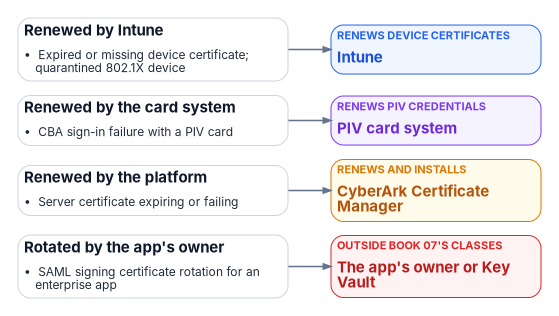
The help desk renews no certificates by hand: device certificates come back through Intune, PIV through its card system, and server certificates through the CLM platform’s owner and drivers (Book 07, Chapter 05).
Microsoft Learn, “Least privileged roles by task in Microsoft Entra ID,” https://learn.microsoft.com/entra/identity/role-based-access-control/delegate-by-task (accessed Oct 21, 2026).↩︎
Microsoft Learn, “Microsoft Entra audit log activity reference,” https://learn.microsoft.com/entra/identity/monitoring-health/reference-audit-activities (accessed Oct 21, 2026).↩︎
Microsoft Learn, “Microsoft Entra audit log activity reference,” https://learn.microsoft.com/entra/identity/monitoring-health/reference-audit-activities (accessed Oct 21, 2026).↩︎
Microsoft Learn, “Least privileged roles by task in Microsoft Entra ID,” https://learn.microsoft.com/entra/identity/role-based-access-control/delegate-by-task (accessed Oct 21, 2026).↩︎
Microsoft Learn, “Privileged roles and permissions in Microsoft Entra ID (preview),” sections “Who can reset passwords” and “Who can perform sensitive actions,” https://learn.microsoft.com/entra/identity/role-based-access-control/privileged-roles-permissions (accessed Oct 21, 2026).↩︎
Microsoft Learn, “How does self-service password reset writeback work in Microsoft Entra ID?” (feature list item 4: an admin reset in the Microsoft Entra admin center is written back for federated or password-hash-synchronized users; not supported in the Office admin portal), https://learn.microsoft.com/entra/identity/authentication/concept-sspr-writeback; Microsoft Learn, “Troubleshoot admin password resets in Microsoft 365 admin center,” https://learn.microsoft.com/troubleshoot/entra/entra-id/user-prov-sync/password-writeback-microsoft-365-admin-center (both accessed Oct 22, 2026).↩︎
Microsoft Learn, “Least privileged roles by task in Microsoft Entra ID,” https://learn.microsoft.com/entra/identity/role-based-access-control/delegate-by-task (accessed Oct 21, 2026).↩︎
Microsoft Learn, “Microsoft Entra audit log activity reference,” https://learn.microsoft.com/entra/identity/monitoring-health/reference-audit-activities (accessed Oct 21, 2026).↩︎
Microsoft Learn, “Least privileged roles by task in Microsoft Entra ID,” https://learn.microsoft.com/entra/identity/role-based-access-control/delegate-by-task (accessed Oct 21, 2026).↩︎
Microsoft Learn, “Assign Microsoft Entra roles,” section “Assign roles with administrative unit scope,” https://learn.microsoft.com/entra/identity/role-based-access-control/admin-units-assign-roles (accessed Oct 21, 2026).↩︎
Microsoft Learn, “Privileged roles and permissions in Microsoft Entra ID (preview),” sections “Who can reset passwords” and “Who can perform sensitive actions,” https://learn.microsoft.com/entra/identity/role-based-access-control/privileged-roles-permissions (accessed Oct 21, 2026).↩︎
Microsoft Learn, “Least privileged roles by task in Microsoft Entra ID,” https://learn.microsoft.com/entra/identity/role-based-access-control/delegate-by-task (accessed Oct 21, 2026).↩︎
Microsoft Learn, “Least privileged roles by task in Microsoft Entra ID,” https://learn.microsoft.com/entra/identity/role-based-access-control/delegate-by-task (accessed Oct 21, 2026).↩︎
Microsoft Learn, “Microsoft Entra audit log activity reference,” https://learn.microsoft.com/entra/identity/monitoring-health/reference-audit-activities (accessed Oct 21, 2026).↩︎
Microsoft Learn, “Least privileged roles by task in Microsoft Entra ID,” https://learn.microsoft.com/entra/identity/role-based-access-control/delegate-by-task (accessed Oct 21, 2026).↩︎
Microsoft Learn, “Manage user authentication methods for Microsoft Entra multifactor authentication,” https://learn.microsoft.com/entra/identity/authentication/howto-mfa-userdevicesettings (accessed Oct 21, 2026).↩︎
Microsoft Learn, “Configure Temporary Access Pass to register passwordless authentication methods,” https://learn.microsoft.com/entra/identity/authentication/howto-authentication-temporary-access-pass (accessed Oct 21, 2026).↩︎
Microsoft Learn, “Configure Temporary Access Pass to register passwordless authentication methods,” https://learn.microsoft.com/entra/identity/authentication/howto-authentication-temporary-access-pass (accessed Oct 21, 2026).↩︎
Microsoft Learn, “Least privileged roles by task in Microsoft Entra ID,” https://learn.microsoft.com/entra/identity/role-based-access-control/delegate-by-task (accessed Oct 21, 2026).↩︎
Microsoft Learn, “Microsoft Entra audit log activity reference,” https://learn.microsoft.com/entra/identity/monitoring-health/reference-audit-activities (accessed Oct 21, 2026).↩︎
Microsoft Learn, “Least privileged roles by task in Microsoft Entra ID,” https://learn.microsoft.com/entra/identity/role-based-access-control/delegate-by-task (accessed Oct 21, 2026).↩︎
Microsoft Learn, “Least privileged roles by task in Microsoft Entra ID,” https://learn.microsoft.com/entra/identity/role-based-access-control/delegate-by-task (accessed Oct 21, 2026).↩︎
Microsoft Learn, “Microsoft Entra audit log activity reference,” https://learn.microsoft.com/entra/identity/monitoring-health/reference-audit-activities (accessed Oct 21, 2026).↩︎
Microsoft Learn, “Least privileged roles by task in Microsoft Entra ID,” https://learn.microsoft.com/entra/identity/role-based-access-control/delegate-by-task (accessed Oct 21, 2026).↩︎
Microsoft Learn, “Least privileged roles by task in Microsoft Entra ID,” https://learn.microsoft.com/entra/identity/role-based-access-control/delegate-by-task (accessed Oct 21, 2026).↩︎
Microsoft Learn, “Configure Temporary Access Pass to register passwordless authentication methods,” https://learn.microsoft.com/entra/identity/authentication/howto-authentication-temporary-access-pass (accessed Oct 21, 2026).↩︎
Microsoft Learn, “Least privileged roles by task in Microsoft Entra ID,” https://learn.microsoft.com/entra/identity/role-based-access-control/delegate-by-task (accessed Oct 21, 2026).↩︎
Microsoft Learn, “How to create, invite, and delete users,” section “Delete a user,” https://learn.microsoft.com/entra/fundamentals/how-to-create-delete-users (accessed Oct 21, 2026).↩︎
Microsoft Learn, “Microsoft Entra audit log activity reference,” https://learn.microsoft.com/entra/identity/monitoring-health/reference-audit-activities (accessed Oct 21, 2026).↩︎
Microsoft Learn, “Privileged roles and permissions in Microsoft Entra ID (preview),” sections “Who can reset passwords” and “Who can perform sensitive actions,” https://learn.microsoft.com/entra/identity/role-based-access-control/privileged-roles-permissions (accessed Oct 21, 2026).↩︎
Microsoft Learn, “Privileged roles and permissions in Microsoft Entra ID (preview),” sections “Who can reset passwords” and “Who can perform sensitive actions,” https://learn.microsoft.com/entra/identity/role-based-access-control/privileged-roles-permissions (accessed Oct 21, 2026).↩︎
Microsoft Learn, “Microsoft Entra audit log activity reference,” https://learn.microsoft.com/entra/identity/monitoring-health/reference-audit-activities (accessed Oct 21, 2026).↩︎
Microsoft Learn, “Least privileged roles by task in Microsoft Entra ID,” https://learn.microsoft.com/entra/identity/role-based-access-control/delegate-by-task (accessed Oct 21, 2026).↩︎
Microsoft Learn, “How to create, invite, and delete users,” section “Delete a user,” https://learn.microsoft.com/entra/fundamentals/how-to-create-delete-users (accessed Oct 21, 2026).↩︎
Microsoft Learn, “Microsoft Entra audit log activity reference,” https://learn.microsoft.com/entra/identity/monitoring-health/reference-audit-activities (accessed Oct 21, 2026).↩︎
Microsoft Learn, “Least privileged roles by task in Microsoft Entra ID,” https://learn.microsoft.com/entra/identity/role-based-access-control/delegate-by-task (accessed Oct 21, 2026).↩︎
Microsoft Learn, “Least privileged roles by task in Microsoft Entra ID,” https://learn.microsoft.com/entra/identity/role-based-access-control/delegate-by-task (accessed Oct 21, 2026).↩︎
Microsoft Learn, “Least privileged roles by task in Microsoft Entra ID,” https://learn.microsoft.com/entra/identity/role-based-access-control/delegate-by-task (accessed Oct 21, 2026).↩︎
Microsoft Learn, “Microsoft Entra audit log activity reference,” https://learn.microsoft.com/entra/identity/monitoring-health/reference-audit-activities (accessed Oct 21, 2026).↩︎
Microsoft Learn, “Least privileged roles by task in Microsoft Entra ID,” https://learn.microsoft.com/entra/identity/role-based-access-control/delegate-by-task (accessed Oct 21, 2026).↩︎
Microsoft Learn, “Assign Microsoft Entra roles,” section “Assign roles with administrative unit scope,” https://learn.microsoft.com/entra/identity/role-based-access-control/admin-units-assign-roles (accessed Oct 21, 2026).↩︎
Microsoft Learn, “Least privileged roles by task in Microsoft Entra ID,” https://learn.microsoft.com/entra/identity/role-based-access-control/delegate-by-task (accessed Oct 21, 2026).↩︎
Microsoft Learn, “Create custom roles to manage enterprise apps in Microsoft Entra ID,” https://learn.microsoft.com/entra/identity/role-based-access-control/custom-enterprise-apps (accessed Oct 21, 2026).↩︎
Microsoft Learn, “Least privileged roles by task in Microsoft Entra ID,” https://learn.microsoft.com/entra/identity/role-based-access-control/delegate-by-task (accessed Oct 21, 2026).↩︎
Microsoft Learn, “Manage users and groups assignment to an application,” section “Prerequisites,” https://learn.microsoft.com/entra/identity/enterprise-apps/assign-user-or-group-access-portal (accessed Oct 21, 2026).↩︎
Microsoft Learn, “Microsoft Entra audit log activity reference,” https://learn.microsoft.com/entra/identity/monitoring-health/reference-audit-activities (accessed Oct 21, 2026).↩︎
Microsoft Learn, “Microsoft Entra audit log activity reference,” https://learn.microsoft.com/entra/identity/monitoring-health/reference-audit-activities (accessed Oct 21, 2026).↩︎
Microsoft Learn, “Create custom roles to manage enterprise apps in Microsoft Entra ID,” https://learn.microsoft.com/entra/identity/role-based-access-control/custom-enterprise-apps (accessed Oct 21, 2026).↩︎
Microsoft Learn, “Least privileged roles by task in Microsoft Entra ID,” https://learn.microsoft.com/entra/identity/role-based-access-control/delegate-by-task (accessed Oct 21, 2026).↩︎
Microsoft Learn, “Least privileged roles by task in Microsoft Entra ID,” https://learn.microsoft.com/entra/identity/role-based-access-control/delegate-by-task (accessed Oct 21, 2026).↩︎
Microsoft Learn, “Working with users in Microsoft Graph,” section “Sensitive actions,” https://learn.microsoft.com/graph/api/resources/users (accessed Oct 21, 2026).↩︎
Microsoft Learn, “Configure Microsoft Entra Connect for an existing tenant,” sections “Hard match vs soft match” and “Hard match security protections,” https://learn.microsoft.com/entra/identity/hybrid/connect/how-to-connect-install-existing-tenant (accessed Oct 21, 2026).↩︎
Microsoft Learn, “Configure Microsoft Entra Connect for an existing tenant,” sections “Hard match vs soft match” and “Hard match security protections,” https://learn.microsoft.com/entra/identity/hybrid/connect/how-to-connect-install-existing-tenant (accessed Oct 21, 2026).↩︎
Microsoft Learn, “Microsoft Entra Connect Sync: Scheduler,” https://learn.microsoft.com/entra/identity/hybrid/connect/how-to-connect-sync-feature-scheduler (accessed Oct 21, 2026).↩︎
Microsoft Learn, “Least privileged roles by task in Microsoft Entra ID,” https://learn.microsoft.com/entra/identity/role-based-access-control/delegate-by-task (accessed Oct 21, 2026).↩︎
Microsoft Learn, “Microsoft Entra Connect Sync: Scheduler,” https://learn.microsoft.com/entra/identity/hybrid/connect/how-to-connect-sync-feature-scheduler (accessed Oct 21, 2026).↩︎
Microsoft Learn, “Least privileged roles by task in Microsoft Entra ID,” https://learn.microsoft.com/entra/identity/role-based-access-control/delegate-by-task (accessed Oct 21, 2026).↩︎
Microsoft Learn, “View applied Conditional Access details in the Microsoft Entra activity logs,” section “Prerequisites,” https://learn.microsoft.com/entra/identity/monitoring-health/how-to-view-applied-conditional-access-policies (accessed Oct 21, 2026).↩︎
Microsoft Learn, “Microsoft Entra audit log activity reference,” https://learn.microsoft.com/entra/identity/monitoring-health/reference-audit-activities (accessed Oct 21, 2026).↩︎
Microsoft Learn, “OneDrive for Business can’t sync after tenant migration,” https://learn.microsoft.com/troubleshoot/sharepoint/sync/cant-sync-after-migration (accessed Oct 21, 2026).↩︎
Microsoft Learn, “Error 0x8004de85 or 0x8004de8a when signing in to OneDrive,” section “Solution 2: Reset OneDrive,” https://learn.microsoft.com/troubleshoot/sharepoint/sync/sign-into-onedrive-error-0x8004de85-or-0x8004de8a (accessed Oct 21, 2026).↩︎
Microsoft Learn, “SharePoint limits,” section “File size and file path length,” https://learn.microsoft.com/office365/servicedescriptions/sharepoint-online-service-description/sharepoint-online-limits (accessed Oct 21, 2026).↩︎
Microsoft Learn, “Pre-provision OneDrive for users in your organization,” https://learn.microsoft.com/sharepoint/pre-provision-accounts (accessed Oct 21, 2026).↩︎
Microsoft Learn, “Pre-provision OneDrive for users in your organization,” https://learn.microsoft.com/sharepoint/pre-provision-accounts (accessed Oct 21, 2026).↩︎
Microsoft Learn, “Privileged roles and permissions in Microsoft Entra ID (preview),” sections “Who can reset passwords” and “Who can perform sensitive actions,” https://learn.microsoft.com/entra/identity/role-based-access-control/privileged-roles-permissions (accessed Oct 21, 2026).↩︎
Microsoft Learn, “Restricted management administrative units in Microsoft Entra ID,” https://learn.microsoft.com/entra/identity/role-based-access-control/admin-units-restricted-management (accessed Oct 21, 2026).↩︎
Microsoft Learn, “Configure Microsoft Entra Connect for an existing tenant,” sections “Hard match vs soft match” and “Hard match security protections,” https://learn.microsoft.com/entra/identity/hybrid/connect/how-to-connect-install-existing-tenant (accessed Oct 21, 2026).↩︎
Microsoft Learn, “View applied Conditional Access details in the Microsoft Entra activity logs,” section “Prerequisites,” https://learn.microsoft.com/entra/identity/monitoring-health/how-to-view-applied-conditional-access-policies (accessed Oct 21, 2026).↩︎