Implementation guide · Draft
Ticket-to-Machine on ServiceNow and SailPoint: An Example Implementation Guide
Book 13’s loop built on two named products, in seven gates: confirm the boundary, decide the writers and approvers, connect the sources, open the front door, actuate on the native surface, close only on a re-read, and operate the tempo
Status — Draft
This page is still being written. Expect gaps and changes; it is not part of the workbook's production guidance. Last reviewed 2026-11-08.
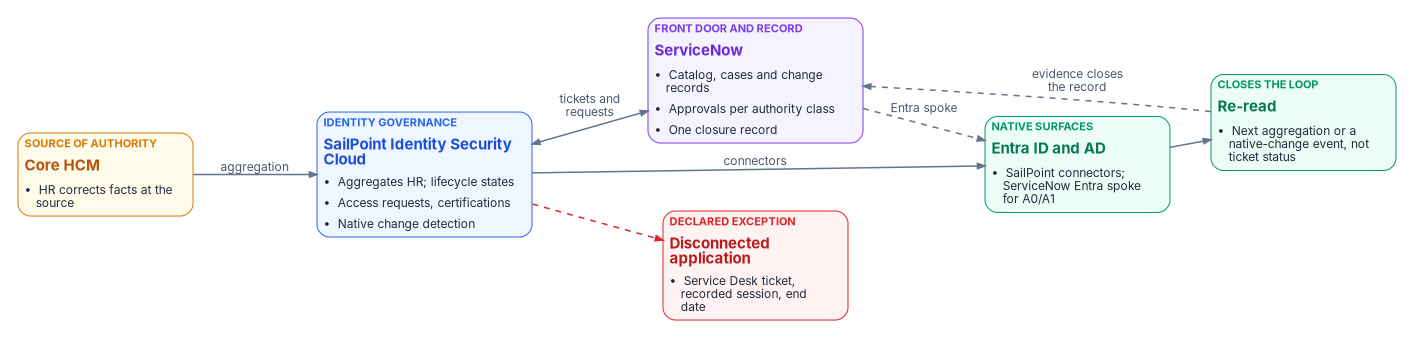
Two products can carry the loop, but neither closes it on its own: the ticket has to authorize a machine, and only a re-read can close the ticket.
Book 13, Appendix B — Ticket-to-Machine Reference is vendor-neutral on purpose: the loop runs on “whatever ITSM platform the agency already has.” This guide picks two products to show what building it looks like: ServiceNow as the front door and the record, and SailPoint Identity Security Cloud (ISC) as identity governance. Other products can fill the same slots, and naming these two isn’t an endorsement by the program or any agency. Product facts are the vendors’ own statements, footnoted with the date each page was read; FedRAMP facts are from the FedRAMP Marketplace. Statements marked (inference) or (design guidance) are the program’s.
Book 13’s five-step loop (test, detect drift, raise a typed task, actuate on the native surface, close with evidence) built for identity on ServiceNow and SailPoint ISC. Where agencies usually start, the loop at a glance with the four places the products fall short of it, and the prerequisites. Then seven gates: confirm the authorization boundary; decide one writer per attribute and one approver per authority class; connect the sources and measure the starting drift; open the front door so findings and requests become typed tasks; actuate on the native surface by lane; close only on a re-read; and operate the tempo with the identity fixes and the evidence. Each gate carries the federal requirements it supports and the evidence an ISSO keeps, the availability of each product and feature it uses, an interim path, a Validate step and its rollback. Then the dangers, the evidence, rollback, a checklist and what couldn’t be verified.
Watch or download
Jump to a slide (13)
| Edition | File |
|---|---|
| Video (MP4, 1080p, about 10 minutes) | Research_TTM_ServiceNow_SailPoint_Narrated.mp4 |
| Narrated, self-running deck (about 10 minutes, captions) | Research_TTM_ServiceNow_SailPoint_Narrated.pptx |
| Deck, for presenting live | Research_TTM_ServiceNow_SailPoint.pptx |
| Narration script and caption track | Script · Captions |
The deck was made from the October 24, 2026 version of this page, before it became a gated guide; its products, gaps and identity fixes still match. The vendor-neutral original has its own narrated deck, linked from Book 13, Appendix B.
The implementation series follows the seven gates in two parts: for each gate, what done means, the steps, the commands from the developer workbook’s first lab, the federal requirement and evidence, availability and rollback. Each part has a deck for presenting live, a narrated self-running deck with captions, a video and its narration script.
| Part | Gates | Deck, narrated deck and video | Narration script |
|---|---|---|---|
| Part 1: boundary, writers, sources and the front door (about 16 minutes) | G1–G4 | Deck · Narrated (about 16 min, captions) · ▶ Watch · MP4 | Script · Captions |
| Part 2: actuation, re-read, tempo and evidence (about 15 minutes) | G5–G7 | Deck · Narrated (about 15 min, captions) · ▶ Watch · MP4 | Script · Captions |
How to read this guide
This guide owns the order of work and the gates. It links to the pages that hold the rest rather than repeating them:
| Question | Where the answer lives |
|---|---|
| Why the loop, the lanes, the tempo and the evidence record | Book 13, Chapter 10 and Appendix B; the controls behind the lanes are in Appendix A |
| Which request needs which authority, and who approves | Book 15, Chapter 03, built on Book 04, Chapter 06 |
| The drift classes and their severities | Book 03, Chapter 11 |
| The order of work on ServiceNow and SailPoint, the gates, the federal evidence per gate, availability and rollback | This guide |
| The code for Pass 1 (drift to a typed task, re-read before close, drift reconciliation), its permissions and its tests | The integration kit page and the kit’s README on GitHub |
| Building the kit step by step, as a developer | The developer workbook, Building Ticket-to-Machine |
| Learning it in order, with exercises and knowledge checks | The training path, Learning path: Ticket-to-Machine on ServiceNow and SailPoint |
| Building the ServiceNow side in-house when there’s no identity governance product | Book 15, Chapter 13 |
Labels. Facts carried from a linked chapter rely on that chapter’s verification log. Facts this guide adds are footnoted and listed in its verification log. The audience is a civilian agency at FedRAMP Moderate, usually in Microsoft 365 GCC, where Entra ID runs in Microsoft’s commercial cloud and Microsoft Graph is graph.microsoft.com.1
Validate steps. Each gate ends with a Validate step. Where the integration kit or the validation kit has a test or check that proves part of the gate, the step names it; the kit’s tests run against mocked responses and prove logic, not the live integration. Where nothing automated exists yet, the step says so and gives the manual check.
Every gate’s hands-on work is a lab in the developer workbook Building Ticket-to-Machine: Lab 1 on a laptop with the kit’s fixtures, Lab 2 in a non-production environment. The Labs page lists them chapter by chapter, with what each needs and a direct link; each gate below links its own labs.
Where agencies start
The guide assumes the starting state most agencies report, and gives an interim path at each gate for the parts that don’t match.
| Area | Assumed starting state | What it changes |
|---|---|---|
| Service management | ServiceNow ITSM already in use for incidents and requests; access requests are catalog items fulfilled by hand, and a ticket closes when a technician writes “done” | Gate 4 reuses the instance; Gate 6 stops the “done” closure |
| Which ServiceNow cloud | Some agencies run on ServiceNow’s Government Community Cloud, others on its commercial cloud | Gate 1: only the former has a FedRAMP listing |
| Identity governance | SailPoint ISC, SailPoint IdentityIQ, another product, or none | ISC is this guide’s example; with none, Book 15’s in-house path applies |
| Directories | Active Directory synchronized to Entra ID; AD groups granted by hand from tickets; some cloud-only groups | Gate 5 moves the grants to connectors |
| HR feed | Either Book 03’s pipeline (Entra inbound provisioning from HR) is live, or accounts are still created from tickets | Gate 2 decides who writes each attribute |
| Microsoft tenant | Microsoft 365 GCC; a minority in GCC High | Availability notes cover both |
| Disconnected applications | Applications with only an administrative console and no connector | Gate 5’s declared-exception lane |
| Evidence | Ticket history and console screenshots; no re-read | Gates 6 and 7 |
The loop at a glance
| Loop step (Book 13) | Done by, in this example | Gate |
|---|---|---|
| 1. Test | SailPoint aggregation and lifecycle-state evaluation on refresh;2 the kit’s read-only drift reconciliation | 3 |
| 2. Detect drift | SailPoint Identity Attributes Changed and Native Change Account Updated events;34 certification findings5 | 3, 4 |
| 3. Raise a typed task | A SailPoint workflow posting to a ServiceNow endpoint (a build);6 the Service Catalog app for requests; Service Desk tickets for disconnected applications78 | 4 |
| 4. Actuate on the native surface | SailPoint’s Entra and Active Directory connectors;910 ServiceNow’s Entra ID spoke for low-authority tasks11 | 5 |
| 5. Close with evidence | A re-read of the target through SailPoint or Microsoft Graph, not the ticket status (a build) | 6 |
Four gaps between the products and the loop. Used as shipped, the two products fall short of the loop in four places. Each gate that closes one says so.
| Gap | What the products do | The fix, and where |
|---|---|---|
| 1. A ticket status isn’t a re-read | SailPoint’s Service Desk integration uses the mapped ServiceNow status to decide when its provisioning task is “treated as complete”12 | Close only on a re-read: Gate 6 |
| 2. The catalog app moves access approval into ServiceNow | With the Service Catalog app, requests follow “the approval process defined within ServiceNow,”13 while Book 15 decides owner-governed access (A2, A3) in the identity governance platform | One approver system per authority class: Gate 2 |
| 3. No change-request tickets from ISC | ISC’s Service Desk integration supports only Service Request and Incident tickets;14 IdentityIQ’s can also create change requests15 | A ServiceNow flow raises the change record: Gate 5 |
| 4. Two doors into the directory | SailPoint can provision Entra ID and AD, and Book 03 makes Entra inbound provisioning the one writer of HR-mastered attributes | One writer per attribute: Gate 2 |
Prerequisites
Subscriptions. Each piece is licensed separately; confirm each against the agency’s agreements before Gate 1.
| Piece | What it needs | Source |
|---|---|---|
| SailPoint ISC | The ISC subscription, in its FedRAMP environment (Gate 1) | 16 |
| SailPoint’s ServiceNow apps | Each app is separate: Service Desk needs an active ISC ServiceNow Service Desk license; the Service Catalog (Portal) integration needs additional licensing | 1718 |
| ServiceNow Entra ID spoke | An Integration Hub subscription | 19 |
| Entra ID | P1 or above for Book 03’s API-driven inbound provisioning, where it’s the writer (Gate 2); PIM for people who act (Gate 5) under the agency’s existing Entra licensing | Book 03, Chapter 05 |
Integration identities. Nine non-person identities carry the integration, two for the connections and the seven the kit runs, one per task, each with two named owners and a federal sponsor in the system inventory, and each governed on the non-person identity track (design guidance):
- SailPoint’s Entra connector app registration in the agency’s tenant (the GCC High endpoints are a source setting, Gate 1);20
- the ServiceNow Entra spoke’s app registration, a custom app that obtains OAuth 2.0 tokens, delegated or application;21
- the ServiceNow integration user the SailPoint workflow posts as (
finding_writer; kit permissions); - the verifier account the re-read client closes records as (
verifier), and the evidence reader the export and the pre-flight checks read as (evidence_reader); - the ISC API clients the kit uses: the reader for the drift and re-read clients (
isc_reader), the deploy checker that lists the workflows (isc_deploy_checker), the workflow administrator that creates, enables and disables them (isc_workflow_admin), and the workflow tester that test-runs a disabled workflow (isc_workflow_tester).
Items 1 and 2 are the two connections; items 3 to 5 are the seven the kit runs, as Chapter 09 of the developer workbook lists them. Environments. A ServiceNow Personal Developer Instance or sub-production instance and a SailPoint sandbox tenant, with synthetic data like the kit’s fixtures, before production (Book 15, Chapter 13).
Roles in the program. A gate owner for each gate, the identity governance office (IGO) for decisions about access, the ServiceNow platform owner, the SailPoint administrator, and the ISSO who receives each gate’s evidence (Book 13, Chapter 09).
The path on one page
| Gate | Done when | Closes gap | Validate with |
|---|---|---|---|
| G1 Boundary | Each product’s FedRAMP status, the actions that run from a vendor cloud, and the integration identities are recorded and accepted | — | VK-NPI-02, VK-NPI-05; manual record |
| G2 Writers and approvers | One writer per attribute and one approver system per authority class are decided, and each operation class has a lane | 2, 4 | writer_check.py flags any attribute with two writers; approvers and lanes are checked by hand |
| G3 Sources and starting drift | HR, Entra ID and AD are aggregated and correlated on employeeId; the starting drift is measured |
— | Kit drift tests; VK-HR-01, VK-HR-04 |
| G4 Front door | Drift events, requests and disconnected-application work arrive in ServiceNow as typed, owned, clocked tasks | — | Kit contract and ServiceNow script tests |
| G5 Actuation | Each lane actuates through a connector or a declared exception, under a service identity, with a change record where its class needs one | 3 | No automated check yet |
| G6 Re-read | No finding or Service Desk ticket closes without a re-read of the target | 1 | Kit re-read and business-rule tests |
| G7 Tempo and evidence | Windows are measured, the identity fixes route through the loop, and the evidence package is produced on a schedule | — | evidence_export.py checks the export; the five measures have no automated check yet |
Step 2: Decide the writers and the approvers
This gate closes gaps 2 and 4 on paper before anything is connected. Every later gate builds what it decides.
Prerequisites. Gate 1 passed; the program attribute map and Book 15’s authority classes adopted.
Steps
- Choose one writer per attribute (gap 4). Book 03’s design makes Entra inbound provisioning the one writer of HR-mastered attributes into the directory. SailPoint’s Oracle HCM Cloud connector reads Core HCM directly, without an on-premises appliance, and writes back only the user name and work email.31 Pick one of two patterns and write it down (design guidance):
- Entra inbound provisioning stays the door, and SailPoint aggregates HR read-only and governs entitlements (groups, roles, access packages, application access); or
- SailPoint becomes the provisioning service and takes on Book 03’s middleware duties (Book 03, Chapter 05).
- Choose one approver system per authority class (gap 2). For example (design guidance): ServiceNow approves A0 and A1 through its Ask for Approval flow (Book 15, Chapter 03); SailPoint approves A2 and A3 through access-request approvals by owner, manager or governance group;32 and the Service Catalog app only collects A2 and A3 requests. Set every approval’s timeout outcome to reject or cancel, never approve.
- Assign each operation class a lane on these products, from Appendix B’s lanes. The mapping below is the program’s (inference); the authorizing official accepts any class run autonomously.
| Lane (Book 13) | On these products | Change record in ServiceNow |
|---|---|---|
| Machine, autonomous (L4) | SailPoint lifecycle states and birthright access, for classes the authorizing official enumerated | Standard change: pre-authorized, no peer or CAB step33 |
| Machine, gated (L3) | A SailPoint access request with approval; a ServiceNow catalog item executed by the spoke | Normal change where the class needs one: peer or technical approval, then CAB34 |
| Human decision | SailPoint certification decisions; ServiceNow approval or CAB | The decision record, then the gated lane |
| Protocol-enforced | Neither product: certificates stay with the CLM platform (Book 13) | None per event |
| Declared exception | A Service Desk ticket for a disconnected application, a recorded session and an end date | The ticket and the exception register entry |
| Emergency class (not a sixth lane: Book 13 acts first, and the incident commander reviews afterward) | ServiceNow emergency change; a SailPoint workflow or a manual lifecycle-state change | ServiceNow’s emergency change goes directly to CAB authorization;35 the retrospective review follows the containment |
- Write the decisions to the authoritative record as a reviewed change, steward and sponsor approving (Book 13, Chapter 09).
Federal requirements and evidence.
| Requirement | KSI | What this gate does | Evidence the ISSO keeps |
|---|---|---|---|
| SP 800-53 AC-5 Separation of Duties (Moderate) | KSI-IAM-JIT; KSI-PIY-RIS; KSI-PIY-RSD | One approver system per class; the requester never approves | The approver-per-class table, merged with its review |
| SP 800-53 CM-3 Configuration Change Control (Moderate) | KSI-CMT-LMC; KSI-CMT-RVP | Each operation class has a lane and a change-record type | The lane table |
| SP 800-53 AC-2 Account Management (Low, Moderate, High) | KSI-IAM-JIT; KSI-IAM-SUS | One writer per attribute keeps account changes traceable to the source | The attribute map with each attribute’s writer |
| Book 13’s L4 acceptance | None: program design | Any autonomous class is accepted in writing by the authorizing official | The signed class acceptance |
Availability. Nothing new is used. Book 03’s API-driven inbound provisioning, if it’s the writer, is available in Azure for US Government, as are PIM, entitlement management, access reviews and Lifecycle Workflows (read November 1, 2026).36 In GCC, Entra ID is the commercial service.37
Interim path. Where the HR pipeline isn’t live yet, SailPoint can’t be measured against a source of authority; decide the writers now, and run Gates 3 to 6 against the HR extract the kit reads, until Book 03’s pipeline lands.
- Automated (read-only):
writer_check.pycompares the Entra inbound provisioning mappings with SailPoint’s provisioning policies and flags any attribute with two writers (developer workbook, Chapter 08). It reads exports; it doesn’t check approver systems or lanes. - Manual: every HR-mastered attribute has exactly one writer in the attribute map; every authority class has exactly one approver system; every operation class has a lane and a change-record type; the decisions are merged in the record.
- Rollback: re-decide by a reviewed change; the record keeps the history.
- On a laptop, no tenant: Chapter 08, Lab 1 of One Writer per Attribute
- In exports from a test tenant and a SailPoint sandbox: Chapter 08, Lab 2
- As training: Module 3: One Writer per Attribute, with a knowledge check
Step 3: Connect the sources and measure the starting drift
Loop steps 1 and 2 for identity: SailPoint reads the sources, and the kit measures how far the directory is from HR before anything is fixed.
Prerequisites. Gate 2 passed; the integration identities from Gate 1 in place with read permissions only.
Steps
- Aggregate HR into SailPoint as the authoritative source, read-only under the first pattern of Gate 2.
- Connect Entra ID and Active Directory as SailPoint sources: the Entra SaaS connector (accounts, groups, licenses, roles, administrative units, access packages, PIM)38 and the AD connector through the virtual appliance.39 In GCC High, set the Entra source’s Graph and token endpoints to
graph.microsoft.usandlogin.microsoftonline.us.40 - Correlate on
employeeId, the key Book 03 joins on. Treat uncorrelated accounts as orphan candidates, not errors to suppress. - Turn on Native Change Detection on the Entra and AD sources, for the attributes and entitlements the record governs. It compares stored and newly read data on aggregation and fires one event per changed account; it isn’t available on Non-Employee Lifecycle Management sources.41
- Run the kit’s drift reconciliation read-only: it joins the HR extract, Microsoft Graph and ISC on
employeeIdand reports Book 03’s drift classes as JSON and CSV (Build 3). Expect a burst of High findings in the first month; Book 03 calls that the measurement working. - File the first run as the baseline. Later gates are measured against it.
Federal requirements and evidence.
| Requirement | KSI | What this gate does | Evidence the ISSO keeps |
|---|---|---|---|
| SP 800-53 AC-2 Account Management | KSI-IAM-SUS | Finds accounts with no worker, and workers with no account | The baseline drift report |
| SP 800-53 CA-7 Continuous Monitoring (Low, Moderate, High) | KSI-MLA-EVC | Starts a repeatable comparison of the record and the estate | The drift report, its date and the checker version |
| SP 800-53 CM-8 System Component Inventory, read for identities (inference) | KSI-PIY-GIV | One correlated inventory of accounts per person | Correlation rate and uncorrelated-account list |
Availability. The SailPoint Entra connector documents Azure Government endpoint overrides;42 GCC tenants use the worldwide endpoints.43 Native Change Detection’s presence in the ISC FedRAMP environment wasn’t confirmed (Gate 1, step 2).
Interim path. Without SailPoint, or before it’s connected, run the kit’s reconciliation against the HR extract and Graph alone; the ISC inputs are optional files (kit README). AD-only groups wait for the appliance.
- Integration kit (logic, mocked):
tests/python/test_identity_drift.pyandtests/powershell/Get-IdentityDrift.Tests.ps1prove the drift classes against the fixtures, the same finding IDs from both clients, and that unauthorized writes are reported as not computed without an audit extract. - Live: the reconciliation’s findings on a synthetic HR extract match a hand count (kit lab item 4, what must still be proven).
- Validation kit: VK-HR-01 (enabled members with no
employeeId) and VK-HR-04 (duplicateemployeeIdvalues) are clean, or each row has an owner, because the join depends on the key. - Rollback: disconnect the source or turn off Native Change Detection; the gate only reads.
- On a laptop, no tenant: Chapter 06, Lab 1 of Drift Reconciliation
- In a test tenant and a SailPoint sandbox: Chapter 06, Lab 2
- As training: Module 4: Sources and the Starting Drift, with a knowledge check
- On a laptop, no tenant: Chapter 04, Lab 1 of Drift to a Typed Task
- In a SailPoint sandbox and a ServiceNow developer instance: Chapter 04, Lab 2
- As training: Module 5: Drift to a Typed Task, with a knowledge check
Step 4: Open the front door
Loop step 3: every drift event, request and residual manual step arrives in ServiceNow as a typed task with an owner, a clock and a severity, through one front door (Book 13, Chapter 10).
Prerequisites. Gate 3 passed; the ServiceNow instance’s state model and assignment groups agreed.
Steps
- Create the identity finding table and its endpoint in a scoped application: a table extending Task, a Scripted REST API resource that validates the payload, maps severity to a priority and a due date on Book 13’s tempo, de-duplicates on source, subject and class (and the attribute when the payload names one), and stores the intended state a re-read must find (Build 1; table and setup in the kit README).
- Create one SailPoint workflow per trigger, posting to that endpoint with an HTTP Request step. Workflows can’t be created enabled; enable each after a test run.44
- Install the Service Catalog app for people’s requests, with the approval routing Gate 2 decided. SailPoint says requests are raised “after Separation of Duties checks,” approved in ServiceNow, provisioned by ISC, and the status written back.45
- Install the Service Desk integration for disconnected applications only. It turns ISC provisioning actions into Service Request or Incident tickets.46 Each one is a declared exception (Gate 5).
- Route by authority, Book 15’s triage order, so a finding or request lands with the owner of its class (Book 15, Chapter 03).
- Feed other detection tools into the same queue, not a second one (Appendix B).
Federal requirements and evidence.
| Requirement | KSI | What this gate does | Evidence the ISSO keeps |
|---|---|---|---|
| SP 800-53 CM-3 Configuration Change Control | KSI-CMT-LMC | Every proposed change is a documented, owned record | Finding and request records with origin, owner, clock |
| SP 800-53 RA-7 Risk Response (Low, Moderate, High) | None | Findings are responded to inside declared windows | Due dates by severity; overdue list |
| SP 800-53 CA-7 Continuous Monitoring | KSI-MLA-EVC | Monitoring results become tracked work | The finding queue with origin records |
| SP 800-53 AC-5 Separation of Duties | KSI-IAM-JIT | Requests pass an SoD check and an approver who isn’t the requester | Approval history on each request |
CM-3(1), automated documentation, notification and prohibition of changes, is what this gate builds, but it’s in the High baseline only (Book 13, Appendix A); at Moderate the program adopts the shape as design.
Availability. SailPoint’s ServiceNow apps and their presence in the government Store weren’t confirmed (Gate 1). The Scripted REST API and custom table are platform features of the instance the agency already runs.
Interim path. Without the Service Catalog app, keep the existing catalog items and have a ServiceNow flow create the SailPoint access request through ISC’s API, approving A0 and A1 in ServiceNow only (design guidance). Without the SailPoint workflows, post the reconciliation’s findings with the drift client’s --push-to-servicenow option on a schedule.
- Integration kit (logic, mocked):
tests/python/test_contract.py(the workflow file’s shape, no secrets in it, every payload field read by the ServiceNow script);tests/servicenow/servicenow_scripts.test.js(“creates a finding with priority and due date from severity,” “tempo windows,” “de-duplicates an open finding,” “validation failures return 400”). - Live: a native change on a test account raises one finding with the right priority and due date, and a repeat de-duplicates (kit lab item 1).
- Manual: one test request through the catalog app shows the SoD check and the approver Gate 2 named.
- Rollback: disable the workflows and the catalog items; findings already raised stay as records.
- On a laptop, no tenant: Chapter 01, Lab 1 of The Loop and the Typed Task
- In a ServiceNow developer instance: Chapter 01, Lab 2
- As training: Module 1: The Loop and the Typed Task, with a knowledge check
- On a laptop, no tenant: Chapter 04, Lab 1 of Drift to a Typed Task
- In a SailPoint sandbox and a ServiceNow developer instance: Chapter 04, Lab 2
- As training: Module 5: Drift to a Typed Task, with a knowledge check
Step 5: Actuate on the native surface
Loop step 4: the ticket authorizes a machine. The fix runs through a connector under a service identity; a person’s role stops at approval, except in the declared-exception lane.
Prerequisites. Gate 4 passed; Gate 2’s lanes in the record. The kit’s Pass 1 doesn’t actuate anything, so this gate is configuration of the products themselves.
Steps
- Provision through SailPoint’s connectors for A2 and A3: account create, update, enable, disable and delete; group, role, license and access-package changes.47 When the Entra connector disables an account, it also signs the user out of existing sessions.48
- Use the ServiceNow Entra spoke for A0 and A1 where its actions cover the task. Its documented coverage and its gaps (no MFA-reset action; the reset action only for cloud-only users) are in Book 15, Chapter 03; validate it against the installed spoke.
- Raise change records where the class needs them (gap 3). A ServiceNow flow raises a standard, normal or emergency change from the request item by change class; the kit plans this for Pass 2 (Pass 2).
- Run the declared-exception lane for disconnected applications: the Service Desk ticket, a named approver before the session, a time-boxed PIM activation and a recorded session, an end date and a POA&M item for an actuator or retirement (Book 13, Chapter 10).
- Keep people off standing privilege. Where a person must act, they activate an eligible role through PIM with the ticket number as justification; PIM doesn’t check the number against the ticket, so a SIEM rule does (Book 15, Chapter 03).
- Verify the person before a sensitive action. An authentication-method reset isn’t the connector’s “MFA attribute management”;49 it stays with the help desk’s verification procedure, which follows NIST SP 800-63B-4 (Book 15, Chapter 03).
Federal requirements and evidence.
| Requirement | KSI | What this gate does | Evidence the ISSO keeps |
|---|---|---|---|
| SP 800-53 CM-5 Access Restrictions for Change (Low, Moderate, High) | KSI-CMT-RMV; KSI-CMT-RVP; KSI-IAM-JIT | Changes run under scoped service identities, not personal admin accounts | Connector and spoke identities with their permissions |
| SP 800-53 AC-3 Access Enforcement; AC-6 Least Privilege | KSI-IAM-ELP; KSI-IAM-JIT | Approved access is enforced by the connector; people activate just in time | SailPoint provisioning events; PIM activation records |
| SP 800-53 CM-3 | KSI-CMT-LMC | Classes that need a change record get one | Change records linked from the request |
| SP 800-53 AU-14 Session Audit (in no baseline; tailored in) | None | Declared-exception sessions are recorded, with counsel consulted | Session recordings attached to the ticket |
| NIST SP 800-63B-4 | None: not an SP 800-53 control | Resets and recovery follow the verification procedure | The verification rung on the ticket (Book 15) |
| SP 800-53 CA-5 Plan of Action and Milestones | None | Each declared exception has an end | The POA&M item |
Availability. PIM is available in Azure for US Government (read November 1, 2026).50 The Entra spoke’s connection points at https://graph.microsoft.com by default and its page doesn’t mention the US Government clouds:51 it fits GCC; for GCC High, confirm with ServiceNow before use. SailPoint’s connector endpoints for GCC High are documented.52
Interim path. Until the change-record flow exists, the approver raises the change record by hand and links it to the request; the closure still waits for Gate 6. Where the spoke isn’t licensed, A0 and A1 tasks stay help desk tasks against an approved ticket, with the PIM activation recorded.
- No automated check yet. Pass 1 doesn’t actuate, so the kit has no test for this gate.
- Manual, in the lab: one task per lane runs end to end: an L3 access request provisions through the connector; an A1 task runs through the spoke; a disconnected-application ticket runs as a declared exception with its recording; an emergency change is recorded after the fact. Each leaves its record.
- VK-NPI-05 re-run: no integration identity holds a Graph permission beyond what its lane needs.
- Rollback: each connector action is reversed by its paired action (re-enable, re-add, reassign) through the same lane; a leaver’s deprovisioning is rollback-never by design, with recovery through a new request (Book 13, Chapter 10).
- On a laptop, no tenant: Chapter 05, Lab 1 of The Re-read Rule
- In a ServiceNow developer instance: Chapter 05, Lab 2
- As training: Module 6: Actuation and the Re-read Rule, with a knowledge check
Step 6: Close only on a re-read
Loop step 5, and gap 1. A finding, or a ticket SailPoint’s Service Desk integration opened, closes only when a re-read of the target shows the intended state. “A success response is not closure” (Appendix B).
Prerequisites. Gates 4 and 5 passed; the verifier account from Gate 1.
Steps
- Add the Awaiting verification state and the business rule that turns any close into it, unless the update carries new evidence and comes from the verifier account; a named exception approver can still cancel with a note, which is the declared-exception lane (Build 2).
- Apply the same rule to Service Desk tickets on the incident and request item tables, so SailPoint’s status mapping no longer decides completion.5354
- Schedule the re-read client: it reads waiting records, re-reads the account through ISC, the identity through ISC Search, or the user through Microsoft Graph, and closes with the query, time, response hash and checker, or reopens with the differences.55 An ISC read reflects the last aggregation, so the client waits a grace period before calling a stale read a mismatch.
- Tune the grace period to the aggregation schedule, and record the setting.
Federal requirements and evidence.
| Requirement | KSI | What this gate does | Evidence the ISSO keeps |
|---|---|---|---|
| SP 800-53 CM-3 (records of changes retained) | KSI-CMT-LMC | Each closure carries its proof | The evidence attachment and hash on each closed record |
| SP 800-53 CM-4(2) Verification of Controls (Moderate) | KSI-CMT-LMC; KSI-CMT-VTD | The change is verified after it’s made | The re-read result and time |
| SP 800-53 CA-7 | KSI-MLA-EVC | Closure feeds monitoring | Closed and reopened counts per period |
| SP 800-53 AU-12 Audit Record Generation (Low, Moderate, High) | KSI-MLA-LET | The verifier’s actions are attributable | The verifier account’s audit trail |
Availability. The re-read uses ISC’s Accounts and Search APIs and Graph’s users endpoint; GCC uses the worldwide Graph endpoint and GCC High graph.microsoft.us.56 The ISC API domain for a FedRAMP tenant wasn’t confirmed (Gate 1).
Interim path. Before the client runs on a schedule, the verifier runs it by hand once a day (dry run first, then apply); the business rule still blocks a person’s close.
- Integration kit (logic, mocked):
tests/python/test_reread_verification.pyandtests/powershell/Invoke-ReReadVerification.Tests.ps1(dry run writes nothing; a match closes with evidence and an attachment; a mismatch reopens with a note; a stale ISC read waits for the grace period);tests/servicenow/servicenow_scripts.test.js(“a person closing a finding is redirected to awaiting verification,” “evidence alone, or the verifier alone, is not enough,” “on incident, only SDIM-opened tickets are governed”). - Live: a person’s close becomes Awaiting verification; the client closes it only after the account shows the intended state; a mismatch reopens it (kit lab items 2 and 3).
- Rollback: disable the business rule; records return to the platform’s normal state model, and closures lose their evidence until it’s re-enabled.
- On a laptop, no tenant: Chapter 05, Lab 1 of The Re-read Rule
- In a ServiceNow developer instance: Chapter 05, Lab 2
- As training: Module 6: Actuation and the Re-read Rule, with a knowledge check
Step 7: Operate the tempo
Once the loop runs, it runs on Book 13’s tempo: P1 halts, P2 one hour, P3 24 hours, P4 72 hours, the program’s windows rather than federal ones (Appendix B).
Steps
- Schedule the drift reconciliation and the re-read client, and keep their outputs with the date and the checker version.
- Report the five measures to the governance board: detection coverage, window adherence, escalation rate, machine-closure share and declared-exception count (Book 13, Chapter 10).
- Route the identity fixes through the loop, below.
- Export the evidence: the monthly evidence package, SailPoint events and ServiceNow records in Book 13’s evidence shape, built by period. The kit’s
evidence_export.pywrites the ServiceNow half as one record per closed finding; running it on a schedule is a separate collection step that is up to the program. - Review each declared exception at its end date, and each L4 class quarterly.
The identity fixes, on these products. From the identity maintenance explainer’s fix catalog. Everything here is (inference) or (design guidance) unless a note cites a source.
| Fix | Detect | Route and track | Fix and carry back |
|---|---|---|---|
| A wrong fact in HR | SailPoint Identity Attributes Changed;57 or a “my information is wrong” catalog item | ServiceNow case to HR | HR corrects it in Core HCM; SailPoint re-aggregates. SailPoint can’t write HR-mastered attributes back: only user name and work email are writable58 |
| A late or retroactive personnel action | A lifecycle-state change on aggregation59 | ServiceNow emergency change if after the fact | The leaver state disables accounts; the Entra connector revokes sessions on disable6061 |
| An urgent leaver HR hasn’t entered | A manager or security calls | ServiceNow emergency change | A SailPoint workflow or a manual lifecycle-state change runs the same leaver sequence62 |
| A record the pipeline couldn’t apply | A failed provisioning action, or a Service Desk “Failed” status63 | ServiceNow task to the identity data steward | Re-run through SailPoint, never by hand |
| A write outside the pipeline | Native Change Detection: an account updated outside SailPoint64 | ServiceNow finding, provenance class | SailPoint restores the value; the writer’s access is reviewed. The closest fit in the catalog |
| An account that matches nobody | Uncorrelated accounts on aggregation | The account owner decides | Correlate it to a person, or disable it |
| The same person twice, or a broken link | SailPoint correlation; rehire and conversion handling65 | Data architect | A correlation-rule change. SailPoint notes partial support for some mover cases in the change feed66 |
| A fact HR doesn’t own (contractors) | A separate contractor source in SailPoint | Sponsor | Correct it in the contractor source. SailPoint lists Non-Employee Risk Management among the FedRAMP ISC’s capabilities;67 confirm it from the authorization package |
| A rule that derives the wrong access | A certification campaign68 | Governance body, through a ServiceNow normal change | Change the role or lifecycle rule |
| Residual access after a move | Attribute-change trigger, then a certification; access granted by the previous lifecycle state is revoked automatically6970 | Entitlement owner | Revocation through the connector, else a Service Desk ticket71 |
| A credential that outlives the person | Outside both products: PIV and certificates | Credentialing office | The card system and the CLM platform (Book 07) |
Federal requirements and evidence.
| Requirement | KSI | What this gate does | Evidence the ISSO keeps |
|---|---|---|---|
| SP 800-53 CA-7 Continuous Monitoring | KSI-MLA-EVC | The loop runs on a declared cadence | Scheduled run outputs; the five measures |
| SP 800-53 RA-7 Risk Response | None | Windows are kept or escalated | Window adherence and the overdue list |
| SP 800-53 CA-5 | None | Declared exceptions are tracked to closure | The exception register and POA&M items |
| SP 800-53 AU-6 Audit Record Review (Low, Moderate, High) | KSI-MLA-RVL | Events and closures are reviewed | The monthly evidence package and its review |
Availability. Nothing beyond Gates 1 to 6.
Interim path. The export builds the ServiceNow half. Until a SailPoint half exists, assemble that half of the monthly package by hand from a SailPoint event search for the same period, beside the export’s records of closed findings with their evidence attachments.
- Automated (read-only):
evidence_export.pywrites one Book 13 evidence record per closed finding, checks the response window, and writes and verifies a hash-chained manifest (developer workbook, Chapter 07);drift_compare.pyclassifies findings across two runs as new, persisting or resolved (Chapter 06). The five measures have no automated check yet. - Manual: the scheduled runs have run for a month with outputs kept; the five measures are reported once; the first monthly evidence package is assembled end to end and accepted by the ISSO.
- Rollback: stop the schedules; the records stay.
- On a laptop, no tenant: Chapter 07, Lab 1 of Evidence Records for Book 13 and the ISSO
- In a ServiceNow developer instance: Chapter 07, Lab 2
- As training: Module 7: Evidence for the ISSO, with a knowledge check
Control states, change safety and assessment mapping
This section states the example against the workbook’s conventions in Book 00, Appendix D.
Control states.
| State | This page | Evidence |
|---|---|---|
| Designed | G1 (boundary and integration identities) and G2 (one writer per attribute, one approver system per authority class, a lane per class) | The boundary and data-flow record; the attribute map and approver table |
| Configured | G3 and G4: sources aggregated, the finding table and endpoint, workflows created disabled and test-run | Source and workflow configuration; the baseline drift run |
| Enforced | G5 (changes run through connectors under service identities) and G6 (no closure without a re-read) | The business rule active on every table SailPoint writes to; connector identities and their permissions |
| Evidenced | Each gate’s Validate | Kit test output, the lab runs, and the records they produced |
| Operated | G7: the tempo, the five measures, the monthly evidence package | Scheduled run outputs, the measures, the package and the ISSO’s review |
A finding this page addresses is ready for closure when every applicable state has evidence; the authorizing official or assessor decides.
How-template coverage. Where the guide carries each subsection of Appendix D’s How template:
| Subsection | Where it is |
|---|---|
| Prerequisites | Prerequisites and each gate’s own; availability in each gate |
| Pilot | The developer instance and sandbox tenant with synthetic data, then test and production in Chapter 09 of the developer workbook |
| Report-only or audit phase | G3’s read-only drift reconciliation (the starting drift, measured before anything acts); G4’s workflows, which can’t be created enabled and are test-run first |
| Enforcement | G5’s lanes and G6’s re-read rule; the rings below |
| Rollback | Rollback, by gate, and each gate’s Validate box |
| Exclusions | G5’s declared-exception lane, each with an approver, an end date and a POA&M item; emergency access accounts, below |
| Telemetry | SailPoint events, ServiceNow records, and Entra ID audit logs forwarded to the SIEM (Evidence) |
| Evidence | Evidence and its checklist |
| Day-two ownership | G7, with the roles in Prerequisites: gate owners, the IGO, the platform owners and the ISSO |
Change safety (design guidance).
| Ring | Scope | Exit criteria |
|---|---|---|
| 0 | Developer instance and sandbox tenant, synthetic data | Every gate’s lab passes |
| 1 | Production, read-only: G3’s reconciliation and G4’s front door, findings raised but nothing actuated | Findings match a hand count; no duplicate tasks |
| 2 | Production, one authority class actuated through its lane, with G6’s rule on | Every closure in the period has a re-read; no unintended change |
| 3 | Every class and lane | G7’s first monthly package accepted by the ISSO |
- Emergency access: the emergency access accounts sit outside every lane: no lifecycle state, workflow, uncorrelated-account rule or connector disables or changes them, and the exclusion is tested at Ring 1 (Book 04, Chapter 04).
- Change window: the change record each class needs (G5), approved by the gate owner, with the SailPoint administrator and ServiceNow platform owner on hand.
- Backout triggers: more connector actions in a run than the batch expected; a re-read failure rate above the one set for the ring; a change to an account the request didn’t name (program decision, settled as WD-150).
- Post-change validation: the gate’s Validate after each ring, and a re-read sample of the ring’s closures.
- Microsoft Zero Trust pillar: Identity
- CISA ZTMM pillar: Identity (with the Governance cross-cutting capability)
- Depends on: the HR source of record (Book 03); the integration identities on the non-person identity track; just-in-time roles for people who act (privileged access guide)
- Attack chain interrupted: Persistence and Privilege Escalation (accounts and access that outlive a leaver or a move, writes outside the pipeline), found and removed on a clock
Dangers and how to avoid them
| Danger | What goes wrong | Mitigation |
|---|---|---|
| Closure by ticket status | A mapped “Closed” status completes SailPoint’s provisioning task with nothing checked72 | Gate 6’s rule on every table SailPoint writes to |
| Two approver systems for one class | The catalog app and SailPoint both approve, or neither does73 | Gate 2’s approver-per-class table |
| Two writers for one attribute | Entra inbound provisioning and SailPoint overwrite each other | Gate 2’s attribute map; the writer_check.py check |
| A vendor-cloud action nobody recorded | Connector calls leave SailPoint’s cloud, outside the boundary the authorizing official reviewed74 | Gate 1’s data-flow record |
| A feature outside the authorization | A workflow or detection feature used in production isn’t in the FedRAMP environment | Written confirmation from SailPoint before production (Gate 1) |
| “MFA attribute management” taken for a reset procedure | A connector changes authentication data without verifying the person75 | Resets stay with the help desk’s verification (Gate 5) |
| The integration identity as a back door | The connector’s or spoke’s app registration holds broad Graph write rights | Certificates, two owners, VK-NPI-05 review (Gates 1 and 5) |
| The declared exception that never ends | A disconnected application stays manual for good | End date, POA&M item, review at the end date (Gate 7) |
Evidence
The mapping is the program’s, from Book 13’s Appendix A and the federal framework crosswalk; the authorizing official and assessors decide whether a control is satisfied. Every lane writes the same record (Appendix B); this is where each field comes from here.
| Book 13 evidence-record field | Where it comes from in this example |
|---|---|
| Origin | The SailPoint trigger and workflow, the reconciliation finding ID, or the catalog request |
| Owner and clock | The ServiceNow assignment, severity, priority and due date |
| Approval | The ServiceNow approval or CAB record for A0 and A1; the SailPoint approval for A2 and A3; the L4 class acceptance |
| Executing identity | The SailPoint connector’s or the spoke’s service principal; the PIM activation for a person |
| What ran | The SailPoint provisioning event, the workflow version, or the session recording |
| Result | The re-read evidence on the finding |
| Closure | The closed record with its evidence hash and attachment |
Run the checks on the continuous-monitoring cadence and file their output with the date, the tenant and the checker version. Entra ID’s own audit logs are kept for 30 days on P1 or P2, so forward them to the SIEM (Book 15, Chapter 03).
Evidence checklist
Rollback
| Gate | Rollback |
|---|---|
| G1 Boundary | Nothing to roll back |
| G2 Writers and approvers | Re-decide by a reviewed change |
| G3 Sources | Disconnect the source or turn off Native Change Detection; read-only |
| G4 Front door | Disable workflows and catalog items; records stay |
| G5 Actuation | The paired action through the same lane; leavers recover by a new request |
| G6 Re-read | Disable the business rule; closures lose evidence until it’s back |
| G7 Tempo | Stop the schedules; records stay |
Checklist
What couldn’t be verified
From public documentation read on November 1, 2026, unless noted:
- ISC feature parity in the FedRAMP environment. SailPoint’s FedRAMP page lists modules but not Workflows, Native Change Detection or the HTTP Request step, and no page was found listing what isn’t available there.76
- The ISC API domain for a FedRAMP tenant, and the Native Change Account Updated trigger ID (kit verify list).
- SailPoint’s ServiceNow apps and the Entra spoke in ServiceNow’s government Store. The Store pages render by script.77
- The Service Catalog app’s approval and status write-back. SailPoint’s apps overview states them;78 its integration page, revised October 30, 2026, now describes a “ServiceNow Portal Integration” and doesn’t state where approval is defined.79
- The Entra spoke in GCC High. Its page documents only the worldwide Graph endpoint.80
- How often the Service Desk integration checks ticket status, SailPoint event retention, and end-dated access requests (from the October 24 review; not re-checked).
- Whether SailPoint’s current documentation still treats IdentityIQ’s change-request ticket type as supported on every release: the IdentityIQ page lists
changeRequestwithout a release or revision date.81
Status and review
Draft. This page was rewritten on November 1, 2026 from a 140-line example into a gated implementation guide, and the rewrite hasn’t been reviewed, so it moved from In review back to Draft. Product and FedRAMP facts were re-read on November 1, 2026 where the footnote says so; the rest carry the October 24, 2026 review. To move it to Proved, build Gates 3 to 6 in a ServiceNow developer instance and a SailPoint sandbox, run the kit’s lab items, and record the evidence here. This page names products to illustrate the vendor-neutral design; it isn’t an endorsement by the program or any agency. Comments and corrections are welcome as issues on GitHub.
- Book 13 — Governance: Chapter 10 for the tempo and the ticket-to-machine rule, Appendix B for the lanes and the evidence record, Appendix A for the controls.
- Book 15 — Compliance Automation & Day-2 Operations: Chapter 03 for triage and routing, Chapter 13 for the in-house path.
- Book 03, Chapter 11 for the drift classes, and the identity maintenance explainer for the fix catalog.
- The integration kit page for the Pass 1 code, and the non-person identity guide for the integration identities.
Version and revision history
Version 2.0, in edition 2026.11.5 (November 8, 2026). Every edition is kept on the Archive page; every change between editions is in the commit history.
| Version | Edition | Date | Changes |
|---|---|---|---|
| 2.0 | 2026.11.5 | 2026-11-08 | Release 2.0, the baseline: checked against every other book; Draft becomes Baseline; Edition 2026.11.4: record the edition and point deck links at it (#362); Review gate ignores the edition tag in deck links; four decks build again (#363); Fix confirmed crosswalk errors in guides and explainers (#406); Guides and explainers: fix inconsistency findings (Oracle platform, Wave 2 count, emergency class, name change, contractor source) (#442); Decisions pass: guides, reference and training (#455); Approve 116 gated pages (Nov 7); fix RMF map stale-review test (#457); Claim language: supports, not satisfies (rule, check, first sweep) (#474); and 4 more (all changes) |
| 1.4 | 2026.11.4 | 2026-11-05 | Approve ten pages on Mike’s word, and drop two names from the briefs (#360) |
| 1.3 | 2026.11.3 | 2026-11-05 | Review gate: Mike’s approval of the 15 implementation guides gated on November 3 (#348) |
| 1.2 | 2026.11.2 | 2026-11-02 | Labs: one page that lists every lab, and “Try it” links in the guides (#290); Ticket-to-Machine: federal requirements, KSIs and evidence for every scripted kit action (#301) |
| 1.1 | 2026.11.1 | 2026-11-01 | Edition 2026.11: record the edition, and publish the four gate-level decks and videos (#282) |
| 1.0 | 2026.11 | 2026-11-01 | Retire Research: move each page to a home by type (guides, training, reference, evaluations, explainers) (#269); Ticket-to-Machine on ServiceNow and SailPoint: rewrite as a gated implementation guide (draft) (#273); Building Ticket-to-Machine: a developer workbook with labs (#275); Learning path: Ticket-to-Machine on ServiceNow and SailPoint (#277); Gate-level deck series for HR-Driven Identity and Ticket-to-Machine (sources) (#280) |
Footnotes
Microsoft Learn, “Microsoft Graph national cloud deployments” (Microsoft 365 GCC continues to use the worldwide endpoints; GCC High uses
https://graph.microsoft.us; Azure US Government sign-in athttps://login.microsoftonline.us), https://learn.microsoft.com/graph/deployments (read November 1, 2026).↩︎SailPoint Developer, “Lifecycle States,” https://developer.sailpoint.com/docs/api/lifecycle-states (read October 24, 2026).↩︎
SailPoint Developer, “Identity Attributes Changed” event trigger, https://developer.sailpoint.com/docs/extensibility/event-triggers/triggers/identity-attribute-changed (read October 24, 2026).↩︎
SailPoint Developer, “Native Change Account Updated” event trigger, https://developer.sailpoint.com/docs/extensibility/event-triggers/triggers/native-change-account-updated (read October 24, 2026).↩︎
SailPoint, “Understanding Certifications,” https://documentation.sailpoint.com/saas/help/certs/understanding_certifications.html (read October 24, 2026).↩︎
SailPoint Developer, “Workflows,” https://developer.sailpoint.com/docs/api/workflows, and SailPoint’s Identity Security Cloud OpenAPI specification, WorkflowBody (“Workflows cannot be created in an enabled state”), https://github.com/sailpoint-oss/api-specs/blob/main/idn/v2025/schemas/workflows/WorkflowBody.yaml (read October 24, 2026).↩︎
SailPoint, “Getting Started with ServiceNow” (the Identity Governance, Service Desk and Service Catalog apps; Service Catalog requests for roles, access profiles and entitlements raised after separation-of-duties checks, approved through “the approval process defined within ServiceNow,” provisioned by Identity Security Cloud with the status updated in ServiceNow), https://documentation.sailpoint.com/connectors/servicenow/service_catalog/help/common/snow/servicenow_apps_intro.html (read November 1, 2026).↩︎
SailPoint, “Integrating SailPoint with ServiceNow Service Desk” (revised September 21, 2026: converts Identity Security Cloud provisioning actions into tickets; supports only the Service Request and Incident ticket types; requires an active Identity Security Cloud ServiceNow Service Desk license), https://documentation.sailpoint.com/connectors/servicenow/sdim/help/integrating_servicenow_sdim/intro.html (read November 1, 2026).↩︎
SailPoint, “Microsoft Entra SaaS: Supported Features” (accounts, groups, service-plan licenses, directory roles, administrative units, access packages, PIM for roles and groups, MFA attribute management; on disable, the user is signed out of existing sessions), https://documentation.sailpoint.com/connectors/saas/msentraid/help/saas_connectivity/microsoft_entra_id/supported_features.html (read November 1, 2026).↩︎
SailPoint, “Integrating SailPoint with Active Directory” (revised September 17, 2026), https://documentation.sailpoint.com/connectors/active_directory/help/integrating_active_directory/intro.html (read October 24, 2026).↩︎
ServiceNow, “Microsoft Entra ID spoke” (Zurich: ten action categories; requires an Integration Hub subscription; a custom app in Microsoft Entra issues OAuth 2.0 tokens, delegated with the authorization code grant or application with client credentials; the connection alias points at
https://graph.microsoft.com), https://www.servicenow.com/docs/bundle/zurich-integrate-applications/page/administer/integrationhub/concept/microsoft-azure-ad-spoke.html (read November 1, 2026).↩︎SailPoint, “SDIM: Best Practices” (status mapping determines when a ticket is closed in ServiceNow, so that the provisioning task “is also treated as complete”), https://documentation.sailpoint.com/connectors/servicenow/sdim/help/integrating_servicenow_sdim/best_practices.html (read November 1, 2026).↩︎
SailPoint, “Getting Started with ServiceNow” (the Identity Governance, Service Desk and Service Catalog apps; Service Catalog requests for roles, access profiles and entitlements raised after separation-of-duties checks, approved through “the approval process defined within ServiceNow,” provisioned by Identity Security Cloud with the status updated in ServiceNow), https://documentation.sailpoint.com/connectors/servicenow/service_catalog/help/common/snow/servicenow_apps_intro.html (read November 1, 2026).↩︎
SailPoint, “Integrating SailPoint with ServiceNow Service Desk” (revised September 21, 2026: converts Identity Security Cloud provisioning actions into tickets; supports only the Service Request and Incident ticket types; requires an active Identity Security Cloud ServiceNow Service Desk license), https://documentation.sailpoint.com/connectors/servicenow/sdim/help/integrating_servicenow_sdim/intro.html (read November 1, 2026).↩︎
SailPoint, “Configuring IdentityIQ to Integrate with ServiceNow” (ticket types
serviceRequest,incidentandchangeRequest), https://documentation.sailpoint.com/connectors/identityiq/servicenow/sdim/help/integrating_servicenow_sdim/configuring__to_integrat.html (read November 1, 2026; the address cited on October 24 now returns not found).↩︎FedRAMP Marketplace data, https://www.fedramp.gov/marketplace/products.json (last change November 1, 2026): ServiceNow Government Community Cloud (F1305072116: FedRAMP Certified, High, Class D, JAB path, certified August 12, 2019); SailPoint Identity Security Cloud (FR2001938710A: FedRAMP Certified, Moderate, Class C, agency path, certified June 5, 2024); UberEther IAM Advantage (FR2208555094), whose service description lists SailPoint IdentityIQ among its components. No other ServiceNow offering is listed (read November 1, 2026).↩︎
SailPoint, “Integrating SailPoint with ServiceNow Service Desk” (revised September 21, 2026: converts Identity Security Cloud provisioning actions into tickets; supports only the Service Request and Incident ticket types; requires an active Identity Security Cloud ServiceNow Service Desk license), https://documentation.sailpoint.com/connectors/servicenow/sdim/help/integrating_servicenow_sdim/intro.html (read November 1, 2026).↩︎
SailPoint, “Integrating ISC with the ServiceNow Service Catalog Application” (revised October 30, 2026: describes the ServiceNow Portal Integration, a separate app in the ServiceNow Store that requires additional licensing or subscriptions), https://documentation.sailpoint.com/connectors/servicenow/service_catalog/help/integrating_service_catalog/intro.html (read November 1, 2026).↩︎
ServiceNow, “Microsoft Entra ID spoke” (Zurich: ten action categories; requires an Integration Hub subscription; a custom app in Microsoft Entra issues OAuth 2.0 tokens, delegated with the authorization code grant or application with client credentials; the connection alias points at
https://graph.microsoft.com), https://www.servicenow.com/docs/bundle/zurich-integrate-applications/page/administer/integrationhub/concept/microsoft-azure-ad-spoke.html (read November 1, 2026).↩︎SailPoint, “Azure Government Endpoint Configuration” (Microsoft Entra connector:
msGraphResourceBasehttps://graph.microsoft.us,msGraphTokenBasehttps://login.microsoftonline.us, set through the source-update API), https://documentation.sailpoint.com/connectors/saas/msentraid/help/saas_connectivity/microsoft_entra_id/endpoint_configuration.html (read November 1, 2026).↩︎ServiceNow, “Microsoft Entra ID spoke” (Zurich: ten action categories; requires an Integration Hub subscription; a custom app in Microsoft Entra issues OAuth 2.0 tokens, delegated with the authorization code grant or application with client credentials; the connection alias points at
https://graph.microsoft.com), https://www.servicenow.com/docs/bundle/zurich-integrate-applications/page/administer/integrationhub/concept/microsoft-azure-ad-spoke.html (read November 1, 2026).↩︎SailPoint, “Identity for government and critical infrastructure” (FedRAMP Moderate ATO; hosted in AWS GovCloud; modules and capabilities included, among them Non-Employee Risk Management; no list of unavailable features), https://www.sailpoint.com/solutions/fedramp-isc (read November 1, 2026).↩︎
SailPoint, Human Fabric product page, https://www.sailpoint.com/products/human-fabric (read October 24, 2026).↩︎
SailPoint, “Managing Native Change Detection” (detects accounts created, updated or deleted out of band, on aggregation, one event per changed account; not available for Non-Employee Lifecycle Management sources; the page now names the product SailPoint Human Fabric), https://documentation.sailpoint.com/saas/help/sources/native_change_detection.html (read November 1, 2026).↩︎
SailPoint, “Integrating SailPoint with Active Directory” (revised September 17, 2026), https://documentation.sailpoint.com/connectors/active_directory/help/integrating_active_directory/intro.html (read October 24, 2026).↩︎
ServiceNow, “Environments with federal or regional ServiceNow Store instances” (Yokohama: regulated environments, including the government cloud, have an isolated Store instance), https://www.servicenow.com/docs/r/VbEA8DxUy61CFZ25mbYrcQ/VHU4zAdCjZkmR77lHBQOVw (read November 1, 2026).↩︎
FedRAMP, “Key Security Indicators,” FedRAMP Consolidated Rules for 2026, indicator titles and “Related SP 800-53 Controls,” https://www.fedramp.gov/2026/reference/key-security-indicators/ (read November 2, 2026).↩︎
FedRAMP Marketplace data, https://www.fedramp.gov/marketplace/products.json (last change November 1, 2026): ServiceNow Government Community Cloud (F1305072116: FedRAMP Certified, High, Class D, JAB path, certified August 12, 2019); SailPoint Identity Security Cloud (FR2001938710A: FedRAMP Certified, Moderate, Class C, agency path, certified June 5, 2024); UberEther IAM Advantage (FR2208555094), whose service description lists SailPoint IdentityIQ among its components. No other ServiceNow offering is listed (read November 1, 2026).↩︎
SailPoint, “Getting Started with ServiceNow” (the Identity Governance, Service Desk and Service Catalog apps; Service Catalog requests for roles, access profiles and entitlements raised after separation-of-duties checks, approved through “the approval process defined within ServiceNow,” provisioned by Identity Security Cloud with the status updated in ServiceNow), https://documentation.sailpoint.com/connectors/servicenow/service_catalog/help/common/snow/servicenow_apps_intro.html (read November 1, 2026).↩︎
SailPoint, “Configuring IdentityIQ to Integrate with ServiceNow” (ticket types
serviceRequest,incidentandchangeRequest), https://documentation.sailpoint.com/connectors/identityiq/servicenow/sdim/help/integrating_servicenow_sdim/configuring__to_integrat.html (read November 1, 2026; the address cited on October 24 now returns not found).↩︎SailPoint, “Oracle HCM Cloud SaaS: Supported Features,” https://documentation.sailpoint.com/connectors/saas/oracle_hcm_cloud/help/saas_connectivity/oracle_hcm_cloud/supported_features.html (read October 24, 2026).↩︎
SailPoint Developer, “Access Request Approvals,” https://developer.sailpoint.com/docs/api/access-request-approvals (read October 24, 2026).↩︎
ServiceNow, “Change types” (Zurich IT Service Management: standard changes pre-authorized, with no group, peer or CAB step; normal changes need two levels of approval; emergency changes go directly to CAB authorization; an unplanned change to a configuration item creates an unauthorized change request), https://www.servicenow.com/docs/r/MlbQAgTiiiMOLOw9T36wJg/0mfA2AyAdGPOssbbVgOLLQ (read November 1, 2026).↩︎
ServiceNow, “Change types” (Zurich IT Service Management: standard changes pre-authorized, with no group, peer or CAB step; normal changes need two levels of approval; emergency changes go directly to CAB authorization; an unplanned change to a configuration item creates an unauthorized change request), https://www.servicenow.com/docs/r/MlbQAgTiiiMOLOw9T36wJg/0mfA2AyAdGPOssbbVgOLLQ (read November 1, 2026).↩︎
ServiceNow, “Change types” (Zurich IT Service Management: standard changes pre-authorized, with no group, peer or CAB step; normal changes need two levels of approval; emergency changes go directly to CAB authorization; an unplanned change to a configuration item creates an unauthorized change request), https://www.servicenow.com/docs/r/MlbQAgTiiiMOLOw9T36wJg/0mfA2AyAdGPOssbbVgOLLQ (read November 1, 2026).↩︎
Microsoft Learn, “Microsoft Entra feature availability” (Azure for US Government: Privileged Identity Management, access reviews, entitlement management and Lifecycle Workflows available; API-driven inbound provisioning available; Microsoft Entra ID Governance available in GCC, GCC High and DoD), https://learn.microsoft.com/entra/identity/authentication/feature-availability (read November 1, 2026).↩︎
Microsoft Learn, “Microsoft Graph national cloud deployments” (Microsoft 365 GCC continues to use the worldwide endpoints; GCC High uses
https://graph.microsoft.us; Azure US Government sign-in athttps://login.microsoftonline.us), https://learn.microsoft.com/graph/deployments (read November 1, 2026).↩︎SailPoint, “Microsoft Entra SaaS: Supported Features” (accounts, groups, service-plan licenses, directory roles, administrative units, access packages, PIM for roles and groups, MFA attribute management; on disable, the user is signed out of existing sessions), https://documentation.sailpoint.com/connectors/saas/msentraid/help/saas_connectivity/microsoft_entra_id/supported_features.html (read November 1, 2026).↩︎
SailPoint, “Integrating SailPoint with Active Directory” (revised September 17, 2026), https://documentation.sailpoint.com/connectors/active_directory/help/integrating_active_directory/intro.html (read October 24, 2026).↩︎
SailPoint, “Azure Government Endpoint Configuration” (Microsoft Entra connector:
msGraphResourceBasehttps://graph.microsoft.us,msGraphTokenBasehttps://login.microsoftonline.us, set through the source-update API), https://documentation.sailpoint.com/connectors/saas/msentraid/help/saas_connectivity/microsoft_entra_id/endpoint_configuration.html (read November 1, 2026).↩︎SailPoint, “Managing Native Change Detection” (detects accounts created, updated or deleted out of band, on aggregation, one event per changed account; not available for Non-Employee Lifecycle Management sources; the page now names the product SailPoint Human Fabric), https://documentation.sailpoint.com/saas/help/sources/native_change_detection.html (read November 1, 2026).↩︎
SailPoint, “Azure Government Endpoint Configuration” (Microsoft Entra connector:
msGraphResourceBasehttps://graph.microsoft.us,msGraphTokenBasehttps://login.microsoftonline.us, set through the source-update API), https://documentation.sailpoint.com/connectors/saas/msentraid/help/saas_connectivity/microsoft_entra_id/endpoint_configuration.html (read November 1, 2026).↩︎Microsoft Learn, “Microsoft Graph national cloud deployments” (Microsoft 365 GCC continues to use the worldwide endpoints; GCC High uses
https://graph.microsoft.us; Azure US Government sign-in athttps://login.microsoftonline.us), https://learn.microsoft.com/graph/deployments (read November 1, 2026).↩︎SailPoint Developer, “Workflows,” https://developer.sailpoint.com/docs/api/workflows, and SailPoint’s Identity Security Cloud OpenAPI specification, WorkflowBody (“Workflows cannot be created in an enabled state”), https://github.com/sailpoint-oss/api-specs/blob/main/idn/v2025/schemas/workflows/WorkflowBody.yaml (read October 24, 2026).↩︎
SailPoint, “Getting Started with ServiceNow” (the Identity Governance, Service Desk and Service Catalog apps; Service Catalog requests for roles, access profiles and entitlements raised after separation-of-duties checks, approved through “the approval process defined within ServiceNow,” provisioned by Identity Security Cloud with the status updated in ServiceNow), https://documentation.sailpoint.com/connectors/servicenow/service_catalog/help/common/snow/servicenow_apps_intro.html (read November 1, 2026).↩︎
SailPoint, “Integrating SailPoint with ServiceNow Service Desk” (revised September 21, 2026: converts Identity Security Cloud provisioning actions into tickets; supports only the Service Request and Incident ticket types; requires an active Identity Security Cloud ServiceNow Service Desk license), https://documentation.sailpoint.com/connectors/servicenow/sdim/help/integrating_servicenow_sdim/intro.html (read November 1, 2026).↩︎
SailPoint, “Microsoft Entra SaaS: Supported Features” (accounts, groups, service-plan licenses, directory roles, administrative units, access packages, PIM for roles and groups, MFA attribute management; on disable, the user is signed out of existing sessions), https://documentation.sailpoint.com/connectors/saas/msentraid/help/saas_connectivity/microsoft_entra_id/supported_features.html (read November 1, 2026).↩︎
SailPoint, “Microsoft Entra SaaS: Supported Features” (accounts, groups, service-plan licenses, directory roles, administrative units, access packages, PIM for roles and groups, MFA attribute management; on disable, the user is signed out of existing sessions), https://documentation.sailpoint.com/connectors/saas/msentraid/help/saas_connectivity/microsoft_entra_id/supported_features.html (read November 1, 2026).↩︎
SailPoint, “Microsoft Entra SaaS: Supported Features” (accounts, groups, service-plan licenses, directory roles, administrative units, access packages, PIM for roles and groups, MFA attribute management; on disable, the user is signed out of existing sessions), https://documentation.sailpoint.com/connectors/saas/msentraid/help/saas_connectivity/microsoft_entra_id/supported_features.html (read November 1, 2026).↩︎
Microsoft Learn, “Microsoft Entra feature availability” (Azure for US Government: Privileged Identity Management, access reviews, entitlement management and Lifecycle Workflows available; API-driven inbound provisioning available; Microsoft Entra ID Governance available in GCC, GCC High and DoD), https://learn.microsoft.com/entra/identity/authentication/feature-availability (read November 1, 2026).↩︎
ServiceNow, “Microsoft Entra ID spoke” (Zurich: ten action categories; requires an Integration Hub subscription; a custom app in Microsoft Entra issues OAuth 2.0 tokens, delegated with the authorization code grant or application with client credentials; the connection alias points at
https://graph.microsoft.com), https://www.servicenow.com/docs/bundle/zurich-integrate-applications/page/administer/integrationhub/concept/microsoft-azure-ad-spoke.html (read November 1, 2026).↩︎SailPoint, “Azure Government Endpoint Configuration” (Microsoft Entra connector:
msGraphResourceBasehttps://graph.microsoft.us,msGraphTokenBasehttps://login.microsoftonline.us, set through the source-update API), https://documentation.sailpoint.com/connectors/saas/msentraid/help/saas_connectivity/microsoft_entra_id/endpoint_configuration.html (read November 1, 2026).↩︎SailPoint, “SDIM: Best Practices” (status mapping determines when a ticket is closed in ServiceNow, so that the provisioning task “is also treated as complete”), https://documentation.sailpoint.com/connectors/servicenow/sdim/help/integrating_servicenow_sdim/best_practices.html (read November 1, 2026).↩︎
SailPoint, “SDIM: Status Mapping,” https://documentation.sailpoint.com/connectors/servicenow/sdim/help/integrating_servicenow_sdim/status_mapping.html, and “Configuring SailPoint for ServiceNow Service Desk,” https://documentation.sailpoint.com/connectors/servicenow/sdim/help/integrating_servicenow_sdim/configure_sailpoint.html (read October 24, 2026).↩︎
SailPoint Developer, “Search,” https://developer.sailpoint.com/docs/api/search (read October 24, 2026).↩︎
Microsoft Learn, “Microsoft Graph national cloud deployments” (Microsoft 365 GCC continues to use the worldwide endpoints; GCC High uses
https://graph.microsoft.us; Azure US Government sign-in athttps://login.microsoftonline.us), https://learn.microsoft.com/graph/deployments (read November 1, 2026).↩︎SailPoint Developer, “Identity Attributes Changed” event trigger, https://developer.sailpoint.com/docs/extensibility/event-triggers/triggers/identity-attribute-changed (read October 24, 2026).↩︎
SailPoint, “Oracle HCM Cloud SaaS: Supported Features,” https://documentation.sailpoint.com/connectors/saas/oracle_hcm_cloud/help/saas_connectivity/oracle_hcm_cloud/supported_features.html (read October 24, 2026).↩︎
SailPoint Developer, “Lifecycle States,” https://developer.sailpoint.com/docs/api/lifecycle-states (read October 24, 2026).↩︎
SailPoint Developer, “Lifecycle States,” https://developer.sailpoint.com/docs/api/lifecycle-states (read October 24, 2026).↩︎
SailPoint, “Microsoft Entra SaaS: Supported Features” (accounts, groups, service-plan licenses, directory roles, administrative units, access packages, PIM for roles and groups, MFA attribute management; on disable, the user is signed out of existing sessions), https://documentation.sailpoint.com/connectors/saas/msentraid/help/saas_connectivity/microsoft_entra_id/supported_features.html (read November 1, 2026).↩︎
SailPoint Developer, “Workflows,” https://developer.sailpoint.com/docs/api/workflows, and SailPoint’s Identity Security Cloud OpenAPI specification, WorkflowBody (“Workflows cannot be created in an enabled state”), https://github.com/sailpoint-oss/api-specs/blob/main/idn/v2025/schemas/workflows/WorkflowBody.yaml (read October 24, 2026).↩︎
SailPoint, “SDIM: Status Mapping,” https://documentation.sailpoint.com/connectors/servicenow/sdim/help/integrating_servicenow_sdim/status_mapping.html, and “Configuring SailPoint for ServiceNow Service Desk,” https://documentation.sailpoint.com/connectors/servicenow/sdim/help/integrating_servicenow_sdim/configure_sailpoint.html (read October 24, 2026).↩︎
SailPoint Developer, “Native Change Account Updated” event trigger, https://developer.sailpoint.com/docs/extensibility/event-triggers/triggers/native-change-account-updated (read October 24, 2026).↩︎
SailPoint, “Oracle HCM Cloud SaaS: Supported Features,” https://documentation.sailpoint.com/connectors/saas/oracle_hcm_cloud/help/saas_connectivity/oracle_hcm_cloud/supported_features.html (read October 24, 2026).↩︎
SailPoint, “Oracle HCM Cloud SaaS: Supported Features,” https://documentation.sailpoint.com/connectors/saas/oracle_hcm_cloud/help/saas_connectivity/oracle_hcm_cloud/supported_features.html (read October 24, 2026).↩︎
SailPoint, “Identity for government and critical infrastructure” (FedRAMP Moderate ATO; hosted in AWS GovCloud; modules and capabilities included, among them Non-Employee Risk Management; no list of unavailable features), https://www.sailpoint.com/solutions/fedramp-isc (read November 1, 2026).↩︎
SailPoint, “Understanding Certifications,” https://documentation.sailpoint.com/saas/help/certs/understanding_certifications.html (read October 24, 2026).↩︎
SailPoint Developer, “Identity Attributes Changed” event trigger, https://developer.sailpoint.com/docs/extensibility/event-triggers/triggers/identity-attribute-changed (read October 24, 2026).↩︎
SailPoint Developer, “Lifecycle States,” https://developer.sailpoint.com/docs/api/lifecycle-states (read October 24, 2026).↩︎
SailPoint, “Understanding Certifications,” https://documentation.sailpoint.com/saas/help/certs/understanding_certifications.html (read October 24, 2026).↩︎
SailPoint, “SDIM: Best Practices” (status mapping determines when a ticket is closed in ServiceNow, so that the provisioning task “is also treated as complete”), https://documentation.sailpoint.com/connectors/servicenow/sdim/help/integrating_servicenow_sdim/best_practices.html (read November 1, 2026).↩︎
SailPoint, “Getting Started with ServiceNow” (the Identity Governance, Service Desk and Service Catalog apps; Service Catalog requests for roles, access profiles and entitlements raised after separation-of-duties checks, approved through “the approval process defined within ServiceNow,” provisioned by Identity Security Cloud with the status updated in ServiceNow), https://documentation.sailpoint.com/connectors/servicenow/service_catalog/help/common/snow/servicenow_apps_intro.html (read November 1, 2026).↩︎
SailPoint, “Integrating SailPoint with Active Directory” (revised September 17, 2026), https://documentation.sailpoint.com/connectors/active_directory/help/integrating_active_directory/intro.html (read October 24, 2026).↩︎
SailPoint, “Microsoft Entra SaaS: Supported Features” (accounts, groups, service-plan licenses, directory roles, administrative units, access packages, PIM for roles and groups, MFA attribute management; on disable, the user is signed out of existing sessions), https://documentation.sailpoint.com/connectors/saas/msentraid/help/saas_connectivity/microsoft_entra_id/supported_features.html (read November 1, 2026).↩︎
SailPoint, “Identity for government and critical infrastructure” (FedRAMP Moderate ATO; hosted in AWS GovCloud; modules and capabilities included, among them Non-Employee Risk Management; no list of unavailable features), https://www.sailpoint.com/solutions/fedramp-isc (read November 1, 2026).↩︎
ServiceNow, “Environments with federal or regional ServiceNow Store instances” (Yokohama: regulated environments, including the government cloud, have an isolated Store instance), https://www.servicenow.com/docs/r/VbEA8DxUy61CFZ25mbYrcQ/VHU4zAdCjZkmR77lHBQOVw (read November 1, 2026).↩︎
SailPoint, “Getting Started with ServiceNow” (the Identity Governance, Service Desk and Service Catalog apps; Service Catalog requests for roles, access profiles and entitlements raised after separation-of-duties checks, approved through “the approval process defined within ServiceNow,” provisioned by Identity Security Cloud with the status updated in ServiceNow), https://documentation.sailpoint.com/connectors/servicenow/service_catalog/help/common/snow/servicenow_apps_intro.html (read November 1, 2026).↩︎
SailPoint, “Integrating ISC with the ServiceNow Service Catalog Application” (revised October 30, 2026: describes the ServiceNow Portal Integration, a separate app in the ServiceNow Store that requires additional licensing or subscriptions), https://documentation.sailpoint.com/connectors/servicenow/service_catalog/help/integrating_service_catalog/intro.html (read November 1, 2026).↩︎
ServiceNow, “Microsoft Entra ID spoke” (Zurich: ten action categories; requires an Integration Hub subscription; a custom app in Microsoft Entra issues OAuth 2.0 tokens, delegated with the authorization code grant or application with client credentials; the connection alias points at
https://graph.microsoft.com), https://www.servicenow.com/docs/bundle/zurich-integrate-applications/page/administer/integrationhub/concept/microsoft-azure-ad-spoke.html (read November 1, 2026).↩︎SailPoint, “Configuring IdentityIQ to Integrate with ServiceNow” (ticket types
serviceRequest,incidentandchangeRequest), https://documentation.sailpoint.com/connectors/identityiq/servicenow/sdim/help/integrating_servicenow_sdim/configuring__to_integrat.html (read November 1, 2026; the address cited on October 24 now returns not found).↩︎