Federal Modernization Workbook · Book 15 · How
Chapter 12 — The Day-Two Operator Runbook and Validation
A runbook earns its place when every step leaves proof behind, and when something checks, on a schedule, that the steps the machines took on the operator’s behalf actually happened.
The operator’s runbook by cadence: what happens daily, weekly, monthly and quarterly, what each step proves and which control it supports, then the same cadence by control family (identity, devices, applications, data and network) through the annual cycle, with who does each task. The governed procedure for the eight everyday tasks that most often arrive in an ungoverned shape, from password resets to the morning synchronization check, with an illustrative read-only probe. The validation and test harnesses that check the automation itself (telemetry completeness, detection efficacy, deployment smoke tests and baseline re-checks), the controls they support, what the platforms already provide, and what the harnesses can’t prove.
Every chapter in this book has added a piece of machinery: one front door for requests (Chapter 03), scoped help-desk authority (Chapter 04), typed catalog items (Chapter 05), an authorization verdict before any SaaS consent (Chapter 06), a CMDB that reconciles to the authoritative inventory (Chapter 07), native control state turned into tracked work (Chapter 08, Chapter 09), and the attestation loop that turns the result into evidence (Chapter 11). This chapter is what the operators do with it, day after day.
Two things make a runbook more than a checklist. Each step has to say what it proves, so an operator who skips one knows what evidence stops arriving. And the runbook has to include steps that check the automation, not just the estate, because the most dangerous failure in an automated operation is a silent one: a log source that stops sending, a detection that stopped matching after a schema change, a pipeline that deployed without closing the control it was written for. A control that fails silently is worse than one known to be absent. It carries false confidence into an authorization.
The five operating rules every step obeys are in Chapter 02: originate with the source of truth, carry the authorization the control requires, execute under least privilege, elevated just in time, close with provenance, and emit the evidence automatically. This chapter doesn’t restate them; it applies them.
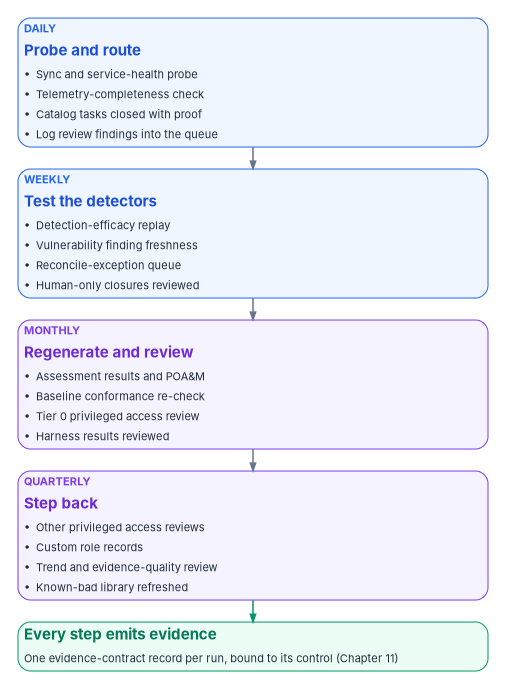
The runbook at a glance
The table is the program’s design. NIST leaves almost every frequency here to the organization: CA-7 asks the organization to establish its own frequencies for monitoring and for assessing control effectiveness, and AC-6(7) asks for privilege reviews at an organization-defined frequency.1 Where another book in the workbook has already set a frequency, this table uses it.
| Cadence | Step | What it proves | Controls it supports | Owner |
|---|---|---|---|---|
| Daily | Synchronization and service-health probe | Directory synchronization ran, its errors are known, and each one is tracked work | CA-7, SI-4, CP-9 (backup result) | Identity operations |
| Daily | Telemetry-completeness check | Every expected log source is still sending | CA-7, SI-4 | Security operations |
| Daily | Catalog and remediation tasks | Each change was requested, approved, executed under a scoped role and closed with a check | AC-2, IA-5, CM-3, and the task’s own control | Service desk; platform teams |
| Daily | Log review findings | Review happened, and what it found entered the same queue as everything else | AU-6 | Security operations |
| Weekly | Detection-efficacy replay | Detection rules still fire on the patterns they were written for | CA-2, SI-4 | Detection engineering |
| Weekly | Vulnerability finding freshness | Open findings are current and inside their remediation deadlines | RA-5, SI-2 | Vulnerability management |
| Weekly | Reconciliation exceptions | Findings for assets the CMDB couldn’t match are being resolved, not ignored | CM-8 | CMDB owner |
| Weekly | Human-only closures | Every task closed without automated proof is reviewed and either evidenced or reopened | CA-2, CA-7 | Service desk lead |
| Monthly | Regenerate assessment results and the POA&M | The package reflects current evidence | CA-2, CA-5, CA-7 | ISSO |
| Monthly | Baseline conformance re-check | Configuration matches the intended baseline after reconciliation | CM-6 | Platform owners |
| Monthly | Tier 0 privileged access review | Every Tier 0 assignment is still needed | AC-6(7), AC-2 | Governance office |
| Monthly | Harness results review | The checks on the automation passed, or their failures are tracked | CA-2, CA-7 | ISSO |
| Quarterly | Other privileged access reviews | Every non-Tier-0 privileged assignment is still needed | AC-6(7), AC-2 | Role owners |
| Quarterly | Custom role records | Each custom role’s permissions, backing group and purpose are still right | AC-6, AC-2 | Identity engineering |
| Quarterly | Trend and evidence-quality review | Which controls drift repeatedly; which verdicts rest on manual evidence | CA-7 (CA-7(3) as design) | ISSM |
| Quarterly | Known-bad event library refresh | The efficacy tests still reflect current attacker behavior and current schemas | CA-2, SI-4 | Detection engineering |
The monthly regeneration and review match the cadence in Book 14, Chapter 11. The Tier 0 monthly and other-privileged quarterly reviews are the program’s choice in Book 04, Chapter 09 and Book 04, Chapter 08, and they are never self-reviews. CA-7(3), Trend Analyses, isn’t in any NIST baseline;2 the quarterly trend review adopts it as a design choice, because a control that passed every month and then failed is a different finding from one that has always failed.
Daily: the eight everyday tasks, governed
The source runbook took eight tasks as they actually arrive at many service desks, by email, under standing administrator rights, closed with a reply, and rewrote each as a governed procedure. Chapter 02 has the one-line summary of each. Here is the procedure an operator follows. The first five are request-driven; the last three are standing operations. The illustrative catalog item names are the program’s design (Chapter 05).
1. Password reset
Catalog item: entra.credential.password_reset · Supports: IA-5
The ungoverned shape: an email arrives, an operator with standing portal rights resets the password and emails a temporary password back to the mailbox that asked. If that mailbox is compromised, the reset hands the account to whoever holds it.
- Originate. The email opens a catalog request against the reconciled identity record. If the account is disabled, the request stops and routes to the security office rather than proceeding.
- Authorize. Self-service where policy allows. Otherwise the service desk verifies the person against the record the agency already holds, never against facts the caller supplies (Chapter 04).
- Elevate and act. The catalog actuator resets the credential through Graph under a just-in-time scoped role. The operator holds no standing administrator role.
- Deliver on a separate channel. A Temporary Access Pass, Microsoft’s “time-limited passcode that can be configured for single use or multiple sign-ins,”3 or another channel distinct from the one the request came in on. Issuing a pass needs an authentication role, not the Password or Helpdesk Administrator role that does the reset. Two messages to the same inbox are still one channel.
- Close with provenance. The closing check confirms the new credential is active and the old one no longer works. The change record holds who asked, who approved, what verification happened and the check result.
2. Authenticator (MFA) reset
Catalog item: entra.credential.mfa_reset · Supports: IA-5, with IA-2 and IA-12
After an authenticator reset, the next person to register a method controls the account. A reset performed on an emailed request with no verification is the classic help-desk social-engineering entry. It is never a look-up-and-click.
- Originate. The request opens the reset item against the identity record.
- Authorize: the gate is the point. The operator verifies identity to policy before anything happens, at the assurance level the account’s risk tier requires, and a privileged or sensitive account needs a second approver (Chapter 04).
- Elevate and act. Require re-registration through Graph under a just-in-time role (Chapter 04).
- Alert. Every reset raises an audit event and a security alert (SI-4). Repeated resets on one identity are a detection signal, not routine.
- Close with provenance. The record carries the verification evidence and confirms the old method is gone and a new registration is pending under the user’s control.
3. Admin consent for a third-party application
Catalog item: the SaaS integration request (Chapter 06) · Supports: AC-20, SA-9, AC-6
Consent restriction governs who may approve an integration. It doesn’t decide whether the service at the other end is authorized to hold federal data. An administrator who correctly consents to an unauthorized cloud service passes every consent gate and still breaks the boundary.
- Originate. The request records the application, its business owner and the directory attributes it will receive (what identity data leaves the boundary, and to which external system).
- Authorize: verdict before configuration. Record the service’s authorization status at or above the required baseline before consent is granted. A missing or lapsed authorization stops the request. An approved-software list is necessary but not sufficient.
- Least privilege on the grant. Consent is scoped to the minimum the application needs; the approver is not the requester; the grant is executed by an identity governance office role holder who activates the role through PIM against the ticket, not a portal click by a standing administrator and never by the help desk (Book 04, Chapter 06).
- Declare the endpoints. The application’s sign-on and provisioning endpoints, ports and protocols are recorded, so network allow-lists derive from the declaration and an undeclared endpoint shows up as drift.
- Close and re-check. Closure records the verdict, the scoped consent and the endpoint declaration; the authorization is re-checked on a cadence and a lapse raises a task (CA-7).
4. Creating an account
Catalog item: entra.jml.joiner · Supports: AC-2, with AC-6 and IA-5
- Originate from the joiner event. The account is provisioned from the HR joiner event, not an ad hoc request (Book 03). Provisioning before the HR record exists is the exception path, flagged and time-boxed.
- Authorize. The lifecycle workflow, with confirmation from the manager of record, taken from the authoritative record, and from identity operations.
- Least privilege by derivation. Group, license and role membership are derived from the identity’s attributes (department, role, location), not picked by hand. Usage location and synchronization attributes are set from the record so the account is well formed at creation.
- Elevate and act. Create through Graph under a just-in-time scoped role, never standing global administrator.
- Deliver credentials on a separate channel. A Temporary Access Pass or other out-of-band channel; never a username and password in clear-text email.
- Close with provenance. The check confirms the account exists with exactly the derived entitlements and an anchored owner.
5. Running a script for a requester
Catalog item: a typed extension of the catalog, never a free-form script · Supports: AC-2, AC-6, CM-3
If the requester writes the command and the operator runs it under administrator rights, the requester is the author and the operator is the execution engine. A spoofed or compromised mailbox then gets arbitrary execution in the tenant.
- Parameters travel; commands don’t. The request supplies validated inputs to a pre-approved, version-controlled script held in the platform. The form can submit only the parameters the script declares, and the script is the only thing that runs. A secret is resolved on the connector host, never typed into a form.
- Originate and authorize. The request resolves against the authoritative record for the objects it changes, and the change type’s approval gate holds it.
- Elevate and act. The script acts through Graph under a just-in-time scoped role.
- Close with provenance. The closing record captures the exact parameters, the before-and-after state of each changed object, and a check confirming the intended change and nothing broader. A genuinely one-off bulk change outside the catalog is a change-managed, peer-reviewed, logged operation (Book 13, Chapter 10); never an emailed command.
6. The morning synchronization check
Runs: daily, scheduled · Supports: CA-7, SI-4, AU-6, CP-9
The ungoverned shape is one of the purest examples of manual compilation: an operator logs on interactively every morning to the directory synchronization servers, which are Tier 0 assets, reads the latest import, synchronization and export results, and pastes them into an email in which “changes from yesterday must be bolded.” Errors found don’t become tracked work, and the daily privileged logon is itself a risk.
- Probe, don’t log on. A scheduled read-only probe collects synchronization status and errors through APIs, under a read-only identity. Microsoft Entra Connect Health for sync already gathers server health, alerts, synchronization errors and data freshness in one view, and its alert catalog includes failed imports and exports, a stopped synchronization service and a skipped password-hash-synchronization heartbeat.4 Microsoft Graph reports the tenant’s last synchronization time and the synchronization conflicts recorded on each user.56 Daily interactive logon to the synchronization hosts ends (AC-6, and the privileged-access model in Book 04).
- Generate the report; don’t compile it. The morning report is produced from the probe’s output, so it can be re-run and diffed, and “what changed since yesterday” is a computed difference rather than bold text.
- Errors become tracked work. Each synchronization error or unhealthy connector opens a task with an owner and a service level. A failed backup of the synchronization server is a CP-9 finding, not a note.
- Emit. The probe result and the report go to the evidence pipeline (Chapter 11).
What the probe should treat as late is grounded in the product’s own schedule: by default Microsoft Entra Connect runs a synchronization cycle every 30 minutes, and a modified schedule must still run a cycle at least once every seven days.7
The scripts and queries in this chapter are illustrative. They read state and change nothing, but they haven’t been tested against a production tenant or workspace. Review them, run them first against a test tenant under a read-only identity, and adapt the thresholds to your own schedule before relying on them.
# Morning synchronization probe: read-only.
# Requires the Microsoft Graph PowerShell SDK and an identity holding only
# Organization.Read.All and User.Read.All. It changes nothing in the tenant.

Connect-MgGraph -Scopes 'Organization.Read.All', 'User.Read.All' -NoWelcome

# 1. When did the tenant last synchronize with the on-premises directory?
$org = Get-MgOrganization -Property 'id', 'onPremisesSyncEnabled', 'onPremisesLastSyncDateTime'

$lastSync   = $org.OnPremisesLastSyncDateTime
$ageMinutes = $null
if ($lastSync) {
    $ageMinutes = [int]((Get-Date).ToUniversalTime() - $lastSync.ToUniversalTime()).TotalMinutes
}

# Default cycle is 30 minutes; flag anything past two missed cycles.
$syncLate = ($null -eq $ageMinutes) -or ($ageMinutes -gt 90)

# 2. Which users carry a synchronization conflict?
# Advanced query: needs ConsistencyLevel eventual and a count.
$conflicts = Get-MgUser -All `
    -Filter "onPremisesProvisioningErrors/any(o:o/category eq 'PropertyConflict')" `
    -ConsistencyLevel eventual -CountVariable conflictCount `
    -Property 'id', 'onPremisesProvisioningErrors'

# 3. One raw result per run. The collector maps it to the eight-field evidence contract.
[pscustomobject]@{
    source        = 'sync-probe'
    timestamp     = (Get-Date).ToUniversalTime().ToString('o')
    control       = @('CA-7', 'SI-4')
    syncEnabled   = $org.OnPremisesSyncEnabled
    lastSyncUtc   = $lastSync
    ageMinutes    = $ageMinutes
    syncLate      = $syncLate
    conflictCount = $conflictCount
    verdict       = $(if ($syncLate -or $conflictCount -gt 0) { 'drift' } else { 'compliant' })
} | ConvertTo-Json -Depth 4
The filter uses Graph’s advanced query support, in which onPremisesProvisioningErrors/any(o:o/category) is a supported filter on users and PropertyConflict is currently the only error category.89 The probe records object identifiers, not names; the task it opens carries what the operator needs. Connect Health’s own synchronization error report and export cover the detail the probe leaves out.10
7. Event-log handling
Runs: continuously, reviewed daily · Supports: AU-2, AU-6, AU-9, AU-11
The ungoverned shape: a scheduled script writes event-log output to an administrative file share that anyone with server administrator rights can change. The audit record can be altered by the very people it is meant to hold accountable, which is what AU-9 exists to prevent: it asks the organization to “protect audit information and audit logging tools from unauthorized access, modification, and deletion.”11 The source document ended with “Review Monday to see if this is enough.”
- Forward to the central log platform, not a share. Event logs go to the log platform described in Book 12, in a store the monitored administrators can’t alter. An administrative share is never an evidence destination. Microsoft’s authentication operations guide likewise gives archiving sign-in activity in a SIEM to the security operations team.12 In an Azure Monitor Logs workspace, deleting data is a separate, permissioned operation, and each deletion appears in the workspace’s Activity Log with the caller, the target table and the status.13 The program grants that permission to nobody who administers the systems whose logs it holds.
- Retain to policy. Retention follows the audit-record policy (AU-11) and the federal logging requirements in Book 12, Chapter 12, not the free space on a server.
- Review is a procedure. Log review (AU-6) is scheduled and owned, and its findings enter the same remediation queue as everything else.
- Emit. Collection status and review completion go to the evidence pipeline.
8. Custom administrative roles
Runs: the standing posture under every task above; reviewed quarterly · Supports: AC-6, AC-6(7), AC-2
The ungoverned shape is common: one well-scoped custom role exists (for example, a help-desk role limited to one device action) while everything else runs on standing global and portal administrator rights, and even the good role has no recorded permission set, activation policy or review.
- Least privilege by default. Every task in this chapter runs under a scoped role activated just in time; standing global and portal administrator rights leave day-to-day operations. The one good scoped role becomes the pattern (Chapter 04).
- Enumerate and bind. Each custom role is a governed record: its exact permissions, its backing group and the tasks it exists for.
- Activation through Privileged Identity Management. Elevation is time-boxed, approved where configured and logged; the activation record is part of each task’s evidence, binding who could act to what was done (Book 04, Chapter 08).
- Review on a calendar. Privileged role membership is reviewed (AC-6(7) asks the organization to review privileges “to validate the need for such privileges”14), and revocations become tracked work.
A note on the control the source cited here. It named AC-2(7), Privileged User Accounts, for the review. AC-2(7) is about administering privileged accounts under a role-based scheme and isn’t in any NIST baseline; the review of privileges is AC-6(7), which is in the Moderate and High baselines, together with AC-2’s own account review.15 The runbook cites AC-6(7).
Moving the desk onto the governed tasks
The eight procedures replace habits, and the last step of the move is enforcement: standing administrator rights leave day-to-day operations (task 8), and a request that arrives by email no longer gets actioned from the email. That step follows the workbook’s implementation conventions (Book 00, Appendix D); the role and scope configuration it relies on is Chapter 04’s, and the integration gate is Chapter 06’s.
Authority: Risk-based recommended, the program’s position, for the eight procedures. Mandated where the system’s baseline selects the controls each task names (IA-5, AC-2, AC-6(7), AU-9 and the others above). Microsoft-recommended for archiving sign-in activity in a SIEM run by security operations (task 7, above). Applies: all tenants. License-dependent: just-in-time activation needs PIM (Entra ID P2 or Entra ID Governance; Chapter 04).
| How-template step | Where this chapter covers it, or what it adds |
|---|---|
| Prerequisites | The catalog items (Chapter 05); the scoped roles and PIM (Chapter 04); the central log platform (Book 12); the evidence pipeline (Chapter 11) |
| Pilot | One task type first, normally password reset, on one service desk line |
| Report-only or audit phase | The catalog items run beside the old path for a set period while the SIEM’s no-ticket rule (Chapter 04) counts the changes that still happen outside it, without blocking them |
| Enforcement | Standing administrator assignments removed from operators, and the shared request mailbox redirected to the front door (Chapter 03), task type by task type (rings below) |
| Rollback | Restore a removed standing assignment from the export taken before the change, through PIM against the change record, for a named operator and a stated period; a Privileged Role Administrator does it in minutes |
| Exclusions | Emergency access accounts are never used for daily tasks and keep their own design (Book 04); a task without a catalog item yet runs as a change-managed one-off (task 5) until its item exists |
| Telemetry | Each task’s closing record, PIM activations, directory audit entries and the no-ticket rule, all to the evidence pipeline |
| Evidence | The checklist below |
| Day-two ownership | The service desk lead owns the queue and the weekly human-only closure review; identity engineering owns the custom role records reviewed quarterly; the cadence is in the table by control family. Drift is a change with no ticket or a standing assignment that came back |
Change safety
| Ring | Scope | Exit criteria |
|---|---|---|
| 0 | Password reset on the implementing team’s line | Every reset closed with its provenance record; no change found outside a ticket |
| 1 | Password and authenticator resets for the whole desk | Two weeks with the no-ticket rule silent for those tasks |
| 2 | Account creation, scripts and admin consent requests through their items | The same, per task |
| 3 | Standing administrator assignments removed; the request mailbox redirected | No standing operator assignment in the export; the redirect’s auto-reply sending people to the front door |
- Emergency access: untouched by the change; the accounts aren’t operator accounts.
- Change window: one task type at a time, in business hours, with the service desk lead and identity engineering on hand.
- Backout triggers: set before each ring, for example a queue backlog past the service level for the task that just moved, or a task the new path can’t complete.
- Post-change validation: one test request per moved task, end to end, with its closing record checked.
Control states.
| State | This page | Evidence |
|---|---|---|
| Designed | The eight procedures above | This chapter and the catalog item definitions |
| Configured | Catalog items, roles and the log forwarding | The item definitions, the role export and the collection configuration |
| Enforced | Standing rights removed and the mailbox redirected (ring 3) | The role export with no standing operator assignment; the mailbox redirect setting |
| Evidenced | One test request per task, and the no-ticket rule firing on a deliberate test | Test records with expected and observed outcomes |
| Operated | The daily queue, the weekly human-only closure review and the quarterly custom role review | Review records and the cadence tasks’ closures |
A finding this page addresses is ready for closure when every applicable state has evidence; the authorizing official or assessor decides.
Evidence checklist
- Microsoft Zero Trust pillar: Identity, with SecOps for the log handling
- CISA ZTMM pillar: Identity
- Depends on: Chapter 04’s scoped roles and PIM (Identity); Book 12’s log platform (SecOps)
- Attack chain interrupted: a spoofed or compromised mailbox used to order a reset, an account or a script (Initial Access, Execution), and standing administrator rights reused by whoever compromises an operator (Privilege Escalation)
Weekly, monthly and quarterly
The daily work produces most of the evidence. The longer cycles check that the evidence still means what it says.
Weekly. The detection-efficacy replay runs (below). Vulnerability findings are checked for freshness against their remediation deadlines (Book 12, Chapter 06); stale findings are themselves findings. The reconciliation exception queue from Chapter 07 is worked down, because a finding that can’t be tied to an asset can’t be attested. And every task closed without automated proof (a human-only closure) is reviewed: either the evidence is attached, or the task reopens. The program counts human-only closures separately so the number is visible; an attestation over unverified closures would attest something nobody checked.
Monthly. Assessment results and the POA&M are regenerated from current evidence (Chapter 11, Book 14, Chapter 11). The baseline conformance re-check compares current configuration with the intended baseline and raises drift that survived reconciliation as a CM-6 finding (Book 13, Chapter 06). Tier 0 privileged access is reviewed. And the ISSO reviews the harness results: which checks failed, whether each failure became work, and whether any check stopped running.
Quarterly. Non-Tier-0 privileged access is reviewed, custom role records are revisited, and the ISSM runs the trend and evidence-quality review: which controls drift repeatedly, which verdicts rest on manual or derived evidence, and which evidence categories are close to their freshness limits. The known-bad event library behind the efficacy tests is refreshed, because an efficacy test that hasn’t changed in a year has quietly become a rubber stamp.
The cadence by control family
The table at the top of this chapter is organized by step. An assessor, and the owner of each control family, reads it the other way: for identity, devices, applications, data and network, what happens every day, week, month, quarter and year, and who does it. The table below is that view, with the annual cycle the steps above leave out. Each row is a recurring task in the ITSM tool (Chapter 05), generated on its schedule, assigned to its owner, and closed with an evidence record like every other task (Chapter 11), so the calendar and the evidence are the same thing.
Each task carries its authority (Book 00, Appendix D). M is mandated: a CISA binding operational directive sets the frequency. MS is Microsoft-recommended. Everything else is the program’s choice (P), inside the organization-defined frequencies NIST leaves open,16 and an agency should set its own and record why.
| Family | Daily | Weekly | Monthly | Quarterly | Annual |
|---|---|---|---|---|---|
| Identity | Synchronization probe (task 6, P); Entra Health alerts (P); risky-user and risky-sign-in triage (Book 12, P); emergency access alert reviewed for any firing (MS)17 | Entra recommendations (P); Temporary Access Passes issued matched to tickets (P); Connect Sync server checks (P) | Tier 0 privileged access review (P, Book 04); assessment results and POA&M regenerated (P) | Emergency access validation drill, at least every 90 days (MS);18 other privileged reviews and custom role records (P); help-desk simulation (Appendix B, P) | Identity-verification procedure and authentication methods policy reviewed (P); SCuBA results reported continuously or quarterly, and in-scope cloud tenants reported annually, under BOD 25-01 (M)19 |
| Devices | Noncompliant-device queue worked (Book 05, P) | Automated asset discovery every 7 days; vulnerability enumeration every 14 days (M, BOD 23-01)20 | Patch and update-ring compliance; BitLocker encryption report (P)21 | Stale and unmanaged devices cleaned up or claimed (P); recovery-key reads reviewed against tickets (P) | Security baseline versions reviewed against the vendor’s current release (P) |
| Applications | Any consent, role or access grant with no ticket alerted (Chapter 04, P) | New application credentials and ownerless applications reported (Book 13, P) | Credentials expiring within the renewal window worked down (P) | Application access reviews (Book 04, P); SaaS integration attestation (Chapter 06, P) | Application portfolio recertified, with retirement candidates (Book 18, P) |
| Data | Data loss prevention and label-change alerts triaged (Book 12, P) | Changes to label, retention and DLP policies compared with the baseline (Book 13, P) | Audit-log retention and routing confirmed against the evidence contract (P) | External sharing and guest access reviewed (P) | Data inventory and classification recertified by data owners (P) |
| Network | Telemetry completeness, network sources included (P) | Bypass and exemption register changes reviewed (Book 09, P) | Public IP and endpoint inventory compared with last month’s (Book 10, P) | Publicly exposed IP addresses and domains attested to CISA, under BOD 26-04 (M);22 bypass register reviewed in full (P) | DDoS and WAF response exercise (Book 10, P); TIC 3.0 use-case alignment reviewed (Book 09, P) |
Three cross-family cycles sit above the table: the trend and evidence-quality review each quarter, and each year the contingency plan test (CP-4) and the incident response test (IR-3), both at frequencies the organization defines,23 with the recovery runbooks and an emergency access scenario in the exercise.
Who does it
Six roles keep an operating control honest: policy owner, platform owner, operator, security monitor, help desk and assessor. They map onto this book’s roles in Chapter 10, so nobody is added; the table only says who holds each role for each family. R = does the task; A = accountable for the cadence being kept; C = consulted; I = informed.
| Family | Policy owner (A) | Platform owner (R) | Operator (R) | Security monitor (R for alerts) | Help desk | Assessor |
|---|---|---|---|---|---|---|
| Identity | CISO for verification; identity governance officer for access | Identity engineering | Identity operations | Security operations | R for recovery runbooks; I for the rest | ISSO for the package; assessor reads the evidence |
| Devices | CISO | Endpoint platform owner (Book 05) | Device support | Security operations | R for device replacement and key requests | Same |
| Applications | Identity governance officer | Application owners and identity engineering | Identity operations | Security operations | I; triage only | Same |
| Data | Data owners, with the privacy officer consulted | Purview platform owner | Platform operators | Security operations | I | Same |
| Network | Network owner (Book 09) | Network and cloud platform teams | Network operations | Security operations | I; routes blocked-access calls | Same |
The assessor consumes the cadence; it never runs a task in it, which keeps the separation the authorization depends on (Chapter 10). A task that misses its date opens a finding against the accountable owner, and three misses in a row reach the quarterly trend review.
The synchronization servers that stay
The morning probe reads synchronization from the cloud side. The Entra Connect Sync servers that remain during the migration need their own checks on the server side, because the failures that matter most there (a suspended scheduler, an upgrade that stalled, a database near its ceiling, a changed account password) don’t show up as a late synchronization until they have already stopped it. Microsoft’s operations reference guide for identity and access management makes the same point about baselines: the default delta cycle is 30 minutes, a delta cycle that consistently takes longer should be investigated, and synchronization errors left unresolved for more than 100 days should be cleaned up.24 The two entries below run alongside the daily probe in task 6 and the weekly cycle, and their results go to the evidence pipeline like every other step.
The synchronization servers are Tier 0 assets (Book 04), and under the program’s baseline assumption they run Windows Server 2019 or later. Where a server’s operating system has to change, Microsoft’s recommended method is a new server and a swing migration rather than an in-place upgrade.25
Entra Connect Sync server checks
Runs: weekly, and after any upgrade or configuration change · Supports: CM-2, CM-6, CP-9, SI-2, SI-4
- Version and upgrade. Microsoft requires every Connect Sync server to be on version 2.6.84.0 or later, with application-based authentication configured, by April 7, 2027; synchronization stops after that date on servers that don’t meet both, and all 1.x versions are already unsupported and no longer synchronize.2627 Automatic upgrade is on by default only for eligible installations (express settings, SQL Server Express LocalDB, fewer than 100,000 metaverse objects), and it doesn’t proceed when, among other conditions, the LocalDB database is 8 GB or larger.
Get-ADSyncAutoUpgradereports Enabled, Disabled or Suspended, and-Detailgives the suspension reason.28 Microsoft suggests a swing migration rather than an in-place upgrade for a server that hasn’t been upgraded in 12 to 18 months.29 - Staging server. Only one server exports at a time; every other server stays in staging mode, which runs import and synchronization but no export, password hash synchronization or password writeback. Microsoft recommends leaving synchronization running on the staging server so it can take over without a long catch-up.30 The check confirms
StagingModeEnabledisTrueon every server except the active one. - Scheduler status.
Get-ADSyncSchedulershows whether the cycle is enabled (SyncCycleEnabled), whether staging mode is on, the interval in effect, the next cycle’s start time, and the run-history retention (seven days by default).SchedulerSuspendedis set by Connect during an upgrade and isn’t supported as a manual setting, and leaving the installation wizard open also suspends the scheduler.Get-ADSyncConnectorRunStatusreturns nothing when the engine is idle and the running connector’s name when it isn’t.31 A disabled cycle, or a suspension that outlasts the upgrade window, is a task. - Service account and connector account passwords. The ADSync service account is created by the installation wizard with a 127-character password that doesn’t expire, and the account can’t be changed after installation. Microsoft warns that changing or resetting its password without following its procedure can leave the synchronization service unable to start or to read its encryption key.32 Changing the AD DS Connector account’s password means entering the new one in the connector’s properties in the Synchronization Service Manager and restarting the service.33 Both are change-managed tasks (Book 13, Chapter 10), done on the staging server first.
- Configuration export. Each change made through the Connect wizard writes a time-stamped
Applied-SynchronizationPolicy-*.jsonfile to%ProgramData%\AADConnect; changes made through PowerShell, the Synchronization Service Manager or the Synchronization Rules Editor don’t, and need an on-demand export through the wizard’s View or Export Current Configuration task. Microsoft suggests keeping a copy in a protected location for disaster recovery.34 The check confirms the newest export is later than the last recorded change, and the protected copy is the CP-9 backup evidence. - Database. By default Connect installs SQL Server 2019 Express LocalDB, which has a 10 GB limit, enough for roughly 100,000 objects; beyond that it needs a full SQL Server installation.35 When LocalDB reaches the limit, the synchronization service can no longer start or synchronize properly, and the long-term fix is a new server with full SQL Server, brought in as a staging server through a swing migration.36 The check records the database file’s size and opens a task well before 8 GB, the point at which automatic upgrade stops.37
- Required ports. The server needs DNS (53), Kerberos (88), MS-RPC (135), LDAP (389), SMB (445), LDAP over TLS (636, only if TLS is used) and the high RPC ports (49152–65535) to the domain controllers, and HTTPS (443) plus HTTP (80, for certificate revocation lists) to Microsoft Entra ID. The latest Connect Health agent needs only 443; older agents also use 5671.38 Microsoft’s ADConnectivityTool module tests DNS, Kerberos and LDAP to named domain controllers.39
- Connect Health. The Health agent for sync is installed with Connect, needs Entra ID P1 or P2, and requires Connect Sync V2.4041 Email notifications for alerts are on by default and go to the recipients set in Notification settings.42 The “Health service data isn’t up to date” alert fires when the service hasn’t received complete data for two hours; only the error state (no data at all) sends email, so the warning state needs a check of its own.43
Test-MicrosoftEntraConnectHealthConnectivity -Role Synctests whether the agent can upload.44 For duplicate-attribute errors, Connect Health’s diagnose feature narrows the cause and, for orphaned objects only, can apply the fix from the cloud side.45
# Entra Connect Sync server check: read-only.
# Run on each synchronization server (active and staging). It changes nothing.

Import-Module ADSync

# 1. Scheduler: cycle enabled, staging mode, suspension, interval, next run, retention.
Get-ADSyncScheduler |
    Select-Object SyncCycleEnabled, StagingModeEnabled, SchedulerSuspended,
        CurrentlyEffectiveSyncCycleInterval, NextSyncCycleStartTimeInUTC, PurgeRunHistoryInterval

# 2. Is a connector running now? An empty result means the engine is idle.
Get-ADSyncConnectorRunStatus

# 3. Automatic upgrade state, with the suspension reason if suspended.
Get-ADSyncAutoUpgrade -Detail

# 4. Server configuration version, to compare with the 2.6.84.0 minimum.
(Get-ADSyncGlobalSettings).Parameters |
    Where-Object Name -eq 'Microsoft.Synchronize.ServerConfigurationVersion' |
    Select-Object Name, Value

# 5. Database: where it is, and the LocalDB data file's size against the 10 GB limit.
Get-ADSyncDatabaseConfiguration
Get-Item "$env:ProgramFiles\Microsoft Azure AD Sync\Data\ADSync.mdf" |
    Select-Object Name, @{ n = 'SizeGB'; e = { [math]::Round($_.Length / 1GB, 2) } }

# 6. Newest configuration export written by the wizard.
Get-ChildItem "$env:ProgramData\AADConnect" -Filter 'Applied-SynchronizationPolicy-*.json' |
    Sort-Object LastWriteTime -Descending |
    Select-Object -First 1 Name, LastWriteTime

# 7. Can the Connect Health agent still upload?
Test-MicrosoftEntraConnectHealthConnectivity -Role Sync
# Port check from the synchronization server to named domain controllers: read-only.
# Tests DNS (53), Kerberos (88) and LDAP (389). Replace the names with your own.
Import-Module "C:\Program Files\Microsoft Entra Connect\Tools\ADConnectivityTool.psm1"
Confirm-NetworkConnectivity -DCs 'dc01.agency.example', 'dc02.agency.example' -VerboseThe cmdlets are Microsoft’s: Get-ADSyncScheduler and Get-ADSyncConnectorRunStatus from the scheduler documentation,46 Get-ADSyncAutoUpgrade and Get-ADSyncDatabaseConfiguration from the ADSync reference,47 the server configuration version from Microsoft’s automatic-upgrade troubleshooting,48 and Confirm-NetworkConnectivity from the ADConnectivityTool reference.49
Government clouds. Microsoft lists directory synchronization (Connect Sync and cloud sync) and Connect Health reporting as available in Azure for US Government.50 Connect uses US-only endpoints there, with its own proxy list (*.microsoftonline.us and *.gov.us.microsoftonline.com among them); a server with no internet access needs the AzureInstance registry value set to 4 during a custom installation, and Microsoft asks hybrid environments that integrate with Azure Government to run the latest Connect release.51 The Connect Health agent has its own Azure Government endpoint list, and installing it with the Hybrid Identity Administrator role isn’t supported in Azure Government.52
Entra Health monitoring and recommendations
Runs: daily for health alerts, weekly for recommendations · Supports: CA-7, SI-4, RA-5
- Health alerts, daily. Microsoft Entra Health monitoring (preview) turns sign-in data into signals for four scenarios (sign-ins requiring MFA, sign-ins requiring a managed device, sign-ins requiring a compliant device, and sign-ins to SAML applications) and raises an alert when a signal breaks the tenant’s own pattern; alerts also cover a Conditional Access block policy scenario. It needs at least four weeks of data to learn the pattern, and each alert emails the recipients the tenant chose.53 Viewing signals needs Entra ID P1 or P2; viewing and receiving alerts needs a non-trial P1 or P2 license and at least 100 monthly active users. Reports Reader is the least-privileged role to view them, and Helpdesk Administrator to update alerts and their notification settings.54 The operator reads the active alerts each morning and opens a task for each one; dismissing an alert is a closure that carries its reason.55
- Recommendations, weekly. Microsoft Entra recommendations compare the tenant with Microsoft’s best practices and refresh every 24 hours with a one-day lag. Each one is active, completed, dismissed or postponed, and the service marks it completed only when every affected resource is addressed.56 Several apply directly to the synchronization servers, among them deprecated Connect versions, rotating the AD DS Connector account’s password, replacing an Enterprise or Domain Admin connector account, and removing unsafe permissions on Connect accounts.57 Each active recommendation becomes a task, and a dismissal records the reason Microsoft requires.
# Entra Health alerts and recommendations: read-only.
# Requires the Microsoft Graph PowerShell beta modules and an identity holding only
# HealthMonitoringAlert.Read.All and DirectoryRecommendations.Read.All. It changes nothing.

Connect-MgGraph -Scopes 'HealthMonitoringAlert.Read.All', 'DirectoryRecommendations.Read.All' -NoWelcome

# 1. Active health monitoring alerts.
Get-MgBetaReportHealthMonitoringAlert `
    -Filter "state eq microsoft.graph.healthmonitoring.alertState'active'" `
    -Property 'id', 'alertType', 'createdDateTime', 'state'

# 2. Active recommendations.
Get-MgBetaDirectoryRecommendation -All |
    Where-Object { $_.Status -eq 'active' } |
    Select-Object DisplayName, RecommendationType, Priority, Status, ImpactStartDateTime
Both cmdlets call Microsoft Graph beta APIs, which Microsoft doesn’t support for production applications.5859 Government clouds: Microsoft lists the health monitoring alerts API for the global service only, not US Government L4 or L5 (DoD), and the recommendations API for the global service and US Government L4 and L5.6061 Availability of Entra Health monitoring for GCC tenants is not yet specified.
Validation and test harnesses
Everything above depends on automation: log sources, detection rules, deployment pipelines, ITSM flows and the evidence pipeline. The harnesses are the part of the runbook that checks the automation itself. Their purpose is to make silent failure loud.
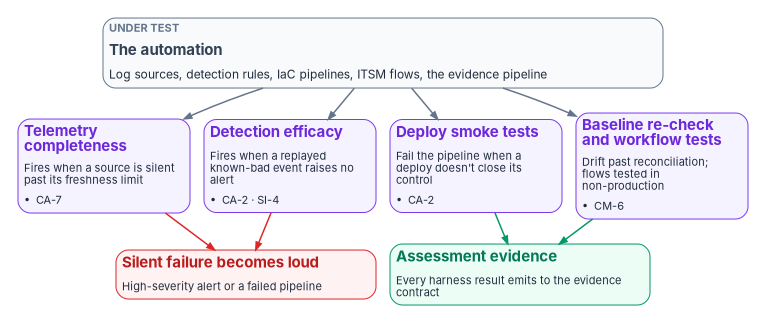
| Harness | Question it answers | Fires when | Supports |
|---|---|---|---|
| Telemetry completeness | Is every expected source still sending? | A source’s newest record is older than its freshness limit | CA-7; SI-4 |
| Detection efficacy | Do the detection rules still catch what they should? | A replayed known-bad event doesn’t raise its rule | CA-2; SI-4 |
| Deployment smoke tests | Did the infrastructure-as-code change actually make the control test pass? | A post-deployment assertion fails | CA-2 |
| Accessibility checks | Do the self-service pages, forms and help articles still meet Section 508? | A scheduled scan, or a manual check after a change, finds a WCAG 2.0 AA failure | Section 508 (M-24-08)62 |
| Baseline conformance re-check | Does configuration still match the intended baseline after reconciliation? | Drift survives a reconciliation cycle | CM-6 |
| Workflow tests | Do the ITSM flows still route, approve, escalate and close as designed? | A test in the non-production instance fails | CA-2; CM-3 |
Every harness result is written to the evidence contract as assessment evidence (Chapter 11), so the checks on the automation are themselves part of the package.
Which controls this supports, precisely
- CA-2, Control Assessments, asks for assessments that determine whether controls are “implemented correctly, operating as intended, and producing the desired outcome.”63 Efficacy and smoke tests are assessments of exactly that kind.
- CA-7, Continuous Monitoring, asks for ongoing monitoring of defined metrics and response actions to what the monitoring finds.64 A silent source is a monitoring outage, and the completeness check is how the program notices one.
- CA-7(3), Trend Analyses, isn’t in any NIST baseline; the program adopts it as design for the quarterly review.65 The source mapped the completeness check itself to CA-7(3). The check is monitoring, not trend analysis, so the runbook maps it to CA-7 and SI-4 and keeps CA-7(3) for the quarterly comparison of results over time.
- SI-6, Security and Privacy Function Verification, asks the organization to verify “the correct operation” of defined security and privacy functions, at defined times, and to alert defined people “to failed security and privacy verification tests.”66 That describes the harnesses closely, but SI-6 is in the High baseline only.67 At Moderate, the program presents the harnesses as CA-2 and CA-7 evidence and treats SI-6 as a design aspiration, not a claimed control.
- SI-4, System Monitoring, is where source liveness belongs as a first-class signal, and CM-6 is the baseline re-check.
There is a parallel worth noticing on the provider side. FedRAMP’s 2026 rules ask providers seeking 20x certification to include, for each applicable Key Security Indicator, “verification that the automation in place is accurate and sufficient” and “validation that the measures are accurately produced and are in place and working as intended.”68 Those rules bind providers, not agencies, but they make the same point this section does: automation is evidence only if something checks the automation.
The telemetry-completeness check
This is the most valuable harness, because every other control depends on its sources still sending. It asserts that each expected table has produced data within its freshness limit. A table that goes quiet is the leading indicator of a detection that has gone blind.
// Telemetry completeness: list every expected source that is past its freshness limit.
// Read-only. Limits are illustrative; set each one from the source's own expected cadence.
let expected = datatable(TableName: string, SlaMinutes: long) [
    "SigninLogs", 60,
    "AADNonInteractiveUserSignInLogs", 60,
    "OfficeActivity", 120,
    "DeviceEvents", 120
];
let lastSeen =
    union isfuzzy=true withsource=TableName
        SigninLogs, AADNonInteractiveUserSignInLogs, OfficeActivity, DeviceEvents
    | where TimeGenerated > ago(2d)
    | summarize LastSeen = max(TimeGenerated) by TableName;
expected
| join kind=leftouter lastSeen on TableName
| extend AgeMin = datetime_diff('minute', now(), LastSeen)
| where isnull(LastSeen) or AgeMin > SlaMinutes   // any row is a source that went dark
| project TableName, LastSeen, AgeMin, SlaMinutes
Two corrections to the source’s version. It called now without parentheses, which isn’t valid in KQL; the function is now(). And without isfuzzy=true, a union that names a table that doesn’t exist in the workspace fails outright. With it, the union proceeds over the tables that resolve and returns a warning for the rest,69 so a missing table shows up as a null LastSeen and is reported, which is what a completeness check should do. The two-day look-back keeps the query cheap; anything silent for longer is reported as null and is just as stale.
Schedule the query at the tightest source limit and route any result to a high-severity alert. A dark source is a control outage, not a hygiene item.
Detection efficacy, smoke tests and the baseline re-check
The detection-efficacy harness is the active counterpart. It replays a library of known-bad but harmless events into a test scope (a benign impossible-travel pair, a scripted password-spray burst) and asserts that the matching rule raises. Run it on every rule change, as a regression gate, and on the weekly schedule. A rule that silently stopped matching after a schema change is then caught by a test rather than by a missed incident. Book 12, Chapter 11 covers detection engineering itself; this harness is how the runbook keeps checking it.
Deployment smoke tests attach to each infrastructure-as-code pipeline, so a deployment that doesn’t close the control it was written for fails the pipeline, not the audit. The baseline conformance re-check runs monthly against the intended baseline and surfaces drift that survived reconciliation.
Workflow tests check the ITSM side. ServiceNow’s Automated Test Framework is the platform’s own mechanism, and ServiceNow’s guidance is to “run tests only on development, test, and other non-production instances to avoid data corruption and outage.”70 The program follows it: workflow tests run in the non-production instance on every change to a flow or catalog item, and they prove the workflow, not the behavior of the native platforms behind it (Chapter 11).
What the platforms already provide
As with the compliance application, the agency should use what its platforms ship before building. Microsoft Sentinel provides a data collection health monitoring workbook that “detects anomalies, and gives insight regarding the workspace’s data ingestion status,” and a SentinelHealth table that records connector health events, which Microsoft recommends pairing with Azure Monitor alert rules. The table currently covers only selected connectors (among them Amazon Web Services, Office 365 and Microsoft Defender for Endpoint), and the health feature must be turned on first.71 For synchronization, Connect Health supplies the alerts listed above.72 The custom completeness query still earns its place because it covers every table the agency depends on, regardless of connector, and because its output goes into the evidence pipeline in the program’s record shape.
What the harnesses can’t prove
- Efficacy tests bound regression; they don’t prove coverage. A test proves a rule can fire on a known pattern. It says nothing about attacker variants nobody has written down.
- The known-bad library ages. If it isn’t refreshed as attacker behavior and log schemas change, the efficacy test silently becomes a rubber stamp. That is why its refresh is on the quarterly runbook.
- Smoke tests assert what they were written to assert. A dimension of a control that no test covers is still unverified, however green the pipeline.
- The harnesses are automation too. A harness that stops running looks exactly like a harness that passes. The monthly harness review checks that each one ran, not just what it found.
Honest limits
- The runbook is design, not mandate. Every frequency in it is the program’s choice, within ranges NIST leaves to the organization, except the few a CISA directive sets, which the family cadence marks M; an agency should set its own and record why.
- Some steps still need people. Identity verification for a reset, the second approval on a high-risk task, the access review decision and the quarterly trend review are human judgments. The runbook makes them recorded and scheduled; it doesn’t automate them away.
- The probe sees what the APIs expose. Graph reports the last synchronization time and recorded conflicts, not every class of synchronization error; Connect Health reports more but needs its agent and, for full alert coverage, the default synchronization configuration.73
- Evidence is only as good as the step that produced it. A task closed by hand with a “done” note is still visible as a human-only closure. The runbook makes those visible; it can’t make them good.
What changes, in one table
| Old habit | What replaces it |
|---|---|
| A runbook lists steps | Each step states what it proves and which control it supports |
| The morning check is a privileged logon and a hand-edited email | A scheduled read-only probe generates the report and opens a task per error |
| Logs land on an administrative share | Logs go to a store the administrators can’t alter, retained and reviewed on a schedule |
| Requests carry commands for the operator to run | Requests carry parameters for a pre-approved script, and the closing record shows before and after |
| Automation is trusted once deployed | Harnesses check it on a schedule, and a silent source or a blind rule raises an alert |
| Workflow tests run wherever convenient | Workflow tests run in non-production only, on every change |
| Human-only closures disappear into the totals | They are counted, reviewed weekly and either evidenced or reopened |
| SI-6 is claimed because the harnesses look like it | At Moderate the harnesses are presented as CA-2 and CA-7 evidence; SI-6 is High-only |
National Institute of Standards and Technology, SP 800-53 Rev. 5, Security and Privacy Controls for Information Systems and Organizations, controls AU-9, AC-6(7), CA-2, CA-7 and SI-6; text read from the release 5.2.0 OSCAL catalog, https://github.com/usnistgov/oscal-content/blob/main/nist.gov/SP800-53/rev5/json/NIST_SP-800-53_rev5_catalog.json (accessed Oct 21, 2026).↩︎
National Institute of Standards and Technology, SP 800-53B control baselines, release 5.2.0 OSCAL profiles for the Low, Moderate and High baselines (AC-6(7) in Moderate and High; SI-6 in High only; CA-7(3) and AC-2(7) in none), https://github.com/usnistgov/oscal-content/tree/main/nist.gov/SP800-53/rev5/json (accessed Oct 21, 2026).↩︎
Microsoft Learn, “Configure Temporary Access Pass to register passwordless authentication methods,” https://learn.microsoft.com/entra/identity/authentication/howto-authentication-temporary-access-pass (accessed Oct 21, 2026).↩︎
Microsoft Learn, “Monitor Microsoft Entra Connect Sync with Microsoft Entra Connect Health” (service overview, alerts, limited evaluation of alerts, object-level synchronization error report), https://learn.microsoft.com/entra/identity/hybrid/connect/how-to-connect-health-sync; and “Microsoft Entra Connect Health Alert Catalog,” section “Alerts for Microsoft Entra Connect (Sync),” https://learn.microsoft.com/entra/identity/hybrid/connect/how-to-connect-health-alert-catalog (both accessed Oct 21, 2026).↩︎
Microsoft Learn, “organization resource type” (
onPremisesLastSyncDateTime,onPremisesSyncEnabled), https://learn.microsoft.com/graph/api/resources/organization?view=graph-rest-1.0; and “Get organization,” permissions (Organization.Read.All needed to read all properties), https://learn.microsoft.com/graph/api/organization-get?view=graph-rest-1.0 (both accessed Oct 21, 2026).↩︎Microsoft Learn, “user resource type,” property
onPremisesProvisioningErrors(“Errors when using Microsoft synchronization product during provisioning”), https://learn.microsoft.com/graph/api/resources/user?view=graph-rest-1.0 (accessed Oct 21, 2026).↩︎Microsoft Learn, “Microsoft Entra Connect Sync: Scheduler,” https://learn.microsoft.com/entra/identity/hybrid/connect/how-to-connect-sync-feature-scheduler (accessed Oct 21, 2026).↩︎
Microsoft Learn, “Advanced query capabilities on Microsoft Entra ID objects” (user properties supporting
onPremisesProvisioningErrors/any(o:o/category)), https://learn.microsoft.com/graph/aad-advanced-queries; and “Get-MgUser” (-Filter,-ConsistencyLevel,-CountVariable,-Property,-All), https://learn.microsoft.com/powershell/module/microsoft.graph.users/get-mguser?view=graph-powershell-1.0 (both accessed Oct 21, 2026).↩︎Microsoft Learn, “onPremisesProvisioningError resource type” (category: “Currently, there is only one possible value,”
PropertyConflict), https://learn.microsoft.com/graph/api/resources/onpremisesprovisioningerror?view=graph-rest-1.0 (accessed Oct 21, 2026).↩︎Microsoft Learn, “Monitor Microsoft Entra Connect Sync with Microsoft Entra Connect Health” (service overview, alerts, limited evaluation of alerts, object-level synchronization error report), https://learn.microsoft.com/entra/identity/hybrid/connect/how-to-connect-health-sync; and “Microsoft Entra Connect Health Alert Catalog,” section “Alerts for Microsoft Entra Connect (Sync),” https://learn.microsoft.com/entra/identity/hybrid/connect/how-to-connect-health-alert-catalog (both accessed Oct 21, 2026).↩︎
National Institute of Standards and Technology, SP 800-53 Rev. 5, Security and Privacy Controls for Information Systems and Organizations, controls AU-9, AC-6(7), CA-2, CA-7 and SI-6; text read from the release 5.2.0 OSCAL catalog, https://github.com/usnistgov/oscal-content/blob/main/nist.gov/SP800-53/rev5/json/NIST_SP-800-53_rev5_catalog.json (accessed Oct 21, 2026).↩︎
Microsoft Learn, “Microsoft Entra authentication management operations reference guide,” section “Assign owners to key tasks,” https://learn.microsoft.com/entra/architecture/ops-guide-auth (accessed Nov 9, 2026).↩︎
Microsoft Learn, “Delete data from a Log Analytics workspace by using the Delete Data API,” section “Check delete data operations and status,” https://learn.microsoft.com/azure/azure-monitor/logs/delete-log-data (accessed Oct 21, 2026).↩︎
National Institute of Standards and Technology, SP 800-53 Rev. 5, Security and Privacy Controls for Information Systems and Organizations, controls AU-9, AC-6(7), CA-2, CA-7 and SI-6; text read from the release 5.2.0 OSCAL catalog, https://github.com/usnistgov/oscal-content/blob/main/nist.gov/SP800-53/rev5/json/NIST_SP-800-53_rev5_catalog.json (accessed Oct 21, 2026).↩︎
National Institute of Standards and Technology, SP 800-53B control baselines, release 5.2.0 OSCAL profiles for the Low, Moderate and High baselines (AC-6(7) in Moderate and High; SI-6 in High only; CA-7(3) and AC-2(7) in none), https://github.com/usnistgov/oscal-content/tree/main/nist.gov/SP800-53/rev5/json (accessed Oct 21, 2026).↩︎
National Institute of Standards and Technology, SP 800-53 Rev. 5, Security and Privacy Controls for Information Systems and Organizations, controls AU-9, AC-6(7), CA-2, CA-7 and SI-6; text read from the release 5.2.0 OSCAL catalog, https://github.com/usnistgov/oscal-content/blob/main/nist.gov/SP800-53/rev5/json/NIST_SP-800-53_rev5_catalog.json (accessed Oct 21, 2026).↩︎
Microsoft Learn, “Manage emergency access accounts in Microsoft Entra ID,” sections “Monitor sign-in and audit logs” and “Validate accounts regularly” (alert on every use; validate at least every 90 days), https://learn.microsoft.com/entra/identity/role-based-access-control/security-emergency-access (accessed Nov 11, 2026).↩︎
Microsoft Learn, “Manage emergency access accounts in Microsoft Entra ID,” sections “Monitor sign-in and audit logs” and “Validate accounts regularly” (alert on every use; validate at least every 90 days), https://learn.microsoft.com/entra/identity/role-based-access-control/security-emergency-access (accessed Nov 11, 2026).↩︎
Cybersecurity and Infrastructure Security Agency, Binding Operational Directive 25-01, Implementing Secure Practices for Cloud Services, December 17, 2024, required actions (report in-scope cloud tenants annually; deploy the SCuBA assessment tools and report continuously or quarterly), https://www.cisa.gov/news-events/directives/bod-25-01-implementing-secure-practices-cloud-services (accessed Oct 21, 2026, as cited in Book 13, Appendix A).↩︎
Cybersecurity and Infrastructure Security Agency, Binding Operational Directive 23-01, Improving Asset Visibility and Vulnerability Detection on Federal Networks, October 3, 2022, required actions (automated asset discovery every 7 days; vulnerability enumeration every 14 days), https://www.cisa.gov/news-events/directives/bod-23-01-improving-asset-visibility-and-vulnerability-detection-federal-networks (accessed Oct 21, 2026, as cited in Book 12, Chapter 06).↩︎
Microsoft Learn, “Encrypt Windows devices with BitLocker using Intune,” section “Monitor and manage BitLocker” (the encryption report), https://learn.microsoft.com/intune/device-configuration/endpoint-security/encrypt-bitlocker-windows#monitor-and-manage-bitlocker (accessed Nov 11, 2026).↩︎
Cybersecurity and Infrastructure Security Agency, Binding Operational Directive 26-04, Prioritizing Security Updates Based on Risk, June 10, 2026, Phase I required actions (attest to publicly exposed IP addresses and domains quarterly), https://www.cisa.gov/news-events/directives/bod-26-04-prioritizing-security-updates-based-risk (accessed Oct 21, 2026, as cited in Book 12, Chapter 06).↩︎
National Institute of Standards and Technology, SP 800-53 Rev. 5, Security and Privacy Controls for Information Systems and Organizations, controls AU-9, AC-6(7), CA-2, CA-7 and SI-6; text read from the release 5.2.0 OSCAL catalog, https://github.com/usnistgov/oscal-content/blob/main/nist.gov/SP800-53/rev5/json/NIST_SP-800-53_rev5_catalog.json (accessed Oct 21, 2026).↩︎
Microsoft Learn, “Microsoft Entra operations reference guide,” https://learn.microsoft.com/entra/architecture/ops-guide-intro; and “Microsoft Entra identity and access management operations reference guide,” sections “Identify and resolve synchronization issues” and “Microsoft Entra Connect delta sync cycle baseline,” https://learn.microsoft.com/entra/architecture/ops-guide-iam (both accessed Nov 9, 2026).↩︎
Microsoft Learn, “Microsoft Entra Connect: Upgrade from a previous version to the latest” (mandatory upgrade to 2.6.84.0 with application-based authentication by April 7, 2027; upgrade methods; swing migration; upgrading the server operating system), https://learn.microsoft.com/entra/identity/hybrid/connect/how-to-upgrade-previous-version (accessed Nov 9, 2026).↩︎
Microsoft Learn, “Microsoft Entra Connect: Upgrade from a previous version to the latest” (mandatory upgrade to 2.6.84.0 with application-based authentication by April 7, 2027; upgrade methods; swing migration; upgrading the server operating system), https://learn.microsoft.com/entra/identity/hybrid/connect/how-to-upgrade-previous-version (accessed Nov 9, 2026).↩︎
Microsoft Learn, “Microsoft Entra Connect: Version release history,” section “Non-functional Microsoft Entra Connect 1.x versions,” https://learn.microsoft.com/entra/identity/hybrid/connect/reference-connect-version-history (accessed Nov 9, 2026).↩︎
Microsoft Learn, “Microsoft Entra Connect: Automatic upgrade,” sections “Overview,” “Auto upgrade eligibility” and “Troubleshooting,” https://learn.microsoft.com/entra/identity/hybrid/connect/how-to-connect-install-automatic-upgrade (accessed Nov 9, 2026).↩︎
Microsoft Learn, “Microsoft Entra Connect: Upgrade from a previous version to the latest” (mandatory upgrade to 2.6.84.0 with application-based authentication by April 7, 2027; upgrade methods; swing migration; upgrading the server operating system), https://learn.microsoft.com/entra/identity/hybrid/connect/how-to-upgrade-previous-version (accessed Nov 9, 2026).↩︎
Microsoft Learn, “Microsoft Entra Connect: Staging server and disaster recovery,” section “Staging mode,” https://learn.microsoft.com/entra/identity/hybrid/connect/how-to-connect-sync-staging-server (accessed Nov 9, 2026).↩︎
Microsoft Learn, “Microsoft Entra Connect Sync: Scheduler,” https://learn.microsoft.com/entra/identity/hybrid/connect/how-to-connect-sync-feature-scheduler (accessed Oct 21, 2026).↩︎
Microsoft Learn, “Microsoft Entra Connect Sync: Best practices for changing the default configuration,” section “Changes to the service account,” https://learn.microsoft.com/entra/identity/hybrid/connect/how-to-connect-sync-best-practices-changing-default-configuration; “Changing the ADSync service account password,” https://learn.microsoft.com/entra/identity/hybrid/connect/how-to-connect-sync-change-serviceacct-pass; and “ADSync service account,” https://learn.microsoft.com/entra/identity/hybrid/connect/concept-adsync-service-account (all accessed Nov 9, 2026).↩︎
Microsoft Learn, “Using connectors with the Microsoft Entra Connect Sync Service Manager,” section “Changing the AD DS account password,” https://learn.microsoft.com/entra/identity/hybrid/connect/how-to-connect-sync-service-manager-ui-connectors (accessed Nov 9, 2026).↩︎
Microsoft Learn, “Import and export Microsoft Entra Connect configuration settings,” https://learn.microsoft.com/entra/identity/hybrid/connect/how-to-connect-import-export-config (accessed Nov 9, 2026).↩︎
Microsoft Learn, “Prerequisites for Microsoft Entra Connect,” section “SQL Server used by Microsoft Entra Connect,” https://learn.microsoft.com/entra/identity/hybrid/connect/how-to-connect-install-prerequisites (accessed Nov 9, 2026).↩︎
Microsoft Learn, “Microsoft Entra Connect: How to recover from LocalDB 10-GB limit,” https://learn.microsoft.com/entra/identity/hybrid/connect/tshoot-connect-recover-from-localdb-10gb-limit (accessed Nov 9, 2026).↩︎
Microsoft Learn, “Microsoft Entra Connect: Automatic upgrade,” sections “Overview,” “Auto upgrade eligibility” and “Troubleshooting,” https://learn.microsoft.com/entra/identity/hybrid/connect/how-to-connect-install-automatic-upgrade (accessed Nov 9, 2026).↩︎
Microsoft Learn, “Hybrid Identity Required Ports and Protocols,” tables 1, 2 and 7a, https://learn.microsoft.com/entra/identity/hybrid/connect/reference-connect-ports (accessed Nov 9, 2026).↩︎
Microsoft Learn, “Microsoft Entra Connect: ADConnectivityTools PowerShell Reference,” section “Confirm-NetworkConnectivity,” https://learn.microsoft.com/entra/identity/hybrid/connect/reference-connect-adconnectivitytools; and “Troubleshoot Microsoft Entra connectivity with the ADConnectivityTool PowerShell module” (module location), https://learn.microsoft.com/entra/identity/hybrid/connect/how-to-connect-adconnectivitytools (both accessed Nov 9, 2026).↩︎
Microsoft Learn, “Install the Microsoft Entra Connect Health agents,” sections “Prerequisites,” “Install the agent for sync” and “Test connectivity to the Microsoft Entra Connect Health service,” https://learn.microsoft.com/entra/identity/hybrid/connect/how-to-connect-health-agent-install (accessed Nov 9, 2026).↩︎
Microsoft Learn, “Monitor Microsoft Entra Connect Sync with Microsoft Entra Connect Health” (service overview, alerts, limited evaluation of alerts, object-level synchronization error report), https://learn.microsoft.com/entra/identity/hybrid/connect/how-to-connect-health-sync; and “Microsoft Entra Connect Health Alert Catalog,” section “Alerts for Microsoft Entra Connect (Sync),” https://learn.microsoft.com/entra/identity/hybrid/connect/how-to-connect-health-alert-catalog (both accessed Oct 21, 2026).↩︎
Microsoft Learn, “Microsoft Entra Connect Health operations,” section “Enable email notifications,” https://learn.microsoft.com/entra/identity/hybrid/connect/how-to-connect-health-operations (accessed Nov 9, 2026).↩︎
Microsoft Learn, “Microsoft Entra Connect Health - Health service data isn’t up to date alert,” https://learn.microsoft.com/entra/identity/hybrid/connect/how-to-connect-health-data-freshness (accessed Nov 9, 2026).↩︎
Microsoft Learn, “Install the Microsoft Entra Connect Health agents,” sections “Prerequisites,” “Install the agent for sync” and “Test connectivity to the Microsoft Entra Connect Health service,” https://learn.microsoft.com/entra/identity/hybrid/connect/how-to-connect-health-agent-install (accessed Nov 9, 2026).↩︎
Microsoft Learn, “Microsoft Entra Connect Health - Diagnose duplicated attribute synchronization errors,” https://learn.microsoft.com/entra/identity/hybrid/connect/how-to-connect-health-diagnose-sync-errors (accessed Nov 9, 2026).↩︎
Microsoft Learn, “Microsoft Entra Connect Sync: Scheduler,” https://learn.microsoft.com/entra/identity/hybrid/connect/how-to-connect-sync-feature-scheduler (accessed Oct 21, 2026).↩︎
Microsoft Learn, “Microsoft Entra Connect: ADSync PowerShell Reference,” sections “Get-ADSyncAutoUpgrade” and “Get-ADSyncDatabaseConfiguration,” https://learn.microsoft.com/entra/identity/hybrid/connect/reference-connect-adsync (accessed Nov 9, 2026).↩︎
Microsoft Learn, “Microsoft Entra Connect is not working correctly after an automatic upgrade,” section “Cause” (
Get-ADSyncGlobalSettings,Microsoft.Synchronize.ServerConfigurationVersion,SchedulerSuspended), https://learn.microsoft.com/troubleshoot/entra/entra-id/user-prov-sync/cannot-work-automatic-upgrade (accessed Nov 9, 2026).↩︎Microsoft Learn, “Microsoft Entra Connect: ADConnectivityTools PowerShell Reference,” section “Confirm-NetworkConnectivity,” https://learn.microsoft.com/entra/identity/hybrid/connect/reference-connect-adconnectivitytools; and “Troubleshoot Microsoft Entra connectivity with the ADConnectivityTool PowerShell module” (module location), https://learn.microsoft.com/entra/identity/hybrid/connect/how-to-connect-adconnectivitytools (both accessed Nov 9, 2026).↩︎
Microsoft Learn, “Microsoft Entra feature availability,” table “Microsoft Entra ID,” rows “Directory synchronization—Microsoft Entra Connect (sync and cloud sync)” and “Microsoft Entra Connect Health reporting,” https://learn.microsoft.com/entra/identity/authentication/feature-availability (accessed Nov 9, 2026).↩︎
Microsoft Learn, “Microsoft Entra Connect: Special considerations for instances,” section “Microsoft Azure Government,” https://learn.microsoft.com/entra/identity/hybrid/connect/reference-connect-instances; and “Hybrid identity considerations for the Azure Government cloud,” https://learn.microsoft.com/entra/identity/hybrid/connect/reference-connect-government-cloud (both accessed Nov 9, 2026).↩︎
Microsoft Learn, “Install the Microsoft Entra Connect Health agents,” sections “Prerequisites,” “Install the agent for sync” and “Test connectivity to the Microsoft Entra Connect Health service,” https://learn.microsoft.com/entra/identity/hybrid/connect/how-to-connect-health-agent-install (accessed Nov 9, 2026).↩︎
Microsoft Learn, “What is Microsoft Entra Health monitoring?” (preview; signals, alerts and the scenarios they cover), https://learn.microsoft.com/entra/identity/monitoring-health/concept-microsoft-entra-health (accessed Nov 9, 2026).↩︎
Microsoft Learn, “How to investigate sign-ins requiring Microsoft Entra multifactor authentication,” section “Prerequisites,” https://learn.microsoft.com/entra/identity/monitoring-health/scenario-health-sign-ins-mfa (accessed Nov 9, 2026).↩︎
Microsoft Learn, “How to investigate Microsoft Entra Health monitoring alerts (Preview),” https://learn.microsoft.com/entra/identity/monitoring-health/howto-investigate-health-scenario-alerts (accessed Nov 9, 2026).↩︎
Microsoft Learn, “How to use Microsoft Entra Recommendations,” sections “Prerequisites” and “How to read a recommendation,” https://learn.microsoft.com/entra/identity/monitoring-health/howto-use-recommendations (accessed Nov 9, 2026).↩︎
Microsoft Learn, “What are Microsoft Entra recommendations?” section “Recommendations overview table,” https://learn.microsoft.com/entra/identity/monitoring-health/overview-recommendations (accessed Nov 9, 2026).↩︎
Microsoft Learn, “List alerts” (Microsoft Graph beta,
healthMonitoring; national cloud availability: global service only), https://learn.microsoft.com/graph/api/healthmonitoring-healthmonitoringroot-list-alerts?view=graph-rest-beta; and “Get-MgBetaReportHealthMonitoringAlert,” https://learn.microsoft.com/powershell/module/microsoft.graph.beta.reports/get-mgbetareporthealthmonitoringalert?view=graph-powershell-beta (both accessed Nov 9, 2026).↩︎Microsoft Learn, “List recommendations” (Microsoft Graph beta; national cloud availability: global service, US Government L4 and L5), https://learn.microsoft.com/graph/api/directory-list-recommendation?view=graph-rest-beta; and “Get-MgBetaDirectoryRecommendation,” https://learn.microsoft.com/powershell/module/microsoft.graph.beta.identity.directorymanagement/get-mgbetadirectoryrecommendation?view=graph-powershell-beta (both accessed Nov 9, 2026).↩︎
Microsoft Learn, “List alerts” (Microsoft Graph beta,
healthMonitoring; national cloud availability: global service only), https://learn.microsoft.com/graph/api/healthmonitoring-healthmonitoringroot-list-alerts?view=graph-rest-beta; and “Get-MgBetaReportHealthMonitoringAlert,” https://learn.microsoft.com/powershell/module/microsoft.graph.beta.reports/get-mgbetareporthealthmonitoringalert?view=graph-powershell-beta (both accessed Nov 9, 2026).↩︎Microsoft Learn, “List recommendations” (Microsoft Graph beta; national cloud availability: global service, US Government L4 and L5), https://learn.microsoft.com/graph/api/directory-list-recommendation?view=graph-rest-beta; and “Get-MgBetaDirectoryRecommendation,” https://learn.microsoft.com/powershell/module/microsoft.graph.beta.identity.directorymanagement/get-mgbetadirectoryrecommendation?view=graph-powershell-beta (both accessed Nov 9, 2026).↩︎
36 CFR part 1194, Appendix C, 602.3 (web-based self-service support documentation conforms to WCAG 2.0 Level A and AA), https://www.ecfr.gov/current/title-36/chapter-XI/part-1194; Office of Management and Budget, M-24-08, Strengthening Digital Accessibility and the Management of Section 508 of the Rehabilitation Act, December 21, 2023, §III.E and note 30 (scan web content at a set frequency, “including internal-facing web content on intranets,” and add manual testing), https://www.whitehouse.gov/wp-content/uploads/2023/12/M-24-08-Strengthening-Digital-Accessibility-and-the-Management-of-Section-508-of-the-Rehabilitation-Act.pdf (both accessed Oct 23, 2026).↩︎
National Institute of Standards and Technology, SP 800-53 Rev. 5, Security and Privacy Controls for Information Systems and Organizations, controls AU-9, AC-6(7), CA-2, CA-7 and SI-6; text read from the release 5.2.0 OSCAL catalog, https://github.com/usnistgov/oscal-content/blob/main/nist.gov/SP800-53/rev5/json/NIST_SP-800-53_rev5_catalog.json (accessed Oct 21, 2026).↩︎
National Institute of Standards and Technology, SP 800-53 Rev. 5, Security and Privacy Controls for Information Systems and Organizations, controls AU-9, AC-6(7), CA-2, CA-7 and SI-6; text read from the release 5.2.0 OSCAL catalog, https://github.com/usnistgov/oscal-content/blob/main/nist.gov/SP800-53/rev5/json/NIST_SP-800-53_rev5_catalog.json (accessed Oct 21, 2026).↩︎
National Institute of Standards and Technology, SP 800-53B control baselines, release 5.2.0 OSCAL profiles for the Low, Moderate and High baselines (AC-6(7) in Moderate and High; SI-6 in High only; CA-7(3) and AC-2(7) in none), https://github.com/usnistgov/oscal-content/tree/main/nist.gov/SP800-53/rev5/json (accessed Oct 21, 2026).↩︎
National Institute of Standards and Technology, SP 800-53 Rev. 5, Security and Privacy Controls for Information Systems and Organizations, controls AU-9, AC-6(7), CA-2, CA-7 and SI-6; text read from the release 5.2.0 OSCAL catalog, https://github.com/usnistgov/oscal-content/blob/main/nist.gov/SP800-53/rev5/json/NIST_SP-800-53_rev5_catalog.json (accessed Oct 21, 2026).↩︎
National Institute of Standards and Technology, SP 800-53B control baselines, release 5.2.0 OSCAL profiles for the Low, Moderate and High baselines (AC-6(7) in Moderate and High; SI-6 in High only; CA-7(3) and AC-2(7) in none), https://github.com/usnistgov/oscal-content/tree/main/nist.gov/SP800-53/rev5/json (accessed Oct 21, 2026).↩︎
FedRAMP, “Security Decision Record,” FedRAMP Consolidated Rules for 2026, rule SDR-CSX-KSI (audience: providers; 20x certifications), https://fedramp.gov/2026/providers/20x/rules/security-decision-record/ (accessed Oct 21, 2026).↩︎
Microsoft Learn, “union operator,” parameters
isfuzzyandwithsource, https://learn.microsoft.com/kusto/query/union-operator?view=microsoft-fabric (accessed Oct 21, 2026).↩︎ServiceNow, “Test your apps with the ATF,” Xanadu release documentation, https://www.servicenow.com/docs/r/a3E8xg0zsiQLBPKbKO15Mg/cP2Njdzlu6Zs5j5aasYMIg (accessed Oct 21, 2026).↩︎
Microsoft Learn, “Monitor the health of your data connectors” (data collection health monitoring workbook;
SentinelHealthtable and its supported connectors; Azure Monitor alert rules), https://learn.microsoft.com/azure/sentinel/monitor-data-connector-health (accessed Oct 21, 2026).↩︎Microsoft Learn, “Monitor Microsoft Entra Connect Sync with Microsoft Entra Connect Health” (service overview, alerts, limited evaluation of alerts, object-level synchronization error report), https://learn.microsoft.com/entra/identity/hybrid/connect/how-to-connect-health-sync; and “Microsoft Entra Connect Health Alert Catalog,” section “Alerts for Microsoft Entra Connect (Sync),” https://learn.microsoft.com/entra/identity/hybrid/connect/how-to-connect-health-alert-catalog (both accessed Oct 21, 2026).↩︎
Microsoft Learn, “Monitor Microsoft Entra Connect Sync with Microsoft Entra Connect Health” (service overview, alerts, limited evaluation of alerts, object-level synchronization error report), https://learn.microsoft.com/entra/identity/hybrid/connect/how-to-connect-health-sync; and “Microsoft Entra Connect Health Alert Catalog,” section “Alerts for Microsoft Entra Connect (Sync),” https://learn.microsoft.com/entra/identity/hybrid/connect/how-to-connect-health-alert-catalog (both accessed Oct 21, 2026).↩︎