Federal Modernization Workbook · Book 15 · What
Chapter 05 — The Service Catalogs: ITSM and Teams Telephony
The busiest surfaces in a modernized estate stay governed only if every routine change arrives as a typed request with an approval and leaves as evidence, and telephony is no exception, because a wrong emergency address sends responders to the wrong place.
The help-desk catalog: ten request types for joiners, movers, leavers, credentials, groups, licenses, Conditional Access exceptions and guests, each bound to the control it exercises and the approval it needs. The loop every item runs, the five verbs that every identity change reduces to, and why the reset and the leaver deserve the most care. Then the Teams Phone catalog: phone numbers, calling policy, voice routing, emergency addresses and call records, what federal rules ask of a multi-line telephone system’s operator and why the agency configures as if they bind it, how Teams meets them, including for softphone users off the agency’s network, in the commercial cloud, GCC and GCC High, and how Teams configuration drift joins the Microsoft 365 compliance loop.
A service desk makes hundreds of identity changes a week. Each one, whether a new account, a password reset or a group added, changes something that a control governs: account management (AC-2), authenticator management (IA-5) or least privilege (AC-6). Done as a portal click by a technician holding a standing administrator role, the change has no recorded reason, no recorded approval and no proof that it did only what was asked. Multiplied across a week, that is the largest steady source of control erosion in the estate, and none of it shows up until an assessor samples the accounts.
The program’s answer is a catalog. Every routine change is a request against a named target, not a click. The request carries the approval its control needs, a machine or a scoped technician carries it out, and the result is written back as a record. The catalog doesn’t add a control. It stops the most frequent operations from quietly undoing the controls the agency already claims. Chapter 03 explained how requests reach the desk and how they’re routed by the authority they need, and Chapter 04 defined that authority in Entra ID. This chapter defines what the requests are.
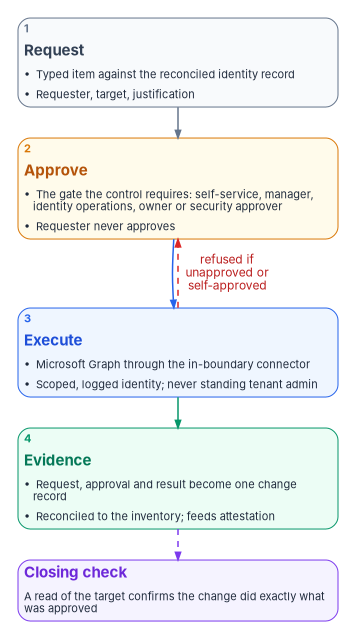
The loop every item runs
Every catalog item, identity or telephony, runs the same four steps. They are the program’s design, the day-two form of the ticket-to-machine tempo in Book 13, Chapter 10.
- Request. A typed item names the target (the identity record reconciled to the configuration database, Chapter 07), the requester and the justification. Free text is for context, never for the target.
- Approve. The item carries the gate its control requires: self-service where policy allows it, the manager, identity operations, the resource owner or a security approver. The requester never approves their own request.
- Execute. Microsoft Graph is called through the connector inside the boundary, under a service identity whose write permissions are scoped, logged and approved per change. No step runs under a standing tenant administrator. Where no connector action exists, the technician executes under the role Chapter 04 assigns and records what was done.
- Evidence. The request, the approval and the Graph result become one change record, reconciled to the inventory and passed to attestation (Chapter 11). The record closes only when a read of the target confirms the change, the rule Book 14, Chapter 04 sets for every closure.
Chapter 02 explains why ServiceNow is the reference platform in the sources, what its in-boundary connector does, and how an agency on a different service-management platform satisfies the same contract. Chapter 03 maps each help-desk task to the actions ServiceNow’s Microsoft Entra ID spoke actually documents. Substituting the platform changes the catalog and connector syntax; it doesn’t change the loop.
The identity catalog
The catalog has ten items in three families: lifecycle (joiner, mover, leaver, license, guest), credentials (password, MFA method, unlock) and access (groups and Conditional Access exceptions). Each binds to the control it exercises in NIST SP 800-53 Rev. 5 and to the approval that control calls for. The control column records the control each item exercises; the approval column is the program’s design.
| Catalog item | Control | Approval gate | What the item enforces |
|---|---|---|---|
| New account (joiner) | AC-2 | The lifecycle workflow, with manager and identity operations confirmation | Provisioned from the HR-sourced record (Book 03, Chapter 08) with a least-privilege baseline |
| Role or scope change (mover) | AC-6 | The lifecycle workflow, with manager and identity operations confirmation | Entitlements re-derived from the new assignment; stale ones removed; an access review of what remains |
| Deprovision (leaver) | AC-2 | The lifecycle workflow, with manager and identity operations confirmation | Disable, revoke sessions and tokens, reassign owned objects, all evidenced |
| Password reset | IA-5 | Self-service; otherwise no approver (an A0 task), with the service desk’s identity verification as the gate | Self-service password reset where policy allows; otherwise the verified path in Chapter 04 |
| MFA method reset | IA-5 | The service desk supervisor or the requester’s manager, after the service desk re-proofs the user | Re-proofing required; the change is logged and alerts, because it is a social-engineering target |
| Account unlock | IA-5 | Self-service, or the service desk | Repeated unlocks for one account are a detection signal, not just a ticket count |
| Group membership | AC-6 | Group owner and an approver | Time-bound where the group grants elevation; linked to the access review |
| License assignment | AC-2 | Manager | Group-based licensing preferred over per-user assignment |
| Conditional Access exception | AC-3 | Security approver | Mandatory expiry and review, using the governed exclusion groups Book 04, Chapter 07 defines |
| Guest invitation | AC-2 | Agency business owner decides; the sponsor is a named role and requests; the application owner is consulted | A named sponsor and an expiry on every guest |
Two of these items reuse patterns that already exist elsewhere, and the catalog deliberately invokes them rather than building second copies. The Conditional Access exception is a membership change to one of the governed exclusion groups Book 04, Chapter 07 defines, where every member carries an expiry and the emergency-access exclusion is already on every enforced policy; Conditional Access changes themselves go to security through change control (Book 04, Chapter 06). The catalog item is a front door to that process, not a parallel path that could drift. Guest invitations follow the same sponsor-and-expiry pattern as any other external identity. Where an item’s work also has a home in Microsoft Entra ID Governance, such as access packages and access reviews (Book 04, Chapter 09), the catalog raises the request and the governance tooling carries the decision; the program doesn’t rebuild what the platform already does.
Five verbs
Every identity operation the catalog fulfills is one of five verbs: add, move, change, delete or reset, which are the five change classes of Book 13, Chapter 04. Each travels the same authorized path: it starts from the authoritative record, is approved by the person with authority over it, runs under a just-in-time scoped role, closes with a check that proves the result, and emits its evidence automatically. The verbs differ in what starts them, what the closing check has to prove, and which controls they exercise.
| Verb | What it means for an identity | What starts it | The closing check proves | Controls exercised |
|---|---|---|---|---|
| Add | Joiner: account created, groups and licenses derived, MFA registered, accounts created in every connected application | HR joiner event | The account exists with exactly the derived entitlements; an MFA method is registered; every connected application has the account | AC-2, IA-4, IA-5 |
| Move | Mover: role or unit change; attributes updated, group and license membership re-derived, application access re-evaluated | HR mover event | The new derivation matches the authoritative record, and entitlements from the old role are gone | AC-2, AC-6 |
| Change | An entitlement or attribute change outside a move: an access request, a group addition, a delegation | A request checked against the authoritative record | The scope granted equals the scope approved, and nothing broader | AC-2, AC-6 |
| Delete | Leaver: disable, revoke sessions and tokens, deprovision every connected application, reassign owned objects, including the person’s service accounts and app registrations | HR separation event | The account is unusable everywhere, no sessions remain, connected applications have disabled the account, and nothing owned is left without an owner | AC-2, AC-2(3), IA-4 |
| Reset | A credential event: password reset, MFA method reset, session revocation | A request checked against the authoritative identity | The person was re-proofed before issuance, the new credential meets policy, and the old one no longer works | IA-4, IA-5, AC-2 |
The same five verbs govern every other kind of object the program manages, from devices to DNS records. At the help desk only the object changes (people, and on the delete row the non-human identities they own) and so do the checks.
Reset is the verb attackers order
A password or MFA reset reissues the keys to an identity on the strength of a conversation. That makes it the classic social-engineering entry point, and it is why Chapter 04 treats a lost authenticator as account recovery and requires re-proofing against the record the agency already holds, never against facts the caller supplies. The catalog’s reset items enforce that order mechanically. The verification result is a required field on the item, the reset runs under a scoped just-in-time role, and the item closes only when a check confirms the old credential no longer works and the new one meets policy. A reset closed by hand, with no verification result attached, is exactly the kind of closure Book 14, Chapter 04 declines to count.
The leaver is the one that fails audits
Deprovisioning is an obligation with evidence, not a courtesy. SP 800-53 asks the agency to disable accounts within a defined time once they are no longer associated with a user (AC-2(3)).3 The leaver item therefore does four things and records each one: disable the account, revoke active sessions and refresh tokens, deprovision the person from every connected application, and reassign everything they owned, including groups, application ownership and mailboxes. ServiceNow’s Entra ID spoke documents the first two as actions (Disable User, and Revoke User SignIn Sessions), and its sample offboarding flow disables the user and removes group memberships when the ServiceNow user record is deactivated.4 The other two depend on how the person’s applications are connected, which is Chapter 06’s subject: an application provisioned by SCIM receives the disable automatically, and one that isn’t becomes a manual task with no automatic check.
Ownership transfer covers non-human identities too. A leaver who owned service accounts or app registrations leaves them orphaned unless the item hands each one to a named successor; the program treats an ownerless non-human identity as a finding, as Book 04, Chapter 06 does for applications.
What the catalog doesn’t fix
- Self-service password reset and unlock are only as strong as the tenant’s authentication-methods policy. A weak policy is a configuration problem for Chapter 08, not something the catalog can repair.
- The catalog governs the request. A standing Global Administrator can still act outside it; detections and access reviews catch that, and Book 04 removes the standing role.
- Catalog coverage is only as good as the connector actions behind it. Where an action is missing, as it is for MFA method resets in the current Entra ID spoke (Chapter 03), the item routes to a person and the verification step carries the weight.
The telephony catalog
Teams Phone is the voice workload in Microsoft 365, and it carries day-two work that is usually run by ad hoc administrator action. Microsoft offers four ways to connect Teams Phone to the public telephone network: Microsoft Calling Plans, where Microsoft is the carrier; Operator Connect, where a participating carrier manages the connection; Teams Phone Mobile, through a participating mobile operator; and Direct Routing, where the agency connects its own session border controllers.5 Microsoft lists PSTN calling through Teams Phone as available in GCC. In GCC High and DoD, Direct Routing must be configured for Teams voice and audio conferencing to work.67
The architecture choice belongs to the network and telecommunications design; Book 09, Chapter 12 covers how Teams media crosses the network. This chapter governs the standing operator tasks on whatever architecture the agency chose, and every one of them is a change to a configured surface (CM-3) or a source of audit records (AU-2).
| Catalog item | Control | What the item enforces |
|---|---|---|
| Phone number assignment or release | CM-3 | Reconciled to the number inventory; a release returns the number to the pool and records it |
| Calling policy and dial plan assignment | CM-3 | Least-privilege calling scope (for example, domestic only by default); PSTN calling from the Teams web client turned off where dynamic emergency calling is in use |
| Emergency address validation | CM-3 | A validated emergency address is a gate on number assignment, not an optional field |
| Network-to-location mapping | CM-3 | Subnets, wireless access points and switches mapped to emergency locations whenever the network changes; VPN address pools left unmapped |
| Remote-location emergency calling policy | CM-3 | Every softphone user holds an emergency calling policy with external location lookup turned on, assigned by group rather than by one-off request |
| Voice routing or session border controller change | CM-3 | Change-controlled; a session border controller is a boundary-affecting component |
| Call records and telephony administration telemetry | AU-2 | Call detail records and telephony administrator actions routed into the evidence store at onboarding |
Emergency calling: configure as if the rules bind the agency
The emergency-address item is the one telephony step where a silent error has physical consequences: a phone whose registered location is wrong sends responders to the wrong building. It is also where federal rules reach the phone system itself. Whether they reach the agency as its operator is a narrower question, taken up below; the catalog doesn’t wait for the answer.
Two statutes apply. Kari’s Law requires a multi-line telephone system to let a user dial 911 directly, without a prefix such as 9 for an outside line, and to notify someone (for example a front desk or security office) when a 911 call is made. It applies to systems manufactured, imported, first sold or leased, or installed after February 16, 2020.9 Section 506 of RAY BAUM’S Act directed the FCC to consider rules so that a caller’s dispatchable location is conveyed with every 911 call, whatever the technology; the FCC adopted those rules in its August 2019 order implementing both statutes.10
The rules sit in 47 CFR part 9, and three points in them matter to an agency.
- They cover the agency’s system. The FCC defines a multi-line telephone system to include network-based and premises-based systems, including VoIP, and states that it includes systems owned or leased by governmental agencies.11
- They put duties on the operator, not only the manufacturer. A person engaged in the business of installing, managing or operating such a system must configure it so a user can dial 911 directly, must configure notification to a central location or another person if the system can do it without new hardware or software, and must configure it so the caller’s dispatchable location reaches the 911 call center. Notification has to start at the same time as the call where technically feasible, mustn’t delay the call, and must go somewhere someone is likely to see or hear it.12
- They define “dispatchable location” and set dates. A dispatchable location is the validated street address of the caller plus information such as a suite or floor needed to locate them.13 On-premises fixed phones had to provide it automatically by January 6, 2021. Non-fixed on-premises devices and off-premises devices had to provide it by January 6, 2022: automatically where technically feasible, and otherwise from a location the user updates manually or, for off-premises devices, the best available location obtainable at reasonable cost, which may be coordinate-based.14
A notification under the rules has to say, at a minimum, that a 911 call was made, give a valid callback number, and pass on the location information the system sent with the call.15
The system is plainly covered: the statute defines a multi-line telephone system to include systems owned or leased by governmental agencies.16 The duties, though, fall on “a person engaged in the business of” installing, managing or operating one,17 and the Communications Act defines “person” to include an individual, partnership, association, joint-stock company, trust or corporation, with no mention of government.18 The FCC’s 2019 order implementing both statutes counts government agencies among the operators, installers and managers of these systems in its regulatory flexibility analysis, but it doesn’t address federal agencies or how they fit that definition of “person.”19 So the text leaves open whether the FCC could enforce these rules against an agency that runs its own system; the carriers and Microsoft are covered either way. This book’s position, shared with Book 03, Chapter 10, is to configure the system as if the agency is bound, because the system is one the rules describe and a caller’s safety doesn’t depend on who could be fined.
This chapter is guidance, not legal advice; the agency’s counsel and telecommunications office own the compliance determination. What the catalog contributes is the evidence that the configuration meeting those rules was put in place and kept current.
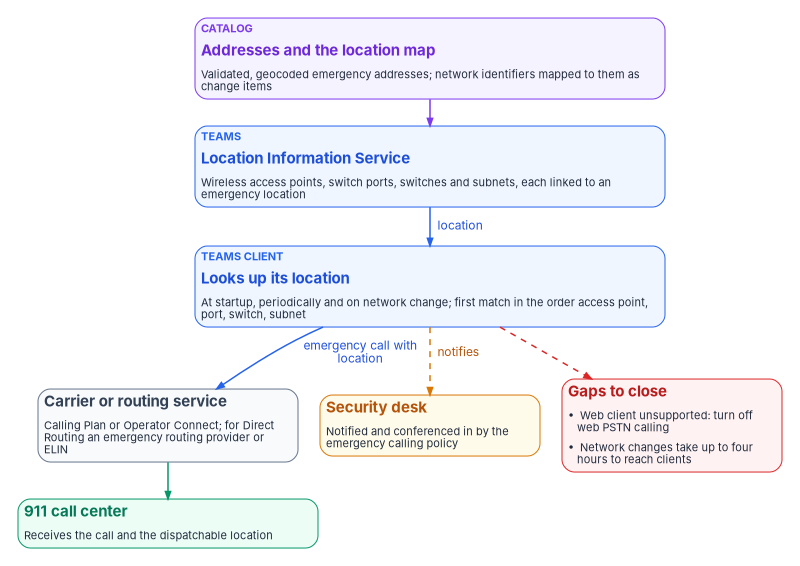
How Teams meets the rules
Teams provides the mechanisms; the agency has to configure them, and the catalog keeps them configured.
- Validated addresses. An emergency address must be marked validated before it can be assigned to a user or a network identifier. Addresses created with the map search in the Teams admin center are validated and geocoded automatically, and Microsoft recommends creating them that way. Places (floor, wing or office) can be added under an address to give the in-building detail.20 For Calling Plan users in the United States, an emergency location is required at the moment a number is assigned to the user.21 The catalog makes that requirement the gate for every connectivity option, not only Calling Plans.
- Dynamic locations. Dynamic emergency calling works with Calling Plans, Operator Connect, Teams Phone Mobile and Direct Routing. The Teams client sends its network connectivity to the Location Information Service at startup, periodically and when its connection changes, and the service returns the location linked to the first matching network element, in the order wireless access point, switch port, switch, subnet. Network identifiers used for dynamic locations need addresses with geocodes, and some network-settings changes take up to four hours to reach clients.22 That is why network-to-location mapping is its own catalog item, raised whenever the address-management system records a new subnet or access point (Book 08).
- Notification. The Teams emergency calling policy sets who is notified when someone places an emergency call and how, including conferencing the security desk into the call, and it can treat a test call to 933 differently. It applies to all four connectivity options and can be assigned to users, network sites or both; a site assignment overrides a user assignment.23
- Routing. Calling Plan, Operator Connect and Teams Phone Mobile users are enabled for emergency calling automatically. Direct Routing needs an emergency call routing policy, a session border controller set to pass location in PIDF-LO, and either an emergency routing service provider (in the United States and Canada) or an ELIN configuration on the session border controller.24
- Unsupported clients. Dynamic emergency calling, including security desk notification, isn’t supported on the Teams web client. Microsoft’s guidance is a calling policy that turns off web PSTN calling for those users.25 The calling-policy item applies it by default.
- Remote workers. A softphone leaves the mapped network, and Teams then sends the first location it has: the network location from the Location Information Service, an address the user confirmed or edited for the network the client is on, an address the operating system suggests, an address the user typed, and last an address an administrator assigned statically to the user’s number. In the United States the address type decides the routing. A dynamic address, an operating-system address the user confirmed, and an address picked from the address suggestions go directly to the 911 call center; an address assigned statically to the user or number, an unconfirmed operating-system address, a typed address and no address at all are screened by a national call center first, which then transfers the call.26 A user can confirm or enter an address only under an emergency calling policy with external location lookup turned on, and only in Teams desktop on Windows and Mac; Teams mobile detects location automatically, and Teams phones don’t support the experience.2728 The catalog’s remote-location item gives that policy to every softphone user, not only those with a telework agreement, by group from HR attributes (Book 03, Chapter 10). The registered address on the number stays as the screening center’s fallback; it isn’t what the call should depend on.
- VPN pools stay unmapped. Teams tries a subnet-based location only when the client’s public IP address is on the tenant’s trusted list, while access point and switch lookups happen regardless; and cloud proxy deployments that change Teams clients’ source IP addresses don’t support these lookups at all.29 It follows, as an inference rather than a Microsoft statement, that a full-tunnel VPN whose exit address is trusted would hand a home worker whatever location the VPN address pool is mapped to. The mapping item therefore leaves VPN pools out of the Location Information Service (Book 09, Chapter 05). Microsoft’s separate performance guidance on keeping Teams media out of the tunnel doesn’t change which address the location lookup sees.
- A site match isn’t a location. On Windows, an IPv6 address from stateful DHCPv6 can be reported with a /128 prefix. The client then matches its network site and gets that site’s emergency policies, but fails the subnet match in the Location Information Service and gets no emergency location. Microsoft’s alternatives are an IPv4 subnet entry for dual-stack endpoints and a switch, port or access point entry for IPv6-only ones, not per-device /128 entries.30 The Locations and Networks report separates the two: its Network Site tab shows site matches, and its Network Identifier tab shows whether a location was matched and which one.31 The mapping item closes on the Network Identifier tab and a test call, not on a site match.
- Testing. Calling Plan, Operator Connect and Teams Phone Mobile users in the United States and Canada can dial 933 to hear back their number, their location and whether a real call would route automatically; Direct Routing customers arrange testing with their emergency routing provider.32 A successful test call is the closing check on the address and mapping items.
Government clouds differ in client coverage, so the catalog has to know which cloud it is in. Microsoft lists dynamic emergency calling as available on all Teams clients in GCC; in GCC High it is available on Teams desktop and mobile clients and on Teams phones from a stated app version, and in DoD on desktop, mobile and Teams phone applications released through the Teams admin center.33
Putting emergency calling in place
The emergency items change what happens on every 911 call, so turning them on follows the workbook’s implementation conventions (Book 00, Appendix D). Most of each step is already above; the table says where.
Authority: Risk-based recommended, the program’s position: configure the system as if 47 CFR part 9 binds the agency (Emergency calling and its interpretation note). Microsoft-recommended for creating addresses with the map search and for turning off web PSTN calling where dynamic emergency calling is in use (above, read on the dates in the notes). Applies: every Teams Phone deployment. Environment-dependent: dynamic emergency calling’s client coverage differs in GCC, GCC High and DoD, and GCC High and DoD need Direct Routing (above).
| How-template step | Where this section covers it, or what it adds |
|---|---|
| Prerequisites | Validated, geocoded addresses; the network inventory from Book 08; the connectivity option and, for Direct Routing, the emergency routing provider or ELIN configuration (How Teams meets the rules) |
| Pilot | One building’s network sites and the softphone users who work there |
| Report-only or audit phase | The Locations and Networks report’s Network Identifier tab shows which clients get a location before anyone relies on it; 933 test calls where the connectivity option supports them (above) |
| Enforcement | Number assignment gated on a validated address; emergency calling and calling policies assigned by group and site; rings below |
| Rollback | Reassign the previous emergency calling or calling policy to the group or site; a mapping that returns the wrong location is removed so the call falls back to the user’s confirmed or registered address rather than a wrong one. A Teams administrator does it in minutes; network changes take up to four hours to reach clients |
| Exclusions | VPN address pools stay unmapped (above); users on clients that don’t support dynamic emergency calling are covered by the web-PSTN restriction, not excluded. Emergency access accounts aren’t affected: nothing here touches sign-in |
| Telemetry | Call records, the PSTN usage report and telephony administrator actions routed to the evidence store (Call records are evidence) |
| Evidence | The checklist below |
| Day-two ownership | The telecommunications office owns the addresses and mappings; the network-to-location item runs whenever the address-management system records a change; drift is a subnet or access point with no mapping, or a softphone user without the remote-location policy |
Change safety
| Ring | Scope | Exit criteria |
|---|---|---|
| 0 | The telephony team’s own phones and softphones | 933 test calls return the right number and location |
| 1 | One building | Every network identifier there matches a location in the report; the security desk receives the notification on a test call |
| 2 | Buildings by region | The same, per building |
| 3 | Every site, and every softphone user by group | No unmapped subnet or access point in the report; the remote-location policy held by every softphone user |
- Emergency access: not applicable; no sign-in control changes.
- Change window: outside the security desk’s busiest hours, with the telecommunications office and the security desk told in advance, because test calls ring there.
- Backout triggers: a test call that returns the wrong location, or a security-desk notification that doesn’t arrive.
- Post-change validation: a 933 call (or the emergency routing provider’s test for Direct Routing) from a sample of mapped locations in each ring.
Control states.
| State | This page | Evidence |
|---|---|---|
| Designed | The catalog items and the position on the rules | This chapter and the counsel’s determination, held by the telecommunications office |
| Configured | Addresses, places, network identifiers and policies | A Teams PowerShell or admin-center export of emergency addresses, network mappings and policy assignments |
| Enforced | Number assignment gated on a validated address; policies assigned to every user and site in scope | The assignment export with no user lacking a policy |
| Evidenced | The test calls | Test records (location returned, notification received, date, tester) |
| Operated | The mapping item raised on every network change; call records kept | Catalog task history and the call-record export |
A finding this page addresses is ready for closure when every applicable state has evidence; the authorizing official or assessor decides.
Evidence checklist
The Zero Trust assessment-mapping block doesn’t apply: emergency calling is a life-safety configuration, not a finding family a Zero Trust assessment raises. That is the program’s settled position (WD-150).
Call records are evidence, and they expire
Call detail records and telephony administrator actions are the AU-2 half of the catalog. Microsoft Graph keeps a call record for 30 days after the call ends, and organizations can subscribe to call records as they are created to build their own reporting or alert on scenarios such as emergency calls.34 The PSTN usage report in the Teams admin center keeps detailed PSTN records for a period set by country; for most countries it is 365 days for Calling Plans and 150 days for Direct Routing.35 Both windows are shorter than most audit periods. The program’s design routes call records and telephony administrator actions into the evidence store when the service is onboarded, under the evidence contract in Book 12, Chapter 02, rather than relying on the portal’s retention when an investigation needs them.
Teams configuration drift joins the Microsoft 365 loop
Teams also carries the second kind of day-two work: drift from its secure configuration. CISA’s SCuBA project publishes a Teams baseline alongside the other Microsoft 365 baselines, and BOD 25-01 requires federal civilian agencies to implement the mandatory policies for in-scope tenants; the deadline for the policies in force at issuance was June 20, 2025.36 The required Teams policies are that anonymous users can’t start meetings (MS.TEAMS.1.2v2), external access is enabled only per domain (MS.TEAMS.2.1v2), unmanaged users can’t initiate contact with internal users (MS.TEAMS.2.2v2), and Teams email integration is disabled (MS.TEAMS.4.1v1).37
The program doesn’t build a separate loop for Teams. It extends the Microsoft 365 loop in Chapter 08 to the Teams surface: the assessment runs, a new failure becomes a typed change or incident against the Teams service record, an owner fixes it in the native console, and a re-test closes it with evidence (CM-6). One loop, one more surface.
Who does what
The catalog only works if the roles behind it stay separate. The program’s design, consistent with Chapter 03 and Chapter 10:
| Role | Owns |
|---|---|
| Service desk (first and second lines, Chapter 10) | Verification, execution of items with no connector action, and the record of what was done; no approval of access (the supervisor approves routine credential work, per Chapter 10) |
| Identity operations (the identity governance officer and identity engineering, Chapter 10) | Confirmation of lifecycle items, alongside the manager; the joiner, mover and leaver derivations. Routine credential items other than a password reset, which has no approver, are approved by the service desk supervisor or the requester’s manager |
| Resource and group owners | Approval of access items for what they own |
| Security approver (the security office, Chapter 10) | Conditional Access exceptions, MFA resets for sensitive accounts |
| Agency business owner | The decision on guest invitations; the sponsor, a named role, requests them (Book 03, Chapter 15) |
| Telephony administrators | Numbers, policies, routing and the network-to-location map, through catalog items |
| Facilities and the security desk | The accuracy of building and floor addresses, and receiving emergency notifications |
| Counsel and the telecommunications office | The determination that the configuration meets the FCC rules |
Honest limits
- The emergency-address check is only as good as the address data behind it. The catalog validates against the Teams address service and the agency’s own building records; someone has to keep those records current when offices move.
- Media-path confidentiality and the accreditation of session border controllers belong to the network and telecommunications design. This chapter governs operational changes to that design, not its transport security.
- Teams baseline coverage depends on the assessment tool’s Teams checks.
- The approval gates and the five-verb checks are the program’s design. They are a defensible reading of SP 800-53, not the only one, and an agency’s authorizing official may set different gates.
National Institute of Standards and Technology, SP 800-53 Rev. 5, Security and Privacy Controls for Information Systems and Organizations, controls AC-2, AC-2(3), AC-3, AC-6, AU-2, CM-3, CM-6, IA-4 and IA-5, statements checked against the release 5.2.0 OSCAL catalog, https://github.com/usnistgov/oscal-content/blob/main/nist.gov/SP800-53/rev5/json/NIST_SP-800-53_rev5_catalog.json (accessed Oct 21, 2026).↩︎
National Institute of Standards and Technology, SP 800-53 Rev. 5, Security and Privacy Controls for Information Systems and Organizations, controls AC-2, AC-2(3), AC-3, AC-6, AU-2, CM-3, CM-6, IA-4 and IA-5, statements checked against the release 5.2.0 OSCAL catalog, https://github.com/usnistgov/oscal-content/blob/main/nist.gov/SP800-53/rev5/json/NIST_SP-800-53_rev5_catalog.json (accessed Oct 21, 2026).↩︎
National Institute of Standards and Technology, SP 800-53 Rev. 5, Security and Privacy Controls for Information Systems and Organizations, controls AC-2, AC-2(3), AC-3, AC-6, AU-2, CM-3, CM-6, IA-4 and IA-5, statements checked against the release 5.2.0 OSCAL catalog, https://github.com/usnistgov/oscal-content/blob/main/nist.gov/SP800-53/rev5/json/NIST_SP-800-53_rev5_catalog.json (accessed Oct 21, 2026).↩︎
ServiceNow, “Microsoft Entra ID Spoke” (Washington DC release documentation), action list and sample User Offboarding flow, https://www.servicenow.com/docs/r/washingtondc/integrate-applications/integration-hub/microsoft-azure-ad-spoke.html (accessed Oct 21, 2026).↩︎
Microsoft Learn, “PSTN connectivity options,” https://learn.microsoft.com/microsoftteams/pstn-connectivity (accessed Oct 21, 2026).↩︎
Microsoft Learn, “Microsoft Teams service description,” Feature availability table and footnotes 2 and 6, https://learn.microsoft.com/office365/servicedescriptions/teams-service-description (accessed Oct 21, 2026).↩︎
Microsoft Learn, “Office 365 GCC High and DoD,” Feature nuances, Microsoft Teams, https://learn.microsoft.com/office365/servicedescriptions/office-365-platform-service-description/office-365-us-government/gcc-high-and-dod (accessed Oct 21, 2026).↩︎
National Institute of Standards and Technology, SP 800-53 Rev. 5, Security and Privacy Controls for Information Systems and Organizations, controls AC-2, AC-2(3), AC-3, AC-6, AU-2, CM-3, CM-6, IA-4 and IA-5, statements checked against the release 5.2.0 OSCAL catalog, https://github.com/usnistgov/oscal-content/blob/main/nist.gov/SP800-53/rev5/json/NIST_SP-800-53_rev5_catalog.json (accessed Oct 21, 2026).↩︎
Federal Communications Commission, FCC 19-76, Report and Order, Implementing Kari’s Law and Section 506 of RAY BAUM’S Act, PS Docket No. 18-261, adopted August 1, 2019, released August 2, 2019, paragraphs 8–12, and Appendix C (Final Regulatory Flexibility Analysis), paragraph 15; the full text was searched for federal agencies and federal government as operators and has no such discussion, https://docs.fcc.gov/public/attachments/FCC-19-76A1.pdf (accessed Oct 21 and Oct 30, 2026).↩︎
Federal Communications Commission, FCC 19-76, Report and Order, Implementing Kari’s Law and Section 506 of RAY BAUM’S Act, PS Docket No. 18-261, adopted August 1, 2019, released August 2, 2019, paragraphs 8–12, and Appendix C (Final Regulatory Flexibility Analysis), paragraph 15; the full text was searched for federal agencies and federal government as operators and has no such discussion, https://docs.fcc.gov/public/attachments/FCC-19-76A1.pdf (accessed Oct 21 and Oct 30, 2026).↩︎
Electronic Code of Federal Regulations, 47 CFR § 9.3, definitions of “Dispatchable location,” “Multi-line telephone system or MLTS” and “MLTS notification,” https://www.ecfr.gov/api/versioner/v1/full/2026-10-01/title-47.xml?part=9§ion=9.3 (accessed Oct 21, 2026).↩︎
Electronic Code of Federal Regulations, 47 CFR § 9.16, “General obligations—direct 911 dialing, notification, and dispatchable location,” https://www.ecfr.gov/api/versioner/v1/full/2026-10-01/title-47.xml?part=9§ion=9.16 (accessed Oct 21, 2026).↩︎
Electronic Code of Federal Regulations, 47 CFR § 9.3, definitions of “Dispatchable location,” “Multi-line telephone system or MLTS” and “MLTS notification,” https://www.ecfr.gov/api/versioner/v1/full/2026-10-01/title-47.xml?part=9§ion=9.3 (accessed Oct 21, 2026).↩︎
Electronic Code of Federal Regulations, 47 CFR § 9.16, “General obligations—direct 911 dialing, notification, and dispatchable location,” https://www.ecfr.gov/api/versioner/v1/full/2026-10-01/title-47.xml?part=9§ion=9.16 (accessed Oct 21, 2026).↩︎
Electronic Code of Federal Regulations, 47 CFR § 9.3, definitions of “Dispatchable location,” “Multi-line telephone system or MLTS” and “MLTS notification,” https://www.ecfr.gov/api/versioner/v1/full/2026-10-01/title-47.xml?part=9§ion=9.3 (accessed Oct 21, 2026).↩︎
47 U.S.C. § 1471(2), definition of “multi-line telephone system,” https://www.govinfo.gov/link/uscode/47/1471?link-type=html (accessed Oct 30, 2026).↩︎
47 U.S.C. § 623(b)–(c), configuration of multi-line telephone systems for direct dialing of 9-1-1 (Kari’s Law), https://www.govinfo.gov/link/uscode/47/623?link-type=html (accessed Oct 30, 2026).↩︎
47 U.S.C. § 153(39), definition of “person,” https://www.govinfo.gov/link/uscode/47/153?link-type=html (accessed Oct 30, 2026).↩︎
Federal Communications Commission, FCC 19-76, Report and Order, Implementing Kari’s Law and Section 506 of RAY BAUM’S Act, PS Docket No. 18-261, adopted August 1, 2019, released August 2, 2019, paragraphs 8–12, and Appendix C (Final Regulatory Flexibility Analysis), paragraph 15; the full text was searched for federal agencies and federal government as operators and has no such discussion, https://docs.fcc.gov/public/attachments/FCC-19-76A1.pdf (accessed Oct 21 and Oct 30, 2026).↩︎
Microsoft Learn, “Manage emergency calling,” sections Emergency address, Emergency address validation and Emergency address geo codes, https://learn.microsoft.com/microsoftteams/what-are-emergency-locations-addresses-and-call-routing (accessed Oct 21, 2026).↩︎
Microsoft Learn, “Emergency calling considerations for Microsoft Calling Plans,” https://learn.microsoft.com/microsoftteams/considerations-calling-plan (accessed Oct 21, 2026).↩︎
Microsoft Learn, “Plan and configure dynamic emergency calling,” including Configure network settings, IPv6 subnet matching, Configure emergency policies, Test emergency calling and Government support, https://learn.microsoft.com/microsoftteams/configure-dynamic-emergency-calling (accessed Oct 21 and Oct 30, 2026).↩︎
Microsoft Learn, “Plan and configure dynamic emergency calling,” including Configure network settings, IPv6 subnet matching, Configure emergency policies, Test emergency calling and Government support, https://learn.microsoft.com/microsoftteams/configure-dynamic-emergency-calling (accessed Oct 21 and Oct 30, 2026).↩︎
Microsoft Learn, “Plan and configure dynamic emergency calling,” including Configure network settings, IPv6 subnet matching, Configure emergency policies, Test emergency calling and Government support, https://learn.microsoft.com/microsoftteams/configure-dynamic-emergency-calling (accessed Oct 21 and Oct 30, 2026).↩︎
Microsoft Learn, “Plan and configure dynamic emergency calling,” including Configure network settings, IPv6 subnet matching, Configure emergency policies, Test emergency calling and Government support, https://learn.microsoft.com/microsoftteams/configure-dynamic-emergency-calling (accessed Oct 21 and Oct 30, 2026).↩︎
Microsoft Learn, “Emergency addresses for remote locations,” sections Location precedence, Emergency address classification and routing, and Notes and restrictions, https://learn.microsoft.com/microsoftteams/emergency-calling-dispatchable-location (accessed Oct 30, 2026).↩︎
Microsoft Learn, “Emergency addresses for remote locations,” sections Location precedence, Emergency address classification and routing, and Notes and restrictions, https://learn.microsoft.com/microsoftteams/emergency-calling-dispatchable-location (accessed Oct 30, 2026).↩︎
Microsoft Learn, “Manage emergency calling policies in Microsoft Teams,” https://learn.microsoft.com/microsoftteams/manage-emergency-calling-policies (accessed Oct 30, 2026).↩︎
Microsoft Learn, “Plan and configure dynamic emergency calling,” including Configure network settings, IPv6 subnet matching, Configure emergency policies, Test emergency calling and Government support, https://learn.microsoft.com/microsoftteams/configure-dynamic-emergency-calling (accessed Oct 21 and Oct 30, 2026).↩︎
Microsoft Learn, “Plan and configure dynamic emergency calling,” including Configure network settings, IPv6 subnet matching, Configure emergency policies, Test emergency calling and Government support, https://learn.microsoft.com/microsoftteams/configure-dynamic-emergency-calling (accessed Oct 21 and Oct 30, 2026).↩︎
Microsoft Learn, “Microsoft Teams Locations and Networks report,” sections Network Site, Network identifier and Network-site match without an emergency-location match, https://learn.microsoft.com/microsoftteams/teams-analytics-and-reports/locations-networks (accessed Oct 30, 2026).↩︎
Microsoft Learn, “Plan and configure dynamic emergency calling,” including Configure network settings, IPv6 subnet matching, Configure emergency policies, Test emergency calling and Government support, https://learn.microsoft.com/microsoftteams/configure-dynamic-emergency-calling (accessed Oct 21 and Oct 30, 2026).↩︎
Microsoft Learn, “Plan and configure dynamic emergency calling,” including Configure network settings, IPv6 subnet matching, Configure emergency policies, Test emergency calling and Government support, https://learn.microsoft.com/microsoftteams/configure-dynamic-emergency-calling (accessed Oct 21 and Oct 30, 2026).↩︎
Microsoft Learn, “Call records” (Microsoft Graph), https://learn.microsoft.com/graph/cloud-communications-callrecords (accessed Oct 21, 2026).↩︎
Microsoft Learn, “Microsoft Teams PSTN usage report,” Interpret the report, retention table, https://learn.microsoft.com/microsoftteams/teams-analytics-and-reports/pstn-usage-report (accessed Oct 21, 2026).↩︎
Cybersecurity and Infrastructure Security Agency, BOD 25-01, Implementing Secure Practices for Cloud Services, December 17, 2024, https://www.cisa.gov/news-events/directives/bod-25-01-implementing-secure-practices-cloud-services (accessed Oct 21, 2026).↩︎
Cybersecurity and Infrastructure Security Agency, “BOD 25-01: Implementing Secure Practices for Cloud Services Required Configurations,” Microsoft Teams, https://www.cisa.gov/resources-tools/services/bod-25-01-implementing-secure-practices-cloud-services-required-configurations (accessed Oct 21, 2026).↩︎