Federal Modernization Workbook · Book 12 · Why
Chapter 02 — Telemetry Is the Precondition: The Evidence Contract
Five stacks can’t produce one compliance picture by being put on one dashboard; they produce it by agreeing, in advance, what a record says and which asset it is about.
The problem the evidence contract solves and the case in one paragraph. The contract’s fields and how they support AU-3. The join key, authoritative asset identity plus time, and why AU-12(1)’s system-wide, time-correlated audit trail depends on the naming plane. How vulnerability, patch, configuration, posture and data-protection findings become records in one queue, and what closes them. The roles that realize the contract, the continuous-monitoring pipeline CA-7 describes, the controls this chapter supports and where they sit in the FedRAMP baselines, and an illustrative coverage query. Then the connector and retention plan for data and endpoint telemetry (Purview audit, data loss prevention, sensitivity labels, Intune, Defender for Endpoint, endpoint analytics and encryption state) with its government-cloud availability, and a test that proves each source is searchable.
Five stacks, five inventories
A multi-cloud agency runs several management stacks, and each produces its own telemetry in its own schema. Azure Update Manager reports patch state one way, AWS Systems Manager another, the virtualization platform’s lifecycle manager a third, a firewall’s syslog a fourth, a Linux host’s agent a fifth. Five stacks, five inventories, five log formats. When an assessor asks “is this vulnerability remediated across the whole estate, and prove it,” five partial views that don’t reconcile can’t answer.
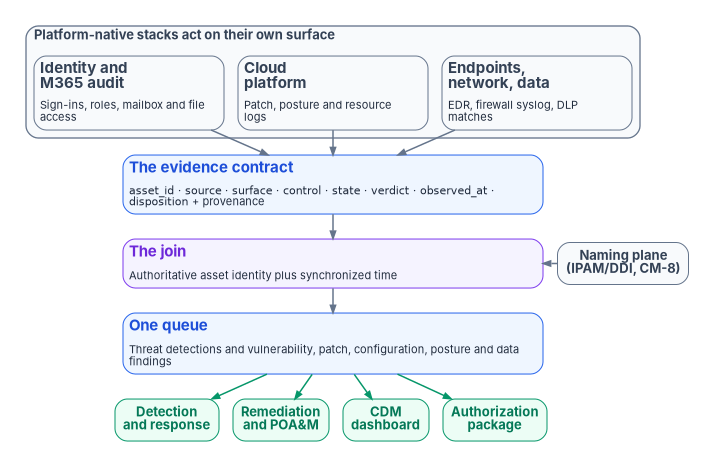
Chapter 01 argued that visibility has to be designed. This chapter is the design. The Federal Modernization Program’s answer is an evidence contract: one normalized record shape that every source emits, correlated on one authoritative asset identity and on time, and delivered to the consumers an agency owes, CISA’s Continuous Diagnostics and Mitigation (CDM) program first among them. The contract is program design. The controls it supports, and the federal requirements that make it necessary, are external and cited below.
The contract has a clear boundary. It isn’t detection engineering: rules, correlation logic, user and entity behavior analytics and playbooks find threats in the data, and they belong to Chapter 05 and Chapter 11. It isn’t the authorization package either: the package is assembled from the contract’s output, and Book 14, Federal Compliance & Authorization, carries it. The contract sits beneath both. Detection analyzes what it carries; the authorization package attests to it.
Problem. Every platform’s own tools patch, scan, harden and alert, and each reports in its own schema against its own inventory. Records from different stacks can be stored together but can’t be joined, so no one can say what is true about one asset across all of them, and an assessor gets five partial answers.
Solution. Define one evidence contract that every source emits, with fields fixed in advance; key it to the authoritative asset identity from the naming plane and to synchronized time; route every finding, from threat alerts to missing patches to data-loss matches, into one queue as a record of that contract; and close a record only when the measured state changes, with the proof attached.
Ask. Stand up the naming plane before the evidence pipeline, and reconcile every stack’s inventory to it. Write the contract into the Agency Logging Plan. Fund the normalization work for each source as part of onboarding that source, not as a later dashboard project.
For decision makers
- The contract is the coordination mechanism, not a console. NIST’s AU-3 requires every audit record to establish what happened, when, where, from what source, with what outcome and involving whom.1 The program raises that to a cross-stack rule: every source emits the same fields, so records are comparable, joinable and countable.
- Aggregating isn’t correlating. Two records describe the same asset only if they carry the same identifier. AU-12(1) asks for a system-wide audit trail “time-correlated” to a set tolerance,2 and M-26-14 requires timestamps synchronized to a traceable time source.3
- Each vendor has its own device identifier. Even Microsoft’s normalization model lists separate device ID types for Defender for Endpoint, Azure resources, AWS and others, and calls a hostname used as an ID a last resort.4 The join key has to come from an authority outside every stack: the naming plane.
- Findings and detections share one queue. Posture, patch and vulnerability findings can be exported as records alongside security alerts,5 and a vendor default can still move a finding type out of the queue without notice.6
- The baselines differ. FedRAMP’s Moderate baseline includes cross-source correlation (SI-4(16)) and automated review integration (AU-6(1)), but not AU-12(1), which NIST and FedRAMP place in the High baseline.78 At Moderate, the program selects AU-12(1) as its own design choice.
The contract: one record, every source
Coordination across stacks that don’t share a vendor isn’t achieved with a console. It is achieved with a contract that fixes, before any data flows, what every record must say. The program’s record has eight fields.
| Field | Meaning | AU-3 element it carries |
|---|---|---|
asset_id |
The authoritative name or address of the asset, from the naming plane (IPAM and DDI). This is the join key. | Where the event occurred; identity of the object or entity |
source |
The stack, appliance or agent that produced the record | Source of the event |
surface |
The kind of surface: cloud service provider, network enforcement, operating system, identity, data | Where the event occurred |
control |
The NIST SP 800-53 control the record is evidence for (for example SI-2, CM-6, SC-8) | What type of event occurred, stated in control terms |
state |
The measured value: patch level, baseline conformance, cipher, posture, label | What occurred |
verdict |
Pass, warn or fail against the intended state | Outcome of the event |
observed_at |
When the state was measured, in synchronized time | When the event occurred |
disposition |
Applied, accepted risk (with its POA&M reference) or open | Not an AU-3 element; the record’s remediation status |
AU-3 requires audit records to contain information establishing six things: the type of event, when it occurred, where, its source, its outcome, and the identity of any individuals, subjects, objects or entities associated with it.9 The contract’s fields carry each one. What the contract adds is uniformity across stacks: the content is standardized, so a record from a patch stack and a record from a firewall can be compared, joined and rolled up. The program treats the contract as a closure necessity: without a schema the sources agreed on in advance, no dashboard built afterward can recover one.
Two enhancements follow from the same design. AU-3(1), Additional Audit Information, asks for audit records that carry additional information the organization defines; the program defines it as the control, verdict and disposition fields and the provenance envelope described next. AU-6(5), Integrated Analysis of Audit Records, asks for the analysis of audit records to be integrated with the analysis of vulnerability scanning information, performance data, system monitoring information or other sources, to find inappropriate or unusual activity.10 A scanner’s finding and a sign-in or firewall record for the same asset share asset_id and time, so the program can analyze them together; Chapter 06 builds the vulnerability side.
The program’s telemetry design adds a provenance envelope to every record: the issuer, the classification of the source, the chain of transformations applied between the source and the contract, and a lineage hash. Its rules are that telemetry is a control input rather than after-the-fact reporting, that evidence bundles are assembled and sealed deterministically, that the combination is reproducible from raw telemetry plus the authoritative source, and that drift findings are first-class artifacts of the authorization package rather than a parallel log. These are design positions. One external anchor sits close to them: M-26-14’s maturity model, at Level 3 for log management, calls for logs “encrypted in transit and at rest, and regularly hashed for veracity.”11
The contract doesn’t require one vendor’s schema. Microsoft Sentinel’s Advanced Security Information Model (ASIM) is an example of the same idea inside one SIEM: a normalization layer between diverse sources and the analyst, with schemas for authentication, network sessions, DNS, DHCP, file, process, audit and other events, so that one analytics rule “work[s] across sources, on-premises and cloud.”12 An agency using Sentinel can implement much of the contract by normalizing to ASIM and adding the fields ASIM doesn’t carry, such as control, verdict and disposition. What ASIM can’t supply is the authoritative asset identity, which is the subject of the next section.
The join key: authoritative asset identity plus time
Putting records in one place isn’t the same as correlating them. Two records describe the same asset only if they carry the same asset_id, and every stack has its own idea of what that is. ASIM shows the problem plainly. Its device fields allow a DvcId whose type may be a Defender for Endpoint ID, an Azure resource ID, a Defender for IoT ID, a VM Insights connection ID, an AWS VPC ID or several vendor-specific IDs; when an event carries several, the others go in separate fields; and using the hostname as the device ID “implies reusing the hostname. Use it only as a last resort.”13 Each stack’s identifier is correct inside that stack and meaningless outside it.
The program’s join key is therefore the naming plane’s authoritative name or address, not any stack’s local inventory ID. NIST’s component inventory control, CM-8, already asks for an inventory that accurately reflects the system, includes all components, and “does not include duplicate accounting of components or components assigned to any other system.”14 An inventory that does what CM-8 asks across stacks is the naming plane. Book 08, Chapter 07 and Book 10, Chapter 06 describe how IPAM and DDI become that authority across clouds. An IT service management CMDB has a role here too, as the workflow and correlation hub, but in the program’s design the CMDB reconciles to the naming plane; it doesn’t replace the join key.
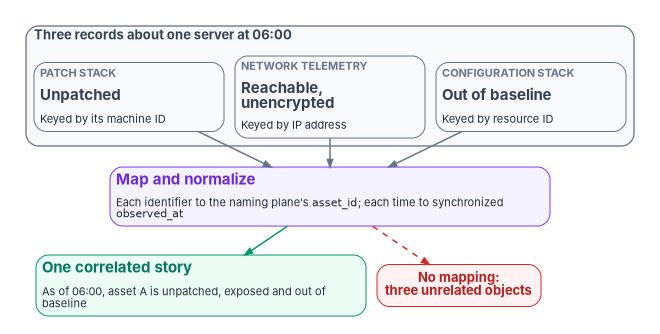
Add time and the contract produces what AU-12(1) describes: audit records from system components compiled “into a system-wide (logical or physical) audit trail that is time-correlated to within” a tolerance the organization sets.15 AU-8 requires time stamps that use Coordinated Universal Time or carry a fixed or recorded offset from it, and M-26-14 requires network time synchronized to a traceable source the agency designates, encouraging sources traceable to the U.S. Naval Observatory or NIST.1617 The result is one story about one asset, assembled from several surfaces: as of 06:00, asset A was unpatched for a given vulnerability (from the patch stack), reachable on an unencrypted segment (from network telemetry) and out of baseline (from the configuration stack).
Time is easier to get wrong than it looks, because “when” has more than one meaning in a pipeline. Two examples from one connector show why the contract carries observed_at explicitly. When Microsoft Sentinel ingests AWS VPC flow logs in a customized format, the format must include the start attribute, because it maps to TimeGenerated; otherwise TimeGenerated is the ingestion time, “which doesn’t accurately describe the log event.” GuardDuty findings, by default, are exported to the S3 bucket the connector reads from every six hours, and their TimeGenerated is the finding’s update time.18 A pipeline that correlates on arrival time instead of observation time will join the wrong records, or miss the right ones, without any error.
AU-12(1) is downstream of the naming plane and of the federal asset-visibility directive. BOD 23-01 requires automated asset discovery every 7 days and vulnerability enumeration every 14 days, with results in the CDM Agency Dashboard within 72 hours.19 The patch and vulnerability chapters of this book (Chapter 06 and Chapter 07) use the same key for SI-2 at scale: the evidence contract and the patch plane share it.
One queue for every finding
Detection is only one kind of finding. A missing patch, a known exploited vulnerability, a configuration that drifted from its baseline, a storage account open to the internet and a file that left the agency with a sensitive label are all statements about an asset’s state, against an intended state, at a time. In the program’s design they are all records of the same contract, and they land in the same queue as threat detections.
| Finding stream | Typical source | control |
Example state and verdict |
Book 12 chapter |
|---|---|---|---|---|
| Threat detection | SIEM analytics, XDR | SI-4, AU-6 | Rule matched on the asset; fail | 05, 11 |
| Vulnerability | Scanner, vulnerability management | RA-5 | Vulnerability present; fail | 06 |
| Patch | Update and patch management | SI-2 | Update missing past its due date; fail | 07 |
| Configuration baseline | Machine configuration, SCuBA, hardening checks | CM-6 | Setting differs from baseline; warn or fail | 07 |
| Cloud posture | Cloud security posture management | CM-6, CM-7, AC-3 | Resource exposed; fail | 08 |
| Data protection | Data loss prevention, classification | AC-4, SC-28 | Policy match on labeled content; warn or fail | 09 |
The control assignments are the program’s mapping, not a published crosswalk; each chapter refines its own. The product capability underneath is documented. Microsoft Defender for Cloud’s continuous export streams security recommendations, secure score, security alerts, regulatory compliance and attack paths to a Log Analytics workspace or an event hub whenever they change. Recommendations carry sub-recommendations: the system-updates recommendations carry one per outstanding update, and “Machines should have vulnerability findings resolved” carries one per vulnerability the scanner finds. In a workspace they land in the SecurityRecommendation and SecurityAlert tables.20 Patch, vulnerability, posture and alert data can therefore sit side by side, which is the precondition for one queue. Two cautions apply. Streaming export sends an assessment only when a resource’s health state changes (“if no updates occur, no data is sent”),21 so the absence of new records doesn’t prove the absence of open findings. And the records still carry the stack’s own resource identifiers until they are mapped to asset_id.
Data-protection findings show how a queue can lose a finding type silently. Microsoft Purview data loss prevention alerts have been routed to the Microsoft Defender XDR incident queue, where they can be correlated with alerts from Defender for Endpoint, Defender for Office 365 and Sentinel. Microsoft’s documentation now notes that a built-in alert tuning rule for DLP signals “took effect in early October 2026”: it sets those signals as behaviors instead of alerts, so they no longer generate alerts or appear in the incident queue, though they remain available for advanced hunting. To keep seeing them as alerts, an administrator disables the rule.22 Whatever the merits of the default, it is exactly the kind of change Chapter 01 warns about: a finding stream left the queue and nothing failed. Whether to keep the rule is a tuning decision for the rule owner in security engineering, with the SOC consulted, under Chapter 10’s matrix, and a standing suppression follows the matrix’s suppression rows, and Chapter 09 covers the DLP policies that produce the signals; the general lesson is that queue membership is part of the contract and has to be checked, not assumed.
The disposition field is where the book’s last rule lives. A record is applied when the measured state matches the intended state, with the observation that shows it; accepted risk when the authorizing official has accepted the residual risk, with the POA&M reference that records it; and open otherwise. Only the authorizing official accepts residual risk (Book 01, Chapter 09). Nothing else closes a record: not a ticket marked resolved, not a suppressed alert, not an expired scan. Remediation has no substitute, and a finding closes only when a later observation of the same asset_id shows the fixed state.
Realizing the contract
Because the fabric is a contract, more than one product can fill each role. The program states the roles and a default for each; the defaults are design choices, not requirements, and every authorization and feature should be checked against the agency’s cloud and the FedRAMP Marketplace at procurement (Book 10).
| Role | What it does | Program default and notes |
|---|---|---|
| Aggregation and analytics | Ingests the multi-surface record set; runs analytics | Microsoft Sentinel, by breadth of native ingestion: AWS service logs (CloudTrail, VPC flow logs, GuardDuty and CloudWatch through the S3 connector)23 and syslog or CEF from network and security appliances through a log forwarder running the Azure Monitor Agent.24 An agency running a second SIEM can run the same contract in parallel for continuity. |
| Workflow and correlation hub | Tickets, ownership, CMDB | The agency’s IT service management platform. Its CMDB reconciles to the naming plane; it doesn’t replace the join key. |
| Federal rollup | Agency and federal visibility | CDM’s Agency and Federal Dashboards; agency dashboards receive information from CDM tools and push summarized information onward25 |
| Attestation | Machine-readable assessment evidence | OSCAL assessment results and POA&M, assembled for the authorization package26 |
The guardrail is the same in every row: the program mandates the contract, never the vendor. Any lake that ingests the record set, any hub that correlates on the authoritative asset_id, and any pipeline that emits the assessment evidence is admissible. The one product position the program holds firmly is negative: no stack’s own inventory is the join key.
The continuous-monitoring pipeline
The contract is the continuous-monitoring evidence pipeline. Sources emit on their own cadence; records are normalized to the contract; they are correlated on asset identity and time; they are bound to the control and indicator they evidence, aggregated in the lake and rolled up to CDM; they are reported, with the machine-readable results attested in the authorization package; and findings are responded to (Chapter 12 names the six stages). CA-7 describes the same loop in control terms. A system-level continuous monitoring strategy includes ongoing monitoring of the metrics the organization sets, “correlation and analysis of information generated by control assessments and monitoring,” response actions to address the results, and reporting security status to designated roles at a set frequency.27 NIST SP 800-137 supplies the purpose: ongoing awareness of security, vulnerabilities and threats in support of risk decisions.28
Three enhancements describe what automation adds. AU-6(1) integrates audit review, analysis and reporting with automated mechanisms; AU-6(3) analyzes and correlates audit records across repositories “to gain organization-wide situational awareness”; and SI-4(16) correlates information from monitoring tools throughout the system.29 The contract is what makes those correlations possible across vendors: records that share fields and a join key can be correlated; records that don’t, can’t.
On the attestation side, NIST’s OSCAL defines an assessment layer with three models, assessment plan, assessment results and plan of action and milestones,30 which is where the contract’s records go when the authorization package is assembled. FedRAMP’s 2026 indicators show the same chain from the cloud service provider’s side: the related controls for KSI-MLA-OSM, operating a SIEM capability, include AU-3, AU-6(1), AU-6(3), AU-8, AU-12(1) and SI-4(16).31 Those indicators bind cloud service providers rather than agencies, but the program uses the same control set for its own estate, so that an agency’s evidence and its providers’ evidence describe monitoring in the same terms. Chapter 12 covers metrics and the ongoing reporting cycle.
Data and endpoint telemetry in the contract
Zero Trust assessments find data and device controls that are configured but can’t be shown working: labels published that nobody can count, a data loss prevention policy whose matches go nowhere, devices reported encrypted by one console and unknown to another. Each is a contract problem. The source exists; its records don’t reach the queue, or reach it without a join key, or age out before an assessor asks. The matrix below is the program’s connector and retention plan for the data and endpoint sources, so the Agency Logging Plan can name each one. Purview’s own audit depth (the audit tiers, audit retention policies and searches inside Purview) belongs to Book 20, Information Protection & Microsoft Purview, Chapter 10; Chapter 04 carries the unified audit log’s collection and retention tiers, and this section only places its records in the contract.
| Source | What reaches the workspace, and how | control and state it carries |
Latency and gaps | GCC | GCC High and DoD |
|---|---|---|---|---|---|
| Microsoft 365 unified audit (Purview Audit) | Exchange, SharePoint and Teams activity in OfficeActivity through the Microsoft 365 connector; every other workload, including Audit.General and DLP.All, through the Management Activity API collector (Chapter 04) |
AU-2, AU-12; the activity and its result | Records arrive out of order and can be duplicated (Chapter 04) | Connector GA32 | Connector GA33 |
| Data loss prevention | Policy matches in the DLP.All content type through the collector; DLP alerts in the Defender XDR incident queue, and through the Defender XDR connector into Sentinel (One queue for every finding) |
AC-4, SC-28; the policy, the rule matched and the action taken | A built-in tuning rule can turn DLP alerts into behaviors that never reach the queue (above) | Defender XDR connector GA | Defender XDR connector: GCC High GA, DoD to be confirmed in the agency’s portal (Chapter 05) |
| Sensitivity labels | Label applied, changed and removed, and labeled-file events, are Microsoft 365 audit records; the Microsoft Purview Information Protection connector lands them in MicrosoftPurviewInformationProtection34 |
AC-16, SC-28; label, action, and justification where the user gave one | Label names aren’t populated in events from the Office Management API, so a watchlist maps label IDs to names; the connector’s table and OfficeActivity can hold duplicates35 |
Connector in public preview36 | Connector not available in Azure Government;37 collect the same records with the Management Activity API collector |
| Intune audit and operational logs | IntuneAuditLogs (create, update, delete, assign and remote actions) and IntuneOperationalLogs (enrollment results, noncompliant device details) through Intune diagnostic settings38 |
CM-3, CM-6; who changed which policy, enrollment success or failure | Sent to Azure Monitor immediately after the action39 | Available (GCC uses the commercial Intune service)40 | Log Analytics export listed as available in GCC High and DoD41 |
| Intune compliance and device inventory, including encryption state | IntuneDeviceComplianceOrg and IntuneDevices; the inventory carries CompliantState, EncryptionStatusString, Ownership, JoinType and LastContact4243 |
CM-8, CM-6, SC-28; compliant or not, encrypted or not, per device | Exported once in each 24-hour period and can take up to 48 hours to arrive;44 Intune can take up to 24 hours to report an encryption change, and for Windows reports the OS drive only45 | Available | Available |
| Defender for Endpoint | Raw Device* tables streamed through the Defender XDR connector; alerts and incidents through incident integration46 |
SI-4, SI-3, CM-8; sensor events, alerts, onboarding and health | Streaming the raw tables is a per-table choice with ingestion cost (Chapter 05) | Raw tables GA47 | Raw device tables GA in Defender XDR and public preview in Sentinel48 |
| Defender cloud app events | CloudAppEvents, Microsoft 365 activity enriched by Defender for Cloud Apps, in advanced hunting and through the connector49 |
AU-6, SI-4 | Needs the Microsoft 365 app connector in Defender for Cloud Apps | GA50 | Unsupported in the Sentinel connector;51 stays in Defender advanced hunting |
| Endpoint analytics | Not one of Intune’s diagnostic-setting categories (audit, operational, compliance and devices);52 scores and reports are read in the Intune admin center or exported as reports | CM-6, SI-2 evidence of drift and delayed patching (Book 05) | A periodic export, not a stream | Available | Advanced Analytics listed as supporting GCC High and DoD;53 base endpoint analytics reports: not yet specified |
The matrix is design built on Microsoft’s documentation, read November 11, 2026. Two rules follow from it.
- Every source has a
statethe contract can carry. Device encryption and compliance land as daily snapshots keyed by Intune’s device ID and the Entra device ID (ReferenceId), which the naming plane maps toasset_id(The join key). A snapshot table is evidence of state at a time, not of change; the change itself is inIntuneAuditLogs. - Retention is set per table, in the Agency Logging Plan. Each table in the matrix goes on the plan’s retention list, with the same six-month searchable and one-year retrievable floor Chapter 12 applies to the identity and platform tables, and its retention conformance export reads them like any other. The Purview tier keeps its own clock (Chapter 04); the workspace copy is the evidence store.
Proving each source is searchable
A connector that shows green proves nothing until a known event is found at the other end. For each source, the program makes one synthetic event and finds it in the workspace, then records the delay, on the quarterly cadence of Chapter 05. Microsoft 365 audit has its own emission test in Chapter 04. Placeholders: <test-managed-device-id> is a pilot device’s Intune device ID; <test-device-name> the same device’s name.
Intune audit: a remote sync on a pilot device, a remote action the audit log records.54 For GCC High use -Environment USGov, for DoD USGovDoD.
Connect-MgGraph -Environment Global -Scopes "DeviceManagementManagedDevices.PrivilegedOperations.All" -NoWelcome
Sync-MgDeviceManagementManagedDevice -ManagedDeviceId '<test-managed-device-id>'
IntuneAuditLogs
| where TimeGenerated > ago(2h)
| where OperationName has "sync"
| project TimeGenerated, OperationName, Identity, PropertiesDefender for Endpoint: Microsoft’s detection test on a pilot Windows device, from an elevated Command Prompt, after creating C:\test-MDATP-test; an alert should appear in about 10 minutes.55
powershell.exe -NoExit -ExecutionPolicy Bypass -WindowStyle Hidden $ErrorActionPreference = 'silentlycontinue';(New-Object System.Net.WebClient).DownloadFile('http://127.0.0.1/1.exe', 'C:\\test-MDATP-test\\invoice.exe');Start-Process 'C:\\test-MDATP-test\\invoice.exe'SecurityAlert
| where TimeGenerated > ago(2h)
| where CompromisedEntity has "<test-device-name>"
| project TimeGenerated, AlertName, ProviderName, CompromisedEntity, StatusIntune inventory and encryption state: the daily export, checked for freshness rather than triggered.
IntuneDevices
| where TimeGenerated > ago(2d)
| summarize LastExport = max(TimeGenerated), Devices = dcount(DeviceId),
            NotEncrypted = dcountif(DeviceId, EncryptionStatusString !~ "Encrypted")
The value strings in EncryptionStatusString vary by platform; read them from one export before relying on the NotEncrypted count. A source whose synthetic event isn’t found within its documented delay is a coverage finding in the same queue as everything else, and the delay observed is the number the Agency Logging Plan records.
Controls this chapter supports
| Control | Title | How the contract closes it | FedRAMP Rev. 5 Moderate baseline |
|---|---|---|---|
| AU-3 | Content of Audit Records | One record shape every source emits | Included |
| AU-3(1) | Additional Audit Information | The control, verdict and disposition fields and the provenance envelope |
Included |
| AU-8 | Time Stamps | observed_at in synchronized UTC time |
Included |
| AU-12 | Audit Record Generation | Every plane emits by design (Chapter 01) | Included |
| AU-12(1) | System-wide and Time-correlated Audit Trail | Correlation on authoritative asset_id plus time |
Not included (High baseline); selected by program design |
| AU-6(1) | Automated Process Integration | Automated aggregation and analysis in one lake | Included |
| AU-6(3) | Correlate Audit Record Repositories | Cross-repository correlation on the join key | Included |
| AU-6(5) | Integrated Analysis of Audit Records | Vulnerability findings and audit records joined on asset_id and time (Chapter 06) |
Not included (High baseline); selected by program design |
| SI-4(16) | Correlate Monitoring Information | Correlation across vendor and surface boundaries | Included |
| CA-7 | Continuous Monitoring | The emit, normalize, correlate, bind, report, respond pipeline | Included |
The baseline column is read from FedRAMP’s Rev. 5 baseline workbook, which FedRAMP marked as a legacy document on June 23, 2026 while it is replaced by the Consolidated Rules for 2026;56 NIST’s own SP 800-53B profiles agree for AU-12(1), which appears in the High baseline only, and they don’t select SI-4(16) at either level, which FedRAMP adds at Moderate.57 (The source volume listed all of these as FedRAMP Moderate controls; AU-12(1) isn’t one.) For the control-level depth, including the authorities each row draws on, see the Federal Compliance volume’s Multi-Cloud Evidence Fabric; Appendix A maps them across the book. None of these controls can be shown by a scan of a single tenant: the evidence is the aggregated, correlated record set, which a per-tenant tool can’t produce.
Checking coverage against the inventory
The contract makes the coverage check in Chapter 01 concrete. With the naming plane’s inventory loaded into the SIEM, the question “which assets should be emitting and aren’t” is a query rather than an audit finding.
The query below is illustrative. It hasn’t been tested against a production workspace. The watchlist name FMP-AssetInventory and its columns are the program’s own example, not a Microsoft default. Review it and adapt the tables and time windows before relying on it.
The query assumes a Microsoft Sentinel watchlist exported from the naming plane, with the authoritative host name as its SearchKey, and uses the Heartbeat table, which monitoring agents write once a minute, as the simplest evidence that a machine is reporting.58 Watchlists are queried with _GetWatchlist() and joined on SearchKey.59 The Computer column holds the computer name as the agent reports it, so the mapping to asset_id (short name or fully qualified) has to match the naming plane’s convention.
// Assets the naming plane says exist, with no agent heartbeat in the last 24 hours
let expected = _GetWatchlist('FMP-AssetInventory')
    | project asset_id = tolower(SearchKey);
let reporting = Heartbeat
    | where TimeGenerated > ago(24h)
    | summarize LastSeen = max(TimeGenerated) by asset_id = tolower(Computer);
expected
| join kind=leftanti reporting on asset_id
| project asset_id
A heartbeat proves only that an agent is talking, not that every plane is. The same pattern extends per plane: join the inventory to each source’s table on the mapped asset_id, and treat every asset with no record in a window as a coverage finding in the same queue as everything else. Agentless sources, such as appliances that send syslog through a forwarder, need their own expected-source list, because a forwarder’s heartbeat says nothing about the devices behind it.
- Coordination across stacks is a contract, not a console: every source emits the same fields, which carry AU-3’s six elements plus control, verdict and disposition.
- The join key is authoritative asset identity plus synchronized time. Every stack has its own identifier, so the key must come from the naming plane, and the naming plane must exist before the pipeline.
- Threat detections and vulnerability, patch, configuration, posture and data findings are all records of the same contract in one queue. Queue membership has to be checked, because vendor defaults can remove a finding type silently.
- A record closes only when a later observation of the same asset shows the fixed state, or the authorizing official accepts the risk with a POA&M reference.
- AU-12(1) is in the High baseline, not FedRAMP Moderate; at Moderate the program selects it by design, alongside the Moderate controls AU-3, AU-6(1), AU-6(3), SI-4(16) and CA-7.
National Institute of Standards and Technology, SP 800-53 Rev. 5 (release 5.2.0), Security and Privacy Controls for Information Systems and Organizations, controls AU-3, AU-6(1), AU-6(3), AU-8, AU-12(1), CA-7, CM-8 and SI-4(16), OSCAL catalog, https://github.com/usnistgov/oscal-content/blob/main/nist.gov/SP800-53/rev5/json/NIST_SP-800-53_rev5_catalog.json (accessed Oct 21, 2026); AU-3(1) and AU-6(5) from the same catalog (accessed Nov 9, 2026).↩︎
National Institute of Standards and Technology, SP 800-53 Rev. 5 (release 5.2.0), Security and Privacy Controls for Information Systems and Organizations, controls AU-3, AU-6(1), AU-6(3), AU-8, AU-12(1), CA-7, CM-8 and SI-4(16), OSCAL catalog, https://github.com/usnistgov/oscal-content/blob/main/nist.gov/SP800-53/rev5/json/NIST_SP-800-53_rev5_catalog.json (accessed Oct 21, 2026); AU-3(1) and AU-6(5) from the same catalog (accessed Nov 9, 2026).↩︎
Office of Management and Budget, M-26-14, Ensuring Effective and Efficient Agency Logging and Network Visibility to Defend Against Evolving Cyber Threats, May 22, 2026, Appendix B item 3 (timestamps synchronized to a traceable time source) and Appendix C (Log Management element, Level 3), https://www.whitehouse.gov/wp-content/uploads/2026/05/M-26-14-Ensuring-Effective-and-Efficient-Agency-Logging-and-Network-Visibility-to-Defend-Against-Evolving-Cyber-Threats.pdf (accessed Oct 21, 2026).↩︎
Microsoft Learn, “The Advanced Security Information Model (ASIM) common schema fields reference” (DvcId and DvcIdType), https://learn.microsoft.com/azure/sentinel/normalization-common-fields; and “The Advanced Security Information Model (ASIM) Device Entity,” https://learn.microsoft.com/azure/sentinel/normalization-entity-device (both accessed Oct 21, 2026).↩︎
Microsoft Learn, “Export alerts and recommendations with continuous export” (exportable data types; SecurityAlert and SecurityRecommendation tables), https://learn.microsoft.com/azure/defender-for-cloud/benefits-of-continuous-export; and “Set up continuous export in the Azure portal” (streaming versus weekly snapshots), https://learn.microsoft.com/azure/defender-for-cloud/continuous-export (both accessed Oct 21, 2026).↩︎
Microsoft Learn, “Investigate data loss prevention alerts with Microsoft Defender XDR” (note on the built-in DLP alert tuning rule, early October 2026), https://learn.microsoft.com/defender-xdr/dlp-investigate-alerts-defender (accessed Oct 21, 2026).↩︎
FedRAMP, FedRAMP Security Controls Baseline (Rev. 5 workbook; “Moderate Baseline” and “High Baseline” sheets; legacy notice dated June 23, 2026), https://github.com/FedRAMP/docs-legacy/blob/main/overrides/assets/LEGACY%20FedRAMP_Security_Controls_Baseline.xlsx (accessed Oct 21, 2026).↩︎
National Institute of Standards and Technology, SP 800-53B Rev. 5 (release 5.2.0) Moderate and High baseline profiles, OSCAL, https://github.com/usnistgov/oscal-content/blob/main/nist.gov/SP800-53/rev5/json/NIST_SP-800-53_rev5_MODERATE-baseline_profile.json and https://github.com/usnistgov/oscal-content/blob/main/nist.gov/SP800-53/rev5/json/NIST_SP-800-53_rev5_HIGH-baseline_profile.json (both accessed Oct 21, 2026).↩︎
National Institute of Standards and Technology, SP 800-53 Rev. 5 (release 5.2.0), Security and Privacy Controls for Information Systems and Organizations, controls AU-3, AU-6(1), AU-6(3), AU-8, AU-12(1), CA-7, CM-8 and SI-4(16), OSCAL catalog, https://github.com/usnistgov/oscal-content/blob/main/nist.gov/SP800-53/rev5/json/NIST_SP-800-53_rev5_catalog.json (accessed Oct 21, 2026); AU-3(1) and AU-6(5) from the same catalog (accessed Nov 9, 2026).↩︎
National Institute of Standards and Technology, SP 800-53 Rev. 5 (release 5.2.0), Security and Privacy Controls for Information Systems and Organizations, controls AU-3, AU-6(1), AU-6(3), AU-8, AU-12(1), CA-7, CM-8 and SI-4(16), OSCAL catalog, https://github.com/usnistgov/oscal-content/blob/main/nist.gov/SP800-53/rev5/json/NIST_SP-800-53_rev5_catalog.json (accessed Oct 21, 2026); AU-3(1) and AU-6(5) from the same catalog (accessed Nov 9, 2026).↩︎
Office of Management and Budget, M-26-14, Ensuring Effective and Efficient Agency Logging and Network Visibility to Defend Against Evolving Cyber Threats, May 22, 2026, Appendix B item 3 (timestamps synchronized to a traceable time source) and Appendix C (Log Management element, Level 3), https://www.whitehouse.gov/wp-content/uploads/2026/05/M-26-14-Ensuring-Effective-and-Efficient-Agency-Logging-and-Network-Visibility-to-Defend-Against-Evolving-Cyber-Threats.pdf (accessed Oct 21, 2026).↩︎
Microsoft Learn, “Normalization and the Advanced Security Information Model (ASIM),” https://learn.microsoft.com/azure/sentinel/normalization (accessed Oct 21, 2026).↩︎
Microsoft Learn, “The Advanced Security Information Model (ASIM) common schema fields reference” (DvcId and DvcIdType), https://learn.microsoft.com/azure/sentinel/normalization-common-fields; and “The Advanced Security Information Model (ASIM) Device Entity,” https://learn.microsoft.com/azure/sentinel/normalization-entity-device (both accessed Oct 21, 2026).↩︎
National Institute of Standards and Technology, SP 800-53 Rev. 5 (release 5.2.0), Security and Privacy Controls for Information Systems and Organizations, controls AU-3, AU-6(1), AU-6(3), AU-8, AU-12(1), CA-7, CM-8 and SI-4(16), OSCAL catalog, https://github.com/usnistgov/oscal-content/blob/main/nist.gov/SP800-53/rev5/json/NIST_SP-800-53_rev5_catalog.json (accessed Oct 21, 2026); AU-3(1) and AU-6(5) from the same catalog (accessed Nov 9, 2026).↩︎
National Institute of Standards and Technology, SP 800-53 Rev. 5 (release 5.2.0), Security and Privacy Controls for Information Systems and Organizations, controls AU-3, AU-6(1), AU-6(3), AU-8, AU-12(1), CA-7, CM-8 and SI-4(16), OSCAL catalog, https://github.com/usnistgov/oscal-content/blob/main/nist.gov/SP800-53/rev5/json/NIST_SP-800-53_rev5_catalog.json (accessed Oct 21, 2026); AU-3(1) and AU-6(5) from the same catalog (accessed Nov 9, 2026).↩︎
National Institute of Standards and Technology, SP 800-53 Rev. 5 (release 5.2.0), Security and Privacy Controls for Information Systems and Organizations, controls AU-3, AU-6(1), AU-6(3), AU-8, AU-12(1), CA-7, CM-8 and SI-4(16), OSCAL catalog, https://github.com/usnistgov/oscal-content/blob/main/nist.gov/SP800-53/rev5/json/NIST_SP-800-53_rev5_catalog.json (accessed Oct 21, 2026); AU-3(1) and AU-6(5) from the same catalog (accessed Nov 9, 2026).↩︎
Office of Management and Budget, M-26-14, Ensuring Effective and Efficient Agency Logging and Network Visibility to Defend Against Evolving Cyber Threats, May 22, 2026, Appendix B item 3 (timestamps synchronized to a traceable time source) and Appendix C (Log Management element, Level 3), https://www.whitehouse.gov/wp-content/uploads/2026/05/M-26-14-Ensuring-Effective-and-Efficient-Agency-Logging-and-Network-Visibility-to-Defend-Against-Evolving-Cyber-Threats.pdf (accessed Oct 21, 2026).↩︎
Microsoft Learn, “Set up your Amazon Web Services (AWS) environment to collect AWS logs to Microsoft Sentinel” (VPC flow log start attribute and TimeGenerated; GuardDuty export frequency), https://learn.microsoft.com/azure/sentinel/connect-aws-configure-environment (accessed Oct 21, 2026).↩︎
Cybersecurity and Infrastructure Security Agency, Binding Operational Directive 23-01, Improving Asset Visibility and Vulnerability Detection on Federal Networks, October 3, 2022, https://www.cisa.gov/news-events/directives/bod-23-01-improving-asset-visibility-and-vulnerability-detection-federal-networks (accessed Oct 21, 2026).↩︎
Microsoft Learn, “Export alerts and recommendations with continuous export” (exportable data types; SecurityAlert and SecurityRecommendation tables), https://learn.microsoft.com/azure/defender-for-cloud/benefits-of-continuous-export; and “Set up continuous export in the Azure portal” (streaming versus weekly snapshots), https://learn.microsoft.com/azure/defender-for-cloud/continuous-export (both accessed Oct 21, 2026).↩︎
Microsoft Learn, “Export alerts and recommendations with continuous export” (exportable data types; SecurityAlert and SecurityRecommendation tables), https://learn.microsoft.com/azure/defender-for-cloud/benefits-of-continuous-export; and “Set up continuous export in the Azure portal” (streaming versus weekly snapshots), https://learn.microsoft.com/azure/defender-for-cloud/continuous-export (both accessed Oct 21, 2026).↩︎
Microsoft Learn, “Investigate data loss prevention alerts with Microsoft Defender XDR” (note on the built-in DLP alert tuning rule, early October 2026), https://learn.microsoft.com/defender-xdr/dlp-investigate-alerts-defender (accessed Oct 21, 2026).↩︎
Microsoft Learn, “Connect Microsoft Sentinel to Amazon Web Services to ingest AWS service log data,” https://learn.microsoft.com/azure/sentinel/connect-aws (accessed Oct 21, 2026).↩︎
Microsoft Learn, “Syslog and Common Event Format (CEF) via AMA connectors for Microsoft Sentinel,” https://learn.microsoft.com/azure/sentinel/cef-syslog-ama-overview (accessed Oct 21, 2026).↩︎
Cybersecurity and Infrastructure Security Agency, “Continuous Diagnostics and Mitigation (CDM) Program” (CDM Agency and Federal Dashboards), https://www.cisa.gov/resources-tools/programs/continuous-diagnostics-and-mitigation-cdm-program (accessed Oct 21, 2026).↩︎
National Institute of Standards and Technology, “OSCAL Layers and Models,” Open Security Controls Assessment Language, https://pages.nist.gov/OSCAL/learn/concepts/layer/ (accessed Oct 21, 2026).↩︎
National Institute of Standards and Technology, SP 800-53 Rev. 5 (release 5.2.0), Security and Privacy Controls for Information Systems and Organizations, controls AU-3, AU-6(1), AU-6(3), AU-8, AU-12(1), CA-7, CM-8 and SI-4(16), OSCAL catalog, https://github.com/usnistgov/oscal-content/blob/main/nist.gov/SP800-53/rev5/json/NIST_SP-800-53_rev5_catalog.json (accessed Oct 21, 2026); AU-3(1) and AU-6(5) from the same catalog (accessed Nov 9, 2026).↩︎
National Institute of Standards and Technology, SP 800-137, Information Security Continuous Monitoring (ISCM) for Federal Information Systems and Organizations, September 2011, §2, https://nvlpubs.nist.gov/nistpubs/Legacy/SP/nistspecialpublication800-137.pdf (accessed Oct 21, 2026).↩︎
National Institute of Standards and Technology, SP 800-53 Rev. 5 (release 5.2.0), Security and Privacy Controls for Information Systems and Organizations, controls AU-3, AU-6(1), AU-6(3), AU-8, AU-12(1), CA-7, CM-8 and SI-4(16), OSCAL catalog, https://github.com/usnistgov/oscal-content/blob/main/nist.gov/SP800-53/rev5/json/NIST_SP-800-53_rev5_catalog.json (accessed Oct 21, 2026); AU-3(1) and AU-6(5) from the same catalog (accessed Nov 9, 2026).↩︎
National Institute of Standards and Technology, “OSCAL Layers and Models,” Open Security Controls Assessment Language, https://pages.nist.gov/OSCAL/learn/concepts/layer/ (accessed Oct 21, 2026).↩︎
FedRAMP, “Monitoring, Logging, and Auditing,” Key Security Indicators, FedRAMP Consolidated Rules for 2026 (KSI-MLA-OSM related controls), https://fedramp.gov/2026/providers/20x/key-security-indicators/monitoring-logging-and-auditing/ (accessed Oct 21, 2026).↩︎
Microsoft Learn, “Microsoft Sentinel feature support for Azure commercial/other clouds,” Data collection table (Office 365 GA in Azure commercial and Azure Government; Microsoft Purview Information Protection public preview, Azure commercial only), https://learn.microsoft.com/azure/sentinel/feature-availability (accessed Nov 11, 2026).↩︎
Microsoft Learn, “Microsoft Sentinel feature support for Azure commercial/other clouds,” Data collection table (Office 365 GA in Azure commercial and Azure Government; Microsoft Purview Information Protection public preview, Azure commercial only), https://learn.microsoft.com/azure/sentinel/feature-availability (accessed Nov 11, 2026).↩︎
Microsoft Learn, “Stream data from Microsoft Purview Information Protection to Microsoft Sentinel,” sections “Overview” (
MicrosoftPurviewInformationProtectiontable, gathered through the Office Management API) and “Known issues and limitations” (label names not populated; duplicates withOfficeActivity), https://learn.microsoft.com/azure/sentinel/connect-microsoft-purview, and “Microsoft Purview Information Protection connector reference - audit log record types and activities support,” https://learn.microsoft.com/azure/sentinel/microsoft-purview-record-types-activities (both accessed Nov 11, 2026).↩︎Microsoft Learn, “Stream data from Microsoft Purview Information Protection to Microsoft Sentinel,” sections “Overview” (
MicrosoftPurviewInformationProtectiontable, gathered through the Office Management API) and “Known issues and limitations” (label names not populated; duplicates withOfficeActivity), https://learn.microsoft.com/azure/sentinel/connect-microsoft-purview, and “Microsoft Purview Information Protection connector reference - audit log record types and activities support,” https://learn.microsoft.com/azure/sentinel/microsoft-purview-record-types-activities (both accessed Nov 11, 2026).↩︎Microsoft Learn, “Microsoft Sentinel feature support for Azure commercial/other clouds,” Data collection table (Office 365 GA in Azure commercial and Azure Government; Microsoft Purview Information Protection public preview, Azure commercial only), https://learn.microsoft.com/azure/sentinel/feature-availability (accessed Nov 11, 2026).↩︎
Microsoft Learn, “Microsoft Sentinel feature support for Azure commercial/other clouds,” Data collection table (Office 365 GA in Azure commercial and Azure Government; Microsoft Purview Information Protection public preview, Azure commercial only), https://learn.microsoft.com/azure/sentinel/feature-availability (accessed Nov 11, 2026).↩︎
Microsoft Learn, “Send Intune log data to Azure Storage, Event Hubs, or Log Analytics” (the four log categories; audit and operational logs sent immediately; compliance organizational and devices data once every 24 hours, up to 48 hours to arrive; audit logs record create, update, delete, assign and remote actions), https://learn.microsoft.com/intune/governance/integrate-azure-monitor (accessed Nov 11, 2026).↩︎
Microsoft Learn, “Send Intune log data to Azure Storage, Event Hubs, or Log Analytics” (the four log categories; audit and operational logs sent immediately; compliance organizational and devices data once every 24 hours, up to 48 hours to arrive; audit logs record create, update, delete, assign and remote actions), https://learn.microsoft.com/intune/governance/integrate-azure-monitor (accessed Nov 11, 2026).↩︎
Microsoft Learn, “Microsoft Intune for US Government GCC High and DoD service description” (Log Analytics export available; GCC uses the commercial Intune instance; Advanced Analytics among the Intune Suite features supporting GCC High and DoD), https://learn.microsoft.com/intune/fundamentals/government-service (accessed Nov 11, 2026).↩︎
Microsoft Learn, “Microsoft Intune for US Government GCC High and DoD service description” (Log Analytics export available; GCC uses the commercial Intune instance; Advanced Analytics among the Intune Suite features supporting GCC High and DoD), https://learn.microsoft.com/intune/fundamentals/government-service (accessed Nov 11, 2026).↩︎
Microsoft Learn, “Send Intune log data to Azure Storage, Event Hubs, or Log Analytics” (the four log categories; audit and operational logs sent immediately; compliance organizational and devices data once every 24 hours, up to 48 hours to arrive; audit logs record create, update, delete, assign and remote actions), https://learn.microsoft.com/intune/governance/integrate-azure-monitor (accessed Nov 11, 2026).↩︎
Microsoft Learn, Azure Monitor Logs table reference, “IntuneDevices” (
CompliantState,EncryptionStatusString,Ownership,JoinType,LastContact,ReferenceIdas the Entra device ID), https://learn.microsoft.com/azure/azure-monitor/reference/tables/intunedevices, and “IntuneAuditLogs,” https://learn.microsoft.com/azure/azure-monitor/reference/tables/intuneauditlogs (both accessed Nov 11, 2026).↩︎Microsoft Learn, “Send Intune log data to Azure Storage, Event Hubs, or Log Analytics” (the four log categories; audit and operational logs sent immediately; compliance organizational and devices data once every 24 hours, up to 48 hours to arrive; audit logs record create, update, delete, assign and remote actions), https://learn.microsoft.com/intune/governance/integrate-azure-monitor (accessed Nov 11, 2026).↩︎
Microsoft Learn, “Monitor device encryption with Intune,” section “Device encryption status” (up to 24 hours to report; for Windows, the OS drive only), https://learn.microsoft.com/intune/device-management/monitor-encryption (accessed Nov 11, 2026).↩︎
Microsoft Learn, “Support for Microsoft Defender XDR connector data types in different clouds,” section “Raw event data” (Defender for Endpoint tables GA in commercial and GCC; in GCC High and DoD GA in Defender XDR and public preview in Sentinel;
CloudAppEventsunsupported in GCC High and DoD), https://learn.microsoft.com/azure/sentinel/microsoft-365-defender-cloud-support (accessed Nov 11, 2026).↩︎Microsoft Learn, “Support for Microsoft Defender XDR connector data types in different clouds,” section “Raw event data” (Defender for Endpoint tables GA in commercial and GCC; in GCC High and DoD GA in Defender XDR and public preview in Sentinel;
CloudAppEventsunsupported in GCC High and DoD), https://learn.microsoft.com/azure/sentinel/microsoft-365-defender-cloud-support (accessed Nov 11, 2026).↩︎Microsoft Learn, “Support for Microsoft Defender XDR connector data types in different clouds,” section “Raw event data” (Defender for Endpoint tables GA in commercial and GCC; in GCC High and DoD GA in Defender XDR and public preview in Sentinel;
CloudAppEventsunsupported in GCC High and DoD), https://learn.microsoft.com/azure/sentinel/microsoft-365-defender-cloud-support (accessed Nov 11, 2026).↩︎Microsoft Learn, “Support for Microsoft Defender XDR connector data types in different clouds,” section “Raw event data” (Defender for Endpoint tables GA in commercial and GCC; in GCC High and DoD GA in Defender XDR and public preview in Sentinel;
CloudAppEventsunsupported in GCC High and DoD), https://learn.microsoft.com/azure/sentinel/microsoft-365-defender-cloud-support (accessed Nov 11, 2026).↩︎Microsoft Learn, “Support for Microsoft Defender XDR connector data types in different clouds,” section “Raw event data” (Defender for Endpoint tables GA in commercial and GCC; in GCC High and DoD GA in Defender XDR and public preview in Sentinel;
CloudAppEventsunsupported in GCC High and DoD), https://learn.microsoft.com/azure/sentinel/microsoft-365-defender-cloud-support (accessed Nov 11, 2026).↩︎Microsoft Learn, “Support for Microsoft Defender XDR connector data types in different clouds,” section “Raw event data” (Defender for Endpoint tables GA in commercial and GCC; in GCC High and DoD GA in Defender XDR and public preview in Sentinel;
CloudAppEventsunsupported in GCC High and DoD), https://learn.microsoft.com/azure/sentinel/microsoft-365-defender-cloud-support (accessed Nov 11, 2026).↩︎Microsoft Learn, “Send Intune log data to Azure Storage, Event Hubs, or Log Analytics” (the four log categories; audit and operational logs sent immediately; compliance organizational and devices data once every 24 hours, up to 48 hours to arrive; audit logs record create, update, delete, assign and remote actions), https://learn.microsoft.com/intune/governance/integrate-azure-monitor (accessed Nov 11, 2026).↩︎
Microsoft Learn, “Microsoft Intune for US Government GCC High and DoD service description” (Log Analytics export available; GCC uses the commercial Intune instance; Advanced Analytics among the Intune Suite features supporting GCC High and DoD), https://learn.microsoft.com/intune/fundamentals/government-service (accessed Nov 11, 2026).↩︎
Microsoft Learn, “Send Intune log data to Azure Storage, Event Hubs, or Log Analytics” (the four log categories; audit and operational logs sent immediately; compliance organizational and devices data once every 24 hours, up to 48 hours to arrive; audit logs record create, update, delete, assign and remote actions), https://learn.microsoft.com/intune/governance/integrate-azure-monitor (accessed Nov 11, 2026).↩︎
Microsoft Learn, “Run a detection test on a device recently onboarded to Microsoft Defender for Endpoint,” https://learn.microsoft.com/defender-endpoint/run-detection-test (accessed Nov 11, 2026).↩︎
FedRAMP, FedRAMP Security Controls Baseline (Rev. 5 workbook; “Moderate Baseline” and “High Baseline” sheets; legacy notice dated June 23, 2026), https://github.com/FedRAMP/docs-legacy/blob/main/overrides/assets/LEGACY%20FedRAMP_Security_Controls_Baseline.xlsx (accessed Oct 21, 2026).↩︎
National Institute of Standards and Technology, SP 800-53B Rev. 5 (release 5.2.0) Moderate and High baseline profiles, OSCAL, https://github.com/usnistgov/oscal-content/blob/main/nist.gov/SP800-53/rev5/json/NIST_SP-800-53_rev5_MODERATE-baseline_profile.json and https://github.com/usnistgov/oscal-content/blob/main/nist.gov/SP800-53/rev5/json/NIST_SP-800-53_rev5_HIGH-baseline_profile.json (both accessed Oct 21, 2026).↩︎
Microsoft Learn, “Heartbeat” (Azure Monitor Logs table reference: records logged by agents once per minute; Computer and TimeGenerated columns), https://learn.microsoft.com/azure/azure-monitor/reference/tables/heartbeat (accessed Oct 21, 2026).↩︎
Microsoft Learn, “Build queries or detection rules with watchlists in Microsoft Sentinel,” https://learn.microsoft.com/azure/sentinel/watchlists-queries (accessed Oct 21, 2026).↩︎