Federal Modernization Workbook · Book 20 · What
Chapter 02 — Sensitivity Label Architecture
A label is a promise about what happens to the content wherever it goes; the architecture has to say which plane keeps each part of that promise, and the taxonomy has to be small enough that people choose correctly.
The reference architecture for the book: the trust boundaries the data crosses and the four control planes (identity, policy, protection and monitoring) that act on it. Then the label design: a small taxonomy taken from the class register in Chapter 01; label scopes; priority and the modern label scheme of label groups; encryption settings and why rights go to mail-enabled groups; content markings and their limits; and publishing policies. It closes with how the taxonomy is built in a test tenant before anyone sees it, and the licensing and government-cloud availability of each feature it uses.
Chapter 01 decided the agency’s data classes and their handling outcomes. This chapter decides how those classes become sensitivity labels, and how the labels sit inside the tenant’s architecture. Book 12, Chapter 09 already maps CUI Basic and CUI Specified to a label taxonomy and shows it as code; this chapter doesn’t repeat that mapping. It adds what the mapping doesn’t decide: which planes enforce each part of a label, how labels are scoped, ordered and grouped, how encryption grants rights, and what the program has to build before Chapter 03 publishes anything.
- Microsoft Zero Trust pillar: Data
- CISA ZTMM pillar: Data (Data Categorization; Data Encryption)
- Depends on: Identity, for the groups that labels grant rights to (Book 03) and for Conditional Access on labeled sites (Book 04); the classes in Chapter 01; the Rights Management service in Chapter 05
- Attack chain interrupted: Collection and Exfiltration: an encrypted, labeled item stays unreadable outside the rights it grants, and its label is the signal DLP and the CASB act on
Control states.
| State | This page | Evidence |
|---|---|---|
| Designed | The taxonomy, Encryption settings | The label design table, with a decision record per label (template) |
| Configured | How: build the taxonomy in a test tenant | Get-Label export from the test tenant, then from production, matched to the design table |
| Enforced | Not applicable here: a label acts only once published, in Chapter 03 | — |
| Evidenced | Validate | Test record: each label applied to a test item, with the marking and the encryption rights observed |
| Operated | Day-two ownership | Label change log; annual review against the class register |
A finding this page addresses is ready for closure when every applicable state has evidence; the authorizing official or assessor decides.
The reference architecture
The architecture has three trust boundaries and four control planes. The boundaries are where the data’s protection changes hands; the planes are the services that decide, protect and watch.
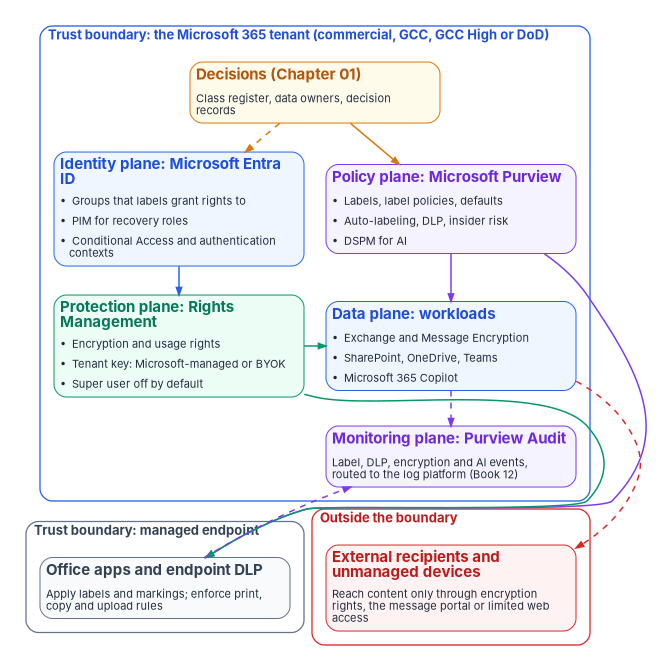
| Plane | Service | What it decides or does | Where this book covers it |
|---|---|---|---|
| Decisions | The class register and decision records | What each class is, who owns it, what must happen to it | Chapter 01 |
| Identity | Microsoft Entra ID | Who is in the groups labels grant rights to; who may activate recovery roles; which sign-in conditions a labeled site requires | Book 03, Book 04; Chapter 04, Chapter 05 |
| Policy | Microsoft Purview | Labels, label policies, defaults, auto-labeling, DLP, insider risk and AI data security | Chapters 02, 03, 08, 09, 10 and 11 |
| Protection | Azure Rights Management and the tenant key | Encrypts content and enforces usage rights wherever it goes | Chapter 05, Chapter 06; key choices in Book 12, Chapter 09 |
| Data | Exchange, SharePoint, OneDrive, Teams, Office apps, Microsoft 365 Copilot | Where labels are applied and honored | Chapters 03, 04, 06, 07 and 11 |
| Monitoring | Purview Audit, routed to the log platform | Records label, DLP, encryption and AI events for detection and evidence | Chapter 10; Book 12, Chapter 04 |
The trust boundaries:
- The tenant. Content inside the tenant is governed by the tenant’s policies, whatever its label. A label adds two things the tenant boundary doesn’t give: a classification other services can read, and, when it encrypts, protection that stays with the content when it leaves.1
- The managed endpoint. Office apps apply labels and content markings, and endpoint DLP enforces print, copy and upload rules, only on devices the agency manages and has onboarded (Chapter 08; Book 05). An unmanaged device reaches labeled sites only through the limited web access a container label allows (Chapter 04).
- Outside. External recipients and guests can’t see the agency’s sensitivity labels in their apps;2 what protects the content out there is the encryption the label applied, or the message portal of Chapter 06.
Two design consequences follow. First, a label that doesn’t encrypt protects nothing once the content leaves the tenant; it is a classification signal, which is enough for most classes and wrong for CUI Specified. Second, each plane has its own owner: the identity team owns the groups, the Purview platform owner owns the labels, the Rights Management service is owned with the tenant key, and the security monitor owns the audit routing. The RACI in Chapter 12 assigns them.
The taxonomy: from classes to labels
Every label stands for one class in the register, and every class that users choose by hand becomes one label. The program’s starting taxonomy is the one Book 12, Chapter 09 derives from the CUI framework. In this book it is recorded as a design table with the settings each label needs:
| Priority | Label (group / label) | Class | Scopes | Content marking | Encryption | Container settings |
|---|---|---|---|---|---|---|
| 0 | Public |
Public | Files, Emails, Meetings | None | None | — |
| 1 | Internal |
Uncontrolled, not for release | Files, Emails, Meetings | None | None | — |
| 2 | CUI / CUI Basic |
CUI Basic | Files, Emails, Meetings | Header CUI |
Tenant users, administrator-defined | — |
| 3 | CUI / CUI//<category> (only where agency policy requires category markings) |
CUI Basic with category | Files, Emails, Meetings | Header with the category marking | Tenant users, administrator-defined | — |
| 4 | CUI / CUI//SP-<category> (one per specified authority held) |
CUI Specified | Files, Emails, Meetings | Header with the category marking | Named authorized-holder group | — |
| — | Sites / Internal site, CUI site, CUI Specified site |
Container classes | Groups & sites | — | — | Privacy, guest access, sharing, unmanaged devices (Chapter 04) |
Four design choices are built into the table.
- Few labels, plain names. Five main labels or fewer, each with five sublabels or fewer, is the point beyond which Microsoft reports that effectiveness drops noticeably; a tenant can hold far more, but users can’t choose among them.3 A label name says what the content is (
CUI Basic), not what to do with it. - Separate labels for containers. A label scoped only to Groups & sites isn’t shown in Office apps and can’t be applied to files, which keeps the file taxonomy short for users.4 The cost is a second list to order; Container labels and priority below covers it.
- Category sublabels only where they are needed. CUI Basic category markings are optional unless agency policy requires them, and Specified markings are mandatory (Chapter 01). A sublabel per category the agency doesn’t use is noise.
- No expiry by default. A label can expire encrypted content after a number of days; for records under a schedule, that is a records officer’s decision, not a default (Book 12, Chapter 09).
Authority: Microsoft-recommended for keeping the number of labels small (Microsoft Learn, “Learn about sensitivity labels,” accessed Nov 11, 2026). Mandated for the CUI banner markings (32 CFR Part 2002, §2002.20(b)). The rest of the table is risk-based recommended, the program’s design. Applies: License-dependent: manual labeling is included from Microsoft 365 E3/G3 and Office 365 E3; automatic labeling needs E5/G5-level licensing (Chapter 09).5
Scopes
A label’s scope decides which settings it can carry and where users see it. Files & other data assets is selected by default and covers Office, Loop and Power BI files; Emails is normally selected with it, because many labeling features need both; Meetings covers calendar events, Teams meeting options and Teams chat, and needs Files and Emails selected too; Groups & sites appears once labels are enabled for containers (Chapter 04).6 Microsoft warns against removing the Files scope from an existing label, because configurations that rely on it (a SharePoint library’s default label, for example) stop working; create a new email-only label instead.7
Priority, label groups and the modern label scheme
Label order is priority. The least restrictive label sits at the top of the list and the most restrictive at the bottom. Priority decides what “downgrade” means when a policy requires a justification to lower a label, and which label wins when auto-labeling matches more than one.8 The design table’s Priority column is therefore part of the design, not a display preference.
Two-tier hierarchies were built with parent labels and sublabels. Microsoft is replacing parent labels with label groups, which carry only a name, description, color and priority; a label group can’t be published or applied itself, only the labels in it.9 New tenants from October 1, 2025 use the modern scheme automatically; an existing tenant migrates from the Purview portal when its banner offers it. Migration is irreversible, so Microsoft strongly recommends testing it first in a test tenant with the same label configuration. A parent label that carried its own encryption, markings, auto-labeling or advanced settings, or was published differently from its sublabels, becomes a label group plus a new sublabel of the same name and GUID, which may then be selectable where it wasn’t before.10 Two consequences for the design:
- Don’t give the
CUIgroup settings of its own. Its sublabels carry the marking and encryption; the group is a heading. That avoids the extra sublabel at migration. - Sublabels in the same group share their group’s priority for the downgrade-justification check, so moving from
CUI//SP-<category>toCUI Basicisn’t treated as a downgrade.11 DLP and auditing, not the justification prompt, watch for that move (Chapter 08; Book 12, Chapter 11).
Authority: Microsoft-recommended (Microsoft Learn, “Migrate parent sensitivity labels to label groups,” accessed Nov 11, 2026) for testing the migration in a test tenant first. Applies: All tenants; government-cloud rollout of the migration is not yet specified on the government planning pages.
Container labels and priority
When a labeled document is uploaded to a labeled site and the document’s label has a higher priority than the site’s, SharePoint doesn’t block the upload; it raises a Detected document sensitivity mismatch audit event and emails the uploader and the site owners.12 That only works if the container labels sit in the same priority order as the file labels they correspond to. Microsoft advises, where container labels are separated from file labels, ordering the container labels before the labels scoped to files.13 The program orders Internal site below Internal, CUI site below CUI Basic, and CUI Specified site below the Specified sublabels, so a CUI Specified document in a CUI site raises the mismatch event, and Chapter 10 turns it into a detection.
Encryption settings
A label that encrypts grants usage rights to named users or groups, or lets the user assign them. The program’s design:
| Setting | Program’s choice | Why |
|---|---|---|
| Assign permissions now, or let users assign | Assign now (administrator-defined) for every file label; Do Not Forward and Encrypt-Only user-assigned options only for email labels in Chapter 06 | Users can’t pick the right authorized-holder group under pressure; the label should |
| Who gets rights | Mail-enabled security groups, Microsoft 365 groups or the tenant’s domain; never individuals | Rights Management doesn’t support non-email-enabled security groups or exclusions for protection14 |
| Content expiry | Never, unless the records officer decides otherwise | Records schedules govern disposition, not the label |
| Offline access | The tenant default, unless a class’s owner sets a shorter period | Shorter periods make revocation faster and offline work harder |
| Double Key Encryption | Only for the narrowest CUI Specified class whose authority requires it | It removes search, eDiscovery, co-authoring, web apps and Copilot for that content (Book 12, Chapter 09) |
Two Microsoft cautions shape the defaults in Chapter 03: a label that encrypts is usually a poor choice as the default label for documents, because external recipients may not be able to open it;15 and the label policy decides who can see and apply a label, while the encryption settings decide who can open what it protects, so the two have to name the same people.16 Encryption with administrator-defined permissions is also capped at 500 labels per tenant, far above the program’s design.17
The encryption itself depends on the Rights Management service being active, and on the decision about the tenant key; Chapter 05 covers both and the recovery path when the only authorized holder is gone.
Content markings
Content markings are headers, footers and watermarks applied by Office apps. They carry the CUI banner (Book 12, Chapter 09). Their limits shape the design:
- Watermarks are limited to 255 characters, headers and footers to 1,024, except in Excel, where headers and footers share a 255-character limit that includes invisible formatting codes; text past the limit doesn’t display.18
- Watermarks apply to documents, not to email or meeting invites.19
- Markings support variables, such as the label name, so one header pattern can serve several labels.20
- Markings are inserted by Office apps. A label applied by a service (for example service-side auto-labeling) applies the metadata and encryption, and the marking appears when the file is next labeled in an Office app (Book 12, Chapter 09).
- Dynamic watermarking is license-dependent: it is listed with E5/G5-level plans.21
Test markings against the agency’s templates and forms before publishing, as Microsoft advises; a header that pushes a form’s fields onto a second page is a help-desk ticket on day one.22
Publishing policies
A label does nothing until a label policy publishes it to users or groups. Policies decide who sees which labels and carry the defaults and mandatory-labeling settings that Chapter 03 configures. Policies are ordered too: a user in several policies gets all their labels, and for conflicting settings the policy with the highest order number wins.23 The program uses three policies:
| Order | Policy | Labels | Who |
|---|---|---|---|
| 0 | B20-Labels-All |
Public, Internal, CUI Basic (and category sublabels), container labels | Everyone in scope |
| 1 | B20-Labels-CUI-SP |
Adds the CUI Specified sublabels | Members of the authorized-holder groups only |
| 2 | B20-Labels-Pilot |
Everything, with the pilot defaults of Chapter 03 | The pilot ring, until enforcement |
Publishing CUI Specified sublabels only to their holders keeps the list short for everyone else, and anyone in the organization can still see the name of a label applied to content even if it isn’t published to them.24 Allow up to 24 hours for a new or changed policy to reach users.25
How: build the taxonomy in a test tenant
Label configuration has effects that can’t be undone cleanly: a label applied to content keeps the version of its settings that was applied, deleting a label doesn’t remove it from content, and label-group migration is irreversible.2627 The program therefore builds the taxonomy in a test tenant from code (Book 12, Chapter 09 has the New-Label and New-LabelPolicy block), exports it, and promotes the same code to production.
Prerequisites
| Feature | Commercial | GCC | GCC High | DoD | Source |
|---|---|---|---|---|---|
| Manual labels | Available | Available | Available | Available | Government Purview planning pages282930 |
| Mandatory labels | Available | Available | Available | Available | Same pages |
| Sensitivity labels for Teams, Microsoft 365 groups and SharePoint sites | Available | Available | Available | Available | Same pages |
| Co-authoring on encrypted documents | Available | Available | Available | Available | Same pages |
| Label groups (modern label scheme) migration | Available (rolling out) | Not yet specified | Not yet specified | Not yet specified | “Migrate parent sensitivity labels to label groups”31 |
| Sensitivity labels on all platforms | Available | Available | Available | Available | “Learn about sensitivity labels”: supported for all platforms in US Government tenants32 |
- Licenses: manual labeling with Microsoft 365 E3/G3 or higher; dynamic watermarking and automatic labeling with E5/G5-level plans.33 Record the plan in the decision record.
- Roles: an Information Protection Admin (or Compliance Administrator) for the platform owner; nobody uses Global Administrator for label work.
- Groups: the mail-enabled authorized-holder groups exist and are populated by the identity lifecycle (Book 03) before a label grants them rights.
- Rights Management active (Chapter 05), and the tenant key decision made, before any encrypting label is created.
- A test tenant in the same cloud as production, with the same label scheme (parent labels or label groups).
Pilot
The pilot for this chapter is the test tenant itself: the platform owner creates every label from the design table there, and a test group of five to ten people from the help desk, records and the data owners applies each label to sample documents, mail and meetings.
Report-only or audit phase
Not applicable: a label has no audit mode. Its effect is observed by applying it in the test tenant and, in production, by publishing it to the pilot ring only (Chapter 03).
Enforcement
Promote the same code to production, unpublished. Labels created in production aren’t visible to users until a policy publishes them, so creating them is safe; publishing is the enforcement step, in Chapter 03.
Connect to Security & Compliance PowerShell for the tenant’s cloud (the commands are in Chapter 01). Commands were checked against Microsoft Learn on Nov 11, 2026; run them against the test tenant first.
Run the reviewed label script from source control. Then export what was created, with the date:
$stamp = Get-Date -Format 'yyyy-MM-dd'
Get-Label | Sort-Object Priority |
  Select-Object Name, DisplayName, Guid, ParentId, Priority, ContentType, Tooltip |
  Export-Csv ".\labels-$stamp.csv" -NoTypeInformation -Encoding UTF8
Get-Label | ConvertTo-Json -Depth 6 | Out-File ".\labels-$stamp.json" -Encoding utf8
Set each label’s priority to match the design table, least restrictive first.
Set-Labeltakes a priority number:Set-Label -Identity 'Public' -Priority 0 Set-Label -Identity 'Internal' -Priority 1Repeat for each label in the design table’s order, then re-run the export in step 2 and compare it with the design.
Change safety
| Ring | Scope | Exit criteria |
|---|---|---|
| 0 | Test tenant, platform owner | Every label created; export matches the design table |
| 1 | Test tenant, test group | Each label applied to sample items; markings and rights observed as designed |
| 2 | Production, labels created but unpublished | Production export matches the test export |
| 3 | Production, published | Chapter 03’s rings |
- Emergency access: not applicable here; labels don’t restrict sign-in.
- Change window: label creation in production is a standard change approved by the platform owner; publishing is a normal change (Chapter 03).
- Backout triggers: the production export differs from the design or the test export.
- Post-change validation: the export comparison in step 2.
Rollback
Before publishing, remove a wrong label with Remove-Label -Identity '<label-name>' and re-run the script. After a label has been published and applied, don’t delete it: deleting doesn’t remove it from content, and protection continues to be enforced.34 Remove it from the label policy instead (Chapter 03), and correct its settings with Set-Label; content keeps the version of the label it was given. A label-group migration can’t be rolled back.35
Exclusions
None at this stage. Who sees which label is decided by the policies in Chapter 03.
Telemetry
Label creation and changes are recorded in the Purview audit log; Chapter 10 has the search commands and Book 12, Chapter 04 the routing.
Validate
In the test tenant, for each label: apply it to a Word document, an email and a meeting invite (where scoped); confirm the header text; open the encrypted document as a member of the granted group (opens) and as a non-member (denied). Record the expected and observed result, the date and the tester.
Evidence
Evidence checklist
Day-two ownership
The platform owner owns the label configuration and its code; the policy owner of each class approves any change to its label; the operator runs the scripts; the assessor reviews the export at each assessment. Review the taxonomy against the class register annually, with the register review in Chapter 01. Drift is any difference between the production export and source control (Chapter 12). The full RACI is in Chapter 12.
Key takeaways
- The architecture has three trust boundaries (tenant, managed endpoint, outside) and four planes (identity, policy, protection, monitoring); each plane has an owner.
- One label per class, five or fewer per level, ordered by priority, with label groups as headings that carry no settings of their own.
- Encryption grants rights to mail-enabled groups, never individuals; a default label shouldn’t encrypt.
- Build the taxonomy from code in a test tenant first: deletion doesn’t unlabel content, and label-group migration can’t be undone.
Microsoft Learn, “Learn about sensitivity labels,” sections “What a sensitivity label is,” “What sensitivity labels can do” (content-marking limits; watermarks not on email), “Label scopes,” “Label priority (order matters),” “Sublabels that use parent labels or label groups,” “Editing or deleting a sensitivity label,” “Sensitivity label limitations per tenant” (500 labels with administrator-defined encryption; five main labels or sublabels), “What label policies can do” (Rights Management doesn’t support non-email-enabled security groups or exclusions; default label shouldn’t usually encrypt; up to 24 hours) and “Label policy priority (order matters)”; and the note that for US Government tenants sensitivity labels are supported for all platforms, https://learn.microsoft.com/purview/sensitivity-labels (accessed Nov 11, 2026).↩︎
Microsoft Learn, “Learn about sensitivity labels,” sections “What a sensitivity label is,” “What sensitivity labels can do” (content-marking limits; watermarks not on email), “Label scopes,” “Label priority (order matters),” “Sublabels that use parent labels or label groups,” “Editing or deleting a sensitivity label,” “Sensitivity label limitations per tenant” (500 labels with administrator-defined encryption; five main labels or sublabels), “What label policies can do” (Rights Management doesn’t support non-email-enabled security groups or exclusions; default label shouldn’t usually encrypt; up to 24 hours) and “Label policy priority (order matters)”; and the note that for US Government tenants sensitivity labels are supported for all platforms, https://learn.microsoft.com/purview/sensitivity-labels (accessed Nov 11, 2026).↩︎
Microsoft Learn, “Learn about sensitivity labels,” sections “What a sensitivity label is,” “What sensitivity labels can do” (content-marking limits; watermarks not on email), “Label scopes,” “Label priority (order matters),” “Sublabels that use parent labels or label groups,” “Editing or deleting a sensitivity label,” “Sensitivity label limitations per tenant” (500 labels with administrator-defined encryption; five main labels or sublabels), “What label policies can do” (Rights Management doesn’t support non-email-enabled security groups or exclusions; default label shouldn’t usually encrypt; up to 24 hours) and “Label policy priority (order matters)”; and the note that for US Government tenants sensitivity labels are supported for all platforms, https://learn.microsoft.com/purview/sensitivity-labels (accessed Nov 11, 2026).↩︎
Microsoft Learn, “Use sensitivity labels to protect collaborative workspaces (groups and sites),” sections “How to configure groups and site settings for containers” (Groups & sites-only labels aren’t displayed in Office apps) and “Auditing sensitivity label activities” (Detected document sensitivity mismatch; order container labels before labels scoped to files), https://learn.microsoft.com/purview/sensitivity-labels-teams-groups-sites (accessed Nov 11, 2026).↩︎
Microsoft Learn, “Microsoft Purview service description,” section “Microsoft Purview Information Protection sensitivity labeling” (manual labeling included from E3/G3; automatic labeling and dynamic watermarking with E5/G5-level plans), https://learn.microsoft.com/office365/servicedescriptions/microsoft-365-service-descriptions/microsoft-365-tenantlevel-services-licensing-guidance/microsoft-purview-service-description (accessed Nov 11, 2026).↩︎
Microsoft Learn, “Learn about sensitivity labels,” sections “What a sensitivity label is,” “What sensitivity labels can do” (content-marking limits; watermarks not on email), “Label scopes,” “Label priority (order matters),” “Sublabels that use parent labels or label groups,” “Editing or deleting a sensitivity label,” “Sensitivity label limitations per tenant” (500 labels with administrator-defined encryption; five main labels or sublabels), “What label policies can do” (Rights Management doesn’t support non-email-enabled security groups or exclusions; default label shouldn’t usually encrypt; up to 24 hours) and “Label policy priority (order matters)”; and the note that for US Government tenants sensitivity labels are supported for all platforms, https://learn.microsoft.com/purview/sensitivity-labels (accessed Nov 11, 2026).↩︎
Microsoft Learn, “Manage sensitivity labels in Office apps,” section “Scope labels to just files or emails” (don’t remove the Files scope from an existing label), https://learn.microsoft.com/purview/sensitivity-labels-office-apps (accessed Nov 11, 2026).↩︎
Microsoft Learn, “Learn about sensitivity labels,” sections “What a sensitivity label is,” “What sensitivity labels can do” (content-marking limits; watermarks not on email), “Label scopes,” “Label priority (order matters),” “Sublabels that use parent labels or label groups,” “Editing or deleting a sensitivity label,” “Sensitivity label limitations per tenant” (500 labels with administrator-defined encryption; five main labels or sublabels), “What label policies can do” (Rights Management doesn’t support non-email-enabled security groups or exclusions; default label shouldn’t usually encrypt; up to 24 hours) and “Label policy priority (order matters)”; and the note that for US Government tenants sensitivity labels are supported for all platforms, https://learn.microsoft.com/purview/sensitivity-labels (accessed Nov 11, 2026).↩︎
Microsoft Learn, “Learn about sensitivity labels,” sections “What a sensitivity label is,” “What sensitivity labels can do” (content-marking limits; watermarks not on email), “Label scopes,” “Label priority (order matters),” “Sublabels that use parent labels or label groups,” “Editing or deleting a sensitivity label,” “Sensitivity label limitations per tenant” (500 labels with administrator-defined encryption; five main labels or sublabels), “What label policies can do” (Rights Management doesn’t support non-email-enabled security groups or exclusions; default label shouldn’t usually encrypt; up to 24 hours) and “Label policy priority (order matters)”; and the note that for US Government tenants sensitivity labels are supported for all platforms, https://learn.microsoft.com/purview/sensitivity-labels (accessed Nov 11, 2026).↩︎
Microsoft Learn, “Migrate parent sensitivity labels to label groups” (automatic for new tenants from October 1, 2025; irreversible; test in a test tenant first; applicable parent labels create a sublabel with the same name and GUID; rolling out gradually), https://learn.microsoft.com/purview/migrate-sensitivity-label-scheme (accessed Nov 11, 2026).↩︎
Microsoft Learn, “Learn about sensitivity labels,” sections “What a sensitivity label is,” “What sensitivity labels can do” (content-marking limits; watermarks not on email), “Label scopes,” “Label priority (order matters),” “Sublabels that use parent labels or label groups,” “Editing or deleting a sensitivity label,” “Sensitivity label limitations per tenant” (500 labels with administrator-defined encryption; five main labels or sublabels), “What label policies can do” (Rights Management doesn’t support non-email-enabled security groups or exclusions; default label shouldn’t usually encrypt; up to 24 hours) and “Label policy priority (order matters)”; and the note that for US Government tenants sensitivity labels are supported for all platforms, https://learn.microsoft.com/purview/sensitivity-labels (accessed Nov 11, 2026).↩︎
Microsoft Learn, “Use sensitivity labels to protect collaborative workspaces (groups and sites),” sections “How to configure groups and site settings for containers” (Groups & sites-only labels aren’t displayed in Office apps) and “Auditing sensitivity label activities” (Detected document sensitivity mismatch; order container labels before labels scoped to files), https://learn.microsoft.com/purview/sensitivity-labels-teams-groups-sites (accessed Nov 11, 2026).↩︎
Microsoft Learn, “Use sensitivity labels to protect collaborative workspaces (groups and sites),” sections “How to configure groups and site settings for containers” (Groups & sites-only labels aren’t displayed in Office apps) and “Auditing sensitivity label activities” (Detected document sensitivity mismatch; order container labels before labels scoped to files), https://learn.microsoft.com/purview/sensitivity-labels-teams-groups-sites (accessed Nov 11, 2026).↩︎
Microsoft Learn, “Learn about sensitivity labels,” sections “What a sensitivity label is,” “What sensitivity labels can do” (content-marking limits; watermarks not on email), “Label scopes,” “Label priority (order matters),” “Sublabels that use parent labels or label groups,” “Editing or deleting a sensitivity label,” “Sensitivity label limitations per tenant” (500 labels with administrator-defined encryption; five main labels or sublabels), “What label policies can do” (Rights Management doesn’t support non-email-enabled security groups or exclusions; default label shouldn’t usually encrypt; up to 24 hours) and “Label policy priority (order matters)”; and the note that for US Government tenants sensitivity labels are supported for all platforms, https://learn.microsoft.com/purview/sensitivity-labels (accessed Nov 11, 2026).↩︎
Microsoft Learn, “Learn about sensitivity labels,” sections “What a sensitivity label is,” “What sensitivity labels can do” (content-marking limits; watermarks not on email), “Label scopes,” “Label priority (order matters),” “Sublabels that use parent labels or label groups,” “Editing or deleting a sensitivity label,” “Sensitivity label limitations per tenant” (500 labels with administrator-defined encryption; five main labels or sublabels), “What label policies can do” (Rights Management doesn’t support non-email-enabled security groups or exclusions; default label shouldn’t usually encrypt; up to 24 hours) and “Label policy priority (order matters)”; and the note that for US Government tenants sensitivity labels are supported for all platforms, https://learn.microsoft.com/purview/sensitivity-labels (accessed Nov 11, 2026).↩︎
Microsoft Learn, “Learn about sensitivity labels,” sections “What a sensitivity label is,” “What sensitivity labels can do” (content-marking limits; watermarks not on email), “Label scopes,” “Label priority (order matters),” “Sublabels that use parent labels or label groups,” “Editing or deleting a sensitivity label,” “Sensitivity label limitations per tenant” (500 labels with administrator-defined encryption; five main labels or sublabels), “What label policies can do” (Rights Management doesn’t support non-email-enabled security groups or exclusions; default label shouldn’t usually encrypt; up to 24 hours) and “Label policy priority (order matters)”; and the note that for US Government tenants sensitivity labels are supported for all platforms, https://learn.microsoft.com/purview/sensitivity-labels (accessed Nov 11, 2026).↩︎
Microsoft Learn, “Learn about sensitivity labels,” sections “What a sensitivity label is,” “What sensitivity labels can do” (content-marking limits; watermarks not on email), “Label scopes,” “Label priority (order matters),” “Sublabels that use parent labels or label groups,” “Editing or deleting a sensitivity label,” “Sensitivity label limitations per tenant” (500 labels with administrator-defined encryption; five main labels or sublabels), “What label policies can do” (Rights Management doesn’t support non-email-enabled security groups or exclusions; default label shouldn’t usually encrypt; up to 24 hours) and “Label policy priority (order matters)”; and the note that for US Government tenants sensitivity labels are supported for all platforms, https://learn.microsoft.com/purview/sensitivity-labels (accessed Nov 11, 2026).↩︎
Microsoft Learn, “Learn about sensitivity labels,” sections “What a sensitivity label is,” “What sensitivity labels can do” (content-marking limits; watermarks not on email), “Label scopes,” “Label priority (order matters),” “Sublabels that use parent labels or label groups,” “Editing or deleting a sensitivity label,” “Sensitivity label limitations per tenant” (500 labels with administrator-defined encryption; five main labels or sublabels), “What label policies can do” (Rights Management doesn’t support non-email-enabled security groups or exclusions; default label shouldn’t usually encrypt; up to 24 hours) and “Label policy priority (order matters)”; and the note that for US Government tenants sensitivity labels are supported for all platforms, https://learn.microsoft.com/purview/sensitivity-labels (accessed Nov 11, 2026).↩︎
Microsoft Learn, “Learn about sensitivity labels,” sections “What a sensitivity label is,” “What sensitivity labels can do” (content-marking limits; watermarks not on email), “Label scopes,” “Label priority (order matters),” “Sublabels that use parent labels or label groups,” “Editing or deleting a sensitivity label,” “Sensitivity label limitations per tenant” (500 labels with administrator-defined encryption; five main labels or sublabels), “What label policies can do” (Rights Management doesn’t support non-email-enabled security groups or exclusions; default label shouldn’t usually encrypt; up to 24 hours) and “Label policy priority (order matters)”; and the note that for US Government tenants sensitivity labels are supported for all platforms, https://learn.microsoft.com/purview/sensitivity-labels (accessed Nov 11, 2026).↩︎
Microsoft Learn, “Learn about sensitivity labels,” sections “What a sensitivity label is,” “What sensitivity labels can do” (content-marking limits; watermarks not on email), “Label scopes,” “Label priority (order matters),” “Sublabels that use parent labels or label groups,” “Editing or deleting a sensitivity label,” “Sensitivity label limitations per tenant” (500 labels with administrator-defined encryption; five main labels or sublabels), “What label policies can do” (Rights Management doesn’t support non-email-enabled security groups or exclusions; default label shouldn’t usually encrypt; up to 24 hours) and “Label policy priority (order matters)”; and the note that for US Government tenants sensitivity labels are supported for all platforms, https://learn.microsoft.com/purview/sensitivity-labels (accessed Nov 11, 2026).↩︎
Microsoft Learn, “Microsoft Purview service description,” section “Microsoft Purview Information Protection sensitivity labeling” (manual labeling included from E3/G3; automatic labeling and dynamic watermarking with E5/G5-level plans), https://learn.microsoft.com/office365/servicedescriptions/microsoft-365-service-descriptions/microsoft-365-tenantlevel-services-licensing-guidance/microsoft-purview-service-description (accessed Nov 11, 2026).↩︎
Microsoft Learn, “Learn about sensitivity labels,” sections “What a sensitivity label is,” “What sensitivity labels can do” (content-marking limits; watermarks not on email), “Label scopes,” “Label priority (order matters),” “Sublabels that use parent labels or label groups,” “Editing or deleting a sensitivity label,” “Sensitivity label limitations per tenant” (500 labels with administrator-defined encryption; five main labels or sublabels), “What label policies can do” (Rights Management doesn’t support non-email-enabled security groups or exclusions; default label shouldn’t usually encrypt; up to 24 hours) and “Label policy priority (order matters)”; and the note that for US Government tenants sensitivity labels are supported for all platforms, https://learn.microsoft.com/purview/sensitivity-labels (accessed Nov 11, 2026).↩︎
Microsoft Learn, “Learn about sensitivity labels,” sections “What a sensitivity label is,” “What sensitivity labels can do” (content-marking limits; watermarks not on email), “Label scopes,” “Label priority (order matters),” “Sublabels that use parent labels or label groups,” “Editing or deleting a sensitivity label,” “Sensitivity label limitations per tenant” (500 labels with administrator-defined encryption; five main labels or sublabels), “What label policies can do” (Rights Management doesn’t support non-email-enabled security groups or exclusions; default label shouldn’t usually encrypt; up to 24 hours) and “Label policy priority (order matters)”; and the note that for US Government tenants sensitivity labels are supported for all platforms, https://learn.microsoft.com/purview/sensitivity-labels (accessed Nov 11, 2026).↩︎
Microsoft Learn, “Learn about sensitivity labels,” sections “What a sensitivity label is,” “What sensitivity labels can do” (content-marking limits; watermarks not on email), “Label scopes,” “Label priority (order matters),” “Sublabels that use parent labels or label groups,” “Editing or deleting a sensitivity label,” “Sensitivity label limitations per tenant” (500 labels with administrator-defined encryption; five main labels or sublabels), “What label policies can do” (Rights Management doesn’t support non-email-enabled security groups or exclusions; default label shouldn’t usually encrypt; up to 24 hours) and “Label policy priority (order matters)”; and the note that for US Government tenants sensitivity labels are supported for all platforms, https://learn.microsoft.com/purview/sensitivity-labels (accessed Nov 11, 2026).↩︎
Microsoft Learn, “Learn about sensitivity labels,” sections “What a sensitivity label is,” “What sensitivity labels can do” (content-marking limits; watermarks not on email), “Label scopes,” “Label priority (order matters),” “Sublabels that use parent labels or label groups,” “Editing or deleting a sensitivity label,” “Sensitivity label limitations per tenant” (500 labels with administrator-defined encryption; five main labels or sublabels), “What label policies can do” (Rights Management doesn’t support non-email-enabled security groups or exclusions; default label shouldn’t usually encrypt; up to 24 hours) and “Label policy priority (order matters)”; and the note that for US Government tenants sensitivity labels are supported for all platforms, https://learn.microsoft.com/purview/sensitivity-labels (accessed Nov 11, 2026).↩︎
Microsoft Learn, “Learn about sensitivity labels,” sections “What a sensitivity label is,” “What sensitivity labels can do” (content-marking limits; watermarks not on email), “Label scopes,” “Label priority (order matters),” “Sublabels that use parent labels or label groups,” “Editing or deleting a sensitivity label,” “Sensitivity label limitations per tenant” (500 labels with administrator-defined encryption; five main labels or sublabels), “What label policies can do” (Rights Management doesn’t support non-email-enabled security groups or exclusions; default label shouldn’t usually encrypt; up to 24 hours) and “Label policy priority (order matters)”; and the note that for US Government tenants sensitivity labels are supported for all platforms, https://learn.microsoft.com/purview/sensitivity-labels (accessed Nov 11, 2026).↩︎
Microsoft Learn, “Migrate parent sensitivity labels to label groups” (automatic for new tenants from October 1, 2025; irreversible; test in a test tenant first; applicable parent labels create a sublabel with the same name and GUID; rolling out gradually), https://learn.microsoft.com/purview/migrate-sensitivity-label-scheme (accessed Nov 11, 2026).↩︎
Microsoft Learn, “Plan for Microsoft Purview compliance and risk management solutions – GCC deployments,” Step 4, https://learn.microsoft.com/office365/servicedescriptions/microsoft-365-service-descriptions/microsoft-365-tenantlevel-services-licensing-guidance/plan-for-microsoft-purview-gcc-deployments (accessed Nov 11, 2026).↩︎
Microsoft Learn, “Plan for Microsoft Purview compliance and risk management solutions – GCC High deployments,” Step 4, https://learn.microsoft.com/office365/servicedescriptions/microsoft-365-service-descriptions/microsoft-365-tenantlevel-services-licensing-guidance/plan-for-microsoft-purview-gcc-high-deployments (accessed Nov 11, 2026).↩︎
Microsoft Learn, “Plan for Microsoft Purview compliance and risk management solutions - DoD deployments,” Step 4, https://learn.microsoft.com/office365/servicedescriptions/microsoft-365-service-descriptions/microsoft-365-tenantlevel-services-licensing-guidance/plan-for-microsoft-purview-dod-deployments (accessed Nov 11, 2026).↩︎
Microsoft Learn, “Migrate parent sensitivity labels to label groups” (automatic for new tenants from October 1, 2025; irreversible; test in a test tenant first; applicable parent labels create a sublabel with the same name and GUID; rolling out gradually), https://learn.microsoft.com/purview/migrate-sensitivity-label-scheme (accessed Nov 11, 2026).↩︎
Microsoft Learn, “Learn about sensitivity labels,” sections “What a sensitivity label is,” “What sensitivity labels can do” (content-marking limits; watermarks not on email), “Label scopes,” “Label priority (order matters),” “Sublabels that use parent labels or label groups,” “Editing or deleting a sensitivity label,” “Sensitivity label limitations per tenant” (500 labels with administrator-defined encryption; five main labels or sublabels), “What label policies can do” (Rights Management doesn’t support non-email-enabled security groups or exclusions; default label shouldn’t usually encrypt; up to 24 hours) and “Label policy priority (order matters)”; and the note that for US Government tenants sensitivity labels are supported for all platforms, https://learn.microsoft.com/purview/sensitivity-labels (accessed Nov 11, 2026).↩︎
Microsoft Learn, “Microsoft Purview service description,” section “Microsoft Purview Information Protection sensitivity labeling” (manual labeling included from E3/G3; automatic labeling and dynamic watermarking with E5/G5-level plans), https://learn.microsoft.com/office365/servicedescriptions/microsoft-365-service-descriptions/microsoft-365-tenantlevel-services-licensing-guidance/microsoft-purview-service-description (accessed Nov 11, 2026).↩︎
Microsoft Learn, “Learn about sensitivity labels,” sections “What a sensitivity label is,” “What sensitivity labels can do” (content-marking limits; watermarks not on email), “Label scopes,” “Label priority (order matters),” “Sublabels that use parent labels or label groups,” “Editing or deleting a sensitivity label,” “Sensitivity label limitations per tenant” (500 labels with administrator-defined encryption; five main labels or sublabels), “What label policies can do” (Rights Management doesn’t support non-email-enabled security groups or exclusions; default label shouldn’t usually encrypt; up to 24 hours) and “Label policy priority (order matters)”; and the note that for US Government tenants sensitivity labels are supported for all platforms, https://learn.microsoft.com/purview/sensitivity-labels (accessed Nov 11, 2026).↩︎
Microsoft Learn, “Migrate parent sensitivity labels to label groups” (automatic for new tenants from October 1, 2025; irreversible; test in a test tenant first; applicable parent labels create a sublabel with the same name and GUID; rolling out gradually), https://learn.microsoft.com/purview/migrate-sensitivity-label-scheme (accessed Nov 11, 2026).↩︎