Federal Modernization Workbook · Book 19 · How
Chapter 09 — Drift Pipelines and Evidence to the ISSO
A check that runs when someone remembers is a spot check. A check that runs every day, says what moved since yesterday, and leaves evidence nobody can edit afterwards is continuous monitoring.
How the read-only checks from Chapter 03 become a scheduled pipeline. You start from Learn’s sample workflows for signing in to Azure from GitHub Actions with a federated credential, which the repository keeps as a pinned copy, and check them offline. Then you build on examples/drift-pipeline for what they leave to you: a schedule, pinned actions, the right sign-in and Graph host for GCC, GCC High and DoD, a comparison of each run with the last, findings opened and closed by fingerprint, and an evidence package for the ISSO with a SHA-256 per file, the other kits’ provenance and a hash chain to the previous package. Lab 1 runs on a laptop with no tenant; Lab 2 uses a test tenant and a test subscription.
Jump to a slide (18)
Deck · Narrated deck (about 11 minutes, captions) · Script · Captions. Recorded on November 2, 2026 from the approved chapter.
Goal and audience
Goal. By the end of this chapter you can run the validation kit on a schedule with no secret stored anywhere, explain every line of the drift report it produces, open and close findings without leaking names into the issue tracker, and hand the ISSO a package they can verify with sha256sum and nothing else. For each rule in the code you can say whether it is Microsoft’s contract, Microsoft’s sample, GitHub’s documentation, or the program’s own design.
Audience. Platform and pipeline engineers who own the scheduled checks, and the ISSOs and reviewers who receive the evidence. You should be comfortable with Python and GitHub Actions. You don’t need a tenant until Lab 2.
Where the pipeline sits
Three pages already say what this pipeline must produce. This chapter builds it and doesn’t repeat them.
- Book 13, Chapter 06 defines the drift engine: drift is measured against a versioned record, not a snapshot, and each check’s cadence is set by the book that owns it.
- Book 13, Chapter 04 says no closure counts unless it carries its proof, and that reports are derivations that can be re-run.
- Book 12, Chapter 02 defines the evidence contract, and says a finding closes only when a later observation shows the fixed state.
The pipeline is a small part of that design. Each validation kit check already compares the tenant with the program’s record or rule: VK-HR-01 with the HR join, VK-DG-01 with the guards, VK-CA-01 with the governed-group list. The pipeline adds the second comparison: this run against the last. That finds change. Whether a change is drift from the record is still the check’s answer, not the pipeline’s. A finding that was there yesterday and is still there today is not new, but it is still open.
The comparison also enforces Book 12’s closing rule in code. A finding is resolved only when the same check read the tenant again and didn’t report it. A check that ended in Error proves nothing, so its findings stay open as unverified.
Why GitHub Actions
Learn documents two ways to run a scheduled job that signs in to Azure without a secret: GitHub Actions with the Azure Login action, and Azure Pipelines with a workload identity federation service connection. This chapter uses GitHub Actions, for three reasons.
- Learn publishes complete sample workflows for it, including the Azure US Government sign-in, on one page.1 That is the sample this chapter starts from.
- The Azure Login action is Microsoft’s own, published with its source and its declared inputs.2
- For Azure Pipelines, Learn’s automatic app registration with workload identity federation doesn’t apply to the Azure US Government environment; that needs the manual method.3 The estate in this chapter is GCC with commercial Azure, so either would work there, but one pipeline that also documents the GCC High and DoD path is simpler to hand on.
Design guidance: an agency standardized on Azure Pipelines can use the same comparator, packager and tests. Only the workflow file changes.
GitHub Actions details that Learn doesn’t cover (the schedule, the token’s claims, action pinning, artifact retention) are cited to GitHub’s own documentation, which Learn’s page itself points to.4
Start with Learn’s sample
What Learn gives you
Learn’s page “Use the Azure Login action with OpenID Connect” has three workflows.5
| Sample | What it does |
|---|---|
| Azure CLI only | Signs in with azure/login@v2 and runs az account show with azure/cli@v2 |
| Azure CLI and Azure PowerShell | The same, with enable-AzPSSession: true and azure/powershell@v2 running Get-AzContext |
| Azure US Government | One step: azure/login@v2 with environment: 'AzureUSGovernment' and audience: api://AzureADTokenExchangeUSGov |
Each job asks for id-token: write and nothing else. The client ID, tenant ID and subscription ID come from GitHub secrets, which Learn recommends “for security reasons”. The audience input defaults to api://AzureADTokenExchange for public clouds and must be changed for the others.6 Before the workflow runs, the app registration (or a user-assigned managed identity) needs a federated credential that trusts the repository.7
The pinned copy
The workflows exist only inside the Learn page, so the repository pins the page itself: connect-from-azure-openid-connect.md from MicrosoftDocs/azure-dev-docs at commit 23900ce (October 28, 2026), unmodified, with the repository’s MIT code license.8 It also pins the Azure Login action’s action.yml at release v3.1.0, because the offline checks read its declared inputs and defaults.9 Each copy has a snapshot.json with a SHA-256 per file, checked by a unit test, and a source-watch feed that reports new upstream commits. Updating either is a reviewed pull request, as in Chapter 01.
python/workflow_lint.py extracts each workflow from the pinned page at test time and parses it as YAML. Nothing runs and nothing signs in. Twelve rules (WF-01 to WF-12) check what Learn, the action and GitHub’s documentation require of a workflow that runs unattended.
What it leaves to you
Checking the three samples offline shows what they do well and what they leave to you. Each row is pinned by a test in tests/test_workflow_lint.py or tests/test_drift_pipeline.py.
| Learn’s samples, checked as published | Why it matters | What examples/drift-pipeline adds |
|---|---|---|
Sign in with OIDC; id-token: write on the job and nothing else; IDs in secrets; inputs the action declares |
— | Kept as the model: the same sign-in, the same secrets, the same single grant on the job that signs in |
They run on push; there is no schedule (WF-02) |
Drift isn’t found because someone pushed a commit | schedule once a day and workflow_dispatch |
azure/login@v2, azure/cli@v2 and azure/powershell@v2 are tags (WF-05), and v2 is an older major version than the current Azure Login release, v3.1.0 (WF-08)10 |
A tag can be moved; GitHub advises pinning an action to a full commit SHA11 | Every action pinned to a commit, Azure Login to v3.1.0’s |
azcliversion: latest and azPSVersion: latest (WF-09) |
The tool that produced the evidence changes without a review | Exact versions from repository variables |
The US Government sample doesn’t parse as YAML: with: is indented under uses: (WF-01) |
Copied as is, the workflow can’t run. Its environment and audience pair is right once the indentation is fixed (a test does that in memory) | The linter catches it; a cloud table gives each cloud’s values |
| The job names no environment (WF-10) | The token’s subject then depends on the branch or event,12 and a federated credential matches one subject exactly13 | The job runs in the drift-gcc environment; the credential’s subject is that environment |
They stop at az account show |
No Graph token, and nothing about GCC High and DoD, which share a sign-in authority and Azure environment but have different Graph hosts14 | A cloud table for GCC, GCC High and DoD, checked against the workflow (WF-12); a Graph token for the profile’s host |
| No workflow-level permissions, no concurrency group, no timeout (WF-03, WF-11 warnings) | Two runs can overlap and compare against each other | permissions: {} at the top, a concurrency group, timeouts |
| Nothing after sign-in | No comparison, no findings, no evidence | compare, issues, package and verify |
The verdict. Use Learn’s sign-in exactly: the federated credential, the action, the secrets, the single grant. Pin it, schedule it, and put the rest of the pipeline behind it. Fix the US Government sample’s indentation before you copy it.
The code: what examples/drift-pipeline adds
examples/drift-pipeline adds two Python files, one sample workflow and two test files to what the folder already holds. drift_pipeline.py uses only the standard library; workflow_lint.py needs PyYAML. The folder also holds the evidence modules for the other kits (hr_evidence.py, npi_evidence.py, pa_evidence.py) with a test file each, the OSCAL export (oscal_export.py, with its tests in oscal/tests) and the deploy/ folder that Chapter 10 covers.
The workflow
workflow/drift-pipeline.yml is a sample for a GCC tenant with commercial Azure. It isn’t active in this repository: it sits under examples/, not .github/workflows/, and has never run against Azure. It has two jobs.
checkruns in thedrift-gccenvironment withcontents: readandid-token: write. It signs in with Azure Login, gets a Graph token for the profile’s Graph host withGet-AzAccessToken -AsSecureString,15 connects Microsoft Graph PowerShell with it,16 and runs the validation kit with-SkipConnect. Then it fetches and verifies the previous evidence package, compares, packages, and writes the package to an immutable container.findingshascontents: readandissues: write, and no Azure access at all. It downloads the drift report and opens or closes issues.
Design guidance: the identity that can read the tenant never writes to the tracker, and the job that writes to the tracker can’t request a token. WF-04 fails a workflow that puts both grants on one job.
The validation kit’s own sign-in supports a certificate or a managed identity (Chapter 03). A federated credential reaches it through -SkipConnect, after Connect-MgGraph -AccessToken. VK-DG-03 is delegated only, so an app-only run reports it as Error every time, as the kit’s README says. The pipeline lists it as unverified on every run, which is the truth: nothing app-only can prove it.
Clouds
cloud_profile() holds one row per cloud. An unknown name is refused, never mapped to worldwide.
| Cloud | Sign-in authority | Graph host | Azure Login environment |
audience |
Connect-MgGraph -Environment |
|---|---|---|---|---|---|
gcc |
login.microsoftonline.com |
graph.microsoft.com |
AzureCloud |
api://AzureADTokenExchange |
Global |
gcchigh |
login.microsoftonline.us |
graph.microsoft.us |
AzureUSGovernment |
api://AzureADTokenExchangeUSGov |
USGov |
dod |
login.microsoftonline.us |
dod-graph.microsoft.us |
AzureUSGovernment |
api://AzureADTokenExchangeUSGov |
USGovDoD |
Learn says an app in a Microsoft 365 GCC environment keeps using the worldwide endpoints, and lists the GCC High and DoD Graph hosts.17 The audiences per cloud are on Learn’s federated credential pages,18 and the Graph PowerShell environment names on Connect-MgGraph’s page.19 Tokens for one cloud don’t work in another.20 The trap is DoD: Azure Login’s AzureUSGovernment covers both GCC High and DoD, so the Graph host has to come from the profile, not from the sign-in.
Compare
load_run() reads a kit run and checks it against the kit’s own ValidationManifest.json: every listed file with the same SHA-256, nothing missing, nothing added, and ReadOnly: true. A run edited after the kit wrote it is refused.
compare() takes the Finding and Warn rows (the kit’s Count; Info rows don’t count) and keys each by check, object ID and issue. It refuses to compare runs from different modes or clouds, or a “current” run that isn’t later. It also refuses two runs from different tenants, which share a cloud and look alike: the kit’s manifest records TenantId, taken from the Graph session, which the Graph PowerShell SDK fills from the access token’s tid claim, the tenant that issued the token.2122 A run whose manifest has no tenant ID is refused too, because nothing shows which tenant it read. --allow-tenant-mismatch overrides both refusals for a reviewed exception and writes the reason into the report’s notes (design guidance). The drift report and the evidence manifest carry each run’s tenant ID. A changed -Option value, such as MaxSecretDays, is noted, because it can move findings without the tenant moving.
| Result | Meaning | In the tracker |
|---|---|---|
| new | A row the previous run didn’t have | opens an issue |
| changed | Same check and object, different severity or issue text | opens an issue (or comments, when only the severity moved); the old one closes as superseded |
| detail only | Same finding, different Detail (a count of days, a list of policies) |
nothing; recorded in the report |
| resolved | Gone from a check that read the tenant this run | closes the issue, citing the run and the kit manifest’s hash |
| unverified | The check ended in Error or NotApplicable, or didn’t run |
opens one issue per check; earlier findings stay open |
Each finding has a fingerprint: the first 16 hex characters of a SHA-256 over check, object and issue. The same finding gets the same fingerprint in every run, so the findings job can find its open issue and never opens a duplicate.
Findings without names
issue_drafts() writes the check, the severity, the object ID, the issue and the fingerprint. It leaves out the object’s name, which for most checks is a user principal name. Design guidance: the evidence store is access-controlled and holds the names; the tracker is read by more people and doesn’t need them. --include-names turns them on. A first run is a baseline: it records every finding and opens one summary issue, not hundreds.
The evidence package
package() writes <run-id>/ with:
kit-run/: the validation kit run as written, including its own manifest;drift/drift-report.jsonanddrift/drift-summary.md;provenance/<kind>/: the latest provenance from the other kits, recognized by schema and summarized:provenance.jsonfromexamples/hcm-entra(Chapter 01),provenance.jsonfromexamples/machine-configuration(Chapter 07), andcheck-results.jsonfromexamples/dynamic-rules(Chapter 04). An unknown file is refused, and one older than 30 days is noted;EVIDENCE-MANIFEST.json: the run, the cloud, the kit manifest’s hash, the drift counts, the provenance summaries, the GitHub run identifiers, a SHA-256 and size for every file, and the previous package’s run ID and manifest hash;SHA256SUMS: every file, the manifest included, in the formatsha256sum -creads.
The previous package’s manifest hash makes the packages a chain. A package that was replaced, or a day that is missing, shows up as a break. The same inputs give the same bytes, so a package can be rebuilt from its inputs and compared, which is Book 13’s “reports are derivations”. verify() is what the ISSO runs; sha256sum -c SHA256SUMS gives the same answer without our code.
The packager doesn’t sign. The hashes show that nothing changed after packaging; the container’s locked time-based retention policy keeps it from changing afterwards: blobs can be created and read, but not modified or deleted, until the retention interval ends.23 Neither binds the package to the pipeline’s identity. Microsoft documents two ways to add that, and the choice of method and key custody stays with the ISSO. Azure Key Vault’s Sign operation creates a signature from a digest with a key that never leaves the vault, and Verify checks it; the caller needs the keys/sign permission, and the SHA-256 of EVIDENCE-MANIFEST.json is the digest to sign.24 Azure Artifact Signing is Microsoft’s managed signing service, at FIPS 140-3 Level 3, with a GitHub Action, and signs the file types SignTool supports, or OCI artifacts through Notation; an evidence package is neither, so it would need a signable wrapper such as a catalog file.2526 Signing stays open in the verification log.
The tests
tests/test_drift_pipeline.py has 54 tests: loading and refusing runs (including runs of different or unrecorded tenants, and the override), every result type, issue drafts, provenance, packaging, the hash chain, verification and the cloud table. tests/test_workflow_lint.py has 20: Learn’s three samples as published, the pinned action, and the sample workflow with one defect introduced at a time. Neither needs a tenant or a network. The other three test files in tests hold the remaining 68 of the 142 that step 9 expects. The fixtures are two fictional kit runs for contoso.example, one day apart, written by tests/make_fixtures.py, and the provenance files the other kits wrote from their own fixtures.
The commands below check Learn’s pinned samples offline and run the example against fixtures. The sample workflow has been parsed and linted, not run: nothing in this chapter has signed in to Azure. Review the code, and run Lab 2 in a test tenant and a test subscription, before it produces evidence anyone relies on.
Lab 1: fixtures, no tenant
You need Python 3.10 or later with PyYAML and pytest, and a shell with sha256sum (Linux, macOS or Git Bash). Work in examples/drift-pipeline.
Every command in this lab, in order, from examples/drift-pipeline. Each step below says what it does and what to look for.
# Step 1: Check Learn's samples offline
python python/workflow_lint.py --learn-samples

# Step 2: Check the sample workflow
python python/workflow_lint.py workflow/drift-pipeline.yml

# Step 3: Print a cloud's hosts
python python/drift_pipeline.py cloud --name dod
python python/drift_pipeline.py cloud --name usgov

# Step 4: Record a baseline and package it
PREV=tests/fixtures/runs/previous/2026-10-28-0617-fixture-runner-fixture
CURR=tests/fixtures/runs/current/2026-10-29-0617-fixture-runner-fixture
P="--provenance hcm-entra=tests/fixtures/provenance/hcm-entra/provenance.json --provenance machine-configuration=tests/fixtures/provenance/machine-configuration/provenance.json --provenance dynamic-rules=tests/fixtures/provenance/dynamic-rules/check-results.json"
python python/drift_pipeline.py compare --current $PREV --out out/day1
python python/drift_pipeline.py package --kit-run $PREV --diff out/day1/drift-report.json $P --out out/evidence

# Step 5: Compare the next day
python python/drift_pipeline.py compare --previous $PREV --current $CURR --out out/day2
cat out/day2/drift-summary.md

# Step 6: Draft the findings
python python/drift_pipeline.py issues --diff out/day2/drift-report.json --out out/day2/issues.json

# Step 6: Draft the findings
grep -c "gina@contoso.example" out/day2/issues.json
grep -c "00000000-0000-4000-8000-000000000011" out/day2/issues.json

# Step 7: Package and verify the second run, chained to the first
python python/drift_pipeline.py package --kit-run $CURR --diff out/day2/drift-report.json $P \
  --previous-manifest out/evidence/2026-10-28-0617-fixture-runner-fixture/EVIDENCE-MANIFEST.json --out out/evidence
python python/drift_pipeline.py verify out/evidence/2026-10-29-0617-fixture-runner-fixture
(cd out/evidence/2026-10-29-0617-fixture-runner-fixture && sha256sum -c --quiet SHA256SUMS)

# Step 7: Package and verify the second run, chained to the first
python -c "import json; m = json.load(open('out/evidence/2026-10-29-0617-fixture-runner-fixture/EVIDENCE-MANIFEST.json')); print(m['previous']['evidence_manifest_sha256']); print(m['tenant_id'])"

# Step 8: Break it on purpose
echo "edited after packaging" >> out/evidence/2026-10-29-0617-fixture-runner-fixture/drift/drift-summary.md
python python/drift_pipeline.py verify out/evidence/2026-10-29-0617-fixture-runner-fixture

# Step 8: Break it on purpose
python python/drift_pipeline.py compare --previous $CURR --current $PREV --out out/swapped

# Step 9: Run the tests
python -m pytest tests -q

# Step 10: Write the OSCAL documents
python python/drift_pipeline.py package --kit-run $CURR --diff out/day2/drift-report.json $P       --previous-manifest out/evidence/2026-10-28-0617-fixture-runner-fixture/EVIDENCE-MANIFEST.json --out out/clean
python python/oscal_export.py export --package out/clean/2026-10-29-0617-fixture-runner-fixture --acceptances oscal/tests/fixtures/acceptances.json --out out/oscal
python python/oscal_export.py validate out/oscal/assessment-results.json out/oscal/poam.json
python -m pytest oscal/tests -q
Check Learn’s samples offline:
python python/workflow_lint.py --learn-samples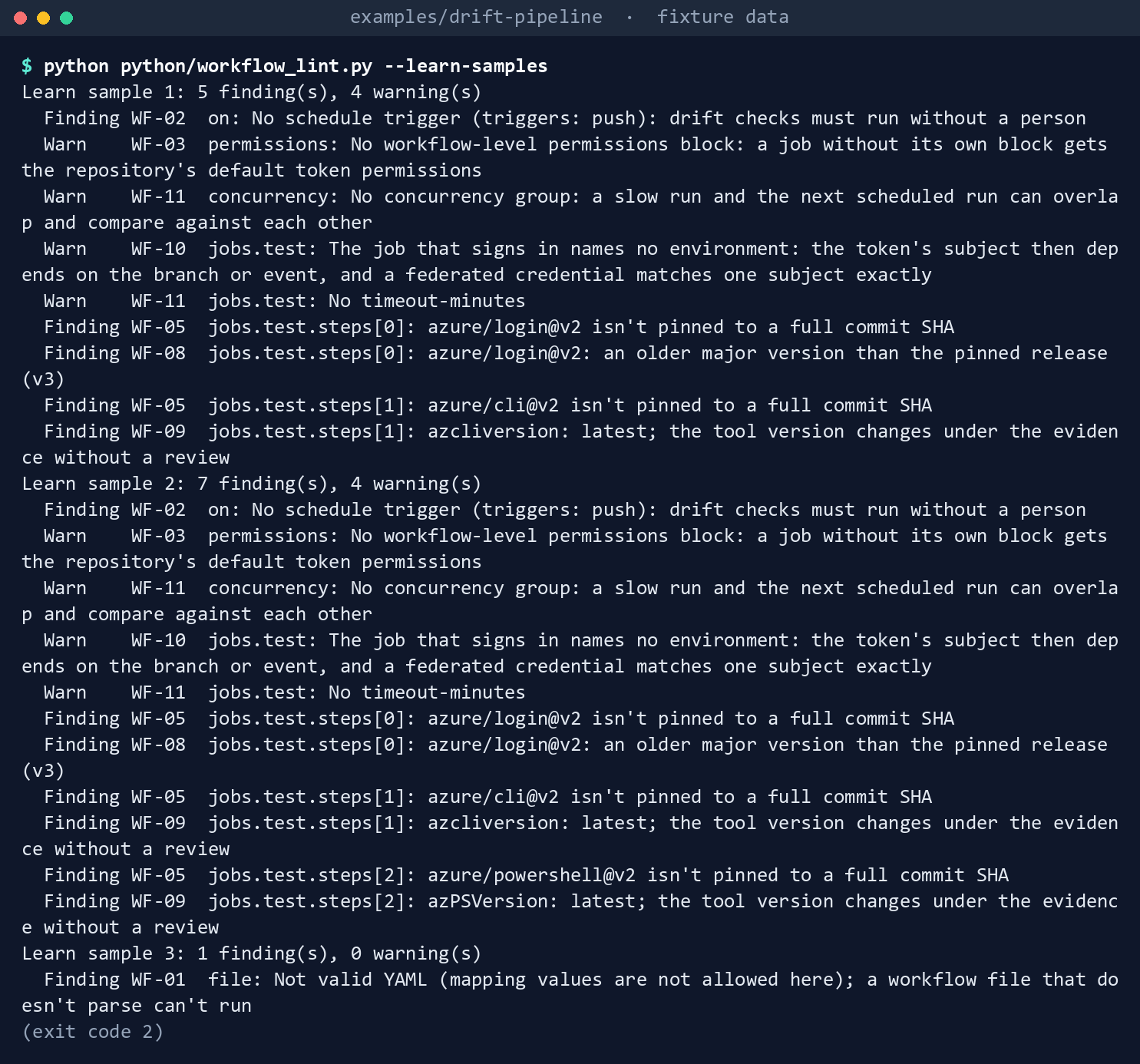
What the terminal shows, run on the kit’s fixtures (the same output as text) Exit
2. Sample 1 has five findings (WF-02, WF-05 twice, WF-08, WF-09) and four warnings; sample 2 has seven findings, including three unpinned actions and twolatestversions; sample 3 has one:WF-01 Not valid YAML (mapping values are not allowed here).Check the sample workflow:
python python/workflow_lint.py workflow/drift-pipeline.yml
What the terminal shows, run on the kit’s fixtures (the same output as text) Exit
0:0 finding(s), 0 warning(s).Print a cloud’s hosts, then ask for a name the pipeline doesn’t know:
python python/drift_pipeline.py cloud --name dod
python python/drift_pipeline.py cloud --name usgov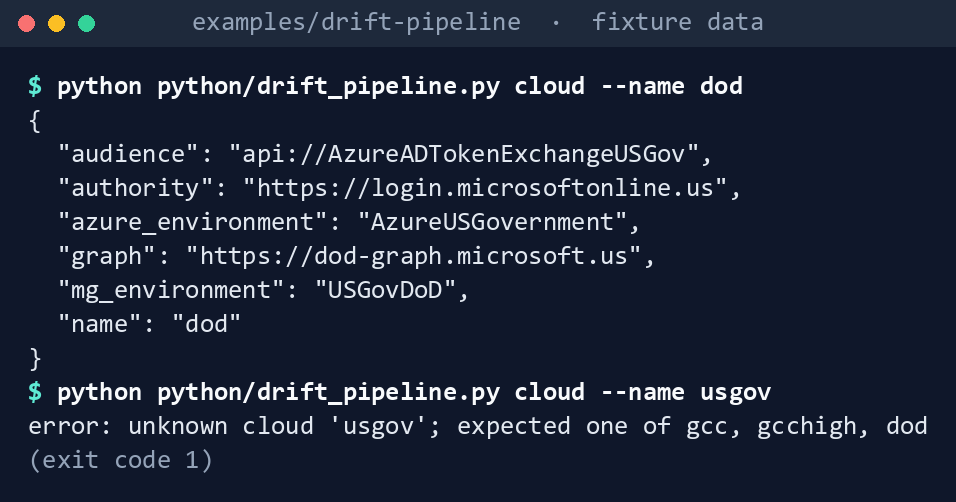
What the terminal shows, run on the kit’s fixtures (the same output as text) The authority is
https://login.microsoftonline.us, the Graph hosthttps://dod-graph.microsoft.us, the Azure environmentAzureUSGovernment. With--name usgov: exit1, unknown cloud.Record a baseline and package it:
PREV=tests/fixtures/runs/previous/2026-10-28-0617-fixture-runner-fixture
CURR=tests/fixtures/runs/current/2026-10-29-0617-fixture-runner-fixture
P="--provenance hcm-entra=tests/fixtures/provenance/hcm-entra/provenance.json --provenance machine-configuration=tests/fixtures/provenance/machine-configuration/provenance.json --provenance dynamic-rules=tests/fixtures/provenance/dynamic-rules/check-results.json"
python python/drift_pipeline.py compare --current $PREV --out out/day1
python python/drift_pipeline.py package --kit-run $PREV --diff out/day1/drift-report.json $P --out out/evidence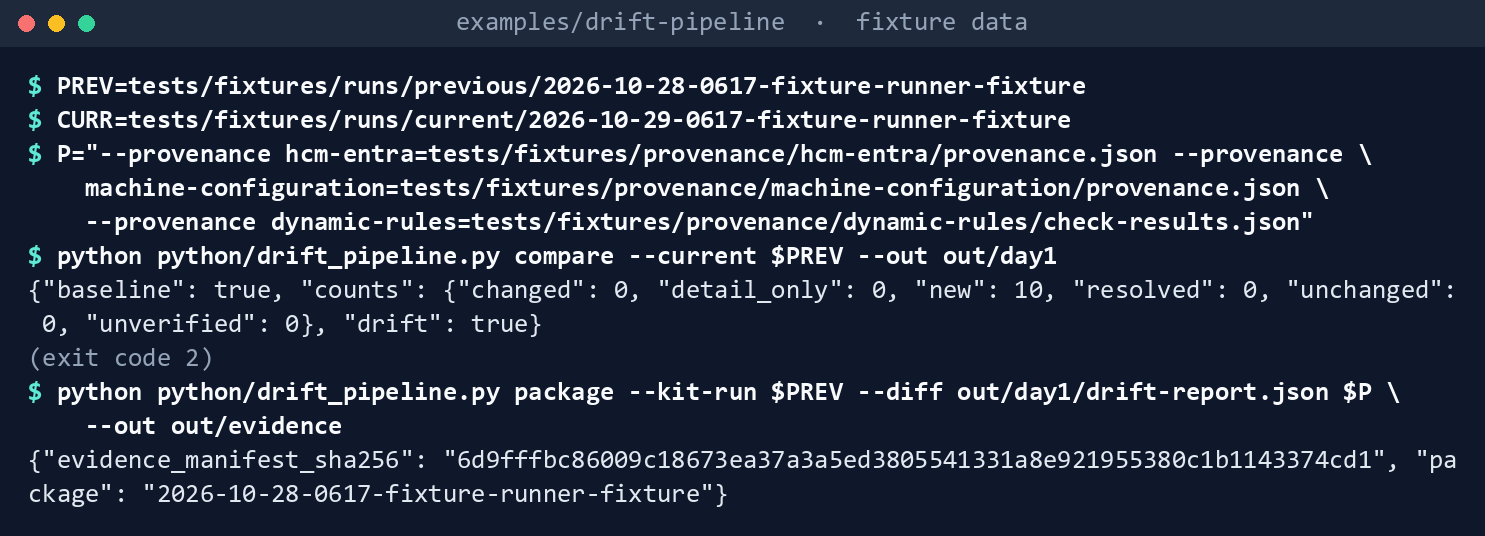
What the terminal shows, run on the kit’s fixtures (the same output as text) The compare exits
2with"baseline": trueand ten new findings. The package’sevidence_manifest_sha256is6d9fffbc….Compare the next day:
python python/drift_pipeline.py compare --previous $PREV --current $CURR --out out/day2
cat out/day2/drift-summary.md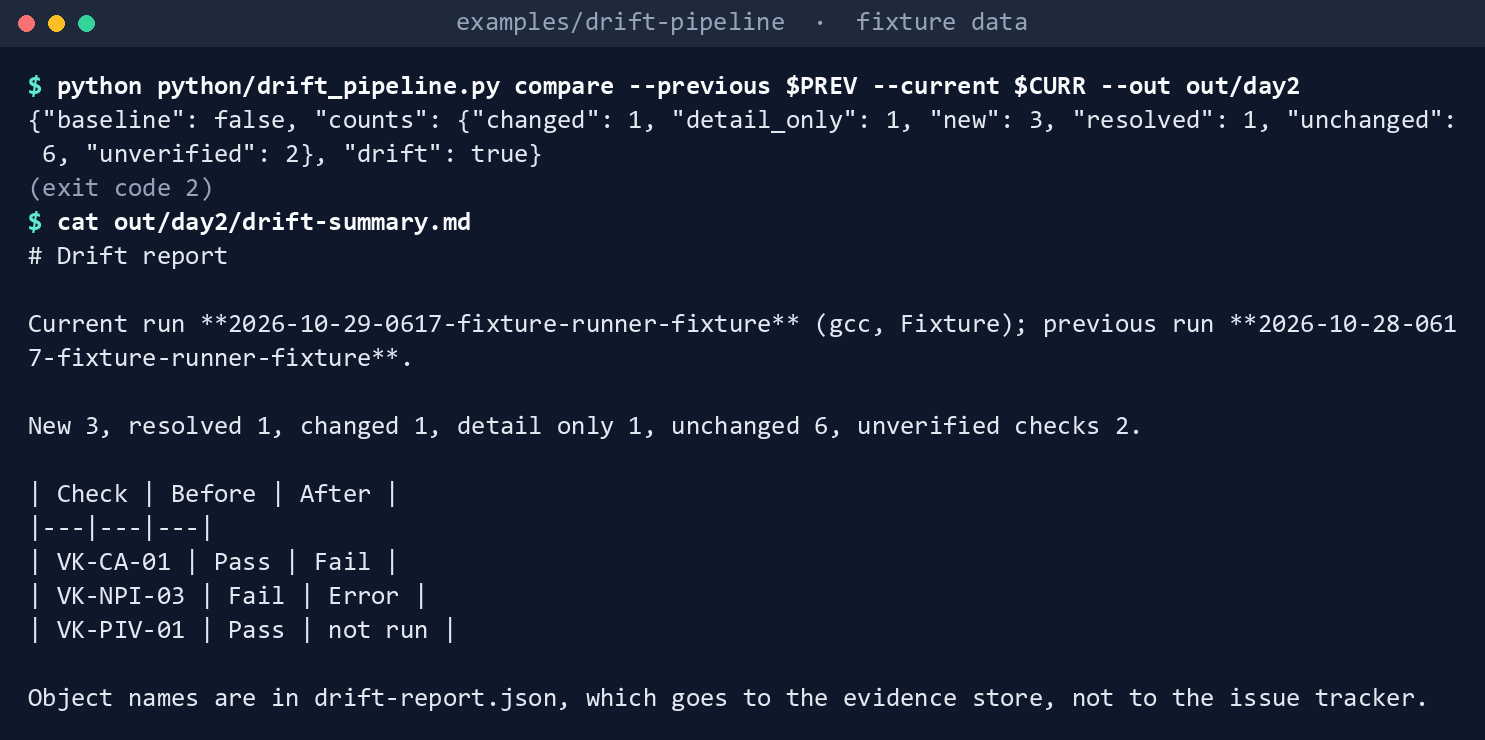
What the terminal shows, run on the kit’s fixtures (the same output as text) Exit
2: new 3, resolved 1, changed 1, detail only 1, unchanged 6, unverified checks 2. The table shows VK-CA-01PasstoFail, VK-NPI-03FailtoError, and VK-PIV-01Passtonot run. VK-NPI-03’s finding is unverified, not resolved: its read failed with a 403.Draft the findings:
python python/drift_pipeline.py issues --diff out/day2/drift-report.json --out out/day2/issues.json
What the terminal shows, run on the kit’s fixtures (the same output as text) {"close": 2, "comment": 0, "open": 6}: three new findings, one changed (VK-ARC-02, whose issue text moved from the agent version to “Status Disconnected”), two unverified checks, and two closes, one forfrank(resolved) and one for the superseded VK-ARC-02 row. Searchissues.jsonforgina@contoso.example, then for her object ID:grep -c "gina@contoso.example" out/day2/issues.json grep -c "00000000-0000-4000-8000-000000000011" out/day2/issues.json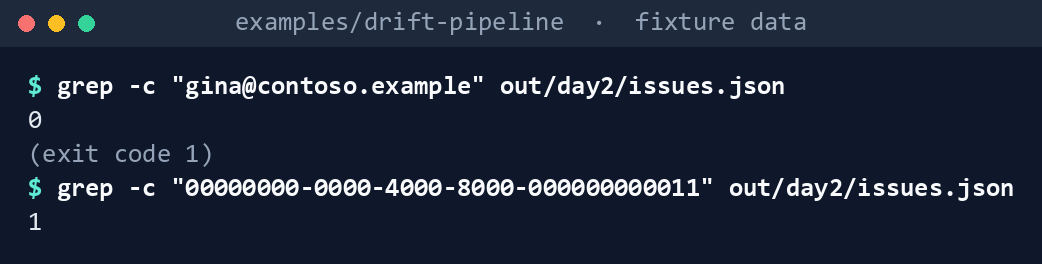
What the terminal shows, run on the kit’s fixtures (the same output as text) Her address isn’t there. Her object ID is.
Package and verify the second run, chained to the first:
python python/drift_pipeline.py package --kit-run $CURR --diff out/day2/drift-report.json $P \
  --previous-manifest out/evidence/2026-10-28-0617-fixture-runner-fixture/EVIDENCE-MANIFEST.json --out out/evidence
python python/drift_pipeline.py verify out/evidence/2026-10-29-0617-fixture-runner-fixture
(cd out/evidence/2026-10-29-0617-fixture-runner-fixture && sha256sum -c --quiet SHA256SUMS)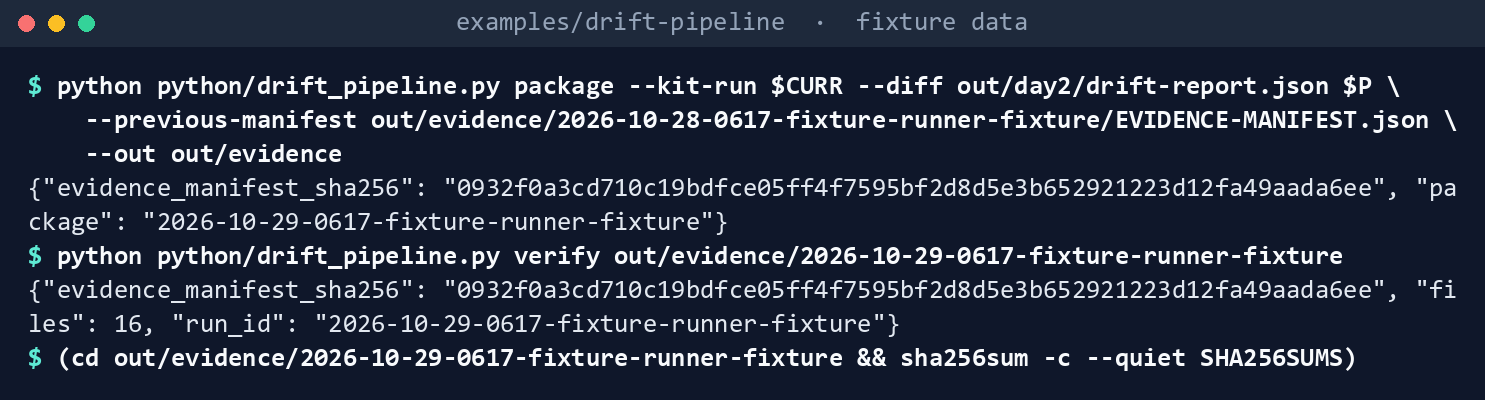
What the terminal shows, run on the kit’s fixtures (the same output as text) The manifest hash is
0932f0a3…,verifyreports 16 files, andsha256sumexits0. Read two fields ofEVIDENCE-MANIFEST.json:python -c "import json; m = json.load(open('out/evidence/2026-10-29-0617-fixture-runner-fixture/EVIDENCE-MANIFEST.json')); print(m['previous']['evidence_manifest_sha256']); print(m['tenant_id'])"
What the terminal shows, run on the kit’s fixtures (the same output as text) previous.evidence_manifest_sha256is the day 1 hash,6d9fffbc…, andtenant_idis the fixture tenant’s placeholder,11111111-1111-4111-8111-111111111111.Break it on purpose. Append a line to
out/evidence/2026-10-29-0617-fixture-runner-fixture/drift/drift-summary.mdand runverifyagain:echo "edited after packaging" >> out/evidence/2026-10-29-0617-fixture-runner-fixture/drift/drift-summary.md python python/drift_pipeline.py verify out/evidence/2026-10-29-0617-fixture-runner-fixture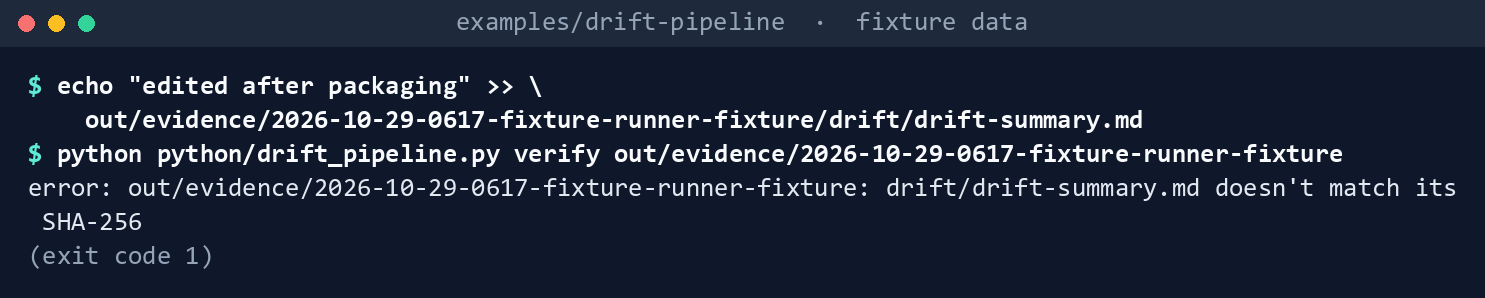
What the terminal shows, run on the kit’s fixtures (the same output as text) Exit
1,drift/drift-summary.md doesn't match its SHA-256. Then swap the runs:python python/drift_pipeline.py compare --previous $CURR --current $PREV --out out/swapped
What the terminal shows, run on the kit’s fixtures (the same output as text) It exits
1: the current run isn’t later than the previous one.Run the tests:
python -m pytest tests -q
What the terminal shows, run on the kit’s fixtures (the same output as text) Write the OSCAL documents. Step 8 edited the day 2 package on purpose, so package day 2 again into a clean folder, chained to day 1, then export Assessment Results and a POA&M and validate them against the pinned OSCAL 1.2.3 schemas (this needs
pip install jsonschema regex):
python python/drift_pipeline.py package --kit-run $CURR --diff out/day2/drift-report.json $P       --previous-manifest out/evidence/2026-10-28-0617-fixture-runner-fixture/EVIDENCE-MANIFEST.json --out out/clean
python python/oscal_export.py export --package out/clean/2026-10-29-0617-fixture-runner-fixture --acceptances oscal/tests/fixtures/acceptances.json --out out/oscal
python python/oscal_export.py validate out/oscal/assessment-results.json out/oscal/poam.json
python -m pytest oscal/tests -q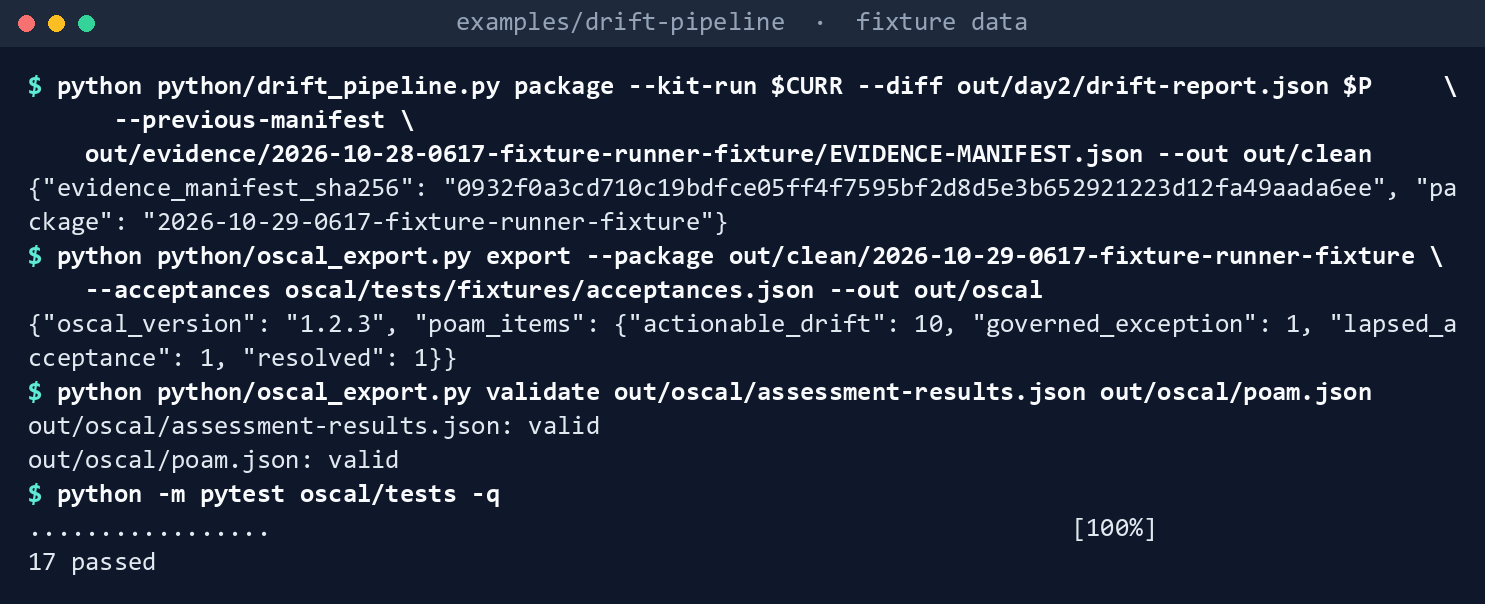
The export prints {"actionable_drift": 10, "governed_exception": 1, "lapsed_acceptance": 1, "resolved": 1} as POA&M items, and validate prints valid twice. The governed exception has risk status deviation-approved; the lapsed acceptance is back to open.
Expected result: 142 tests passing, and each row of the gap table seen with your own eyes.
Lab 2: test tenant and test subscription
Use a test tenant and a test subscription, never production, and a private test repository, contoso-example/estate-checks, holding the validation kit and this example. You’ll replace: <app-object-id> (the app registration’s object ID).
Every command in this lab, in order. Each step below says what it does and what to look for.
# Step 1: Register the app and trust the repository
cat > credential.json <<'EOF'
{
  "name": "drift-gcc",
  "issuer": "https://token.actions.githubusercontent.com",
  "subject": "repo:contoso-example/estate-checks:environment:drift-gcc",
  "audiences": ["api://AzureADTokenExchange"]
}
EOF
az ad app federated-credential create --id <app-object-id> --parameters credential.json

# Step 4: Set up the repository
mkdir -p .github/workflows
cp examples/drift-pipeline/workflow/drift-pipeline.yml .github/workflows/drift.yml
python examples/drift-pipeline/python/workflow_lint.py .github/workflows/drift.yml

# Step 6: Make a change and run again
sha256sum -c SHA256SUMS

# Step 8: Back it out
az ad app federated-credential delete --id <app-object-id> --federated-credential-id drift-gcc
Register the app and trust the repository. Register an app in the test tenant. With Application Administrator, Cloud Application Administrator or ownership of the app,27 add a federated credential with Learn’s command, where
credential.jsonhas the issuerhttps://token.actions.githubusercontent.com, the subjectrepo:contoso-example/estate-checks:environment:drift-gccand the audienceapi://AzureADTokenExchange:28cat > credential.json <<'EOF' { "name": "drift-gcc", "issuer": "https://token.actions.githubusercontent.com", "subject": "repo:contoso-example/estate-checks:environment:drift-gcc", "audiences": ["api://AzureADTokenExchange"] } EOF az ad app federated-credential create --id <app-object-id> --parameters credential.jsonIn GCC High or DoD, the audience is
api://AzureADTokenExchangeUSGov.29 Learn warns that a wrong subject is accepted without error and only fails at sign-in, and that a new credential can take a few minutes to propagate (AADSTS70021).30Grant only the reads. Grant the app the Graph application permissions the app-capable checks need, with admin consent;
Get-VkRequiredScopeprints them (Chapter 03). Assign Reader on the test subscription for the Arc checks.Make the evidence container. In the test subscription, create a storage account and a container,
drift-evidence, and assign Storage Blob Data Contributor on the container to the app; the upload uses--auth-mode login.31 Add a time-based retention policy to the container and leave it unlocked. Learn says an unlocked policy is for testing and can be deleted; a locked one can’t be deleted or shortened, and blocks deleting the account while any blob is retained.3233Set up the repository. Create the
drift-gccenvironment, limited to the default branch. Add the secretsAZURE_CLIENT_ID,AZURE_TENANT_IDandAZURE_SUBSCRIPTION_ID, the variablesEVIDENCE_STORAGE_ACCOUNT,AZ_PS_VERSIONandGRAPH_PS_VERSION(exact versions), and the labelsdrift,new,changed,unverifiedandbaseline. Copy the workflow to.github/workflows/drift.ymlin the test repository, and runworkflow_lint.pyon the copy. From the test repository’s root, where this example sits atexamples/drift-pipeline:mkdir -p .github/workflows cp examples/drift-pipeline/workflow/drift-pipeline.yml .github/workflows/drift.yml python examples/drift-pipeline/python/workflow_lint.py .github/workflows/drift.ymlRun it by hand. Start it from the Actions tab (
workflow_dispatch). The first run is the baseline: one package in the container, one issue. Confirm that the Graph sign-in works with the SecureString token on the pinned Graph PowerShell version: Learn’s pages disagree on that parameter’s type (see the verified facts).Make a change and run again. Create an enabled test member with no
employeeId(VK-HR-01 reports it), then run the workflow. Expect one new finding and one issue, and a second package whosepreviouspoints at the first. Download it and, in the package’s folder, run:sha256sum -c SHA256SUMSLet the schedule run. GitHub runs a scheduled workflow on the latest commit of the default branch, may delay it under load, and, in a public repository, disables it after 60 days with no activity.34 Check the next day that a package arrived; a missing day is a break in the chain.
Back it out. Delete the federated credential:35
az ad app federated-credential delete --id <app-object-id> --federated-credential-id drift-gccThen delete the app registration and its role assignments. Delete the unlocked retention policy, then the container. Close the test issues, and delete the test repository or its workflow and environment.
In production, lock the retention policy once Lab 2 passes. Learn recommends locking it within a reasonable time, typically less than 24 hours, and says an unlocked policy is only for short-term testing.36
Verified facts
| Item | Value | Source |
|---|---|---|
| Sign-in from GitHub Actions | azure/login with client-id, tenant-id, subscription-id from secrets; the job needs id-token: write |
37 |
| Azure Login audience | Default api://AzureADTokenExchange for public clouds; set it for others; US Government sample uses api://AzureADTokenExchangeUSGov with environment: AzureUSGovernment |
38 39 |
| Audiences per cloud | Global api://AzureADTokenExchange; US Government api://AzureADTokenExchangeUSGov; China api://AzureADTokenExchangeChina |
40 |
| Federated credential for GitHub | Issuer https://token.actions.githubusercontent.com; subject repo:<org>/<repo>:environment:<name> for a job with an environment; one audience; no wildcards |
41 42 |
| Who can add one | The app’s owner, Application Administrator, Cloud Application Administrator, Global Administrator or Hybrid Identity Administrator | 43 |
| Limits | 20 federated credentials per app or user-assigned managed identity; issuer and subject unique per app; propagation can take minutes (AADSTS70021) |
44 |
| Graph hosts | GCC: graph.microsoft.com; GCC High: graph.microsoft.us; DoD: dod-graph.microsoft.us; US Government sign-in login.microsoftonline.us; tokens not interchangeable |
45 |
| Graph PowerShell environments | Global, USGov, USGovDoD; -AccessToken typed SecureString |
46 |
| Graph token from the Azure sign-in | Get-AzAccessToken -AsSecureString -ResourceUrl <graph host>; the URL must match the current Azure environment |
47 |
| Azure Pipelines alternative | Automatic workload identity app registration not for Azure US Government | 48 |
| Immutable evidence | Time-based retention, 1 to 146,000 days; locked policy can’t be deleted or shortened; container policy extended at most five times; unlocked is for testing | 49 50 |
| Writing evidence | Storage Blob Data Contributor; az storage blob data commands with --auth-mode login |
51 |
| Schedule | Default branch, latest commit; every 5 minutes at most; can be delayed under load; UTC by default; disabled after 60 days without activity in a public repository | 52 |
| Artifact retention | retention-days can’t exceed the repository, organization or enterprise limit |
53 |
| Release stage | Azure Login v3.1.0 (September 10, 2026), runs on Node 24; flexible federated identity credentials are a preview and aren’t used here | 54 55 |
Three places where sources state things differently, recorded so a later edit doesn’t loosen the code:
- Graph token type.
Connect-MgGraph’s reference page types-AccessTokenasSecureString;56 a Learn troubleshooting article says Microsoft Graph PowerShell 2.28.0 and later accept only a plain string.57 The module’s own source still declares the parameterSecureString(rechecked October 30, 2026, release v2.41.1).58 The workflow passes theSecureString, which keeps the token out of plain text, and Lab 2 step 5 confirms it on the pinned version. - Issuer with a trailing slash. Learn’s federated credential page shows the GitHub issuer both with and without a trailing slash in its examples.59 It also says the issuer must match the token’s
issclaim, which GitHub documents without the slash.60 The lab uses the form without the slash. - Pull request subject. Learn writes the pull request subject as
repo:<org>/<repo>:pull-request;61 GitHub documentspull_request.62 The pipeline doesn’t run on pull requests, so it uses neither.
Federal requirements and evidence
This chapter turns the other chapters’ outputs into continuous monitoring: a run every day, a comparison with the last, and a package the ISSO can check. Each row names the file or command that proves it. Controls are from the Moderate baseline63; indicators are from FedRAMP’s list64. Which output supports which control is the program’s reading (design guidance).
| What the output proves | Requirement it supports | KSI it aligns to | Who keeps it |
|---|---|---|---|
Learn’s sample workflows are checked as published: no schedule, tags not commits, one that doesn’t parse (Lab 1, step 1: workflow_lint.py --learn-samples) |
SA-11; SR-3 | KSI-SCR-MIT; KSI-CMT-VTD | The repository: snapshot.json and the test results |
The pipeline’s workflow pins every action, and the job that reads the tenant can’t write to the tracker (step 2: 0 finding(s)) |
SA-10; AC-6 | KSI-SCR-MIT; KSI-IAM-ELP | The workflow file in Git |
Each cloud’s sign-in, audience and Graph host come from one table, and an unknown name stops the run (step 3: cloud --name dod, exit 1) |
CM-6; IA-5 | KSI-IAM-SNU | The repository |
The first run is a baseline, packaged (step 4: out/day1/drift-report.json, EVIDENCE-MANIFEST.json) |
CA-7; CM-2 | KSI-MLA-EVC | The immutable evidence container |
The next run says what is new, resolved, changed and unverified; a failed read never resolves a finding (step 5: out/day2/drift-report.json, drift-summary.md) |
CA-7; SI-4 (System Monitoring) | KSI-MLA-EVC; KSI-MLA-RVL | The evidence package |
Each finding is opened or closed by fingerprint, with object IDs and no names (step 6: out/day2/issues.json) |
CA-7: response actions; AU-6: reporting to the people who act | KSI-MLA-RVL | The issue tracker |
The package hashes every file, carries the other kits’ provenance, and chains to the day before (step 7: EVIDENCE-MANIFEST.json, SHA256SUMS, provenance/; verify, sha256sum -c) |
AU-9 (Protection of Audit Information); SI-7; CM-3 for the provenance of Chapters 01, 04 and 07 | KSI-SVC-VRI; KSI-CMT-LMC | The immutable evidence container |
An edit after packaging and runs out of order are refused (step 8: exit 1 twice) |
SI-7; AU-9 | KSI-SVC-VRI | The test results |
| The comparator, packager and linter pass (step 9: 142 tests) | SA-11 | KSI-CMT-VTD | The repository’s test results |
The package becomes OSCAL 1.2.3 Assessment Results and a POA&M, with dispositions and risk status, valid against NIST’s schema (step 10: out/oscal/assessment-results.json, poam.json). RMF tasks A-4, A-6 and M-4 |
CA-2; CA-5; CA-7 | KSI-MLA-EVC; KSI-MLA-RVL | The evidence container |
The pipeline signs in with a federated credential; no secret is stored (Lab 2, step 1: credential.json, az ad app federated-credential create) |
IA-5 | KSI-IAM-SNU | The app registration; the Entra audit log |
| The pipeline identity reads the tenant and writes only to the evidence container (Lab 2, steps 2 and 3: Graph read permissions, Reader, and Storage Blob Data Contributor on the container) | AC-6 | KSI-IAM-ELP | The app registration and role assignments |
Evidence can be created and read, but not changed or deleted, until retention ends (Lab 2, step 3: the drift-evidence container’s time-based retention, locked in production) |
AU-9; AU-11 (Audit Record Retention) | KSI-MLA-OSM for AU-9 (Book 13, Appendix A); AU-11 has no indicator pairing in this repository’s verified mappings | The storage account |
| The workflow copied into the repository passes the linter before it runs (Lab 2, step 4) | CM-3(2) | KSI-CMT-VTD | The test repository’s history |
| A run by hand writes the baseline package and one issue (Lab 2, step 5) | CA-7 | KSI-MLA-EVC | The evidence container; the tracker |
A real change becomes one new finding, in a package chained to the first that sha256sum -c verifies (Lab 2, step 6) |
CA-7; SI-4; SI-7 | KSI-MLA-EVC; KSI-SVC-VRI | The evidence container |
| A package arrives every day, and a missing day breaks the chain (Lab 2, step 7) | CA-7: monitoring at a defined frequency | KSI-MLA-EVC | The evidence container |
| The federated credential and the app are removed (Lab 2, step 8) | AC-2 | KSI-IAM-SNU | The Entra audit log |
| GitHub Actions, Azure Storage and Microsoft Graph run on cloud services with FedRAMP Marketplace listings65 | SA-9 (External System Services); the agency confirms each service it uses is inside the listing’s scope (design guidance) | None: the provider reports against the indicators for its own offering | The system security plan’s list of external services |
Key Security Indicators are FedRAMP 20x indicators for cloud service providers. The agency authorizes its own system: it lines this evidence up with what Microsoft, GitHub and the other providers whose services the system uses report against the indicators, and doesn’t report KSIs itself (Book 00, Appendix B). The control-by-control mapping is in Book 13’s Appendix A and Book 14’s Appendix A; the indicator pairings follow Book 04, Chapter 10 and Book 05, Chapter 10.
Dangers
| Danger | What happens | The guard |
|---|---|---|
| A failed read reported as a fix | A 403 makes yesterday’s findings disappear, and their issues close | Error, NotApplicable and “not run” leave findings unverified; only a check that read the tenant resolves them |
| A run edited after the kit wrote it | The comparison, and the evidence, describe a run that never happened | load_run() checks every file against the kit’s own manifest; verify() checks the package |
| Comparing a fixture run with a live one, or two clouds | Every finding looks new or resolved | compare() refuses a different mode or cloud, or runs out of order |
| Comparing two tenants in one cloud | A test tenant’s run is diffed against production’s, and every finding opens or closes | The kit records TenantId; compare() refuses different or missing tenant IDs unless --allow-tenant-mismatch, which the report notes |
| A threshold changed between runs | Findings move with no change in the tenant | Changed options are noted in the report |
| A secret in the pipeline | It leaks, or expires and the checks stop | A federated credential; WF-06 fails creds; no secret is stored |
| A moved action tag | Code you didn’t review signs in to your tenant | Actions pinned to commits (WF-05); source watch on Azure Login |
| The wrong Graph host in DoD | The run signs in to Azure Government and calls the GCC High Graph host | Cloud table; WF-12 checks the workflow’s host against its cloud |
| A subject that doesn’t match | Sign-in fails, and Learn says the credential was created without error | An environment-scoped subject; Lab 2 step 5 run by hand first |
| The token that reads the tenant can write elsewhere | A compromised step edits issues, or more | Two jobs; WF-04 fails a job with id-token: write and another write grant |
| Names in the tracker | User principal names reach everyone with read access to the repository | Object IDs only, unless --include-names |
| Evidence changed or deleted later | The ISSO can’t rely on it | --overwrite never used; a locked retention policy in production; the hash chain |
| A day without a run | A schedule delayed, dropped or disabled leaves a gap nobody notices | The chain records the previous run; check the newest package’s date |
| Stale provenance | A package cites a build or HR run from months ago | Provenance older than 30 days is noted in the manifest |
| A locked policy in a test account | The test account can’t be deleted until retention ends | Lab 2 leaves the policy unlocked |
Checklist
Microsoft Learn, “Use the Azure Login action with OpenID Connect,” https://learn.microsoft.com/azure/developer/github/connect-from-azure-openid-connect (accessed Oct 30, 2026).↩︎
Microsoft, Azure/login,
action.ymlat release v3.1.0, commita641126d1b8aa4d1fa005f4f92df94a3a4c4c906(September 10, 2026), MIT License, https://github.com/Azure/login/blob/a641126d1b8aa4d1fa005f4f92df94a3a4c4c906/action.yml, and its releases page, https://github.com/Azure/login/releases (accessed Oct 30, 2026); pinned copy inexamples/third_party/azure-login-action. Learn has no page for the action’s inputs beyond the sample.↩︎Microsoft Learn, “Connect to Azure with an Azure Resource Manager service connection,” https://learn.microsoft.com/azure/devops/pipelines/library/connect-to-azure?view=azure-devops (accessed Oct 30, 2026).↩︎
Microsoft Learn, “Use the Azure Login action with OpenID Connect,” https://learn.microsoft.com/azure/developer/github/connect-from-azure-openid-connect (accessed Oct 30, 2026).↩︎
Microsoft Learn, “Use the Azure Login action with OpenID Connect,” https://learn.microsoft.com/azure/developer/github/connect-from-azure-openid-connect (accessed Oct 30, 2026).↩︎
Microsoft Learn, “Use the Azure Login action with OpenID Connect,” https://learn.microsoft.com/azure/developer/github/connect-from-azure-openid-connect (accessed Oct 30, 2026).↩︎
Microsoft Learn, “Configure an app to trust an external identity provider,” https://learn.microsoft.com/entra/workload-id/workload-identity-federation-create-trust (accessed Oct 30, 2026).↩︎
Microsoft, MicrosoftDocs/azure-dev-docs,
articles/github/connect-from-azure-openid-connect.mdat commit23900ce00d955ff876f1a2df6a00d52f1a2f3df3(October 28, 2026), code under the MIT License, https://github.com/MicrosoftDocs/azure-dev-docs/blob/23900ce00d955ff876f1a2df6a00d52f1a2f3df3/articles/github/connect-from-azure-openid-connect.md (accessed Oct 30, 2026); pinned copy inexamples/third_party/azure-login-oidc-sample.↩︎Microsoft, Azure/login,
action.ymlat release v3.1.0, commita641126d1b8aa4d1fa005f4f92df94a3a4c4c906(September 10, 2026), MIT License, https://github.com/Azure/login/blob/a641126d1b8aa4d1fa005f4f92df94a3a4c4c906/action.yml, and its releases page, https://github.com/Azure/login/releases (accessed Oct 30, 2026); pinned copy inexamples/third_party/azure-login-action. Learn has no page for the action’s inputs beyond the sample.↩︎Microsoft, Azure/login,
action.ymlat release v3.1.0, commita641126d1b8aa4d1fa005f4f92df94a3a4c4c906(September 10, 2026), MIT License, https://github.com/Azure/login/blob/a641126d1b8aa4d1fa005f4f92df94a3a4c4c906/action.yml, and its releases page, https://github.com/Azure/login/releases (accessed Oct 30, 2026); pinned copy inexamples/third_party/azure-login-action. Learn has no page for the action’s inputs beyond the sample.↩︎GitHub Docs, “Secure use reference,” https://docs.github.com/en/actions/reference/security/secure-use (accessed Oct 30, 2026).↩︎
GitHub Docs, “OpenID Connect reference,” https://docs.github.com/en/actions/reference/security/oidc (accessed Oct 30, 2026). Learn’s Azure Login page points here for the token’s claims.↩︎
Microsoft Learn, “Configure an app to trust an external identity provider,” https://learn.microsoft.com/entra/workload-id/workload-identity-federation-create-trust (accessed Oct 30, 2026).↩︎
Microsoft Learn, “Microsoft Graph national cloud deployments,” https://learn.microsoft.com/graph/deployments (accessed Oct 30, 2026).↩︎
Microsoft Learn, “Get-AzAccessToken,” https://learn.microsoft.com/powershell/module/az.accounts/get-azaccesstoken (accessed Oct 30, 2026).↩︎
Microsoft Learn, “Connect-MgGraph,” https://learn.microsoft.com/powershell/module/microsoft.graph.authentication/connect-mggraph?view=graph-powershell-1.0 (accessed Oct 30, 2026).↩︎
Microsoft Learn, “Microsoft Graph national cloud deployments,” https://learn.microsoft.com/graph/deployments (accessed Oct 30, 2026).↩︎
Microsoft Learn, “Configure an application to trust a managed identity,” https://learn.microsoft.com/entra/workload-id/workload-identity-federation-config-app-trust-managed-identity (accessed Oct 30, 2026).↩︎
Microsoft Learn, “Connect-MgGraph,” https://learn.microsoft.com/powershell/module/microsoft.graph.authentication/connect-mggraph?view=graph-powershell-1.0 (accessed Oct 30, 2026).↩︎
Microsoft Learn, “Microsoft Graph national cloud deployments,” https://learn.microsoft.com/graph/deployments (accessed Oct 30, 2026).↩︎
Microsoft Learn, “Access token claims reference,”
tidin “Payload claims,” https://learn.microsoft.com/entra/identity-platform/access-token-claims-reference#payload-claims (accessed Oct 30, 2026).↩︎Microsoft, microsoftgraph/msgraph-sdk-powershell,
src/Authentication/Authentication.Core/Utilities/JwtHelpers.cs(authContext.TenantId = jwtPayload?.Tid ?? …, applied to a token passed with-AccessTokenas well), last changed in commit0fceedbba17c1dec4d9bb292910a5f286cd7454e(October 30, 2023), read withgh api(accessed Oct 30, 2026). Not a Learn page: Learn’sGet-MgContextpage listsTenantIDamong the session details without saying where it comes from.↩︎Microsoft Learn, “Store business-critical blob data with immutable storage in a write once, read many (WORM) state,” https://learn.microsoft.com/azure/storage/blobs/immutable-storage-overview (accessed Oct 30, 2026).↩︎
Microsoft Learn, “Azure Key Vault REST API reference,” key operations Sign and Verify, https://learn.microsoft.com/rest/api/keyvault/; “az keyvault key sign,” https://learn.microsoft.com/cli/azure/keyvault/key; CryptographyClient sign (
keys/signpermission), https://learn.microsoft.com/java/api/com.azure.security.keyvault.keys.cryptography.cryptographyclient (accessed Oct 30, 2026).↩︎Microsoft Learn, “Set up signing integrations to use Artifact Signing,” https://learn.microsoft.com/azure/artifact-signing/how-to-signing-integrations; “Overview of signing and verifying OCI artifacts,” https://learn.microsoft.com/azure/container-registry/overview-sign-verify-artifacts (accessed Oct 30, 2026).↩︎
Microsoft Learn, “Artifact Signing FAQ,” https://learn.microsoft.com/azure/artifact-signing/faq (accessed Oct 30, 2026).↩︎
Microsoft Learn, “Configure an app to trust an external identity provider,” https://learn.microsoft.com/entra/workload-id/workload-identity-federation-create-trust (accessed Oct 30, 2026).↩︎
Microsoft Learn, “Configure an app to trust an external identity provider,” https://learn.microsoft.com/entra/workload-id/workload-identity-federation-create-trust (accessed Oct 30, 2026).↩︎
Microsoft Learn, “Configure an application to trust a managed identity,” https://learn.microsoft.com/entra/workload-id/workload-identity-federation-config-app-trust-managed-identity (accessed Oct 30, 2026).↩︎
Microsoft Learn, “Important considerations and restrictions for federated identity credentials,” https://learn.microsoft.com/entra/workload-id/workload-identity-federation-considerations (accessed Oct 30, 2026).↩︎
Microsoft Learn, “Quickstart: Create, download, and list blobs with Azure CLI,” https://learn.microsoft.com/azure/storage/blobs/storage-quickstart-blobs-cli (accessed Oct 30, 2026).↩︎
Microsoft Learn, “Store business-critical blob data with immutable storage in a write once, read many (WORM) state,” https://learn.microsoft.com/azure/storage/blobs/immutable-storage-overview (accessed Oct 30, 2026).↩︎
Microsoft Learn, “Configure immutability policies for containers,” https://learn.microsoft.com/azure/storage/blobs/immutable-policy-configure-container-scope (accessed Oct 30, 2026).↩︎
GitHub Docs, “Events that trigger workflows” (
schedule,workflow_dispatch), https://docs.github.com/en/actions/reference/workflows-and-actions/events-that-trigger-workflows (accessed Oct 30, 2026). Learn doesn’t cover GitHub’s scheduler.↩︎Microsoft Learn, “Configure an app to trust an external identity provider,” https://learn.microsoft.com/entra/workload-id/workload-identity-federation-create-trust (accessed Oct 30, 2026).↩︎
Microsoft Learn, “Store business-critical blob data with immutable storage in a write once, read many (WORM) state,” https://learn.microsoft.com/azure/storage/blobs/immutable-storage-overview (accessed Oct 30, 2026).↩︎
Microsoft Learn, “Use the Azure Login action with OpenID Connect,” https://learn.microsoft.com/azure/developer/github/connect-from-azure-openid-connect (accessed Oct 30, 2026).↩︎
Microsoft Learn, “Use the Azure Login action with OpenID Connect,” https://learn.microsoft.com/azure/developer/github/connect-from-azure-openid-connect (accessed Oct 30, 2026).↩︎
Microsoft, Azure/login,
action.ymlat release v3.1.0, commita641126d1b8aa4d1fa005f4f92df94a3a4c4c906(September 10, 2026), MIT License, https://github.com/Azure/login/blob/a641126d1b8aa4d1fa005f4f92df94a3a4c4c906/action.yml, and its releases page, https://github.com/Azure/login/releases (accessed Oct 30, 2026); pinned copy inexamples/third_party/azure-login-action. Learn has no page for the action’s inputs beyond the sample.↩︎Microsoft Learn, “Configure an application to trust a managed identity,” https://learn.microsoft.com/entra/workload-id/workload-identity-federation-config-app-trust-managed-identity (accessed Oct 30, 2026).↩︎
Microsoft Learn, “Configure an app to trust an external identity provider,” https://learn.microsoft.com/entra/workload-id/workload-identity-federation-create-trust (accessed Oct 30, 2026).↩︎
GitHub Docs, “OpenID Connect reference,” https://docs.github.com/en/actions/reference/security/oidc (accessed Oct 30, 2026). Learn’s Azure Login page points here for the token’s claims.↩︎
Microsoft Learn, “Configure an app to trust an external identity provider,” https://learn.microsoft.com/entra/workload-id/workload-identity-federation-create-trust (accessed Oct 30, 2026).↩︎
Microsoft Learn, “Important considerations and restrictions for federated identity credentials,” https://learn.microsoft.com/entra/workload-id/workload-identity-federation-considerations (accessed Oct 30, 2026).↩︎
Microsoft Learn, “Microsoft Graph national cloud deployments,” https://learn.microsoft.com/graph/deployments (accessed Oct 30, 2026).↩︎
Microsoft Learn, “Connect-MgGraph,” https://learn.microsoft.com/powershell/module/microsoft.graph.authentication/connect-mggraph?view=graph-powershell-1.0 (accessed Oct 30, 2026).↩︎
Microsoft Learn, “Get-AzAccessToken,” https://learn.microsoft.com/powershell/module/az.accounts/get-azaccesstoken (accessed Oct 30, 2026).↩︎
Microsoft Learn, “Connect to Azure with an Azure Resource Manager service connection,” https://learn.microsoft.com/azure/devops/pipelines/library/connect-to-azure?view=azure-devops (accessed Oct 30, 2026).↩︎
Microsoft Learn, “Store business-critical blob data with immutable storage in a write once, read many (WORM) state,” https://learn.microsoft.com/azure/storage/blobs/immutable-storage-overview (accessed Oct 30, 2026).↩︎
Microsoft Learn, “Configure immutability policies for containers,” https://learn.microsoft.com/azure/storage/blobs/immutable-policy-configure-container-scope (accessed Oct 30, 2026).↩︎
Microsoft Learn, “Quickstart: Create, download, and list blobs with Azure CLI,” https://learn.microsoft.com/azure/storage/blobs/storage-quickstart-blobs-cli (accessed Oct 30, 2026).↩︎
GitHub Docs, “Events that trigger workflows” (
schedule,workflow_dispatch), https://docs.github.com/en/actions/reference/workflows-and-actions/events-that-trigger-workflows (accessed Oct 30, 2026). Learn doesn’t cover GitHub’s scheduler.↩︎GitHub Docs, “Store and share data with workflow artifacts,” https://docs.github.com/en/actions/how-tos/writing-workflows/choosing-what-your-workflow-does/storing-and-sharing-data-from-a-workflow (accessed Oct 30, 2026).↩︎
Microsoft, Azure/login,
action.ymlat release v3.1.0, commita641126d1b8aa4d1fa005f4f92df94a3a4c4c906(September 10, 2026), MIT License, https://github.com/Azure/login/blob/a641126d1b8aa4d1fa005f4f92df94a3a4c4c906/action.yml, and its releases page, https://github.com/Azure/login/releases (accessed Oct 30, 2026); pinned copy inexamples/third_party/azure-login-action. Learn has no page for the action’s inputs beyond the sample.↩︎Microsoft Learn, “Configure an app to trust an external identity provider,” https://learn.microsoft.com/entra/workload-id/workload-identity-federation-create-trust (accessed Oct 30, 2026).↩︎
Microsoft Learn, “Connect-MgGraph,” https://learn.microsoft.com/powershell/module/microsoft.graph.authentication/connect-mggraph?view=graph-powershell-1.0 (accessed Oct 30, 2026).↩︎
Microsoft Learn, “Microsoft Graph PowerShell throws error ‘IDX14102: Unable to decode the header’,” https://learn.microsoft.com/troubleshoot/entra/entra-id/users-groups-entra-apis/unable-to-decode-header-error (accessed Oct 30, 2026).↩︎
Microsoft, microsoftgraph/msgraph-sdk-powershell,
src/Authentication/Authentication/Cmdlets/ConnectMgGraph.cs(public SecureString AccessToken), last changed in commit34e2549948690924ff403975de39603c1d4043bc(July 22, 2026), read withgh api(accessed Oct 30, 2026). Not a Learn page.↩︎Microsoft Learn, “Configure an app to trust an external identity provider,” https://learn.microsoft.com/entra/workload-id/workload-identity-federation-create-trust (accessed Oct 30, 2026).↩︎
GitHub Docs, “OpenID Connect reference,” https://docs.github.com/en/actions/reference/security/oidc (accessed Oct 30, 2026). Learn’s Azure Login page points here for the token’s claims.↩︎
Microsoft Learn, “Configure an app to trust an external identity provider,” https://learn.microsoft.com/entra/workload-id/workload-identity-federation-create-trust (accessed Oct 30, 2026).↩︎
GitHub Docs, “OpenID Connect reference,” https://docs.github.com/en/actions/reference/security/oidc (accessed Oct 30, 2026). Learn’s Azure Login page points here for the token’s claims.↩︎
National Institute of Standards and Technology, SP 800-53B Moderate baseline, release 5.2.0 OSCAL profile, last modified October 22, 2026 (includes AC-2, AC-6, AU-6, AU-9, AU-11, CA-7, CM-2, CM-3, CM-3(2), CM-6, IA-5, SA-9, SA-10, SA-11, SI-4, SI-7 and SR-3), https://github.com/usnistgov/oscal-content/blob/main/nist.gov/SP800-53/rev5/json/NIST_SP-800-53_rev5_MODERATE-baseline_profile.json (accessed Nov 2, 2026).↩︎
FedRAMP, “Key Security Indicators,” FedRAMP Consolidated Rules for 2026 (indicators KSI-CMT-LMC, KSI-CMT-VTD, KSI-IAM-ELP, KSI-IAM-SNU, KSI-MLA-EVC, KSI-MLA-RVL, KSI-SCR-MIT and KSI-SVC-VRI; control mappings updated October 13, 2026), https://www.fedramp.gov/2026/reference/key-security-indicators/ (accessed Nov 2, 2026).↩︎
FedRAMP Marketplace product data, https://www.fedramp.gov/marketplace/products.json,
last_change2026-11-01T05:02:56Z (accessed Nov 2, 2026): FR1812058188, GitHub Enterprise Cloud, FedRAMP Certified, Class B, LI-SaaS; MSO365MT, Microsoft 365 Government Community Cloud & Supporting Services, FedRAMP Certified, Class C, Moderate; FR1824057433, Microsoft 365 Government Community Cloud-High, FedRAMP Certified, Class D, High; F1209051525, Azure Commercial Cloud, FedRAMP Certified, Class D, High; F1603087869, Azure Government (includes Dynamics 365), FedRAMP Certified, Class D, High.↩︎