Federal Modernization Workbook · Book 19 · How
Chapter 06 — Moving Group Policy as Code
Group Policy analytics tells you which settings Intune can take. It doesn’t tell you which ones should move, who owns them, or what is already in the tenant. Those are the pipeline’s questions.
How a Group Policy setting becomes an Intune settings catalog policy through code. You read Intune’s Group Policy analytics through Microsoft Graph (beta) into a move plan, one row per setting. You keep each policy as a reviewed JSON file in Git, with its owner and a decision record per setting. Then a sync lints the library, diffs it against the tenant, and creates only what is missing. You start from Microsoft’s own settings catalog export and import samples, which the repository keeps as a pinned copy, run them against a fake Graph, and build only for what they leave out. Lab 1 runs on a laptop with no tenant; Lab 2 uses a test tenant.
Jump to a slide (18)
Deck · Narrated deck (about 11 minutes, captions) · Script · Captions. Recorded on November 2, 2026 from the approved chapter.
Goal and audience
Goal. By the end of this chapter you can turn Group Policy analytics into a move plan, write a settings catalog policy as a library file that passes review, show what a change would create before it reaches the tenant, and create it with the least permission that works. For each rule in the code you can say whether it is Microsoft’s contract, Microsoft’s sample, or the program’s own design.
Audience. Developers and Intune engineers who build the policy library for the Intune track, and the reviewers who approve it. You should be comfortable in PowerShell 7 and know what a settings catalog policy is. You don’t need a tenant until Lab 2.
Where this sits
The operator side is already written. Book 05, Chapter 08 runs the GPO sunset in seven phases: inventory and classify, then build the library unassigned, then pilot, then cut over in waves. Its Adopt, don’t build table names Microsoft’s tools for each step, and its Graph templates show the payloads. The Intune track guide turns that into gates: Step 3.1 imports every in-scope GPO into Group Policy analytics, and Step 3.2 creates the library as code. This chapter is the code for those two steps. It doesn’t repeat them.
Two rules from those pages shape the code:
- One owning policy per setting (Intune track, Step 2.4), and one owning tool per setting, recorded as
config_ownerin the CMDB (Ansible guide). The library holds only settings Intune owns. - Build unassigned (Book 05, Phase 3). The code creates policies with no assignments. Assigning them is a later, reviewed step.
What Learn says about the tools sets the stakes:
- Group Policy analytics imports GPO XML exports (each under 4 MB), shows which settings have an MDM equivalent, and keeps its mapping up to date without a reimport. It is for Windows only. It parses only non-ADMX settings in English; other languages make the MDM support figure inaccurate.1
- Its Migrate step builds a settings catalog policy from imported GPOs. Learn calls it best effort, advises against including every setting without review, stops when two GPOs set one setting to different values, and is disabled for AppLocker and firewall rule settings, which belong in Endpoint security.2
- The same data is in Graph:
groupPolicyMigrationReports, one per imported GPO, each with itsgroupPolicySettingMappings.34 Both are beta. Learn says Microsoft supports Intune beta APIs but they change more often, and the Graph API for Intune needs an active Intune license.5 - Settings catalog policies are
deviceManagement/configurationPolicies, documented in beta only.6 Book 05 already notes this.
Start with Microsoft’s sample
What Microsoft gives you
Learn’s Intune migration guide points to Microsoft’s Intune Graph samples, microsoft/mggraph-intune-samples, for exporting and importing policies with PowerShell. It says the scripts change your tenant, come as-is, should be validated in a non-production tenant, and don’t cover every policy type.7 The older repository, microsoftgraph/powershell-intune-samples, no longer resolves on GitHub; some Learn text still names it, but the link goes to the new one.
The new repository uses the Microsoft Graph PowerShell SDK. Its SettingsCatalog folder has two scripts:
| Script | What it does |
|---|---|
SettingsCatalog_Export.ps1 |
Reads every settings catalog policy (technologies has 'mdm'), follows paging, reads each policy’s settings, and writes one JSON file per policy |
SettingsCatalog_Import_FromJSON.ps1 |
Asks for one JSON file, works out the endpoint, removes read-only properties, adds # to @odata.type where it is missing, and POSTs the policy |
There is no Microsoft sample that reads Group Policy analytics through Graph. Learn’s pages for the read are the API reference and the admin center procedure.8910
The pinned copy
The repository keeps an unmodified copy of the SettingsCatalog folder and the repository’s MIT license in examples/third_party/mggraph-intune-samples, from commit 2e66845 (September 25, 2026).11 snapshot.json records each file’s SHA-256, and a unit test checks them. The weekly source watch reports new commits to the folder. Updating the copy is a reviewed pull request, as in Chapter 01.
tests/MicrosoftSampleHarness.ps1 runs each script, unmodified, against a fake Graph. Only the commands it calls outside itself are replaced: Read-Host, Write-Host, Invoke-MgGraphRequest, and the Graph module it imports, which becomes an empty stand-in so nothing is installed.
What it leaves to you
Running the two scripts against the fake Graph shows what they do well and what they leave to you. Each row is pinned by a test in tests/MicrosoftSamples.Tests.ps1.
| Microsoft’s samples, run as published | Why it matters | What examples/group-policy-as-code adds |
|---|---|---|
Import creates the policy with one POST to /beta/deviceManagement/configurationPolicies; export follows @odata.nextLink; a policy exported from one tenant imports into another with the same settings |
— | Kept as the model: the same call, the same technologies has 'mdm' filter, the same paging |
Import drops assignments, so the policy is created unassigned |
Book 05 builds the library unassigned | Kept; GPC-04 also refuses assignments in a library file, so the review sees what is sent |
Import sends to graph.microsoft.com whatever cloud the session signed in to |
Right for GCC. In GCC High or DoD the call goes to the wrong host, and Learn says tokens for one cloud don’t work in another12 | Get-GpcCloud maps each cloud to its host and refuses a name it doesn’t know |
| Import doesn’t sign in or choose a permission; it uses the caller’s session | A session opened with broad scopes does the write | Get-GpcRequiredScope: DeviceManagementConfiguration.Read.All for the plan and the dry run, ReadWrite.All only with -Apply |
| Import asks only for the file and creates at once | No dry run, and no view of what will change | A dry run by default; -Apply to write |
| Run twice, import creates a second policy with the same name; it never reads the tenant | Two policies set the same settings, and the second one is invisible to review | The sync reads the tenant first, creates only what is missing, and refuses when two tenant policies share a library name |
Import silently strips service-set properties (id, settingCount and others) and adds # to @odata.type |
The body sent isn’t the file reviewed | GPC-03 and GPC-07 refuse the file instead, so the reviewed file is the body |
| Import records nothing beyond the screen | Nothing to hand the ISSO | sync-record.json: the cloud, the scopes, each file’s SHA-256, the result per policy and the IDs created |
| Export names each file with the time of the run | Each export is a new file, so Git can’t show a diff | Library files have fixed names, and the diff with the tenant is computed |
| Export keeps name, description, platforms, technologies and settings, and drops the scope tags | A re-imported policy lands in the Default scope tag, so the wrong administrators see it | The library carries roleScopeTagIds, and the diff compares them |
| Neither reads Group Policy analytics, and neither knows who owns a setting | Settings move without a decision, or into a policy that another policy or tool already sets | The move plan, and lint rules GPC-02, GPC-06, GPC-08 and GPC-09 |
The verdict. Use Microsoft’s import call as the model for the create, and keep the samples pinned for comparison. For a reviewed pipeline, use the example’s sync, because it can answer “what is already there?” before it writes, and the samples can’t.
The code: what examples/group-policy-as-code adds
examples/group-policy-as-code is one PowerShell module, one script, the policy library, a fixture tenant and two test files. Every Graph call goes through a script block, -Invoke: Invoke-MgGraphRequest in a tenant, a fake in the tests.
Read: the gate and the move plan
The read side has two parts.
VK-INT-07 is the gate. The validation kit’s check reads groupPolicyMigrationReports and fails on any GPO targeted in Active Directory whose migration readiness isn’t complete, and on any GPO in gpo-scope.csv that was never imported (Chapter 03 explains the kit). It works per GPO. It doesn’t read the settings.
Get-GpcMovePlan works per setting. It reads each report’s groupPolicySettingMappings and returns one row per setting: the GPO, the setting, its value, its scope (device or user; Learn also lists unknown, which the plan keeps as is), and the Intune setting definition ID.13 Then it gives each row a disposition:
| Disposition | When | What happens next |
|---|---|---|
Candidate |
mdmSupportedState is supported and there is an intuneSettingDefinitionId |
A person decides whether it moves, and records the decision |
Conflict |
Two GPOs set one definition ID to different values | The same case Learn’s Migrate step stops on.14 The decision record picks the value |
EndpointSecurity |
An AppLocker or firewall setting | Built in Endpoint security, as Learn says15 |
NoCatalogSetting |
Supported, but no settings catalog definition | Learn’s admin center shows the OMA-URI for a custom profile16 |
NotSupported, Deprecated, Unknown |
mdmSupportedState says so |
Stays with the GPO until the GPO is retired, or is dropped by decision |
The plan decides nothing. Book 05 is clear that Group Policy analytics finds the landing zone and never decides whether a setting is still needed (Phase 1). User-scope rows keep their scope, because user settings go to user groups on the HR track (Intune track, Step 2.3).
Write: one file per policy
Each settings catalog policy is a JSON file in policies/:
{
  "owner": "Workstation baseline owner (Intune track)",
  "configOwner": "Intune",
  "sourceGpos": ["FMP-Workstation-Baseline", "Workstation-Power"],
  "decisions": {
    "device_vendor_msft_policy_config_windowslogon_allowautomaticrestartsignon": "DR-0104",
    "device_vendor_msft_policy_config_power_allowhibernate": "DR-0105"
  },
  "policy": {
    "name": "FMP-SC-202-Sign-in-and-power",
    "platforms": "windows10",
    "technologies": "mdm",
    "roleScopeTagIds": ["0"],
    "settings": [ "…two choice settings…" ]
  }
}
policy is the body Graph receives, exactly as reviewed, in the shape Learn’s Create page documents.17 The rest is the record: who approves a change, which tool owns the settings, which GPOs they came from, and the ID of each setting’s decision record from Book 05, Chapter 07. The two library files use setting definition IDs that appear in Learn’s own settings catalog examples.18 Export a policy built in the admin center and compare before you rely on any other ID, as Book 05 says.
Lint
Test-GpcLibrary applies ten rules (GPC-01 to GPC-10; the README lists them). Four carry the program’s rules:
- GPC-02:
configOwnermust beIntune. A setting another tool owns stays with that tool (design guidance, from the Ansible guide’s one owning tool per setting). - GPC-06: one setting definition ID in one policy. Two policies on one setting is the conflict Book 05’s peer review looks for.
- GPC-09: every setting has a decision record.
- GPC-08, with the move plan: a setting that isn’t a
Candidateis a warning, so a setting added by hand is a choice someone made on purpose. AConflictis shown with its decision.
GPC-10 warns on a string value whose setting name suggests a secret. Learn says anyone who can read device configuration can read such values.19
Diff, then create
Get-GpcTenantPolicy reads the tenant’s settings catalog policies with the same filter Microsoft’s export uses, then reads the settings of each policy whose name is in the library.2021 Compare-GpcLibrary compares each file with the tenant’s copy. Learn’s response examples show @odata.type without its # inside settings, nulls where a value is empty, and an ID on each setting,22 so ConvertTo-GpcCanonical normalizes both sides before comparing. Each policy gets one action:
| Action | Meaning | Exit |
|---|---|---|
Create |
Not in the tenant | 0 |
NoChange |
Same settings, description, platform, technology and scope tags | 0 |
Drift |
Differs; the row names each setting added, removed or changed | 2 |
Duplicate |
Two tenant policies have the library’s name | 2 |
Invoke-GpcSync.ps1 runs it all. Without -Apply it is a dry run: it signs in with Read.All and sends only GET. With -Apply it signs in with ReadWrite.All and POSTs each Create, reads it back, and compares again. It writes nothing if the lint has a finding or any policy is Drift or Duplicate.
It never sends PATCH or DELETE. Learn documents both,2324 and the Update page’s body lists the policy’s own properties, not its settings. A policy’s settings change one at a time: the beta reference documents PATCH /deviceManagement/configurationPolicies/{policyId}/settings/{settingId} with a settingInstance body and DeviceManagementConfiguration.ReadWrite.All.25 So an update is possible; the sync still doesn’t make one. A policy that differs from Git is a decision for a person: someone changed it in the admin center, or Git changed it on purpose. To change a policy, the program creates the new version under a new name, moves the assignment in a reviewed change, and deletes the old one by hand (design guidance).
The tests
tests/GroupPolicyAsCode.Tests.ps1 has 34 tests: clouds and scopes, the move plan, each lint rule, the canonical comparison, the sync’s guards and the script’s exit codes. tests/MicrosoftSamples.Tests.ps1 has 12 tests that run Microsoft’s two scripts against the fake Graph. Neither needs a Graph module, a tenant or a network.
The commands below run Microsoft’s pinned samples and the example as published in the repository, against a fixture tenant and a fake Graph. The Group Policy analytics and settings catalog APIs are beta, and the fixture’s shapes follow Learn’s API pages, not a live response. Review the code, and run Lab 2 in a test tenant, before it writes to a real one.
Lab 1: fixtures, no tenant
You need PowerShell 7.1 or later and Pester 5. Work in examples/group-policy-as-code.
Every command in this lab, in order, from examples/group-policy-as-code. Each step below says what it does and what to look for.
# Step 1: Run the gate
Set-Location ../validation-kit
Import-Module ./powershell/ValidationKit/ValidationKit.psd1
$ctx = Get-VkRunContext -FixturePath ./tests/fixtures/fail -AsOf '2026-10-29T00:00:00Z' -IncludeBeta
(Invoke-VkCheck -CheckId VK-INT-07 -Context $ctx).Details | Format-Table Severity, Object, Issue

# Step 2: Run Microsoft's import sample twice against the fake Graph
Set-Location ../group-policy-as-code
Import-Module ./powershell/GroupPolicyAsCode.psm1
. ./tests/MicrosoftSampleHarness.ps1
New-Item -ItemType Directory -Force ./out | Out-Null
(Get-Content ./policies/fmp-sc-201-error-reporting-and-dumps.json -Raw | ConvertFrom-Json).policy |
    ConvertTo-Json -Depth 20 | Set-Content ./out/sc-201.json
$g = New-GpcFixtureInvoke -Path ./tests/fixtures/tenant.json
Invoke-MicrosoftSample -Name Import -Graph $g -Answers (Resolve-Path ./out/sc-201.json).Path | Out-Null
Invoke-MicrosoftSample -Name Import -Graph $g -Answers (Resolve-Path ./out/sc-201.json).Path | Out-Null
$g.Policies | ForEach-Object { $_['name'] }
$g.Calls | Format-Table Method, Uri

# Step 3: Build the move plan
$plan = Get-GpcMovePlan -Invoke (New-GpcFixtureInvoke -Path ./tests/fixtures/tenant.json).Invoke
$plan | Format-Table Gpo, Setting, Scope, Disposition

# Step 4: Lint the library against the plan
Test-GpcLibrary -Library (Read-GpcLibrary -Path ./policies) -Plan $plan | Format-List

# Step 5: Run the dry run, then apply
pwsh ./powershell/Invoke-GpcSync.ps1 -FixturePath ./tests/fixtures/tenant.json -WithPlan
pwsh ./powershell/Invoke-GpcSync.ps1 -FixturePath ./tests/fixtures/tenant.json -Apply

# Step 5: Run the dry run, then apply
Get-Content ./out/sync-record.json -Raw | ConvertFrom-Json | Format-List Scopes, Created
pwsh ./powershell/Invoke-GpcSync.ps1 -FixturePath ./tests/fixtures/tenant.json -WithPlan -Cloud gcchigh
pwsh ./powershell/Invoke-GpcSync.ps1 -FixturePath ./tests/fixtures/tenant.json -WithPlan -Cloud usgov

# Step 6: Break something on purpose
$f = './policies/fmp-sc-202-sign-in-and-power.json'
(Get-Content -Raw $f).Replace('power_allowhibernate_0', 'power_allowhibernate_1') | Set-Content -NoNewline $f
pwsh ./powershell/Invoke-GpcSync.ps1 -FixturePath ./tests/fixtures/tenant.json -WithPlan

# Step 6: Break something on purpose
pwsh ./powershell/Invoke-GpcSync.ps1 -FixturePath ./tests/fixtures/tenant.json -Apply

# Step 6: Break something on purpose
(Get-Content -Raw $f).Replace('power_allowhibernate_1', 'power_allowhibernate_0') | Set-Content -NoNewline $f

# Step 7: Run the tests
Invoke-Pester ./tests
Run the gate. In
examples/validation-kit, run VK-INT-07 on the kit’s fail fixture:Set-Location ../validation-kit Import-Module ./powershell/ValidationKit/ValidationKit.psd1 $ctx = Get-VkRunContext -FixturePath ./tests/fixtures/fail -AsOf '2026-10-29T00:00:00Z' -IncludeBeta (Invoke-VkCheck -CheckId VK-INT-07 -Context $ctx).Details | Format-Table Severity, Object, Issue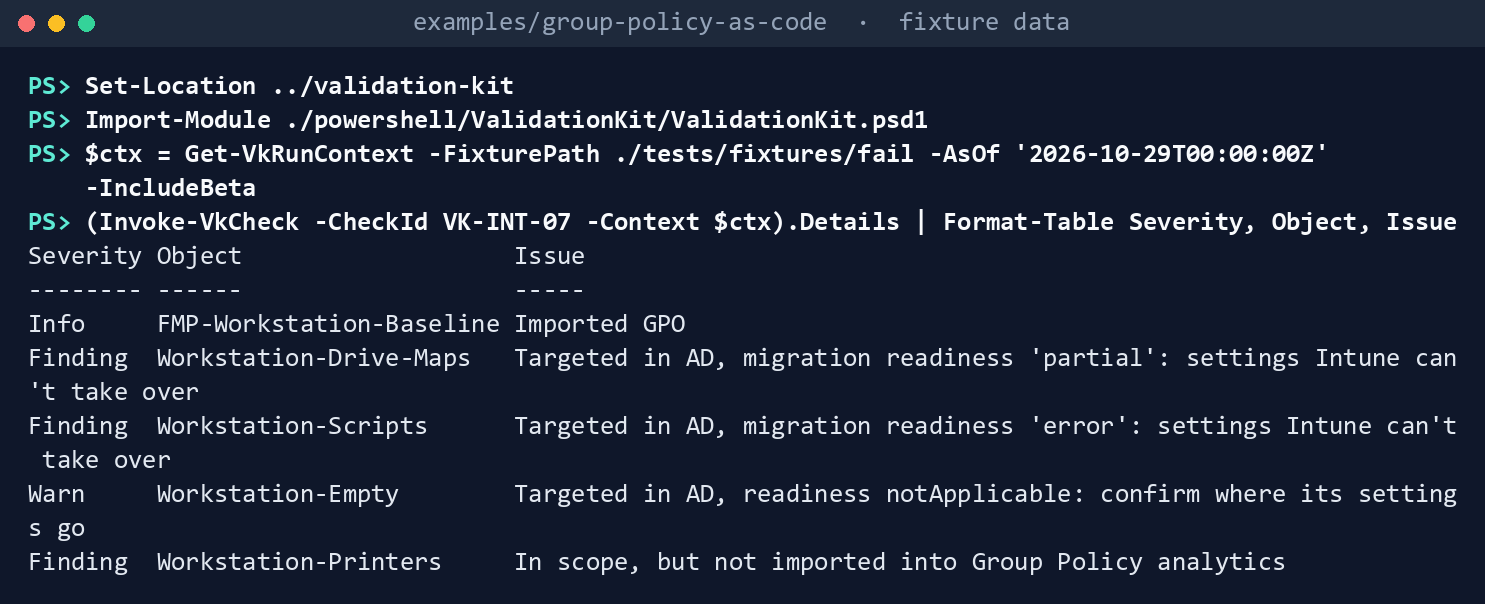
What the terminal shows, run on the kit’s fixtures (the same output as text) Status
Fail, with five rows: three findings (Workstation-Drive-Mapspartial,Workstation-Scriptserror,Workstation-Printersnever imported), a warning onWorkstation-Empty, andFMP-Workstation-Baselineas context. The rest of the lab works inexamples/group-policy-as-code.Run Microsoft’s import sample twice against the fake Graph:
Set-Location ../group-policy-as-code
Import-Module ./powershell/GroupPolicyAsCode.psm1
. ./tests/MicrosoftSampleHarness.ps1
New-Item -ItemType Directory -Force ./out | Out-Null
(Get-Content ./policies/fmp-sc-201-error-reporting-and-dumps.json -Raw | ConvertFrom-Json).policy |
    ConvertTo-Json -Depth 20 | Set-Content ./out/sc-201.json
$g = New-GpcFixtureInvoke -Path ./tests/fixtures/tenant.json
Invoke-MicrosoftSample -Name Import -Graph $g -Answers (Resolve-Path ./out/sc-201.json).Path | Out-Null
Invoke-MicrosoftSample -Name Import -Graph $g -Answers (Resolve-Path ./out/sc-201.json).Path | Out-Null
$g.Policies | ForEach-Object { $_['name'] }
$g.Calls | Format-Table Method, Uri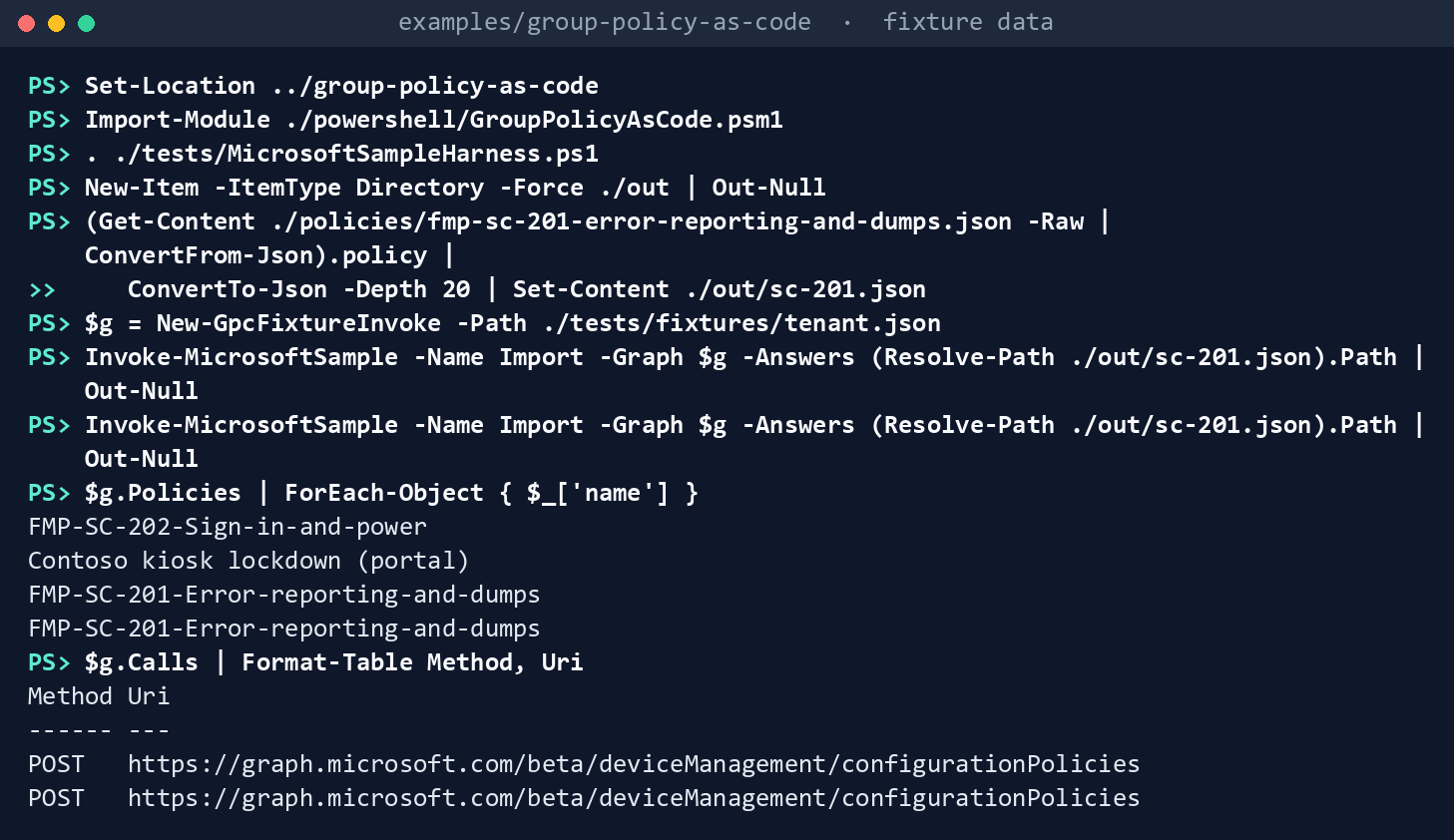
What the terminal shows, run on the kit’s fixtures (the same output as text) FMP-SC-201-Error-reporting-and-dumpsis listed twice. The calls are two POSTs tohttps://graph.microsoft.com/beta/deviceManagement/configurationPoliciesand no GET: the script never looked.Build the move plan:
$plan = Get-GpcMovePlan -Invoke (New-GpcFixtureInvoke -Path ./tests/fixtures/tenant.json).Invoke
$plan | Format-Table Gpo, Setting, Scope, Disposition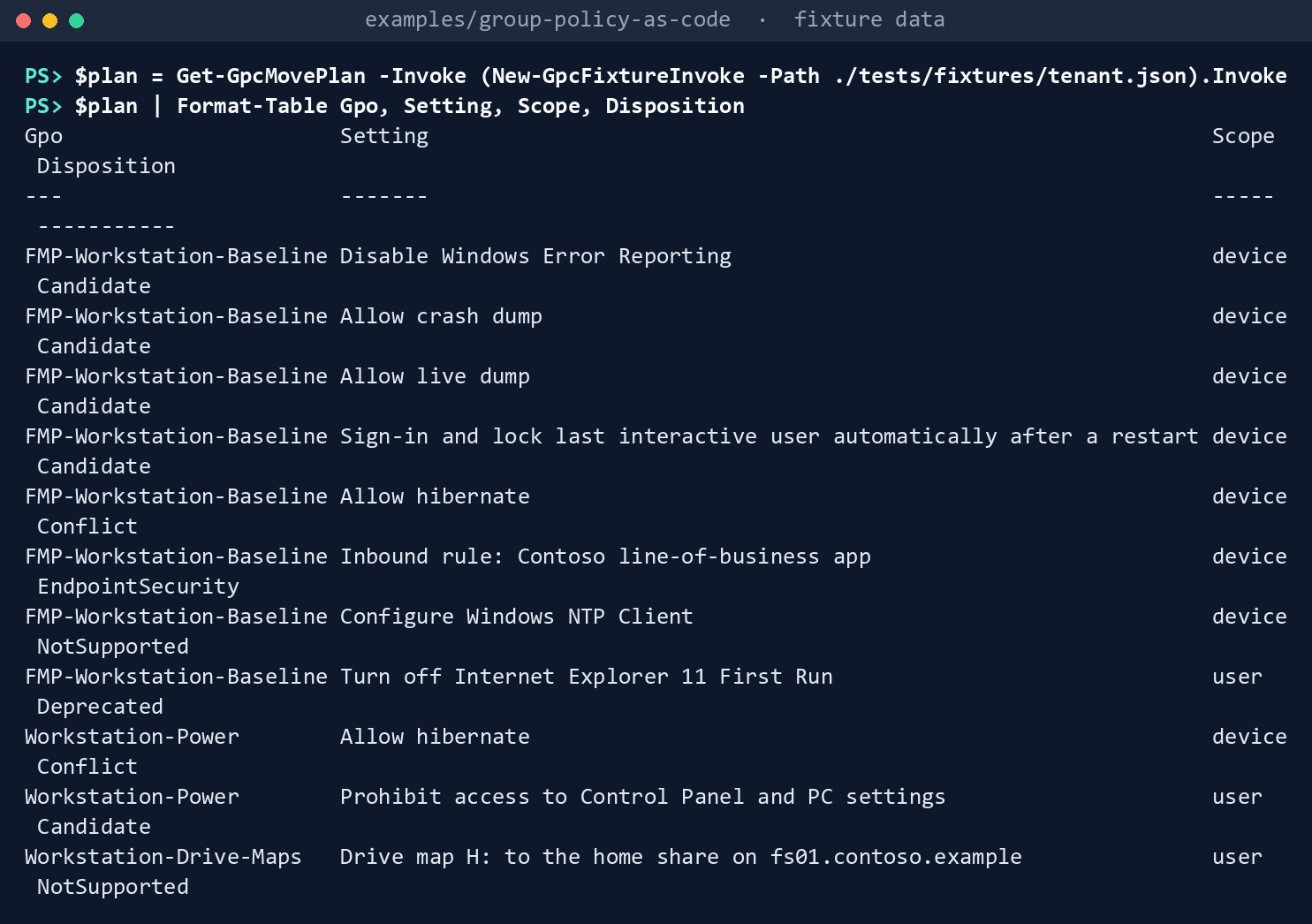
What the terminal shows, run on the kit’s fixtures (the same output as text) Eleven rows from three GPOs. Five are
Candidate, one of them user-scope.Allow hibernateis aConflicton two rows, becauseFMP-Workstation-Baselinedisables it andWorkstation-Powerenables it. The firewall rule isEndpointSecurity. Two rows areNotSupportedand one isDeprecated.Lint the library against the plan:
Test-GpcLibrary -Library (Read-GpcLibrary -Path ./policies) -Plan $plan | Format-List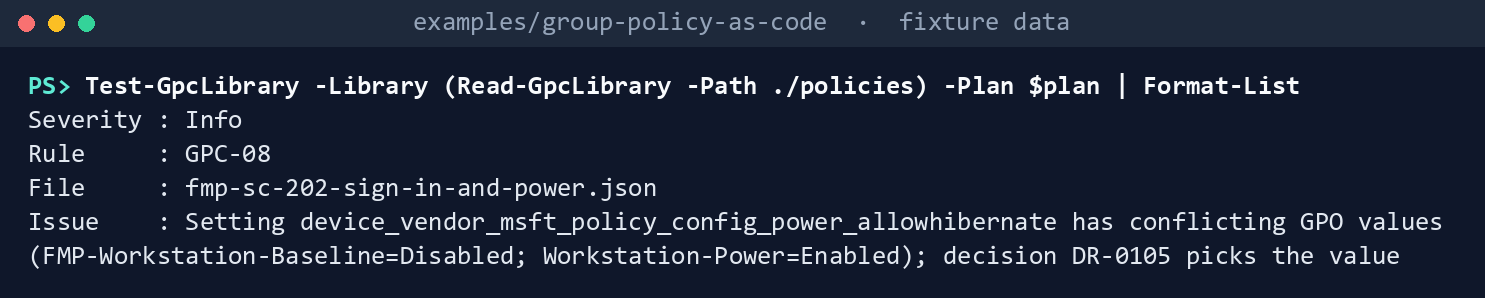
What the terminal shows, run on the kit’s fixtures (the same output as text) One row,
InfoGPC-08: the hibernate setting has conflicting GPO values, and decisionDR-0105picks the value.Run the dry run, then apply:
pwsh ./powershell/Invoke-GpcSync.ps1 -FixturePath ./tests/fixtures/tenant.json -WithPlan
pwsh ./powershell/Invoke-GpcSync.ps1 -FixturePath ./tests/fixtures/tenant.json -Apply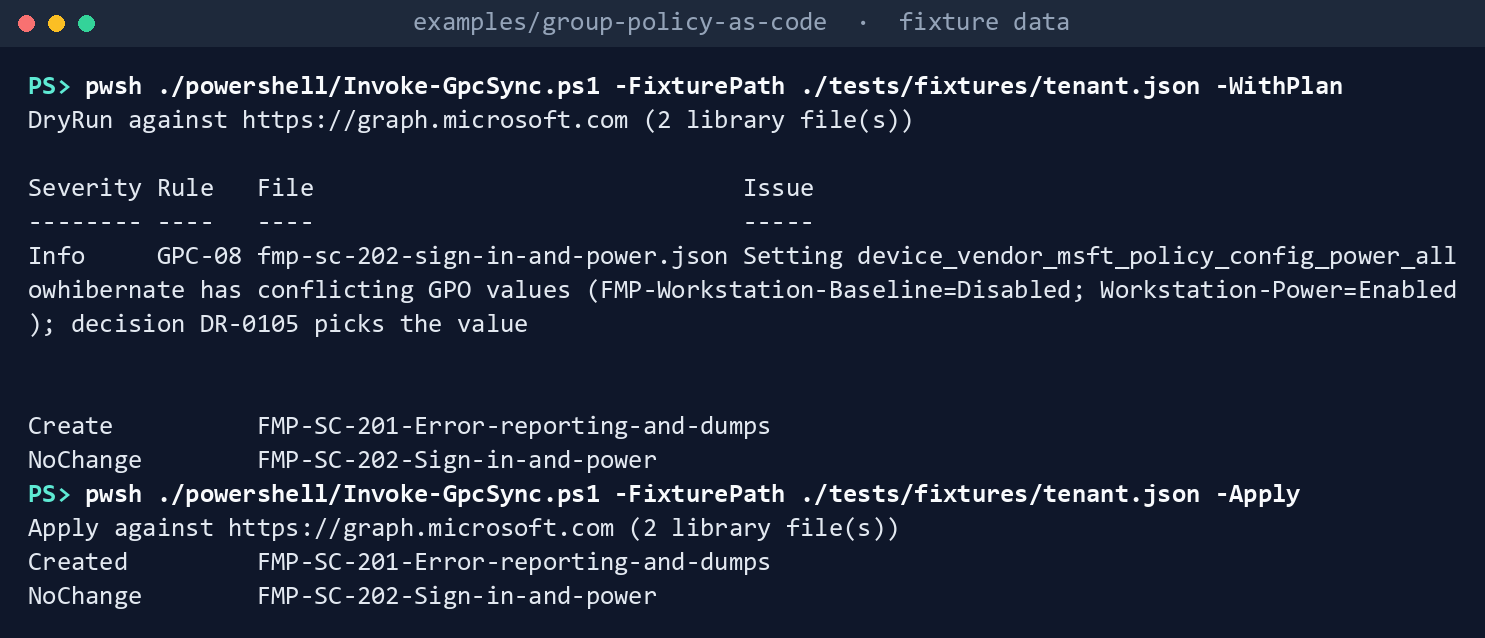
What the terminal shows, run on the kit’s fixtures (the same output as text) The dry run exits
0withCreate FMP-SC-201-…andNoChange FMP-SC-202-…. The apply exits0withCreated FMP-SC-201-…. Read the record, then run the dry run again for GCC High, and once with a cloud name the script doesn’t know:Get-Content ./out/sync-record.json -Raw | ConvertFrom-Json | Format-List Scopes, Created pwsh ./powershell/Invoke-GpcSync.ps1 -FixturePath ./tests/fixtures/tenant.json -WithPlan -Cloud gcchigh pwsh ./powershell/Invoke-GpcSync.ps1 -FixturePath ./tests/fixtures/tenant.json -WithPlan -Cloud usgov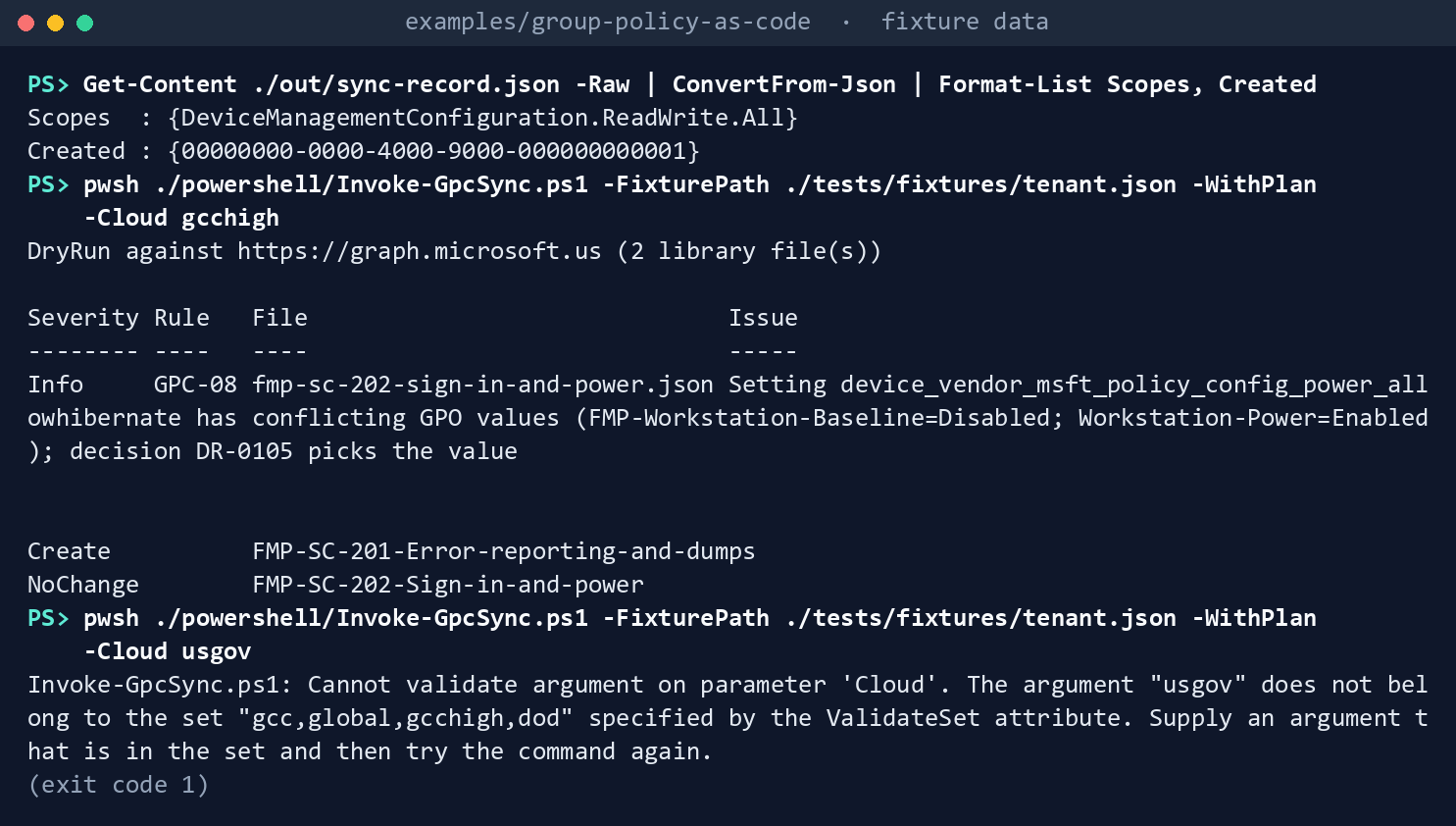
What the terminal shows, run on the kit’s fixtures (the same output as text) In
out/sync-record.json,ScopesisDeviceManagementConfiguration.ReadWrite.AllandCreatedholds the new ID. With-Cloud gcchigh, the first line sayshttps://graph.microsoft.us. With-Cloud usgov: exit1, because the script doesn’t know that name.Break something on purpose. The first two commands change
power_allowhibernate_0topower_allowhibernate_1inpolicies/fmp-sc-202-sign-in-and-power.json; then run the dry run:$f = './policies/fmp-sc-202-sign-in-and-power.json' (Get-Content -Raw $f).Replace('power_allowhibernate_0', 'power_allowhibernate_1') | Set-Content -NoNewline $f pwsh ./powershell/Invoke-GpcSync.ps1 -FixturePath ./tests/fixtures/tenant.json -WithPlan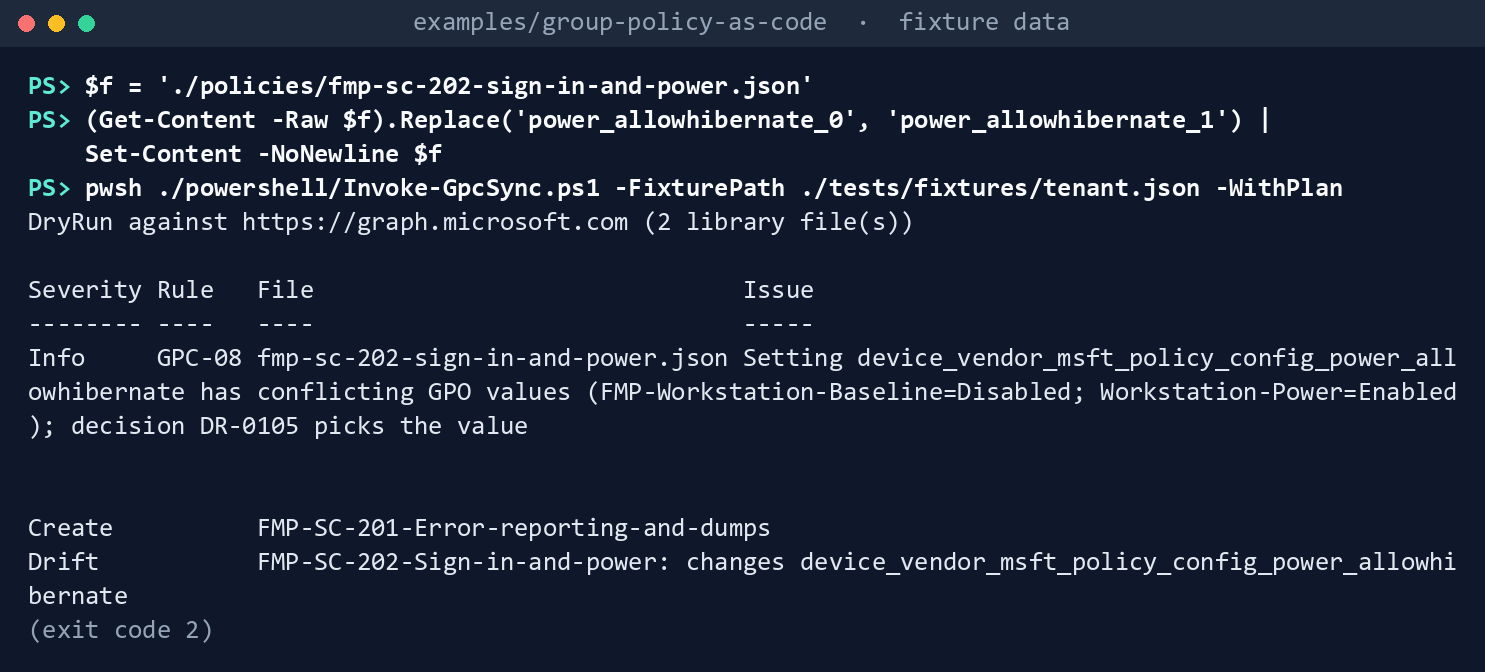
What the terminal shows, run on the kit’s fixtures (the same output as text) Exit
2, withDrift FMP-SC-202-Sign-in-and-power: changes device_vendor_msft_policy_config_power_allowhibernate. Run it with-Apply:pwsh ./powershell/Invoke-GpcSync.ps1 -FixturePath ./tests/fixtures/tenant.json -Apply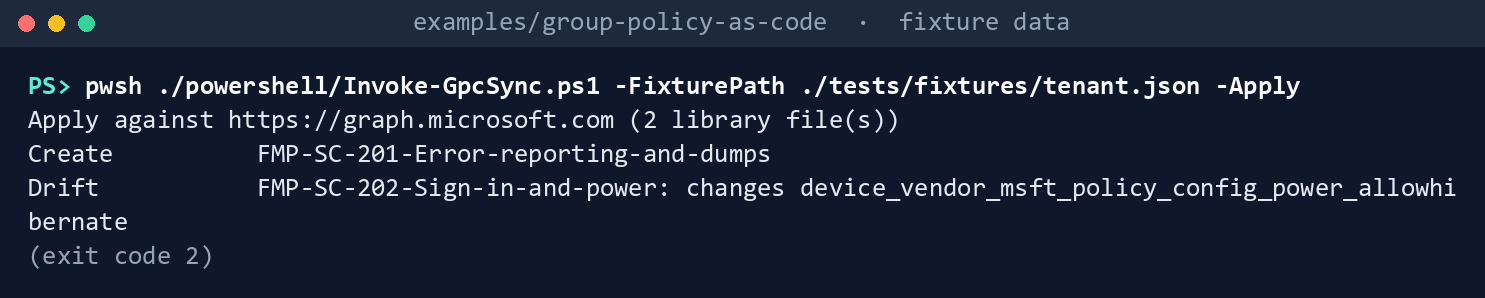
What the terminal shows, run on the kit’s fixtures (the same output as text) Still exit
2, and nothing is created, not even SC-201. Put the value back:(Get-Content -Raw $f).Replace('power_allowhibernate_1', 'power_allowhibernate_0') | Set-Content -NoNewline $f
What the terminal shows, run on the kit’s fixtures (the same output as text) Run the tests:
Invoke-Pester ./tests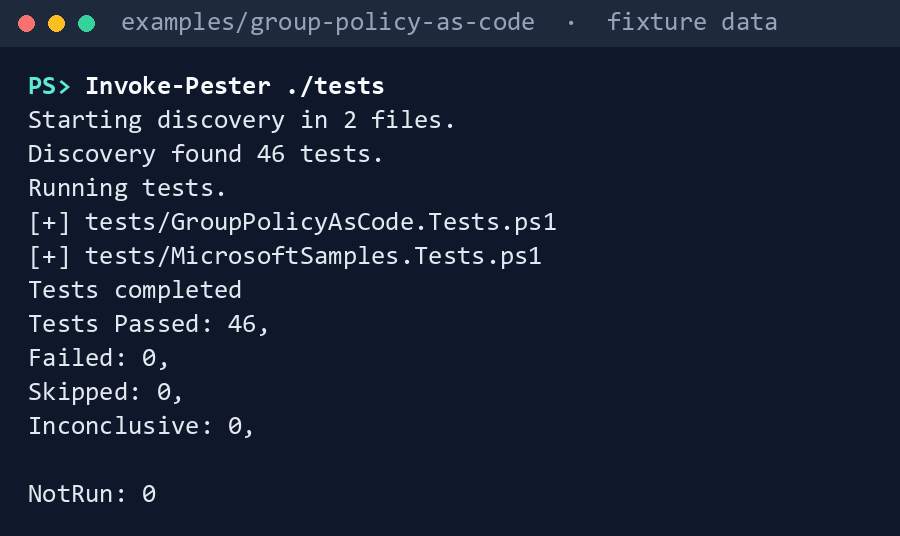
What the terminal shows, run on the kit’s fixtures (the same output as text)
Expected result: 46 tests passing, and each difference in the table above seen with your own eyes.
Lab 2: test tenant
Use a test tenant with Intune licenses and a test GPO export, never production. In GCC, Graph and the Intune admin center are the worldwide ones: Learn says GCC uses graph.microsoft.com, and Intune for GCC is the same instance as commercial Intune.2627 In GCC High and DoD, use -Cloud gcchigh or -Cloud dod and the government admin center, intune.microsoft.us.28 Work in examples/group-policy-as-code. You’ll replace: <test-tenant-id> (the test tenant’s ID) and <synced-policy-name> (the name of the library policy that holds the settings you migrate in step 6).
Every command in this lab, in order, from examples/group-policy-as-code. Each step below says what it does and what to look for.
# Step 2: Run the gate live
pwsh -File ../validation-kit/Invoke-ValidationKit.ps1 -OutputPath ./out/vk -Track INT -CheckId VK-INT-07 -IncludeBeta

# Step 3: Build the move plan live
Import-Module ./powershell/GroupPolicyAsCode.psm1
Connect-MgGraph -Environment Global -Scopes DeviceManagementConfiguration.Read.All
$invoke = { param($Method, $Uri, $Body, $Headers) Invoke-MgGraphRequest -Method $Method -Uri $Uri -Body $Body -Headers $Headers }
Get-GpcMovePlan -Invoke $invoke | Export-Csv ./out/plan.csv
$planIds = (Import-Csv ./out/plan.csv).DefinitionId
(Read-GpcLibrary -Path ./policies).Policy.settings.settingInstance.settingDefinitionId | Where-Object { $_ -notin $planIds }

# Step 4: Dry run
pwsh ./powershell/Invoke-GpcSync.ps1 -Cloud gcc -TenantId <test-tenant-id> -WithPlan

# Step 5: Apply
pwsh ./powershell/Invoke-GpcSync.ps1 -Cloud gcc -TenantId <test-tenant-id> -Apply -OutputPath ./out/apply
pwsh ./powershell/Invoke-GpcSync.ps1 -Cloud gcc -TenantId <test-tenant-id> -WithPlan

# Step 6: Compare with Migrate
$both = Get-GpcTenantPolicy -Invoke $invoke -Name '<synced-policy-name>', 'Lab-Migrate-compare'
$synced = $both | Where-Object Name -EQ '<synced-policy-name>'
$migrated = $both | Where-Object Name -EQ 'Lab-Migrate-compare'
Compare-Object @($synced.Settings | ForEach-Object { ConvertTo-GpcCanonical $_.settingInstance }) @($migrated.Settings | ForEach-Object { ConvertTo-GpcCanonical $_.settingInstance })

# Step 7: Drill drift
pwsh ./powershell/Invoke-GpcSync.ps1 -Cloud gcc -TenantId <test-tenant-id> -WithPlan

# Step 8: Back it out
Connect-MgGraph -Environment Global -Scopes DeviceManagementConfiguration.ReadWrite.All
$ids = @((Get-Content ./out/apply/sync-record.json -Raw | ConvertFrom-Json).Created) + @($migrated.Id)
foreach ($id in $ids) { Invoke-MgGraphRequest -Method DELETE -Uri "/beta/deviceManagement/configurationPolicies/$id" }

# Step 8: Back it out
pwsh ./powershell/Invoke-GpcSync.ps1 -Cloud gcc -TenantId <test-tenant-id> -WithPlan
Import a test GPO into Group Policy analytics. Follow Learn’s procedure: save the GPO report as XML under 4 MB, then Devices > Manage devices > Group Policy analytics > Import, with a scope tag. It needs Intune Administrator or a role with the Security baselines and Device configuration permissions.29
Run the gate live. Sign in as a Read Only Operator, which holds read on device configurations and security baselines,30 and run the validation kit with
-Track INT -CheckId VK-INT-07 -IncludeBeta:pwsh -File ../validation-kit/Invoke-ValidationKit.ps1 -OutputPath ./out/vk -Track INT -CheckId VK-INT-07 -IncludeBetaExpect the test GPO listed with its readiness.
Build the move plan live, then list each setting ID in your library files that isn’t among the plan’s
DefinitionIdvalues:Import-Module ./powershell/GroupPolicyAsCode.psm1 Connect-MgGraph -Environment Global -Scopes DeviceManagementConfiguration.Read.All $invoke = { param($Method, $Uri, $Body, $Headers) Invoke-MgGraphRequest -Method $Method -Uri $Uri -Body $Body -Headers $Headers } Get-GpcMovePlan -Invoke $invoke | Export-Csv ./out/plan.csv $planIds = (Import-Csv ./out/plan.csv).DefinitionId (Read-GpcLibrary -Path ./policies).Policy.settings.settingInstance.settingDefinitionId | Where-Object { $_ -notin $planIds }A library ID that isn’t in the plan is a finding against the library.
Dry run.
pwsh ./powershell/Invoke-GpcSync.ps1 -Cloud gcc -TenantId <test-tenant-id> -WithPlanIt asks for
Read.Allonly. ExpectCreatefor each library file.Apply. Sign in as a Policy and Profile Manager, the built-in role that manages configuration profiles,31 and run the same command with
-Apply, keeping its record inout/applyso the next dry run doesn’t overwrite it; then run the dry run again:pwsh ./powershell/Invoke-GpcSync.ps1 -Cloud gcc -TenantId <test-tenant-id> -Apply -OutputPath ./out/apply pwsh ./powershell/Invoke-GpcSync.ps1 -Cloud gcc -TenantId <test-tenant-id> -WithPlanThe apply asks for
ReadWrite.All. ExpectCreatedfor each file and a policy in the admin center with no assignments. The second dry run:NoChange.Compare with Migrate. In Group Policy analytics, select the same GPO and Migrate the same settings into a policy named
Lab-Migrate-compare, with Assignments left empty.32 Read both policies withGet-GpcTenantPolicyand compare their settings withConvertTo-GpcCanonical:$both = Get-GpcTenantPolicy -Invoke $invoke -Name '<synced-policy-name>', 'Lab-Migrate-compare' $synced = $both | Where-Object Name -EQ '<synced-policy-name>' $migrated = $both | Where-Object Name -EQ 'Lab-Migrate-compare' Compare-Object @($synced.Settings | ForEach-Object { ConvertTo-GpcCanonical $_.settingInstance }) @($migrated.Settings | ForEach-Object { ConvertTo-GpcCanonical $_.settingInstance })A difference is a finding: record which side is wrong.
Drill drift. In the admin center, change one value in a policy the sync created. Run the dry run:
pwsh ./powershell/Invoke-GpcSync.ps1 -Cloud gcc -TenantId <test-tenant-id> -WithPlanExit
2, and the row names the setting. Change it back.Back it out. Delete the policies the sync created, by the IDs in
out/apply/sync-record.json, andLab-Migrate-compare, in the admin center or withDELETE /beta/deviceManagement/configurationPolicies/{id}andReadWrite.All:33Connect-MgGraph -Environment Global -Scopes DeviceManagementConfiguration.ReadWrite.All $ids = @((Get-Content ./out/apply/sync-record.json -Raw | ConvertFrom-Json).Created) + @($migrated.Id) foreach ($id in $ids) { Invoke-MgGraphRequest -Method DELETE -Uri "/beta/deviceManagement/configurationPolicies/$id" }The sync never deletes. Then delete the imported GPO in Group Policy analytics, as Learn describes.34 Confirm the dry run shows
Createfor every library file again:pwsh ./powershell/Invoke-GpcSync.ps1 -Cloud gcc -TenantId <test-tenant-id> -WithPlan
When the policies are assigned later, Learn’s guidance applies: use an assignment filter instead of a dynamic device group when only Intune uses the group, and don’t exclude with a dynamic device group where timing matters.3536 Book 05 keeps dynamic device groups where the rule reads device extension attributes, because filters can’t (assignment strategy). VK-INT-04 checks the result.
Verified facts
| Item | Value | Source |
|---|---|---|
| List Group Policy analytics reports | GET /beta/deviceManagement/groupPolicyMigrationReports; beta; least privileged DeviceManagementConfiguration.Read.All, delegated and application; global, US Government L4 and L5 |
37 |
| Report properties | migrationReadiness: none, partial, complete, error, notApplicable; targetedInActiveDirectory; supported-setting counts; relationships groupPolicySettingMappings and unsupportedGroupPolicyExtensions |
38 |
| List setting mappings | GET …/groupPolicyMigrationReports/{id}/groupPolicySettingMappings; beta; DeviceManagementConfiguration.Read.All; global, L4 and L5 |
39 |
| Mapping properties | mdmSupportedState: unknown, supported, unsupported, deprecated; settingScope: unknown, device, user; intuneSettingDefinitionId; settingType includes appLockerRuleCollection and windowsFirewallSettings |
40 |
| List settings catalog policies | GET /beta/deviceManagement/configurationPolicies; DeviceManagementConfiguration.Read.All least privileged; global, L4 and L5 |
41 |
| List a policy’s settings | GET /beta/deviceManagement/configurationPolicies/{id}/settings; DeviceManagementConfiguration.Read.All |
42 |
| Create a settings catalog policy | POST /beta/deviceManagement/configurationPolicies; DeviceManagementConfiguration.ReadWrite.All least privileged; 201 Created; global, L4 and L5 |
43 |
| Update and delete | PATCH and DELETE on /configurationPolicies/{id}; DeviceManagementConfiguration.ReadWrite.All (the sync uses neither) |
44 45 |
| Change one setting | PATCH /beta/deviceManagement/configurationPolicies/{policyId}/settings/{settingId}, body a deviceManagementConfigurationSetting with its settingInstance; DeviceManagementConfiguration.ReadWrite.All; beta; global, US Government L4 and L5 (the sync doesn’t use it) |
46 |
| Release stage | Beta for every call above; Microsoft supports Intune beta APIs, but they change more often; the Graph API for Intune needs an active Intune license | 47 48 |
| Graph host per cloud | GCC: https://graph.microsoft.com; GCC High: https://graph.microsoft.us; DoD: https://dod-graph.microsoft.us; a token for one cloud doesn’t work in another |
49 |
Connect-MgGraph -Environment |
Global, USGov, USGovDoD |
50 |
| Intune per cloud | GCC is the commercial Intune instance; GCC High and DoD share the government instance; government admin center intune.microsoft.us |
51 52 |
| Group Policy analytics | Windows only; XML under 4 MB per GPO; Intune Administrator or a role with Security baselines and Device configuration; non-ADMX settings parsed in English only | 53 |
| Migrate | Best effort; stops on conflicting values; disabled for AppLocker and firewall rules; review before including every setting | 54 |
| Roles | Policy and Profile Manager manages configuration profiles; Read Only Operator views and can’t change | 55 |
| Targeting | Use assignment filters instead of dynamic groups when the group is used only by Intune; dynamic device group exclusions not recommended where latency matters | 56 57 |
| Sensitive values | Anyone with read access to device configuration can read values stored in a profile | 58 |
| Microsoft’s sample | microsoft/mggraph-intune-samples, linked from Learn’s Intune migration guide; as-is; validate in a test tenant |
59 60 |
What the samples do, and what the module does, come from running them, not from Learn. The setting definition IDs in the library come from Learn’s settings catalog examples; the fixture’s mappings that point to them are fictional.
Two things Learn doesn’t say yet, recorded so a later edit doesn’t assume them, and one it now does. A policy’s settings can be changed one at a time through the setting’s own PATCH;61 the code still never updates, by design. Learn documents no Graph equivalent of the Migrate step, so Lab 2 compares the two by hand. And no Learn page states that the Group Policy analytics import works in GCC High and DoD, although the Graph pages list both clouds; confirm it in a GCC High test tenant first.
Federal requirements and evidence
Moving Group Policy to Intune changes the baseline of every device, so the plan, the library and the sync record are configuration-management evidence. Each row names the file or command that proves it. Controls are from the Moderate baseline62; indicators are from FedRAMP’s list63. Which output supports which control is the program’s reading (design guidance).
| What the output proves | Requirement it supports | KSI it aligns to | Who keeps it |
|---|---|---|---|
| Every in-scope GPO is imported and ready, or listed (Lab 1, step 1: VK-INT-07, five rows) | CM-2; CA-7 | KSI-MLA-EVC | The run’s Results/ValidationResults.json |
| Microsoft’s import sample, run twice, creates a duplicate without reading the tenant (step 2: two POSTs, no GET) | SA-11; SR-3 | KSI-SCR-MIT; KSI-CMT-VTD | The repository: snapshot.json and MicrosoftSamples.Tests.ps1 |
Each GPO setting has a disposition, and conflicts are shown (step 3: Get-GpcMovePlan) |
CM-2; CM-6 | KSI-SVC-ACM | The plan saved with the pull request |
The library has one owner per setting and a decision record per setting (step 4: Test-GpcLibrary, GPC-02, GPC-06, GPC-08, GPC-09) |
CM-3; CM-6: settings and deviations are documented | KSI-CMT-VTD | The library in Git; the decision records |
The sync shows what it would create, then writes only that, with the cloud, scopes, file hashes and created IDs (step 5: out/sync-record.json) |
CM-3; AC-6: Read.All for the dry run, ReadWrite.All only with -Apply |
KSI-CMT-LMC; KSI-CMT-RMV; KSI-IAM-ELP | The evidence store |
An unknown cloud name stops the run (step 5: -Cloud usgov, exit 1) |
CM-6 | KSI-CMT-VTD | The run log |
A library that differs from the tenant stops the release, and nothing is created (step 6: Drift, exit 2) |
CM-3; CA-7 | KSI-MLA-EVC; KSI-CMT-VTD | The run log; the pull request |
| The module and the sample tests pass (step 7: 46 tests) | SA-11 | KSI-CMT-VTD | The repository’s test results |
| A test GPO is imported into Group Policy analytics (Lab 2, step 1) | CM-2 | KSI-CMT-LMC | The Intune audit log |
The gate runs live as a read-only operator (Lab 2, step 2: out/vk) |
CA-7; AC-6 | KSI-MLA-EVC; KSI-IAM-ELP | The evidence store |
The live plan is saved, and every library setting is in it (Lab 2, step 3: out/plan.csv) |
CM-2; CM-6 | KSI-SVC-ACM | The pull request |
| The dry run asks for read only (Lab 2, step 4) | AC-6 | KSI-IAM-ELP | The Entra sign-in log |
The policies are created unassigned, then the dry run shows NoChange (Lab 2, step 5: out/apply/sync-record.json) |
CM-3; CM-2 | KSI-CMT-RMV; KSI-CMT-LMC | The evidence store; the Intune audit log |
The synced policy matches what Migrate builds (Lab 2, step 6: Compare-Object) |
CM-4(2); SA-11 | KSI-CMT-VTD | The test record; a difference is a finding |
A change made in the admin center is caught and named (Lab 2, step 7: exit 2) |
CA-7; CM-3 | KSI-MLA-EVC; KSI-CMT-LMC | The run log; the Intune audit log |
| The created policies are deleted by the IDs the record kept (Lab 2, step 8) | CM-3 | KSI-CMT-LMC | The Intune audit log |
| Intune and Microsoft Graph run on cloud services with FedRAMP Marketplace listings64 | SA-9 (External System Services); the agency confirms each service it uses is inside the listing’s scope (design guidance) | None: the provider reports against the indicators for its own offering | The system security plan’s list of external services |
Key Security Indicators are FedRAMP 20x indicators for cloud service providers. The agency authorizes its own system: it lines this evidence up with what Microsoft report against the indicators, and doesn’t report KSIs itself (Book 00, Appendix B). The control-by-control mapping is in Book 13’s Appendix A and Book 14’s Appendix A; the indicator pairings follow Book 04, Chapter 10 and Book 05, Chapter 10.
Dangers
| Danger | What happens | The guard |
|---|---|---|
| Two policies set one setting | Devices report a conflict, and neither policy owns the value | GPC-06 in the pull request; VK-INT-05 after assignment |
| A setting another tool owns | Intune and Configuration Manager, or Intune and Ansible, flip one value back and forth | GPC-02; config_owner in the CMDB decides which devices an assignment may reach |
| Running the create twice | A second policy with the same name and settings | The sync reads first and creates only Create rows; Duplicate stops it |
| The wrong cloud | A GCC High tenant is called on the worldwide host | Get-GpcCloud per cloud; unknown names refused |
| An edit in the admin center | Git and the tenant disagree, and the next release overwrites one or the other | Drift stops the release and names the setting; the sync never updates |
| Moving every setting without review | Learn advises against it; stale settings move to every device | The move plan decides nothing; GPC-09 needs a decision per setting |
| Two GPOs with different values | Migrate stops; a script would pick one silently | Conflict rows; the decision record picks the value; GPC-08 shows it |
| A broad session doing the write | A token that could change anything in Intune runs the pipeline | Read.All for the dry run; ReadWrite.All only for -Apply |
| A secret in a setting value | Anyone with read access can read it | GPC-10 |
| Beta changes | A property or behavior changes under the code | Pinned sample tests; the source watch; Lab 2 before each release |
| Firewall and AppLocker rules | Migrate can’t move them | EndpointSecurity rows go to Endpoint security |
| Non-English GPOs | The MDM support figure is inaccurate | Export GPOs in English where possible, and check the plan by hand |
| A dynamic device group only Intune uses | Policy lands late, or an exclusion misses | Learn prefers a filter; Book 05’s assignment strategy; VK-INT-04 |
Checklist
Microsoft Learn, “Import and analyze your on-premises GPOs using Group Policy analytics in Microsoft Intune,” https://learn.microsoft.com/intune/device-configuration/import-group-policy-analytics (accessed Oct 30, 2026).↩︎
Microsoft Learn, “Create a Settings Catalog policy using your imported GPOs in Microsoft Intune,” https://learn.microsoft.com/intune/device-configuration/migrate-group-policy (accessed Oct 30, 2026).↩︎
Microsoft Learn, “groupPolicyMigrationReport resource type” (Microsoft Graph beta), https://learn.microsoft.com/graph/api/resources/intune-gpanalyticsservice-grouppolicymigrationreport?view=graph-rest-beta (accessed Oct 30, 2026).↩︎
Microsoft Learn, “groupPolicySettingMapping resource type” (Microsoft Graph beta), https://learn.microsoft.com/graph/api/resources/intune-gpanalyticsservice-grouppolicysettingmapping?view=graph-rest-beta (accessed Oct 31, 2026).↩︎
Microsoft Learn, “List groupPolicyMigrationReports” (Microsoft Graph beta), https://learn.microsoft.com/graph/api/intune-gpanalyticsservice-grouppolicymigrationreport-list?view=graph-rest-beta (accessed Oct 30, 2026).↩︎
Microsoft Learn, “Create deviceManagementConfigurationPolicy” (Microsoft Graph beta), https://learn.microsoft.com/graph/api/intune-deviceconfigv2-devicemanagementconfigurationpolicy-create?view=graph-rest-beta (accessed Oct 30, 2026).↩︎
Microsoft Learn, “Migration guide: Set up or move to Microsoft Intune,” section “Tenant to tenant migration,” https://learn.microsoft.com/intune/fundamentals/setup-migration (accessed Oct 30, 2026).↩︎
Microsoft Learn, “List groupPolicyMigrationReports” (Microsoft Graph beta), https://learn.microsoft.com/graph/api/intune-gpanalyticsservice-grouppolicymigrationreport-list?view=graph-rest-beta (accessed Oct 30, 2026).↩︎
Microsoft Learn, “List groupPolicySettingMappings” (Microsoft Graph beta), https://learn.microsoft.com/graph/api/intune-gpanalyticsservice-grouppolicysettingmapping-list?view=graph-rest-beta (accessed Oct 30, 2026).↩︎
Microsoft Learn, “Import and analyze your on-premises GPOs using Group Policy analytics in Microsoft Intune,” https://learn.microsoft.com/intune/device-configuration/import-group-policy-analytics (accessed Oct 30, 2026).↩︎
Microsoft, microsoft/mggraph-intune-samples,
SettingsCatalogat commit2e668455288ebc43b7356b2d9b0c537e24c409f4(September 25, 2026), MIT License, https://github.com/microsoft/mggraph-intune-samples/tree/2e668455288ebc43b7356b2d9b0c537e24c409f4/SettingsCatalog (accessed Oct 30, 2026); pinned copy inexamples/third_party/mggraph-intune-samples.↩︎Microsoft Learn, “Microsoft Graph national cloud deployments,” section “Microsoft Graph and Graph Explorer service root endpoints,” https://learn.microsoft.com/graph/deployments (accessed Oct 30, 2026).↩︎
Microsoft Learn, “groupPolicySettingMapping resource type” (Microsoft Graph beta), https://learn.microsoft.com/graph/api/resources/intune-gpanalyticsservice-grouppolicysettingmapping?view=graph-rest-beta (accessed Oct 31, 2026).↩︎
Microsoft Learn, “Create a Settings Catalog policy using your imported GPOs in Microsoft Intune,” https://learn.microsoft.com/intune/device-configuration/migrate-group-policy (accessed Oct 30, 2026).↩︎
Microsoft Learn, “Create a Settings Catalog policy using your imported GPOs in Microsoft Intune,” https://learn.microsoft.com/intune/device-configuration/migrate-group-policy (accessed Oct 30, 2026).↩︎
Microsoft Learn, “Import and analyze your on-premises GPOs using Group Policy analytics in Microsoft Intune,” https://learn.microsoft.com/intune/device-configuration/import-group-policy-analytics (accessed Oct 30, 2026).↩︎
Microsoft Learn, “Create deviceManagementConfigurationPolicy” (Microsoft Graph beta), https://learn.microsoft.com/graph/api/intune-deviceconfigv2-devicemanagementconfigurationpolicy-create?view=graph-rest-beta (accessed Oct 30, 2026).↩︎
Microsoft Learn, “Configure Personal Data Encryption,” section “Configure Personal Data Encryption with Microsoft Intune” (its Graph example sets the error reporting, crash dump, live dump, automatic restart sign-in and hibernation settings), https://learn.microsoft.com/windows/security/operating-system-security/data-protection/personal-data-encryption/configure (accessed Oct 30, 2026).↩︎
Microsoft Learn, “Apply features and settings on your devices using device profiles in Microsoft Intune,” section “Handle custom and imported device profile settings,” https://learn.microsoft.com/intune/device-configuration/overview (accessed Oct 30, 2026).↩︎
Microsoft Learn, “List deviceManagementConfigurationPolicies” (Microsoft Graph beta), https://learn.microsoft.com/graph/api/intune-deviceconfigv2-devicemanagementconfigurationpolicy-list?view=graph-rest-beta (accessed Oct 30, 2026).↩︎
Microsoft Learn, “List deviceManagementConfigurationSettings” (Microsoft Graph beta), https://learn.microsoft.com/graph/api/intune-deviceconfigv2-devicemanagementconfigurationsetting-list?view=graph-rest-beta (accessed Oct 30, 2026).↩︎
Microsoft Learn, “List deviceManagementConfigurationSettings” (Microsoft Graph beta), https://learn.microsoft.com/graph/api/intune-deviceconfigv2-devicemanagementconfigurationsetting-list?view=graph-rest-beta (accessed Oct 30, 2026).↩︎
Microsoft Learn, “Update deviceManagementConfigurationPolicy” (Microsoft Graph beta), https://learn.microsoft.com/graph/api/intune-deviceconfigv2-devicemanagementconfigurationpolicy-update?view=graph-rest-beta (accessed Oct 30, 2026).↩︎
Microsoft Learn, “Delete deviceManagementConfigurationPolicy” (Microsoft Graph beta), https://learn.microsoft.com/graph/api/intune-deviceconfigv2-devicemanagementconfigurationpolicy-delete?view=graph-rest-beta (accessed Oct 30, 2026).↩︎
Microsoft Learn, “Update deviceManagementConfigurationSetting” (Microsoft Graph beta), https://learn.microsoft.com/graph/api/intune-deviceconfigv2-devicemanagementconfigurationsetting-update?view=graph-rest-beta (accessed Oct 30, 2026).↩︎
Microsoft Learn, “Microsoft Graph national cloud deployments,” section “Microsoft Graph and Graph Explorer service root endpoints,” https://learn.microsoft.com/graph/deployments (accessed Oct 30, 2026).↩︎
Microsoft Learn, “Microsoft Intune for US Government GCC High and DoD service description,” section “Intune commercial and government instances,” https://learn.microsoft.com/intune/fundamentals/government-service (accessed Oct 30, 2026).↩︎
Microsoft Learn, “US government endpoints for Microsoft Intune,” section “US Government customer designated endpoints,” https://learn.microsoft.com/intune/fundamentals/endpoints-us-government (accessed Oct 30, 2026).↩︎
Microsoft Learn, “Import and analyze your on-premises GPOs using Group Policy analytics in Microsoft Intune,” https://learn.microsoft.com/intune/device-configuration/import-group-policy-analytics (accessed Oct 30, 2026).↩︎
Microsoft Learn, “Role-based access control (RBAC) with Microsoft Intune,” section “RBAC Roles,” https://learn.microsoft.com/intune/fundamentals/role-based-access-control/overview; and “Built-in role permissions for Microsoft Intune,” section “Read Only Operator,” https://learn.microsoft.com/intune/fundamentals/role-based-access-control/ref-built-in-roles (both accessed Oct 30, 2026).↩︎
Microsoft Learn, “Role-based access control (RBAC) with Microsoft Intune,” section “RBAC Roles,” https://learn.microsoft.com/intune/fundamentals/role-based-access-control/overview; and “Built-in role permissions for Microsoft Intune,” section “Read Only Operator,” https://learn.microsoft.com/intune/fundamentals/role-based-access-control/ref-built-in-roles (both accessed Oct 30, 2026).↩︎
Microsoft Learn, “Create a Settings Catalog policy using your imported GPOs in Microsoft Intune,” https://learn.microsoft.com/intune/device-configuration/migrate-group-policy (accessed Oct 30, 2026).↩︎
Microsoft Learn, “Delete deviceManagementConfigurationPolicy” (Microsoft Graph beta), https://learn.microsoft.com/graph/api/intune-deviceconfigv2-devicemanagementconfigurationpolicy-delete?view=graph-rest-beta (accessed Oct 30, 2026).↩︎
Microsoft Learn, “Import and analyze your on-premises GPOs using Group Policy analytics in Microsoft Intune,” https://learn.microsoft.com/intune/device-configuration/import-group-policy-analytics (accessed Oct 30, 2026).↩︎
Microsoft Learn, “Performance recommendations for grouping, targeting, and filtering in large Microsoft Intune environments,” https://learn.microsoft.com/intune/fundamentals/filters/performance-recommendations (accessed Oct 30, 2026).↩︎
Microsoft Learn, “Assign policies in Microsoft Intune,” section “Exclude groups from a policy assignment,” https://learn.microsoft.com/intune/device-configuration/assign-device-profile (accessed Oct 30, 2026).↩︎
Microsoft Learn, “List groupPolicyMigrationReports” (Microsoft Graph beta), https://learn.microsoft.com/graph/api/intune-gpanalyticsservice-grouppolicymigrationreport-list?view=graph-rest-beta (accessed Oct 30, 2026).↩︎
Microsoft Learn, “groupPolicyMigrationReport resource type” (Microsoft Graph beta), https://learn.microsoft.com/graph/api/resources/intune-gpanalyticsservice-grouppolicymigrationreport?view=graph-rest-beta (accessed Oct 30, 2026).↩︎
Microsoft Learn, “List groupPolicySettingMappings” (Microsoft Graph beta), https://learn.microsoft.com/graph/api/intune-gpanalyticsservice-grouppolicysettingmapping-list?view=graph-rest-beta (accessed Oct 30, 2026).↩︎
Microsoft Learn, “groupPolicySettingMapping resource type” (Microsoft Graph beta), https://learn.microsoft.com/graph/api/resources/intune-gpanalyticsservice-grouppolicysettingmapping?view=graph-rest-beta (accessed Oct 31, 2026).↩︎
Microsoft Learn, “List deviceManagementConfigurationPolicies” (Microsoft Graph beta), https://learn.microsoft.com/graph/api/intune-deviceconfigv2-devicemanagementconfigurationpolicy-list?view=graph-rest-beta (accessed Oct 30, 2026).↩︎
Microsoft Learn, “List deviceManagementConfigurationSettings” (Microsoft Graph beta), https://learn.microsoft.com/graph/api/intune-deviceconfigv2-devicemanagementconfigurationsetting-list?view=graph-rest-beta (accessed Oct 30, 2026).↩︎
Microsoft Learn, “Create deviceManagementConfigurationPolicy” (Microsoft Graph beta), https://learn.microsoft.com/graph/api/intune-deviceconfigv2-devicemanagementconfigurationpolicy-create?view=graph-rest-beta (accessed Oct 30, 2026).↩︎
Microsoft Learn, “Update deviceManagementConfigurationPolicy” (Microsoft Graph beta), https://learn.microsoft.com/graph/api/intune-deviceconfigv2-devicemanagementconfigurationpolicy-update?view=graph-rest-beta (accessed Oct 30, 2026).↩︎
Microsoft Learn, “Delete deviceManagementConfigurationPolicy” (Microsoft Graph beta), https://learn.microsoft.com/graph/api/intune-deviceconfigv2-devicemanagementconfigurationpolicy-delete?view=graph-rest-beta (accessed Oct 30, 2026).↩︎
Microsoft Learn, “Update deviceManagementConfigurationSetting” (Microsoft Graph beta), https://learn.microsoft.com/graph/api/intune-deviceconfigv2-devicemanagementconfigurationsetting-update?view=graph-rest-beta (accessed Oct 30, 2026).↩︎
Microsoft Learn, “List groupPolicyMigrationReports” (Microsoft Graph beta), https://learn.microsoft.com/graph/api/intune-gpanalyticsservice-grouppolicymigrationreport-list?view=graph-rest-beta (accessed Oct 30, 2026).↩︎
Microsoft Learn, “Create deviceManagementConfigurationPolicy” (Microsoft Graph beta), https://learn.microsoft.com/graph/api/intune-deviceconfigv2-devicemanagementconfigurationpolicy-create?view=graph-rest-beta (accessed Oct 30, 2026).↩︎
Microsoft Learn, “Microsoft Graph national cloud deployments,” section “Microsoft Graph and Graph Explorer service root endpoints,” https://learn.microsoft.com/graph/deployments (accessed Oct 30, 2026).↩︎
Microsoft Learn, “Authentication module cmdlets in Microsoft Graph PowerShell,” section “Use Get-MgEnvironment,” https://learn.microsoft.com/powershell/microsoftgraph/authentication-commands?view=graph-powershell-1.0; and “Get-MgEnvironment,” https://learn.microsoft.com/powershell/module/microsoft.graph.authentication/get-mgenvironment?view=graph-powershell-1.0 (both accessed Oct 30, 2026).↩︎
Microsoft Learn, “Microsoft Intune for US Government GCC High and DoD service description,” section “Intune commercial and government instances,” https://learn.microsoft.com/intune/fundamentals/government-service (accessed Oct 30, 2026).↩︎
Microsoft Learn, “US government endpoints for Microsoft Intune,” section “US Government customer designated endpoints,” https://learn.microsoft.com/intune/fundamentals/endpoints-us-government (accessed Oct 30, 2026).↩︎
Microsoft Learn, “Import and analyze your on-premises GPOs using Group Policy analytics in Microsoft Intune,” https://learn.microsoft.com/intune/device-configuration/import-group-policy-analytics (accessed Oct 30, 2026).↩︎
Microsoft Learn, “Create a Settings Catalog policy using your imported GPOs in Microsoft Intune,” https://learn.microsoft.com/intune/device-configuration/migrate-group-policy (accessed Oct 30, 2026).↩︎
Microsoft Learn, “Role-based access control (RBAC) with Microsoft Intune,” section “RBAC Roles,” https://learn.microsoft.com/intune/fundamentals/role-based-access-control/overview; and “Built-in role permissions for Microsoft Intune,” section “Read Only Operator,” https://learn.microsoft.com/intune/fundamentals/role-based-access-control/ref-built-in-roles (both accessed Oct 30, 2026).↩︎
Microsoft Learn, “Performance recommendations for grouping, targeting, and filtering in large Microsoft Intune environments,” https://learn.microsoft.com/intune/fundamentals/filters/performance-recommendations (accessed Oct 30, 2026).↩︎
Microsoft Learn, “Assign policies in Microsoft Intune,” section “Exclude groups from a policy assignment,” https://learn.microsoft.com/intune/device-configuration/assign-device-profile (accessed Oct 30, 2026).↩︎
Microsoft Learn, “Apply features and settings on your devices using device profiles in Microsoft Intune,” section “Handle custom and imported device profile settings,” https://learn.microsoft.com/intune/device-configuration/overview (accessed Oct 30, 2026).↩︎
Microsoft Learn, “Migration guide: Set up or move to Microsoft Intune,” section “Tenant to tenant migration,” https://learn.microsoft.com/intune/fundamentals/setup-migration (accessed Oct 30, 2026).↩︎
Microsoft, microsoft/mggraph-intune-samples,
SettingsCatalogat commit2e668455288ebc43b7356b2d9b0c537e24c409f4(September 25, 2026), MIT License, https://github.com/microsoft/mggraph-intune-samples/tree/2e668455288ebc43b7356b2d9b0c537e24c409f4/SettingsCatalog (accessed Oct 30, 2026); pinned copy inexamples/third_party/mggraph-intune-samples.↩︎Microsoft Learn, “Update deviceManagementConfigurationSetting” (Microsoft Graph beta), https://learn.microsoft.com/graph/api/intune-deviceconfigv2-devicemanagementconfigurationsetting-update?view=graph-rest-beta (accessed Oct 30, 2026).↩︎
National Institute of Standards and Technology, SP 800-53B Moderate baseline, release 5.2.0 OSCAL profile, last modified October 22, 2026 (includes AC-6, CA-7, CM-2, CM-3, CM-4(2), CM-6, SA-9, SA-11 and SR-3), https://github.com/usnistgov/oscal-content/blob/main/nist.gov/SP800-53/rev5/json/NIST_SP-800-53_rev5_MODERATE-baseline_profile.json (accessed Nov 2, 2026).↩︎
FedRAMP, “Key Security Indicators,” FedRAMP Consolidated Rules for 2026 (indicators KSI-CMT-LMC, KSI-CMT-RMV, KSI-CMT-VTD, KSI-IAM-ELP, KSI-MLA-EVC, KSI-SCR-MIT and KSI-SVC-ACM; control mappings updated October 13, 2026), https://www.fedramp.gov/2026/reference/key-security-indicators/ (accessed Nov 2, 2026).↩︎
FedRAMP Marketplace product data, https://www.fedramp.gov/marketplace/products.json,
last_change2026-11-01T05:02:56Z (accessed Nov 2, 2026): MSO365MT, Microsoft 365 Government Community Cloud & Supporting Services, FedRAMP Certified, Class C, Moderate; FR1824057433, Microsoft 365 Government Community Cloud-High, FedRAMP Certified, Class D, High; F1209051525, Azure Commercial Cloud, FedRAMP Certified, Class D, High; F1603087869, Azure Government (includes Dynamics 365), FedRAMP Certified, Class D, High.↩︎