Federal Modernization Workbook
Chapter 06 — Drift Reconciliation
Events tell you what changed. A reconciliation tells you what is wrong now, including what changed while nobody was listening.
The kit’s Build 3, the loop’s steps 1 and 2: a read-only join of the HR extract, Microsoft Graph and ISC on employeeId that measures Book 03’s drift classes. Events (Chapter 04) catch changes as they happen; the reconciliation catches the state, including drift whose event was missed. This chapter adds drift_compare.py, which compares two runs by their stable finding IDs, so a scheduled run raises only what is new, and shows what has stopped being measured. Lab 1 runs a two-day story on a laptop; Lab 2 runs the client against a test tenant and sandbox.
Jump to a slide (15)
Deck · Narrated deck (about 9 minutes, captions) · Script · Captions. Recorded on November 1, 2026 from the approved chapter.
Goal and audience
Goal. By the end of this chapter you can run the reconciliation over saved exports, read its findings, compare two runs, and explain why a resolved finding doesn’t close anything by itself.
Audience. Developers and identity engineers who schedule the reconciliation, and the identity data steward who reads its output. You should read Python and CSV. You don’t need a tenant until Lab 2.
The code: examples/servicenow-sailpoint
What exists
clients/python/identity_drift.py, described in the implementation example’s Build 3:
- Inputs. An HR extract (CSV,
employeeIdandstatusrequired); Graph users withemployeeId,accountEnabled,departmentand the manager’semployeeId; ISC identities from Search (accounts nested) and uncorrelated accounts from the Accounts API; and, optionally, the Entra directory audit. Each can be a saved export, which is how the labs run. - Classes. Missing identity, stale access, orphan account and attribute drift (department and manager), High or Medium as Book 03, Chapter 11 sets them; an unauthorized write only when the audit is read. Credential and schema drift are always reported as not computed, because they need the card system, Intune and the provisioning middleware’s output.
- Finding IDs. Each finding’s ID is a hash of its class, system, employee ID, object ID and attribute, so the same drift gets the same ID on every run. The PowerShell client produces the same IDs from the same fixtures.
- Outputs. JSON (the findings, and which classes were and weren’t computed) and CSV.
--push-to-servicenowposts the findings to the Scripted REST resource, and still writes nothing without--apply.
The client measured one moment. A scheduled run that pushed every finding every night would lean on the Scripted REST resource’s de-duplication to avoid duplicates, and nothing reported what had disappeared.
What this chapter adds
clients/python/drift_compare.pycompares two runs by finding ID: new (raise it), persisting (already raised; the de-duplication adds a counter) and resolved (no longer measured). It refuses to compare runs that computed different classes, one with the audit and one without, because every finding of the class the second run skipped would look resolved. A resolved finding is printed with a reminder that its record still closes only on Chapter 05’s re-read.tests/fixtures/hr_extract_day2.csv, the second day of the fictional estate: HR has corrected Erin’s department from HR to Finance, the value someone had already typed into Entra ID by hand. Graph now agrees with HR; ISC, not yet re-aggregated, doesn’t.tests/fixtures/config.fixtures.json, the fixture settings for an offline run (the authoritative HR source and the provisioning service’s app ID), with no secrets.- Output folders. The client now creates the folder for
--out-jsonand--out-csvif it doesn’t exist.
The tests
tests/python/test_drift_compare.py, 4 tests: the day-two story, identical runs, the refusal and the command line. The kit’s original 13 drift tests pass unchanged, including the shared finding IDs with the PowerShell client.
The commands below run over fictional exports. They show the join and the comparison, not that your HR extract, Graph or ISC return these shapes; the manager expansion and the ISC employee ID attribute in particular are on the verify list. Expect a burst of High findings in the first month of a real run: Book 03 calls that the measurement working.
Lab 1: fixtures, no tenant
Work in examples/servicenow-sailpoint, with Python 3.10 or later, pytest and requests.
Every command in this lab, in order, from examples/servicenow-sailpoint. Each step below says what it does and what to look for.
# Step 1: Run the drift tests
python -m pytest tests/python/test_identity_drift.py tests/python/test_drift_compare.py -q

# Step 2: Day one
python clients/python/identity_drift.py --hr-csv tests/fixtures/hr_extract.csv --config tests/fixtures/config.fixtures.json --graph-users-json tests/fixtures/graph_users.json --isc-identities-json tests/fixtures/isc_identities.json --isc-accounts-json tests/fixtures/isc_uncorrelated_accounts.json --entra-audit-json tests/fixtures/entra_audit.json --out-json out/day1.json --out-csv out/day1.csv
python -c "import csv, json; [print(r['drift_class'], r['system'], r['employee_id'], r['attribute'], r['expected'], '->', r['observed'], json.loads(r['evidence']).get('initiated_by', '')) for r in csv.DictReader(open('out/day1.csv', encoding='utf-8')) if r['employee_id'] in ('E1002', 'E1004')]"

# Step 3: Day two
python clients/python/identity_drift.py --hr-csv tests/fixtures/hr_extract_day2.csv --config tests/fixtures/config.fixtures.json --graph-users-json tests/fixtures/graph_users.json --isc-identities-json tests/fixtures/isc_identities.json --isc-accounts-json tests/fixtures/isc_uncorrelated_accounts.json --entra-audit-json tests/fixtures/entra_audit.json --out-json out/day2.json --out-csv out/day2.csv

# Step 4: Compare the two days
python clients/python/drift_compare.py --previous out/day1.json --current out/day2.json

# Step 5: See the refusal
python clients/python/identity_drift.py --hr-csv tests/fixtures/hr_extract_day2.csv --config tests/fixtures/config.fixtures.json --graph-users-json tests/fixtures/graph_users.json --isc-identities-json tests/fixtures/isc_identities.json --isc-accounts-json tests/fixtures/isc_uncorrelated_accounts.json --out-json out/day2-noaudit.json --out-csv out/day2-noaudit.csv
python clients/python/drift_compare.py --previous out/day1.json --current out/day2-noaudit.json
Run the drift tests:
python -m pytest tests/python/test_identity_drift.py tests/python/test_drift_compare.py -q
What the terminal shows, run on the kit’s fixtures (the same output as text) 17 passed.Day one, then Erin’s and Carol’s rows from
out/day1.csv:python clients/python/identity_drift.py --hr-csv tests/fixtures/hr_extract.csv --config tests/fixtures/config.fixtures.json --graph-users-json tests/fixtures/graph_users.json --isc-identities-json tests/fixtures/isc_identities.json --isc-accounts-json tests/fixtures/isc_uncorrelated_accounts.json --entra-audit-json tests/fixtures/entra_audit.json --out-json out/day1.json --out-csv out/day1.csv python -c "import csv, json; [print(r['drift_class'], r['system'], r['employee_id'], r['attribute'], r['expected'], '->', r['observed'], json.loads(r['evidence']).get('initiated_by', '')) for r in csv.DictReader(open('out/day1.csv', encoding='utf-8')) if r['employee_id'] in ('E1002', 'E1004')]"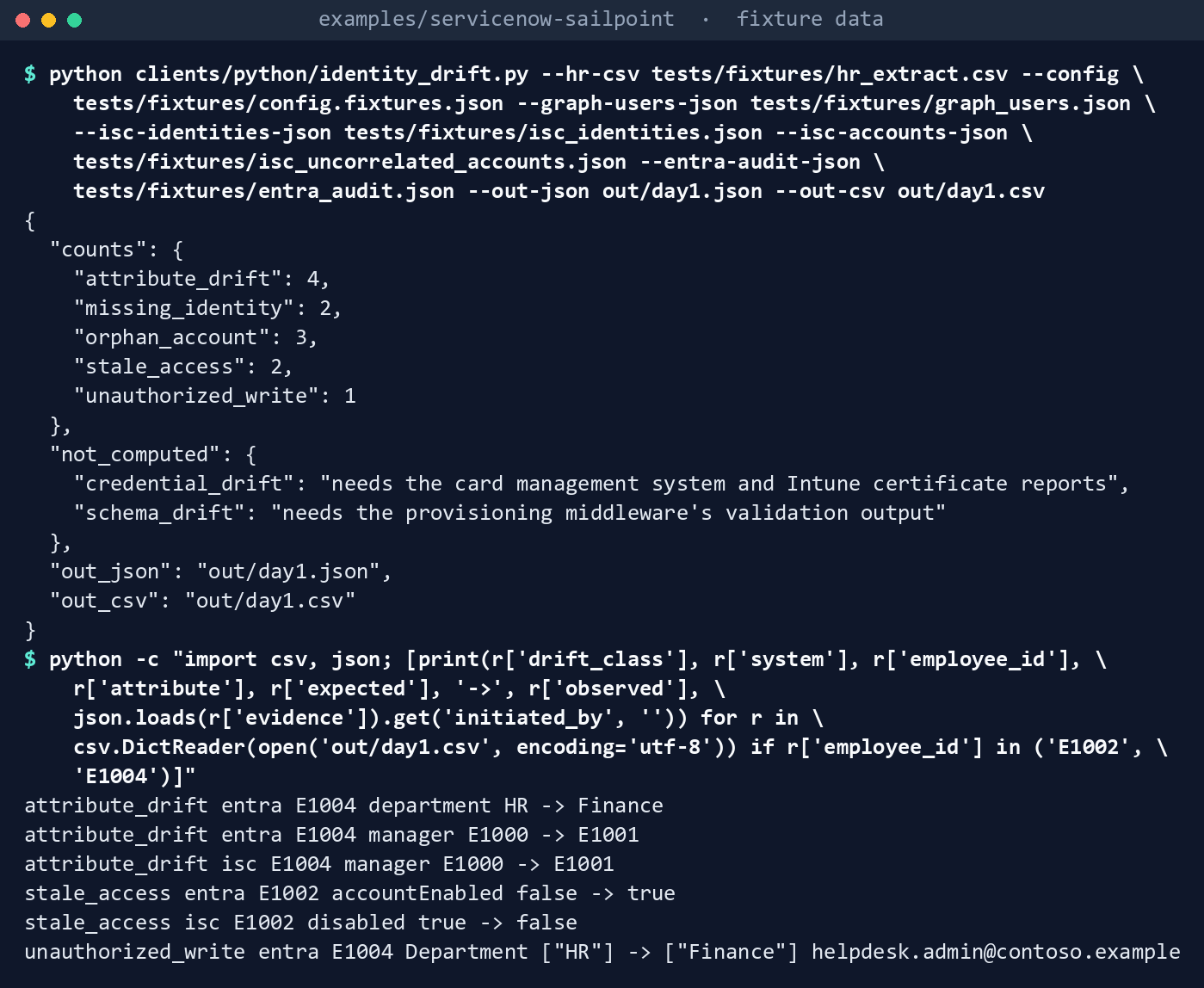
What the terminal shows, run on the kit’s fixtures (the same output as text) The summary counts
attribute_drift 4,missing_identity 2,orphan_account 3,stale_access 2,unauthorized_write 1, and lists credential and schema drift undernot_computed. In the rows fromout/day1.csv, Erin’s Entra ID department is Finance where HR says HR, and the audit shows a help desk administrator made that change. Carol, terminated, is still enabled in Entra ID and in Active Directory.Day two, after HR’s correction:
python clients/python/identity_drift.py --hr-csv tests/fixtures/hr_extract_day2.csv --config tests/fixtures/config.fixtures.json --graph-users-json tests/fixtures/graph_users.json --isc-identities-json tests/fixtures/isc_identities.json --isc-accounts-json tests/fixtures/isc_uncorrelated_accounts.json --entra-audit-json tests/fixtures/entra_audit.json --out-json out/day2.json --out-csv out/day2.csv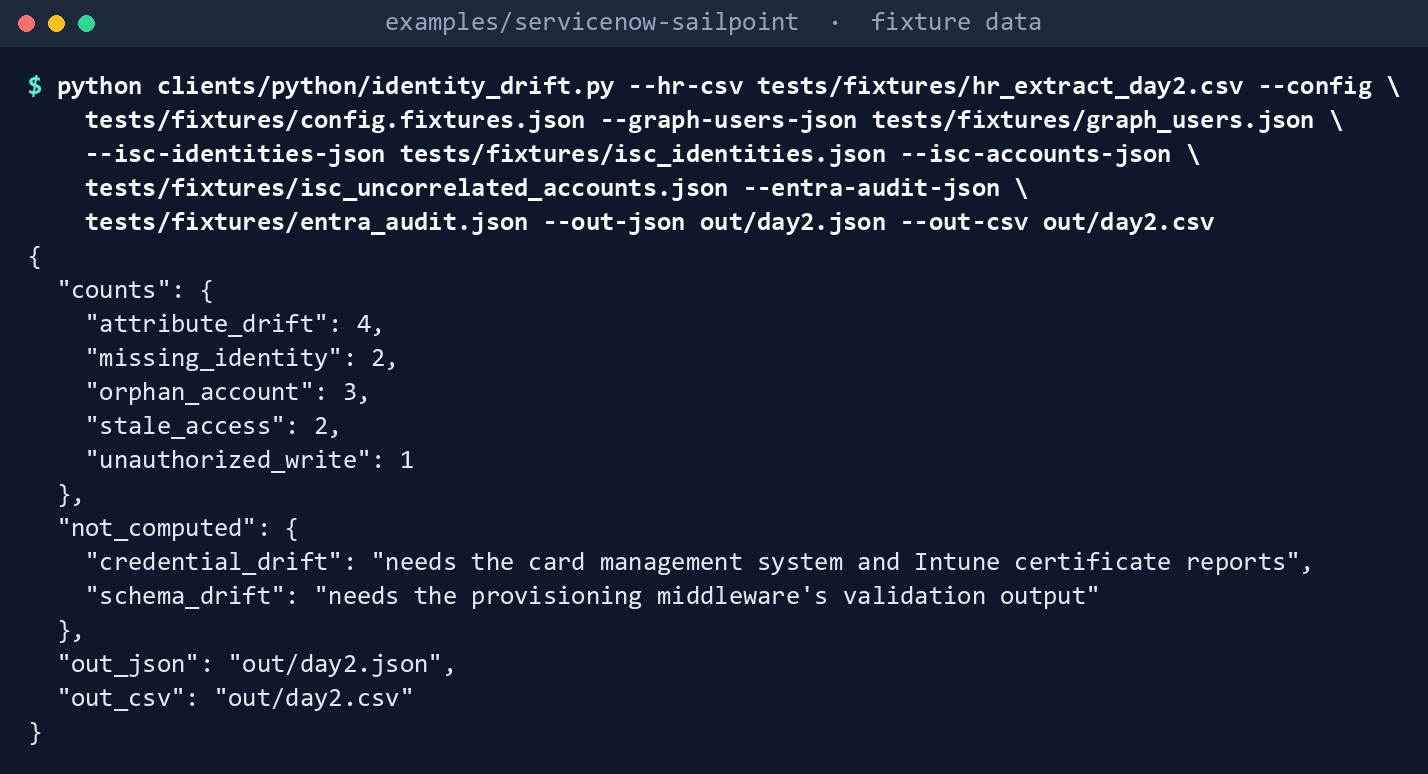
What the terminal shows, run on the kit’s fixtures (the same output as text) The same counts. The totals hide what moved.
Compare the two days:
python clients/python/drift_compare.py --previous out/day1.json --current out/day2.json1 new, 11 persisting, 1 resolved new 6456e1f12a60e6be attribute_drift isc E1004 department: expected 'Finance', observed 'HR' resolved 1f0e34ebf049f163 attribute_drift entra E1004 department: expected 'HR', observed 'Finance' Resolved findings are leads for the re-read; their records close only on reread_verification.py.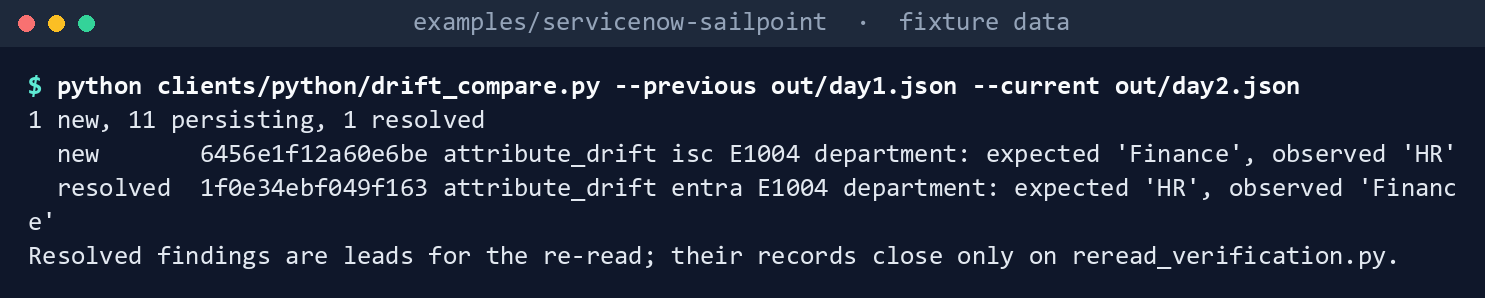
What the terminal shows, run on the kit’s fixtures (the same output as text) Entra ID now matches HR, so that finding is resolved; ISC still holds the old value until the next aggregation, so a new one opens. The unauthorized write persists: HR agreeing afterwards doesn’t make the write authorized, and a person decides that finding.
See the refusal. Run day two without the audit, then compare:
python clients/python/identity_drift.py --hr-csv tests/fixtures/hr_extract_day2.csv --config tests/fixtures/config.fixtures.json --graph-users-json tests/fixtures/graph_users.json --isc-identities-json tests/fixtures/isc_identities.json --isc-accounts-json tests/fixtures/isc_uncorrelated_accounts.json --out-json out/day2-noaudit.json --out-csv out/day2-noaudit.csv
python clients/python/drift_compare.py --previous out/day1.json --current out/day2-noaudit.json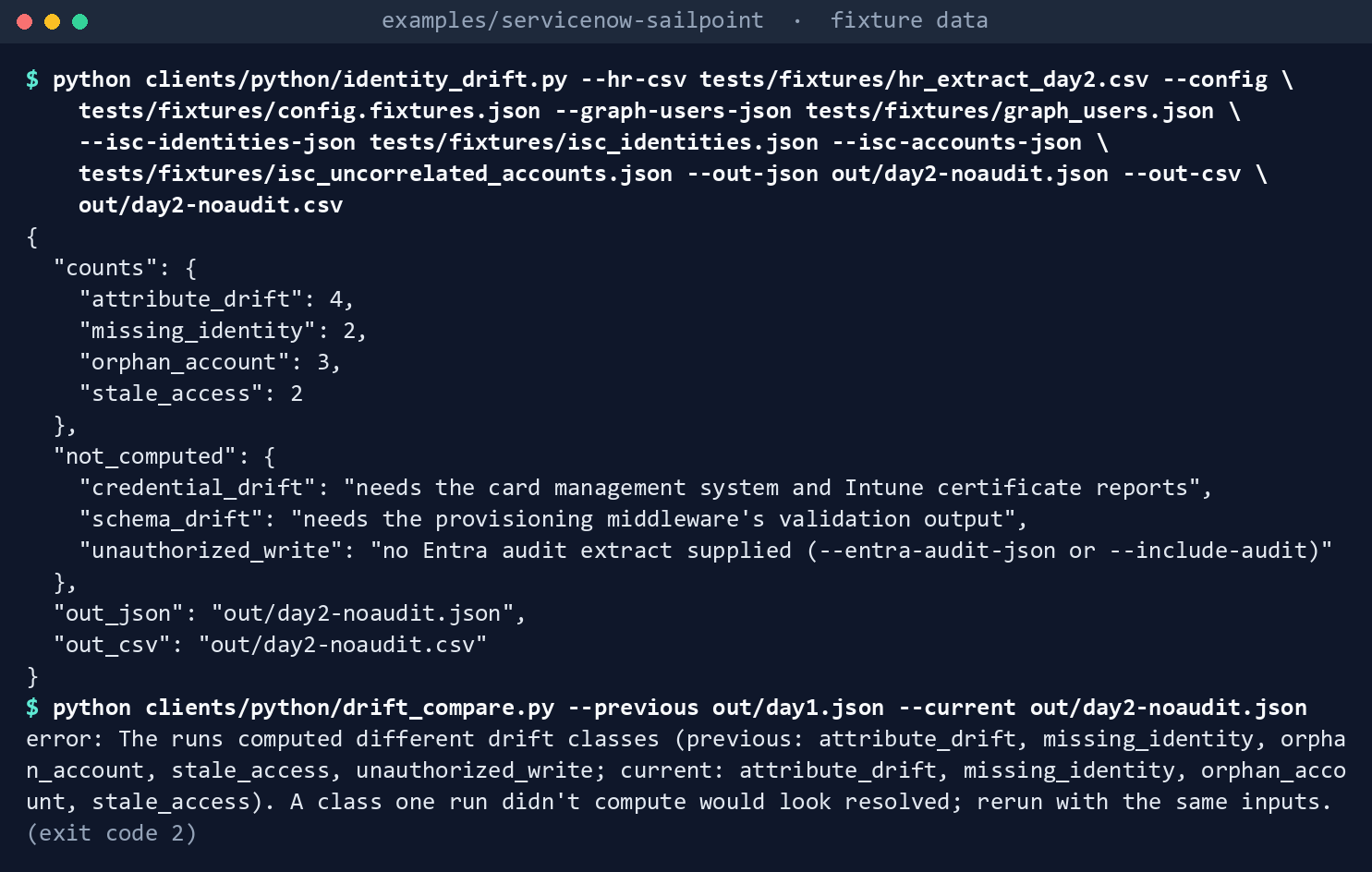
What the terminal shows, run on the kit’s fixtures (the same output as text) The first command lists
unauthorized_writeundernot_computed. The second printserror: The runs computed different drift classes (...)and exits 2: without the refusal, the unauthorized write would have shown as resolved.
Lab 2: a test tenant and a SailPoint sandbox
Not run by the authors. Use a test Entra tenant in the worldwide or GCC cloud and a SailPoint sandbox, with synthetic HR data like the fixtures, never production. Work in examples/servicenow-sailpoint. You’ll replace: <graph-permissions> and <isc-scopes> (what the app registration and the API client hold, comma-separated), <tenant> (your sandbox tenant’s name), <reader-client-id> and <reader-client-secret> (the sandbox API client), <graph-tenant-id>, <graph-client-id> and <graph-cert.pem> (the test app registration and the PEM file holding its certificate and key), <employee-id-attribute> (from Chapter 03‘s Lab 2), <hr-source-name> (the sandbox’s HR source), <provisioning-app-id> (the appId allowed to write HR-mastered attributes), <active-employee-id>, <terminated-employee-id> and <mover-employee-id> (three test users’ employeeId values), <active-user-department> and <terminated-user-department> (the first two users’ departments in Entra ID), <department-not-in-entra> (any other department, for the third user), <new-department> (step 4), and <since-day1> and <since-day2> (midnight UTC on the day before each run, for example 2026-10-31T00:00:00Z).
Every command in this lab, in order, from examples/servicenow-sailpoint. Each step below says what it does and what to look for.
# Step 1: Grant the reads
python clients/python/kit_calls.py --task drift --system graph --granted "<graph-permissions>"
python clients/python/kit_calls.py --task drift --system isc --granted "<isc-scopes>"

# Step 2: Write a synthetic HR extract
cat > hr_synthetic.csv <<'EOF'
employeeId,status,department,managerEmployeeId,displayName,email
<active-employee-id>,Active,<active-user-department>,,Test User One,
<terminated-employee-id>,Terminated,<terminated-user-department>,,Test User Two,
<mover-employee-id>,Active,<department-not-in-entra>,,Test User Three,
EOF

# Step 3: Run the client live
export SAILPOINT_API_BASE="https://<tenant>.api.identitynow.com"
export SAILPOINT_CLIENT_ID="<reader-client-id>"
export SAILPOINT_CLIENT_SECRET="<reader-client-secret>"
export GRAPH_TENANT_ID="<graph-tenant-id>"
export GRAPH_CLIENT_ID="<graph-client-id>"
export GRAPH_CERT_PATH="<graph-cert.pem>"
export GRAPH_CLOUD="Global"
export ISC_EMPLOYEE_ID_ATTRIBUTE="<employee-id-attribute>"
export ISC_AUTHORITATIVE_SOURCES="<hr-source-name>"
export ALLOWED_WRITER_APP_IDS="<provisioning-app-id>"
python clients/python/identity_drift.py --hr-csv hr_synthetic.csv --config config/config.example.json --include-audit "<since-day1>" --out-json out/day1.json --out-csv out/day1.csv

# Step 4: Run it again the next day
sed -i 's/^<mover-employee-id>,Active,[^,]*,/<mover-employee-id>,Active,<new-department>,/' hr_synthetic.csv
python clients/python/identity_drift.py --hr-csv hr_synthetic.csv --config config/config.example.json --include-audit "<since-day2>" --out-json out/day2.json --out-csv out/day2.csv
python clients/python/drift_compare.py --previous out/day1.json --current out/day2.json

# Step 5: Back it out
rm -rf out hr_synthetic.csv
unset SAILPOINT_API_BASE SAILPOINT_CLIENT_ID SAILPOINT_CLIENT_SECRET GRAPH_TENANT_ID GRAPH_CLIENT_ID GRAPH_CERT_PATH GRAPH_CLOUD ISC_EMPLOYEE_ID_ATTRIBUTE ISC_AUTHORITATIVE_SOURCES ALLOWED_WRITER_APP_IDS
Grant the reads from Chapter 03:
User.Read.All(andAuditLog.Read.Allif you read the audit) on a test app registration with a certificate;sp:search:readandidn:accounts:readon a sandbox API client. Check both:python clients/python/kit_calls.py --task drift --system graph --granted "<graph-permissions>" python clients/python/kit_calls.py --task drift --system isc --granted "<isc-scopes>"Write a synthetic HR extract whose
employeeIdvalues match test users, with one terminated user still enabled and one department that differs. This writeshr_synthetic.csvwith three rows: an active user, a terminated user who is still enabled, and an active user whose department differs from the one in Entra ID.cat > hr_synthetic.csv <<'EOF' employeeId,status,department,managerEmployeeId,displayName,email <active-employee-id>,Active,<active-user-department>,,Test User One, <terminated-employee-id>,Terminated,<terminated-user-department>,,Test User Two, <mover-employee-id>,Active,<department-not-in-entra>,,Test User Three, EOFRun the client live with the kit’s example configuration and your values in environment variables (they win over the file), reading the audit since yesterday. Certificate authentication needs the optional
cryptographypackage.export SAILPOINT_API_BASE="https://<tenant>.api.identitynow.com" export SAILPOINT_CLIENT_ID="<reader-client-id>" export SAILPOINT_CLIENT_SECRET="<reader-client-secret>" export GRAPH_TENANT_ID="<graph-tenant-id>" export GRAPH_CLIENT_ID="<graph-client-id>" export GRAPH_CERT_PATH="<graph-cert.pem>" export GRAPH_CLOUD="Global" export ISC_EMPLOYEE_ID_ATTRIBUTE="<employee-id-attribute>" export ISC_AUTHORITATIVE_SOURCES="<hr-source-name>" export ALLOWED_WRITER_APP_IDS="<provisioning-app-id>" python clients/python/identity_drift.py --hr-csv hr_synthetic.csv --config config/config.example.json --include-audit "<since-day1>" --out-json out/day1.json --out-csv out/day1.csvCompare its counts with a hand count of the extract (the implementation example’s proof step 4). If Graph rejects
$expand=managerunder the application permission, record it (verify list, item 14).Run it again the next day after changing one department in the test HR extract, and compare the runs. The first command changes the third user’s department in
hr_synthetic.csv.sed -i 's/^<mover-employee-id>,Active,[^,]*,/<mover-employee-id>,Active,<new-department>,/' hr_synthetic.csv python clients/python/identity_drift.py --hr-csv hr_synthetic.csv --config config/config.example.json --include-audit "<since-day2>" --out-json out/day2.json --out-csv out/day2.csv python clients/python/drift_compare.py --previous out/day1.json --current out/day2.jsonPush nothing: these commands leave out
--push-to-servicenow, and that flag without--applyonly lists what it would send.Back it out. Delete
out, the synthetic extract, the app registration’s permissions and certificate, and the sandbox API client:rm -rf out hr_synthetic.csv unset SAILPOINT_API_BASE SAILPOINT_CLIENT_ID SAILPOINT_CLIENT_SECRET GRAPH_TENANT_ID GRAPH_CLIENT_ID GRAPH_CERT_PATH GRAPH_CLOUD ISC_EMPLOYEE_ID_ATTRIBUTE ISC_AUTHORITATIVE_SOURCES ALLOWED_WRITER_APP_IDS
The verified facts
| Item | Value | Source |
|---|---|---|
| List users | GET /v1.0/users, User.Read.All (application) |
1 |
| Manager | GET /users?$expand=manager documented; application permissions not supported on GET /users/{id}/manager |
2 |
| Directory audit | GET /v1.0/auditLogs/directoryAudits, AuditLog.Read.All (application); available in US Government L4 and L5 |
3 |
| ISC identities | POST /v3/search, identities index, sp:search:read; searchAfter past 10,000 |
4 |
| Uncorrelated accounts | GET /v3/accounts with the uncorrelated filter (eq), idn:accounts:read; limit at most 250 |
5 |
| GCC endpoints | Microsoft 365 GCC uses the worldwide graph.microsoft.com |
6 |
What couldn’t be verified
$expand=managerunder an application permission. Verify list, item 14.- Which ISC identity attribute holds the HR key (
employeeNumberorattributes.employeeId). Verify list, item 9. - The Entra audit’s property display names the client watches (
Department,EmployeeIdand others). Verify list, item 15.
Federal requirements and evidence
| What the output proves | Requirement it supports | KSI | Who keeps it |
|---|---|---|---|
| Every active HR record has its accounts, every terminated one has none enabled, and every enabled account has a person | NIST SP 800-53 AC-2 (account management) and AC-2(3) (disable accounts) at Moderate;7 Book 03’s leaver and orphan measures | KSI-IAM-SUS; KSI-IAM-AAM | The drift JSON and CSV of each run |
| Drift is measured on a schedule, and what changed between runs is reported | CA-7 (continuous monitoring) and SI-4 at Moderate8 | KSI-MLA-EVC; KSI-MLA-RVL | The comparison output, kept with each run |
| What wasn’t measured is said, not implied | CA-7; Book 13’s detection coverage measure | KSI-MLA-EVC | not_computed in every run; the comparison’s refusal |
| Lab 1, step 1: the reconciliation and the comparison hold, tested before a change merges | SA-11 (developer testing) at Moderate9 | KSI-SCR-MIT | The pytest tests/python/test_identity_drift.py tests/python/test_drift_compare.py run, in the pull request’s checks |
| Lab 1, step 2: one run finds each drift by class, with expected and observed values and, for a write, who made it | AC-2; AC-2(3); SI-4 | KSI-IAM-SUS; KSI-IAM-AAM; KSI-MLA-RVL | identity_drift.py --out-json out/day1.json --out-csv out/day1.csv; the fixture run’s files are deleted, a live run’s are kept |
| Lab 1, step 3: a second run on the next day’s HR extract | CA-7 | KSI-MLA-EVC | out/day2.json and out/day2.csv |
| Lab 1, step 4: what was resolved, what persists and what is new between the runs | CA-7; SI-4 | KSI-MLA-EVC; KSI-MLA-RVL | The drift_compare.py --previous --current output, kept with the second run |
| Lab 1, step 5: a run without the audit says so, and the comparison refuses to call the write resolved | CA-7 | KSI-MLA-EVC | not_computed in out/day2-noaudit.json; the comparison’s exit 2 |
| Lab 2, step 1: the Graph permissions and ISC scopes are reads only | AC-6 (least privilege) and AC-2 at Moderate10 | KSI-IAM-ELP; KSI-IAM-SNU | The two kit_calls.py --granted outputs, kept with the approvals |
| Lab 2, step 2: the test uses a synthetic HR extract, never real HR records (design guidance) | None | None | Nobody; hr_synthetic.csv is deleted in step 5 |
| Lab 2, step 3: a live run finds the terminated user still enabled and the department that differs | AC-2; AC-2(3); SI-4 | KSI-IAM-SUS; KSI-IAM-AAM; KSI-MLA-RVL | out/day1.json and out/day1.csv from the live run, with the hand count of the extract |
| Lab 2, step 4: the next day’s live run, compared with the first; nothing is pushed | CA-7; SI-4 | KSI-MLA-EVC; KSI-MLA-RVL | out/day2.json, out/day2.csv and the drift_compare.py output |
| Lab 2, step 5: no test output, extract, permission, certificate or API client is left | AC-2 | KSI-IAM-SNU | The app registration and API client lists; rm -rf out hr_synthetic.csv |
Not run in the labs: identity_drift.py --push-to-servicenow --apply posts each finding to the Scripted REST resource |
CM-3 (configuration change control) at Moderate11 | KSI-CMT-LMC | The u_identity_finding records (Chapter 01) |
The KSI column names the FedRAMP 20x Key Security Indicators whose related SP 800-53 controls include the row’s control.12 KSIs are indicators for cloud service providers: the agency authorizes its own system and lines its own evidence up with what its providers report against them; it doesn’t report KSIs itself.
Dangers
| Danger | What happens | The guard |
|---|---|---|
| A class one run skipped looks resolved | Unauthorized writes “disappear” the night the audit read fails | drift_compare.py refuses runs with different computed classes |
| A resolved finding closes the record | Drift that left the measurement, not the estate, is called fixed | Resolved findings are leads; only the re-read closes |
| Pushing every finding every night | The tracker fills with repeats | Push only the comparison’s new findings; the de-duplication counts the rest |
| The first month’s burst read as failure | The pipeline is turned off before it is tuned | Book 03 expects it; triage by class and severity |
| A guest or the HR source’s own accounts flagged | Noise hides real drift | Guests are excluded; ISC_AUTHORITATIVE_SOURCES and ALLOWED_WRITER_APP_IDS |
| An HR extract with names in a shared folder | Personal data spreads | The run folder is evidence; keep it where the HR data is allowed, and delete lab copies |
Checklist
Footnotes
Microsoft Learn, “List users,” permissions, https://learn.microsoft.com/graph/api/user-list?view=graph-rest-1.0 (read November 1, 2026).↩︎
Microsoft Learn, “List manager,” permissions and HTTP request, https://learn.microsoft.com/graph/api/user-list-manager?view=graph-rest-1.0 (read November 1, 2026).↩︎
Microsoft Learn, “List directoryAudits,” https://learn.microsoft.com/graph/api/directoryaudit-list?view=graph-rest-1.0 (read November 1, 2026).↩︎
SailPoint, Identity Security Cloud OpenAPI specification, v3,
searchPost, https://github.com/sailpoint-oss/api-specs/blob/main/idn/v3/paths/search-post.yaml (read November 1, 2026).↩︎SailPoint, Identity Security Cloud OpenAPI specification, v3,
listAccountsand thelimitparameter, https://github.com/sailpoint-oss/api-specs/blob/main/idn/v3/paths/accounts.yaml and https://github.com/sailpoint-oss/api-specs/blob/main/idn/v3/parameters/limit.yaml (read November 1, 2026).↩︎Microsoft Learn, “Microsoft Graph national cloud deployments,” https://learn.microsoft.com/graph/deployments (read November 1, 2026).↩︎
National Institute of Standards and Technology, SP 800-53B Moderate baseline, release 5.2.0 OSCAL profile (includes AC-2, AC-2(3), AC-6, CA-7, CM-3, SA-11 and SI-4), https://github.com/usnistgov/oscal-content/blob/main/nist.gov/SP800-53/rev5/json/NIST_SP-800-53_rev5_MODERATE-baseline_profile.json (read November 1, 2026).↩︎
National Institute of Standards and Technology, SP 800-53B Moderate baseline, release 5.2.0 OSCAL profile (includes AC-2, AC-2(3), AC-6, CA-7, CM-3, SA-11 and SI-4), https://github.com/usnistgov/oscal-content/blob/main/nist.gov/SP800-53/rev5/json/NIST_SP-800-53_rev5_MODERATE-baseline_profile.json (read November 1, 2026).↩︎
National Institute of Standards and Technology, SP 800-53B Moderate baseline, release 5.2.0 OSCAL profile (includes AC-2, AC-2(3), AC-6, CA-7, CM-3, SA-11 and SI-4), https://github.com/usnistgov/oscal-content/blob/main/nist.gov/SP800-53/rev5/json/NIST_SP-800-53_rev5_MODERATE-baseline_profile.json (read November 1, 2026).↩︎
National Institute of Standards and Technology, SP 800-53B Moderate baseline, release 5.2.0 OSCAL profile (includes AC-2, AC-2(3), AC-6, CA-7, CM-3, SA-11 and SI-4), https://github.com/usnistgov/oscal-content/blob/main/nist.gov/SP800-53/rev5/json/NIST_SP-800-53_rev5_MODERATE-baseline_profile.json (read November 1, 2026).↩︎
National Institute of Standards and Technology, SP 800-53B Moderate baseline, release 5.2.0 OSCAL profile (includes AC-2, AC-2(3), AC-6, CA-7, CM-3, SA-11 and SI-4), https://github.com/usnistgov/oscal-content/blob/main/nist.gov/SP800-53/rev5/json/NIST_SP-800-53_rev5_MODERATE-baseline_profile.json (read November 1, 2026).↩︎
FedRAMP, “Key Security Indicators,” FedRAMP Consolidated Rules for 2026, indicator titles and “Related SP 800-53 Controls,” https://www.fedramp.gov/2026/reference/key-security-indicators/ (read November 2, 2026).↩︎