Federal Modernization Workbook
Chapter 06 — Separation Timing from the Logs
“The leaver workflow ran” is a claim. “Blocked 15 minutes after the effective time, card revoked 11 hours after” is evidence.
The measurement behind the guide’s Gate 6 and plan tasks I4.1, I4.2 and I4.6: the leaver blocks first, revokes in parallel, reconciles and disposes last, and the intervals are measured. You start with Learn’s directory audit activities, the Lifecycle Workflows user processing results and the catch-up window. Then you use examples/hr-lifecycle for what they leave to you: for every leaver, the separation-to-block and separation-to-revocation intervals and the exceptions, ST-01 to ST-09. Lab 1 runs on a laptop with no tenant; Lab 2 uses a test tenant.
Jump to a slide (19)
Deck · Narrated deck (about 11 minutes, captions) · Script · Captions. Recorded on November 2, 2026 from the approved chapter.
Goal and audience
Goal. By the end of this chapter you can produce, from the logs alone, each leaver’s separation-to-block and separation-to-revocation intervals, the period’s 50th and 90th percentiles against the agency’s thresholds, and the list of separations that need someone’s attention. You can say, for each rule, whether it rests on Learn, on FIPS 201-3 or on the program’s design.
Audience. Developers who build the leaver’s evidence, the security team that owns the leaver path end to end, and the ISSO who reports PS-4. You should read Python. You don’t need a tenant until Lab 2.
Why this gate needs code
The guide’s Gate 6 configures the leaver in Book 03’s order (Chapter 09, The canonical leaver sequence) and asks for the timing to be proved. Book 03’s Chapter 11 defines the two intervals; Chapter 08 explains why the tenant schedule belongs in them. This chapter doesn’t restate them. It computes them, because no Microsoft report does: Lifecycle Workflows records that a run completed, the audit log records when the account was disabled, and the card system and Intune record the rest, each in its own place.
Two pieces already exist. The leaver workflow’s order, Disable user account, then Revoke all refresh tokens for user, then the custom task, is checked by lcwext.py check-workflow, and the custom task extension is built for the card revocation, and retiring the devices in Intune follows the same pattern and is still to build, in Book 19, Chapter 05. The list of privileged role holders this chapter reads comes from Building Privileged Access, Chapter 01. This chapter measures what that order produced.
Which cloud, for this read
The audit log and the user processing results are read from Microsoft Graph: graph.microsoft.com for GCC, graph.microsoft.us and dod-graph.microsoft.us for GCC High and DoD.1 Both APIs are listed for US Government L4 and L5.2 3 Lifecycle Workflows is available in Azure for US Government.4 The card system’s and Intune’s records come as exports; this code doesn’t read either service.
Start with Microsoft’s procedure
What Microsoft gives you
- The audit trail. Learn’s audit activity list names, in Core Directory’s UserManagement category, Disable account, Enable account, Delete user and Update StsRefreshTokenValidFrom Timestamp.5 The directoryAudits API returns each with
activityDateTime,result,initiatedByandtargetResources.6 - The workflow’s own record. Each
userProcessingResulthasprocessingStatus,scheduledDateTime,startedDateTime,completedDateTime,failedTasksCountandworkflowExecutionType(scheduled,onDemand), with the user assubject.7 8 - The rules that move the timing. A scheduled workflow is evaluated every three hours by default, or at the interval set in the workflow settings. It still processes a user whose trigger date passed no more than three days ago, the catch-up window; past that, the user isn’t processed. An on-demand run ignores the execution conditions.9 10
- A limit of the disable task. Disable user account doesn’t support users with Microsoft Entra role assignments, or members or owners of role-assignable groups.11
What it leaves to you
Each row is pinned by a test in tests/test_credentials_separation_drift.py.
| What Learn gives | Why it matters | What examples/hr-lifecycle adds |
|---|---|---|
| The disable and the session update as separate audit records | A disabled account with live sessions isn’t blocked | The block is the later of the two; with either missing, no block (test_separation_intervals_and_summary, test_separation_rules) |
A run’s completedDateTime |
It says the workflow finished, not when access stopped, and nothing about the card or the devices | The revocation is the last of the block, the card system’s revocation and the device actions (test_separation_intervals_and_summary) |
| The three-day catch-up window, in prose | A separation entered late is silently never processed | ST-03: a Finding past the window, a Warn when an on-demand run caught it (test_separation_rules) |
| Failed audit records in the same log | A failed disable looks like a disable | Only success records count (test_a_failed_audit_record_is_not_a_block) |
| The disable task’s role-assignment limit | A privileged leaver’s disable task can’t run | ST-06 names every privileged leaver for the verified path (test_separation_rules) |
failedTasksCount |
A failed revocation becomes a silent gap | ST-07 sends it to the exception queue (test_separation_rules) |
| An Enable account record | A late re-send from the pipeline undoes the disable | ST-05, unless HR cancelled the separation (test_a_cancelled_separation_isnt_measured_or_flagged) |
The verdict. Keep Learn’s records as the only clock: HR’s effective time starts it, the audit log and the systems’ own records stop it. The code computes; it never runs a workflow or changes an account.
The code: what examples/hr-lifecycle adds
python/separation_timing.py measure reads the exports graph_export.py --task separation-read writes, the HR separations, the card system’s revocations, Intune’s device actions and the privileged role holders, and writes intervals.csv, summary.json and findings.json with a manifest. config/separation.json holds the thresholds and the activity names.
The intervals
For each separation whose effective time has passed, the code takes the user’s successful audit records from 24 hours before the effective time (the configured lookback) and finds:
- blocked: the later of the first Disable account and the first Update StsRefreshTokenValidFrom Timestamp;
- revoked: the latest of the block, the card system’s revocation and the last completed device action;
- separation-to-block and separation-to-revocation: hours from the HR effective time to each.
Learn lists Update StsRefreshTokenValidFrom Timestamp but doesn’t say that the Revoke all refresh tokens for user task, or the Graph revoke call, is what writes it. Lab 2 confirms it in a test tenant before the code is trusted (verification log, row 6). A cancelled separation is listed and not measured.
The rules
| Rule | Severity | What it flags | Source |
|---|---|---|---|
| ST-01 | Finding | Separation-to-block over the threshold | PS-4’s organization-defined period; the sample is 4 hours (blockThresholdHours) |
| ST-02 | Finding | No block: the disable or the session revocation is missing, or no account matches the HR key | Book 03, Chapter 09’s order |
| ST-03 | Finding; Warn | Entered more than three days after the effective time with no on-demand run (Finding), or caught by one (Warn) | Learn’s catch-up window12 |
| ST-04 | Finding | An uncollected card revoked more than 18 hours after notice, or with no times recorded | FIPS 201-3, as carried by Book 03, Chapter 09 |
| ST-05 | Finding | Re-enabled after the disable with no cancellation in HR | The guide’s Gate 1 and Gate 6: the pipeline sends active false first |
| ST-06 | Warn | A privileged role holder separated | Learn: the disable task doesn’t support role holders13 |
| ST-07 | Finding | A leaver run that failed, or has failed tasks | Design guidance: route to a high-priority exception |
| ST-08 | Finding | The user deleted before the device retire or wipe completed | Book 03, Chapter 08: dispose last |
| ST-09 | Finding | Separation-to-revocation over the threshold | PS-4b; the sample is 24 hours (revocationThresholdHours) |
The thresholds are samples. The agency sets PS-4’s period; the tenant schedule’s interval is part of it, so set the threshold and the schedule together (design guidance).
The read needs two permissions, each the least-privileged for its call:
| Call | Least-privileged permission | Delegated role |
|---|---|---|
| List directoryAudits | AuditLog.Read.All14 |
Reports Reader, Security Reader or Security Administrator |
| List a workflow’s userProcessingResults | LifecycleWorkflows-Reports.Read.All15 |
Global Reader or Lifecycle Workflows Administrator |
The tests
Four tests cover this chapter: the intervals and the summary, every rule on the fixture, a failed audit record that isn’t a block, and a cancelled separation that isn’t flagged. With the other chapters’, 57 pytest tests pass under Python 3.10 or later, with no package, tenant or network.
The commands below run the example against fictional leavers, audit records and card and device exports. They show what the code does, not that a tenant’s logs have the same shapes. Review the code and run Lab 2 in a test tenant before it reports a real leaver.
Lab 1: fixtures, no tenant
You need Python 3.10 or later. Work in examples/hr-lifecycle.
Every command in this lab, in order, from examples/hr-lifecycle. Each step below says what it does and what to look for.
# Step 1: List the calls and permissions
python python/graph_export.py --task separation-read --list

# Step 2: Measure the fictional leavers
python python/separation_timing.py measure --separations tests/fixtures/ch06/hr-separations.csv --users tests/fixtures/ch06/leaver-users.json --audits tests/fixtures/ch06/separation-audits.json --results tests/fixtures/ch06/leaver-results.json --cards tests/fixtures/ch06/card-revocations.csv --devices tests/fixtures/ch06/device-actions.csv --role-holders tests/fixtures/ch06/role-holders.csv --config config/separation.json --as-of 2026-11-01T12:00:00Z --cloud gcc --out out/ch06

# Step 3: Read the findings
python -c "import json; [print(r['Rule'], r['Severity'], r['Object']) for r in json.load(open('out/ch06/findings.json'))]"

# Step 4: Read the intervals
cut -d, -f1,7,8,10 out/ch06/intervals.csv

# Step 5: Run the tests
python -m pytest tests -q

# After the steps
rm -rf out
List the calls and permissions:
python python/graph_export.py --task separation-read --listTask separation-read: AuditLog.Read.All, LifecycleWorkflows-Reports.Read.All GET /auditLogs/directoryAudits [AuditLog.Read.All] GET /identityGovernance/lifecycleWorkflows/workflows/{workflowId}/userProcessingResults [LifecycleWorkflows-Reports.Read.All]
What the terminal shows, run on the kit’s fixtures (the same output as text) Measure the fictional leavers:
python python/separation_timing.py measure --separations tests/fixtures/ch06/hr-separations.csv --users tests/fixtures/ch06/leaver-users.json --audits tests/fixtures/ch06/separation-audits.json --results tests/fixtures/ch06/leaver-results.json --cards tests/fixtures/ch06/card-revocations.csv --devices tests/fixtures/ch06/device-actions.csv --role-holders tests/fixtures/ch06/role-holders.csv --config config/separation.json --as-of 2026-11-01T12:00:00Z --cloud gcc --out out/ch06Leavers: 7 separated, 1 cancelled, 1 not blocked Separation-to-block hours: p50 0.25, p90 5.52, max 84.68 (threshold 4) Separation-to-revocation hours: p50 11.0, p90 110.0, max 395.0 (threshold 24) Separation: 10 Finding, 2 Warn, 0 Info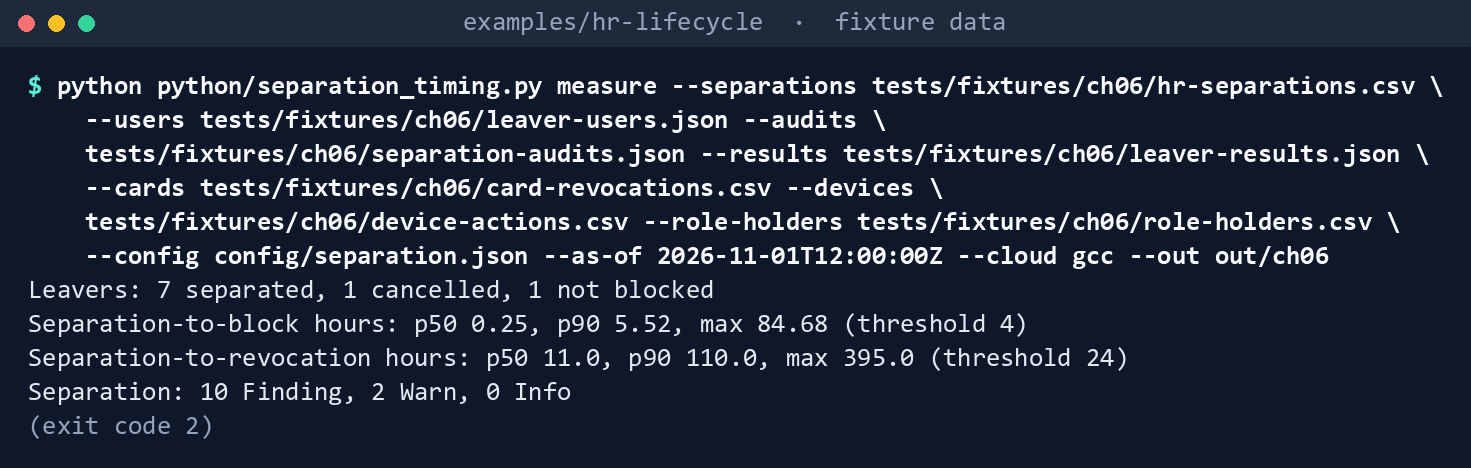
What the terminal shows, run on the kit’s fixtures (the same output as text) The exit code is 2. A ninth separation, effective November 5, isn’t measured yet.
Read the findings:
python -c "import json; [print(r['Rule'], r['Severity'], r['Object']) for r in json.load(open('out/ch06/findings.json'))]"ST-01 Finding casey.ng@contoso.example ST-01 Finding emery.sol@contoso.example ST-02 Finding drew.park@contoso.example ST-03 Finding drew.park@contoso.example ST-04 Finding casey.ng@contoso.example ST-05 Finding harper.vu@contoso.example ST-07 Finding harper.vu@contoso.example ST-08 Finding blake.ito@contoso.example ST-09 Finding emery.sol@contoso.example ST-09 Finding blake.ito@contoso.example ST-03 Warn emery.sol@contoso.example ST-06 Warn kai.oto@contoso.example![Terminal window showing python -c 'import json; [print(r['Rule'], r['Severity'], r['Object']) for r i… and what it printed](captures/06-3.png)
What the terminal shows, run on the kit’s fixtures (the same output as text) Riley blocks 15 minutes after the effective time. Casey blocks after 5.52 hours, over the 4-hour threshold, and Casey’s uncollected card was revoked 23 hours after notice. Drew’s separation was entered 6.8 days late, past the catch-up window, with no on-demand run, and the only disable in the log failed, so Drew was never blocked. Emery’s was entered 3.5 days late and caught on demand, but the block came 84.68 hours after the effective time. The pipeline re-enabled Harper two days after the disable, and Harper’s leaver run had a failed task. Kai holds a privileged role, and the security team disabled the account by hand. Blake was deleted on October 20, before the device retire completed on October 22.
Read the intervals:
cut -d, -f1,7,8,10 out/ch06/intervals.csvPersonNumber,separationToBlockHours,separationToRevocationHours,status 100301,0.25,11.0,measured 100302,5.52,21.0,measured 100303,,,not blocked 100304,84.68,110.0,measured 100305,0.1,10.0,measured 100306,0.35,9.0,measured 100307,,,cancelled 100308,0.1,395.0,measured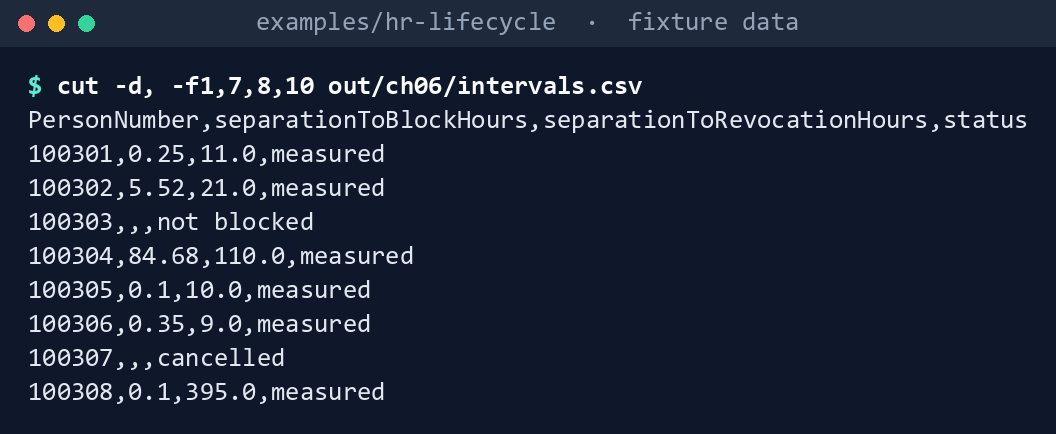
What the terminal shows, run on the kit’s fixtures (the same output as text) Run the tests:
python -m pytest tests -q
What the terminal shows, run on the kit’s fixtures (the same output as text)
Expected result: 57 passed. Delete out either way: Chapter 07’s first step measures the separations again into out/ch06, and the tool refuses to write into a folder that already holds a run.
rm -rf out
Lab 2: test tenant
Not run by the authors. Use a test tenant with Lifecycle Workflows licensed and a leaver workflow in Book 03’s order, never production. Work in examples/hr-lifecycle. You’ll need my-leaver-users.json: the two test users, in the layout of tests/fixtures/ch06/leaver-users.json. You’ll replace: <graph-token> (a bearer token for graph.microsoft.com issued to the reader app), <leaver-workflow-id> (the leaver workflow’s ID), <activity-name> (the activity the revoke task wrote, if it isn’t the expected one), <person-number-1> and <person-number-2> (the test users’ HR person numbers), <effective-1>, <effective-2>, <entered-1> and <entered-2> (each separation’s effective and entered times, such as 2026-11-01T14:00:00Z) and <now> (the current time, in the same form).
Every command in this lab, in order, from examples/hr-lifecycle. Each step below says what it does and what to look for.
# Step 3: Export the logs
export HRLC_GRAPH_TOKEN='<graph-token>'
python python/graph_export.py --task separation-read --cloud gcc --param since=2026-11-01T00:00:00Z --param workflowId=<leaver-workflow-id> --out exports/separation

# Step 3: Export the logs
python -c "import json; [print(r['activityDateTime'], r['activityDisplayName'], [t.get('userPrincipalName') for t in r['targetResources']], r['initiatedBy']) for r in json.load(open('exports/separation/separation-audits.json'))['value']]"

# Step 3: Export the logs
cp config/separation.json my-separation.json

# Step 3: Export the logs
python -c "import json; p='my-separation.json'; d=json.load(open(p)); d['sessionRevokeActivity'] = '<activity-name>'; json.dump(d, open(p, 'w'), indent=2)"

# Step 4: Measure
printf '%s\n' 'PersonNumber,EffectiveDateTime,EnteredDateTime,Cancelled,CardCollected' '<person-number-1>,<effective-1>,<entered-1>,N,Y' '<person-number-2>,<effective-2>,<entered-2>,N,Y' > my-separations.csv
head -n 1 tests/fixtures/ch06/card-revocations.csv > my-card-revocations.csv
head -n 1 tests/fixtures/ch06/device-actions.csv > my-device-actions.csv
head -n 1 tests/fixtures/ch06/role-holders.csv > my-role-holders.csv
python python/separation_timing.py measure --separations my-separations.csv --users my-leaver-users.json --audits exports/separation/separation-audits.json --results exports/separation/leaver-results.json --cards my-card-revocations.csv --devices my-device-actions.csv --role-holders my-role-holders.csv --config my-separation.json --as-of <now> --cloud gcc --out out/separation-test

# Step 5: Back it out
rm -rf exports out my-separation.json my-separations.csv my-card-revocations.csv my-device-actions.csv my-role-holders.csv
Register the reader app with a certificate, and grant the two application permissions from Lab 1, step 1, with admin consent, and nothing else.
Make a test leaver. Give a test user a leave date a few hours ahead, wait for the scheduled run, then run the leaver on demand for a second test user.
Export the logs. With a token in
HRLC_GRAPH_TOKEN:export HRLC_GRAPH_TOKEN='<graph-token>' python python/graph_export.py --task separation-read --cloud gcc --param since=2026-11-01T00:00:00Z --param workflowId=<leaver-workflow-id> --out exports/separationConfirm in
separation-audits.jsonthat the revoke task wrote Update StsRefreshTokenValidFrom Timestamp for the test user, and note which identity appears as the initiator. This prints each record’s time, activity, target and initiator:python -c "import json; [print(r['activityDateTime'], r['activityDisplayName'], [t.get('userPrincipalName') for t in r['targetResources']], r['initiatedBy']) for r in json.load(open('exports/separation/separation-audits.json'))['value']]"Make your copy of
config/separation.json:cp config/separation.json my-separation.jsonIf it wrote a different activity, change
sessionRevokeActivityin your copy and record it:python -c "import json; p='my-separation.json'; d=json.load(open(p)); d['sessionRevokeActivity'] = '<activity-name>'; json.dump(d, open(p, 'w'), indent=2)"Measure. Build a two-row separations file and an empty card and device export for the test users (and an empty list of role holders), and run
measurewith your copy of the settings:printf '%s\n' 'PersonNumber,EffectiveDateTime,EnteredDateTime,Cancelled,CardCollected' '<person-number-1>,<effective-1>,<entered-1>,N,Y' '<person-number-2>,<effective-2>,<entered-2>,N,Y' > my-separations.csv head -n 1 tests/fixtures/ch06/card-revocations.csv > my-card-revocations.csv head -n 1 tests/fixtures/ch06/device-actions.csv > my-device-actions.csv head -n 1 tests/fixtures/ch06/role-holders.csv > my-role-holders.csv python python/separation_timing.py measure --separations my-separations.csv --users my-leaver-users.json --audits exports/separation/separation-audits.json --results exports/separation/leaver-results.json --cards my-card-revocations.csv --devices my-device-actions.csv --role-holders my-role-holders.csv --config my-separation.json --as-of <now> --cloud gcc --out out/separation-testEach test user’s separation-to-block should include the wait for the tenant schedule.
Back it out. Remove the test users’ leave dates and re-enable or restore them if you need them, remove the permissions, and delete the reader app and its certificate. Then delete
exportsandout, with the lab’s files:rm -rf exports out my-separation.json my-separations.csv my-card-revocations.csv my-device-actions.csv my-role-holders.csv
Verified facts
| Item | Value | US Government clouds | Stage | Source |
|---|---|---|---|---|
| Audit activities | Disable account, Enable account, Delete user, Update StsRefreshTokenValidFrom Timestamp (Core Directory, UserManagement) | — | GA | 16 |
| List directoryAudits | AuditLog.Read.All; Reports Reader, Security Reader or Security Administrator; $filter on eq, ge, le, startswith |
L4 and L5 | v1.0 | 17 |
| List userProcessingResults | LifecycleWorkflows-Reports.Read.All; Global Reader or Lifecycle Workflows Administrator |
L4 and L5 | v1.0 | 18 |
| userProcessingResult | processingStatus, scheduledDateTime, startedDateTime, completedDateTime, failedTasksCount, workflowExecutionType (scheduled, onDemand), subject |
— | v1.0 | 19 |
| Schedule and catch-up | Evaluated every three hours by default, or the interval set; a user whose trigger date passed no more than three days ago is still processed; on-demand runs ignore the execution conditions | — | GA (the V2 time-based trigger, in preview, has no catch-up window) | 20 21 |
| Disable user account task | Doesn’t support users with role assignments, or members or owners of role-assignable groups | — | GA | 22 |
| Lifecycle Workflows | Available in Azure for US Government | Available | GA | 23 |
Places Learn says nothing or differs, recorded so a later edit doesn’t loosen the code:
- What records the revocation. Learn lists Update StsRefreshTokenValidFrom Timestamp but doesn’t tie it to the revoke task. Lab 2 confirms it.
- The preview trigger. Learn says the time-based attribute trigger V2, in preview, has no three-day catch-up window.24 ST-03 assumes the standard trigger; a workflow on V2 skips a late separation even inside three days.
Federal requirements and evidence
This chapter helps prove the guide’s Gate 6; its requirements table is the source, and the federal framework crosswalk lists every federal source.
| Requirement | KSI | What this code shows | What the ISSO keeps |
|---|---|---|---|
| NIST SP 800-53 PS-4, personnel termination, and AC-2(3), disable accounts (Moderate) | KSI-IAM-ELP (PS-4); KSI-IAM-AAM (AC-2(3)); KSI-IAM-JIT, KSI-IAM-SUS (both) | Each leaver’s separation-to-block and separation-to-revocation, against the organization-defined period | intervals.csv, summary.json and findings.json with the manifest, per run, and the exported workflow runs, audit records, card revocations and device actions behind them |
| PS-7, external personnel security | KSI-SCR-MON | The same intervals for contractors, from the earliest end the middleware sends (Chapter 02) | The contractor rows of intervals.csv |
| FIPS 201-3: a card that can’t be collected is terminated within 18 hours of notification | None: not an SP 800-53 control | ST-04 per uncollected card | The notice and revocation timestamps |
| AC-2(13), disable accounts for high-risk individuals | KSI-IAM-AAM, KSI-IAM-SUS | The emergency path runs on demand; ST-03 and ST-06 show the separations that need it | The on-demand runs, logged as changes |
The summary’s percentiles feed Chapter 07’s metrics, which the ISSO reports on the continuous monitoring cadence.
Each scripted step in the labs, and each file the code writes, with the evidence it leaves:
| Lab step | What it runs or writes | Requirement | KSI | Evidence |
|---|---|---|---|---|
| Lab 1, step 1 | graph_export.py --task separation-read --list |
AC-6, least privilege: GET calls only | KSI-IAM-ELP | The printed list, and config/calls.json as reviewed |
| Lab 1, steps 2 and 4 | separation_timing.py measure, writing intervals.csv |
PS-4; AC-2(3); PS-7 for the contractor rows | KSI-IAM-ELP, KSI-IAM-JIT, KSI-IAM-SUS; KSI-IAM-AAM; KSI-SCR-MON | out/ch06/intervals.csv: each leaver’s separation-to-block and separation-to-revocation |
| Lab 1, step 2 | summary.json |
CA-7: the percentiles Chapter 07 reports | KSI-MLA-EVC | The run’s percentiles against the thresholds in config/separation.json |
| Lab 1, steps 2 and 3 | findings.json (ST-01 to ST-09) |
PS-4; AC-2(3); AC-2(13) for ST-03 and ST-06 | KSI-IAM-ELP, KSI-IAM-JIT; KSI-IAM-AAM; KSI-IAM-SUS | Each ST row, with its owner and closure |
| Lab 1, step 2 | manifest.json |
AU-9; SI-7 | KSI-MLA-OSM; KSI-SVC-VRI | A SHA-256 per file, written once |
| Lab 1, step 5 | python -m pytest tests -q |
CM-3(2) (design guidance) | KSI-CMT-VTD | 57 passed, kept with the change |
| Lab 1, clean-up | rm -rf out |
None: fixture output isn’t evidence | — | — |
| Lab 2, step 3 | graph_export.py --task separation-read, writing separation-audits.json, leaver-results.json and export.json; print the records; copy the settings and set sessionRevokeActivity |
AU-2 and AU-12 for the records read; AC-6 for GET only; CM-3 for the settings change | KSI-MLA-LET; KSI-IAM-ELP; KSI-CMT-LMC | exports/separation/export.json; the reviewed change to my-separation.json |
| Lab 2, step 4 | Write the separations, card, device and role-holder files; measure into out/separation-test |
PS-4; AC-2(3) | KSI-IAM-ELP, KSI-IAM-JIT, KSI-IAM-SUS; KSI-IAM-AAM | out/separation-test/intervals.csv and findings.json, with their manifest |
| Lab 2, step 5 | Remove the permissions and the reader app; rm -rf the lab files |
AC-6: no reader permissions left after the test | KSI-IAM-ELP | The app’s deletion in the directory audit log |
KSIs are FedRAMP 20x indicators for cloud service providers: the agency authorizes its own system and lines this evidence up with what its providers report against them, and it doesn’t report KSIs itself (Book 00, Appendix B). Each KSI shown lists the row’s control among its related SP 800-53 controls on FedRAMP’s page;25 which file supports which indicator is the program’s mapping (design guidance). Controls the guide’s table doesn’t name (AC-6, AU-2, AU-9, AU-12, CA-7, CM-3, CM-3(2), SI-7) are in the Moderate baseline (Book 13, Appendix A; Book 14, Appendix A).
Dangers
| Danger | What happens | The guard |
|---|---|---|
| A disable with live sessions | The leaver keeps working on refreshed tokens | The block needs both records |
| A late HR entry | The scheduled trigger never processes the leaver | ST-03 every run; an on-demand run, behind PIM approval |
| A late re-send from the pipeline | The account comes back after the disable | ST-05; the pipeline sends active false first (Gate 1) |
| A failed revocation task | The card stays valid and nobody hears | ST-07 to the exception queue |
| A privileged leaver | The disable task can’t run | ST-06; the verified privileged path |
| Deleting before the devices are retired | Device certificates stay valid on unrecovered hardware | ST-08; delete in a separate post-separation workflow |
| A threshold set without the schedule | Every leaver passes the check and misses the period | Set the threshold and the tenant schedule together |
| Logs aged out of Entra before export | The interval can’t be proved later | Export on the drift cadence; Chapter 07 packages the evidence |
Checklist
Footnotes
Microsoft Learn, “Microsoft Graph national cloud deployments,” https://learn.microsoft.com/graph/deployments (read November 1, 2026; carried from Book 19, Chapter 02).↩︎
Microsoft Learn, “List directoryAudits,” permissions, national clouds and query parameters, https://learn.microsoft.com/graph/api/directoryaudit-list?view=graph-rest-1.0 (read November 1, 2026).↩︎
Microsoft Learn, “List userProcessingResults,” permissions and national clouds, https://learn.microsoft.com/graph/api/identitygovernance-workflow-list-userprocessingresults?view=graph-rest-1.0 (read November 1, 2026).↩︎
Microsoft Learn, “Microsoft Entra feature availability,” https://learn.microsoft.com/entra/identity/authentication/feature-availability (read November 1, 2026; carried from the HR-driven identity implementation guide’s verification log).↩︎
Microsoft Learn, “Microsoft Entra audit log categories and activities,” Core Directory, https://learn.microsoft.com/entra/identity/monitoring-health/reference-audit-activities (read November 1, 2026).↩︎
Microsoft Learn, “List directoryAudits,” permissions, national clouds and query parameters, https://learn.microsoft.com/graph/api/directoryaudit-list?view=graph-rest-1.0 (read November 1, 2026).↩︎
Microsoft Learn, “userProcessingResult resource type,” https://learn.microsoft.com/graph/api/resources/identitygovernance-userprocessingresult?view=graph-rest-1.0 (read November 1, 2026).↩︎
Microsoft Learn, “List userProcessingResults,” permissions and national clouds, https://learn.microsoft.com/graph/api/identitygovernance-workflow-list-userprocessingresults?view=graph-rest-1.0 (read November 1, 2026).↩︎
Microsoft Learn, “Lifecycle workflows execution conditions and scheduling,” workflow scheduling, catch-up window and time-based attribute trigger, https://learn.microsoft.com/entra/id-governance/lifecycle-workflow-execution-conditions (read November 1, 2026).↩︎
Microsoft Learn, “Understanding lifecycle workflows,” scheduling and on-demand scheduling, https://learn.microsoft.com/entra/id-governance/understanding-lifecycle-workflows (read November 1, 2026).↩︎
Microsoft Learn, “Lifecycle Workflow built-in tasks,” Disable user account, https://learn.microsoft.com/entra/id-governance/lifecycle-workflow-tasks (read November 1, 2026).↩︎
Microsoft Learn, “Lifecycle workflows execution conditions and scheduling,” workflow scheduling, catch-up window and time-based attribute trigger, https://learn.microsoft.com/entra/id-governance/lifecycle-workflow-execution-conditions (read November 1, 2026).↩︎
Microsoft Learn, “Lifecycle Workflow built-in tasks,” Disable user account, https://learn.microsoft.com/entra/id-governance/lifecycle-workflow-tasks (read November 1, 2026).↩︎
Microsoft Learn, “List directoryAudits,” permissions, national clouds and query parameters, https://learn.microsoft.com/graph/api/directoryaudit-list?view=graph-rest-1.0 (read November 1, 2026).↩︎
Microsoft Learn, “List userProcessingResults,” permissions and national clouds, https://learn.microsoft.com/graph/api/identitygovernance-workflow-list-userprocessingresults?view=graph-rest-1.0 (read November 1, 2026).↩︎
Microsoft Learn, “Microsoft Entra audit log categories and activities,” Core Directory, https://learn.microsoft.com/entra/identity/monitoring-health/reference-audit-activities (read November 1, 2026).↩︎
Microsoft Learn, “List directoryAudits,” permissions, national clouds and query parameters, https://learn.microsoft.com/graph/api/directoryaudit-list?view=graph-rest-1.0 (read November 1, 2026).↩︎
Microsoft Learn, “List userProcessingResults,” permissions and national clouds, https://learn.microsoft.com/graph/api/identitygovernance-workflow-list-userprocessingresults?view=graph-rest-1.0 (read November 1, 2026).↩︎
Microsoft Learn, “userProcessingResult resource type,” https://learn.microsoft.com/graph/api/resources/identitygovernance-userprocessingresult?view=graph-rest-1.0 (read November 1, 2026).↩︎
Microsoft Learn, “Lifecycle workflows execution conditions and scheduling,” workflow scheduling, catch-up window and time-based attribute trigger, https://learn.microsoft.com/entra/id-governance/lifecycle-workflow-execution-conditions (read November 1, 2026).↩︎
Microsoft Learn, “Understanding lifecycle workflows,” scheduling and on-demand scheduling, https://learn.microsoft.com/entra/id-governance/understanding-lifecycle-workflows (read November 1, 2026).↩︎
Microsoft Learn, “Lifecycle Workflow built-in tasks,” Disable user account, https://learn.microsoft.com/entra/id-governance/lifecycle-workflow-tasks (read November 1, 2026).↩︎
Microsoft Learn, “Microsoft Entra feature availability,” https://learn.microsoft.com/entra/identity/authentication/feature-availability (read November 1, 2026; carried from the HR-driven identity implementation guide’s verification log).↩︎
Microsoft Learn, “Lifecycle workflows execution conditions and scheduling,” workflow scheduling, catch-up window and time-based attribute trigger, https://learn.microsoft.com/entra/id-governance/lifecycle-workflow-execution-conditions (read November 1, 2026).↩︎
FedRAMP, “Key Security Indicators,” FedRAMP Consolidated Rules for 2026, indicator titles and “Related SP 800-53 Controls,” including the mapping updates of October 13, 2026, https://www.fedramp.gov/2026/reference/key-security-indicators/ (read November 2, 2026; the indicator IDs are carried from Book 13, Appendix A and Book 14, Chapter 03).↩︎