Federal Modernization Workbook
Chapter 01 — Non-Person Identity Inventory as Code
No account can be given an owner, a decision or a new credential until it is on one list, and Microsoft’s own commands give you five lists that don’t agree.
The read behind the project plan’s Gate 0, “non-person identities inventoried.” You start with Learn’s own commands for finding user accounts used as service accounts, managed service accounts and service principals, and its script for exporting app registrations’ secrets and certificates, which the repository keeps as pinned copies, and run them against stand-ins to see what they return and what they miss. Then you build examples/non-person-identity for what they leave to you: one register of every service account, MSA, gMSA, dMSA, app registration, service principal and managed identity, with owners, credentials, permissions, a risk, a candidate target and a manifest. Lab 1 runs on a laptop with no tenant and no domain; Lab 2 uses a test tenant and a test domain.
Jump to a slide (18)
Deck · Narrated deck (about 11 minutes, captions) · Script · Captions. Recorded on November 2, 2026 from the approved chapter.
Goal and audience
Goal. By the end of this chapter you can produce, from code, the register the plan’s tasks NP0.1, NP0.2, NP0.4 and NP0.5 ask for: “type, host, workload location, risk and candidate target for every identity”, with HIGH-risk accounts listed, stale leads marked for confirmation against sign-in logs, and SQL Server accounts tagged for the Data Platform plan. You can say, for each rule in the code, whether it is Microsoft’s contract, Microsoft’s sample, or the program’s own design.
Audience. Developers who build the project’s read path, the identity and Active Directory engineers who run it, and the ISSOs who review it. You should read PowerShell 7 and know what a service principal is. You don’t need a tenant or a domain until Lab 2.
What the register has to hold
The plan’s Gate 0 asks for “every AD service account, MSA, gMSA and dMSA, every app registration, service principal and managed identity, and every AI use case in the current vintage in one register with type, risk and candidate target.” Book 02 gives the types and their targets: a traditional account (a user object, often with an svc- prefix and a password that never expires), a managed service account bound to one server, a group managed service account usable by several, and on Windows Server 2025 domains a delegated managed service account, each with its own path to Entra ID (Book 02, Chapter 09). Learn adds that no user attribute marks an account as a service account: it recommends a naming convention, and finds candidates by three criteria, an SPN, trust for delegation and a password that never expires, warning that “this approach might not find accounts.”1 A dMSA replaces a traditional account, disables the original account’s password, and ties authentication to the machine identities mapped to it.2
On the Entra side, consent and Microsoft’s own services create service principals, so the register is always longer than the list of apps anyone asked for (Book 04, Chapter 05). Learn’s schema gives each service principal a servicePrincipalType: Application, ManagedIdentity, Legacy (an app with credentials but no app registration, usable only in the tenant that created it), ServiceIdentity for an agent identity, and SocialIdp for internal use.3 A managed identity’s service principal carries its Azure resource ID in alternativeNames,4 and a user-assigned identity can hold federated credentials in Resource Manager.5 List applications also returns agent identity blueprints, marked by @odata.type.6
So the register reads two Active Directory collections, eight Graph collections and one Resource Manager one:
| What | Where | Why this one |
|---|---|---|
| User accounts used as services | Get-ADUser -LDAPFilter with Learn’s three criteria and the naming convention |
One server-side query instead of three reads of every user7 8 |
| MSAs, gMSAs and dMSAs | Get-ADServiceAccount -Filter *, with who may retrieve each password |
Learn’s command for managed service accounts9 10 |
| App registrations, owners, federated credentials | GET /v1.0/applications, /applications/{id}/owners, /applications/{id}/federatedIdentityCredentials |
Credentials and owners live on the registration11 12 13 |
| Service principals by type | GET /v1.0/servicePrincipals; owners of legacy ones |
Every application, managed identity, legacy app and agent identity14 15 |
| Microsoft Graph application permissions | GET /v1.0/servicePrincipals(appId='00000003-…') for its app roles, then /servicePrincipals/{id}/appRoleAssignedTo |
Which service principal holds which Graph permission, by name16 |
| Delegated consent grants | GET /v1.0/oauth2PermissionGrants |
Tenant-wide consent (AllPrincipals) shows here17 |
| A user-assigned identity’s federated credentials | GET {resourceId}/federatedIdentityCredentials?api-version=2024-11-30 |
They live in Resource Manager, not Graph18 |
The risk, the candidate target and the stale lead come from the program, not from Microsoft. The plan defines HIGH as “password never expires, over-privileged”; Book 02 adds a password unchanged for more than 365 days and puts the stale threshold at 90 days. The example keeps those rules in config/register.json, and reads “over-privileged” as membership of a privileged Active Directory group, unconstrained delegation, or a high-privilege Microsoft Graph application permission. Design guidance. A stale account is a lead only: Learn’s lastLogonTimestamp is updated only when the stored value is older than the sync interval,19 and the plan’s risk register says to “confirm stale leads against domain controller and Entra ID sign-in logs before retiring anything.”
Which cloud and which directory, for this read
For the target estate, Microsoft 365 GCC with commercial Azure, every host is a worldwide one: Graph at graph.microsoft.com and Resource Manager at management.azure.com. GCC High uses graph.microsoft.us, DoD dod-graph.microsoft.us, and both use Azure Government’s management.usgovcloudapi.net.20 21 The Graph calls whose pages show a national cloud table (list applications, application owners, federated credentials, delegated permission grants) list the global service, US Government L4 and US Government L5.22 23 24 25 The code takes gcc as an explicit cloud name and refuses any name it doesn’t know, the pattern the first workbook’s Chapter 02 sets. The Active Directory reads go to the domain named with -Domain (here corp.contoso.example), never to whatever domain the machine happens to be in.
Start with Microsoft’s sample
What Microsoft gives you
Learn’s service account series is Microsoft’s procedure for this read. Secure user-based service accounts in Active Directory gives three PowerShell commands: Get-ADObject for accounts trusted for delegation, and Get-ADUser -Filter * with a client-side filter for accounts with SPNs and for passwords that never expire.26 Secure group managed service accounts gives Get-ADServiceAccount -Filter *, then the same filtered to gMSAs by object class.27 Securing service principals in Microsoft Entra ID lists every service principal with Get-MgServicePrincipal -All:$true, and offers a filter on the tag WindowsAzureActiveDirectoryIntegratedApp “to find multi-tenant apps.”28 Govern on-premises service accounts says what to collect for each account: owner, purpose, permissions, CMDB links, risk and lifetime.29
For credentials, Learn’s script Export secrets and certificates for app registrations signs in with Application.Read.All, reads every app registration with Get-MgApplication -All, and writes one CSV row per secret and per certificate with its start and end dates and the app’s owners from Get-MgApplicationOwner.30
The pinned copies
The commands and the script exist only inside the Learn pages, so the repository pins the pages’ source, unmodified, in two folders: examples/third_party/entra-service-account-pages (the three service account pages) and examples/third_party/entra-app-credentials-export-page (the script page), both from MicrosoftDocs/entra-docs at commit 7f78b50 (October 30, 2026), retrieved October 30, 2026, with the repository’s MIT licenses.31 32 Each snapshot.json records every file’s SHA-256, checked against the upstream git blob hashes, and a unit test checks them. The weekly source watch reports new commits to each of the four pages. Updating a copy is a reviewed pull request.
tests/LearnSampleHarness.ps1 extracts the commands and the script from the pinned pages at test time and runs them unmodified against stand-ins for Get-ADObject, Get-ADUser, Get-ADServiceAccount, Get-MgServicePrincipal, Connect-MgGraph, Get-MgApplication, Get-MgApplicationOwner and Read-Host, served from the fixture estate. The stand-in for Get-ADObject evaluates only the delegation filter Learn’s sample passes and throws on any other, so a new upstream filter fails a test instead of being half-read. Nothing is installed and nothing signs in.
What it leaves to you
Running the samples against the fixture estate shows what they do and what they leave out. Each row is pinned by a test: in tests/MicrosoftSamples.Tests.ps1 for the samples, and in tests/NpiInventory.Tests.ps1 for the example.
| Learn’s sample, as published | Why it matters | What examples/non-person-identity adds |
|---|---|---|
| Finds user accounts with SPNs, accounts trusted for delegation and passwords that never expire | — | Kept as the model: the same three criteria, plus the naming convention Learn recommends for them33 and the description attribute Learn suggests for on-premises service accounts34 |
Reads every user with -Filter * and filters on the client, in three separate queries |
Three full reads of the domain, and an account in two lists appears twice; no list is a register | One Get-ADUser -LDAPFilter query, one row per account, DetectedBy saying which criteria matched |
| The password-never-expires query returns a person, with nothing to tell them apart | A person’s account lands on a service account list, or a service account is dismissed as a person | Kept, marked “detected only by a password that never expires” (NPI-INV-08), so someone confirms before Chapter 02 applies the ownership rule |
| The delegation query returns computer accounts | A domain-joined server sits among the service accounts | User objects only; computer accounts are out of scope for the register, and Chapter 06 reads only traditional accounts, MSAs, gMSAs and dMSAs (research gaps, row 8) |
| Reads no last logon, password age or group membership, though the page says to assess privileged group membership | Neither a stale lead nor “over-privileged” can be computed | LastLogonDate, PasswordLastSet, MemberOf and the delegation flags, read in the same query |
Get-ADServiceAccount -Filter * names two object classes; a dMSA comes back unlabeled, and the gMSA filter drops it |
dMSAs, the type Book 02 keeps, go unclassified | MSA, gMSA and dMSA by object class; any other class reported as unknown (NPI-INV-09; research gaps, row 1) |
Reads no PrincipalsAllowedToRetrieveManagedPassword |
A gMSA’s blast radius is the hosts that can retrieve its password (the implementation guide, step 1a) | Recorded in Hosts |
Get-MgServicePrincipal -All:$true lists every service principal |
— | Kept as the model, through GET /servicePrincipals with $select, every page followed |
| The tag filter it offers for multitenant apps returns single-tenant apps; the Entra PowerShell reference uses the same tag to list all enterprise apps35 | A single-tenant app is treated as a third party’s, or the reverse | appOwnerOrganizationId compared with the tenant ID, and signInAudience recorded (research gaps, row 6) |
| The export script lists every secret and certificate on every app registration | — | Kept as the model: secrets, certificates, expired credentials and the next expiry on each row |
Prompts for the output path with Read-Host |
It can’t run unattended or on a schedule | Every input is a parameter; the run writes to -OutputPath |
Calls Get-MgApplication again for every app, and Get-MgApplicationOwner once per credential, without -All |
One extra call per app and per credential; whether every owner page is read isn’t stated | One paged list with $select, owners read once per app, every page followed, as Learn’s paging guidance asks,36 and on the cloud’s own host (the program’s rule, Design guidance) |
| Reads no owners for an app with no credential, and reports a guest owner like any other; counts nothing | An ownerless federated app is invisible, and Chapter 02 has nothing to count | OwnerCount, OwnerIds and OwnerTypes for every app registration and legacy service principal |
| Flags no expired credential, though the page’s explanation says the admin “is asked about the expiration date” | The page and its code disagree, and an expired credential left on an app is noise an attacker can hide in | ExpiredCredentials and NPI-INV-05 |
| Reads no federated credentials, service principals, managed identities, permissions or consent grants | Most of Gate 0’s register is missing | All of them, including a user-assigned identity’s federated credentials from Resource Manager |
Signs in with Connect-MgGraph -Scopes 'Application.Read.All' and no environment |
The worldwide cloud, whatever the tenant | An explicit cloud, the call list in config/calls.json with each call’s least-privileged permission, and a session check against the tenant ID |
The verdict. Use Learn’s commands as the definition of what to look for, and the export script as the model for the credential columns. Don’t run them as the register: they read the domain three times, can’t tell a person from a service account, miss dMSAs, and see only one of the many kinds of workload identity Gate 0 asks for.
Book 02’s own discovery function, Get-FMPServiceAccountInventory, is the program’s earlier code for the Active Directory half (Book 02, Chapter 09). The register keeps its rules (disabled and stale first, then the risk checks; 90 and 365 days) and adds dMSAs, delegation, group membership, the Entra side and the manifest. Book 02’s function stays where it’s maintained.
The code: examples/non-person-identity
examples/non-person-identity is new. This chapter’s code is powershell/NpiCore/NpiCore.psm1 (the reader, shared by every chapter), powershell/NpiInventory/NpiInventory.psm1, config/calls.json, config/register.json and the entry script Invoke-NpiInventory.ps1.
The reader
Every call goes through one reader, built for one task in one cloud: New-NpiReader -Cloud gcc -Task inventory -Invoke <script block> -AdInvoke <script block>. The script blocks are the only things that touch the network: New-NpiLiveInvoker and New-NpiLiveAdInvoker for a real run, or New-NpiFixtureInvoker and New-NpiFixtureAdInvoker for labs and tests. The reader enforces five rules:
- Only declared calls.
config/calls.jsonlists each call with its method (or cmdlet), version, path, least-privileged permission, Azure role or Active Directory right, stage and Learn page, and declares what each task needs. A call the task doesn’t declare throws before anything is sent, and a test keeps each task’s declaration equal to the union of its calls. - Reads only. The reader sends GET and runs only declared
Get-AD*cmdlets; the cmdlet name comes from the call list, never from the caller. A task declared as a write can’t have a reader at all. - One host. Every URL, including every next link, must start with the cloud’s own Graph or Resource Manager host, or the token isn’t sent.
- One tenant. The live invoker refuses to start if the Graph or Azure session is in another cloud or signed in to a tenant other than
-TenantId. - Every page. Collections are followed to the end. The fake serves pages of two by default, so the tests exercise paging on every collection.
The inventory’s needs are the union of its calls:
| Call | Least-privileged permission, role or right | Delegated role |
|---|---|---|
Get-ADUser, Get-ADServiceAccount |
The default read of an authenticated domain user (research gaps, row 2)37 38 | — |
| List applications, owners, federated credentials | Application.Read.All39 40 41 |
Applications and owners: Directory Readers, Global Reader; federated credentials: the app’s owner, Cloud Application Administrator or Application Administrator (Learn lists neither Directory Readers nor Global Reader for them) |
| List service principals, owners, app role assignments | Application.Read.All42 43 44 |
Directory Readers, Global Reader; app role assignments: Directory Readers (Learn doesn’t list Global Reader for them) |
| List delegated permission grants | Directory.Read.All45 |
Global Reader, Directory Readers |
| A user-assigned identity’s federated credentials | Reader on the identity | — |
Two rows matter. Learn’s least-privileged permission for listing delegated permission grants is Directory.Read.All, the broadest read the inventory holds and the only reason it holds it (research gaps, row 5). And without permission to read users, an application’s owners come back with id and @odata.type only,46 which is all a count needs; Chapter 02 reads the people with its own, separate permission.
The register
Get-NpiRegister returns one row per identity with the same columns for every type, so the register writes to one CSV: the identity (ad:<objectGUID>, app:<appId>, sp:<id> or mi:<id>), source, type and name; how it was found; where the workload runs and which hosts can use it; password age, last logon, SPNs, delegation and privileged groups for Active Directory; home tenant, sign-in audience, owner count and types, serviceManagementReference, secrets, certificates, expired credentials, the next expiry and the credential kind for Entra; federated credentials with issuer and subject; Graph application permissions, the high-privilege ones among them, delegated grants and tenant-wide consent; and the risk, its reasons, the candidate target and any hand-off.
An app’s permissions are reported once, on its app registration row; its own service principal row says so, so a HIGH app isn’t counted twice. Service principals of other tenants are typed ExternalServicePrincipal: their credentials are in their home tenant. Microsoft Graph’s own service principal is read for its app roles and left out of the register.
Risk, targets, stale leads and the hand-off
Get-NpiRisk applies the plan’s rule to enabled identities: HIGH for a password that never expires, a password unchanged for more than 365 days, a privileged AD group, unconstrained delegation or a high-privilege Graph permission; MEDIUM for any other enabled traditional account, MSA, gMSA or legacy service principal, or anything holding a client secret; LOW otherwise. Book 02’s table rates MSAs and gMSAs Medium while its function sets them LOW; the code follows the table (research gaps, row 9). Get-NpiCandidateTarget is Book 02’s migration path matrix: a Kerberos service account goes to a gMSA, or a dMSA on a Windows Server 2025 domain; an MSA is upgraded to a gMSA; a secret on an app registration is replaced by a managed identity, then a federated credential, then a certificate. It’s a candidate only: Chapter 03 makes the decision. Design guidance for both.
A stale lead is an enabled Active Directory account with no logon in 90 days. It carries the note “confirm against domain controller and Entra sign-in logs before any change”, and the code never disables, moves or deletes anything. The register reads no Entra sign-in activity, because the service principal sign-in activity report is a beta API (research gaps, row 3).
An account whose SPN starts with MSSQLSvc/, or whose name matches the program’s SQL Server and LDAP-bind patterns, is tagged DataPlatform and written to data-platform-handoff.csv: the plan hands those accounts to the Data Platform plan (task NP0.4; Book 06, Chapter 09).
The findings
Test-NpiRegister turns the rows into findings, each with a stable ID, <rule>:<identity>, so the same gap keeps its ID from run to run.
| Rule | Severity | What it flags | Source |
|---|---|---|---|
| NPI-INV-01 | Finding | A HIGH-risk identity, with its reasons and candidate target | Project plan, NP2.2 and Gate 0; Book 02 |
| NPI-INV-02 | Warn | A stale lead: an enabled AD account with no logon in 90 days, to confirm against sign-in logs | Book 02, Chapter 09; Learn on lastLogonTimestamp47 |
| NPI-INV-03 | Warn | An app registration or legacy service principal with fewer than two owners (Chapter 02 checks who they are) | Book 02, Chapter 09; Learn: at least two owners where possible48 |
| NPI-INV-04 | Warn | A client secret | Book 04, Chapter 05: never a client secret |
| NPI-INV-05 | Warn | An expired credential still on the object | Book 04, Chapter 05: remove unused credentials |
| NPI-INV-06 | Warn | A delegated grant consented for all users (AllPrincipals) |
Learn: consent type on oAuth2PermissionGrant49 |
| NPI-INV-07 | Info | A SQL Server or LDAP-bind account handed to the Data Platform plan | Project plan, NP0.4 |
| NPI-INV-08 | Warn | An account found only by a password that never expires: may be a person | Learn: the criteria “might not find accounts”, and find people too50 |
| NPI-INV-09 | Warn | An object class or service principal type the register doesn’t classify | Design guidance |
The run and its manifest
Invoke-NpiInventory.ps1 reads, classifies, finds and writes register.json, register.csv, findings.json, data-platform-handoff.csv and manifest.json. The manifest records the task, the mode (Fixture or Live), the cloud, the tenant ID, the domain, the as-of date, the permissions, roles and rights the task holds, every request and AD read with its time, the SHA-256 of config/register.json, and the SHA-256 of each file. A live run refuses to start without -TenantId. The manifest names no one; the register names accounts and owners’ object IDs, so treat the run’s folder as sensitive. Chapter 02 refuses a register whose hash doesn’t match its manifest.
The tests
Pester 5 under PowerShell 7, 513 tests across the kit (Lab 1 runs them all), none needing a module, a tenant, a domain or a network. This chapter’s are:
tests/MicrosoftSamples.Tests.ps1, 20 tests in the Chapter 01 blocks: Learn’s commands and script, run as published.tests/NpiInventory.Tests.ps1, 37 tests: clouds, the call list (each task’s declaration equals the union of its calls), refused calls, cmdlets, hosts and writes, paging with page sizes of 1, 3 and 50, the one LDAP query, every type in the register, credentials, permissions, risk, targets, the hand-off, stale leads, each finding, the manifest’s hashes and the console output.
The other 10 sample tests and the 31 in tests/NpiOwnership.Tests.ps1 are Chapter 02’s.
The commands below run Learn’s pinned samples against stand-ins, and the example against a fictional estate served by fakes. They show what the code does, not that a tenant or a domain returns the same shapes. Review the code, and run Lab 2 in a test tenant and test domain, before it reads a real one.
Lab 1: fixtures, no tenant
You need PowerShell 7.1 or later with Pester 5. Work in examples/non-person-identity.
Every command in this lab, in order, from examples/non-person-identity. Each step below says what it does and what to look for.
# Step 1: Run Learn's samples against the stand-ins
Invoke-Pester -Path tests/MicrosoftSamples.Tests.ps1 -FullNameFilter '*Chapter 01*' -Output None -PassThru |
    Select-Object PassedCount, FailedCount, NotRunCount

# Step 2: List what the inventory needs
Import-Module ./powershell/NpiInventory/NpiInventory.psm1
$p = Get-NpiRequiredPermission -Task inventory
$p.GraphPermissions -join ', '; $p.AzureRoles -join ', '; $p.AdRights -join ', '

# Step 3: Run the inventory against the fictional estate
./Invoke-NpiInventory.ps1 -Cloud gcc -FixturePath tests/fixtures/estate.json -OutputPath out/inventory

# Step 4: Read the HIGH-risk identities
Get-Content out/inventory/findings.json -Raw | ConvertFrom-Json | Where-Object Rule -eq 'NPI-INV-01' | Format-Table Object, Issue -Wrap

# Step 5: See the reader refuse
$r = New-NpiReader -Cloud gcc -Task inventory -Invoke (New-NpiFixtureInvoker -Path tests/fixtures/estate.json).Invoke
Invoke-NpiList -Reader $r -CallId graph-user -Bind @{ id = 'x' }
Get-NpiCloud GCC

# Step 6: Read the hand-off to the Data Platform plan
Import-Csv out/inventory/data-platform-handoff.csv | Format-Table Name, Type, Spns, Risk

# Step 7: Run the tests
Invoke-Pester -Path tests

# After the steps
Remove-Item -Recurse -Force out
Run Learn’s samples against the stand-ins:
Invoke-Pester -Path tests/MicrosoftSamples.Tests.ps1 -FullNameFilter '*Chapter 01*' -Output None -PassThru |
    Select-Object PassedCount, FailedCount, NotRunCount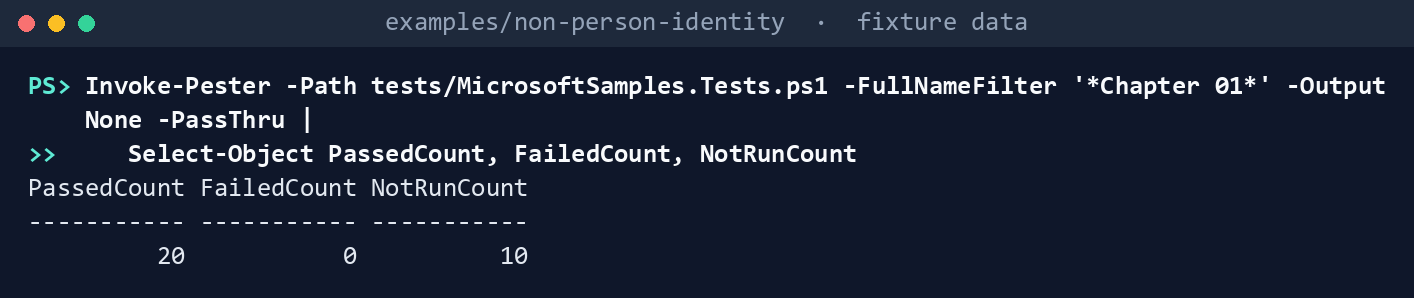
What the terminal shows, run on the kit’s fixtures (the same output as text) PassedCount 20,FailedCount 0,NotRunCount 10(the ten are Chapter 02’s). Open the test file and read the dMSA test: Learn’s command returns the dMSA, and nothing in the sample says what it is.List what the inventory needs:
Import-Module ./powershell/NpiInventory/NpiInventory.psm1
$p = Get-NpiRequiredPermission -Task inventory
$p.GraphPermissions -join ', '; $p.AzureRoles -join ', '; $p.AdRights -join ', '
Application.Read.All, Directory.Read.All Reader Read (default for authenticated domain users)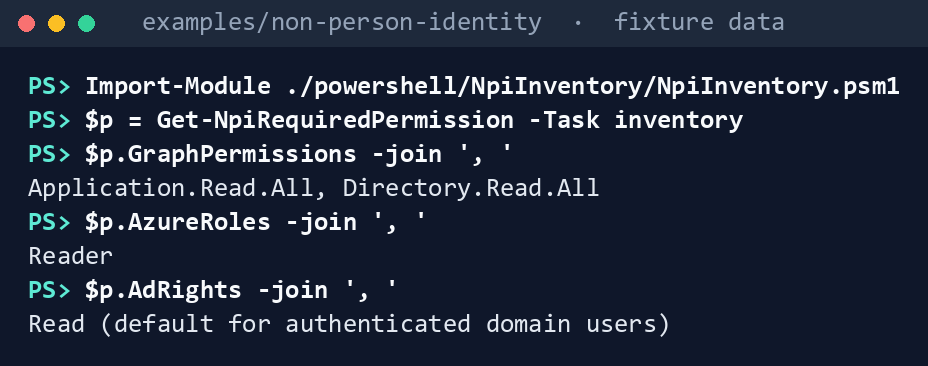
What the terminal shows, run on the kit’s fixtures (the same output as text) Nothing ends in
ReadWrite.Run the inventory against the fictional estate:
./Invoke-NpiInventory.ps1 -Cloud gcc -FixturePath tests/fixtures/estate.json -OutputPath out/inventoryRegister: 35 identities (AD 15, Entra 20); risk HIGH 8, LOW 19, MEDIUM 8 Findings: 8 Finding, 11 Warn, 3 Info; 3 handed to the Data Platform plan Written to out/inventory (manifest.json: tenant c0ffee00-0000-4000-8000-000000000001, every request, a SHA-256 per file)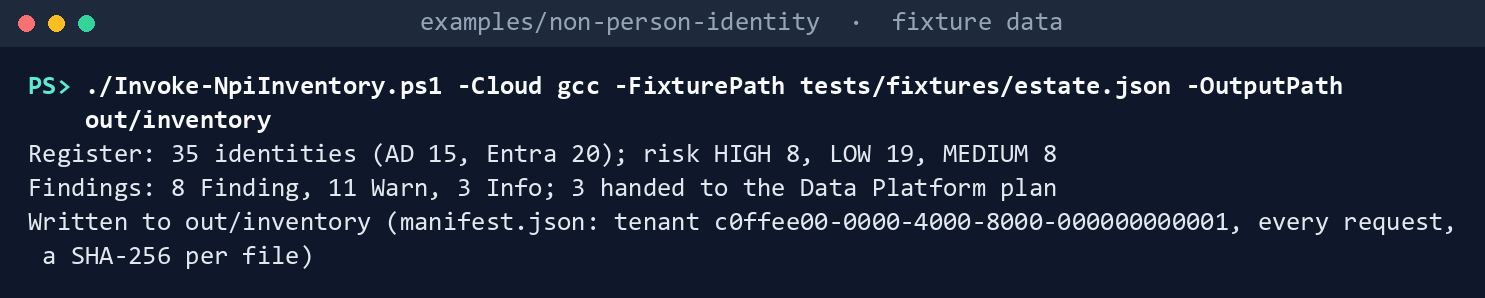
What the terminal shows, run on the kit’s fixtures (the same output as text) Read the HIGH-risk identities:
Get-Content out/inventory/findings.json -Raw | ConvertFrom-Json | Where-Object Rule -eq 'NPI-INV-01' | Format-Table Object, Issue -Wrap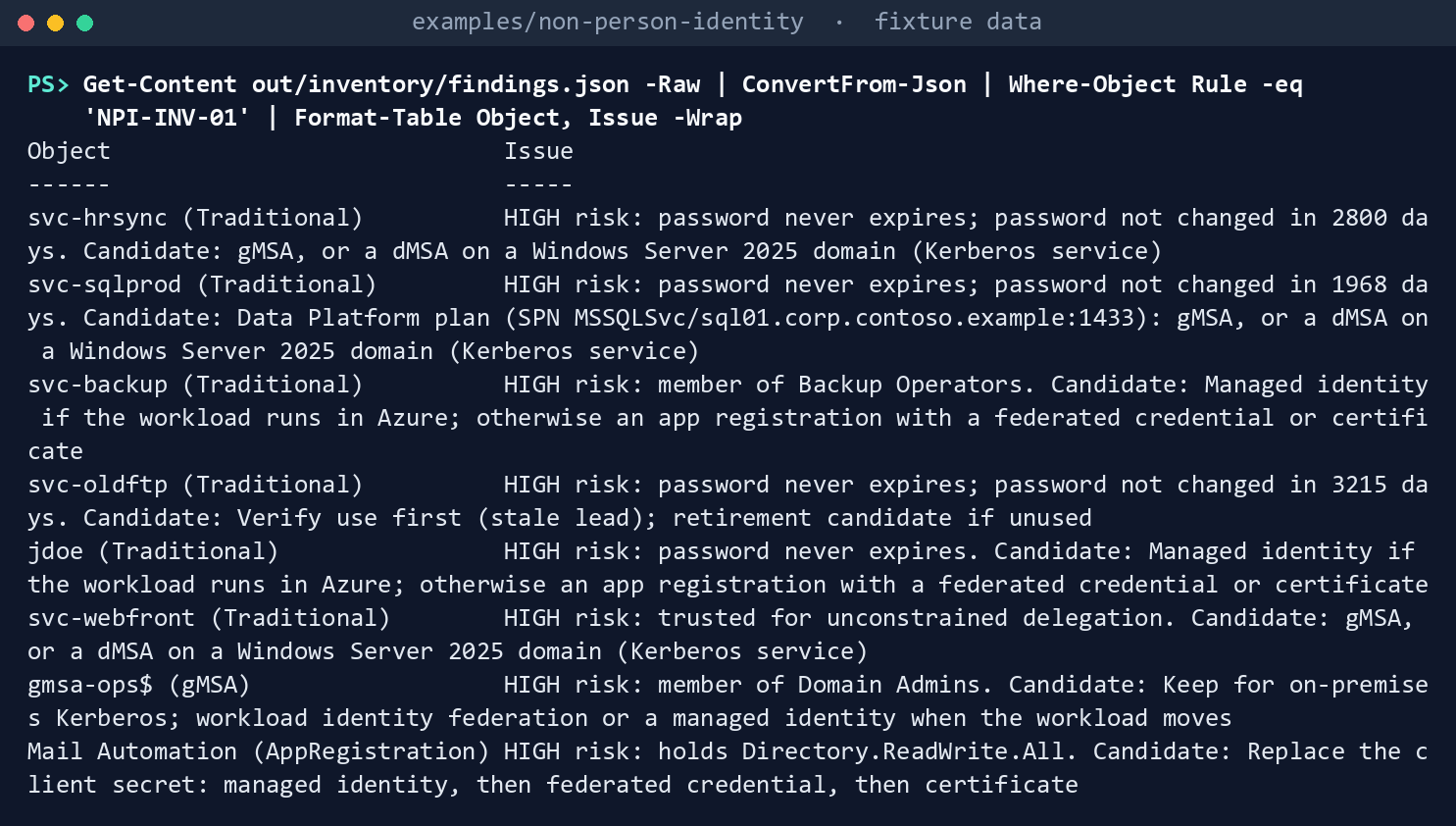
What the terminal shows, run on the kit’s fixtures (the same output as text) Eight rows:
svc-hrsync(password never expires, unchanged in 2800 days; candidate a gMSA or dMSA),svc-sqlprod(the same, handed to the Data Platform plan),svc-backup(Backup Operators),svc-oldftp(password never expires; “verify use first”, because it’s also a stale lead),jdoe(password never expires, and found only by that criterion: NPI-INV-08 asks whether it’s a person),svc-webfront(unconstrained delegation),gmsa-ops$(Domain Admins) and the Mail Automation app registration (Directory.ReadWrite.All). The disabledsvc-reportsisn’t there: its risk is LOW and its candidate is retirement, after confirmation.See the reader refuse:
$r = New-NpiReader -Cloud gcc -Task inventory -Invoke (New-NpiFixtureInvoker -Path tests/fixtures/estate.json).Invoke
Invoke-NpiList -Reader $r -CallId graph-user -Bind @{ id = 'x' }
Get-NpiCloud GCC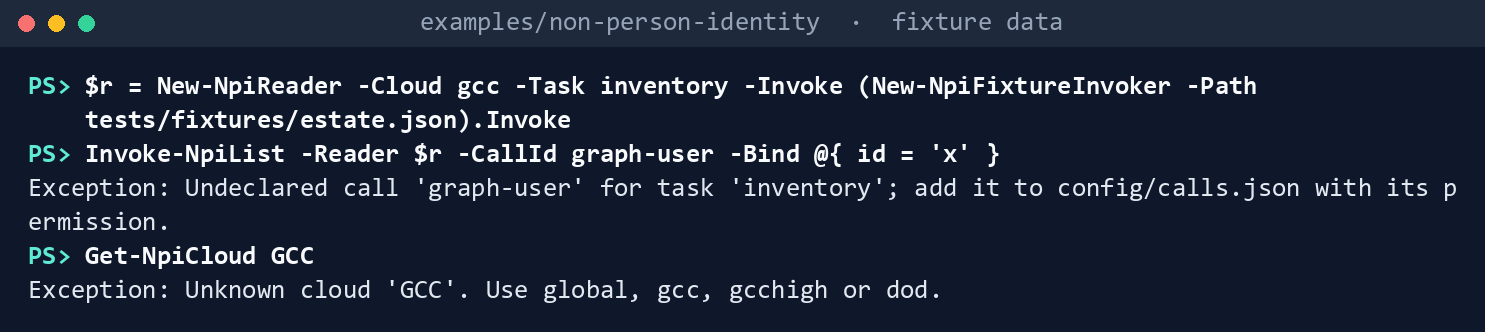
What the terminal shows, run on the kit’s fixtures (the same output as text) Two errors:
Undeclared call 'graph-user' for task 'inventory'; add it to config/calls.json with its permission.andUnknown cloud 'GCC'. Use global, gcc, gcchigh or dod.Read the hand-off to the Data Platform plan:
Import-Csv out/inventory/data-platform-handoff.csv | Format-Table Name, Type, Spns, Risk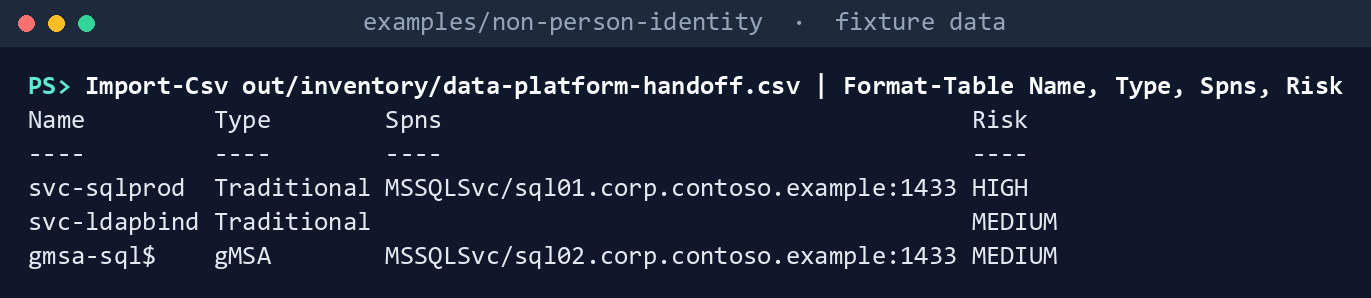
What the terminal shows, run on the kit’s fixtures (the same output as text) svc-sqlprodandgmsa-sql$by theirMSSQLSvc/SPNs, andsvc-ldapbindby name.Run the tests:
Invoke-Pester -Path tests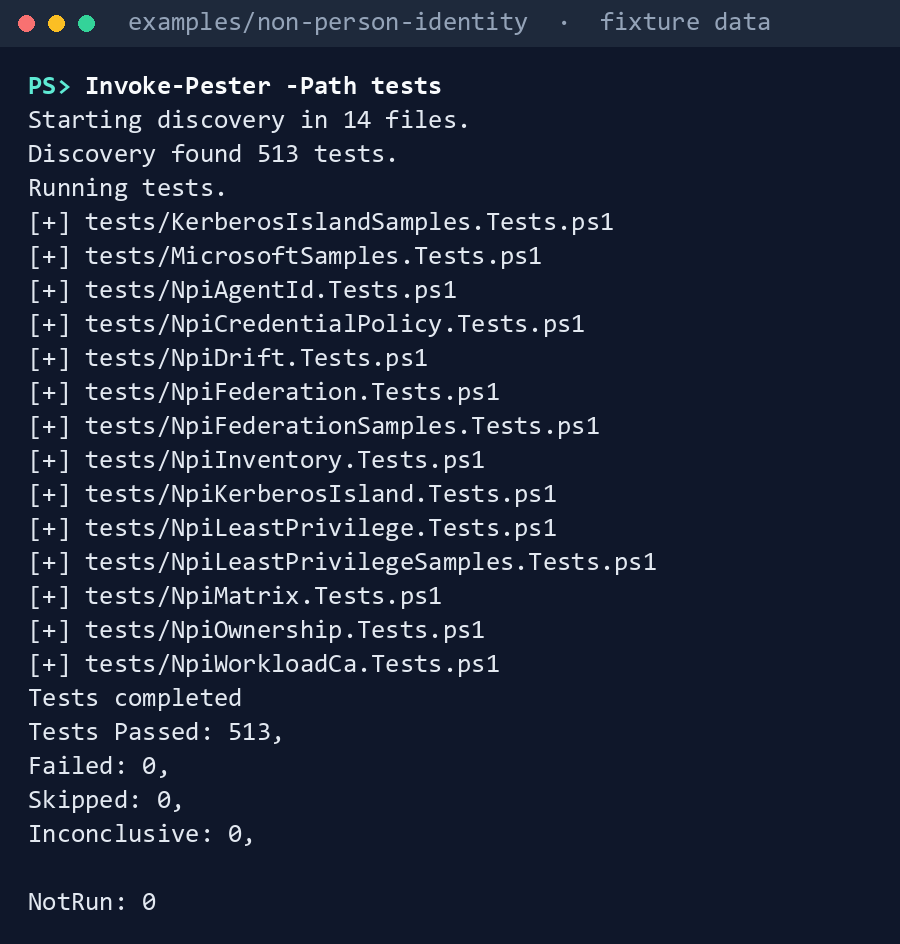
What the terminal shows, run on the kit’s fixtures (the same output as text)
Expected result: 513 tests passing, every row of the gap table seen with your own eyes, and out/inventory/manifest.json listing 36 requests: 34 GETs and 2 AD reads. The later labs make their own copy of out/inventory. Delete out when you’re done:
Remove-Item -Recurse -Force out
Lab 2: test tenant
Use a test tenant in the worldwide or GCC cloud with a test Azure subscription, and a test Active Directory domain, never production, with fictional people. The run only reads. Work in examples/non-person-identity on the test host. You’ll replace: <tenant-id> (the test tenant’s ID), <app-id> (the Application (client) ID of the app you register in step 1), <thumbprint> (the thumbprint of its test certificate), <test-domain> (the test domain’s DNS name).
Every command in this lab, in order, from examples/non-person-identity. Each step below says what it does and what to look for.
# Step 4: On a domain-joined test host with the ActiveDirectory module, as an ordinary domain user, sign in and run
Connect-MgGraph -Environment Global -TenantId <tenant-id> -ClientId <app-id> -CertificateThumbprint <thumbprint>
Connect-AzAccount -ServicePrincipal -Environment AzureCloud -Tenant <tenant-id> -ApplicationId <app-id> -CertificateThumbprint <thumbprint>
./Invoke-NpiInventory.ps1 -Cloud gcc -TenantId <tenant-id> -Domain <test-domain> -OutputPath out/inventory-test

# Step 5: Check the two things the permissions assumed
Import-Csv out/inventory-test/register.csv | Where-Object FederatedCredentials -gt 0 | Format-Table Name, Type, FederatedCredentials, FederatedSubjects -Wrap
(Get-Content out/inventory-test/manifest.json -Raw | ConvertFrom-Json).requests | Where-Object target -match '^https://management\.' | Format-Table call, target -Wrap

# Step 6: Check the directory
./Invoke-NpiInventory.ps1 -Cloud gcc -TenantId <tenant-id> -Domain <test-domain> -OutputPath out/inventory-test
Import-Csv out/inventory-test/register.csv | Where-Object Source -eq 'AD' | Format-Table Name, Type, PasswordAgeDays, LastLogon, PrivilegedGroups -Wrap

# Step 7: Cross-check against Learn's own lists
Import-Csv out/inventory-test/register.csv | Where-Object Source -ne 'AD' | Sort-Object Type, Name | Format-Table Type, Name

# Step 8: Back it out
Remove-Item -Recurse -Force out/inventory-test
Register the app in the tenant’s own cloud. For a GCC tenant that’s the worldwide Microsoft Entra admin center. Add a certificate credential, not a secret:
- Entra ID > App registrations > New registration. Name it, keep Accounts in this organizational directory only, and select Register. Copy the Application (client) ID from Overview: it’s
<app-id>. - Certificates & secrets > Certificates > Upload certificate. Upload the public part (
.cer) of a test certificate whose private key is in the test host’s certificate store, and select Add. The Thumbprint shown is<thumbprint>.
- Entra ID > App registrations > New registration. Name it, keep Accounts in this organizational directory only, and select Register. Copy the Application (client) ID from Overview: it’s
Grant the two application permissions from Lab 1, step 2, and grant admin consent. Nothing else:
- In the app, API permissions > Add a permission > Microsoft Graph > Application permissions.
- Select
Application.Read.AllandDirectory.Read.All, then Add permissions. - Select Grant admin consent for your tenant, and confirm.
Grant Reader to the app’s service principal on a resource group holding one user-assigned managed identity with one federated credential. In the Azure portal:
- Open the resource group, then Access control (IAM) > Add > Add role assignment.
- On Role, select Reader, then Next.
- On Members, choose Select members, select the app, then Select and Review + assign.
On a domain-joined test host with the ActiveDirectory module, as an ordinary domain user, sign in and run:
Connect-MgGraph -Environment Global -TenantId <tenant-id> -ClientId <app-id> -CertificateThumbprint <thumbprint>
Connect-AzAccount -ServicePrincipal -Environment AzureCloud -Tenant <tenant-id> -ApplicationId <app-id> -CertificateThumbprint <thumbprint>
./Invoke-NpiInventory.ps1 -Cloud gcc -TenantId <tenant-id> -Domain <test-domain> -OutputPath out/inventory-test
Check the two things the permissions assumed. Confirm that the app registration with a federated credential shows it (research gaps, row 4), and that the user-assigned identity’s federated credential is read; note the host of any
nextLinkResource Manager returns (row 7). The first command lists the rows with a federated credential; the second, every Resource Manager request the run sent, followed pages among them:Import-Csv out/inventory-test/register.csv | Where-Object FederatedCredentials -gt 0 | Format-Table Name, Type, FederatedCredentials, FederatedSubjects -Wrap (Get-Content out/inventory-test/manifest.json -Raw | ConvertFrom-Json).requests | Where-Object target -match '^https://management\.' | Format-Table call, target -WrapCheck the directory. Create a test dMSA on a Windows Server 2025 test domain if you have one, and confirm it comes back as
dMSA(row 1); confirmPasswordLastSet,LastLogonDateandMemberOfare filled for an ordinary user’s read (row 2). With the dMSA created, read the directory again (the sessions from step 4 are still open) and list its rows:./Invoke-NpiInventory.ps1 -Cloud gcc -TenantId <tenant-id> -Domain <test-domain> -OutputPath out/inventory-test Import-Csv out/inventory-test/register.csv | Where-Object Source -eq 'AD' | Format-Table Name, Type, PasswordAgeDays, LastLogon, PrivilegedGroups -WrapCross-check against Learn’s own lists. Every app registration in the admin center’s App registrations list should be in
register.csv, and every managed identity on Enterprise apps filtered to managed identities.51 This lists the register’s names by type, to compare:Import-Csv out/inventory-test/register.csv | Where-Object Source -ne 'AD' | Sort-Object Type, Name | Format-Table Type, NameBack it out. Do this after the last test-tenant lab, not before: Chapters 02, 03, 04, 06, 07 and 09 reuse this lab’s reading app, its certificate and
out/inventory-test, so keep all three until then, or rebuild them for each later lab. Then remove the Reader assignment and the two permissions, delete the app registration and its certificate, and deleteout/inventory-test: it maps which accounts and apps can do what.In the Azure portal, open the resource group, Access control (IAM) > Role assignments, select the app’s Reader row, and Delete.
In the Microsoft Entra admin center, Entra ID > App registrations, open the app, and Delete it, with its certificate and its two permissions.
On the test host:
Remove-Item -Recurse -Force out/inventory-test
Verified facts
| Item | Value | US Government clouds | Stage | Source |
|---|---|---|---|---|
| Finding user-based service accounts | No attribute marks them; criteria: delegation, SPNs, passwords that never expire; may miss accounts; svc prefix recommended |
n/a (Active Directory) | GA | 52 |
| Managed service accounts | Get-ADServiceAccount -Filter *; msDS-GroupManagedServiceAccount and msDS-ManagedServiceAccount; gMSA passwords 240 bytes, changed every 30 days |
n/a | GA | 53 54 |
| dMSA | Windows Server 2025; supersedes a traditional account, disables its password, authentication tied to mapped machines | n/a | GA | 55 56 |
lastLogonTimestamp |
Updated only when older than the current time minus msDS-LogonTimeSyncInterval |
n/a | — | 57 |
| List applications | Application.Read.All; also returns agent identity blueprints; $select of keyCredentials throttled at 150 requests a minute per tenant; page size 100 by default, 999 at most |
L4 and L5 | v1.0 | 58 |
| List owners of an application | Application.Read.All; owners of unreadable types return id and @odata.type only |
L4 and L5 | v1.0 | 59 |
| List federated identity credentials | Application.Read.All (the Get page names Application.ReadWrite.OwnedBy) |
L4 and L5 | v1.0 | 60 61 |
| List service principals; owners | Application.Read.All; owners are users or service principals |
Not read for this chapter | v1.0 | 62 63 |
servicePrincipalType |
Application, ManagedIdentity, Legacy, ServiceIdentity (agent identity), SocialIdp |
— | v1.0 | 64 |
alternativeNames |
Holds a managed identity’s resource group and full resource ID | — | v1.0 | 65 |
| List appRoleAssignedTo | Application.Read.All |
Not read for this chapter | v1.0 | 66 |
| List delegated permission grants | Directory.Read.All |
L4 and L5 | v1.0 | 67 |
| A user-assigned identity’s federated credentials | GET …/userAssignedIdentities/{name}/federatedIdentityCredentials, api-version=2024-11-30 |
Azure Government host management.usgovcloudapi.net; the API’s availability there not read |
GA | 68 69 |
| Graph hosts | GCC worldwide; GCC High graph.microsoft.us; DoD dod-graph.microsoft.us |
— | — | 70 |
Where Learn’s pages differ: the List and Get pages for federated identity credentials name different least-privileged permissions (research gaps, row 4); the service principal page’s tag filter for “multi-tenant apps” is the Entra PowerShell reference’s filter for all enterprise apps (row 6); the export script’s explanation describes an expiry prompt the script doesn’t have; and the Resource Manager list sample’s nextLink is on a placeholder host (row 7). The code follows the stricter reading in each case and a test pins each.
Federal requirements and evidence
The register is the record the guide’s G1 Inventory gate checks: every non-person identity, its type, its owners and its credentials, in one file. Each row names the file or command that is the evidence. The controls are in the NIST SP 800-53 Rev. 5 Moderate baseline.71
| What the output proves | Requirement it supports | KSI it aligns to | Who keeps it |
|---|---|---|---|
Learn’s commands and export script, run as published, define what the register looks for, and each gap they leave is pinned by a test (Lab 1, step 1: MicrosoftSamples.Tests.ps1, 20 passed) |
CM-8 System Component Inventory | KSI-PIY-GIV | The repository’s tests; each pinned copy’s snapshot.json |
The read holds only Application.Read.All, Directory.Read.All, Reader and the default AD read, with nothing ending in ReadWrite (Lab 1, step 2: Get-NpiRequiredPermission -Task inventory; config/calls.json) |
AC-6 Least Privilege, for a process acting for the program | KSI-IAM-ELP, KSI-IAM-JIT | Identity engineering; the ISSO keeps the consent record |
Every AD service account, MSA, gMSA, dMSA, app registration, service principal and managed identity is one row, read from the directory itself (Lab 1, step 3, and Lab 2, step 4: register.json and register.csv) |
CM-8 System Component Inventory | KSI-PIY-GIV | The identity governance office; the CMDB owner |
Each identity has its own identifier (ad:<objectGUID>, app:<appId>, sp:<id>, mi:<id>), a type, and its owners (register.csv columns IdentityId, Type, OwnerCount, OwnerIds) |
AC-2 Account Management (account types and account managers); IA-4 Identifier Management | KSI-IAM-SNU (AC-2); KSI-IAM-ELP, KSI-IAM-JIT (IA-4) | The identity governance office |
HIGH-risk identities are listed with their reasons: a password that never expires or is over 365 days old, a privileged group, unconstrained delegation, or a high-privilege Graph permission (Lab 1, step 4: findings.json, NPI-INV-01) |
AC-6(5) Privileged Accounts; IA-5 Authenticator Management | KSI-IAM-SNU, KSI-IAM-JIT | Identity engineering, for the first wave |
Client secrets, and expired credentials still on an object, are flagged (findings.json, NPI-INV-04 and NPI-INV-05; register.csv columns Secrets, ExpiredCredentials, NextCredentialExpiry) |
IA-5 and IA-5(2) Public Key-based Authentication | KSI-IAM-SNU, KSI-SVC-ASM | Application owners, through Chapter 04 |
Stale accounts are leads to confirm against sign-in logs, and the code never acts on them (findings.json, NPI-INV-02) |
AC-2(3) Disable Accounts (inactive accounts) | KSI-IAM-AAM | The identity governance officer |
App registrations and legacy service principals with fewer than two owners are flagged (findings.json, NPI-INV-03) |
AC-2 (account managers) | KSI-IAM-SNU | The identity governance office, through Chapter 02 |
Delegated grants consented for all users are flagged (findings.json, NPI-INV-06) |
AC-6 Least Privilege | KSI-IAM-ELP | Application owners, through Chapter 07 |
| The reader refuses a call the task doesn’t declare, and a cloud name it doesn’t know (Lab 1, step 5: the two error texts) | AC-6 Least Privilege | KSI-IAM-ELP | The repository’s tests |
SQL Server and LDAP-bind accounts go to the Data Platform plan (Lab 1, step 6: data-platform-handoff.csv; NPI-INV-07) |
CM-8 (accountability information for each component) | KSI-PIY-GIV | The Data Platform plan |
The run records the tenant, the cloud, every request and AD read, the SHA-256 of config/register.json and a SHA-256 per file, and Chapter 02 refuses a register that doesn’t match (manifest.json) |
AU-9 Protection of Audit Information; SI-7 Software, Firmware, and Information Integrity | KSI-MLA-OSM (AU-9); KSI-SVC-VRI (SI-7) | The ISSO, with the run’s folder |
The code passes its tests (Lab 1, step 7: Invoke-Pester -Path tests, 513 passed) |
CM-3(2) Testing, Validation, and Documentation of Changes | KSI-CMT-VTD | The repository; the pull request’s checks |
| The reading app signs in with a certificate and holds only the two read permissions and Reader (Lab 2, steps 1 to 3: the app’s Certificates & secrets and API permissions pages; the Reader role assignment) | AC-6; IA-5(2) | KSI-IAM-ELP, KSI-IAM-SNU | Identity engineering |
Federated credentials are read from Graph and from Resource Manager, and every Resource Manager request stays on the cloud’s host (Lab 2, step 5: register.csv columns FederatedCredentials and FederatedSubjects; the requests list in manifest.json) |
IA-5 Authenticator Management | KSI-IAM-SNU | Identity engineering |
A dMSA is classified as one, and an ordinary domain user’s read returns password age, last logon and groups (Lab 2, step 6: the AD rows of register.csv) |
CM-8 | KSI-PIY-GIV | AD engineering |
The register holds every app registration and managed identity the admin center lists, once (Lab 2, step 7: the Type, Name listing, compared with App registrations and Enterprise apps) |
CM-8 (every component, no duplicates) | KSI-PIY-GIV | The identity governance office |
| The lab’s reading app is removed when the lab ends (Lab 2, step 8: the Reader assignment and the app registration deleted, which the Entra audit log shows) | AC-2 (remove accounts no longer needed) | KSI-IAM-JIT | Identity engineering |
KSIs are FedRAMP 20x indicators for cloud service providers. The KSI column names the indicators whose related controls, as FedRAMP lists them, include the row’s control or one of its enhancements; which output supports which indicator is the program’s mapping (design guidance).72 The agency authorizes its own system and lines this evidence up with what its providers report against KSIs; it doesn’t report KSIs itself (Book 00, Appendix B). Lab steps that only delete out have no row. The track-wide mapping is the guide’s Evidence table.
Dangers
| Danger | What happens | The guard |
|---|---|---|
| A service account missed | No owner, no decision, and it outlives the domain | Learn’s three criteria plus naming and description in one query; managed service accounts read separately; Lab 2 cross-checks the admin center |
| A person treated as a service account | The orphan rule disables someone’s account | Accounts found only by a password that never expires are marked (NPI-INV-08) and Chapter 02 skips them until confirmed |
| A stale account retired on a guess | A quarterly job fails | Stale is a lead with a note; the code never disables or deletes; Chapter 02’s orphan rule needs the identity governance officer’s confirmation |
| A dMSA left unclassified | The Kerberos island list in Chapter 06 is short | Classified by object class; anything else is NPI-INV-09 |
| An app counted twice, or a third party’s app treated as ours | Inflated HIGH counts; owner findings on apps the tenant can’t change | Permissions on the registration row only; external service principals typed by home tenant |
| A broad permission | Directory.ReadWrite.All or Application.ReadWrite.All granted “to make it work” |
The call list; a test pins the task’s exact permissions, none ReadWrite; Directory.Read.All only for consent grants |
| The wrong cloud, tenant or domain | A GCC High run reads graph.microsoft.com, or the token goes to another tenant |
Explicit cloud, no default; host checked on every page; live sessions checked against -TenantId; AD reads sent to -Domain |
| Throttling on credentials | Reading keyCredentials is limited to 150 requests a minute per tenant73 |
One paged list of applications, never a call per app for its credentials |
| The register as a leak | It maps which accounts can do what | The manifest names no one; Lab 2 deletes the output |
Checklist
Footnotes
Microsoft Learn, “Secure user-based service accounts in Active Directory,” find on-premises user accounts used as service accounts; assess on-premises user account security, https://learn.microsoft.com/entra/architecture/service-accounts-user-on-premises (accessed Oct 31, 2026).↩︎
Microsoft Learn, “Delegated Managed Service Accounts overview,” https://learn.microsoft.com/windows-server/identity/ad-ds/manage/delegated-managed-service-accounts/delegated-managed-service-accounts-overview (accessed Oct 30, 2026).↩︎
Microsoft Learn, “Microsoft.Graph servicePrincipals” (Bicep reference), property values,
servicePrincipalType, https://learn.microsoft.com/graph/templates/bicep/reference/serviceprincipals?view=graph-bicep-1.0 (accessed Oct 30, 2026).↩︎Microsoft Learn, “Update servicePrincipal,” request body,
alternativeNames, https://learn.microsoft.com/graph/api/serviceprincipal-update?view=graph-rest-1.0 (accessed Oct 30, 2026).↩︎Microsoft Learn, “Federated Identity Credentials - List” (Managed Identity REST API, 2024-11-30), https://learn.microsoft.com/rest/api/managedidentity/federated-identity-credentials/list (accessed Oct 30, 2026).↩︎
Microsoft Learn, “List applications,” national cloud table, permissions, optional query parameters, https://learn.microsoft.com/graph/api/application-list?view=graph-rest-1.0 (accessed Oct 30, 2026).↩︎
Microsoft Learn, “Get-ADUser,” https://learn.microsoft.com/powershell/module/activedirectory/get-aduser (accessed Oct 30, 2026).↩︎
Microsoft Learn, “Secure user-based service accounts in Active Directory,” find on-premises user accounts used as service accounts; assess on-premises user account security, https://learn.microsoft.com/entra/architecture/service-accounts-user-on-premises (accessed Oct 31, 2026).↩︎
Microsoft Learn, “Secure group managed service accounts,” benefits; find gMSAs, https://learn.microsoft.com/entra/architecture/service-accounts-group-managed (accessed Oct 30, 2026).↩︎
Microsoft Learn, “Get-ADServiceAccount,” description and examples, https://learn.microsoft.com/powershell/module/activedirectory/get-adserviceaccount (accessed Oct 30, 2026).↩︎
Microsoft Learn, “List applications,” national cloud table, permissions, optional query parameters, https://learn.microsoft.com/graph/api/application-list?view=graph-rest-1.0 (accessed Oct 30, 2026).↩︎
Microsoft Learn, “List owners of an application,” https://learn.microsoft.com/graph/api/application-list-owners?view=graph-rest-1.0 (accessed Oct 30, 2026).↩︎
Microsoft Learn, “List federatedIdentityCredential objects,” https://learn.microsoft.com/graph/api/federatedidentitycredential-list?view=graph-rest-1.0 (accessed Oct 31, 2026).↩︎
Microsoft Learn, “List servicePrincipals,” permissions, https://learn.microsoft.com/graph/api/serviceprincipal-list?view=graph-rest-1.0 (accessed Oct 30, 2026).↩︎
Microsoft Learn, “List owners of a service principal,” permissions, https://learn.microsoft.com/graph/api/serviceprincipal-list-owners?view=graph-rest-1.0 (accessed Oct 30, 2026).↩︎
Microsoft Learn, “List appRoleAssignments granted for a service principal,” permissions, https://learn.microsoft.com/graph/api/serviceprincipal-list-approleassignedto?view=graph-rest-1.0 (accessed Oct 31, 2026).↩︎
Microsoft Learn, “List oauth2PermissionGrants (delegated permission grants),” https://learn.microsoft.com/graph/api/oauth2permissiongrant-list?view=graph-rest-1.0 (accessed Oct 30, 2026).↩︎
Microsoft Learn, “Federated Identity Credentials - List” (Managed Identity REST API, 2024-11-30), https://learn.microsoft.com/rest/api/managedidentity/federated-identity-credentials/list (accessed Oct 30, 2026).↩︎
Microsoft Learn, “Last-Logon-Timestamp attribute,” https://learn.microsoft.com/windows/win32/adschema/a-lastlogontimestamp (accessed Oct 30, 2026).↩︎
Microsoft Learn, “Microsoft Graph national cloud deployments,” https://learn.microsoft.com/graph/deployments (accessed Oct 30, 2026).↩︎
Microsoft Learn, “Compare Azure Government and global Azure,” guidance for developers, https://learn.microsoft.com/azure/azure-government/compare-azure-government-global-azure (accessed Oct 30, 2026; read for the first workbook’s Chapter 02).↩︎
Microsoft Learn, “List applications,” national cloud table, permissions, optional query parameters, https://learn.microsoft.com/graph/api/application-list?view=graph-rest-1.0 (accessed Oct 30, 2026).↩︎
Microsoft Learn, “List owners of an application,” https://learn.microsoft.com/graph/api/application-list-owners?view=graph-rest-1.0 (accessed Oct 30, 2026).↩︎
Microsoft Learn, “List federatedIdentityCredential objects,” https://learn.microsoft.com/graph/api/federatedidentitycredential-list?view=graph-rest-1.0 (accessed Oct 31, 2026).↩︎
Microsoft Learn, “List oauth2PermissionGrants (delegated permission grants),” https://learn.microsoft.com/graph/api/oauth2permissiongrant-list?view=graph-rest-1.0 (accessed Oct 30, 2026).↩︎
Microsoft Learn, “Secure user-based service accounts in Active Directory,” find on-premises user accounts used as service accounts; assess on-premises user account security, https://learn.microsoft.com/entra/architecture/service-accounts-user-on-premises (accessed Oct 31, 2026).↩︎
Microsoft Learn, “Secure group managed service accounts,” benefits; find gMSAs, https://learn.microsoft.com/entra/architecture/service-accounts-group-managed (accessed Oct 30, 2026).↩︎
Microsoft Learn, “Securing service principals in Microsoft Entra ID,” find accounts; assess service principal security, https://learn.microsoft.com/entra/architecture/service-accounts-principal (accessed Oct 30, 2026).↩︎
Microsoft Learn, “Govern on-premises service accounts,” lifecycle management process, https://learn.microsoft.com/entra/architecture/service-accounts-govern-on-premises (accessed Oct 30, 2026).↩︎
Microsoft Learn, “PowerShell sample: Export secrets and certificates for app registrations,” https://learn.microsoft.com/entra/identity/enterprise-apps/scripts/powershell-export-all-app-registrations-secrets-and-certs (accessed Oct 30, 2026).↩︎
Microsoft, MicrosoftDocs/entra-docs,
docs/architecture/service-accounts-user-on-premises.md,service-accounts-group-managed.mdandservice-accounts-principal.mdat commit7f78b50dce9d8cf119de57cbd6fd66e24a6c58d4(October 30, 2026; the pages last changed February 25, 2026), MIT License, https://github.com/MicrosoftDocs/entra-docs/tree/7f78b50dce9d8cf119de57cbd6fd66e24a6c58d4/docs/architecture (accessed Oct 30, 2026); pinned copy inexamples/third_party/entra-service-account-pages.↩︎Microsoft, MicrosoftDocs/entra-docs,
docs/identity/enterprise-apps/scripts/powershell-export-all-app-registrations-secrets-and-certs.mdat commit7f78b50dce9d8cf119de57cbd6fd66e24a6c58d4(October 30, 2026; the page last changed February 19, 2026), MIT License, https://github.com/MicrosoftDocs/entra-docs/blob/7f78b50dce9d8cf119de57cbd6fd66e24a6c58d4/docs/identity/enterprise-apps/scripts/powershell-export-all-app-registrations-secrets-and-certs.md (accessed Oct 30, 2026); pinned copy inexamples/third_party/entra-app-credentials-export-page.↩︎Microsoft Learn, “Secure user-based service accounts in Active Directory,” find on-premises user accounts used as service accounts; assess on-premises user account security, https://learn.microsoft.com/entra/architecture/service-accounts-user-on-premises (accessed Oct 31, 2026).↩︎
Microsoft Learn, “Securing on-premises service accounts,” types of on-premises service accounts, https://learn.microsoft.com/entra/architecture/service-accounts-on-premises (accessed Oct 31, 2026).↩︎
Microsoft Learn, “Get-EntraServicePrincipal,” example 7, retrieve all enterprise apps, https://learn.microsoft.com/powershell/module/microsoft.entra.applications/get-entraserviceprincipal?view=entra-powershell (accessed Oct 30, 2026).↩︎
Microsoft Learn, “Page through a collection using the Microsoft Graph SDKs,” https://learn.microsoft.com/graph/sdks/paging (accessed Oct 31, 2026).↩︎
Microsoft Learn, “Get-ADUser,” https://learn.microsoft.com/powershell/module/activedirectory/get-aduser (accessed Oct 30, 2026).↩︎
Microsoft Learn, “Get-ADServiceAccount,” description and examples, https://learn.microsoft.com/powershell/module/activedirectory/get-adserviceaccount (accessed Oct 30, 2026).↩︎
Microsoft Learn, “List applications,” national cloud table, permissions, optional query parameters, https://learn.microsoft.com/graph/api/application-list?view=graph-rest-1.0 (accessed Oct 30, 2026).↩︎
Microsoft Learn, “List owners of an application,” https://learn.microsoft.com/graph/api/application-list-owners?view=graph-rest-1.0 (accessed Oct 30, 2026).↩︎
Microsoft Learn, “List federatedIdentityCredential objects,” https://learn.microsoft.com/graph/api/federatedidentitycredential-list?view=graph-rest-1.0 (accessed Oct 31, 2026).↩︎
Microsoft Learn, “List servicePrincipals,” permissions, https://learn.microsoft.com/graph/api/serviceprincipal-list?view=graph-rest-1.0 (accessed Oct 30, 2026).↩︎
Microsoft Learn, “List owners of a service principal,” permissions, https://learn.microsoft.com/graph/api/serviceprincipal-list-owners?view=graph-rest-1.0 (accessed Oct 30, 2026).↩︎
Microsoft Learn, “List appRoleAssignments granted for a service principal,” permissions, https://learn.microsoft.com/graph/api/serviceprincipal-list-approleassignedto?view=graph-rest-1.0 (accessed Oct 31, 2026).↩︎
Microsoft Learn, “List oauth2PermissionGrants (delegated permission grants),” https://learn.microsoft.com/graph/api/oauth2permissiongrant-list?view=graph-rest-1.0 (accessed Oct 30, 2026).↩︎
Microsoft Learn, “List owners of an application,” https://learn.microsoft.com/graph/api/application-list-owners?view=graph-rest-1.0 (accessed Oct 30, 2026).↩︎
Microsoft Learn, “Last-Logon-Timestamp attribute,” https://learn.microsoft.com/windows/win32/adschema/a-lastlogontimestamp (accessed Oct 30, 2026).↩︎
Microsoft Learn, “Overview of enterprise application ownership in Microsoft Entra ID,” FAQ, https://learn.microsoft.com/entra/identity/enterprise-apps/overview-assign-app-owners (accessed Oct 30, 2026).↩︎
Microsoft Learn, “List oauth2PermissionGrants (delegated permission grants),” https://learn.microsoft.com/graph/api/oauth2permissiongrant-list?view=graph-rest-1.0 (accessed Oct 30, 2026).↩︎
Microsoft Learn, “Secure user-based service accounts in Active Directory,” find on-premises user accounts used as service accounts; assess on-premises user account security, https://learn.microsoft.com/entra/architecture/service-accounts-user-on-premises (accessed Oct 31, 2026).↩︎
Microsoft Learn, “View the service principal of a managed identity,” https://learn.microsoft.com/entra/identity/managed-identities-azure-resources/how-to-view-managed-identity-service-principal (accessed Oct 30, 2026).↩︎
Microsoft Learn, “Secure user-based service accounts in Active Directory,” find on-premises user accounts used as service accounts; assess on-premises user account security, https://learn.microsoft.com/entra/architecture/service-accounts-user-on-premises (accessed Oct 31, 2026).↩︎
Microsoft Learn, “Secure group managed service accounts,” benefits; find gMSAs, https://learn.microsoft.com/entra/architecture/service-accounts-group-managed (accessed Oct 30, 2026).↩︎
Microsoft Learn, “Get-ADServiceAccount,” description and examples, https://learn.microsoft.com/powershell/module/activedirectory/get-adserviceaccount (accessed Oct 30, 2026).↩︎
Microsoft Learn, “Delegated Managed Service Accounts overview,” https://learn.microsoft.com/windows-server/identity/ad-ds/manage/delegated-managed-service-accounts/delegated-managed-service-accounts-overview (accessed Oct 30, 2026).↩︎
Microsoft Learn, “Setting up delegated Managed Service Accounts,” create a standalone dMSA, https://learn.microsoft.com/windows-server/identity/ad-ds/manage/delegated-managed-service-accounts/delegated-managed-service-accounts-set-up-dmsa (accessed Oct 30, 2026).↩︎
Microsoft Learn, “Last-Logon-Timestamp attribute,” https://learn.microsoft.com/windows/win32/adschema/a-lastlogontimestamp (accessed Oct 30, 2026).↩︎
Microsoft Learn, “List applications,” national cloud table, permissions, optional query parameters, https://learn.microsoft.com/graph/api/application-list?view=graph-rest-1.0 (accessed Oct 30, 2026).↩︎
Microsoft Learn, “List owners of an application,” https://learn.microsoft.com/graph/api/application-list-owners?view=graph-rest-1.0 (accessed Oct 30, 2026).↩︎
Microsoft Learn, “List federatedIdentityCredential objects,” https://learn.microsoft.com/graph/api/federatedidentitycredential-list?view=graph-rest-1.0 (accessed Oct 31, 2026).↩︎
Microsoft Learn, “Get federatedIdentityCredential,” permissions, https://learn.microsoft.com/graph/api/federatedidentitycredential-get?view=graph-rest-1.0 (accessed Oct 30, 2026).↩︎
Microsoft Learn, “List servicePrincipals,” permissions, https://learn.microsoft.com/graph/api/serviceprincipal-list?view=graph-rest-1.0 (accessed Oct 30, 2026).↩︎
Microsoft Learn, “List owners of a service principal,” permissions, https://learn.microsoft.com/graph/api/serviceprincipal-list-owners?view=graph-rest-1.0 (accessed Oct 30, 2026).↩︎
Microsoft Learn, “Microsoft.Graph servicePrincipals” (Bicep reference), property values,
servicePrincipalType, https://learn.microsoft.com/graph/templates/bicep/reference/serviceprincipals?view=graph-bicep-1.0 (accessed Oct 30, 2026).↩︎Microsoft Learn, “Update servicePrincipal,” request body,
alternativeNames, https://learn.microsoft.com/graph/api/serviceprincipal-update?view=graph-rest-1.0 (accessed Oct 30, 2026).↩︎Microsoft Learn, “List appRoleAssignments granted for a service principal,” permissions, https://learn.microsoft.com/graph/api/serviceprincipal-list-approleassignedto?view=graph-rest-1.0 (accessed Oct 31, 2026).↩︎
Microsoft Learn, “List oauth2PermissionGrants (delegated permission grants),” https://learn.microsoft.com/graph/api/oauth2permissiongrant-list?view=graph-rest-1.0 (accessed Oct 30, 2026).↩︎
Microsoft Learn, “Federated Identity Credentials - List” (Managed Identity REST API, 2024-11-30), https://learn.microsoft.com/rest/api/managedidentity/federated-identity-credentials/list (accessed Oct 30, 2026).↩︎
Microsoft Learn, “Compare Azure Government and global Azure,” guidance for developers, https://learn.microsoft.com/azure/azure-government/compare-azure-government-global-azure (accessed Oct 30, 2026; read for the first workbook’s Chapter 02).↩︎
Microsoft Learn, “Microsoft Graph national cloud deployments,” https://learn.microsoft.com/graph/deployments (accessed Oct 30, 2026).↩︎
National Institute of Standards and Technology, SP 800-53B Moderate baseline, release 5.2.0 OSCAL profile (includes AC-2, AC-2(3), AC-6, AC-6(5), AU-9, CM-3(2), CM-8, IA-4, IA-5, IA-5(2) and SI-7), https://github.com/usnistgov/oscal-content/blob/main/nist.gov/SP800-53/rev5/json/NIST_SP-800-53_rev5_MODERATE-baseline_profile.json (read November 2, 2026).↩︎
FedRAMP, “Key Security Indicators,” FedRAMP Consolidated Rules for 2026, indicator statements and “Related SP 800-53 Controls,” https://www.fedramp.gov/2026/reference/key-security-indicators/ (read November 2, 2026).↩︎
Microsoft Learn, “List applications,” national cloud table, permissions, optional query parameters, https://learn.microsoft.com/graph/api/application-list?view=graph-rest-1.0 (accessed Oct 30, 2026).↩︎