Federal Modernization Workbook
Chapter 02 — Microsoft 365 Message Center and Service Health
Message center already tells a tenant what will change and when. The work is reading it from the API, on the right cloud, and saying who decided a post needs action.
The Microsoft 365 collector behind the guide’s G2 Microsoft 365. You start with Learn’s service communications API: three list calls, two read permissions, and the national-cloud hosts. Then you read how the kit maps posts and issues into Chapter 01’s record, keeps Microsoft’s own action-required date apart from the kit’s rule, and sends every request only to the tenant’s own Graph host. Lab 1 collects both fixture weeks and builds a live request without sending it; Lab 2 reads a test tenant with a delegated sign-in and backs out the consent.
Goal and audience
Goal. By the end of this chapter you can read a tenant’s Message center posts and service health issues with only ServiceMessage.Read.All and ServiceHealth.Read.All, on the host for the tenant’s cloud, into records that say which posts need action and whether Microsoft or the kit said so.
Audience. Developers who maintain the kit, the Microsoft 365 service owner who owns G2, and the change manager who receives the change and retirement tasks. You should know Chapter 01’s record.
Start with Microsoft’s documentation
What Microsoft gives you
Learn’s service communications API overview names the resources and the permissions: ServiceMessage.Read.All for Message center posts and ServiceHealth.Read.All for service health; both are granted only by an administrator, and a delegated sign-in also needs an admin role. The API is available on the national clouds, with the US Government L4 and L5 URLs.1 The list methods are GET /admin/serviceAnnouncement/messages, /issues and /healthOverviews on v1.0; each lists its permission and its national-cloud availability.2 3 GCC keeps the worldwide endpoint, graph.microsoft.com; GCC High uses graph.microsoft.us and DoD dod-graph.microsoft.us.4 Data privacy messages are visible only to Global Administrators and Message Center Privacy Readers.5 Learn’s own cmdlet for posts is Get-MgServiceAnnouncementMessage, in Microsoft.Graph.Devices.ServiceAnnouncement.6
What it leaves to you
Each row is pinned by a test in the Microsoft 365 service communications block of tests/Collectors.Tests.ps1, or in tests/Live.Tests.ps1.
| Learn’s material, as published | Why it matters | What the kit adds |
|---|---|---|
Post categories (preventOrFixIssue, planForChange, stayInformed) and tags |
No category says “retirement” | A post tagged Retirement is a retirement; planForChange and preventOrFixIssue are changes; stayInformed is an advisory. Learn doesn’t enumerate the tags (not yet specified) |
actionRequiredByDateTime on a post |
The only field that says Microsoft wants action | The record’s action date and actionBasis: provider: actionRequiredByDateTime; a preventOrFixIssue post without a date is action required by the kit’s rule, labeled rule: |
| Samples with PascalCase enum values | A case-sensitive match misses them | Enum values matched without regard to case |
| HTML in a post’s body | A summary nobody can read in a task | Markup removed; the summary capped at 2,000 characters |
@odata.nextLink for paging |
A next link is a URL the response chose | Followed only if it is on the cloud’s own Graph host; anything else is refused |
| National cloud hosts | A GCC High tenant read on graph.microsoft.com returns nothing, and the gate passes on an empty list |
The settings name the cloud (gcc, gcchigh or dod); the live invoker refuses a Graph session in another environment or tenant |
| A post’s end date | A post past its end still lists | Closed once its end date has passed |
The verdict. Use Learn’s list calls and permissions as they are. Build the kind mapping, the action basis and the host guard, because a wrong cloud fails silently.
The code
Get-PnProviderNotice -Provider m365 makes three declared calls, m365-messages, m365-issues and m365-health-overviews, each a GET through Invoke-MgGraphRequest in live mode. Health overviews are kept in raw/m365.json for the run’s record; the notices come from posts and issues. ConvertTo-PnM365Notice maps them:
| Source | Kind | Action required |
|---|---|---|
Post tagged Retirement |
retirement | If actionRequiredByDateTime is set (provider) |
Post, planForChange |
change | If actionRequiredByDateTime is set (provider) |
Post, preventOrFixIssue |
change | Provider’s date if set; otherwise the kit’s rule, no date |
Post, stayInformed |
advisory | If actionRequiredByDateTime is set (provider) |
Issue, classification incident |
incident | No; isResolved closes it |
Issue, classification advisory |
advisory | No; isResolved closes it |
Get-PnLiveCommand builds each request from the settings without running it, so a reviewer can see the exact URL; Assert-PnLiveContext compares Get-MgContext’s environment and tenant with the settings before the first call. The source link of every record is the post or issue on the same host.
The tests
The Microsoft 365 service communications block of tests/Collectors.Tests.ps1 (7 tests), and in tests/Live.Tests.ps1 the Graph host for each cloud, the refused next link and the Graph session guard.
Lab 1 reads fictional posts and issues; nothing signs in. The live reader has been tested against stand-in Graph responses, not a live tenant. Review it, and run Lab 2 in a test tenant, before it reads a real one.
Lab 1: fixtures, no tenant
You need PowerShell 7.1 or later with Pester 5. Work in examples/provider-notices. The lab settings name the fictional tenant in gcc.
Every command in this lab, in order, from examples/provider-notices. Each step below says what it does and what to look for.
# Step 1: List what Microsoft 365 needs
Import-Module ./powershell/ProviderNotices/ProviderNotices.psm1
Get-PnRequiredPermission -Provider m365 | Format-Table Call, Permissions, Verified

# Step 2: See each cloud's Graph host
foreach ($c in 'gcc', 'gcchigh', 'dod') { $x = Get-PnCloud -Provider m365 -Cloud $c; '{0,-8} {1,-32} {2}' -f $c, $x.Graph, $x.GraphEnvironment }

# Step 3: Collect Microsoft 365 from the day-one fixtures
./Invoke-PnCollect.ps1 -SettingsPath tests/fixtures/settings.lab.json -FixturePath tests/fixtures/day1 -Provider m365 -AsOf 2026-11-09T12:00:00Z -OutputPath out/m365

# Step 4: Read the records
Import-Csv out/m365/notices.csv | Format-Table noticeId, kind, status, actionRequired, actionRequiredBy, title

# Step 5: See who said each one needs action
(Read-PnJson -Path out/m365/notices.json).notices | ForEach-Object { [pscustomobject]@{ noticeId = $_.noticeId; actionBasis = $_.actionBasis } } | Format-Table

# Step 6: Collect the second week and read what changed
./Invoke-PnCollect.ps1 -SettingsPath tests/fixtures/settings.lab.json -FixturePath tests/fixtures/day2 -Provider m365 -AsOf 2026-11-16T12:00:00Z -OutputPath out/m365-day2
Import-Csv out/m365-day2/notices.csv | Format-Table noticeId, kind, status, actionRequiredBy, title

# Step 7: Build the live request without sending it, then try a next link on another host
$s = Read-PnSettings -Path tests/fixtures/settings.lab.json
(Get-PnLiveCommand -CallId m365-messages -Settings $s).Uri
Get-PnLiveCommand -CallId m365-messages -Settings $s -Arguments @{ nextLink = 'https://graph.example.net/v1.0/admin/serviceAnnouncement/messages?skip=100' }

# Step 8: Run this chapter's tests
Invoke-Pester -Path tests/Collectors.Tests.ps1, tests/Live.Tests.ps1 -FullNameFilter 'Microsoft 365 service communications*', '*Graph*' -Output None -PassThru | Select-Object PassedCount, FailedCount

# After the steps
Remove-Item -Recurse -Force out
List what Microsoft 365 needs:
Import-Module ./powershell/ProviderNotices/ProviderNotices.psm1
Get-PnRequiredPermission -Provider m365 | Format-Table Call, Permissions, Verified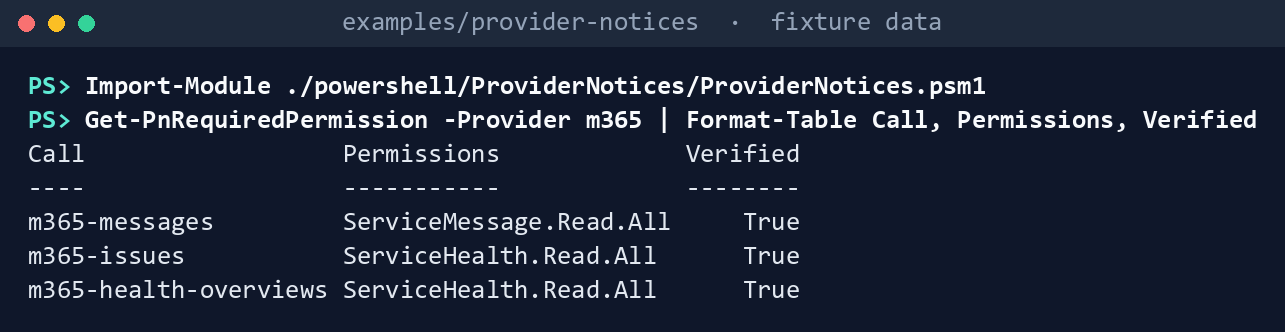
What the terminal shows, run on the kit’s fixtures (the same output as text) Two permissions across three calls, and nothing that writes.
See each cloud’s Graph host. The kit has one row per cloud and no default; an unknown name throws:
foreach ($c in 'gcc', 'gcchigh', 'dod') { $x = Get-PnCloud -Provider m365 -Cloud $c; '{0,-8} {1,-32} {2}' -f $c, $x.Graph, $x.GraphEnvironment }gcc https://graph.microsoft.com Global gcchigh https://graph.microsoft.us USGov dod https://dod-graph.microsoft.us USGovDoD
What the terminal shows, run on the kit’s fixtures (the same output as text) Collect Microsoft 365 from the day-one fixtures:
./Invoke-PnCollect.ps1 -SettingsPath tests/fixtures/settings.lab.json -FixturePath tests/fixtures/day1 -Provider m365 -AsOf 2026-11-09T12:00:00Z -OutputPath out/m365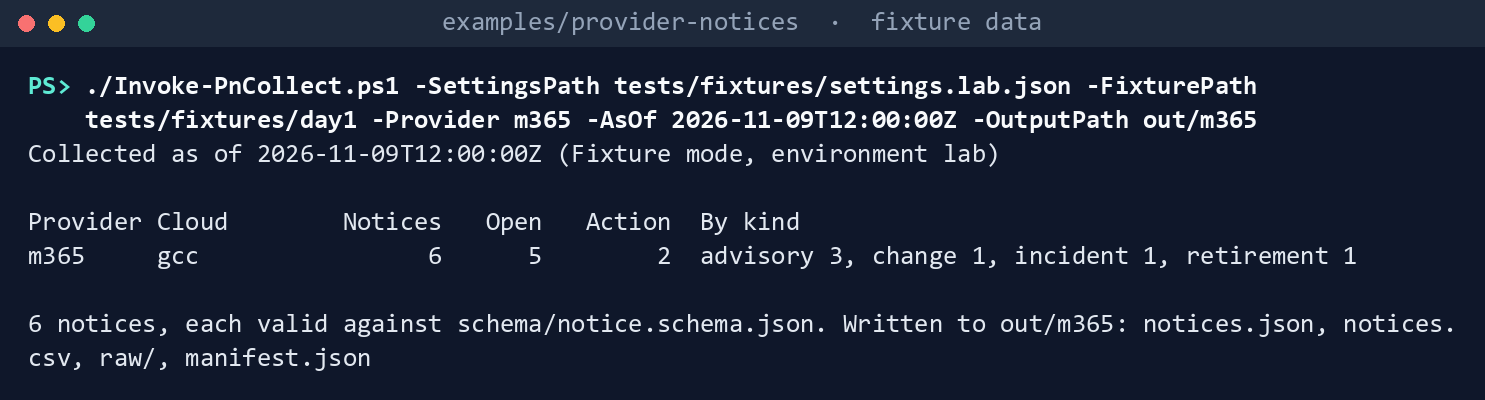
What the terminal shows, run on the kit’s fixtures (the same output as text) Six notices, five open, two needing action.
Read the records:
Import-Csv out/m365/notices.csv | Format-Table noticeId, kind, status, actionRequired, actionRequiredBy, title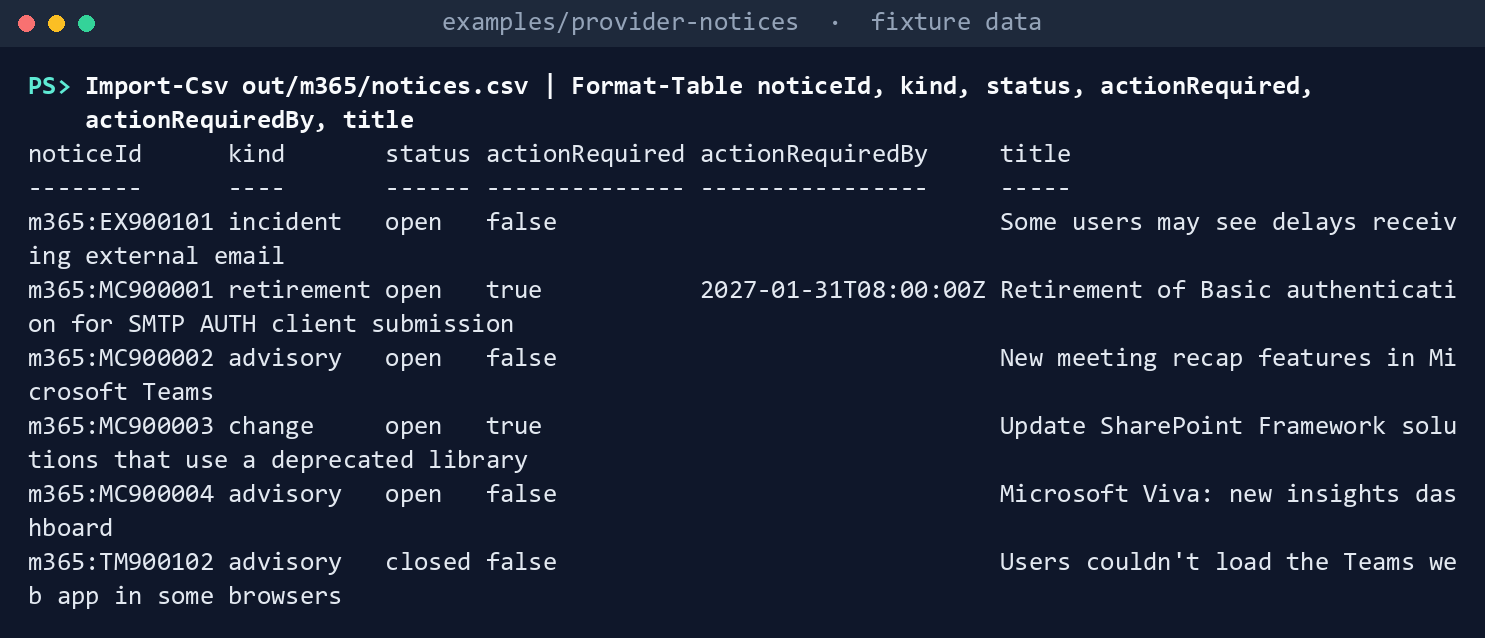
What the terminal shows, run on the kit’s fixtures (the same output as text) MC900001, tagged Retirement, is a retirement due January 31, 2027.MC900003is a change that needs action with no date. The resolved issueTM900102is closed.See who said each one needs action. The retirement’s date is Microsoft’s; the change’s is the kit’s rule for a
preventOrFixIssuepost:(Read-PnJson -Path out/m365/notices.json).notices | ForEach-Object { [pscustomobject]@{ noticeId = $_.noticeId; actionBasis = $_.actionBasis } } | Format-Table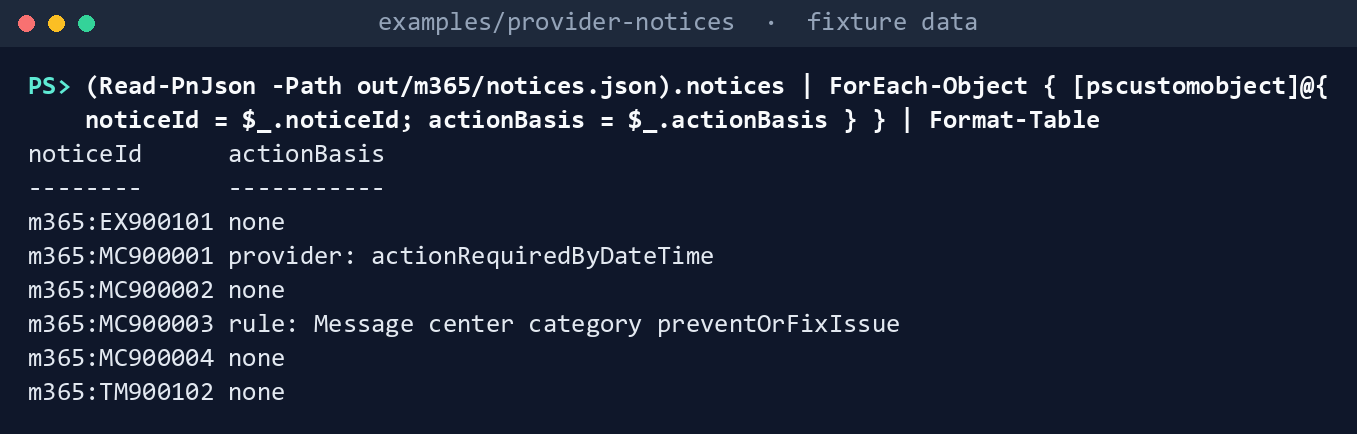
What the terminal shows, run on the kit’s fixtures (the same output as text) Collect the second week and read what changed. A new post,
MC900005, arrives with its own action date, andMC900003is updated:./Invoke-PnCollect.ps1 -SettingsPath tests/fixtures/settings.lab.json -FixturePath tests/fixtures/day2 -Provider m365 -AsOf 2026-11-16T12:00:00Z -OutputPath out/m365-day2 Import-Csv out/m365-day2/notices.csv | Format-Table noticeId, kind, status, actionRequiredBy, title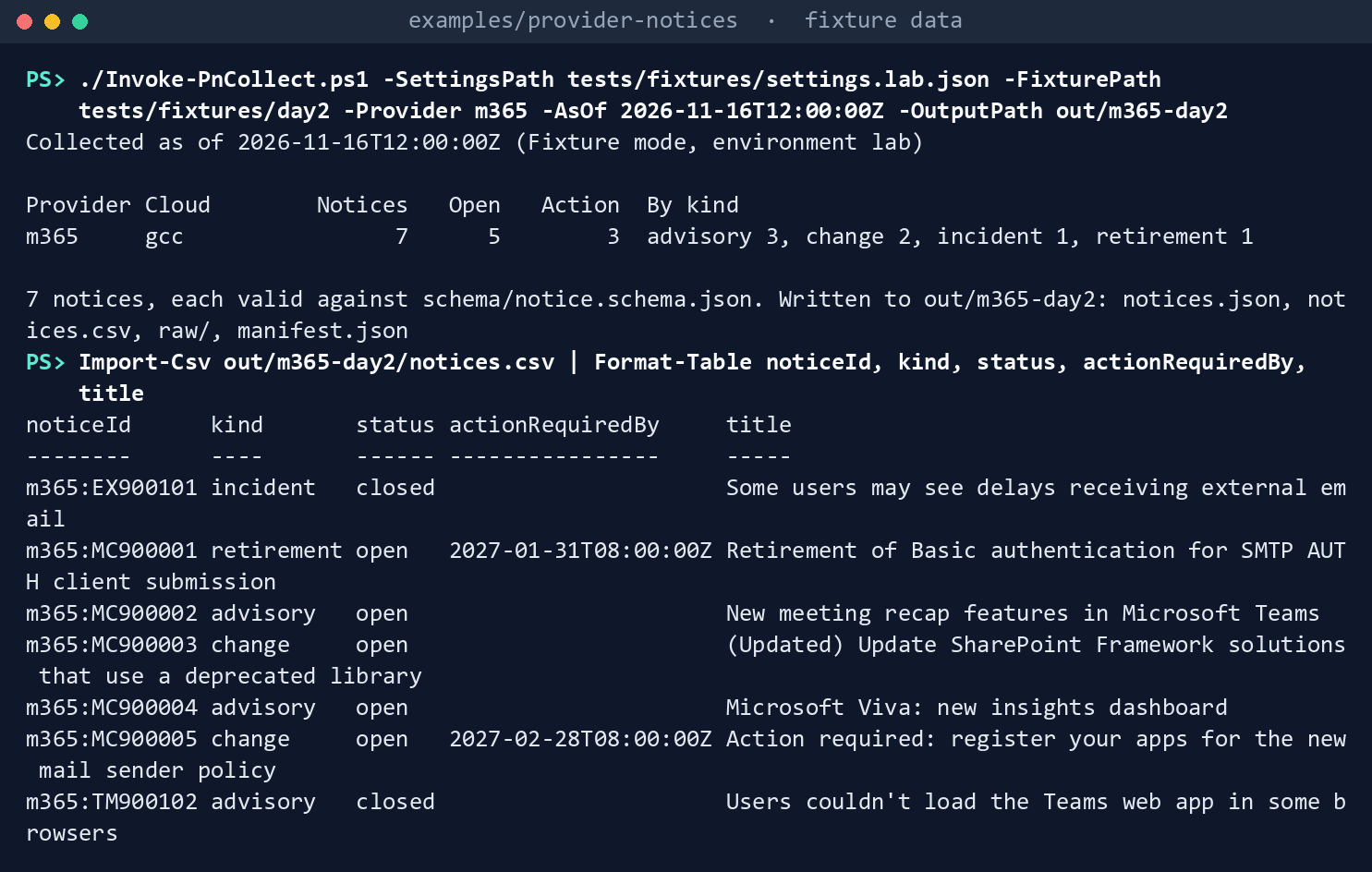
What the terminal shows, run on the kit’s fixtures (the same output as text) Build the live request without sending it, then try a next link on another host. The first line is the URL a live run would call; the second is refused:
$s = Read-PnSettings -Path tests/fixtures/settings.lab.json
(Get-PnLiveCommand -CallId m365-messages -Settings $s).Uri
Get-PnLiveCommand -CallId m365-messages -Settings $s -Arguments @{ nextLink = 'https://graph.example.net/v1.0/admin/serviceAnnouncement/messages?skip=100' }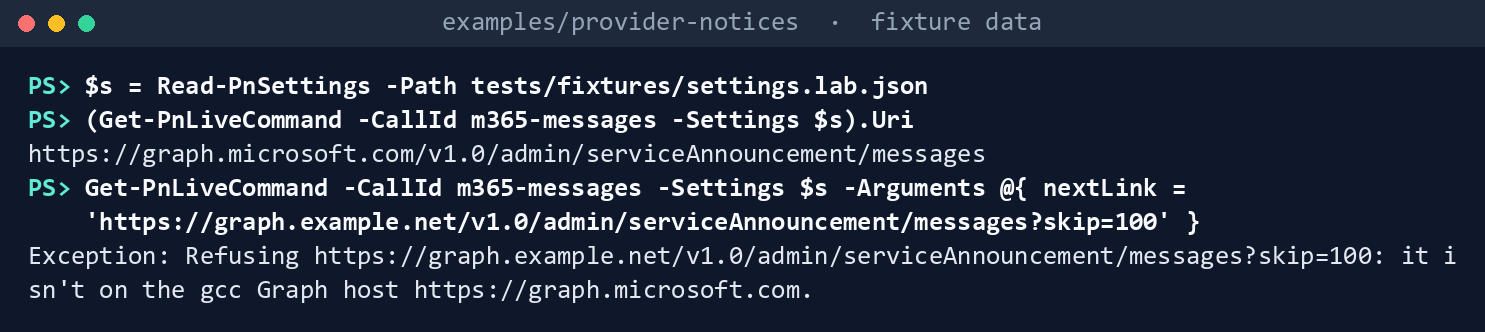
What the terminal shows, run on the kit’s fixtures (the same output as text) Run this chapter’s tests:
Invoke-Pester -Path tests/Collectors.Tests.ps1, tests/Live.Tests.ps1 -FullNameFilter 'Microsoft 365 service communications*', '*Graph*' -Output None -PassThru | Select-Object PassedCount, FailedCount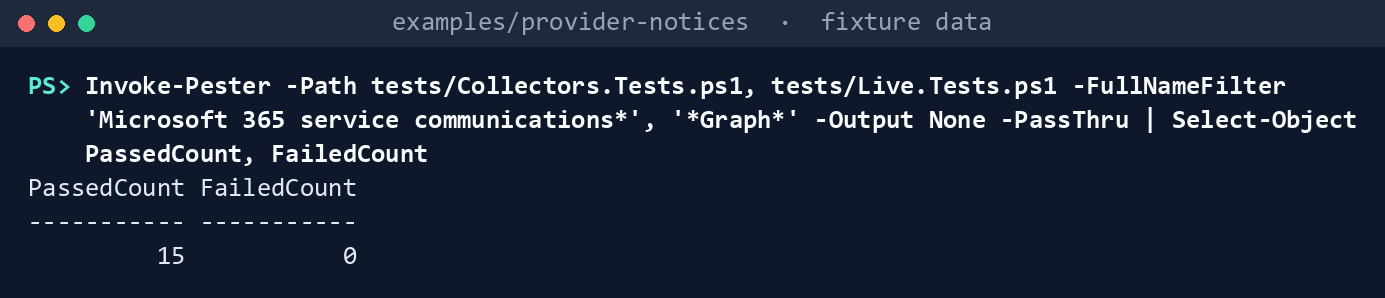
What the terminal shows, run on the kit’s fixtures (the same output as text)
Expected result: PassedCount 15 and FailedCount 0, and out/m365/manifest.json listing the three calls with their permissions. Delete out when you’re done:
Remove-Item -Recurse -Force out
Lab 2: a test tenant
Use a Microsoft 365 test tenant in the worldwide or GCC cloud, never production, signed in as a test administrator who holds an admin role (Learn doesn’t name which ones Graph accepts for a delegated read; the Message center reader roles are the narrowest to try). Work in examples/provider-notices. You’ll replace: <tenant-id> (the test tenant’s ID) and <settings-file> (your copy of deploy/settings.template.json with environment test, only m365 enabled, cloud gcc and tenantId <tenant-id>).
Every command in this lab, in order, from examples/provider-notices. Each step below says what it does and what to look for.
# Step 1: Install the module and sign in, delegated, with only the two read scopes
Install-Module Microsoft.Graph.Authentication -Scope CurrentUser
Connect-MgGraph -Environment Global -TenantId <tenant-id> -Scopes ServiceMessage.Read.All,ServiceHealth.Read.All

# Step 2: Cross-check with Learn's cmdlet, then collect
Install-Module Microsoft.Graph.Devices.ServiceAnnouncement -Scope CurrentUser
(Get-MgServiceAnnouncementMessage -All).Count
./Invoke-PnCollect.ps1 -SettingsPath <settings-file> -Provider m365 -OutputPath out/m365-test
Import-Csv out/m365-test/notices.csv | Group-Object kind | Format-Table Name, Count

# Step 3: Look at the posts that need action
(Read-PnJson -Path out/m365-test/notices.json).notices | Where-Object { $_.actionRequired } | ForEach-Object { [pscustomobject]@{ noticeId = $_.noticeId; by = $_.actionRequiredBy; basis = $_.actionBasis } } | Format-Table

# Step 4: Back it out
Disconnect-MgGraph
Remove-Item -Recurse -Force out/m365-test
Install the module and sign in, delegated, with only the two read scopes. An administrator consents once:
Install-Module Microsoft.Graph.Authentication -Scope CurrentUser
Connect-MgGraph -Environment Global -TenantId <tenant-id> -Scopes ServiceMessage.Read.All,ServiceHealth.Read.All
Cross-check with Learn’s cmdlet, then collect. The counts should agree:
Install-Module Microsoft.Graph.Devices.ServiceAnnouncement -Scope CurrentUser
(Get-MgServiceAnnouncementMessage -All).Count
./Invoke-PnCollect.ps1 -SettingsPath <settings-file> -Provider m365 -OutputPath out/m365-test
Import-Csv out/m365-test/notices.csv | Group-Object kind | Format-Table Name, Count
Look at the posts that need action, and confirm each has the provider basis or the kit’s rule:
(Read-PnJson -Path out/m365-test/notices.json).notices | Where-Object { $_.actionRequired } | ForEach-Object { [pscustomobject]@{ noticeId = $_.noticeId; by = $_.actionRequiredBy; basis = $_.actionBasis } } | Format-TableRecord the tags you see on retirement posts; Learn doesn’t list them.
Back it out. Sign out and delete the run, which names the tenant’s services. If the consent was granted only for this lab, remove it in the Microsoft Entra admin center (Entra ID > Enterprise apps > Microsoft Graph Command Line Tools > Permissions):
Disconnect-MgGraph
Remove-Item -Recurse -Force out/m365-test
Verified facts
| Item | Value | US Government | Source |
|---|---|---|---|
| Message center posts | GET /admin/serviceAnnouncement/messages, ServiceMessage.Read.All |
US Government L4 and L5 | 7 |
| Service health issues and overviews | GET /admin/serviceAnnouncement/issues, /healthOverviews, ServiceHealth.Read.All |
US Government L4 and L5 | 8 |
| Consent and roles | Both permissions granted only by an administrator; a delegated user needs an admin role | — | 9 |
| Hosts | GCC on graph.microsoft.com; GCC High graph.microsoft.us; DoD dod-graph.microsoft.us |
Yes | 10 11 |
| Data privacy messages | Global Administrator or Message Center Privacy Reader | — | 12 |
| Learn’s cmdlet | Get-MgServiceAnnouncementMessage, module Microsoft.Graph.Devices.ServiceAnnouncement |
— | 13 |
Not yet specified: the Message center tag values (Learn doesn’t enumerate them; the kit treats Retirement as a retirement) and which admin roles Graph accepts for a delegated read.
Federal requirements and evidence
The collection is what the guide’s G2 checks. The mappings are the kit’s config/requirements.json.14 15
| What the output proves | Requirement it supports | KSI it aligns to | Who keeps it |
|---|---|---|---|
| The reader holds two read permissions and nothing that writes (Lab 1, step 1; Lab 2, step 1) | SA-9 c | KSI-SCR-MIT, KSI-SCR-MON | The Microsoft 365 service owner; the ISSO keeps the consent record |
| The reads went to the tenant’s own Graph host and no other (Lab 1, steps 2 and 7) | SA-9 c; SI-5 a | KSI-SCR-MIT, KSI-SCR-MON | The repository’s tests |
Every post and issue was read and recorded with its calls (Lab 1, steps 3 and 6; Lab 2, step 2: raw/m365.json, notices.json, manifest.json) |
SA-9 c; SI-5 a | KSI-SCR-MIT, KSI-SCR-MON | The ISSO, with the run folder |
| Each post that announces a change or retirement is marked, with who said it needs action (Lab 1, steps 4 and 5; Lab 2, step 3) | SI-5; CM-3 b, through the tasks Chapter 06 routes | KSI-SCR-MON, KSI-CMT-LMC, KSI-CMT-RVP | The change manager |
KSIs are FedRAMP 20x indicators for cloud service providers; the agency lines its evidence up with them and doesn’t report them (Book 00, Appendix B). The kit’s records support these controls; the agency’s assessor decides them. Which output supports which indicator is the program’s mapping (design guidance).
Dangers
| Danger | What happens | The guard |
|---|---|---|
| A GCC High or DoD tenant read on the worldwide host | Nothing comes back, and the gate passes on an empty list | The cloud named in the settings; the session guard; every request on the cloud’s own host |
| A next link to another host | The token goes somewhere the agency didn’t choose | Next links followed only on the cloud’s host |
| A broad Graph scope for convenience | The reader can change the tenant | Two read permissions, declared per call |
| A kit rule mistaken for Microsoft’s deadline | A post with no date gets an invented one | actionBasis names the rule; no date is made up |
| Data privacy posts unseen | The reader’s role can’t see them16 | Name a Message Center Privacy Reader to read them where they matter |
| The email trusted over the API | Look-alike email gets acted on (Book 15, Chapter 03) | The task links the post the kit read from Graph |
Checklist
Footnotes
Microsoft Learn, “Use the Microsoft Graph API to access service communications,” https://learn.microsoft.com/graph/api/resources/service-communications-api-overview (read November 9, 2026; carried from the provider notices guide’s verification log).↩︎
Microsoft Learn, “List serviceAnnouncement messages,” https://learn.microsoft.com/graph/api/serviceannouncement-list-messages?view=graph-rest-1.0 (read November 9, 2026).↩︎
Microsoft Learn, “List serviceAnnouncement issues,” https://learn.microsoft.com/graph/api/serviceannouncement-list-issues?view=graph-rest-1.0, and “List healthOverviews,” https://learn.microsoft.com/graph/api/serviceannouncement-list-healthoverviews?view=graph-rest-1.0 (read November 9, 2026).↩︎
Microsoft Learn, “National cloud deployments,” https://learn.microsoft.com/graph/deployments (read November 9, 2026).↩︎
Microsoft Learn, “About admin roles in the Microsoft 365 admin center,” https://learn.microsoft.com/microsoft-365/admin/add-users/about-admin-roles (read November 9, 2026).↩︎
Microsoft Learn, “List serviceAnnouncement messages,” https://learn.microsoft.com/graph/api/serviceannouncement-list-messages?view=graph-rest-1.0 (read November 9, 2026).↩︎
Microsoft Learn, “List serviceAnnouncement messages,” https://learn.microsoft.com/graph/api/serviceannouncement-list-messages?view=graph-rest-1.0 (read November 9, 2026).↩︎
Microsoft Learn, “List serviceAnnouncement issues,” https://learn.microsoft.com/graph/api/serviceannouncement-list-issues?view=graph-rest-1.0, and “List healthOverviews,” https://learn.microsoft.com/graph/api/serviceannouncement-list-healthoverviews?view=graph-rest-1.0 (read November 9, 2026).↩︎
Microsoft Learn, “Use the Microsoft Graph API to access service communications,” https://learn.microsoft.com/graph/api/resources/service-communications-api-overview (read November 9, 2026; carried from the provider notices guide’s verification log).↩︎
Microsoft Learn, “Use the Microsoft Graph API to access service communications,” https://learn.microsoft.com/graph/api/resources/service-communications-api-overview (read November 9, 2026; carried from the provider notices guide’s verification log).↩︎
Microsoft Learn, “National cloud deployments,” https://learn.microsoft.com/graph/deployments (read November 9, 2026).↩︎
Microsoft Learn, “About admin roles in the Microsoft 365 admin center,” https://learn.microsoft.com/microsoft-365/admin/add-users/about-admin-roles (read November 9, 2026).↩︎
Microsoft Learn, “List serviceAnnouncement messages,” https://learn.microsoft.com/graph/api/serviceannouncement-list-messages?view=graph-rest-1.0 (read November 9, 2026).↩︎
National Institute of Standards and Technology, SP 800-53 Rev. 5 OSCAL catalog, release 5.2.0, https://github.com/usnistgov/oscal-content/blob/main/nist.gov/SP800-53/rev5/json/NIST_SP-800-53_rev5_catalog.json (read November 9, 2026).↩︎
FedRAMP, “Key Security Indicators,” FedRAMP Consolidated Rules for 2026, https://www.fedramp.gov/2026/providers/20x/key-security-indicators/ (read November 9, 2026).↩︎
Microsoft Learn, “About admin roles in the Microsoft 365 admin center,” https://learn.microsoft.com/microsoft-365/admin/add-users/about-admin-roles (read November 9, 2026).↩︎