Federal Modernization Workbook
Chapter 06 — PIM for Azure Resources
An Owner who never has to activate is an Owner an attacker never has to wait for. In Azure the fix is the same as in Entra: eligible, time-bound, approved. The difference is that every scope keeps its own rules.
The code behind the project plan’s task A3.2, “Azure privileged roles eligible through PIM; three subscription owners at most.” You start with Learn’s walkthroughs for the PIM for Azure resources REST API and Microsoft’s own request and response examples for it, which the repository keeps as a pinned copy, and you replay the examples through the code against a fake Resource Manager. Then you build PaAzurePim in examples/privileged-access for what they leave to you: role settings by tier at every scope, eligible assignments as a reviewed file, standing Owner, Contributor and User Access Administrator found and converted, and a plan that is a dry run until you say -Apply. Lab 1 runs on a laptop with no tenant; Lab 2 uses a test subscription. A table at the end maps each output to the federal requirement it supports.
Jump to a slide (18)
Deck · Narrated deck (about 12 minutes, captions) · Script · Captions. Recorded on November 2, 2026 from the approved chapter.
Goal and audience
Goal. By the end of this chapter you can hold PIM for Azure resources as code. A reviewed JSON file says which scopes are governed, which roles, the settings for each tier, who is eligible, and which standing assignments are allowed and who owns each one. The code reads the estate through Resource Manager, prints a diff, writes the requests it would send, and sends them only when you run it again with -Apply. You can say, for each rule in the code, whether it is Microsoft’s contract, Microsoft’s sample, or the program’s own design.
Audience. Platform engineers who own the Azure management group hierarchy, and the identity engineers and ISSOs who review their changes. You should read PowerShell 7 and know what an Azure role assignment and a scope are. Chapter 01’s “The rows” section and Lab 1’s Azure scopes are the read this chapter builds on. You don’t need a subscription until Lab 2.
The context the code depends on
PIM for Azure resources isn’t in Microsoft Graph. Learn says PIM for Microsoft Entra roles and PIM for Groups are managed through Graph, and PIM for Azure resources through Azure Resource Manager, with no Graph permissions at all: the caller needs at least Owner or User Access Administrator on the resource it administers.1 The same page calls this third iteration of the PIM APIs the final one, generally available for Azure resources, and says the older /beta/privilegedAccess/azureResources endpoint is deprecated and stops returning data on October 28, 2026.2 By that date, code written against the old endpoint no longer gets data; Learn’s page still says “will stop”, so check it before you rely on this. This chapter uses only the current one.3
Three resource types under Microsoft.Authorization do the work:
| Resource | What it does | Call |
|---|---|---|
roleEligibilityScheduleRequests |
Creates or removes an eligible assignment (AdminAssign, AdminRemove) |
PUT {scope}/providers/Microsoft.Authorization/roleEligibilityScheduleRequests/{guid}4 |
roleAssignmentScheduleRequests |
Creates or removes an active assignment, or activates an eligible one | PUT {scope}/providers/Microsoft.Authorization/roleAssignmentScheduleRequests/{guid}5 |
roleManagementPolicies |
The role settings: activation length, approval, justification, ticket, authentication context, how long assignments may last | PATCH {scope}/providers/Microsoft.Authorization/roleManagementPolicies/{guid}6 7 |
The schedules a request produces are read back from roleEligibilitySchedules and roleAssignmentSchedules, the two lists Chapter 01’s inventory already reads.8 Learn’s walkthroughs give the scope forms for a management group (providers/Microsoft.Management/managementGroups/{name}), a subscription and a resource group.9
The API version is 2020-10-01. Learn’s list of Azure RBAC API versions marks 2020-10-01 as the generally available release of every PIM resource type: role assignment and eligibility schedule requests, schedules and instances, eligible child resources, and role management policies and their assignments. The only later stable version, 2022-04-01, made role assignment conditions GA and lists no PIM change.10 The template reference also lists preview versions of roleEligibilityScheduleRequests (2022-04-01-preview, 2024-02-01-preview, 2024-09-01-preview);11 the code doesn’t use them. Learn’s own PIM how-to for assigning Azure roles through Resource Manager still shows 2020-10-01-preview in its sample request.12 The two pages differ; the code follows the stricter one, the GA version, and calls-ch06.json pins it (research gaps, row 64).
Policies don’t inherit. Learn says role settings are defined per role and per resource, and settings at a subscription aren’t inherited by a resource group under it.13 So the desired state lists every scope it governs, and the code reads and sets each role’s policy at each of them. A resource group left out of the file keeps whatever settings it has.
Who can be eligible. Learn says you can make users eligible but not applications, service principals or managed identities, because they can’t perform the activation steps, and that users with eligible or time-bound assignments need a valid license (Microsoft Entra ID P2 or Microsoft Entra ID Governance).14 So a standing Contributor held by a deployment pipeline can’t be converted. The code reports it and leaves it alone.
What counts as privileged. Learn’s privileged administrator roles are Owner, Contributor, Reservations Administrator, Role Based Access Control Administrator and User Access Administrator.15 This chapter governs three, Owner, Contributor and User Access Administrator, the Azure roles in Book 04, Chapter 04’s placements and the program’s scope (the project plan names subscription owners and Azure privileged roles), and the desired state can add the others by role definition ID. Microsoft’s best practice is at most three subscription owners.16
Which cloud, for these calls
The target estate is Microsoft 365 GCC (Moderate) with commercial Azure. GCC uses the worldwide endpoints: sign-in at login.microsoftonline.com, Graph at graph.microsoft.com, and Resource Manager at management.azure.com, which is the host for every call in this chapter. GCC High and DoD use their own Graph hosts, and their Azure subscriptions are in Azure Government, whose Resource Manager host is management.usgovcloudapi.net.17 18 Microsoft Entra ID P1 and P2 for GCC are hosted in the Azure commercial environment,19 and Microsoft Entra ID Governance, which PIM needs, is available in GCC, GCC High and DoD.20 No Learn page read for this chapter states the PIM Resource Manager API’s availability in Azure Government in so many words (research gaps, row 65). The code takes the cloud as a required parameter, with no default, uses Chapter 01’s cloud table, and refuses a desired-state file written for another cloud.
Start with Microsoft’s sample
What Microsoft gives you
Learn has three walkthroughs for this API, one per job: Use Azure PIM to manage eligible access with the REST API, Use Azure PIM to manage active access with the REST API, and Use Role Management Policies to manage rules for each role within each resource.21 22 23 Together they show how to list schedules with a scope and a filter, grant and remove an eligible assignment, grant and remove an active one, activate and deactivate, list a role’s policy with $filter=roleDefinitionId eq '{scope}/providers/Microsoft.Authorization/roleDefinitions/{id}', and patch its rules. They name the five rule types (enablement, expiration, notification, approval and authentication context), say you never create a policy because every role at every resource has a default one, and list the errors a request returns when it breaks a rule, such as ExpirationRule and JustificationRule.24 25
The walkthroughs’ source isn’t in a public Microsoft repository, so the pages can’t be pinned and checked. Microsoft’s request and response examples for the same calls are: they live in Azure/azure-rest-api-specs beside the API definition, and the Learn REST reference renders them on each operation’s page.26 No Azure-Samples repository for PIM for Azure resources was found.
The pinned copy
The repository pins six of those examples, unmodified, in examples/third_party/azure-pim-rest-examples: list assignment schedules, list eligibility schedules, list role management policies, create an eligibility schedule request, create an assignment schedule request, and the partial policy PATCH, all for API version 2020-10-01, from commit 411fb22 (October 30, 2026), with the repository’s MIT license.27 snapshot.json records each file’s SHA-256, checked against the upstream git blob hashes, and a unit test checks them. The weekly source watch reports new commits to the examples folder. Updating the copy is a reviewed pull request.
tests/AzurePim.Tests.ps1 replays them. A stand-in Resource Manager answers each list with the example’s own response body, and the chapter’s code reads it as it would read a tenant. The write examples are compared field by field with what the code would send. Nothing signs in and nothing leaves the machine.
What it leaves to you
Replaying the examples, and reading them beside the walkthroughs, shows what they do and what they leave out. Every row is pinned by a test in tests/AzurePim.Tests.ps1.
| Microsoft’s sample, as published | Why it matters | What PaAzurePim adds |
|---|---|---|
Each list example is one page, filtered to one principal with assignedTo() |
An unfiltered list of a busy subscription spans pages; reading one misses holders | Chapter 01’s Invoke-PaList follows nextLink on the cloud’s own host; page sizes of 1, 2 and 50 give the same state |
The eligibility example’s roleDefinitionId ends in the Contributor ID, while its expandedProperties.roleDefinition carries a different ID with the display name Contributor |
A reader that trusts the expanded object or the name can file a row under the wrong role | Rows key on properties.roleDefinitionId and the role GUID, never on a display name |
The assignment example says assignmentType: Assigned but carries a linkedRoleEligibilityScheduleId and an eight-hour end |
It is the activation the active-access walkthrough creates;28 read naively it looks like an assignment | A schedule linked to an eligibility is Activated, never standing |
The examples address the scope as providers/Microsoft.Subscription/subscriptions/{id}; the walkthroughs use subscriptions/{id}; responses return /subscriptions/{id} |
Two forms of one scope make diffs and de-duplication fail | The walkthrough’s form, the one responses use; any other form is refused |
The AdminAssign example makes Contributor eligible for 365 days, with an attribute condition and no justification |
A year is longer than any tier allows; a missing justification fails a policy that requires one | Duration from the tier (90 days for Tier 0, 180 for Tier 1, from Appendix B); a justification on every request; no condition on a privileged administrator role |
| The policy PATCH example sends two rules, one of them an email notification to a fixed address | It shows partial patches work; it says nothing about which rules a program should own | Seven managed rules compared with the tier’s settings; a PATCH carries only the rules that differ, each with its id, ruleType and target as read |
| Every example shows one subscription | Settings don’t inherit,29 so a resource group under a governed subscription keeps the defaults | Each role’s policy read and set at every scope in the desired state |
| Nothing finds standing assignments or converts them | Standing Owner is the state the project exists to remove | PA-AZ-01 to PA-AZ-06; eligible replacement first, then AdminRemove; service principals, root elevation and the caller left alone, with the reason |
| Each write is a request you send by hand | Nothing to review before it lands | A plan and a diff, a dry run by default, and writes only through an apply client with -Apply |
Every request goes to management.azure.com |
Right for GCC; wrong for GCC High and DoD | The host comes from the cloud table |
The verdict. Use Learn’s walkthroughs as the procedure and the examples as the contract for request and response shapes. Don’t drive the estate from them: they make one change at a time, at one scope, with nothing to review first.
The code: PaAzurePim in examples/privileged-access
examples/privileged-access gains another module for this chapter, powershell/PaAzurePim/PaAzurePim.psm1, with its own call list config/calls-ch06.json, entry script Invoke-PaAzurePim.ps1, tests and fixtures. The notes are in docs/ch06.md.
What it builds on
The module imports Chapter 01’s PrivilegedAccess module and changes nothing in it. It uses four of its functions:
Get-PaCloudfor the hosts, with no default cloud;Get-PaTierMapandGet-PaAzureTierfor each row’s tier, by role and scope, with the desired state’s control-plane subscriptions added (Book 04, Chapter 04’s placements, Design guidance);Invoke-PaListfor every read. APaAzurePimclient has the same shape as Chapter 01’s reader, so every GET is declared, paged to the end, recorded, and refused if it isn’t a GET or isn’t on the cloud’s host.
What it adds
A call list with two tasks. azure-pim-read holds the three lists. azure-pim-apply adds the two PUTs and the PATCH. Each call names its least-privileged Azure role and the Learn page that states it:
| Call | Method | Least-privileged role | Why |
|---|---|---|---|
| Role assignment schedules, list for scope | GET | Reader | Needs Microsoft.Authorization/roleAssignments/read, which every built-in role has30 |
| Role eligibility schedules, list for scope | GET | Reader | The same action31 |
| Role management policies, list for scope | GET | Reader | The same action32 |
| Role eligibility schedule request, create | PUT | User Access Administrator | Needs Microsoft.Authorization/roleAssignments/write; “only Owner and User Access Administrator” of the built-in roles33 |
Role assignment schedule request, create (AdminRemove only) |
PUT | User Access Administrator | The same34 |
| Role management policy, update | PATCH | User Access Administrator | Owner or User Access Administrator manages role settings;35 the action is Microsoft.Authorization/roleManagementPolicies/write36 |
User Access Administrator is the narrower of the two roles Learn names: it holds */read and Microsoft.Authorization/*, while Owner can also change every resource.37 Role Based Access Control Administrator holds roleAssignments/write too, and Learn’s general role-assignment pages offer it as the least-privileged way to assign roles,38 but the PIM walkthroughs and the PIM APIs page name only Owner and User Access Administrator.39 40 The code follows the stricter statement and declares User Access Administrator (research gaps, row 62). Get-PaAzRequiredRole returns the union for a task, so the dry run needs Reader and the apply needs User Access Administrator, and the manifest says which.
A desired state. Read-PaAzDesiredState loads the reviewed file and refuses what Learn or the program rules out: a service principal as an eligible holder,41 an activation outside 1 to 24 hours,42 approval with no approver group, the root scope, and an authentication context before its Conditional Access policy is confirmed. That last guard is Learn’s advice: create and enable the Conditional Access policy for the authentication context before you set it in PIM.43 The authentication context c1 and its policy are Chapter 03’s. The settings per tier follow Book 04, Appendix B: four hours of activation for Tier 0 and eight for Tier 1, approval by PIM-Approvers-T0 or PIM-Approvers-T1, justification and a ticket on activation, MFA and justification on an active assignment, eligibility for at most 90 or 180 days, and no permanent active assignment. Design guidance for the values.
A read. Get-PaAzPimState reads, at each governed scope, both schedule lists and one policy per governed role, found with the walkthrough’s roleDefinitionId filter. Rows are de-duplicated by ID and inherited rows skipped, as in Chapter 01. A schedule is ActivePermanent only when it is Assigned, has no end, isn’t linked to an eligibility, and is direct.
A plan. New-PaAzPlan compares the two and lists operations in the order they must be sent:
- Policy updates. For each scope and role, the seven managed rules (
Expiration_Admin_Eligibility,Expiration_Admin_Assignment,Expiration_EndUser_Assignment,Enablement_Admin_Assignment,Enablement_EndUser_Assignment,AuthenticationContext_EndUser_AssignmentandApproval_EndUser_Assignment) are compared with the tier’s settings. One PATCH carries only the rules that differ. Notification rules aren’t managed here. - New eligible assignments. Each declared eligibility the estate doesn’t hold, as
AdminAssignwith anAfterDurationexpiration of the tier’s maximum and the declared justification. - Removal of standing assignments. Each standing Owner, Contributor or User Access Administrator held by a user or group, outside the exceptions, gets an eligible replacement in step 2 and an
AdminRemovein step 3. Eligible first, so no holder loses the role before they can activate it.
The policies go first because a request that breaks the policy is refused: an eligibility longer than the rule allows fails with ExpirationRule.44 The fake enforces that too, and a test shows it.
Each request is named with a GUID derived from the run ID and the operation, so the dry run and the apply on the same day send exactly the requests the reviewer read. An eligibility the estate holds but the file doesn’t declare is reported (PA-AZ-04), never removed by the plan: removing access is its own reviewed change.
Findings. The plan reports what it found and what it won’t touch, and why:
| Rule | Severity | What it flags | Source |
|---|---|---|---|
| PA-AZ-01 | Finding (Info on the exceptions list) | Standing Owner, Contributor or User Access Administrator outside the exceptions; an exception with no owner doesn’t count | Learn: zero permanently active assignments except the emergency accounts;45 Design guidance for the exceptions |
| PA-AZ-02 | Finding | A standing assignment held by a service principal or managed identity | Learn: they can’t be made eligible46 |
| PA-AZ-03 | Finding | User Access Administrator at root scope (/) |
Learn: elevated access, to be removed when the task is done;47 Book 04 treats it as a Tier 0 event |
| PA-AZ-04 | Warn | An eligibility on a governed role not in the desired state, or one that never expires | Design guidance (Appendix B bounds eligibility by tier) |
| PA-AZ-05 | Finding | A standing assignment held by the identity the plan runs as | Design guidance: the apply needs it to finish; decide it last, from another session |
| PA-AZ-06 | Finding | More than three Owners on a subscription, eligible or active, after the plan | Learn: at most three subscription owners48 |
The apply. Invoke-PaAzPlan is a dry run unless called with -Apply and a client built for azure-pim-apply. The live invoker, New-PaAzLiveInvoker, uses Invoke-AzRestMethod, refuses an Az session signed in to another cloud, and refuses any host but the cloud’s own. With -Apply, the entry script reads the estate again afterwards and writes what is still different to diff-after.txt. Every run writes state.json (including each policy’s rules as read, which is the back-out), plan.json, diff.txt, findings.json and manifest.json with the SHA-256 of each file and every request sent.
The tests
Pester 5 under PowerShell 7: 38 tests in tests/AzurePim.Tests.ps1, none needing a module, a tenant or a network:
- 6 on the call list and the client: one API version, GET only for reads, exactly Reader and User Access Administrator, the GCC and Azure Government hosts, a write refused by a read client, a name that isn’t a GUID refused.
- 6 replaying Microsoft’s examples, one for each row of the gap table above that the examples show.
- 4 on the read, 5 on the desired state, 10 on the plan, and 7 on the dry run, the apply against the fake, the fake’s policy and principal checks, and the entry script.
The kit runs 330 tests in all.
The commands below replay Microsoft’s pinned examples against a stand-in, and run the example against a fictional estate served by a fake. They show what the code does, not that a tenant returns the same shapes or accepts the same requests. Review the code, and run Lab 2 in a test subscription, before it reads or writes a real one.
Lab 1: fixtures, no tenant
You need PowerShell 7.1 or later with Pester 5. Work in examples/privileged-access. The fixture estate has a management group (contoso-root), a workload subscription, a control-plane subscription and a resource group, rg-payroll. The identity that would run the apply is the fictional service principal sp-pim-automation, c3000000-0000-4000-8000-000000000003.
Every command in this lab, in order, from examples/privileged-access. Each step below says what it does and what to look for.
# Step 1: Replay Microsoft's examples
Invoke-Pester -Path tests/AzurePim.Tests.ps1 -FullNameFilter "*Microsoft's examples*" -Output None -PassThru |
    Select-Object PassedCount, FailedCount, NotRunCount

# Step 2: List the roles each task needs
Import-Module ./powershell/PaAzurePim/PaAzurePim.psm1
(Get-PaAzRequiredRole -Task azure-pim-read).AzureRoles -join ', '
(Get-PaAzRequiredRole -Task azure-pim-apply).AzureRoles -join ', '

# Step 3: Plan, as a dry run
./Invoke-PaAzurePim.ps1 -Cloud gcc -FixturePath tests/fixtures/ch06/estate.json -DesiredPath tests/fixtures/ch06/desired.json `
    -CallerPrincipalId c3000000-0000-4000-8000-000000000003 -OutputPath out/ch06 -RunId lab

# Step 4: Read the diff and the findings
Get-Content out/ch06/diff.txt | Where-Object { $_ -match '^[+-] ' }
(Get-Content out/ch06/diff.txt | Where-Object { $_ -match '^~ ' }).Count
Get-Content out/ch06/findings.json -Raw | ConvertFrom-Json | Where-Object Severity -ne 'Warn' | Format-Table Rule, Severity, Role, Scope

# Step 5: Apply against the fake
./Invoke-PaAzurePim.ps1 -Cloud gcc -FixturePath tests/fixtures/ch06/estate.json -DesiredPath tests/fixtures/ch06/desired.json `
    -CallerPrincipalId c3000000-0000-4000-8000-000000000003 -OutputPath out/ch06-apply -RunId lab -Apply

# Step 6: See the code refuse
$read = New-PaAzClient -Cloud gcc -Task azure-pim-read -Invoke (New-PaAzFixtureInvoker -Path tests/fixtures/ch06/estate.json).Invoke
Invoke-PaAzWrite -Client $read -CallId azpim-policy-update -Bind @{ scope = '/subscriptions/11111111-1111-4111-8111-111111111111'; name = 'f6000000-0000-4000-8000-000000000004' } -Body @{} -Apply
ConvertTo-PaAzScope '/subscriptions/11111111-1111-4111-8111-111111111111/resourceGroups/rg-payroll/providers/Microsoft.Web/sites/payroll'

# Step 7: Run the tests
Invoke-Pester -Path tests

# After the steps
Remove-Item -Recurse -Force out
Replay Microsoft’s examples:
Invoke-Pester -Path tests/AzurePim.Tests.ps1 -FullNameFilter "*Microsoft's examples*" -Output None -PassThru |
    Select-Object PassedCount, FailedCount, NotRunCount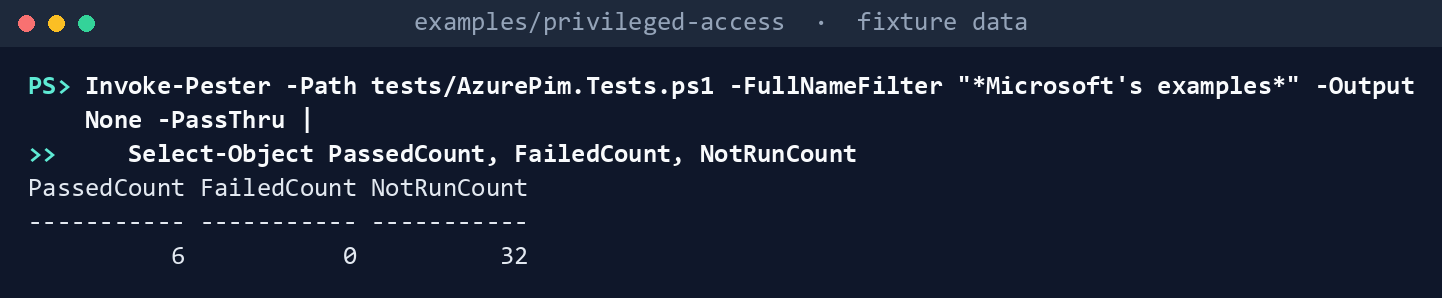
What the terminal shows, run on the kit’s fixtures (the same output as text) PassedCount 6,FailedCount 0,NotRunCount 32. Open the test file and read the second test: Microsoft’s own assignment example is an activation, though itsassignmentTypesaysAssigned.List the roles each task needs:
Import-Module ./powershell/PaAzurePim/PaAzurePim.psm1
(Get-PaAzRequiredRole -Task azure-pim-read).AzureRoles -join ', '
(Get-PaAzRequiredRole -Task azure-pim-apply).AzureRoles -join ', '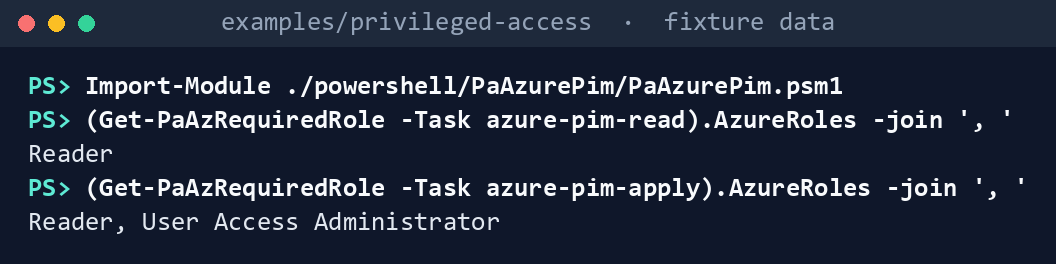
What the terminal shows, run on the kit’s fixtures (the same output as text) Reader, thenReader, User Access Administrator. Owner isn’t needed for anything.Plan, as a dry run:
./Invoke-PaAzurePim.ps1 -Cloud gcc -FixturePath tests/fixtures/ch06/estate.json -DesiredPath tests/fixtures/ch06/desired.json `
    -CallerPrincipalId c3000000-0000-4000-8000-000000000003 -OutputPath out/ch06 -RunId lab
Read: 9 assignment and 2 eligibility schedules, 12 policies at 4 scopes Plan: 11 policy updates, 5 eligible assignments to add, 3 standing assignments to remove Findings: 7 Finding, 2 Warn, 1 Info Dry run: 19 requests written to plan.json, none sent. Review diff.txt, then rerun with -Apply. Written to out/ch06 (manifest.json lists every request and file hash)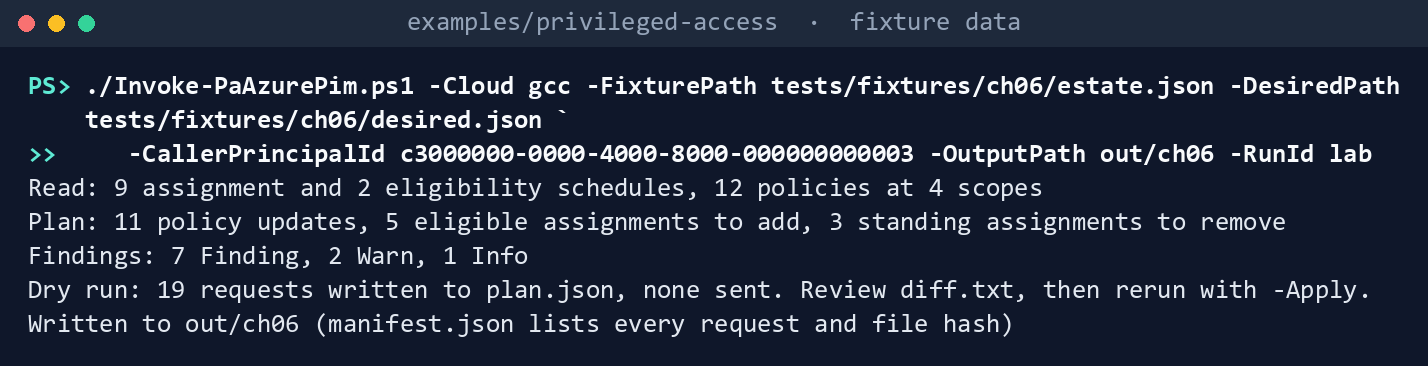
What the terminal shows, run on the kit’s fixtures (the same output as text) out/ch06/manifest.jsonlists 23 requests, every one a GET.Read the diff and the findings:
Get-Content out/ch06/diff.txt | Where-Object { $_ -match '^[+-] ' }
(Get-Content out/ch06/diff.txt | Where-Object { $_ -match '^~ ' }).Count
Get-Content out/ch06/findings.json -Raw | ConvertFrom-Json | Where-Object Severity -ne 'Warn' | Format-Table Rule, Severity, Role, Scope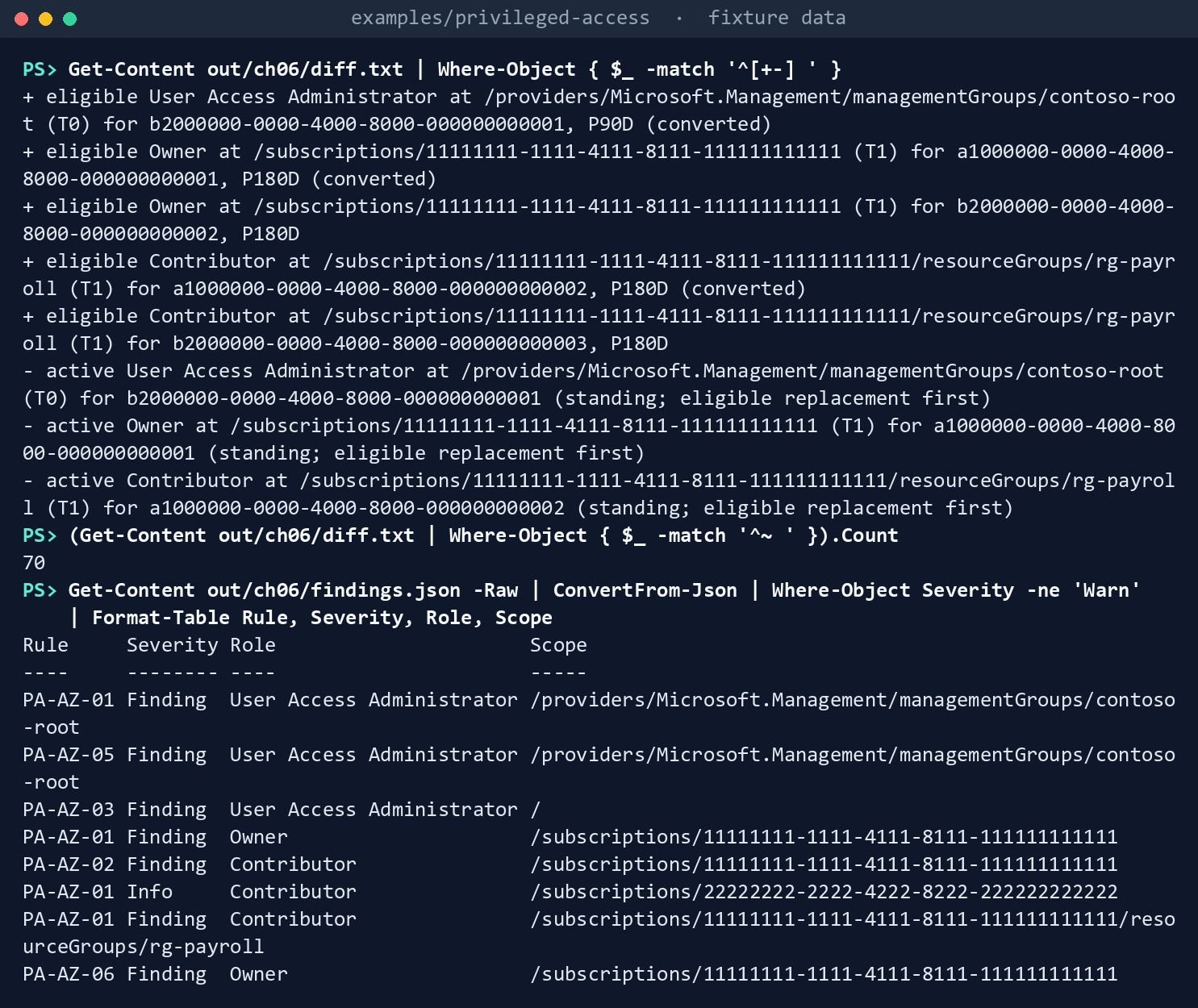
What the terminal shows, run on the kit’s fixtures (the same output as text) Five
+ eligiblelines and three- activelines. Three of the eligible lines end in(converted): the standing User Access Administrator held by the groupPRV-T0-UserAccessAdmin-Rootat the management group (Tier 0, 90 days), a user’s standing Owner on the workload subscription, and a user’s standing Contributor onrg-payroll(Tier 1, 180 days). Each has its- activeline. The other two are the declared groupsPRV-T1-Owner-WorkloadandPRV-T1-Contributor-Payroll. Then 70~ policylines, one per rule that changes; the control-plane subscription’s User Access Administrator policy is already at Tier 0 and isn’t touched. The findings: three PA-AZ-01 for the three conversions; PA-AZ-05 forsp-pim-automation’s own User Access Administrator; PA-AZ-03 for a user’s User Access Administrator at/; PA-AZ-02 forsp-deploy-pipeline’s standing Contributor; PA-AZ-01 as Info forsp-log-export, which is on the exceptions list with an owner; and PA-AZ-06, because the workload subscription would have four Owners. The two Warns are one user’s permanent eligibility for Owner, which the file doesn’t declare.Apply against the fake:
./Invoke-PaAzurePim.ps1 -Cloud gcc -FixturePath tests/fixtures/ch06/estate.json -DesiredPath tests/fixtures/ch06/desired.json `
    -CallerPrincipalId c3000000-0000-4000-8000-000000000003 -OutputPath out/ch06-apply -RunId lab -Apply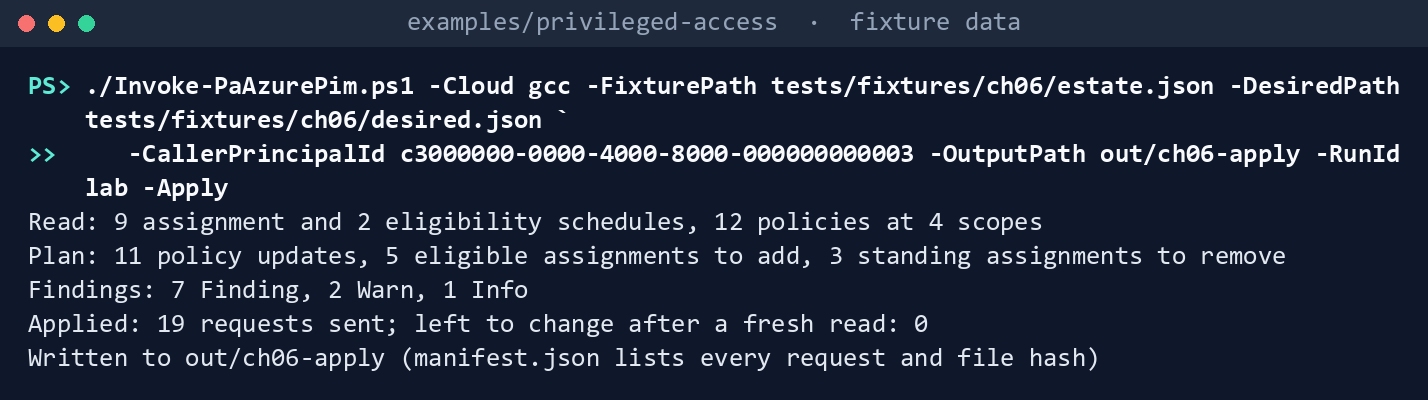
What the terminal shows, run on the kit’s fixtures (the same output as text) The same first three lines, then
Applied: 19 requests sent; left to change after a fresh read: 0. The manifest lists 45 GETs, 11 PATCHes and 8 PUTs, in that order of kind: policies, then eligibility, then removals. The fake started from the file again, so nothing you ran here changed the fixture.See the code refuse:
$read = New-PaAzClient -Cloud gcc -Task azure-pim-read -Invoke (New-PaAzFixtureInvoker -Path tests/fixtures/ch06/estate.json).Invoke
Invoke-PaAzWrite -Client $read -CallId azpim-policy-update -Bind @{ scope = '/subscriptions/11111111-1111-4111-8111-111111111111'; name = 'f6000000-0000-4000-8000-000000000004' } -Body @{} -Apply
ConvertTo-PaAzScope '/subscriptions/11111111-1111-4111-8111-111111111111/resourceGroups/rg-payroll/providers/Microsoft.Web/sites/payroll'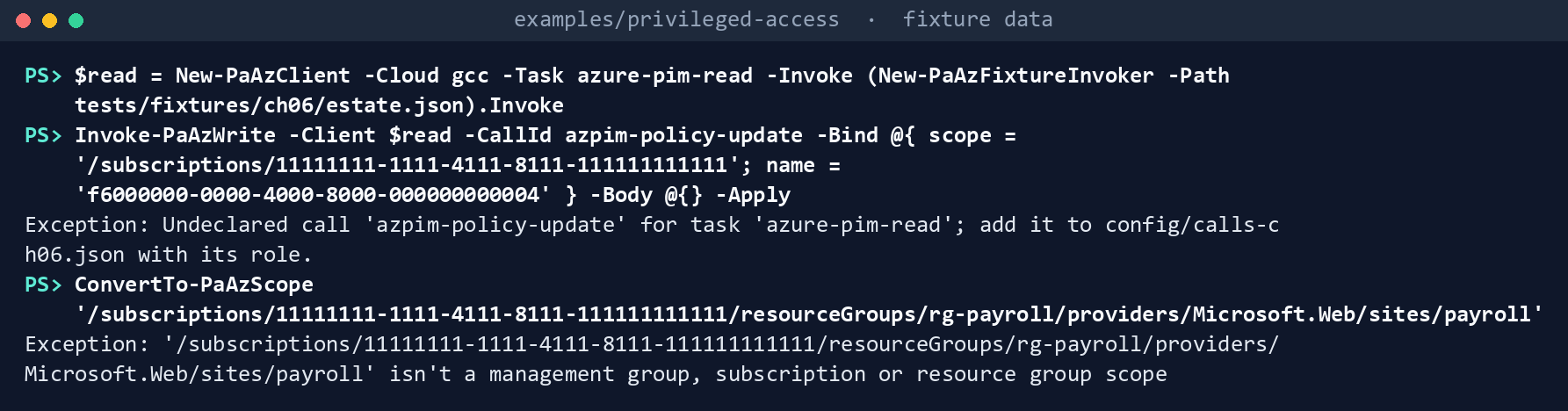
What the terminal shows, run on the kit’s fixtures (the same output as text) Two errors:
Undeclared call 'azpim-policy-update' for task 'azure-pim-read'; add it to config/calls-ch06.json with its role.and'/subscriptions/11111111-1111-4111-8111-111111111111/resourceGroups/rg-payroll/providers/Microsoft.Web/sites/payroll' isn't a management group, subscription or resource group scope.Run the tests:
Invoke-Pester -Path tests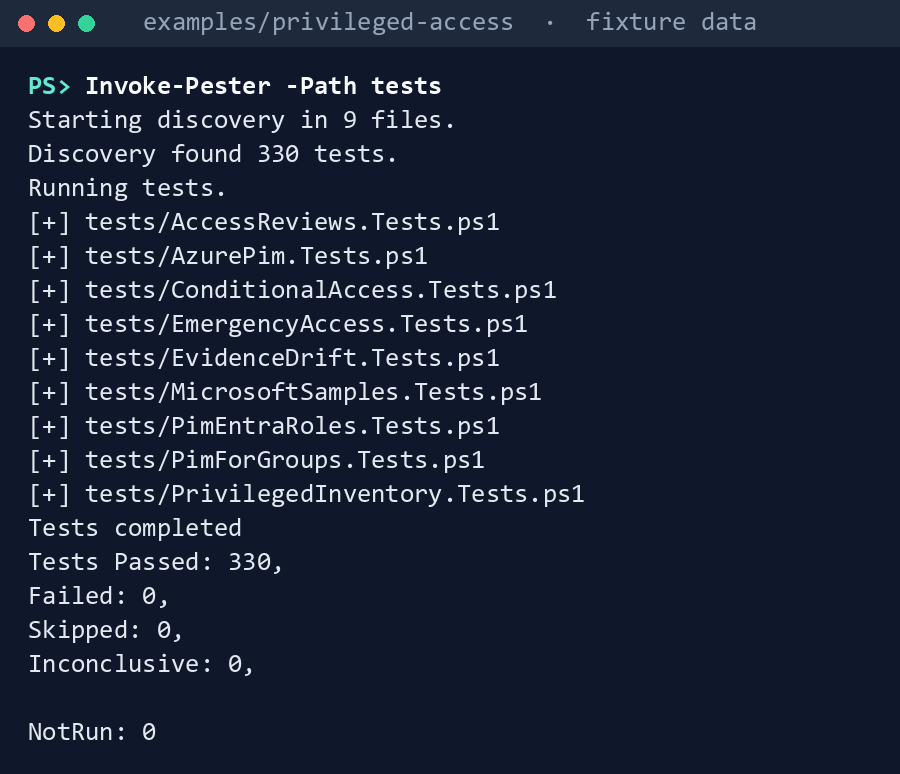
What the terminal shows, run on the kit’s fixtures (the same output as text)
Expected result: 330 tests passing, 38 of them this chapter’s, every row of the gap table seen with your own eyes, and a plan you could hand a reviewer.
When you’re done, delete out:
Remove-Item -Recurse -Force out
Lab 2: test tenant
Use a test tenant in the worldwide or GCC cloud, with a test management group, subscription and resource group, never production, and fictional users and groups. Eligible users need Microsoft Entra ID P2 or Microsoft Entra ID Governance.49 Work in examples/privileged-access. You’ll replace: <tenant-id> (the test tenant’s ID), <app-id>, <app-object-id> and <thumbprint> (the app’s application (client) ID, its service principal’s object ID and its certificate’s thumbprint), <test-mg-id>, <test-subscription-id> and <test-rg> (the test scopes), <t0-approver-group-id> and <t1-approver-group-id> (the two approver groups), and <eligible-group-id> and <eligible-group-name> (the group to be eligible).
Every command in this lab, in order, from examples/privileged-access. Each step below says what it does and what to look for.
# Step 2: Write the desired state
$d = Get-Content tests/fixtures/ch06/desired.json -Raw | ConvertFrom-Json
$d.scopes = @('/providers/Microsoft.Management/managementGroups/<test-mg-id>', '/subscriptions/<test-subscription-id>', '/subscriptions/<test-subscription-id>/resourceGroups/<test-rg>')
$d.controlPlaneSubscriptionIds = @()
$d.settings.T0.approverGroupId = '<t0-approver-group-id>'; $d.settings.T1.approverGroupId = '<t1-approver-group-id>'
$d.eligible = @([pscustomobject]@{ scope = '/subscriptions/<test-subscription-id>'; roleDefinitionId = '8e3af657-a8ff-443c-a75c-2fe8c4bcb635'
    principalId = '<eligible-group-id>'; principalType = 'Group'; name = '<eligible-group-name>'; justification = 'Lab: the test group activates Owner' })
$d.standingExceptions = @()
$d | ConvertTo-Json -Depth 6 | Set-Content desired-test.json

# Step 2: Write the desired state
$d.authenticationContextPolicyConfirmed = $false
foreach ($t in 'T0', 'T1') { $d.settings.$t.authenticationContext = $null }
$d | ConvertTo-Json -Depth 6 | Set-Content desired-test.json

# Step 3: Plan, live
Connect-AzAccount -ServicePrincipal -Environment AzureCloud -Tenant <tenant-id> -ApplicationId <app-id> -CertificateThumbprint <thumbprint>
./Invoke-PaAzurePim.ps1 -Cloud gcc -DesiredPath desired-test.json -CallerPrincipalId <app-object-id> -OutputPath out/ch06-test-dry -TenantId <tenant-id>

# Step 4: Apply
./Invoke-PaAzurePim.ps1 -Cloud gcc -DesiredPath desired-test.json -CallerPrincipalId <app-object-id> -OutputPath out/ch06-test-apply -TenantId <tenant-id> -Apply
Get-Content out/ch06-test-apply/diff-after.txt

# Step 6: Back it out
Remove-Item -Recurse -Force out/ch06-test-*
Prepare the identity. Register an app in the tenant’s own cloud (for GCC, the worldwide Microsoft Entra admin center) with a certificate credential, or use a managed identity. It needs no Graph permission.50 Grant it Reader on each test scope.
- Open Entra ID > App registrations > New registration, name the app and select Register.
- In the app, open Certificates & secrets > Certificates > Upload certificate and upload the certificate’s public key.
- In the Azure portal, on each test scope (the management group, the subscription and the resource group), open Access control (IAM) > Add > Add role assignment, select Reader, then on Members select the app, and Review + assign.
Write the desired state for the test scopes: two test groups for the approvers, a test group to be eligible, and one standing Owner assignment you create by hand on the test subscription for a test user, so there is something to convert. The command starts from the fixture’s file, keeps its tier settings, and puts in your scopes, approver groups and eligible group (Owner,
8e3af657-a8ff-443c-a75c-2fe8c4bcb635, on the test subscription), with no control-plane subscription and no standing exceptions:$d = Get-Content tests/fixtures/ch06/desired.json -Raw | ConvertFrom-Json $d.scopes = @('/providers/Microsoft.Management/managementGroups/<test-mg-id>', '/subscriptions/<test-subscription-id>', '/subscriptions/<test-subscription-id>/resourceGroups/<test-rg>') $d.controlPlaneSubscriptionIds = @() $d.settings.T0.approverGroupId = '<t0-approver-group-id>'; $d.settings.T1.approverGroupId = '<t1-approver-group-id>' $d.eligible = @([pscustomobject]@{ scope = '/subscriptions/<test-subscription-id>'; roleDefinitionId = '8e3af657-a8ff-443c-a75c-2fe8c4bcb635' principalId = '<eligible-group-id>'; principalType = 'Group'; name = '<eligible-group-name>'; justification = 'Lab: the test group activates Owner' }) $d.standingExceptions = @() $d | ConvertTo-Json -Depth 6 | Set-Content desired-test.jsonIf Chapter 03’s
PIM-Activation-c1policy doesn’t exist in the test tenant, clearauthenticationContextfrom the settings rather than confirming it:$d.authenticationContextPolicyConfirmed = $false foreach ($t in 'T0', 'T1') { $d.settings.$t.authenticationContext = $null } $d | ConvertTo-Json -Depth 6 | Set-Content desired-test.jsonPlan, live:
Connect-AzAccount -ServicePrincipal -Environment AzureCloud -Tenant <tenant-id> -ApplicationId <app-id> -CertificateThumbprint <thumbprint>
./Invoke-PaAzurePim.ps1 -Cloud gcc -DesiredPath desired-test.json -CallerPrincipalId <app-object-id> -OutputPath out/ch06-test-dry -TenantId <tenant-id>
Compare
state.jsonwith ID Governance > Privileged Identity Management > Azure resources in the admin center for each scope.51 Check the three things the fixture assumed: whether a list at the management group returns a root-scope assignment, and with whichmemberType(research gaps, row 66); that each policy list with theroleDefinitionIdfilter returns exactly one policy; and that each schedule appears once.Apply. Give the app User Access Administrator on the test scopes, itself as a time-bound assignment of one day (Access control (IAM) > Add > Add role assignment, as in step 1). Then apply, to a new output path, and print
diff-after.txt, which should be empty:./Invoke-PaAzurePim.ps1 -Cloud gcc -DesiredPath desired-test.json -CallerPrincipalId <app-object-id> -OutputPath out/ch06-test-apply -TenantId <tenant-id> -Apply Get-Content out/ch06-test-apply/diff-after.txtIn the admin center, check one role’s settings and the eligible assignments, then sign in as the test user and activate Owner: it should ask for the justification and ticket and wait for approval.5253
Try the narrower role. On one test scope, swap User Access Administrator for Role Based Access Control Administrator and send one eligibility request. Record whether Resource Manager accepts it (research gaps, row 62), and whether a request whose role definition ID is in the management group or resource group form is accepted (research gaps, row 63).
Back it out. Wait at least five minutes after the last assignment: Learn says a role assignment can’t be removed within five minutes of being made.54 Remove the eligible assignments the run created, with
AdminRemoveor in the admin center; restore each policy from the rules saved in the dry run’sstate.json; remove the test user’s eligibility and the hand-made Owner if it still exists; remove the app’s User Access Administrator and Reader assignments (Access control (IAM) > Role assignments, select the row, Remove); delete the app registration and its certificate; and delete theout/ch06-test-*folders, which name the test holders.Remove-Item -Recurse -Force out/ch06-test-*
Verified facts
| Item | Value | US Government clouds | Stage | Source |
|---|---|---|---|---|
| Where PIM for Azure resources lives | Azure Resource Manager, not Graph; no Graph permissions; the caller needs at least Owner or User Access Administrator on the resource | Resource Manager host management.usgovcloudapi.net in Azure Government; API availability there not stated on the pages read |
GA (iteration 3) | 55 56 |
| The old Azure resources API | /beta/privilegedAccess/azureResources deprecated; stops returning data October 28, 2026 |
— | Deprecated | 57 |
| API version | 2020-10-01: GA of every PIM resource type; 2022-04-01 adds no PIM change |
— | GA | 58 |
| Later versions | roleEligibilityScheduleRequests also in 2022-04-01-preview, 2024-02-01-preview, 2024-09-01-preview |
— | Preview | 59 |
| List schedules and policies | GET at management group, subscription, resource group or resource scope; Microsoft.Authorization/roleAssignments/read, held by every built-in role |
— | GA | 60 61 62 |
| Create a schedule request | PUT with a GUID name; AdminAssign or AdminRemove; roleAssignments/write; only Owner and User Access Administrator among built-in roles |
— | GA | 63 64 |
| Update a role management policy | PATCH; Owner or User Access Administrator; action roleManagementPolicies/write |
— | GA | 65 66 67 |
| Policy errors | ExpirationRule, JustificationRule, TicketingRule, MfaRule, EligibilityRule |
— | — | 68 |
| Role settings | Per role and per resource; not inherited from subscription to resource group; activation 1 to 24 hours; create the authentication context’s policy first | — | GA | 69 |
| Who can be eligible | Users and groups, not applications, service principals or managed identities; P2 or ID Governance license | — | GA | 70 |
| Removing an assignment | Not within five minutes of its creation | — | — | 71 |
| Built-in privileged roles | User Access Administrator: */read, Microsoft.Authorization/*; Role Based Access Control Administrator: roleAssignments/write and delete, */read |
— | — | 72 |
| Subscription owners | At most three | — | — | 73 |
| Permanent active assignments | Zero, except the emergency access accounts; only Owner or User Access Administrator manage Azure resource role assignments | — | — | 74 |
| Elevate access | User Access Administrator at root scope; remove it when done | — | — | 75 |
| Licensing and clouds | Entra ID P1 and P2 for GCC hosted in Azure commercial; Entra ID Governance in GCC, GCC High and DoD | GCC High and DoD in Azure Government | — | 76 77 |
Two places where Learn’s pages differ, recorded so a later edit doesn’t loosen the code:
- The API version. Learn’s PIM how-to for assigning Azure resource roles shows a Resource Manager request on
2020-10-01-preview, with the scope writtenproviders/Microsoft.Subscription/subscriptions/{id}.78 The API versions page makes2020-10-01the GA release,79 and the REST walkthroughs use it withsubscriptions/{id}.80 The code follows the GA version and the walkthroughs’ scope form (research gaps, row 64). - The least-privileged write role. The PIM walkthroughs and the PIM APIs page name Owner and User Access Administrator only;81 82 the built-in roles page gives Role Based Access Control Administrator the same
roleAssignments/writeaction.83 The code declares User Access Administrator, the stricter reading, until Lab 2 shows otherwise (research gaps, row 62).
Federal requirements and evidence
The desired state, the plan and the read-back are the evidence for the plan’s task A3.2, “Azure privileged roles eligible through PIM.” Each row names the command or file that shows it. Every control named is in the NIST SP 800-53B Moderate baseline.84 BOD 25-01’s Microsoft Entra ID policies cover Entra roles, not Azure roles, so none is claimed here.
| What the output proves | Requirement it supports | KSI it aligns to | Who keeps it |
|---|---|---|---|
Microsoft’s examples replay against the fake, and the kit’s own code passes its tests: Lab 1, steps 1 and 7 (Invoke-Pester) |
CM-3(2), testing and validation of changes | KSI-CMT-VTD | The repository’s test runs |
Planning needs Reader; applying needs User Access Administrator, the narrower of the two roles Learn names: Lab 1, step 2 (Get-PaAzRequiredRole) |
AC-6, least privilege for each identity | KSI-IAM-ELP | Identity engineering |
What a run would change, and each policy’s rules as read, for the back-out, with nothing sent: state.json, plan.json and diff.txt from Lab 1, step 3, with manifest.json |
CM-3, configuration change control: the change is reviewed before it is made | KSI-CMT-LMC, KSI-CMT-RMV | The pull request, with the diff attached |
Each tier’s role settings: activation of four hours for Tier 0 and eight for Tier 1, approval by the tier’s group, a ticket, bounded eligibility, no permanent active assignment: the ~ lines in diff.txt against desired.json |
AC-6, least privilege in time; AC-6(1), authorize access to security functions; the values are Book 04, Appendix B’s (design guidance) | KSI-IAM-JIT | Identity engineering, in the repository |
Standing Owner, Contributor or User Access Administrator outside an owned exception, standing service principals, root-scope elevation, undeclared eligibility, and more than three Owners: PA-AZ-01 to 06 in findings.json, Lab 1, step 4 |
AC-6 and AC-6(5), privileged accounts restricted to defined roles; AC-2, account management | KSI-IAM-JIT, KSI-IAM-ELP | The ISSO |
The apply sends policies first, then eligibility, then removals, and the read-back shows nothing left to change: Lab 1, step 5, out/ch06-apply/diff-after.txt |
CM-3, approved changes implemented and recorded; CM-4(2), verification after the change; AC-2: no holder loses a role before they can activate it | KSI-CMT-LMC, KSI-CMT-VTD, KSI-IAM-JIT | The ISSO, beside the files the manifest lists |
| A read client refuses a write, and a scope that isn’t a management group, subscription or resource group is refused: the two errors in Lab 1, step 6 | AC-6: the read identity can’t change anything | KSI-IAM-ELP | The repository’s test runs |
The reviewed desired state for the test scopes, with no authentication context until its policy is confirmed: Lab 2, step 2, desired-test.json |
CM-3: the file is the change record (the guard is Learn’s advice; the values are design guidance) | KSI-CMT-RMV | Identity engineering, in the repository |
A live plan of the test scopes, as Reader: Lab 2, step 3, out/ch06-test-dry |
CM-3 | KSI-CMT-LMC | Identity engineering |
The apply runs under a one-day User Access Administrator assignment, and the read-back is empty: Lab 2, step 4, out/ch06-test-apply/diff-after.txt |
CM-4(2); AC-6(5): the identity that applies holds its privilege for a day, not standing | KSI-CMT-VTD, KSI-IAM-JIT | The ISSO |
The back-out removes what the run added and restores each policy from state.json, and the lab folders are deleted: Lab 2, step 6 |
CM-3: the rollback is a recorded change | KSI-CMT-RMV | Identity engineering |
Lab 2, step 5, the test of the narrower role, is a single request recorded against research gaps rows 62 and 63; it isn’t evidence for a control. KSIs are FedRAMP 20x indicators for cloud service providers.85 The agency authorizes its own system and lines this evidence up with what its providers report against those indicators; it doesn’t report KSIs itself (Book 00, Appendix B). Book 04, Chapter 10 carries the control-by-control mapping.
Dangers
| Danger | What happens | The guard |
|---|---|---|
| A standing Owner removed before the eligible one exists | The holder loses access mid-task, or a scope is left with no one who can act | Eligible first, removal after, in one ordered plan; a test pins the order |
| The apply identity removes its own access | The run stops halfway, with policies changed and conversions half done | PA-AZ-05: the caller’s own standing assignment is never planned for removal |
| A pipeline’s service principal “converted” | The request fails, or the pipeline loses access it can’t reactivate | PA-AZ-02: reported, never planned; desired state refuses a service principal as eligible |
| A resource group left on default settings | Activation there has no approval and lasts the default | Every governed scope is read and set; a test pins the resource group |
| An authentication context with no policy behind it | Activation falls back to MFA only, or is blocked | The desired state refuses c1 until its policy is confirmed |
| A write nobody reviewed | A typo in JSON changes a production policy | Dry run by default; -Apply needs an apply client; diff.txt and plan.json are the review |
| A rerun after a partial failure | Requests repeat, and RoleAssignmentExists errors hide the real one |
The plan reads the estate first, so done work isn’t planned again; request names are stable within a run ID |
| Owner instead of User Access Administrator for the apply | The automation can change every resource it governs | The call list declares User Access Administrator; the manifest records the roles the task needed |
| Root elevation treated as a normal assignment | Elevate access is converted, or quietly kept | PA-AZ-03: reported for removal, never converted |
| The wrong cloud | A GCC High run sends tokens to management.azure.com |
Explicit cloud, no default; the live invoker checks the Az session and the host; the desired state names its cloud |
| The old beta API | Code built on /beta/privilegedAccess/azureResources stops returning data |
Only the Resource Manager API at the GA version |
Checklist
Footnotes
Microsoft Learn, “Privileged Identity Management APIs,” PIM API history and permissions, https://learn.microsoft.com/entra/id-governance/privileged-identity-management/pim-apis (accessed Oct 30, 2026).↩︎
Microsoft Learn, “Privileged Identity Management APIs,” PIM API history and permissions, https://learn.microsoft.com/entra/id-governance/privileged-identity-management/pim-apis (accessed Oct 30, 2026).↩︎
Microsoft Learn, “PIM PowerShell for Azure resources migration guidance,” the old AzureADPreview cmdlets and their Az equivalents on role management policies and schedule requests, https://learn.microsoft.com/entra/id-governance/privileged-identity-management/pim-powershell-migration (accessed Nov 9, 2026).↩︎
Microsoft Learn, “Use Azure PIM to manage eligible access with the REST API,” https://learn.microsoft.com/rest/api/authorization/privileged-role-eligibility-rest-sample (accessed Oct 30, 2026).↩︎
Microsoft Learn, “Use Azure PIM to manage active access with the REST API,” https://learn.microsoft.com/rest/api/authorization/privileged-role-assignment-rest-sample (accessed Oct 30, 2026).↩︎
Microsoft Learn, “Use Role Management Policies to manage rules for each role within each resource,” https://learn.microsoft.com/rest/api/authorization/privileged-role-policy-rest-sample (accessed Oct 30, 2026).↩︎
Microsoft Learn, “Role Management Policies - Update,” API version 2020-10-01, https://learn.microsoft.com/rest/api/authorization/role-management-policies/update (accessed Oct 30, 2026).↩︎
Microsoft Learn, “Privileged Identity Management APIs,” PIM API history and permissions, https://learn.microsoft.com/entra/id-governance/privileged-identity-management/pim-apis (accessed Oct 30, 2026).↩︎
Microsoft Learn, “Use Azure PIM to manage eligible access with the REST API,” https://learn.microsoft.com/rest/api/authorization/privileged-role-eligibility-rest-sample (accessed Oct 30, 2026).↩︎
Microsoft Learn, “API versions of Azure RBAC REST APIs,” stable versions and release notes, https://learn.microsoft.com/rest/api/authorization/versions (accessed Oct 30, 2026).↩︎
Microsoft Learn, “Microsoft.Authorization roleEligibilityScheduleRequests,” template reference, versions, https://learn.microsoft.com/azure/templates/microsoft.authorization/roleeligibilityschedulerequests (accessed Oct 30, 2026).↩︎
Microsoft Learn, “Assign Azure resource roles in Privileged Identity Management,” assign a role using Azure Resource Manager API, and role assignment conditions, https://learn.microsoft.com/entra/id-governance/privileged-identity-management/pim-resource-roles-assign-roles (accessed Oct 30, 2026).↩︎
Microsoft Learn, “Configure Azure resource role settings in Privileged Identity Management,” https://learn.microsoft.com/entra/id-governance/privileged-identity-management/pim-resource-roles-configure-role-settings (accessed Oct 30, 2026).↩︎
Microsoft Learn, “Eligible and time-bound role assignments in Azure RBAC,” PIM functionality, https://learn.microsoft.com/azure/role-based-access-control/pim-integration (accessed Oct 30, 2026).↩︎
Microsoft Learn, “Azure built-in roles for Privileged,” Role Based Access Control Administrator and User Access Administrator, https://learn.microsoft.com/azure/role-based-access-control/built-in-roles/privileged, and “Steps to assign an Azure role,” check your prerequisites, https://learn.microsoft.com/azure/role-based-access-control/role-assignments-steps (accessed Oct 30, 2026).↩︎
Microsoft Learn, “Best practices for Azure RBAC,” limit the number of subscription owners, https://learn.microsoft.com/azure/role-based-access-control/best-practices (accessed Oct 30, 2026; read for Chapter 01).↩︎
Microsoft Learn, “Microsoft Graph national cloud deployments,” https://learn.microsoft.com/graph/deployments (accessed Oct 30, 2026; read for Chapter 01).↩︎
Microsoft Learn, “Compare Azure Government and global Azure,” guidance for developers, https://learn.microsoft.com/azure/azure-government/compare-azure-government-global-azure (accessed Oct 30, 2026; read for the first workbook’s Chapter 02).↩︎
Microsoft Learn, “Enterprise Mobility + Security for US Government service description,” EMS for US GCC customers, https://learn.microsoft.com/enterprise-mobility-security/solutions/ems-govt-service-description (accessed Oct 30, 2026; read for Chapter 01).↩︎
Microsoft Learn, “Microsoft Entra feature availability,” other Microsoft Entra products, https://learn.microsoft.com/entra/identity/authentication/feature-availability (accessed Oct 30, 2026).↩︎
Microsoft Learn, “Use Azure PIM to manage eligible access with the REST API,” https://learn.microsoft.com/rest/api/authorization/privileged-role-eligibility-rest-sample (accessed Oct 30, 2026).↩︎
Microsoft Learn, “Use Azure PIM to manage active access with the REST API,” https://learn.microsoft.com/rest/api/authorization/privileged-role-assignment-rest-sample (accessed Oct 30, 2026).↩︎
Microsoft Learn, “Use Role Management Policies to manage rules for each role within each resource,” https://learn.microsoft.com/rest/api/authorization/privileged-role-policy-rest-sample (accessed Oct 30, 2026).↩︎
Microsoft Learn, “Use Role Management Policies to manage rules for each role within each resource,” https://learn.microsoft.com/rest/api/authorization/privileged-role-policy-rest-sample (accessed Oct 30, 2026).↩︎
Microsoft Learn, “Use Azure PIM to manage eligible access with the REST API,” https://learn.microsoft.com/rest/api/authorization/privileged-role-eligibility-rest-sample (accessed Oct 30, 2026).↩︎
Microsoft Learn, “Role Management Policies - Update,” API version 2020-10-01, https://learn.microsoft.com/rest/api/authorization/role-management-policies/update (accessed Oct 30, 2026).↩︎
Microsoft, Azure/azure-rest-api-specs,
specification/authorization/resource-manager/Microsoft.Authorization/Authorization/stable/2020-10-01/examplesat commit411fb227a905864f972d26ab88b21ef69e1f67b2(October 30, 2026; the files last changed February 12, 2026), MIT License, https://github.com/Azure/azure-rest-api-specs/tree/411fb227a905864f972d26ab88b21ef69e1f67b2/specification/authorization/resource-manager/Microsoft.Authorization/Authorization/stable/2020-10-01/examples (accessed Oct 30, 2026); pinned copy inexamples/third_party/azure-pim-rest-examples.↩︎Microsoft Learn, “Use Azure PIM to manage active access with the REST API,” https://learn.microsoft.com/rest/api/authorization/privileged-role-assignment-rest-sample (accessed Oct 30, 2026).↩︎
Microsoft Learn, “Configure Azure resource role settings in Privileged Identity Management,” https://learn.microsoft.com/entra/id-governance/privileged-identity-management/pim-resource-roles-configure-role-settings (accessed Oct 30, 2026).↩︎
Microsoft Learn, “Use Azure PIM to manage active access with the REST API,” https://learn.microsoft.com/rest/api/authorization/privileged-role-assignment-rest-sample (accessed Oct 30, 2026).↩︎
Microsoft Learn, “Use Azure PIM to manage eligible access with the REST API,” https://learn.microsoft.com/rest/api/authorization/privileged-role-eligibility-rest-sample (accessed Oct 30, 2026).↩︎
Microsoft Learn, “Use Role Management Policies to manage rules for each role within each resource,” https://learn.microsoft.com/rest/api/authorization/privileged-role-policy-rest-sample (accessed Oct 30, 2026).↩︎
Microsoft Learn, “Use Azure PIM to manage eligible access with the REST API,” https://learn.microsoft.com/rest/api/authorization/privileged-role-eligibility-rest-sample (accessed Oct 30, 2026).↩︎
Microsoft Learn, “Use Azure PIM to manage active access with the REST API,” https://learn.microsoft.com/rest/api/authorization/privileged-role-assignment-rest-sample (accessed Oct 30, 2026).↩︎
Microsoft Learn, “Configure Azure resource role settings in Privileged Identity Management,” https://learn.microsoft.com/entra/id-governance/privileged-identity-management/pim-resource-roles-configure-role-settings (accessed Oct 30, 2026).↩︎
Microsoft Learn, “Azure permissions for Management and governance,” Microsoft.Authorization, https://learn.microsoft.com/azure/role-based-access-control/permissions/management-and-governance (accessed Oct 30, 2026).↩︎
Microsoft Learn, “Azure built-in roles for Privileged,” Role Based Access Control Administrator and User Access Administrator, https://learn.microsoft.com/azure/role-based-access-control/built-in-roles/privileged, and “Steps to assign an Azure role,” check your prerequisites, https://learn.microsoft.com/azure/role-based-access-control/role-assignments-steps (accessed Oct 30, 2026).↩︎
Microsoft Learn, “Azure built-in roles for Privileged,” Role Based Access Control Administrator and User Access Administrator, https://learn.microsoft.com/azure/role-based-access-control/built-in-roles/privileged, and “Steps to assign an Azure role,” check your prerequisites, https://learn.microsoft.com/azure/role-based-access-control/role-assignments-steps (accessed Oct 30, 2026).↩︎
Microsoft Learn, “Use Azure PIM to manage eligible access with the REST API,” https://learn.microsoft.com/rest/api/authorization/privileged-role-eligibility-rest-sample (accessed Oct 30, 2026).↩︎
Microsoft Learn, “Privileged Identity Management APIs,” PIM API history and permissions, https://learn.microsoft.com/entra/id-governance/privileged-identity-management/pim-apis (accessed Oct 30, 2026).↩︎
Microsoft Learn, “Eligible and time-bound role assignments in Azure RBAC,” PIM functionality, https://learn.microsoft.com/azure/role-based-access-control/pim-integration (accessed Oct 30, 2026).↩︎
Microsoft Learn, “Configure Azure resource role settings in Privileged Identity Management,” https://learn.microsoft.com/entra/id-governance/privileged-identity-management/pim-resource-roles-configure-role-settings (accessed Oct 30, 2026).↩︎
Microsoft Learn, “Configure Azure resource role settings in Privileged Identity Management,” https://learn.microsoft.com/entra/id-governance/privileged-identity-management/pim-resource-roles-configure-role-settings (accessed Oct 30, 2026).↩︎
Microsoft Learn, “Use Azure PIM to manage eligible access with the REST API,” https://learn.microsoft.com/rest/api/authorization/privileged-role-eligibility-rest-sample (accessed Oct 30, 2026).↩︎
Microsoft Learn, “Plan a Privileged Identity Management deployment,” type of assignments, and plan and implement PIM for Azure resource roles, https://learn.microsoft.com/entra/id-governance/privileged-identity-management/pim-deployment-plan (accessed Oct 30, 2026).↩︎
Microsoft Learn, “Eligible and time-bound role assignments in Azure RBAC,” PIM functionality, https://learn.microsoft.com/azure/role-based-access-control/pim-integration (accessed Oct 30, 2026).↩︎
Microsoft Learn, “Azure roles, Microsoft Entra roles, and classic subscription administrator roles,” do Azure roles and Microsoft Entra roles overlap, https://learn.microsoft.com/azure/role-based-access-control/rbac-and-directory-admin-roles (accessed Oct 30, 2026; read for Chapter 01).↩︎
Microsoft Learn, “Best practices for Azure RBAC,” limit the number of subscription owners, https://learn.microsoft.com/azure/role-based-access-control/best-practices (accessed Oct 30, 2026; read for Chapter 01).↩︎
Microsoft Learn, “Eligible and time-bound role assignments in Azure RBAC,” PIM functionality, https://learn.microsoft.com/azure/role-based-access-control/pim-integration (accessed Oct 30, 2026).↩︎
Microsoft Learn, “Privileged Identity Management APIs,” PIM API history and permissions, https://learn.microsoft.com/entra/id-governance/privileged-identity-management/pim-apis (accessed Oct 30, 2026).↩︎
Microsoft Learn, “Configure Azure resource role settings in Privileged Identity Management,” https://learn.microsoft.com/entra/id-governance/privileged-identity-management/pim-resource-roles-configure-role-settings (accessed Oct 30, 2026).↩︎
Microsoft Learn, “Activate my Azure resource roles in Privileged Identity Management,” activate a role, https://learn.microsoft.com/entra/id-governance/privileged-identity-management/pim-resource-roles-activate-your-roles (accessed Nov 9, 2026).↩︎
Microsoft Learn, “Approve requests for Azure resource roles in PIM,” view pending requests and approve requests, https://learn.microsoft.com/entra/id-governance/privileged-identity-management/pim-resource-roles-approval-workflow (accessed Nov 9, 2026).↩︎
Microsoft Learn, “Assign Azure resource roles in Privileged Identity Management,” assign a role using Azure Resource Manager API, and role assignment conditions, https://learn.microsoft.com/entra/id-governance/privileged-identity-management/pim-resource-roles-assign-roles (accessed Oct 30, 2026).↩︎
Microsoft Learn, “Privileged Identity Management APIs,” PIM API history and permissions, https://learn.microsoft.com/entra/id-governance/privileged-identity-management/pim-apis (accessed Oct 30, 2026).↩︎
Microsoft Learn, “Compare Azure Government and global Azure,” guidance for developers, https://learn.microsoft.com/azure/azure-government/compare-azure-government-global-azure (accessed Oct 30, 2026; read for the first workbook’s Chapter 02).↩︎
Microsoft Learn, “Privileged Identity Management APIs,” PIM API history and permissions, https://learn.microsoft.com/entra/id-governance/privileged-identity-management/pim-apis (accessed Oct 30, 2026).↩︎
Microsoft Learn, “API versions of Azure RBAC REST APIs,” stable versions and release notes, https://learn.microsoft.com/rest/api/authorization/versions (accessed Oct 30, 2026).↩︎
Microsoft Learn, “Microsoft.Authorization roleEligibilityScheduleRequests,” template reference, versions, https://learn.microsoft.com/azure/templates/microsoft.authorization/roleeligibilityschedulerequests (accessed Oct 30, 2026).↩︎
Microsoft Learn, “Use Azure PIM to manage eligible access with the REST API,” https://learn.microsoft.com/rest/api/authorization/privileged-role-eligibility-rest-sample (accessed Oct 30, 2026).↩︎
Microsoft Learn, “Use Azure PIM to manage active access with the REST API,” https://learn.microsoft.com/rest/api/authorization/privileged-role-assignment-rest-sample (accessed Oct 30, 2026).↩︎
Microsoft Learn, “Use Role Management Policies to manage rules for each role within each resource,” https://learn.microsoft.com/rest/api/authorization/privileged-role-policy-rest-sample (accessed Oct 30, 2026).↩︎
Microsoft Learn, “Use Azure PIM to manage eligible access with the REST API,” https://learn.microsoft.com/rest/api/authorization/privileged-role-eligibility-rest-sample (accessed Oct 30, 2026).↩︎
Microsoft Learn, “Use Azure PIM to manage active access with the REST API,” https://learn.microsoft.com/rest/api/authorization/privileged-role-assignment-rest-sample (accessed Oct 30, 2026).↩︎
Microsoft Learn, “Role Management Policies - Update,” API version 2020-10-01, https://learn.microsoft.com/rest/api/authorization/role-management-policies/update (accessed Oct 30, 2026).↩︎
Microsoft Learn, “Configure Azure resource role settings in Privileged Identity Management,” https://learn.microsoft.com/entra/id-governance/privileged-identity-management/pim-resource-roles-configure-role-settings (accessed Oct 30, 2026).↩︎
Microsoft Learn, “Azure permissions for Management and governance,” Microsoft.Authorization, https://learn.microsoft.com/azure/role-based-access-control/permissions/management-and-governance (accessed Oct 30, 2026).↩︎
Microsoft Learn, “Use Azure PIM to manage eligible access with the REST API,” https://learn.microsoft.com/rest/api/authorization/privileged-role-eligibility-rest-sample (accessed Oct 30, 2026).↩︎
Microsoft Learn, “Configure Azure resource role settings in Privileged Identity Management,” https://learn.microsoft.com/entra/id-governance/privileged-identity-management/pim-resource-roles-configure-role-settings (accessed Oct 30, 2026).↩︎
Microsoft Learn, “Eligible and time-bound role assignments in Azure RBAC,” PIM functionality, https://learn.microsoft.com/azure/role-based-access-control/pim-integration (accessed Oct 30, 2026).↩︎
Microsoft Learn, “Assign Azure resource roles in Privileged Identity Management,” assign a role using Azure Resource Manager API, and role assignment conditions, https://learn.microsoft.com/entra/id-governance/privileged-identity-management/pim-resource-roles-assign-roles (accessed Oct 30, 2026).↩︎
Microsoft Learn, “Azure built-in roles for Privileged,” Role Based Access Control Administrator and User Access Administrator, https://learn.microsoft.com/azure/role-based-access-control/built-in-roles/privileged, and “Steps to assign an Azure role,” check your prerequisites, https://learn.microsoft.com/azure/role-based-access-control/role-assignments-steps (accessed Oct 30, 2026).↩︎
Microsoft Learn, “Best practices for Azure RBAC,” limit the number of subscription owners, https://learn.microsoft.com/azure/role-based-access-control/best-practices (accessed Oct 30, 2026; read for Chapter 01).↩︎
Microsoft Learn, “Plan a Privileged Identity Management deployment,” type of assignments, and plan and implement PIM for Azure resource roles, https://learn.microsoft.com/entra/id-governance/privileged-identity-management/pim-deployment-plan (accessed Oct 30, 2026).↩︎
Microsoft Learn, “Azure roles, Microsoft Entra roles, and classic subscription administrator roles,” do Azure roles and Microsoft Entra roles overlap, https://learn.microsoft.com/azure/role-based-access-control/rbac-and-directory-admin-roles (accessed Oct 30, 2026; read for Chapter 01).↩︎
Microsoft Learn, “Enterprise Mobility + Security for US Government service description,” EMS for US GCC customers, https://learn.microsoft.com/enterprise-mobility-security/solutions/ems-govt-service-description (accessed Oct 30, 2026; read for Chapter 01).↩︎
Microsoft Learn, “Microsoft Entra feature availability,” other Microsoft Entra products, https://learn.microsoft.com/entra/identity/authentication/feature-availability (accessed Oct 30, 2026).↩︎
Microsoft Learn, “Assign Azure resource roles in Privileged Identity Management,” assign a role using Azure Resource Manager API, and role assignment conditions, https://learn.microsoft.com/entra/id-governance/privileged-identity-management/pim-resource-roles-assign-roles (accessed Oct 30, 2026).↩︎
Microsoft Learn, “API versions of Azure RBAC REST APIs,” stable versions and release notes, https://learn.microsoft.com/rest/api/authorization/versions (accessed Oct 30, 2026).↩︎
Microsoft Learn, “Use Azure PIM to manage eligible access with the REST API,” https://learn.microsoft.com/rest/api/authorization/privileged-role-eligibility-rest-sample (accessed Oct 30, 2026).↩︎
Microsoft Learn, “Use Azure PIM to manage eligible access with the REST API,” https://learn.microsoft.com/rest/api/authorization/privileged-role-eligibility-rest-sample (accessed Oct 30, 2026).↩︎
Microsoft Learn, “Privileged Identity Management APIs,” PIM API history and permissions, https://learn.microsoft.com/entra/id-governance/privileged-identity-management/pim-apis (accessed Oct 30, 2026).↩︎
Microsoft Learn, “Azure built-in roles for Privileged,” Role Based Access Control Administrator and User Access Administrator, https://learn.microsoft.com/azure/role-based-access-control/built-in-roles/privileged, and “Steps to assign an Azure role,” check your prerequisites, https://learn.microsoft.com/azure/role-based-access-control/role-assignments-steps (accessed Oct 30, 2026).↩︎
National Institute of Standards and Technology, SP 800-53B Moderate baseline, release 5.2.0 OSCAL profile (includes AC-2, AC-6, AC-6(1), AC-6(5), CM-3, CM-3(2) and CM-4(2)), https://github.com/usnistgov/oscal-content/blob/main/nist.gov/SP800-53/rev5/json/NIST_SP-800-53_rev5_MODERATE-baseline_profile.json (accessed Nov 2, 2026).↩︎
FedRAMP, “Key Security Indicators,” FedRAMP Consolidated Rules for 2026, indicator statements and “Related SP 800-53 Controls” for KSI-CMT-LMC, KSI-CMT-RMV, KSI-CMT-VTD, KSI-IAM-ELP and KSI-IAM-JIT, https://www.fedramp.gov/2026/reference/key-security-indicators/ (accessed Nov 2, 2026).↩︎