Federal Modernization Workbook
Chapter 02 — Ownership and the Orphan Rule
An account nobody will own is the one nobody will notice when it’s misused, so the rule for it is decided once, written down, and run by code a reviewer has read.
The check and the plan behind the project plan’s Gate 1, “every non-person identity owned.” You start with Learn’s own Graph samples for finding service principals with no owner or one owner, adding an owner, and recording a serviceManagementReference, which the repository keeps as a pinned copy, and you send them to a fake Graph to see what they find and what they miss. Then you use examples/non-person-identity for what they leave to you: the ownership check over Chapter 01’s register, findings with stable IDs, the AI sponsor fields Chapter 09 will check, and the orphan rule (decision D-NP2) as a dry-run plan, applied only by a separate write path after a reviewer approves the plan’s SHA-256. Lab 1 runs on a laptop with no tenant; Lab 2 uses a test tenant and a test domain.
Jump to a slide (17)
Deck · Narrated deck (about 11 minutes, captions) · Script · Captions. Recorded on November 2, 2026 from the approved chapter.
Goal and audience
Goal. By the end of this chapter you can check, from code, the ownership the plan’s task NP1.1 asks for (“an application owner found for every service account; two human owners on every app registration and service principal; serviceManagementReference set”), and produce the orphan rule’s plan for NP1.3 (“unowned identities disabled, not deleted, under the orphan rule; each a retirement candidate with a 30-day claim window”) as a file a reviewer approves before anything changes. You can say, for each rule, whether it is Learn’s, Learn’s sample, or the program’s design.
Audience. Developers who build the project’s ownership and lifecycle code, the identity governance officer who confirms each orphan, and the application owners and ISSOs who review the results. You should read PowerShell 7 and know Chapter 01’s register. You don’t need a tenant until Lab 2.
The rule the code holds
Owners are the most misunderstood control on an application: an owner can add a credential and act as the app (Book 04, Chapter 05). Learn recommends monitoring so that every application has at least two owners where possible, and using the application’s serviceManagementReference to reference the team contact from the organization’s service or asset management database, so a contact survives any one person leaving.1 Learn describes a service principal’s owners as users or service principals.2 Learn’s guidance for application owners is to keep ownership to a minimal set of people and review the list every few months.3
The program’s rule, from the plan and Book 02, is stricter (Design guidance):
- Two human owners on every app registration and service principal, “never service accounts” (Book 02, Chapter 09), and no guests (Design guidance). The code counts an owner only if it is a user, a member and enabled.
- A service-management reference that names a record in the system inventory, the plan’s source of record (D-NP1), not free text.
- An application owner for every Active Directory account, found “before the account is touched” (companion guide; Book 02, Chapter 10, Phase 4). Active Directory has no owners attribute the code can trust, so the owner comes from an owners file kept with the record.
The orphan rule is the plan’s decision D-NP2, which the CISO owns: disable once the identity governance officer confirms the finding, then 30 days for the office to name an owner or retire it, “Book 04’s rule, applied at once to agents because they can act.” Access & Privilege, Chapter 06’s own policy runs the other way round, 30 days to assign an owner, then suspension on day 31 (Access & Privilege, Chapter 06); AI Identity Governance disables first, for agents (AI Identity Governance, Chapter 05). The program settled on D-NP2’s order, the stricter: disable first, then the 30-day claim window. The implementation guide’s Orphans step follows the same order, and so does the code (research gaps, row 11). Learn’s own governance guidance agrees on the shape: if owners fail to review, disable the account but don’t delete it until the review is complete; delete only after a defined period and a warning to owners.4 5
Disable, never delete. For an app registration, Learn offers two reversible switches: deactivating the registration (isDisabled, which blocks tokens in every tenant), and disabling sign-in on the tenant’s service principal (accountEnabled false, which blocks tokens in that tenant only). Both keep the configuration; deletion leaves a 30-day recycle bin.6 7 Learn’s procedure for deactivation is on the beta endpoint,8 so the code disables the service principal, on v1.0 (research gaps, row 12). For Active Directory, Disable-ADAccount disables a user, computer or service account.9
Which cloud, for this check and these writes
The reads and writes in this chapter go to Graph at graph.microsoft.com for the target estate, Microsoft 365 GCC; GCC High and DoD use graph.microsoft.us and dod-graph.microsoft.us.10 Listing an application’s owners, adding an owner and updating a service principal all list the global service, US Government L4 and US Government L5.11 12 13 The disables in Active Directory go to the domain named with -Domain; Disable-ADAccount doesn’t work against a read-only domain controller.14
Start with Microsoft’s sample
What Microsoft gives you
Learn’s Graph tutorial Manage Microsoft Entra applications using Microsoft Graph is Microsoft’s procedure for this chapter. Its “Manage owners” section gives three HTTP samples: a query for service principals with no owner or one owner (owners/$count eq 0 or owners/$count eq 1, with the ConsistencyLevel: eventual header that advanced queries need), a request that adds an owner to an application, and one that adds an owner to a service principal. Its “basic properties” sample sets an application’s serviceManagementReference.15 List applications has the same owners/$count query for applications,16 and Add owner documents the request and its permissions.17
The pinned copy
The samples exist only inside the Learn page, so the repository pins the page’s source, unmodified, in examples/third_party/graph-applications-tutorial-page: tutorial-applications-basics.md from microsoftgraph/microsoft-graph-docs-contrib at commit a693031 (October 30, 2026), retrieved October 30, 2026, with the repository’s licenses (MIT for code, Creative Commons Attribution 4.0 for documentation).18 snapshot.json records each file’s SHA-256, checked against the upstream git blob hashes, and a unit test checks them. The weekly source watch reports new commits to the page. Updating the copy is a reviewed pull request.
tests/LearnSampleHarness.ps1 finds each HTTP sample by its name in the page’s source, parses the method, URL, headers and body, and sends it unmodified to the fake Graph, which serves the fixture estate, evaluates the owners/$count filter, and refuses an advanced query without ConsistencyLevel: eventual as Learn says Graph does.
What it leaves to you
Each row is pinned by a test: in tests/MicrosoftSamples.Tests.ps1 for the samples, and in tests/NpiOwnership.Tests.ps1 for the example.
| Learn’s sample, as published | Why it matters | What examples/non-person-identity adds |
|---|---|---|
Finds service principals with no owner or one owner, with ConsistencyLevel: eventual |
— | Kept as the model: Chapter 01 reads owners for every app registration and legacy service principal, every page followed |
| Returns managed identities, an external app and Microsoft Graph’s own service principal among the “ownerless” | The list is mostly noise nobody can act on: managed identities have no owners to add, and a third party’s app is owned in its home tenant | Owner rules apply to app registrations and legacy service principals; managed identities, external apps and own apps’ service principals are left out, with the reason in the register |
| Reads service principal owners, so an app registration with one owner is missed when its service principal has two | The credentials live on the registration; its owners are the ones who can add one | The rule is checked on the registration’s owners (research gaps, row 19) |
| Counts a guest and a service principal as owners, like any person | An app owned by a guest and one member, or a person and a bot, passes the query | Each owner read with userType and accountEnabled; service principals, guests and disabled users don’t count (NPI-OWN-03 to -05) |
Labels this read with the least-privileged delegated permission Application.ReadWrite.All |
A write permission for a read; List servicePrincipals names Application.Read.All19 |
Owners are read in Chapter 01 with Application.Read.All; the people with User.Read.All (research gaps, row 13) |
| Adds any directory object as an owner, a service principal included | Learn allows it;20 the program’s rule doesn’t | An owner is added only from a claim, only if the nominee is an enabled member, and only through the reviewed write path |
Hard-codes graph.microsoft.com |
The host is wrong for GCC High and DoD | The host from the cloud table, checked on every request |
Sets serviceManagementReference to free-text owner aliases |
Learn’s own guidance is a reference to the service management database;21 free text can’t be checked | A record key that must name an active record in the service records file (NPI-OWN-06, -07; research gaps, row 17) |
| Nothing about Active Directory service accounts | Half of Gate 1 | An application owner from the owners file, checked as an enabled member, and its record (NPI-OWN-08) |
| No step that disables an orphan, or records a claim window | The orphan rule is left to you | The rule as a dry-run plan, with the identity governance officer’s confirmation, the 30-day claim window, and a separate write path |
The verdict. Use Learn’s query and its owner requests as the model for the reads and the one write that adds an owner. Don’t use the query as the ownership check: it counts the wrong owners on the wrong object and can’t see Active Directory.
The code: what examples/non-person-identity adds
This chapter’s code is powershell/NpiOwnership/NpiOwnership.psm1, two entry scripts (Invoke-NpiOwnership.ps1, which only reads, and Invoke-NpiOrphanAction.ps1, the write path), the ownership and orphan-apply tasks in config/calls.json, and four input files kept with the records.
The inputs
| File | Who keeps it | What it holds |
|---|---|---|
| Chapter 01’s run folder | The pipeline | register.json and manifest.json; the check refuses a register whose SHA-256 isn’t the manifest’s |
application-owners.csv |
Application owners, through the identity governance office | For each AD account: SamAccountName, OwnerUpn, ApplicationRecord |
service-records.csv |
The system inventory (D-NP1) | RecordId, Name, Status (Active or Retired), IsAI |
igo-confirmations.csv |
The identity governance officer | For each orphan: IdentityId, Decision (Disable or Exception), ConfirmedBy, ConfirmedOn, then DisabledOn after the disable, or ExceptionEnds |
owner-claims.csv |
The offices that claim an identity | IdentityId, NomineeUpn, ClaimedBy, ClaimedOn |
The check
Test-NpiOwnership reads each owner and each nominated person once, through a reader for the ownership task, whose only call is GET /users/{id} with $select=id,userPrincipalName,userType,accountEnabled and User.Read.All.22 A guest’s user principal name holds #, which Learn says to encode as %23;23 the reader encodes every key.
| Rule | Severity | What it flags | Source |
|---|---|---|---|
| NPI-OWN-01 | Finding | An app registration or legacy service principal with no valid human owner: an orphan candidate | Book 02; Learn: at least two owners24 |
| NPI-OWN-02 | Finding | One valid human owner | Book 02, Chapter 09 |
| NPI-OWN-03 | Warn | An owner that is a service principal | Book 02: “never service accounts” |
| NPI-OWN-04 | Warn | An owner that is a guest | Design guidance (research gaps, row 16) |
| NPI-OWN-05 | Warn | An owner whose account is disabled or not found | Design guidance |
| NPI-OWN-06 | Finding | No service-management reference | Learn;25 project plan, NP1.1 |
| NPI-OWN-07 | Finding | A reference that isn’t a record key, names no record, or names a retired one | D-NP1 (Design guidance) |
| NPI-OWN-08 | Finding | An AD account with no valid application owner in the owners file: an orphan candidate | Book 02, Chapter 10 |
| NPI-OWN-09 | Info | An AD account found only by a password that never expires, not checked until someone confirms it’s a service account | Chapter 01, NPI-INV-08 |
Every finding has a stable ID, <rule>:<identity>, so the same gap keeps its ID from run to run and the weekly comparison in Chapter 10 can tell a new finding from an old one.
The AI sponsor fields. The plan’s task NP1.2 asks every AI identity for a federal sponsor mastered in HR, a sponsoring group, a technical owner who isn’t the sponsor and a matching inventory record (Book 17, Chapter 05). This chapter records those four fields, empty, for every agent identity, agent identity blueprint and record marked IsAI, in ai-sponsor-fields.json, and checks none of them: Chapter 09 reads the sponsors and builds the check (research gaps, row 18). Agent identities and blueprints are left out of the owner rule here.
The orphan rule as a plan
New-NpiOrphanPlan turns each orphan candidate and each claim into one action. Nothing in it writes.
| Action | When | Writes? |
|---|---|---|
AwaitConfirmation |
No confirmation from the identity governance officer, or one this code can’t read | No |
Disable |
Confirmed, still enabled. A service principal gets PATCH /servicePrincipals/{id} with {"accountEnabled": false}; an AD account gets Disable-ADAccount -Identity <objectGUID>. The claim window is 30 days from the disable |
Yes, after review |
AlreadyDisabled |
Confirmed, already disabled: record DisabledOn so the window has a start |
No |
ClaimWindowOpen |
Disabled, inside the 30 days | No |
ClaimRecorded |
Disabled and claimed inside the window; re-enabling is a person’s decision | No |
RetirementCandidate |
Disabled, the window closed, no claim: retire through the reviewed decommission process. This code never deletes | No |
ReEnabledOutsideRule |
Recorded as disabled, but enabled now: a new confirmation is needed | No |
Exception, ExceptionExpired |
A dated exception, still running or ended | No |
HandedOff |
A SQL Server account: the Data Platform plan decides | No |
AddOwner |
A claim names an enabled member for an app registration: POST /applications/{id}/owners/$ref |
Yes, after review |
NomineeRefused, AlreadyOwner, RecordOwner |
The nominee is a guest, disabled or not found; already an owner; or the identity is an AD account, whose owner goes in the owners file in a reviewed change | No |
The plan is written as orphan-plan.json with the register’s SHA-256, the tenant, the cloud and the date, and the run prints the plan’s own SHA-256. The same inputs give the same plan, byte for byte, so a reviewer approves a hash.
The separate write path
Invoke-NpiOrphanAction.ps1 is the only code in this chapter that can write, and it writes only through New-NpiWriter, whose calls are the orphan-apply task’s. It refuses to run unless:
- the plan file’s SHA-256 is the one passed as
-ApprovedSha256; - the plan is for this tenant and this cloud, and no more than seven days old (Design guidance);
- each write is a declared
orphan-applycall with the declared method; the onlyPATCHbody allowed is{"accountEnabled": false}, the onlyPOSTbody a@odata.idnaming a directory object on the cloud’s own Graph host, andDELETEis never sent; - a live run is delegated: a person signed in with Cloud Application Administrator, never an unattended app. Disabling is never automatic (Book 17, Chapter 05).
Before each write it re-reads the target (the registration’s or service principal’s owners, the AD account’s state) and skips the write if an owner has appeared or the account is already disabled since the plan was reviewed. Without -Apply it stops after the prechecks and reports WouldSend. With -Apply it sends, records every request in its manifest, and tells the operator the date to record as DisabledOn and when the claim window ends.
| Task | Calls | Permissions, role or right |
|---|---|---|
ownership (read) |
GET /users/{id} |
User.Read.All26 |
orphan-apply (write, delegated only) |
Re-read owners; read the nominee; PATCH /servicePrincipals/{id}; POST /applications/{id}/owners/$ref; Get-ADUser, Get-ADServiceAccount, Disable-ADAccount |
Application.Read.All, User.Read.All, Application.ReadWrite.All, Directory.Read.All, Cloud Application Administrator;27 28 29 a delegated right to disable accounts in the account’s OU (research gaps, row 15) |
Application.ReadWrite.All is the least-privileged delegated permission for updating a service principal; the application permission Application.ReadWrite.OwnedBy reaches only service principals the caller owns, which an orphan isn’t, and Learn says it isn’t sufficient to add another owner.30 31 Learn’s permissions reference warns that permissions that can manage credentials, such as Application.ReadWrite.All, let an app act as other entities.32 That is why the write path is a person’s delegated session, not an app’s standing permission.
The tests
Pester 5 under PowerShell 7. This chapter’s are:
tests/MicrosoftSamples.Tests.ps1, 10 tests in the Chapter 02 block: Learn’s HTTP samples, sent as published.tests/NpiOwnership.Tests.ps1, 31 tests: the register’s hash, the read-only task, each rule, stable IDs, the AI sponsor fields, each plan action, the deterministic plan hash, the writer’s refusals (hash, tenant, age, method, body, host), dry run,-Apply, the precheck that skips a disable, and the entry scripts.
The commands below send Learn’s pinned samples to a fake, and run the example against a fictional estate. -Apply in Lab 1 changes only the fake, in memory. Review the code, and run Lab 2 in a test tenant and test domain, before it reads or writes a real one.
Lab 1: fixtures, no tenant
You need PowerShell 7.1 or later with Pester 5. Work in examples/non-person-identity. First make Chapter 01’s out/inventory (Lab 1 of Chapter 01, step 3):
Every command in this lab, in order, from examples/non-person-identity. Each step below says what it does and what to look for.
./Invoke-NpiInventory.ps1 -Cloud gcc -FixturePath tests/fixtures/estate.json -OutputPath out/inventory

# Step 1: Send Learn's samples to the fake
Invoke-Pester -Path tests/MicrosoftSamples.Tests.ps1 -FullNameFilter '*Chapter 02*' -Output None -PassThru |
    Select-Object PassedCount, FailedCount, NotRunCount

# Step 2: List what each task needs
Import-Module ./powershell/NpiOwnership/NpiOwnership.psm1
foreach ($t in 'ownership', 'orphan-apply') { $p = Get-NpiRequiredPermission -Task $t; "$t : " + ($p.GraphPermissions -join ', ') }

# Step 3: Check ownership and build the plan
./Invoke-NpiOwnership.ps1 -Cloud gcc -RegisterRun out/inventory -FixturePath tests/fixtures/estate.json -InputPath tests/fixtures/inputs -OutputPath out/ownership

# Step 4: Read the findings
Get-Content out/ownership/findings.json -Raw | ConvertFrom-Json | Where-Object Severity -eq 'Finding' | Group-Object Rule | Format-Table Name, Count

# Step 5: Read the plan
Get-Content out/ownership/orphan-plan.json -Raw | ConvertFrom-Json | Select-Object -ExpandProperty actions | Format-Table Action, Name, Write

# Step 6: Dry-run the plan with its approved hash
$sha = (Get-FileHash out/ownership/orphan-plan.json -Algorithm SHA256).Hash.ToLower()
./Invoke-NpiOrphanAction.ps1 -Cloud gcc -PlanPath out/ownership/orphan-plan.json -ApprovedSha256 $sha -FixturePath tests/fixtures/estate.json -OutputPath out/orphan-dryrun

# Step 7: Apply it to the fake, then try a hash nobody approved
./Invoke-NpiOrphanAction.ps1 -Cloud gcc -PlanPath out/ownership/orphan-plan.json -ApprovedSha256 $sha -FixturePath tests/fixtures/estate.json -OutputPath out/orphan-apply -Apply
./Invoke-NpiOrphanAction.ps1 -Cloud gcc -PlanPath out/ownership/orphan-plan.json -ApprovedSha256 ('0' * 64) -FixturePath tests/fixtures/estate.json -OutputPath out/orphan-x

# Step 8: Run the tests
Invoke-Pester -Path tests

# After the steps
Remove-Item -Recurse -Force out./Invoke-NpiInventory.ps1 -Cloud gcc -FixturePath tests/fixtures/estate.json -OutputPath out/inventory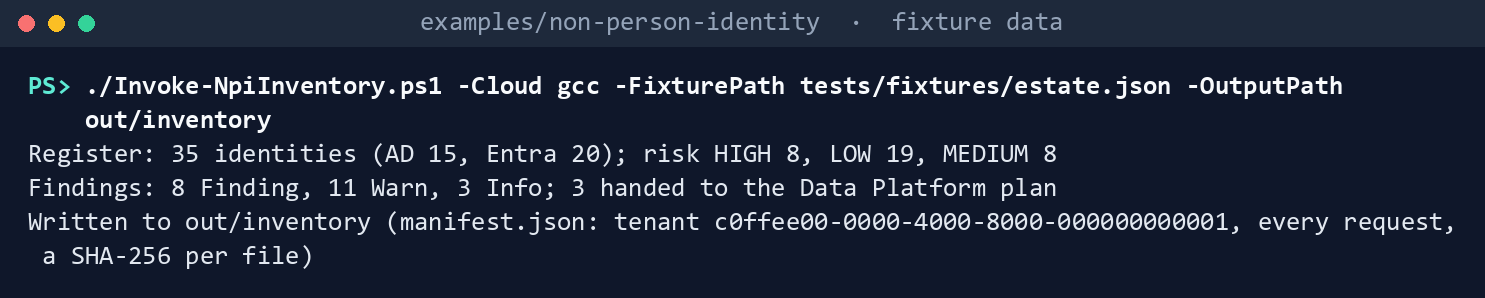
It prints the three lines of Chapter 01’s step 3, ending Written to out/inventory.
Send Learn’s samples to the fake:
Invoke-Pester -Path tests/MicrosoftSamples.Tests.ps1 -FullNameFilter '*Chapter 02*' -Output None -PassThru |
    Select-Object PassedCount, FailedCount, NotRunCount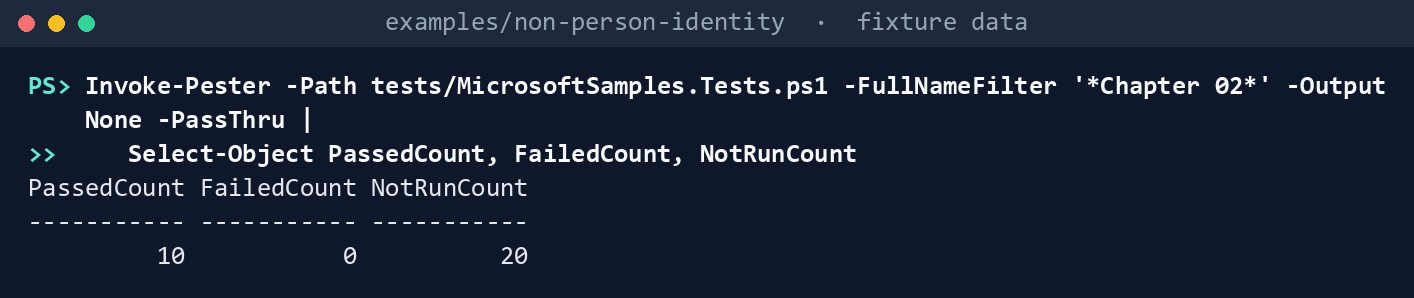
What the terminal shows, run on the kit’s fixtures (the same output as text) PassedCount 10,FailedCount 0,NotRunCount 20(the twenty are Chapter 01’s). Read the test that sends the query without its header: the fake answers400, as Graph does for an advanced query withoutConsistencyLevel: eventual.List what each task needs:
Import-Module ./powershell/NpiOwnership/NpiOwnership.psm1
foreach ($t in 'ownership', 'orphan-apply') { $p = Get-NpiRequiredPermission -Task $t; "$t : " + ($p.GraphPermissions -join ', ') }
ownership : User.Read.All orphan-apply : Application.Read.All, Application.ReadWrite.All, Directory.Read.All, User.Read.All
What the terminal shows, run on the kit’s fixtures (the same output as text) Check ownership and build the plan:
./Invoke-NpiOwnership.ps1 -Cloud gcc -RegisterRun out/inventory -FixturePath tests/fixtures/estate.json -InputPath tests/fixtures/inputs -OutputPath out/ownershipOwnership: 22 identities checked; 7 orphan candidates Findings: 20 Finding, 3 Warn, 1 Info. AI sponsor fields recorded for Chapter 09: 2 Orphan plan: 10 actions, 3 of them writes (1 AddOwner, 2 Disable); nothing sent Plan SHA-256: 1e1799d7181bd1a3dc271c645fff8a60fc741ab1ebc219bb3011cc25953bad3e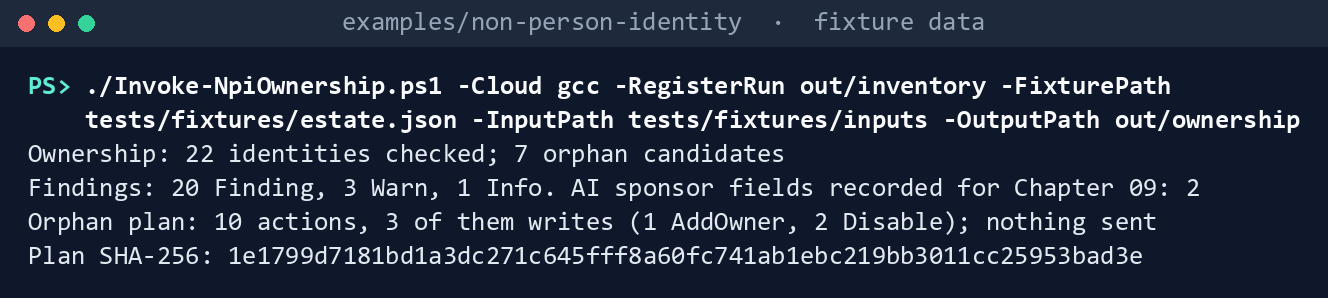
What the terminal shows, run on the kit’s fixtures (the same output as text) The plan’s hash is the same on every run with these inputs.
Read the findings:
Get-Content out/ownership/findings.json -Raw | ConvertFrom-Json | Where-Object Severity -eq 'Finding' | Group-Object Rule | Format-Table Name, Count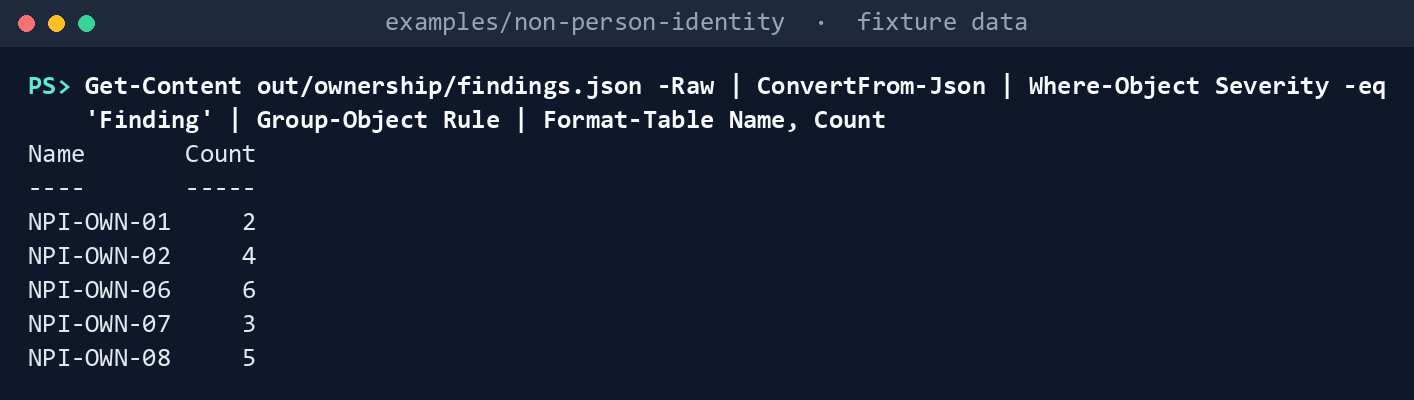
What the terminal shows, run on the kit’s fixtures (the same output as text) NPI-OWN-01 twice (Legacy Reports, Old SAML Connector), NPI-OWN-02 four times (HR Connector; Build Pipeline, whose other owner is a service principal; Vendor Portal, whose other owner is a guest; Mail Automation, whose other owner is disabled), NPI-OWN-06 six times, NPI-OWN-07 three times (Build Pipeline’s free text, Vendor Portal’s retired record,
svc-ldapbind’s unknown one) and NPI-OWN-08 five times (svc-backup, whose only owner is disabled, and four AD accounts with none). Payroll Export and Deploy Bot pass.jdoeis the one Info: not checked until someone confirms it’s a service account.Read the plan:
Get-Content out/ownership/orphan-plan.json -Raw | ConvertFrom-Json | Select-Object -ExpandProperty actions | Format-Table Action, Name, WriteAction Name Write ------ ---- ----- Disable svc-backup True AwaitConfirmation svc-oldftp False RetirementCandidate svc-reports False ClaimWindowOpen sa-printsvc False Exception gmsa-ops$ False Disable Legacy Reports True AwaitConfirmation Old SAML Connector False AddOwner HR Connector True NomineeRefused Build Pipeline False RecordOwner svc-oldftp False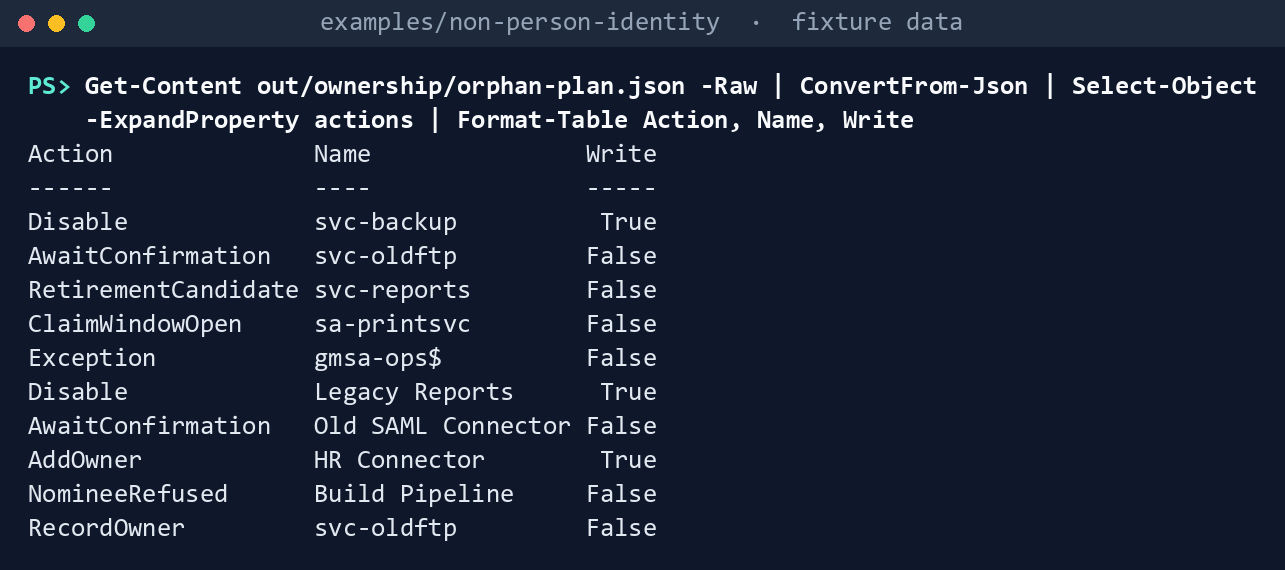
What the terminal shows, run on the kit’s fixtures (the same output as text) svc-reportswas disabled on September 12 and nobody claimed it by October 12: a retirement candidate, with no write.sa-printsvc’s window runs to November 15. The Build Pipeline claim named a guest and is refused.Dry-run the plan with its approved hash:
$sha = (Get-FileHash out/ownership/orphan-plan.json -Algorithm SHA256).Hash.ToLower()
./Invoke-NpiOrphanAction.ps1 -Cloud gcc -PlanPath out/ownership/orphan-plan.json -ApprovedSha256 $sha -FixturePath tests/fixtures/estate.json -OutputPath out/orphan-dryrun
DryRun: 3 WouldSend WouldSend Disable WRITE Disable-ADAccount -Identity ad000000-0000-4000-8000-000000000003 WouldSend Disable PATCH https://graph.microsoft.com/v1.0/servicePrincipals/5b000000-0000-4000-8000-000000000003 WouldSend AddOwner POST https://graph.microsoft.com/v1.0/applications/0a000000-0000-4000-8000-000000000002/owners/$ref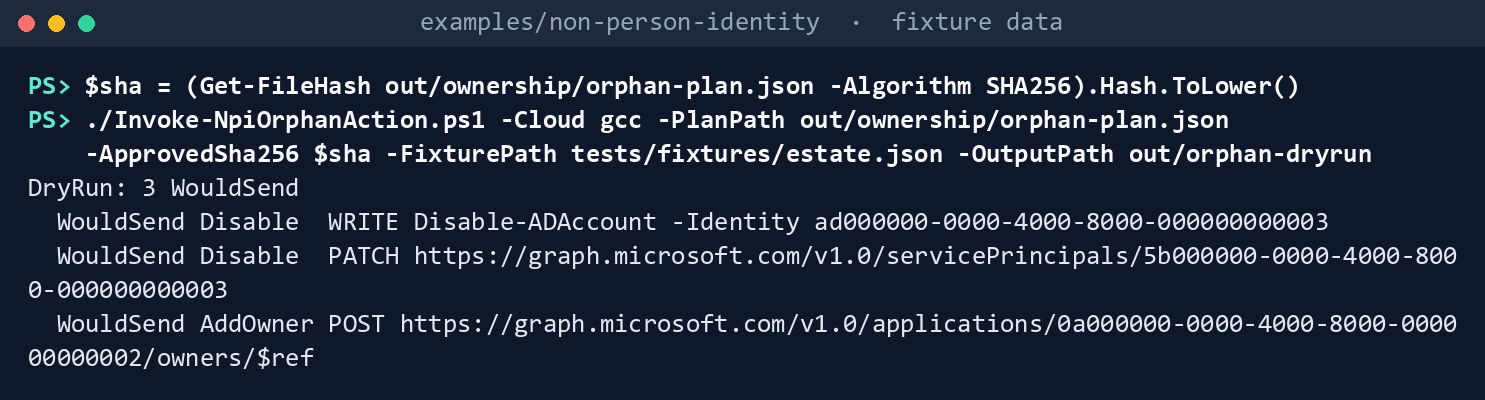
What the terminal shows, run on the kit’s fixtures (the same output as text) Apply it to the fake, then try a hash nobody approved:
./Invoke-NpiOrphanAction.ps1 -Cloud gcc -PlanPath out/ownership/orphan-plan.json -ApprovedSha256 $sha -FixturePath tests/fixtures/estate.json -OutputPath out/orphan-apply -Apply
./Invoke-NpiOrphanAction.ps1 -Cloud gcc -PlanPath out/ownership/orphan-plan.json -ApprovedSha256 ('0' * 64) -FixturePath tests/fixtures/estate.json -OutputPath out/orphan-x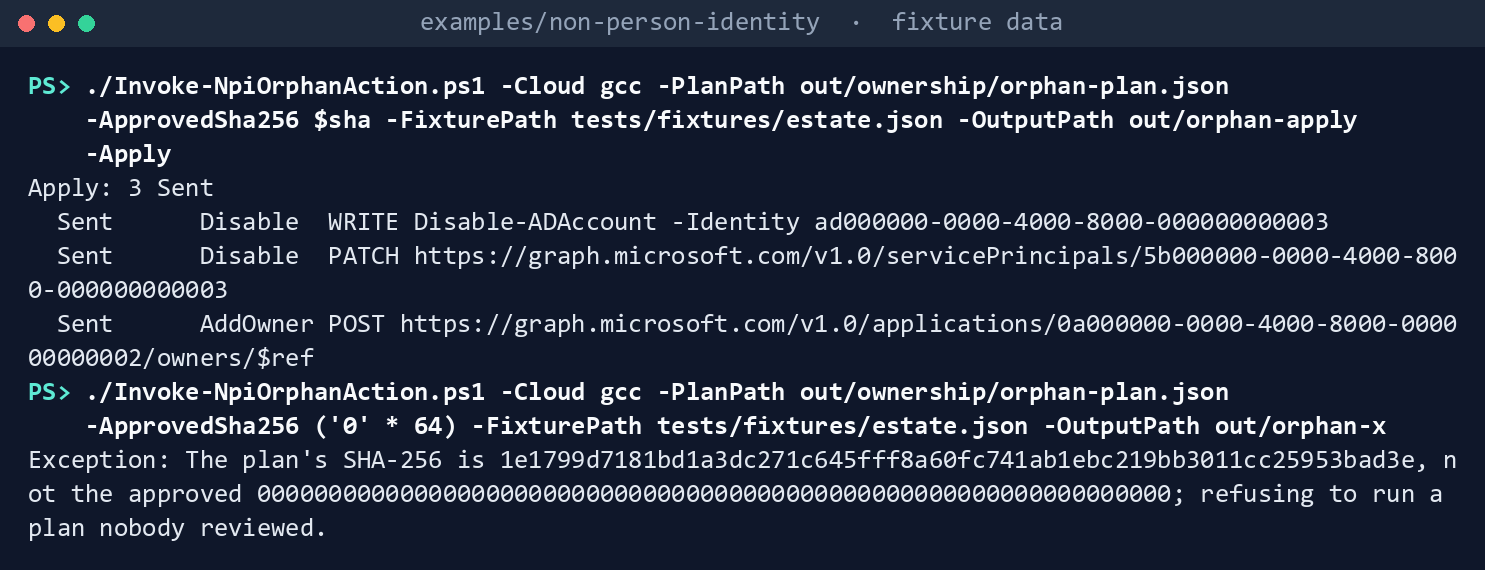
What the terminal shows, run on the kit’s fixtures (the same output as text) Apply: 3 Sent, each disable’s detail saying to recordDisabledOn 2026-10-30and that the claim window ends2026-11-29; then the refusal,The plan's SHA-256 is 1e1799d7…, not the approved 0000…; refusing to run a plan nobody reviewed.Run the tests:
Invoke-Pester -Path tests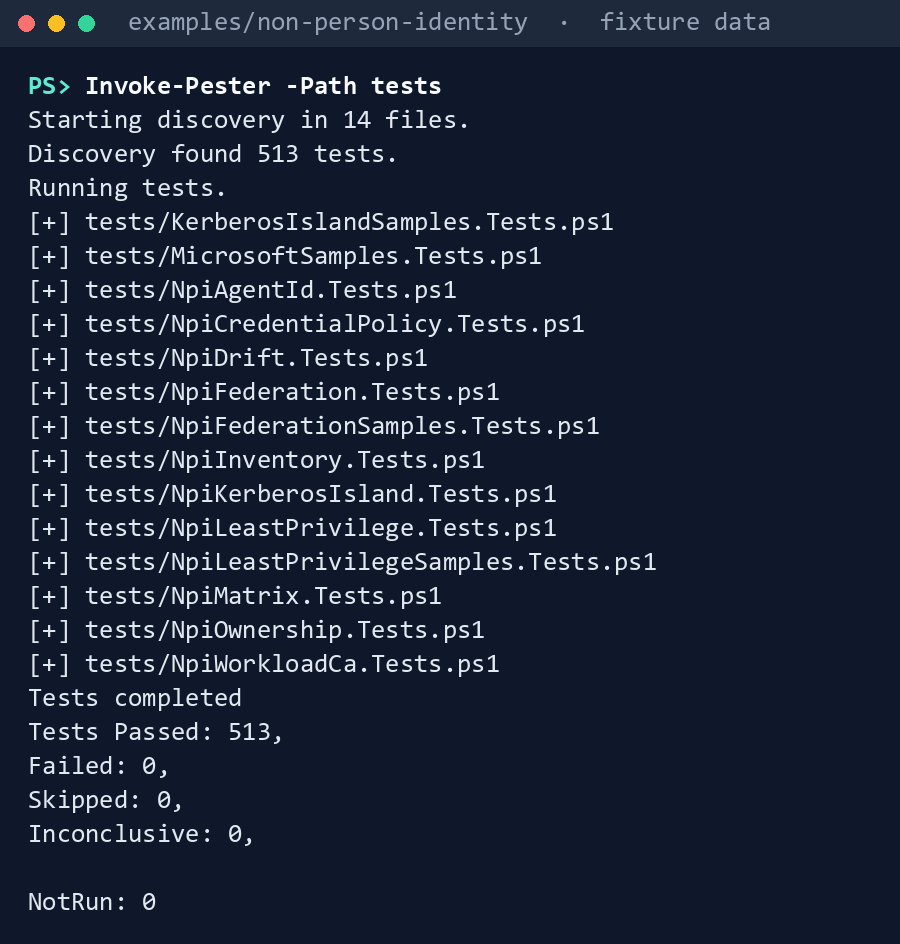
What the terminal shows, run on the kit’s fixtures (the same output as text)
Expected result: 513 tests passing, out/ownership/manifest.json listing 14 user reads and the SHA-256 of the register and of each input, and out/orphan-apply/manifest.json listing the prechecks and the three writes. Delete out when you’re done:
Remove-Item -Recurse -Force out
Lab 2: test tenant
Use a test tenant in the worldwide or GCC cloud and a test Active Directory domain, never production, with fictional people, and Chapter 01’s Lab 2 run (out/inventory-test). Work in examples/non-person-identity on Chapter 01’s test host. You’ll replace: <tenant-id> (the test tenant’s ID), <inventory-app-id> and <inventory-thumbprint> (Chapter 01’s reading app and its certificate), <app-id> and <thumbprint> (an app holding only User.Read.All, and its certificate), <test-domain> (the test domain’s DNS name), <inputs> (a folder for this lab’s input files), <test-app-name> (the test app registration’s display name), <test-account> (the test service account’s sAMAccountName), <igo-upn> (the test identity governance officer’s user principal name), <sha> (the plan’s SHA-256 the reviewer passes you), <sp-object-id> (the Object ID of the test app’s enterprise application).
Every command in this lab, in order, from examples/non-person-identity. Each step below says what it does and what to look for.
# Step 1: Make two test orphans
New-Item -ItemType Directory -Force <inputs> | Out-Null
foreach ($f in 'application-owners', 'igo-confirmations', 'owner-claims', 'service-records') { Get-Content tests/fixtures/inputs/$f.csv -TotalCount 1 | Set-Content <inputs>/$f.csv }
Add-Content <inputs>/service-records.csv 'TEST-0001,NPI test orphan app,Active,false', 'TEST-0002,NPI test service account,Active,false'
Connect-MgGraph -Environment Global -TenantId <tenant-id> -ClientId <inventory-app-id> -CertificateThumbprint <inventory-thumbprint>
Connect-AzAccount -ServicePrincipal -Environment AzureCloud -Tenant <tenant-id> -ApplicationId <inventory-app-id> -CertificateThumbprint <inventory-thumbprint>
./Invoke-NpiInventory.ps1 -Cloud gcc -TenantId <tenant-id> -Domain <test-domain> -OutputPath out/inventory-test

# Step 2: Run the check
Connect-MgGraph -Environment Global -TenantId <tenant-id> -ClientId <app-id> -CertificateThumbprint <thumbprint>
./Invoke-NpiOwnership.ps1 -Cloud gcc -RegisterRun out/inventory-test -InputPath <inputs> -OutputPath out/ownership-test
Get-Content out/ownership-test/findings.json -Raw | ConvertFrom-Json | Where-Object Rule -in 'NPI-OWN-01', 'NPI-OWN-08' | Format-Table Rule, Object, Issue -Wrap

# Step 3: Confirm them
$ids = Import-Csv out/inventory-test/register.csv | Where-Object Name -in '<test-app-name>', '<test-account>'
$ids | ForEach-Object { Add-Content <inputs>/igo-confirmations.csv "$($_.IdentityId),Disable,<igo-upn>,$(Get-Date -Format yyyy-MM-dd),," }
./Invoke-NpiOwnership.ps1 -Cloud gcc -RegisterRun out/inventory-test -InputPath <inputs> -OutputPath out/ownership-test

# Step 3: Confirm them
(Get-FileHash out/ownership-test/orphan-plan.json -Algorithm SHA256).Hash.ToLower()

# Step 4: Dry-run, then apply
Connect-MgGraph -Environment Global -TenantId <tenant-id> -Scopes Application.Read.All, Application.ReadWrite.All, Directory.Read.All, User.Read.All
./Invoke-NpiOrphanAction.ps1 -Cloud gcc -PlanPath out/ownership-test/orphan-plan.json -ApprovedSha256 <sha> -Domain <test-domain> -OutputPath out/orphan-test
./Invoke-NpiOrphanAction.ps1 -Cloud gcc -PlanPath out/ownership-test/orphan-plan.json -ApprovedSha256 <sha> -Domain <test-domain> -OutputPath out/orphan-test-apply -Apply

# Step 5: Check the result
Get-ADUser -Identity <test-account> | Select-Object SamAccountName, Enabled
$log = Import-Csv <inputs>/igo-confirmations.csv
$log | Where-Object IdentityId -in $ids.IdentityId | ForEach-Object { $_.DisabledOn = Get-Date -Format yyyy-MM-dd }
$log | Export-Csv <inputs>/igo-confirmations.csv -NoTypeInformation -UseQuotes AsNeeded

# Step 6: Back it out
Invoke-MgGraphRequest -Method PATCH -Uri https://graph.microsoft.com/v1.0/servicePrincipals/<sp-object-id> -Body @{ accountEnabled = $true }
Enable-ADAccount -Identity <test-account>

# Step 6: Back it out
Remove-Item -Recurse -Force out/ownership-test, out/orphan-test, out/orphan-test-apply
Make two test orphans: a test app registration with no owners, and an enabled test service account (
svc-prefix) in a test OU. Add both toservice-records.csvand give the account no row inapplication-owners.csv. These commands make the four input files with the fixture’s headers, add the two service records, and read the register again so it holds the new objects:New-Item -ItemType Directory -Force <inputs> | Out-Null foreach ($f in 'application-owners', 'igo-confirmations', 'owner-claims', 'service-records') { Get-Content tests/fixtures/inputs/$f.csv -TotalCount 1 | Set-Content <inputs>/$f.csv } Add-Content <inputs>/service-records.csv 'TEST-0001,NPI test orphan app,Active,false', 'TEST-0002,NPI test service account,Active,false' Connect-MgGraph -Environment Global -TenantId <tenant-id> -ClientId <inventory-app-id> -CertificateThumbprint <inventory-thumbprint> Connect-AzAccount -ServicePrincipal -Environment AzureCloud -Tenant <tenant-id> -ApplicationId <inventory-app-id> -CertificateThumbprint <inventory-thumbprint> ./Invoke-NpiInventory.ps1 -Cloud gcc -TenantId <tenant-id> -Domain <test-domain> -OutputPath out/inventory-testRun the check with an app holding only
User.Read.All, signed in as in Chapter 01:Connect-MgGraph -Environment Global -TenantId <tenant-id> -ClientId <app-id> -CertificateThumbprint <thumbprint> ./Invoke-NpiOwnership.ps1 -Cloud gcc -RegisterRun out/inventory-test -InputPath <inputs> -OutputPath out/ownership-test Get-Content out/ownership-test/findings.json -Raw | ConvertFrom-Json | Where-Object Rule -in 'NPI-OWN-01', 'NPI-OWN-08' | Format-Table Rule, Object, Issue -WrapBoth test orphans should be candidates (NPI-OWN-01 and NPI-OWN-08). Confirm that a guest owner comes back with
userTypeGuest(research gaps, row 16).Confirm them as the identity governance officer would: add both to
igo-confirmations.csvwithDecisionDisable, run step 2 again, and have a second person revieworphan-plan.jsonand pass you its SHA-256. These commands add the two rows, dated today, and run the check again:$ids = Import-Csv out/inventory-test/register.csv | Where-Object Name -in '<test-app-name>', '<test-account>' $ids | ForEach-Object { Add-Content <inputs>/igo-confirmations.csv "$($_.IdentityId),Disable,<igo-upn>,$(Get-Date -Format yyyy-MM-dd),," } ./Invoke-NpiOwnership.ps1 -Cloud gcc -RegisterRun out/inventory-test -InputPath <inputs> -OutputPath out/ownership-testThe reviewer reads
out/ownership-test/orphan-plan.jsonand computes the hash they pass you:(Get-FileHash out/ownership-test/orphan-plan.json -Algorithm SHA256).Hash.ToLower()Dry-run, then apply, signed in as a person with Cloud Application Administrator and a delegated right to disable accounts in the test OU:
Connect-MgGraph -Environment Global -TenantId <tenant-id> -Scopes Application.Read.All, Application.ReadWrite.All, Directory.Read.All, User.Read.All
./Invoke-NpiOrphanAction.ps1 -Cloud gcc -PlanPath out/ownership-test/orphan-plan.json -ApprovedSha256 <sha> -Domain <test-domain> -OutputPath out/orphan-test
./Invoke-NpiOrphanAction.ps1 -Cloud gcc -PlanPath out/ownership-test/orphan-plan.json -ApprovedSha256 <sha> -Domain <test-domain> -OutputPath out/orphan-test-apply -Apply
Check the result. The test app’s enterprise application shows Activation status Deactivated, from
accountEnabledfalse;33 the test account is disabled; recordDisabledOnin the confirmations log. Confirm the right the AD disable needed (research gaps, row 15). The first command shows the account’s state; the others write today’s date into the two rows’DisabledOn:Get-ADUser -Identity <test-account> | Select-Object SamAccountName, Enabled $log = Import-Csv <inputs>/igo-confirmations.csv $log | Where-Object IdentityId -in $ids.IdentityId | ForEach-Object { $_.DisabledOn = Get-Date -Format yyyy-MM-dd } $log | Export-Csv <inputs>/igo-confirmations.csv -NoTypeInformation -UseQuotes AsNeededBack it out. Set the service principal’s
accountEnabledback totrue, as Learn’s restore step describes,34 enable the test account, delete both test objects and the test app’s registration, and delete theoutfolders: they name owners. Still signed in as in step 4:Invoke-MgGraphRequest -Method PATCH -Uri https://graph.microsoft.com/v1.0/servicePrincipals/<sp-object-id> -Body @{ accountEnabled = $true } Enable-ADAccount -Identity <test-account>Delete the test account in the test domain and the test app’s registration in the admin center (Entra ID > App registrations, open it, Delete). Keep
out/ownership-testuntil Chapters 03 and 09’s labs are done, because they read it, or rebuild it for each. Then remove theoutfolders:Remove-Item -Recurse -Force out/ownership-test, out/orphan-test, out/orphan-test-apply
Verified facts
| Item | Value | US Government clouds | Stage | Source |
|---|---|---|---|---|
| Ownerless service principals | GET /servicePrincipals?$filter=owners/$count eq 0 or owners/$count eq 1&$count=true, ConsistencyLevel: eventual |
— | v1.0 | 35 |
| Applications with fewer than two owners | The same filter on GET /applications |
L4 and L5 | v1.0 | 36 |
| List owners of an application | Application.Read.All; unreadable owners return id and @odata.type only |
L4 and L5 | v1.0 | 37 |
| Owners of a service principal | Users or service principals | — | v1.0 | 38 |
| Add owner | POST /applications/{id}/owners/$ref; delegated Application.ReadWrite.All and Directory.Read.All; Application.ReadWrite.OwnedBy not sufficient to add another owner; Hybrid Identity, Cloud Application or Application Administrator |
L4 and L5 | v1.0 | 39 |
| Get a user | Application User.Read.All; properties outside the default set need $select; encode # as %23 in a guest’s UPN |
— | v1.0 | 40 |
| Update servicePrincipal | Delegated Application.ReadWrite.All; application Application.ReadWrite.OwnedBy |
L4 and L5 | v1.0 | 41 |
| Disable sign-in | accountEnabled false blocks tokens in this tenant only; Cloud Application Administrator, Application Administrator or the service principal’s owner; restore by setting true |
— | v1.0 | 42 |
| Deactivate an app registration | isDisabled on beta; reactivation shown on v1.0; existing tokens stay valid until they expire; remove owners to prevent reactivation |
— | Beta (deactivate) | 43 |
| Activation status | Shows Deactivated for accountEnabled false, isDisabled true, or Microsoft’s disablement |
— | — | 44 |
serviceManagementReference; two owners |
Reference the team contact in the service or asset management database; monitor for at least two owners | — | — | 45 |
| Disable, don’t delete | Disable until the review is complete; delete after a defined period and warning | — | — | 46 47 |
Disable-ADAccount |
Disables a user, computer or service account; not against a read-only domain controller | n/a (Active Directory) | GA | 48 |
Where Learn’s pages differ: the tutorial labels its ownerless read with Application.ReadWrite.All while List servicePrincipals names Application.Read.All (research gaps, row 13); Add owner’s permission table and its note disagree about Application.ReadWrite.OwnedBy (row 14); the tutorial’s serviceManagementReference sample is free text where the ownership overview says to reference the service management database (row 17); and deactivation is shown on beta while reactivation is shown on v1.0 (row 12). The code follows the stricter reading in each case.
Federal requirements and evidence
The ownership check and the orphan rule are what the guide’s G1 Inventory and G6 Lifecycle gates check: every identity has named human owners and a record, and an orphan is disabled only after a person confirms it and a reviewer approves the plan. Each row names the file or command that is the evidence. The controls are in the NIST SP 800-53 Rev. 5 Moderate baseline.49
| What the output proves | Requirement it supports | KSI it aligns to | Who keeps it |
|---|---|---|---|
Learn’s HTTP samples for ownerless and single-owner service principals, sent as published, are the model the check keeps (Lab 1, step 1: MicrosoftSamples.Tests.ps1, 10 passed) |
AC-2 Account Management (account managers) | KSI-IAM-SNU | The repository’s tests |
The check reads people with User.Read.All only; the write path is a separate task (Lab 1, step 2: Get-NpiRequiredPermission for ownership and orphan-apply) |
AC-6 Least Privilege | KSI-IAM-ELP, KSI-IAM-JIT | Identity engineering; the ISSO keeps the consent record |
Each app registration and legacy service principal has its owners read once, as people, and judged valid or not (Lab 1, step 3: ownership.json) |
AC-2 (account managers) | KSI-IAM-SNU | The identity governance office |
No owner, one owner, a service principal or guest as owner, a disabled owner, an AD account with no application owner: each is a finding with a stable ID (Lab 1, step 4, and Lab 2, step 2: findings.json, NPI-OWN-01 to -05, -08 and -09) |
AC-2 (account managers; accounts no longer associated with a user) | KSI-IAM-SNU | The identity governance office |
Each identity names a record in the system inventory, and the record is active (findings.json, NPI-OWN-06 and -07) |
IA-4 Identifier Management; CM-8 System Component Inventory | KSI-IAM-ELP, KSI-IAM-JIT (IA-4); KSI-PIY-GIV (CM-8) | The CMDB owner |
Every AI identity is recorded with four sponsor fields for Chapter 09 to check (ai-sponsor-fields.json) |
AC-2 (account types and conditions) | KSI-IAM-SNU | The identity governance office, through Chapter 09 |
Each orphan becomes one action, nothing in the plan writes, and the same inputs give the same plan hash (Lab 1, step 5: orphan-plan.json) |
AC-2(3) Disable Accounts; CM-3 Configuration Change Control | KSI-IAM-AAM (AC-2(3)); KSI-CMT-LMC, KSI-CMT-RVP (CM-3) | The identity governance officer; the reviewer who approves the hash |
The write path stops after its prechecks without -Apply, and refuses a plan whose hash nobody approved (Lab 1, steps 6 and 7: out/orphan-dryrun/results.json; the refusal text) |
CM-3; CM-5 Access Restrictions for Change | KSI-CMT-RVP, KSI-IAM-JIT | The repository’s tests; the ISSO |
The approved disables and owner additions were sent, each after a fresh re-read, and recorded (Lab 1, step 7, and Lab 2, step 4: results.json and manifest.json in the apply folder) |
AC-2(3); CM-3 | KSI-IAM-AAM; KSI-CMT-LMC | The ISSO, with the run’s folder |
Every run records the tenant, the cloud, every user read, and the SHA-256 of the register, of each input and of each file (manifest.json in each output folder) |
AU-9 Protection of Audit Information; SI-7 Software, Firmware, and Information Integrity | KSI-MLA-OSM (AU-9); KSI-SVC-VRI (SI-7) | The ISSO |
The code passes its tests (Lab 1, step 8: Invoke-Pester -Path tests, 513 passed) |
CM-3(2) Testing, Validation, and Documentation of Changes | KSI-CMT-VTD | The repository; the pull request’s checks |
The identity governance officer confirms each orphan, and a second person approves the plan’s SHA-256 (Lab 2, steps 1 and 3: igo-confirmations.csv; the hash from Get-FileHash) |
AC-5 Separation of Duties; AC-2(3) | KSI-IAM-JIT (AC-5); KSI-IAM-AAM (AC-2(3)) | The identity governance officer; the reviewer |
The disable took effect and has a start date for the claim window (Lab 2, step 5: Get-ADUser … Enabled; the enterprise application’s Activation status; DisabledOn in igo-confirmations.csv) |
AC-2(3) | KSI-IAM-AAM | The identity governance officer |
The lab’s changes were reversed by a person, and the directory logged it (Lab 2, step 6: the accountEnabled PATCH and Enable-ADAccount; the audit entries they leave) |
CM-3; AU-2 Event Logging | KSI-CMT-LMC | Identity engineering |
KSIs are FedRAMP 20x indicators for cloud service providers. The KSI column names the indicators whose related controls, as FedRAMP lists them, include the row’s control or one of its enhancements; which output supports which indicator is the program’s mapping (design guidance).50 The agency authorizes its own system and lines this evidence up with what its providers report against KSIs; it doesn’t report KSIs itself (Book 00, Appendix B). Lab steps that only run Chapter 01 or delete out have no row. The track-wide mapping is the guide’s Evidence table.
Dangers
| Danger | What happens | The guard |
|---|---|---|
| A guest, a bot or a leaver counted as an owner | Gate 1 passes on owners who can’t answer for the app | Each owner read with userType and accountEnabled; only enabled members count |
| A disable on a guess | A job fails, and nobody knew it was claimed | Only after the identity governance officer’s confirmation; re-read before the write; skipped if an owner appeared |
| A delete | Configuration gone once the 30-day recycle bin empties51 | No delete action exists; the writer refuses DELETE; retirement goes through the reviewed decommission process |
An unattended app with Application.ReadWrite.All |
A standing permission that can act as every app | The write path is delegated only, a person with Cloud Application Administrator; the read path holds User.Read.All alone |
| A plan changed after review | Different writes from the ones approved | The approved SHA-256 is checked; the plan must be for this tenant and cloud, and no older than seven days |
| A body that does more than disable | A PATCH that also changes other properties |
The only body allowed is {"accountEnabled": false}; the only POST body a directory object on the cloud’s host |
| A register that changed since Chapter 01 | The check runs on evidence the ISSO never saw | The register’s SHA-256 must match its manifest |
| A person treated as an orphaned account | Someone’s account is disabled | Accounts found only by a password that never expires are skipped (NPI-OWN-09) |
| An app re-enabled after the rule disabled it | The orphan is back with nobody accountable | ReEnabledOutsideRule; a new confirmation is needed |
| The window never closes | Disabled orphans pile up | RetirementCandidate once 30 days pass with no claim |
Checklist
Footnotes
Microsoft Learn, “Overview of enterprise application ownership in Microsoft Entra ID,” FAQ, https://learn.microsoft.com/entra/identity/enterprise-apps/overview-assign-app-owners (accessed Oct 30, 2026).↩︎
Microsoft Learn, “Get-MgServicePrincipalOwner,” description, https://learn.microsoft.com/powershell/module/microsoft.graph.applications/get-mgserviceprincipalowner?view=graph-powershell-1.0 (accessed Oct 31, 2026).↩︎
Microsoft Learn, “Security best practices for application properties in Microsoft Entra ID,” app ownership configuration, https://learn.microsoft.com/entra/identity-platform/security-best-practices-for-app-registration (accessed Oct 30, 2026).↩︎
Microsoft Learn, “Governing Microsoft Entra service accounts,” build a lifecycle process, https://learn.microsoft.com/entra/architecture/govern-service-accounts (accessed Oct 30, 2026).↩︎
Microsoft Learn, “Govern on-premises service accounts,” deprovision service accounts, https://learn.microsoft.com/entra/architecture/service-accounts-govern-on-premises (accessed Oct 30, 2026).↩︎
Microsoft Learn, “Deactivate an app registration,” https://learn.microsoft.com/entra/identity/enterprise-apps/deactivate-app-registration (accessed Oct 30, 2026).↩︎
Microsoft Learn, “Disable user sign-in for an application,” prerequisites; Microsoft Graph and PowerShell; restore tenant-local sign-in, https://learn.microsoft.com/entra/identity/enterprise-apps/disable-user-sign-in-portal (accessed Oct 30, 2026).↩︎
Microsoft Learn, “Deactivate an app registration,” https://learn.microsoft.com/entra/identity/enterprise-apps/deactivate-app-registration (accessed Oct 30, 2026).↩︎
Microsoft Learn, “Disable-ADAccount,” description and notes, https://learn.microsoft.com/powershell/module/activedirectory/disable-adaccount (accessed Oct 30, 2026).↩︎
Microsoft Learn, “Microsoft Graph national cloud deployments,” https://learn.microsoft.com/graph/deployments (accessed Oct 30, 2026).↩︎
Microsoft Learn, “List owners of an application,” https://learn.microsoft.com/graph/api/application-list-owners?view=graph-rest-1.0 (accessed Oct 30, 2026).↩︎
Microsoft Learn, “Add owner” (application), https://learn.microsoft.com/graph/api/application-post-owners?view=graph-rest-1.0 (accessed Oct 30, 2026).↩︎
Microsoft Learn, “Update servicePrincipal,” permissions, https://learn.microsoft.com/graph/api/serviceprincipal-update?view=graph-rest-1.0 (accessed Oct 30, 2026).↩︎
Microsoft Learn, “Disable-ADAccount,” description and notes, https://learn.microsoft.com/powershell/module/activedirectory/disable-adaccount (accessed Oct 30, 2026).↩︎
Microsoft Learn, “Manage Microsoft Entra applications using Microsoft Graph,” manage owners; configure other basic properties, https://learn.microsoft.com/graph/tutorial-applications-basics (accessed Oct 30, 2026).↩︎
Microsoft Learn, “List applications,” example 5, https://learn.microsoft.com/graph/api/application-list?view=graph-rest-1.0 (accessed Oct 30, 2026).↩︎
Microsoft Learn, “Add owner” (application), https://learn.microsoft.com/graph/api/application-post-owners?view=graph-rest-1.0 (accessed Oct 30, 2026).↩︎
Microsoft, microsoftgraph/microsoft-graph-docs-contrib,
concepts/tutorial-applications-basics.mdat commita69303123e9701eecbf56568d152ece936a97f1e(October 30, 2026; the page last changed July 3, 2026), code MIT License, documentation Creative Commons Attribution 4.0, https://github.com/microsoftgraph/microsoft-graph-docs-contrib/blob/a69303123e9701eecbf56568d152ece936a97f1e/concepts/tutorial-applications-basics.md (accessed Oct 30, 2026); pinned copy inexamples/third_party/graph-applications-tutorial-page.↩︎Microsoft Learn, “List servicePrincipals,” permissions, https://learn.microsoft.com/graph/api/serviceprincipal-list?view=graph-rest-1.0 (accessed Oct 30, 2026).↩︎
Microsoft Learn, “Add owner” (application), https://learn.microsoft.com/graph/api/application-post-owners?view=graph-rest-1.0 (accessed Oct 30, 2026).↩︎
Microsoft Learn, “Overview of enterprise application ownership in Microsoft Entra ID,” FAQ, https://learn.microsoft.com/entra/identity/enterprise-apps/overview-assign-app-owners (accessed Oct 30, 2026).↩︎
Microsoft Learn, “Get a user,” permissions and HTTP request, https://learn.microsoft.com/graph/api/user-get?view=graph-rest-1.0, and “Get-MgUser,” https://learn.microsoft.com/powershell/module/microsoft.graph.users/get-mguser?view=graph-powershell-1.0 (accessed Oct 30, 2026).↩︎
Microsoft Learn, “Get a user,” permissions and HTTP request, https://learn.microsoft.com/graph/api/user-get?view=graph-rest-1.0, and “Get-MgUser,” https://learn.microsoft.com/powershell/module/microsoft.graph.users/get-mguser?view=graph-powershell-1.0 (accessed Oct 30, 2026).↩︎
Microsoft Learn, “Overview of enterprise application ownership in Microsoft Entra ID,” FAQ, https://learn.microsoft.com/entra/identity/enterprise-apps/overview-assign-app-owners (accessed Oct 30, 2026).↩︎
Microsoft Learn, “Overview of enterprise application ownership in Microsoft Entra ID,” FAQ, https://learn.microsoft.com/entra/identity/enterprise-apps/overview-assign-app-owners (accessed Oct 30, 2026).↩︎
Microsoft Learn, “Get a user,” permissions and HTTP request, https://learn.microsoft.com/graph/api/user-get?view=graph-rest-1.0, and “Get-MgUser,” https://learn.microsoft.com/powershell/module/microsoft.graph.users/get-mguser?view=graph-powershell-1.0 (accessed Oct 30, 2026).↩︎
Microsoft Learn, “Update servicePrincipal,” permissions, https://learn.microsoft.com/graph/api/serviceprincipal-update?view=graph-rest-1.0 (accessed Oct 30, 2026).↩︎
Microsoft Learn, “Add owner” (application), https://learn.microsoft.com/graph/api/application-post-owners?view=graph-rest-1.0 (accessed Oct 30, 2026).↩︎
Microsoft Learn, “Disable user sign-in for an application,” prerequisites; Microsoft Graph and PowerShell; restore tenant-local sign-in, https://learn.microsoft.com/entra/identity/enterprise-apps/disable-user-sign-in-portal (accessed Oct 30, 2026).↩︎
Microsoft Learn, “Update servicePrincipal,” permissions, https://learn.microsoft.com/graph/api/serviceprincipal-update?view=graph-rest-1.0 (accessed Oct 30, 2026).↩︎
Microsoft Learn, “Add owner” (application), https://learn.microsoft.com/graph/api/application-post-owners?view=graph-rest-1.0 (accessed Oct 30, 2026).↩︎
Microsoft Learn, “Microsoft Graph permissions reference,”
Application.ReadWrite.All, https://learn.microsoft.com/graph/permissions-reference (accessed Oct 30, 2026).↩︎Microsoft Learn, “Properties of an enterprise application,” activation status, https://learn.microsoft.com/entra/identity/enterprise-apps/application-properties (accessed Oct 30, 2026).↩︎
Microsoft Learn, “Disable user sign-in for an application,” prerequisites; Microsoft Graph and PowerShell; restore tenant-local sign-in, https://learn.microsoft.com/entra/identity/enterprise-apps/disable-user-sign-in-portal (accessed Oct 30, 2026).↩︎
Microsoft Learn, “Manage Microsoft Entra applications using Microsoft Graph,” manage owners; configure other basic properties, https://learn.microsoft.com/graph/tutorial-applications-basics (accessed Oct 30, 2026).↩︎
Microsoft Learn, “List applications,” example 5, https://learn.microsoft.com/graph/api/application-list?view=graph-rest-1.0 (accessed Oct 30, 2026).↩︎
Microsoft Learn, “List owners of an application,” https://learn.microsoft.com/graph/api/application-list-owners?view=graph-rest-1.0 (accessed Oct 30, 2026).↩︎
Microsoft Learn, “Get-MgServicePrincipalOwner,” description, https://learn.microsoft.com/powershell/module/microsoft.graph.applications/get-mgserviceprincipalowner?view=graph-powershell-1.0 (accessed Oct 31, 2026).↩︎
Microsoft Learn, “Add owner” (application), https://learn.microsoft.com/graph/api/application-post-owners?view=graph-rest-1.0 (accessed Oct 30, 2026).↩︎
Microsoft Learn, “Get a user,” permissions and HTTP request, https://learn.microsoft.com/graph/api/user-get?view=graph-rest-1.0, and “Get-MgUser,” https://learn.microsoft.com/powershell/module/microsoft.graph.users/get-mguser?view=graph-powershell-1.0 (accessed Oct 30, 2026).↩︎
Microsoft Learn, “Update servicePrincipal,” permissions, https://learn.microsoft.com/graph/api/serviceprincipal-update?view=graph-rest-1.0 (accessed Oct 30, 2026).↩︎
Microsoft Learn, “Disable user sign-in for an application,” prerequisites; Microsoft Graph and PowerShell; restore tenant-local sign-in, https://learn.microsoft.com/entra/identity/enterprise-apps/disable-user-sign-in-portal (accessed Oct 30, 2026).↩︎
Microsoft Learn, “Deactivate an app registration,” https://learn.microsoft.com/entra/identity/enterprise-apps/deactivate-app-registration (accessed Oct 30, 2026).↩︎
Microsoft Learn, “Properties of an enterprise application,” activation status, https://learn.microsoft.com/entra/identity/enterprise-apps/application-properties (accessed Oct 30, 2026).↩︎
Microsoft Learn, “Overview of enterprise application ownership in Microsoft Entra ID,” FAQ, https://learn.microsoft.com/entra/identity/enterprise-apps/overview-assign-app-owners (accessed Oct 30, 2026).↩︎
Microsoft Learn, “Governing Microsoft Entra service accounts,” build a lifecycle process, https://learn.microsoft.com/entra/architecture/govern-service-accounts (accessed Oct 30, 2026).↩︎
Microsoft Learn, “Govern on-premises service accounts,” deprovision service accounts, https://learn.microsoft.com/entra/architecture/service-accounts-govern-on-premises (accessed Oct 30, 2026).↩︎
Microsoft Learn, “Disable-ADAccount,” description and notes, https://learn.microsoft.com/powershell/module/activedirectory/disable-adaccount (accessed Oct 30, 2026).↩︎
National Institute of Standards and Technology, SP 800-53B Moderate baseline, release 5.2.0 OSCAL profile (includes AC-2, AC-2(3), AC-5, AC-6, AU-2, AU-9, CM-3, CM-3(2), CM-5, CM-8, IA-4 and SI-7), https://github.com/usnistgov/oscal-content/blob/main/nist.gov/SP800-53/rev5/json/NIST_SP-800-53_rev5_MODERATE-baseline_profile.json (read November 2, 2026).↩︎
FedRAMP, “Key Security Indicators,” FedRAMP Consolidated Rules for 2026, indicator statements and “Related SP 800-53 Controls,” https://www.fedramp.gov/2026/reference/key-security-indicators/ (read November 2, 2026).↩︎
Microsoft Learn, “Deactivate an app registration,” https://learn.microsoft.com/entra/identity/enterprise-apps/deactivate-app-registration (accessed Oct 30, 2026).↩︎