Federal Modernization Workbook
Chapter 04 — PIM for Microsoft Entra Roles as Code
A role setting someone changed in the portal is a control nobody reviewed. Hold each role’s settings in a file, compare the file with the tenant, and change the tenant only from the file.
The code behind the plan’s tasks A1.6, A2.1 and A2.2: “role settings for every tier written as code from Appendix B and reviewed,” then the pilot class’s settings applied with PRV groups holding the eligible assignments, then its standing assignments converted, “eligible first, activation confirmed, active removed.” You start with two Learn pages, Microsoft’s samples for updating PIM rules and for assigning eligibility, pinned in the repository, and you send their requests to a fake Graph to see what they do and what they leave out. Then you use examples/privileged-access for the rest: one reviewed JSON file per role, a diff against the tenant, a dry run by default, separate read and write permissions, a lockout guard, and a rollout that refuses the next tier until the last one matches its files. Lab 1 runs on a laptop with no tenant; Lab 2 uses a test tenant. A table at the end maps each output to the federal requirement it supports.
Jump to a slide (18)
Deck · Narrated deck (about 11 minutes, captions) · Script · Captions. Recorded on November 2, 2026 from the approved chapter.
Goal and audience
Goal. By the end of this chapter you can hold Book 04, Appendix B’s role settings as code, show a reviewer exactly what a change will do to the tenant before it happens, apply it to one rollout wave with the least privilege the writes need, and prove from a read-back that the tenant now matches the files. You can say, for each rule in the code, whether it is Microsoft’s contract, Microsoft’s sample, or the program’s own design.
Audience. Developers who build the project’s write path, the identity engineers who own PIM, and the ISSOs who review the changes. You should read PowerShell 7 and JSON, and know what an eligible assignment is. You don’t need a tenant until Lab 2.
The context the code depends on
Emergency access first. Learn documents a lockout: every Privileged Role Administrator and Global Administrator eligible and none active, approval required, and no approvers selected. With no approvers, the active Privileged Role and Global Administrators become the default approvers, and there are none.1 Learn’s fix has two halves: emergency access accounts, and named approvers. Chapter 02 checks the first half. This chapter refuses to change any role setting until that half holds in the tenant, and refuses any file that requires approval with no approver.
Settings are per role, and Graph calls them rules. Each Microsoft Entra role has its own settings, independent of every other role’s, and every assignment of the role follows them.2 In Graph, each role at tenant scope is assigned one unifiedRoleManagementPolicy, and each policy has 17 predefined rules with fixed IDs, in three groups: activation, assignment and notification.3 This chapter manages the seven activation and assignment rules Book 04, Chapter 08 lists, and leaves the notification rules alone (research gaps, row 45).
| Rule ID | What it sets | Admin center setting |
|---|---|---|
Expiration_EndUser_Assignment |
Activation maximum duration | Activation |
Enablement_EndUser_Assignment |
Justification, MFA and ticket on activation | Activation |
AuthenticationContext_EndUser_Assignment |
The authentication context required on activation | Activation |
Approval_EndUser_Assignment |
Approval and approvers | Activation |
Expiration_Admin_Eligibility |
Permanent eligible allowed, or the eligibility maximum | Assignment |
Expiration_Admin_Assignment |
Permanent active allowed, or the active maximum | Assignment |
Enablement_Admin_Assignment |
MFA and justification on an active assignment | Assignment |
Rule IDs, types and the caller each one is enforced for are from Learn’s mapping guide.4
The authentication context needs its policy first. Learn says to create and enable the Conditional Access policy for the context before selecting the context in PIM. If no policy targets the context, activation falls back to MFA, but not when the policy is off, report-only, or excludes the user.5 The program’s context is c1 and its policy is PIM-Activation-c1 (Book 04, Chapter 08). Chapter 03 builds both, report-only first, and its PA-CA-04 warns until the policy is On. Learn’s pages disagree on its stage. The mapping guide labels the admin center’s authentication context option “(Preview)”, and the PIM deployment plan still marks “Require Conditional Access context” as public preview; Microsoft Entra releases and announcements lists reauthentication with Conditional Access on every PIM activation as generally available in April 2026; the role settings page and the v1.0 rule resource carry no label.6 7 8 9 This chapter keeps treating the option as preview, the stricter reading, until the pages agree (research gaps, row 42). The context alone doesn’t force a prompt on every activation: Learn says to set the context’s Conditional Access policy to sign-in frequency Every time for that, and even then a 10-minute window applies, across Microsoft Entra roles, Azure resource roles and PIM for Groups, in which a second activation doesn’t prompt again.10 Chapter 03 owns that policy.
The plan’s order is fixed. Emergency access first, then one role class under just-in-time elevation (the plan’s Phase 2; for decision D-A5 the owner chose Tier 1, the management-plane roles, as the pilot class), then every tier (Phase 3, task A3.1), tier by tier (project plan). The code holds that order as rollout waves: Tier 1, then Tier 0, Tier 2 and read-only. It refuses a wave until every earlier wave matches its files (research gaps, row 49). The order of the waves after the first is Design guidance.
Which cloud, for these calls
Every call in this chapter is Microsoft Graph v1.0. For Microsoft 365 GCC, Graph is the worldwide host, graph.microsoft.com, and sign-in is login.microsoftonline.com; GCC High uses graph.microsoft.us and DoD dod-graph.microsoft.us.11 No call here uses Resource Manager; PIM for Azure resources is Chapter 06. Every call’s Learn page lists the global service, US Government L4 and US Government L5 as available.12 13 14 15 16 PIM is available in Azure for US Government, and Microsoft Entra ID Governance is available in GCC, GCC High and DoD.17 The code takes an explicit cloud name and has no default.
Start with Microsoft’s sample
What Microsoft gives you
Two Learn pages are Microsoft’s samples for this task.
Update rules in PIM by using Microsoft Graph shows how to find a role’s policy from its template ID through roleManagementPolicyAssignments, then six PATCH requests: the activation maximum, justification with MFA and ticket on activation, approval, eligibility expiration, active expiration, and justification with MFA on active assignment. It says every body must carry the derived rule’s @odata.type, that each update returns 204 No Content, that Privileged Role Administrator is the least-privileged role, and that RoleManagementPolicy.ReadWrite.Directory is the permission for Microsoft Entra roles.18
Assign privileged roles using PIM for Microsoft Entra roles APIs is the tutorial for eligibility. It creates a role-assignable group, makes it eligible for User Administrator through roleEligibilityScheduleRequests, has a member activate the role with a justification and a ticket, and cleans up.19 That is the pattern Book 04 uses: the role is eligible to a PRV-<tier>-<role> group, not to a person.
The pinned copy
The samples exist only inside the pages, so the repository pins the pages’ source, unmodified, in examples/third_party/graph-pim-rules-pages: concepts/how-to-pim-update-rules.md and concepts/tutorial-assign-azureadroles.md from microsoftgraph/microsoft-graph-docs-contrib at commit a693031 (October 30, 2026), retrieved October 30, 2026, with the repository’s licenses (MIT for code, Creative Commons Attribution 4.0 for documentation).20 snapshot.json records each file’s SHA-256, checked against the upstream git blob hashes; a unit test checks them, and the weekly source watch reports new commits to either page.
tests/PimLearnSampleHarness.ps1 extracts every HTTP request from the pinned pages, unmodified, and the tests send them to the fake Graph in PimEntraRoles.psm1, which serves a fictional tenant with one policy per role and all 17 rules. The fake requires the @odata.type the rule has, and it rejects an eligibility request longer than the policy allows, as Learn says PIM does.21 Nothing signs in.
What it leaves to you
Each row is pinned by a test in tests/PimEntraRoles.Tests.ps1: the first 13 run Learn’s samples as published.
| Learn’s samples, as published | Why it matters | What examples/privileged-access adds |
|---|---|---|
Find the policy from the template ID through roleManagementPolicyAssignments |
— | Kept as the read, with Learn’s $expand=policy($expand=rules) so one call returns the policy and its rules22 |
Each PATCH carries its @odata.type; the write permission is RoleManagementPolicy.ReadWrite.Directory |
— | Kept: every body the code writes has the type, and the call list declares the same permission |
No sample for AuthenticationContext_EndUser_Assignment |
Appendix B requires context c1 on every role |
The rule is written from each role file, with its @odata.type23 |
| Activation requires MFA, not an authentication context | MFA may not prompt in a session that already did it24 | c1 on activation, and MFA only on active assignment, as Appendix B sets; c1 prompts on every activation only if its policy sets sign-in frequency to Every time, outside Learn’s 10-minute window; Chapter 03’s PIM-Activation-c1 sets it25 |
Every PATCH names one hard-coded policy ID from another tenant, so each one fails as published |
A copied script writes nowhere, or to the wrong role | The policy ID always comes from the read, per role |
| With the right policy ID, the six samples still leave Application Administrator different from Appendix B in six rules | Applying the samples isn’t applying the program’s settings | Compare-PaPimPolicy: a diff, rule by rule and property by property |
| The approval sample names a single user beside a group | People leave; a policy that names one is a broken approval path | Approvers are groups only, named by alias and bound to object IDs per tenant |
| No read before a write, no dry run, no read-back | Nobody sees the change before it happens or proves it after | A plan and a diff by default; writes only with -Apply; the tenant read back and compared after |
| Nothing checks the lockout conditions | Approval with no approver and no emergency accounts locks the tenant26 | PA-PIM-01 and PA-PIM-02 block every write |
| The tutorial asks for a year of User Administrator eligibility | Appendix B caps Tier 2 at 180 days; the code refuses the request before sending it, and the fake, like PIM, rejects it once the policy is set | New-PaPimEligibilityRequest checks the role file’s maximum |
The tutorial asks for RoleManagement.ReadWrite.Directory and Group.ReadWrite.All |
Broader than the request needs | RoleEligibilitySchedule.ReadWrite.Directory only27 |
| The tutorial’s clean-up deletes a group by the test user’s object ID | Run as written, it deletes the wrong object, or fails | The back-out uses only IDs the run recorded |
| The tutorial reads no existing eligibility and sets no role settings | A second run asks again; the eligibility follows whatever the role allows | Eligibility is planned only where it’s missing, after the role’s rules are set |
The verdict. Keep Learn’s read, Learn’s rule shapes and Learn’s write permission. Don’t run the samples as published: they write one role at a time to a policy in another tenant, with a single-user approver, MFA instead of a context, and nothing to stop the lockout.
The code: examples/privileged-access
This chapter adds its own module, powershell/PimEntraRoles/PimEntraRoles.psm1, its own call list, config/calls-ch04.json, the role files and rollout in config/pim-ch04, and the entry script Invoke-PaPimRoleSettings.ps1. It imports Chapter 01’s PrivilegedAccess module for the cloud table and the exceptions list, and reads Chapter 02’s emergency-access.json. Its notes are in examples/privileged-access/docs/ch04.md.
It builds on Book 04’s own script. Appendix B’s Set-FMPPimTierPolicy.ps1 applies five rules to a list of roles and honors -WhatIf. This code adds the two assignment rules, the files per role, the diff, the read-back, the guards and the waves.
The role files
config/pim-ch04/roles holds one file per role in Appendix B, 22 in all, named for the role. Each file holds the role’s template ID and tier, and its activation, approval and assignment settings: for example Global Administrator, Tier 0, four hours, context c1, justification and ticket, approval by PIM-Approvers-T0, eligibility for at most 90 days, and permanent active allowed only for this role, for the emergency accounts. A reviewer reads a change to a file as a change to the tenant.
The files name approvers by alias. pim-bindings.json, one per tenant, gives each alias its group’s object ID, and names the PRV group and scope that holds each role’s eligibility. The files carry no tenant’s IDs, so the same reviewed files serve a test tenant and production.
Read-PaPimRoleSetting refuses a file with a missing key, a name where a template ID belongs, an unknown tier, a duration that isn’t ISO 8601, or a second file for the same role. A malformed file never reaches the tenant.
config/pim-ch04/tiers.json holds the bounds every file must sit inside. Learn’s bounds come first. The role settings page says an activation lasts one to 24 hours, but the PIM API overview says an activation is always at most eight hours.28 29 The code follows the stricter, eight hours (research gaps, row 41). The tier caps are Appendix B’s: four hours for Tier 0, eight for the rest; eligibility of 90, 180 or 365 days; approval for Tier 0 and Tier 1; a ticket for every tier but read-only. Design guidance. Appendix B sets the active assignment maximum at “the shortest period the documented exception needs”; the owner has decided it is at most 15 days, P15D in every file and maximumActive in tiers.json, and PA-PIM-04 flags a file that asks for more (research gaps, row 48).
The rules
ConvertTo-PaPimRule turns one file into the seven PATCH bodies, in Learn’s shapes: the derived @odata.type, the rule ID, and the target with Learn’s caller and level for that rule.30 31 Approval is single-stage, with a one-day stage timeout, requester and approver justification, and the tier’s group as the only approver. An alias the bindings don’t name throws.
The checks
Before anything is written, Test-PaPimSetting and New-PaPimPlan report:
| Rule | Severity | What it flags | Source |
|---|---|---|---|
| PA-PIM-01 | Finding | Approval required with no approver | Learn: half of the documented lockout32 |
| PA-PIM-02 | Finding | Fewer emergency accounts with permanent, active, direct Global Administrator than emergency-access.json requires |
Learn: the other half;33 Chapter 02 |
| PA-PIM-03 | Finding | An approver group that is also the role’s eligible group | Design guidance: Book 04, Chapter 08 |
| PA-PIM-04 | Finding | A file outside Learn’s bounds or its tier’s cap: activation, eligibility, permanent eligible, active assignments over 15 days, permanent active on any role but Global Administrator, missing approval or ticket | Learn’s bounds; Appendix B’s caps (Design guidance); the owner’s 15-day decision |
| PA-PIM-05 | Warn | An authentication context: its Conditional Access policy must be On before the rule is set | Learn34 |
| PA-PIM-06 | Finding | No policy for the role at tenant scope | — |
| PA-PIM-07 | Finding | An earlier rollout wave that doesn’t match its files yet | Design guidance: the plan’s order |
| PA-PIM-08 | Warn | Eligibility outside the role’s PRV group |
Design guidance; the access review removes it (Chapter 07) |
| PA-PIM-09 | Warn; Info | A standing active assignment: a user to convert, or a service principal to document (Warn); an emergency account or a documented exception (Info) | Book 04, Chapter 08 |
Any Finding blocks -Apply. PA-PIM-05 can’t be checked from v1.0: the Conditional Access policy’s authentication context target is a beta property.35 36 So -Apply needs -ActivationGateChecked, a person’s statement, made after Chapter 03’s run shows no PA-CA-04 for PIM-Activation-c1, that the policy is On (research gaps, row 44). Chapter 06 asks the same of its Azure role settings.
The alert check
CISA’s baseline asks for two alerts the role files don’t set. MS.AAD.7.7v1: an eligible or active assignment to a highly privileged role triggers an alert. MS.AAD.7.8v1: activating Global Administrator triggers an alert.37 ScubaGear’s baseline sets both in each role’s PIM notification settings, with the security monitoring mailbox as an additional recipient of the role assignment alert, for eligible and for active assignments, and, on Global Administrator, of the role activation alert. It lists eight highly privileged roles.38 Learn maps those settings to three of the nine notification rules this chapter otherwise leaves alone: Notification_Admin_Admin_Eligibility, Notification_Admin_Admin_Assignment and Notification_Admin_EndUser_Assignment.39
The baseline asks for the same settings on PIM for Groups. When a group holds a highly privileged role, its implementation steps say to apply the same configuration to the group’s Member settings. ScubaGear’s check finds those groups among the eligible and active role assignments, reads each one’s member policy, and fails the policy if any of those groups lacks the recipient.40 41 Each group in PIM for Groups has its own member and owner policies, independent of the role’s.42
Invoke-PaPimAlertCheck.ps1 runs under its own read-only task, pim-alerts. It reads the eight roles’ policies with the same call the plan uses. Then it reads every eligibility schedule and active assignment instance to find the groups that hold one of the eight roles, at any scope, as ScubaGear does. Only a role-assignable group can hold an Entra role. For each of those groups it reads the member policy with Learn’s PIM for Groups filter (scopeType eq 'Group', roleDefinitionId eq 'member'), one call per group.43 If Graph refuses a read, a 403 for instance, the run doesn’t stop. A role gets a PA-PIM-10 Finding that says its policy couldn’t be read and quotes the error, plus a PA-PIM-11 for Global Administrator; a group gets a PA-PIM-12, plus a PA-PIM-13 if it holds Global Administrator. The check goes on to the next role or group. The plan reads the same role policies but stops on a refused read, because it mustn’t work from a policy it didn’t read. It writes findings.json and a manifest and changes nothing. PIM’s default recipients, the role’s or group’s administrators, don’t count; the baseline’s own check doesn’t count them either.
| Rule | Severity | What it flags | Source |
|---|---|---|---|
| PA-PIM-10 | Finding (Info when set) | A highly privileged role whose role assignment alert, for eligible or active assignments, has no additional recipient, or whose policy couldn’t be read | MS.AAD.7.7v144 45 |
| PA-PIM-11 | Finding (Info when set) | Global Administrator’s role activation alert has no additional recipient, or its policy couldn’t be read | MS.AAD.7.8v146 47 |
| PA-PIM-12 | Finding (Info when set) | A group holding a highly privileged role, eligible or active, whose PIM for Groups member policy has no additional recipient on the assignment alert, for eligible or active members, or whose member policy couldn’t be read | MS.AAD.7.7v148 49 |
| PA-PIM-13 | Finding (Info when set) | A group holding Global Administrator whose member policy has no additional recipient on the activation alert, or couldn’t be read | MS.AAD.7.8v150 51 |
The groups get their own rule IDs, not more PA-PIM-10 and PA-PIM-11 rows. Each group is fixed in a different place, under its PIM for Groups settings, not the role’s. Each is read under a different permission. The role rows keep their one-per-role count (“8 of 8 roles”). ScubaGear reports roles and groups together, one result per policy, so PA-PIM-10 and PA-PIM-12 map back to MS.AAD.7.7v1 and PA-PIM-11 and PA-PIM-13 to MS.AAD.7.8v1.
The two new reads change the task’s permissions. pim-alerts now needs four, all reads: RoleManagementPolicy.Read.Directory for the roles’ policies, RoleEligibilitySchedule.Read.Directory and RoleAssignmentSchedule.Read.Directory to find the groups, and RoleManagementPolicy.Read.AzureADGroup for the groups’ member policies. Learn lists the last as the least-privileged permission for PIM for Groups policies.52 Signing in as a user, Global Reader isn’t enough for the group read. Learn’s PIM for Groups settings page says reading a role-assignable group’s policies takes a role that can update the group’s owners or members, such as Privileged Role Administrator, or being the group’s owner or member.53 So Get-PaPimRequiredPermission -Task pim-alerts names Privileged Role Administrator. An app with the four application permissions avoids holding that role (research gaps, row 113).
./Invoke-PaPimAlertCheck.ps1 -Cloud gcc -FixturePath tests/fixtures/ch04/tenant.json -OutputPath out/pim-alertsThe fictional tenant keeps PIM’s defaults, so all 11 are Findings: nine for the roles, and a PA-PIM-12 for each of the two PRV groups eligible for a highly privileged role (PRV-T1-AppAdmin, PRV-T0-PrivRoleAdmin). Neither holds Global Administrator, so there’s no PA-PIM-13. Set the mailbox under each role’s Role settings > Notifications and each group’s PIM for Groups Settings > Member > Notifications, then run the check again. The tests are a separate suite, baseline/tests, so this chapter’s counts don’t change.
The calls and their permissions
Every call goes through one client, built for one task in one cloud. The client sends only the calls config/calls-ch04.json declares for the task, follows every page on the cloud’s own Graph host, and refuses every method but GET unless it was built with -AllowWrite. The entry script builds it that way only with -Apply. Reads and writes are different tasks, with different permissions:
| Call | Least-privileged permission | Delegated role | Task |
|---|---|---|---|
| List roleManagementPolicyAssignments, with the policy and its rules | RoleManagementPolicy.Read.Directory54 |
Global Reader, Security Operator, Security Reader, Security Administrator or Privileged Role Administrator | all |
| List roleManagementPolicyAssignments for a group’s member policy (PIM for Groups) | RoleManagementPolicy.Read.AzureADGroup55 |
Privileged Role Administrator, or the group’s owner or member56 | pim-alerts |
| List roleEligibilitySchedules | RoleEligibilitySchedule.Read.Directory57 |
as above | all |
| List roleAssignmentScheduleInstances | RoleAssignmentSchedule.Read.Directory58 |
Global Reader (read) | all |
Update a policy rule (PATCH) |
RoleManagementPolicy.ReadWrite.Directory59 |
Privileged Role Administrator | pim-apply |
Create a roleEligibilityScheduleRequest (POST) |
RoleEligibilitySchedule.ReadWrite.Directory60 |
Privileged Role Administrator | pim-apply |
Create a roleAssignmentScheduleRequest (POST, adminRemove only) |
RoleAssignmentSchedule.ReadWrite.Directory61 |
Privileged Role Administrator | pim-convert |
Learn’s Graph PowerShell guide for the same policies asks for RoleManagement.ReadWrite.Directory, and the tutorial for the same, plus Group.ReadWrite.All.62 63 Each is broader than the call needs. The code follows the API reference pages, which name the narrower permission. The removal page lists RoleAssignmentSchedule.Remove.Directory as higher privileged than ReadWrite (research gaps, row 43). A test keeps each task’s permissions equal to the union of its calls, so a dry run’s reader app never holds a write permission.
The diff, the plan and the read-back
Get-PaPimTenantState reads each role’s policy with Learn’s own filter and expand, one call per role, then every eligibility schedule and every active assignment instance.64 Compare-PaPimPolicy compares the seven rules with the file, after normalizing them: durations as time spans, enabled rules and approvers sorted, and nothing that doesn’t apply (no maximum when the rule allows permanent). A role that matches its file has no rows.
New-PaPimPlan takes one wave and returns the findings, the diff and the actions: a PATCH for each rule that differs, an adminAssign eligibility request for each PRV group that isn’t eligible yet, for the role’s maximum, and each standing assignment to convert. It sends nothing. The entry script writes plan.json, diff.csv, findings.json, before.json (the wave’s rules as the tenant holds them, for the back-out) and a manifest with every request and the SHA-256 of each file.
With -Apply, Invoke-PaPimPlan sends the rule updates first and the eligibility requests second, so each request meets the role’s new expiration rule. The manifest records the SHA-256 of each write’s body. Then the script reads the tenant again and writes verify.csv, the diff after the change. Learn’s pages differ on the response to a rule update, 204 No Content on the how-to page and 200 OK with the rule on the API page; the code accepts either, and the read-back is the evidence, not the response (research gaps, row 46).65 66
Converting standing assignments
Book 04’s order is eligible first, activation confirmed, active removed (Book 04, Chapter 08). The plan lists each standing user assignment with one of three statuses: WaitingForEligibility until the role’s PRV group is eligible in the tenant, WaitingForConfirmedActivation until confirmed-activations.csv has a row for that person and role with a ticket, and Confirmed. Only -Apply -Convert, a separate task with its own permission, sends adminRemove, and only for Confirmed rows. Emergency accounts and documented exceptions are never planned for removal; service principals are reported, not removed. Design guidance.
Learn’s rules on timing still apply: an assignment can’t be removed within five minutes of creation, and PIM won’t remove the last active Global Administrator (Book 04, Chapter 08).
The tests
This chapter’s tests are the 50 in tests/PimEntraRoles.Tests.ps1: 13 run Learn’s samples as published; the rest cover the role files and their refusals, the rules, each check, the client’s permissions and refusals, the plan on the fixture, the apply and read-back, the conversion, the back-out, and the entry script. With the other chapters’ tests in the example, 330 Pester tests pass under PowerShell 7, with no module, tenant or network.
The commands below send Learn’s pinned requests and the example’s own to a fake Graph serving a fictional tenant. They show what the code does, not that a tenant returns the same shapes. This code can write to a tenant: review it, review every role file, and run Lab 2 in a test tenant before it touches production.
Lab 1: fixtures, no tenant
You need PowerShell 7.1 or later with Pester 5. Work in examples/privileged-access.
Every command in this lab, in order, from examples/privileged-access. Each step below says what it does and what to look for.
# Step 1: Send Learn's samples to the fake
Invoke-Pester -Path tests/PimEntraRoles.Tests.ps1 -FullNameFilter '*(Learn), run as published*' -Output None -PassThru |
    Select-Object PassedCount, FailedCount

# Step 2: List the permissions each task needs
Import-Module ./powershell/PimEntraRoles/PimEntraRoles.psm1
'pim-plan', 'pim-apply', 'pim-convert' | ForEach-Object { "$_`: " + ((Get-PaPimRequiredPermission -Task $_).GraphPermissions -join ', ') }

# Step 3: Dry-run wave 1, the pilot class (Tier 1)
$lab = @{ Cloud = 'gcc'; FixturePath = 'tests/fixtures/ch04/tenant.json'; BindingsPath = 'tests/fixtures/ch04/inputs/pim-bindings.json'
    EmergencyConfigPath = 'tests/fixtures/inputs/emergency-access.json'; ExceptionsPath = 'tests/fixtures/inputs/exceptions.csv'
    ConfirmedPath = 'tests/fixtures/ch04/inputs/confirmed-activations.csv'; AsOf = '2026-10-30' }
./Invoke-PaPimRoleSettings.ps1 @lab -Wave 1 -OutputPath out/pim-wave1

# Step 4: Read the diff and the findings
Import-Csv out/pim-wave1/diff.csv | Where-Object Role -EQ 'Exchange Administrator' | Format-Table RuleId, Property, Tenant, Desired
Get-Content out/pim-wave1/findings.json -Raw | ConvertFrom-Json | Where-Object Rule -NE 'PA-PIM-05' | Format-Table Rule, Severity, Object, Issue

# Step 5: Try wave 2, Tier 0, before wave 1 is done
./Invoke-PaPimRoleSettings.ps1 @lab -Wave 2 -OutputPath out/pim-wave2

# Step 6: Apply wave 1 to the fake
./Invoke-PaPimRoleSettings.ps1 @lab -Wave 1 -OutputPath out/pim-apply -Apply
./Invoke-PaPimRoleSettings.ps1 @lab -Wave 1 -OutputPath out/pim-apply -Apply -ActivationGateChecked

# Step 7: Run the tests
Invoke-Pester -Path tests

# After the steps
Remove-Item -Recurse -Force out
Send Learn’s samples to the fake:
Invoke-Pester -Path tests/PimEntraRoles.Tests.ps1 -FullNameFilter '*(Learn), run as published*' -Output None -PassThru |
    Select-Object PassedCount, FailedCount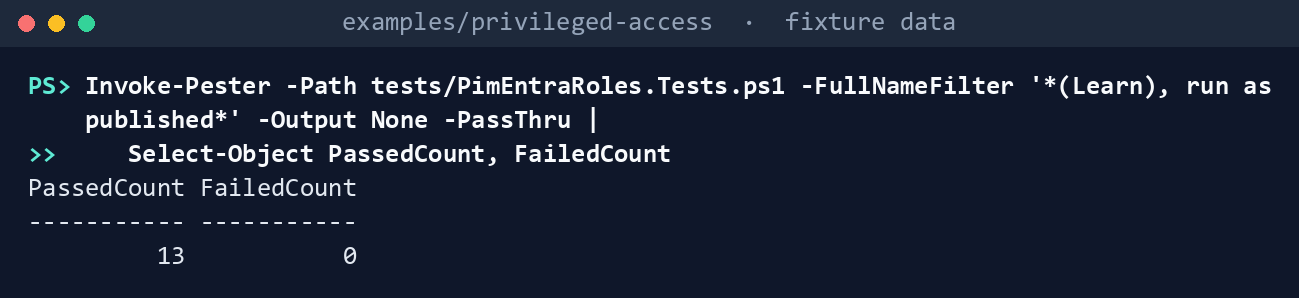
What the terminal shows, run on the kit’s fixtures (the same output as text) PassedCount 13,FailedCount 0. Read the fourth test: with the policy ID from the read, all six of Learn’s updates apply, and Application Administrator still differs from its file in six of seven rules.List the permissions each task needs:
Import-Module ./powershell/PimEntraRoles/PimEntraRoles.psm1
'pim-plan', 'pim-apply', 'pim-convert' | ForEach-Object { "$_`: " + ((Get-PaPimRequiredPermission -Task $_).GraphPermissions -join ', ') }
pim-plan: RoleAssignmentSchedule.Read.Directory, RoleEligibilitySchedule.Read.Directory, RoleManagementPolicy.Read.Directory pim-apply: RoleAssignmentSchedule.Read.Directory, RoleEligibilitySchedule.Read.Directory, RoleEligibilitySchedule.ReadWrite.Directory, RoleManagementPolicy.Read.Directory, RoleManagementPolicy.ReadWrite.Directory pim-convert: RoleAssignmentSchedule.Read.Directory, RoleAssignmentSchedule.ReadWrite.Directory, RoleEligibilitySchedule.Read.Directory, RoleManagementPolicy.Read.Directory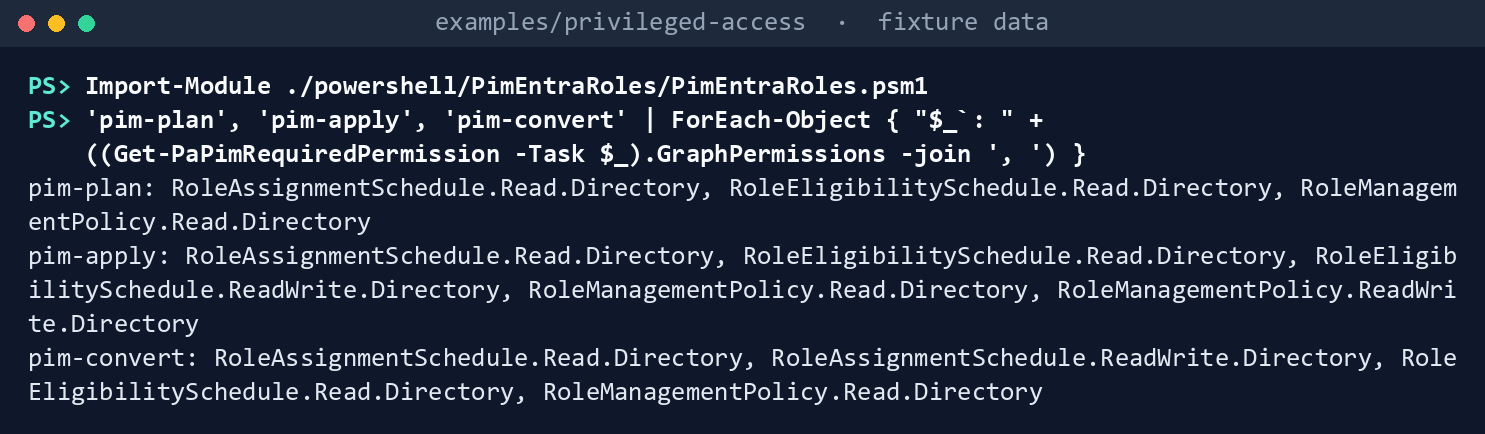
What the terminal shows, run on the kit’s fixtures (the same output as text) Dry-run wave 1, the pilot class (Tier 1):
$lab = @{ Cloud = 'gcc'; FixturePath = 'tests/fixtures/ch04/tenant.json'; BindingsPath = 'tests/fixtures/ch04/inputs/pim-bindings.json'
    EmergencyConfigPath = 'tests/fixtures/inputs/emergency-access.json'; ExceptionsPath = 'tests/fixtures/inputs/exceptions.csv'
    ConfirmedPath = 'tests/fixtures/ch04/inputs/confirmed-activations.csv'; AsOf = '2026-10-30' }
./Invoke-PaPimRoleSettings.ps1 @lab -Wave 1 -OutputPath out/pim-wave1
Wave 1 (9 roles): 0 Finding, 13 Warn, 0 Info Plan: 43 rule updates, 8 eligibility requests, 2 standing assignments to convert (0 confirmed) Dry run: nothing was sent Written to out/pim-wave1 (manifest.json lists every request and file hash)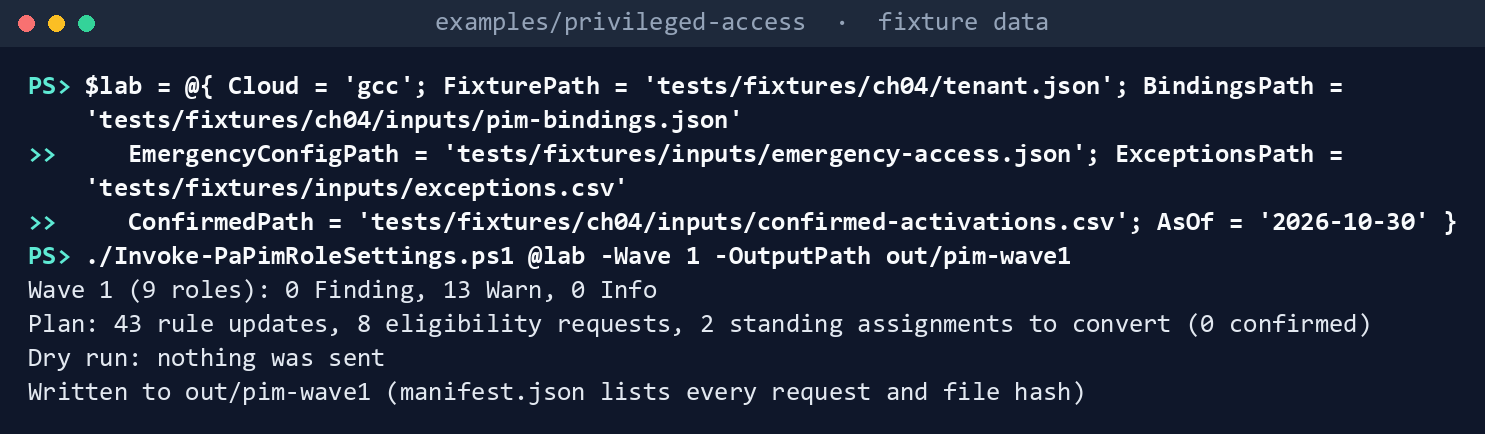
What the terminal shows, run on the kit’s fixtures (the same output as text) Read the diff and the findings:
Import-Csv out/pim-wave1/diff.csv | Where-Object Role -EQ 'Exchange Administrator' | Format-Table RuleId, Property, Tenant, Desired
Get-Content out/pim-wave1/findings.json -Raw | ConvertFrom-Json | Where-Object Rule -NE 'PA-PIM-05' | Format-Table Rule, Severity, Object, Issue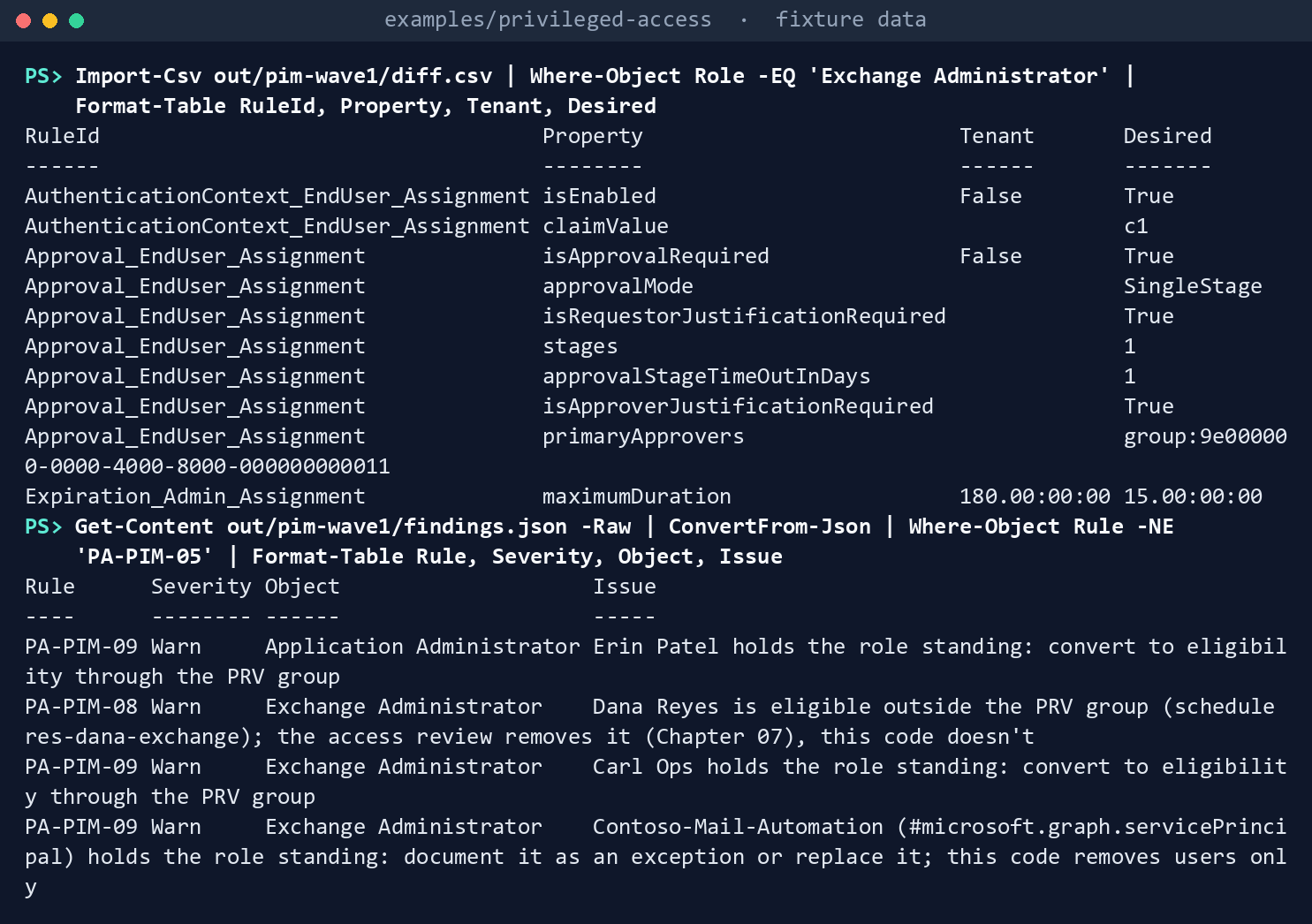
What the terminal shows, run on the kit’s fixtures (the same output as text) Exchange Administrator was partly set by hand, so its diff is short: ten rows in three rules. The authentication context goes from off to
c1; approval goes from not required to required, single-stage, by thePIM-Approvers-T1group; and the active maximum goes from 180 days to 15. Its activation window and eligibility expiry already match, so they aren’t touched. The findings name Carl Ops and Erin Patel, who hold Tier 1 roles standing;Contoso-Mail-Automation, a service principal with Exchange Administrator and no owner on the exceptions list; and Dana Reyes, eligible for Exchange Administrator outside thePRVgroup. The 9 PA-PIM-05 rows ask you to confirm the activation gate. Inplan.json, Carl’s removal waits for his group’s eligibility, and Erin’s for a confirmed activation.Try wave 2, Tier 0, before wave 1 is done:
./Invoke-PaPimRoleSettings.ps1 @lab -Wave 2 -OutputPath out/pim-wave2Wave 2 (5 roles): 9 Finding, 5 Warn, 2 Info Plan: 30 rule updates, 4 eligibility requests, 0 standing assignments to convert (0 confirmed) Blocked: fix every Finding before -Apply Dry run: nothing was sent Written to out/pim-wave2 (manifest.json lists every request and file hash)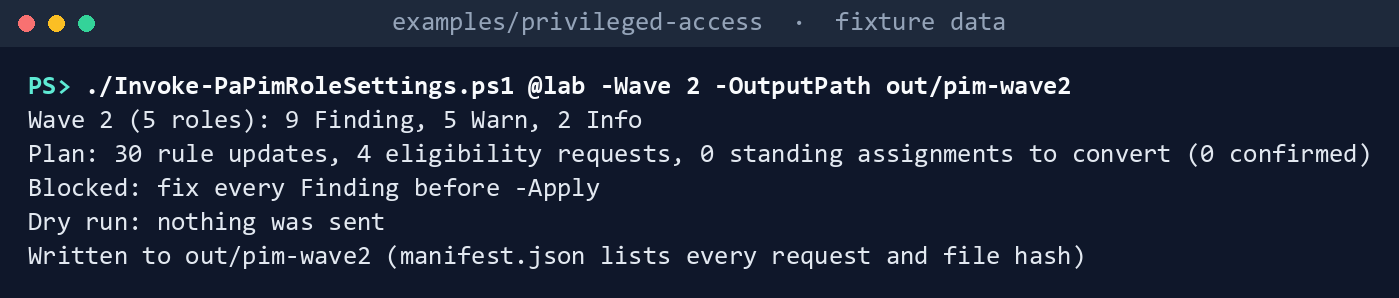
What the terminal shows, run on the kit’s fixtures (the same output as text) The nine Findings are PA-PIM-07, one for each Tier 1 role that doesn’t match its file yet. The two Info rows are the emergency accounts, kept permanent active.
Apply wave 1 to the fake:
./Invoke-PaPimRoleSettings.ps1 @lab -Wave 1 -OutputPath out/pim-apply -Apply
./Invoke-PaPimRoleSettings.ps1 @lab -Wave 1 -OutputPath out/pim-apply -Apply -ActivationGateChecked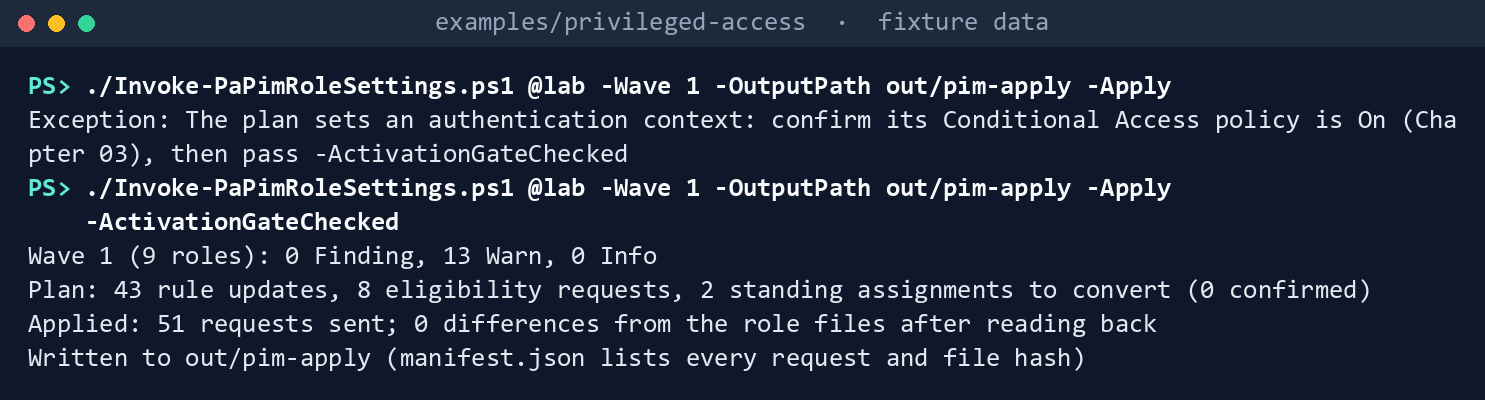
What the terminal shows, run on the kit’s fixtures (the same output as text) The first command stops before any write:
The plan sets an authentication context: confirm its Conditional Access policy is On (Chapter 03), then pass -ActivationGateChecked. The second prints the plan again, thenApplied: 51 requests sent; 0 differences from the role files after reading back. The fake lives only for the run, so the next run starts from the fixture again; the tests apply, convert and back out in one session.Run the tests:
Invoke-Pester -Path tests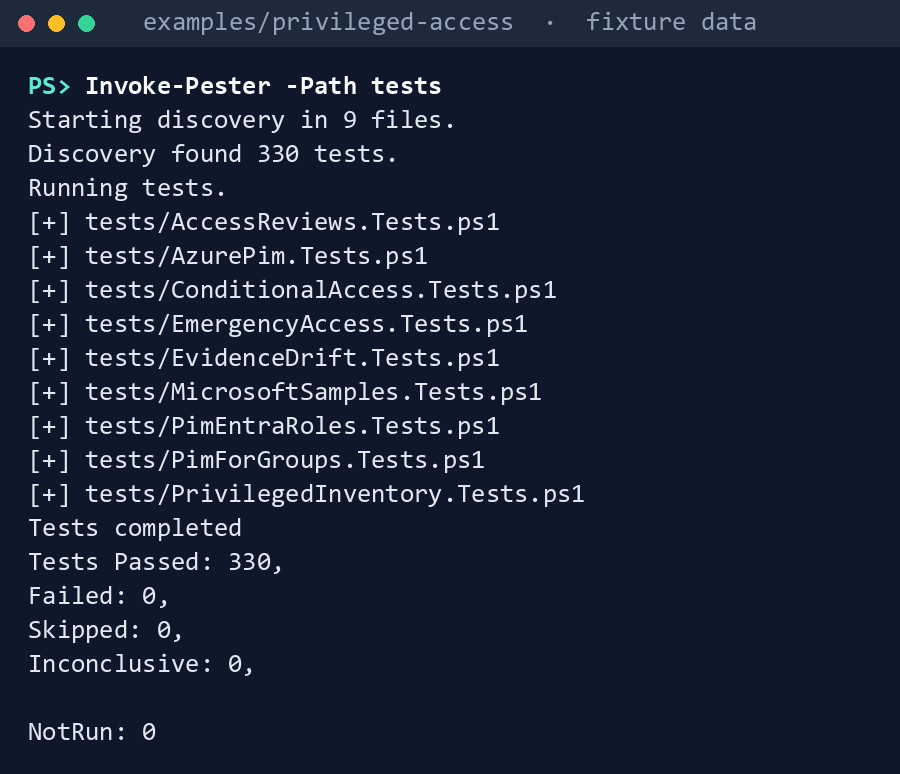
What the terminal shows, run on the kit’s fixtures (the same output as text)
Expected result: 330 tests passing, and each row of the gap table seen with your own eyes.
When you’re done, delete out:
Remove-Item -Recurse -Force out
Lab 2: test tenant
Use a test tenant in the worldwide or GCC cloud, never production, with Microsoft Entra ID P2 or ID Governance licenses for the test users and approvers. Work one role, in a test copy of the files, in examples/privileged-access, with the emergency-access.json you wrote in Chapter 02, Lab 2. You’ll replace: <tenant-id> (the test tenant’s ID), <reader-app-id>, <writer-app-id> and <thumbprint> (the two apps from step 3 and the certificate’s thumbprint; if each app has its own certificate, use its thumbprint), <approvers-group-id> and <prv-group-id> (the two groups from step 2), <ea1-object-id> and <ea2-object-id> (the test emergency accounts), <owner> (who owns their exception), <second-user-object-id> (the user in step 6), <confirmed-on> (the date of their activation, as yyyy-MM-dd) and <ticket>.
Every command in this lab, in order. Each step below says what it does and what to look for.
# Step 2: Make the lab's role and groups
New-Item -ItemType Directory lab-roles; Copy-Item config/pim-ch04/roles/teams-administrator.json lab-roles/

# Step 2: Make the lab's role and groups
$b = Get-Content tests/fixtures/ch04/inputs/pim-bindings.json -Raw | ConvertFrom-Json
$b.tenantId = '<tenant-id>'
$b.approverGroups = [pscustomobject]@{ 'PIM-Approvers-T1' = '<approvers-group-id>' }
$b.eligibility = @($b.eligibility | Where-Object role -EQ 'Teams Administrator')
$b.eligibility[0].groupId = '<prv-group-id>'
$b | ConvertTo-Json -Depth 5 | Set-Content lab-bindings.json

# Step 2: Make the lab's role and groups
'PrincipalId,Name,Reason,Owner', '<ea1-object-id>,Emergency Access 01,Emergency access account,<owner>', '<ea2-object-id>,Emergency Access 02,Emergency access account,<owner>' |
    Set-Content exceptions.csv

# Step 4: Dry-run as the reader
Connect-MgGraph -Environment Global -TenantId <tenant-id> -ClientId <reader-app-id> -CertificateThumbprint <thumbprint>
./Invoke-PaPimRoleSettings.ps1 -Cloud gcc -Wave 1 -RolesPath lab-roles -BindingsPath lab-bindings.json `
    -EmergencyConfigPath emergency-access.json -ExceptionsPath exceptions.csv -OutputPath out/lab-plan -TenantId <tenant-id>

# Step 4: Dry-run as the reader
Import-Csv out/lab-plan/diff.csv | Format-Table Role, RuleId, Property, Tenant, Desired
Get-Content out/lab-plan/plan.json

# Step 5: Apply as the writer
Connect-MgGraph -Environment Global -TenantId <tenant-id> -ClientId <writer-app-id> -CertificateThumbprint <thumbprint>
./Invoke-PaPimRoleSettings.ps1 -Cloud gcc -Wave 1 -RolesPath lab-roles -BindingsPath lab-bindings.json `
    -EmergencyConfigPath emergency-access.json -ExceptionsPath exceptions.csv -OutputPath out/lab-apply -TenantId <tenant-id> -Apply -ActivationGateChecked

# Step 5: Apply as the writer
Connect-MgGraph -Environment Global -TenantId <tenant-id> -ClientId <reader-app-id> -CertificateThumbprint <thumbprint>
./Invoke-PaPimRoleSettings.ps1 -Cloud gcc -Wave 1 -RolesPath lab-roles -BindingsPath lab-bindings.json `
    -EmergencyConfigPath emergency-access.json -ExceptionsPath exceptions.csv -OutputPath out/lab-plan2 -TenantId <tenant-id>

# Step 6: Activate and convert
'PrincipalId,RoleTemplateId,ConfirmedOn,Ticket', '<second-user-object-id>,69091246-20e8-4a56-aa4d-066075b2a7a8,<confirmed-on>,<ticket>' | Set-Content confirmed-activations.csv
Connect-MgGraph -Environment Global -TenantId <tenant-id> -ClientId <writer-app-id> -CertificateThumbprint <thumbprint>
./Invoke-PaPimRoleSettings.ps1 -Cloud gcc -Wave 1 -RolesPath lab-roles -BindingsPath lab-bindings.json `
    -EmergencyConfigPath emergency-access.json -ExceptionsPath exceptions.csv -OutputPath out/lab-convert -TenantId <tenant-id> `
    -Apply -Convert -ConfirmedPath confirmed-activations.csv

# Step 7: Back it out
Connect-MgGraph -Environment Global -TenantId <tenant-id> -ClientId <writer-app-id> -CertificateThumbprint <thumbprint>
./Invoke-PaPimRoleSettings.ps1 -Cloud gcc -Wave 1 -RolesPath lab-roles -BindingsPath lab-bindings.json `
    -EmergencyConfigPath emergency-access.json -ExceptionsPath exceptions.csv -OutputPath out/lab-restore -TenantId <tenant-id> `
    -Apply -RestoreFrom out/lab-apply

# Step 7: Back it out
Remove-Item -Recurse -Force out/lab-plan, out/lab-plan2, out/lab-apply, out/lab-convert, out/lab-restore
Check the prerequisites. Run Chapter 02’s check against the test tenant’s emergency accounts; it must show no Finding. Create authentication context
c1and turnPIM-Activation-c1On, with Chapter 03’s code or as Book 04, Chapter 08, Step 2 describes; report-only doesn’t count.67 Chapter 03’s run must show no PA-CA-04 for it.Make the lab’s role and groups. Copy one Tier 1 file into a lab folder:
New-Item -ItemType Directory lab-roles; Copy-Item config/pim-ch04/roles/teams-administrator.json lab-roles/In the test tenant, create a security group
PIM-Approvers-T1with two test approvers, and a role-assignable groupPRV-T1-TeamsAdminwith one test member. Writelab-bindings.jsonwith their object IDs, in the shape oftests/fixtures/ch04/inputs/pim-bindings.json, and anexceptions.csvthat lists the emergency accounts. The first command block keeps the fixture’s Teams Administrator entry and puts in your IDs; the second writes the exceptions:$b = Get-Content tests/fixtures/ch04/inputs/pim-bindings.json -Raw | ConvertFrom-Json $b.tenantId = '<tenant-id>' $b.approverGroups = [pscustomobject]@{ 'PIM-Approvers-T1' = '<approvers-group-id>' } $b.eligibility = @($b.eligibility | Where-Object role -EQ 'Teams Administrator') $b.eligibility[0].groupId = '<prv-group-id>' $b | ConvertTo-Json -Depth 5 | Set-Content lab-bindings.json'PrincipalId,Name,Reason,Owner', '<ea1-object-id>,Emergency Access 01,Emergency access account,<owner>', '<ea2-object-id>,Emergency Access 02,Emergency access account,<owner>' | Set-Content exceptions.csvRegister two apps in the worldwide admin center, each with a certificate: a reader with the three
pim-planpermissions from Lab 1, step 2, and a writer with the twopim-applywrite permissions added. Grant admin consent, and nothing else. For each app:- Open Entra ID > App registrations > New registration, name the app and select Register.
- In the app, open Certificates & secrets > Certificates > Upload certificate and upload the certificate’s public key.
- Open API permissions > Add a permission > Microsoft Graph > Application permissions and select
RoleAssignmentSchedule.Read.Directory,RoleEligibilitySchedule.Read.DirectoryandRoleManagementPolicy.Read.Directory; for the writer, alsoRoleEligibilitySchedule.ReadWrite.DirectoryandRoleManagementPolicy.ReadWrite.Directory. Select Add permissions, then Grant admin consent for your tenant.
Dry-run as the reader:
Connect-MgGraph -Environment Global -TenantId <tenant-id> -ClientId <reader-app-id> -CertificateThumbprint <thumbprint>
./Invoke-PaPimRoleSettings.ps1 -Cloud gcc -Wave 1 -RolesPath lab-roles -BindingsPath lab-bindings.json `
    -EmergencyConfigPath emergency-access.json -ExceptionsPath exceptions.csv -OutputPath out/lab-plan -TenantId <tenant-id>
Read
diff.csvandplan.jsonwith a second person. Keep the folder.Import-Csv out/lab-plan/diff.csv | Format-Table Role, RuleId, Property, Tenant, Desired Get-Content out/lab-plan/plan.jsonApply as the writer:
Connect-MgGraph -Environment Global -TenantId <tenant-id> -ClientId <writer-app-id> -CertificateThumbprint <thumbprint>
./Invoke-PaPimRoleSettings.ps1 -Cloud gcc -Wave 1 -RolesPath lab-roles -BindingsPath lab-bindings.json `
    -EmergencyConfigPath emergency-access.json -ExceptionsPath exceptions.csv -OutputPath out/lab-apply -TenantId <tenant-id> -Apply -ActivationGateChecked
The script must end with
0 differences from the role files after reading back. Open the role’s settings in the admin center (ID Governance > Privileged Identity Management > Microsoft Entra roles > Roles, select Teams Administrator, then Role settings) and compare them with the file. Run the dry run again as the reader; the plan should have no rule updates and no eligibility requests:Connect-MgGraph -Environment Global -TenantId <tenant-id> -ClientId <reader-app-id> -CertificateThumbprint <thumbprint> ./Invoke-PaPimRoleSettings.ps1 -Cloud gcc -Wave 1 -RolesPath lab-roles -BindingsPath lab-bindings.json ` -EmergencyConfigPath emergency-access.json -ExceptionsPath exceptions.csv -OutputPath out/lab-plan2 -TenantId <tenant-id>Check any eligibility that was longer than the new maximum before the change (research gaps, row 47).
Activate and convert. Give a second test user a standing Teams Administrator assignment and add them to
PRV-T1-TeamsAdmin. As that user, activate the role through the group; one approver approves. Add a row toconfirmed-activations.csvwith a ticket, grant the writerRoleAssignmentSchedule.ReadWrite.Directory(API permissions > Add a permission > Microsoft Graph > Application permissions, then Grant admin consent for your tenant), and run the conversion:'PrincipalId,RoleTemplateId,ConfirmedOn,Ticket', '<second-user-object-id>,69091246-20e8-4a56-aa4d-066075b2a7a8,<confirmed-on>,<ticket>' | Set-Content confirmed-activations.csv Connect-MgGraph -Environment Global -TenantId <tenant-id> -ClientId <writer-app-id> -CertificateThumbprint <thumbprint> ./Invoke-PaPimRoleSettings.ps1 -Cloud gcc -Wave 1 -RolesPath lab-roles -BindingsPath lab-bindings.json ` -EmergencyConfigPath emergency-access.json -ExceptionsPath exceptions.csv -OutputPath out/lab-convert -TenantId <tenant-id> ` -Apply -Convert -ConfirmedPath confirmed-activations.csvThe standing assignment goes; the eligibility stays. Wait five minutes after creating an assignment before removing it. To test research gaps, row 43, repeat with
RoleAssignmentSchedule.Remove.Directoryin place ofReadWrite.Back it out. As the writer, restore from the apply run’s folder:
Connect-MgGraph -Environment Global -TenantId <tenant-id> -ClientId <writer-app-id> -CertificateThumbprint <thumbprint>
./Invoke-PaPimRoleSettings.ps1 -Cloud gcc -Wave 1 -RolesPath lab-roles -BindingsPath lab-bindings.json `
    -EmergencyConfigPath emergency-access.json -ExceptionsPath exceptions.csv -OutputPath out/lab-restore -TenantId <tenant-id> `
    -Apply -RestoreFrom out/lab-apply
It puts the role’s seven rules back as
before.jsonrecorded them and removes the eligibility the run created; the read-back then shows the differences from the file again. Give the test user back their standing assignment if the test needs it. Delete the two groups, the two apps and their certificates, and theoutfolders. Keep the authentication context and its policy only if Chapter 03’s lab still needs them.Remove-Item -Recurse -Force out/lab-plan, out/lab-plan2, out/lab-apply, out/lab-convert, out/lab-restore
Verified facts
| Item | Value | US Government clouds | Stage | Source |
|---|---|---|---|---|
| Role settings | Per role, independent of other roles; Privileged Role Administrator to manage | PIM available | GA | 68 69 |
| Policies and rules | One policy per role at tenant scope; 17 rules with fixed IDs; five derived rule types | — | v1.0 | 70 |
| Find a role’s policy | GET /policies/roleManagementPolicyAssignments; $filter on scopeId /, scopeType DirectoryRole (or Directory) and roleDefinitionId; $expand=policy($expand=rules); RoleManagementPolicy.Read.Directory |
L4 and L5 | v1.0 | 71 |
| Update a rule | PATCH /policies/roleManagementPolicies/{id}/rules/{ruleId}; the derived @odata.type required; RoleManagementPolicy.ReadWrite.Directory; Privileged Role Administrator |
L4 and L5 | v1.0 | 72 73 |
| Authentication context rule | unifiedRoleManagementPolicyAuthenticationContextRule: isEnabled, claimValue |
— | v1.0 resource; the admin center option is labeled preview in the mapping guide and the deployment plan, and listed as generally available (April 2026) in the release notes; treated as preview | 74 75 76 77 |
| Reauthentication on activation | Sign-in frequency Every time on the context’s Conditional Access policy; a 10-minute window across Microsoft Entra roles, Azure resource roles and PIM for Groups | — | — | 78 |
| Activation maximum | 1 to 24 hours (role settings); at most 8 hours (PIM API overview) | — | — | 79 80 |
| Approval | At least one approver, two recommended; with none, active Privileged Role and Global Administrators approve; the lockout | — | GA | 81 |
| Context before PIM | The Conditional Access policy must exist and be On first; fallback to MFA only if no policy targets the context | — | — | 82 |
| Context in a policy’s conditions | includeAuthenticationContextClassReferences on conditionalAccessApplications in beta, not v1.0 |
— | beta | 83 84 |
| List eligibility schedules | RoleEligibilitySchedule.Read.Directory |
L4 and L5 | v1.0 | 85 |
| Create an eligibility request | POST /roleManagement/directory/roleEligibilityScheduleRequests; adminAssign, adminRemove; RoleEligibilitySchedule.ReadWrite.Directory |
L4 and L5 | v1.0 | 86 |
| Expiration rule enforced on requests | A request that breaks the expiration rule returns 400 Bad Request |
— | v1.0 | 87 |
| List active instances | RoleAssignmentSchedule.Read.Directory |
L4 and L5 | v1.0 | 88 |
| Remove a standing assignment | POST /roleManagement/directory/roleAssignmentScheduleRequests with adminRemove; RoleAssignmentSchedule.ReadWrite.Directory; Privileged Role Administrator |
L4 and L5 | v1.0 | 89 |
| Graph hosts | GCC graph.microsoft.com; GCC High graph.microsoft.us; DoD dod-graph.microsoft.us |
— | — | 90 |
Where Learn’s pages differ, recorded so a later edit doesn’t loosen the code:
- Activation maximum. One to 24 hours on the role settings page; at most eight hours on the PIM API overview. The code follows the stricter (research gaps, row 41).
- Authentication context stage. “(Preview)” in the mapping guide and public preview in the deployment plan; generally available since April 2026 in the release notes; no label on the role settings page or the v1.0 resource. The chapter treats it as preview, the stricter (research gaps, row 42).91 92 93
- Write permission. The API reference pages name
RoleManagementPolicy.ReadWrite.DirectoryandRoleEligibilitySchedule.ReadWrite.Directory; the Graph PowerShell guide and the tutorial ask forRoleManagement.ReadWrite.Directory. The code follows the narrower.94 95 - Update response.
204 No Contenton the how-to page;200 OKwith the rule on the API page. The code accepts both and reads back (research gaps, row 46). scopeType. The Graph PowerShell guide usesDirectoryRolein one step andDirectoryin the next; the list page says both are accepted for Microsoft Entra roles. The code usesDirectoryRole, as the how-to page does.96 97
Federal requirements and evidence
The role files, the plan and the read-back are the evidence for the plan’s tasks A1.6, A2.1 and A2.2. Each row names the command or file that shows it. Every control named is in the NIST SP 800-53B Moderate baseline.98
| What the output proves | Requirement it supports | KSI it aligns to | Who keeps it |
|---|---|---|---|
Learn’s samples run against the fake as published, and the kit’s own code passes its tests: Lab 1, steps 1 and 7 (Invoke-Pester) |
CM-3(2), testing and validation of changes | KSI-CMT-VTD | The repository’s test runs |
Planning needs three read permissions; applying and converting each add only their own write permission: Lab 1, step 2 (Get-PaPimRequiredPermission) |
AC-6, least privilege for each identity | KSI-IAM-ELP | Identity engineering, with each app’s consent record |
Each role’s settings sit inside Learn’s bounds and its tier’s caps: activation of at most four hours for Tier 0 and eight for the rest, bounded eligibility, active assignments of at most 15 days, approval and a ticket: the files in config/pim-ch04/roles, tiers.json, and PA-PIM-04 in findings.json |
AC-6, least privilege in time; AC-2, conditions for role membership; the caps are Book 04, Appendix B’s (design guidance) | KSI-IAM-JIT | Identity engineering, in the repository |
Global Administrator activation needs approval by PIM-Approvers-T0: global-administrator.json and its rows in diff.csv |
AC-2 and AC-3: approval before activation is an enforced approval step (Book 04, Chapter 08); MS.AAD.7.6v1, approval to activate Global Administrator (BOD 25-01)99 | KSI-IAM-JIT | Identity engineering, in the repository |
What the wave would change, rule by rule, and the rules as the tenant holds them, for the back-out: plan.json, diff.csv and before.json from Lab 1, step 3, with nothing sent |
CM-3, configuration change control: the change is reviewed before it is made | KSI-CMT-LMC, KSI-CMT-RMV | The pull request, with the plan attached |
No approval without an approver, the emergency accounts kept, and no approver group that is also the role’s eligible group: PA-PIM-01, 02 and 03 in findings.json, Lab 1, step 4 |
AC-5, separation of duties (PA-PIM-03); AC-2, the emergency accounts (PA-PIM-02) | KSI-IAM-JIT | The ISSO |
Standing assignments still to convert, and eligibility outside the role’s PRV group: PA-PIM-09 and PA-PIM-08 in findings.json |
AC-6(5), privileged accounts restricted to defined roles; MS.AAD.7.4v1, no permanent active assignment to a highly privileged role, and MS.AAD.7.5v1, provisioning only through a PAM system (BOD 25-01)100 | KSI-IAM-JIT | The ISSO |
The eight highly privileged roles alert on every eligible and active assignment, and Global Administrator on every activation, and so do the PIM for Groups member policies of the groups that hold them: PA-PIM-10 to PA-PIM-13 in out/pim-alerts/findings.json from Invoke-PaPimAlertCheck.ps1, with no Finding |
AU-6, audit record review; MS.AAD.7.7v1 and MS.AAD.7.8v1, alerts on highly privileged assignments and Global Administrator activation (BOD 25-01)101 102 | KSI-MLA-RVL | The ISSO; the security monitoring team keeps the mailbox |
Tier 0 waits until the pilot wave matches its files: PA-PIM-07 and Blocked in Lab 1, step 5 |
CM-3: changes go in the approved order (the order is design guidance) | KSI-CMT-LMC | Identity engineering |
The apply refuses without a person’s statement that the gate is On, then sends the rules first and the eligibility second, and the read-back shows no difference: Lab 1, step 6, the refusal, then verify.csv and the SHA-256 of each body in manifest.json |
CM-3, approved changes implemented and recorded; CM-4(2), verification of controls after the change | KSI-CMT-LMC, KSI-CMT-VTD | The ISSO, beside the files the manifest lists |
A live plan of the test tenant, as the reader app: Lab 2, step 4, out/lab-plan/diff.csv and plan.json |
CM-3 | KSI-CMT-LMC | Identity engineering |
The writer applies, and a second plan by the reader finds nothing left to change: Lab 2, step 5, out/lab-apply/verify.csv and an empty out/lab-plan2/diff.csv |
CM-4(2); AC-5, a reader and a writer that are different identities | KSI-CMT-VTD, KSI-IAM-JIT | The ISSO |
A standing assignment is removed only after the holder’s activation through the group is confirmed with a ticket: Lab 2, step 6, confirmed-activations.csv and out/lab-convert |
AC-2, accounts modified according to policy; AC-6(5); MS.AAD.7.4v1 (BOD 25-01) | KSI-IAM-JIT | The ISSO, with the ticket |
The back-out restores the rules from before.json and removes what the apply added, and the lab folders are deleted: Lab 2, step 7, out/lab-restore |
CM-3: the rollback is a recorded change | KSI-CMT-RMV | Identity engineering |
OMB M-22-09 asks agencies to move from static roles toward more granular, dynamically defined permissions; it doesn’t mandate time-bound privilege, which is the program’s choice (Book 04, Chapter 02).103 AC-2(7), privileged accounts under a role-based or attribute-based scheme, isn’t in the Moderate baseline;104 an agency that tailors it in can point to the same rows. KSIs are FedRAMP 20x indicators for cloud service providers.105 The agency authorizes its own system and lines this evidence up with what its providers report against those indicators; it doesn’t report KSIs itself (Book 00, Appendix B). Book 04, Chapter 08 carries the full control mapping for the activation gate.
Dangers
| Danger | What happens | The guard |
|---|---|---|
| Approval switched on before the emergency accounts hold Global Administrator | The documented lockout | PA-PIM-02 reads the tenant and blocks every write |
| Approval with no approver | The default approvers are the people the program keeps eligible | PA-PIM-01 blocks the file |
| The context set before its Conditional Access policy is On | Activation falls back to MFA only if no policy targets the context; an off or report-only policy enforces nothing | PA-PIM-05; -Apply needs -ActivationGateChecked |
| A write nobody saw | The tenant changes from a copied script | Dry run by default; -Apply only from a reviewed plan; a read-only client throws on any write |
| A write identity with read-write on everything | One stolen secret changes every role | Separate tasks and apps; the dry run’s app holds no write permission; a test pins each task’s permissions |
| A sample copied with another tenant’s policy ID | The write fails, or lands on the wrong role | Policy IDs come only from the read |
| Settings set in the portal drift from the files | The control in the tenant isn’t the one reviewed | The diff, every run; Chapter 08 can add it to the scheduled run (research gaps, row 88) |
| Eligibility longer than the tier allows | A Tier 2 holder is eligible for a year | New-PaPimEligibilityRequest refuses it; the role’s rule is set before any request |
| Removing a standing assignment before the person can activate | An administrator is stranded mid-conversion | Removal only after the group is eligible and the activation is confirmed with a ticket |
| Tier 0 changed before the pilot is proven | A mistake hits the control plane first | PA-PIM-07 refuses a wave until earlier waves match |
| A back-out from memory | The rules come back wrong, or not at all | before.json from the run, applied with -RestoreFrom |
| Names and IDs in the output | The plan names administrators and groups | The output folder is evidence; delete lab copies |
Checklist
Footnotes
Microsoft Learn, “Configure Microsoft Entra role settings in Privileged Identity Management,” https://learn.microsoft.com/entra/id-governance/privileged-identity-management/pim-how-to-change-default-settings (accessed Oct 30, 2026).↩︎
Microsoft Learn, “Configure Microsoft Entra role settings in Privileged Identity Management,” https://learn.microsoft.com/entra/id-governance/privileged-identity-management/pim-how-to-change-default-settings (accessed Oct 30, 2026).↩︎
Microsoft Learn, “Rules in PIM - mapping guide,” https://learn.microsoft.com/graph/identity-governance-pim-rules-overview (accessed Oct 30, 2026).↩︎
Microsoft Learn, “Rules in PIM - mapping guide,” https://learn.microsoft.com/graph/identity-governance-pim-rules-overview (accessed Oct 30, 2026).↩︎
Microsoft Learn, “Configure Microsoft Entra role settings in Privileged Identity Management,” https://learn.microsoft.com/entra/id-governance/privileged-identity-management/pim-how-to-change-default-settings (accessed Oct 30, 2026).↩︎
Microsoft Learn, “Rules in PIM - mapping guide,” https://learn.microsoft.com/graph/identity-governance-pim-rules-overview (accessed Oct 30, 2026).↩︎
Microsoft Learn, “Plan a Privileged Identity Management deployment,” overview and plan testing, https://learn.microsoft.com/entra/id-governance/privileged-identity-management/pim-deployment-plan (accessed Oct 31, 2026).↩︎
Microsoft Learn, “Microsoft Entra releases and announcements,” April 2026, General Availability - Enforce Conditional Access policies like MFA on every PIM activation, https://learn.microsoft.com/entra/fundamentals/whats-new (accessed Oct 31, 2026).↩︎
Microsoft Learn, “unifiedRoleManagementPolicyAuthenticationContextRule resource type,” https://learn.microsoft.com/graph/api/resources/unifiedrolemanagementpolicyauthenticationcontextrule?view=graph-rest-1.0 (accessed Oct 30, 2026).↩︎
Microsoft Learn, “Configure Microsoft Entra role settings in Privileged Identity Management,” on activation, require Microsoft Entra Conditional Access authentication context, https://learn.microsoft.com/entra/id-governance/privileged-identity-management/pim-how-to-change-default-settings (accessed Oct 31, 2026).↩︎
Microsoft Learn, “Microsoft Graph national cloud deployments,” https://learn.microsoft.com/graph/deployments (accessed Oct 30, 2026).↩︎
Microsoft Learn, “List roleManagementPolicyAssignments,” https://learn.microsoft.com/graph/api/policyroot-list-rolemanagementpolicyassignments?view=graph-rest-1.0 (accessed Oct 30, 2026).↩︎
Microsoft Learn, “Update unifiedRoleManagementPolicyRule,” https://learn.microsoft.com/graph/api/unifiedrolemanagementpolicyrule-update?view=graph-rest-1.0 (accessed Oct 30, 2026).↩︎
Microsoft Learn, “List roleEligibilitySchedules,” https://learn.microsoft.com/graph/api/rbacapplication-list-roleeligibilityschedules?view=graph-rest-1.0 (accessed Oct 30, 2026).↩︎
Microsoft Learn, “Create roleEligibilityScheduleRequest,” https://learn.microsoft.com/graph/api/rbacapplication-post-roleeligibilityschedulerequests?view=graph-rest-1.0 (accessed Oct 30, 2026).↩︎
Microsoft Learn, “Create roleAssignmentScheduleRequests,” https://learn.microsoft.com/graph/api/rbacapplication-post-roleassignmentschedulerequests?view=graph-rest-1.0 (accessed Oct 30, 2026).↩︎
Microsoft Learn, “Microsoft Entra feature availability,” Microsoft Entra ID, identity governance, and other Microsoft Entra products, https://learn.microsoft.com/entra/identity/authentication/feature-availability (accessed Oct 30, 2026).↩︎
Microsoft Learn, “Update rules in PIM by using Microsoft Graph,” https://learn.microsoft.com/graph/how-to-pim-update-rules (accessed Oct 30, 2026).↩︎
Microsoft Learn, “Assign privileged roles using PIM for Microsoft Entra roles APIs,” https://learn.microsoft.com/graph/tutorial-assign-azureadroles (accessed Oct 30, 2026).↩︎
Microsoft, microsoftgraph/microsoft-graph-docs-contrib,
concepts/how-to-pim-update-rules.mdandconcepts/tutorial-assign-azureadroles.mdat commita69303123e9701eecbf56568d152ece936a97f1e(October 30, 2026; the pages last changed August 29, 2025 and July 3, 2026), code MIT License, documentation CC BY 4.0, https://github.com/microsoftgraph/microsoft-graph-docs-contrib/tree/a69303123e9701eecbf56568d152ece936a97f1e/concepts (accessed Oct 30, 2026); pinned copy inexamples/third_party/graph-pim-rules-pages.↩︎Microsoft Learn, “Manage Microsoft Entra role assignments by using PIM APIs,” methods of assigning roles and role settings and PIM, https://learn.microsoft.com/graph/api/resources/privilegedidentitymanagementv3-overview?view=graph-rest-1.0 (accessed Oct 30, 2026).↩︎
Microsoft Learn, “List roleManagementPolicyAssignments,” https://learn.microsoft.com/graph/api/policyroot-list-rolemanagementpolicyassignments?view=graph-rest-1.0 (accessed Oct 30, 2026).↩︎
Microsoft Learn, “unifiedRoleManagementPolicyAuthenticationContextRule resource type,” https://learn.microsoft.com/graph/api/resources/unifiedrolemanagementpolicyauthenticationcontextrule?view=graph-rest-1.0 (accessed Oct 30, 2026).↩︎
Microsoft Learn, “Configure Microsoft Entra role settings in Privileged Identity Management,” https://learn.microsoft.com/entra/id-governance/privileged-identity-management/pim-how-to-change-default-settings (accessed Oct 30, 2026).↩︎
Microsoft Learn, “Configure Microsoft Entra role settings in Privileged Identity Management,” on activation, require Microsoft Entra Conditional Access authentication context, https://learn.microsoft.com/entra/id-governance/privileged-identity-management/pim-how-to-change-default-settings (accessed Oct 31, 2026).↩︎
Microsoft Learn, “Configure Microsoft Entra role settings in Privileged Identity Management,” https://learn.microsoft.com/entra/id-governance/privileged-identity-management/pim-how-to-change-default-settings (accessed Oct 30, 2026).↩︎
Microsoft Learn, “Create roleEligibilityScheduleRequest,” https://learn.microsoft.com/graph/api/rbacapplication-post-roleeligibilityschedulerequests?view=graph-rest-1.0 (accessed Oct 30, 2026).↩︎
Microsoft Learn, “Configure Microsoft Entra role settings in Privileged Identity Management,” https://learn.microsoft.com/entra/id-governance/privileged-identity-management/pim-how-to-change-default-settings (accessed Oct 30, 2026).↩︎
Microsoft Learn, “Manage Microsoft Entra role assignments by using PIM APIs,” methods of assigning roles and role settings and PIM, https://learn.microsoft.com/graph/api/resources/privilegedidentitymanagementv3-overview?view=graph-rest-1.0 (accessed Oct 30, 2026).↩︎
Microsoft Learn, “Update rules in PIM by using Microsoft Graph,” https://learn.microsoft.com/graph/how-to-pim-update-rules (accessed Oct 30, 2026).↩︎
Microsoft Learn, “Rules in PIM - mapping guide,” https://learn.microsoft.com/graph/identity-governance-pim-rules-overview (accessed Oct 30, 2026).↩︎
Microsoft Learn, “Configure Microsoft Entra role settings in Privileged Identity Management,” https://learn.microsoft.com/entra/id-governance/privileged-identity-management/pim-how-to-change-default-settings (accessed Oct 30, 2026).↩︎
Microsoft Learn, “Configure Microsoft Entra role settings in Privileged Identity Management,” https://learn.microsoft.com/entra/id-governance/privileged-identity-management/pim-how-to-change-default-settings (accessed Oct 30, 2026).↩︎
Microsoft Learn, “Configure Microsoft Entra role settings in Privileged Identity Management,” https://learn.microsoft.com/entra/id-governance/privileged-identity-management/pim-how-to-change-default-settings (accessed Oct 30, 2026).↩︎
Microsoft Learn, “conditionalAccessApplications resource type” (v1.0), https://learn.microsoft.com/graph/api/resources/conditionalaccessapplications?view=graph-rest-1.0 (accessed Oct 30, 2026).↩︎
Microsoft Learn, “conditionalAccessApplications resource type” (beta), https://learn.microsoft.com/graph/api/resources/conditionalaccessapplications?view=graph-rest-beta (accessed Oct 30, 2026).↩︎
Cybersecurity and Infrastructure Security Agency, “BOD 25-01: Implementing Secure Practices for Cloud Services Required Configurations,” Microsoft Entra ID policies MS.AAD.7.4v1, MS.AAD.7.5v1, MS.AAD.7.6v1, MS.AAD.7.7v1 and MS.AAD.7.8v1, https://www.cisa.gov/resources-tools/services/bod-25-01-implementing-secure-practices-cloud-services-required-configurations (accessed Nov 2, 2026).↩︎
Cybersecurity and Infrastructure Security Agency, ScubaGear Microsoft Entra ID secure configuration baseline (
aad.md), MS.AAD.7.7v1 and MS.AAD.7.8v1 and their implementation steps, and the list of highly privileged roles, https://github.com/cisagov/ScubaGear/blob/main/PowerShell/ScubaGear/baselines/aad.md (accessed Nov 2, 2026).↩︎Microsoft Learn, “Rules in PIM - mapping guide,” https://learn.microsoft.com/graph/identity-governance-pim-rules-overview (accessed Oct 30, 2026).↩︎
Cybersecurity and Infrastructure Security Agency, ScubaGear Microsoft Entra ID secure configuration baseline (
aad.md), MS.AAD.7.7v1 and MS.AAD.7.8v1 and their implementation steps, and the list of highly privileged roles, https://github.com/cisagov/ScubaGear/blob/main/PowerShell/ScubaGear/baselines/aad.md (accessed Nov 2, 2026).↩︎Cybersecurity and Infrastructure Security Agency, ScubaGear,
ExportAADProvider.psm1(Get-PrivilegedRole,GetConfigurationsForPimGroups) andAADConfig.rego(MS.AAD.7.7v1, MS.AAD.7.8v1), https://github.com/cisagov/ScubaGear/tree/main/PowerShell/ScubaGear (accessed Nov 2, 2026).↩︎Microsoft Learn, “Configure PIM for Groups settings,” https://learn.microsoft.com/entra/id-governance/privileged-identity-management/groups-role-settings (accessed Nov 2, 2026).↩︎
Microsoft Learn, “List roleManagementPolicyAssignments,” https://learn.microsoft.com/graph/api/policyroot-list-rolemanagementpolicyassignments?view=graph-rest-1.0 (accessed Oct 30, 2026).↩︎
Cybersecurity and Infrastructure Security Agency, “BOD 25-01: Implementing Secure Practices for Cloud Services Required Configurations,” Microsoft Entra ID policies MS.AAD.7.4v1, MS.AAD.7.5v1, MS.AAD.7.6v1, MS.AAD.7.7v1 and MS.AAD.7.8v1, https://www.cisa.gov/resources-tools/services/bod-25-01-implementing-secure-practices-cloud-services-required-configurations (accessed Nov 2, 2026).↩︎
Cybersecurity and Infrastructure Security Agency, ScubaGear Microsoft Entra ID secure configuration baseline (
aad.md), MS.AAD.7.7v1 and MS.AAD.7.8v1 and their implementation steps, and the list of highly privileged roles, https://github.com/cisagov/ScubaGear/blob/main/PowerShell/ScubaGear/baselines/aad.md (accessed Nov 2, 2026).↩︎Cybersecurity and Infrastructure Security Agency, “BOD 25-01: Implementing Secure Practices for Cloud Services Required Configurations,” Microsoft Entra ID policies MS.AAD.7.4v1, MS.AAD.7.5v1, MS.AAD.7.6v1, MS.AAD.7.7v1 and MS.AAD.7.8v1, https://www.cisa.gov/resources-tools/services/bod-25-01-implementing-secure-practices-cloud-services-required-configurations (accessed Nov 2, 2026).↩︎
Cybersecurity and Infrastructure Security Agency, ScubaGear Microsoft Entra ID secure configuration baseline (
aad.md), MS.AAD.7.7v1 and MS.AAD.7.8v1 and their implementation steps, and the list of highly privileged roles, https://github.com/cisagov/ScubaGear/blob/main/PowerShell/ScubaGear/baselines/aad.md (accessed Nov 2, 2026).↩︎Cybersecurity and Infrastructure Security Agency, “BOD 25-01: Implementing Secure Practices for Cloud Services Required Configurations,” Microsoft Entra ID policies MS.AAD.7.4v1, MS.AAD.7.5v1, MS.AAD.7.6v1, MS.AAD.7.7v1 and MS.AAD.7.8v1, https://www.cisa.gov/resources-tools/services/bod-25-01-implementing-secure-practices-cloud-services-required-configurations (accessed Nov 2, 2026).↩︎
Cybersecurity and Infrastructure Security Agency, ScubaGear Microsoft Entra ID secure configuration baseline (
aad.md), MS.AAD.7.7v1 and MS.AAD.7.8v1 and their implementation steps, and the list of highly privileged roles, https://github.com/cisagov/ScubaGear/blob/main/PowerShell/ScubaGear/baselines/aad.md (accessed Nov 2, 2026).↩︎Cybersecurity and Infrastructure Security Agency, “BOD 25-01: Implementing Secure Practices for Cloud Services Required Configurations,” Microsoft Entra ID policies MS.AAD.7.4v1, MS.AAD.7.5v1, MS.AAD.7.6v1, MS.AAD.7.7v1 and MS.AAD.7.8v1, https://www.cisa.gov/resources-tools/services/bod-25-01-implementing-secure-practices-cloud-services-required-configurations (accessed Nov 2, 2026).↩︎
Cybersecurity and Infrastructure Security Agency, ScubaGear Microsoft Entra ID secure configuration baseline (
aad.md), MS.AAD.7.7v1 and MS.AAD.7.8v1 and their implementation steps, and the list of highly privileged roles, https://github.com/cisagov/ScubaGear/blob/main/PowerShell/ScubaGear/baselines/aad.md (accessed Nov 2, 2026).↩︎Microsoft Learn, “List roleManagementPolicyAssignments,” https://learn.microsoft.com/graph/api/policyroot-list-rolemanagementpolicyassignments?view=graph-rest-1.0 (accessed Oct 30, 2026).↩︎
Microsoft Learn, “Configure PIM for Groups settings,” https://learn.microsoft.com/entra/id-governance/privileged-identity-management/groups-role-settings (accessed Nov 2, 2026).↩︎
Microsoft Learn, “List roleManagementPolicyAssignments,” https://learn.microsoft.com/graph/api/policyroot-list-rolemanagementpolicyassignments?view=graph-rest-1.0 (accessed Oct 30, 2026).↩︎
Microsoft Learn, “List roleManagementPolicyAssignments,” https://learn.microsoft.com/graph/api/policyroot-list-rolemanagementpolicyassignments?view=graph-rest-1.0 (accessed Oct 30, 2026).↩︎
Microsoft Learn, “Configure PIM for Groups settings,” https://learn.microsoft.com/entra/id-governance/privileged-identity-management/groups-role-settings (accessed Nov 2, 2026).↩︎
Microsoft Learn, “List roleEligibilitySchedules,” https://learn.microsoft.com/graph/api/rbacapplication-list-roleeligibilityschedules?view=graph-rest-1.0 (accessed Oct 30, 2026).↩︎
Microsoft Learn, “List roleAssignmentScheduleInstances,” https://learn.microsoft.com/graph/api/rbacapplication-list-roleassignmentscheduleinstances?view=graph-rest-1.0 (accessed Oct 30, 2026; read for Chapter 02).↩︎
Microsoft Learn, “Update unifiedRoleManagementPolicyRule,” https://learn.microsoft.com/graph/api/unifiedrolemanagementpolicyrule-update?view=graph-rest-1.0 (accessed Oct 30, 2026).↩︎
Microsoft Learn, “Create roleEligibilityScheduleRequest,” https://learn.microsoft.com/graph/api/rbacapplication-post-roleeligibilityschedulerequests?view=graph-rest-1.0 (accessed Oct 30, 2026).↩︎
Microsoft Learn, “Create roleAssignmentScheduleRequests,” https://learn.microsoft.com/graph/api/rbacapplication-post-roleassignmentschedulerequests?view=graph-rest-1.0 (accessed Oct 30, 2026).↩︎
Microsoft Learn, “Manage PIM policies in Microsoft Graph PowerShell,” https://learn.microsoft.com/powershell/microsoftgraph/how-to-manage-pim-policies?view=graph-powershell-1.0 (accessed Oct 30, 2026).↩︎
Microsoft Learn, “Assign privileged roles using PIM for Microsoft Entra roles APIs,” https://learn.microsoft.com/graph/tutorial-assign-azureadroles (accessed Oct 30, 2026).↩︎
Microsoft Learn, “List roleManagementPolicyAssignments,” https://learn.microsoft.com/graph/api/policyroot-list-rolemanagementpolicyassignments?view=graph-rest-1.0 (accessed Oct 30, 2026).↩︎
Microsoft Learn, “Update rules in PIM by using Microsoft Graph,” https://learn.microsoft.com/graph/how-to-pim-update-rules (accessed Oct 30, 2026).↩︎
Microsoft Learn, “Update unifiedRoleManagementPolicyRule,” https://learn.microsoft.com/graph/api/unifiedrolemanagementpolicyrule-update?view=graph-rest-1.0 (accessed Oct 30, 2026).↩︎
Microsoft Learn, “Configure Microsoft Entra role settings in Privileged Identity Management,” https://learn.microsoft.com/entra/id-governance/privileged-identity-management/pim-how-to-change-default-settings (accessed Oct 30, 2026).↩︎
Microsoft Learn, “Configure Microsoft Entra role settings in Privileged Identity Management,” https://learn.microsoft.com/entra/id-governance/privileged-identity-management/pim-how-to-change-default-settings (accessed Oct 30, 2026).↩︎
Microsoft Learn, “Microsoft Entra feature availability,” Microsoft Entra ID, identity governance, and other Microsoft Entra products, https://learn.microsoft.com/entra/identity/authentication/feature-availability (accessed Oct 30, 2026).↩︎
Microsoft Learn, “Rules in PIM - mapping guide,” https://learn.microsoft.com/graph/identity-governance-pim-rules-overview (accessed Oct 30, 2026).↩︎
Microsoft Learn, “List roleManagementPolicyAssignments,” https://learn.microsoft.com/graph/api/policyroot-list-rolemanagementpolicyassignments?view=graph-rest-1.0 (accessed Oct 30, 2026).↩︎
Microsoft Learn, “Update unifiedRoleManagementPolicyRule,” https://learn.microsoft.com/graph/api/unifiedrolemanagementpolicyrule-update?view=graph-rest-1.0 (accessed Oct 30, 2026).↩︎
Microsoft Learn, “Update rules in PIM by using Microsoft Graph,” https://learn.microsoft.com/graph/how-to-pim-update-rules (accessed Oct 30, 2026).↩︎
Microsoft Learn, “unifiedRoleManagementPolicyAuthenticationContextRule resource type,” https://learn.microsoft.com/graph/api/resources/unifiedrolemanagementpolicyauthenticationcontextrule?view=graph-rest-1.0 (accessed Oct 30, 2026).↩︎
Microsoft Learn, “Rules in PIM - mapping guide,” https://learn.microsoft.com/graph/identity-governance-pim-rules-overview (accessed Oct 30, 2026).↩︎
Microsoft Learn, “Plan a Privileged Identity Management deployment,” overview and plan testing, https://learn.microsoft.com/entra/id-governance/privileged-identity-management/pim-deployment-plan (accessed Oct 31, 2026).↩︎
Microsoft Learn, “Microsoft Entra releases and announcements,” April 2026, General Availability - Enforce Conditional Access policies like MFA on every PIM activation, https://learn.microsoft.com/entra/fundamentals/whats-new (accessed Oct 31, 2026).↩︎
Microsoft Learn, “Configure Microsoft Entra role settings in Privileged Identity Management,” on activation, require Microsoft Entra Conditional Access authentication context, https://learn.microsoft.com/entra/id-governance/privileged-identity-management/pim-how-to-change-default-settings (accessed Oct 31, 2026).↩︎
Microsoft Learn, “Configure Microsoft Entra role settings in Privileged Identity Management,” https://learn.microsoft.com/entra/id-governance/privileged-identity-management/pim-how-to-change-default-settings (accessed Oct 30, 2026).↩︎
Microsoft Learn, “Manage Microsoft Entra role assignments by using PIM APIs,” methods of assigning roles and role settings and PIM, https://learn.microsoft.com/graph/api/resources/privilegedidentitymanagementv3-overview?view=graph-rest-1.0 (accessed Oct 30, 2026).↩︎
Microsoft Learn, “Configure Microsoft Entra role settings in Privileged Identity Management,” https://learn.microsoft.com/entra/id-governance/privileged-identity-management/pim-how-to-change-default-settings (accessed Oct 30, 2026).↩︎
Microsoft Learn, “Configure Microsoft Entra role settings in Privileged Identity Management,” https://learn.microsoft.com/entra/id-governance/privileged-identity-management/pim-how-to-change-default-settings (accessed Oct 30, 2026).↩︎
Microsoft Learn, “conditionalAccessApplications resource type” (v1.0), https://learn.microsoft.com/graph/api/resources/conditionalaccessapplications?view=graph-rest-1.0 (accessed Oct 30, 2026).↩︎
Microsoft Learn, “conditionalAccessApplications resource type” (beta), https://learn.microsoft.com/graph/api/resources/conditionalaccessapplications?view=graph-rest-beta (accessed Oct 30, 2026).↩︎
Microsoft Learn, “List roleEligibilitySchedules,” https://learn.microsoft.com/graph/api/rbacapplication-list-roleeligibilityschedules?view=graph-rest-1.0 (accessed Oct 30, 2026).↩︎
Microsoft Learn, “Create roleEligibilityScheduleRequest,” https://learn.microsoft.com/graph/api/rbacapplication-post-roleeligibilityschedulerequests?view=graph-rest-1.0 (accessed Oct 30, 2026).↩︎
Microsoft Learn, “Manage Microsoft Entra role assignments by using PIM APIs,” methods of assigning roles and role settings and PIM, https://learn.microsoft.com/graph/api/resources/privilegedidentitymanagementv3-overview?view=graph-rest-1.0 (accessed Oct 30, 2026).↩︎
Microsoft Learn, “List roleAssignmentScheduleInstances,” https://learn.microsoft.com/graph/api/rbacapplication-list-roleassignmentscheduleinstances?view=graph-rest-1.0 (accessed Oct 30, 2026; read for Chapter 02).↩︎
Microsoft Learn, “Create roleAssignmentScheduleRequests,” https://learn.microsoft.com/graph/api/rbacapplication-post-roleassignmentschedulerequests?view=graph-rest-1.0 (accessed Oct 30, 2026).↩︎
Microsoft Learn, “Microsoft Graph national cloud deployments,” https://learn.microsoft.com/graph/deployments (accessed Oct 30, 2026).↩︎
Microsoft Learn, “Rules in PIM - mapping guide,” https://learn.microsoft.com/graph/identity-governance-pim-rules-overview (accessed Oct 30, 2026).↩︎
Microsoft Learn, “Plan a Privileged Identity Management deployment,” overview and plan testing, https://learn.microsoft.com/entra/id-governance/privileged-identity-management/pim-deployment-plan (accessed Oct 31, 2026).↩︎
Microsoft Learn, “Microsoft Entra releases and announcements,” April 2026, General Availability - Enforce Conditional Access policies like MFA on every PIM activation, https://learn.microsoft.com/entra/fundamentals/whats-new (accessed Oct 31, 2026).↩︎
Microsoft Learn, “Manage PIM policies in Microsoft Graph PowerShell,” https://learn.microsoft.com/powershell/microsoftgraph/how-to-manage-pim-policies?view=graph-powershell-1.0 (accessed Oct 30, 2026).↩︎
Microsoft Learn, “Assign privileged roles using PIM for Microsoft Entra roles APIs,” https://learn.microsoft.com/graph/tutorial-assign-azureadroles (accessed Oct 30, 2026).↩︎
Microsoft Learn, “List roleManagementPolicyAssignments,” https://learn.microsoft.com/graph/api/policyroot-list-rolemanagementpolicyassignments?view=graph-rest-1.0 (accessed Oct 30, 2026).↩︎
Microsoft Learn, “Manage PIM policies in Microsoft Graph PowerShell,” https://learn.microsoft.com/powershell/microsoftgraph/how-to-manage-pim-policies?view=graph-powershell-1.0 (accessed Oct 30, 2026).↩︎
National Institute of Standards and Technology, SP 800-53B Moderate baseline, release 5.2.0 OSCAL profile (includes AC-2, AC-3, AC-5, AC-6, AC-6(5), AU-6, CM-3, CM-3(2) and CM-4(2); AC-2(7) isn’t selected), https://github.com/usnistgov/oscal-content/blob/main/nist.gov/SP800-53/rev5/json/NIST_SP-800-53_rev5_MODERATE-baseline_profile.json (accessed Nov 2, 2026).↩︎
Cybersecurity and Infrastructure Security Agency, “BOD 25-01: Implementing Secure Practices for Cloud Services Required Configurations,” Microsoft Entra ID policies MS.AAD.7.4v1, MS.AAD.7.5v1, MS.AAD.7.6v1, MS.AAD.7.7v1 and MS.AAD.7.8v1, https://www.cisa.gov/resources-tools/services/bod-25-01-implementing-secure-practices-cloud-services-required-configurations (accessed Nov 2, 2026).↩︎
Cybersecurity and Infrastructure Security Agency, “BOD 25-01: Implementing Secure Practices for Cloud Services Required Configurations,” Microsoft Entra ID policies MS.AAD.7.4v1, MS.AAD.7.5v1, MS.AAD.7.6v1, MS.AAD.7.7v1 and MS.AAD.7.8v1, https://www.cisa.gov/resources-tools/services/bod-25-01-implementing-secure-practices-cloud-services-required-configurations (accessed Nov 2, 2026).↩︎
Cybersecurity and Infrastructure Security Agency, “BOD 25-01: Implementing Secure Practices for Cloud Services Required Configurations,” Microsoft Entra ID policies MS.AAD.7.4v1, MS.AAD.7.5v1, MS.AAD.7.6v1, MS.AAD.7.7v1 and MS.AAD.7.8v1, https://www.cisa.gov/resources-tools/services/bod-25-01-implementing-secure-practices-cloud-services-required-configurations (accessed Nov 2, 2026).↩︎
Cybersecurity and Infrastructure Security Agency, ScubaGear Microsoft Entra ID secure configuration baseline (
aad.md), MS.AAD.7.7v1 and MS.AAD.7.8v1 and their implementation steps, and the list of highly privileged roles, https://github.com/cisagov/ScubaGear/blob/main/PowerShell/ScubaGear/baselines/aad.md (accessed Nov 2, 2026).↩︎Office of Management and Budget, M-22-09, Moving the U.S. Government Toward Zero Trust Cybersecurity Principles, January 26, 2022, https://www.whitehouse.gov/wp-content/uploads/2022/01/M-22-09.pdf (accessed Oct 20, 2026; carried from Book 04, Chapter 02).↩︎
National Institute of Standards and Technology, SP 800-53B Moderate baseline, release 5.2.0 OSCAL profile (includes AC-2, AC-3, AC-5, AC-6, AC-6(5), AU-6, CM-3, CM-3(2) and CM-4(2); AC-2(7) isn’t selected), https://github.com/usnistgov/oscal-content/blob/main/nist.gov/SP800-53/rev5/json/NIST_SP-800-53_rev5_MODERATE-baseline_profile.json (accessed Nov 2, 2026).↩︎
FedRAMP, “Key Security Indicators,” FedRAMP Consolidated Rules for 2026, indicator statements and “Related SP 800-53 Controls” for KSI-CMT-LMC, KSI-CMT-RMV, KSI-CMT-VTD, KSI-IAM-ELP, KSI-IAM-JIT and KSI-MLA-RVL, https://www.fedramp.gov/2026/reference/key-security-indicators/ (accessed Nov 2, 2026).↩︎