Federal Modernization Workbook
Chapter 04 — AWS Health
AWS tells each account which of its instances will be retired and when. The API that says so needs a support plan, a policy you write yourself, and the right partition.
The AWS collector behind the guide’s G4 AWS Health. You start with what AWS documents: the Health API’s three read operations, the support plans it needs, the read actions for a policy, and the single GovCloud (US) endpoint. Then you read how the kit pages events into details and entities ten at a time, maps categories to kinds, and keeps AWS’s actionability apart from its own retirement rule. Lab 1 collects the fixture account and builds the GovCloud request without sending it; Lab 2 reads a test account and removes the policy afterwards.
Goal and audience
Goal. By the end of this chapter you can read every open and upcoming AWS Health event for an account, with a policy that allows three read actions and nothing else, into records that name the affected resources and say whether AWS or the kit decided the event needs action.
Audience. Developers who maintain the kit, the AWS account owner who owns G4, and whoever owns the account’s support plan. You should know Chapter 01’s record.
Start with AWS’s documentation
What AWS gives you
The AWS Health API reference defines the Event (arn, service, eventTypeCode, eventTypeCategory, region, startTime, endTime, lastUpdatedTime, statusCode, and newer fields such as actionability and personas), and the CLI’s describe-events lists them.1 DescribeEventDetails takes one to ten event ARNs and returns each event’s latest description; AffectedEntity names the resources.2 The API needs a qualifying AWS Support plan, and without one it answers SubscriptionRequiredException.3 AWS’s pages don’t agree on which plans qualify: the AWS Health concepts page names Business Support+, Enterprise Support or Unified Operations, and the API reference’s welcome page and the GovCloud (US) page name the older Business and Enterprise plans.4 5 Confirm the account’s plan with AWS Support rather than reading it off one page. AWS’s policy examples grant health:Describe*, and AWS publishes no read-only managed policy for Health (AWSHealthFullAccess includes writes).6 The active endpoint for commercial accounts is in us-east-1;7 in AWS GovCloud (US) there is a single regional endpoint in us-gov-west-1, and EventBridge there doesn’t send public events from the Service Health view.8
What it leaves to you
Each row is pinned by a test in the AWS Health block of tests/Collectors.Tests.ps1, or in tests/Live.Tests.ps1.
| AWS’s material, as published | Why it matters | What the kit adds |
|---|---|---|
describe-events returns events; descriptions and entities are separate calls |
An event list without its description or resources can’t be routed | Details and entities for every event, in batches of at most ten ARNs; eleven in one call is refused |
eventTypeCategory values issue, scheduledChange, accountNotification, investigation |
No category says “retirement” or “security” | A scheduledChange whose event type code names a retirement, lifecycle event, deprecation or end of support is a retirement (the kit’s rule); an accountNotification with the SECURITY persona is security |
actionability |
AWS’s own flag | ACTION_REQUIRED makes the record action required with actionBasis: provider: ...; a scheduled change’s start is its due date |
No flag on a retirement without actionability |
A retirement could look optional | Action required by the kit’s rule, due at its start, labeled rule: |
| Times as epoch seconds | Compared as numbers or local times, they are wrong | UTC ISO 8601 |
A policy example with health:Describe* |
A wildcard grows as AWS adds actions | A customer managed policy with exactly the three actions the kit calls |
| Two partitions with different endpoints | A GovCloud account read from us-east-1 fails, or worse, reads nothing |
The settings name the partition; the region comes from it; the caller’s ARN must be in that partition |
The verdict. Use AWS’s three operations as published, with a policy of exactly the three actions. Build the batching, the kind mapping and the partition guard.
The code
Get-PnProviderNotice -Provider aws makes aws-describe-events with the filter {"eventStatusCodes":["open","upcoming"]}, then aws-describe-event-details and aws-describe-affected-entities ten ARNs at a time. ConvertTo-PnAwsNotice maps them:
eventTypeCategory |
Kind | Action required |
|---|---|---|
issue, investigation |
incident | If actionability is ACTION_REQUIRED (provider) |
scheduledChange, code naming a retirement or lifecycle event |
retirement | ACTION_REQUIRED (provider), or else the kit’s rule; due at its start |
scheduledChange, otherwise |
maintenance | If ACTION_REQUIRED (provider), due at its start |
accountNotification with persona SECURITY |
security | If ACTION_REQUIRED (provider) |
accountNotification, otherwise |
advisory | If ACTION_REQUIRED (provider) |
The title is built from the service and the event type code (EC2: Instance retirement scheduled); statusCode closed closes the record. In live mode the region is the partition’s Health endpoint region, and Assert-PnLiveContext runs aws sts get-caller-identity once and refuses a caller whose ARN isn’t in the settings’ partition. A tool’s failure, such as SubscriptionRequiredException, surfaces with the tool’s own message.
The tests
The AWS Health block of tests/Collectors.Tests.ps1 (6 tests), and the AWS rows of tests/Live.Tests.ps1: the endpoint per partition, the refusal of eleven ARNs, the caller guard and the support-plan error.
Lab 1 reads fictional events for AWS’s documentation account, 111122223333; nothing signs in. The live reader has been tested against stand-in CLI output, not a live account. Review it, and run Lab 2 in a test account, before it reads a real one.
Lab 1: fixtures, no tenant
You need PowerShell 7.1 or later with Pester 5. Work in examples/provider-notices. The lab settings name the documentation account in partition aws.
Every command in this lab, in order, from examples/provider-notices. Each step below says what it does and what to look for.
# Step 1: List what AWS needs
Import-Module ./powershell/ProviderNotices/ProviderNotices.psm1
Get-PnRequiredPermission -Provider aws | Format-Table Call, Permissions, Verified

# Step 2: See each partition's Health endpoint region
foreach ($p in 'aws', 'aws-us-gov') { $c = Get-PnCloud -Provider aws -Cloud $p; '{0,-11} {1,-14} {2}' -f $p, $c.Region, $c.ArnPrefix }

# Step 3: Collect AWS from the day-one fixtures
./Invoke-PnCollect.ps1 -SettingsPath tests/fixtures/settings.lab.json -FixturePath tests/fixtures/day1 -Provider aws -AsOf 2026-11-09T12:00:00Z -OutputPath out/aws

# Step 4: Read the records
Import-Csv out/aws/notices.csv | Format-Table kind, status, actionRequired, actionRequiredBy, title, resources

# Step 5: See who said each one needs action
(Read-PnJson -Path out/aws/notices.json).notices | ForEach-Object { [pscustomobject]@{ title = $_.title; actionBasis = $_.actionBasis } } | Format-Table

# Step 6: Build the GovCloud request without sending it
$s = Read-PnSettings -Path tests/fixtures/settings.lab.json
$s.providers.aws.partition = 'aws-us-gov'
(Get-PnLiveCommand -CallId aws-describe-events -Settings $s).Arguments -join ' '

# Step 7: Ask for details of eleven events in one call
Get-PnLiveCommand -CallId aws-describe-event-details -Settings $s -Arguments @{ arns = @(1..11 | ForEach-Object { "arn:aws-us-gov:health:us-gov-west-1::event/EC2/EXAMPLE/$_" }) }

# Step 8: Run this chapter's tests
Invoke-Pester -Path tests/Collectors.Tests.ps1, tests/Live.Tests.ps1 -FullNameFilter 'AWS Health*', '*AWS*', '*10 ARNs*' -Output None -PassThru | Select-Object PassedCount, FailedCount

# After the steps
Remove-Item -Recurse -Force out
List what AWS needs:
Import-Module ./powershell/ProviderNotices/ProviderNotices.psm1
Get-PnRequiredPermission -Provider aws | Format-Table Call, Permissions, Verified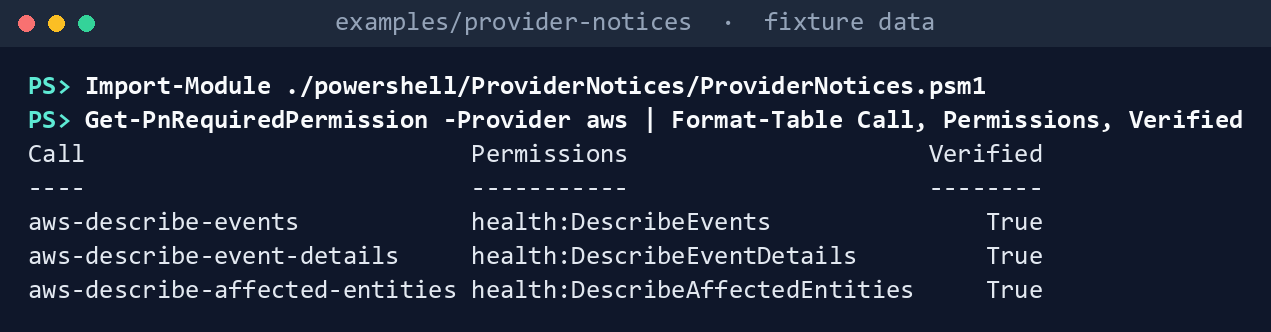
What the terminal shows, run on the kit’s fixtures (the same output as text) Three read actions, one per call: the whole policy.
See each partition’s Health endpoint region:
foreach ($p in 'aws', 'aws-us-gov') { $c = Get-PnCloud -Provider aws -Cloud $p; '{0,-11} {1,-14} {2}' -f $p, $c.Region, $c.ArnPrefix }aws us-east-1 arn:aws: aws-us-gov us-gov-west-1 arn:aws-us-gov:
What the terminal shows, run on the kit’s fixtures (the same output as text) Collect AWS from the day-one fixtures:
./Invoke-PnCollect.ps1 -SettingsPath tests/fixtures/settings.lab.json -FixturePath tests/fixtures/day1 -Provider aws -AsOf 2026-11-09T12:00:00Z -OutputPath out/aws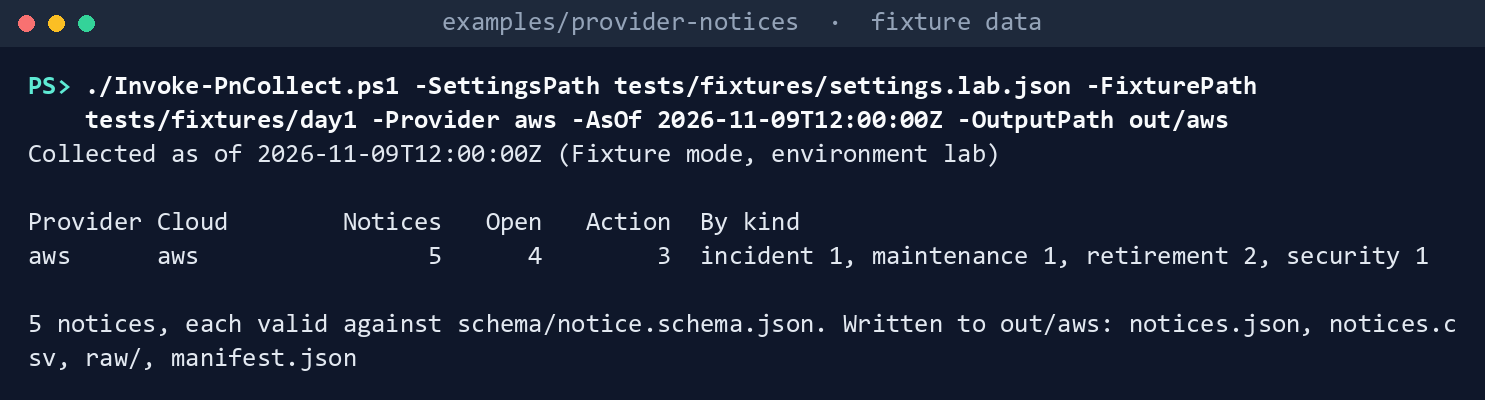
What the terminal shows, run on the kit’s fixtures (the same output as text) Read the records:
Import-Csv out/aws/notices.csv | Format-Table kind, status, actionRequired, actionRequiredBy, title, resources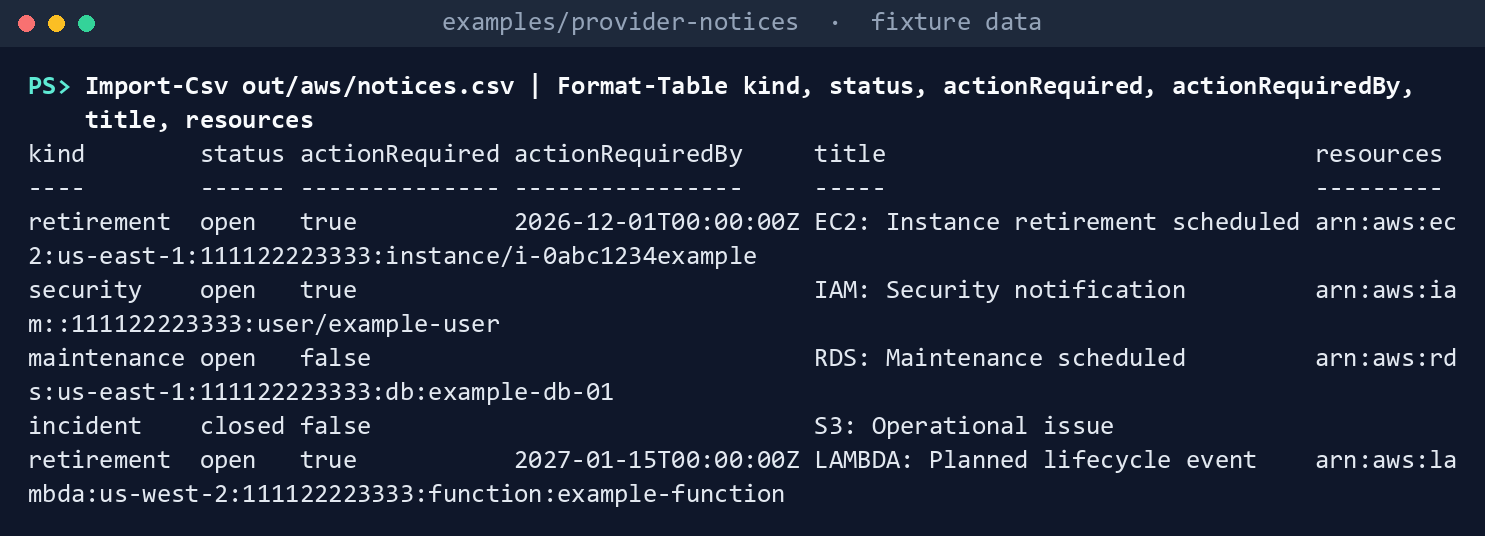
What the terminal shows, run on the kit’s fixtures (the same output as text) Two retirements, an instance and a Lambda lifecycle event, each with a due date and the affected resource; maintenance on a database; a security notification; a closed incident.
See who said each one needs action. The instance retirement is AWS’s
actionability; the Lambda lifecycle event is the kit’s rule:(Read-PnJson -Path out/aws/notices.json).notices | ForEach-Object { [pscustomobject]@{ title = $_.title; actionBasis = $_.actionBasis } } | Format-Table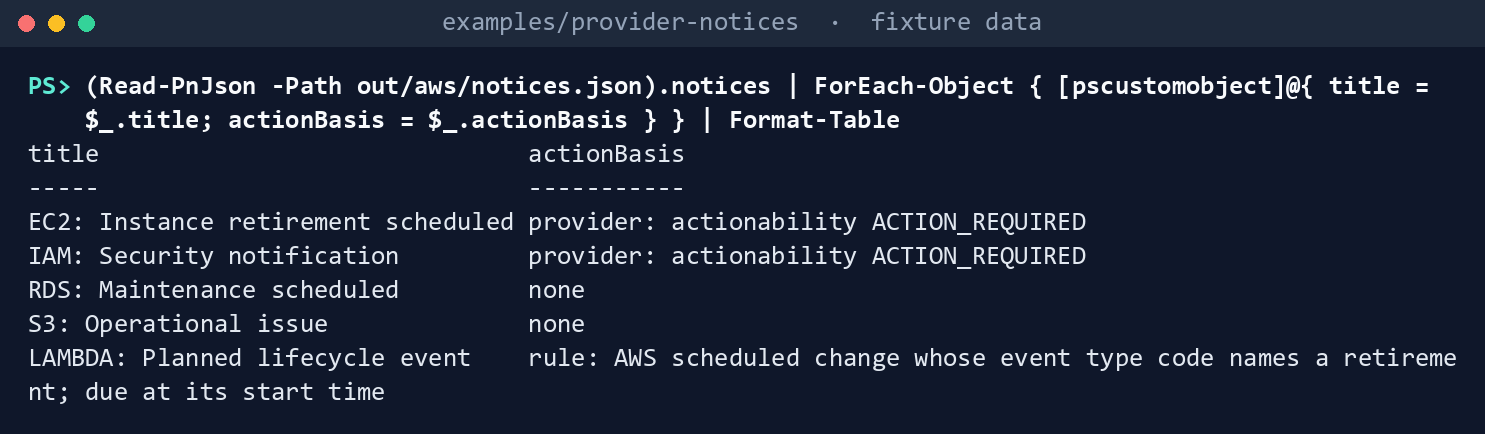
What the terminal shows, run on the kit’s fixtures (the same output as text) Build the GovCloud request without sending it. Change the partition in memory and read the command a live run would use:
$s = Read-PnSettings -Path tests/fixtures/settings.lab.json
$s.providers.aws.partition = 'aws-us-gov'
(Get-PnLiveCommand -CallId aws-describe-events -Settings $s).Arguments -join ' '
What the terminal shows, run on the kit’s fixtures (the same output as text) The region is
us-gov-west-1.Ask for details of eleven events in one call. The API takes one to ten, and the kit refuses before anything runs:
Get-PnLiveCommand -CallId aws-describe-event-details -Settings $s -Arguments @{ arns = @(1..11 | ForEach-Object { "arn:aws-us-gov:health:us-gov-west-1::event/EC2/EXAMPLE/$_" }) }
What the terminal shows, run on the kit’s fixtures (the same output as text) Run this chapter’s tests:
Invoke-Pester -Path tests/Collectors.Tests.ps1, tests/Live.Tests.ps1 -FullNameFilter 'AWS Health*', '*AWS*', '*10 ARNs*' -Output None -PassThru | Select-Object PassedCount, FailedCount
What the terminal shows, run on the kit’s fixtures (the same output as text)
Expected result: PassedCount 11 and FailedCount 0, and out/aws/manifest.json listing the three calls with their actions. Delete out when you’re done:
Remove-Item -Recurse -Force out
Lab 2: a test account
Use an AWS test account with a qualifying AWS Support plan (AWS’s pages name different plans; see Start with AWS’s documentation), never production; without the plan, step 3’s error is the expected result. Work in examples/provider-notices. You’ll replace: <account-id> (the test account), <reader-role> (the IAM role the reader assumes), <profile> (the AWS CLI profile that signs in as that role) and <settings-file> (your copy of deploy/settings.template.json with environment test, only aws enabled, partition aws, the account ID and the profile).
Every command in this lab, in order, from examples/provider-notices. Each step below says what it does and what to look for.
# Step 1: Write the read policy and create it
Set-Content -Path health-read.json -Value '{ "Version": "2012-10-17", "Statement": [ { "Effect": "Allow", "Action": ["health:DescribeEvents", "health:DescribeEventDetails", "health:DescribeAffectedEntities"], "Resource": "*" } ] }'
aws iam create-policy --policy-name ProviderNoticesHealthRead --policy-document file://health-read.json
aws iam attach-role-policy --role-name <reader-role> --policy-arn arn:aws:iam::<account-id>:policy/ProviderNoticesHealthRead

# Step 2: Check who you are signed in as
aws sts get-caller-identity --profile <profile> --query Arn --output text

# Step 3: Cross-check from the Health endpoint, then collect
aws health describe-events --region us-east-1 --filter '{"eventStatusCodes":["open","upcoming"]}' --profile <profile> --query "length(events)"
./Invoke-PnCollect.ps1 -SettingsPath <settings-file> -Provider aws -OutputPath out/aws-test
Import-Csv out/aws-test/notices.csv | Format-Table kind, status, actionRequiredBy, title, resources

# Step 4: Back it out
aws iam detach-role-policy --role-name <reader-role> --policy-arn arn:aws:iam::<account-id>:policy/ProviderNoticesHealthRead
aws iam delete-policy --policy-arn arn:aws:iam::<account-id>:policy/ProviderNoticesHealthRead
Remove-Item -Recurse -Force out/aws-test, health-read.json
Write the read policy and create it, as an IAM administrator. The policy holds exactly the three actions:
Set-Content -Path health-read.json -Value '{ "Version": "2012-10-17", "Statement": [ { "Effect": "Allow", "Action": ["health:DescribeEvents", "health:DescribeEventDetails", "health:DescribeAffectedEntities"], "Resource": "*" } ] }'
aws iam create-policy --policy-name ProviderNoticesHealthRead --policy-document file://health-read.json
aws iam attach-role-policy --role-name <reader-role> --policy-arn arn:aws:iam::<account-id>:policy/ProviderNoticesHealthRead
Check who you are signed in as. The ARN must start with
arn:aws:, the partition the settings name:aws sts get-caller-identity --profile <profile> --query Arn --output textCross-check from the Health endpoint, then collect. The counts should agree:
aws health describe-events --region us-east-1 --filter '{"eventStatusCodes":["open","upcoming"]}' --profile <profile> --query "length(events)"
./Invoke-PnCollect.ps1 -SettingsPath <settings-file> -Provider aws -OutputPath out/aws-test
Import-Csv out/aws-test/notices.csv | Format-Table kind, status, actionRequiredBy, title, resources
An error naming
SubscriptionRequiredExceptionmeans the account has no qualifying support plan.Back it out. Detach and delete the policy, and delete the run, which names the account’s resources:
aws iam detach-role-policy --role-name <reader-role> --policy-arn arn:aws:iam::<account-id>:policy/ProviderNoticesHealthRead
aws iam delete-policy --policy-arn arn:aws:iam::<account-id>:policy/ProviderNoticesHealthRead
Remove-Item -Recurse -Force out/aws-test, health-read.json
Verified facts
| Item | Value | US Government | Source |
|---|---|---|---|
| Events | describe-events; eventTypeCategory, statusCode, actionability, personas |
— | 9 |
| Details and entities | DescribeEventDetails takes 1 to 10 ARNs; latestDescription; AffectedEntity |
— | 10 |
| Support plan | A qualifying AWS Support plan; otherwise SubscriptionRequiredException. The concepts page names Business Support+, Enterprise Support or Unified Operations; the API reference and the GovCloud (US) page name Business and Enterprise plans |
GovCloud page: Business or Enterprise | 11 12 |
| Read policy | health:Describe* example; no read-only managed policy |
— | 13 |
| Commercial endpoint | Active endpoint in us-east-1 |
— | 14 |
| GovCloud (US) | One regional endpoint in us-gov-west-1; EventBridge doesn’t send public Service Health events |
Yes | 15 |
| Push alternative | EventBridge source aws.health, detail-type AWS Health Event (the kit doesn’t build it) |
Not for public events in GovCloud | 16 |
| CLI | aws iam create-policy, attach-role-policy, detach-role-policy, delete-policy; aws sts get-caller-identity |
— | 17 |
Federal requirements and evidence
The collection is what the guide’s G4 checks. The mappings are the kit’s config/requirements.json.18 19
| What the output proves | Requirement it supports | KSI it aligns to | Who keeps it |
|---|---|---|---|
| The reader’s policy allows three read actions and nothing else (Lab 1, step 1; Lab 2, step 1) | SA-9 c | KSI-SCR-MIT, KSI-SCR-MON | The AWS account owner; the ISSO keeps the policy document |
| The reads went to the partition’s own endpoint, as a caller in that partition (Lab 1, steps 2 and 6; Lab 2, step 2) | SA-9 c; SI-5 a | KSI-SCR-MIT, KSI-SCR-MON | The repository’s tests; the run’s manifest |
Every open and upcoming event was read with its description and resources (Lab 1, step 3; Lab 2, step 3: raw/aws.json, notices.json, manifest.json) |
SA-9 c; SI-5 a | KSI-SCR-MIT, KSI-SCR-MON | The ISSO, with the run folder |
Events AWS marks ACTION_REQUIRED carry AWS’s due date, and the kit’s rule is labeled as the kit’s (Lab 1, steps 4 and 5) |
SI-5 d (implement directives in the established time frames), through the task Chapter 06 routes | KSI-SCR-MON | The AWS account owner |
KSIs are FedRAMP 20x indicators for cloud service providers; the agency lines its evidence up with them and doesn’t report them (Book 00, Appendix B). The kit’s records support these controls; the agency’s assessor decides them. Which output supports which indicator is the program’s mapping (design guidance).
Dangers
| Danger | What happens | The guard |
|---|---|---|
| No support plan | SubscriptionRequiredException; nothing is read |
The error surfaces; the runbook’s pre-flight calls the API first (PF-04-aws); the AWS Health Dashboard is the interim path |
AWSHealthFullAccess attached for convenience |
The reader can write | A customer managed policy with three actions |
A GovCloud account read from us-east-1 |
The call fails or reads the wrong partition | The partition names the region; the caller’s ARN is checked |
| Eleven ARNs in one details call | The API refuses it mid-run | Batches of ten; the kit refuses more before calling |
| A retirement without AWS’s flag treated as optional | An instance stops on its retirement date | The kit’s rule makes it action required, labeled as the kit’s |
| EventBridge relied on in GovCloud | Public Service Health events don’t arrive there20 | The scheduled read through the API |
Checklist
Footnotes
AWS, AWS Health API Reference, “Event,” https://docs.aws.amazon.com/health/latest/APIReference/API_Event.html, and AWS CLI reference,
describe-events, https://docs.aws.amazon.com/cli/latest/reference/health/describe-events.html (read November 9, 2026; carried from the provider notices guide’s verification log).↩︎AWS, AWS Health API Reference, “DescribeEventDetails,” https://docs.aws.amazon.com/health/latest/APIReference/API_DescribeEventDetails.html, and “AffectedEntity,” https://docs.aws.amazon.com/health/latest/APIReference/API_AffectedEntity.html (read November 9, 2026).↩︎
AWS, AWS Health User Guide, “Concepts for AWS Health” (Business Support+, Enterprise Support or Unified Operations; otherwise
SubscriptionRequiredException), https://docs.aws.amazon.com/health/latest/ug/aws-health-concepts-and-terms.html, and AWS Health API Reference, “Welcome” (Business, Enterprise On-Ramp or Enterprise Support), https://docs.aws.amazon.com/health/latest/APIReference/Welcome.html (read November 9, 2026).↩︎AWS, AWS Health User Guide, “Concepts for AWS Health” (Business Support+, Enterprise Support or Unified Operations; otherwise
SubscriptionRequiredException), https://docs.aws.amazon.com/health/latest/ug/aws-health-concepts-and-terms.html, and AWS Health API Reference, “Welcome” (Business, Enterprise On-Ramp or Enterprise Support), https://docs.aws.amazon.com/health/latest/APIReference/Welcome.html (read November 9, 2026).↩︎AWS, AWS GovCloud (US) User Guide, “AWS Health,” https://docs.aws.amazon.com/govcloud-us/latest/UserGuide/govcloud-health.html (read November 9, 2026).↩︎
AWS, AWS Health User Guide, “Identity-based policy examples,” https://docs.aws.amazon.com/health/latest/ug/security_iam_id-based-policy-examples.html, and “AWS managed policies for AWS Health,” https://docs.aws.amazon.com/health/latest/ug/security-iam-awsmanpol.html (read November 9, 2026).↩︎
AWS, AWS Health User Guide, “Accessing the AWS Health API,” https://docs.aws.amazon.com/health/latest/ug/health-api.html (read November 9, 2026).↩︎
AWS, AWS GovCloud (US) User Guide, “AWS Health,” https://docs.aws.amazon.com/govcloud-us/latest/UserGuide/govcloud-health.html (read November 9, 2026).↩︎
AWS, AWS Health API Reference, “Event,” https://docs.aws.amazon.com/health/latest/APIReference/API_Event.html, and AWS CLI reference,
describe-events, https://docs.aws.amazon.com/cli/latest/reference/health/describe-events.html (read November 9, 2026; carried from the provider notices guide’s verification log).↩︎AWS, AWS Health API Reference, “DescribeEventDetails,” https://docs.aws.amazon.com/health/latest/APIReference/API_DescribeEventDetails.html, and “AffectedEntity,” https://docs.aws.amazon.com/health/latest/APIReference/API_AffectedEntity.html (read November 9, 2026).↩︎
AWS, AWS Health User Guide, “Concepts for AWS Health” (Business Support+, Enterprise Support or Unified Operations; otherwise
SubscriptionRequiredException), https://docs.aws.amazon.com/health/latest/ug/aws-health-concepts-and-terms.html, and AWS Health API Reference, “Welcome” (Business, Enterprise On-Ramp or Enterprise Support), https://docs.aws.amazon.com/health/latest/APIReference/Welcome.html (read November 9, 2026).↩︎AWS, AWS GovCloud (US) User Guide, “AWS Health,” https://docs.aws.amazon.com/govcloud-us/latest/UserGuide/govcloud-health.html (read November 9, 2026).↩︎
AWS, AWS Health User Guide, “Identity-based policy examples,” https://docs.aws.amazon.com/health/latest/ug/security_iam_id-based-policy-examples.html, and “AWS managed policies for AWS Health,” https://docs.aws.amazon.com/health/latest/ug/security-iam-awsmanpol.html (read November 9, 2026).↩︎
AWS, AWS Health User Guide, “Accessing the AWS Health API,” https://docs.aws.amazon.com/health/latest/ug/health-api.html (read November 9, 2026).↩︎
AWS, AWS GovCloud (US) User Guide, “AWS Health,” https://docs.aws.amazon.com/govcloud-us/latest/UserGuide/govcloud-health.html (read November 9, 2026).↩︎
AWS, Amazon EventBridge events reference, AWS Health, https://docs.aws.amazon.com/eventbridge/latest/ref/events-ref-health.html (read November 9, 2026).↩︎
AWS, AWS CLI User Guide, “IAM examples using AWS CLI,” https://docs.aws.amazon.com/cli/latest/userguide/cli_iam_code_examples.html, and AWS CLI reference,
sts get-caller-identity, https://docs.aws.amazon.com/cli/latest/reference/sts/get-caller-identity.html (read November 9, 2026).↩︎National Institute of Standards and Technology, SP 800-53 Rev. 5 OSCAL catalog, release 5.2.0, https://github.com/usnistgov/oscal-content/blob/main/nist.gov/SP800-53/rev5/json/NIST_SP-800-53_rev5_catalog.json (read November 9, 2026).↩︎
FedRAMP, “Key Security Indicators,” FedRAMP Consolidated Rules for 2026, https://www.fedramp.gov/2026/providers/20x/key-security-indicators/ (read November 9, 2026).↩︎
AWS, AWS GovCloud (US) User Guide, “AWS Health,” https://docs.aws.amazon.com/govcloud-us/latest/UserGuide/govcloud-health.html (read November 9, 2026).↩︎