Federal Modernization Workbook
Chapter 03 — Oracle Cloud Infrastructure Announcements
When a platform the agency doesn’t run is patched on a Saturday night, the people who own what runs on it should hear from the provider’s own record, not from the help desk on Monday.
The OCI collector behind the guide’s G3 Oracle Cloud Infrastructure. You start with what Oracle documents: the Announcements service, its list and get CLI commands, the read announcements policy, and the US Government Cloud endpoints. Then you read how the kit keeps the latest announcement in each chain, reads each one’s affected resources, maps announcement types to kinds, and keeps Oracle’s own action flag. Lab 1 collects both fixture weeks, so you see a rescheduled maintenance window replace the original; Lab 2 reads a test tenancy and removes the policy statement afterwards.
Goal and audience
Goal. By the end of this chapter you can read every announcement for a tenancy, the latest in each chain, with the affected resources, into records that carry Oracle’s own action-required date. An agency whose HR platform runs on OCI can hand that platform’s maintenance to the HR system’s owners before it lands.
Audience. Developers who maintain the kit, the OCI platform lead who owns G3, and the owners of systems that run on OCI. You should know Chapter 01’s record.
Start with Oracle’s documentation
What Oracle gives you
Oracle’s CLI reference documents oci announce announcements list, with --compartment-id (required), --all and --should-show-only-latest-in-chain, and the Announcement model’s fields: announcementType, timeOneType/timeOneValue, timeTwoType/timeTwoValue, lifecycleState, chainId and the rest.1 oci announce announcements get --announcement-id returns one announcement’s details, including its affected resources.2 The policy reference makes announcements a resource type: inspect lists summaries, read adds the details, and Oracle’s common policy is Allow group AnnouncementReaders to read announcements in tenancy.3 Oracle’s US Government Cloud page lists the Announcements API at announcements.us-langley-1.oraclegovcloud.com and announcements.us-luke-1.oraclegovcloud.com, in realm OC2.4 The CLI is configured with oci setup config, which creates the configuration file and an API key pair.5
What it leaves to you
Each row is pinned by a test in the Oracle Cloud Infrastructure announcements block of tests/Collectors.Tests.ps1, or in tests/Live.Tests.ps1.
| Oracle’s material, as published | Why it matters | What the kit adds |
|---|---|---|
| A chain of updates to one announcement | A rescheduled window arrives as a new announcement; reading every one doubles the work and keeps the old date | --should-show-only-latest-in-chain, and the kit keeps only the latest by timeUpdated in each chainId as well; the record’s ID is the chain’s |
Announcement types (*_MAINTENANCE*, *_CHANGE*, ACTION_REQUIRED, ACTION_RECOMMENDED, INFORMATION, PRODUCTION_EVENT_NOTIFICATION) |
Several types mean the same kind of news | Mapped to maintenance, change, advisory and incident |
| Two generic time fields with a type each | The window and the deadline are in fields whose meaning is in another field | START_TIME and NEW_START_TIME start the window; the end-time types end it; ACTION_REQUIRED_BY is the provider’s action date |
ACTION_REQUIRED as a type |
The provider’s own flag | Action required, with actionBasis: provider: ...; no kit rule needed for OCI |
| Affected resources on the details call only | The list alone doesn’t name the agency’s resources | A get per announcement; inspect alone would give summaries without them |
| CLI output keys not shown (camelCase or kebab-case) | A parser keyed to one casing reads nothing from the other | Both accepted (not yet specified which the CLI prints) |
| OC2 endpoints; OC3 not readable | A reader pointed at the wrong realm | oc1 and oc2 known; a region outside the realm refused; oc3 refused with the reason |
The verdict. Use Oracle’s list and get and its one policy statement as published. Build the chain handling, the time-field mapping and the realm guard.
The code
Get-PnProviderNotice -Provider oci makes oci-announcements-list, then oci-announcement-get for each announcement. ConvertTo-PnOciNotice keeps the latest in each chain and maps it:
announcementType |
Kind | Action required |
|---|---|---|
Contains MAINTENANCE |
maintenance | If a time is ACTION_REQUIRED_BY (provider) |
Contains CHANGE, or ACTION_REQUIRED |
change | ACTION_REQUIRED always (provider) |
PRODUCTION_EVENT_NOTIFICATION |
incident | No |
ACTION_RECOMMENDED, INFORMATION |
advisory | If a time is ACTION_REQUIRED_BY (provider) |
lifecycleState INACTIVE closes a notice. The summary is the details call’s description where there is one. The source link is the announcement on announcements.<region>.<realm domain>. The live invoker runs oci with the tenancy and region from the settings, and refuses a region outside the realm: us-langley-1 and us-luke-1 are OC2, and naming them under oc1 throws.
The tests
The Oracle Cloud Infrastructure announcements block of tests/Collectors.Tests.ps1 (7 tests), and the OCI rows of tests/Live.Tests.ps1 (the list command and the realm guard).
Lab 1 reads fictional announcements for a fictional tenancy; nothing signs in. The live reader has been tested against stand-in CLI output, not a live tenancy. Review it, and run Lab 2 in a test tenancy, before it reads a real one.
Lab 1: fixtures, no tenant
You need PowerShell 7.1 or later with Pester 5. Work in examples/provider-notices. The lab settings name a fictional tenancy in realm oc1, region us-ashburn-1.
Every command in this lab, in order, from examples/provider-notices. Each step below says what it does and what to look for.
# Step 1: List what OCI needs
Import-Module ./powershell/ProviderNotices/ProviderNotices.psm1
Get-PnRequiredPermission -Provider oci | Format-Table Call, Permissions, Verified

# Step 2: See the realms the kit knows
foreach ($r in 'oc1', 'oc2', 'oc3') { try { $c = Get-PnCloud -Provider oci -Cloud $r; "$r : $($c.Domain) $($c.Regions -join ', ')" } catch { "$r : $($_.Exception.Message)" } }

# Step 3: Collect OCI from the day-one fixtures
./Invoke-PnCollect.ps1 -SettingsPath tests/fixtures/settings.lab.json -FixturePath tests/fixtures/day1 -Provider oci -AsOf 2026-11-09T12:00:00Z -OutputPath out/oci-day1

# Step 4: Read the records
Import-Csv out/oci-day1/notices.csv | Format-Table noticeId, kind, status, actionRequired, actionRequiredBy, windowStart, resources

# Step 5: Collect the second week
./Invoke-PnCollect.ps1 -SettingsPath tests/fixtures/settings.lab.json -FixturePath tests/fixtures/day2 -Provider oci -AsOf 2026-11-16T12:00:00Z -OutputPath out/oci-day2
Import-Csv out/oci-day2/notices.csv | Format-Table noticeId, kind, status, windowStart, windowEnd

# Step 6: Build the live list command without running it
$s = Read-PnSettings -Path tests/fixtures/settings.lab.json
(Get-PnLiveCommand -CallId oci-announcements-list -Settings $s).Arguments -join ' '

# Step 7: Run this chapter's tests
Invoke-Pester -Path tests/Collectors.Tests.ps1, tests/Live.Tests.ps1 -FullNameFilter 'Oracle Cloud Infrastructure announcements*', '*OCI*' -Output None -PassThru | Select-Object PassedCount, FailedCount

# After the steps
Remove-Item -Recurse -Force out
List what OCI needs:
Import-Module ./powershell/ProviderNotices/ProviderNotices.psm1
Get-PnRequiredPermission -Provider oci | Format-Table Call, Permissions, Verified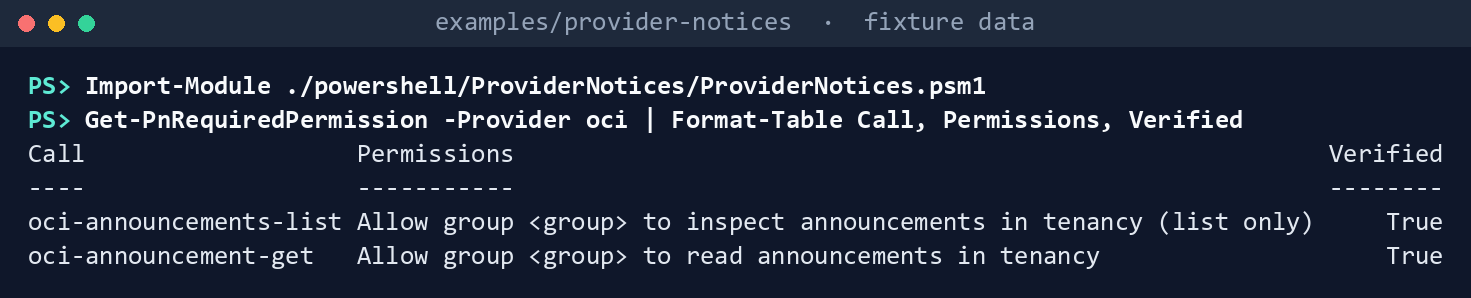
What the terminal shows, run on the kit’s fixtures (the same output as text) inspectis enough to list;readis what the details call needs.See the realms the kit knows. OC3 is refused with its reason:
foreach ($r in 'oc1', 'oc2', 'oc3') { try { $c = Get-PnCloud -Provider oci -Cloud $r; "$r : $($c.Domain) $($c.Regions -join ', ')" } catch { "$r : $($_.Exception.Message)" } }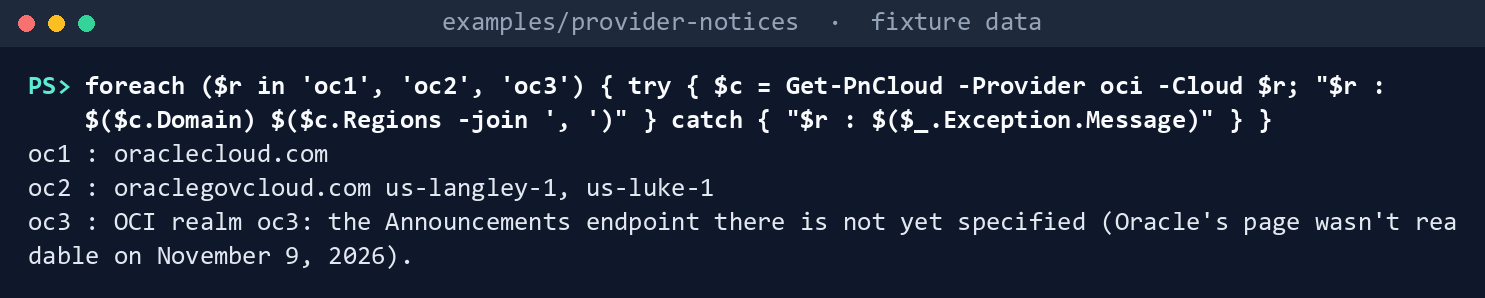
What the terminal shows, run on the kit’s fixtures (the same output as text) Collect OCI from the day-one fixtures:
./Invoke-PnCollect.ps1 -SettingsPath tests/fixtures/settings.lab.json -FixturePath tests/fixtures/day1 -Provider oci -AsOf 2026-11-09T12:00:00Z -OutputPath out/oci-day1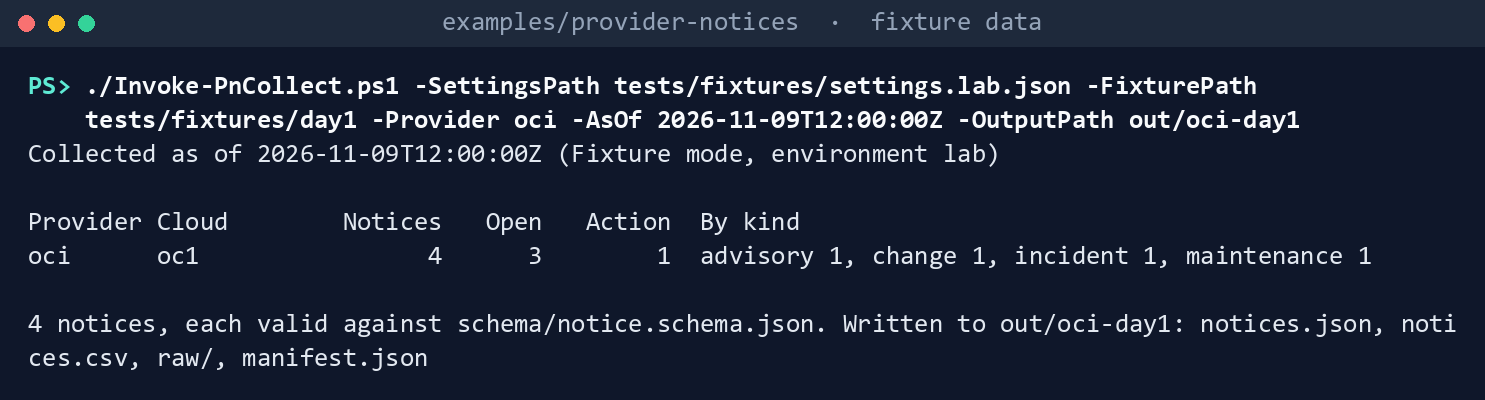
What the terminal shows, run on the kit’s fixtures (the same output as text) Read the records. The maintenance names a database system; the change is action required by December 15, by Oracle’s own type:
Import-Csv out/oci-day1/notices.csv | Format-Table noticeId, kind, status, actionRequired, actionRequiredBy, windowStart, resources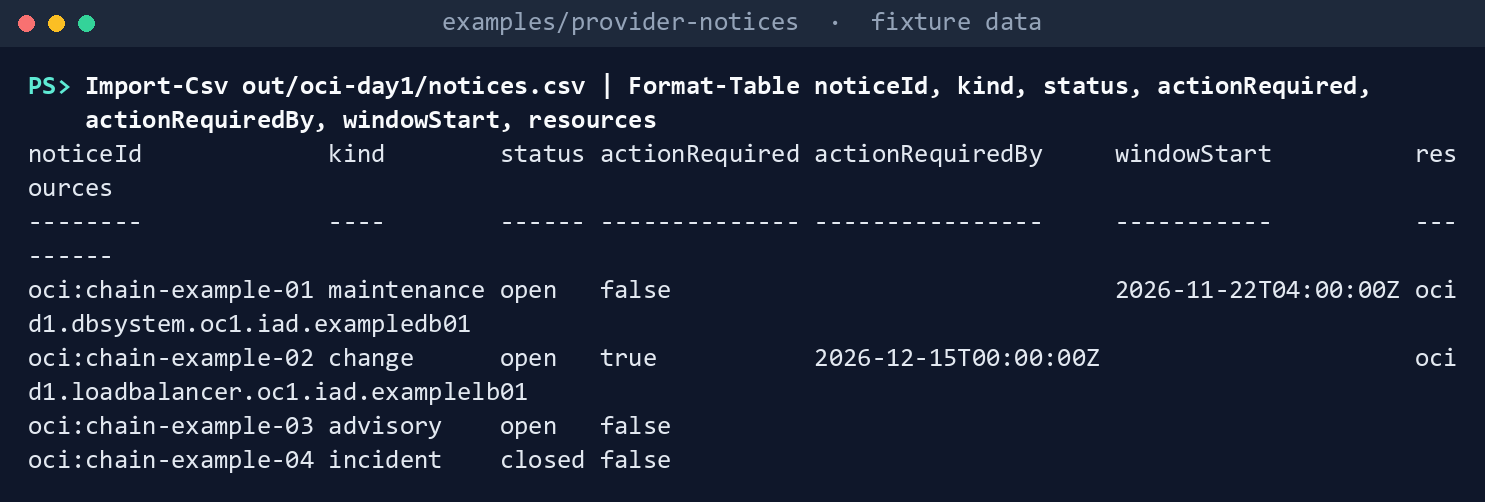
What the terminal shows, run on the kit’s fixtures (the same output as text) Collect the second week. Oracle rescheduled the maintenance: the chain’s latest announcement replaces the first, with the new window:
./Invoke-PnCollect.ps1 -SettingsPath tests/fixtures/settings.lab.json -FixturePath tests/fixtures/day2 -Provider oci -AsOf 2026-11-16T12:00:00Z -OutputPath out/oci-day2
Import-Csv out/oci-day2/notices.csv | Format-Table noticeId, kind, status, windowStart, windowEnd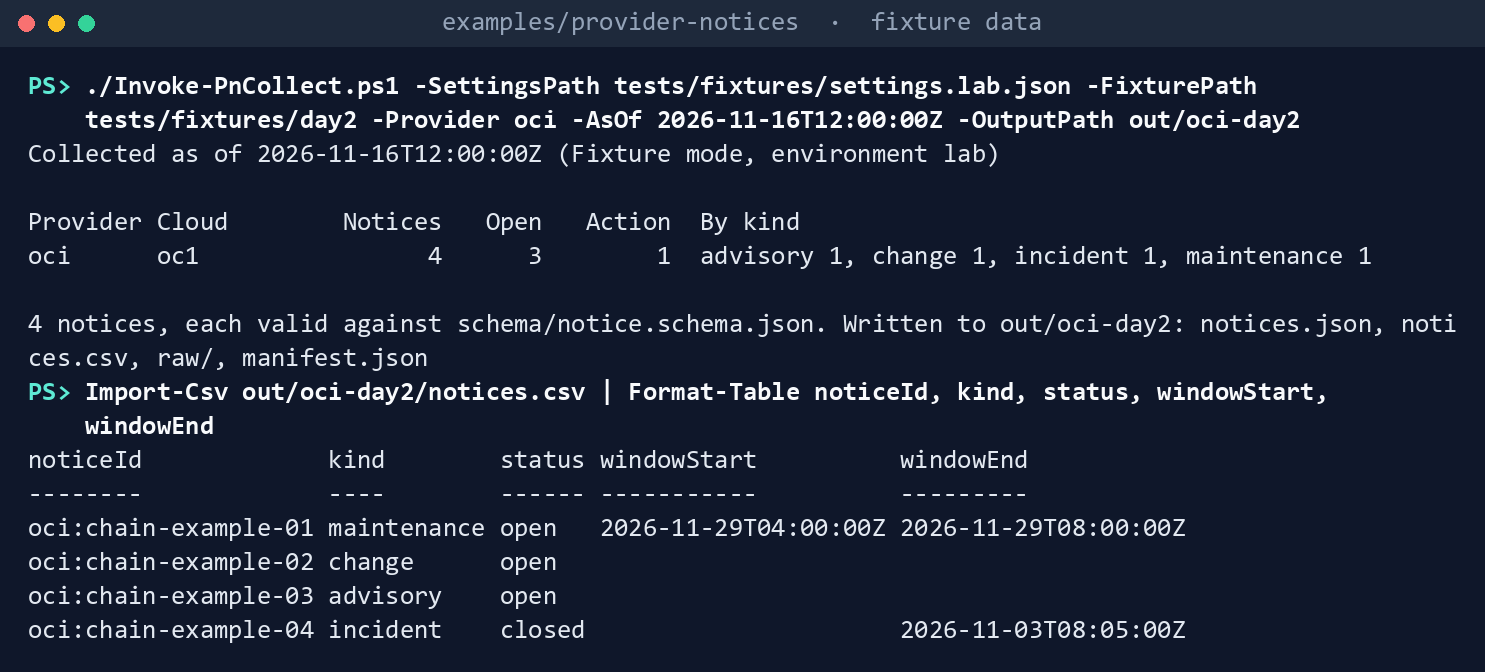
What the terminal shows, run on the kit’s fixtures (the same output as text) oci:chain-example-01now starts November 29 instead of November 22. It is still one notice, so Chapter 06 updates its task instead of opening a second.Build the live list command without running it:
$s = Read-PnSettings -Path tests/fixtures/settings.lab.json
(Get-PnLiveCommand -CallId oci-announcements-list -Settings $s).Arguments -join ' '
What the terminal shows, run on the kit’s fixtures (the same output as text) Run this chapter’s tests:
Invoke-Pester -Path tests/Collectors.Tests.ps1, tests/Live.Tests.ps1 -FullNameFilter 'Oracle Cloud Infrastructure announcements*', '*OCI*' -Output None -PassThru | Select-Object PassedCount, FailedCount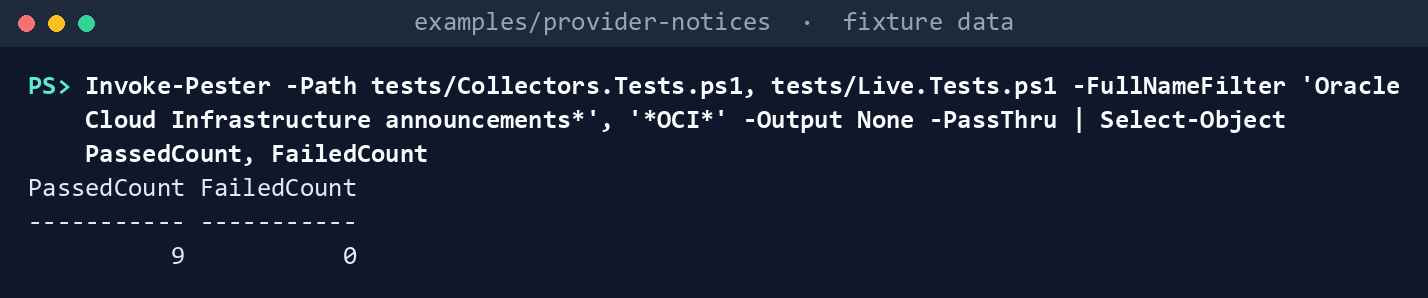
What the terminal shows, run on the kit’s fixtures (the same output as text)
Expected result: PassedCount 9 and FailedCount 0, and out/oci-day1/raw/oci.json holding the list and each announcement’s details. Delete out when you’re done:
Remove-Item -Recurse -Force out
Lab 2: a test tenancy
Use an OCI test tenancy, never production. Work in examples/provider-notices. You’ll replace: <group> (a test IAM group for the reader), <tenancy-ocid> (the test tenancy’s OCID), <home-region> (its home region, such as us-ashburn-1) and <settings-file> (your copy of deploy/settings.template.json with environment test, only oci enabled, realm oc1, the region and the tenancy).
Every command in this lab, in order, from examples/provider-notices. Each step below says what it does and what to look for.
# Step 1: Add the policy statement
Set-Content -Path statements.json -Value '["Allow group <group> to read announcements in tenancy"]'
$policy = oci iam policy create --compartment-id <tenancy-ocid> --name ProviderNoticesRead --description "Provider notices kit: read announcements" --statements file://statements.json | ConvertFrom-Json
$policy.data.id

# Step 2: Configure the CLI as the reader
oci setup config
oci --version

# Step 3: Cross-check the list with Oracle's command, then collect
oci announce announcements list --compartment-id <tenancy-ocid> --all --should-show-only-latest-in-chain true --region <home-region> --query "length(data.items)"
./Invoke-PnCollect.ps1 -SettingsPath <settings-file> -Provider oci -OutputPath out/oci-test
Import-Csv out/oci-test/notices.csv | Format-Table noticeId, kind, status, actionRequiredBy, resources

# Step 4: Back it out
oci iam policy delete --policy-id $policy.data.id --force
Remove-Item -Recurse -Force out/oci-test, statements.json
Add the policy statement, as an IAM administrator, in a policy in the tenancy (root compartment), for the reader’s group.6 The statement goes in a file, so the shell doesn’t touch its quotes; the policy’s ID is kept for the back-out:7
Set-Content -Path statements.json -Value '["Allow group <group> to read announcements in tenancy"]'
$policy = oci iam policy create --compartment-id <tenancy-ocid> --name ProviderNoticesRead --description "Provider notices kit: read announcements" --statements file://statements.json | ConvertFrom-Json
$policy.data.id
Configure the CLI as the reader and check it.
oci setup configprompts for the user, tenancy and region and creates the key pair; upload the public key in the Console as Oracle’s page says:8oci setup config oci --versionCross-check the list with Oracle’s command, then collect. The counts should agree:
oci announce announcements list --compartment-id <tenancy-ocid> --all --should-show-only-latest-in-chain true --region <home-region> --query "length(data.items)"
./Invoke-PnCollect.ps1 -SettingsPath <settings-file> -Provider oci -OutputPath out/oci-test
Import-Csv out/oci-test/notices.csv | Format-Table noticeId, kind, status, actionRequiredBy, resources
Look in
out/oci-test/raw/oci.jsonat the key casing the CLI printed, and record it: Oracle’s reference doesn’t show it.Back it out. Delete the policy, as the IAM administrator, and the run, which names the tenancy’s resources:
oci iam policy delete --policy-id $policy.data.id --force
Remove-Item -Recurse -Force out/oci-test, statements.json
Verified facts
| Item | Value | US Government | Source |
|---|---|---|---|
| List | oci announce announcements list --compartment-id ... --all --should-show-only-latest-in-chain true |
— | 9 |
| Details | oci announce announcements get --announcement-id ...; affected resources |
— | 10 |
| Fields | announcementType, timeOneType, timeTwoType, lifecycleState, chainId; details affectedResources |
— | 11 |
| Policy | Allow group <group> to read announcements in tenancy; inspect lists only |
— | 12 |
| OC2 endpoints | announcements.us-langley-1.oraclegovcloud.com, announcements.us-luke-1.oraclegovcloud.com |
US Government Cloud | 13 |
| CLI setup | oci setup config; oci --version |
— | 14 |
| Policy from the CLI | oci iam policy create --compartment-id --name --description --statements (a JSON array); oci iam policy delete --policy-id --force |
— | 15 |
Not yet specified: the CLI’s output key casing (the kit accepts camelCase and kebab-case), and the Announcements endpoint in realm OC3 (Oracle’s page wasn’t readable; the kit refuses oc3).
Federal requirements and evidence
The collection is what the guide’s G3 checks. The mappings are the kit’s config/requirements.json.16 17
| What the output proves | Requirement it supports | KSI it aligns to | Who keeps it |
|---|---|---|---|
| The reader’s group can read announcements and nothing else from this kit (Lab 1, step 1; Lab 2, step 1) | SA-9 c | KSI-SCR-MIT, KSI-SCR-MON | The OCI platform lead; the ISSO keeps the policy |
Every chain’s latest announcement was read, with its details, in the tenancy’s realm (Lab 1, steps 3 and 5; Lab 2, step 3: raw/oci.json, notices.json, manifest.json) |
SA-9 c; SI-5 a | KSI-SCR-MIT, KSI-SCR-MON | The ISSO, with the run folder |
| Maintenance that names the agency’s resources is marked, so Chapter 06 asks for a contingency plan review (Lab 1, step 4) | CP-2 e | KSI-RPL-ARP | The owner of each system on OCI |
| A rescheduled window replaces the original and stays one notice (Lab 1, step 5) | SI-5; CA-7 | KSI-SCR-MON, KSI-MLA-EVC | The repository’s tests |
KSIs are FedRAMP 20x indicators for cloud service providers; the agency lines its evidence up with them and doesn’t report them (Book 00, Appendix B). The kit’s records support these controls; the agency’s assessor decides them. Which output supports which indicator is the program’s mapping (design guidance).
Dangers
| Danger | What happens | The guard |
|---|---|---|
inspect granted instead of read |
Summaries without affected resources; nothing routes as “names our resources” | read announcements in config/calls.json; an empty resources on every maintenance notice is the sign |
| Every announcement in a chain read as its own notice | The old window lingers next to the new one | Latest in each chain, keyed by chainId |
| A government tenancy read in the commercial realm | Nothing comes back | The settings name the realm; a region outside it is refused; OC3 is refused until its endpoint is known |
| HR platform maintenance seen only by the help desk | The HR system’s owners learn of it after it lands | Route OCI maintenance that names the HR system’s resources to its owners (Chapter 06) (design guidance) |
| The announcement email treated as the record | It can be spoofed and isn’t in the evidence | The task links the announcement the kit read; the email is the interim path only |
Checklist
Footnotes
Oracle, OCI CLI command reference,
oci announce announcements list, https://docs.oracle.com/en-us/iaas/tools/oci-cli/latest/oci_cli_docs/cmdref/announce/announcements/list.html, and the Python SDK’s Announcement model, https://docs.oracle.com/en-us/iaas/tools/python/latest/api/announcements_service/models/oci.announcements_service.models.Announcement.html (read November 9, 2026; carried from the provider notices guide’s verification log).↩︎Oracle, OCI CLI command reference,
oci announce announcements get, https://docs.oracle.com/en-us/iaas/tools/oci-cli/latest/oci_cli_docs/cmdref/announce/announcements/get.html (read November 9, 2026).↩︎Oracle, “Details for Announcements,” https://docs.oracle.com/en-us/iaas/Content/Identity/Reference/announcementspolicyreference.htm, and “Common Policies,” https://docs.oracle.com/iaas/Content/Identity/Concepts/commonpolicies.htm (read November 9, 2026).↩︎
Oracle, “Oracle US Government Cloud,” https://docs.oracle.com/en-us/iaas/Content/General/Concepts/govfedramp.htm (read November 9, 2026).↩︎
Oracle, “Installing the CLI” (
oci setup config; verifying withoci --version), https://docs.oracle.com/en-us/iaas/Content/API/SDKDocs/cliinstall.htm (read November 9, 2026).↩︎Oracle, “Details for Announcements,” https://docs.oracle.com/en-us/iaas/Content/Identity/Reference/announcementspolicyreference.htm, and “Common Policies,” https://docs.oracle.com/iaas/Content/Identity/Concepts/commonpolicies.htm (read November 9, 2026).↩︎
Oracle, OCI CLI command reference,
oci iam policy create, https://docs.oracle.com/en-us/iaas/tools/oci-cli/latest/oci_cli_docs/cmdref/iam/policy/create.html, andoci iam policy delete, https://docs.oracle.com/en-us/iaas/tools/oci-cli/latest/oci_cli_docs/cmdref/iam/policy/delete.html (read November 9, 2026).↩︎Oracle, “Installing the CLI” (
oci setup config; verifying withoci --version), https://docs.oracle.com/en-us/iaas/Content/API/SDKDocs/cliinstall.htm (read November 9, 2026).↩︎Oracle, OCI CLI command reference,
oci announce announcements list, https://docs.oracle.com/en-us/iaas/tools/oci-cli/latest/oci_cli_docs/cmdref/announce/announcements/list.html, and the Python SDK’s Announcement model, https://docs.oracle.com/en-us/iaas/tools/python/latest/api/announcements_service/models/oci.announcements_service.models.Announcement.html (read November 9, 2026; carried from the provider notices guide’s verification log).↩︎Oracle, OCI CLI command reference,
oci announce announcements get, https://docs.oracle.com/en-us/iaas/tools/oci-cli/latest/oci_cli_docs/cmdref/announce/announcements/get.html (read November 9, 2026).↩︎Oracle, OCI CLI command reference,
oci announce announcements list, https://docs.oracle.com/en-us/iaas/tools/oci-cli/latest/oci_cli_docs/cmdref/announce/announcements/list.html, and the Python SDK’s Announcement model, https://docs.oracle.com/en-us/iaas/tools/python/latest/api/announcements_service/models/oci.announcements_service.models.Announcement.html (read November 9, 2026; carried from the provider notices guide’s verification log).↩︎Oracle, “Details for Announcements,” https://docs.oracle.com/en-us/iaas/Content/Identity/Reference/announcementspolicyreference.htm, and “Common Policies,” https://docs.oracle.com/iaas/Content/Identity/Concepts/commonpolicies.htm (read November 9, 2026).↩︎
Oracle, “Oracle US Government Cloud,” https://docs.oracle.com/en-us/iaas/Content/General/Concepts/govfedramp.htm (read November 9, 2026).↩︎
Oracle, “Installing the CLI” (
oci setup config; verifying withoci --version), https://docs.oracle.com/en-us/iaas/Content/API/SDKDocs/cliinstall.htm (read November 9, 2026).↩︎Oracle, OCI CLI command reference,
oci iam policy create, https://docs.oracle.com/en-us/iaas/tools/oci-cli/latest/oci_cli_docs/cmdref/iam/policy/create.html, andoci iam policy delete, https://docs.oracle.com/en-us/iaas/tools/oci-cli/latest/oci_cli_docs/cmdref/iam/policy/delete.html (read November 9, 2026).↩︎National Institute of Standards and Technology, SP 800-53 Rev. 5 OSCAL catalog, release 5.2.0, https://github.com/usnistgov/oscal-content/blob/main/nist.gov/SP800-53/rev5/json/NIST_SP-800-53_rev5_catalog.json (read November 9, 2026).↩︎
FedRAMP, “Key Security Indicators,” FedRAMP Consolidated Rules for 2026, https://www.fedramp.gov/2026/providers/20x/key-security-indicators/ (read November 9, 2026).↩︎