Federal Modernization Workbook
Chapter 06 — gMSAs, dMSAs and the Kerberos Island
A gMSA is a good credential with a known expiry date: the day the last domain controller is demoted. The code’s job is to make sure every one of them is gone, or on a dated list, before that day.
The Kerberos-only part of credential modernization (the project plan’s NP3.5 and NP3.6) and the reconciliation before AD is retired (NP7.3). You start with Learn’s own procedures for group managed service accounts (gMSAs), delegated managed service accounts (dMSAs, Windows Server 2025) and the KDS root key, which the repository keeps as a pinned copy, and you run them against stand-ins to see what they do and what they leave to you. Then you use examples/non-person-identity for the rest: a plan per Kerberos account from reviewed data, the KDS root key checked without reading the key, the password retrievers held as reviewed data, a separate write path that creates, migrates and disables but never deletes, the island list for the program’s SPN retirement, and the reconciliation with the program’s end state. Lab 1 runs on a laptop with no domain; Lab 2 uses a test domain.
Jump to a slide (18)
Deck · Narrated deck (about 11 minutes, captions) · Script · Captions. Recorded on November 2, 2026 from the approved chapter.
Goal and audience
Goal. By the end of this chapter you can produce, from code and reviewed data, the three things the plan asks for here: NP3.5, “MSAs upgraded to gMSAs; traditional accounts, IIS application pools and scheduled tasks moved to a gMSA or a dMSA”; NP3.6, the Kerberos accounts that stay, each with “SPN owner and an end date within D08 recorded”, and “the islanded list handed to the program’s SPN retirement” (P4.6); and NP7.3, “gMSAs and dMSAs reconciled with the provisional end state: moved to a workload identity, or listed for the Kerberos island with an end-of-life date”. Every change to the domain is a plan file a reviewer approves by its SHA-256 before anything runs. You can say, for each rule, whether it is Learn’s, Learn’s procedure, or the program’s design.
Audience. Developers who build the project’s Active Directory code, the server and Active Directory engineers who run the write path and change the hosts, the application owners who name an SPN owner and an end date, and the ISSO who reviews the island list. You should read PowerShell 7 and know Chapter 01’s register. You don’t need a domain until Lab 2.
The context the code depends on
What a gMSA and a dMSA are. A gMSA is a domain account whose password the domain controllers manage and which several servers can retrieve; services that use the Service Control Manager, IIS application pools and Task Scheduler tasks can run as one.1 Learn’s Entra guidance says to use gMSAs for on-premises services unless a service, such as failover clustering, doesn’t support them, and that Windows changes the password every 30 days.2 A dMSA, new in Windows Server 2025, supersedes a traditional service account: once the migration completes, the old account’s password can no longer be used, authentication is tied to the machines mapped to the dMSA, and the original account is disabled.3 Learn’s gMSA page adds four rules the plan has to respect: a gMSA’s name must be unique in the forest, not just the domain; its password interval (30 days by default) can be set only when it’s created; a gMSA can be created for outbound authentication only (-RestrictToOutboundAuthenticationOnly); and each host tests that it can retrieve the password with Test-ADServiceAccount after Install-ADServiceAccount.4 Learn’s containers page adds that a forest should have only one KDS root key, because more than one makes gMSAs fail after a password rotation.5 The same moves done by hand, step by step with Learn’s commands, and the Entra targets compared side by side, are in the guide Service Accounts: From User Accounts to gMSAs to Microsoft Entra Workload Identities. Book 02’s matrix gives the targets: a traditional account that serves Kerberos on-premises goes to a gMSA, or a dMSA on a Windows Server 2025 domain; an MSA is upgraded to a gMSA first; IIS application pools and scheduled tasks go to a gMSA now and to a managed identity once they move to Azure.
Why this chapter has an end date built in. A gMSA works only while AD is authoritative (companion guide). The program decides at G0 whether its end state is AD retired or a dated Kerberos island (D11, provisional), sets end dates for legacy authentication and NTLM at D08, and retires AD at program G5. The project plan’s risk register is blunt: a workload still running under a gMSA loses its credential when the last domain controller is demoted. So the code doesn’t stop at “converted”: every gMSA and dMSA ends this chapter either moving to a workload identity (Chapter 05), retiring, or on the island list with an end date, and the island list is what the program’s SPN retirement (P4.6) works from. Book 02, Chapter 10’s What still needs AD after Phase 10 lists Kerberos applications as one of the dependencies AD retirement has to clear.
The program’s rules for this chapter (Design guidance):
- Every Kerberos account has a reviewed disposition, and it is Chapter 03’s: the application owner’s D-NP3 decision,
Retire,Replatform,KeeporKeepKerberos, which this chapter reads from Chapter 03’s run, never from a second list.Replatformto a gMSA or a dMSA is converted here;Replatformto a managed identity or an app registration moves in Chapter 05;KeepandKeepKerberosstay, with an end date and, where Chapter 03 asks for one, an SPN owner, andKeepKerberoscarries the authorizing official’s acceptance onto the island list;Retiregoes through the decommission process. For each account it re-platforms,kerberos-replatform.csv, kept with the application records, names the new account, its workload and its hosts. A Kerberos account here is an enabled traditional account with an SPN, an MSA, a gMSA or a dMSA from Chapter 01’s register. SQL Server’s go to the Data Platform plan. - Who may retrieve a managed password is reviewed data, in
password-retrievers.json, not whatever AD holds today. - A dMSA migration runs for 30 days before it completes. That is the program’s parallel run for every conversion, and it covers four 7-day ticket lifetimes, the wait Learn recommends before completing (at least two).6
- Every account that stays on Kerberos has an end date, bounded as in Chapter 03: no later than D08’s for an account kept on Kerberos with the authorizing official’s acceptance (
KeepKerberos), and no later than program G5 for every other one, a kept or planned gMSA or dMSA. It has an SPN owner where Chapter 03 asks for one: aKeepKerberosaccount, or any account with SPNs; a kept account with no SPNs needs none. Every gMSA and dMSA also ends no later than program G5 if D11 retires AD, or than the island’s end of life if D11 keeps one. - Never delete. The old account is disabled at most, by
Complete-ADServiceAccountMigrationfor a dMSA or byDisable-ADAccountafter a clean 30-day parallel run on a gMSA (Book 02, Chapter 10, Phase 4); retirement goes through the plan’s reviewed decommission process.
Which domain, and which cloud
Every call in this chapter is an Active Directory cmdlet against the program’s domain (corp.contoso.example in the fixtures), sent to the domain controller named with -Server. The writes don’t work against a read-only domain controller.7 8 No Graph or Resource Manager endpoint is called, so the US Government clouds don’t change anything here; the run still takes -Cloud and refuses a register read in another cloud, so the evidence matches Chapter 01’s. The moves to a workload identity happen in Chapter 05, against the cloud’s own endpoints.
Start with Microsoft’s sample
What Microsoft gives you
Learn has four procedures for this chapter. Setting up delegated Managed Service Accounts is a PowerShell walk-through: check the KDS root key with Get-KdsRootKey, create a dMSA with New-ADServiceAccount -CreateDelegatedServiceAccount, grant a machine its password with Set-ADServiceAccount, set msDS-DelegatedMSAState, start the migration with Start-ADServiceAccountMigration, set a registry value on the host, restart the host’s services, complete it with Complete-ADServiceAccountMigration, and undo or reset it.9 Delegated Managed Service Accounts overview gives the limits and what each step changes in AD.10 Manage group Managed Service Accounts (formerly Get started with group managed service accounts) creates a gMSA with New-ADServiceAccount -PrincipalsAllowedToRetrieveManagedPassword and installs it on each host.11 Create a Key Distribution Service (KDS) root key covers the one-time prerequisite.12 Learn’s Entra page Secure group managed service accounts, pinned for Chapter 01, gives the seven steps to move a service to a gMSA.13
The pinned copy
The procedures exist only inside the Learn pages, so the repository pins the pages’ source, unmodified, in examples/third_party/windows-server-msa-pages: four pages from MicrosoftDocs/windowsserverdocs at commit 2205ce8 (October 30, 2026), retrieved October 30, 2026, with the repository’s licenses (Creative Commons Attribution 4.0 for documentation, MIT for code).14 snapshot.json records each file’s SHA-256 and git blob hash, checked against the upstream tree, and a unit test checks them. The weekly source watch reports new commits to each page. Updating the copy is a reviewed pull request.
tests/KerberosIslandSampleHarness.ps1 finds each PowerShell block by its content in the page’s source, strips the Markdown quote and list indentation, and runs it unmodified against stand-ins for the Active Directory, registry and service cmdlets it calls. The stand-ins take the parameters Learn’s cmdlet references list, so a parameter a cmdlet doesn’t have fails here as it would on a server.
What it leaves to you
Each row is pinned by a test: in tests/KerberosIslandSamples.Tests.ps1 for the procedures, and in tests/NpiKerberosIsland.Tests.ps1 for the example.
| Learn’s procedure, as published | Why it matters | What examples/non-person-identity adds |
|---|---|---|
Creates a dMSA with -CreateDelegatedServiceAccount and AES256; creates a gMSA with its retrievers |
— | Kept as the model: CreateDmsa and CreateGmsa, each a declared call with only these parameters |
Checks the KDS root key with Get-KdsRootKey, which returns each root key’s value15 |
The prerequisite check reads the secret every gMSA password derives from | A read of msKds-UseStartTime and msKds-CreateTime only, from the container Learn’s KDS page names, with a delegated read (research gaps, row 52); the fake refuses to return the key data |
Offers Add-KdsRootKey backdated 10 hours, which the KDS page reserves for a test environment with one domain controller16 |
A production root key used before it replicates fails gMSA password retrieval | The code never creates a root key; it waits until a key has been usable for 10 hours (NPI-KRB-01) |
Sets msDS-DelegatedMSAState with Set-ADServiceAccount -Properties, a parameter the cmdlet doesn’t have17 |
Fails as published | The migration path doesn’t set state 3; Start- and Complete-ADServiceAccountMigration set 1 and 2 (research gaps, row 51) |
Names the account ServiceAccountName, DMSA Name and dMSAsnmp in successive steps, and grants retrieval to one machine typed by hand |
Placeholders that differ step to step invite a wrong account | Names from the reviewed dispositions; retrievers from password-retrievers.json (NPI-KRB-03) |
| Has no wait between start and complete; the overview says at least two ticket lifetimes (14 days), four (28 days) recommended18 | Completing early loses hosts the dMSA hasn’t learned yet | CompleteDmsaMigration only 30 days after MigrationStartedOn: the program’s 30-day parallel run, which covers four 7-day ticket lifetimes (research gaps, row 54) |
| Doesn’t check the overview’s limits: no MSA or gMSA to dMSA; unconstrained delegation stops working; every machine using the account must support dMSA19; one dMSA per service account and at least one Windows Server 2025 domain controller20 | A migration that disables the old account on a host that can’t use the new one breaks the service | Each limit is checked before a dMSA is planned (NPI-KRB-04) |
| Restarts every running service on the host to pick up the dMSA | A restart of unrelated services | Host steps are the server owner’s, recorded, never run by this code (research gaps, row 57) |
| Warns never to delete the original account,21 while the Entra page’s move to a gMSA ends by deleting it22 | The pages disagree; a deleted account can’t be reverted to | Never delete, the stricter: no delete, uninstall, undo or reset call exists; the old gMSA source is disabled after a 30-day parallel run (research gaps, rows 55 and 56) |
gMSA commands are templates with <placeholders> that don’t parse; no Kerberos encryption type |
— | Concrete parameters from reviewed data; KerberosEncryptionType AES256, as the gMSA overview advises AES23 |
| No SPN owner, end date, D08, D11 or program G5 | NP3.6 and NP7.3 are left to you | The island list and the reconciliation (NPI-KRB-05 to -07) |
The verdict. Use Learn’s cmdlets and their order as the model for every write. Don’t use the procedures as the program: they read the KDS key, skip the migration’s own limits and waits, and stop at “migrated”, with nothing that keeps the account from being forgotten at program G5.
The code: what examples/non-person-identity adds
This chapter’s code is powershell/NpiKerberosIsland/NpiKerberosIsland.psm1, two entry scripts (Invoke-NpiKerberosIsland.ps1, which only reads, and Invoke-NpiKerberosIslandAction.ps1, the write path), its own call list config/calls-ch06.json with the kerberos-island and kerberos-apply tasks, Chapter 03’s decisions and three reviewed inputs. It builds on Chapter 01’s register and NpiCore’s findings, hashes and fixtures, and adds a fake Active Directory for this chapter’s cmdlets.
The inputs
| File | Who keeps it | What it holds |
|---|---|---|
| Chapter 01’s run folder | The pipeline | register.json and manifest.json; the run refuses a register whose SHA-256 isn’t the manifest’s |
| Chapter 03’s run folder | The pipeline | decisions.json and manifest.json: each account’s D-NP3 Disposition (Retire, Replatform, Keep, KeepKerberos) and Target, and for a kept account its EndDate, SpnOwner and the authorizing official’s acceptance (AoAcceptedBy); the run refuses a decisions.json whose SHA-256 isn’t the manifest’s, or one decided on a different register |
kerberos-replatform.csv |
Application owners, through identity engineering | Per account Chapter 03 re-platforms: NewAccount, Workload (Service, IisAppPool or ScheduledTask) and Hosts for a gMSA or a dMSA, or Reference for a workload identity; the new account’s SpnOwnerUpn and EndDate; then HostChangedOn and MigrationStartedOn as the work happens. A kept account’s SPN owner and end date are Chapter 03’s |
password-retrievers.json |
Server and AD engineering, reviewed | Per gMSA and dMSA, the distinguished names allowed to retrieve its password; Learn recommends a security group of the hosts24 |
program-dates.json |
Identity engineering lead, from the program master schedule | The one program dates file, which Chapter 03 also reads: D08’s end date (d08LegacyAuthEndDate), program G5’s date (g5AdRetired) and D11’s decision (d11: AdRetired, or KerberosIsland with an end of life). There is no default; a missing or unknown decision stops the run, and so does a copy whose SHA-256 isn’t the one Chapter 03’s run recorded |
The check and the plan
Read-NpiKrbDomain reads, through a reader for the read task: the KDS root keys (msKds-UseStartTime only), every managed service account with PrincipalsAllowedToRetrieveManagedPassword, msDS-DelegatedMSAState and msDS-ManagedAccountPrecededByLink, and, for a dMSA conversion, the account’s distinguished name, the domain controllers and each host’s operating system. Test-NpiKerberosIsland returns the findings, the plan, the island list and the reconciliation.
| Rule | Severity | What it flags | Source |
|---|---|---|---|
| NPI-KRB-01 | Finding / Warn | No KDS root key (no gMSA or dMSA can be created); or one usable less than 10 hours ago | Learn25 |
| NPI-KRB-02 | Finding | A Kerberos account with no disposition in Chapter 03’s decisions, or one this chapter doesn’t know; a move to a workload identity with no Reference |
Project plan, D-NP3 (Design guidance) |
| NPI-KRB-03 | Finding | A gMSA or dMSA whose retrievers in AD differ from the reviewed list, or that has no reviewed list, or an empty one | Design guidance |
| NPI-KRB-04 | Finding | A target that can’t be used: a dMSA from an MSA, or with unconstrained delegation, a host or a domain without Windows Server 2025, one dMSA for two accounts; a gMSA with no reviewed retrievers; a gMSA or dMSA converted again | Learn26 27 |
| NPI-KRB-05 | Finding | An account that stays on Kerberos with no SPN owner, where Chapter 03 asks for one: a KeepKerberos account, or one with SPNs |
Project plan, NP3.6; Chapter 03 |
| NPI-KRB-06 | Finding / Warn | No end date, or one after its bound: D08’s for a KeepKerberos account, program G5’s for any other; Warn while that date isn’t set |
Project plan, NP3.6 and NP7.3; Chapter 03 |
| NPI-KRB-07 | Finding | A gMSA or dMSA not reconciled with D11: no destination; a move or retirement after program G5; an island account past program G5 when AD is retired, or past the island’s end of life | Project plan, NP7.3 and program G5 |
| NPI-KRB-08 | Warn | A managed service account in a privileged group | Learn28 |
| NPI-KRB-09 | Info | A SQL Server account, handed to the Data Platform plan | Chapter 01 |
Every finding has a stable ID, <rule>:<account>. The plan turns each account into one action:
| Action | When | Writes? |
|---|---|---|
CreateGmsa |
Replatform to a gMSA, the gMSA doesn’t exist, the root key is ready, the retrievers are reviewed: New-ADServiceAccount -Name -DNSHostName -PrincipalsAllowedToRetrieveManagedPassword -KerberosEncryptionType AES256 |
Yes, after review |
AwaitHostChange, AwaitParallelRun |
The gMSA exists; the server owner installs it on the hosts with Install-ADServiceAccount, confirms Test-ADServiceAccount returns True on each,29 moves the SPNs and changes the service, application pool or task identity (Learn’s commands are in the guide’s step A5), then records HostChangedOn; 30 days follow |
No |
DisableSuperseded |
30 days after HostChangedOn, the old account still enabled: Disable-ADAccount -Identity <objectGUID> |
Yes, after review |
CreateDmsa |
Replatform to a dMSA that passes every limit, and doesn’t exist: New-ADServiceAccount -CreateDelegatedServiceAccount -KerberosEncryptionType AES256 |
Yes, after review |
StartDmsaMigration |
The dMSA exists with msDS-DelegatedMSAState 0: Start-ADServiceAccountMigration -Identity <dMSA> -SupersededAccount <DN> |
Yes, after review |
AwaitMigrationWindow |
In migration, less than 30 days since MigrationStartedOn, or no date recorded |
No |
CompleteDmsaMigration |
State 1 and 30 days passed: Complete-ADServiceAccountMigration, which disables the old account and moves its SPNs to the dMSA30 |
Yes, after review |
SetRetrievers |
A gMSA or dMSA whose retrievers differ from the reviewed list: Set-ADServiceAccount -Identity -PrincipalsAllowedToRetrieveManagedPassword |
Yes, after review |
Island, MovesToWorkloadIdentity, RetireThroughDecommission, MigrationComplete, Superseded, HandedOff, Blocked, AwaitDisposition |
Recorded, with the reason | No |
The plan is written as kerberos-plan.json with the register’s SHA-256, the SHA-256 of each input, the tenant, the cloud, the domain and the date. The same inputs give the same plan, byte for byte, so a reviewer approves a hash.
The island list and the reconciliation
island-list.csv holds every account that stays on Kerberos under the name it will have (the dMSA or gMSA a conversion creates, or the account itself), with its SPNs, its D-NP3 disposition, SPN owner, end date, the date that bounds it (EndBound: D08 for a KeepKerberos account, G5 for any other) and whether the end date is within it (WithinBound), the authorizing official who accepted an account kept on Kerberos (AoAcceptedBy, carried from Chapter 03) and whether it is ready for the program’s SPN retirement (P4.6). A KeepKerberos account without that acceptance isn’t ready, and neither is an account that needs an SPN owner and has none. The run’s manifest records islandHandoffReady, true only when every row is ready; a row whose bounding date isn’t set isn’t.
reconciliation.json holds every gMSA and dMSA, existing or planned, with its destination and outcome: MovesToWorkloadIdentity, Retires, OnIslandList, HandedOff or Unreconciled. When the program confirms or revises D11 (D09, week 36), program-dates.json changes in a reviewed pull request, and Chapter 03’s run and this one are repeated inside the 72-day margin before program G5.
The separate write path
Invoke-NpiKerberosIslandAction.ps1 is the only code in this chapter that can write, and it writes only through New-NpiKrbWriter, whose calls are the kerberos-apply task’s. It refuses to run unless:
- the plan file’s SHA-256 is the one passed as
-ApprovedSha256; - the plan is for this tenant and this domain, and no more than seven days old (Design guidance);
- each write is a declared
kerberos-applycall with its cmdlet and only itsallowedParams; a new account is AES256, a retriever list is never empty, a superseded account is a distinguished name, and no cmdlet that removes, uninstalls, undoes or resets is ever run; - a live run is a person’s session against a read-write domain controller, never a computer or service identity.
Before each write it re-reads the target and skips the write if the precheck no longer holds: the root key isn’t ready, the account already exists, the retrievers changed since review, the migration state moved, or the old account is already disabled. Without -Apply it stops after the prechecks and reports WouldSend.
| Task | Cmdlets | Active Directory right |
|---|---|---|
kerberos-island (read) |
Get-ADObject (KDS root keys), Get-ADServiceAccount, Get-ADUser, Get-ADDomainController, Get-ADComputer |
The default read of an authenticated domain user, plus a delegated read of msKds-UseStartTime and msKds-CreateTime in CN=Master Root Keys, whose class’s default security descriptor grants Enterprise Admins, Domain Admins and SYSTEM only31 (research gaps, rows 52 and 53) |
kerberos-apply (write, a person) |
The reads, New-ADServiceAccount, Set-ADServiceAccount, Start- and Complete-ADServiceAccountMigration, Disable-ADAccount |
Domain Admins or Enterprise Admins, or equivalent, to create or migrate to a dMSA;32 Domain Admins or a delegated right to create gMSAs;33 write of msDS-GroupMSAMembership; a delegated right to disable accounts in the account’s OU |
The read task holds no domain administration. The write task does, because Learn’s dMSA procedure needs it: that is why it is a separate script, run by a person, on a plan someone else approved.
The tests
Pester 5 under PowerShell 7. This chapter’s are:
tests/KerberosIslandSamples.Tests.ps1, 17 tests: Learn’s procedures, run as published against stand-ins.tests/NpiKerberosIsland.Tests.ps1, 44 tests: the call list and its least-privilege check, the reader’s refusals, the register’s hash, Chapter 03’s run and the one program dates file, the end state with no default, the KDS root key read, each rule, gMSA and dMSA paths step by step, the retrievers, the island list and its hand-off, the reconciliation under each D11 decision, the deterministic plan, the writer’s refusals (hash, tenant, domain, age, delete, undeclared call, parameter, empty list, encryption type, distinguished name), dry run,-Apply, the prechecks that skip a write, and the entry scripts.
The commands below run Learn’s pinned procedures against stand-ins, and run the example against a fictional estate and a fake Active Directory. -Apply in Lab 1 changes only the fake, in memory. Review the code, and run Lab 2 in a test domain, before it reads or writes a real one.
Lab 1: fixtures, no tenant
You need PowerShell 7.1 or later with Pester 5. Work in examples/non-person-identity. First make the runs this chapter reads: Chapter 01’s out/inventory, Chapter 02’s out/ownership and Chapter 03’s out/matrix, with the commands of Chapter 03’s Lab 1, step 3:
Every command in this lab, in order, from examples/non-person-identity. Each step below says what it does and what to look for.
./Invoke-NpiInventory.ps1 -Cloud gcc -FixturePath tests/fixtures/estate.json -OutputPath out/inventory | Out-Null
./Invoke-NpiOwnership.ps1 -Cloud gcc -RegisterRun out/inventory -FixturePath tests/fixtures/estate.json -InputPath tests/fixtures/inputs -OutputPath out/ownership | Out-Null
./Invoke-NpiMatrix.ps1 -Cloud gcc -RegisterRun out/inventory -OwnershipRun out/ownership -InputPath tests/fixtures/ch03/inputs -FixturePath tests/fixtures/estate.json -SkuFixturePath tests/fixtures/ch03/subscribed-skus.json -OutputPath out/matrix | Out-Null

# Step 1: Run Learn's procedures against the stand-ins
Invoke-Pester -Path tests/KerberosIslandSamples.Tests.ps1 -Output None -PassThru |
    Select-Object PassedCount, FailedCount, NotRunCount

# Step 2: List what each task runs
Import-Module ./powershell/NpiKerberosIsland/NpiKerberosIsland.psm1
foreach ($t in 'kerberos-island', 'kerberos-apply') { $r = Get-NpiKrbRequiredRight -Task $t; "$t : " + ($r.Cmdlets -join ', ') }

# Step 3: Check the Kerberos accounts and build the plan
./Invoke-NpiKerberosIsland.ps1 -Cloud gcc -RegisterRun out/inventory -MatrixRun out/matrix -ProgramDatesPath tests/fixtures/ch03/inputs/program-dates.json -FixturePath tests/fixtures/estate.json -KerberosFixturePath tests/fixtures/ch06/ad-kerberos.json -InputPath tests/fixtures/ch06/inputs -OutputPath out/kerberos

# Step 4: Read the findings
Get-Content out/kerberos/findings.json -Raw | ConvertFrom-Json | Sort-Object Rule | Format-Table Rule, Severity, ObjectKey

# Step 5: Read the plan
Get-Content out/kerberos/kerberos-plan.json -Raw | ConvertFrom-Json | Select-Object -ExpandProperty actions | Format-Table Action, Account, Write, Cmdlet

# Step 6: Read the island list and the reconciliation
Import-Csv out/kerberos/island-list.csv | Format-Table Account, Type, Disposition, SpnOwnerUpn, EndDate, AoAcceptedBy, ReadyForP46
Get-Content out/kerberos/reconciliation.json -Raw | ConvertFrom-Json | Format-Table Account, Type, Planned, Destination, Outcome

# Step 7: Dry-run the plan with its approved hash
$sha = (Get-FileHash out/kerberos/kerberos-plan.json -Algorithm SHA256).Hash.ToLower()
./Invoke-NpiKerberosIslandAction.ps1 -PlanPath out/kerberos/kerberos-plan.json -ApprovedSha256 $sha -FixturePath tests/fixtures/estate.json -KerberosFixturePath tests/fixtures/ch06/ad-kerberos.json -OutputPath out/kerberos-dryrun

# Step 8: Apply it to the fake, then try a hash nobody approved
./Invoke-NpiKerberosIslandAction.ps1 -PlanPath out/kerberos/kerberos-plan.json -ApprovedSha256 $sha -FixturePath tests/fixtures/estate.json -KerberosFixturePath tests/fixtures/ch06/ad-kerberos.json -OutputPath out/kerberos-apply -Apply
./Invoke-NpiKerberosIslandAction.ps1 -PlanPath out/kerberos/kerberos-plan.json -ApprovedSha256 ('0' * 64) -FixturePath tests/fixtures/estate.json -KerberosFixturePath tests/fixtures/ch06/ad-kerberos.json -OutputPath out/kerberos-x

# Step 9: Run the tests
Invoke-Pester -Path tests

# After the steps
Remove-Item -Recurse -Force out./Invoke-NpiInventory.ps1 -Cloud gcc -FixturePath tests/fixtures/estate.json -OutputPath out/inventory | Out-Null
./Invoke-NpiOwnership.ps1 -Cloud gcc -RegisterRun out/inventory -FixturePath tests/fixtures/estate.json -InputPath tests/fixtures/inputs -OutputPath out/ownership | Out-Null
./Invoke-NpiMatrix.ps1 -Cloud gcc -RegisterRun out/inventory -OwnershipRun out/ownership -InputPath tests/fixtures/ch03/inputs -FixturePath tests/fixtures/estate.json -SkuFixturePath tests/fixtures/ch03/subscribed-skus.json -OutputPath out/matrix | Out-Null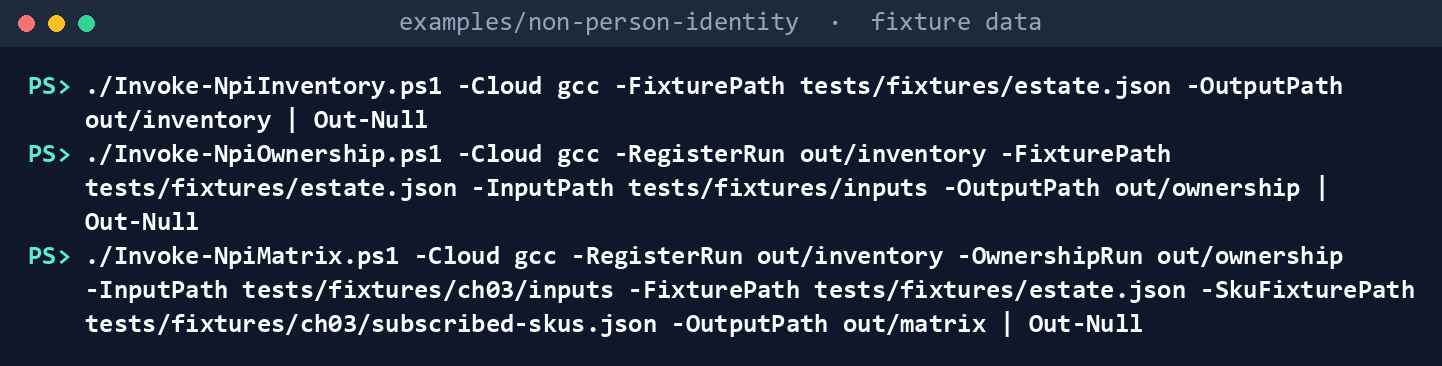
It prints nothing. The three folders hold the register, the owners and the owners’ D-NP3 decisions this chapter reads.
Run Learn’s procedures against the stand-ins:
Invoke-Pester -Path tests/KerberosIslandSamples.Tests.ps1 -Output None -PassThru |
    Select-Object PassedCount, FailedCount, NotRunCount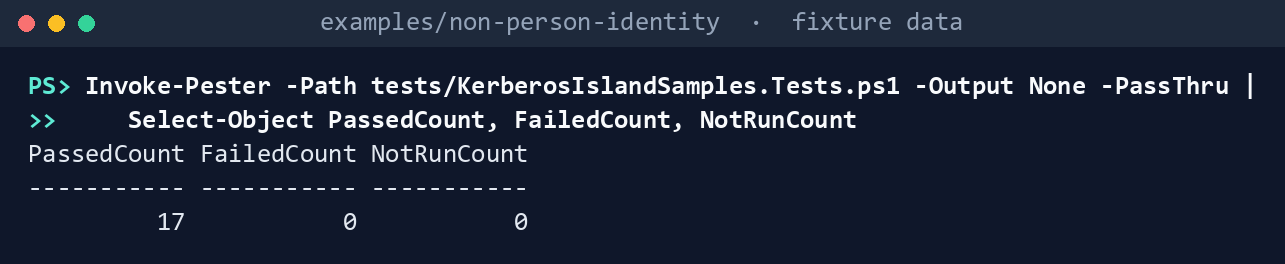
What the terminal shows, run on the kit’s fixtures (the same output as text) PassedCount 17,FailedCount 0,NotRunCount 0. Read the test for the state-3 step: Learn’s block fails withA parameter cannot be found that matches parameter name 'Properties'.List what each task runs:
Import-Module ./powershell/NpiKerberosIsland/NpiKerberosIsland.psm1
foreach ($t in 'kerberos-island', 'kerberos-apply') { $r = Get-NpiKrbRequiredRight -Task $t; "$t : " + ($r.Cmdlets -join ', ') }
kerberos-island : Get-ADComputer, Get-ADDomainController, Get-ADObject, Get-ADServiceAccount, Get-ADUser kerberos-apply : Complete-ADServiceAccountMigration, Disable-ADAccount, Get-ADComputer, Get-ADDomainController, Get-ADObject, Get-ADServiceAccount, Get-ADUser, New-ADServiceAccount, Set-ADServiceAccount, Start-ADServiceAccountMigration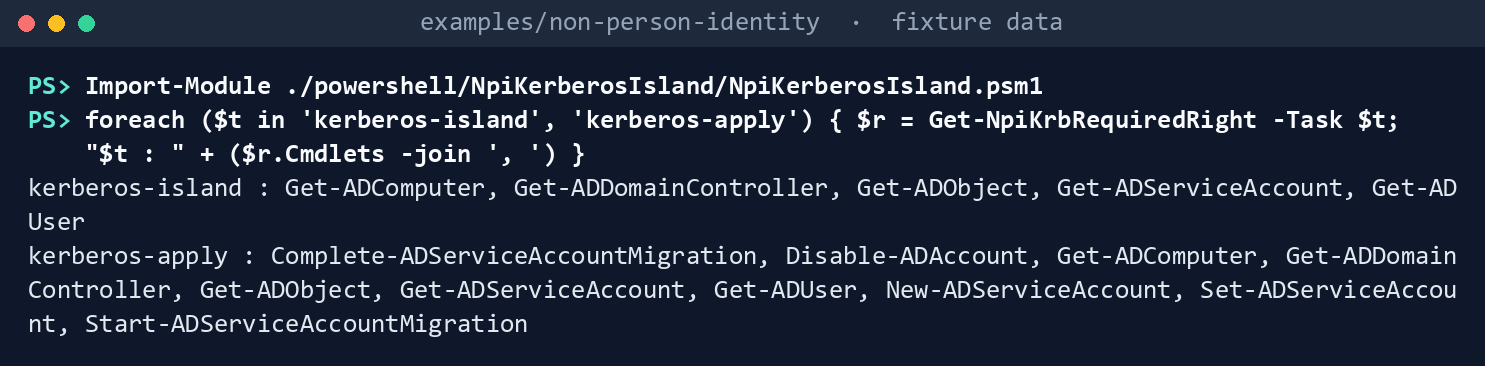
What the terminal shows, run on the kit’s fixtures (the same output as text) Check the Kerberos accounts and build the plan:
./Invoke-NpiKerberosIsland.ps1 -Cloud gcc -RegisterRun out/inventory -MatrixRun out/matrix -ProgramDatesPath tests/fixtures/ch03/inputs/program-dates.json -FixturePath tests/fixtures/estate.json -KerberosFixturePath tests/fixtures/ch06/ad-kerberos.json -InputPath tests/fixtures/ch06/inputs -OutputPath out/kerberosKerberos accounts: 9 in scope; KDS root key Ready Findings: 5 Finding, 1 Warn, 2 Info Plan: 9 actions, 4 of them writes (1 CompleteDmsaMigration, 2 CreateGmsa, 1 SetRetrievers); nothing sent Island list: 6 accounts, 4 ready for P4.6; hand-off ready: False Reconciliation (D11 KerberosIsland): 1 HandedOff, 4 OnIslandList, 1 Unreconciled Plan SHA-256: e8fb8355ee0989d9ce9d7b107cd52f45d0eea5f155a49c1667a1bf5840de9cca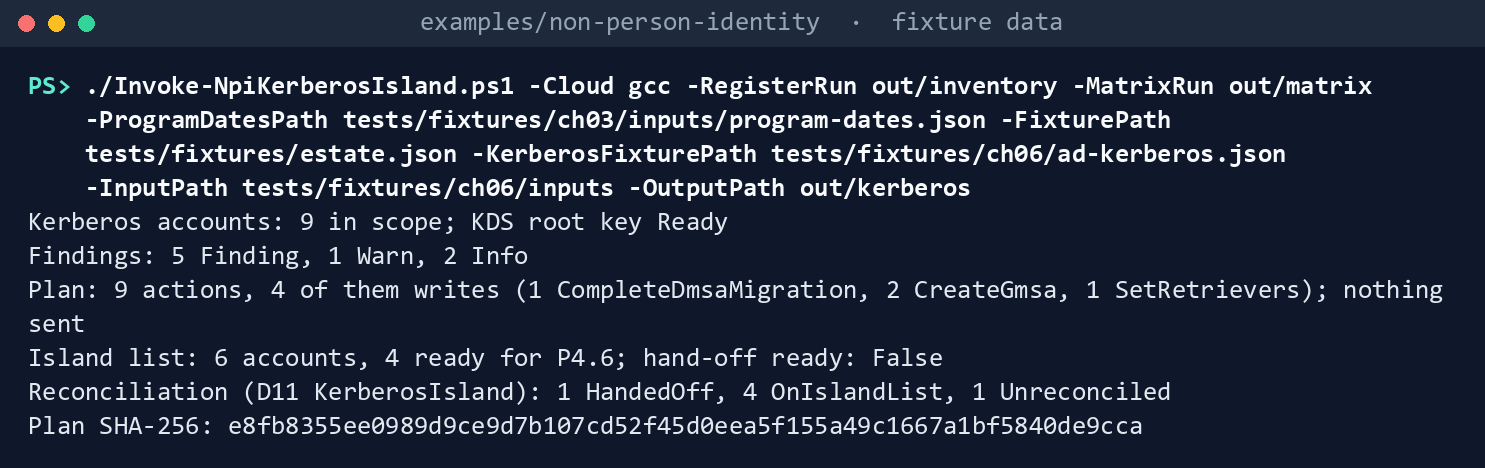
What the terminal shows, run on the kit’s fixtures (the same output as text) The plan’s hash is the same on every run with these inputs.
Read the findings:
Get-Content out/kerberos/findings.json -Raw | ConvertFrom-Json | Sort-Object Rule | Format-Table Rule, Severity, ObjectKeyRule Severity ObjectKey ---- -------- --------- NPI-KRB-03 Finding gmsa-web$ NPI-KRB-05 Finding svc-intranet NPI-KRB-05 Finding svc-webfront NPI-KRB-06 Finding svc-intranet NPI-KRB-07 Finding gmsa-intranet$ NPI-KRB-08 Warn gmsa-ops$ NPI-KRB-09 Info gmsa-sql$ NPI-KRB-09 Info svc-sqlprod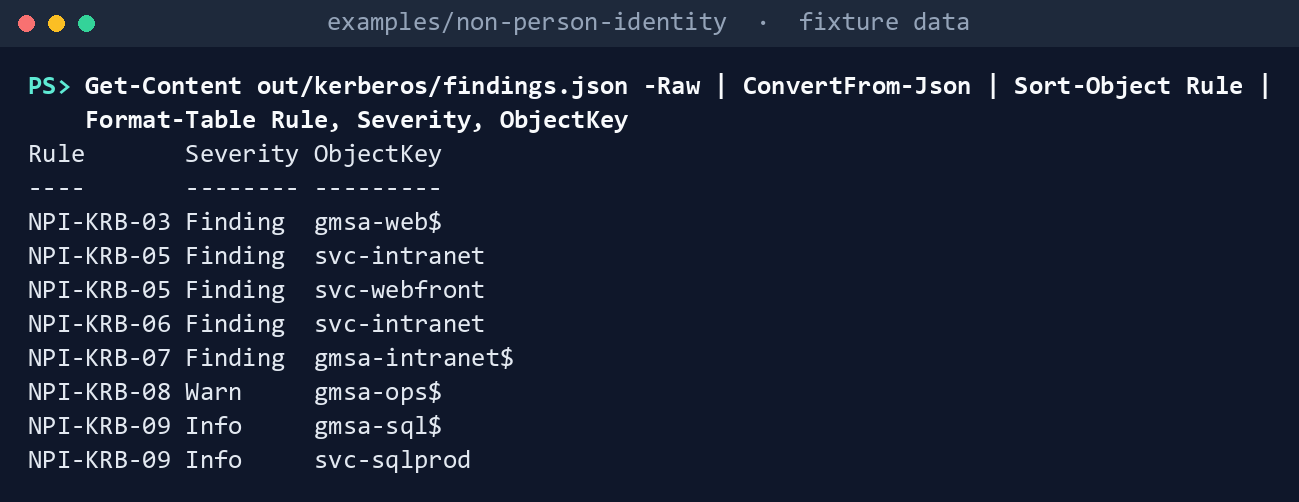
What the terminal shows, run on the kit’s fixtures (the same output as text) Each disposition is Chapter 03’s.
svc-webfrontis trusted for unconstrained delegation, which stops working once a dMSA migration completes, so its owner kept it on Kerberos (KeepKerberos, with the authorizing official’s acceptance) instead of the dMSA the matrix proposed; it has no SPN owner. Had the owner chosen the dMSA, this chapter would block it (NPI-KRB-04, pinned by the tests).gmsa-web$’s reviewed retrievers addWEB03, and the end date Chapter 03 records for it (August 31, 2027) is after D08’s (June 30, 2027) but before program G5 (September 30, 2027), which bounds a kept gMSA, as in Chapter 03.gmsa-ops$has the same end date and no SPN owner, which it doesn’t need because it has no SPNs, and is in Domain Admins. Chapter 03 re-platformssvc-intranetto a gMSA, butkerberos-replatform.csvnames no SPN owner for it, and its end date (2028) is after program G5 and after the island’s end of life, so its planned gMSA isn’t reconciled.Read the plan:
Get-Content out/kerberos/kerberos-plan.json -Raw | ConvertFrom-Json | Select-Object -ExpandProperty actions | Format-Table Action, Account, Write, CmdletAction Account Write Cmdlet ------ ------- ----- ------ Island gmsa-ops$ False HandedOff gmsa-sql$ False Island gmsa-web$ False SetRetrievers gmsa-web$ True Set-ADServiceAccount CreateGmsa msa-print01$ True New-ADServiceAccount CompleteDmsaMigration svc-hrsync True Complete-ADServiceAccountMigration CreateGmsa svc-intranet True New-ADServiceAccount HandedOff svc-sqlprod False Island svc-webfront False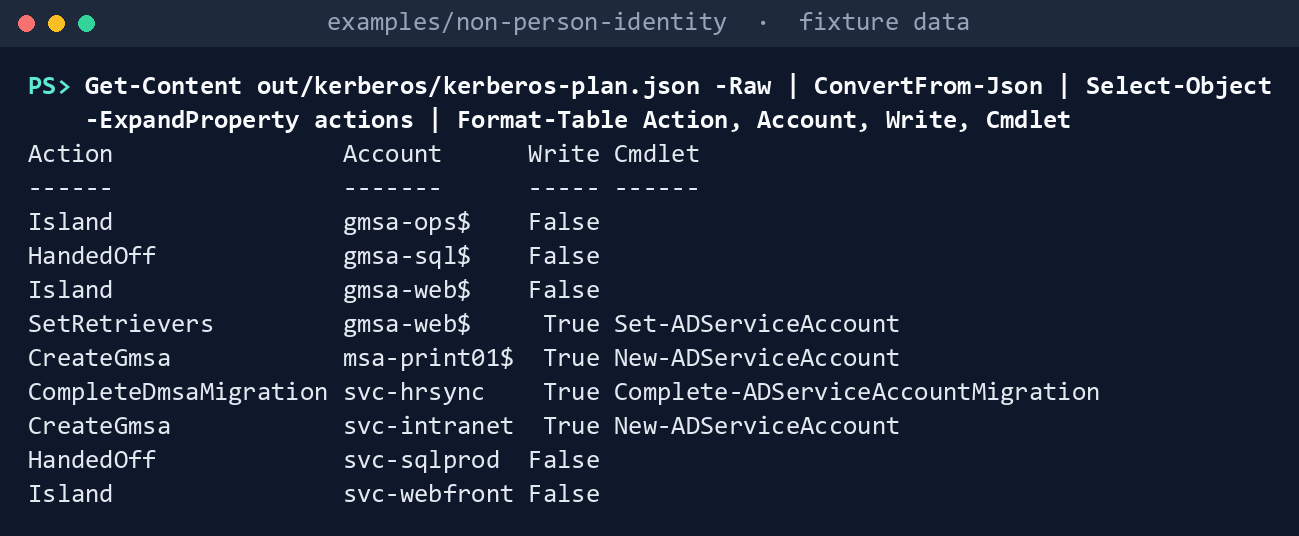
What the terminal shows, run on the kit’s fixtures (the same output as text) svc-hrsync’s migration todmsa-hrsync$started on September 20, 40 days ago, so it can complete. The MSAmsa-print01$gets a new gMSA for its scheduled task; the IIS application pool’s accountsvc-intranetgets one whose retrievers are a group.gmsa-ops$,gmsa-web$andsvc-webfrontstay on the island, as Chapter 03 decided. An account Chapter 03 re-platforms to a managed identity or an app registration would showMovesToWorkloadIdentity, for Chapter 05.Read the island list and the reconciliation:
Import-Csv out/kerberos/island-list.csv | Format-Table Account, Type, Disposition, SpnOwnerUpn, EndDate, AoAcceptedBy, ReadyForP46
Get-Content out/kerberos/reconciliation.json -Raw | ConvertFrom-Json | Format-Table Account, Type, Planned, Destination, Outcome
Account Type Disposition SpnOwnerUpn EndDate AoAcceptedBy ReadyForP46 ------- ---- ----------- ----------- ------- ------------ ----------- dmsa-hrsync$ dMSA Replatform hr-apps.owner@contoso.example 2027-06-30 True gmsa-intranet$ gMSA Replatform 2028-12-31 False gmsa-ops$ gMSA Keep 2027-08-31 True gmsa-print$ gMSA Replatform print.owner@contoso.example 2027-06-30 True gmsa-web$ gMSA Keep erin@contoso.example 2027-08-31 True svc-webfront Traditional KeepKerberos 2027-05-31 ao@contoso.example False Account Type Planned Destination Outcome ------- ---- ------- ----------- ------- dmsa-hrsync$ dMSA False Island OnIslandList gmsa-ops$ gMSA False Island OnIslandList gmsa-sql$ gMSA False HandedOff HandedOff gmsa-web$ gMSA False Island OnIslandList gmsa-intranet$ gMSA True Island Unreconciled gmsa-print$ gMSA True Island OnIslandList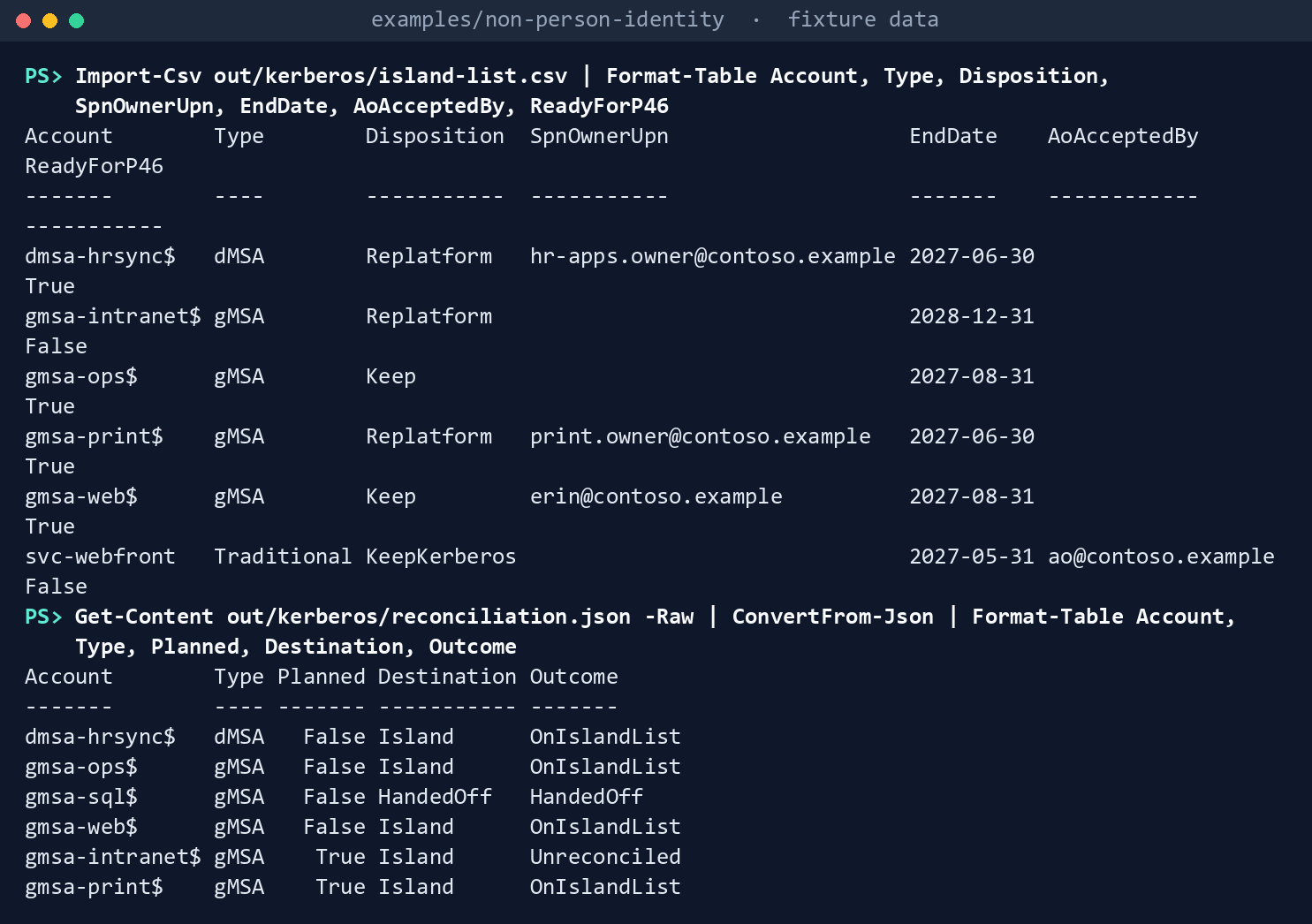
What the terminal shows, run on the kit’s fixtures (the same output as text) svc-webfrontcarries Chapter 03’s acceptance by the authorizing official, so it becomes ready once it has an SPN owner; aKeepKerberosaccount without the acceptance stays not ready.Dry-run the plan with its approved hash:
$sha = (Get-FileHash out/kerberos/kerberos-plan.json -Algorithm SHA256).Hash.ToLower()
./Invoke-NpiKerberosIslandAction.ps1 -PlanPath out/kerberos/kerberos-plan.json -ApprovedSha256 $sha -FixturePath tests/fixtures/estate.json -KerberosFixturePath tests/fixtures/ch06/ad-kerberos.json -OutputPath out/kerberos-dryrun
DryRun: 4 WouldSend WouldSend SetRetrievers gmsa-web$ Set-ADServiceAccount WouldSend CreateGmsa msa-print01$ New-ADServiceAccount WouldSend CompleteDmsaMigration svc-hrsync Complete-ADServiceAccountMigration WouldSend CreateGmsa svc-intranet New-ADServiceAccount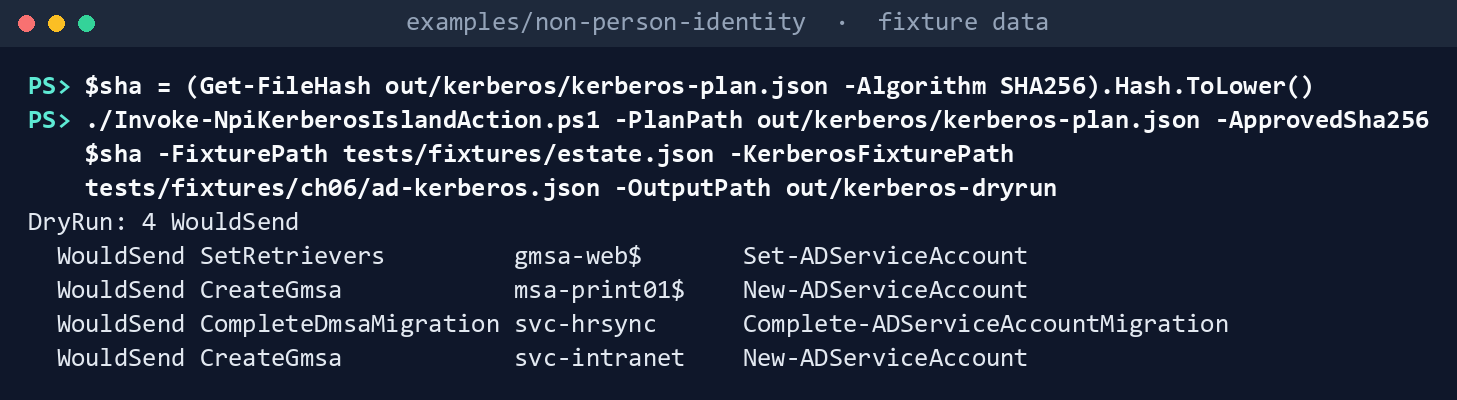
What the terminal shows, run on the kit’s fixtures (the same output as text) Apply it to the fake, then try a hash nobody approved:
./Invoke-NpiKerberosIslandAction.ps1 -PlanPath out/kerberos/kerberos-plan.json -ApprovedSha256 $sha -FixturePath tests/fixtures/estate.json -KerberosFixturePath tests/fixtures/ch06/ad-kerberos.json -OutputPath out/kerberos-apply -Apply
./Invoke-NpiKerberosIslandAction.ps1 -PlanPath out/kerberos/kerberos-plan.json -ApprovedSha256 ('0' * 64) -FixturePath tests/fixtures/estate.json -KerberosFixturePath tests/fixtures/ch06/ad-kerberos.json -OutputPath out/kerberos-x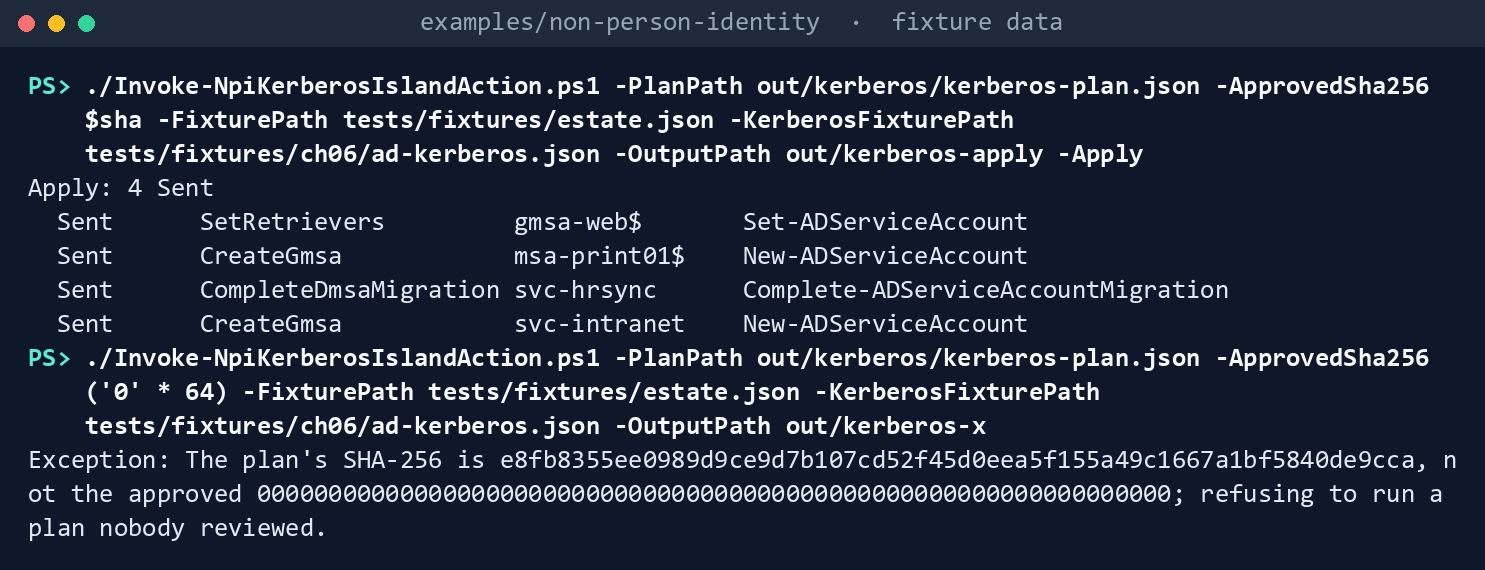
What the terminal shows, run on the kit’s fixtures (the same output as text) Apply: 4 Sent;results.jsontells the operator what comes next (install each gMSA on its hosts and recordHostChangedOn; the oldsvc-hrsyncis disabled and kept). Then the refusal:The plan's SHA-256 is e8fb8355…, not the approved 0000…; refusing to run a plan nobody reviewed.Run the tests:
Invoke-Pester -Path tests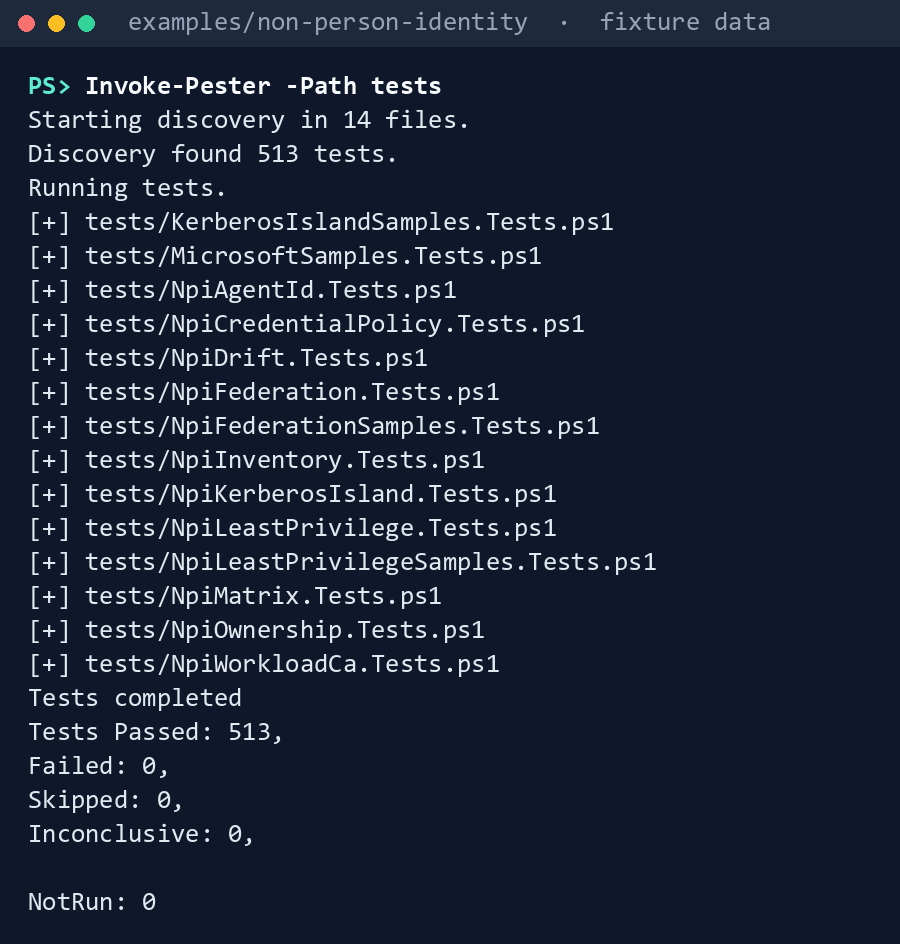
What the terminal shows, run on the kit’s fixtures (the same output as text)
Expected result: 513 tests passing across the example, out/kerberos/manifest.json listing seven AD reads and the SHA-256 of the register, of Chapter 03’s decisions and of each input, and out/kerberos-apply/manifest.json listing the prechecks and the four writes. Delete out when you’re done:
Remove-Item -Recurse -Force out
Lab 2: test domain
Use a test Active Directory domain, never production, with at least one Windows Server 2025 domain controller, a Windows Server 2025 member server, Chapter 01’s Lab 2 test host, and the permissions Chapters 02 and 03’s Lab 2 grant to Chapter 01’s reading app, which this lab uses to run those chapters again over the test accounts. The KDS root key must already exist; in a test domain with one domain controller, Learn’s KDS page shows how to create one usable at once.34 Work in examples/non-person-identity on Chapter 01’s test host. You’ll replace: <tenant-id>, <inventory-app-id> and <inventory-thumbprint> (Chapter 01’s tenant, reading app and certificate), <test-domain> (the test domain’s DNS name), <test-dc> (a writable test domain controller), <inputs>, <ownership-inputs> and <matrix-inputs> (folders for this lab’s input files and for the ones it writes for Chapters 02 and 03), <your-upn> (your user principal name, as the owner who decides), <test-account> (the traditional test account’s sAMAccountName), <test-account-dn> (its distinguished name), <test-msa> (the test MSA’s name, without the $), <new-dmsa> and <new-gmsa> (names for the new dMSA and gMSA, without the $), <msa-workload> (Service, IisAppPool or ScheduledTask: what the MSA runs), <member-server> (the 2025 member server’s name), <retriever-dn> (the distinguished name of the computer or group allowed to retrieve the gMSA’s password), <spn-owner-upn> (a test SPN owner), <end-date> (an end date before your test D08), <test-d08>, <test-g5> and <island-eol> (your test program’s dates, in the one program-dates.json both chapters read), <test-service> (the test Windows service’s name), and <sha>, <sha2>, <sha3> (each plan’s SHA-256, as the reviewer passes it to you).
Every command in this lab, in order, from examples/non-person-identity. Each step below says what it does and what to look for.
# Step 1: Make two test accounts, and record their dispositions in Chapter 03
Connect-MgGraph -Environment Global -TenantId <tenant-id> -ClientId <inventory-app-id> -CertificateThumbprint <inventory-thumbprint>
Connect-AzAccount -ServicePrincipal -Environment AzureCloud -Tenant <tenant-id> -ApplicationId <inventory-app-id> -CertificateThumbprint <inventory-thumbprint>
./Invoke-NpiInventory.ps1 -Cloud gcc -TenantId <tenant-id> -Domain <test-domain> -OutputPath out/inventory-test

# Step 1: Make two test accounts, and record their dispositions in Chapter 03
New-Item -ItemType Directory -Force <inputs>, <ownership-inputs>, <matrix-inputs> | Out-Null
foreach ($f in 'application-owners', 'igo-confirmations', 'owner-claims', 'service-records') { Get-Content tests/fixtures/inputs/$f.csv -TotalCount 1 | Set-Content <ownership-inputs>/$f.csv }
Add-Content <ownership-inputs>/application-owners.csv '<test-account>,<your-upn>,TEST-0003', '<test-msa>$,<your-upn>,TEST-0003'
Add-Content <ownership-inputs>/service-records.csv 'TEST-0003,NPI test Kerberos service,Active,false'
./Invoke-NpiOwnership.ps1 -Cloud gcc -RegisterRun out/inventory-test -InputPath <ownership-inputs> -OutputPath out/kerberos-test-ownership

# Step 1: Make two test accounts, and record their dispositions in Chapter 03
foreach ($f in 'workloads', 'dispositions', 'waves') { Get-Content tests/fixtures/ch03/inputs/$f.csv -TotalCount 1 | Set-Content <matrix-inputs>/$f.csv }
$d = Get-Content tests/fixtures/ch03/inputs/program-dates.json -Raw | ConvertFrom-Json; $d.d08LegacyAuthEndDate = '<test-d08>'; $d.g5AdRetired = '<test-g5>'; $d.d11.islandEndOfLife = '<island-eol>'; $d | ConvertTo-Json -Depth 5 | Set-Content <matrix-inputs>/program-dates.json
$reg = Get-Content out/inventory-test/register.json -Raw | ConvertFrom-Json; $today = Get-Date -Format yyyy-MM-dd
$acct = ($reg | Where-Object Name -eq '<test-account>').IdentityId; $msa = ($reg | Where-Object Name -eq '<test-msa>$').IdentityId
Add-Content <matrix-inputs>/workloads.csv "$acct,OnPremKerberos,,Yes,,<your-upn>", "$msa,OnPremKerberos,,Yes,,<your-upn>"
Add-Content <matrix-inputs>/dispositions.csv "$acct,Replatform,dMSA,1,<your-upn>,$today,,,,", "$msa,Replatform,gMSA,1,<your-upn>,$today,,,,"
Add-Content <matrix-inputs>/waves.csv "1,Test wave,$today,30,<spn-owner-upn>,$today"
./Invoke-NpiMatrix.ps1 -Cloud gcc -RegisterRun out/inventory-test -OwnershipRun out/kerberos-test-ownership -InputPath <matrix-inputs> -OutputPath out/kerberos-test-matrix

# Step 1: Make two test accounts, and record their dispositions in Chapter 03
Get-Content tests/fixtures/ch06/inputs/kerberos-replatform.csv -TotalCount 1 | Set-Content <inputs>/kerberos-replatform.csv
Add-Content <inputs>/kerberos-replatform.csv '<test-account>,<new-dmsa>$,Service,<member-server>,<spn-owner-upn>,<end-date>,,,', '<test-msa>$,<new-gmsa>$,<msa-workload>,<member-server>,<spn-owner-upn>,<end-date>,,,'
@{ accounts = @{ '<new-gmsa>$' = @('<retriever-dn>') } } | ConvertTo-Json -Depth 5 | Set-Content <inputs>/password-retrievers.json

# Step 3: Run the check
./Invoke-NpiKerberosIsland.ps1 -Cloud gcc -RegisterRun out/inventory-test -MatrixRun out/kerberos-test-matrix -ProgramDatesPath <matrix-inputs>/program-dates.json -InputPath <inputs> -Server <test-dc> -OutputPath out/kerberos-test
Get-Content out/kerberos-test/kerberos-plan.json -Raw | ConvertFrom-Json | Select-Object -ExpandProperty actions | Format-Table Action, Account, Write, Cmdlet

# Step 3: Run the check
(Get-FileHash out/kerberos-test/kerberos-plan.json -Algorithm SHA256).Hash.ToLower()

# Step 4: Dry-run, then apply
./Invoke-NpiKerberosIslandAction.ps1 -PlanPath out/kerberos-test/kerberos-plan.json -ApprovedSha256 <sha> -Server <test-dc> -OutputPath out/kerberos-test-dry
./Invoke-NpiKerberosIslandAction.ps1 -PlanPath out/kerberos-test/kerberos-plan.json -ApprovedSha256 <sha> -Server <test-dc> -OutputPath out/kerberos-test-apply -Apply

# Step 5: Run the next plan
./Invoke-NpiKerberosIsland.ps1 -Cloud gcc -RegisterRun out/inventory-test -MatrixRun out/kerberos-test-matrix -ProgramDatesPath <matrix-inputs>/program-dates.json -InputPath <inputs> -Server <test-dc> -OutputPath out/kerberos-test-start
Get-Content out/kerberos-test-start/kerberos-plan.json -Raw | ConvertFrom-Json | Select-Object -ExpandProperty actions | Format-Table Action, Account, Write, Cmdlet

# Step 5: Run the next plan
./Invoke-NpiKerberosIslandAction.ps1 -PlanPath out/kerberos-test-start/kerberos-plan.json -ApprovedSha256 <sha2> -Server <test-dc> -OutputPath out/kerberos-test-start-dry
./Invoke-NpiKerberosIslandAction.ps1 -PlanPath out/kerberos-test-start/kerberos-plan.json -ApprovedSha256 <sha2> -Server <test-dc> -OutputPath out/kerberos-test-start-apply -Apply
$d = Import-Csv <inputs>/kerberos-replatform.csv
($d | Where-Object SamAccountName -eq '<test-account>').MigrationStartedOn = Get-Date -Format yyyy-MM-dd
$d | Export-Csv <inputs>/kerberos-replatform.csv -NoTypeInformation -UseQuotes AsNeeded

# Step 5: Run the next plan
New-ItemProperty -Path "HKLM:\SOFTWARE\Microsoft\Windows\CurrentVersion\Policies\System\Kerberos\Parameters" -Name "DelegatedMSAEnabled" -Value "1" -PropertyType "DWORD" -Force
Restart-Service -Name <test-service>

# Step 5: Run the next plan
Get-ADServiceAccount -Identity <new-dmsa> -Properties msDS-DelegatedMSAState -Server <test-dc> | Select-Object Name, msDS-DelegatedMSAState

# Step 6: Complete, or back out
./Invoke-NpiKerberosIsland.ps1 -Cloud gcc -RegisterRun out/inventory-test -MatrixRun out/kerberos-test-matrix -ProgramDatesPath <matrix-inputs>/program-dates.json -InputPath <inputs> -Server <test-dc> -OutputPath out/kerberos-test-complete

# Step 6: Complete, or back out
./Invoke-NpiKerberosIslandAction.ps1 -PlanPath out/kerberos-test-complete/kerberos-plan.json -ApprovedSha256 <sha3> -Server <test-dc> -OutputPath out/kerberos-test-complete-dry
./Invoke-NpiKerberosIslandAction.ps1 -PlanPath out/kerberos-test-complete/kerberos-plan.json -ApprovedSha256 <sha3> -Server <test-dc> -OutputPath out/kerberos-test-complete-apply -Apply
Get-ADUser -Identity <test-account> -Properties ServicePrincipalName -Server <test-dc> | Select-Object SamAccountName, Enabled, ServicePrincipalName
Get-ADServiceAccount -Identity <new-dmsa> -Properties ServicePrincipalName -Server <test-dc> | Select-Object Name, ServicePrincipalName

# Step 6: Complete, or back out
Undo-ADServiceAccountMigration -Identity <new-dmsa> -SupersededAccount "<test-account-dn>"
Enable-ADAccount -Identity <test-account>

# Step 6: Complete, or back out
Remove-Item -Recurse -Force out/kerberos-test*
Make two test accounts, and record their dispositions in Chapter 03: a traditional test service account (
svc-prefix) with an SPN, running a test Windows service on the 2025 member server, and a test MSA. With the two accounts made, read the register again so it holds them:Connect-MgGraph -Environment Global -TenantId <tenant-id> -ClientId <inventory-app-id> -CertificateThumbprint <inventory-thumbprint> Connect-AzAccount -ServicePrincipal -Environment AzureCloud -Tenant <tenant-id> -ApplicationId <inventory-app-id> -CertificateThumbprint <inventory-thumbprint> ./Invoke-NpiInventory.ps1 -Cloud gcc -TenantId <tenant-id> -Domain <test-domain> -OutputPath out/inventory-testRun Chapter 02 over it, with you as the two accounts’ owner, in the fixture’s formats:
New-Item -ItemType Directory -Force <inputs>, <ownership-inputs>, <matrix-inputs> | Out-Null
foreach ($f in 'application-owners', 'igo-confirmations', 'owner-claims', 'service-records') { Get-Content tests/fixtures/inputs/$f.csv -TotalCount 1 | Set-Content <ownership-inputs>/$f.csv }
Add-Content <ownership-inputs>/application-owners.csv '<test-account>,<your-upn>,TEST-0003', '<test-msa>$,<your-upn>,TEST-0003'
Add-Content <ownership-inputs>/service-records.csv 'TEST-0003,NPI test Kerberos service,Active,false'
./Invoke-NpiOwnership.ps1 -Cloud gcc -RegisterRun out/inventory-test -InputPath <ownership-inputs> -OutputPath out/kerberos-test-ownership
Record the D-NP3 decisions in Chapter 03’s files: the first account
Replatformto a dMSA, the MSAReplatformto a gMSA, both in wave 1, with your test program’s dates inprogram-dates.json, then run Chapter 03:foreach ($f in 'workloads', 'dispositions', 'waves') { Get-Content tests/fixtures/ch03/inputs/$f.csv -TotalCount 1 | Set-Content <matrix-inputs>/$f.csv } $d = Get-Content tests/fixtures/ch03/inputs/program-dates.json -Raw | ConvertFrom-Json; $d.d08LegacyAuthEndDate = '<test-d08>'; $d.g5AdRetired = '<test-g5>'; $d.d11.islandEndOfLife = '<island-eol>'; $d | ConvertTo-Json -Depth 5 | Set-Content <matrix-inputs>/program-dates.json $reg = Get-Content out/inventory-test/register.json -Raw | ConvertFrom-Json; $today = Get-Date -Format yyyy-MM-dd $acct = ($reg | Where-Object Name -eq '<test-account>').IdentityId; $msa = ($reg | Where-Object Name -eq '<test-msa>$').IdentityId Add-Content <matrix-inputs>/workloads.csv "$acct,OnPremKerberos,,Yes,,<your-upn>", "$msa,OnPremKerberos,,Yes,,<your-upn>" Add-Content <matrix-inputs>/dispositions.csv "$acct,Replatform,dMSA,1,<your-upn>,$today,,,,", "$msa,Replatform,gMSA,1,<your-upn>,$today,,,," Add-Content <matrix-inputs>/waves.csv "1,Test wave,$today,30,<spn-owner-upn>,$today" ./Invoke-NpiMatrix.ps1 -Cloud gcc -RegisterRun out/inventory-test -OwnershipRun out/kerberos-test-ownership -InputPath <matrix-inputs> -OutputPath out/kerberos-test-matrixThen this chapter’s two files:
kerberos-replatform.csvnames the dMSA and the gMSA on that host, each with a test SPN owner and an end date before your test program G5, andpassword-retrievers.jsonthe gMSA’s retrievers:Get-Content tests/fixtures/ch06/inputs/kerberos-replatform.csv -TotalCount 1 | Set-Content <inputs>/kerberos-replatform.csv Add-Content <inputs>/kerberos-replatform.csv '<test-account>,<new-dmsa>$,Service,<member-server>,<spn-owner-upn>,<end-date>,,,', '<test-msa>$,<new-gmsa>$,<msa-workload>,<member-server>,<spn-owner-upn>,<end-date>,,,' @{ accounts = @{ '<new-gmsa>$' = @('<retriever-dn>') } } | ConvertTo-Json -Depth 5 | Set-Content <inputs>/password-retrievers.jsonGrant the read: give the account that runs the read a delegated read of
msKds-UseStartTimeandmsKds-CreateTimeonCN=Master Root Keys,CN=Group Key Distribution Service,CN=Services,CN=Configuration,<forest>, nothing else, and record whether the read works without access to the key data (research gaps, row 52). Record whetherPrincipalsAllowedToRetrieveManagedPasswordcomes back for that account (row 53).Run the check:
./Invoke-NpiKerberosIsland.ps1 -Cloud gcc -RegisterRun out/inventory-test -MatrixRun out/kerberos-test-matrix -ProgramDatesPath <matrix-inputs>/program-dates.json -InputPath <inputs> -Server <test-dc> -OutputPath out/kerberos-test
Get-Content out/kerberos-test/kerberos-plan.json -Raw | ConvertFrom-Json | Select-Object -ExpandProperty actions | Format-Table Action, Account, Write, Cmdlet
Expect
CreateDmsaandCreateGmsa. Have a second person reviewkerberos-plan.jsonand pass you its SHA-256. They compute it with:(Get-FileHash out/kerberos-test/kerberos-plan.json -Algorithm SHA256).Hash.ToLower()Dry-run, then apply, signed in to the domain as a person with the test domain’s Domain Admins or equivalent rights, against a writable domain controller:
./Invoke-NpiKerberosIslandAction.ps1 -PlanPath out/kerberos-test/kerberos-plan.json -ApprovedSha256 <sha> -Server <test-dc> -OutputPath out/kerberos-test-dry
./Invoke-NpiKerberosIslandAction.ps1 -PlanPath out/kerberos-test/kerberos-plan.json -ApprovedSha256 <sha> -Server <test-dc> -OutputPath out/kerberos-test-apply -Apply
Run the next plan: the check now plans
StartDmsaMigrationfor the dMSA andAwaitHostChangefor the gMSA. Review, apply, recordMigrationStartedOn. On the member server, set the host’s registry value and restart only the test service, as Learn’s procedure does for all services;35 watch Kerberos events 307 to 309 in the Security-Kerberos Operational log. Record whether the dMSA’s state is 1 without first setting it to 3 (row 51). Plan:./Invoke-NpiKerberosIsland.ps1 -Cloud gcc -RegisterRun out/inventory-test -MatrixRun out/kerberos-test-matrix -ProgramDatesPath <matrix-inputs>/program-dates.json -InputPath <inputs> -Server <test-dc> -OutputPath out/kerberos-test-start Get-Content out/kerberos-test-start/kerberos-plan.json -Raw | ConvertFrom-Json | Select-Object -ExpandProperty actions | Format-Table Action, Account, Write, CmdletThe reviewer passes you
out/kerberos-test-start/kerberos-plan.json’s SHA-256 as<sha2>. Dry-run and apply, then record today as the migration’s start:./Invoke-NpiKerberosIslandAction.ps1 -PlanPath out/kerberos-test-start/kerberos-plan.json -ApprovedSha256 <sha2> -Server <test-dc> -OutputPath out/kerberos-test-start-dry ./Invoke-NpiKerberosIslandAction.ps1 -PlanPath out/kerberos-test-start/kerberos-plan.json -ApprovedSha256 <sha2> -Server <test-dc> -OutputPath out/kerberos-test-start-apply -Apply $d = Import-Csv <inputs>/kerberos-replatform.csv ($d | Where-Object SamAccountName -eq '<test-account>').MigrationStartedOn = Get-Date -Format yyyy-MM-dd $d | Export-Csv <inputs>/kerberos-replatform.csv -NoTypeInformation -UseQuotes AsNeededOn the member server, in an elevated PowerShell session, Learn’s registry step, then a restart of the test service only:
New-ItemProperty -Path "HKLM:\SOFTWARE\Microsoft\Windows\CurrentVersion\Policies\System\Kerberos\Parameters" -Name "DelegatedMSAEnabled" -Value "1" -PropertyType "DWORD" -Force
Restart-Service -Name <test-service>
Back on the test host, read the dMSA’s state:
Get-ADServiceAccount -Identity <new-dmsa> -Properties msDS-DelegatedMSAState -Server <test-dc> | Select-Object Name, msDS-DelegatedMSAStateComplete, or back out. After 30 days the check plans
CompleteDmsaMigration; apply it and confirm the old account is disabled and its SPNs are on the dMSA. To back out instead, run Learn’sUndo-ADServiceAccountMigrationby hand (this code never runs it),36 re-enable the test account, then remove the test dMSA, gMSA, MSA and account by hand in the test domain, and delete theoutfolders. To complete, plan:./Invoke-NpiKerberosIsland.ps1 -Cloud gcc -RegisterRun out/inventory-test -MatrixRun out/kerberos-test-matrix -ProgramDatesPath <matrix-inputs>/program-dates.json -InputPath <inputs> -Server <test-dc> -OutputPath out/kerberos-test-completeThe reviewer passes you
out/kerberos-test-complete/kerberos-plan.json’s SHA-256 as<sha3>. Dry-run, apply, and read both accounts:./Invoke-NpiKerberosIslandAction.ps1 -PlanPath out/kerberos-test-complete/kerberos-plan.json -ApprovedSha256 <sha3> -Server <test-dc> -OutputPath out/kerberos-test-complete-dry ./Invoke-NpiKerberosIslandAction.ps1 -PlanPath out/kerberos-test-complete/kerberos-plan.json -ApprovedSha256 <sha3> -Server <test-dc> -OutputPath out/kerberos-test-complete-apply -Apply Get-ADUser -Identity <test-account> -Properties ServicePrincipalName -Server <test-dc> | Select-Object SamAccountName, Enabled, ServicePrincipalName Get-ADServiceAccount -Identity <new-dmsa> -Properties ServicePrincipalName -Server <test-dc> | Select-Object Name, ServicePrincipalNameTo back out instead, Learn’s undo and the re-enable, by hand:
Undo-ADServiceAccountMigration -Identity <new-dmsa> -SupersededAccount "<test-account-dn>"
Enable-ADAccount -Identity <test-account>
Either way, after removing the test accounts in the test domain, delete the
outfolders:Remove-Item -Recurse -Force out/kerberos-test*
Verified facts
Every item is Active Directory on-premises: no US Government cloud endpoint applies, and none is marked preview on Learn.
| Item | Value | US Government clouds | Stage | Source |
|---|---|---|---|---|
| gMSA prerequisites | Domain Admins or Enterprise Admins; domain and forest functional level Windows Server 2012 or later; a KDS root key | n/a (AD) | GA | 37 |
| gMSA create | New-ADServiceAccount -Name -DNSHostName -PrincipalsAllowedToRetrieveManagedPassword; a gMSA by default; services, IIS application pools and Task Scheduler tasks can run as one; failover clusters can’t |
n/a (AD) | GA | 38 39 |
| gMSA password | Changed by Windows every 30 days; review privileged group membership | n/a (AD) | GA | 40 |
| gMSA name and interval | Names unique in the forest, not just the domain; the password interval is set only at creation (-ManagedPasswordIntervalInDays, default 30); -RestrictToOutboundAuthenticationOnly for outbound-only use; Domain Admins or a delegated right to create msDS-GroupManagedServiceAccount objects; Account Operators can’t by default |
n/a (AD) | GA | 41 |
| gMSA on a host | Install-ADServiceAccount on each host, then Test-ADServiceAccount returns True; a host gets new group membership after a restart |
n/a (AD) | GA | 42 43 |
| Delegation on a gMSA | No Delegation tab; set with Set-ADAccountControl and msDS-AllowedToDelegateTo, never both delegation flags |
n/a (AD) | GA | 44 |
| Encryption types | Always configure AES for MSAs | n/a (AD) | GA | 45 |
| KDS root key | Domain controllers wait up to 10 hours from the time it’s created; Domain Admins or Enterprise Admins create it; stored under CN=Master Root Keys,CN=Group Key Distribution Service,CN=Services,CN=Configuration; a deleted and re-created key can stay cached until the KDC restarts on every domain controller; one key per forest, since more than one makes gMSAs fail after a rotation; creation confirmed by Event ID 4004 |
n/a (AD) | GA | 46 47 48 |
msKds-ProvRootKey |
Default security descriptor grants Enterprise Admins, Domain Admins and SYSTEM; msKds-UseStartTime is when the key may be used |
n/a (AD) | GA | 49 50 |
Get-KdsRootKey |
Returns each root key’s identifier and value | n/a (AD) | GA | 51 |
Set-ADServiceAccount |
-PrincipalsAllowedToRetrieveManagedPassword sets msDS-GroupMSAMembership; no -Properties parameter; not against a read-only domain controller |
n/a (AD) | GA | 52 |
| dMSA prerequisites | Windows Server 2025; at least one Windows Server 2025 domain controller; Domain Admins or Enterprise Admins, or equivalent; a KDS root key | n/a (AD) | GA (Windows Server 2025) | 53 54 |
| dMSA migration limits | No MSA or gMSA to dMSA; wait two ticket lifetimes (14 days), four (28) recommended; a read-write domain controller; unconstrained delegation stops; every machine must support dMSA; one dMSA per service account | n/a (AD) | GA (Windows Server 2025) | 55 56 |
Start- / Complete-ADServiceAccountMigration |
-Identity the dMSA, -SupersededAccount a distinguished name; complete copies the SPNs, delegation and authentication policy, disables the account and removes its SPNs |
n/a (AD) | GA (Windows Server 2025) | 57 58 59 |
| Never delete | Never delete the original account after a dMSA migration; keep it intact | n/a (AD) | — | 60 61 |
Disable-ADAccount |
Disables a user, computer or service account | n/a (AD) | GA | 62 |
Where Learn’s pages differ: the dMSA set-up page sets msDS-DelegatedMSAState with a parameter Set-ADServiceAccount doesn’t have (research gaps, row 51); the set-up page completes with no wait while the overview asks for two to four ticket lifetimes (row 54); the Entra gMSA page deletes the old account while the dMSA pages say never to (row 55); and the dMSA page checks the root key with a cmdlet that returns the key, where the code reads only its start time (row 52). The KDS page reserves the root key backdated 10 hours for a test environment with one domain controller, and the containers page says not to use it in production, while the dMSA set-up prerequisites and AD FS’s Configure a federation server offer it without that caveat;63 64 65 66 the code never creates a key. The code follows the stricter reading in each case.
Federal requirements and evidence
The Kerberos accounts are the on-premises part of the guide’s G5 Conversion gate: each traditional account moved to a gMSA or dMSA, a dated island list for what stays, and every gMSA and dMSA reconciled with the program’s end state. Each row names the file or command that is the evidence. The controls are in the NIST SP 800-53 Rev. 5 Moderate baseline.67
| What the output proves | Requirement it supports | KSI it aligns to | Who keeps it |
|---|---|---|---|
Learn’s gMSA and dMSA procedures, run as published against stand-ins, are the models the code keeps, and each gap is pinned by a test (Lab 1, step 1: KerberosIslandSamples.Tests.ps1, 17 tests) |
IA-5 Authenticator Management | KSI-IAM-SNU | The repository’s tests; the pinned copies |
The read holds no domain administration; the write task does, and is a person’s (Lab 1, step 2: the cmdlets and rights for kerberos-island and kerberos-apply; Lab 2, step 2: the delegated read of msKds-UseStartTime and msKds-CreateTime only) |
AC-6 Least Privilege; CM-5 Access Restrictions for Change | KSI-IAM-ELP, KSI-IAM-JIT (AC-6); KSI-CMT-RVP (CM-5) | AD engineering; the ISSO |
Each Kerberos account gets one action, with the register’s and each input’s SHA-256, and the same inputs give the same plan hash (Lab 1, steps 3 and 5: kerberos-plan.json) |
IA-5 (Windows-managed passwords replace stored ones); CM-3 Configuration Change Control | KSI-IAM-SNU; KSI-CMT-LMC | Identity engineering; the reviewer who approves the hash |
No root key, no disposition, an unusable target, no SPN owner where one is needed, no end date or one past its bound (D08 or program G5), an unreconciled account: each is a finding (Lab 1, step 4, and Lab 2, step 3: findings.json, NPI-KRB-01 to -07 and -09) |
AC-2 Account Management; IA-5 | KSI-IAM-SNU | Identity engineering |
A managed service account in a privileged group is flagged (findings.json, NPI-KRB-08) |
AC-6(5) Privileged Accounts | KSI-IAM-SNU, KSI-IAM-JIT | AD engineering, through the Privileged Access plan |
Only the reviewed hosts can retrieve each gMSA’s and dMSA’s password (password-retrievers.json; NPI-KRB-03; SetRetrievers in the plan) |
AC-6 Least Privilege (who can retrieve a managed password) | KSI-IAM-ELP | Server and AD engineering |
Every account that stays on Kerberos is listed under its future name, with its SPNs, SPN owner, end date and, for one kept on Kerberos, the authorizing official’s acceptance from Chapter 03 (Lab 1, step 6: island-list.csv) |
CM-8 System Component Inventory; AC-2 | KSI-PIY-GIV; KSI-IAM-SNU | Identity engineering lead |
Every gMSA and dMSA has a destination under decision D11 (Lab 1, step 6: reconciliation.json; program-dates.json) |
CM-8; AC-2 | KSI-PIY-GIV; KSI-IAM-SNU | Identity engineering lead (NP7.3) |
The write path stops after its prechecks without -Apply, and refuses a plan whose hash nobody approved (Lab 1, steps 7 and 8: results.json in the dry-run folder; the refusal text) |
CM-3; CM-5 | KSI-CMT-RVP; KSI-IAM-JIT | The reviewer; the ISSO |
The approved creations, migrations and disables were run after fresh prechecks, and recorded; no cmdlet that removes or undoes was run (Lab 1, step 8, and Lab 2, steps 4 and 5: results.json and manifest.json in the apply folder) |
CM-3; AC-2(3) Disable Accounts | KSI-CMT-LMC; KSI-IAM-AAM | The ISSO, with the run’s folder |
Every run records the tenant, the domain, every AD read, and the SHA-256 of the register, of each input and of each file (manifest.json in each output folder) |
AU-9 Protection of Audit Information; SI-7 Software, Firmware, and Information Integrity | KSI-MLA-OSM (AU-9); KSI-SVC-VRI (SI-7) | The ISSO |
The code passes its tests (Lab 1, step 9: Invoke-Pester -Path tests, 513 passed) |
CM-3(2) Testing, Validation, and Documentation of Changes | KSI-CMT-VTD | The repository; the pull request’s checks |
The migration started on the recorded date, and after 30 days completed: the old account disabled, its SPNs on the dMSA (Lab 2, steps 5 and 6: MigrationStartedOn in kerberos-replatform.csv; CompleteDmsaMigration in the plan; Get-ADUser and Get-ADServiceAccount after the apply) |
AC-2(3); IA-5 | KSI-IAM-AAM; KSI-IAM-SNU | Server owners; AD engineering |
A back-out is a person’s step, outside this code (Lab 2, step 6: Learn’s Undo-ADServiceAccountMigration, run by hand) |
CM-3 | KSI-CMT-LMC | AD engineering |
KSIs are FedRAMP 20x indicators for cloud service providers. The KSI column names the indicators whose related controls, as FedRAMP lists them, include the row’s control or one of its enhancements; which output supports which indicator is the program’s mapping (design guidance).68 The agency authorizes its own system and lines this evidence up with what its providers report against KSIs; it doesn’t report KSIs itself (Book 00, Appendix B). Lab steps that only make test accounts, run Chapter 01 or delete out have no row. The track-wide mapping is the guide’s Evidence table.
Dangers
| Danger | What happens | The guard |
|---|---|---|
| A gMSA left behind at program G5 | The workload loses its credential when the last domain controller is demoted | Every gMSA and dMSA reconciled with D11 and program G5 (NPI-KRB-07); the run repeated when D11 changes |
| A dMSA migration completed too early, or on a host that can’t use it | The old account is disabled; the service fails on hosts the dMSA hasn’t learned | Complete only 30 days after the start; Windows Server 2025 on every host and one domain controller; no unconstrained delegation (NPI-KRB-04) |
| The old account deleted | No way back; the service and the dMSA link to it | No delete, uninstall, undo or reset call exists; the writer refuses them by name |
| A root key used before it replicates | gMSA password retrieval fails on other domain controllers | Creations wait until a key has been usable for 10 hours (NPI-KRB-01); the code never creates a key |
| The root key read as a secret | Whoever runs the check holds the input to every gMSA password | Only msKds-UseStartTime and msKds-CreateTime are read, with a delegated read |
| Retrievers widened by hand | Another host can read the gMSA’s password and act as the service | Retrievers are reviewed data; drift is a finding and a reviewed SetRetrievers |
| A restart of every service | Learn’s step restarts unrelated services on the host | Host steps are the server owner’s, scoped to the service, never run by this code |
| A plan changed after review | Different writes from the ones approved | The approved SHA-256; this tenant and domain; no older than seven days |
| Domain administration held by a job | A standing credential that can create and migrate any account | The write path runs as a person; the read path holds no administration |
| An island with no owner or end | SPNs nobody retires; P4.6 has no list to work from | NPI-KRB-05 and -06; the island list is ready for hand-off only when every row is |
Checklist
Footnotes
Microsoft Learn, “Manage group Managed Service Accounts,” prerequisites (Event ID 4004); create a gMSA (forest-unique names, outbound-only, the interval set only at creation,
Test-ADServiceAccount, the delegated create right); install a gMSA, https://learn.microsoft.com/windows-server/identity/ad-ds/manage/group-managed-service-accounts/group-managed-service-accounts/manage-group-managed-service-accounts (accessed Oct 30, 2026; re-read Nov 9, 2026, unchanged at the pinned commit).↩︎Microsoft Learn, “Secure group managed service accounts,” benefits; using gMSAs; assess gMSA security posture; move to a gMSA, https://learn.microsoft.com/entra/architecture/service-accounts-group-managed (accessed Oct 30, 2026); pinned copy in
examples/third_party/entra-service-account-pages.↩︎Microsoft Learn, “Delegated Managed Service Accounts overview,” migration flow; account attributes for dMSA, https://learn.microsoft.com/windows-server/identity/ad-ds/manage/delegated-managed-service-accounts/delegated-managed-service-accounts-overview (accessed Oct 30, 2026).↩︎
Microsoft Learn, “Manage group Managed Service Accounts,” prerequisites (Event ID 4004); create a gMSA (forest-unique names, outbound-only, the interval set only at creation,
Test-ADServiceAccount, the delegated create right); install a gMSA, https://learn.microsoft.com/windows-server/identity/ad-ds/manage/group-managed-service-accounts/group-managed-service-accounts/manage-group-managed-service-accounts (accessed Oct 30, 2026; re-read Nov 9, 2026, unchanged at the pinned commit).↩︎Microsoft Learn, “Create gMSAs for Windows containers,” one-time preparation of Active Directory (one KDS root key per forest; the backdated key not for production); create a group Managed Service Account (delegated create right); prepare your container host (restart for group membership;
Test-ADServiceAccount), https://learn.microsoft.com/virtualization/windowscontainers/manage-containers/manage-serviceaccounts (accessed Nov 9, 2026).↩︎Microsoft Learn, “Delegated Managed Service Accounts overview,” migration flow; account attributes for dMSA, https://learn.microsoft.com/windows-server/identity/ad-ds/manage/delegated-managed-service-accounts/delegated-managed-service-accounts-overview (accessed Oct 30, 2026).↩︎
Microsoft Learn, “New-ADServiceAccount,” description;
-CreateDelegatedServiceAccount; notes, https://learn.microsoft.com/powershell/module/activedirectory/new-adserviceaccount (accessed Oct 30, 2026).↩︎Microsoft Learn, “Start-ADServiceAccountMigration,” description and notes, https://learn.microsoft.com/powershell/module/activedirectory/start-adserviceaccountmigration (accessed Oct 30, 2026).↩︎
Microsoft Learn, “Setting up delegated Managed Service Accounts,” prerequisites; create a standalone dMSA; migrate to a dMSA; complete account migration, https://learn.microsoft.com/windows-server/identity/ad-ds/manage/delegated-managed-service-accounts/delegated-managed-service-accounts-set-up-dmsa (accessed Oct 30, 2026).↩︎
Microsoft Learn, “Delegated Managed Service Accounts overview,” migration flow; account attributes for dMSA, https://learn.microsoft.com/windows-server/identity/ad-ds/manage/delegated-managed-service-accounts/delegated-managed-service-accounts-overview (accessed Oct 30, 2026).↩︎
Microsoft Learn, “Manage group Managed Service Accounts,” prerequisites (Event ID 4004); create a gMSA (forest-unique names, outbound-only, the interval set only at creation,
Test-ADServiceAccount, the delegated create right); install a gMSA, https://learn.microsoft.com/windows-server/identity/ad-ds/manage/group-managed-service-accounts/group-managed-service-accounts/manage-group-managed-service-accounts (accessed Oct 30, 2026; re-read Nov 9, 2026, unchanged at the pinned commit).↩︎Microsoft Learn, “Create a Key Distribution Service (KDS) root key,” https://learn.microsoft.com/windows-server/identity/ad-ds/manage/group-managed-service-accounts/group-managed-service-accounts/create-the-key-distribution-services-kds-root-key (accessed Oct 31, 2026).↩︎
Microsoft Learn, “Secure group managed service accounts,” benefits; using gMSAs; assess gMSA security posture; move to a gMSA, https://learn.microsoft.com/entra/architecture/service-accounts-group-managed (accessed Oct 30, 2026); pinned copy in
examples/third_party/entra-service-account-pages.↩︎Microsoft, MicrosoftDocs/windowsserverdocs,
WindowsServerDocs/identity/ad-ds/manage/delegated-managed-service-accounts/(delegated-managed-service-accounts-set-up-dmsa.md,delegated-managed-service-accounts-overview.md) andWindowsServerDocs/identity/ad-ds/manage/group-managed-service-accounts/group-managed-service-accounts/(manage-group-managed-service-accounts.md,create-the-key-distribution-services-kds-root-key.md) at commit2205ce8e55001a9b5e8e0de43981baa8ad782562(October 30, 2026), documentation Creative Commons Attribution 4.0, code MIT License, https://github.com/MicrosoftDocs/windowsserverdocs/tree/2205ce8e55001a9b5e8e0de43981baa8ad782562/WindowsServerDocs/identity/ad-ds/manage (accessed Oct 30, 2026); pinned copy inexamples/third_party/windows-server-msa-pages.↩︎Microsoft Learn, “Get-KdsRootKey,” description, https://learn.microsoft.com/powershell/module/kds/get-kdsrootkey (accessed Oct 30, 2026).↩︎
Microsoft Learn, “Create a Key Distribution Service (KDS) root key,” https://learn.microsoft.com/windows-server/identity/ad-ds/manage/group-managed-service-accounts/group-managed-service-accounts/create-the-key-distribution-services-kds-root-key (accessed Oct 31, 2026).↩︎
Microsoft Learn, “Set-ADServiceAccount,” syntax;
-PrincipalsAllowedToRetrieveManagedPassword; notes, https://learn.microsoft.com/powershell/module/activedirectory/set-adserviceaccount (accessed Oct 30, 2026).↩︎Microsoft Learn, “Delegated Managed Service Accounts overview,” migration flow; account attributes for dMSA, https://learn.microsoft.com/windows-server/identity/ad-ds/manage/delegated-managed-service-accounts/delegated-managed-service-accounts-overview (accessed Oct 30, 2026).↩︎
Microsoft Learn, “Delegated Managed Service Accounts overview,” migration flow; account attributes for dMSA, https://learn.microsoft.com/windows-server/identity/ad-ds/manage/delegated-managed-service-accounts/delegated-managed-service-accounts-overview (accessed Oct 30, 2026).↩︎
Microsoft Learn, “Delegated Managed Service Accounts FAQ,” general; migration, https://learn.microsoft.com/windows-server/identity/ad-ds/manage/delegated-managed-service-accounts/delegated-managed-service-accounts-faq (accessed Oct 30, 2026).↩︎
Microsoft Learn, “Setting up delegated Managed Service Accounts,” prerequisites; create a standalone dMSA; migrate to a dMSA; complete account migration, https://learn.microsoft.com/windows-server/identity/ad-ds/manage/delegated-managed-service-accounts/delegated-managed-service-accounts-set-up-dmsa (accessed Oct 30, 2026).↩︎
Microsoft Learn, “Secure group managed service accounts,” benefits; using gMSAs; assess gMSA security posture; move to a gMSA, https://learn.microsoft.com/entra/architecture/service-accounts-group-managed (accessed Oct 30, 2026); pinned copy in
examples/third_party/entra-service-account-pages.↩︎Microsoft Learn, “Group Managed Service Accounts overview,” software requirements, https://learn.microsoft.com/windows-server/identity/ad-ds/manage/group-managed-service-accounts/group-managed-service-accounts/group-managed-service-accounts-overview (accessed Oct 30, 2026).↩︎
Microsoft Learn, “Manage group Managed Service Accounts,” prerequisites (Event ID 4004); create a gMSA (forest-unique names, outbound-only, the interval set only at creation,
Test-ADServiceAccount, the delegated create right); install a gMSA, https://learn.microsoft.com/windows-server/identity/ad-ds/manage/group-managed-service-accounts/group-managed-service-accounts/manage-group-managed-service-accounts (accessed Oct 30, 2026; re-read Nov 9, 2026, unchanged at the pinned commit).↩︎Microsoft Learn, “Create a Key Distribution Service (KDS) root key,” https://learn.microsoft.com/windows-server/identity/ad-ds/manage/group-managed-service-accounts/group-managed-service-accounts/create-the-key-distribution-services-kds-root-key (accessed Oct 31, 2026).↩︎
Microsoft Learn, “Delegated Managed Service Accounts overview,” migration flow; account attributes for dMSA, https://learn.microsoft.com/windows-server/identity/ad-ds/manage/delegated-managed-service-accounts/delegated-managed-service-accounts-overview (accessed Oct 30, 2026).↩︎
Microsoft Learn, “Delegated Managed Service Accounts FAQ,” general; migration, https://learn.microsoft.com/windows-server/identity/ad-ds/manage/delegated-managed-service-accounts/delegated-managed-service-accounts-faq (accessed Oct 30, 2026).↩︎
Microsoft Learn, “Secure group managed service accounts,” benefits; using gMSAs; assess gMSA security posture; move to a gMSA, https://learn.microsoft.com/entra/architecture/service-accounts-group-managed (accessed Oct 30, 2026); pinned copy in
examples/third_party/entra-service-account-pages.↩︎Microsoft Learn, “Manage group Managed Service Accounts,” prerequisites (Event ID 4004); create a gMSA (forest-unique names, outbound-only, the interval set only at creation,
Test-ADServiceAccount, the delegated create right); install a gMSA, https://learn.microsoft.com/windows-server/identity/ad-ds/manage/group-managed-service-accounts/group-managed-service-accounts/manage-group-managed-service-accounts (accessed Oct 30, 2026; re-read Nov 9, 2026, unchanged at the pinned commit).↩︎Microsoft Learn, “Delegated Managed Service Accounts overview,” migration flow; account attributes for dMSA, https://learn.microsoft.com/windows-server/identity/ad-ds/manage/delegated-managed-service-accounts/delegated-managed-service-accounts-overview (accessed Oct 30, 2026).↩︎
Microsoft Learn, “ms-Kds-Prov-RootKey class,” default security descriptor, https://learn.microsoft.com/windows/win32/adschema/c-mskds-provrootkey (accessed Oct 30, 2026).↩︎
Microsoft Learn, “Setting up delegated Managed Service Accounts,” prerequisites; create a standalone dMSA; migrate to a dMSA; complete account migration, https://learn.microsoft.com/windows-server/identity/ad-ds/manage/delegated-managed-service-accounts/delegated-managed-service-accounts-set-up-dmsa (accessed Oct 30, 2026).↩︎
Microsoft Learn, “Manage group Managed Service Accounts,” prerequisites (Event ID 4004); create a gMSA (forest-unique names, outbound-only, the interval set only at creation,
Test-ADServiceAccount, the delegated create right); install a gMSA, https://learn.microsoft.com/windows-server/identity/ad-ds/manage/group-managed-service-accounts/group-managed-service-accounts/manage-group-managed-service-accounts (accessed Oct 30, 2026; re-read Nov 9, 2026, unchanged at the pinned commit).↩︎Microsoft Learn, “Create a Key Distribution Service (KDS) root key,” https://learn.microsoft.com/windows-server/identity/ad-ds/manage/group-managed-service-accounts/group-managed-service-accounts/create-the-key-distribution-services-kds-root-key (accessed Oct 31, 2026).↩︎
Microsoft Learn, “Setting up delegated Managed Service Accounts,” prerequisites; create a standalone dMSA; migrate to a dMSA; complete account migration, https://learn.microsoft.com/windows-server/identity/ad-ds/manage/delegated-managed-service-accounts/delegated-managed-service-accounts-set-up-dmsa (accessed Oct 30, 2026).↩︎
Microsoft Learn, “Setting up delegated Managed Service Accounts,” prerequisites; create a standalone dMSA; migrate to a dMSA; complete account migration, https://learn.microsoft.com/windows-server/identity/ad-ds/manage/delegated-managed-service-accounts/delegated-managed-service-accounts-set-up-dmsa (accessed Oct 30, 2026).↩︎
Microsoft Learn, “Manage group Managed Service Accounts,” prerequisites (Event ID 4004); create a gMSA (forest-unique names, outbound-only, the interval set only at creation,
Test-ADServiceAccount, the delegated create right); install a gMSA, https://learn.microsoft.com/windows-server/identity/ad-ds/manage/group-managed-service-accounts/group-managed-service-accounts/manage-group-managed-service-accounts (accessed Oct 30, 2026; re-read Nov 9, 2026, unchanged at the pinned commit).↩︎Microsoft Learn, “Manage group Managed Service Accounts,” prerequisites (Event ID 4004); create a gMSA (forest-unique names, outbound-only, the interval set only at creation,
Test-ADServiceAccount, the delegated create right); install a gMSA, https://learn.microsoft.com/windows-server/identity/ad-ds/manage/group-managed-service-accounts/group-managed-service-accounts/manage-group-managed-service-accounts (accessed Oct 30, 2026; re-read Nov 9, 2026, unchanged at the pinned commit).↩︎Microsoft Learn, “New-ADServiceAccount,” description;
-CreateDelegatedServiceAccount; notes, https://learn.microsoft.com/powershell/module/activedirectory/new-adserviceaccount (accessed Oct 30, 2026).↩︎Microsoft Learn, “Secure group managed service accounts,” benefits; using gMSAs; assess gMSA security posture; move to a gMSA, https://learn.microsoft.com/entra/architecture/service-accounts-group-managed (accessed Oct 30, 2026); pinned copy in
examples/third_party/entra-service-account-pages.↩︎Microsoft Learn, “Manage group Managed Service Accounts,” prerequisites (Event ID 4004); create a gMSA (forest-unique names, outbound-only, the interval set only at creation,
Test-ADServiceAccount, the delegated create right); install a gMSA, https://learn.microsoft.com/windows-server/identity/ad-ds/manage/group-managed-service-accounts/group-managed-service-accounts/manage-group-managed-service-accounts (accessed Oct 30, 2026; re-read Nov 9, 2026, unchanged at the pinned commit).↩︎Microsoft Learn, “Manage group Managed Service Accounts,” prerequisites (Event ID 4004); create a gMSA (forest-unique names, outbound-only, the interval set only at creation,
Test-ADServiceAccount, the delegated create right); install a gMSA, https://learn.microsoft.com/windows-server/identity/ad-ds/manage/group-managed-service-accounts/group-managed-service-accounts/manage-group-managed-service-accounts (accessed Oct 30, 2026; re-read Nov 9, 2026, unchanged at the pinned commit).↩︎Microsoft Learn, “Create gMSAs for Windows containers,” one-time preparation of Active Directory (one KDS root key per forest; the backdated key not for production); create a group Managed Service Account (delegated create right); prepare your container host (restart for group membership;
Test-ADServiceAccount), https://learn.microsoft.com/virtualization/windowscontainers/manage-containers/manage-serviceaccounts (accessed Nov 9, 2026).↩︎Microsoft Learn, “Configuring Kerberos delegation for group Managed Service Accounts,” https://learn.microsoft.com/windows-server/identity/ad-ds/manage/group-managed-service-accounts/group-managed-service-accounts/configure-kerberos-delegation-group-managed-service-accounts (accessed Nov 9, 2026).↩︎
Microsoft Learn, “Group Managed Service Accounts overview,” software requirements, https://learn.microsoft.com/windows-server/identity/ad-ds/manage/group-managed-service-accounts/group-managed-service-accounts/group-managed-service-accounts-overview (accessed Oct 30, 2026).↩︎
Microsoft Learn, “Create a Key Distribution Service (KDS) root key,” https://learn.microsoft.com/windows-server/identity/ad-ds/manage/group-managed-service-accounts/group-managed-service-accounts/create-the-key-distribution-services-kds-root-key (accessed Oct 31, 2026).↩︎
Microsoft Learn, “Create gMSAs for Windows containers,” one-time preparation of Active Directory (one KDS root key per forest; the backdated key not for production); create a group Managed Service Account (delegated create right); prepare your container host (restart for group membership;
Test-ADServiceAccount), https://learn.microsoft.com/virtualization/windowscontainers/manage-containers/manage-serviceaccounts (accessed Nov 9, 2026).↩︎Microsoft Learn, “Manage group Managed Service Accounts,” prerequisites (Event ID 4004); create a gMSA (forest-unique names, outbound-only, the interval set only at creation,
Test-ADServiceAccount, the delegated create right); install a gMSA, https://learn.microsoft.com/windows-server/identity/ad-ds/manage/group-managed-service-accounts/group-managed-service-accounts/manage-group-managed-service-accounts (accessed Oct 30, 2026; re-read Nov 9, 2026, unchanged at the pinned commit).↩︎Microsoft Learn, “ms-Kds-Prov-RootKey class,” default security descriptor, https://learn.microsoft.com/windows/win32/adschema/c-mskds-provrootkey (accessed Oct 30, 2026).↩︎
Microsoft Learn, “ms-Kds-UseStartTime attribute,” https://learn.microsoft.com/windows/win32/adschema/a-mskds-usestarttime (accessed Oct 30, 2026).↩︎
Microsoft Learn, “Get-KdsRootKey,” description, https://learn.microsoft.com/powershell/module/kds/get-kdsrootkey (accessed Oct 30, 2026).↩︎
Microsoft Learn, “Set-ADServiceAccount,” syntax;
-PrincipalsAllowedToRetrieveManagedPassword; notes, https://learn.microsoft.com/powershell/module/activedirectory/set-adserviceaccount (accessed Oct 30, 2026).↩︎Microsoft Learn, “Setting up delegated Managed Service Accounts,” prerequisites; create a standalone dMSA; migrate to a dMSA; complete account migration, https://learn.microsoft.com/windows-server/identity/ad-ds/manage/delegated-managed-service-accounts/delegated-managed-service-accounts-set-up-dmsa (accessed Oct 30, 2026).↩︎
Microsoft Learn, “Delegated Managed Service Accounts FAQ,” general; migration, https://learn.microsoft.com/windows-server/identity/ad-ds/manage/delegated-managed-service-accounts/delegated-managed-service-accounts-faq (accessed Oct 30, 2026).↩︎
Microsoft Learn, “Delegated Managed Service Accounts overview,” migration flow; account attributes for dMSA, https://learn.microsoft.com/windows-server/identity/ad-ds/manage/delegated-managed-service-accounts/delegated-managed-service-accounts-overview (accessed Oct 30, 2026).↩︎
Microsoft Learn, “Delegated Managed Service Accounts FAQ,” general; migration, https://learn.microsoft.com/windows-server/identity/ad-ds/manage/delegated-managed-service-accounts/delegated-managed-service-accounts-faq (accessed Oct 30, 2026).↩︎
Microsoft Learn, “Start-ADServiceAccountMigration,” description and notes, https://learn.microsoft.com/powershell/module/activedirectory/start-adserviceaccountmigration (accessed Oct 30, 2026).↩︎
Microsoft Learn, “Complete-ADServiceAccountMigration,” description and notes, https://learn.microsoft.com/powershell/module/activedirectory/complete-adserviceaccountmigration (accessed Oct 30, 2026).↩︎
Microsoft Learn, “Delegated Managed Service Accounts overview,” migration flow; account attributes for dMSA, https://learn.microsoft.com/windows-server/identity/ad-ds/manage/delegated-managed-service-accounts/delegated-managed-service-accounts-overview (accessed Oct 30, 2026).↩︎
Microsoft Learn, “Setting up delegated Managed Service Accounts,” prerequisites; create a standalone dMSA; migrate to a dMSA; complete account migration, https://learn.microsoft.com/windows-server/identity/ad-ds/manage/delegated-managed-service-accounts/delegated-managed-service-accounts-set-up-dmsa (accessed Oct 30, 2026).↩︎
Microsoft Learn, “Delegated Managed Service Accounts FAQ,” general; migration, https://learn.microsoft.com/windows-server/identity/ad-ds/manage/delegated-managed-service-accounts/delegated-managed-service-accounts-faq (accessed Oct 30, 2026).↩︎
Microsoft Learn, “Disable-ADAccount,” description, https://learn.microsoft.com/powershell/module/activedirectory/disable-adaccount (accessed Oct 30, 2026).↩︎
Microsoft Learn, “Create a Key Distribution Service (KDS) root key,” https://learn.microsoft.com/windows-server/identity/ad-ds/manage/group-managed-service-accounts/group-managed-service-accounts/create-the-key-distribution-services-kds-root-key (accessed Oct 31, 2026).↩︎
Microsoft Learn, “Create gMSAs for Windows containers,” one-time preparation of Active Directory (one KDS root key per forest; the backdated key not for production); create a group Managed Service Account (delegated create right); prepare your container host (restart for group membership;
Test-ADServiceAccount), https://learn.microsoft.com/virtualization/windowscontainers/manage-containers/manage-serviceaccounts (accessed Nov 9, 2026).↩︎Microsoft Learn, “Setting up delegated Managed Service Accounts,” prerequisites; create a standalone dMSA; migrate to a dMSA; complete account migration, https://learn.microsoft.com/windows-server/identity/ad-ds/manage/delegated-managed-service-accounts/delegated-managed-service-accounts-set-up-dmsa (accessed Oct 30, 2026).↩︎
Microsoft Learn, “Configure a federation server,” configure the first federation server in a new federation server farm (the gMSA option and
Add-KdsRootKey -EffectiveTime (Get-Date).AddHours(-10)), https://learn.microsoft.com/windows-server/identity/ad-fs/deployment/configure-a-federation-server (accessed Nov 9, 2026).↩︎National Institute of Standards and Technology, SP 800-53B Moderate baseline, release 5.2.0 OSCAL profile (includes AC-2, AC-2(3), AC-6, AC-6(5), AU-9, CM-3, CM-3(2), CM-5, CM-8, IA-5 and SI-7), https://github.com/usnistgov/oscal-content/blob/main/nist.gov/SP800-53/rev5/json/NIST_SP-800-53_rev5_MODERATE-baseline_profile.json (read November 2, 2026).↩︎
FedRAMP, “Key Security Indicators,” FedRAMP Consolidated Rules for 2026, indicator statements and “Related SP 800-53 Controls,” https://www.fedramp.gov/2026/reference/key-security-indicators/ (read November 2, 2026).↩︎