Federal Modernization Workbook
Chapter 10 — Drift and Evidence for the ISSO
A register approved once proves the day it was approved. The ISSO needs to know what changed since, who changed it, and that nobody edited the record afterwards.
The evidence behind the project plan’s tasks NP7.1, NP7.2 and NP7.4 and its Gate 7, “steady state.” You start with the Sentinel analytics rule that Learn’s security operations guide for applications links for credentials added to existing applications, which the repository keeps as a pinned copy, and run its query offline over fictional audit rows to see what it catches and what it misses. Then you build the drift run in examples/non-person-identity: Chapter 01‘s register and Chapter 02’s ownership check, run together, compared with the last approved baseline by fingerprint, with the credential and consent events from Microsoft Graph’s directory audit log and the service principal sign-in activity report. You read the review cycle’s records and the other chapters’ findings through a small contract, compare one AI use-case inventory vintage with the last, and extend the first workbook’s examples/drift-pipeline with new files that package each run in a hash chain and assemble a period for the ISSO. Lab 1 runs on a laptop with no tenant; Lab 2 uses a test tenant.
Jump to a slide (17)
Deck · Narrated deck (about 11 minutes, captions) · Script · Captions. Recorded on November 2, 2026 from the approved chapter.
Goal and audience
Goal. By the end of this chapter you can run the plan’s register drift check (NP7.1: “ownerless, unused or expiring registrations, passwords that never expire, credentials added outside the pipeline”) on a schedule against a baseline someone approved, show the review cycle (NP7.2) from the records the reviewing chapters write, and hand the ISSO a package and a period summary for AC-2, AC-6(5), IA-4, IA-5, IA-9 and M-25-21 that they can check with sha256sum alone (NP7.4), with the annual inventory vintage comparison beside it. For each rule you can say whether it is Learn’s, Microsoft’s sample, the first two workbooks’ pipeline, or the program’s design.
Audience. Developers and pipeline engineers who own the scheduled checks, the identity governance officer who owns NP7.2 and NP7.4, and the ISSO who receives the evidence and signs Gate 7. You should read PowerShell 7 and Python and know Chapters 01 and 02. You don’t need a tenant until Lab 2.
What the evidence has to show
Four pages already say what this evidence is for, and this chapter builds it without repeating them.
- The plan. NP7.1 schedules the register drift; NP7.2 asks for “a full review cycle: owners’ quarterly permission review, sponsors’ attestation, expiry-based recertification of agent access”; NP7.4 asks for “evidence to the ISSO for AC-2, AC-6(5), IA-4, IA-5 and IA-9, and for M-25-21; the annual inventory vintage comparison scheduled.” Gate 7 asks that every service account and service principal has an owner and sponsor, a reason and a target, that none holds a password that never expires and none is orphaned, that drift checks and review cycles run, and that every remaining gMSA and dMSA is moved or in the dated Kerberos island (project plan).
- Book 02, Chapter 10 sets the pattern: inventories committed as a baseline, each later run compared with it, new objects, removed objects and attribute changes as drift, and each finding closed at the source, never by editing the copy (Book 02, Chapter 10).
- The companion guide’s federal requirements map the non-person identity track to AC-2, AC-6(5), IA-4, IA-5 and IA-9, and M-25-21 for AI, as the program’s reading; the assessor and the authorizing official decide each control (companion guide).
- Book 17 sets the AI side: expiry is the agent’s review (Chapter 05), and each new vintage of the AI use-case inventory is compared with the last by use case ID for four kinds of change (Chapter 09).
Learn gives the facts the design turns on. Its security operations guide for applications rates credentials added to existing applications as high risk, says any credential added outside expected processes could be a malicious actor’s, and says application and service principal updates are logged as two entries.1 Its activity list names the events: Update application - Certificates and secrets management, Add service principal credentials, Consent to application, Add delegated permission grant and Add app role assignment to service principal, all logged by Core Directory in the ApplicationManagement category.2 Audit logs are kept 30 days with Microsoft Entra ID P1 or P2, and seven on Free.3 Learn’s recommendations call an application credential expiring when it ends within the next 30 days, and an application unused when it hasn’t been used for over 90 days.4 5
So the run has the same three parts as the first two workbooks’ evidence runs. Chapters 01 and 02 describe the state: what exists, who owns it, what it holds. The audit read describes the events in a window: who added a credential or a grant, and whether the pipeline did. A comparison with the approved baseline turns the state into drift, and a chain of windows with no gap between them is what “drift checks running” means in code. Design guidance.
Chapters 03 to 09 are written, and their outputs are fixed in each chapter. This chapter reads Chapter 01’s and Chapter 02’s run folders directly, and defines a small contract that the other chapters’ outputs can be written to: a findings file with id, rule, severity, chapter, objectKey and fingerprint, review records, and the rotation pipeline’s credential log (the contract). No chapter’s kit writes these files yet: the files in the repository are fixtures, and only powershell/NpiDrift/NpiDrift.psm1 reads them. Until a chapter writes its file, the run says so, and the period marks the controls that depend on it as incomplete.
Which cloud, for this read
The audit and sign-in reads call Microsoft Graph: graph.microsoft.com for GCC, which uses the worldwide endpoints; GCC High uses graph.microsoft.us and DoD dod-graph.microsoft.us.6 List directoryAudits is available in the global service, US Government L4 and US Government L5.7 The service principal sign-in activity report is beta and is listed for the global service only, not L4 or L5,8 so a GCC tenant can read it on the worldwide endpoint, and a GCC High or DoD run doesn’t send the call and records the unused check as not read (research gaps, row 93). The run takes the cloud as a required parameter with no default and uses Chapter 01’s reader, which sends the token only to that cloud’s host.
Start with Microsoft’s sample
What Microsoft gives you
Learn’s Microsoft Entra security operations guide for applications is Microsoft’s procedure for this chapter. Its “Application credentials” table says what to monitor (credentials added to existing applications, high risk; credentials with lifetimes longer than policy allows, medium), where (the audit log, filtered to Core Directory and ApplicationManagement), and when to alert (“outside of normal business hours or workflows”), and it links a pre-built Microsoft Sentinel rule, New access credential added to Application or Service Principal.9 Its “Application permissions” and “End-user consent” tables name the consent and grant activities to watch.10 Learn’s List directoryAudits gives the Graph read and its filters,11 and the recommendations for expiring credentials and unused applications give the thresholds.12 13
The pinned copy
The query lives in Microsoft’s Azure-Sentinel repository, so the repository pins the rule, unmodified, in examples/third_party/sentinel-app-credential-rule: Solutions/Microsoft Entra ID/Analytic Rules/NewAppOrServicePrincipalCredential.yaml at commit 2985095 (October 30, 2026), retrieved October 30, 2026, with the repository’s MIT license.14 Learn links the rule’s earlier path, which upstream now keeps as a stub pointing to this one. snapshot.json records each file’s SHA-256 and upstream git blob hash, checked with gh api before the manifest was written; a unit test checks the hashes, and the weekly source watch reports new commits to the rule.
tests/SentinelRuleHarness.ps1 reads the query from the pinned YAML at test time, splits it into its 20 pipeline stages, and evaluates each one it recognizes by its exact text over tests/fixtures/ch10/audit.json, ten fictional audit items shaped as the AuditLogs table’s columns. A stage it doesn’t recognize throws, so a new upstream query fails the tests instead of being half-run. It isn’t a KQL engine, and nothing is sent to a workspace.
What it leaves to you
Each row is pinned by a test: in the “as published” block of tests/NpiDrift.Tests.ps1 for the sample, and in the rest of that file or in examples/drift-pipeline/tests/test_npi_evidence.py for the code.
| Microsoft’s rule, as published | Why it matters | What the code adds |
|---|---|---|
| Finds the client secret a person added to HR Connector, an app that already had a certificate | — | Kept as the model: the activity names and the KeyDescription key list, read from the same events (NPI-DRF-07) |
| Requires the initiator to carry an “@”: a user principal name, or an app whose display name has one | A credential added by an app, whether the rotation pipeline or an app holding Application.ReadWrite.All (here Mail Automation adding a secret to Payroll Export), is never seen |
Every initiator is read, user or app; the pipeline is named in a reviewed list, not inferred |
| Keeps only events whose old key list isn’t empty | The first secret on an app that had none, the riskiest kind, is dropped | Every added key ID, compared old against new |
| Keeps only targets of type Application, even when a person adds the credential | A credential added to a service principal (Add service principal credentials) is dropped; Learn notes such updates are logged as separate entries15 |
Service principal targets resolved to the app registration’s register row |
| Alerts on the pipeline’s own rotation when a person runs it | It knows no pipeline and no change record, so every rotation alerts and the alert is ignored | Inside the pipeline only when the key is in the credential log (Chapter 04) and the initiator is the person the log records as its operator |
| Parses only the first of several credentials added in one event | A second key added at the same moment is missed | Every key in the difference |
Carries the initiator’s user principal name into the alert, split into Name and UPNSuffix |
Names travel wherever the alert goes | Events kept as object IDs and key IDs; names dropped |
| Looks back one hour, in a Sentinel workspace, with no link to the register, the owners, the expiry or the consent grants | Needs the workspace and its diagnostic setting before any evidence exists, and says nothing about the rest of NP7.1 | The Graph audit read with AuditLog.Read.All, refused past the 30 days the log keeps,16 joined to the register, the baseline and Chapter 02’s ownership check |
The verdict. Use Learn’s activity names and the rule’s KeyDescription comparison as the model for the credential read. Don’t use the rule as the NP7.1 check: it misses app-initiated and first credentials and service principal targets, can’t tell the pipeline from an attacker, and covers one item of five.
The code: what the drift run builds on and adds
The run is two pieces, each in its own files. examples/non-person-identity gains Invoke-NpiDriftRun.ps1, Invoke-NpiVintage.ps1, the module powershell/NpiDrift/NpiDrift.psm1, the call list config/calls-ch10.json, the thresholds config/drift-ch10.json, the contract notes docs/ch10-contract.md and its tests. examples/drift-pipeline gains python/npi_evidence.py, workflow/npi-evidence.yml, tests/test_npi_evidence.py and two fixture folders, as new files: drift_pipeline.py, pa_evidence.py and their tests are unchanged, and npi_evidence.py imports their hashing, JSON, fingerprint, refusal, row-reading and time helpers. Chapter 01’s and Chapter 02’s modules, scripts and tests are unchanged too.
The run
Invoke-NpiDriftRun.ps1 -Cloud gcc -TenantId <id> writes one folder per run, named by its time and mode, such as 2026-10-30T0600Z-fixture, as Building Privileged Access, Chapter 08 does:
inventory/, written by Chapter 01’sInvoke-NpiInventory.ps1, unchanged;ownership/, written by Chapter 02’sInvoke-NpiOwnership.ps1, unchanged (its orphan plan is written and nothing is sent);drift/, this chapter’s:events.json,signin-activity.json,findings.json,chapter-findings.json,review-cycle.json,summary.json,baseline-candidate.jsonand amanifest.jsonin the same shape as the other two;run.json: the run ID, the as-of time, the cloud, the tenant ID, the mode, the audit window, the approved baseline’s run and SHA-256, the permissions, and each task’s status with the SHA-256 of its manifest.
The cloud and the tenant ID are required. In a live run the tenant ID must match the Graph session’s. A task that fails is recorded as Error in run.json and leaves no folder; the drift task needs the inventory, so it fails with it. The audit window runs from -Since (by default 24 hours before -AsOf) to -AsOf; the sample workflow starts each window where the last package’s ended. Design guidance.
The approved baseline
A run without -BaselinePath compares with nothing and writes drift/baseline-candidate.json: each identity’s fingerprint, a SHA-256 over 20 governance columns of its register row (owners, record, credentials and their next expiry, federated subjects, Graph permissions, grants, tenant-wide consent, privileged groups, delegation, SPNs, enabled), with the tenant, cloud, run and register hash. Last logon, password age and the stale lead are left out: they move every day and aren’t drift. A reviewer approves a candidate by passing its SHA-256 to the next run as -ApprovedBaselineSha256, as Chapter 02’s write path approves a plan; the run refuses a baseline whose hash differs, or that is for another tenant or cloud. Design guidance, following Book 02’s committed baseline.
The audit and sign-in reads
Get-NpiAuditEvent reads GET /v1.0/auditLogs/directoryAudits once for each activity name in config/drift-ch10.json, filtered by activityDateTime (ge, le) and activityDisplayName (eq), the filters Learn’s directoryAudit resource page lists.17 It goes through Chapter 01’s reader, so the call must be declared in config/calls-ch10.json, is a GET, goes only to the cloud’s Graph host, and follows every page. It refuses a window that starts more than 30 days before the run.18 Each event is kept as IDs: the activity and its class, the result, the initiator (user ID or app service principal ID), the target, and the key IDs, types and usages added or removed. Names and key display names are dropped. Design guidance.
Get-NpiSignInActivity reads GET /beta/reports/servicePrincipalSignInActivities for each app’s last sign-in, in clouds where Learn lists it.19
| Task | Calls | Least-privileged permission | Delegated role |
|---|---|---|---|
drift (read) |
List directoryAudits; List servicePrincipalSignInActivities (beta) | AuditLog.Read.All20 21 |
Reports Reader, Security Reader or Security Administrator22 |
With Chapter 01’s inventory and Chapter 02’s ownership tasks, the run needs four Graph application permissions (Application.Read.All, AuditLog.Read.All, Directory.Read.All, User.Read.All), none a write, Reader on the user-assigned identities, and the default Active Directory read. Directory.Read.All is Chapter 01’s, for delegated permission grants (Chapter 01’s research gaps, row 5); this chapter adds nothing broader than AuditLog.Read.All.
The register drift findings
| Rule | Severity | What it flags | Source |
|---|---|---|---|
| NPI-DRF-01 | Warn | An identity new since the approved baseline | Book 02, Chapter 10: new objects are drift |
| NPI-DRF-02 | Warn; Info when removed | An identity whose fingerprint changed, with the columns that changed; one in the baseline that is gone | Book 02, Chapter 10: attribute changes and removed objects |
| NPI-DRF-03 | Finding | Ownerless: an orphan candidate in Chapter 02’s run. The orphan rule decides; this code disables nothing | Plan NP7.1; Chapter 02 |
| NPI-DRF-04 | Warn | An app registration or legacy service principal with no sign-in for over 90 days, or none at all; one new since the baseline isn’t judged | Learn: unused for over 90 days23 |
| NPI-DRF-05 | Warn | A credential that expires within 30 days | Learn: expiring within the next 30 days24 |
| NPI-DRF-06 | Finding | An enabled AD account whose password never expires, except one found only that way (Chapter 02, NPI-OWN-09) | Plan NP7.1 and Gate 7: none |
| NPI-DRF-07 | Finding | A credential added outside the pipeline, one per key | Learn: credentials added outside expected processes, high25 |
| NPI-DRF-08 | Finding when tenant-wide or a high-privilege Graph permission; Warn otherwise | A new consent grant or application permission, from the baseline and the audit events | Learn: grants of highly privileged permissions, high26 |
| NPI-DRF-09 | Warn or Info | An evidence gap: a contract file refused, a chapter that sent nothing, the sign-in report unavailable in the cloud, the ownership check failed | Design guidance |
Every finding has the stable ID Chapters 01 and 02 use, <rule>:<objectKey>, and a fingerprint: the first 16 hex characters of SHA-256 over <rule>|<objectKey>|, the first workbook’s fingerprint() with an empty issue, so the fingerprint stays the same however the issue text changes. The contract asks Chapters 03 to 09 to compute it the same way, and npi_evidence.py checks every one it is given.
Inside the pipeline. A credential counts as the pipeline’s only when two independent records agree: the target and key ID are in the credential log Chapter 04’s rotation writes, and the event’s initiator is the delegated person the log records as the operator who sent the rotation (the user’s object ID in operator). Every write is a person’s, so a service principal never counts, listed or not; a person adding a key the log lists under someone else, or a key it doesn’t list, is still NPI-DRF-07 (research gaps, row 96). Design guidance.
The review cycle
NP7.2 is the identity governance officer’s. Chapters 07 and 09 build the reviews; this chapter reads only their records, through the contract’s fmp-npi-review/1 files (no kit module writes them yet, and Chapter 09 has no sponsor attestation or recertification step, so those records are fixtures until one does), and writes review-cycle.json: for each app registration, legacy service principal, agent identity and blueprint, the last owners’ permission review, the last sponsor attestation, and the agent’s access assignments with their next expiry.
| Rule | Severity | What it flags | Source |
|---|---|---|---|
| NPI-REV-01 | Finding | An app registration holding Graph permissions with no owners’ permission review in the last 92 days | Plan NP7.2: quarterly (Design guidance for the days) |
| NPI-REV-02 | Finding | An agent identity or blueprint with no sponsor attestation in the last 365 days | Learn: sponsors attest every six to twelve months27 |
| NPI-REV-03 | Finding | An agent access assignment with no end date, an end more than 365 days away, or recorded as active after it | Book 17, Chapter 05: expiry is the review; no agent access without an end date (research gaps, row 97) |
| NPI-REV-04 | Warn | A kind of review record not received this run | Design guidance: a missing record isn’t a passed review |
The annual vintage comparison
Invoke-NpiVintage.ps1 compares this year’s AI use-case inventory vintage with last year’s by use case ID, Book 17, Chapter 09’s four changes, and joins both to the register through a use-case map (UseCaseId, RecordId) and Chapter 02’s service records. It writes vintage-<year>/ with its findings, the changes and a manifest holding the register’s and each input’s SHA-256.
| Rule | Severity | What it flags |
|---|---|---|
| NPI-VIN-01 | Finding; Info when matched | A new piloted or deployed entry with no identity in the register |
| NPI-VIN-02 | Finding | An entry retired whose identities are still enabled: start the leaver process |
| NPI-VIN-03 | Warn | An authorization answer changed |
| NPI-VIN-04 | Finding | An entry that left the inventory without being reported as retired |
| NPI-VIN-05 | Warn | An agent identity, blueprint or AI record whose record maps to no use case in this vintage |
The first four are Book 17, Chapter 09’s; the fifth is its “identity with no inventory row” check, run against the register.
The package and the chain
npi_evidence.py package writes <run-id>/ with the run as written (run/), a summary.md with rule IDs, object keys and fingerprints but no names, an EVIDENCE-MANIFEST.json and a SHA256SUMS that sha256sum -c reads. It checks the run first, as the first two workbooks’ pipelines do: run.json, each task manifest by its hash, every file against its manifest, nothing extra, every recorded request a GET or a Get-AD* read, one tenant, cloud and mode throughout, and every finding’s fingerprint. The manifest records the run, the cloud, the tenant ID, the mode, the audit window, the approved baseline, each task’s status, the run.json hash, the GitHub run identifiers when there are any, every open finding from every chapter by fingerprint, what opened and what closed since the previous package, a SHA-256 and size for every file, and the previous package’s run ID and manifest hash. That last hash makes the packages a chain: a replaced package or a missing day shows up as a break. The same inputs give the same bytes. verify is what the ISSO runs.
The packager doesn’t sign, for the reason the first workbook gives: the hashes show nothing changed after packaging, and a container with a locked time-based retention policy keeps blobs from being modified or deleted until the interval ends.28 Signing stays the ISSO’s choice (research gaps, row 99).
What the ISSO receives
npi_evidence.py period --since <start> --until <end> [--vintage <dir>] is the plan’s NP7.4. It verifies every package whose window falls in the period, checks the chain and that the windows cover the period with no gap, lists the findings opened and closed by fingerprint, and writes PERIOD-MANIFEST.json, period-summary.md and SHA256SUMS. The packages stay where they are, cited by their manifest hashes.
| Control | Rules and chapters that give its evidence (Design guidance) |
|---|---|
| AC-2 Account Management | NPI-INV-02, -03; NPI-OWN-01, -02, -08; NPI-DRF-01 to -04; NPI-REV-02; Chapter 03 |
| AC-6(5) Privileged Accounts | NPI-INV-01, -06; NPI-DRF-08; NPI-REV-01; Chapter 07 |
| IA-4 Identifier Management | NPI-OWN-06, -07; NPI-INV-09; NPI-DRF-01; NPI-VIN-01, -05 |
| IA-5 Authenticator Management | NPI-INV-04, -05; NPI-DRF-05 to -07; Chapters 04 and 06 |
| IA-9 Service Identification and Authentication | NPI-DRF-07; Chapters 05 and 08 |
| M-25-21 | NPI-REV-02, -03; NPI-VIN-01 to -05; Chapter 09; the vintage comparison |
For each control the period gives the open Findings and Warns at the period’s end and the sources it didn’t receive; its status is “evidence present; the assessor decides” or “evidence incomplete.” The mapping is the program’s reading, from the companion guide; it decides nothing about the control (research gaps, row 98). For Gate 7 it gives:
| Gate 7 criterion | What the period shows | Who decides |
|---|---|---|
| Every service account and service principal has an owner and sponsor, a reason and a target | NPI-DRF-03, NPI-REV-02, and whether Chapter 03’s decisions arrived | The ISSO; Chapter 03’s dispositions |
| None holds a password that never expires | NPI-DRF-06 at period end | The ISSO |
| None is orphaned | NPI-DRF-03 at period end | The ISSO; the orphan rule (D-NP2) |
| Drift checks and review cycles running | Packages, coverage gaps, chain breaks, unverified task runs; NPI-REV-01 to -04 | The ISSO, from the period |
| Every remaining gMSA and dMSA moved or in the dated Kerberos island | Chapter 06’s findings, when they arrive | Identity engineering (NP7.3) |
The schedule
workflow/npi-evidence.yml is a sample GitHub Actions workflow, not active in this repository. It follows the first workbook’s: Learn’s Azure Login sign-in with a federated credential and no secret, pinned actions, and a job that can request a token but write nothing else.29 It runs daily, starts each audit window where the last package’s ended, fetches the approved baseline and its SHA-256 from repository settings, and on the first of the month assembles the previous month’s period. It skips the Active Directory reads, which need a runner inside the domain. The first workbook’s workflow_lint.py checks it with no findings. The plan doesn’t set a frequency for NP7.1; daily is the sample’s choice. Design guidance.
The tests
Pester 5 under PowerShell 7: tests/NpiDrift.Tests.ps1, 51 tests, 11 of them Microsoft’s rule as published, beside the other chapters’ tests, unchanged. pytest: tests/test_npi_evidence.py, 21 tests over the two fixture runs and the vintage comparison; with the other workbooks’ tests, 142 in examples/drift-pipeline. A Pester test reruns the drift run and the vintage comparison from the fixtures and checks that their data files match the fixtures the Python tests read. None of them needs a tenant or a network.
The commands below run Microsoft’s pinned Sentinel rule over fictional audit rows, and the example against a fictional estate served by fakes. The sample workflow has been parsed and linted, not run. They show what the code does, not that a tenant returns the same shapes. Review the code, and run Lab 2 in a test tenant, before it produces evidence anyone relies on.
Lab 1: fixtures, no tenant
You need PowerShell 7.1 or later with Pester 5, Python 3.10 or later with pytest and PyYAML, and a shell with sha256sum (Linux, macOS or Git Bash). Steps 1 to 6 run in examples/non-person-identity in PowerShell; steps 7 to 10 in examples/drift-pipeline in a POSIX shell; step 11 in both.
Every command in this lab, in order. Each step below says what it does and what to look for.
In PowerShell 7:
# Step 1: Run Microsoft's rule over the fixture
Invoke-Pester -Path tests/NpiDrift.Tests.ps1 -FullNameFilter '*as published*' -Output None -PassThru |
    Select-Object PassedCount, FailedCount, NotRunCount

# Step 2: List what the run needs
Import-Module ./powershell/NpiDrift/NpiDrift.psm1
(Get-NpiDriftPermission -Task drift-run).GraphPermissions -join ', '

# Step 3: Run the first day, with no baseline
$lab = @{ Cloud = 'gcc'; TenantId = 'c0ffee00-0000-4000-8000-000000000001'; OutputPath = 'out/runs'; InputPath = 'tests/fixtures/inputs'
    AuditFixturePath = 'tests/fixtures/ch10/audit.json'; SignInFixturePath = 'tests/fixtures/ch10/signin-activity.json'
    ContractPath = 'tests/fixtures/ch10/contract'; PipelineIdentitiesPath = 'tests/fixtures/ch10/inputs/pipeline-identities.csv' }
./Invoke-NpiDriftRun.ps1 @lab -FixturePath tests/fixtures/ch10/estate-day1.json -AsOf 2026-10-29T06:00:00Z

# Step 4: Approve the baseline and run the second day
$base = 'out/runs/2026-10-29T0600Z-fixture/drift/baseline-candidate.json'
$sha = (Get-FileHash $base -Algorithm SHA256).Hash.ToLower()
./Invoke-NpiDriftRun.ps1 @lab -FixturePath tests/fixtures/ch10/estate-day2.json -AsOf 2026-10-30T06:00:00Z -BaselinePath $base -ApprovedBaselineSha256 $sha

# Step 5: Read the drift
Get-Content out/runs/2026-10-30T0600Z-fixture/drift/findings.json -Raw | ConvertFrom-Json | Group-Object Rule, Severity | Sort-Object Name | Format-Table Name, Count

# Step 6: Compare the AI use-case inventory vintages
./Invoke-NpiVintage.ps1 -RegisterRun out/runs/2026-10-30T0600Z-fixture/inventory -Vintage 2026 `
    -CurrentPath tests/fixtures/ch10/vintage/ai-inventory-2026.csv -PriorPath tests/fixtures/ch10/vintage/ai-inventory-2025.csv `
    -UseCaseMapPath tests/fixtures/ch10/vintage/ai-use-cases.csv -ServiceRecordsPath tests/fixtures/inputs/service-records.csv -OutputPath out/vintage
In a POSIX shell (Git Bash on Windows):
# Step 7: Package both days, chained
DAY1=tests/fixtures/npi-runs/2026-10-29T0600Z-fixture
DAY2=tests/fixtures/npi-runs/2026-10-30T0600Z-fixture
python python/npi_evidence.py package --run $DAY1 --out out/evidence
python python/npi_evidence.py package --run $DAY2 \
  --previous-manifest out/evidence/2026-10-29T0600Z-fixture/EVIDENCE-MANIFEST.json --out out/evidence

# Step 8: Verify the second package
python python/npi_evidence.py verify out/evidence/2026-10-30T0600Z-fixture
(cd out/evidence/2026-10-30T0600Z-fixture && sha256sum -c --quiet SHA256SUMS)
grep -c contoso out/evidence/2026-10-30T0600Z-fixture/summary.md

# Step 9: Assemble the period for the ISSO, with the vintage
python python/npi_evidence.py period --evidence out/evidence --since 2026-10-28T06:00:00Z --until 2026-10-30T06:00:00Z \
  --vintage tests/fixtures/npi-vintage/vintage-2026 --out out/periods
cat out/periods/period-2026-10-28_2026-10-30/period-summary.md

# Step 10: Break it on purpose
echo edited >> out/evidence/2026-10-30T0600Z-fixture/summary.md
python python/npi_evidence.py verify out/evidence/2026-10-30T0600Z-fixture
python python/npi_evidence.py package --run $DAY1 --previous-manifest out/evidence/2026-10-30T0600Z-fixture/EVIDENCE-MANIFEST.json --out out/swap
python python/workflow_lint.py workflow/npi-evidence.yml
In PowerShell 7:
# Step 11: Run the tests
Invoke-Pester -Path tests
In a POSIX shell (Git Bash on Windows):
# Step 11: Run the tests
python -m pytest tests -q
In PowerShell 7:
# After the steps
Remove-Item -Recurse -Force out
In a POSIX shell (Git Bash on Windows):
# After the steps
rm -rf out
Run Microsoft’s rule over the fixture:
Invoke-Pester -Path tests/NpiDrift.Tests.ps1 -FullNameFilter '*as published*' -Output None -PassThru |
    Select-Object PassedCount, FailedCount, NotRunCount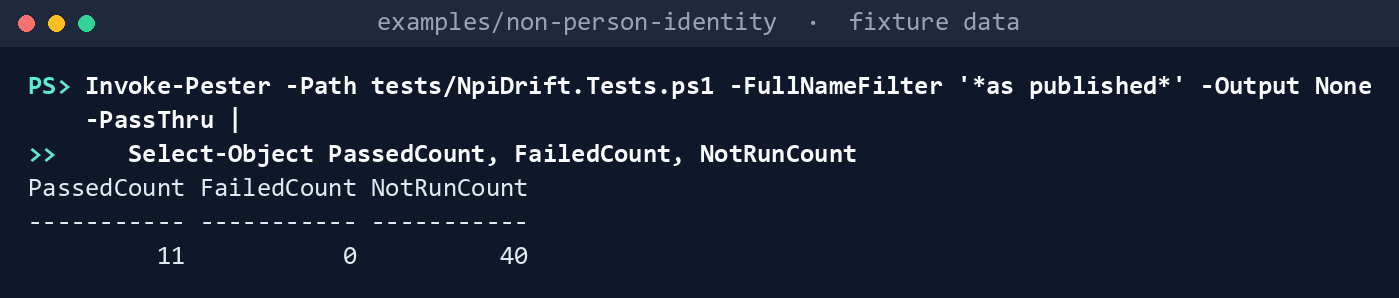
What the terminal shows, run on the kit’s fixtures (the same output as text) PassedCount 11,FailedCount 0,NotRunCount 40. Read the third and fifth tests: of the four credentials added in the second day’s window, the rule finds one.List what the run needs:
Import-Module ./powershell/NpiDrift/NpiDrift.psm1
(Get-NpiDriftPermission -Task drift-run).GraphPermissions -join ', '
What the terminal shows, run on the kit’s fixtures (the same output as text) Application.Read.All, AuditLog.Read.All, Directory.Read.All, User.Read.All. The drift task alone needsAuditLog.Read.All. Nothing ends inReadWrite.Run the first day, with no baseline:
$lab = @{ Cloud = 'gcc'; TenantId = 'c0ffee00-0000-4000-8000-000000000001'; OutputPath = 'out/runs'; InputPath = 'tests/fixtures/inputs'
    AuditFixturePath = 'tests/fixtures/ch10/audit.json'; SignInFixturePath = 'tests/fixtures/ch10/signin-activity.json'
    ContractPath = 'tests/fixtures/ch10/contract'; PipelineIdentitiesPath = 'tests/fixtures/ch10/inputs/pipeline-identities.csv' }
./Invoke-NpiDriftRun.ps1 @lab -FixturePath tests/fixtures/ch10/estate-day1.json -AsOf 2026-10-29T06:00:00Z
Run 2026-10-29T0600Z-fixture (Fixture, gcc): inventory OK, ownership OK, drift OK Audit window 2026-10-28T06:00:00Z to 2026-10-29T06:00:00Z; baseline none: this run is a baseline candidate Drift findings: 14 Finding, 4 Warn, 5 Info; baseline candidate SHA-256 604ee088ae43a964072671234833aeb71bccd082fa9ce4032a55d2fc4b146cc8 Written to <path>/out/runs/2026-10-29T0600Z-fixture (run.json lists each task's manifest hash)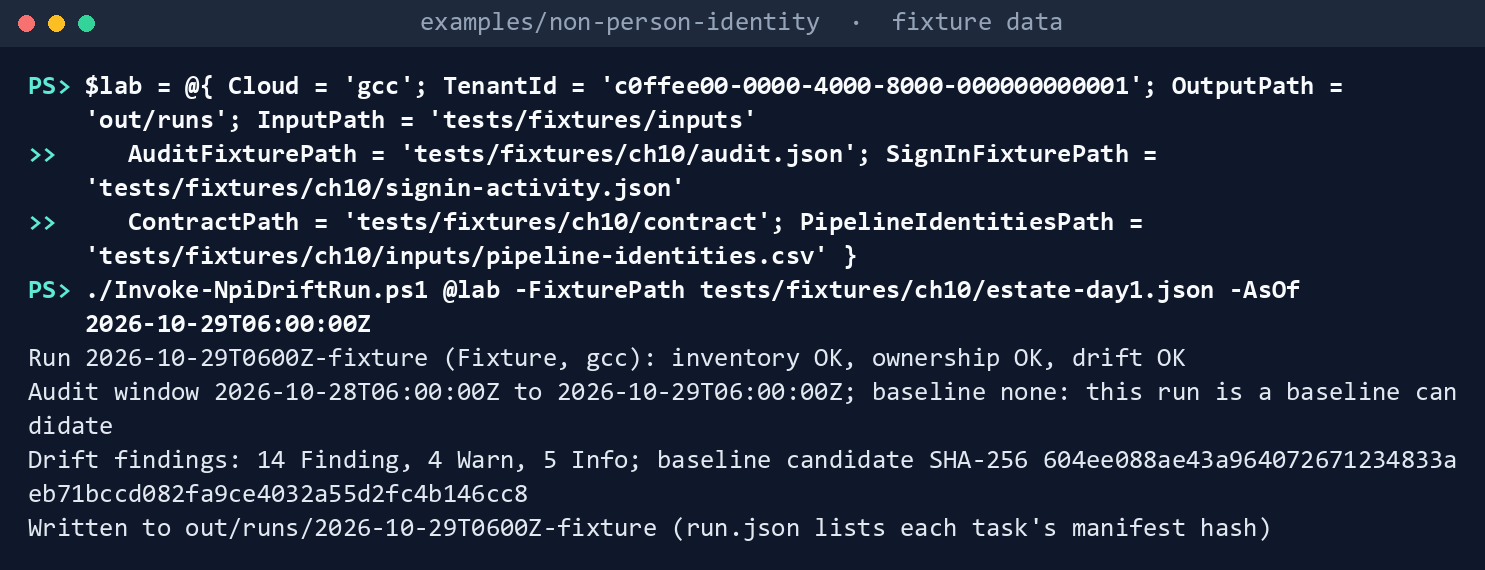
What the terminal shows, run on the kit’s fixtures (the same output as text) Approve the baseline and run the second day:
$base = 'out/runs/2026-10-29T0600Z-fixture/drift/baseline-candidate.json'
$sha = (Get-FileHash $base -Algorithm SHA256).Hash.ToLower()
./Invoke-NpiDriftRun.ps1 @lab -FixturePath tests/fixtures/ch10/estate-day2.json -AsOf 2026-10-30T06:00:00Z -BaselinePath $base -ApprovedBaselineSha256 $sha
Run 2026-10-30T0600Z-fixture (Fixture, gcc): inventory OK, ownership OK, drift OK Audit window 2026-10-29T06:00:00Z to 2026-10-30T06:00:00Z; baseline 2026-10-29T0600Z-fixture (604ee088ae43…) Drift findings: 18 Finding, 11 Warn, 5 Info; baseline candidate SHA-256 fbe346457c070d6bb7de0fbb43f35d54315b42d46e6ba26b245d33efa6dc840c Written to <path>/out/runs/2026-10-30T0600Z-fixture (run.json lists each task's manifest hash)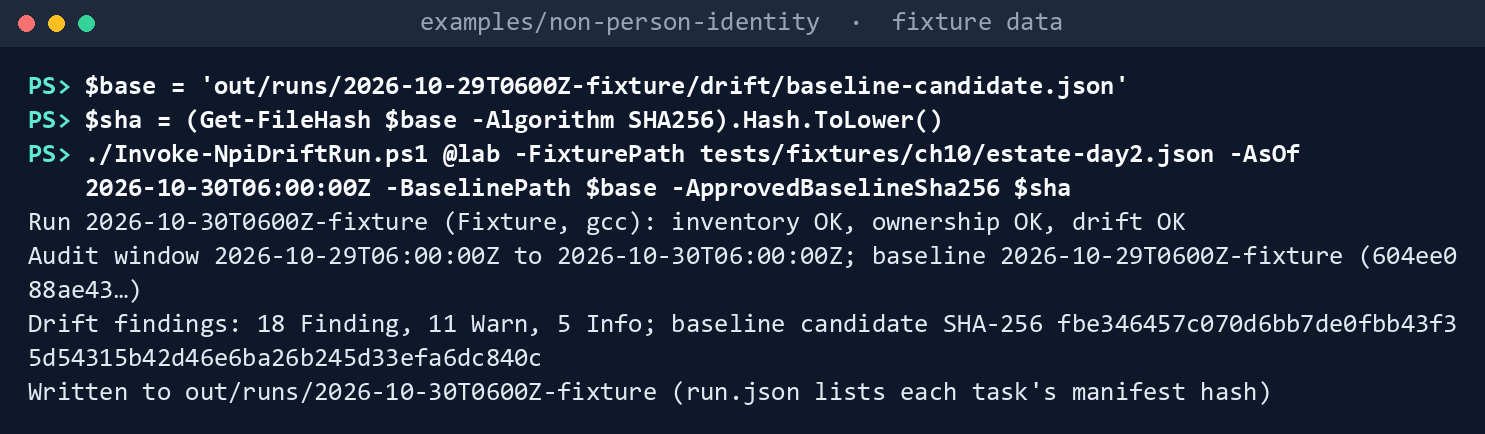
What the terminal shows, run on the kit’s fixtures (the same output as text) In a real run a second person reviews the candidate and passes you its hash. The candidate records the register’s SHA-256, and every chapter writes LF line endings on every platform, so the two hashes are the same on Windows, Linux and macOS.
Read the drift:
Get-Content out/runs/2026-10-30T0600Z-fixture/drift/findings.json -Raw | ConvertFrom-Json | Group-Object Rule, Severity | Sort-Object Name | Format-Table Name, CountName Count ---- ----- NPI-DRF-01, Warn 2 NPI-DRF-02, Warn 6 NPI-DRF-03, Finding 7 NPI-DRF-04, Warn 2 NPI-DRF-06, Finding 3 NPI-DRF-07, Finding 3 NPI-DRF-08, Finding 1 NPI-DRF-09, Info 5 NPI-DRF-09, Warn 1 NPI-REV-01, Finding 2 NPI-REV-02, Finding 1 NPI-REV-03, Finding 1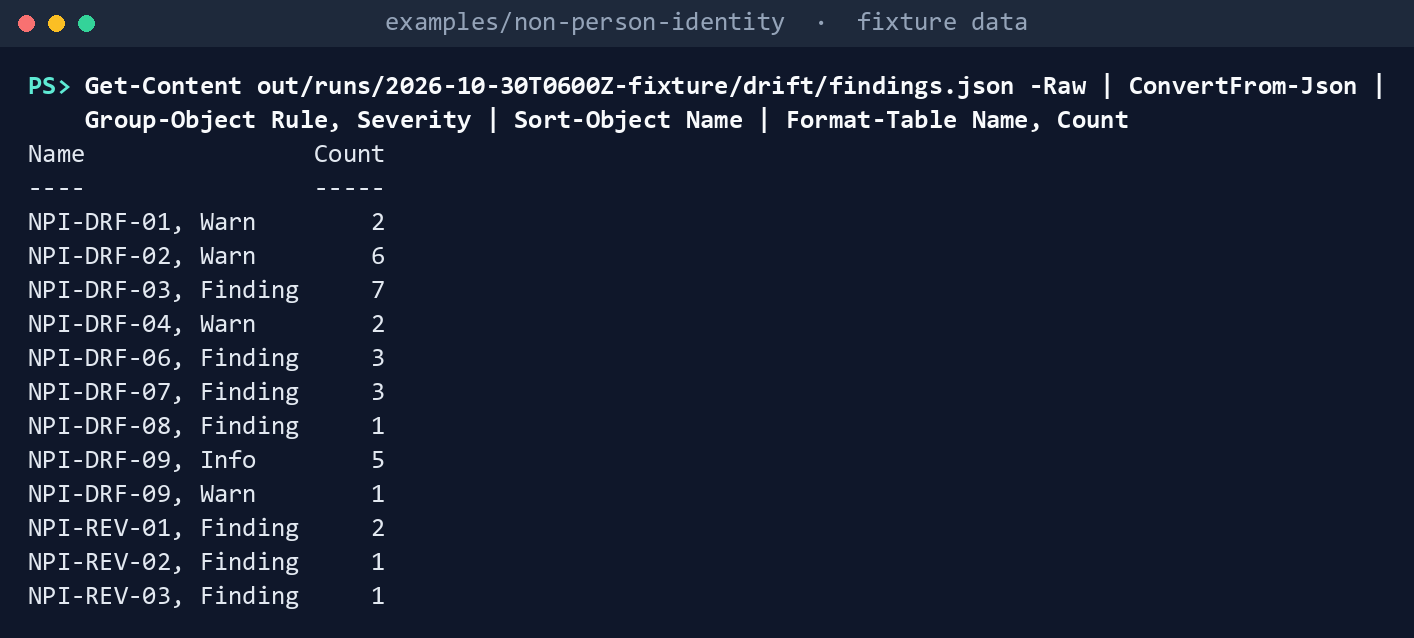
What the terminal shows, run on the kit’s fixtures (the same output as text) NPI-DRF-07 holds the three credentials added outside the pipeline: a secret a person added to HR Connector, a secret Mail Automation added to Payroll Export’s service principal, and the first secret on Build Pipeline. The pipeline’s two certificate rotations, on Deploy Bot and Vendor Portal, aren’t there: both are by the person the credential log names as the operator, and in the log. Vendor Portal’s expiring certificate (NPI-DRF-05 on day 1) is gone. NPI-DRF-08 is Mail Automation’s new grant for all users, with the two audit events behind it. NPI-DRF-04 is Legacy Reports (last sign-in May 1) and Old SAML Connector (none); Survey Tool, new since the baseline, isn’t judged. NPI-DRF-09’s Warn is the sample Chapter 05 file, refused because its fingerprint is wrong; its Infos are the five chapters that sent nothing. Open
events.json: object IDs and key IDs, no names. Openreview-cycle.json: Payroll Export’s last owners’ review is 2026-09-15; Mail Automation’s, 2026-05-01, is too old (NPI-REV-01).Compare the AI use-case inventory vintages:
./Invoke-NpiVintage.ps1 -RegisterRun out/runs/2026-10-30T0600Z-fixture/inventory -Vintage 2026 `
    -CurrentPath tests/fixtures/ch10/vintage/ai-inventory-2026.csv -PriorPath tests/fixtures/ch10/vintage/ai-inventory-2025.csv `
    -UseCaseMapPath tests/fixtures/ch10/vintage/ai-use-cases.csv -ServiceRecordsPath tests/fixtures/inputs/service-records.csv -OutputPath out/vintage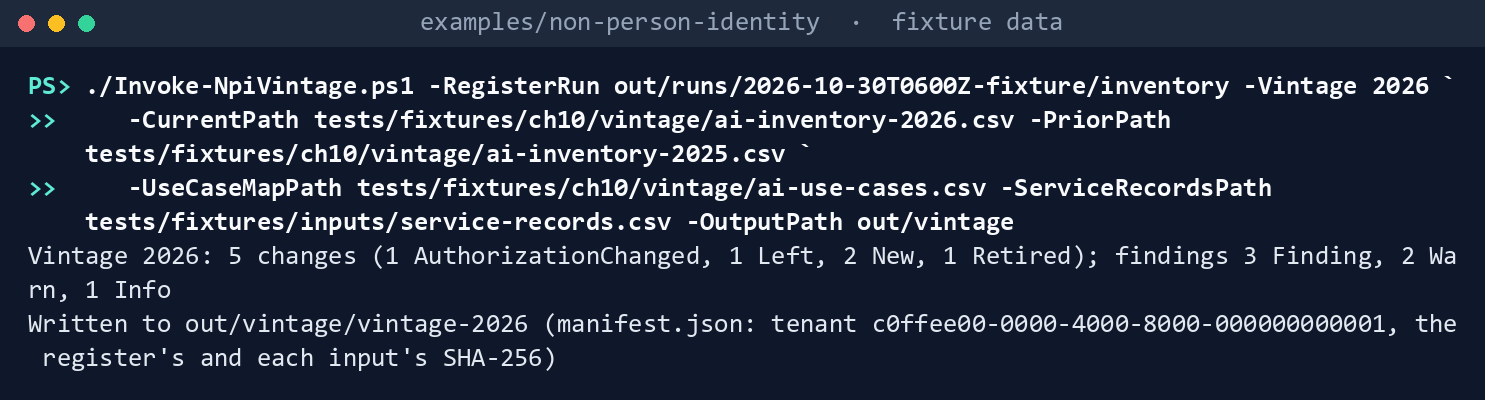
What the terminal shows, run on the kit’s fixtures (the same output as text) Vintage 2026: 5 changes (1 AuthorizationChanged, 1 Left, 2 New, 1 Retired); findings 3 Finding, 2 Warn, 1 Info. UC-005 is a new deployed agentic entry with no identity, UC-002 was retired while Mail Automation is still enabled, UC-004 left without being retired, and the Benefits Q&A agent identity maps to no use case. Deleteoutwhen you’re done; the runs in step 7 are the repository’s copies of these two, which a Pester test checks against a fresh run.Package both days, chained. In
examples/drift-pipeline:DAY1=tests/fixtures/npi-runs/2026-10-29T0600Z-fixture DAY2=tests/fixtures/npi-runs/2026-10-30T0600Z-fixture python python/npi_evidence.py package --run $DAY1 --out out/evidence python python/npi_evidence.py package --run $DAY2 \ --previous-manifest out/evidence/2026-10-29T0600Z-fixture/EVIDENCE-MANIFEST.json --out out/evidence{"evidence_manifest_sha256": "12532bfb598dc4303f1d60aa7dba1c401b055d36aa666b5893890a2666f09e32", "new": 62, "open": 62, "package": "2026-10-29T0600Z-fixture", "resolved": 0} {"evidence_manifest_sha256": "7676170f011129acd75a888fe8625acdc32297cf87c49ffbbd6a4e558375fc80", "new": 19, "open": 80, "package": "2026-10-30T0600Z-fixture", "resolved": 1}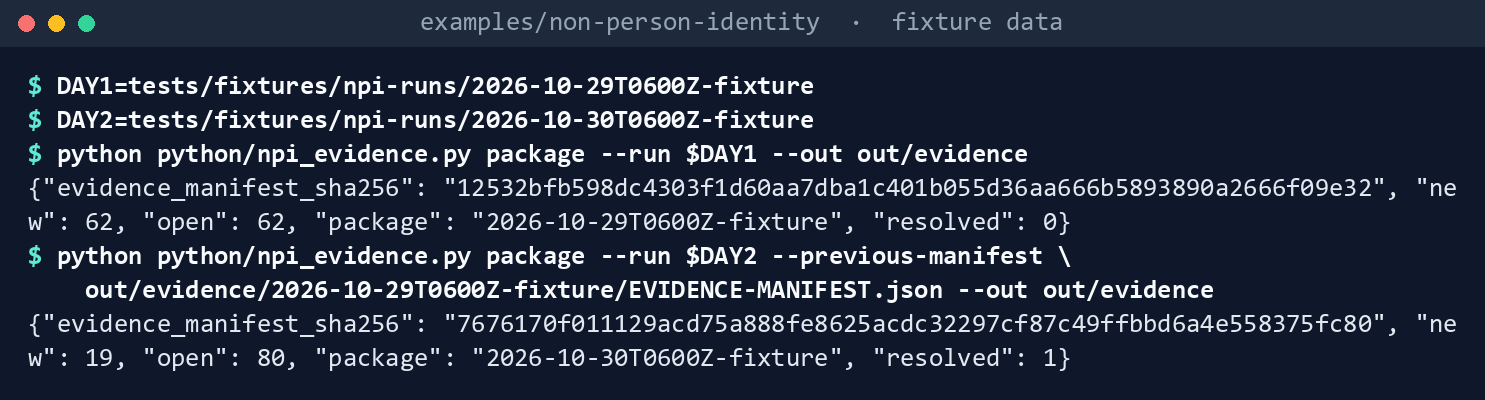
What the terminal shows, run on the kit’s fixtures (the same output as text) Every chapter’s open findings are counted, Chapters 01 and 02’s with them, and compared by fingerprint: 19 opened on day 2, one closed (Vendor Portal’s NPI-DRF-05).
Verify the second package:
python python/npi_evidence.py verify out/evidence/2026-10-30T0600Z-fixture
(cd out/evidence/2026-10-30T0600Z-fixture && sha256sum -c --quiet SHA256SUMS)
grep -c contoso out/evidence/2026-10-30T0600Z-fixture/summary.md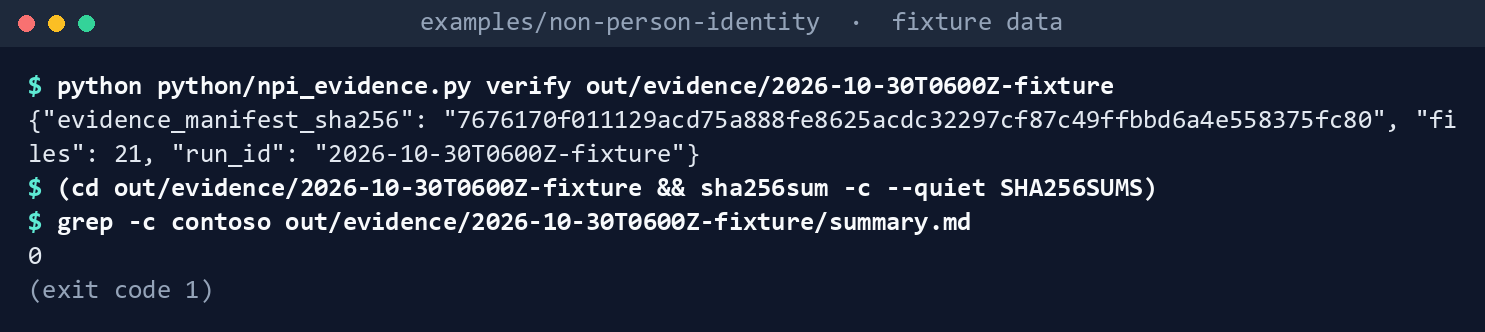
What the terminal shows, run on the kit’s fixtures (the same output as text) verifyreports 21 files and the manifest hash7676170f…,sha256sumexits0, andgrepprints0: no user principal name in the summary. InEVIDENCE-MANIFEST.json,previous.evidence_manifest_sha256is day 1’s hash andtenant_idis the fixture tenant’s.Assemble the period for the ISSO, with the vintage:
python python/npi_evidence.py period --evidence out/evidence --since 2026-10-28T06:00:00Z --until 2026-10-30T06:00:00Z \
  --vintage tests/fixtures/npi-vintage/vintage-2026 --out out/periods
cat out/periods/period-2026-10-28_2026-10-30/period-summary.md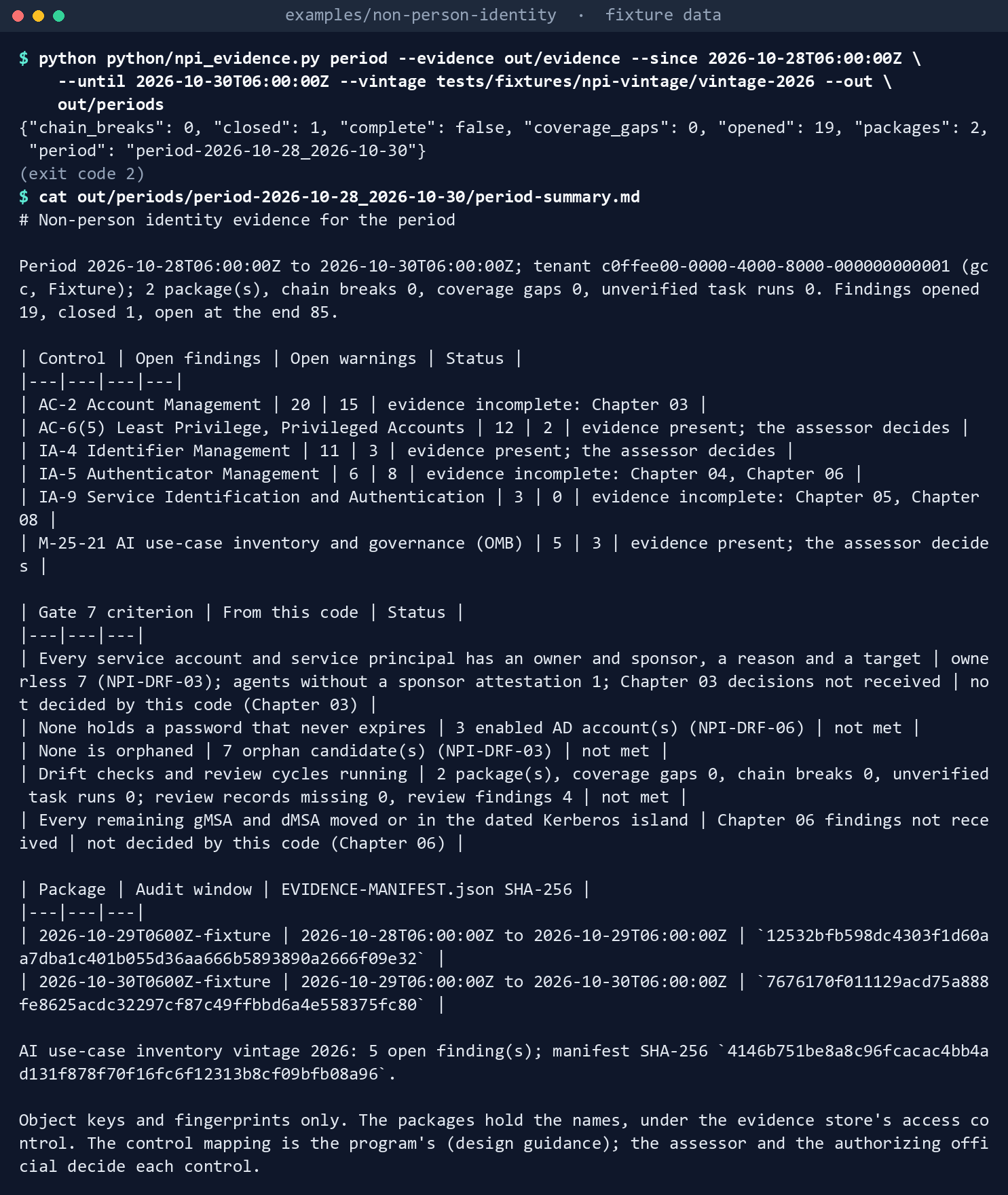
What the terminal shows, run on the kit’s fixtures (the same output as text) Exit
2:{"chain_breaks": 0, "closed": 1, "complete": false, "coverage_gaps": 0, "opened": 19, "packages": 2, ...}. The control table shows AC-2 incomplete without Chapter 03, IA-5 without Chapters 04 and 06, IA-9 without Chapters 05 and 08, and AC-6(5), IA-4 and M-25-21 with evidence present. In the Gate 7 table, “None holds a password that never expires” (three accounts) and “None is orphaned” (seven candidates) are not met, the review cycle is not met (four review findings), and the owner-and-reason and Kerberos island criteria are “not decided by this code” until Chapters 03 and 06 send their findings.Break it on purpose:
echo edited >> out/evidence/2026-10-30T0600Z-fixture/summary.md
python python/npi_evidence.py verify out/evidence/2026-10-30T0600Z-fixture
python python/npi_evidence.py package --run $DAY1 --previous-manifest out/evidence/2026-10-30T0600Z-fixture/EVIDENCE-MANIFEST.json --out out/swap
python python/workflow_lint.py workflow/npi-evidence.yml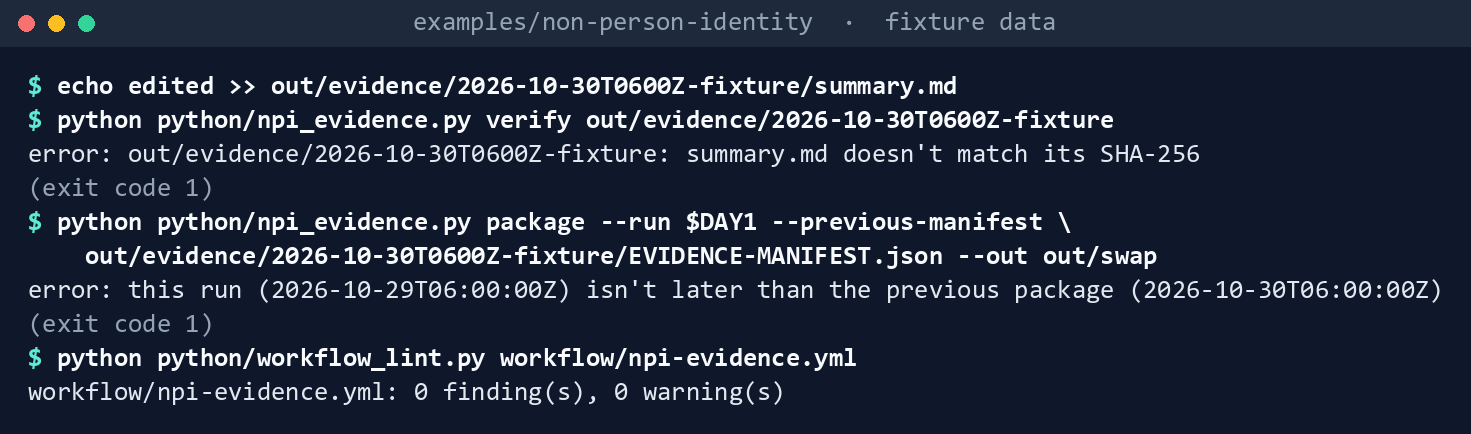
What the terminal shows, run on the kit’s fixtures (the same output as text) verifyexits1:summary.md doesn't match its SHA-256. The swapped package exits1:this run (2026-10-29T06:00:00Z) isn't later than the previous package (2026-10-30T06:00:00Z). The workflow lints with0 finding(s), 0 warning(s).Run the tests. In
examples/non-person-identity, in PowerShell:Invoke-Pester -Path tests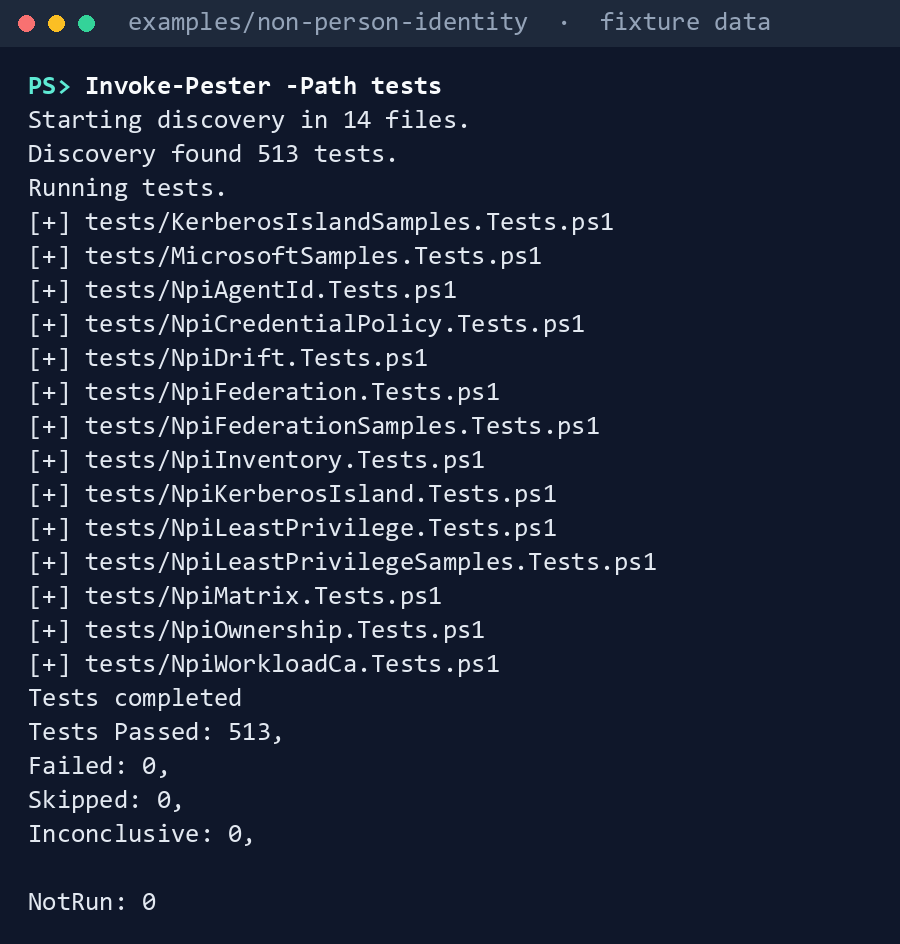
What the terminal shows, run on the kit’s fixtures (the same output as text) In
examples/drift-pipeline, in the POSIX shell:python -m pytest tests -q
What the terminal shows, run on the kit’s fixtures (the same output as text)
Expected result: the Pester run passes 513 tests, and the pytest run passes 142. Delete out in both folders when you’re done. In examples/non-person-identity:
Remove-Item -Recurse -Force out
In examples/drift-pipeline:
rm -rf out
Lab 2: test tenant
Use a test tenant in the worldwide or GCC cloud with Microsoft Entra ID P1 or P2, never production, with fictional people. The run only reads; the changes in step 2 are made by hand in the test tenant. Steps 1 to 5 run in examples/non-person-identity in PowerShell on Chapter 01’s test host; step 6 in examples/drift-pipeline in a POSIX shell. You’ll replace: <tenant-id> (the test tenant’s ID), <app-id> and <thumbprint> (the reader app you register in step 1, and its certificate), <test-domain> (the test domain’s DNS name), <inputs> (Chapter 02’s Lab 2 inputs folder), <pipeline-identities.csv> (your pipeline identities, in the format of tests/fixtures/ch10/inputs/pipeline-identities.csv), <baseline-run> and <drift-run> (the folders the runs in steps 1 and 3 write under out/runs-test), and <sha> (the baseline candidate’s SHA-256, as the reviewer passes it to you).
Every command in this lab, in order. Each step below says what it does and what to look for.
In PowerShell 7:
# Step 1: Register the reader app
Connect-MgGraph -Environment Global -TenantId <tenant-id> -ClientId <app-id> -CertificateThumbprint <thumbprint>
Connect-AzAccount -ServicePrincipal -Environment AzureCloud -Tenant <tenant-id> -ApplicationId <app-id> -CertificateThumbprint <thumbprint>
./Invoke-NpiDriftRun.ps1 -Cloud gcc -TenantId <tenant-id> -Domain <test-domain> -InputPath <inputs> -OutputPath out/runs-test -PipelineIdentitiesPath <pipeline-identities.csv>

# Step 1: Register the reader app
(Get-FileHash out/runs-test/<baseline-run>/drift/baseline-candidate.json -Algorithm SHA256).Hash.ToLower()

# Step 3: Run the drift run
Connect-MgGraph -Environment Global -TenantId <tenant-id> -ClientId <app-id> -CertificateThumbprint <thumbprint>
Connect-AzAccount -ServicePrincipal -Environment AzureCloud -Tenant <tenant-id> -ApplicationId <app-id> -CertificateThumbprint <thumbprint>
./Invoke-NpiDriftRun.ps1 -Cloud gcc -TenantId <tenant-id> -Domain <test-domain> -InputPath <inputs> -OutputPath out/runs-test `
    -BaselinePath out/runs-test/<baseline-run>/drift/baseline-candidate.json -ApprovedBaselineSha256 <sha> -PipelineIdentitiesPath <pipeline-identities.csv>

# Step 4: Check what the fixture assumed
Get-Content out/runs-test/<drift-run>/drift/events.json -Raw | ConvertFrom-Json | Format-Table ActivityDateTime, Activity, TargetType, TargetId, @{ n = 'KeysAdded'; e = { $_.KeysAdded.KeyId -join ' ' } } -Wrap
Get-Content out/runs-test/<drift-run>/drift/findings.json -Raw | ConvertFrom-Json | Where-Object Rule -in 'NPI-DRF-07', 'NPI-DRF-08' | Format-Table Rule, Object, Issue -Wrap
Get-Content out/runs-test/<drift-run>/drift/signin-activity.json -Raw | ConvertFrom-Json | ConvertTo-Json -Depth 5
In a POSIX shell (Git Bash on Windows):
# Step 6: Package and verify locally
RUN1=../non-person-identity/out/runs-test/<baseline-run>
RUN2=../non-person-identity/out/runs-test/<drift-run>
python python/npi_evidence.py package --run $RUN1 --out out/evidence-test
python python/npi_evidence.py package --run $RUN2 \
  --previous-manifest out/evidence-test/<baseline-run>/EVIDENCE-MANIFEST.json --out out/evidence-test
python python/npi_evidence.py verify out/evidence-test/<drift-run>
(cd out/evidence-test/<drift-run> && sha256sum -c --quiet SHA256SUMS)
In PowerShell 7:
# Step 7: Back it out
Remove-Item -Recurse -Force out/runs-test
In a POSIX shell (Git Bash on Windows):
# Step 7: Back it out
rm -rf out/evidence-test
Register the reader app in the tenant’s own cloud (for GCC, the worldwide Microsoft Entra admin center) with a certificate. Grant the four application permissions from Lab 1, step 2, with admin consent, and nothing else; grant Reader on the test subscription. With Chapter 02’s Lab 2 inputs in place, run step 3’s command once without
-BaselinePathand-ApprovedBaselineSha256, and have a second person review that run’sdrift/baseline-candidate.jsonand pass you its SHA-256.Entra ID > App registrations > New registration; name it and Register. Its Application (client) ID is
<app-id>.Certificates & secrets > Certificates > Upload certificate, upload a test certificate’s public part, and Add. Its Thumbprint is
<thumbprint>.API permissions > Add a permission > Microsoft Graph > Application permissions; select
Application.Read.All,AuditLog.Read.All,Directory.Read.AllandUser.Read.All, then Add permissions and Grant admin consent for your tenant.In the Azure portal, on the test subscription, Access control (IAM) > Add > Add role assignment; select Reader, Next, Select members, the app, Select, and Review + assign.
On the test host, the first run, with no baseline:
Connect-MgGraph -Environment Global -TenantId <tenant-id> -ClientId <app-id> -CertificateThumbprint <thumbprint>
Connect-AzAccount -ServicePrincipal -Environment AzureCloud -Tenant <tenant-id> -ApplicationId <app-id> -CertificateThumbprint <thumbprint>
./Invoke-NpiDriftRun.ps1 -Cloud gcc -TenantId <tenant-id> -Domain <test-domain> -InputPath <inputs> -OutputPath out/runs-test -PipelineIdentitiesPath <pipeline-identities.csv>
The reviewer reads
out/runs-test/<baseline-run>/drift/baseline-candidate.jsonand computes the hash they pass you:(Get-FileHash out/runs-test/<baseline-run>/drift/baseline-candidate.json -Algorithm SHA256).Hash.ToLower()
Make three changes to see. As a test administrator: add a client secret to a test app registration that has a certificate; add the first secret to a second test app that has no credential; and grant admin consent for a delegated Graph permission to a third test app.
- On the first test app, Certificates & secrets > Client secrets > New client secret, then Add.
- On the second test app, the same.
- On the third test app, API permissions > Add a permission > Microsoft Graph > Delegated permissions; select one permission, Add permissions, and Grant admin consent for your tenant.
Run the drift run with your own inputs and the approved baseline:
Connect-MgGraph -Environment Global -TenantId <tenant-id> -ClientId <app-id> -CertificateThumbprint <thumbprint>
Connect-AzAccount -ServicePrincipal -Environment AzureCloud -Tenant <tenant-id> -ApplicationId <app-id> -CertificateThumbprint <thumbprint>
./Invoke-NpiDriftRun.ps1 -Cloud gcc -TenantId <tenant-id> -Domain <test-domain> -InputPath <inputs> -OutputPath out/runs-test `
    -BaselinePath out/runs-test/<baseline-run>/drift/baseline-candidate.json -ApprovedBaselineSha256 <sha> -PipelineIdentitiesPath <pipeline-identities.csv>
Check what the fixture assumed. In
drift/events.json, record the exactactivityDisplayNameof each credential event, hyphen or dash (research gaps, row 91); whether a secret added to the service principal is logged asAdd service principal credentials,Update service principal, or both (row 92); and whetherKeysAddedholds the key IDs, which means theKeyDescriptionformat is the one Microsoft’s rule parses. NPI-DRF-07 should list both secrets, NPI-DRF-08 the consent. Indrift/signin-activity.json, record whether the beta report returned rows (row 93). The three files, in that order:Get-Content out/runs-test/<drift-run>/drift/events.json -Raw | ConvertFrom-Json | Format-Table ActivityDateTime, Activity, TargetType, TargetId, @{ n = 'KeysAdded'; e = { $_.KeysAdded.KeyId -join ' ' } } -Wrap Get-Content out/runs-test/<drift-run>/drift/findings.json -Raw | ConvertFrom-Json | Where-Object Rule -in 'NPI-DRF-07', 'NPI-DRF-08' | Format-Table Rule, Object, Issue -Wrap Get-Content out/runs-test/<drift-run>/drift/signin-activity.json -Raw | ConvertFrom-Json | ConvertTo-Json -Depth 5Cross-check against Learn’s procedure. In the admin center, open Monitoring & health > Audit logs, filter on the ApplicationManagement category and the window, as Learn’s security operations guide describes:30 every credential and consent event there should be in
events.json. If the tenant sends audit logs to a Log Analytics workspace, run Microsoft’s rule there: it should return the first secret’s event and not the second.Package and verify locally. Run Lab 1, steps 7 and 8, on the test run. In
examples/drift-pipeline, package both runs, chained, and verify the second:RUN1=../non-person-identity/out/runs-test/<baseline-run> RUN2=../non-person-identity/out/runs-test/<drift-run> python python/npi_evidence.py package --run $RUN1 --out out/evidence-test python python/npi_evidence.py package --run $RUN2 \ --previous-manifest out/evidence-test/<baseline-run>/EVIDENCE-MANIFEST.json --out out/evidence-test python python/npi_evidence.py verify out/evidence-test/<drift-run> (cd out/evidence-test/<drift-run> && sha256sum -c --quiet SHA256SUMS)Back it out. Remove both secrets and the consent grant from the test apps, remove the four permissions and the Reader assignment, delete the reader app’s registration and certificate, and delete
out/runs-testand the packages: they hold the tenant’s identities and owners. If you ran the sample workflow in a test repository, follow the first workbook’s Chapter 09, Lab 2 for its federated credential, an unlocked retention policy, and its back-out. The folders, inexamples/non-person-identity:Remove-Item -Recurse -Force out/runs-testAnd in
examples/drift-pipeline:rm -rf out/evidence-test
In production, lock the evidence container’s retention policy once Lab 2 passes; Learn says an unlocked policy is for testing only.31
Verified facts
| Item | Value | US Government clouds | Stage | Source |
|---|---|---|---|---|
| List directoryAudits | GET /auditLogs/directoryAudits; AuditLog.Read.All (higher: Directory.Read.All); delegated roles Reports Reader, Security Administrator, Security Reader; $filter (eq, ge, le, startswith), $top, $orderby, skiptoken |
L4 and L5 | v1.0 | 32 |
| directoryAudit filters | activityDateTime eq, ge, le; activityDisplayName eq, startswith; result success, failure, timeout |
— | v1.0 | 33 |
| Activity names | Update application - Certificates and secrets management, Add service principal credentials, Remove service principal credentials, Consent to application, Add delegated permission grant, Add app role assignment to service principal; Core Directory, ApplicationManagement |
— | — | 34 |
| Monitoring application credentials and consent | Credentials added to existing applications, high; application and service principal updates logged as two entries; alert outside normal workflows; grants of highly privileged permissions, high; end-user consent, low | — | — | 35 |
| List servicePrincipalSignInActivities | GET /reports/servicePrincipalSignInActivities; AuditLog.Read.All (higher: Directory.Read.All); Reports Reader, Security Reader, Security Administrator |
Global service only; L4 and L5 not available | Beta | 36 |
| Expiring application credentials | On an app registration and expiring within the next 30 days | — | Preview | 37 |
| Unused applications | Not used for over 90 days; managed identities and apps created within 90 days exempt; Learn’s action plan soft-deletes, then permanently deletes after 15 days | — | Preview | 38 |
| Audit log retention | Free seven days; P1 and P2 30 days | — | — | 39 |
| Agent sponsors | Attest every six to twelve months that each agent is still needed; quarterly review for missing sponsors, outdated metadata or no recent activity | — | Agent ID: see below | 40 41 |
| Graph hosts | GCC graph.microsoft.com; GCC High graph.microsoft.us; DoD dod-graph.microsoft.us |
— | — | 42 |
| Sign-in from GitHub Actions | Azure Login with a federated credential; the job needs id-token: write; US Government audience api://AzureADTokenExchangeUSGov |
Azure Government environment | Learn’s samples use azure/login@v2; the sample workflow pins v3.1.0 (Design guidance) |
43 |
| Immutable evidence | Time-based retention; a locked policy can’t be deleted or shortened; unlocked is for testing | — | GA | 44 |
Where Learn’s pages differ, recorded so a later edit doesn’t loosen the code:
- The credential activity’s name. The activity list writes
Update application - Certificates and secrets management;45 the security operations guide writesUpdate Application-Certificates and secrets management.46 The code filters on the activity list’s name, the one Microsoft’s rule also uses, and normalizes a dash; Lab 2 records the live value (research gaps, row 91). - Service principal credentials. The activity list has
Add service principal credentials;47 the security operations guide’s filter for added credentials namesUpdate Service principal/Update Application.48 The code reads the activity list’s name; Lab 2 records which a tenant logs (row 92). - Unused applications. The recommendation’s action plan deletes an unused app and permanently deletes it after 15 days;49 Learn’s governance guidance for service accounts says to disable an account, not delete it, until the review is complete.50 The code follows the stricter: unused is a Warn for the owner, and the orphan rule disables (row 95).
- Agent ID’s stage. Learn’s release notes list the Agent ID platform as generally available in April 2026, and the current Agent ID overview has no preview notice; the older overview address that showed one now opens it.51 This chapter only reads the review records Chapter 09 writes; the stage of each agent feature is Chapter 09’s to record.
- The linked rule’s path. The security operations guide links
Detections/AuditLogs/NewAppOrServicePrincipalCredential.yaml,52 which upstream now keeps as a stub pointing to the solution path pinned here.53
Federal requirements and evidence
The drift run and its packages are the evidence behind the guide’s G6 Lifecycle gate and its Evidence section: checks on the continuous monitoring cadence, filed with the date, the tenant and the version. What the ISSO receives maps the rules to controls; this table maps each Lab step and each file the code writes. The NIST SP 800-53 Rev. 5 controls are in the Moderate baseline, except IA-9, which is in none.54
| What the output proves | Requirement it supports | KSI it aligns to | Who keeps it |
|---|---|---|---|
Microsoft’s analytics rule for credentials added to applications, run as published over the fixture, is the model the credential check keeps (Lab 1, step 1: NpiDrift.Tests.ps1, 11 tests) |
SI-4 System Monitoring | KSI-IAM-SUS, KSI-MLA-RVL, KSI-SVC-EIS | The repository’s tests; the pinned copy |
The run needs four Graph read permissions, Reader and the default AD read, none a write (Lab 1, step 2, and Lab 2, step 1: Get-NpiDriftPermission -Task drift-run) |
AC-6 Least Privilege | KSI-IAM-ELP, KSI-IAM-JIT | Identity engineering; the ISSO keeps the consent record |
A fingerprint over 20 governance columns of every identity, offered as the baseline, and used only when a reviewer approves its SHA-256 (Lab 1, steps 3 and 4: drift/baseline-candidate.json; -ApprovedBaselineSha256) |
CM-2 Baseline Configuration; CM-3 Configuration Change Control | KSI-CMT-RMV, KSI-MLA-EVC, KSI-SVC-ACM (CM-2); KSI-CMT-RVP (CM-3) | The reviewer who approves the hash |
What changed since the baseline: new, changed and removed identities, ownerless ones, expiring credentials, passwords that never expire (Lab 1, step 5, and Lab 2, step 3: drift/findings.json, NPI-DRF-01 to -06) |
CA-7 Continuous Monitoring; AC-2 Account Management | KSI-MLA-EVC (CA-7); KSI-IAM-SNU (AC-2) | The identity governance office |
A credential added outside the pipeline, and a new consent grant or application permission, from the directory audit log (drift/events.json; drift/findings.json, NPI-DRF-07 and -08) |
AC-2(4) Automated Audit Actions; AU-6 Audit Record Review, Analysis, and Reporting; SI-4 | KSI-MLA-LET, KSI-MLA-RVL (AC-2(4), AU-6); KSI-IAM-SUS (SI-4) | Security operations |
Each app’s last sign-in, where the cloud has the report, and the apps unused for over 90 days (drift/signin-activity.json; NPI-DRF-04) |
AC-2(3) Disable Accounts (inactive accounts) | KSI-IAM-AAM | The identity governance office |
The last owners’ permission review, the last sponsor attestation and each agent assignment’s end date (drift/review-cycle.json; NPI-REV-01 to -04) |
AC-6(7) Review of User Privileges; AC-2 | KSI-IAM-AAM, KSI-IAM-JIT | The identity governance officer (NP7.2) |
The other chapters’ findings, read through the contract, and any evidence gap (drift/chapter-findings.json; NPI-DRF-09) |
CA-7 | KSI-MLA-EVC | The ISSO |
The run’s counts, and each task’s status with the SHA-256 of its manifest, one tenant, cloud and mode throughout (drift/summary.json; run.json; drift/manifest.json) |
CA-7; AU-9 Protection of Audit Information | KSI-MLA-EVC; KSI-MLA-OSM | The ISSO |
The year’s AI use-case inventory compared with last year’s and joined to the register (Lab 1, step 6: findings.json and changes.json in vintage-<year>/; NPI-VIN-01 to -05) |
OMB M-25-21, section 3(b)(v), as Book 17, Appendix A maps it; CM-8 System Component Inventory | KSI-PIY-GIV (CM-8) | The Chief AI Officer’s staff; the identity governance office |
Each run is packaged with a SHA-256 for every file, chained to the previous package, and a summary with no names (Lab 1, step 7: EVIDENCE-MANIFEST.json, SHA256SUMS, summary.md) |
AU-9; SI-7 Software, Firmware, and Information Integrity | KSI-MLA-OSM (AU-9); KSI-SVC-VRI (SI-7) | The ISSO |
A package can be checked with sha256sum alone, and its summary names no one (Lab 1, step 8: npi_evidence.py verify; sha256sum -c --quiet SHA256SUMS; grep -c contoso returns 0) |
AU-9; SI-7 | KSI-MLA-OSM; KSI-SVC-VRI | The ISSO |
The period’s packages are verified, the chain is whole, the windows leave no gap, and findings opened and closed are listed per control (Lab 1, step 9: PERIOD-MANIFEST.json, period-summary.md, SHA256SUMS) |
CA-7 (status reporting); AU-9 | KSI-MLA-EVC; KSI-MLA-OSM | The ISSO (NP7.4) |
An edited file and a package chained out of order are each refused, and the sample workflow lints clean (Lab 1, step 10: verify exits 1; the chained package exits 1; workflow_lint.py workflow/npi-evidence.yml reports 0 findings) |
SI-7; CM-3(2) Testing, Validation, and Documentation of Changes | KSI-SVC-VRI; KSI-CMT-VTD | The repository’s tests |
The code passes its tests in both kits (Lab 1, step 11: Invoke-Pester -Path tests; python -m pytest tests -q) |
CM-3(2) | KSI-CMT-VTD | The repository; the pull request’s checks |
The test tenant’s three changes are found: two secrets added outside the pipeline and one consent grant (Lab 2, steps 2 and 3: NPI-DRF-07 and -08 in drift/findings.json) |
AC-2(4); SI-4 | KSI-MLA-LET, KSI-MLA-RVL; KSI-IAM-SUS | Security operations |
The audit log’s activity names are recorded as the live tenant writes them (Lab 2, step 4: activityDisplayName in drift/events.json) |
AU-2 Event Logging; AU-12 Audit Record Generation | KSI-MLA-LET | Security operations |
Every credential change the admin center’s audit log shows is in the run (Lab 2, step 5: Audit logs, ApplicationManagement, compared with drift/events.json) |
AU-6 | KSI-MLA-RVL | Security operations |
The test runs package and verify like the fixture runs (Lab 2, step 6: the two packages and verify on the second) |
AU-9; SI-7 | KSI-MLA-OSM; KSI-SVC-VRI | The ISSO |
| The lab’s secrets, grant, permissions and reader app are removed when the lab ends (Lab 2, step 7) | AC-2 (remove accounts no longer needed); IA-5 Authenticator Management | KSI-IAM-JIT; KSI-IAM-SNU | Identity engineering |
KSIs are FedRAMP 20x indicators for cloud service providers. The KSI column names the indicators whose related controls, as FedRAMP lists them, include the row’s control or one of its enhancements; which output supports which indicator is the program’s mapping (design guidance), and the M-25-21 row is mapped through CM-8.55 The agency authorizes its own system and lines this evidence up with what its providers report against KSIs; it doesn’t report KSIs itself (Book 00, Appendix B). Lab steps that only delete out have no row.
Dangers
| Danger | What happens | The guard |
|---|---|---|
| A baseline nobody approved | Drift is measured against whatever the last run happened to see, and a malicious change becomes the new normal | The baseline is compared only with an approved SHA-256, for this tenant and cloud |
| A failed read reported as a fix | A 403 makes yesterday’s findings disappear | A failed task is Error with no folder; a missing contract file or review kind is NPI-DRF-09 or NPI-REV-04, never a pass |
| A day nobody read | A credential added in the gap has no evidence, and Gate 7’s “drift checks running” passes on the days that were read | Each window starts where the last ended; a gap is a coverage gap in the period |
| A window older than the log | The read returns part of the window and looks complete | Refused past 30 days; read the gap from the workspace and attach it |
| Trusting Microsoft’s rule as the check | App-initiated, first and service principal credentials go unseen | The Graph read of every initiator and target, every added key; tests pin what the rule misses |
| Every rotation alerts | The pipeline’s own rotations bury the one that matters, and the alert is ignored | Inside the pipeline needs both the credential log entry and its recorded operator as the initiator |
| An operator’s or pipeline’s identity misused | An attacker with a credential adds a key | A key not in the credential log, or added by anyone but its logged operator, is still NPI-DRF-07 |
| Names in the tracker or the summary | Owners and initiators are listed for everyone who can read it | Events keep IDs; summaries carry rule IDs, object keys and fingerprints; a test searches them for every name in the fixtures |
| A finding’s text changes and it looks new | Every date in an issue reopens it | The fingerprint is the rule and object key only |
| Another chapter’s file accepted as written | A wrong tenant, a forged fingerprint or a misnamed rule enters the evidence | Each contract file is checked whole and refused with the reason |
| A run edited, or swapped with another tenant’s | The evidence describes a run that never happened | Every file checked against its manifest, each manifest against run.json; tenant, cloud and mode must match through the chain |
| A replaced package | A bad day is quietly rewritten | The hash chain; period reports the break; a locked retention policy |
| Unused treated as delete | A seasonal app is removed | NPI-DRF-04 is a Warn; nothing here writes; retirement is the decommission process |
| The wrong cloud | A GCC High run reads graph.microsoft.com, or sends a beta call the cloud lacks |
Required cloud, no default; the sign-in report isn’t sent where Learn doesn’t list it |
Checklist
Footnotes
Microsoft Learn, “Microsoft Entra security operations guide for applications,” application credentials; application permissions; end-user consent, https://learn.microsoft.com/entra/architecture/security-operations-applications (accessed Oct 30, 2026).↩︎
Microsoft Learn, “Microsoft Entra audit log categories and activities,” Core Directory, https://learn.microsoft.com/entra/identity/monitoring-health/reference-audit-activities (accessed Oct 30, 2026; source checked in MicrosoftDocs/entra-docs).↩︎
Microsoft Learn, “Microsoft Entra data retention,” activity reports, https://learn.microsoft.com/entra/identity/monitoring-health/reference-reports-data-retention (accessed Oct 30, 2026).↩︎
Microsoft Learn, “Microsoft Entra recommendation: Renew expiring application credentials (preview),” description, https://learn.microsoft.com/entra/identity/monitoring-health/recommendation-renew-expiring-application-credential (accessed Oct 30, 2026).↩︎
Microsoft Learn, “Microsoft Entra recommendation: Remove unused applications (preview),” description and action plan, https://learn.microsoft.com/entra/identity/monitoring-health/recommendation-remove-unused-apps (accessed Oct 30, 2026).↩︎
Microsoft Learn, “Microsoft Graph national cloud deployments,” https://learn.microsoft.com/graph/deployments (accessed Oct 30, 2026; read for Chapter 01).↩︎
Microsoft Learn, “List directoryAudits,” https://learn.microsoft.com/graph/api/directoryaudit-list?view=graph-rest-1.0 (accessed Oct 30, 2026).↩︎
Microsoft Learn, “List servicePrincipalSignInActivities,” https://learn.microsoft.com/graph/api/reportroot-list-serviceprincipalsigninactivities?view=graph-rest-beta (accessed Oct 30, 2026).↩︎
Microsoft Learn, “Microsoft Entra security operations guide for applications,” application credentials; application permissions; end-user consent, https://learn.microsoft.com/entra/architecture/security-operations-applications (accessed Oct 30, 2026).↩︎
Microsoft Learn, “Microsoft Entra security operations guide for applications,” application credentials; application permissions; end-user consent, https://learn.microsoft.com/entra/architecture/security-operations-applications (accessed Oct 30, 2026).↩︎
Microsoft Learn, “List directoryAudits,” https://learn.microsoft.com/graph/api/directoryaudit-list?view=graph-rest-1.0 (accessed Oct 30, 2026).↩︎
Microsoft Learn, “Microsoft Entra recommendation: Renew expiring application credentials (preview),” description, https://learn.microsoft.com/entra/identity/monitoring-health/recommendation-renew-expiring-application-credential (accessed Oct 30, 2026).↩︎
Microsoft Learn, “Microsoft Entra recommendation: Remove unused applications (preview),” description and action plan, https://learn.microsoft.com/entra/identity/monitoring-health/recommendation-remove-unused-apps (accessed Oct 30, 2026).↩︎
Microsoft, Azure/Azure-Sentinel,
Solutions/Microsoft Entra ID/Analytic Rules/NewAppOrServicePrincipalCredential.yamlat commit2985095e602f32c493e43998856ac9bcf1382afd(October 30, 2026; the rule last changed January 8, 2024), MIT License, https://github.com/Azure/Azure-Sentinel/blob/2985095e602f32c493e43998856ac9bcf1382afd/Solutions/Microsoft%20Entra%20ID/Analytic%20Rules/NewAppOrServicePrincipalCredential.yaml (accessed Oct 30, 2026); pinned copy inexamples/third_party/sentinel-app-credential-rule.↩︎Microsoft Learn, “Microsoft Entra security operations guide for applications,” application credentials; application permissions; end-user consent, https://learn.microsoft.com/entra/architecture/security-operations-applications (accessed Oct 30, 2026).↩︎
Microsoft Learn, “Microsoft Entra data retention,” activity reports, https://learn.microsoft.com/entra/identity/monitoring-health/reference-reports-data-retention (accessed Oct 30, 2026).↩︎
Microsoft Learn, “directoryAudit resource type,” properties, https://learn.microsoft.com/graph/api/resources/directoryaudit?view=graph-rest-1.0 (accessed Oct 30, 2026).↩︎
Microsoft Learn, “Microsoft Entra data retention,” activity reports, https://learn.microsoft.com/entra/identity/monitoring-health/reference-reports-data-retention (accessed Oct 30, 2026).↩︎
Microsoft Learn, “List servicePrincipalSignInActivities,” https://learn.microsoft.com/graph/api/reportroot-list-serviceprincipalsigninactivities?view=graph-rest-beta (accessed Oct 30, 2026).↩︎
Microsoft Learn, “List directoryAudits,” https://learn.microsoft.com/graph/api/directoryaudit-list?view=graph-rest-1.0 (accessed Oct 30, 2026).↩︎
Microsoft Learn, “List servicePrincipalSignInActivities,” https://learn.microsoft.com/graph/api/reportroot-list-serviceprincipalsigninactivities?view=graph-rest-beta (accessed Oct 30, 2026).↩︎
Microsoft Learn, “List directoryAudits,” https://learn.microsoft.com/graph/api/directoryaudit-list?view=graph-rest-1.0 (accessed Oct 30, 2026).↩︎
Microsoft Learn, “Microsoft Entra recommendation: Remove unused applications (preview),” description and action plan, https://learn.microsoft.com/entra/identity/monitoring-health/recommendation-remove-unused-apps (accessed Oct 30, 2026).↩︎
Microsoft Learn, “Microsoft Entra recommendation: Renew expiring application credentials (preview),” description, https://learn.microsoft.com/entra/identity/monitoring-health/recommendation-renew-expiring-application-credential (accessed Oct 30, 2026).↩︎
Microsoft Learn, “Microsoft Entra security operations guide for applications,” application credentials; application permissions; end-user consent, https://learn.microsoft.com/entra/architecture/security-operations-applications (accessed Oct 30, 2026).↩︎
Microsoft Learn, “Microsoft Entra security operations guide for applications,” application credentials; application permissions; end-user consent, https://learn.microsoft.com/entra/architecture/security-operations-applications (accessed Oct 30, 2026).↩︎
Microsoft Learn, “Best practices for Microsoft Entra Agent ID,” govern the agent lifecycle, https://learn.microsoft.com/entra/agent-id/best-practices-agent-id (accessed Oct 30, 2026).↩︎
Microsoft Learn, “Store business-critical blob data with immutable storage in a write once, read many (WORM) state,” https://learn.microsoft.com/azure/storage/blobs/immutable-storage-overview (accessed Oct 30, 2026; read for the first workbook’s Chapter 09).↩︎
Microsoft Learn, “Use the Azure Login action with OpenID Connect,” https://learn.microsoft.com/azure/developer/github/connect-from-azure-openid-connect (accessed Oct 31, 2026).↩︎
Microsoft Learn, “Microsoft Entra security operations guide for applications,” application credentials; application permissions; end-user consent, https://learn.microsoft.com/entra/architecture/security-operations-applications (accessed Oct 30, 2026).↩︎
Microsoft Learn, “Store business-critical blob data with immutable storage in a write once, read many (WORM) state,” https://learn.microsoft.com/azure/storage/blobs/immutable-storage-overview (accessed Oct 30, 2026; read for the first workbook’s Chapter 09).↩︎
Microsoft Learn, “List directoryAudits,” https://learn.microsoft.com/graph/api/directoryaudit-list?view=graph-rest-1.0 (accessed Oct 30, 2026).↩︎
Microsoft Learn, “directoryAudit resource type,” properties, https://learn.microsoft.com/graph/api/resources/directoryaudit?view=graph-rest-1.0 (accessed Oct 30, 2026).↩︎
Microsoft Learn, “Microsoft Entra audit log categories and activities,” Core Directory, https://learn.microsoft.com/entra/identity/monitoring-health/reference-audit-activities (accessed Oct 30, 2026; source checked in MicrosoftDocs/entra-docs).↩︎
Microsoft Learn, “Microsoft Entra security operations guide for applications,” application credentials; application permissions; end-user consent, https://learn.microsoft.com/entra/architecture/security-operations-applications (accessed Oct 30, 2026).↩︎
Microsoft Learn, “List servicePrincipalSignInActivities,” https://learn.microsoft.com/graph/api/reportroot-list-serviceprincipalsigninactivities?view=graph-rest-beta (accessed Oct 30, 2026).↩︎
Microsoft Learn, “Microsoft Entra recommendation: Renew expiring application credentials (preview),” description, https://learn.microsoft.com/entra/identity/monitoring-health/recommendation-renew-expiring-application-credential (accessed Oct 30, 2026).↩︎
Microsoft Learn, “Microsoft Entra recommendation: Remove unused applications (preview),” description and action plan, https://learn.microsoft.com/entra/identity/monitoring-health/recommendation-remove-unused-apps (accessed Oct 30, 2026).↩︎
Microsoft Learn, “Microsoft Entra data retention,” activity reports, https://learn.microsoft.com/entra/identity/monitoring-health/reference-reports-data-retention (accessed Oct 30, 2026).↩︎
Microsoft Learn, “Best practices for Microsoft Entra Agent ID,” govern the agent lifecycle, https://learn.microsoft.com/entra/agent-id/best-practices-agent-id (accessed Oct 30, 2026).↩︎
Microsoft Learn, “Microsoft Entra releases and announcements,” April 2026, https://learn.microsoft.com/entra/fundamentals/whats-new#april-2026, and “What is Microsoft Entra Agent ID?,” https://learn.microsoft.com/entra/agent-id/what-is-microsoft-entra-agent-id (both accessed Oct 31, 2026).↩︎
Microsoft Learn, “Microsoft Graph national cloud deployments,” https://learn.microsoft.com/graph/deployments (accessed Oct 30, 2026; read for Chapter 01).↩︎
Microsoft Learn, “Use the Azure Login action with OpenID Connect,” https://learn.microsoft.com/azure/developer/github/connect-from-azure-openid-connect (accessed Oct 31, 2026).↩︎
Microsoft Learn, “Store business-critical blob data with immutable storage in a write once, read many (WORM) state,” https://learn.microsoft.com/azure/storage/blobs/immutable-storage-overview (accessed Oct 30, 2026; read for the first workbook’s Chapter 09).↩︎
Microsoft Learn, “Microsoft Entra audit log categories and activities,” Core Directory, https://learn.microsoft.com/entra/identity/monitoring-health/reference-audit-activities (accessed Oct 30, 2026; source checked in MicrosoftDocs/entra-docs).↩︎
Microsoft Learn, “Microsoft Entra security operations guide for applications,” application credentials; application permissions; end-user consent, https://learn.microsoft.com/entra/architecture/security-operations-applications (accessed Oct 30, 2026).↩︎
Microsoft Learn, “Microsoft Entra audit log categories and activities,” Core Directory, https://learn.microsoft.com/entra/identity/monitoring-health/reference-audit-activities (accessed Oct 30, 2026; source checked in MicrosoftDocs/entra-docs).↩︎
Microsoft Learn, “Microsoft Entra security operations guide for applications,” application credentials; application permissions; end-user consent, https://learn.microsoft.com/entra/architecture/security-operations-applications (accessed Oct 30, 2026).↩︎
Microsoft Learn, “Microsoft Entra recommendation: Remove unused applications (preview),” description and action plan, https://learn.microsoft.com/entra/identity/monitoring-health/recommendation-remove-unused-apps (accessed Oct 30, 2026).↩︎
Microsoft Learn, “Governing Microsoft Entra service accounts,” build a lifecycle process, https://learn.microsoft.com/entra/architecture/govern-service-accounts (accessed Oct 30, 2026; read for Chapter 02).↩︎
Microsoft Learn, “Microsoft Entra releases and announcements,” April 2026, https://learn.microsoft.com/entra/fundamentals/whats-new#april-2026, and “What is Microsoft Entra Agent ID?,” https://learn.microsoft.com/entra/agent-id/what-is-microsoft-entra-agent-id (both accessed Oct 31, 2026).↩︎
Microsoft Learn, “Microsoft Entra security operations guide for applications,” application credentials; application permissions; end-user consent, https://learn.microsoft.com/entra/architecture/security-operations-applications (accessed Oct 30, 2026).↩︎
Microsoft, Azure/Azure-Sentinel,
Solutions/Microsoft Entra ID/Analytic Rules/NewAppOrServicePrincipalCredential.yamlat commit2985095e602f32c493e43998856ac9bcf1382afd(October 30, 2026; the rule last changed January 8, 2024), MIT License, https://github.com/Azure/Azure-Sentinel/blob/2985095e602f32c493e43998856ac9bcf1382afd/Solutions/Microsoft%20Entra%20ID/Analytic%20Rules/NewAppOrServicePrincipalCredential.yaml (accessed Oct 30, 2026); pinned copy inexamples/third_party/sentinel-app-credential-rule.↩︎National Institute of Standards and Technology, SP 800-53B Moderate baseline, release 5.2.0 OSCAL profile (includes AC-2, AC-2(3), AC-2(4), AC-6, AC-6(7), AU-2, AU-6, AU-9, AU-12, CA-7, CM-2, CM-3, CM-3(2), CM-8, IA-5, SI-4 and SI-7; IA-9 is not in it), https://github.com/usnistgov/oscal-content/blob/main/nist.gov/SP800-53/rev5/json/NIST_SP-800-53_rev5_MODERATE-baseline_profile.json (read November 2, 2026).↩︎
FedRAMP, “Key Security Indicators,” FedRAMP Consolidated Rules for 2026, indicator statements and “Related SP 800-53 Controls,” https://www.fedramp.gov/2026/reference/key-security-indicators/ (read November 2, 2026).↩︎