Federal Modernization Workbook
Chapter 04 — App Management Policies and Certificate Rotation
A policy nobody can diff is a setting somebody changed once, and a certificate nobody rotates is an outage with a date on it.
The code behind the project plan’s tasks NP3.1, “new client secrets and symmetric keys blocked, certificates capped at 180 days for new apps; app instance property lock on owned apps,” and NP3.7, “certificates in Key Vault, rotated by the pipeline, raised before expiry and approved by the owner.” You start with Microsoft’s own samples: the Graph requests for the tenant default app management policy and app-specific policies, Learn’s procedure for configuring them, its request for adding a certificate to an app, and the Az.KeyVault examples that create a certificate from a policy. The repository keeps pinned copies, and you send them to fakes to see what they do and what they leave out. Then you use examples/non-person-identity for the rest: the policy as reviewed JSON with a diff, a dry run and -Apply, and rotation through Key Vault with an owner’s approval and an overlap. Lab 1 runs on a laptop with no tenant; Lab 2 uses a test tenant and a test key vault.
Jump to a slide (18)
Deck · Narrated deck (about 11 minutes, captions) · Script · Captions. Recorded on November 2, 2026 from the approved chapter.
Goal and audience
Goal. By the end of this chapter you can hold the tenant’s app management policy in a reviewed file, compare it with the tenant, and apply the difference through a write path that can’t loosen it. You can find from code every certificate that needs rotating, and carry each one through the plan’s rotation: raised before expiry, approved by an owner, renewed in Key Vault, added beside the old one, verified, and the old one removed after the overlap. For each rule you can say whether it is Learn’s, Learn’s sample, or the program’s design.
Audience. Developers who build the project’s credential code, the identity engineers who run it, the application owners who approve rotations, and the ISSOs who review the evidence. You should read PowerShell 7 and know Chapters 01 and 02. You don’t need a tenant until Lab 2.
The rules the code holds
What an app management policy is. Learn describes two kinds. The tenant default policy (tenantAppManagementPolicy) always exists, is disabled by default, and holds separate restrictions for application objects (apps homed in the tenant) and service principal objects (apps provisioned from another tenant). An app management policy (appManagementPolicy) is assigned to one application or service principal and overrides the default for the restrictions it defines; a restriction it sets to disabled doesn’t apply to that app, and one it doesn’t define falls back to the default. Only one app management policy can be assigned to an app. Restrictions apply to apps created after a date you choose, and neither kind blocks token issuance for an existing app: only the create or update that breaks the policy is refused.1 2 On v1.0, password credentials take passwordAddition, passwordLifetime, symmetricKeyAddition, symmetricKeyLifetime and customPasswordAddition; key credentials take asymmetricKeyLifetime, whose maxLifetime is an ISO 8601 duration.3 4 Beta adds more, among them trustedCertificateAuthority, audiences, the redirect URI restrictions and an audit state that evaluates a restriction without enforcing it.5
The program’s policy (Design guidance). Book 04, Chapter 05 adopts Microsoft’s recommended settings for every app created after the program’s effective date: new client secrets and symmetric keys blocked, certificates capped at 180 days. The code sets them on both application and service principal objects, because Learn’s admin center expects the application and service principal copies of a restriction to be in the same state and refuses to edit them otherwise.6 An app that can’t use a certificate gets a documented, time-limited exception (Book 04, Chapter 06): here, an app management policy with a record number and an end date. Existing workloads move onto certificates rotated at least annually while they’re remediated (Book 02, Chapter 09), so the cap the rotation checks is 180 days for apps created on or after the effective date and 365 days for older ones.
The app instance property lock. An app’s owner can lock the sensitive properties of its service principals (credentials used for verification and for signing, and the token encryption key ID) against change in any tenant, through the application’s servicePrincipalLockConfiguration. Since June 2026 the lock is enabled by default for new applications.7 8 Book 04 locks all sensitive properties on every app registration the program owns (Book 04, Chapter 05); the code reads “owned apps” as every app registration in Chapter 01’s register (research gaps, row 34).
Licensing. Learn’s Workload ID FAQ lists application management policies as a capability of both the free edition and Workload ID Premium.9 None of the Graph policy pages, nor Learn’s configuration procedure, names a license.10 11 So this chapter needs no Workload ID Premium, and decision D-NP4 doesn’t gate it (research gaps, row 31). Premium is what Chapter 08’s Conditional Access for workload identities needs.
Rotation (Design guidance). Book 04’s lifecycle has a fourth stage: rotation “is raised automatically before expiry and approved by the owner, so the app never depends on someone remembering” (Book 04, Chapter 05). Key Vault can renew a certificate on a schedule through its certificate policy’s lifetime actions,12 but Entra ID renews nothing on the app registration (Book 04’s certificates table). The code joins the two: a request raised raiseDays (60) before expiry; an approval from an owner who is an enabled member; the next version created in Key Vault from the vault’s existing policy; the new certificate added beside the old one; the owner’s record that the workload signs in with it; and, overlapDays (7) after the new certificate started, the old one removed. Secrets aren’t rotated in place: each is reported for replacement by a certificate or a federated credential (Chapter 05).
Which cloud, for these reads and writes
The policy and application calls go to Graph at graph.microsoft.com for Microsoft 365 GCC; GCC High and DoD use graph.microsoft.us and dod-graph.microsoft.us.13 Every policy page this chapter calls lists the global service, US Government L4 and US Government L5.14 15 16 17 Key Vault’s data plane is <vault>.vault.azure.net in commercial Azure, which GCC’s estate uses, and <vault>.vault.usgovcloudapi.net in Azure Government.18 The code takes the cloud as a required parameter and builds both hosts from it.
Start with Microsoft’s sample
What Microsoft gives you
Five Learn sources hold Microsoft’s procedure for this chapter. Update tenantAppManagementPolicy has the v1.0 PATCH that enables the default policy with secrets blocked and certificates capped; Create appManagementPolicy and Assign appliesTo create an app-specific policy and attach it to an app.19 20 21 Configure restrictions on how applications can be configured is the procedure, in the admin center and in Graph: block password addition tenant-wide, grant an app or a caller an exception, apply a restriction to one app, list custom policies, and put the policy back into the state the admin center expects.22 Add a certificate to an app by using Microsoft Graph PATCHes an application’s keyCredentials, once replacing the existing certificates and once keeping one.23 For Key Vault, Learn’s tutorial Configure certificate autorotation in Key Vault sets a certificate’s validity and its renewal action,24 and the Az.KeyVault examples create a certificate from a policy and set a policy.25 26 Chapter 02’s pinned Graph tutorial adds the lock samples and a default policy sample.27
The pinned copies
The samples exist only inside their pages, so the repository pins the page sources, unmodified:
examples/third_party/graph-app-credential-policy-pages: the three policy pages and the certificate how-to from microsoftgraph/microsoft-graph-docs-contrib at commitbb35043, with the repository’s licenses (MIT for code, Creative Commons Attribution 4.0 for documentation).28examples/third_party/entra-app-management-policies-page: Learn’s procedure from MicrosoftDocs/entra-docs at commit7f78b50(MIT).29examples/third_party/az-keyvault-certificate-help: theAdd-AzKeyVaultCertificateandSet-AzKeyVaultCertificatePolicyhelp pages from Azure/azure-powershell at commit3c18cda, under the Microsoft Software License Terms for Azure PowerShell.30 Learn’s Key Vault autorotation tutorial left the public azure-docs repository in August 2024 and isn’t published elsewhere, so it is cited and not pinned (research gaps, row 39).
Each snapshot.json records every file’s SHA-256, checked against the upstream git blob hashes, and a unit test checks them. The weekly source watch reports new commits to each upstream file. Updating a copy is a reviewed pull request.
tests/CredentialPolicySampleHarness.ps1 finds each HTTP request in a pinned page, by its name or its place, parses the method, URL, headers and body, and sends it unmodified to the fake Graph, which evaluates the v1.0 restriction types, replaces a restriction collection as a PATCH does, holds one policy per app, and refuses a new certificate longer than the effective cap. The Az examples run against stand-ins for the cmdlets that call a fake Key Vault.
What it leaves to you
Each row is pinned by a test in the Microsoft samples block of tests/NpiCredentialPolicy.Tests.ps1; what the code adds in each row is pinned in its blocks for the policy, the rotation and the write path.
| Microsoft’s sample, as published | Why it matters | What examples/non-person-identity adds |
|---|---|---|
| Update tenantAppManagementPolicy enables the default with secrets blocked and certificates capped | — | Kept as the model for the PATCH |
| Its start dates (2015 to 2021) reach existing apps, and its cap is 30 days | Sent as written, it refuses the next 180-day certificate on an app created years ago | One effective date from the reviewed file, for new apps only; existing apps are rotated under their own cap |
Sets no state on any restriction |
What Graph does with a restriction without a state isn’t stated (research gaps, row 32) | Every restriction carries an explicit state |
| Isn’t strict JSON (a trailing comma) | PowerShell forgives it; a JSON library doesn’t | Bodies are built as data and serialized |
| Sets application restrictions only | The admin center expects the application and service principal copies in the same state | Both objects get the same restrictions |
| Learn’s procedure PATCH names two restrictions; a PATCH replaces the collection, so a restriction it doesn’t name is dropped | Learn says to include the existing ones; a script that forgets turns one off | The body carries every restriction the tenant has, and the writer refuses a body that loosens or drops one |
Learn’s procedure sends every policy request to /beta |
Beta isn’t supported in production | v1.0 throughout |
| Create appManagementPolicy makes a policy | — | Kept as the model for an exception, with the record and end date in the name and description |
Assign appliesTo sends a literal {id}, and a second policy on the same app is refused |
An app takes one policy | The plan checks every policy’s assignments first (ForeignPolicyAssigned, NPI-POL-04) |
The Graph tutorial’s default policy sample uses certificateLifetime, which v1.0 refuses, and labels a PATCH with a read permission |
Copied, it fails, or it’s run with the wrong permission | Only v1.0 restriction types; the call list holds Policy.ReadWrite.ApplicationConfiguration for writes and Policy.Read.All for reads |
The tutorial locks one app’s properties on /beta and reads nothing first |
The plan’s task is every app the program owns | The lock state of every app registration in the register, read on v1.0; only unlocked or partly locked apps are written |
Every Graph sample hard-codes graph.microsoft.com |
The host is wrong for GCC High and DoD | The host from the cloud table, checked on every request |
| Add a certificate’s first PATCH replaces every certificate the app had | The old certificate disappears the moment the new one is added: no overlap | An attach keeps every existing certificate with its key and adds exactly one |
Its second PATCH keeps the old certificate by a thumbprint written as hex text, with no keyId |
How Graph matches a kept entry isn’t stated (research gaps, row 37) | Kept certificates are sent with keyId, type, usage, key and displayName |
| Its certificate lasts 364 days; the page allows up to a year | Over the 180-day cap for new apps | Lifetime checked against the app’s cap before the attach (LifetimeOverCap) |
| Add-AzKeyVaultCertificate’s example asks for 6 months, more than 180 days, as its own output shows | Six months is 181 to 184 days | A certificate policy longer than the cap stops the renewal (KeyVaultPolicyOverCap; research gaps, row 39) |
| Its code and output share one block | It can’t be run as published | The harness runs its command lines |
| Set-AzKeyVaultCertificatePolicy’s example sets no lifetime action | Nothing renews and nobody is told | The rotation is raised by this code from the register, whatever the vault’s lifetime actions |
| Key Vault renews; nothing in the samples puts the certificate on the app registration, asks the owner or removes the old one | The plan’s NP3.7 is left to you | The rotation plan: raise, approve, renew, attach, verify, overlap, remove |
The verdict. Use the v1.0 policy requests and the certificate PATCH as the models for the writes, and Learn’s procedure for what the admin center expects. Don’t run them as published: their dates reach existing apps, their PATCHes replace collections, and none of them raises, approves or overlaps a rotation.
The code: what examples/non-person-identity adds
This chapter’s code is powershell/NpiCredentialPolicy/NpiCredentialPolicy.psm1; three entry scripts, Invoke-NpiCredentialPolicy.ps1 and Invoke-NpiRotation.ps1, which only read, and Invoke-NpiCredentialAction.ps1, the write path; the call list config/calls-ch04.json; the reviewed policy config/app-management-policy.json; the rotation rules config/rotation.json; and three input files kept with the records.
The inputs
| File | Who keeps it | What it holds |
|---|---|---|
| Chapter 01’s run folder | The pipeline | register.json and manifest.json; both reads refuse a register whose SHA-256 isn’t the manifest’s |
config/app-management-policy.json |
Identity engineering, through a reviewed pull request | The effective date, the default restrictions and the objects they apply to, each exception with its record, app, end date and restrictions, and the lock |
config/rotation.json |
Identity engineering | raiseDays 60, overlapDays 7, approvalValidDays 30, maxLifetimeDays 180, legacyMaxLifetimeDays 365, maxPlanAgeDays 7 |
certificate-bindings.csv |
Application owners | For each app: AppObjectId, Vault, CertificateName |
rotation-approvals.csv |
Application owners | RequestId, ApprovedBy, ApprovedOn |
rotation-verifications.csv |
Application owners | RequestId, NewThumbprint, VerifiedBy, VerifiedOn: the workload signs in with the new certificate |
A request ID is ROT:<app object ID>:<keyId of the certificate being replaced>, so it stays the same from the first raise to the removal.
The policy: read, compare, plan
Get-NpiAppPolicyState reads, through a reader for the app-policy task, the default policy, every app management policy with what it applies to, and each app registration’s createdDateTime and servicePrincipalLockConfiguration. Compare-NpiAppPolicy compares the default with the file, restriction by restriction, on both objects:
| Change | Meaning | In the PATCH body |
|---|---|---|
Add, Change |
The tenant lacks the program’s restriction, or holds a weaker one | The program’s restriction, state explicit, the effective date |
KeepStricter |
The tenant already holds it enabled, from an earlier date, or with a shorter lifetime | The tenant’s, unchanged |
KeepExisting |
A restriction the file doesn’t name | The tenant’s, unchanged |
Same |
Nothing to do | Unchanged |
The body is merged: every restriction the tenant already has is in it, so the PATCH never drops one and never loosens one. New-NpiPolicyPlan turns the diff, the exceptions and the locks into actions. Nothing in it writes.
| Action | When | Writes? |
|---|---|---|
PatchDefaultPolicy |
The diff has an Add or Change. Precheck: the SHA-256 of the default policy as it was read |
Yes, after review |
DefaultPolicyInPlace |
The default already holds the file’s restrictions | No |
CreateAppPolicy, AssignAppPolicy |
An exception in force with no policy yet, or not yet assigned | Yes, after review |
AppPolicyInPlace, AssignmentInPlace, AppPolicyDrift |
The exception’s policy exists, is assigned, or differs from the file (a person updates it) | No |
ForeignPolicyAssigned |
The app already holds another policy, and an app takes one | No |
ExceptionExpired |
The exception’s end date has passed: a person removes the assignment through the reviewed process | No |
LockApp |
An app registration with no lock, a disabled lock, or only some properties locked | Yes, after review |
AlreadyLocked |
All sensitive properties locked | No |
| Rule | Severity | What it flags |
|---|---|---|
| NPI-POL-01 | Finding | A default restriction the tenant doesn’t hold yet |
| NPI-POL-02 | Warn | An app management policy that isn’t in the reviewed file, with the apps it applies to. The code never changes or deletes it |
| NPI-POL-03 | Finding | An expired exception whose policy is still assigned |
| NPI-POL-04 | Finding | An exception that can’t be assigned: the app holds another policy |
| NPI-POL-05 | Info | A restriction kept as the tenant has it (KeepStricter, KeepExisting) |
| NPI-POL-06 | Finding | An app registration without the full app instance property lock |
Rotation: the plan
New-NpiRotationPlan reads, through a reader for the rotation task, each app registration in the register with $select=keyCredentials,passwordCredentials (a credential’s key comes back only on a single-object read that selects it31), its Key Vault certificate’s current version from the binding, its owners, and the approver. It matches an app’s certificate to Key Vault’s by thumbprint: Key Vault’s x5t, and Graph’s customKeyIdentifier, which defaults to the certificate’s thumbprint32 (research gaps, row 36). Each certificate gets one step:
| Action | When | Writes? |
|---|---|---|
NotDue |
Key Vault’s current certificate is the app’s, and it expires more than 60 days away | No |
AwaitOwnerApproval |
Due, or Key Vault holds a newer certificate, and no owner has approved; a request is written to rotation-requests.json |
No |
ApprovalRefused |
The approver isn’t an enabled member, isn’t an owner, or approved more than 30 days ago | No |
KeyVaultPolicyOverCap |
Key Vault’s policy would make the next version longer than the app’s cap (months × 31 days) | No |
RenewInKeyVault |
Due and approved: POST /certificates/{name}/create with an empty body, so the vault’s own policy makes the next version.33 Precheck: the vault’s current x5t |
Yes, after review |
LifetimeOverCap, KeyVaultCertificateExpired |
Key Vault’s new certificate is longer than the cap, or already expired | No |
AttachNewCertificate |
Key Vault’s current certificate isn’t on the app, and an owner approved: PATCH /applications/{id} with every existing certificate and the new one. Precheck: the app’s keyIds and the vault’s thumbprint |
Yes, after review |
AwaitVerification |
The new certificate is on the app beside the old one; its owner hasn’t recorded that the workload signs in with it | No |
OverlapRunning |
Verified, but fewer than 7 days since the new certificate started | No |
RemoveOldCertificate |
Verified and the overlap passed: PATCH /applications/{id} with every certificate except the old one |
Yes, after review |
Expired |
The certificate expired with no replacement | No |
NoKeyVaultBinding |
A certificate with no Key Vault binding | No |
ReplaceSecret |
A client secret: replaced by a certificate or federation (Chapter 05), not rotated | No |
| Rule | Severity | What it flags |
|---|---|---|
| NPI-ROT-01 | Finding | A rotation due, or a new certificate waiting, with no owner’s approval |
| NPI-ROT-02 | Finding | A certificate credential with no Key Vault binding |
| NPI-ROT-03 | Finding | A certificate, or Key Vault’s current one, expired with no replacement |
| NPI-ROT-04 | Warn | An approval refused |
| NPI-ROT-05 | Finding | A certificate, a Key Vault certificate or a Key Vault policy longer than the app’s cap |
| NPI-ROT-06 | Info | A client secret: replace, don’t rotate |
| NPI-ROT-07 | Info | A new certificate awaiting the owner’s verification |
Both plans are written with the register’s SHA-256, the tenant, the cloud and the date, keys sorted, so the same inputs give the same file byte for byte and a reviewer approves a hash.
The separate write path
Invoke-NpiCredentialAction.ps1 is the only code in this chapter that can write, through a client for the plan’s task (policy-apply or rotation-apply). It refuses to run unless the plan file’s SHA-256 is the one passed as -ApprovedSha256, the plan is for this tenant, cloud and task and no more than seven days old, and each write is a declared call with the declared method on this cloud’s host. Bodies are checked against what the call list allows:
- the default policy PATCH sets only
isEnabled(true),applicationRestrictionsandservicePrincipalRestrictions, only v1.0 restriction types, and, checked again against the policy read just before the write, never loosens or drops a live restriction; - a policy create carries a name and a description; an assignment names an app management policy on this cloud’s host;
- the lock body is exactly
{"isEnabled": true, "allProperties": true}; - an attach keeps every planned
keyIdand adds exactly one certificate; a removal drops only the planned old certificates and keeps the new one; every credential is anAsymmetricX509CertforVerifywith its public key; - the Key Vault create body is empty: the rotation never changes a certificate policy;
DELETEandPUTare never sent.
The rotation is a person’s delegated run, and Chapter 10’s drift check relies on that. The credential log Chapter 10 reads (fmp-npi-credential-log/1) records, for each credential a rotation added, the object ID and key ID, the change record and the operator: the object ID of the person who signed in and sent the rotation. A credential counts as the rotation’s only when the audit log’s initiator is that person. No kit module writes the log yet; the change record for the rotation names the person, and that is where operator comes from. Design guidance.
Before each write it re-reads the target and skips the write if the precheck no longer holds: the default policy changed since the diff was reviewed, a policy with the exception’s name exists, the app already holds a policy, the app is already locked, the app’s certificates or the vault’s current version changed. Without -Apply it stops after the prechecks and reports WouldSend. With -Apply it sends, polls a Key Vault create until it completes,34 and records every request in its manifest. A live run is delegated: a person signed in with Security Administrator and Cloud Application Administrator (or Application Administrator) for a policy run, and, for a rotation, Cloud Application Administrator and Key Vault Certificates Officer on the vault.
| Task | Calls | Permissions and roles |
|---|---|---|
app-policy (read) |
GET /policies/defaultAppManagementPolicy, /policies/appManagementPolicies, .../{id}/appliesTo, /applications/{id} |
Application.Read.All, Policy.Read.All35 36 37 38 |
policy-apply (write, delegated only) |
The reads; PATCH /policies/defaultAppManagementPolicy; POST /policies/appManagementPolicies; POST /applications/{id}/appManagementPolicies/$ref; PATCH /applications/{id} (lock) |
Application.Read.All, Application.ReadWrite.All, Policy.Read.All, Policy.ReadWrite.ApplicationConfiguration; Security Administrator and Cloud Application Administrator or Application Administrator39 40 41 42 |
rotation (read) |
GET /applications/{id}, .../owners, /users/{id}; Key Vault GET /certificates/{name} |
Application.Read.All, User.Read.All; Key Vault Reader43 (research gaps, row 35) |
rotation-apply (write, delegated only) |
GET /applications/{id}; Key Vault GET /certificates/{name}, POST .../create, GET .../pending; PATCH /applications/{id} (keyCredentials) |
Application.Read.All, Application.ReadWrite.All; Key Vault Reader, Key Vault Certificates Officer; Cloud Application Administrator44 45 |
Application.ReadWrite.All is the least-privileged delegated permission for updating an application; the application permission Application.ReadWrite.OwnedBy reaches only apps the caller owns.46 Learn’s addKey and removeKey let an app roll its own keys with a proof of possession signed by an existing certificate, and no permission at all; they can’t be used by an app with no valid certificate.47 The program’s path is a person’s reviewed run instead, because the plan asks for the owner’s approval (research gaps, row 37).
The tests
Pester 5 under PowerShell 7. tests/NpiCredentialPolicy.Tests.ps1 holds this chapter’s 51: 19 for Microsoft’s samples as published, 5 for the call list (the least-privilege union among them), 10 for the policy, 9 for the rotation, including one that runs a whole rotation in one tenant from renewal to removal, 7 for the write path’s refusals, dry run, prechecks and -Apply, and the entry scripts.
The commands below send Microsoft’s pinned samples to a fake, and run the example against a fictional tenant and vault. -Apply in Lab 1 changes only the fake, in memory. Review the code, and run Lab 2 in a test tenant and a test vault, before it reads or writes a real one.
Lab 1: fixtures, no tenant
You need PowerShell 7.1 or later with Pester 5. Work in examples/non-person-identity. First make Chapter 01’s out/inventory (Lab 1 of Chapter 01, step 3):
Every command in this lab, in order, from examples/non-person-identity. Each step below says what it does and what to look for.
./Invoke-NpiInventory.ps1 -Cloud gcc -FixturePath tests/fixtures/estate.json -OutputPath out/inventory

# Step 1: Send Microsoft's samples to the fakes
Invoke-Pester -Path tests/NpiCredentialPolicy.Tests.ps1 -FullNameFilter '*Microsoft*samples*' -Output None -PassThru |
    Select-Object PassedCount, FailedCount, NotRunCount

# Step 2: List what each task needs
Import-Module ./powershell/NpiCredentialPolicy/NpiCredentialPolicy.psm1
foreach ($t in 'app-policy', 'policy-apply', 'rotation', 'rotation-apply') { $p = Get-NpiCh04RequiredPermission -Task $t; "$t : " + (($p.GraphPermissions + $p.AzureRoles) -join ', ') }

# Step 3: Compare the policy and build its plan
./Invoke-NpiCredentialPolicy.ps1 -Cloud gcc -RegisterRun out/inventory -FixturePath tests/fixtures/ch04/tenant.json -OutputPath out/policy

# Step 4: Read the diff
Get-Content out/policy/policy-diff.json -Raw | ConvertFrom-Json | Format-Table Scope, RestrictionType, Change, Desired

# Step 5: Dry-run the policy plan with its approved hash, apply it to the fake, then try a hash nobody approved
$sha = (Get-FileHash out/policy/policy-plan.json -Algorithm SHA256).Hash.ToLower()
./Invoke-NpiCredentialAction.ps1 -Cloud gcc -PlanPath out/policy/policy-plan.json -ApprovedSha256 $sha -FixturePath tests/fixtures/ch04/tenant.json -OutputPath out/policy-dryrun
./Invoke-NpiCredentialAction.ps1 -Cloud gcc -PlanPath out/policy/policy-plan.json -ApprovedSha256 $sha -FixturePath tests/fixtures/ch04/tenant.json -OutputPath out/policy-apply -Apply
./Invoke-NpiCredentialAction.ps1 -Cloud gcc -PlanPath out/policy/policy-plan.json -ApprovedSha256 ('0' * 64) -FixturePath tests/fixtures/ch04/tenant.json -OutputPath out/policy-x

# Step 6: Build the rotation plan
./Invoke-NpiRotation.ps1 -Cloud gcc -RegisterRun out/inventory -InputPath tests/fixtures/ch04/inputs -FixturePath tests/fixtures/ch04/tenant.json -OutputPath out/rotation

# Step 7: Read the plan
(Get-Content out/rotation/rotation-plan.json -Raw | ConvertFrom-Json).actions | Format-Table Action, Name, Write

# Step 8: Dry-run the rotation, then apply it to the fake
$sha = (Get-FileHash out/rotation/rotation-plan.json -Algorithm SHA256).Hash.ToLower()
./Invoke-NpiCredentialAction.ps1 -Cloud gcc -PlanPath out/rotation/rotation-plan.json -ApprovedSha256 $sha -FixturePath tests/fixtures/ch04/tenant.json -OutputPath out/rotation-dryrun
./Invoke-NpiCredentialAction.ps1 -Cloud gcc -PlanPath out/rotation/rotation-plan.json -ApprovedSha256 $sha -FixturePath tests/fixtures/ch04/tenant.json -OutputPath out/rotation-apply -Apply

# Step 9: Run the tests
Invoke-Pester -Path tests

# After the steps
Remove-Item -Recurse -Force out./Invoke-NpiInventory.ps1 -Cloud gcc -FixturePath tests/fixtures/estate.json -OutputPath out/inventory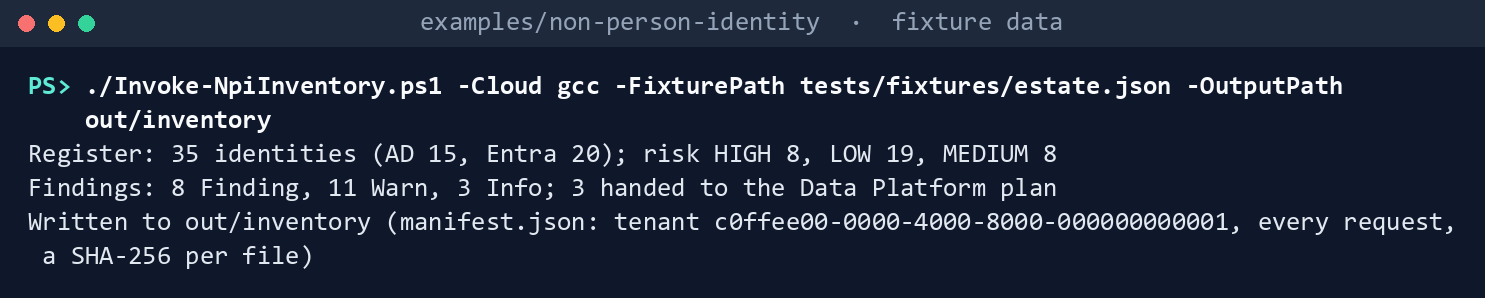
It prints the three lines of Chapter 01’s step 3, ending Written to out/inventory.
Send Microsoft’s samples to the fakes:
Invoke-Pester -Path tests/NpiCredentialPolicy.Tests.ps1 -FullNameFilter '*Microsoft*samples*' -Output None -PassThru |
    Select-Object PassedCount, FailedCount, NotRunCount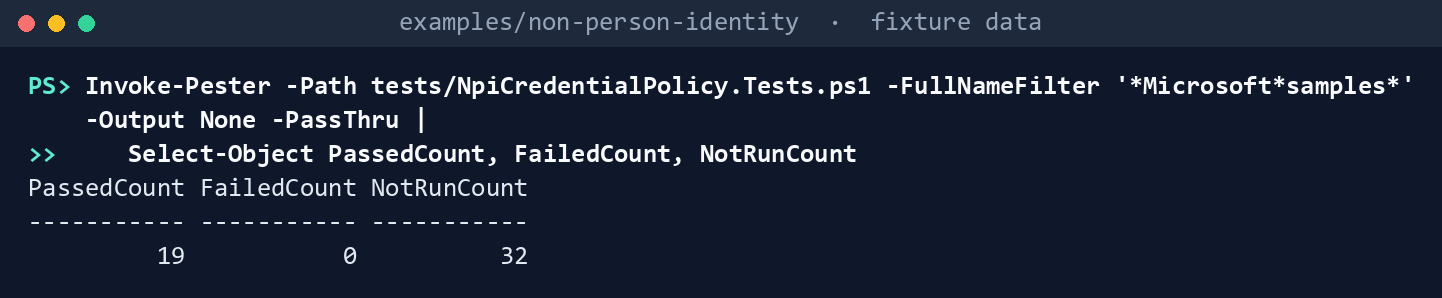
What the terminal shows, run on the kit’s fixtures (the same output as text) PassedCount 19,FailedCount 0,NotRunCount 32(the 32 are the code’s own tests). Read the test that sends Learn’s procedure PATCH: the tenant’scustomPasswordAdditionis gone afterward.List what each task needs:
Import-Module ./powershell/NpiCredentialPolicy/NpiCredentialPolicy.psm1
foreach ($t in 'app-policy', 'policy-apply', 'rotation', 'rotation-apply') { $p = Get-NpiCh04RequiredPermission -Task $t; "$t : " + (($p.GraphPermissions + $p.AzureRoles) -join ', ') }
app-policy : Application.Read.All, Policy.Read.All policy-apply : Application.Read.All, Application.ReadWrite.All, Policy.Read.All, Policy.ReadWrite.ApplicationConfiguration rotation : Application.Read.All, User.Read.All, Key Vault Reader rotation-apply : Application.Read.All, Application.ReadWrite.All, Key Vault Certificates Officer, Key Vault Reader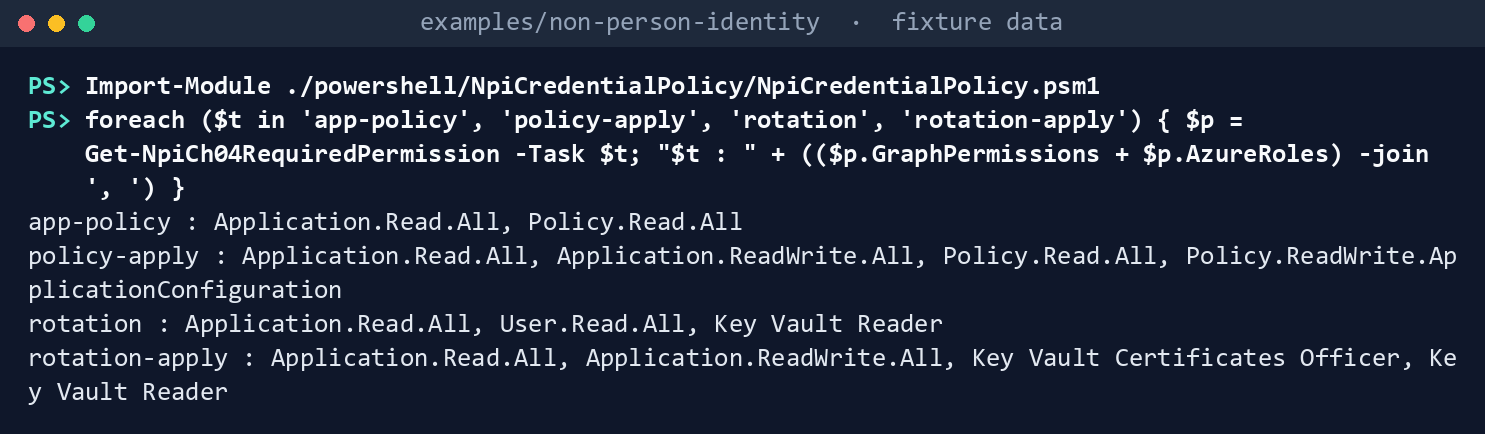
What the terminal shows, run on the kit’s fixtures (the same output as text) Compare the policy and build its plan:
./Invoke-NpiCredentialPolicy.ps1 -Cloud gcc -RegisterRun out/inventory -FixturePath tests/fixtures/ch04/tenant.json -OutputPath out/policyPolicy: tenant default disabled; 1 app management policies; 7 app registrations Diff: 6 Add, 1 Change, 1 KeepExisting Findings: 12 Finding, 1 Warn, 1 Info Policy plan: 10 actions, 8 of them writes (1 AssignAppPolicy, 1 CreateAppPolicy, 5 LockApp, 1 PatchDefaultPolicy); nothing sent Plan SHA-256: 2d4c419a05b7792470e59a5969f94f1b6452cba079a47595336c4d451cbfa809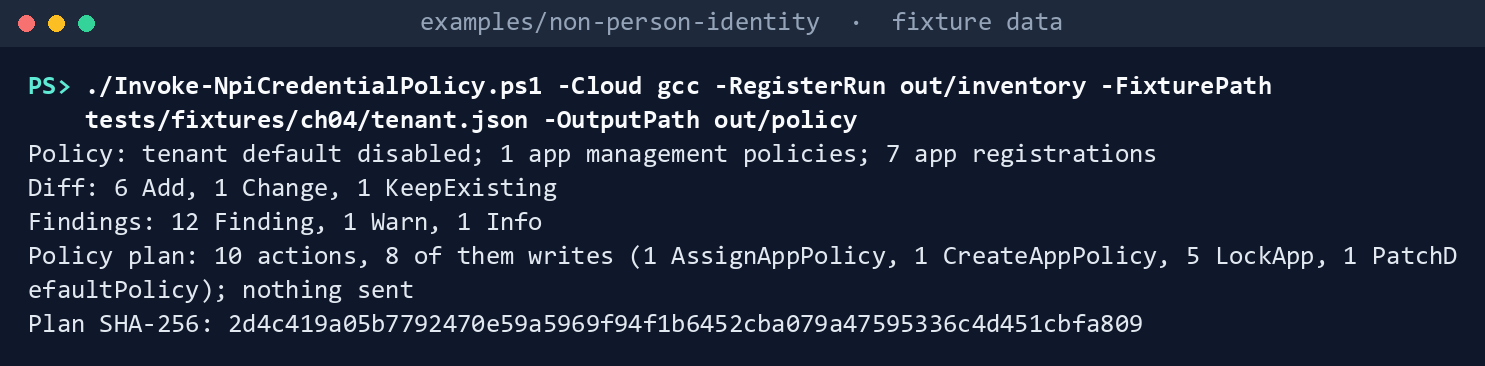
What the terminal shows, run on the kit’s fixtures (the same output as text) The plan’s hash is the same on every run with these inputs.
Read the diff:
Get-Content out/policy/policy-diff.json -Raw | ConvertFrom-Json | Format-Table Scope, RestrictionType, Change, DesiredScope RestrictionType Change Desired ----- --------------- ------ ------- policy isEnabled Change true applicationRestrictions passwordAddition Add enabled for apps created after 2026-11-15 applicationRestrictions symmetricKeyAddition Add enabled for apps created after 2026-11-15 applicationRestrictions customPasswordAddition KeepExisting (not in the reviewed file) applicationRestrictions asymmetricKeyLifetime Add enabled P180D for apps created after 2026-11-15 servicePrincipalRestrictions passwordAddition Add enabled for apps created after 2026-11-15 servicePrincipalRestrictions symmetricKeyAddition Add enabled for apps created after 2026-11-15 servicePrincipalRestrictions asymmetricKeyLifetime Add enabled P180D for apps created after 2026-11-15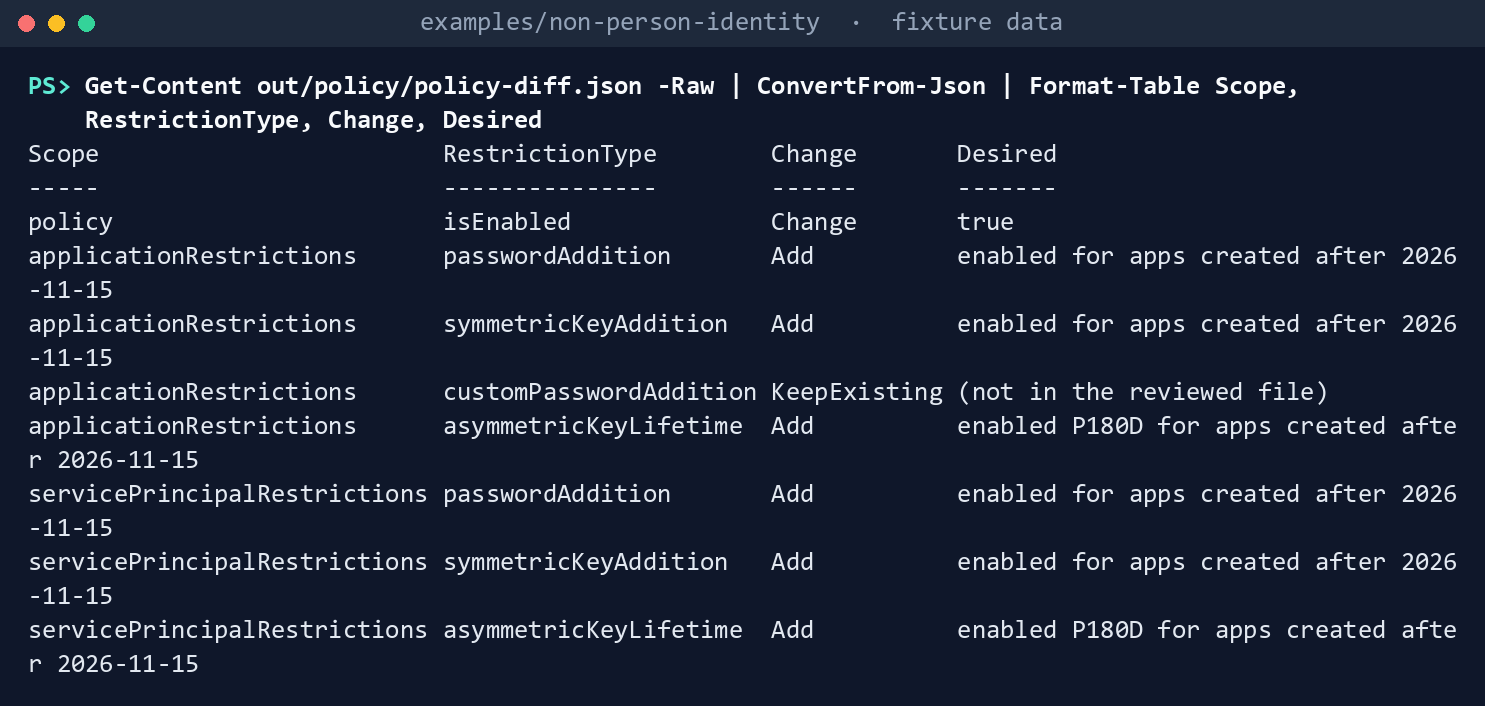
What the terminal shows, run on the kit’s fixtures (the same output as text) The tenant’s
customPasswordAdditionstays in the PATCH body. The one Warn is NPI-POL-02: Vendor portal legacy exception, an app management policy on Vendor Portal that nobody reviewed. The plan reports it and never touches it. Five apps get the lock: Payroll Export, Build Pipeline and Mail Automation have none, Legacy Reports has it disabled, and Vendor Portal locks only some properties; HR Connector and Deploy Bot are already fully locked.Dry-run the policy plan with its approved hash, apply it to the fake, then try a hash nobody approved:
$sha = (Get-FileHash out/policy/policy-plan.json -Algorithm SHA256).Hash.ToLower()
./Invoke-NpiCredentialAction.ps1 -Cloud gcc -PlanPath out/policy/policy-plan.json -ApprovedSha256 $sha -FixturePath tests/fixtures/ch04/tenant.json -OutputPath out/policy-dryrun
./Invoke-NpiCredentialAction.ps1 -Cloud gcc -PlanPath out/policy/policy-plan.json -ApprovedSha256 $sha -FixturePath tests/fixtures/ch04/tenant.json -OutputPath out/policy-apply -Apply
./Invoke-NpiCredentialAction.ps1 -Cloud gcc -PlanPath out/policy/policy-plan.json -ApprovedSha256 ('0' * 64) -FixturePath tests/fixtures/ch04/tenant.json -OutputPath out/policy-x
DryRun: 8 WouldSend WouldSend PatchDefaultPolicy PATCH https://graph.microsoft.com/v1.0/policies/defaultAppManagementPolicy WouldSend CreateAppPolicy POST https://graph.microsoft.com/v1.0/policies/appManagementPolicies WouldSend AssignAppPolicy POST https://graph.microsoft.com/v1.0/applications/0a000000-0000-4000-8000-000000000006/appManagementPolicies/$ref WouldSend LockApp PATCH https://graph.microsoft.com/v1.0/applications/0a000000-0000-4000-8000-000000000001 WouldSend LockApp PATCH https://graph.microsoft.com/v1.0/applications/0a000000-0000-4000-8000-000000000003 WouldSend LockApp PATCH https://graph.microsoft.com/v1.0/applications/0a000000-0000-4000-8000-000000000004 WouldSend LockApp PATCH https://graph.microsoft.com/v1.0/applications/0a000000-0000-4000-8000-000000000005 WouldSend LockApp PATCH https://graph.microsoft.com/v1.0/applications/0a000000-0000-4000-8000-000000000006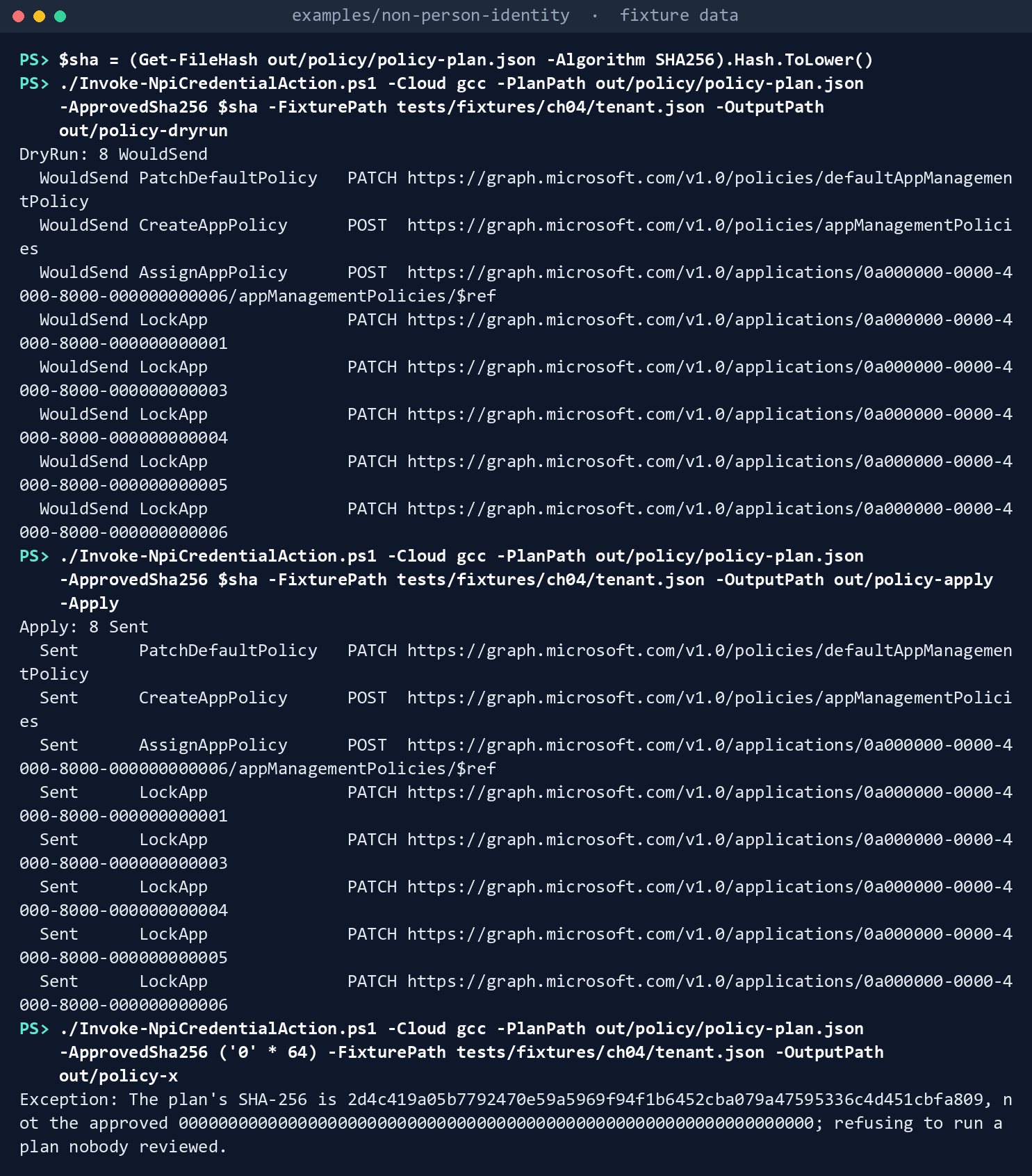
What the terminal shows, run on the kit’s fixtures (the same output as text) Then
Apply: 8 Sent, and the refusal:The plan's SHA-256 is 2d4c419a…, not the approved 0000…; refusing to run a plan nobody reviewed.Build the rotation plan:
./Invoke-NpiRotation.ps1 -Cloud gcc -RegisterRun out/inventory -InputPath tests/fixtures/ch04/inputs -FixturePath tests/fixtures/ch04/tenant.json -OutputPath out/rotationRotation: 7 app registrations read; 7 steps Findings: 2 Finding, 0 Warn, 3 Info; 0 requests for owners Rotation plan: 3 writes (1 AttachNewCertificate, 1 RemoveOldCertificate, 1 RenewInKeyVault); nothing sent Plan SHA-256: d54726465dddc6ccdf03d9df2137e77e31547e9aade890d11bd7053653fa0d8f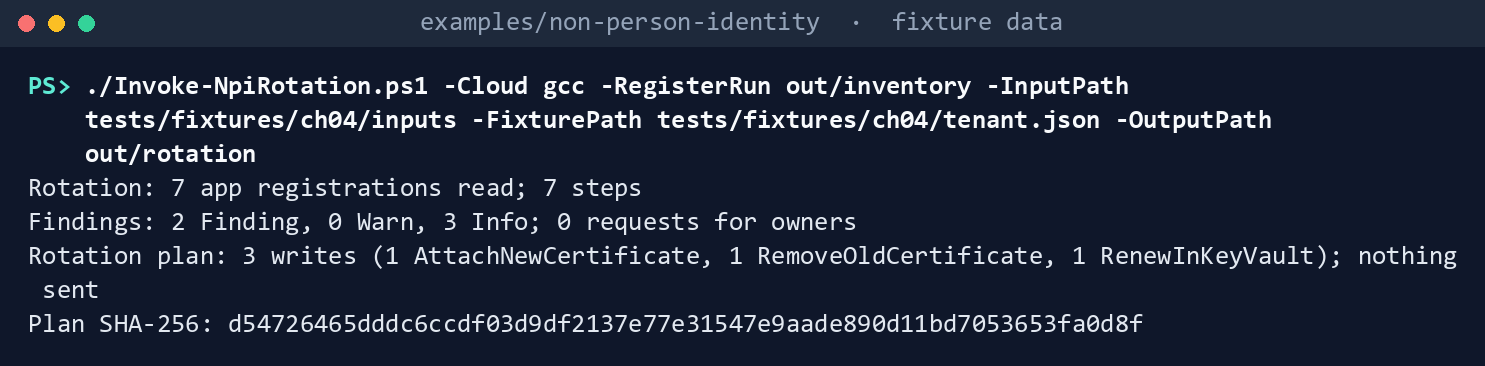
What the terminal shows, run on the kit’s fixtures (the same output as text) Read the plan:
(Get-Content out/rotation/rotation-plan.json -Raw | ConvertFrom-Json).actions | Format-Table Action, Name, WriteAction Name Write ------ ---- ----- AttachNewCertificate Deploy Bot True RemoveOldCertificate HR Connector True ReplaceSecret Legacy Reports False NoKeyVaultBinding Legacy Reports False ReplaceSecret Mail Automation False ReplaceSecret Payroll Export False RenewInKeyVault Vendor Portal True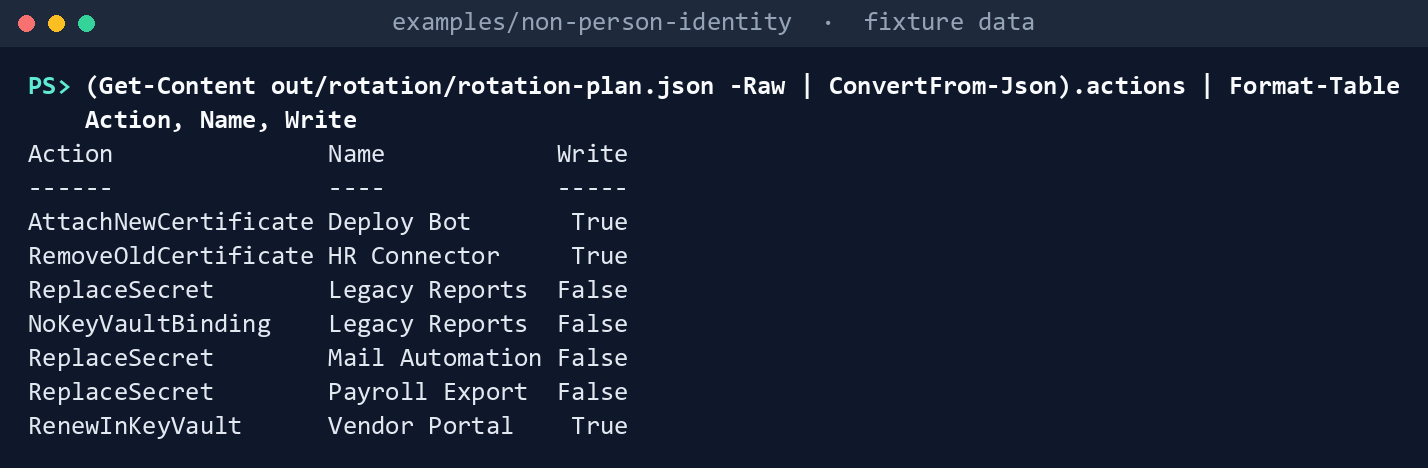
What the terminal shows, run on the kit’s fixtures (the same output as text) Vendor Portal’s certificate expires December 1, inside the 60 days, and Erin, an enabled member who owns it, approved on October 28: renew it in Key Vault. Key Vault renewed Deploy Bot’s on its own lifetime action on October 25 and Carol approved: add the new certificate beside the old one. HR Connector’s new certificate started October 20, Alice verified it on October 22 and the 7 days have passed: remove the old one. Legacy Reports’ certificate isn’t in Key Vault and lasts 730 days (NPI-ROT-02 and NPI-ROT-05), and three apps still have secrets (NPI-ROT-06).
Dry-run the rotation, then apply it to the fake:
$sha = (Get-FileHash out/rotation/rotation-plan.json -Algorithm SHA256).Hash.ToLower()
./Invoke-NpiCredentialAction.ps1 -Cloud gcc -PlanPath out/rotation/rotation-plan.json -ApprovedSha256 $sha -FixturePath tests/fixtures/ch04/tenant.json -OutputPath out/rotation-dryrun
./Invoke-NpiCredentialAction.ps1 -Cloud gcc -PlanPath out/rotation/rotation-plan.json -ApprovedSha256 $sha -FixturePath tests/fixtures/ch04/tenant.json -OutputPath out/rotation-apply -Apply
DryRun: 3 WouldSend WouldSend AttachNewCertificate PATCH https://graph.microsoft.com/v1.0/applications/0a000000-0000-4000-8000-000000000007 WouldSend RemoveOldCertificate PATCH https://graph.microsoft.com/v1.0/applications/0a000000-0000-4000-8000-000000000002 WouldSend RenewInKeyVault POST https://kv-npi-contoso.vault.azure.net/certificates/vendor-portal/create?api-version=2025-07-01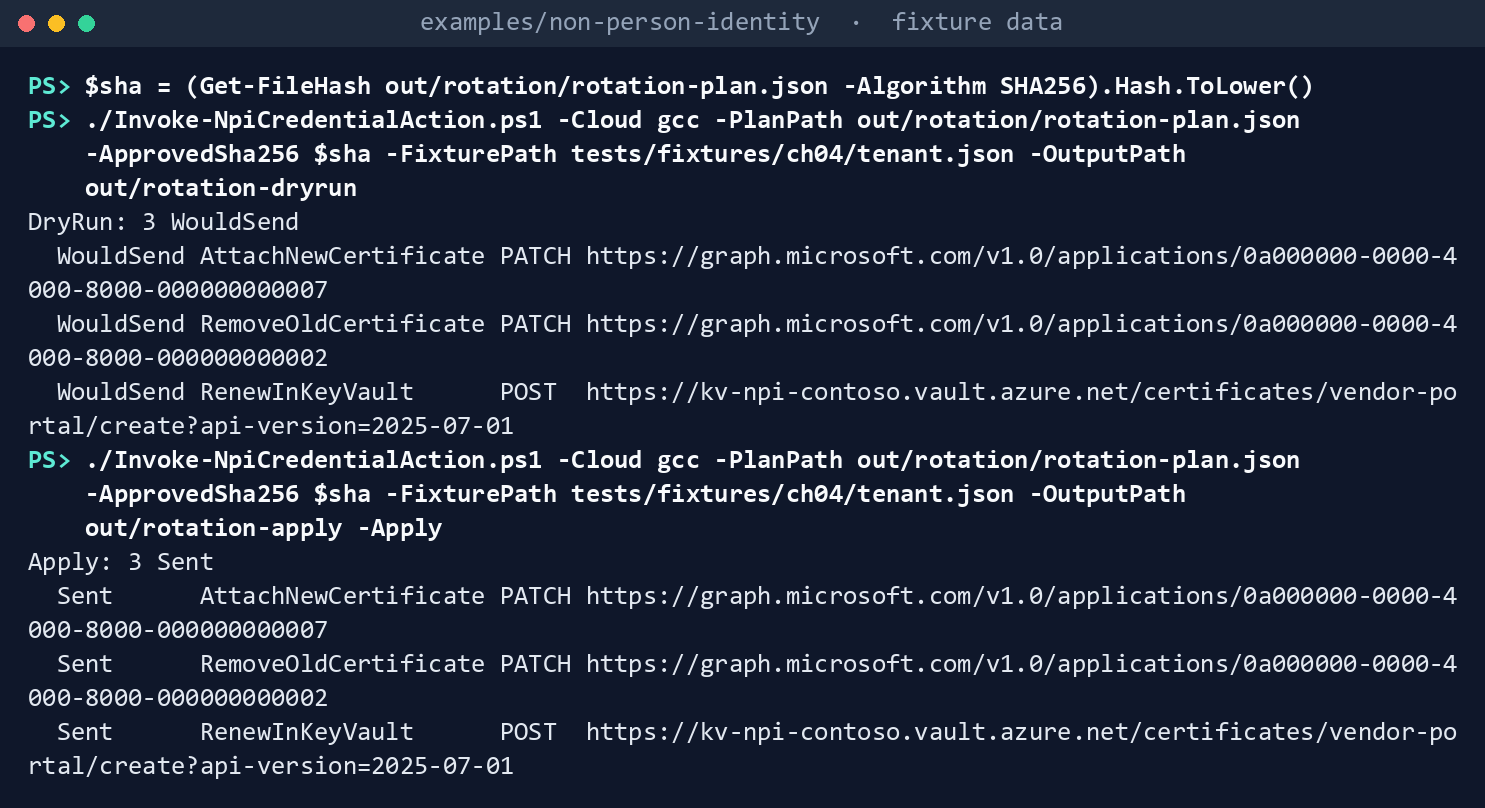
What the terminal shows, run on the kit’s fixtures (the same output as text) Then
Apply: 3 Sent.out/rotation-apply/results.jsontells you what’s next for each: record the verification when Deploy Bot signs in with26D76A71…; the old HR Connector certificate is removed; for Vendor Portal, “Key Vault created the next version; plan again to attach it after review.” Each run starts from the fixture, so the next plan is a new review: the test runs a whole rotation in one tenant carries Vendor Portal through every step.Run the tests:
Invoke-Pester -Path tests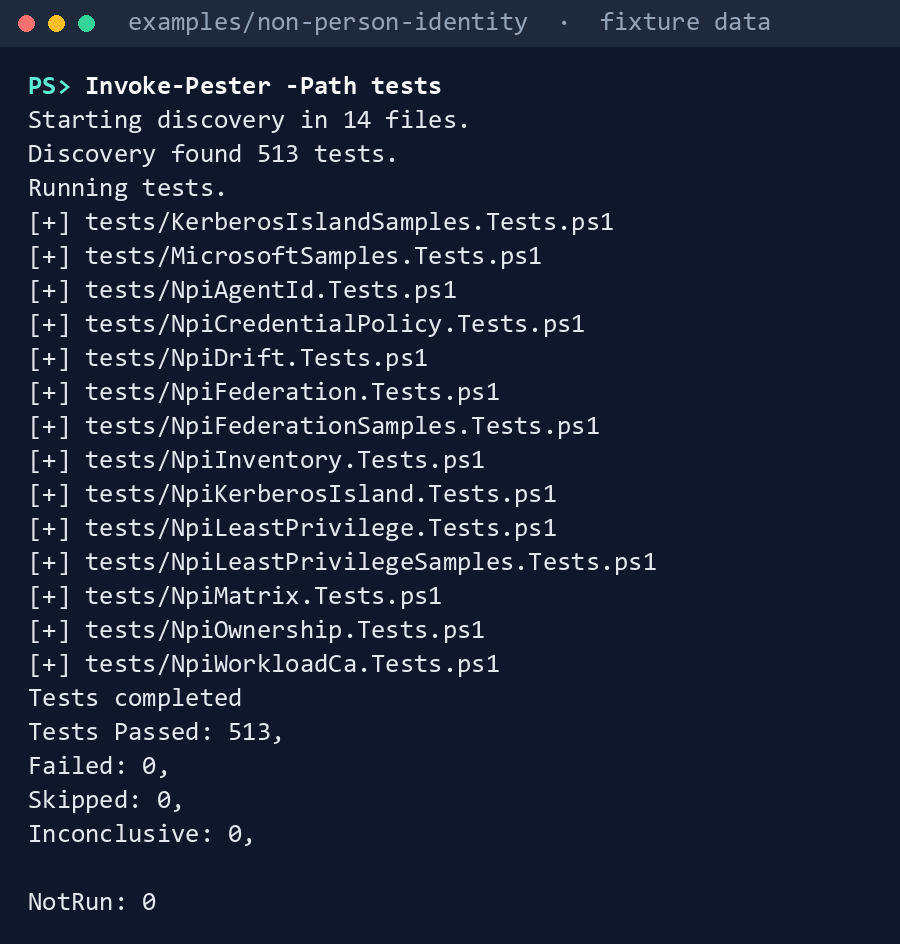
What the terminal shows, run on the kit’s fixtures (the same output as text)
Expected result: 513 tests passing across the example, this chapter’s 51 among them; out/policy/manifest.json listing the reads with Application.Read.All and Policy.Read.All and the SHA-256 of the register, the reviewed file and the default policy as read; out/rotation-apply/manifest.json listing the prechecks, the two PATCHes, the Key Vault create and its poll. Delete out when you’re done:
Remove-Item -Recurse -Force out
Lab 2: test tenant
Use a test tenant in the worldwide or GCC cloud and a test key vault using Azure RBAC, never production, with fictional people, and Chapter 01’s Lab 2 run (out/inventory-test). Copy config/app-management-policy.json and config/rotation.json to a test folder for the values below; the reviewed files don’t change. Work in examples/non-person-identity on Chapter 01’s test host. You’ll replace: <tenant-id> (the test tenant’s ID), <inventory-app-id> and <inventory-thumbprint> (Chapter 01’s reading app and its certificate), <app-id> and <thumbprint> (an app holding only Application.Read.All and Policy.Read.All, and its certificate), <test-domain> (the test domain’s DNS name), <test-copy> (the test folder for the two copied files), <inputs> (a folder for this lab’s input files), <vault-name> (the test key vault’s name), <cert-app-object-id> and <cert-app-client-id> (the Object ID and Application (client) ID of npi-test-cert), <owner-upn> (one of npi-test-cert’s test owners), <new-thumbprint> (the renewed certificate’s thumbprint), and <sha>, <sha2>, <sha3>, <sha4> (each plan’s SHA-256, as the reviewer passes it to you).
Every command in this lab, in order, from examples/non-person-identity. Each step below says what it does and what to look for.
New-Item -ItemType Directory -Force <test-copy> | Out-Null
Copy-Item config/app-management-policy.json, config/rotation.json <test-copy>/

# Step 1: Prepare
Connect-AzAccount -Environment AzureCloud -Tenant <tenant-id>
$policy = New-AzKeyVaultCertificatePolicy -SecretContentType "application/x-pkcs12" -SubjectName "CN=npi-test-cert" -IssuerName "Self" -ValidityInMonths 5 -ReuseKeyOnRenewal
Add-AzKeyVaultCertificate -VaultName <vault-name> -Name npi-test-cert -CertificatePolicy $policy
Get-AzKeyVaultCertificateOperation -VaultName <vault-name> -Name npi-test-cert

# Step 1: Prepare
[IO.File]::WriteAllBytes("$PWD/npi-test-cert.cer", (Get-AzKeyVaultCertificate -VaultName <vault-name> -Name npi-test-cert).Certificate.RawData)

# Step 1: Prepare
New-Item -ItemType Directory -Force <inputs> | Out-Null
foreach ($f in 'certificate-bindings', 'rotation-approvals', 'rotation-verifications') { Get-Content tests/fixtures/ch04/inputs/$f.csv -TotalCount 1 | Set-Content <inputs>/$f.csv }
Add-Content <inputs>/certificate-bindings.csv '<cert-app-object-id>,npi-test-cert,<vault-name>,npi-test-cert'
(Get-Content <test-copy>/app-management-policy.json -Raw) -replace '"effectiveDate": "[^"]*"', ('"effectiveDate": "{0:yyyy-MM-dd}T00:00:00Z"' -f (Get-Date).AddDays(-1)) | Set-Content <test-copy>/app-management-policy.json -NoNewline
Connect-MgGraph -Environment Global -TenantId <tenant-id> -ClientId <inventory-app-id> -CertificateThumbprint <inventory-thumbprint>
Connect-AzAccount -ServicePrincipal -Environment AzureCloud -Tenant <tenant-id> -ApplicationId <inventory-app-id> -CertificateThumbprint <inventory-thumbprint>
./Invoke-NpiInventory.ps1 -Cloud gcc -TenantId <tenant-id> -Domain <test-domain> -OutputPath out/inventory-test

# Step 2: Read and plan the policy
Connect-MgGraph -Environment Global -TenantId <tenant-id> -ClientId <app-id> -CertificateThumbprint <thumbprint>
./Invoke-NpiCredentialPolicy.ps1 -Cloud gcc -RegisterRun out/inventory-test -ConfigPath <test-copy>/app-management-policy.json -OutputPath out/policy-test

# Step 2: Read and plan the policy
(Get-FileHash out/policy-test/policy-plan.json -Algorithm SHA256).Hash.ToLower()

# Step 3: Review, dry-run and apply
Connect-MgGraph -Environment Global -TenantId <tenant-id> -Scopes Application.Read.All, Application.ReadWrite.All, Policy.Read.All, Policy.ReadWrite.ApplicationConfiguration
./Invoke-NpiCredentialAction.ps1 -Cloud gcc -PlanPath out/policy-test/policy-plan.json -ApprovedSha256 <sha> -OutputPath out/policy-test-dry
./Invoke-NpiCredentialAction.ps1 -Cloud gcc -PlanPath out/policy-test/policy-plan.json -ApprovedSha256 <sha> -OutputPath out/policy-test-apply -Apply

# Step 3: Review, dry-run and apply
Invoke-MgGraphRequest -Uri https://graph.microsoft.com/v1.0/policies/defaultAppManagementPolicy | ConvertTo-Json -Depth 10

# Step 4: Check the policy
$policy12 = New-AzKeyVaultCertificatePolicy -SecretContentType "application/x-pkcs12" -SubjectName "CN=npi-test-cert-12m" -IssuerName "Self" -ValidityInMonths 12
Add-AzKeyVaultCertificate -VaultName <vault-name> -Name npi-test-cert-12m -CertificatePolicy $policy12
Get-AzKeyVaultCertificateOperation -VaultName <vault-name> -Name npi-test-cert-12m

# Step 4: Check the policy
[IO.File]::WriteAllBytes("$PWD/npi-test-cert-12m.cer", (Get-AzKeyVaultCertificate -VaultName <vault-name> -Name npi-test-cert-12m).Certificate.RawData)

# Step 4: Check the policy
(Invoke-MgGraphRequest -Uri "https://graph.microsoft.com/v1.0/applications/<cert-app-object-id>?`$select=servicePrincipalLockConfiguration").servicePrincipalLockConfiguration | ConvertTo-Json

# Step 5: Raise the rotation
(Get-Content <test-copy>/rotation.json -Raw) -replace '"raiseDays": \d+', '"raiseDays": 200' | Set-Content <test-copy>/rotation.json -NoNewline
Connect-MgGraph -Environment Global -TenantId <tenant-id> -Scopes Application.Read.All, User.Read.All
Connect-AzAccount -Environment AzureCloud -Tenant <tenant-id>
./Invoke-NpiRotation.ps1 -Cloud gcc -RegisterRun out/inventory-test -InputPath <inputs> -ConfigPath <test-copy>/rotation.json -PolicyPath <test-copy>/app-management-policy.json -OutputPath out/rotation-test
$req = Get-Content out/rotation-test/rotation-requests.json -Raw | ConvertFrom-Json | Where-Object Application -eq 'npi-test-cert'
$req | Format-List RequestId, Expires, Owners, Status

# Step 5: Raise the rotation
Add-Content <inputs>/rotation-approvals.csv "$($req.RequestId),<owner-upn>,$(Get-Date -Format yyyy-MM-dd)"
./Invoke-NpiRotation.ps1 -Cloud gcc -RegisterRun out/inventory-test -InputPath <inputs> -ConfigPath <test-copy>/rotation.json -PolicyPath <test-copy>/app-management-policy.json -OutputPath out/rotation-test-renew
(Get-Content out/rotation-test-renew/rotation-plan.json -Raw | ConvertFrom-Json).actions | Format-Table Action, Name, Write

# Step 6: Renew and attach
Connect-MgGraph -Environment Global -TenantId <tenant-id> -Scopes Application.Read.All, Application.ReadWrite.All, Policy.Read.All, Policy.ReadWrite.ApplicationConfiguration
Connect-AzAccount -Environment AzureCloud -Tenant <tenant-id>
./Invoke-NpiCredentialAction.ps1 -Cloud gcc -PlanPath out/rotation-test-renew/rotation-plan.json -ApprovedSha256 <sha2> -OutputPath out/rotation-test-renew-dry
./Invoke-NpiCredentialAction.ps1 -Cloud gcc -PlanPath out/rotation-test-renew/rotation-plan.json -ApprovedSha256 <sha2> -OutputPath out/rotation-test-renew-apply -Apply
./Invoke-NpiRotation.ps1 -Cloud gcc -RegisterRun out/inventory-test -InputPath <inputs> -ConfigPath <test-copy>/rotation.json -PolicyPath <test-copy>/app-management-policy.json -OutputPath out/rotation-test-attach

# Step 6: Renew and attach
./Invoke-NpiCredentialAction.ps1 -Cloud gcc -PlanPath out/rotation-test-attach/rotation-plan.json -ApprovedSha256 <sha3> -OutputPath out/rotation-test-attach-dry
./Invoke-NpiCredentialAction.ps1 -Cloud gcc -PlanPath out/rotation-test-attach/rotation-plan.json -ApprovedSha256 <sha3> -OutputPath out/rotation-test-attach-apply -Apply

# Step 7: Verify, then remove
Connect-MgGraph -Environment Global -TenantId <tenant-id> -ClientId <cert-app-client-id> -CertificateThumbprint <new-thumbprint>
Add-Content <inputs>/rotation-verifications.csv "$($req.RequestId),<new-thumbprint>,<owner-upn>,$(Get-Date -Format yyyy-MM-dd)"

# Step 7: Verify, then remove
Connect-MgGraph -Environment Global -TenantId <tenant-id> -Scopes Application.Read.All, Application.ReadWrite.All, Policy.Read.All, Policy.ReadWrite.ApplicationConfiguration
Connect-AzAccount -Environment AzureCloud -Tenant <tenant-id>
./Invoke-NpiRotation.ps1 -Cloud gcc -RegisterRun out/inventory-test -InputPath <inputs> -ConfigPath <test-copy>/rotation.json -PolicyPath <test-copy>/app-management-policy.json -OutputPath out/rotation-test-remove

# Step 7: Verify, then remove
./Invoke-NpiCredentialAction.ps1 -Cloud gcc -PlanPath out/rotation-test-remove/rotation-plan.json -ApprovedSha256 <sha4> -OutputPath out/rotation-test-remove-dry
./Invoke-NpiCredentialAction.ps1 -Cloud gcc -PlanPath out/rotation-test-remove/rotation-plan.json -ApprovedSha256 <sha4> -OutputPath out/rotation-test-remove-apply -Apply
(Invoke-MgGraphRequest -Uri https://graph.microsoft.com/v1.0/applications/<cert-app-object-id>).keyCredentials | ForEach-Object { '{0} {1}' -f $_.keyId, $_.endDateTime }

# Step 8: Back it out
Remove-Item -Recurse -Force out/policy-test*, out/rotation-test*
The copies:
New-Item -ItemType Directory -Force <test-copy> | Out-Null
Copy-Item config/app-management-policy.json, config/rotation.json <test-copy>/
Prepare. Two test app registrations:
npi-test-cert, with two test owners who are enabled members, andnpi-test-secret. In the test vault, create a self-signed certificatenpi-test-certwith a validity of 5 months, as Learn’s tutorial does with the portal orAdd-AzKeyVaultCertificate, and upload its public certificate tonpi-test-cert. Add a row for it tocertificate-bindings.csv. In your test copy of the policy, set the effective date to yesterday, so the two test apps are covered.In the Microsoft Entra admin center, Entra ID > App registrations > New registration: register
npi-test-cert, thennpi-test-secret. Onnpi-test-cert, Owners > Add owners, and add the two test owners.Signed in to Azure as a person who can create certificates in the test vault, create the certificate with
Add-AzKeyVaultCertificate’s example 1, renamed and set to 5 months:Connect-AzAccount -Environment AzureCloud -Tenant <tenant-id> $policy = New-AzKeyVaultCertificatePolicy -SecretContentType "application/x-pkcs12" -SubjectName "CN=npi-test-cert" -IssuerName "Self" -ValidityInMonths 5 -ReuseKeyOnRenewal Add-AzKeyVaultCertificate -VaultName <vault-name> -Name npi-test-cert -CertificatePolicy $policy Get-AzKeyVaultCertificateOperation -VaultName <vault-name> -Name npi-test-certWhen the operation’s
Statusiscompleted, save its public certificate:[IO.File]::WriteAllBytes("$PWD/npi-test-cert.cer", (Get-AzKeyVaultCertificate -VaultName <vault-name> -Name npi-test-cert).Certificate.RawData)On
npi-test-cert, Certificates & secrets > Certificates > Upload certificate, uploadnpi-test-cert.cer, and select Add.Make the three input files with the fixture’s headers, add the binding, move the test copy’s effective date to yesterday, and read the register again so it holds the two apps:
New-Item -ItemType Directory -Force <inputs> | Out-Null
foreach ($f in 'certificate-bindings', 'rotation-approvals', 'rotation-verifications') { Get-Content tests/fixtures/ch04/inputs/$f.csv -TotalCount 1 | Set-Content <inputs>/$f.csv }
Add-Content <inputs>/certificate-bindings.csv '<cert-app-object-id>,npi-test-cert,<vault-name>,npi-test-cert'
(Get-Content <test-copy>/app-management-policy.json -Raw) -replace '"effectiveDate": "[^"]*"', ('"effectiveDate": "{0:yyyy-MM-dd}T00:00:00Z"' -f (Get-Date).AddDays(-1)) | Set-Content <test-copy>/app-management-policy.json -NoNewline
Connect-MgGraph -Environment Global -TenantId <tenant-id> -ClientId <inventory-app-id> -CertificateThumbprint <inventory-thumbprint>
Connect-AzAccount -ServicePrincipal -Environment AzureCloud -Tenant <tenant-id> -ApplicationId <inventory-app-id> -CertificateThumbprint <inventory-thumbprint>
./Invoke-NpiInventory.ps1 -Cloud gcc -TenantId <tenant-id> -Domain <test-domain> -OutputPath out/inventory-test
Read and plan the policy with an app or a person holding only
Application.Read.AllandPolicy.Read.All(Global Reader for a person):Connect-MgGraph -Environment Global -TenantId <tenant-id> -ClientId <app-id> -CertificateThumbprint <thumbprint> ./Invoke-NpiCredentialPolicy.ps1 -Cloud gcc -RegisterRun out/inventory-test -ConfigPath <test-copy>/app-management-policy.json -OutputPath out/policy-testKeep
out/policy-test/default-policy-before.json: it’s the back-out. The reviewer readsout/policy-test/policy-plan.jsonand computes the hash they pass you as<sha>:(Get-FileHash out/policy-test/policy-plan.json -Algorithm SHA256).Hash.ToLower()Review, dry-run and apply, signed in as a person with Security Administrator and Cloud Application Administrator (or Application Administrator):
Connect-MgGraph -Environment Global -TenantId <tenant-id> -Scopes Application.Read.All, Application.ReadWrite.All, Policy.Read.All, Policy.ReadWrite.ApplicationConfiguration
./Invoke-NpiCredentialAction.ps1 -Cloud gcc -PlanPath out/policy-test/policy-plan.json -ApprovedSha256 <sha> -OutputPath out/policy-test-dry
./Invoke-NpiCredentialAction.ps1 -Cloud gcc -PlanPath out/policy-test/policy-plan.json -ApprovedSha256 <sha> -OutputPath out/policy-test-apply -Apply
Record whether Cloud Application Administrator alone was enough, as confirmation only (research gaps, row 33) and the
stateGraph returns for each restriction (row 32). In the admin center, Entra ID > Enterprise apps > Application policies should show Block password addition and Restrict max certificate lifetime on, with no “modified outside of this interface” message.48 This reads the default policy back:Invoke-MgGraphRequest -Uri https://graph.microsoft.com/v1.0/policies/defaultAppManagementPolicy | ConvertTo-Json -Depth 10Check the policy. Try to add a client secret to
npi-test-secret, and a 12-month certificate tonpi-test-cert: both should be refused. Check thatnpi-test-cert’s lock shows all properties.On
npi-test-secret, Certificates & secrets > Client secrets > New client secret, then Add: refused.Make a 12-month certificate in the test vault:
$policy12 = New-AzKeyVaultCertificatePolicy -SecretContentType "application/x-pkcs12" -SubjectName "CN=npi-test-cert-12m" -IssuerName "Self" -ValidityInMonths 12
Add-AzKeyVaultCertificate -VaultName <vault-name> -Name npi-test-cert-12m -CertificatePolicy $policy12
Get-AzKeyVaultCertificateOperation -VaultName <vault-name> -Name npi-test-cert-12m
When its
Statusiscompleted, save its public certificate:[IO.File]::WriteAllBytes("$PWD/npi-test-cert-12m.cer", (Get-AzKeyVaultCertificate -VaultName <vault-name> -Name npi-test-cert-12m).Certificate.RawData)On
npi-test-cert, Certificates & secrets > Certificates > Upload certificate, uploadnpi-test-cert-12m.cer, then Add: refused.Read the lock:
(Invoke-MgGraphRequest -Uri "https://graph.microsoft.com/v1.0/applications/<cert-app-object-id>?`$select=servicePrincipalLockConfiguration").servicePrincipalLockConfiguration | ConvertTo-Json
Raise the rotation. In your test copy of
rotation.json, setraiseDaysabove the certificate’s remaining days. RunInvoke-NpiRotation.ps1with-ConfigPathand-PolicyPathset to the test copies;npi-test-certshould beAwaitOwnerApprovalwith a request inrotation-requests.json. Have one test owner add the approval, and run it again:RenewInKeyVault. These commands setraiseDaysto 200, above a 5-month certificate’s days, and plan, signed in with the rotation task’s permissions (Lab 1, step 2) and Key Vault Reader on the test vault:(Get-Content <test-copy>/rotation.json -Raw) -replace '"raiseDays": \d+', '"raiseDays": 200' | Set-Content <test-copy>/rotation.json -NoNewline Connect-MgGraph -Environment Global -TenantId <tenant-id> -Scopes Application.Read.All, User.Read.All Connect-AzAccount -Environment AzureCloud -Tenant <tenant-id> ./Invoke-NpiRotation.ps1 -Cloud gcc -RegisterRun out/inventory-test -InputPath <inputs> -ConfigPath <test-copy>/rotation.json -PolicyPath <test-copy>/app-management-policy.json -OutputPath out/rotation-test $req = Get-Content out/rotation-test/rotation-requests.json -Raw | ConvertFrom-Json | Where-Object Application -eq 'npi-test-cert' $req | Format-List RequestId, Expires, Owners, StatusThe test owner adds the approval, dated today, and the rotation is planned again:
Add-Content <inputs>/rotation-approvals.csv "$($req.RequestId),<owner-upn>,$(Get-Date -Format yyyy-MM-dd)"
./Invoke-NpiRotation.ps1 -Cloud gcc -RegisterRun out/inventory-test -InputPath <inputs> -ConfigPath <test-copy>/rotation.json -PolicyPath <test-copy>/app-management-policy.json -OutputPath out/rotation-test-renew
(Get-Content out/rotation-test-renew/rotation-plan.json -Raw | ConvertFrom-Json).actions | Format-Table Action, Name, Write
Renew and attach, signed in to Graph as in step 3 and to Azure as a person with Key Vault Certificates Officer on the test vault (
Connect-AzAccount -Environment AzureCloud -Tenant <tenant-id>): dry-run and apply the plan, plan again (AttachNewCertificate), review, dry-run and apply. Record whether Key Vault Reader alone returnscerandx5tfor the read (row 35), whether the thumbprint match held (row 36), and whetherInvoke-AzRestMethod -ResourceIdreached the vault (row 38). The reviewer passes youout/rotation-test-renew/rotation-plan.json’s SHA-256 as<sha2>:Connect-MgGraph -Environment Global -TenantId <tenant-id> -Scopes Application.Read.All, Application.ReadWrite.All, Policy.Read.All, Policy.ReadWrite.ApplicationConfiguration Connect-AzAccount -Environment AzureCloud -Tenant <tenant-id> ./Invoke-NpiCredentialAction.ps1 -Cloud gcc -PlanPath out/rotation-test-renew/rotation-plan.json -ApprovedSha256 <sha2> -OutputPath out/rotation-test-renew-dry ./Invoke-NpiCredentialAction.ps1 -Cloud gcc -PlanPath out/rotation-test-renew/rotation-plan.json -ApprovedSha256 <sha2> -OutputPath out/rotation-test-renew-apply -Apply ./Invoke-NpiRotation.ps1 -Cloud gcc -RegisterRun out/inventory-test -InputPath <inputs> -ConfigPath <test-copy>/rotation.json -PolicyPath <test-copy>/app-management-policy.json -OutputPath out/rotation-test-attachThe reviewer passes you
out/rotation-test-attach/rotation-plan.json’s SHA-256 as<sha3>:./Invoke-NpiCredentialAction.ps1 -Cloud gcc -PlanPath out/rotation-test-attach/rotation-plan.json -ApprovedSha256 <sha3> -OutputPath out/rotation-test-attach-dry ./Invoke-NpiCredentialAction.ps1 -Cloud gcc -PlanPath out/rotation-test-attach/rotation-plan.json -ApprovedSha256 <sha3> -OutputPath out/rotation-test-attach-apply -ApplyVerify, then remove. Sign in as the app with the new certificate, as Learn’s how-to does with
Connect-MgGraph -CertificateThumbprint,49 add the verification row, and after the overlap plan, review and apply the removal. Confirm the kept certificate’skeyIdis unchanged (row 37). With the renewed certificate in the host’s certificate store, the app signs in, and the owner records the verification, dated today:Connect-MgGraph -Environment Global -TenantId <tenant-id> -ClientId <cert-app-client-id> -CertificateThumbprint <new-thumbprint> Add-Content <inputs>/rotation-verifications.csv "$($req.RequestId),<new-thumbprint>,<owner-upn>,$(Get-Date -Format yyyy-MM-dd)"After the 7-day overlap, signed in as in step 6, plan the removal; the reviewer passes you
out/rotation-test-remove/rotation-plan.json’s SHA-256 as<sha4>:Connect-MgGraph -Environment Global -TenantId <tenant-id> -Scopes Application.Read.All, Application.ReadWrite.All, Policy.Read.All, Policy.ReadWrite.ApplicationConfiguration Connect-AzAccount -Environment AzureCloud -Tenant <tenant-id> ./Invoke-NpiRotation.ps1 -Cloud gcc -RegisterRun out/inventory-test -InputPath <inputs> -ConfigPath <test-copy>/rotation.json -PolicyPath <test-copy>/app-management-policy.json -OutputPath out/rotation-test-removeThen dry-run and apply it, and read the certificates left on the app:
./Invoke-NpiCredentialAction.ps1 -Cloud gcc -PlanPath out/rotation-test-remove/rotation-plan.json -ApprovedSha256 <sha4> -OutputPath out/rotation-test-remove-dry
./Invoke-NpiCredentialAction.ps1 -Cloud gcc -PlanPath out/rotation-test-remove/rotation-plan.json -ApprovedSha256 <sha4> -OutputPath out/rotation-test-remove-apply -Apply
(Invoke-MgGraphRequest -Uri https://graph.microsoft.com/v1.0/applications/<cert-app-object-id>).keyCredentials | ForEach-Object { '{0} {1}' -f $_.keyId, $_.endDateTime }
Back it out. As a person in Graph Explorer, PATCH the default policy back to
default-policy-before.json(a restriction you added can be set todisabled, andisEnabledtofalse: the default is disabled until you enable it50); this code never loosens a policy, so the back-out is a person’s. Remove the test exception’s assignment and delete the test policy, delete both test apps and the test certificate, and delete theoutfolders. The last of these, on the test host:Remove-Item -Recurse -Force out/policy-test*, out/rotation-test*
Verified facts
| Item | Value | US Government clouds | Stage | Source |
|---|---|---|---|---|
| Tenant default and app management policies | Default always exists, disabled by default; one app policy per app overrides it; restrictions by creation date; no token blocked for existing apps | — | v1.0 | 51 52 |
| Restriction types | v1.0: passwordAddition, passwordLifetime, symmetricKeyAddition, symmetricKeyLifetime, customPasswordAddition, asymmetricKeyLifetime; state enabled or disabled |
— | v1.0 | 53 54 |
More restrictions, audit |
trustedCertificateAuthority, audiences, redirect URI rules; audit evaluates without enforcing |
— | Beta | 55 |
| Get the default policy | GET /policies/defaultAppManagementPolicy; Policy.Read.All; Global Reader |
L4 and L5 | v1.0 | 56 |
| Update the default policy | PATCH; Policy.ReadWrite.ApplicationConfiguration; Cloud Application Administrator or Application Administrator; a service principal with a null createdDateTime counts as created January 1, 2019 |
L4 and L5 | v1.0 | 57 |
| List policies; list what one applies to | Policy.Read.All; Application.Read.All and Policy.Read.All; Global Reader |
L4 and L5 | v1.0 | 58 59 |
| Create a policy | POST /policies/appManagementPolicies; Policy.ReadWrite.ApplicationConfiguration; displayName and description required |
L4 and L5 | v1.0 | 60 |
| Assign a policy | POST /applications/{id}/appManagementPolicies/$ref; Application.Read.All and Policy.ReadWrite.ApplicationConfiguration; one policy per app |
L4 and L5 | v1.0 | 61 |
| Admin center | Expects the application and service principal copies of a restriction in the same state; Security Administrator and Cloud Application or Application Administrator | — | GA | 62 |
| Licensing | Application management policies are in both the free edition and Workload ID Premium | Premium through the account manager; no trial in Azure Government | — | 63 |
| App instance property lock | servicePrincipalLockConfiguration (isEnabled, allProperties, …); enabled by default for new apps since June 2026; Cloud Application Administrator |
— | v1.0 | 64 65 |
| Get and update an application | Application.Read.All; delegated Application.ReadWrite.All, application Application.ReadWrite.OwnedBy; a collection in the body replaces the existing one |
L4 and L5 | v1.0 | 66 67 |
keyCredential |
key only on a single-object read with $select=keyCredentials; customKeyIdentifier defaults to the thumbprint |
— | v1.0 | 68 |
| Add a certificate | Include the current and the new certificate, or the PATCH replaces them; end date up to a year after the start | — | v1.0 | 69 |
addKey |
Proof of possession signed by an existing valid certificate; not for apps with none; no permission needed to roll its own keys | L4 and L5 | v1.0 | 70 |
| Key Vault certificate creation | Asynchronous, 202; poll the pending object; without a policy, the vault’s policy makes the next version |
Commercial vault.azure.net; Azure Government vault.usgovcloudapi.net |
GA (2025-07-01) |
71 72 73 74 |
| Key Vault roles | Certificates Officer: any action on certificates except permissions; Reader: metadata, no sensitive values | — | GA | 75 76 |
| Key Vault renewal | Validity in months; lifetime action at a percentage or days before expiry; autorotation through partnered CAs | — | GA | 77 |
Where Learn’s pages differ: the Graph pages name Cloud Application Administrator or Application Administrator to manage the policies, Learn’s procedure asks for Security Administrator as well, and the Graph tutorial labels its policy PATCH with the read permission Policy.Read.ApplicationConfiguration and Security Administrator (research gaps, row 33); the v1.0 update sample sets no state while the create sample does (row 32); Create appManagementPolicy says it returns 201 Created and shows 200 OK;78 the certificate how-to names Application Developer and Application Administrator while Update application lists Cloud Application Administrator too;79 80 and the procedure and the tutorial’s lock samples use beta where v1.0 has the same resources. The code follows the stricter reading in each case and uses v1.0.
Federal requirements and evidence
The policy and the rotation are what the guide’s G3 Credential rules gate checks: no new secrets, certificates capped at 180 days, every certificate in a vault and renewed with an owner’s approval and an overlap. Each row names the file or command that is the evidence. The NIST SP 800-53 Rev. 5 controls are in the Moderate baseline.81 The SCuBA policies are ScubaGear 2.0.0’s, as Book 17, Chapter 06 records them: SHOULD policies, not BOD 25-01 required configurations.
| What the output proves | Requirement it supports | KSI it aligns to | Who keeps it |
|---|---|---|---|
Microsoft’s policy and certificate samples, sent as published, are the models for the writes, and each gap is pinned by a test (Lab 1, step 1: NpiCredentialPolicy.Tests.ps1, Microsoft’s samples) |
CM-6 Configuration Settings | KSI-SVC-ACM, KSI-MLA-EVC | The repository’s tests; the pinned copies |
The reads hold only read permissions, and each write task is separate and delegated (Lab 1, step 2: Get-NpiCh04RequiredPermission for app-policy, policy-apply, rotation and rotation-apply) |
AC-6 Least Privilege; CM-5 Access Restrictions for Change | KSI-IAM-ELP, KSI-IAM-JIT (AC-6); KSI-CMT-RVP (CM-5) | Identity engineering; the ISSO keeps the consent record |
The tenant’s default policy as it was read, and each restriction compared with the reviewed file: add, change, keep stricter, keep existing (Lab 1, steps 3 and 4, and Lab 2, step 2: default-policy-before.json, policy-diff.json; config/app-management-policy.json) |
CM-6 (settings established and deviations documented); SCuBA MS.AAD.5.5v1, 5.6v1 and 5.7v1 | KSI-SVC-ACM, KSI-MLA-EVC | Identity engineering, in a reviewed pull request |
A missing default restriction, an unknown app policy, an expired exception, an app with no full property lock: each is a finding (policy-findings.json, NPI-POL-01 to -06) |
CM-6; IA-5 Authenticator Management | KSI-SVC-ACM; KSI-IAM-SNU | Identity engineering |
The policy plan names each write, and a reviewer approves its SHA-256; the write path stops after its prechecks without -Apply and refuses a hash nobody approved (Lab 1, step 5, and Lab 2, steps 2 and 3: policy-plan.json; results.json and manifest.json in out/policy-dryrun, out/policy-apply; the refusal text) |
CM-3 Configuration Change Control; CM-5 | KSI-CMT-LMC, KSI-CMT-RVP; KSI-IAM-JIT | The reviewer; the ISSO |
The default policy holds the program’s restrictions after the change (Lab 2, step 3: GET /v1.0/policies/defaultAppManagementPolicy) |
CM-6; SCuBA MS.AAD.5.5v1 to 5.7v1 | KSI-SVC-ACM | Identity engineering; the ScubaGear report |
The tenant refuses a new client secret and a 12-month certificate, and the app’s lock covers all properties (Lab 2, step 4: the admin center’s refusals; servicePrincipalLockConfiguration) |
IA-5 and IA-5(2) Public Key-based Authentication; CM-6 | KSI-IAM-SNU, KSI-SVC-ASM; KSI-SVC-ACM | Identity engineering |
Each certificate is bound to its Key Vault certificate, and each rotation step is planned: approval, renewal, attach, verification, overlap, removal (Lab 1, steps 6 and 7: rotation-plan.json; certificate-bindings.csv) |
IA-5(2); SC-12 Cryptographic Key Establishment and Management; SC-17 Public Key Infrastructure Certificates | KSI-SVC-ASM, KSI-IAM-SNU | Application owners; identity engineering |
A due rotation asks the app’s owner for approval, and nothing renews without it (Lab 2, step 5: rotation-requests.json; rotation-approvals.csv) |
IA-5 (authenticators changed under a defined process) | KSI-SVC-ASM | Application owners |
A missing binding, an expired certificate, an over-cap lifetime, a refused approval, a secret to replace: each is a finding (rotation-findings.json, NPI-ROT-01 to -07) |
IA-5(2); SC-12 | KSI-SVC-ASM | Identity engineering |
The approved renewal, attach and removal were sent after fresh prechecks, and recorded (Lab 1, step 8, and Lab 2, steps 6 and 7: results.json and manifest.json in each apply folder) |
IA-5(2); SC-12; CM-3 | KSI-SVC-ASM; KSI-CMT-LMC | The ISSO, with the run’s folder |
The workload signs in with the new certificate before the old one is removed, and the app ends with one certificate (Lab 2, step 7: Connect-MgGraph -CertificateThumbprint; rotation-verifications.csv; the keyCredentials listing) |
IA-5(2) | KSI-IAM-SNU, KSI-SVC-ASM | Application owners |
Every run records the tenant, the cloud, every request, and the SHA-256 of the register, the reviewed files and each file written (manifest.json in each output folder) |
AU-9 Protection of Audit Information; SI-7 Software, Firmware, and Information Integrity | KSI-MLA-OSM (AU-9); KSI-SVC-VRI (SI-7) | The ISSO |
The code passes its tests (Lab 1, step 9: Invoke-Pester -Path tests, 513 passed) |
CM-3(2) Testing, Validation, and Documentation of Changes | KSI-CMT-VTD | The repository; the pull request’s checks |
The lab’s policy change is reversed from the saved copy (Lab 2, step 8: the PATCH back to default-policy-before.json) |
CM-3 | KSI-CMT-LMC | Identity engineering |
KSIs are FedRAMP 20x indicators for cloud service providers. The KSI column names the indicators whose related controls, as FedRAMP lists them, include the row’s control or one of its enhancements; which output supports which indicator is the program’s mapping (design guidance), and the SCuBA rows are mapped through CM-6.82 The agency authorizes its own system and lines this evidence up with what its providers report against KSIs; it doesn’t report KSIs itself (Book 00, Appendix B). Lab steps that only prepare test objects, run Chapter 01 or delete out have no row. The track-wide mapping is the guide’s Evidence table.
Dangers
| Danger | What happens | The guard |
|---|---|---|
| A PATCH that drops a restriction | A collection is replaced whole, and a restriction the body forgets is gone | The body carries every live restriction; the writer re-reads the policy and refuses a body that loosens or drops one |
| A retroactive start date | Every existing app’s next certificate is refused, and rotations fail on the day they’re needed | One effective date, for new apps; existing apps rotate under their own cap |
| A plan changed after review, or a tenant changed since | Different writes from the ones approved | The approved SHA-256; this tenant, cloud and task; seven days; the default policy’s hash re-checked before the PATCH |
| An exception that never ends | A secret allowed forever | An end date in the file; ExceptionExpired and NPI-POL-03 once it passes; removal is a person’s |
| An unreviewed policy on an app | An app quietly exempt from the tenant default | NPI-POL-02 names it and the apps it applies to |
| A new certificate that replaces the old one | The workload fails until it picks up the new one | An attach keeps every existing certificate; the old one goes only after verification and the overlap |
| A certificate longer than the cap | The attach is refused at the worst moment, or a long-lived certificate slips through | KeyVaultPolicyOverCap before renewal, LifetimeOverCap before the attach |
| A rotation nobody approved | A credential changes under an owner who didn’t know | An approval from an enabled member who owns the app, no older than 30 days |
| A rotation that changes the vault’s policy | Validity, issuer or key type changed by a pipeline | The create body must be empty |
An unattended app with Application.ReadWrite.All |
A standing permission that can add a credential to every app | Writes are delegated only, a person with Cloud Application Administrator; reads hold read permissions alone |
| A secret “rotated” in place | The weakest credential survives another year | ReplaceSecret: a secret is replaced by a certificate or federation, not rotated |
Checklist
Footnotes
Microsoft Learn, “Microsoft Entra application management policies API overview” (v1.0), tenant default policy; app management policy; restrictions; single vs multitenant apps; requirements, https://learn.microsoft.com/graph/api/resources/applicationauthenticationmethodpolicy?view=graph-rest-1.0 (accessed Oct 30, 2026).↩︎
Microsoft Learn, “Assign appliesTo,” permissions, national clouds and examples, https://learn.microsoft.com/graph/api/appmanagementpolicy-post-appliesto?view=graph-rest-1.0 (accessed Oct 30, 2026).↩︎
Microsoft Learn, “passwordCredentialConfiguration resource type,” https://learn.microsoft.com/graph/api/resources/passwordcredentialconfiguration?view=graph-rest-1.0 (accessed Oct 30, 2026).↩︎
Microsoft Learn, “keyCredentialConfiguration resource type,” https://learn.microsoft.com/graph/api/resources/keycredentialconfiguration?view=graph-rest-1.0 (accessed Oct 30, 2026).↩︎
Microsoft Learn, “Microsoft Entra application management policies API overview” (beta), https://learn.microsoft.com/graph/api/resources/applicationauthenticationmethodpolicy?view=graph-rest-beta (accessed Oct 30, 2026).↩︎
Microsoft Learn, “Configure restrictions on how applications can be configured,” prerequisites; configure a restriction; fix your policy state for use in the Microsoft Entra admin center, https://learn.microsoft.com/entra/identity/enterprise-apps/configure-app-management-policies (accessed Oct 30, 2026).↩︎
Microsoft Learn, “How to configure app instance property lock for your applications,” https://learn.microsoft.com/entra/identity-platform/howto-configure-app-instance-property-locks (accessed Oct 30, 2026).↩︎
Microsoft Learn, “servicePrincipalLockConfiguration resource type,” https://learn.microsoft.com/graph/api/resources/serviceprincipallockconfiguration?view=graph-rest-1.0 (accessed Oct 30, 2026).↩︎
Microsoft Learn, “Frequently asked questions about Microsoft Entra Workload ID,” free and premium features; free trial, https://learn.microsoft.com/entra/workload-id/workload-identities-faqs (accessed Oct 30, 2026).↩︎
Microsoft Learn, “Update tenantAppManagementPolicy,” permissions, national clouds, request body and example, https://learn.microsoft.com/graph/api/tenantappmanagementpolicy-update?view=graph-rest-1.0 (accessed Oct 30, 2026).↩︎
Microsoft Learn, “Configure restrictions on how applications can be configured,” prerequisites; configure a restriction; fix your policy state for use in the Microsoft Entra admin center, https://learn.microsoft.com/entra/identity/enterprise-apps/configure-app-management-policies (accessed Oct 30, 2026).↩︎
Microsoft Learn, “Tutorial: Configure certificate autorotation in Key Vault,” https://learn.microsoft.com/azure/key-vault/certificates/tutorial-rotate-certificates (accessed Oct 30, 2026).↩︎
Microsoft Learn, “Microsoft Graph national cloud deployments,” https://learn.microsoft.com/graph/deployments (accessed Oct 30, 2026).↩︎
Microsoft Learn, “Get tenantAppManagementPolicy,” permissions and national clouds, https://learn.microsoft.com/graph/api/tenantappmanagementpolicy-get?view=graph-rest-1.0 (accessed Oct 30, 2026).↩︎
Microsoft Learn, “Update tenantAppManagementPolicy,” permissions, national clouds, request body and example, https://learn.microsoft.com/graph/api/tenantappmanagementpolicy-update?view=graph-rest-1.0 (accessed Oct 30, 2026).↩︎
Microsoft Learn, “Create appManagementPolicy,” permissions, request body, response and example, https://learn.microsoft.com/graph/api/appmanagementpolicy-post?view=graph-rest-1.0 (accessed Oct 30, 2026).↩︎
Microsoft Learn, “Assign appliesTo,” permissions, national clouds and examples, https://learn.microsoft.com/graph/api/appmanagementpolicy-post-appliesto?view=graph-rest-1.0 (accessed Oct 30, 2026).↩︎
Microsoft Learn, “Azure Key Vault keys, secrets, and certificates overview,” DNS suffixes for object identifiers, https://learn.microsoft.com/azure/key-vault/general/about-keys-secrets-certificates (accessed Oct 30, 2026).↩︎
Microsoft Learn, “Update tenantAppManagementPolicy,” permissions, national clouds, request body and example, https://learn.microsoft.com/graph/api/tenantappmanagementpolicy-update?view=graph-rest-1.0 (accessed Oct 30, 2026).↩︎
Microsoft Learn, “Create appManagementPolicy,” permissions, request body, response and example, https://learn.microsoft.com/graph/api/appmanagementpolicy-post?view=graph-rest-1.0 (accessed Oct 30, 2026).↩︎
Microsoft Learn, “Assign appliesTo,” permissions, national clouds and examples, https://learn.microsoft.com/graph/api/appmanagementpolicy-post-appliesto?view=graph-rest-1.0 (accessed Oct 30, 2026).↩︎
Microsoft Learn, “Configure restrictions on how applications can be configured,” prerequisites; configure a restriction; fix your policy state for use in the Microsoft Entra admin center, https://learn.microsoft.com/entra/identity/enterprise-apps/configure-app-management-policies (accessed Oct 30, 2026).↩︎
Microsoft Learn, “Add a certificate to an app by using Microsoft Graph,” prerequisites; step 2; step 3, https://learn.microsoft.com/graph/applications-how-to-add-certificate (accessed Oct 30, 2026).↩︎
Microsoft Learn, “Tutorial: Configure certificate autorotation in Key Vault,” https://learn.microsoft.com/azure/key-vault/certificates/tutorial-rotate-certificates (accessed Oct 30, 2026).↩︎
Microsoft Learn, “Add-AzKeyVaultCertificate,” example 1, https://learn.microsoft.com/powershell/module/az.keyvault/add-azkeyvaultcertificate (accessed Oct 30, 2026).↩︎
Microsoft Learn, “Set-AzKeyVaultCertificatePolicy,” example 1, https://learn.microsoft.com/powershell/module/az.keyvault/set-azkeyvaultcertificatepolicy (accessed Oct 30, 2026).↩︎
Microsoft Learn, “Manage Microsoft Entra applications using Microsoft Graph,” lock sensitive properties for service principals; configure trusted certificate authorities for apps, https://learn.microsoft.com/graph/tutorial-applications-basics (accessed Oct 30, 2026); pinned by Chapter 02 in
examples/third_party/graph-applications-tutorial-page.↩︎Microsoft, microsoftgraph/microsoft-graph-docs-contrib,
api-reference/v1.0/api/tenantappmanagementpolicy-update.md,appmanagementpolicy-post.md,appmanagementpolicy-post-appliesto.mdandconcepts/applications-how-to-add-certificate.mdat commitbb35043c742d4406d73ccae904c05fbfca7c7428(October 31, 2026, 00:42 UTC), code MIT License, documentation Creative Commons Attribution 4.0, https://github.com/microsoftgraph/microsoft-graph-docs-contrib/tree/bb35043c742d4406d73ccae904c05fbfca7c7428 (accessed Oct 30, 2026); pinned copy inexamples/third_party/graph-app-credential-policy-pages.↩︎Microsoft, MicrosoftDocs/entra-docs,
docs/identity/enterprise-apps/configure-app-management-policies.mdat commit7f78b50dce9d8cf119de57cbd6fd66e24a6c58d4(October 30, 2026; the page last changed June 15, 2026), MIT License, https://github.com/MicrosoftDocs/entra-docs/blob/7f78b50dce9d8cf119de57cbd6fd66e24a6c58d4/docs/identity/enterprise-apps/configure-app-management-policies.md (accessed Oct 30, 2026); pinned copy inexamples/third_party/entra-app-management-policies-page.↩︎Microsoft, Azure/azure-powershell,
src/KeyVault/KeyVault/help/Add-AzKeyVaultCertificate.mdandSet-AzKeyVaultCertificatePolicy.mdat commit3c18cdad2344172de6c9c9b08cb030cf20432dbc(October 29, 2026), Microsoft Software License Terms for Microsoft Azure PowerShell, https://github.com/Azure/azure-powershell/tree/3c18cdad2344172de6c9c9b08cb030cf20432dbc/src/KeyVault/KeyVault/help (accessed Oct 30, 2026); pinned copy inexamples/third_party/az-keyvault-certificate-help.↩︎Microsoft Learn, “keyCredential resource type,” https://learn.microsoft.com/graph/api/resources/keycredential?view=graph-rest-1.0 (accessed Oct 30, 2026).↩︎
Microsoft Learn, “keyCredential resource type,” https://learn.microsoft.com/graph/api/resources/keycredential?view=graph-rest-1.0 (accessed Oct 30, 2026).↩︎
Microsoft Learn, “Certificate creation methods,” asynchronous process; first creation, https://learn.microsoft.com/azure/key-vault/certificates/create-certificate (accessed Oct 30, 2026).↩︎
Microsoft Learn, “Get Certificate Operation” (Key Vault REST, 2025-07-01), https://learn.microsoft.com/rest/api/keyvault/certificates/get-certificate-operation/get-certificate-operation (accessed Oct 30, 2026).↩︎
Microsoft Learn, “Get tenantAppManagementPolicy,” permissions and national clouds, https://learn.microsoft.com/graph/api/tenantappmanagementpolicy-get?view=graph-rest-1.0 (accessed Oct 30, 2026).↩︎
Microsoft Learn, “List appManagementPolicies,” permissions, https://learn.microsoft.com/graph/api/appmanagementpolicy-list?view=graph-rest-1.0 (accessed Oct 30, 2026).↩︎
Microsoft Learn, “List appliesTo,” permissions, https://learn.microsoft.com/graph/api/appmanagementpolicy-list-appliesto?view=graph-rest-1.0 (accessed Oct 30, 2026).↩︎
Microsoft Learn, “Get application,” permissions, https://learn.microsoft.com/graph/api/application-get?view=graph-rest-1.0 (accessed Oct 30, 2026).↩︎
Microsoft Learn, “Update tenantAppManagementPolicy,” permissions, national clouds, request body and example, https://learn.microsoft.com/graph/api/tenantappmanagementpolicy-update?view=graph-rest-1.0 (accessed Oct 30, 2026).↩︎
Microsoft Learn, “Create appManagementPolicy,” permissions, request body, response and example, https://learn.microsoft.com/graph/api/appmanagementpolicy-post?view=graph-rest-1.0 (accessed Oct 30, 2026).↩︎
Microsoft Learn, “Assign appliesTo,” permissions, national clouds and examples, https://learn.microsoft.com/graph/api/appmanagementpolicy-post-appliesto?view=graph-rest-1.0 (accessed Oct 30, 2026).↩︎
Microsoft Learn, “Update application,” permissions, national clouds, request body and example 2, https://learn.microsoft.com/graph/api/application-update?view=graph-rest-1.0 (accessed Oct 30, 2026).↩︎
Microsoft Learn, “Provide access to Key Vault keys, certificates, and secrets with Azure role-based access control,” access model; built-in roles for data plane operations, https://learn.microsoft.com/azure/key-vault/general/rbac-guide (accessed Oct 30, 2026).↩︎
Microsoft Learn, “Update application,” permissions, national clouds, request body and example 2, https://learn.microsoft.com/graph/api/application-update?view=graph-rest-1.0 (accessed Oct 30, 2026).↩︎
Microsoft Learn, “Certificate access control,” grant access to certificates; troubleshoot, https://learn.microsoft.com/azure/key-vault/certificates/certificate-access-control (accessed Oct 30, 2026).↩︎
Microsoft Learn, “Update application,” permissions, national clouds, request body and example 2, https://learn.microsoft.com/graph/api/application-update?view=graph-rest-1.0 (accessed Oct 30, 2026).↩︎
Microsoft Learn, “application: addKey,” https://learn.microsoft.com/graph/api/application-addkey?view=graph-rest-1.0 (accessed Oct 30, 2026).↩︎
Microsoft Learn, “Configure restrictions on how applications can be configured,” prerequisites; configure a restriction; fix your policy state for use in the Microsoft Entra admin center, https://learn.microsoft.com/entra/identity/enterprise-apps/configure-app-management-policies (accessed Oct 30, 2026).↩︎
Microsoft Learn, “Add a certificate to an app by using Microsoft Graph,” prerequisites; step 2; step 3, https://learn.microsoft.com/graph/applications-how-to-add-certificate (accessed Oct 30, 2026).↩︎
Microsoft Learn, “tenantAppManagementPolicy resource type,” https://learn.microsoft.com/graph/api/resources/tenantappmanagementpolicy?view=graph-rest-1.0 (accessed Oct 30, 2026).↩︎
Microsoft Learn, “Microsoft Entra application management policies API overview” (v1.0), tenant default policy; app management policy; restrictions; single vs multitenant apps; requirements, https://learn.microsoft.com/graph/api/resources/applicationauthenticationmethodpolicy?view=graph-rest-1.0 (accessed Oct 30, 2026).↩︎
Microsoft Learn, “tenantAppManagementPolicy resource type,” https://learn.microsoft.com/graph/api/resources/tenantappmanagementpolicy?view=graph-rest-1.0 (accessed Oct 30, 2026).↩︎
Microsoft Learn, “passwordCredentialConfiguration resource type,” https://learn.microsoft.com/graph/api/resources/passwordcredentialconfiguration?view=graph-rest-1.0 (accessed Oct 30, 2026).↩︎
Microsoft Learn, “keyCredentialConfiguration resource type,” https://learn.microsoft.com/graph/api/resources/keycredentialconfiguration?view=graph-rest-1.0 (accessed Oct 30, 2026).↩︎
Microsoft Learn, “Microsoft Entra application management policies API overview” (beta), https://learn.microsoft.com/graph/api/resources/applicationauthenticationmethodpolicy?view=graph-rest-beta (accessed Oct 30, 2026).↩︎
Microsoft Learn, “Get tenantAppManagementPolicy,” permissions and national clouds, https://learn.microsoft.com/graph/api/tenantappmanagementpolicy-get?view=graph-rest-1.0 (accessed Oct 30, 2026).↩︎
Microsoft Learn, “Update tenantAppManagementPolicy,” permissions, national clouds, request body and example, https://learn.microsoft.com/graph/api/tenantappmanagementpolicy-update?view=graph-rest-1.0 (accessed Oct 30, 2026).↩︎
Microsoft Learn, “List appManagementPolicies,” permissions, https://learn.microsoft.com/graph/api/appmanagementpolicy-list?view=graph-rest-1.0 (accessed Oct 30, 2026).↩︎
Microsoft Learn, “List appliesTo,” permissions, https://learn.microsoft.com/graph/api/appmanagementpolicy-list-appliesto?view=graph-rest-1.0 (accessed Oct 30, 2026).↩︎
Microsoft Learn, “Create appManagementPolicy,” permissions, request body, response and example, https://learn.microsoft.com/graph/api/appmanagementpolicy-post?view=graph-rest-1.0 (accessed Oct 30, 2026).↩︎
Microsoft Learn, “Assign appliesTo,” permissions, national clouds and examples, https://learn.microsoft.com/graph/api/appmanagementpolicy-post-appliesto?view=graph-rest-1.0 (accessed Oct 30, 2026).↩︎
Microsoft Learn, “Configure restrictions on how applications can be configured,” prerequisites; configure a restriction; fix your policy state for use in the Microsoft Entra admin center, https://learn.microsoft.com/entra/identity/enterprise-apps/configure-app-management-policies (accessed Oct 30, 2026).↩︎
Microsoft Learn, “Frequently asked questions about Microsoft Entra Workload ID,” free and premium features; free trial, https://learn.microsoft.com/entra/workload-id/workload-identities-faqs (accessed Oct 30, 2026).↩︎
Microsoft Learn, “How to configure app instance property lock for your applications,” https://learn.microsoft.com/entra/identity-platform/howto-configure-app-instance-property-locks (accessed Oct 30, 2026).↩︎
Microsoft Learn, “servicePrincipalLockConfiguration resource type,” https://learn.microsoft.com/graph/api/resources/serviceprincipallockconfiguration?view=graph-rest-1.0 (accessed Oct 30, 2026).↩︎
Microsoft Learn, “Get application,” permissions, https://learn.microsoft.com/graph/api/application-get?view=graph-rest-1.0 (accessed Oct 30, 2026).↩︎
Microsoft Learn, “Update application,” permissions, national clouds, request body and example 2, https://learn.microsoft.com/graph/api/application-update?view=graph-rest-1.0 (accessed Oct 30, 2026).↩︎
Microsoft Learn, “keyCredential resource type,” https://learn.microsoft.com/graph/api/resources/keycredential?view=graph-rest-1.0 (accessed Oct 30, 2026).↩︎
Microsoft Learn, “Add a certificate to an app by using Microsoft Graph,” prerequisites; step 2; step 3, https://learn.microsoft.com/graph/applications-how-to-add-certificate (accessed Oct 30, 2026).↩︎
Microsoft Learn, “application: addKey,” https://learn.microsoft.com/graph/api/application-addkey?view=graph-rest-1.0 (accessed Oct 30, 2026).↩︎
Microsoft Learn, “Certificate creation methods,” asynchronous process; first creation, https://learn.microsoft.com/azure/key-vault/certificates/create-certificate (accessed Oct 30, 2026).↩︎
Microsoft Learn, “Create Certificate” (Key Vault REST, 2025-07-01), https://learn.microsoft.com/rest/api/keyvault/certificates/create-certificate/create-certificate (accessed Oct 30, 2026).↩︎
Microsoft Learn, “Get Certificate Operation” (Key Vault REST, 2025-07-01), https://learn.microsoft.com/rest/api/keyvault/certificates/get-certificate-operation/get-certificate-operation (accessed Oct 30, 2026).↩︎
Microsoft Learn, “Azure Key Vault keys, secrets, and certificates overview,” DNS suffixes for object identifiers, https://learn.microsoft.com/azure/key-vault/general/about-keys-secrets-certificates (accessed Oct 30, 2026).↩︎
Microsoft Learn, “Provide access to Key Vault keys, certificates, and secrets with Azure role-based access control,” access model; built-in roles for data plane operations, https://learn.microsoft.com/azure/key-vault/general/rbac-guide (accessed Oct 30, 2026).↩︎
Microsoft Learn, “Certificate access control,” grant access to certificates; troubleshoot, https://learn.microsoft.com/azure/key-vault/certificates/certificate-access-control (accessed Oct 30, 2026).↩︎
Microsoft Learn, “Tutorial: Configure certificate autorotation in Key Vault,” https://learn.microsoft.com/azure/key-vault/certificates/tutorial-rotate-certificates (accessed Oct 30, 2026).↩︎
Microsoft Learn, “Create appManagementPolicy,” permissions, request body, response and example, https://learn.microsoft.com/graph/api/appmanagementpolicy-post?view=graph-rest-1.0 (accessed Oct 30, 2026).↩︎
Microsoft Learn, “Add a certificate to an app by using Microsoft Graph,” prerequisites; step 2; step 3, https://learn.microsoft.com/graph/applications-how-to-add-certificate (accessed Oct 30, 2026).↩︎
Microsoft Learn, “Update application,” permissions, national clouds, request body and example 2, https://learn.microsoft.com/graph/api/application-update?view=graph-rest-1.0 (accessed Oct 30, 2026).↩︎
National Institute of Standards and Technology, SP 800-53B Moderate baseline, release 5.2.0 OSCAL profile (includes AC-6, AU-9, CM-3, CM-3(2), CM-5, CM-6, IA-5, IA-5(2), SC-12, SC-17 and SI-7), https://github.com/usnistgov/oscal-content/blob/main/nist.gov/SP800-53/rev5/json/NIST_SP-800-53_rev5_MODERATE-baseline_profile.json (read November 2, 2026).↩︎
FedRAMP, “Key Security Indicators,” FedRAMP Consolidated Rules for 2026, indicator statements and “Related SP 800-53 Controls,” https://www.fedramp.gov/2026/reference/key-security-indicators/ (read November 2, 2026).↩︎