Project plan · Sample · Project
Endpoint & Device Modernization: Group Policy to Intune and Azure Arc
A sample project plan for Book 05: observe the fleet, author the policy library, pilot it beside the GPOs, cut each workload over, and retire the GPOs with evidence
This is an illustrative plan built from the workbook’s books, in the form a project manager would baseline: a work breakdown, a schedule network, a computed critical path, decision points, gates and risks. The durations are illustrative, sized to the books’ roadmap weeks. Replace them with the agency’s own estimates, then baseline the result. The plan names roles, not people, and no specific agency.
Plan at a glance
| Plan type | Project: Observe, author, pilot, workload cutover and formal retirement (Book 05, Chapter 08’s seven phases), and servers under Azure Arc (Chapter 09) |
| Built from | Book 05 |
| Sponsor | Executive sponsor and CIO |
| Plan manager | Project lead, with the four domain leads: device identity, Group Policy sunset, Conditional Access and NTLM |
| Duration | 48 weeks (237 working days), computed from the network |
| Work | 38 tasks, 6 gates, 7 decision points, 8 milestones from other plans |
| Critical path | 7 of 59 items; 15 more within 5 days of it |
| Calendar | Week 1 = the program’s Phase 0 approval; five working days a week |
This plan moves the existing fleet from Group Policy and domain join to the governed device lifecycle in Book 05: workstations under Intune, servers under Azure Arc, and every setting owned by exactly one policy. It runs the GPO sunset in Chapter 07 at the working level of Chapter 08, with Chapter 09 for servers and Chapter 10 for the evidence. Net-new devices take the Intune-first path in Chapter 04 from the start. The plan feeds the program master schedule: its pilot gate comes before the program’s G2, its workload waves run in the program’s Phase 3, and its GPO retirement closes in Phase 4. Domain unjoin of the existing fleet is a separate decision, outside this plan, as the charter sets out.
Schedule
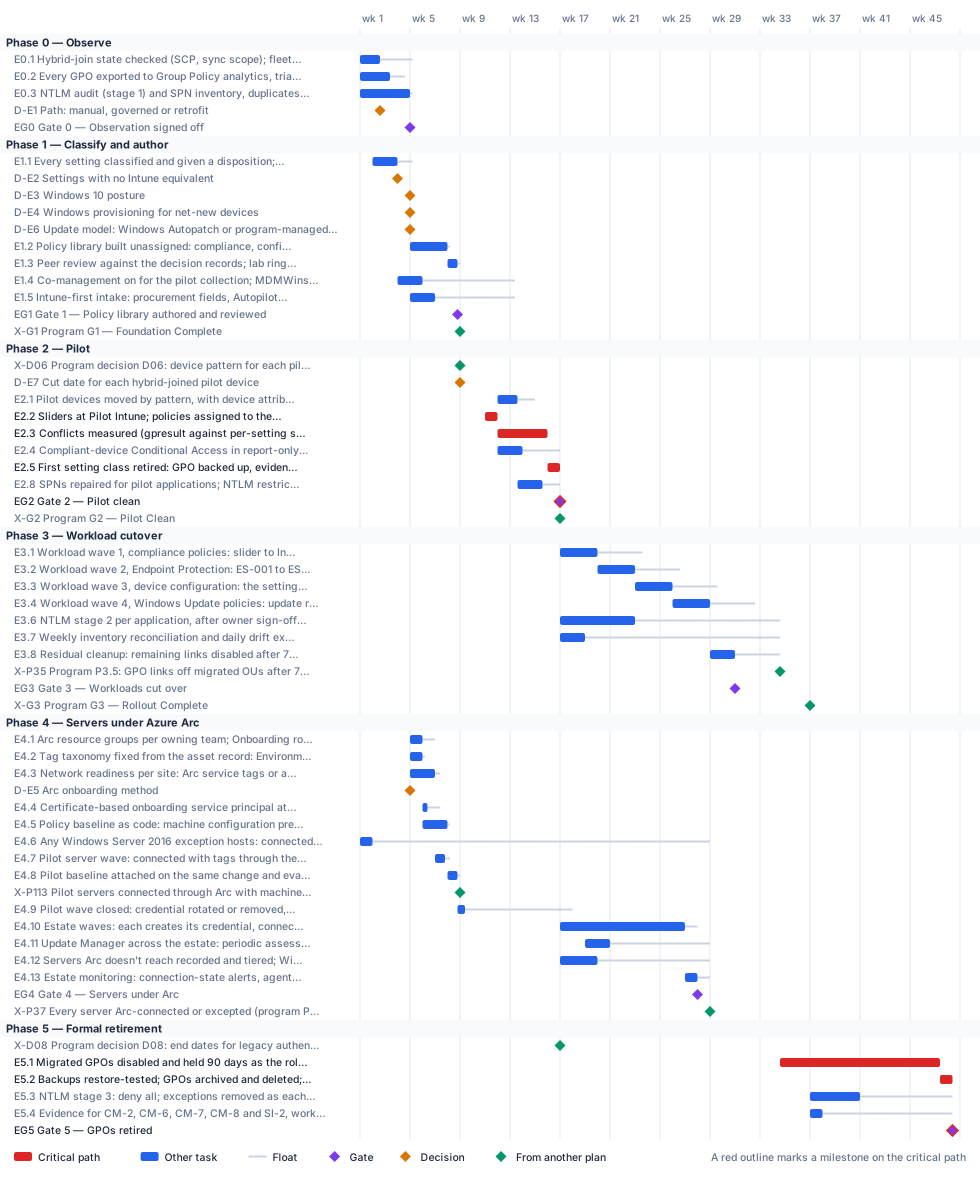
Critical path
Two program gates bound the first half. The program’s G1 (end of week 8) needs the Intune policy design, so the GPO export, the classification of every setting, the policy library and its peer review have to finish by then: they do, with one working day to spare, which is why the program carries its own Intune design on its critical path. The NTLM audit and Gate 0 sit one day off that path. The pilot then has to clear the program’s G2 (end of week 16): policies assigned in week 11 beside the still-linked GPOs, devices moved in weeks 12 to 13, four weeks of conflict and application testing, and the first setting class retired, with no days to spare.
After G2 the computed critical path is the four workload waves in their fixed order (Endpoint Protection before device configuration, because the device configuration slider carries it), the residual cleanup, the 90-day hold on the disabled GPOs, and their archiving and deletion. The hold is the longest single item. It starts when the program’s P3.5 takes the links off, at the end of week 34, so the last deletions land at the end of week 48, with the program’s G5. The program’s P4.1 only disables the GPOs; deletion waits for this hold. Waiting for G3 to start it would push the deletions to about week 50, past G5. The NTLM stages and the inventory reconciliation carry float.
Servers under Azure Arc are their own phase, held to two program dates rather than to this plan’s finish. Readiness starts at Gate 0: resource groups and scoped roles, the tag taxonomy, the network check per site, the onboarding method (D-E5) and its certificate-based service principal, and the policy baseline written as code. The pilot wave connects before the program’s G1 and has its baseline attached and evaluated by the end of week 8, one working day inside the program’s P1.13, which the Data Platform plan’s pilot SQL Server host also waits for. The estate waves start after the program’s G2, and Gate 4 (servers under Arc) lands in week 27, five working days inside the program’s P3.7. The plan expects no Windows Server 2016 hosts, because the workbook’s standard has them gone by end of support. An exception host can’t wait for either date: with this sample’s placeholder start, end of support on January 12, 2027 falls in week 2, so it’s connected for ESUs only, ahead of the readiness work.
The critical path, in order. Each item has zero total float: a day lost on any of them is a day lost at the finish.
| # | ID | Item | Owner or approver | When |
|---|---|---|---|---|
| 1 | E2.2 | Sliders at Pilot Intune; policies assigned to the pilot cohort with a 7-day grace period; GPOs left linked | Endpoint engineering | wk 11 |
| 2 | E2.3 | Conflicts measured (gpresult against per-setting status); application and user tests against the baseline | Endpoint engineering | wk 12–15 |
| 3 | E2.5 | First setting class retired: GPO backed up, evidence checked, links disabled on the pilot OUs | Endpoint engineering | wk 16 |
| 4 | EG2 | Gate 2 — Pilot clean | Endpoint engineering | end of wk 16 |
| 5 | E5.1 | Migrated GPOs disabled and held 90 days as the rollback net | Endpoint engineering | wk 34–47 |
| 6 | E5.2 | Backups restore-tested; GPOs archived and deleted; exception register closed | Endpoint engineering | wk 47–48 |
| 7 | EG5 | Gate 5 — GPOs retired | CISO / ISSO | end of wk 48 |
Near-critical. These items have 5 working days of float or less. Track them weekly: once their float is spent, they join the critical path.
| ID | Item | Float | When |
|---|---|---|---|
| E0.3 | NTLM audit (stage 1) and SPN inventory, duplicates and stale owners flagged | 1 d | wk 1–4 |
| EG0 | Gate 0 — Observation signed off | 1 d | end of wk 4 |
| D-E3 | Windows 10 posture | 1 d | end of wk 4 |
| E1.2 | Policy library built unassigned: compliance, configuration, endpoint security, app protection; groups, filters and scope tags | 1 d | wk 5–7 |
| E4.2 | Tag taxonomy fixed from the asset record: Environment, Workload, Criticality, Owner, CostCenter, PatchGroup, ArcOnboardedDate; SQL Server opt-out tag where needed | 1 d | wk 5 |
| E4.5 | Policy baseline as code: machine configuration prerequisites, Azure compute security baselines, Update Manager schedules by PatchGroup, Defender for Servers Plan 2, extension allowlists | 1 d | wk 6–7 |
| E1.3 | Peer review against the decision records; lab ring reports Succeeded for every setting | 1 d | wk 8 |
| E4.8 | Pilot baseline attached on the same change and evaluated: machine configuration compliance, Update Manager assessment, Defender for Servers Plan 2 onboarded | 1 d | wk 8 |
| E4.3 | Network readiness per site: Arc service tags or a private link scope; azcmagent check from a representative server | 2 d | wk 5–6 |
| E4.7 | Pilot server wave: connected with tags through the chosen tool, licensing attested, certificate file removed, agent local controls set | 2 d | wk 7 |
| E4.1 | Arc resource groups per owning team; Onboarding role to the service principal only, Resource Administrator to server operations, scoped and held through PIM | 5 d | wk 5 |
| E4.4 | Certificate-based onboarding service principal at resource-group scope, created as a recorded change and handed to the chosen tool | 5 d | wk 6 |
| E4.10 | Estate waves: each creates its credential, connects, attests, attaches the baseline, verifies and closes by removing what onboarding needed | 5 d | wk 17–26 |
| E4.13 | Estate monitoring: connection-state alerts, agent currency, the three baselines watched together, ESU coverage reported | 5 d | wk 27 |
| EG4 | Gate 4 — Servers under Arc | 5 d | end of wk 27 |
Decision points
Each decision is a zero-duration milestone in the network. Decide by is its late finish: the last week it can be made without moving the plan’s finish. A decision with zero float sits on the critical path, so the meeting that makes it should be booked before the plan is baselined. Decision rights follow Book 01, Chapter 09.
| ID | Decision | Decides | Needed by | Decide by | Float | Options | If it’s late |
|---|---|---|---|---|---|---|---|
| D-E3 | Windows 10 posture | CISO / ISSO | E1.2 | end of wk 5 | 1 d | Upgrade to Windows 11 before the device’s wave; keep the device as an exception with an upgrade date | The compliance policies can’t set their OS floor, so baseline authoring waits |
| D-E5 | Arc onboarding method | Server infrastructure | E4.4 | end of wk 6 | 10 d | A certificate-based service principal through the tool the server team already runs (Configuration Manager, Ansible or Group Policy); the portal script for a handful of servers or a pilot; Arc-enabled VMware vSphere; the multicloud connector for AWS | The pilot server wave can’t create its credential |
| D-E2 | Settings with no Intune equivalent | CISO / ISSO | E1.3 | end of wk 8 | 21 d | A Remediation script, reviewed later for a native replacement; a Configuration Manager baseline on co-managed devices; a dated exception with its GPO linked for that population only; a standing exception, accepted by the authorizing official | Decision records stay open and the baseline review can’t sign off |
| D-E1 | Path: manual, governed or retrofit | Executive sponsor and CIO | E1.4 | end of wk 11 | 44 d | Manual (small estate or pilot, no control plane yet); governed (larger estate, or the authorizing official must sign); retrofit (estate already modernized by hand) | Nobody knows who holds the decision record; co-management for the pilot can’t start |
| D-E4 | Windows provisioning for net-new devices | Endpoint engineering | E1.5 | end of wk 11 | 32 d | Classic Windows Autopilot, user-driven, Entra join, OEM or reseller registration with a group tag (the program’s GCC default); Autopilot device preparation, with the attribute carried by the serial-number mapping table | New hardware has no governed path and keeps arriving as tomorrow’s migration |
| D-E7 | Cut date for each hybrid-joined pilot device | Executive sponsor and CIO | EG2 | end of wk 16 | 40 d | The device’s refresh date; an OS upgrade; a troubleshooting rebuild (each needs a reset to reach Entra join) | The pilot fails its no-hybrid-join-without-a-cut-date criterion, and so does the program’s G2 |
| D-E6 | Update model: Windows Autopatch or program-managed rings | CISO / ISSO | E3.4 | end of wk 29 | 123 d | Autopatch groups configured to the program’s ring table, where the license allows; Intune update rings built from SC-005 | The Windows Update wave can’t be built, and WSUS stays |
Gates
A gate opens the work that names it as a predecessor, which is usually the next phase but not always. The approver signs it against the criteria, from evidence in the repository.
| Gate | When | Approver | Criteria |
|---|---|---|---|
| Gate 0 — Observation signed off | end of wk 4 | CISO / ISSO | Every linked GPO and setting inventoried; the NTLM audit window closed; SPNs inventoried with duplicates flagged; device records correlated and the loss ledger run |
| Gate 1 — Policy library authored and reviewed | end of wk 8 | CISO / ISSO | A decision record for every setting; every required setting owned by exactly one policy; peer review signed off; lab devices report Succeeded; pilot devices co-managed and syncing |
| Gate 2 — Pilot clean | end of wk 16 | Endpoint engineering | No unexplained Conflict or Error; no application regressions against the baseline; one setting class retired with evidence; every hybrid-joined pilot device has a cut date; an NTLM restriction plan per application |
| Gate 3 — Workloads cut over | end of wk 30 | Endpoint engineering | Each wave’s settings report success on its population; no migrated device processes an in-scope GPO; every preference item cleared or owned; evidence filed |
| Gate 4 — Servers under Arc | end of wk 27 | CISO / ISSO | Every in-scope server Connected with the full tag taxonomy, or in the exception register with its tier; machine configuration baseline assigned and evaluated, noncompliance filed as findings; Update Manager assessing every server and patching on its PatchGroup schedule; Defender for Servers Plan 2 onboarded; no onboarding credential or certificate file left after any wave; no Windows Server 2016 host remains, or each one is a recorded exception with ESU coverage, a signed risk acceptance and a retirement date; rollback rehearsed |
| Gate 5 — GPOs retired | end of wk 48 | CISO / ISSO | No GPO in scope linked to an OU with migrated devices; every retired GPO backed up with a decision record; only dated exceptions remain, each with an owner and review date; workload sliders at Intune |
Links to other plans
- X-G1, Program G1 — Foundation Complete, is G1 in the Program master schedule plan (G1 — Foundation Complete), end of wk 8. This plan must finish E1.3 by then: a margin of 1 d. Later work in this plan waits for it. The pilot can’t start: groups, AUs and the Conditional Access baseline aren’t in place.
- X-D06, Program decision D06: device pattern for each pilot cohort, is D06 in the Program master schedule plan (Device pattern for each pilot cohort), end of wk 8. This plan waits for it; it can slip 22 d before it moves this plan. Pilot devices can’t move, and this plan’s pilot waits.
- X-G2, Program G2 — Pilot Clean, is G2 in the Program master schedule plan (G2 — Pilot Clean), end of wk 16. This plan must finish EG2 by then: no margin. Later work in this plan waits for it. The workload waves can’t start.
- X-P35, Program P3.5: GPO links off migrated OUs after 7 clean days, is P3.5 in the Program master schedule plan (GPO links off migrated OUs after 7 clean days (M-036)), end of wk 34. This plan must finish E3.8 by then: a margin of 18 d. Later work in this plan waits for it. The 90-day hold on the disabled GPOs starts late, and so does their deletion.
- X-G3, Program G3 — Rollout Complete, is G3 in the Program master schedule plan (G3 — Rollout Complete), end of wk 36. This plan waits for it; it can slip 37 d before it moves this plan. Formal retirement and NTLM stage 3 can’t close.
- X-P113, Pilot servers connected through Arc with machine configuration applied (program P1.13), is P1.13 in the Program master schedule plan (Pilot servers connected through Arc with machine configuration applied (M-030)), end of wk 8. This plan must finish E4.8 by then: a margin of 1 d. The program’s pilot has no governed servers, and the Data Platform plan’s pilot SQL Server host has no Arc pattern to follow.
- X-P37, Every server Arc-connected or excepted (program P3.7), is P3.7 in the Program master schedule plan (Every server Arc-connected or excepted), end of wk 28. This plan must finish EG4 by then: a margin of 5 d. The program’s G3 fails its every-server-Arc-connected-or-excepted criterion.
- X-D08, Program decision D08: end dates for legacy authentication and NTLM, is D08 in the Program master schedule plan (End dates for legacy authentication and NTLM), end of wk 16. This plan waits for it; it can slip 137 d before it moves this plan. NTLM stage 3 has no date for application owners to plan against.
Other plans that take a date from this one. Waits for it: that plan can’t move until this item finishes, and its float says how far this item can slip before it moves that plan. Must finish by it: that plan’s work has to be done before this item, and the margin says by how much.
| This plan’s item | When | Linked plan | Relationship | Float or margin |
|---|---|---|---|---|
| EG0 Gate 0 — Observation signed off | end of wk 4 | Attribute-Driven Migration (X-EG0) | Must finish AT0.4 by it | 8 d margin |
| E4.2 Tag taxonomy fixed from the asset record: Environment, Workload, Criticality, Owner, CostCenter, PatchGroup, ArcOnboardedDate; SQL Server opt-out tag where needed | wk 5 | Attribute-Driven Migration (X-E42) | Must finish AT5.3 by it | 6 d margin |
| E1.4 Co-management on for the pilot collection; MDMWinsOverGP decided per population | wk 4–5 | Content Delivery Modernization (X-E14) | Waits for it | 63 d |
| E1.5 Intune-first intake: procurement fields, Autopilot registration with group tags, enrollment restrictions | wk 5–6 | Content Delivery Modernization (X-E15) | Waits for it | 193 d |
| start of E1.2 Policy library built unassigned: compliance, configuration, endpoint security, app protection; groups, filters and scope tags | wk 5–7 | Attribute-Driven Migration (X-E12) | Must finish AT5.2 by it | 4 d margin |
| EG3 Gate 3 — Workloads cut over | end of wk 30 | Content Delivery Modernization (X-EG3) | Waits for it | 88 d |
Work breakdown and schedule
Every row, by phase. Float is total float in working days; bold rows are on the critical path. Each row links to the chapter it comes from.
Phase 0 — Observe
| ID | Item | Type | Owner or approver | Days | Predecessors | When | Float |
|---|---|---|---|---|---|---|---|
| E0.1 | Hybrid-join state checked (SCP, sync scope); fleet run against the loss ledger | Task | Endpoint engineering | 8 | — | wk 1–2 | 13 d |
| E0.2 | Every GPO exported to Group Policy analytics, triaged to Intune or Arc scope; baseline per tier captured | Task | Endpoint engineering | 12 | — | wk 1–3 | 6 d |
| E0.3 | NTLM audit (stage 1) and SPN inventory, duplicates and stale owners flagged | Task | Server infrastructure | 20 | — | wk 1–4 | 1 d |
| D-E1 | Path: manual, governed or retrofit | Decision | Executive sponsor and CIO | — | E0.1 | end of wk 2 | 44 d |
| EG0 | Gate 0 — Observation signed off | Gate | CISO / ISSO | — | E0.1, E0.2, E0.3 | end of wk 4 | 1 d |
Phase 2 — Pilot
| ID | Item | Type | Owner or approver | Days | Predecessors | When | Float |
|---|---|---|---|---|---|---|---|
| X-D06 | Program decision D06: device pattern for each pilot cohort | External | Program office (program) | — | — | end of wk 8 | 22 d |
| D-E7 | Cut date for each hybrid-joined pilot device | Decision | Executive sponsor and CIO | — | X-D06 | end of wk 8 | 40 d |
| E2.1 | Pilot devices moved by pattern, with device attributes populated | Task | Endpoint engineering | 8 | E2.2, EG1, X-G1, X-D06 | wk 12–13 | 7 d |
| E2.2 | Sliders at Pilot Intune; policies assigned to the pilot cohort with a 7-day grace period; GPOs left linked | Task | Endpoint engineering | 5 | X-G1 +10 d | wk 11 | 0 |
| E2.3 | Conflicts measured (gpresult against per-setting status); application and user tests against the baseline | Task | Endpoint engineering | 20 | E2.2 | wk 12–15 | 0 |
| E2.4 | Compliant-device Conditional Access in report-only for the pilot; coverage reconciled | Task | Identity engineering | 10 | E2.2 | wk 12–13 | 15 d |
| E2.5 | First setting class retired: GPO backed up, evidence checked, links disabled on the pilot OUs | Task | Endpoint engineering | 5 | E2.3 | wk 16 | 0 |
| E2.8 | SPNs repaired for pilot applications; NTLM restriction plan per application | Task | Application owners | 10 | E2.1, EG0 | wk 13–15 | 7 d |
| EG2 | Gate 2 — Pilot clean | Gate | Endpoint engineering | — | E2.5, E2.4, E2.8, D-E7 | end of wk 16 | 0 |
| X-G2 | Program G2 — Pilot Clean | External | Steward and executive sponsor (co-signed; program) | — | EG2 | end of wk 16 | fixed date |
Phase 3 — Workload cutover
Phase 4 — Servers under Azure Arc
Phase 5 — Formal retirement
| ID | Item | Type | Owner or approver | Days | Predecessors | When | Float |
|---|---|---|---|---|---|---|---|
| X-D08 | Program decision D08: end dates for legacy authentication and NTLM | External | Authorizing official (program) | — | — | end of wk 16 | 137 d |
| E5.1 | Migrated GPOs disabled and held 90 days as the rollback net | Task | Endpoint engineering | 64 | EG3, X-P35 | wk 34–47 | 0 |
| E5.2 | Backups restore-tested; GPOs archived and deleted; exception register closed | Task | Endpoint engineering | 5 | E5.1, X-G3 | wk 47–48 | 0 |
| E5.3 | NTLM stage 3: deny all; exceptions removed as each dependency retires | Task | Application owners | 20 | E3.6, X-D08, X-G3 | wk 37–40 | 37 d |
| E5.4 | Evidence for CM-2, CM-6, CM-7, CM-8 and SI-2, workstations and servers, handed to the ISSO | Task | Endpoint engineering | 5 | E3.7, EG4, X-G3 | wk 37 | 52 d |
| EG5 | Gate 5 — GPOs retired | Gate | CISO / ISSO | — | E5.2, E5.3, E5.4 | end of wk 48 | 0 |
Responsibility
Who owns what in this plan. Each row has one owner; consulted and informed parties follow the decision matrix.
| Owner or approver | Tasks | Decisions | Gates |
|---|---|---|---|
| Endpoint engineering | 20 | 1 | 2 |
| Server infrastructure | 14 | 1 | — |
| CISO / ISSO | — | 3 | 4 |
| Application owners | 3 | — | — |
| Platform teams (program) | 3 | — | — |
| Executive sponsor and CIO | — | 2 | — |
| Authorizing official (program) | 1 | — | — |
| Executive sponsor and steering committee (program) | 1 | — | — |
| Identity engineering | 1 | — | — |
| Program office (program) | 1 | — | — |
| Steward (program) | 1 | — | — |
| Steward and executive sponsor (co-signed; program) | 1 | — | — |
Assumptions
- The fleet has a Configuration Manager estate, which is what Book 05’s durations assume; a fleet without one skips most of the coexistence planning (Chapter 08).
- The pilot cohort is about 5% of the fleet, representative across tiers, regions and departments, and sits inside the program’s pilot division (one division, typically IT, with 50 to 100 devices as a floor); the ring sizes in each wave are a program design choice.
- Domain unjoin of the existing fleet is out of scope; the sponsor schedules it separately (Chapter 06).
- The 90-day GPO retention window is the program’s design choice, sized to the fleet’s patch and refresh cycle (Chapter 07); here it is taken as 64 working days.
- Arc onboarding attaches the management plane and doesn’t unjoin a server from the domain; unjoining is a separate decision per workload, outside this plan, as is Entra ID sign-in on Windows Server 2025 (Chapter 09).
- The workbook’s standard has Windows Server 2016 gone from production by its January 12, 2027 end of support. This sample’s placeholder calendar starts on January 4, 2027, so any exception host is connected for ESUs in week 1; on a real calendar that is done before the program starts (Chapter 09).
- Durations are illustrative. Replace them with the agency’s own estimates once the GPO inventory and the NTLM audit are in.
Schedule risks
| Risk | Effect on the schedule | Response |
|---|---|---|
| NTLM is restricted before the audit window closes | Legacy applications break; the stage is rolled back and the NTLM track slips | Restrict only after a 14 to 30 day audit shows no dependencies and the application owner signs off (Chapter 05) |
| A setting outside the Policy CSP (Defender, Windows Hello for Business) is configured in both a GPO and Intune | A race with no guaranteed winner; unexplained conflicts fail the pilot gate | Never configure those settings in both places; unlink the GPO first or exclude the population (Chapter 07) |
| Device attributes are incomplete | Devices fall outside every policy’s scope, and the compliant-device policies can’t be enforced | Mark devices with no compliance policy as not compliant; reconcile the inventories weekly (Chapter 10) |
| Pilot Intune doesn’t remove policies when they are unassigned | A pilot rollback takes longer than planned | Plan rollback as reassigning a policy that sets the old value, not as removing the assignment (Chapter 08) |
| An Arc server stays disconnected for more than 14 days | Its machine configuration assignments are deleted and not reassigned, so its baseline evaluation silently stops | Alert on connection state and investigate missed heartbeats; reconnect inside the window or re-assign the baseline (Chapter 09) |
| An onboarding secret is left in plain text in a startup script | Anyone who reads SYSVOL can register servers into the subscription | Onboard with a certificate-based service principal and remove the credential when each wave closes (Chapter 09) |
Baseline and change control
- Baseline the plan when its first gate is approved: the YAML file, as merged, is the baseline.
- Report weekly, green, yellow or red, against the baseline (Book 01, Chapter 12). Report float, not percent complete: a task’s float says how much slip the plan can still absorb.
- Change the plan only through a reviewed pull request that edits the YAML and regenerates this page, so every change to a date or a dependency has an author, a reviewer and a reason.
- Re-baseline at each gate, after the approver signs it, and whenever a critical-path decision is made late.
Download and adapt
| File | Use it for |
|---|---|
| endpoint-device.xml | Microsoft Project desktop (open the XML file; it keeps the dependencies, milestones and owners). The dates start on a placeholder Monday: change the project start date. |
| endpoint-device.csv | Excel or any other scheduling tool: every row with its dependencies, early and late dates and float |
| endpoint-device-azure-boards.csv | Azure DevOps Boards: an Epic per phase and a Feature per task, gate and decision, with dates and tags (see below) |
| endpoint-device-dependencies.csv · add-azure-boards-links.ps1 | The plan’s predecessor links, and a script that adds them in Azure Boards after the import |
| endpoint-device-jira.csv | Jira: an Epic per phase and a Task per task, gate and decision, with dates, labels and Blocks links (see below) |
| endpoint-device.yaml | The source. Edit the durations, owners and dependencies, then run python scripts/project_plans/build.py to recompute the critical path and regenerate this page, the chart and the downloads. |
- In the project, select Boards > Queries > Import work items, choose endpoint-device-azure-boards.csv, check the results and select Save items. It creates one Epic per phase with a Feature under it for each task, gate and decision, with start and target dates, which is what Delivery Plans show. Epic and Feature exist in the Agile, Scrum and CMMI processes; in the Basic process, change Feature to Issue in the file first.
- The import can’t create dependency links or assign people. To add the predecessor links, sign in with
az login, add the CLI extension withaz extension add --name azure-devops, and run./add-azure-boards-links.ps1 -Organization https://dev.azure.com/<org> -Project <project> -Plan endpoint-devicebeside endpoint-device-dependencies.csv. It finds the imported items by theirfmw-id-tags and links each one to its predecessors. - Assign people in Boards: each item carries its owner role as an Owner - … tag, and critical-path items carry Critical path. Azure Boards links don’t hold lag or start-to-start timing; each item’s description keeps them.
The dates count from the plan’s placeholder start; shift them when you set the real start. The script hasn’t been run against a live organization yet: test it on a scratch project first.
- Run the CSV importer (in Jira Cloud, Settings > System > External system import > CSV) with endpoint-device-jira.csv. On the second step, set Date format in import file to
yyyy-MM-dd. - Map the columns: Work item ID to Work item ID, Work type to Work type, Parent to Parent, Summary, Description and every Labels column to their fields, Start date to the Start date field, Due date to Due date, and every Blocks column to the Blocks link type. Each phase becomes an Epic with a Task under it for each task, gate and decision; each Blocks column makes that row’s item block the item it names, which carries the plan’s dependencies.
- Assign people in Jira: each item carries its owner role as an
owner-…label, and critical-path items carrycritical-path. Jira links don’t hold lag or start-to-start timing; each description keeps them.
Test the import on a scratch project with a few rows first: the importer doesn’t remove duplicate links and Jira has no bulk delete for them. If the Blocks links don’t come through on your site, import the items first and add the links from the plan’s dependency list in a second pass, as Atlassian recommends. The dates count from the plan’s placeholder start.
- Microsoft Project desktop opens the XML file directly, with every dependency, milestone and owner.
- Microsoft Planner has no file import of its own: it doesn’t read XML, CSV or Excel. To bring this plan into a Planner premium plan, open the XML file in Project desktop, save it as an
.mppfile, and import that through the Project Power App. Tasks, durations, dependencies and milestones come across; resources and baselines don’t, so assign owners again in Planner. - Without Project desktop, the CSV can feed a Power Automate flow that creates the tasks one by one, but dependencies in a premium plan need Microsoft’s Project schedule APIs, so that’s a build, not an import.
- In a government cloud tenant, check that premium plans are available before relying on Planner for this schedule: Microsoft notes that converting a basic plan to a premium plan isn’t available in GCC.
Project for the web was retired on August 1, 2025, and Project Online on September 30, 2026; Planner is their successor. Project desktop is unaffected.