Federal Modernization Workbook
Chapter 08 — Evidence and Drift for the ISSO
An inventory taken once proves the day it was taken. The ISSO needs every day of the period, every elevation in it, and a record nobody could have edited afterwards.
The evidence behind the project plan’s tasks A3.6 and A4.3: “drift every six hours,” and “monthly evidence package assembled and its metrics signed off,” which feed Gate 4. You start with Learn’s page on PIM audit history, whose three sample Log Analytics queries the repository keeps as a pinned copy, and run them offline over fictional audit rows to see what they find and what they leave out. Then you build an evidence run in examples/privileged-access that runs Chapter 01’s inventory and Chapter 02’s check and reads the PIM audit evidence from Microsoft Graph, and you extend the first workbook’s examples/drift-pipeline with new files to compare runs, package them in a hash chain, and assemble a period for the ISSO. Lab 1 runs on a laptop with no tenant; Lab 2 uses a test tenant. A table at the end maps each output to the federal requirement it supports.
Jump to a slide (18)
Deck · Narrated deck (about 12 minutes, captions) · Script · Captions. Recorded on November 2, 2026 from the approved chapter.
Goal and audience
Goal. By the end of this chapter you can run the privileged reads on a schedule, say what changed since the last run without putting anyone’s name in the issue tracker, show every PIM activation in a window with its approval, and hand the ISSO a package and a period summary they can check with sha256sum alone. For each rule in the code you can say whether it is Microsoft’s contract, Microsoft’s sample, the first workbook’s pipeline, or the program’s own design.
Audience. Developers and pipeline engineers who own the scheduled checks, and the ISSOs and identity governance officers who receive the evidence. You should read PowerShell 7 and Python. You don’t need a tenant until Lab 2.
What the evidence has to show
Three pages already say what this evidence is for. This chapter builds it and doesn’t repeat them.
- The plan’s gates. Gate 3 asks for “a Tier 0 drift handled as an incident.” Gate 4 asks for residual standing privilege named and accepted, “evidence for every elevation in the period,” and a current exception register (project plan).
- Book 04, Chapter 10 sets the rule for Tier 0 drift (“a security incident”) and lists what the monthly package holds: monitoring results with each drift’s resolution, PIM audit records, the exception register, and the metrics (Book 04, Chapter 10; the package’s contents are in The evidence package for a period).
- Book 04, Chapter 08 says the PIM audit records must be exported before the service’s retention closes, and that an activation is correlated by its request, not its session (Book 04, Chapter 08).
Learn gives the two facts the design turns on. Microsoft Entra audit logs are kept for 30 days with Microsoft Entra ID P1 or P2, and seven days on Free.1 And PIM can log one activation under several correlation IDs, when it waits for an approval or starts at a scheduled time; roleAssignmentRequestId stays the same through all of it.2
So the run has three parts. Chapter 01’s inventory and Chapter 02’s check describe the tenant’s state: who holds what, and whether the emergency accounts meet the standard. The PIM audit read describes the events in a window: who asked, who approved, what was activated, and what was assigned outside PIM. A comparison with the last run turns the state into drift. A chain of windows with no gap between them is what “every elevation in the period” means in code. Design guidance.
Chapters 03 to 07 add Conditional Access, PIM role settings, PIM for Groups, Azure PIM and access reviews. Their outputs aren’t in this run yet. Each can join it as another task with its own folder and manifest, and the comparison treats it the same way (research gaps, row 88).
Which cloud, for this read
The audit read calls Microsoft Graph: graph.microsoft.com for GCC, which uses the worldwide endpoints, as do sign-in at login.microsoftonline.com and Azure Resource Manager at management.azure.com. GCC High uses graph.microsoft.us and DoD dod-graph.microsoft.us.3 List directoryAudits is available in the global service, US Government L4 and US Government L5.4 PIM is part of Microsoft Entra ID Governance, available in GCC, GCC High and DoD.5 The run takes the cloud as a required parameter with no default, and uses Chapter 01’s reader, which sends the token only to that cloud’s host.
Start with Microsoft’s sample
What Microsoft gives you
Learn’s page View audit history for Microsoft Entra roles in Privileged Identity Management is Microsoft’s procedure. It shows PIM’s resource audit in the admin center, says the data covers the past 30 days, and says to route the logs to a storage account or Log Analytics through diagnostic settings to keep them longer.6 It then gives three sample Log Analytics queries: one that finds role activation entries with OperationName has "Add member to role", one that finds the entries for one request by its roleAssignmentRequestId, and one that follows a whole activation and deactivation cycle by also collecting the correlation IDs of those entries.7
Learn’s Microsoft Entra audit log categories and activities lists the activity names PIM logs, such as Add member to role requested (PIM activation), Add member to role request approved (PIM activation), Add member to role completed (PIM activation), Add member to role outside of PIM (permanent) and Update role setting in PIM.8 Learn’s security operations guide for PIM says to monitor role assignments made outside PIM and changes to PIM settings, and to always alert on changes for Privileged Role Administrator and Global Administrator.9
Microsoft Sentinel rule templates for PIM settings changes and denied elevations exist in the Azure/Azure-Sentinel repository, and Learn’s security operations guide links them.10 They aren’t used here: they run in a Sentinel workspace, and Learn’s own page already gives the activation queries this chapter needs.
The pinned copy
The queries exist only inside the Learn page, so the repository pins the page’s source, unmodified, in examples/third_party/entra-pim-audit-page: pim-how-to-use-audit-log.md from MicrosoftDocs/entra-docs at commit 07cb73d (October 30, 2026), retrieved October 30, 2026, with the repository’s MIT licenses.11 snapshot.json records each file’s SHA-256 and its upstream git blob hash, checked with gh api before the manifest was written. A unit test checks the hashes, and the weekly source watch reports new commits to the page.
tests/EvidenceDrift.Tests.ps1 extracts the three queries from the pinned page at test time and runs them unmodified over tests/fixtures/ch08/audit.json, eighteen fictional audit items, mapped to the AuditLogs table’s column names. Its small evaluator handles only the queries’ shape: let, where Column has ... terms joined by or, in, and summarize makeset(...). Anything else throws. It isn’t a KQL engine, and nothing is sent to a workspace.
What it leaves to you
Each row is pinned by a test: in the “as published” block of tests/EvidenceDrift.Tests.ps1 for the sample, and in the rest of that file or in examples/drift-pipeline/tests/test_pa_evidence.py for the code.
| Learn’s queries, as published | Why it matters | What the code adds |
|---|---|---|
| The first query finds the three completed activations in the fixture | — | Kept as the model: the activity names, read from Learn’s list12 |
| The first query also returns the two events that assigned a role outside PIM, mixed in with 11 activation events | A standing Tier 0 assignment looks like one more activation | Classifies each event by its activity name; an outside-PIM assignment is PA-AUD-01 |
| The first query misses deactivations and the role setting change | Learn’s guide says to alert on every change to PIM settings for the top roles13 | Reads every event PIM logs in the window; a setting change is PA-AUD-04 |
The second query, as published, holds the placeholder {roleAssignmentRequestId}; read as whole terms it matches the detail’s key name, so it returns all 13 events that carry a request ID |
A query copied as published selects no single request | Reads each event’s request ID and groups by it |
| With a real request ID, it finds one activation across three correlation IDs | — | Kept: the request ID is the key, as Learn advises14 |
| The third query adds the deactivation event that has a correlation ID but no request ID (four events become five) | — | Kept: an event without a request ID joins the request that shares its correlation ID |
| One request at a time, with no time window, no tier and no check of the approval | “Every elevation in the period” can’t be shown one request at a time | A window per run, a tier per role, PA-AUD-02 for a Tier 0 or Tier 1 activation with no approval, PA-AUD-03 for a requester who approved their own request |
| Runs only in Log Analytics | Needs the workspace and its diagnostic setting before any evidence exists | Reads Graph’s directory audit log with AuditLog.Read.All, and refuses a window older than the 30 days the log keeps15 16 |
| Stops at the query | No comparison, no package, nothing for the ISSO | pa_evidence.py: compare, issues, package, verify and period |
The verdict. Use Learn’s request ID as the key for an activation and Learn’s activity names as the vocabulary. Don’t use the first query as the evidence of elevation: it mixes direct assignments in with activations and doesn’t show approvals.
The code: what the evidence run builds on and adds
The run is two pieces, each in its own files. examples/privileged-access gains Invoke-PaEvidenceRun.ps1, the module powershell/PaEvidence/PaEvidence.psm1, the call list config/calls-ch08.json and its tests. examples/drift-pipeline gains python/pa_evidence.py, workflow/pa-evidence.yml and their tests, as new files: drift_pipeline.py and its tests are unchanged, and pa_evidence.py imports its hashing, JSON, fingerprint and refusal helpers. The notes are in examples/privileged-access/docs/ch08.md.
The run
Invoke-PaEvidenceRun.ps1 -Cloud gcc -TenantId <id> writes one folder per run, named by its time and mode, such as 2026-10-30T0600Z-fixture:
inventory/, written by Chapter 01’sInvoke-PaInventory.ps1, unchanged;emergency/, written by Chapter 02’sInvoke-PaEmergencyCheck.ps1, unchanged;pim-audit/, this chapter’s:events.json,requests.json,summary.json,findings.jsonand amanifest.jsonin the same shape as the other two;run.json: the run ID, the as-of time, the cloud, the tenant ID, the mode, the audit window, the permissions, and each task’s status with the SHA-256 of its manifest.
The cloud and the tenant ID are required. In a live run the tenant ID must match the Graph session’s. A task that fails is recorded as Error in run.json and leaves no folder; the other tasks still run. Design guidance.
The audit read
Get-PaPimAuditEvent reads GET /v1.0/auditLogs/directoryAudits with three filters for the window: everything logged by PIM under each of the two service names Learn uses, and the Add member to role events Core Directory logs when a role is assigned outside PIM. The directoryAudit resource page lists eq, ge and le on activityDateTime, and eq on loggedByService and activityDisplayName.17 It goes through Chapter 01’s reader, so the call must be declared in config/calls-ch08.json, is a GET, goes only to the cloud’s Graph host, and follows every page. It refuses a window that starts more than 30 days before the run. The next window starts where the last one ended, so no hour goes unread.
Each event is kept as IDs: the activity and its class, the role, the target principal, the initiator, the correlation ID and the request ID. Names in the log, such as the initiator’s user principal name, are dropped. Design guidance: the inventory already holds names for the people who hold roles, and the audit evidence doesn’t need its own copy.
| Call | Least-privileged permission | Delegated role |
|---|---|---|
| List directoryAudits | AuditLog.Read.All18 |
Reports Reader, Security Reader or Security Administrator19 |
With Chapter 01’s five and Chapter 02’s six, the run needs nine Graph application permissions, none of them a write, and Reader on each Azure scope.
The audit findings
| Rule | Severity | What it flags | Source |
|---|---|---|---|
| PA-AUD-01 | Finding for T0 and T1; Warn otherwise | A role assigned outside PIM (Add member to role outside of PIM (permanent), or Core Directory’s Add member to role), once per role and principal |
Learn: monitor roles assigned outside PIM, high risk20 |
| PA-AUD-02 | Finding | A T0 or T1 activation completed with no approval record in the window | Book 04, Chapter 08: approval required for T0 and T1 (settings by tier); Learn’s baseline asks for approval to activate21 |
| PA-AUD-03 | Finding | An activation approved by its own requester | Design guidance; the plan’s Gate 3 asks for requester and approver distinct for Tier 0 |
| PA-AUD-04 | Finding for T0; Warn otherwise | A role setting changed in PIM, to be reconciled with a reviewed settings change | Learn: always alert on PIM setting changes for Privileged Role Administrator and Global Administrator22 |
An approval logged before the window started looks missing to PA-AUD-02, so its issue names the request ID for the reviewer to look up. Whether every approval is logged under the activity name the code reads is open (research gaps, row 85).
Compare, by fingerprint
pa_evidence.py compare loads both runs and checks them first: run.json, each task manifest by its hash, every file against its manifest, nothing extra, every recorded request a GET, and one tenant, cloud and mode throughout. It refuses runs from different modes, clouds or tenants, or a current run that isn’t later, as the first workbook’s pipeline does (Chapter 09).
| Result | Meaning |
|---|---|
| new, changed, resolved, unchanged | Chapter 01’s and Chapter 02’s Finding and Warn rows, keyed by rule, object ID and issue |
| unverified | A task that didn’t read the tenant this run: its earlier findings stay open, never resolved |
| assignment added, removed, changed | Chapter 01’s rows, keyed by plane, role, scope, principal and route, with activations left out because they come and go within hours and the audit records each one |
| audit | This run’s PA-AUD findings: events in the window, listed as they are |
| coverage gap | Time between the last window’s end and this window’s start, or a window whose read failed |
| incident | Any Tier 0 assignment added, removed or changed; any new or changed Tier 0 Finding; any Tier 0 audit Finding |
The incident rule is Book 04, Chapter 10’s: a drift on a Tier 0 object is a security incident (Book 04, Chapter 10). The emergency access rules, the Global Administrator count and root-scope elevation are Tier 0 whatever the row says. Design guidance.
Each result has a fingerprint: the first 16 hex characters of a SHA-256 over the rule, the object ID and the issue, from the first workbook’s fingerprint(). The same finding has the same fingerprint every run, so the tracker can find its open issue.
Findings without names
pa_evidence.py issues drafts what to open, comment on and close. A title uses a fixed rule title from a catalog, or a role name, never a finding’s own text, because Chapter 01’s issue text can name a person. A body carries the rule, severity, tier, object ID and fingerprint, and the run and its run.json hash. Names stay in the drift report, which goes to the access-controlled evidence store. --include-names turns them on for a reviewed exception. A test checks that no name or user principal name from either run appears in the drafts. Design guidance, as in the first workbook’s Chapter 09.
The package and the chain
pa_evidence.py package writes <run-id>/ with the run as written (run/), the drift report and summary (drift/), an EVIDENCE-MANIFEST.json and a SHA256SUMS that sha256sum -c reads. The manifest records the run, the cloud, the tenant ID, the mode, the audit window, each task’s status, the run.json hash, the counts, the GitHub run identifiers when there are any, a SHA-256 and size for every file, and the previous package’s run ID and manifest hash. That last hash makes the packages a chain: a replaced package or a missing day shows up as a break. The same inputs give the same bytes. verify is what the ISSO runs.
The packager doesn’t sign, for the reason the first workbook gives: the hashes show nothing changed after packaging, and a container with a locked time-based retention policy keeps blobs from being modified or deleted until the interval ends.23 Signing stays the ISSO’s choice (research gaps, row 87).
What the ISSO receives
pa_evidence.py period --since <start> --until <end> is the plan’s A4.3. It verifies every package whose window falls in the period, checks the chain between them and that their windows cover the period with no gap, and writes PERIOD-MANIFEST.json, period-summary.md and SHA256SUMS. The packages stay where they are, cited by their manifest hashes. For the Gate 4 review it gives:
| Gate 4 criterion | What the period shows | Who decides |
|---|---|---|
| Residual standing privilege named with a rationale and accepted | Chapter 01’s PA-INV-01 rows at period end: on the exceptions list with their reason, or outside it | The authorizing official accepts it |
| Evidence for every elevation in the period | Activations by tier, approvals, denials, T0 or T1 activations without approval, audit coverage gaps, chain breaks | The ISSO, from the period |
| Exception register current | The exceptions list the inventory read | The governance office |
| Access-related GPO settings retired | Nothing: not a privileged read | Identity engineering (A4.1) |
It also lists every Tier 0 incident by fingerprint, for the ISSO to match against the incident records Gate 3 asks for. Book 04’s other monthly items, such as merged pull requests, review history and the governance metrics, come from their own sources (Book 04, Chapter 10).
The schedule
workflow/pa-evidence.yml is a sample GitHub Actions workflow, not active in this repository. It follows the first workbook’s: Learn’s Azure Login sign-in with a federated credential and no secret, pinned actions, a job that can request a token but write nothing else, and a second job with no Azure access that opens issues.24 It runs daily, starts each audit window where the last package’s ended, and on the first of the month assembles the previous month’s period. The first workbook’s workflow_lint.py checks it with no findings.
The project plan’s A3.6 sets drift every six hours. A run that often only needs a shorter schedule and the same code; daily is the sample’s choice. Design guidance.
The tests
Pester 5 under PowerShell 7: tests/EvidenceDrift.Tests.ps1, 32 tests, 8 of them Learn’s queries as published; the other chapters’ test files in examples/privileged-access run beside it unchanged. pytest: tests/test_pa_evidence.py, 41 tests over the two fixture runs; with the first workbook’s, 142 tests in examples/drift-pipeline. A Pester test reruns the evidence run from the fixtures and checks that its data files match the fixture runs the Python tests read. None of them needs a tenant or a network.
The commands below run Learn’s pinned queries over fictional audit rows, and the example against a fictional tenant served by a fake. The sample workflow has been parsed and linted, not run. They show what the code does, not that a tenant returns the same shapes. Review the code, and run Lab 2 in a test tenant, before it produces evidence anyone relies on.
Lab 1: fixtures, no tenant
You need PowerShell 7.1 or later with Pester 5, Python 3.10 or later with pytest and PyYAML, and a shell with sha256sum (Linux, macOS or Git Bash). Steps 1 to 4 run in examples/privileged-access in PowerShell; steps 5 to 10 in examples/drift-pipeline in a POSIX shell; step 11 in both.
Every command in this lab, in order. Each step below says what it does and what to look for.
In PowerShell 7:
# Step 1: Run Learn's queries over the fixture
Invoke-Pester -Path tests/EvidenceDrift.Tests.ps1 -FullNameFilter '*as published*' -Output None -PassThru |
    Select-Object PassedCount, FailedCount, NotRunCount

# Step 2: List the permissions the run needs
Import-Module ./powershell/PaEvidence/PaEvidence.psm1
(Get-PaEvidencePermission -Task evidence-run).GraphPermissions -join ', '

# Step 3: Run two days against the fictional tenant
$lab = @{ Cloud = 'gcc'; TenantId = '11111111-1111-4111-8111-111111111111'; OutputPath = 'out/runs'
    AuditFixturePath = 'tests/fixtures/ch08/audit.json'; EmergencyConfigPath = 'tests/fixtures/inputs/emergency-access.json'
    ValidationsPath = 'tests/fixtures/inputs/emergency-validations.csv'; ExceptionsPath = 'tests/fixtures/inputs/exceptions.csv'
    AzureScope = '/subscriptions/11111111-1111-4111-8111-111111111111', '/providers/Microsoft.Management/managementGroups/contoso-root', '/subscriptions/22222222-2222-4222-8222-222222222222'
    ControlPlaneSubscriptionId = '22222222-2222-4222-8222-222222222222' }
./Invoke-PaEvidenceRun.ps1 @lab -FixturePath tests/fixtures/tenant.json -AsOf 2026-10-29T06:00:00Z
./Invoke-PaEvidenceRun.ps1 @lab -FixturePath tests/fixtures/ch08/tenant-day2.json -AsOf 2026-10-30T06:00:00Z

# Step 4: Read the second day's audit findings
Get-Content out/runs/2026-10-30T0600Z-fixture/pim-audit/findings.json -Raw | ConvertFrom-Json | Format-Table Rule, Severity, Tier, ObjectId
In a POSIX shell (Git Bash on Windows):
# Step 5: Record a baseline and package it
DAY1=tests/fixtures/pa-runs/2026-10-29T0600Z-fixture
DAY2=tests/fixtures/pa-runs/2026-10-30T0600Z-fixture
python python/pa_evidence.py compare --current $DAY1 --out out/day1
python python/pa_evidence.py package --run $DAY1 --diff out/day1/pa-drift-report.json --out out/evidence

# Step 6: Compare the next day
python python/pa_evidence.py compare --previous $DAY1 --current $DAY2 --out out/day2
cat out/day2/pa-drift-summary.md

# Step 7: Draft the findings
python python/pa_evidence.py issues --diff out/day2/pa-drift-report.json --out out/day2/issues.json
grep -c contoso out/day2/issues.json

# Step 8: Package and verify the second day, chained to the first
python python/pa_evidence.py package --run $DAY2 --diff out/day2/pa-drift-report.json \
  --previous-manifest out/evidence/2026-10-29T0600Z-fixture/EVIDENCE-MANIFEST.json --out out/evidence
python python/pa_evidence.py verify out/evidence/2026-10-30T0600Z-fixture
(cd out/evidence/2026-10-30T0600Z-fixture && sha256sum -c --quiet SHA256SUMS)

# Step 9: Assemble the period for the ISSO
python python/pa_evidence.py period --evidence out/evidence --since 2026-10-28T06:00:00Z --until 2026-10-30T06:00:00Z --out out/periods
cat out/periods/period-2026-10-28_2026-10-30/period-summary.md

# Step 10: Break it on purpose
echo edited >> out/evidence/2026-10-30T0600Z-fixture/drift/pa-drift-summary.md
python python/pa_evidence.py verify out/evidence/2026-10-30T0600Z-fixture
python python/pa_evidence.py compare --previous $DAY2 --current $DAY1 --out out/swap
python python/workflow_lint.py workflow/pa-evidence.yml
In PowerShell 7:
# Step 11: Run the tests
Invoke-Pester -Path tests/EvidenceDrift.Tests.ps1
Invoke-Pester -Path tests
In a POSIX shell (Git Bash on Windows):
# Step 11: Run the tests
python -m pytest tests -q
In PowerShell 7:
# After the steps
Remove-Item -Recurse -Force out
In a POSIX shell (Git Bash on Windows):
# After the steps
rm -rf out
Run Learn’s queries over the fixture:
Invoke-Pester -Path tests/EvidenceDrift.Tests.ps1 -FullNameFilter '*as published*' -Output None -PassThru |
    Select-Object PassedCount, FailedCount, NotRunCount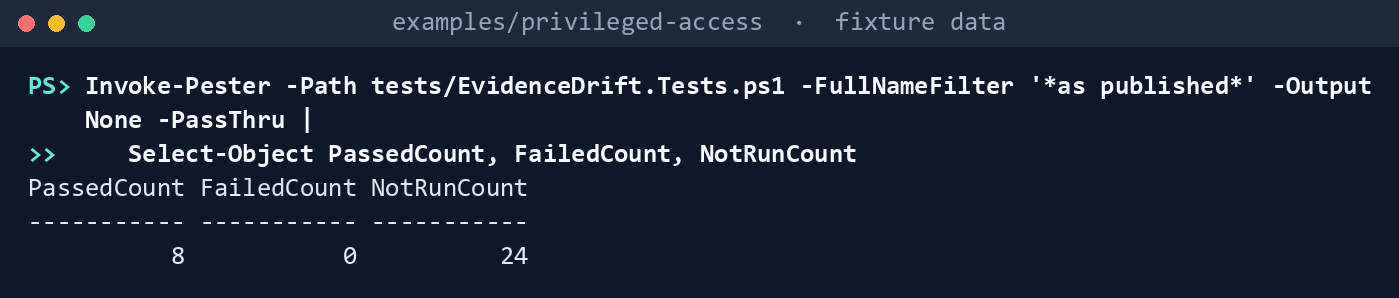
What the terminal shows, run on the kit’s fixtures (the same output as text) PassedCount 8,FailedCount 0,NotRunCount 24. Read the third test: two of the 13 rows the first query returns are role assignments made outside PIM.List the permissions the run needs:
Import-Module ./powershell/PaEvidence/PaEvidence.psm1
(Get-PaEvidencePermission -Task evidence-run).GraphPermissions -join ', '
What the terminal shows, run on the kit’s fixtures (the same output as text) AuditLog.Read.All, GroupMember.ReadBasic.All, Policy.Read.All, RoleAssignmentSchedule.Read.Directory, RoleEligibilitySchedule.Read.Directory, RoleManagement.Read.Directory, User.Read.All, User.ReadBasic.All, UserAuthenticationMethod.Read.All. Nothing ends inReadWrite.Run two days against the fictional tenant:
$lab = @{ Cloud = 'gcc'; TenantId = '11111111-1111-4111-8111-111111111111'; OutputPath = 'out/runs'
    AuditFixturePath = 'tests/fixtures/ch08/audit.json'; EmergencyConfigPath = 'tests/fixtures/inputs/emergency-access.json'
    ValidationsPath = 'tests/fixtures/inputs/emergency-validations.csv'; ExceptionsPath = 'tests/fixtures/inputs/exceptions.csv'
    AzureScope = '/subscriptions/11111111-1111-4111-8111-111111111111', '/providers/Microsoft.Management/managementGroups/contoso-root', '/subscriptions/22222222-2222-4222-8222-222222222222'
    ControlPlaneSubscriptionId = '22222222-2222-4222-8222-222222222222' }
./Invoke-PaEvidenceRun.ps1 @lab -FixturePath tests/fixtures/tenant.json -AsOf 2026-10-29T06:00:00Z
./Invoke-PaEvidenceRun.ps1 @lab -FixturePath tests/fixtures/ch08/tenant-day2.json -AsOf 2026-10-30T06:00:00Z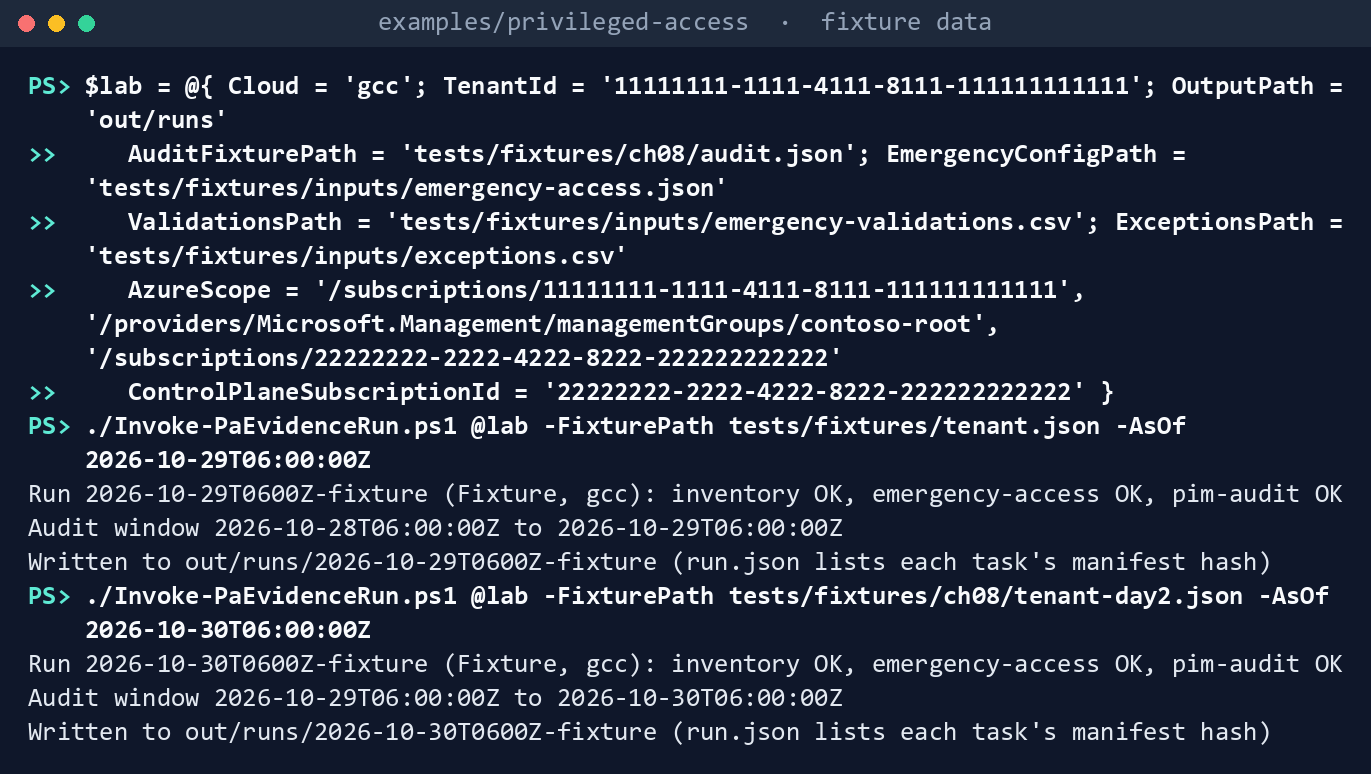
What the terminal shows, run on the kit’s fixtures (the same output as text) Each prints three lines, the second run:
Run 2026-10-30T0600Z-fixture (Fixture, gcc): inventory OK, emergency-access OK, pim-audit OK
Audit window 2026-10-29T06:00:00Z to 2026-10-30T06:00:00Z
Written to <path>/out/runs/2026-10-30T0600Z-fixture (run.json lists each task's manifest hash)
Read the second day’s audit findings:
Get-Content out/runs/2026-10-30T0600Z-fixture/pim-audit/findings.json -Raw | ConvertFrom-Json | Format-Table Rule, Severity, Tier, ObjectId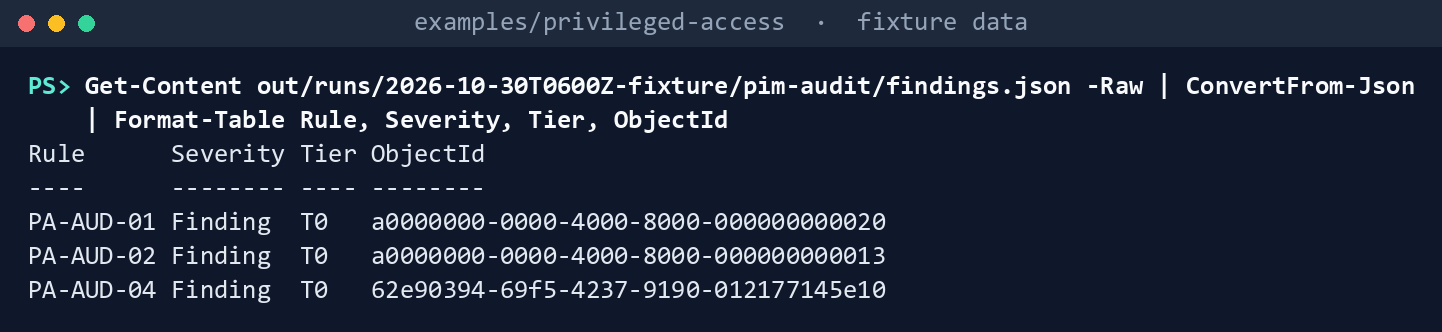
What the terminal shows, run on the kit’s fixtures (the same output as text) Three Tier 0 Findings: PA-AUD-01 for Privileged Role Administrator assigned to
…000000000020outside PIM (two events, one finding), PA-AUD-02 for a Global Administrator activation by…000000000013with no approval, and PA-AUD-04 for the Global Administrator role setting change. Day 1 has none: both of its activations were approved by someone else. Openevents.json: object IDs, no names. The runs in step 5 are the repository’s copies of these two, which a Pester test checks against a fresh run.Record a baseline and package it. In
examples/drift-pipeline:DAY1=tests/fixtures/pa-runs/2026-10-29T0600Z-fixture DAY2=tests/fixtures/pa-runs/2026-10-30T0600Z-fixture python python/pa_evidence.py compare --current $DAY1 --out out/day1 python python/pa_evidence.py package --run $DAY1 --diff out/day1/pa-drift-report.json --out out/evidence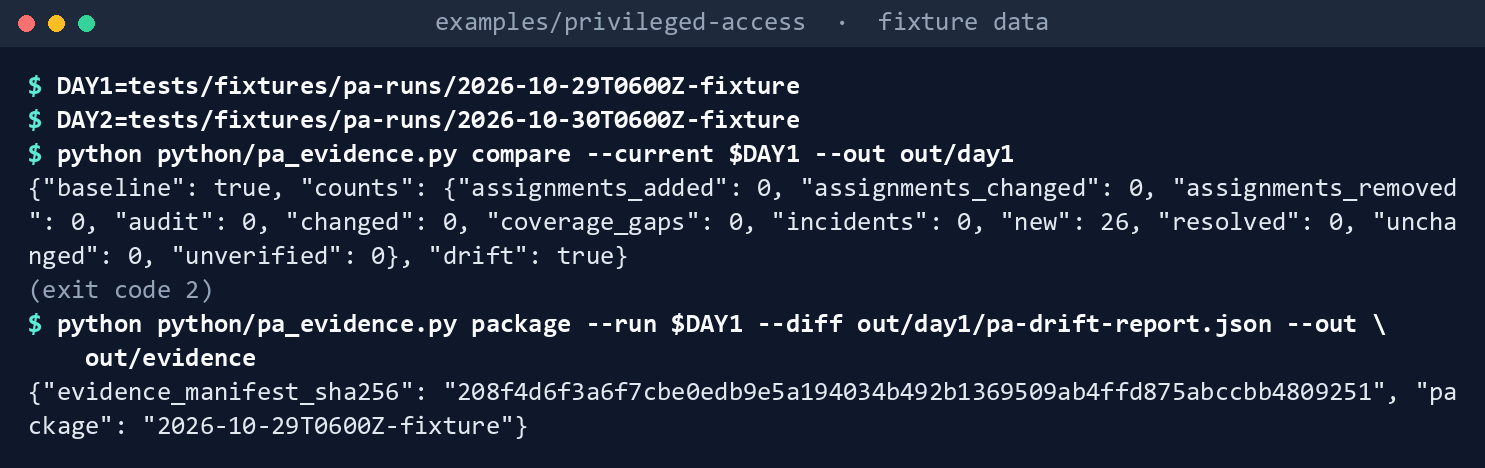
What the terminal shows, run on the kit’s fixtures (the same output as text) The compare exits
2with"baseline": trueand 26 new findings. The package’sevidence_manifest_sha256ise10d8543….Compare the next day:
python python/pa_evidence.py compare --previous $DAY1 --current $DAY2 --out out/day2
cat out/day2/pa-drift-summary.md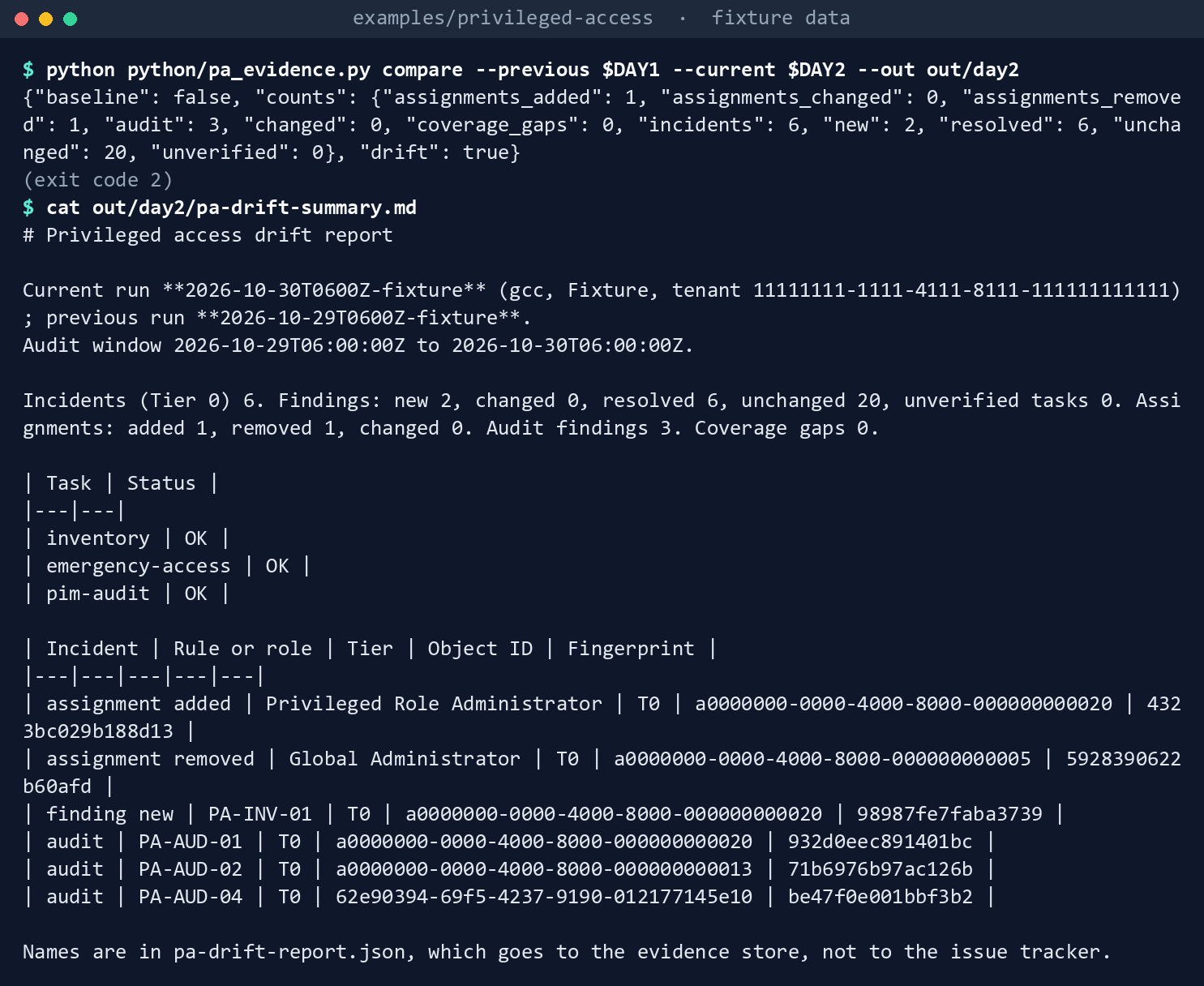
What the terminal shows, run on the kit’s fixtures (the same output as text) Exit
2: incidents 6; findings new 2, resolved 6, unchanged 20; assignments added 1, removed 1; audit findings 3; coverage gaps 0. The incidents are the standing Privileged Role Administrator assignment (added, and its new PA-INV-01), the removed permanent Global Administrator eligibility, and the three audit Findings. The six resolved are Chapter 02’s PA-EA-07 and two PA-EA-08 forea02, now in the exclusion group, and three of Chapter 01’s that went with the removed eligibility.Draft the findings:
python python/pa_evidence.py issues --diff out/day2/pa-drift-report.json --out out/day2/issues.json
grep -c contoso out/day2/issues.json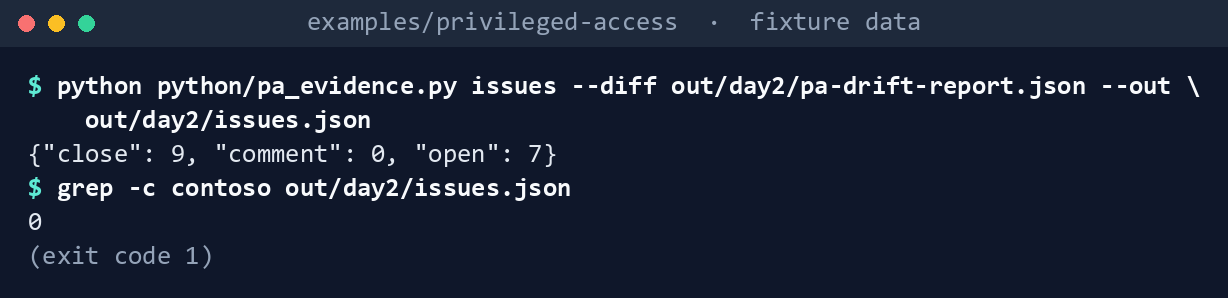
What the terminal shows, run on the kit’s fixtures (the same output as text) {"close": 9, "comment": 0, "open": 7}: six incidents and one new Warn to open; six resolved and three “reads again” to close.grepprints0: no user principal name reaches the drafts. The new holder’s object ID appears four times.Package and verify the second day, chained to the first:
python python/pa_evidence.py package --run $DAY2 --diff out/day2/pa-drift-report.json \
  --previous-manifest out/evidence/2026-10-29T0600Z-fixture/EVIDENCE-MANIFEST.json --out out/evidence
python python/pa_evidence.py verify out/evidence/2026-10-30T0600Z-fixture
(cd out/evidence/2026-10-30T0600Z-fixture && sha256sum -c --quiet SHA256SUMS)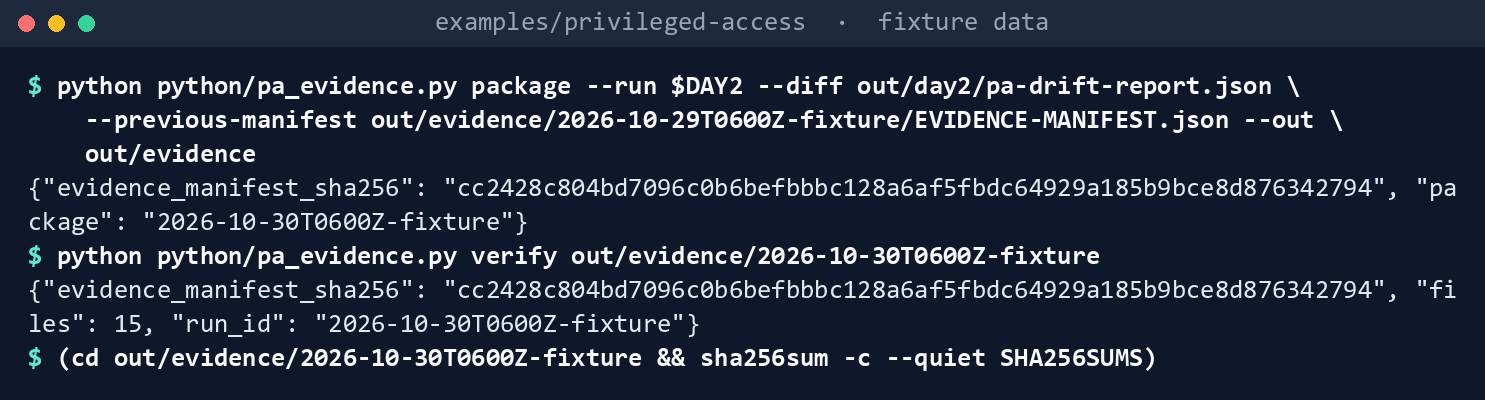
What the terminal shows, run on the kit’s fixtures (the same output as text) The manifest hash is
763d4a1f…,verifyreports 15 files, andsha256sumexits0. InEVIDENCE-MANIFEST.json,previous.evidence_manifest_sha256is the day 1 hash andtenant_idis the fixture tenant’s.Assemble the period for the ISSO:
python python/pa_evidence.py period --evidence out/evidence --since 2026-10-28T06:00:00Z --until 2026-10-30T06:00:00Z --out out/periods
cat out/periods/period-2026-10-28_2026-10-30/period-summary.md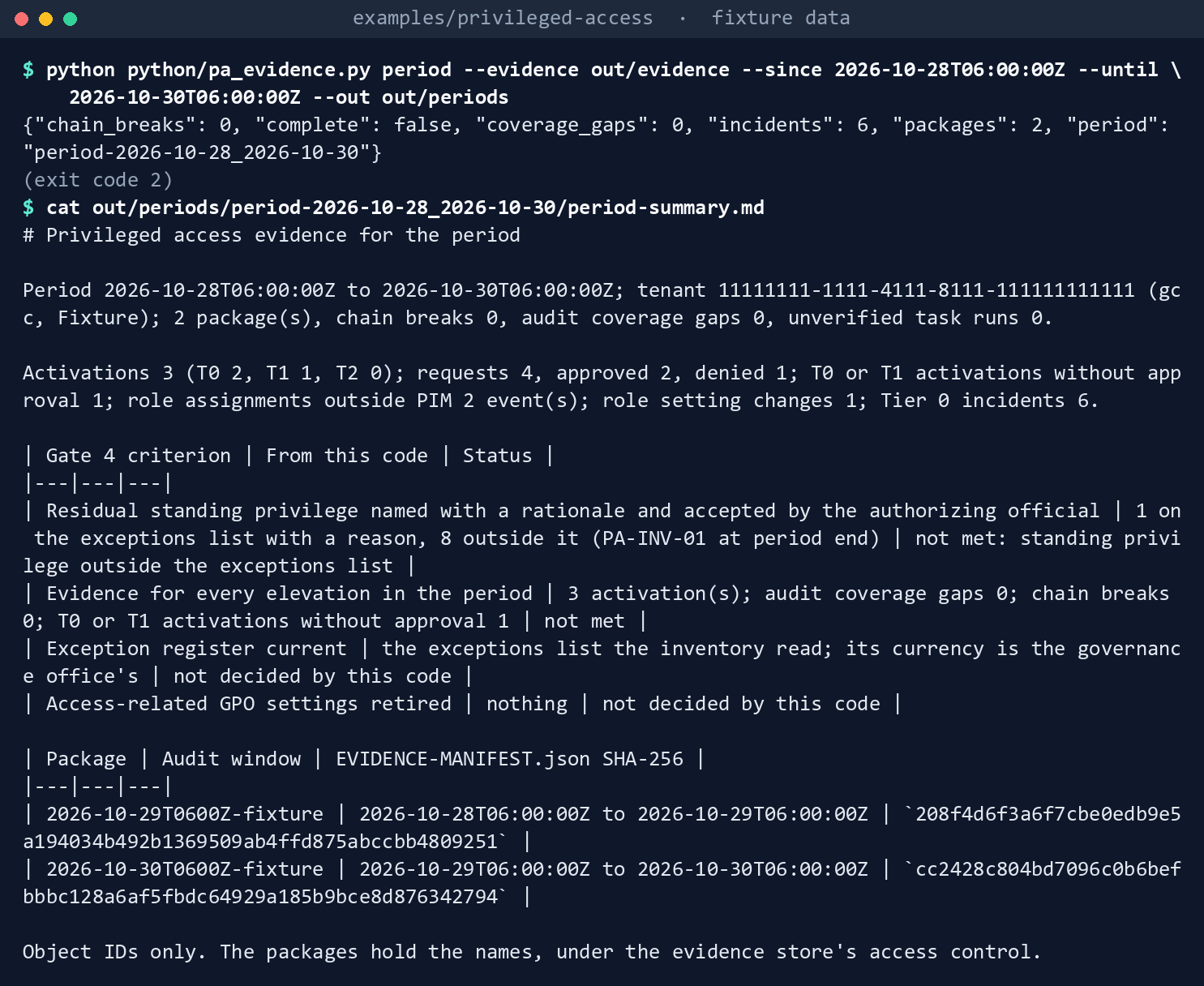
What the terminal shows, run on the kit’s fixtures (the same output as text) Exit
2: two packages, no chain break, no coverage gap; activations 3 (T0 2, T1 1), requests 4, approved 2, denied 1, one T0 or T1 activation without approval, six Tier 0 incidents. The Gate 4 table shows the residual standing privilege criterion not met (one standing assignment on the exceptions list, eight outside it) and the elevation criterion not met (the unapproved activation).Break it on purpose:
echo edited >> out/evidence/2026-10-30T0600Z-fixture/drift/pa-drift-summary.md
python python/pa_evidence.py verify out/evidence/2026-10-30T0600Z-fixture
python python/pa_evidence.py compare --previous $DAY2 --current $DAY1 --out out/swap
python python/workflow_lint.py workflow/pa-evidence.yml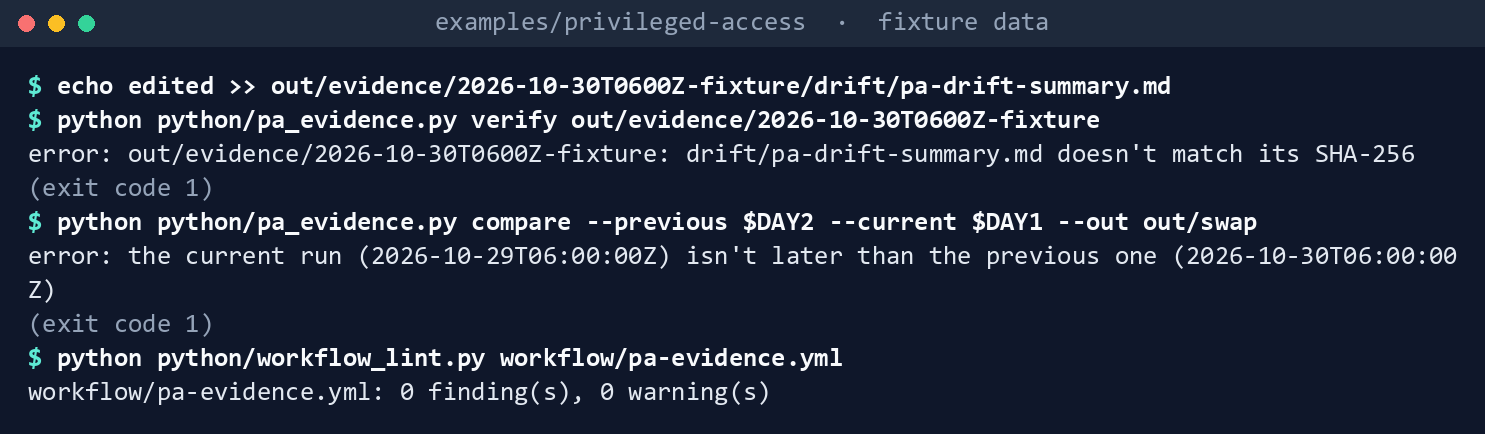
What the terminal shows, run on the kit’s fixtures (the same output as text) verifyexits1:drift/pa-drift-summary.md doesn't match its SHA-256. The swapped compare exits1: the current run isn’t later than the previous one. The workflow lints with0 finding(s), 0 warning(s).Run the tests. In
examples/privileged-access, in PowerShell, this chapter’s tests, then every chapter’s:Invoke-Pester -Path tests/EvidenceDrift.Tests.ps1 Invoke-Pester -Path tests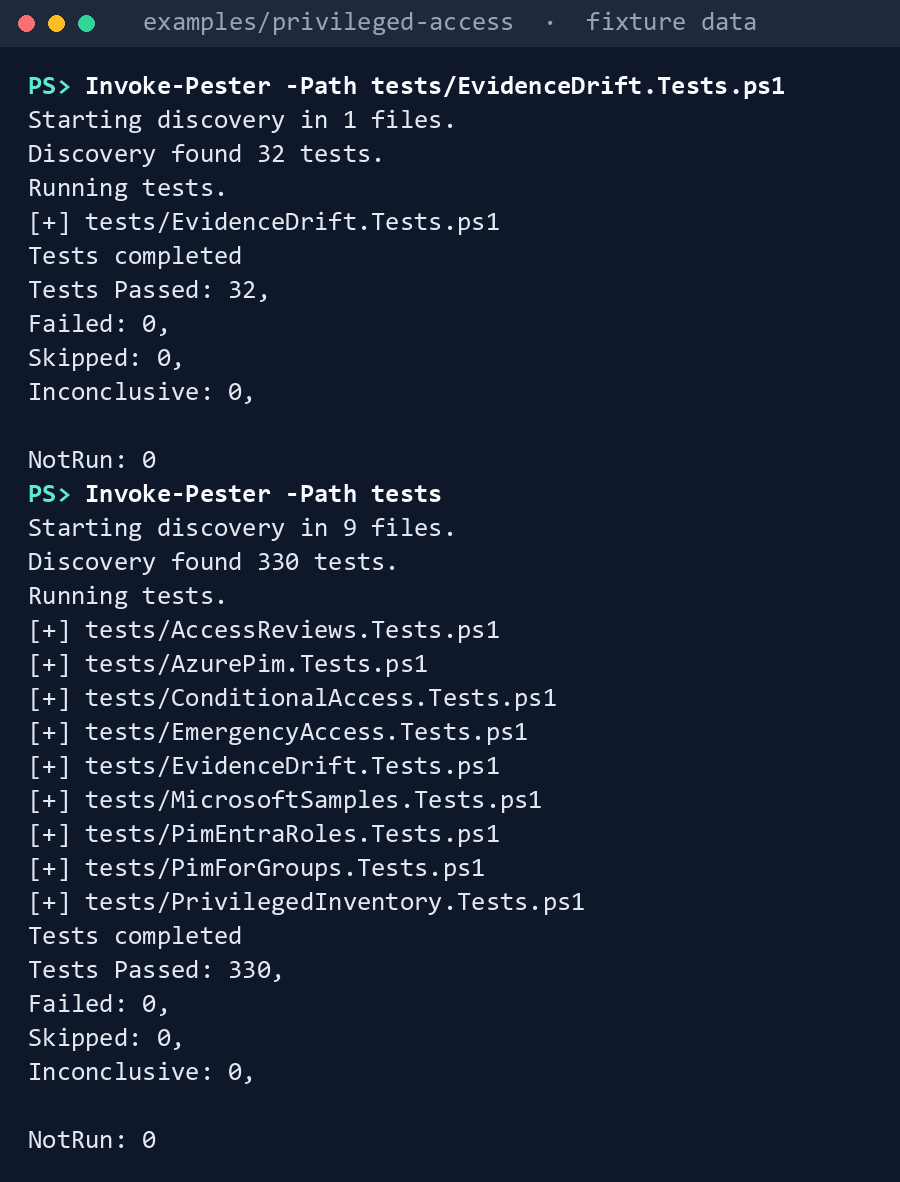
What the terminal shows, run on the kit’s fixtures (the same output as text) In
examples/drift-pipeline:python -m pytest tests -q
What the terminal shows, run on the kit’s fixtures (the same output as text)
Expected result: the first Pester run passes 32 tests, the second runs every chapter’s tests and should pass them all, and pytest passes 142.
When you’re done, delete out in both folders, in examples/privileged-access, then in examples/drift-pipeline:
Remove-Item -Recurse -Force out
rm -rf out
Lab 2: test tenant
Use a test tenant in the worldwide or GCC cloud with Microsoft Entra ID P2 or ID Governance, and a test Azure subscription, never production, with fictional people. The run only reads. Steps 3 and 4 run in examples/privileged-access in PowerShell, with the emergency-access.json and emergency-validations.csv from Chapter 02, Lab 2 and the exceptions.csv from Chapter 04, Lab 2; step 6 runs in examples/drift-pipeline in a POSIX shell. You’ll replace: <tenant-id> (the test tenant’s ID), <app-id> and <thumbprint> (the reader app from step 1 and its certificate’s thumbprint) and <test-subscription-id> (the test subscription’s ID).
Every command in this lab, in order. Each step below says what it does and what to look for.
In PowerShell 7:
# Step 3: Run twice
Connect-MgGraph -Environment Global -TenantId <tenant-id> -ClientId <app-id> -CertificateThumbprint <thumbprint>
Connect-AzAccount -ServicePrincipal -Environment AzureCloud -Tenant <tenant-id> -ApplicationId <app-id> -CertificateThumbprint <thumbprint>
./Invoke-PaEvidenceRun.ps1 -Cloud gcc -TenantId <tenant-id> -OutputPath out/runs-test -AzureScope /subscriptions/<test-subscription-id> `
    -EmergencyConfigPath emergency-access.json -ValidationsPath emergency-validations.csv -ExceptionsPath exceptions.csv

# Step 3: Run twice
$first = Get-ChildItem out/runs-test -Directory | Sort-Object Name | Select-Object -First 1
$since = (Get-Content (Join-Path $first.FullName 'run.json') -Raw | ConvertFrom-Json).auditWindow.until
./Invoke-PaEvidenceRun.ps1 -Cloud gcc -TenantId <tenant-id> -OutputPath out/runs-test -AzureScope /subscriptions/<test-subscription-id> `
    -EmergencyConfigPath emergency-access.json -ValidationsPath emergency-validations.csv -ExceptionsPath exceptions.csv -Since $since

# Step 4: Check what the fixture assumed
$second = Get-ChildItem out/runs-test -Directory | Sort-Object Name | Select-Object -Last 1
Get-Content (Join-Path $second.FullName 'pim-audit/events.json') -Raw | ConvertFrom-Json | Format-Table Activity, Service, RequestId, RoleId
Get-Content (Join-Path $second.FullName 'pim-audit/requests.json') -Raw | ConvertFrom-Json | Format-Table RequestId, RoleId, @{ n = 'States'; e = { $_.States -join ', ' } }
In a POSIX shell (Git Bash on Windows):
# Step 6: Compare and package locally
RUNS=../privileged-access/out/runs-test
FIRST=$(ls $RUNS | sort | head -n 1)
SECOND=$(ls $RUNS | sort | tail -n 1)
DAY1=$RUNS/$FIRST
DAY2=$RUNS/$SECOND
python python/pa_evidence.py compare --current $DAY1 --out out/test-day1
python python/pa_evidence.py package --run $DAY1 --diff out/test-day1/pa-drift-report.json --out out/test-evidence
python python/pa_evidence.py compare --previous $DAY1 --current $DAY2 --out out/test-day2
cat out/test-day2/pa-drift-summary.md
python python/pa_evidence.py issues --diff out/test-day2/pa-drift-report.json --out out/test-day2/issues.json
python python/pa_evidence.py package --run $DAY2 --diff out/test-day2/pa-drift-report.json \
  --previous-manifest out/test-evidence/$FIRST/EVIDENCE-MANIFEST.json --out out/test-evidence
python python/pa_evidence.py verify out/test-evidence/$SECOND
In PowerShell 7:
# Step 7: Back it out
Remove-Item -Recurse -Force out/runs-test
In a POSIX shell (Git Bash on Windows):
# Step 7: Back it out
rm -rf out/test-day1 out/test-day2 out/test-evidence
Register the reader app in the tenant’s own cloud (for GCC, the worldwide Microsoft Entra admin center) with a certificate. Grant the nine application permissions from Lab 1, step 2, with admin consent, and nothing else. Grant Reader on the test subscription.
- Open Entra ID > App registrations > New registration, name the app and select Register.
- In the app, open Certificates & secrets > Certificates > Upload certificate and upload the certificate’s public key.
- Open API permissions > Add a permission > Microsoft Graph > Application permissions, select
AuditLog.Read.All,GroupMember.ReadBasic.All,Policy.Read.All,RoleAssignmentSchedule.Read.Directory,RoleEligibilitySchedule.Read.Directory,RoleManagement.Read.Directory,User.Read.All,User.ReadBasic.AllandUserAuthenticationMethod.Read.All, then Add permissions and Grant admin consent for your tenant. - In the Azure portal, open Subscriptions > the test subscription > Access control (IAM) > Add > Add role assignment, select Reader, then on Members select the app, and Review + assign.
Make one activation to see. As a test administrator, make a test user eligible for Helpdesk Administrator (T2) through PIM, and have the user activate it with a justification.
Run twice. Run once before step 2’s activation and once after, with your own inputs. The first run:
Connect-MgGraph -Environment Global -TenantId <tenant-id> -ClientId <app-id> -CertificateThumbprint <thumbprint>
Connect-AzAccount -ServicePrincipal -Environment AzureCloud -Tenant <tenant-id> -ApplicationId <app-id> -CertificateThumbprint <thumbprint>
./Invoke-PaEvidenceRun.ps1 -Cloud gcc -TenantId <tenant-id> -OutputPath out/runs-test -AzureScope /subscriptions/<test-subscription-id> `
    -EmergencyConfigPath emergency-access.json -ValidationsPath emergency-validations.csv -ExceptionsPath exceptions.csv
The second run passes
-Sincewith the first run’s window end, which the first two lines read from itsrun.json:$first = Get-ChildItem out/runs-test -Directory | Sort-Object Name | Select-Object -First 1 $since = (Get-Content (Join-Path $first.FullName 'run.json') -Raw | ConvertFrom-Json).auditWindow.until ./Invoke-PaEvidenceRun.ps1 -Cloud gcc -TenantId <tenant-id> -OutputPath out/runs-test -AzureScope /subscriptions/<test-subscription-id> ` -EmergencyConfigPath emergency-access.json -ValidationsPath emergency-validations.csv -ExceptionsPath exceptions.csv -Since $sinceCheck what the fixture assumed. In the second run’s
pim-audit/events.json, record whichloggedByServicevalue the events carry (theServicecolumn; research gaps, row 81), whetherRequestIdis filled, which means theadditionalDetailskey isroleAssignmentRequestId(row 82), and whetherRoleIdis the role’s template ID (row 83). Inrequests.json, the activation should showRequestedandActivated.$second = Get-ChildItem out/runs-test -Directory | Sort-Object Name | Select-Object -Last 1 Get-Content (Join-Path $second.FullName 'pim-audit/events.json') -Raw | ConvertFrom-Json | Format-Table Activity, Service, RequestId, RoleId Get-Content (Join-Path $second.FullName 'pim-audit/requests.json') -Raw | ConvertFrom-Json | Format-Table RequestId, RoleId, @{ n = 'States'; e = { $_.States -join ', ' } }Cross-check against Learn’s procedure. In the admin center, open ID Governance > Privileged Identity Management > Microsoft Entra roles > Resource audit for the same window, as Learn’s page describes.25 Every activation there should be in
requests.json. If the tenant sends audit logs to a workspace (Chapter 02, Lab 2), run Learn’s second query there with the real request ID: it should return the same events (row 84).Compare and package locally. Run steps 5 to 8 of Lab 1 on the two test runs, in
examples/drift-pipeline. The first five lines pick the two runs, oldest first:RUNS=../privileged-access/out/runs-test FIRST=$(ls $RUNS | sort | head -n 1) SECOND=$(ls $RUNS | sort | tail -n 1) DAY1=$RUNS/$FIRST DAY2=$RUNS/$SECOND python python/pa_evidence.py compare --current $DAY1 --out out/test-day1 python python/pa_evidence.py package --run $DAY1 --diff out/test-day1/pa-drift-report.json --out out/test-evidence python python/pa_evidence.py compare --previous $DAY1 --current $DAY2 --out out/test-day2 cat out/test-day2/pa-drift-summary.md python python/pa_evidence.py issues --diff out/test-day2/pa-drift-report.json --out out/test-day2/issues.json python python/pa_evidence.py package --run $DAY2 --diff out/test-day2/pa-drift-report.json \ --previous-manifest out/test-evidence/$FIRST/EVIDENCE-MANIFEST.json --out out/test-evidence python python/pa_evidence.py verify out/test-evidence/$SECONDThe second compare should show the activation in the audit summary and no assignment drift for it.
Back it out. Let the activation expire or deactivate it, remove the test eligibility, remove the nine permissions and the Reader assignment, delete the app registration and its certificate, and delete
out/runs-testand the packages: they hold the tenant’s privileged holders. Inexamples/privileged-access, then inexamples/drift-pipeline:Remove-Item -Recurse -Force out/runs-testrm -rf out/test-day1 out/test-day2 out/test-evidenceIf you ran the sample workflow in a test repository, follow the first workbook’s Chapter 09, Lab 2 for its federated credential and an unlocked retention policy, and its back-out.
In production, lock the evidence container’s retention policy once Lab 2 passes; Learn says an unlocked policy is for testing only.26
Verified facts
| Item | Value | US Government clouds | Stage | Source |
|---|---|---|---|---|
| List directoryAudits | GET /auditLogs/directoryAudits; AuditLog.Read.All (higher: Directory.Read.All); delegated roles Reports Reader, Security Reader, Security Administrator; $filter (eq, ge, le, startswith), $top, $orderby, skiptoken |
L4 and L5 | v1.0 | 27 |
| directoryAudit filters | activityDateTime eq, ge, le; activityDisplayName eq, startswith; loggedByService eq; loggedByService example Privileged Identity Management |
— | v1.0 | 28 |
| PIM activity names | Add member to role requested / approval requested / request approved / request denied / completed (PIM activation), Add member to role outside of PIM (permanent), Remove member from role (PIM activation expired), Update role setting in PIM, and others, category RoleManagement |
— | — | 29 |
| PIM audit history | Resource audit covers the past 30 days; correlate an activation by roleAssignmentRequestId, which stays the same across asynchronous steps; deactivation events log the original request ID under additional details |
— | GA | 30 |
| Audit log retention | Free seven days; P1 and P2 30 days; route to storage or Log Analytics to keep longer; retention changes aren’t retroactive | — | — | 31 |
| Monitoring PIM | Alert on roles assigned outside PIM (high); always alert on PIM setting changes for Privileged Role Administrator and Global Administrator; baseline requires approval to activate | — | — | 32 |
| Graph hosts | GCC graph.microsoft.com; GCC High graph.microsoft.us; DoD dod-graph.microsoft.us |
— | — | 33 |
| Microsoft Entra ID Governance | Available in GCC, GCC High and DoD | Available | GA | 34 |
| Sign-in from GitHub Actions | Azure Login with a federated credential; the job needs id-token: write; US Government audience api://AzureADTokenExchangeUSGov |
Azure Government environment | Learn’s samples use azure/login@v2; the sample workflow pins v3.1.0 by commit, as the first workbook’s Chapter 09 does |
35 |
| Immutable evidence | Time-based retention; a locked policy can’t be deleted or shortened; unlocked is for testing | — | GA | 36 |
Two places where Learn’s pages differ, recorded so a later edit doesn’t loosen the code:
- PIM’s service name. The directoryAudit resource page gives
Privileged Identity Managementas aloggedByServicevalue;37 the security operations guide for PIM filters onService = PIM.38 The code follows the stricter reading, one that misses nothing: it asks for both and de-duplicates by event ID. Lab 2 records which one a tenant uses (research gaps, row 81). - Where approvals are logged. Learn’s activity list puts
Add member to role request approved (PIM activation)under RoleManagement;39 the security operations guide lists approvals and denials underService = Access Reviewand category UserManagement.40 The code reads PIM’s service, so an approval logged only under Access Review would make PA-AUD-02 fire. That fails closed: a false Finding, not a missed one. Lab 2 confirms (research gaps, row 85).
The roles Learn names for reading differ by surface, without contradicting each other. PIM’s Resource audit page names Global Administrator, Global Reader, Privileged Role Administrator, Security Administrator or Security Reader;41 the Graph call names Reports Reader, Security Reader or Security Administrator.42 The code uses the application permission, and for a delegated read the Graph call’s least-privileged role, Reports Reader.
Federal requirements and evidence
The runs, the packages and the period are the evidence for the plan’s tasks A3.6 and A4.3, and for Gate 4’s “evidence for every elevation in the period.” Each row names the command or file that shows it. Every control named is in the NIST SP 800-53B Moderate baseline.43
| What the output proves | Requirement it supports | KSI it aligns to | Who keeps it |
|---|---|---|---|
Learn’s queries run over the fixture as published, and the kit’s own code passes its tests: Lab 1, steps 1 and 11 (Invoke-Pester, python -m pytest) |
CM-3(2), testing and validation of changes | KSI-CMT-VTD | The repository’s test runs |
The run needs nine read permissions and nothing that writes: Lab 1, step 2 (Get-PaEvidencePermission -Task evidence-run) |
AC-6, least privilege for the identity that reads | KSI-IAM-ELP | Identity engineering, with the app’s consent record |
One folder per run with the inventory, the emergency check, the PIM audit read and run.json, which hashes each task’s manifest: Lab 1, step 3, out/runs/<run-id>/ |
CA-7, continuous monitoring | KSI-MLA-EVC | The ISSO |
Every PIM request, approval, activation and assignment in the window, kept as IDs, read before the 30-day log retention closes: pim-audit/events.json, requests.json and summary.json |
AC-6(9), log use of privileged functions; AC-2(4), automated audit actions; AU-11, audit record retention | KSI-MLA-LET, KSI-IAM-JIT, KSI-MLA-OSM | The ISSO, in the evidence store |
Roles assigned outside PIM, and Tier 0 or Tier 1 activations with no approval: PA-AUD-01 and PA-AUD-02 in pim-audit/findings.json, Lab 1, step 4 |
AU-6, audit record review; MS.AAD.7.5v1, provisioning only through a PAM system, and MS.AAD.7.6v1, approval to activate Global Administrator (BOD 25-01)44 | KSI-MLA-RVL | The ISSO |
Activations approved by their own requester, and role settings changed in PIM: PA-AUD-03 and PA-AUD-04 in pim-audit/findings.json |
AC-5, separation of duties; CM-3, changes reconciled with a reviewed change | KSI-IAM-JIT, KSI-CMT-LMC | The ISSO |
A baseline recorded and packaged with a manifest and checksums: Lab 1, step 5, out/day1/pa-drift-report.json, then EVIDENCE-MANIFEST.json and SHA256SUMS |
CA-7; AU-9, protection of audit information | KSI-MLA-EVC, KSI-MLA-OSM | The ISSO, in the evidence store |
What changed since the last run, with each Tier 0 drift marked as an incident: Lab 1, step 6, out/day2/pa-drift-summary.md |
CA-7; SI-4, system monitoring; IR-4, incident handling, for the Tier 0 rule (Book 04, Chapter 10) | KSI-MLA-EVC, KSI-IAM-SUS | The ISSO, matched to the incident records Gate 3 asks for |
Issue drafts that carry no names: Lab 1, step 7, out/day2/issues.json, and grep -c contoso printing 0 |
SI-4: monitoring information goes to defined roles; leaving names out of the tracker is design guidance | KSI-IAM-SUS, KSI-MLA-RVL | The tracker; names stay in the evidence store |
Each package chained to the one before, verified, and checked by sha256sum -c: Lab 1, step 8 (pa_evidence.py verify) |
AU-9 | KSI-MLA-OSM | The ISSO |
The period’s packages verified, chained and covering the window with no gap, with activations, approvals and coverage gaps summed: Lab 1, step 9, PERIOD-MANIFEST.json, period-summary.md and SHA256SUMS |
CA-7, status reporting; AU-6; AC-6(9); the project plan’s Gate 4 | KSI-MLA-EVC, KSI-MLA-RVL | The ISSO, for the Gate 4 review |
| An edited file fails verification, swapped runs are refused, and the sample workflow passes its lint: Lab 1, step 10 | AU-9; CM-3(2) for the workflow | KSI-MLA-OSM, KSI-CMT-VTD | The repository’s test runs |
Two live runs of a test tenant, the second starting where the first’s audit window ended: Lab 2, step 3, out/runs-test/ |
AC-6(9); AU-11: no hour goes unread | KSI-MLA-LET, KSI-MLA-OSM | The ISSO |
The audit events carry the fields the fixture assumed, and one activation shows Requested and Activated: Lab 2, step 4, events.json and requests.json |
AU-6 | KSI-MLA-RVL | Identity engineering, recording research gaps rows 81 to 83 |
| The two live runs compared, packaged, chained and verified: Lab 2, step 6 | CA-7; AU-9 | KSI-MLA-EVC, KSI-MLA-OSM | The ISSO |
| The lab runs and packages are deleted because they name privileged holders: Lab 2, step 7, and the cleanup after Lab 1 | No control; handling the folders as sensitive is design guidance | — | — |
Lab 2, step 5, the cross-check against PIM’s resource audit in the admin center, has no command; it supports AU-6 and is recorded against research gaps row 84. KSIs are FedRAMP 20x indicators for cloud service providers.45 The agency authorizes its own system and lines this evidence up with what its providers report against those indicators; it doesn’t report KSIs itself (Book 00, Appendix B). Book 04, Chapter 10 carries the control-by-control mapping.
Dangers
| Danger | What happens | The guard |
|---|---|---|
| A failed read reported as a fix | A 403 makes yesterday’s findings disappear | A failed task is Error with no folder; its findings stay unverified, never resolved |
| A day nobody read | An activation in the gap has no evidence, and Gate 4 passes on the days that were read | Each window starts where the last ended; a gap is a coverage gap in the report and the period |
| A window older than the log | The read returns part of the window and looks complete | Refused past 30 days; read the gap from the workspace and attach it |
| An outside-PIM assignment counted as an activation | Standing Tier 0 privilege hides among normal elevations | PA-AUD-01, apart from activations; a test pins that Learn’s first query mixes them |
| An activation with no approval | A Tier 0 role used without the second person | PA-AUD-02 and PA-AUD-03 |
| A PIM setting relaxed in the portal | Approval is switched off and the next activation looks routine | PA-AUD-04, a Tier 0 incident for the top roles |
| Names in the tracker | Privileged holders are listed for everyone with read access to the repository | Fixed rule titles, object IDs only; a test searches the drafts for every name in the runs |
| A run edited, or swapped with another tenant’s | The evidence describes a run that never happened | Every file checked against its manifest, each manifest against run.json; tenant, cloud and mode must match |
| A replaced package | A bad day is quietly rewritten | The hash chain; period reports the break; a locked retention policy |
| An activation counted as drift | Every activation opens a Tier 0 incident, and the incident queue is ignored | Activated rows are left out of the assignment comparison; the audit evidence covers them |
| The wrong cloud | A GCC High run reads graph.microsoft.com |
Required cloud, no default; Chapter 01’s reader checks the host on every page |
Checklist
Footnotes
Microsoft Learn, “Microsoft Entra data retention,” activity reports, https://learn.microsoft.com/entra/identity/monitoring-health/reference-reports-data-retention (accessed Oct 30, 2026).↩︎
Microsoft Learn, “View audit history for Microsoft Entra roles in Privileged Identity Management,” https://learn.microsoft.com/entra/id-governance/privileged-identity-management/pim-how-to-use-audit-log (accessed Oct 30, 2026).↩︎
Microsoft Learn, “Microsoft Graph national cloud deployments,” https://learn.microsoft.com/graph/deployments (accessed Oct 30, 2026; read for Chapter 01).↩︎
Microsoft Learn, “List directoryAudits,” https://learn.microsoft.com/graph/api/directoryaudit-list?view=graph-rest-1.0 (accessed Oct 30, 2026).↩︎
Microsoft Learn, “Microsoft Entra feature availability,” other Microsoft Entra products, https://learn.microsoft.com/entra/identity/authentication/feature-availability (accessed Oct 30, 2026; read for Chapter 01).↩︎
Microsoft Learn, “View audit history for Microsoft Entra roles in Privileged Identity Management,” https://learn.microsoft.com/entra/id-governance/privileged-identity-management/pim-how-to-use-audit-log (accessed Oct 30, 2026).↩︎
Microsoft Learn, “View audit history for Microsoft Entra roles in Privileged Identity Management,” https://learn.microsoft.com/entra/id-governance/privileged-identity-management/pim-how-to-use-audit-log (accessed Oct 30, 2026).↩︎
Microsoft Learn, “Microsoft Entra audit log categories and activities,” Privileged Identity Management (PIM), https://learn.microsoft.com/entra/identity/monitoring-health/reference-audit-activities (accessed Oct 30, 2026).↩︎
Microsoft Learn, “Microsoft Entra security operations for Privileged Identity Management,” baselines, PIM alerts and Microsoft Entra roles assignment, https://learn.microsoft.com/entra/architecture/security-operations-privileged-identity-management (accessed Oct 30, 2026).↩︎
Microsoft Learn, “Microsoft Entra security operations for Privileged Identity Management,” baselines, PIM alerts and Microsoft Entra roles assignment, https://learn.microsoft.com/entra/architecture/security-operations-privileged-identity-management (accessed Oct 30, 2026).↩︎
Microsoft, MicrosoftDocs/entra-docs,
docs/id-governance/privileged-identity-management/pim-how-to-use-audit-log.mdat commit07cb73d6c6380414eecd040ba5e14c1c94d48b66(October 30, 2026; the page last changed September 3, 2026), MIT License, https://github.com/MicrosoftDocs/entra-docs/blob/07cb73d6c6380414eecd040ba5e14c1c94d48b66/docs/id-governance/privileged-identity-management/pim-how-to-use-audit-log.md (accessed Oct 30, 2026); pinned copy inexamples/third_party/entra-pim-audit-page.↩︎Microsoft Learn, “Microsoft Entra audit log categories and activities,” Privileged Identity Management (PIM), https://learn.microsoft.com/entra/identity/monitoring-health/reference-audit-activities (accessed Oct 30, 2026).↩︎
Microsoft Learn, “Microsoft Entra security operations for Privileged Identity Management,” baselines, PIM alerts and Microsoft Entra roles assignment, https://learn.microsoft.com/entra/architecture/security-operations-privileged-identity-management (accessed Oct 30, 2026).↩︎
Microsoft Learn, “View audit history for Microsoft Entra roles in Privileged Identity Management,” https://learn.microsoft.com/entra/id-governance/privileged-identity-management/pim-how-to-use-audit-log (accessed Oct 30, 2026).↩︎
Microsoft Learn, “List directoryAudits,” https://learn.microsoft.com/graph/api/directoryaudit-list?view=graph-rest-1.0 (accessed Oct 30, 2026).↩︎
Microsoft Learn, “Microsoft Entra data retention,” activity reports, https://learn.microsoft.com/entra/identity/monitoring-health/reference-reports-data-retention (accessed Oct 30, 2026).↩︎
Microsoft Learn, “directoryAudit resource type,” properties, https://learn.microsoft.com/graph/api/resources/directoryaudit?view=graph-rest-1.0 (accessed Oct 30, 2026).↩︎
Microsoft Learn, “List directoryAudits,” https://learn.microsoft.com/graph/api/directoryaudit-list?view=graph-rest-1.0 (accessed Oct 30, 2026).↩︎
Microsoft Learn, “List directoryAudits,” https://learn.microsoft.com/graph/api/directoryaudit-list?view=graph-rest-1.0 (accessed Oct 30, 2026).↩︎
Microsoft Learn, “Microsoft Entra security operations for Privileged Identity Management,” baselines, PIM alerts and Microsoft Entra roles assignment, https://learn.microsoft.com/entra/architecture/security-operations-privileged-identity-management (accessed Oct 30, 2026).↩︎
Microsoft Learn, “Microsoft Entra security operations for Privileged Identity Management,” baselines, PIM alerts and Microsoft Entra roles assignment, https://learn.microsoft.com/entra/architecture/security-operations-privileged-identity-management (accessed Oct 30, 2026).↩︎
Microsoft Learn, “Microsoft Entra security operations for Privileged Identity Management,” baselines, PIM alerts and Microsoft Entra roles assignment, https://learn.microsoft.com/entra/architecture/security-operations-privileged-identity-management (accessed Oct 30, 2026).↩︎
Microsoft Learn, “Store business-critical blob data with immutable storage in a write once, read many (WORM) state,” https://learn.microsoft.com/azure/storage/blobs/immutable-storage-overview (accessed Oct 30, 2026; read for the first workbook’s Chapter 09).↩︎
Microsoft Learn, “Use the Azure Login action with OpenID Connect,” https://learn.microsoft.com/azure/developer/github/connect-from-azure-openid-connect (accessed Oct 31, 2026; first read for the first workbook’s Chapter 09, which pins it in
examples/third_party/azure-login-oidc-sample).↩︎Microsoft Learn, “View audit history for Microsoft Entra roles in Privileged Identity Management,” https://learn.microsoft.com/entra/id-governance/privileged-identity-management/pim-how-to-use-audit-log (accessed Oct 30, 2026).↩︎
Microsoft Learn, “Store business-critical blob data with immutable storage in a write once, read many (WORM) state,” https://learn.microsoft.com/azure/storage/blobs/immutable-storage-overview (accessed Oct 30, 2026; read for the first workbook’s Chapter 09).↩︎
Microsoft Learn, “List directoryAudits,” https://learn.microsoft.com/graph/api/directoryaudit-list?view=graph-rest-1.0 (accessed Oct 30, 2026).↩︎
Microsoft Learn, “directoryAudit resource type,” properties, https://learn.microsoft.com/graph/api/resources/directoryaudit?view=graph-rest-1.0 (accessed Oct 30, 2026).↩︎
Microsoft Learn, “Microsoft Entra audit log categories and activities,” Privileged Identity Management (PIM), https://learn.microsoft.com/entra/identity/monitoring-health/reference-audit-activities (accessed Oct 30, 2026).↩︎
Microsoft Learn, “View audit history for Microsoft Entra roles in Privileged Identity Management,” https://learn.microsoft.com/entra/id-governance/privileged-identity-management/pim-how-to-use-audit-log (accessed Oct 30, 2026).↩︎
Microsoft Learn, “Microsoft Entra data retention,” activity reports, https://learn.microsoft.com/entra/identity/monitoring-health/reference-reports-data-retention (accessed Oct 30, 2026).↩︎
Microsoft Learn, “Microsoft Entra security operations for Privileged Identity Management,” baselines, PIM alerts and Microsoft Entra roles assignment, https://learn.microsoft.com/entra/architecture/security-operations-privileged-identity-management (accessed Oct 30, 2026).↩︎
Microsoft Learn, “Microsoft Graph national cloud deployments,” https://learn.microsoft.com/graph/deployments (accessed Oct 30, 2026; read for Chapter 01).↩︎
Microsoft Learn, “Microsoft Entra feature availability,” other Microsoft Entra products, https://learn.microsoft.com/entra/identity/authentication/feature-availability (accessed Oct 30, 2026; read for Chapter 01).↩︎
Microsoft Learn, “Use the Azure Login action with OpenID Connect,” https://learn.microsoft.com/azure/developer/github/connect-from-azure-openid-connect (accessed Oct 31, 2026; first read for the first workbook’s Chapter 09, which pins it in
examples/third_party/azure-login-oidc-sample).↩︎Microsoft Learn, “Store business-critical blob data with immutable storage in a write once, read many (WORM) state,” https://learn.microsoft.com/azure/storage/blobs/immutable-storage-overview (accessed Oct 30, 2026; read for the first workbook’s Chapter 09).↩︎
Microsoft Learn, “directoryAudit resource type,” properties, https://learn.microsoft.com/graph/api/resources/directoryaudit?view=graph-rest-1.0 (accessed Oct 30, 2026).↩︎
Microsoft Learn, “Microsoft Entra security operations for Privileged Identity Management,” baselines, PIM alerts and Microsoft Entra roles assignment, https://learn.microsoft.com/entra/architecture/security-operations-privileged-identity-management (accessed Oct 30, 2026).↩︎
Microsoft Learn, “Microsoft Entra audit log categories and activities,” Privileged Identity Management (PIM), https://learn.microsoft.com/entra/identity/monitoring-health/reference-audit-activities (accessed Oct 30, 2026).↩︎
Microsoft Learn, “Microsoft Entra security operations for Privileged Identity Management,” baselines, PIM alerts and Microsoft Entra roles assignment, https://learn.microsoft.com/entra/architecture/security-operations-privileged-identity-management (accessed Oct 30, 2026).↩︎
Microsoft Learn, “View audit history for Microsoft Entra roles in Privileged Identity Management,” https://learn.microsoft.com/entra/id-governance/privileged-identity-management/pim-how-to-use-audit-log (accessed Oct 30, 2026).↩︎
Microsoft Learn, “List directoryAudits,” https://learn.microsoft.com/graph/api/directoryaudit-list?view=graph-rest-1.0 (accessed Oct 30, 2026).↩︎
National Institute of Standards and Technology, SP 800-53B Moderate baseline, release 5.2.0 OSCAL profile (includes AC-2(4), AC-5, AC-6, AC-6(9), AU-6, AU-9, AU-11, CA-7, CM-3, CM-3(2), IR-4 and SI-4), https://github.com/usnistgov/oscal-content/blob/main/nist.gov/SP800-53/rev5/json/NIST_SP-800-53_rev5_MODERATE-baseline_profile.json (accessed Nov 2, 2026).↩︎
Cybersecurity and Infrastructure Security Agency, “BOD 25-01: Implementing Secure Practices for Cloud Services Required Configurations,” Microsoft Entra ID policies MS.AAD.7.5v1 and MS.AAD.7.6v1, https://www.cisa.gov/resources-tools/services/bod-25-01-implementing-secure-practices-cloud-services-required-configurations (accessed Nov 2, 2026).↩︎
FedRAMP, “Key Security Indicators,” FedRAMP Consolidated Rules for 2026, indicator statements and “Related SP 800-53 Controls” for KSI-CMT-LMC, KSI-CMT-VTD, KSI-IAM-ELP, KSI-IAM-JIT, KSI-IAM-SUS, KSI-MLA-EVC, KSI-MLA-LET, KSI-MLA-OSM and KSI-MLA-RVL, https://www.fedramp.gov/2026/reference/key-security-indicators/ (accessed Nov 2, 2026).↩︎